FCE828VX WIFI/E - Oven CANDY - Free user manual and instructions
Find the device manual for free FCE828VX WIFI/E CANDY in PDF.


| Product type | Built-in oven |
| Brand | Candy |
| Model | FCE828VX WIFI/E |
| Power supply | 220-240 V ~ 50/60 Hz |
| Maximum power | Approximately 3 kW (depending on mode) |
| Capacity | Approximately 70 L |
| Dimensions (H x W x D) | 595 x 595 x 560 mm (standard estimate) |
| Number of shelf positions | 5 positions |
| Cooking modes | Fan forced, Natural convection, Grill, Grill + fan, Bottom heat, Bottom heat + fan, Defrost |
| Lighting | LED (14 LED or 10 high power depending on version) |
| Self-cleaning | By catalysis (optional microporous panels) |
| Connectivity | Wi-Fi (Candy Simply-Fi) – IEEE 802.11b/g/n |
| Programmable functions | Cooking duration, End of cooking, Timer, Delayed start |
| Child safety | Yes (key lock) |
| Door type | Cool touch glass, removable for cleaning |
| Included accessories | Metal grid, Drip tray |
| Cleaning | Damp sponge, mild detergent, avoid abrasives |
| Repairability index | Not communicated |
| Net weight | Approximately 30 kg |
| Network standby consumption | 2.0 W |
Frequently Asked Questions - FCE828VX WIFI/E CANDY
User questions about FCE828VX WIFI/E CANDY
0 question about this device. Answer the ones you know or ask your own.
Ask a new question about this device
Download the instructions for your Oven in PDF format for free! Find your manual FCE828VX WIFI/E - CANDY and take your electronic device back in hand. On this page are published all the documents necessary for the use of your device. FCE828VX WIFI/E by CANDY.
USER MANUAL FCE828VX WIFI/E CANDY
- During cooking, moisture may condense inside the oven cavity or on the glass of the door. This is a normal condition. To reduce this effect, wait 10-15 minutes after turning on the power before putting food inside the oven. In any case, the condensation disappears when the oven reaches the cooking temperature.
- Cook the vegetables in a container with a lid instead of an open tray.
- Avoid leaving food inside the oven after cooking for more than 15/20 minutes.
- WARNING: the appliance and accessible parts become hot during use. Be careful not to touch any hot parts.
- WARNING: the accessible parts can become hot when the grill is in use. Children should be kept at a safe distance.
- WARNING: ensure that the appliance is switched off before replacing the bulb, to avoid the possibility of electric shocks.
- WARNING: in order to avoid any danger caused by the accidental resetting of the thermal interruption device, the appliance should not be powered by an external switching device, such as a timer, or be connected to a circuit that is regularly switched on and off.
- Children under 8 should be kept at a safe distance from the appliance if not continuously supervised.
• Children should not play with the appliance.
- The appliance can be used by those aged 8 or over and by those with limited physical, sensorial or mental capacities, without experience or knowledge of the product, only if supervised or provided with instruction as to the operation of the appliance, in a safe way with awareness of the possible risks.
- Cleaning and maintenance should not be carried out by unsupervised children.
- Do not use rough or abrasive materials or sharp metal scrapers to clean the oven door glasses, as they can scratch the surface and cause the glass to shatter.
- The oven must be switched off before removing the removable parts.
After cleaning, reassemble them according the instructions.
- Only use the meat probe recommended for this oven.
- Do not use a steam cleaner for cleaning operations.
- Connect a plug to the supply cable that is able to bear the voltage, current and load indicated on the tag and having the earth contact. The socket must be suitable for the load indicated on the tag and must have ground contact connected and in operation. The earth conductor is yellow-green in colour. This operation should be carried out by a suitably qualified professional. In case of incompatibility between the socket and the appliance plug, ask a qualified electrician to substitute the socket with another suitable type. The plug and the socket must be conformed to the current norms of the installation country. Connection to the power source can also be made by placing an omnipolar breaker between the appliance and the power source that can bear the maximum connected load and that is in line with current legislation. The yellow-green earth cable should not be interrupted by the breaker. The socket or omnipolar breaker used for the connection should be easily accessible when the appliance is installed.
- The disconnection may be achieved by having the plug accessible or by incorporating a switch in the fixed wiring in accordance with the wiring rules.
- If the power cable is damaged, it should be substituted with a cable or special bundle available from the manufacturer or by contacting the customer service department. The type of power cable must be H05V2V2-F. This operation should be carried out by a suitably qualified professional. The earth conductor (yellow-green) must be approximately 10 mm longer than the other conductors. For any repairs, refer only to the Customer Care Department and request the use of original spare parts.
- Failure to comply with the above can compromise the safety of the appliance and invalidate the guarantee.
- Any excess of spilled material should be removed before cleaning.
- A long power supply failure during an occurring cooking phase may cause a malfunction of the monitor. In this case contact customer service.
- The appliance must not be installed behind a decorative door in order to avoid overheating.
- When you place the shelf inside, make sure that the stop is directed upwards and in the back of the cavity. The shelf must be inserted completely into the cavity.
- WARNING: Do not line the oven walls with aluminium foil or single-use protection available from stores. Aluminium foil or any other protection, in direct contact with the hot enamel, risk melting and deteriorating the enamel of the insides.
- WARNING: Never remove the oven door seal.
- CAUTION: Do not refill the cavity bottom with water during cooking or when the oven is hot.
- No additional operation/setting is required in order to operate the appliance at the rated frequencies.
General Instructions

1.1 Safety indications
1.2 Electrical safety
1.3 Recommendations
1.4 Installation
1.5 Waste management
1.6 Conformity declaration
Product Description

2.1 Overview
2.2 Accessories
2.3 First use
Use of the Oven

3.1 Display description
3.2 Cooking modes
Oven Cleaning and Maintenance
4.1 General notes on cleaning
4.2 Self-cleaning oven with catalytic
4.3 Maintenance
- Removing and cleaning wire racks
- Removal of the oven window
- Removal and cleaning of the glass door
Troubleshooting
5.1 F.A.Q.
1. General Instructions
We thank you for choosing one of our products. For the best results with your oven, you should read this manual carefully and retain it for future reference. Before installing the oven, take note of the serial number so that you can give it to customer service staff if any repairs are required. Having removed the oven from its packaging, check that it has not been damaged during transportation. If you have doubts, do not use the oven and refer to a qualified technician for advice. Keep all of the packaging material (plastic bags, polystyrene, nails) out of the reach of children. When the oven is switched on for the first time, strong
natural_image
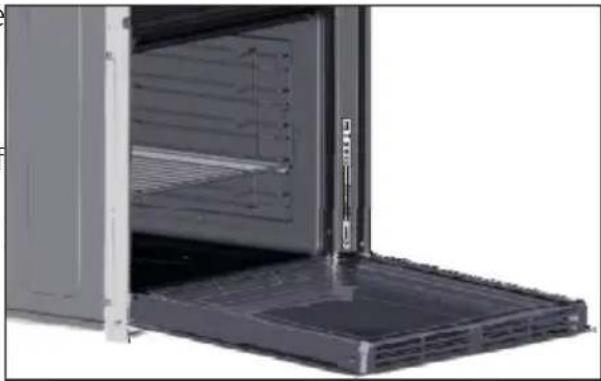
Interior view of a stainless steel oven with open door and side panel (no visible text or symbols)smelling smoke can develop, which is caused by the glue on the insulation panels surrounding the oven heating for the first time. This is absolutely normal and, if it occurs, you should wait for the smoke to dissipate before putting food in the oven. The manufacturer accepts no responsibility in cases where the instructions contained in this document are not observed.
NOTE: The oven functions, properties and accessories cited in this manual will vary, depending on the model you have purchased.
1.1 Safety Indications
Only use the oven for its intended purpose, that is only for the cooking of foods; any other use, for example as a heat source, is considered improper and therefore dangerous. The manufacturer cannot be held responsible for any damage resulting from improper, incorrect or unreasonable usage.
The use of anyelectrical appliance implies the observance of some fundamental rules:
- Do not pull on the power cable to disconnect the plug from the socket;
- Do not touch the appliance with wet or damp hands or feet;
- In general the use of adaptors, multiple sockets and extension cables is not recommended;
- In case of malfunction and/or poor operation, switchoff the appliance and do not tamperwith it.
1.2 Electrical Safety
ENSURE THAT AN ELECTRICIAN OR QUALIFIED TECHNICIAN MAKES THE ELECTRICAL CONNECTIONS.
The power supply to which the oven is connected must conform with the laws in force in the country of installation. The manufacturer accepts no responsibility for any damage caused by the failure to observe these instructions. The oven must be connected to an electrical supply with an earthed wall outlet or a disconnector with multiple poles, depending on the laws in force in the country of installation. The electrical supply should be protected with suitable fuses and the cables used must have a transverse section that can ensure correct supply to the oven.
CONNECTION
The oven is supplied with a power cable that should only be connected to an electrical supply with 220-240 Vac power between the phases or between the phase and neutral. Before the oven is connected to the electrical supply, it is important to check:
- Powervoltageindicatedon the gauge;
- The setting of the disconnector.
The grounding wire connected to the oven's earth terminal must be connected to the earth terminal of the power supply.
WARNING
Before connecting the ovento the powersupply, ask a qualified electrician to check the continuity of the power supply's earth terminal. The manufacturer accepts no responsibility for any accidents or other problems caused by failure to connect the oven to the earth terminal or by an earth connection that has defective continuity.
NOTE: As the oven could require maintenance work, it is advisable to keep another wall socket available so that the oven can be connected to this if it is removed from the space in which it is installed. The power cable must only be substituted by technical service staff or by technicians with equivalent qualifications.
1.3 Recommendations
After each use of the oven, a minimum of cleaning will help keep the oven perfectly clean.
Do not line the oven walls with aluminium foil or single-use protection available from stores. Aluminium foil or any other protection, in direct contact with the hot enamel, risks melting and deteriorating the enamel of the insides. In order to prevent excessive dirtying of your oven and the resulting strong smokey smells, we recommend not using the oven at very high temperature. It is better to extend the cooking time and lower the temperature a little. In addition to the accessories supplied with the oven, we advise you only use dishes and baking moulds resistant to very high temperatures.
1.4 Installation
The manufacturers have no obligation to carry this out. If the assistance of the manufacturer is required to rectify faults arising from incorrect installation, this assistance is not covered by the guarantee. The installation instructions for professionally qualified personnel must be followed. Incorrect installation may cause harm or injury to people, animals or belongings. The manufacturer cannot be held responsible for such harm or injury.
The oven can be located high in a column or under a worktop. Before fixing, you must ensure good ventilation in the oven space to allow proper circulation of the fresh air required for cooling and protecting the internal parts. Makethe openings specified on lastpageaccordingtothetype of fitting.
1.5 Waste management and environmental protection
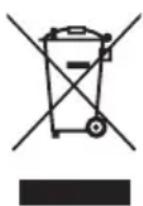
This appliance is labelled in accordance with European Directive 2012/19/EU regarding electric and electronic appliances (WEEE). The WEEE contain both polluting substances (that can have a negative effect on the environment) and base elements (that can be reused). It is important that the WEEE undergo specific treatments to correctly remove and dispose of the pollutants and recover all the materials. Individuals can play an important role in ensuring that the WEEE do not become an environmental problem; it is essential to follow a few basic rules:
- The WEEE should not be treated as domestic waste;
- The WEEE should be taken to dedicated collection areas managed by the town council or a registered company.
In many countries, domestic collections may be available for large WEEEs. When you buy a new appliance, the old one can be returned to the vendor who must accept it free of charge as a one-off, as long as the appliance is of an equivalent type and has the same functions as the purchased appliance.
SAVING AND RESPECTINGTHEENVIRONMENT
Where possible, avoid pre-heating the oven and always try to fill it. Open the oven door as infrequently as possible, because heat from the cavity disperses every time it is opened. For a significant energy saving, switch off the oven between 5 and 10 minutes before the planned end of the cooking time, and use the residual heat that the oven continues to generate. Keep the seals clean and in order, to avoid any heat dispersal outside of the cavity. If you have an electric contract with an hourly tariff, the "delayed cooking" programme makes energy saving more simple, moving the cooking process to start at the reduced tariff time slot.
1.6 Declaration of compliance
- By placing the CE mark on the appliance, we are confirming compliance to all relevant European safety, health and environmentalrequirementswhich areapplicablein legislation forthisproduct.
- Hereby, Candy Hoover Group Srl declares that the radio equipment is in compliance with Directive 2014/53/EU. The full text of the EU declaration of conformity is available at the following internet address:www.candy-group.com.
2. Product Description
2.1 Overview
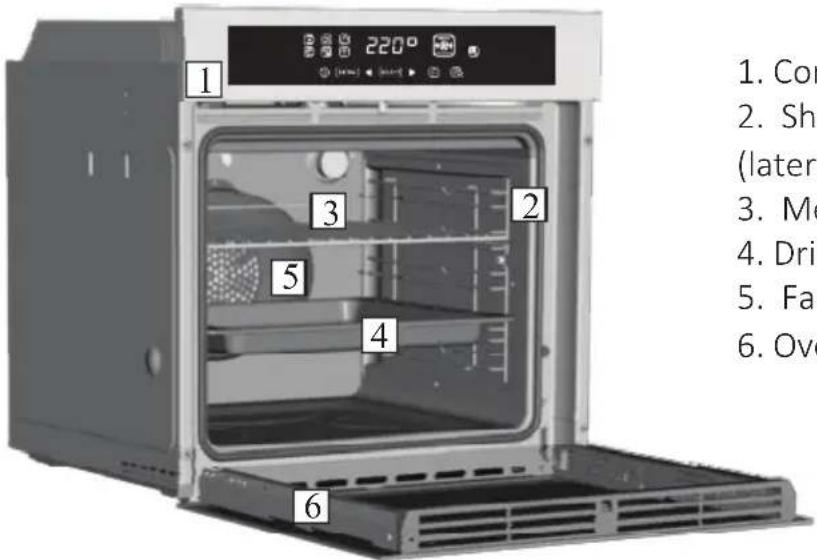
text_image
1. 2. 3. 4. 5. 6. 220° (###) (###) 1. Con 2. Sh (later 3. Me 4. Dri 5. Fa 6. Ove- Control panel
- Shelf positions
(lateral wire grid if included) - Metal grill
- Drip pan
- Fan (behind the steel plate)
- Oven door
2.2 Accessories (According to model)
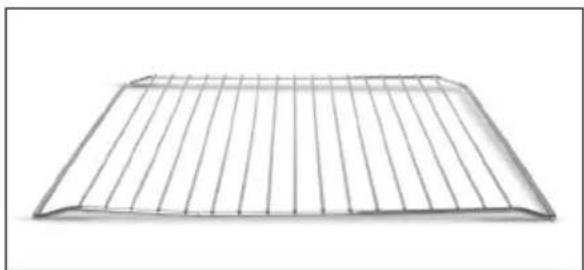
1 Metal grill
natural_image
Simple wire mesh structure resembling a roof or ventilation grille (no text or symbols)Holds baking trays and plates.
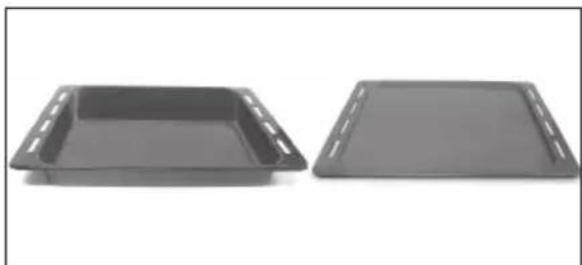
2 Drip pan
natural_image
Two black plastic tray containers on a white background, no text or symbols visibleCollects the residues that drip during the cooking of foodsonthegrills.
3 Led vision
natural_image
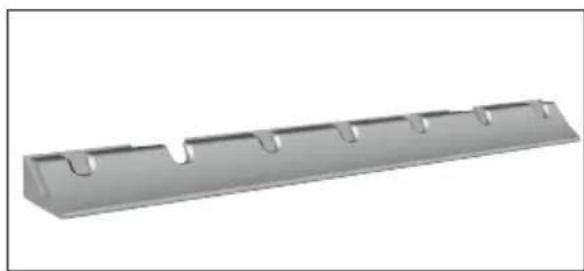
Metallic rectangular component with multiple recessed slots and a flat top edge (no text or symbols visible)Is an illumination system which replaces the traditional « light bulb ». 14 LED (for non-pyrolitic versions) or 10 High Power LED (for pyrolitic versions) lights are integrated within the door. These produce white high quality illumination which enables to view the inside of the oven with clarity without any shadows on all the shelves.
Advantages:
This system, besides providing excellent illumination inside the oven, lasts longer than the traditional light bulb its easier and to maintain and most of all saves energy.
-Optimum view
-Long life illumination
-Very low energy consumption, -95% in comparison with the traditional illumination High.
4 Lateral wire grids
natural_image
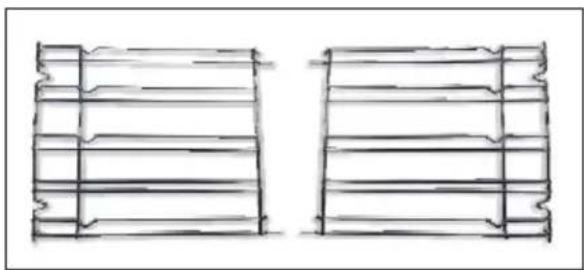
Two hand-drawn sketch-style panels showing vertical and horizontal lines, no text or symbols presentIt located at both sides of the oven cavity. It holds metalgrills and drip pans.
2.3 First Use
PRELIMINARYCLEANING
Clean the oven before using for the first time. Wipe over external surfaces with a damp soft cloth. Wash all accessories and wipe inside the oven with a solution of hot water and washing up liquid. Set the empty oven to the maximum temperature and leave on for about 1 hour, this will remove any lingering smells of newness.
3. Use of the Oven
3.1 Display description
text_image
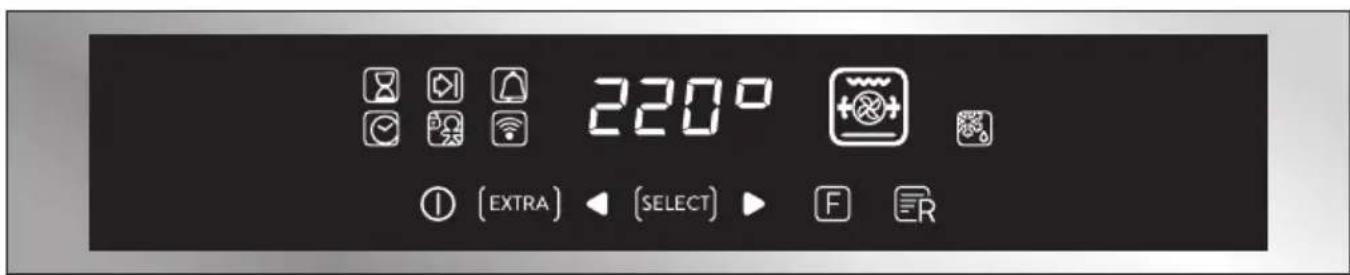
220° [ EXTRA ] ◀ [ SELECT ] ▶ F RON / OFF ⏻ → The oven is switched on and off with this button.
EXTRA (EXTRA) →
flowchart
graph TD
    A["Clock set"] --> B["Clock"]
    C["Child lock"] --> D["Clock"]
    E["WiFi"] --> F["WiFi"]
    B --> G["Cooking duration"]
    D --> H["Cooking end"]
    F --> I["Timer"]
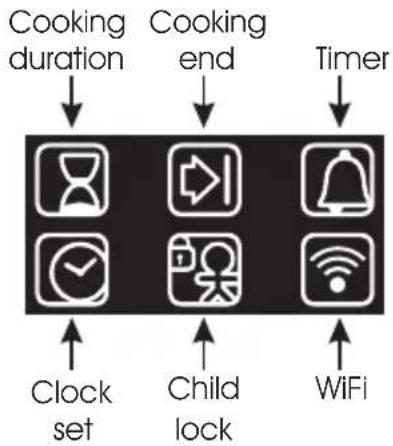
If the oven is switched off, the display shows the clock. When the oven is inactive, all the functions are available except the cookingdurationand end of cooking.
If the clock is not set, the oven does not work: the display flashes, showing "12:00" and the only functioning key is Extra.Fromthe Extra key,the followingfunctions can beset:
| FUNCTION | HOW TO ACTIVATE | HOW TO DEACTIVATE | WHAT IT DOES WHY | IT IS NEEDED |
COOKING DURATION | NB: can only be set with an active cooking programme. PressEXTRAtwiceandset the time using the "+" and "-" keys, confirming by pressing"SELECT". The displayshows "00:00" if no cookingduration has been inserted,otherwise the displayshows the time remaining. | •To modify cooking before the set time, press EXTRA twice and regulate the cooking time as required using the "<" and "> " keys, before pressing SELECT" once more. •To cancel the cooking duration, reset the display to "00:00". | When a cookingprogramme terminates , the oven switches off while the display shows "END" (the cooking programme icon remains on) until the On/Off button, the only functioning key, is pressed. When a co o k i n g r o g r amme terminates, an alarm will sound. | When the cooking time has f i n i s h e d , t h e o v e n automatically switches off and the alarm sounds for a fewseconds.p |
END OF COOKING | NB: can only be set with an active cooking programme. Press EXTRA enough times to illuminate the icon, set the end of cooking time using the "<" and "> " keys and confirm by pressing "SELECT". Press EXTRA enough times to illuminate the icon, set the end of cooking time using the "<" and "> " keys and confirm by pressing "SELECT". The cooking duration is automatically calculated. | To modify the end of cooking before the set time, press EXTRA enough times to illuminate the icon, regulate the end of cooking time as required using the "<" and "> " keys and confirm by pressing "SELECT". To cancel the end of cooking time, reset the displayto"00:00". | W h e n a c o o k i n g programme terminates, the oven switches off while the display shows "END" (the cooking programme icon remains on) until the On/Off button, the only functioning key, is pressed. W h e n a c o o k i n g programme terminates, an alarm will sound. | •This function is also used for cooking that can be scheduled in advance. •If a cooking programme is set, it will be lost if the "F" key is pressed. •If delayed cooking is set, the oven switches off and the display shows the current time while the cooking programme, cooking duration and end of cookingiconsare illuminated. •If a cooking programme is set, by pressing the "<" and "> " keys you can see and modify the temperature set: at the first t o u c h , t h e o p e r a t i n g temperature is shown while another touch will allow you to modify said temperature. |
TIMER | • The display shows "00:00" if no time has been inserted or the time remaining if this has alreadybeenset. Press EXTRA enough times to illuminate the icon and use the "<" and "> " keys to set the time, confirming by pressingSELECT. | •To modify the timer, press EXTRA enough times to illuminate the icon, regulate the cooking time as required using the "<" and "> " keys and confirm by pressing"SELECT". | •This function activates an alarm that sounds for a few secondwhenthesetime expires(thisfunctiondoes not switchtheovenoff). You can select a time between00:00and23:59. | • The timer functions regardless of whether the ovenisswitchedon. |
SETTING THE CLOCK | •Switched on for the first time, the display illuminates and shows "12:00". •To modify the time, press EXTRA enough times to illuminate the icon and use the "<" and "> " keys to set the time, confirming it by pressing SELECT. | •It allows you to set the time that appears on the display. | •The alarm functions regardless of whether the oven is switched on. | |
CHILD SAFETY LOCK | •Press the EXTRA key enough times to illuminate the icon and then either the "<" or "> " key to activate this function: the display will show ON; to confirm press SELECT. | •Press the EXTRA key enough times to illuminate the icon and then either the "<" or "> " key to deactivate this function: the display will show OFF; to confirm press SELECT. | •If the function is active only the "Extra" button, to deactivate the function, and "On/Off" button can be used. | •This function is useful when there are children in the house. |
WiFi (depends on the oven model) → Pressing"Extra"on the timer display allows you to select the Wi-Fi menu. In the Wi-Fi menu if you pressthe "<>" buttonsyou can select:
- Off: Wi-Fi is off; the oven is not controllable via the app.
- On: Wi-fi is on and the oven is only controllable via the app. It means that it is not possible to select cooking functions, recipes and temperature from the display. Only the Wi-Fi menu is available by pressing "Extra". You can switch the oven off using the On/Off button, but you cannot switch it back on again via the display, it can only be switched on via the app.
- Reset: This setting should be used to enrol the oven the first time it connects to your Wi-Fi network and to reset the current Wi-Fi connection to allow a new enrolment. Once selected, the appliance gives you 5 minutes to complete the enrolment process. During this process the cooking functions, recipes and temperature setting are not accessible from the display. Only the Wi-Fi menu is available by pressing "Extra". You can switch the oven off using the On/Off button, but you cannot switch it back on again via the display, it can only be switched on via the app. To exit the enrolment/reset procedure via the display, press "Extra" and then use "<>" buttons to select "Off". After five minutes, the appliance will exit the enrolment/reset procedure automatically.
- Read: the oven sends its status to the app but it cannot be controlled remotely. The oven must be enrolled before this is possible.
If Wi-Fi is not configured it is only possible to choose between off and reset.
When the oven is connected to Wi-Fi, the default cooking time duration is 5 hours, but this can be modified by the user.
Wi-Fi Enrolment:
To enroll the appliance for Wi-Fi, press "Extra" on the display until the Wi-Fi icon lights, then select "Reset" by pressing "<>". The procedure on the app should then be followed. Once selected, the appliance gives you 5 minutesto complete the enrolmentprocess.
Wi-Fi icon
- Icon not lit: Wi-Fi is off.
- Icon blinks 1 second on an 1 second off: the oven is accessible to your Wi-Fi network and ready to be enrolled. If the enrolment has not been successful, the Wi-Fi icon will switch off after 5 minutes.
- Icon is permanently lit: the oven is connected to your Wi-Fi router.
- The icon blinks 3 seconds on and 1 second off: the oven is trying to connect to your Wi-Fi router.
- The icon blinks 1 second on and 3 seconds off: the ovensis in read only mode.

CANDY SIMPLY-FI:
For detailed information about HOW TO CONNECT your simply-Fi appliance and HOW TO USE it at its best, go to http://www.candysimplyfi.com or visit the dedicated simply-Fi Customer Service website http://simplyfiservice.candy-hoover.com
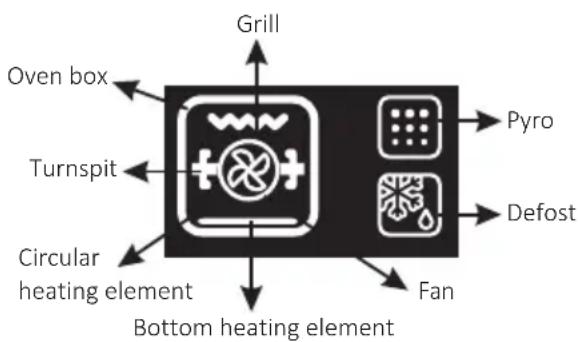
flowchart
graph TD
    A["Grill"] --> B["Turnspit"]
    B --> C["Circular heating element"]
    C --> D["Bottom heating element"]
    D --> E["Fan"]
    E --> F["Defost"]
    F --> G["Pyro"]
    G --> H["Grill"]
    style A fill:#f9f,stroke:#333
    style B fill:#ccf,stroke:#333
    style C fill:#cfc,stroke:#333
    style D fill:#fcc,stroke:#333
    style E fill:#cff,stroke:#333
    style F fill:#ffc,stroke:#333
    style G fill:#cfc,stroke:#333
    style H fill:#fcc,stroke:#333
LANGUAGE SETTING → The language can be set when the oven is switched off by pressing the Extra and Select buttonssimultaneously and for 3". The current language is shown on the display and can be changed by pressing the "<" or "> " keys, confirming it by pressing SELECT. Available languages are: Italian, English, French and German.
SELECT → Any selection must be confirmed. If not confirmed within 15 seconds, the selection is cancelled. Bychanging menu, any unconfirmed selection is lost.
"HOT" ICON → When a cooking programme finishes or when the oven switches off, if the oven is still hot, the display shows the current time alternating with the message "HOT" at 3 intervals.
Wi-Fi Parameters & Product Information for Networked Equipment
| Technology | Wi-Fi |
| Standard | IEEE 802.11b/g/n |
| Frequency Band(s) [MHz] | 2412÷2484 |
| Maximum Power [mW] | 41.4 |
| Product information for networked equipment | |
| Power consumption of the product in networked standby if all wired network ports are connected andall wirelessnetwork ports areactivated: | 2,0 W |
| How to activate wirelessnetworkport: | Ifthewifiiconison or blinksthe wifi module isonIf the oven is already enrolled : press “Extra” on the timer display and select the Wi-Fi menu then press the “<>" buttons, select On and press the select button.If the oven is not enrolled : follow procedure for enrolling |
| How to deactivate wirelessnetworkport: | Ifthe wifi icon isoff the wifi moduleis offTo switch off the wifi press “Extra” on the timer display and select the Wi-Fi menu then press the “<>"buttons,select Off and pressthe select button. |
3.2 Cooking Modes
| Function Dial | T °C default | T °C range | Function (Depends on the oven model) |
 | LAMP: Turns on the oven light. | ||
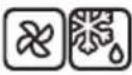 | 40 | 40 ÷ 40 | DEFROST: When the dial is set to this position. The fan circulates air at room temperature around the frozen foodso that it defrotsin a few minutes without the proteincontentof the food being changed or altered. |
 | 180 | 50 ÷ 240 | MULTI-LEVEL: We recommend you use this method for poultry, pastries, fish and vegetables. Heat penetrates into the food better and both the cooking and preheating times are reduced. You can cook different foods at the same time with or without the same preparation in one or more positions. This cooking method gives even heat distributionand the smells arenot mixed.Allow about ten minutes extrawhen cooking foodsat the same time. |
 | 210 | 50 ÷ 240 | |
* | 220 | 50 ÷ 280 | CONVENTIONAL: Both top and bottomheating elements are used. Preheat the oven for about ten minutes. This method is ideal for all traditional roasting and baking. For seizing red meats, roast beef, leg of lamb, game, bread, foil wrapped food (papillotes), flaky pastry. Place the food and its dish on a shelf in mid position. |
 | 210 | 50 ÷ 230 | BOTTOM HEATING + FAN: The bottom heating element is used with the fan circulatingthe air inside the oven. This method is ideal forjuicy fruit flans, tarts, quiches and pâté.It prevents food from drying and encourages rising in cakes, bread dough and other bottom-cooked food.Place the shelf in the bottom position. |
* | 200 150 | ÷ 220 | GRILL + FAN:Use the turbo-grill with the door closed.The top heating element is used with the fan circulating the air inside the oven.Preheating is necessary forredmeats but not for white meats. Ideal forcooking thick food items, whole pieces such as roastpork, poultry, etc. Place the foodto be grilled directly on the shelf centrally, at the middle level. Slide the drip tray under the shelf to collect the juices. Make sure that the food is not too close to the grill. Turn the foodoverhalfway throughcooking. |
 | L3 | L1 ÷ L5 | GRILL: Use the grill with the door closed.The top heating element is used alone and you can adjustthetemperature.Five minutes preheating is required to get the elements red-hot. Success is guaranteed for grills, kebabs and gratin dishes. White meats should be put at a distance from the grill; the cooking time is longer, but the meat will be tastier.You can put red meats and fish fillets on the shelf with the drip trayunderneath.The oven has two grill positions:Grill: 2140 W Barbecue: 3340 W |
 | 210 50 | ÷ 230 | BOTTOM HEATING: Using the lower element. Ideal for cooking all pastry based dishes. Use this for flans, quiches, tarts, pate and any cooking that needs more heatfrombelow. |
*Tested in accordance with the EN 60350-1 for the purpose of energy consumption declaration and energy class.
4. Oven cleaning and maintenance
4.1 General notes on cleaning
The lifecycle of the appliance can be extended through regular cleaning. Wait for the oven to cool before carrying out manual cleaning operations. Never use abrasive detergents, steel wool or sharp objects for cleaning, so as to not irreparably damage the enamelled parts. Use only water, soap or bleach-based detergents (ammonia).
GLASS PARTS
It is advisable to clean the glass window with absorbent kitchen towel after every use of the oven. To remove more obstinate stains, you can use a detergent-soaked sponge, well wrung out, and then rinse with water.
OVENWINDOW SEAL
If dirty, the seal can be cleaned with a slightly damp sponge.
ACCESSORIES
Clean accessories with a wet, soapy sponge before rinsing and drying them: avoid using abrasive detergents.
DRIP PAN
After using the grill, remove the pan from the oven. Pour the hot fat into a container and wash the pan in hot water, using a sponge and washing-up liquid.
If greasy residues remain, immerse the pan in water and detergent. Alternatively, you can wash the pan in the dishwasheroruseacommercial oven detergent. Neverputadirtypanbackinto the oven.
4.2 Self-cleaning oven with catalytic
Special self-cleaning panels covered in a micro-porous coating are available as optional extras for all models. If they are fitted, the ovenlongerneedsto be cleaned by hand.
The fat that is splattered onto the sides of the oven during roasting is eliminated by the microporous coating which breaks the fat down by catalysis and transforms it intogas.
Excessive splattering may nevertheless block the pores and therefore hinder self-cleaning. The self-cleaning capacity may be restored by switching on the empty oven to maximum for about 10-20 minutes.
Do not use abrasive products, metal cleaning wads, sharp objects, rough cloths, or chemical products and detergents that may permanently damage the catalytic lining.
It is a good idea to use deep roasting trays to roast fatty foods such as joints of meat etc. and to put a tray underneath the grill to catch surplus fat. If the walls of the oven are so thickly coated in grease that the catalytic lining is no longer effective remove surplus grease with a soft cloth or sponge soaked in hot water.
The lining mustbeporous forself-cleaningtobeeffective.
N.B.: All catalytic linings currently on the market have a working life of about 300 hours. They should therefore bereplaced after about 300 hours.
4.3 Maintenance
REMOVING AND CLEANING WIRE RACKS
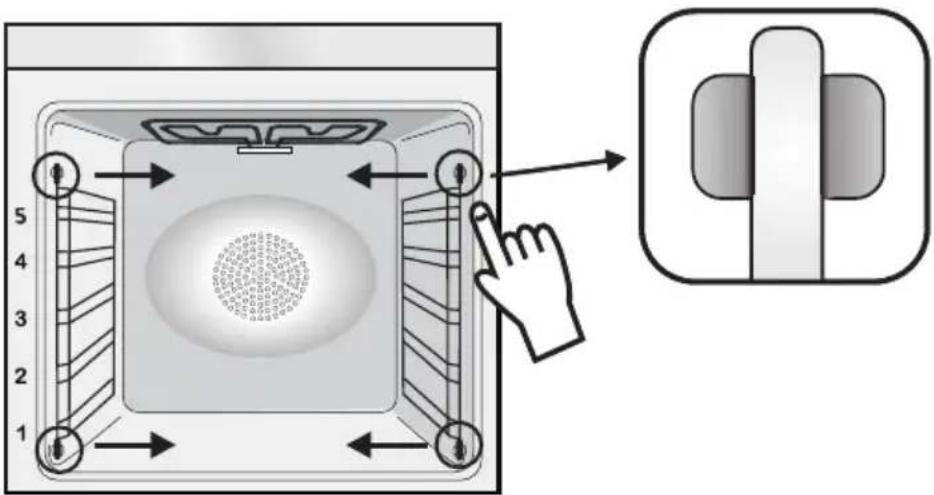
- Removethe wire racksby pulling themin the directionof the arrows(see below)
- To clean the wire racks either put them in the dishwasher or use a wet sponge, ensuring that they are dried afterwards.
- After the cleaning process installthe wire racksin reverseorder.
text_image
Diagram showing a door panel with numbered positions and a hand interacting with the interior, alongside a close-up of the door handle.REMOVAL OF THE OVEN WINDOW
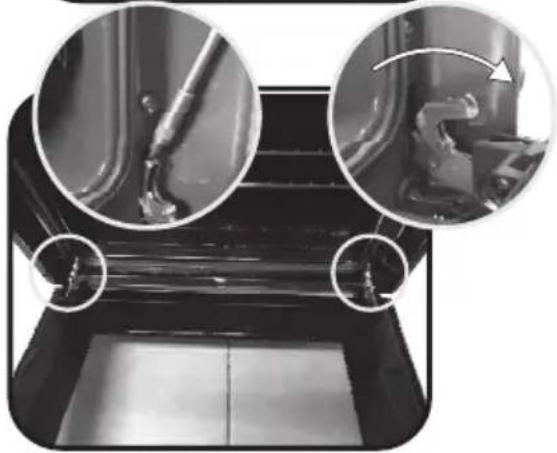
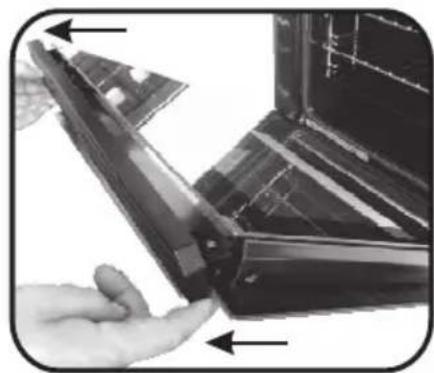
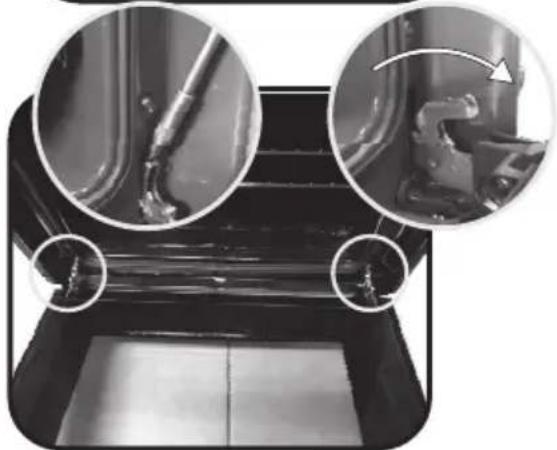
- Open the frontwindow.
- Open the clamps of the hinge housing on the right and left side of the front window by pushing them downwards.
- Replace the windowby carrying out the procedurein reverse.
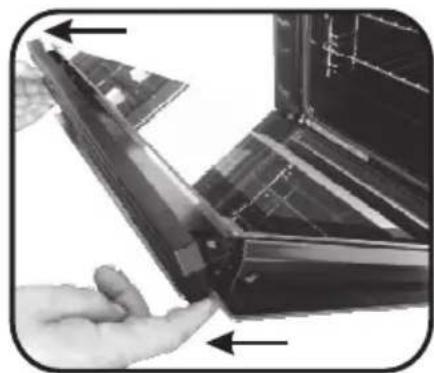
REMOVAL AND CLEANING OF THE GLASS DOOR
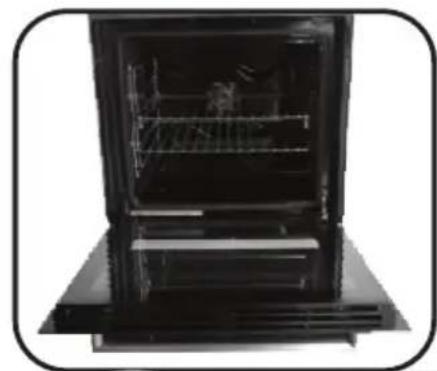
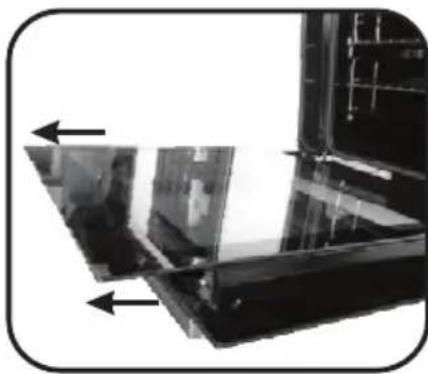
- Open the ovendoor.
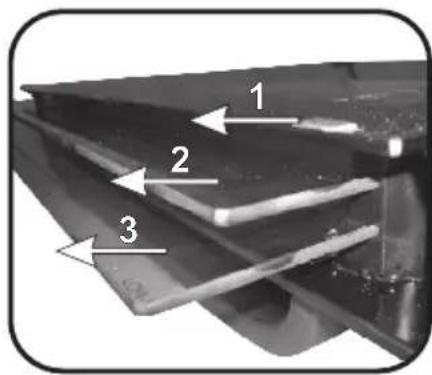
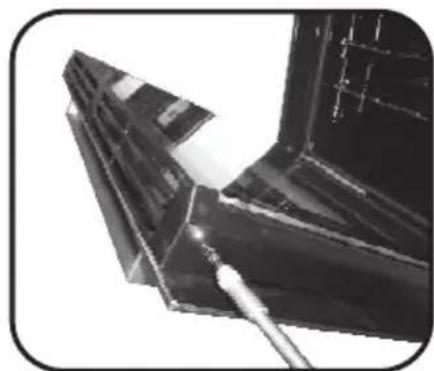
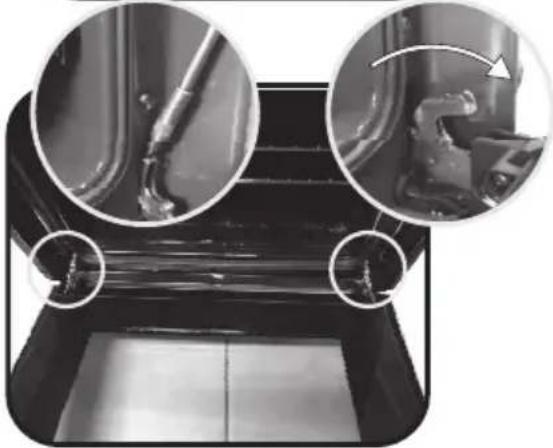
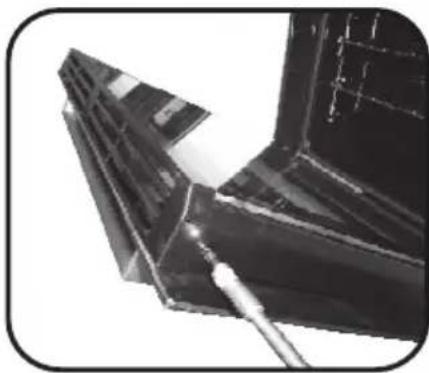
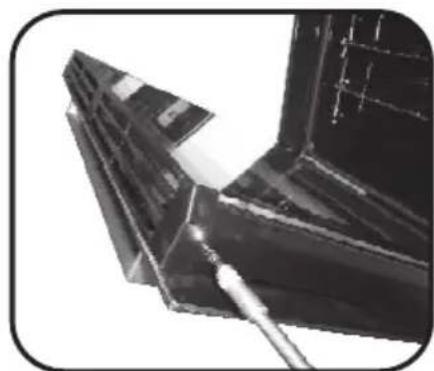
2.3.4. Lock the hinges, remove the screws and remove the upper metalcover by pulling it upwards.
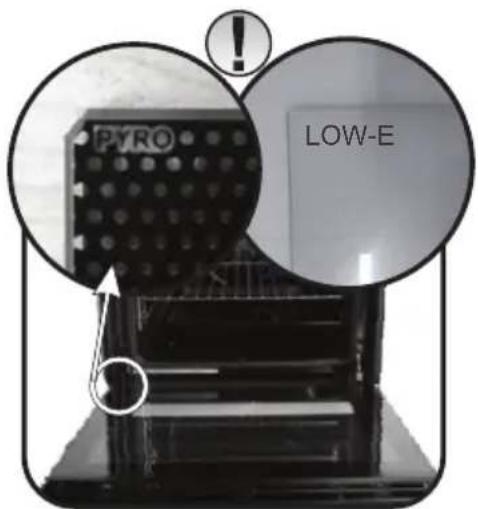
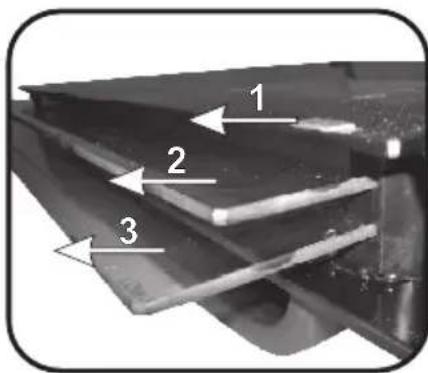
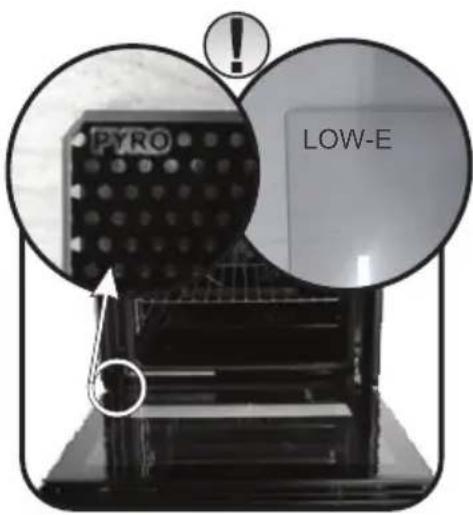
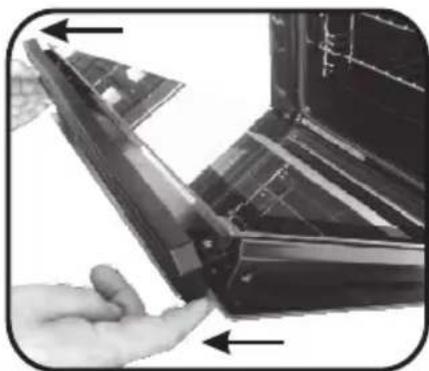
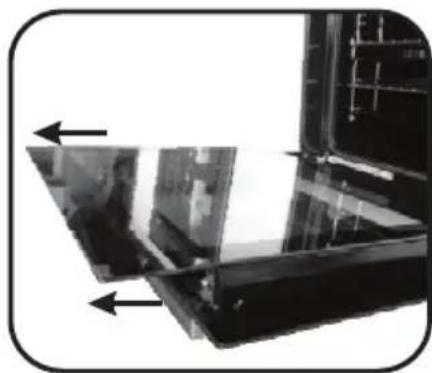
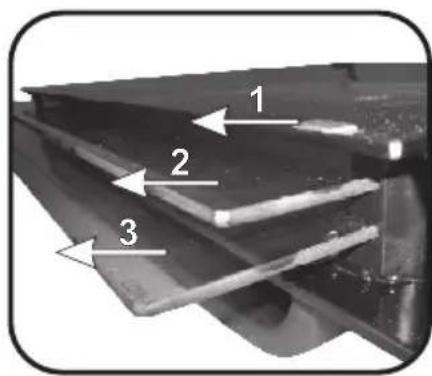
5.6. Removetheglass, carefully extracting it from the oven door (NB: in pyrolyticovens, also remove the second and third glass (if present)). - Attheendofcleaningorsubstitution, reassemble the parts in reverseorder.
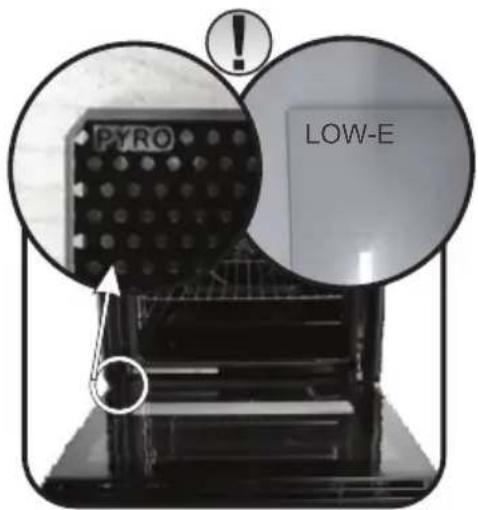
On all glass, the indication "Pyro" must be legible and positioned on the left side of the door, close to the left-handlateralhinge. In this way, the printedlabelofthefirst glass will be inside the door.
1.
natural_image
Black oven with open lid and visible internal shelves (no text or symbols)5.

natural_image
Close-up of a metallic mechanical component with two arrows pointing to specific surfaces (no visible text or symbols)2.
natural_image
Close-up of a mechanical component with two circular insets showing internal components (no visible text or symbols)6.
text_image
1 2 33.
natural_image
Close-up of a metallic bracket with a tool inserted, showing no visible text or symbols.7.
text_image
PYRO LOW-E4.
natural_image
Close-up of a hand holding a flexible electronic device with a close-up view of its internal components (no text or symbols visible)5. Troubleshooting
5.1 FAQ
| PROBLEM POSSIBLE CAUSE SOLUTION | ||
| The oven does not heat up | The clock is not set Set the | clock |
| The oven does not heat up | The child lock is on | Deactivate the child lock |
| The oven does not heat up | A cooking function and temperature has not been set | Ensure that the necessary settings are correct |
| No reaction of the touch user interface | Steam and condensation on the user interface panel | Clean with a microfiber cloth the user interface panel to remove the condensation layer |
natural_image
Exterior view of a modern kitchen oven with open door and side panel (no visible text or symbols)natural_image
Two black rectangular plastic trays with side cutouts, one upright and one flat (no text or symbols visible)natural_image
Metallic rectangular object with four recessed slots and a flat top edge (no text or symbols)natural_image
Two hand-drawn sketch-style grid-like structures with no text or symbolstext_image
Diagram showing a device interior with numbered components and directional arrows, including a hand pointing to a button.RETRAIT DE LA PORTEDUFOUR
natural_image
Interior view of a black oven or oven unit with visible internal structure and ventilation grilles (no text or symbols)5.
natural_image
Close-up of a mechanical component with two arrows pointing to specific areas (no visible text or symbols)2.
natural_image
Close-up of mechanical components with circular insets showing close-ups of parts (no visible text or symbols)6.
text_image
1 2 33.
natural_image
Close-up of a metallic structural component with a tool inserted (no visible text or symbols)7.
text_image
PYRO LOW-E4.
natural_image
Close-up of a hand interacting with a dark plastic panel or bracket component (no visible text or symbols)5. Dépannage
5.1 FAQ
natural_image
Interior view of a modern kitchen oven with open door and side panel (no visible text or symbols)natural_image
Line drawing of a wire mesh structure with no text or symbolsnatural_image
Two black plastic tray containers on a white background, no text or symbols visiblenatural_image
Exterior view of a gray plastic mechanical component with multiple slots and a recessed slot (no text or symbols)natural_image
Two identical wireframe diagrams of rectangular structures, no text or symbols presenttext_image
Diagram showing a device interior with numbered components and directional arrows, including a hand pointing to a button.RIMOZIONEDELLOSPORTELLO DEL FORNO
natural_image
Interior view of a black appliance with visible internal structure and ventilation grilles (no text or symbols)5.
natural_image
Close-up of a metallic panel or bracket with two arrows pointing to the edges (no visible text or symbols)2.
natural_image
Close-up of mechanical components with circular insets showing internal parts (no visible text or symbols)6.
text_image
1 2 33.
natural_image
Close-up of a metallic structural joint or bracket component (no visible text or symbols)7.
text_image
PYRO LOW-E4.
natural_image
Close-up of a hand holding a dark plastic panel with arrows indicating direction (no text or symbols visible)natural_image
Interior view of a modern kitchen oven with open door and side panel (no visible text or symbols)natural_image
Simple wire mesh diagram of a rectangular metal grate (no text or symbols)natural_image
Two black plastic tray containers on a white background, no text or symbols visiblenatural_image
Exterior view of a gray plastic mechanical component with multiple slots and mounting holes (no text or symbols)text_image
Diagram showing a door panel with numbered positions and a hand pointing to a button, alongside a close-up of the right side of a button.natural_image
Interior view of a black oven or oven unit with visible internal structure and ventilation duct (no text or symbols)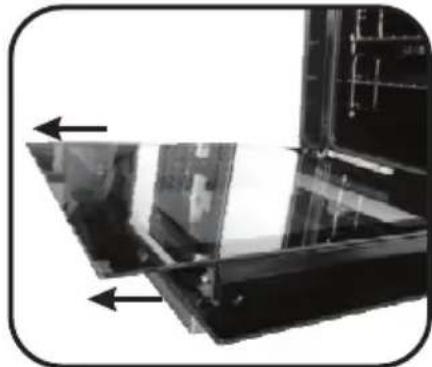
natural_image
Close-up of a metallic panel or fixture with two arrows pointing to specific components (no visible text or symbols)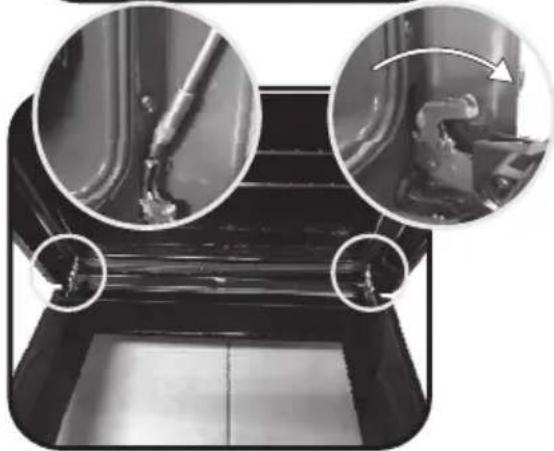
natural_image
Close-up of mechanical components with circular insets showing pipe fittings and a curved arrow indicating motion (no text or symbols)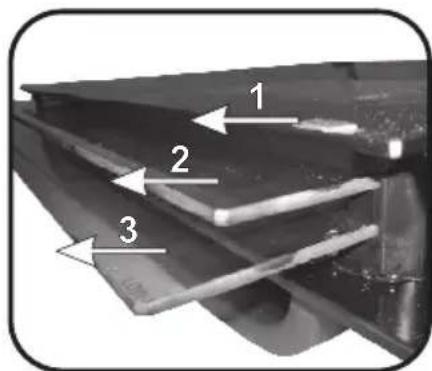
text_image
1 2 3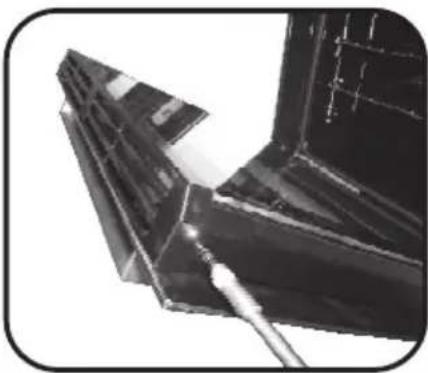
natural_image
Close-up of a metallic structural component with visible joints and a tool, no text or symbols present.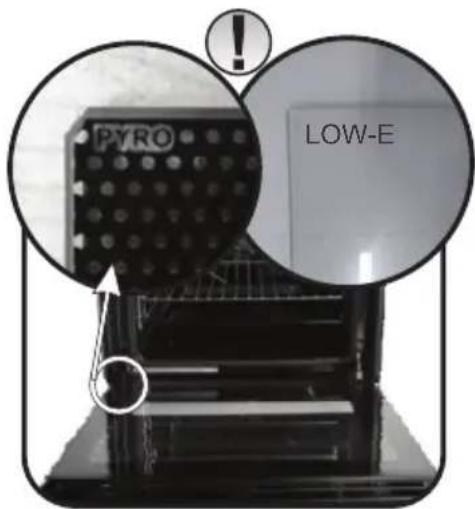
text_image
PYRO LOW-E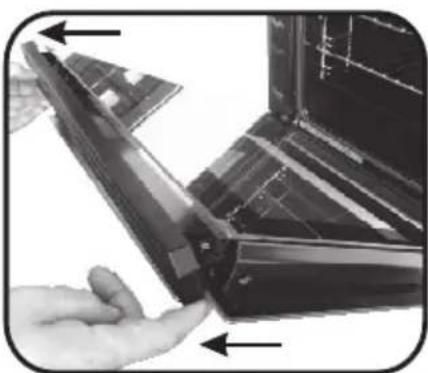
natural_image
Close-up of a hand holding a flexible electronic component with visible internal structure (no text or symbols)natural_image
Exterior view of a modern kitchen oven with metal grilles and a red label on the door (no visible text or symbols)natural_image
Exterior view of a gray metal bracket with multiple slots and a notch (no text or symbols)natural_image
Two black plastic tray containers on a white background, one open and one closed (no text or symbols visible)natural_image
Two hand-drawn sketch-style panels showing horizontal lines with rounded ends, no text or symbols present.text_image
Diagram illustrating a door mechanism with numbered positions and directional arrows, including a close-up of the right-side component.ENTFERNEN DES BACKOFENFENSTERS
natural_image
Interior view of a black oven or oven with visible internal structure and ventilation grilles (no text or symbols)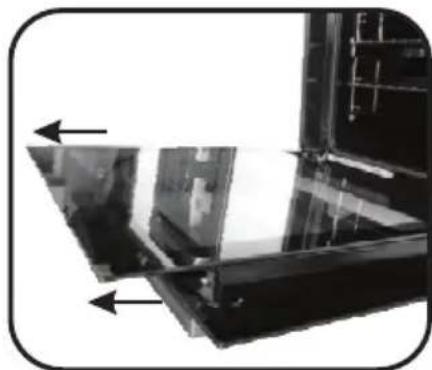
natural_image
Close-up of a metallic panel or bracket with two arrows pointing to specific components (no visible text or symbols)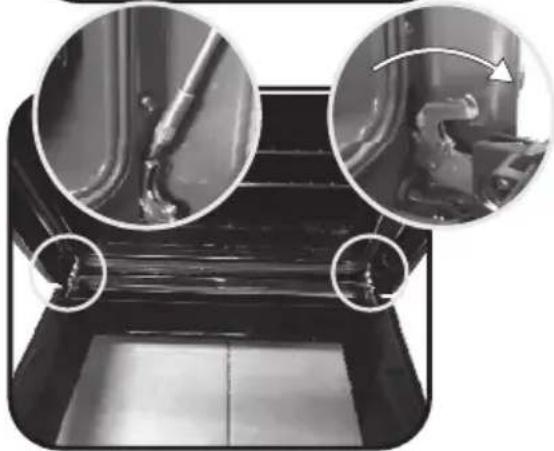
natural_image
Close-up of mechanical components with circular insets showing close-ups of pipe and valve (no text or symbols visible)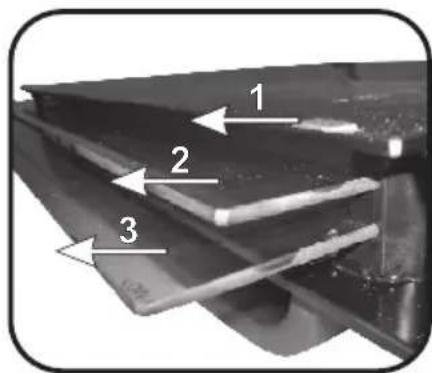
text_image
1 2 3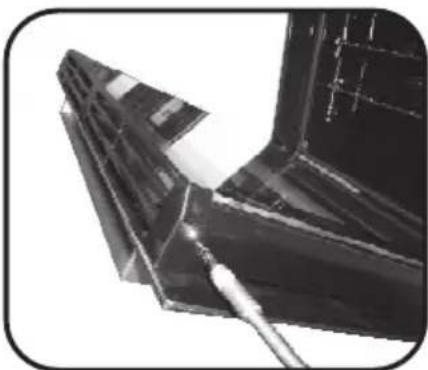
natural_image
Close-up of a metallic mechanical component with visible cutting edge and base (no text or symbols)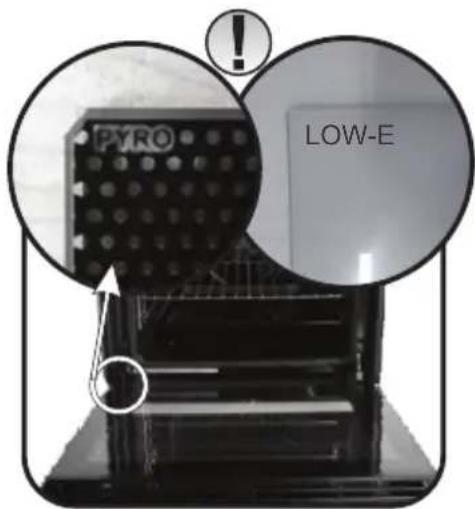
text_image
PYRO LOW-E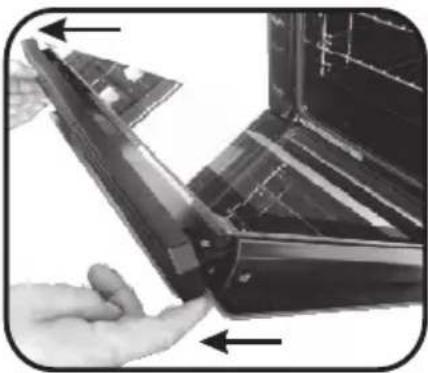
natural_image
Close-up of a hand holding a flexible electronic device with visible internal components (no text or symbols)5. Fehlerbehebung
natural_image
Exterior view of a modern stainless steel oven with open lid and metal tray (no visible text or symbols)natural_image
Line drawing of a wire mesh structure with no text or symbolsnatural_image
Two black plastic tray containers, one open and one closed, displayed against a white background (no text or symbols visible)natural_image
Metallic rectangular object with four recessed slots, no visible text or symbolsnatural_image
Two hand-drawn sketch-style panels showing horizontal lines within rectangular frames (no text or symbols)text_image
Diagram showing a device interior with numbered components and a hand interacting with a button, alongside a close-up of the button's view.DEMONTÁŽ OKNA TROUBY
natural_image
Interior view of a black oven or oven unit with visible internal structure and ventilation grilles (no text or symbols)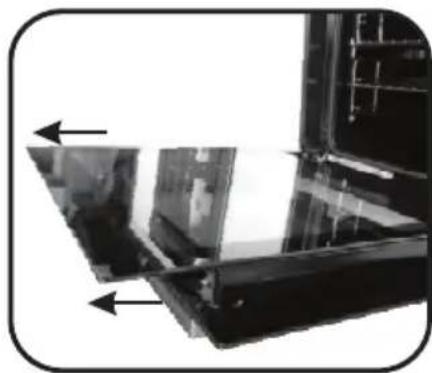
natural_image
Close-up of a mechanical component with two black arrows pointing to features, no visible text or symbols.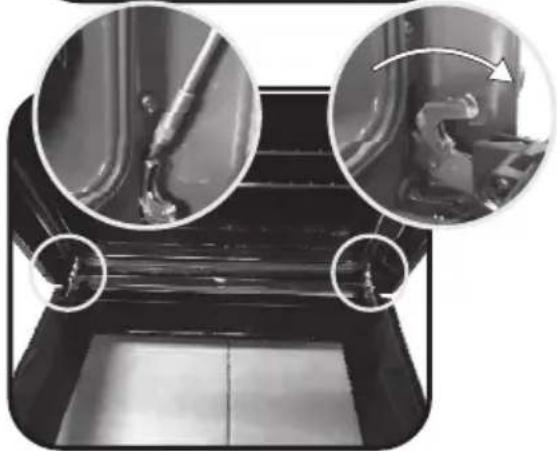
natural_image
Close-up of mechanical components with circular insets showing internal parts (no visible text or symbols)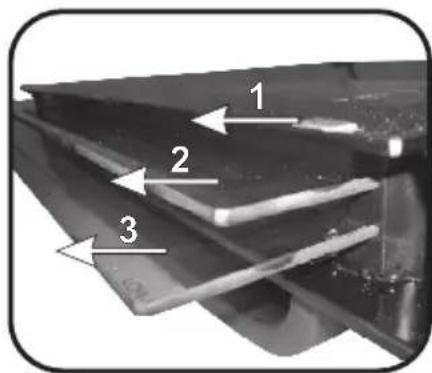
text_image
1 2 3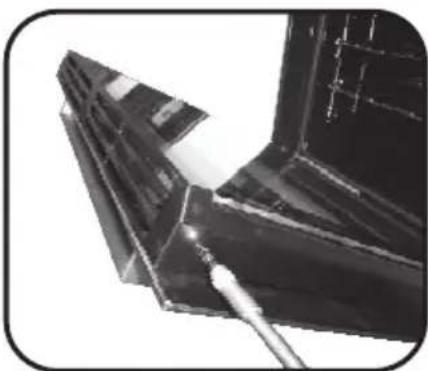
natural_image
Close-up of a metallic mechanical component with a tool inserted, no visible text or symbols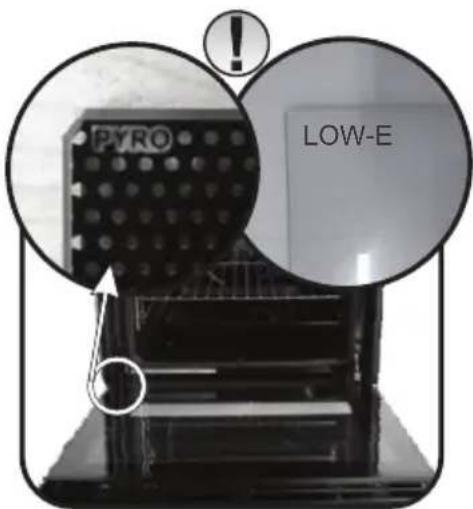
text_image
PYRO LOW-E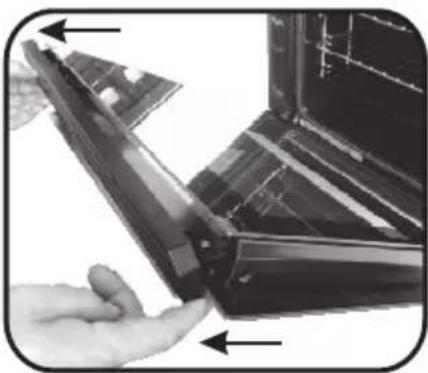
natural_image
Close-up of a hand holding a flexible electronic device with visible internal components (no text or symbols)5. Řešení potíží
The manufacturer will not be responsible for any inaccuracy resulting from printing or transcript errors contained in this brochure. We reserve the right to carry out modifications to products as required, including the interests of consumption, without prejudice to the characteristics relating to safety or function.