302352 - Bluetooth USB Drive Aplic - Free user manual and instructions
Find the device manual for free 302352 Aplic in PDF.


| Product Type | Bluetooth USB Adapter |
| Interface | USB 2.0 (compatible with earlier versions) |
| Bluetooth Version | Bluetooth 4.0 (compatible with earlier versions) |
| Frequency | 2400-2483.5 MHz |
| Transmission Power | 7.02 dBm |
| Bluetooth Features | Low energy, fast connection speed, supports A2DP |
| Supported Operating Systems | Microsoft Windows 7 / 8 / 8.1 / 10 |
| Package Contents | Bluetooth USB dongle, installation disc, user manual |
| Power Supply | Via USB port (5V) |
| Installation | Plug & Play (built-in drivers) or manual installation / alternative Harmony Stack driver |
| Connectivity | Add Bluetooth devices via Windows manager |
| Safety | Do not repair or modify yourself; use in a dry place; avoid high temperatures and vibrations |
| Recycling | WEEE compliant; do not dispose with household waste; drop off at a collection point |
Frequently Asked Questions - 302352 Aplic
User questions about 302352 Aplic
0 question about this device. Answer the ones you know or ask your own.
Ask a new question about this device
Download the instructions for your Bluetooth USB Drive in PDF format for free! Find your manual 302352 - Aplic and take your electronic device back in hand. On this page are published all the documents necessary for the use of your device. 302352 by Aplic.
USER MANUAL 302352 Aplic
natural_image
Blue and gray abstract logo design with stylized letter 'a' and partial text 'aplic' below (no readable text or symbols)Table of contents
- Deutsch .... 3
- English....10
- Français 17
- Italiano 24
- Español....31
Thank you for choosing this product from aplic and for placing your trust in our company. Before using the produkt or the first time, please read this manual carefully to ensure your long-term enjoyment of this product. For future reference, please keep this manual. Before using the delivered product, check that it is complete, faultless and undamaged.
1. Scope of delivery
- USB Bluetooth stick
- Driver CD
- User manual
2. Technical specifications
| Interface USB 2.0 (backward compatible) | |
| Bluetooth standard Version 4.0 (backward compatible) | |
| Frequency band 2400-2483,5MHz | |
| Transmission power 7,02 dBm | |
| Features | Bluetooth 4.0 low energyFast connectionsupports A2DP |
| Tested operating systems | Microsoft Windows 7 / 8 / 8.1 / 10 |
3. Getting started
When the device is put into operation for the first time, check the intactness of the product or components and their function again. Please plug the Bluetooth stick into a free USB port of your computer. The system detects the USB Bluetooth stick due to „Plug and Play” automatically and installs all system drivers by itself. Then the basic functions of the device can already be used with the Bluetooth symbol in the task bar next to the system lock. If you wish to use the whole range of functions, please follow the instructions of the driver installation.
4. Installation
4.1 Plug & Play Installation
Plug the Bluetooth adapter into a suitable USB slot. Windows 7 / 8 / 8.1 / 10 provide a Plug & Play driver, which will be installed automatically.
4.2 Manual Installation (highly recommended)
- Plug the Bluetooth adapter into an appropriate USB slot and start your computer.
- Once your computer has booted and the adapter has been successfully detected, switch to the Device Manager in order to check the setup.
- The adapter should have been detected as shown below.
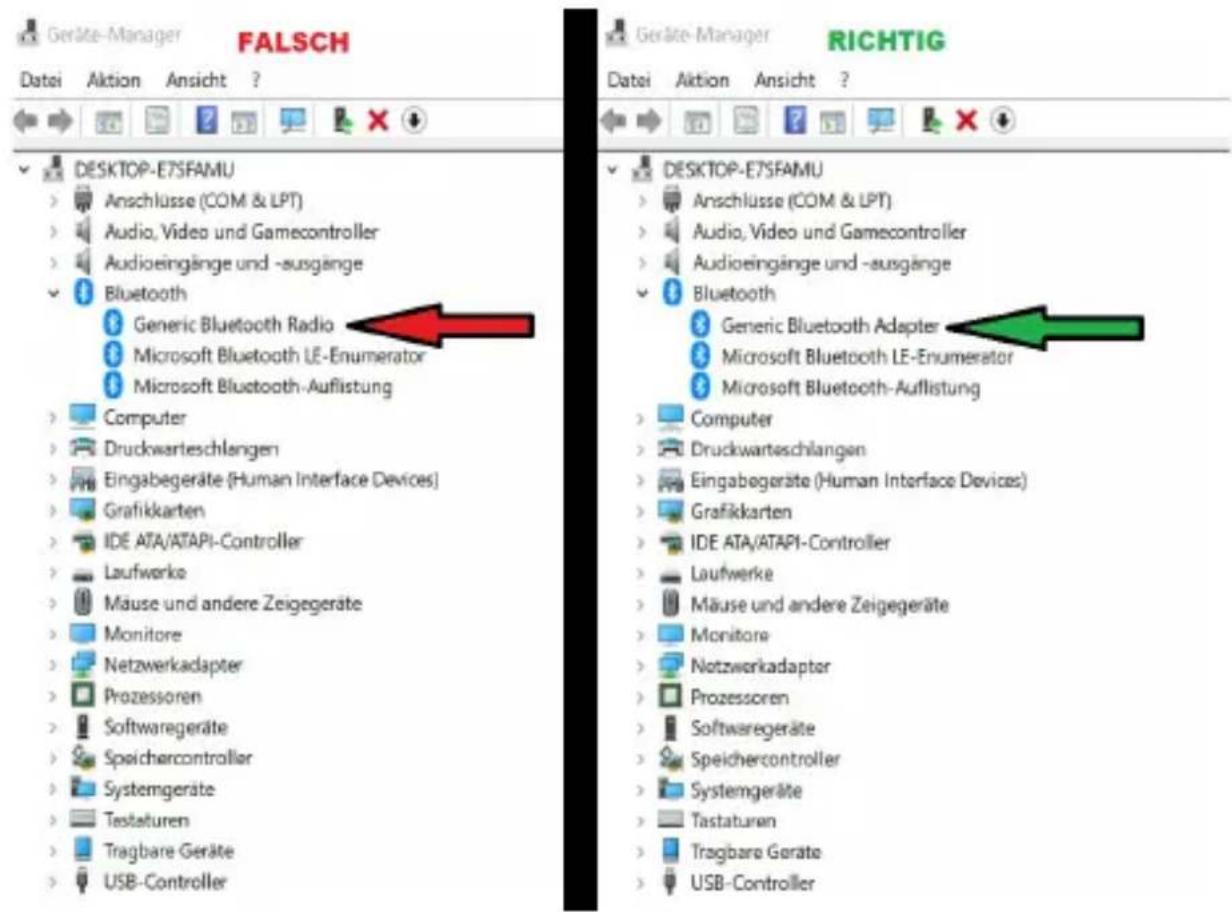
If you find the Generic Bluetooth Radio in the Device Manager instead of the Generic Bluetooth Adapter, we recommend to follow the installation steps below for a higher compatibility.
- Open the Device Manager.
- Right-click the „Bluetooth Generic Radio“ and select „Update driver software...“.
- In the next step, select „Search for software on the computer“.
- Then click „Select from a list of device drivers on the computer“ and go to „Next“.
- You will be guided to the overview of the available drivers. Select the „Generic Bluetooth Adapter“ here and then click „Next“.
- The driver will be installed and is ready to use. After a few minutes, the successful update will be confirmed by the system.
If you have any problems or questions regarding the installation, please contact our customer service. We will be happy to help you with the installation. You can connect via Bluetooth Connection Manager the desired end devices from Microsoft.
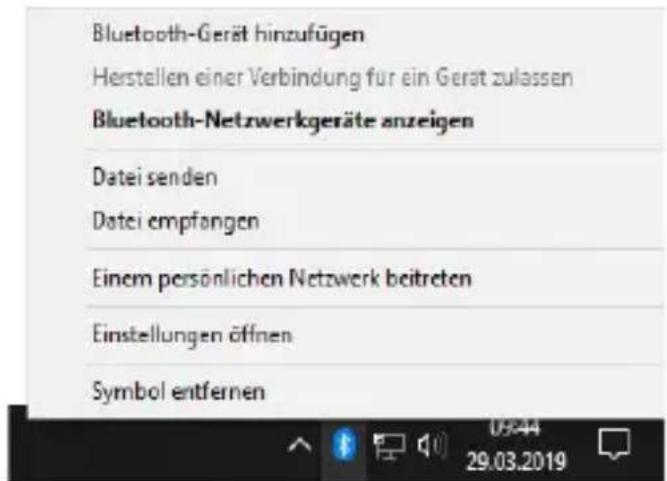
Click „Add Bluetooth device“ and select „Add Bluetooth or other devices under Bluetooth and other devices“. If several Bluetooth devices cannot be connected to your PC, there is a comprehensive driver (CSR Harmony Stack) with additional protocols and utilities you can download and install from our website www.ganzeinfach.de in the download area.
12 English
4.3 Harmony Stack driver (alternative driver)
Insert the driver CD into your CD-ROM drive. After that, the automatic playback opens. Please click „autorun.exe“ below to reach the installation menu.
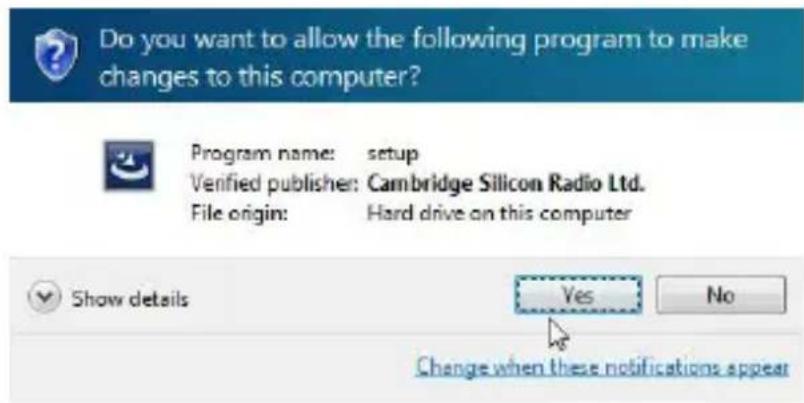
Answer the security question with "Yes" to confirm that you want to start the installation.
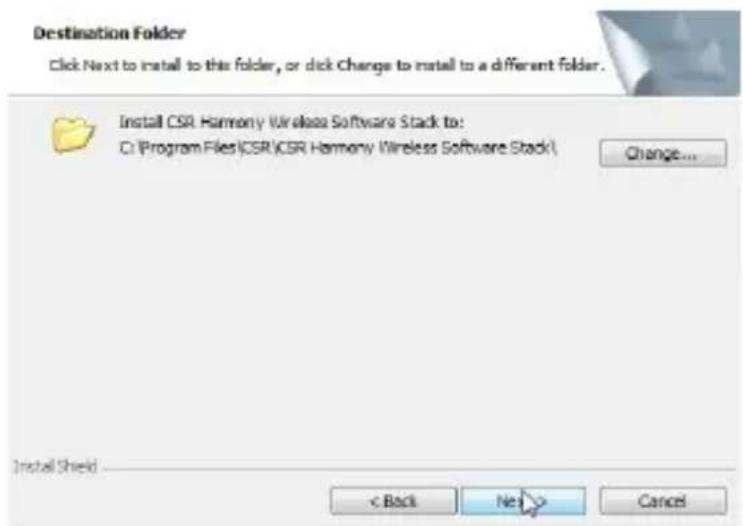
In the next window, select your desired language and click „OK“ to confirm your choice. In the next dialog click the „Next“ button.
Now accept the licensing terms and click „Next“ to proceed with the installation.
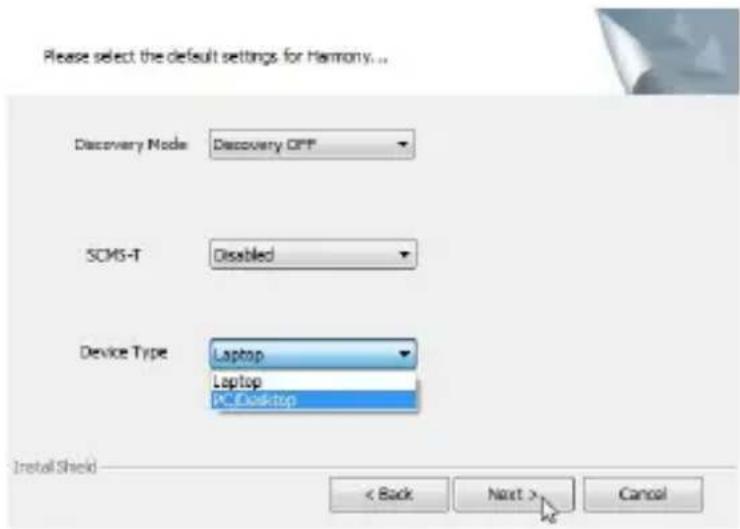
Check if the standard settings are suitable for your needs and continue with „Next“.
Then click the „Install“ button in order to start the installation and subsequently on the „Finish“ button. The full functionality of the Bluetooth stick is achieved after reboot your system.

natural_image
Abstract blue gradient background with two triangular shapes and a small white square in the top-right corner (no text or symbols)InstallShield Wizard Completed
The InstallShield Wizard has successfully installed CSR. Harmony Wireless Software Stack. Click Finish to exit the wizard.

5. Safety instructions and disclaimer
Do not attempt to service this product by yourself as opening or removing covers may result in fire, electric shock or equipment damage. Please avoid any contact to the electric current. This product is only licensed for indoor use and dry areas. Please protect it from water, rain, snow or high humidity and keep it away from high temperatures and direct sunlight.
Do not expose this product to extreme and sudden changes of temperature or heavy vibrations; this may lead to damage of the internal electronic part of this unit.
Check this product for signs of damage before putting it in operation.
In case the device received any damage, it should not be used. Please contact our customer support.
Please observe the relevant national provisions and legal restrictions.
Do not use this product for anything other than intended and as described in the manual.
Any attempt of repairs or alterations by someone other than the original supplier will invalidate the guarantee and result in refusal of warranty claims.
Persons who are familiar with the operating manual and the applicable regulations concerning working safety and accident prevention may only use the Bluetooth stick.
This unit is not intended to be used by persons (including children) with limited physical, sensory or mental aptitude or lack of experience and/or knowledge unless they are supervised by a person responsible for their safety or have received instructions as to how the device is used properly. The technical specifications of this product may change without prior notice.
6. Disposal Instructions
The European Directive (WEEE) requires that old electrical and electronic appliances shall be disposed of separately from normal household garbage for optimal recycling. The component parts must be separated, collected and sent for recycling or disposal in an environment-friendly manner. Otherwise, toxic and dangerous substances could cause enduring damage to the environment if disposed of incorrectly.
As a consumer you are legally obligated (Electrical and Electronic Equipment Act-ElektroG) to return electronic equipment at the end of its lifetime to their manufacturer, point of sale, public collection points or importer free of charge. The relevant local laws apply here. The symbol on the product, in the instructions or on its packing indicates these regulations. The reuse or recycling of materials and old units makes an important contribution towards protecting the environment.

WEEE guideline: 2012/19/EU WEEE register number.: DE 67896761
WD Plus GmbH, herewith declares that this product 302352 conforms to the principle requirements and other relevant stipulations of Directive 2014/53/EU. The complete Declaration of Conformity can be obtained from: WD Plus GmbH, Wohlenbergstraße 16, 30179 Hanover, http://downloads.ganzeinfach.de/search/model/302352
Brand : Aplic
Model : 302352
Category : Bluetooth USB Drive