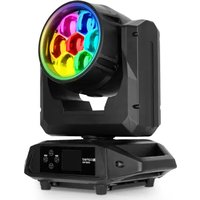
OTOS W3 - Lamp Cameo - Free user manual and instructions
Find the device manual for free OTOS W3 Cameo in PDF.


| Product type | Outdoor LED Wash moving head |
| Brand | Cameo |
| Model | OTOS W3 |
| Central light source | 7 RGBL LEDs of 50 W |
| LED ring | 46 RGB LEDs of 0.5 W |
| Beam angle | 4° – 45° (motorized zoom) |
| Field angle | 10° – 60° |
| Pan/Tilt | Pan 630°/540° adjustable, Tilt 241° |
| Luminous flux | 4,000 lm |
| CRI | > 85 |
| Color temperature | 1,800 K – 10,000 K |
| Control protocols | DMX512, RDM, W-DMX, Art-Net, sACN |
| DMX modes | 11-channel Dual Output, 21-channel Dual Output, 22-channel RGBL effect, 21-channel HSI, 22-channel RGBL Wash, 26-channel RGBL, 38-channel HSI, 48-channel RGBL, 63-channel RGBL, 187-channel RGBL Full |
| Connectors | IP65 5-pin XLR (IN/OUT), RJ45 (IN/OUT), Power In/Out TrueOne IP65 |
| Power supply | 100-240 V, 50/60 Hz |
| Max. power consumption | 350 W |
| Fuse | T4 A / 250 V (5x20 mm) |
| Protection rating | IP65 (temporary outdoor use) |
| Cooling | Thermally controlled fan |
| Dimensions (WxDxH) | 308 x 383 x 229 mm |
| Weight | 10.9 kg |
| Ambient temperature | -10°C to +40°C |
| Min. distance to illuminated surface | 3 m |
| Min. distance to flammable materials | 0.5 m |
| Risk group | RG1 (do not stare at source) |
| Box contents | OTOS W3, power cord, 2 omega brackets, manual |
Frequently Asked Questions - OTOS W3 Cameo
User questions about OTOS W3 Cameo
0 question about this device. Answer the ones you know or ask your own.
Ask a new question about this device
Download the instructions for your Lamp in PDF format for free! Find your manual OTOS W3 - Cameo and take your electronic device back in hand. On this page are published all the documents necessary for the use of your device. OTOS W3 by Cameo.
USER MANUAL OTOS W3 Cameo
OTOS® W3
OUTDOOR LED WASH MOVING HEAD
CLOTOSW3
CONTENTS / INHALTSVERZEICHNIS / CONTENU / CONTENIDO / TREŚĆ / CONTENUTO
ENGLISH
INFORMATION ON THIS USER MANUAL 6
INTENDED USE 6
EXPLANATIONS OF TERMS AND SYMBOLS 6
SAFETY INSTRUCTIONS 7
NOTES ON PORTABLE OUTDOOR DEVICES 11
PACKAGING CONTENT 11
INTRODUCTION 12
CONNECTIONS AND OPERATING/DISPLAY ELEMENTS 13
OPERATION 15
SETUP AND INSTALLATION 27
CARE, MAINTENANCE, AND REPAIR 27
DIMENSIONS 28
TECHNICAL DATA 29
EXPLANATION OF IP PROTECTION CLASS 30
MINIMUM DISTANCE TO ILLUMINATED SURFACE 31
MINIMUM DISTANCE TO NORMALLY FLAMMABLE MATERIALS 31
DISPOSAL 31
MANUFACTURER'S DECLARATIONS 32
DEUTSCH
This device has been developed and manufactured to the highest standards of quality to ensure many years of trouble-free operation. Please read this user manual carefully to be able to quickly put your new Cameo Light product to optimum use. Further information about Cameo Light is available on our website CAMEOLIGHT.COM
INFORMATION ON THIS USER MANUAL
- Carefully read the safety instructions and the entire manual before operating the device.
- Observe the warnings on the device and in the user manual.
• Always keep the user manual within reach. - If you sell or pass on the device, it is important that you also include this user manual, as it is an integral part of the product.
INTENDED USE
This product is a device for event technology!
This product has been developed for professional use in the field of event technology and is not suitable for use as domestic lighting!
Furthermore, this product is only intended for qualified users with specialist knowledge of event technology!
Temporary operation! Event equipment is generally only designed for temporary operation and is not intended for permanent operation or permanent installation!
Use of the product outside the specified technical data and operating conditions is considered improper use!
Liability is exempted when damage and third-party damage to persons and property is caused by inappropriate use!
The product is not suitable for:
- Use by persons (including children) with limited physical, sensory, or mental abilities or lack of experience and knowledge.
- Children (children must be instructed not to play with the device).
EXPLANATIONS OF TERMS AND SYMBOLS
- DANGER: The word DANGER, possibly in combination with a symbol, indicates immediately hazardous situations or conditions for life and limb.
- WARNING: The word WARNING, possibly in combination with a symbol, indicates potentially hazardous situations or conditions for life and limb.
- CAUTION: The word CAUTION, possibly in combination with a symbol, indicates situations or conditions that may lead to injury.
- ATTENTION: The word ATTENTION, possibly in combination with a symbol, indicates situations or conditions that can lead to damage to property and/or the environment.
This symbol identifies hazards that can cause electric shock.

This symbol identifies hazardous areas or hazardous situations.
This symbol indicates hazards caused by hot surfaces.
This symbol indicates that you must avoid looking or staring at the light source.

This symbol indicates a device in which there are no user-serviceable parts.

This symbol indicates additional information on the operation of the product.
SAFETY INSTRUCTIONS
DANGER:
- Do not open the device, and do not make any modifications to it.
- If your device no longer functions properly, if liquids or objects get inside it, or if it has been damaged in any other way, switch it off immediately and disconnect it from the power supply. The device may be repaired only by authorised repair technicians.
- For devices of protection class 1, the protective conductor must be connected correctly. Never disconnect the protective conductor. Devices of protection class 2 do not have a protective conductor.
- Ensure that live cables are not kinked or otherwise mechanically damaged.
- Never bypass the device fuse.
WARNING:
- The device may not be operated if it shows obvious signs of damage.
- The device may only be installed in a voltage-free state.
- If the device's mains cable is damaged, the device may not be operated.
- Permanently attached mains cables may only be replaced by a qualified person.
ATTENTION:
- Do not operate the device if it has been exposed to large temperature fluctuations (for example, after transport). Moisture and condensation can damage the device. Switch on the device only when it has reached ambient temperature.
- Make sure that the voltage and frequency of the mains correspond to the values specified on the device. If the device has a voltage selector switch, do not connect the device until it has been set correctly. Use only suitable mains cables.
- To disconnect the device from the mains at all poles, it is not sufficient to press the on/off switch on the device.
- Make sure that the fuse used corresponds to the type specified on the device.
- Make sure that appropriate measures have been taken against power surges (for example, lightning strike).
- Observe the specified maximum output current on devices with Power Out connection. Ensure that the total current consumption of all connected devices does not exceed the specified value.
- Replace plug-in mains cables only with original cables.

DANGER:
- Danger of suffocation/choking! Plastic bags and small parts must be kept out of reach of persons (including children) with reduced physical, sensory, or mental capabilities.
- Danger caused by falling device! Make sure that the device is securely installed and cannot fall down. Only use suitable stands or mounts (particularly for fixed installations). Ensure that accessories are properly installed and secured. Ensure that applicable safety regulations are observed.

WARNING:
- Use the device only in the prescribed manner.
- Operate the device only with the accessories recommended and intended by the manufacturer.
- During installation, observe the safety regulations applicable in your country.
- After connecting the device, check all cable routes to avoid damage or accidents, for example, due to tripping hazards.
- Always observe the specified minimum distance to normally flammable materials! Unless explicitly stated, the minimum distance is 0.3 m.
- Always observe the minimum distance to the illuminated surface specified on the device!

CAUTION:
- Moving components such as mounting brackets or other movable components may become jammed.
- Devices with motor-driven components may result in injury from the movement of the device. Sudden movement of the device can cause shock reactions.
- The exterior surface of the device can become very hot during regular operation. Ensure that accidental touching of the housing is not possible. Always allow the device to cool sufficiently before removal, maintenance work, charging, or similar.

ATTENTION:
- Do not install or use the device in the vicinity of radiators, heat accumulators, furnaces, or other heat sources. Ensure that the device is always installed in such a way that it is sufficiently cooled and cannot overheat.
- Do not place ignition sources such as burning candles near the device.
- Ventilation openings must not be covered, and fans must not be blocked.
- Use the original packaging or packaging provided by the manufacturer for transport.
- Avoid shock or impact to the device.
- Observe the IP protection class as well as the ambient conditions such as temperature and humidity according to the specification.
- Devices can be continuously further developed. In the event of deviating information on operating conditions, performance, or other device properties between the user manual and the device labelling, the information provided on the device always has priority.
- The device is not suitable for tropical climates and for operation at heights of 2,000 m above sea level or higher.
- Unless explicitly stated, the device is not suitable for operation in marine conditions.
CAUTION! IMPORTANT NOTES ON LIGHTING PRODUCTS!
- This device is a risk group 1 device. Do not stare at the light source! Do not look directly into the lamp with optical instruments such as magnifying glasses or binoculars!

- Stroboscopic effects may cause epileptic seizures in susceptible individuals!

- Permanently installed lamps are built into these lighting units. These may not be replaced by the user. The lamps contained in this light source may only be replaced by the manufacturer, its service partner, or a similarly qualified person.

SIGNAL TRANSMISSION BY RADIO
(FOR EXAMPLE, W-DMX OR AUDIO RADIO SYSTEMS):
The quality and performance of wireless signal transmissions generally depends on the ambient conditions.
For example, the following factors can impact range and signal quality:
Shielding (for example, masonry, metal structures, water)
High volumes of radio traffic (for example, powerful wireless LAN networks)
Interference
Electromagnetic radiation (for example, LED video screens, dimmers)
All range specifications refer to free-field line-of-sight applications without interference!
The operation of radio transmission systems is subject to official regulations. These may vary from region to region and must be checked by the operator before use (for example, radio frequency and transmission power).

WARNING: Devices with wireless signal transmission are not suitable for use in sensitive areas in which radio operation can lead to potentially detrimental interactions.
These include:
- Hospitals, health centres, or other healthcare facilities that provide patient treatments with skilled personnel and equipment.
• Class I, II, and III hazardous areas - Restricted areas
- Military facilities
- Aircraft or vehicles
- Areas where the use of mobile phones is prohibited

TRANSMISSION VIA W-DMX
WARNING: In general, wireless DMX transmission must not be used for applications involving safety-related factors that might result in personal injury or property damage in the event of a failure.
This applies in particular to moving scene or traverse structures, DMX-controlled motors/lifts or lifting devices for operating DMX-operated platform lifts, hydraulic systems, or comparable moving components.
Furthermore, wireless DMX transmission must not be used to control flame or pyrotechnic devices, explosion-driven effects, or gas or liquid effects. These include CO2 cannons, confetti shooters, water effects, or similar.

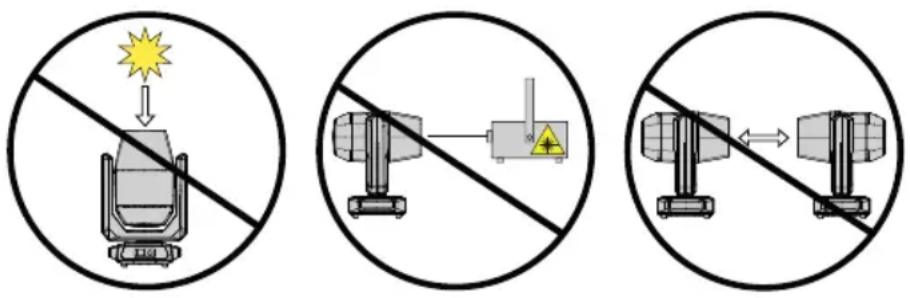
ATTENTION! POTENTIAL DAMAGE FROM EXTERNAL LIGHT SOURCES!
Solar radiation, laser radiation, and bundled light beams from other lights can damage the housing and internal components, such as filters, gobo and colour wheels, motors, cables, belts, as well as light sources!
Do not expose the device and especially the lens opening to direct sunlight, laser radiation, and bundled light beams from other lights during unpacking, installation, prolonged disuse, and operation! Always point the lens opening towards the floor when the device is not in use! Damage caused by external light sources is excluded from the manufacturer's warranty!

NOTES ON PORTABLE OUTDOOR DEVICES
- Temporary operation!
Event equipment is generally only designed for temporary operation. - Continuous operation or permanent structural installation – particularly outdoors – can impair the function, surfaces, and seals and cause premature material fatigue.
- Damage to the surface coating can impair the device's corrosion protection. Damaged surface coating (for example, scratches) must be promptly repaired using suitable measures.
PACKAGING CONTENT
Remove the product from the packaging and remove all packaging material.
Please check the completeness and integrity of the delivery and notify your distribution partner immediately after purchase if the delivery is not complete or if it is damaged.
The packaging content for the product includes:
▶ 1 × OTOS W3 wash moving head
▶ 1 × Mains cable
▶ 2 × Omega brackets
▶ User manual
INTRODUCTION
PROFESSIONAL OUTDOOR LED WASH MOVING HEAD CLOTOSW3
CONTROL FUNCTIONS:
11-channel dual, 21-channel dual, 22-channel RGBL effect, 21-channel HSI, 22-channel RGBL wash, 26-channel RGBL, 38-channel HSI, 48-channel RGBL, 63-channel RGBL, 187-channel RGBL full
Master/slave operation
Stand-alone operation
Art-Net
sACN
Wireless DMX
FEATURES:
Protection class IP65. 7× 50 W RGBL LEDs plus LED ring (46× 0.5 W RGB LEDs). DMX512. Wireless DMX. Art-Net and sACN. 5-pin DMX connections. Zoom function, 2× omega mounting brackets included. Operating voltage: 100–240 V AC.
The lights feature the RDM standard (remote device management). Remote device management allows the user to request the status of and configure RDM devices using an RDM-capable controller, such as the optionally available Cameo UNICON (product number: CLIREMOTE).
CONNECTIONS AND OPERATING/DISPLAY ELEMENTS
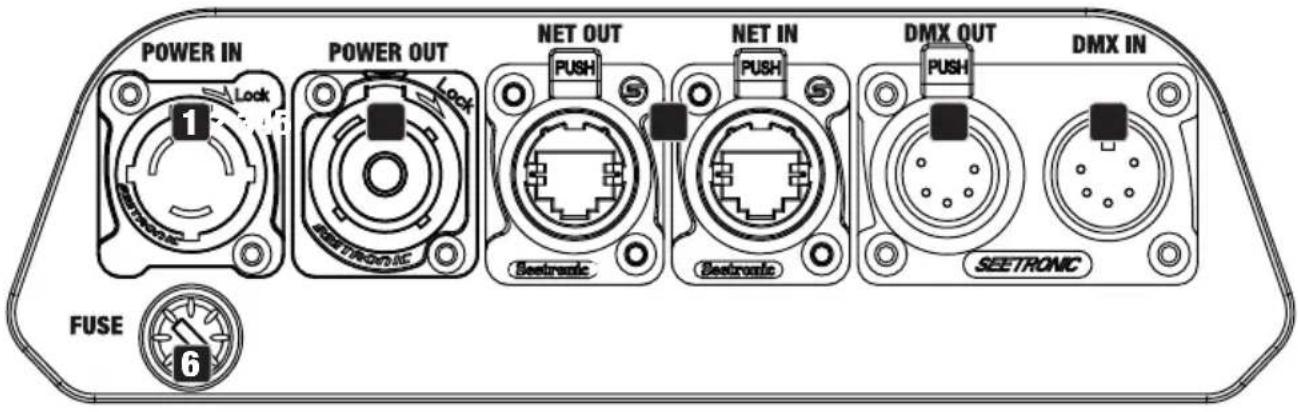
1 POWER IN
IP65 mains input socket with rubber sealing cap. Operating voltage 100–240 V AC / 50–60 Hz. Connection via supplied mains cable (when not in use, always close with the rubber sealing cap).
2 POWER OUT
IP65 mains output socket with rubber sealing cap. Enables power supply to other CAMEO lights. Ensure that the total current consumption of all connected devices does not exceed the value specified on the device in amperes (A) (when not in use, always close with the rubber sealing cap).
3 DMX IN
Male IP65 5-pin XLR socket for connecting a DMX control device (for example, DMX console; when not in use, always close with the rubber sealing cap).
4 DMX OUT
Female IP65 5-pin XLR socket for relaying the DMX control signal (when not in use, always close with the rubber sealing cap).
5 NET IN / OUT
RJ45 network connectors for connecting to an Art-Net or sACN network in order to relay the control signal (when not in use, always close with the rubber sealing cap). Use cables with IP65 rating and CAT 5e or better cables to set up the network.
6 FUSE
IP65 fuse holder for 5 × 20 mm fuses. IMPORTANT NOTE: Only replace the fuse with a fuse of the same type and value. Carefully reseal the fuse holder to further ensure IP65 tightness. In the event of repeated fuse failure, please contact an authorised service centre.
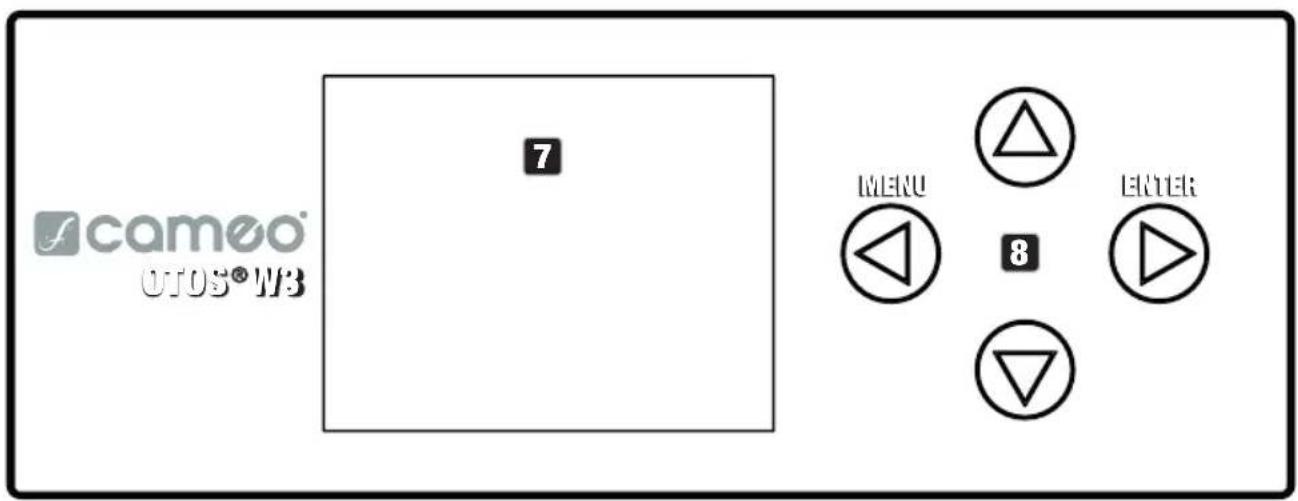
7 LC DISPLAY
The illuminated display shows the currently activated mode (main display), the menu items in the main menu and submenus, and the numerical value or status in certain menu items. If there is no control signal to the device, the characters in the centre of the display start flashing; the flashing stops as soon as a control signal is available (W-DMX, DMX, and slave operation).
8 TOUCH-SENSITIVE CONTROLS
MENU – Press MENU to access the main menu. Press again or repeatedly to return to the main display.
▲ and ▼ – Use ▲ and ▼ to select the menu items in the main menu (for example, DMX address, operating mode) and in the submenus. Change the value or status of a menu item, such as DMX address.
ENTER – Press ENTER to access the menu layer to make value or status changes, and to access one of the submenus. Press ENTER to confirm value or status changes.

- Before navigating the device menu, make sure that the control panel is dry and clean so that its functionality is not impaired.
- Moisture on the control panel can lead to incorrect operation of the light, for example, in outdoor conditions. Therefore, after configuring the light, activate the lock function to prevent incorrect operation by water (Settings -> Display -> Autolock). Deactivate the lock function: press ▲ and ▼ simultaneously for approximately 5 seconds.
PRESSURE EQUALISATION ELEMENT
The pressure equalisation element to prevent condensation forming inside the housing is located in the back of the device. In order to ensure its proper function, the element must be protected from contamination.
W-DMX™ ANTENNA
The antenna for W-DMX TM control is located inside the base of the device.

ATTENTION: In order to protect the DMX and network sockets from splashing water in accordance with the IP65 protection class, special input and output sockets must be used with special IP65-rated connectors, or they must be sealed using the rubber caps. When connected correctly, or when sealed correctly with the rubber sealing caps, the POWER IN and POWER OUT mains sockets are protected from splashing water, as in accordance with IP65.

The battery-powered display can be activated, even if the device is not connected to the mains. To do this, press and hold MENU for approximately 10 seconds. You can now access device information and change and save system settings without mains connection. The external control of the light is not activated in this case. For this reason, the display shows that there is no control signal even if the device has a control signal.
OPERATION
NOTES
- When the light is correctly connected to the mains, “Software update ... please wait”, the software version, “Welcome to Cameo”, and “... RESET” are shown on the display during start-up and motor reset. After this process, the light is ready for operation, and the previously activated operating mode is launched.
- The main display is activated automatically if no input is made within approximately 30 seconds.
MAIN DISPLAY
In the different operating modes, the main display shows different information which is relevant to the operating mode.
DMX and W-DMX operating modes Art-Net and sACN operating modes
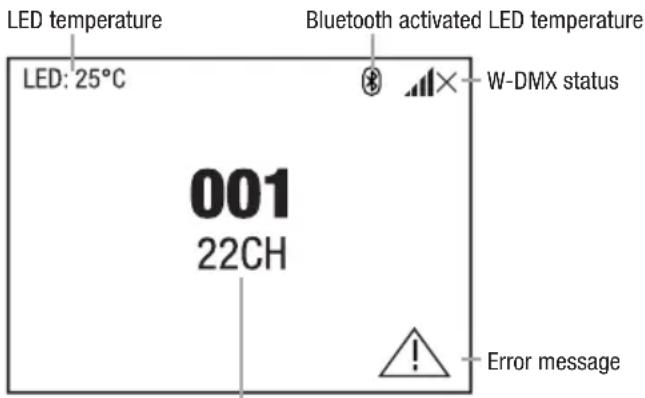
DMX start address and DMX mode
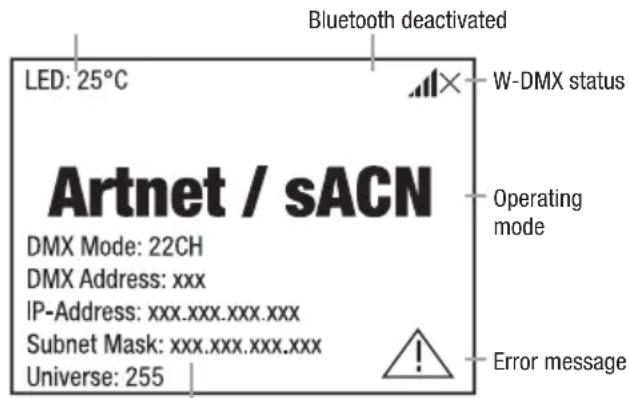
DMX operating mode, DMX address, IP address, subnet mask, and universe
Art-Net + DMX operating mode sACN + DMX operating mode
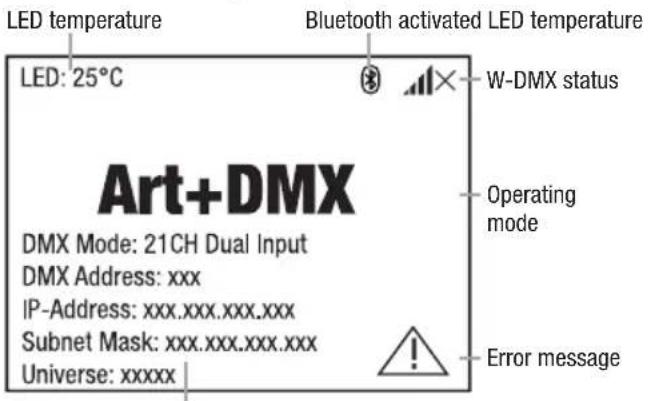
DMX operating mode, DMX address, IP address, subnet mask, and universe
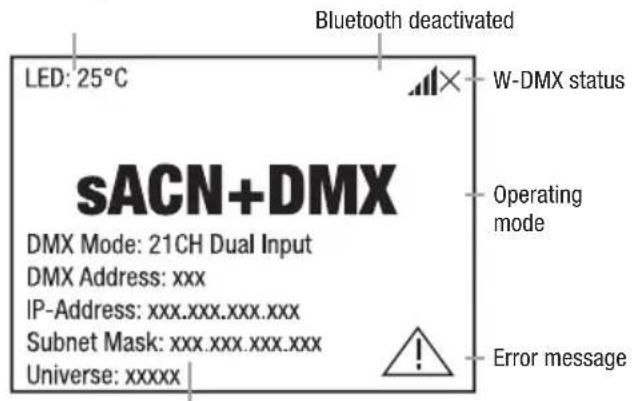
DMX operating mode, DMX address, IP address, subnet mask, and universe
Stand-alone operating modes Slave operating mode
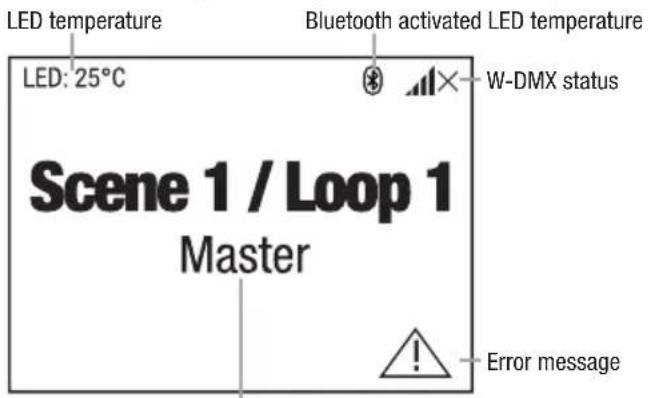
Scene or loop and signal output
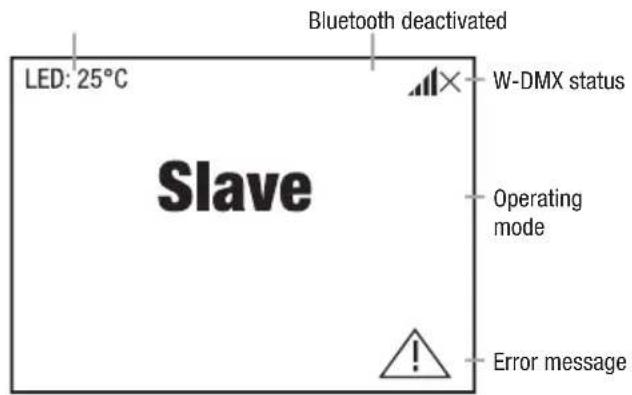
Note on the main display in the operating modes with external control: In the event that the control signal is interrupted, the characters in the centre of the display begin flashing; once the control signal is present again, the flashing stops.
Error message: If the warning symbol (triangle with exclamation mark) appears in the display, there is an error in one or more of the device's components. The affected components can be viewed in the System Info Menu under Error Info. If a restart or reset does not rectify the error, please contact an authorised service centre.
WIRELESS DMX
To pair a wireless DMX receiver with a wireless DMX transmitter, the corresponding menu item must be reset (Unlink). The receiver is now ready to pair and waiting for a pairing request from a transmitter. To start the pairing process, select Link or Force to pair in the transmitter's menu and confirm; the devices are now paired automatically. Simultaneous or consecutive pairing of several receivers to a transmitter (for example, for master/slave operation) can also be done in the same manner. A wireless DMX connection is always maintained until it is disconnected with the Reset command in the receiver or the Unlink command in the transmitter, regardless of whether a device has been disconnected from the power supply in the meantime.
WIRELESS DMX STATUS
 |  | 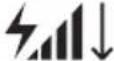 | 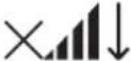 |  |  |
| W-DMX deactivated | W-DMX activated as receiver; not paired | W-DMX activated as receiver and paired; transmitter is switched off or out of range | W-DMX activated as receiver and paired; no DMX signal | W-DMX activated as receiver and paired; DMX signal present | W-DMX activated as transmitter |
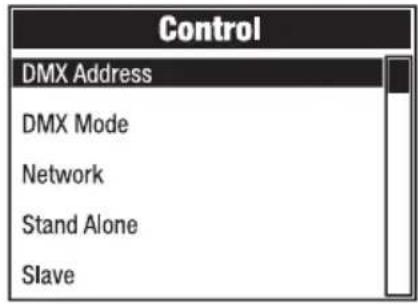
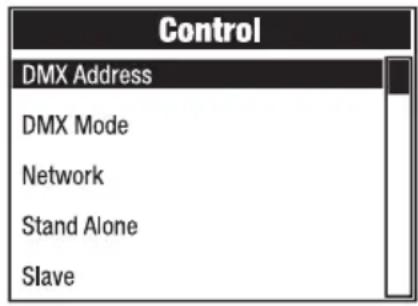
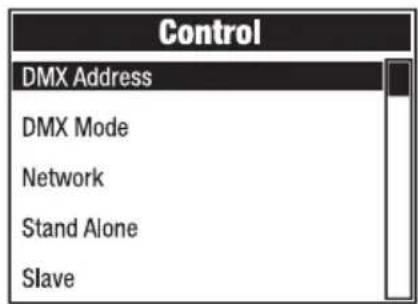
CONTROL MENU (Control)
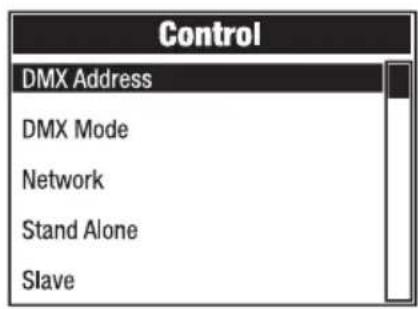
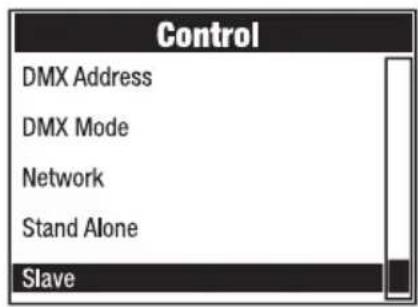
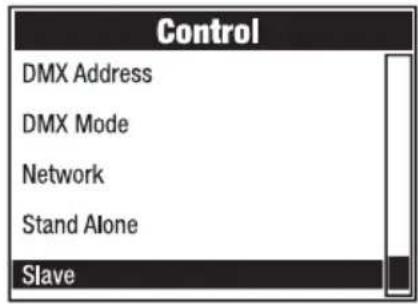
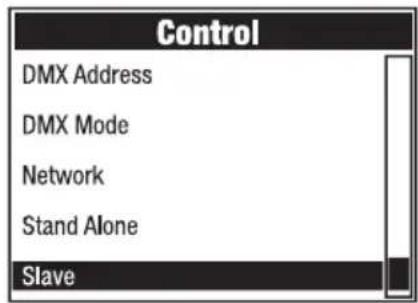
The control menu is used to select the various operating modes and set their options in the respective submenus.
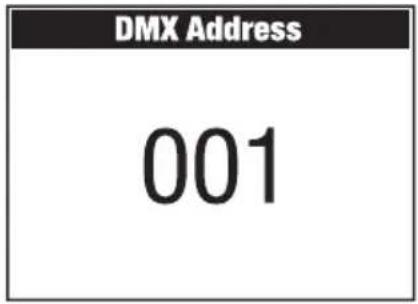
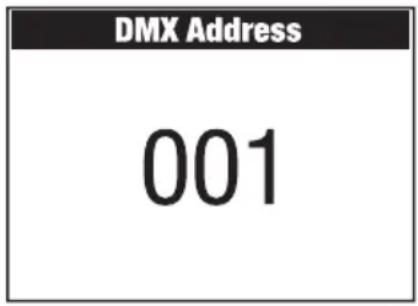
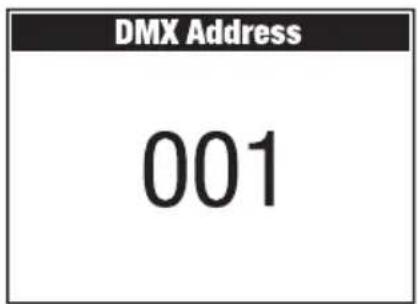
SETTING THE DMX START ADDRESS (DMX Address)
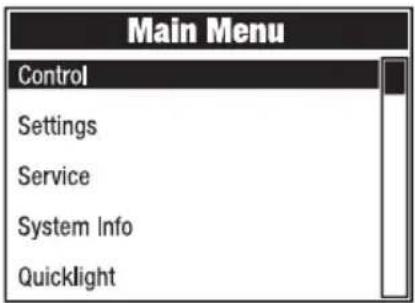
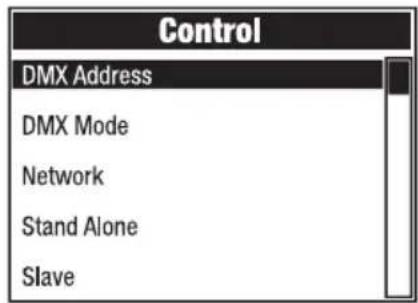
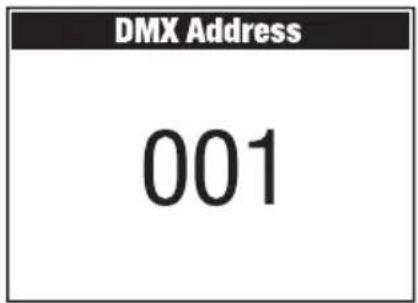
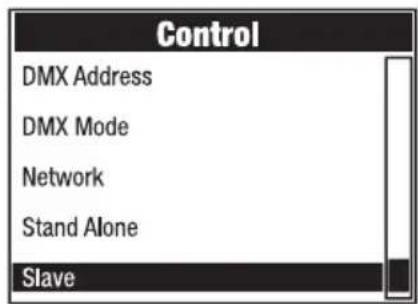
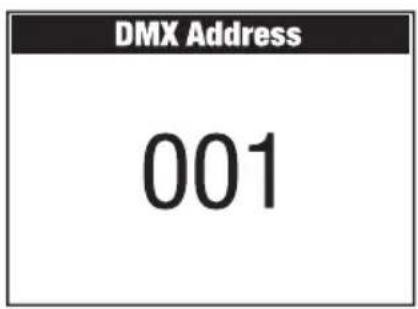
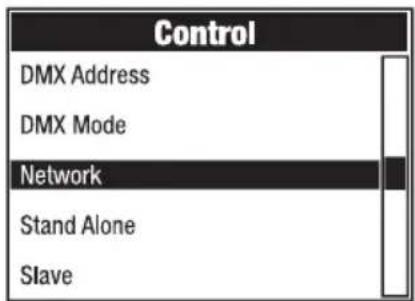
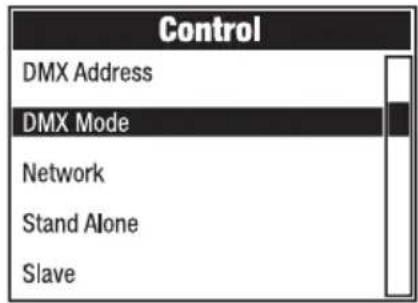
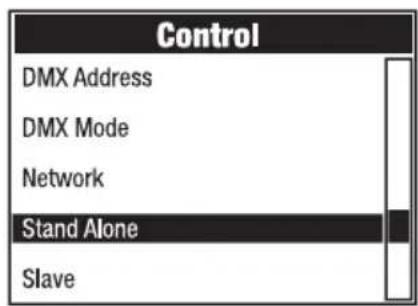
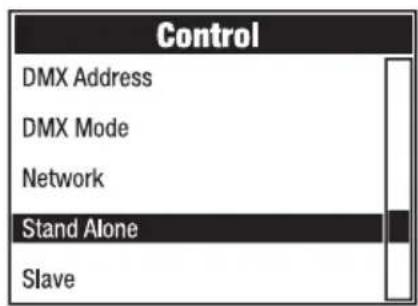
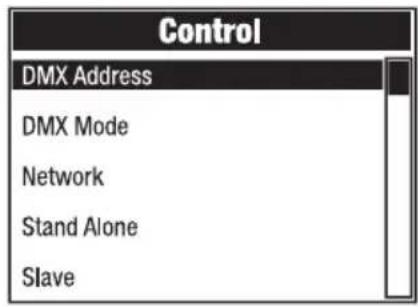
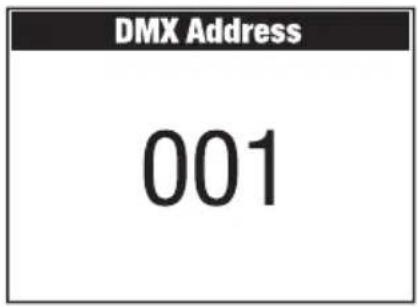
Starting from the main display, press MENU to access the main menu. Use ▲ and ▼ to select the Control menu and press ENTER. Now select the DMX Address menu item and confirm again. Use ▲ and ▼ to set the desired value and press ENTER to confirm.
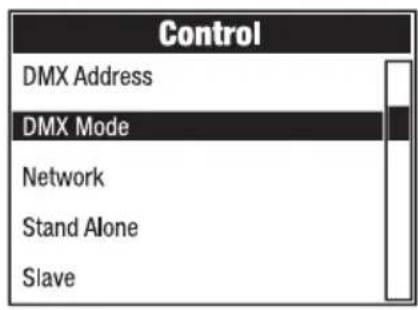
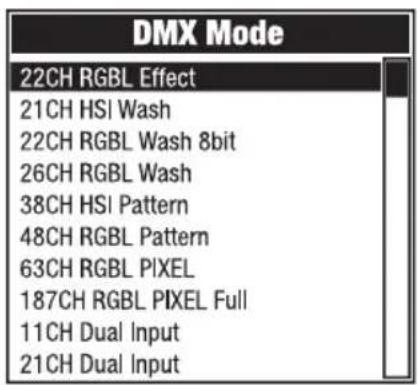
SETTING THE DMX OPERATING MODE (DMX Mode)
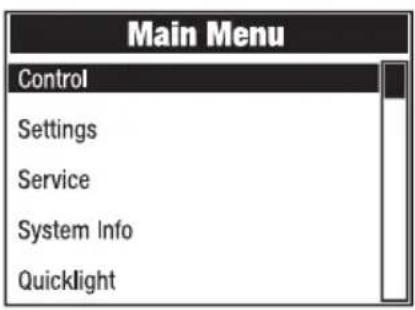
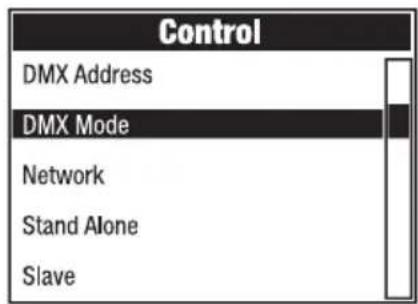
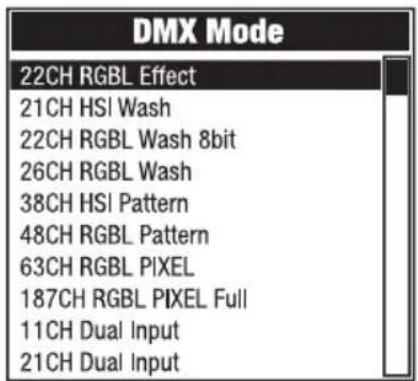
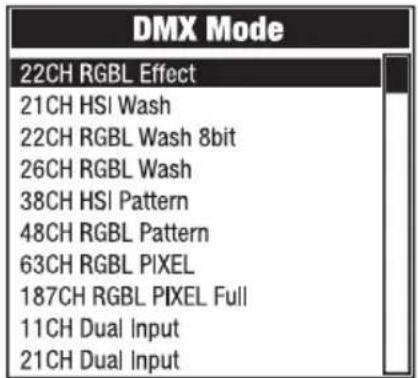
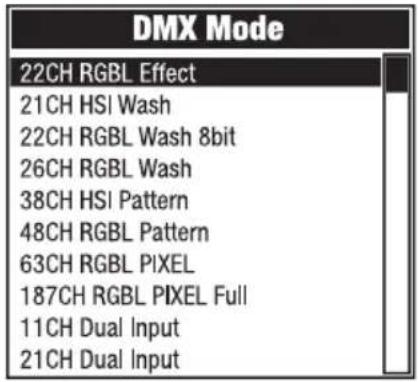
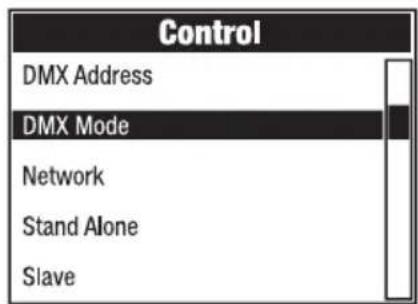
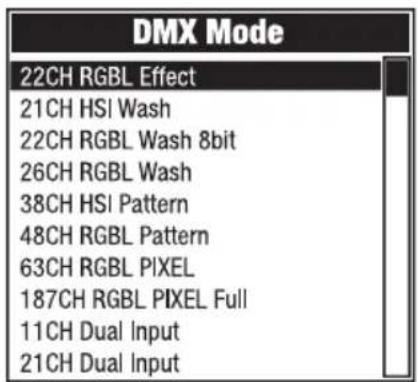
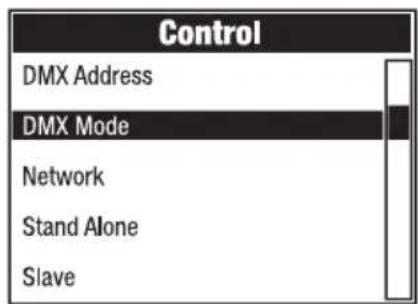
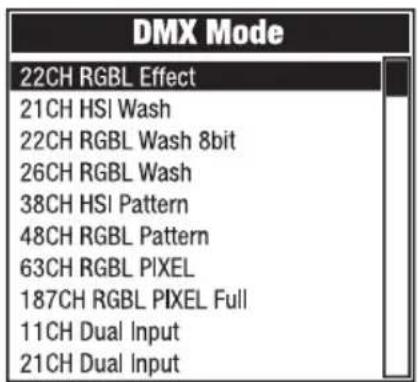
Starting from the main display, press MENU to access the main menu. Use ▲ and ▼ to select the Control menu and press ENTER. Now select the DMX Mode menu item and confirm again. Use ▲ and ▼ to select the desired DMX operating mode and press ENTER to confirm. DMX tables with the channel assignments can be found in the DMX CONTROL section of this user manual.
NETWORK (Network)
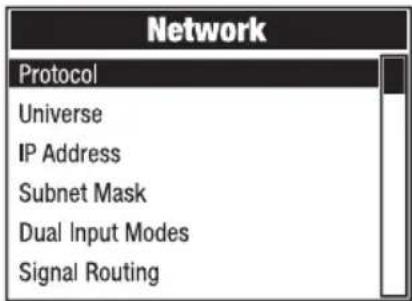
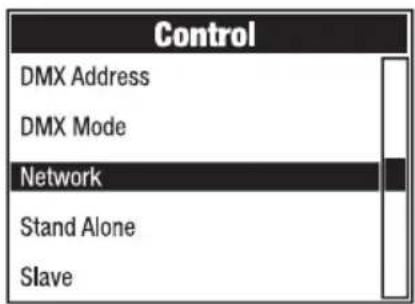
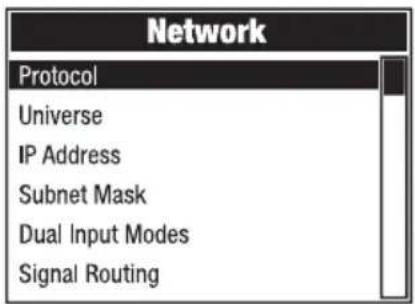
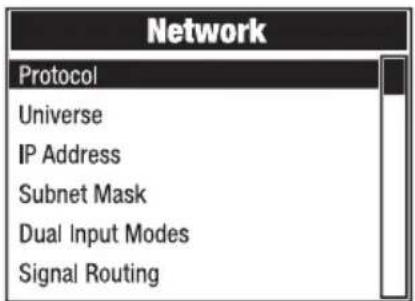
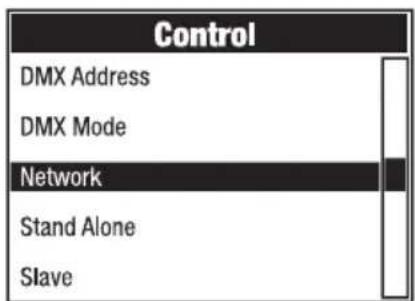
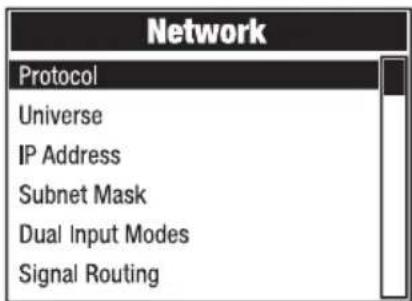
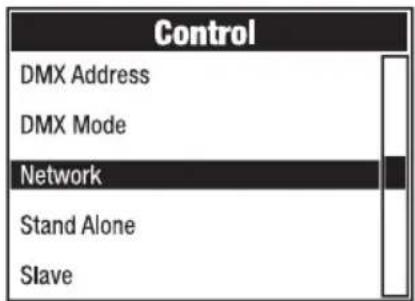
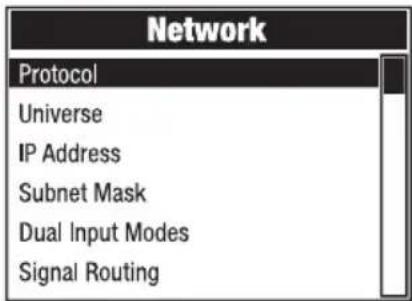
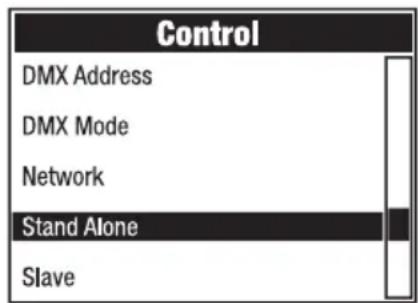
Starting from the main display, press MENU to access the main menu. Use ▲ and ▼ to select the Control menu and press ENTER. Now select the Network menu item and confirm again.
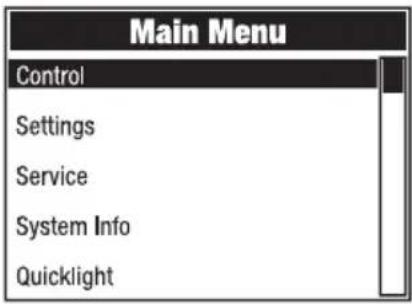
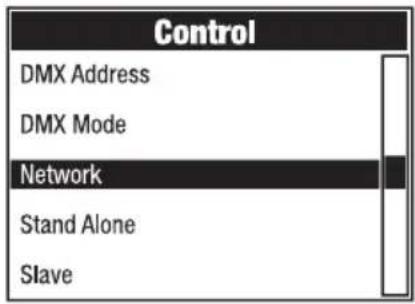
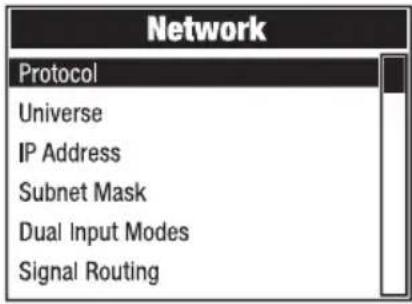
Information on the submenu items in the stand-alone menu and the corresponding setting options can be found in the table below (select with ▲ and ▼, confirm with ENTER, change the value or status with ▲ and ▼, confirm with ENTER).
| Art-Net network | |||
| Protocol | Artnet | Control via Art-Net | |
| sACN | Control via sACN | ||
| Universe | Absolute Universe | Setting of the absolute Art-Net universe | Dependent on net, subnet, and universe |
| Net | Setting of the Art-Net network | Depending on absolute universe | |
| Subnet | Setting of the Art-Net subnet | ||
| Universe | Setting of the Art-Net universe | ||
| IP Address | xxx.xxx.xxx.xxx | Setting of the IP address: set first block, confirm, set second block, confirm. | |
| Subnet Mask | xxx.xxx.xxx.xxx | Setting of the subnet mask: set first block, confirm, set second block, confirm. | |
| Dual Input Modes | Pixel Address | Setting of the pixel start address from 001 to 4xx | |
| Signal Setup | Pixel via network Pixel | control via network | |
| Pixel via DMX Pixel control via DMX | |||
| Signal Routing | Send to XLR | Relaying of the control signal to XLR Out | |
| Backup by XLR | Control via XLR with network signal interruption | ||
| Receive only | No connection between network signal and XLR connectors | ||
| sACN network | |||
| Protocol | Artnet | Control via Art-Net | |
| sACN | Control via sACN | ||
| Universe | Absolute Univ. | Setting of the sACN universe | |
| IP Address | xxx.xxx.xxx.xxx | Setting of the IP address: set first block, confirm, set second block, confirm. | |
| Subnet Mask | xxx.xxx.xxx.xxx | Setting of the subnet mask: set first block, confirm, set second block, confirm. | |
| Dual Input Modes | Pixel Address | Setting of the pixel start address from 001 to 4xx | |
| Signal Setup | Pixel via network Pixel control via network | ||
| Pixel via DMX Pixel control via DMX | |||
| Signal Routing | Send to XLR | Relaying of the control signal to XLR Out | |
| Backup by XLR | Control via XLR with network signal interruption | ||
| Receive only | No connection between network signal and XLR connectors | ||
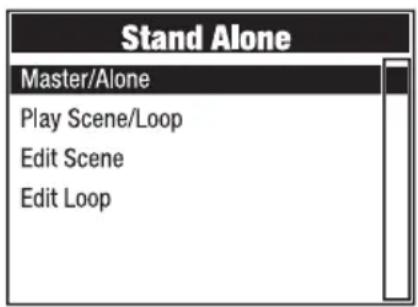
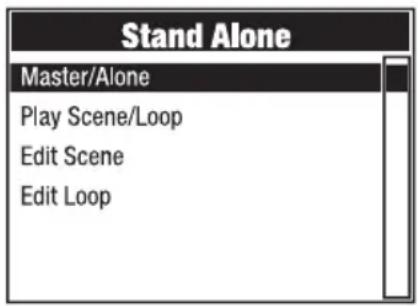
STAND-ALONE MENU (Stand Alone)
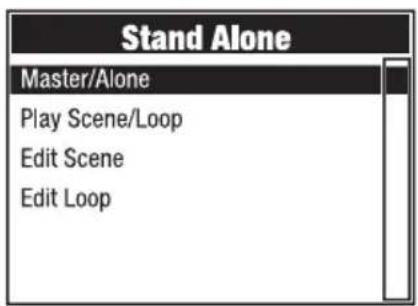
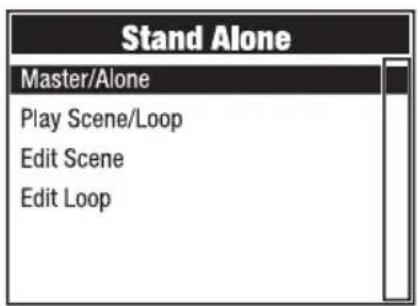
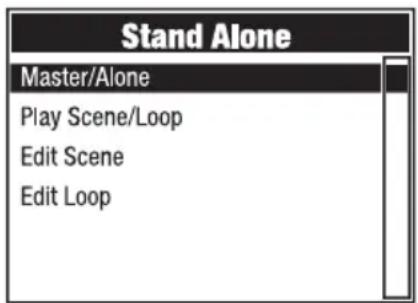
In the stand-alone operating modes "Play Scene" and "Play Loop", the control signal of the corresponding operating mode can be output to slave units via XLR (Master/Alone -> Master). If you do not want to output the control signal, deactivate the output (Master/Alone -> Alone).
Activate one of the eight available scenes (Scene 1–8) or one of the eight available loops (Loop 1–8). The scenes and loops are pre-programmed, but can be customised (Edit Scene / Edit Loop).
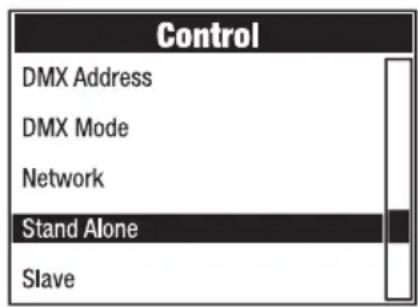
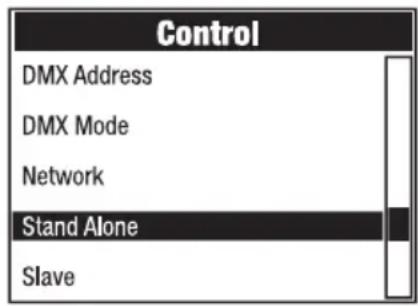
Starting from the main display, press MENU to access the main menu. Use ▲ and ▼ to select the Control menu item and confirm with ENTER. Now select the menu item Stand Alone and confirm again.
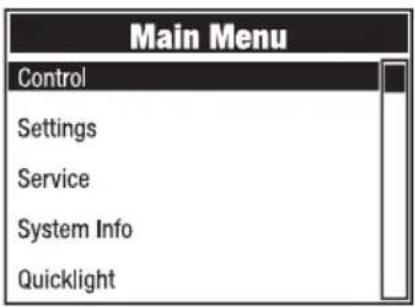
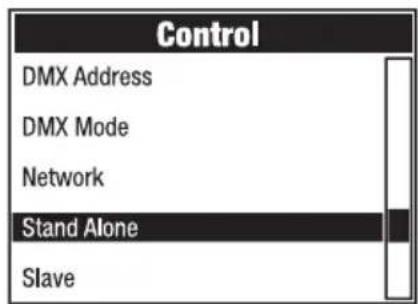
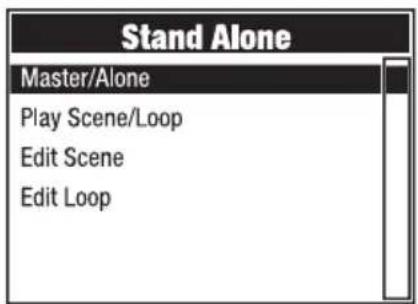
Information on the submenu items in the stand-alone menu and the corresponding setting options can be found in the table below (select with ▲ and ▼, confirm with ENTER, change the value or status with ▲ and ▼, confirm with ENTER).
| Stand alone | ||||
| Master/Alone | Master | Control signal is relayed via DMX OUT | ||
| Alone | Control signal is not relayed | |||
| Play Scene/Loop | Scene | Scene 1 - 8 | Selection and activation of the desired scene | |
| Loop | Loop 1 - 8 | Selection and activation of the desired loop | ||
| Edit Scene | Scene1 - 8 | Pan | Set each scene individually. Scenes are activated byselecting them. | |
| Tilt | ||||
| Dimmer | ||||
| ... | ||||
| Edit Loop | Loop 1 - 8 | Step | 1 - 8 | Selection of Step 1-8 |
| t-Step | 0s - 20min | Setting of the step time | ||
| t-Fade | 0s - 20 min | Setting of the fade time | ||
| User Scene | 1 - 8 | Selection of Scene 1-8 | ||
| Skip Step | No / Yes | Skip step: No/Yes | ||
SLAVE MODE (Slave)
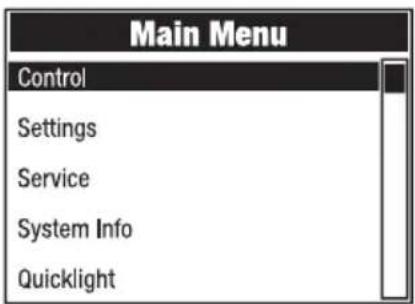
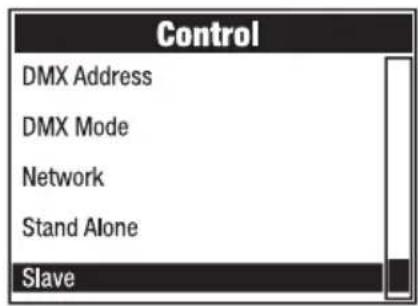
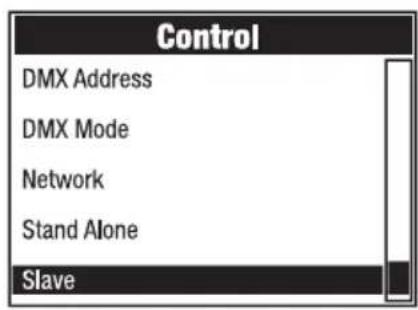
Starting from the main display, press MENU to access the main menu. Use ▲ and ▼ to select the Control menu item and confirm with ENTER. Now select the menu item Slave and confirm again. Activate the output of the control signal in the master unit (Control -> Stand Alone -> Master/Alone -> Master). Connect the slave and master units (same model, same software version) with a DMX cable or via W-DMX™ and activate the stand-alone operating mode “Play Scene” or “Play Loop” in the master unit. The slave unit will now follow the master unit.
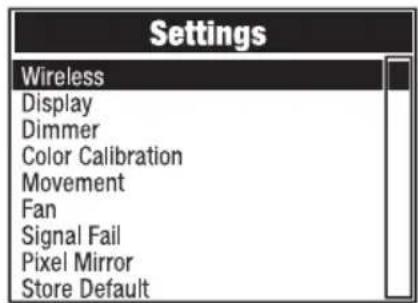
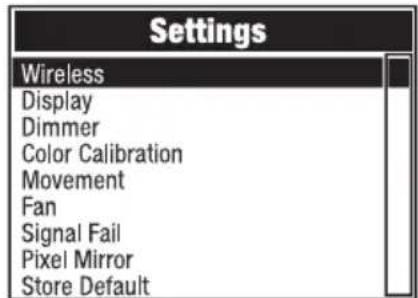
SYSTEM SETTINGS (Settings)
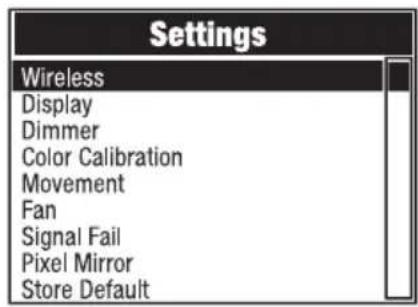
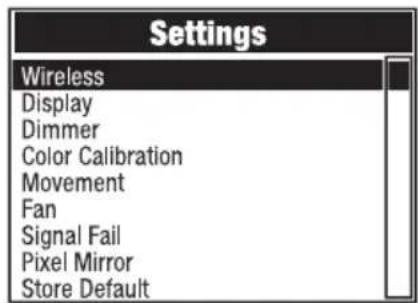
Starting from the main display, press MENU to access the main menu. Use ▲ and ▼ to select Settings and confirm with ENTER.
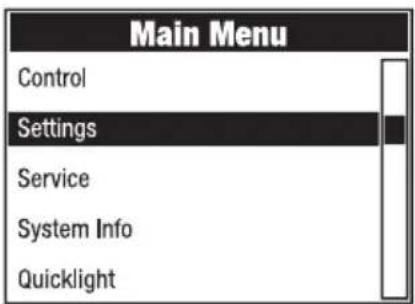
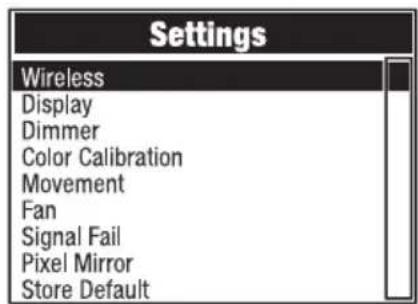
Information on the submenu items in the settings menu and the corresponding setting options can be found in the table below (select with ▲ and ▼, confirm with ENTER, change the value or status with ▲ and ▼, confirm with ENTER).
| Settings (bold = factory setting) | |||||
| Wireless | Wireless settings | State | On | Wireless module activated | |
| Off Wireless module deactivated | |||||
| Operating Mode | RX Wireless module = receiver | ||||
| TX CRMX | Wireless module = transmitter with CRMX transmitter standard | ||||
| TX G3 | Wireless module = transmitter with G3 transmitter standard | ||||
| TX G4s | Wireless module = transmitter with G4s transmitter standard | ||||
| Linking | Link | Pairing with compatible, ready-to-pair wireless devices | |||
| Unlink | Disconnect wireless DMX connections and place in pairing standby mode | ||||
| Linking Key | Linking Key | Setting of the connection key | |||
| CRMX Mode (only available with operating mode = RX) | CRMX | Receiver standard = CRMX | |||
| CRMX2 | Receiver standard = CRMX2 | ||||
| CRMX Universe | A - H | Selection of CRMX universe A to H | |||
| Universe Metadata | RGB Color Code | Red, Orange, Yellow, Green, Cyan, Blue, Purple, White | RGB code for colour display of the universe | ||
| Universe A 16-Character String Name | With a customisable name that identifies the universe | ||||
| Bluetooth | State | On Bluetooth switched on | |||
| Off | Bluetooth switched off | ||||
| Pin | On | PIN request switched on (factory setting 081569) | |||
| Off | PIN request switched off | ||||
| Wireless | Wireless settings | Signal Routing | Send to XLR | Relaying of the control signal to XLR (DMX OUT) |
| Backup by Control via XLR (DMX IN) with wireless signal interruption | ||||
| Receive only | No connection between wireless DMX signal and XLR connectors | |||
| Display | Display settings | Reverse | On | 180° display rotation (for example, for overhead installation) |
| Off | No display rotation | |||
| Auto | Automatic position detection (upright/ overhead mounting) | |||
| Off Timer | Always On | Permanently on | ||
| Off after 20s | Deactivation after approximately 20 seconds of inactivity | |||
| Autolock | On after 60s | Controls locked after approximately 60 seconds without input (LOCKED). Unlock: Press UP and DOWN simultaneously for approximately 5 seconds. | ||
| Off | Autolock function deactivated | |||
| Dimmer | Dimmer settings | Curve | Linear | Light intensity increases linearly with DMX value |
| Exponential | Light intensity can be finely adjusted at lower DMX values and broadly adjusted at higher DMX values | |||
| Logarithmic | Light intensity can be broadly adjusted at lower DMX values and finely adjusted at higher DMX values | |||
| S-Curve | Light intensity can be finely adjusted at lower and higher DMX values and broadly adjusted at medium DMX values | |||
| PWM Frequency | 650Hz, 1530Hz, 3600Hz, 12kHz, 18.9kHz, 25kHz | Selection of the LED PWM frequency | ||
| Response | LED | The light responds immediately to changes in the DMX value | ||
| Halogen | The light behaves in a similar way to a halogen light with gradual changes of brightness | |||
| Dimmer | Dimmer settings | Redshift | Dim to Warm | Simulates the colour drift when dimming a halogen light. When dimming the light, the colour temperature changes automatically to increasingly warm white tones and amber (and vice versa). |
| Off | Function deactivated | |||
| Color Calibration | Colour calibration | User | Custom colour calibration. Red, green, blue, and lime brightness setting with values ranging from 0 to 255 | |
| Smart | Factory setting | |||
| Movement | Head movements settings | Pan Reverse | On | Pan direction reversed |
| Off | Pan direction not reversed | |||
| Tilt Reverse | On | Tilt direction reversed | ||
| Off | Tilt direction not reversed | |||
| Pan Angle | 540° | Pan angle 540° | ||
| 630° | Pan angle 630° | |||
| Position Feedback | On | Automatic position correction enabled | ||
| Off | Automatic position correction disabled | |||
| Move in Black | On | Blackout during head movement | ||
| Off | No blackout during head movement | |||
| Silent Movement | On | Slowed motor movements for quieter operation | ||
| Off | Function deactivated | |||
| Fan | Fan setting | Auto | Automatic fan control | |
| Off | Deactivated fan with greatly reduced brightness | |||
| Constant Low | Constant low fan speed with reduced brightness, if necessary | |||
| Constant Mid | Constant average fan speed with reduced brightness, if necessary | |||
| Constant High | Constant high fan speed | |||
| Signal Fail | Operational status with DMX signal fault | Hold | Last command is retained | |
| Last Stand Alone | The last selected stand-alone operating mode is activated | |||
| Fade to Black (10s) | 10-second fade to blackout | |||
| Blackout | Activates blackout | |||
| Full | Full on | |||
| Pixel Mirror | Mirror pixels | Off | Off | |
| Horizontal | Mirror pixels horizontally | |||
| Vertical | Flip pixels vertically | |||
| Horizontal & Vertical | Flip pixels horizontally and vertically | |||
| Store Default | Save settings in three custom presets | User A | Save all current settings as user preset A | |
| User B | Save all current settings as user preset B | |||
| User C | Save all current settings as user preset C | |||
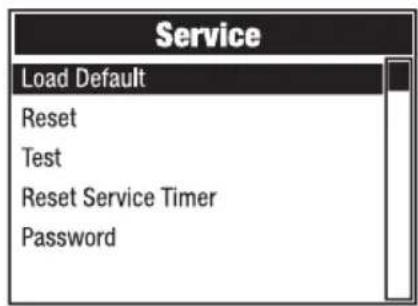
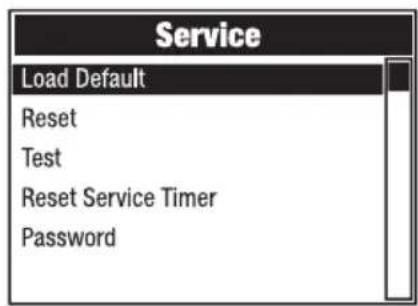
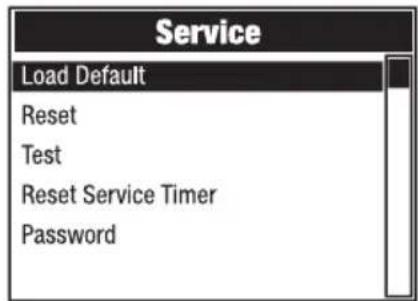
SERVICE MENU (Service)
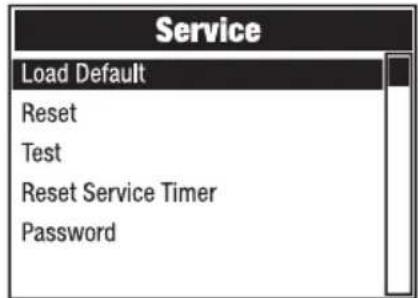
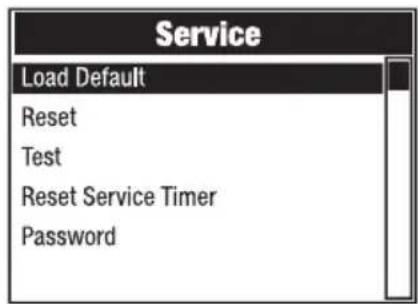
Starting from the main display, press MENU to access the main menu. Use ▲ and ▼ to select Service and confirm with ENTER.
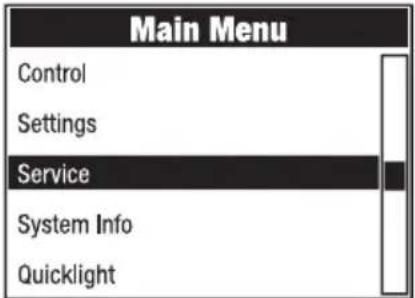
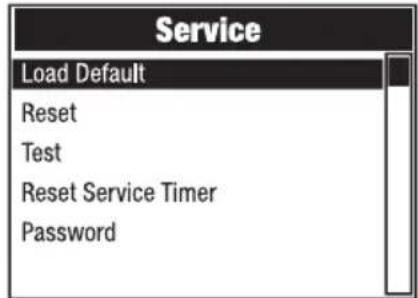
Information on the submenu items in the service menu and the corresponding options can be found in the table below (select with ▲ and ▼, confirm with ENTER, change the value or status with ▲ and ▼, confirm with ENTER).
| Service | ||
| Load Default | Factory Default | Reset to factory setting |
| User A | Reset to user A values (save user values: Settings -> Store Default) | |
| User B | Reset to user B values (save user values: Settings -> Store Default) | |
| User C | Reset to user C values (save user values: Settings -> Store Default) | |
| Reset | Pan/Tilt | Reset pan/tilt motors |
| Head | Reset motors in the device head | |
| All | Reset all motors | |
| Test | Test Sequence | Pre-programmed sequence to test all components |
| Stress Test | Pre-programmed sequence to test all components under maximum load | |
| Motor Test | Activate all motors individually with values of 000 to 255 | |
| Reset Service Timer | Back | Do not reset service operation time |
| Reset Now | Reset service operating time | |
| Password | For service purposes only | |
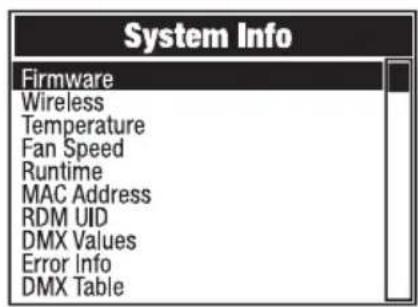
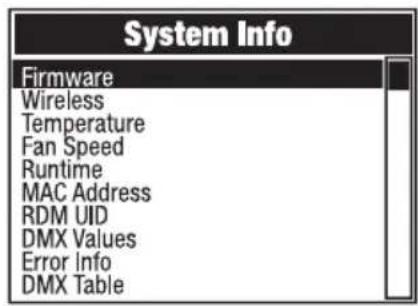
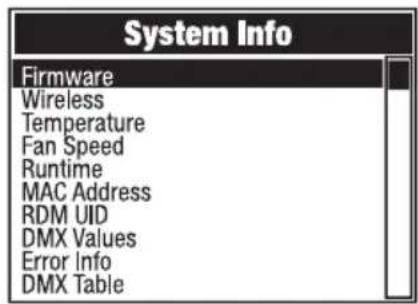
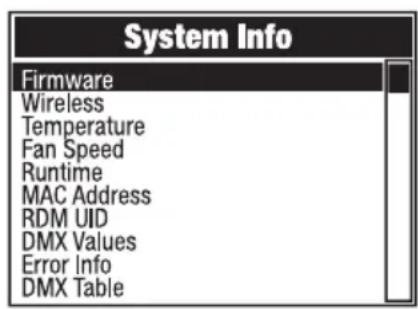
SYSTEM INFORMATION (System Info)
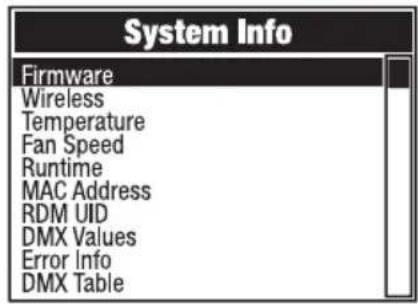
Starting from the main display, press MENU to access the main menu. Use ▲ and ▼ to select System Info and confirm with ENTER.
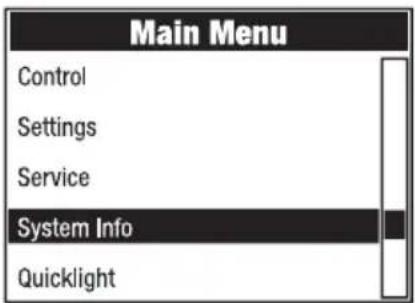
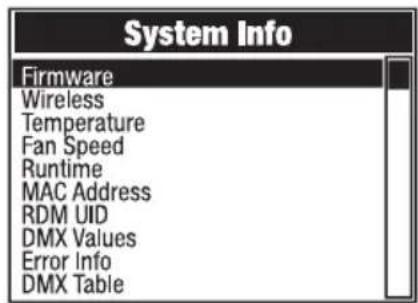
Information on the submenu items in the System Info menu and the corresponding options can be found in the table below (select with ▲ and ▼, confirm with ENTER).
| System info | |||
| Firmware | DISP | Vx.x.x | Display of the firmware version of the corresponding component |
| XY | Vx.x.x | ||
| LED1 | Vx.x.x | ||
| ... | Vx.x.x | ||
| Wireless | Module | TimoTwo | Wireless module model |
| Device Name | OTOSW3-xxxx | Device name | |
| Version | HW (Hardware) Hardware SW (Software) | Software version number | |
| Link Quality | % | Connection quality in per cent | |
| Data Source | None /DMX /Wireless Link /SPI /BLE | Information on the data source | |
| Wireless | Status | Operational:DMX Data:RDM Identify:RF Link:Link State: | Status information |
| Temperature | LED | xxx °C/°F | Display of the temperature of the corresponding component |
| Base | xxx °C/°F | ||
| Temperature Unit | Setting of the temperature | Area unit (press ENTER to change) | |
| °F | |||
| Fan Speed | xxxx RPM | Display of the speed of the corresponding fans | |
| Runtime | Total | xxxx h : xx m | Total operating time |
| Operation | xxxx h : xx m | Time in use | |
| LED | xxxx h : xx m | Lamp operating time | |
| Service | xxxx h : xx m | Operating time since the last reset of the service operating time | |
| MAC Address | xx:xx:xx:xx- :xx:xx | MAC address | |
| RDM UID | RDM unique identifier | ||
| DMX Values | Display of the DMX values present | ||
| Error Info | Error display in case of malfunction | ||
| DMX Table | Display of DMX mode tables | ||
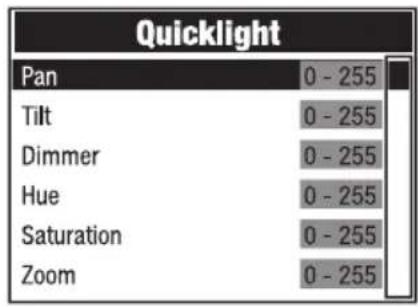
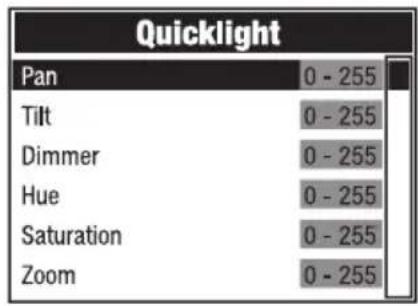
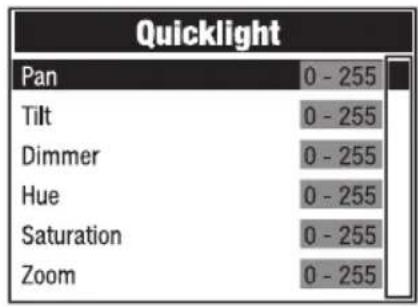
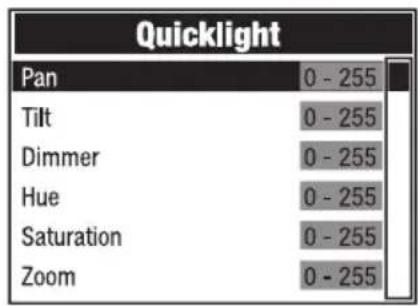
QUICKLIGHT (Quicklight)
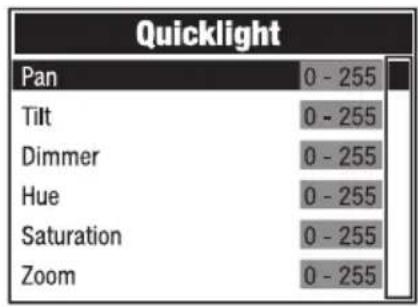
Set up a scene quickly and easily using the basic moving head functions without an external controller. Starting from the main display, press MENU to access the main menu. Use ▲ and ▼ to select Quicklight and confirm with ENTER. Select the desired menu item with ▲ and ▼, confirm with ENTER, change the value with ▲ and ▼, and confirm the value change with ENTER.
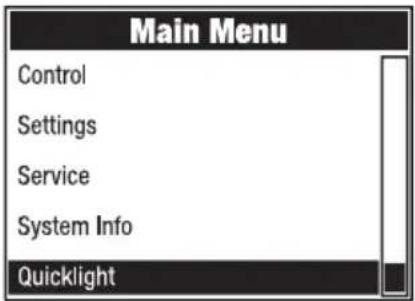
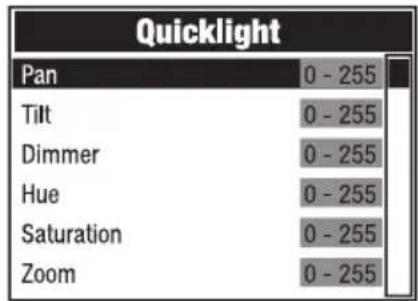
If the Quicklight mode is activated, the display does not automatically return to the main display. Quicklight mode is automatically cancelled when you exit the Quicklight menu. The settings in the Quicklight menu are retained even after restarting the light.
SETUP AND INSTALLATION

DANGER: Overhead mounting requires extensive experience, including calculating the load limit values of the mounting hardware and regular safety inspection of all installation materials and lights. If you do not have these qualifications, do not attempt to perform installation yourself. Refer instead to a qualified professional. There is a risk that devices that are incorrectly mounted and secured may come loose and fall down. This can cause serious injury or death.
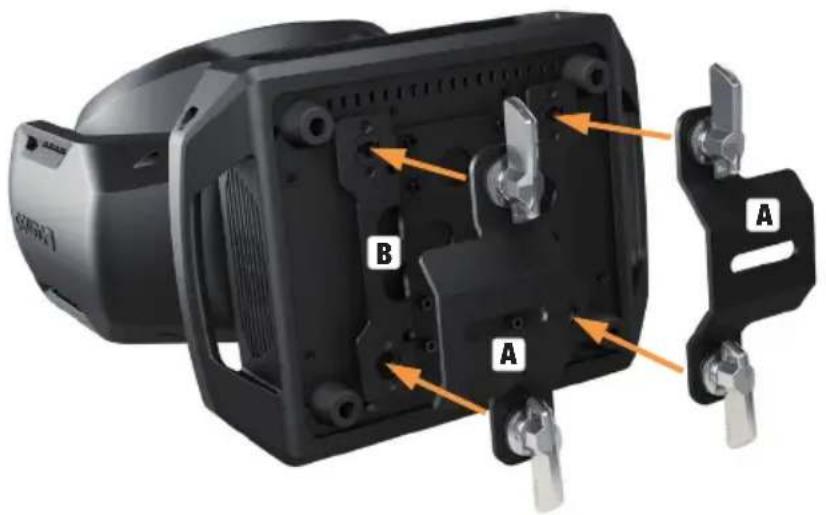
Thanks to its integrated rubber feet, the light can be positioned in a suitable location on a level surface. It can be truss-mounted using two omega brackets, which are attached to the base of the device (A). If required, the two omega brackets can also be mounted on the appliance base rotated by 90°. Two omega brackets are included in the packaging content. Suitable truss clamps are available as an option. Ensure firm connections and secure the light to the securing lug (B) with a suitable safety cable.
CARE, MAINTENANCE, AND REPAIR
In order to ensure the long-term, proper functioning of the device, it must be regularly cleaned and, if necessary, serviced. The care and maintenance required depends on the intensity of use and the environment in which it is used. We recommend a visual inspection before each operation. Furthermore, we recommend carrying out all the applicable service measures specified below once every 500 operating hours or, in the case of a lower intensity of use, at the latest after one year. Warranty claims may be limited should defects result from inadequate service and maintenance.
CARE (carried out by user)
WARNING! Before carrying out any care or maintenance, the power supply – and, if possible, all device connections – must be disconnected.
PLEASE NOTE! Improper care can lead to impairment of the device or even its destruction.
- Housing surfaces must be cleaned with a clean, damp cloth. Make sure that no moisture can penetrate the device.
- Air inlets and outlets must be regularly cleaned of dust and dirt. If compressed air is used, make sure that damage to the device is prevented (for example, fans must be blocked in this case, as they could otherwise over-rev).
- Cables and connectors must be cleaned regularly, and dust and dirt must be removed.
- In general, no cleaning agents or abrasive agents may be used; otherwise, the surface finish may be damaged.
- Devices must be stored in a dry environment and protected from dust and dirt.
- To ensure correct and safe operation, all accessible or removable lenses and light-emitting apertures must be cleaned regularly.
MAINTENANCE AND REPAIR (by qualified personnel only)
DANGER! There are live components in the device. Even after disconnecting from the mains, there may still be residual voltage in the device, for example, due to charged capacitors.

PLEASE NOTE! Maintenance and repair work may only be carried out by sufficiently qualified specialist personnel. If in doubt, consult a specialist workshop.

PLEASE NOTE! Improperly performed maintenance work may affect warranty claims.

PLEASE NOTE! For conversion or retrofit sets provided by the manufacturer, it is essential to observe the enclosed installation instructions.
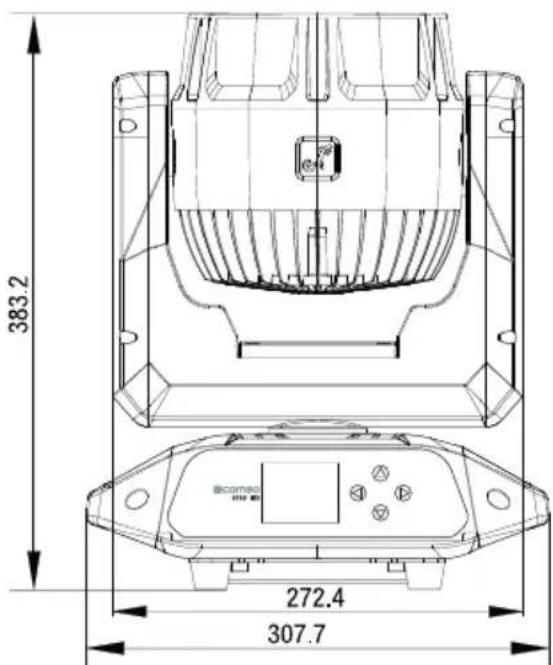
DIMENSIONS (mm)

TECHNICAL DATA
| Item number | CLOTOSW3 |
| Product category | LED Wash Moving Light |
| Type | Moving Head |
| Light source center LEDs | 7 x 50 W LED |
| Color mixing center LEDs | RGBL |
| Number of ring segments | 46 |
| Color mixing ring LEDs | RGB |
| Pan angle | adjustable: 630°/540° |
| Tilt angle | 241° |
| LED PWM | 650 Hz; 1530 Hz; 3600 Hz; 12 kHz; 18,9 kHz; 25 kHz |
| Dimmer resolution | 16-bit |
| Dimmer curves | Linear; Exponential; Logarithmic; S-Curve |
| Calibration | Yes |
| CRI | >85 |
| Luminous flux | 4000 lm |
| Illuminance | 5000 lx (10 m, narrow) |
| Beam angle / field angle | 4-45° / 10-60° |
| CCT | 1800 K - 10000 K |
| Control protocols | DMX; RDM; W-DMX; CRMX |
| Data connections | 5pin XLR male + female; 2x RJ45 |
| DMX modes | 22CH RGBL Effect21CH HSI Wash22CH RGBL Wash 8bit26CH RGBL Wash38CH HSI Pattern48CH RGBL Pattern63CH RGBL Pixel187CH RGBL Pixel Full11CH Dual Input21CH Dual Input |
| DMX functions | Pan (fine); Tilt (fine); Dimmer (fine); Strobe functions, RGBL (fine); Hue (fine); Saturation; Colour Temperature; Tint; Color Presets; Color Crossfade; Ring Dimmer; Ring RGB; Ring Strobe, Ring Pattern Selection; Ring Pattern Speed; Pattern Folder; Pattern Selection; Pattern Position & Speed; Pattern Transition; Pattern Fade/Wake Effect; Background Dimmer (fine); Background Strobe; Background RGBL; Background Hue (fine); Background Saturation; Background Colour Temperature; Background Tint; Background Colour Presets; Background Colour Crossfade; Zoom; LED Control Crossfade; Device Settings; RGBL; Ring RGB |
| Stand alone | Scene; Loop |
| System settings | Display; Dimmer; Color Calibration; Movement; Fan; Signal Fail; Pixel Mirror |
| Display / indicators | LC-display |
| IP rating | IP65 for temporary outdoor use |
| Ambient temperature rating | -10° - 40°C |
| Cooling system | Temperature controlled fans |
| Operation voltage | 100 - 240 V AC / 50-60 Hz |
| Max. power consumption | 350 W |
| Fuse | T4 A / 250 V |
| Power connection | TrueOne compatible |
| Power link | TrueOne compatible |
| Max. power out (110V) | 11 A |
| Max. power out (230V) | 13 A |
| Minimum distance to illuminated surface | 3 m |
| Minimum distance to normally flammable materials | 0.5 m |
| Risk group | RG1 |
| Housing | Metal |
| Dimensions (B x H x D) 308 x 383 x 229 mm | |
| Weight | 10.9 kg |
EXPLANATION OF IP PROTECTION CLASS
- An IP protection class only reflects protection against solid objects and water. It does not describe general weather resistance, such as protection from UV radiation and temperature.
- The first identification digit indicates protection against dust, solid objects, and contact:
| IP2X Protected against solid foreign objects ≥ 12.5 mm in diameter |
| IP3X Protected against solid foreign objects ≥ 2.5 mm in diameter |
| IP4X Protected against solid foreign objects ≥ 1.0 mm in diameter |
| IP5X Protected against dust in harmful quantities and completely protected against contact |
| IP6X Are dust-tight and completely protected against contact |
- The second digit indicates protection against water:
| IPX0 No protection |
| IPX1 Protection against dripping water |
| IPX2 Protection against dripping water when the device is tilted by up to 15° |
| IPX3 Protection against falling spray water up to 60° from the vertical |
| IPX4 Protection against splashing water on all sides |
| IPX5 Protection against water jets (nozzle) from any angle |
| IPX6 Protection against strong water jets |
| IPX7 Protection against temporary immersion |
- In addition, some device-specific measures such as covers and sealing caps are necessary in order to achieve the specified protection class (for example, protective caps on unused connections).

The product's IP protection class can be found in the technical data and is printed on the device.
MINIMUM DISTANCE TO ILLUMINATED SURFACE
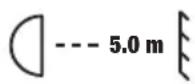
This symbol with the distance stated in metres (m) indicates the minimum distance of the light fixture to the illuminated surface. In this example, the distance is 5 m. The value valid for this device can be found in the technical data in this manual and is printed on the device!
MINIMUM DISTANCE TO NORMALLY FLAMMABLE MATERIALS
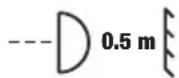
This symbol with the distance stated in metres (m) indicates the minimum distance of the device to normally flammable materials. In this example, the distance is 0.5 m. The value valid for this device can be found in the technical data in this manual!
DISPOSAL

Packaging:
- Packaging can be fed into the reusable material cycle using the usual disposal methods.
- Please separate the packaging in accordance with the disposal laws and recycling regulations in your country.
Device:
- This device is subject to the European Directive on Waste Electrical and Electronic Equipment, as amended. WEEE Directive Waste Electrical and Electronic Equipment. Waste equipment does not belong in household waste. Waste equipment must be disposed of via an authorised waste disposal company or a municipal waste disposal facility. Please observe the applicable regulations in your country!
- Observe all disposal laws applicable in your country.
- As a private customer, you can obtain information on environmentally friendly disposal options from the vendor of the product or the appropriate regional authorities.
MANUFACTURER'S DECLARATIONS
Manufacturer's warranty and limitation of liability
Adam Hall GmbH, Adam-Hall-Str. 1, D-61267 Neu-Anspach
E-mail: Info@adamhall.com / +49 (0)6081 / 9419-0
Our current warranty conditions and limitation of liability can be found at:
https://cdn-shop.adamhall.com/media/pdf/Manufacturers-Declarations-CAMEO_DE_EN_ES_FR.pdf
For service requests, please contact your distribution partner.
CE conformity
Adam Hall GmbH hereby confirms that this product meets the following guidelines (where applicable):
Low-Voltage Directive (2014/35/EU)
EMC Directive (2014/30/EU)
RoHS (2011/65/EU)
RED (2014/53/EU)
EC Declaration of Conformity
Declarations of conformity for products subject to the LVD, EMC, and RoHS Directives can be requested from info@adamhall.com
Declarations of conformity for products subject to RED can be downloaded from www.adamhall.com/compliance/
Subject to misprints and errors, as well as technical or other modifications!
DEUTSCH
NETZWERK (Network)
TECHNISCHE DATEN
| Artikelnummer CLOTOSW3 | |
| Produktkategorie LED Wash Moving Light | |
| Typ Moving Head | |
| Center LEDs 7 x 50 W LED | |
| Farbmischung Center LEDs RGBL | |
| Anzahl der Ringsegmente 46 | |
| Farbmischung Ring LEDs RGB | |
| Pan-winkel Einstellbar: 630°/540° | |
| Tilt-winkel 241° | |
| LED PWM 650 Hz; 1530 Hz; 3600 Hz; 12 kHz; 18,9 kHz; 25 kHz | |
| Auflösung des Dimmers 16-bit | |
| Dimmerkurven | Linear; Exponentiell; Logarithmisch; S-Kurve |
| Kalibrierung | Ja |
| CRI >85 | |
| Lichtstrom | 4000 lm |
https://cdn-shop.adamhall.com/media/pdf/Manufacturers-Declarations-CAMEO DE EN ES FR.pdf

REMARQUES À PROPOS DES APPAREILS PORTABLES POUR EXTÉRIEUR
RÉGLAGE DU MODE DE FONCTIONNEMENT DMX (DMX Mode)
RÉSEAU (Network)
PARAMÈTRES SYSTÈME (Settings)

Directive CEM (2014/30/UE)
RoHS (2011/65/EU)
RED (2014/53/EU)
AJUSTE DEL MODO OPERATIVO DMX (DMX Mode)

RED (Network)

AJUSTES DEL SISTEMA (Settings)
DATOS TÉCNICOS
| Referencia CLOTOSW3 | |
| Categoría de producto Cabeza móvil LED wash | |
| Tipo Cabeza móvil | |
| LED centrales 7 LED de 50 W | |
| Colores LED centrales RGBL | |
| Número de segmentos del anillo 46 | |
| Mezcla de colores en los LED del anillo | RGB |
| Giro horizontal Ajustable: 630°/540° | |
| Giro vertical 241° | |
| PWM del LED 650 Hz, 1.530 Hz, 3.600 Hz, 12 kHz, 18,9 kHz, 25 kHz | |
| Resolución del atenuador 16 bits | |
| Curvas de atenuación Lineal, exponencial, logarítmica, curva en S | |
| Calibración | Sí |
| IRC | >85 |
| Flujo luminoso 4.000 lm | |
| Illuminancia 5.000 lx (10 m, estrecho) | |
| Ángulo de haz / ángulo de campo 4°-45° / 10°-60° | |
| CCT 1.800 K-10.000 K | |
| Protocolos de control DMX, RDM, W-DMX, CRMX | |
| Conectores de datos XLR macho y hembra de 5 pines, 2 RJ45 | |
| Modos DMX | "22CH RGBL Effect21CH HSI Wash22CH RGBL Wash 8bit26CH RGBL Wash38CH HSI Pattern48CH RGBL Pattern63CH RGBL Pixel187CH RGBL Pixel Full11CH Dual Input21CH Dual Input" |
| Funciones DMX: | Pan (fine), Tilt (fine), Dimmer (fine), Strobe, RGBL (fine), Hue (fine), Saturation, Colour Temperature, Tint, Colour Presets, Colour Crossfade, Ring Dimmer, Ring RGB, Ring Strobe, Ring Pattern Selection, Ring Pattern Speed, Pattern Folder, Pattern Selection, Pattern Position + Speed, Pattern Transition, Pattern Fade/Wake Effect, Background Dimmer (fine), Background Strobe, Background RGBL, Background Hue (fine), Background Saturation, Background Colour Temperature, Background Tint, Background Colour Presets, Background Colour Crossfade, Zoom, LED Control Crossfade, Device Settings, RGBL, Ring RGB |
| Autónomo Scene, Loop | |
| Ajustes del sistema | Display, Dimmer, Colour Calibration, Movement, Fan, Signal Fail, Pixel Mirror |
| Pantalla/indicadores Pantalla LCD | |
| Clasificación IP IP65 para uso temporal en exteriores | |
| Temperatura ambiente -10 °C-+40 °C | |
| Refrigeración Ventiladores controladores por temperatura | |
| Tensión de funcionamiento | 100-240 Vca, 50/60 Hz |
| Consumo máximo | 350 W |
| Fusible | T4 A, 250 V |
| Conector eléctrico | Compatible con TrueOne |
| Conexión eléctrica en cadena | Compatible con TrueOne |
| Corriente máx. de salida (110 V) | 11 A |
| Corriente máx. de salida (230 V) | 13 A |
| Distancia mínima a la superficie iluminada | 3 m |
https://cdn-shop.adamhall.com/media/pdf/Manufacturers-Declarations-CAMEO DE EN ES FR.pdf
USTAWIANIE TRYBU PRACY DMX (DMX Mode)
USTAWIENIA SIECIOWE (Network)
USTAWIENIA SYSTEMOWE (Settings)
KONFIGURACJA I INSTALACJA

DANE TECHNICZNE
https://cdn-shop.adamhall.com/media/pdf/Manufacturers-Declarations-CAMEO DE EN ES FR.pdf

NOTE SUI DISPOSITIVI PORTATILI PER ESTERNI
IMPOSTAZIONE DELLA MODALITÀ OPERATIVA DMX (DMX Mode)
RETE (Network)
IMPOSTAZIONI DI SISTEMA (Settings)
DATI TECNICI
| 11CH Dual | 21CH Dual | 63CH RGBL Pixel | 187CH RGBL Pixel Full | ||||||
| Channel | Channel | Channel | Channel | Function | Values | Subgroup | |||
| 1 1 1 | 1 Pan | 000 - 2 | 55 | 0% to 100% Pan | |||||
| 2 2 2 | 2 Pan | fine 000 | - 255 | ||||||
| 3 3 3 | 3 Tilt | 000 - 25 | 5 | 0% to 100% Tilt | |||||
| 4 4 4 | 4 Tilt | fine 000 | - 255 | ||||||
| 5 5 5 | 5 Dim | mer 000 | - 255 | 0% to 100% Dimmer | |||||
| 6 6 6 | 6 | Dimmer fine | 000 | 255 | |||||
| 7 7 7 | 7 | Strobe Functions | 000 | 005 Open | Multi-functional Strobe | ||||
| 006 | 010 Closed | ||||||||
| 011 | 022 Ramp up/down slow to fast | ||||||||
| 023 | 033 | Ramp up/down random slow to fast | |||||||
| 034 | 045 Ramp up slow to fast | ||||||||
| 046 | 056 | Ramp up random slow to fast | |||||||
| 057 | 068 Ramp down slow to fast | ||||||||
| 069 | 079 | Ramp down random slow to fast | |||||||
| 080 | 102 | Random Strobe effect slow to fast | |||||||
| 103 | 127 | Strobe Break effect 5s to 1s (short burst with break) | |||||||
| 128 | 250 | Strobe slow to fast (<1Hz to 20Hz) | |||||||
| 251 | 255 Open | ||||||||
| 8 | 8 | Red 000 | - 255 | 0% to 1 | 100% | Additive Color Mixing | |||
| 9 Red fine 000 - 255 | 255 0% to 100% | Additive Color Mixing | ||||||
| 9 10 | Green 000 - 255 | 0% to 100% | ||||||
| 11 | Green fine | 000 - 255 | ||||||
| 10 12 | Blue 000 - 255 | 0% to 100% | ||||||
| 13 Blue fine 000 - 255 | - 255 | |||||||
| 11 14 | Lime 000 - 255 | 0% to 100% | ||||||
| 15 | Lime fine | 000 - 255 | ||||||
| 12 16 | Color Temperature (affects Color Mixing) | 000 - 005 Off | CCT | |||||
| 006 - 006 Warm white | ||||||||
| 007 - 046 Warm white to 2700K | ||||||||
| 047 - 047 Bulb White (2700K) | ||||||||
| 048 - 087 2700K to 3200K | ||||||||
| 088 - 088 Halogen White (3200K) | ||||||||
| 089 - 128 3200K to 4000K | ||||||||
| 129 - 129 Neutral White (4000K) | ||||||||
| 130 - 169 4000K to 5600K | ||||||||
| 170 - 170 Studio White (5600K) | ||||||||
| 171 - 210 5600K to 6500K | ||||||||
| 211 - 211 Daylight White (6500K) | ||||||||
| 212 - 251 6500K to Cold white | ||||||||
| 252 - 255 Cold white | ||||||||
| 13 17 | Tint (affects Color Temperature) | 000 - 000 Off | Tint | |||||
| 001 - 127 Magenta -> Neutral | ||||||||
| 128 - 128 neutral | ||||||||
| 129 - 255 Neutral -> Green | ||||||||
| 8 | 14 | 8 | 18 | Ring Dimmer | 000 - 255 0% to 100% | |||
| 15 | Ring Red | 000 - 255 0% to 100% | ||||||
| 16 | Ring Green | 000 - 255 0% to 100% | ||||||
| 17 | Ring Blue | 000 - 255 0% to 100% | ||||||
| 9 | 18 | 9 | 19 | Ring Strobe | 000 - 005 Open | |||
| 006 - 010 Closed | ||||||||
| 011 - 022 Ramp up/down slow to fast | ||||||||
| 023 - 033 Ramp up/down random slow to fast | ||||||||
| 034 - 045 Ramp up slow to fast | ||||||||
| 046 - 056 Ramp up random slow to fast | ||||||||
| 057 - 068 Ramp down slow to fast | ||||||||
| 9 18 9 19 | RingStrobe | 069 - 079 | Ramp down random slowto fast | |||||
| 080 - 102 | Random Strobe effect slowto fast | |||||||
| 103 - 127 | Strobe Break effect 5s to1s (short burst with break) | |||||||
| 128 - 250 | Strobe slow to fast (<1Hzto 20Hz) | |||||||
| 251 - 255 Open | ||||||||
| 10 19 10 20 | Zoom | 000 - 255 Narrow to Wide Zoom | ||||||
| 20 | LEDControlCrossfade | 000 - 005 | Pixel controlled by channels8 to 11 and 15 to 17 | |||||
| 006 - 249 | Linear Crossfade to secondinput | |||||||
| 250 - 255 | Pixel controlled by secondprotocol | |||||||
| 000 - 005 No function | ||||||||
| 006 - 007 | Blackout while P/T movingOn | Blackout | ||||||
| 008 - 009 | Blackout while P/T movingOff | |||||||
| 010 - 017 No function | ||||||||
| 018 - 019 Sleep Mode On | Energy Saving | |||||||
| 020 - 021 Sleep Mode Off/Wake Up | ||||||||
| 022 - 024 No function | ||||||||
| 025 - 025 Record User Scene 1 | ||||||||
| 026 - 026 Record User Scene 2 | ||||||||
| 027 - 027 Record User Scene 3 | ||||||||
| 028 - 028 Record User Scene 4 | ||||||||
| 029 - 029 Record User Scene 5 | ||||||||
| 030 - 030 Record User Scene 6 | ||||||||
| 031 - 031 Record User Scene 7 | ||||||||
| 032 - 032 Record User Scene 8 | Users Colors | |||||||
| 033 - 041 No function | ||||||||
| 042 - 043 Invert Pan On | ||||||||
| 044 - 045 Invert Pan Off | ||||||||
| 046 - 047 Invert Tilt On | ||||||||
| 048 - 049 Invert Tilt Off | Move-ment | |||||||
| 050 - 051 Pan Angle 540° | ||||||||
| 052 - 053 Pan Angle 630° | ||||||||
| 054 - 057 No Function | ||||||||
| Device settings(all settings executed are after holding value for 3 seconds)(please read remark 1*) | ||||||||||||
| 058 - 059 Pixel Mirroring Off | ||||||||||||
| 060 - 061 Pixel Mirroring Horizontal | ||||||||||||
| 062 - 063 Pixel Mirroring Vertical | ||||||||||||
| 064 - 065 Vertical | ||||||||||||
| 066 - 073 No function | ||||||||||||
| 074 - 075 Dimmer Response LED | ||||||||||||
| 076 - 077 Dimmer Response Halogen | ||||||||||||
| 078 - 081 No function | ||||||||||||
| 082 - 083 DTV (Redshift) On | ||||||||||||
| 084 - 085 DTV (Redshift) Off | ||||||||||||
| 086 - 093 No function | ||||||||||||
| 094 - 095 Silent movement On | ||||||||||||
| 096 - 097 Silent movement Off | ||||||||||||
| 098 - 099 Fan Auto | ||||||||||||
| 100 - 101 Fan Off | ||||||||||||
| 102 - 103 Fan Constant Low | ||||||||||||
| 104 - 105 Fan Constant Medium | ||||||||||||
| 106 - 107 Fan Constant High | ||||||||||||
| 108 - 119 No function | ||||||||||||
| 120 - 121 PWM 1 (650 Hz) | ||||||||||||
| 122 - 123 PWM 2 (1530 Hz) | ||||||||||||
| 124 - 125 PWM 3 (3600 Hz) | ||||||||||||
| 126 - 127 PWM 4 (12000 Hz) | ||||||||||||
| 128 - 129 PWM 5 (18900 Hz) | ||||||||||||
| 130 - 131 PWM 6 (25000 Hz) | ||||||||||||
| 132 - 135 No function | ||||||||||||
| 136 - 137 User Calibration | ||||||||||||
| 138 - 139 Smart Calibration | ||||||||||||
| 140 - 141 Display Always On | ||||||||||||
| 142 - 143 Display Off after 20s | ||||||||||||
| 144 - 163 No function | ||||||||||||
| 164 - 165 Dimmer Curve Linear | ||||||||||||
| 166 - 167 Dimmer Curve Exponential | ||||||||||||
| 168 - 169 Dimmer Curve Logarithmic | ||||||||||||
| 170 - 171 Dimmer Curve S-Curve | ||||||||||||
| 172 - 221 No function | ||||||||||||
| 222 - 223 Reset Pan / Tilt | ||||||||||||
| 224 - 233 No function | ||||||||||||
| 234 - 235 Reset Head | ||||||||||||
| 236 - 237 Reset All | ||||||||||||
| 238 - 239 No function | ||||||||||||
| Color | ||||||||||||
| Mixing | ||||||||||||
| Pixel 1 | ||||||||||||
| Color | ||||||||||||
| Mixing | ||||||||||||
| Pixel 3 | ||||||||||||
| Color | ||||||||||||
| Mixing | ||||||||||||
| Pixel 4 | ||||||||||||
| Color | ||||||||||||
| Mixing | ||||||||||||
| Pixel 6 | ||||||||||||
| Color | ||||||||||||
| Color | ||||||||||||
| Color Mixing Pixel 6 | ||||||||||||
| Color Mixing Pixel 5 | ||||||||||||
| Color Mixing Pixel 6 | ||||||||||||
| 36 46 36 46 | Red 7 000 - 255 0% to 100% | Color Mixing Pixel 7 | ||||||
| 37 47 37 47 | Green 7 000 - 255 0% to 100% | |||||||
| 38 48 38 48 | Blue 7 000 - 255 0% to 100% | |||||||
| 39 49 39 49 | Lime 7 000 - 255 0% to 100% | |||||||
| 40 50 40 50 | Ring Red 1 | 000 - 255 0% to 100% | Ring Pixel 1 | |||||
| 41 51 41 51 | Ring Green 1 | 000 - 255 0% to 100% | ||||||
| 42 52 42 52 | Ring Blue 1 | 000 - 255 0% to 100% | ||||||
| 43 53 43 53 | Ring Red 2 | 000 - 255 0% to 100% | Ring Pixel 2 | |||||
| 44 54 44 54 | Ring Green 2 | 000 - 255 0% to 100% | ||||||
| 45 55 45 55 | Ring Blue 2 | 000 - 255 0% to 100% | ||||||
| 46 56 46 56 | Ring Red 3 | 000 - 255 0% to 100% | Ring Pixel 3 | |||||
| 47 57 47 57 | Ring Green 3 | 000 - 255 0% to 100% | ||||||
| 48 58 48 58 | Ring Blue 3 | 000 - 255 0% to 100% | ||||||
| 49 59 49 59 | Ring Red 4 | 000 - 255 0% to 100% | Ring Pixel 4 | |||||
| 50 60 50 60 | Ring Green 4 | 000 - 255 0% to 100% | ||||||
| 51 61 51 61 | Ring Blue 4 | 000 - 255 0% to 100% | ||||||
| 52 62 52 62 | Ring Red 5 | 000 - 255 0% to 100% | Ring Pixel 5 | |||||
| 53 63 53 63 | Ring Green 5 | 000 - 255 0% to 100% | ||||||
| 54 64 54 64 | Ring Blue 5 | 000 - 255 0% to 100% | ||||||
| 55 65 55 65 | Ring Red 6 | 000 - 255 0% to 100% | Ring Pixel 6 | |||||
| 56 66 56 66 | Ring Green 6 | 000 - 255 0% to 100% | ||||||
| 57 67 57 67 | Ring Blue 6 | 000 - 255 0% to 100% | ||||||
| 58 68 58 68 | Ring Red7 | 000 - 255 0% to 100% | Ring Pixel7 | |||||
| 59 69 59 69 | RingGreen 7 | 000 - 255 0% to 100% | ||||||
| 60 70 60 70 | Ring Blue7 | 000 - 255 0% to 100% | Ring Pixel8 | |||||
| 61 71 61 71 | Ring Red8 | 000 - 255 0% to 100% | ||||||
| 62 72 62 72 | RingGreen 8 | 000 - 255 0% to 100% | ||||||
| 63 73 63 73 | Ring Blue8 | 000 - 255 0% to 100% | Ring Pixel9 | |||||
| 64 74 74 | Ring Red9 | 000 - 255 0% to 100% | ||||||
| 65 75 75 | RingGreen 9 | 000 - 255 0% to 100% | ||||||
| 66 76 76 | Ring Blue9 | 000 - 255 0% to 100% | ||||||
| 67 77 77 | Ring Red10 | 000 - 255 0% to 100% | Ring Pixel10 | |||||
| 68 78 78 | RingGreen 10 | 000 - 255 0% to 100% | ||||||
| 69 79 79 | Ring Blue10 | 000 - 255 0% to 100% | ||||||
| 70 80 80 | Ring Red11 | 000 - 255 0% to 100% | Ring Pixel11 | |||||
| 71 81 81 | RingGreen 11 | 000 - 255 0% to 100% | ||||||
| 72 82 82 | Ring Blue11 | 000 - 255 0% to 100% | ||||||
| 73 83 83 | Ring Red12 | 000 - 255 0% to 100% | Ring Pixel12 | |||||
| 74 84 84 | RingGreen 12 | 000 - 255 0% to 100% | ||||||
| 75 85 85 | Ring Blue12 | 000 - 255 0% to 100% | ||||||
| 76 86 86 | Ring Red13 | 000 - 255 0% to 100% | Ring Pixel13 | |||||
| 77 87 87 | RingGreen 13 | 000 - 255 0% to 100% | ||||||
| 78 88 88 | Ring Blue13 | 000 - 255 0% to 100% | ||||||
| 79 89 89 | Ring Red 14 | 000 - 255 0% to 100% | Ring Pixel 14 | |||||
| 80 90 90 | Ring Green 14 | 000 - 255 0% to 100% | ||||||
| 81 91 91 | Ring Blue 14 | 000 - 255 0% to 100% | ||||||
| 82 92 92 | Ring Red 15 | 000 - 255 0% to 100% | Ring Pixel 15 | |||||
| 83 93 93 | Ring Green 15 | 000 - 255 0% to 100% | ||||||
| 84 94 94 | Ring Blue 15 | 000 - 255 0% to 100% | ||||||
| 85 95 95 | Ring Red 16 | 000 - 255 0% to 100% | Ring Pixel 16 | |||||
| 86 96 96 | Ring Green 16 | 000 - 255 0% to 100% | ||||||
| 87 97 97 | Ring Blue 16 | 000 - 255 0% to 100% | ||||||
| 88 98 98 | Ring Red 17 | 000 - 255 0% to 100% | Ring Pixel 17 | |||||
| 89 99 99 | Ring Green 17 | 000 - 255 0% to 100% | ||||||
| 90 100 100 | Ring Blue 17 | 000 - 255 0% to 100% | ||||||
| 91 101 101 | Ring Red 18 | 000 - 255 0% to 100% | Ring Pixel 18 | |||||
| 92 102 102 | Ring Green 18 | 000 - 255 0% to 100% | ||||||
| 93 103 103 | Ring Blue 18 | 000 - 255 0% to 100% | ||||||
| 94 104 104 | Ring Red 19 | 000 - 255 0% to 100% | Ring Pixel 19 | |||||
| 95 105 105 | Ring Green 19 | 000 - 255 0% to 100% | ||||||
| 96 106 106 | Ring Blue 19 | 000 - 255 0% to 100% | ||||||
| 97 107 107 | Ring Red 20 | 000 - 255 0% to 100% | Ring Pixel 20 | |||||
| 98 108 108 | Ring Green 20 | 000 - 255 0% to 100% | ||||||
| 99 109 109 | Ring Blue 20 | 000 - 255 0% to 100% | ||||||
| 100 110 110 | Ring Red21 | 000 - 255 0% to 100% | Ring Pixel21 | |||||
| 101 111 111 | RingGreen 21 | 000 - 255 0% to 100% | ||||||
| 102 112 112 | Ring Blue21 | 000 - 255 0% to 100% | ||||||
| 103 113 113 | Ring Red22 | 000 - 255 0% to 100% | Ring Pixel22 | |||||
| 104 114 114 | RingGreen 22 | 000 - 255 0% to 100% | ||||||
| 105 115 115 | Ring Blue22 | 000 - 255 0% to 100% | ||||||
| 106 116 116 | Ring Red23 | 000 - 255 0% to 100% | Ring Pixel23 | |||||
| 107 117 117 | RingGreen 23 | 000 - 255 0% to 100% | ||||||
| 108 118 118 | Ring Blue23 | 000 - 255 0% to 100% | ||||||
| 109 119 119 | Ring Red24 | 000 - 255 0% to 100% | ||||||
| 110 120 120 | RingGreen 24 | 000 - 255 0% to 100% | Ring Pixel24 | |||||
| 111 121 121 | Ring Blue24 | 000 - 255 0% to 100% | ||||||
| 112 122 122 | Ring Red25 | 000 - 255 0% to 100% | ||||||
| 113 123 123 | RingGreen 25 | 000 - 255 0% to 100% | Ring Pixel25 | |||||
| 114 124 124 | Ring Blue25 | 000 - 255 0% to 100% | ||||||
| 115 125 125 | Ring Red26 | 000 - 255 0% to 100% | Ring Pixel26 | |||||
| 116 126 126 | RingGreen 26 | 000 - 255 0% to 100% | ||||||
| 117 127 127 | Ring Blue26 | 000 - 255 0% to 100% | ||||||
| 118 128 128 | Ring Red27 | 000 - 255 0% to 100% | Ring Pixel27 | |||||
| 119 129 129 | RingGreen 27 | 000 - 255 0% to 100% | ||||||
| 120 130 130 | Ring Blue27 | 000 - 255 0% to 100% | ||||||
| 121 | 131 131 | Ring Red 28 | 000 | -255 0% | to 100% | Ring Pixel 28 | ||
| 122 | 132 132 | Ring Green 28 | 000 | -255 0% | to 100% | |||
| 123 | 133 133 | Ring Blue 28 | 000 | -255 0% | to 100% | |||
| 124 | 134 134 | Ring Red 29 | 000 | -255 0% | to 100% | Ring Pixel 29 | ||
| 125 | 135 135 | Ring Green 29 | 000 | -255 0% | to 100% | |||
| 126 | 136 136 | Ring Blue 29 | 000 | -255 0% | to 100% | |||
| 127 | 137 137 | Ring Red 30 | 000 | -255 0% | to 100% | Ring Pixel 30 | ||
| 128 | 138 138 | Ring Green 30 | 000 | -255 0% | to 100% | |||
| 129 | 139 139 | Ring Blue 30 | 000 | -255 0% | to 100% | |||
| 130 | 140 140 | Ring Red 31 | 000 | -255 0% | to 100% | Ring Pixel 31 | ||
| 131 | 141 141 | Ring Green 31 | 000 | -255 0% | to 100% | |||
| 132 | 142 142 | Ring Blue 31 | 000 | -255 0% | to 100% | |||
| 133 | 143 143 | Ring Red 32 | 000 | -255 0% | to 100% | Ring Pixel 32 | ||
| 134 | 144 144 | Ring Green 32 | 000 | -255 0% | to 100% | |||
| 135 | 145 145 | Ring Blue 32 | 000 | -255 0% | to 100% | |||
| 136 | 146 146 | Ring Red 33 | 000 | -255 0% | to 100% | Ring Pixel 33 | ||
| 137 | 147 147 | Ring Green 33 | 000 | -255 0% | to 100% | |||
| 138 | 148 148 | Ring Blue 33 | 000 | -255 0% | to 100% | |||
| 139 | 149 149 | Ring Red 34 | 000 | -255 0% | to 100% | Ring Pixel 34 | ||
| 140 | 150 150 | Ring Green 34 | 000 | -255 0% | to 100% | |||
| 141 | 151 151 | Ring Blue 34 | 000 | -255 0% | to 100% | |||
| 142 | 152 152 | Ring Red35 | 000 | -255 0% | to 100% | Ring Pixel35 | ||
| 143 | 153 153 | RingGreen 35 | 000 | -255 0% | to 100% | |||
| 144 | 154 154 | Ring Blue35 | 000 | -255 0% | to 100% | |||
| 145 | 155 155 | Ring Red36 | 000 | -255 0% | to 100% | Ring Pixel36 | ||
| 146 | 156 156 | RingGreen 36 | 000 | -255 0% | to 100% | |||
| 147 | 157 157 | Ring Blue36 | 000 | -255 0% | to 100% | |||
| 148 | 158 158 | Ring Red37 | 000 | -255 0% | to 100% | Ring Pixel37 | ||
| 149 | 159 159 | RingGreen 37 | 000 | -255 0% | to 100% | |||
| 150 | 160 160 | Ring Blue37 | 000 | -255 0% | to 100% | |||
| 151 | 161 161 | Ring Red38 | 000 | -255 0% | to 100% | Ring Pixel38 | ||
| 152 | 162 162 | RingGreen 38 | 000 | -255 0% | to 100% | |||
| 153 | 163 163 | Ring Blue38 | 000 | -255 0% | to 100% | |||
| 154 | 164 164 | Ring Red39 | 000 | -255 0% | to 100% | Ring Pixel39 | ||
| 155 | 165 165 | RingGreen 39 | 000 | -255 0% | to 100% | |||
| 156 | 166 166 | Ring Blue39 | 000 | -255 0% | to 100% | |||
| 157 | 167 167 | Ring Red40 | 000 | -255 0% | to 100% | Ring Pixel40 | ||
| 158 | 168 168 | RingGreen 40 | 000 | -255 0% | to 100% | |||
| 159 | 169 169 | Ring Blue40 | 000 | -255 0% | to 100% | |||
| 160 | 170 170 | Ring Red41 | 000 | -255 0% | to 100% | Ring Pixel41 | ||
| 161 | 171 171 | RingGreen 41 | 000 | -255 0% | to 100% | |||
| 162 | 172 172 | Ring Blue41 | 000 | -255 0% | to 100% | |||
| 163 1 | 73 173 | Ring Red 42 | 000 - 255 0% to 100% | Ring Pixel 42 | |||||
| 164 1 | 74 174 | Ring Green 42 | 000 - 255 0% to 100% | ||||||
| 165 1 | 75 175 | Ring Blue 42 | 000 - 255 0% to 100% | ||||||
| 166 1 | 76 176 | Ring Red 43 | 000 - 255 0% to 100% | Ring Pixel 43 | |||||
| 167 1 | 77 177 | Ring Green 43 | 000 - 255 0% to 100% | ||||||
| 168 1 | 78 178 | Ring Blue 43 | 000 - 255 0% to 100% | ||||||
| 169 1 | 79 179 | Ring Red 44 | 000 - 255 0% to 100% | Ring Pixel 44 | |||||
| 170 1 | 80 180 | Ring Green 44 | 000 - 255 0% to 100% | ||||||
| 171 1 | 81 181 | Ring Blue 44 | 000 - 255 0% to 100% | ||||||
| 172 1 | 82 182 | Ring Red 45 | 000 - 255 0% to 100% | Ring Pixel 45 | |||||
| 173 1 | 83 183 | Ring Green 45 | 000 - 255 0% to 100% | ||||||
| 174 1 | 84 184 | Ring Blue 45 | 000 - 255 0% to 100% | ||||||
| 175 1 | 85 185 | Ring Red 46 | 000 - 255 0% to 100% | Ring Pixel 46 | |||||
| 176 1 | 86 186 | Ring Green 46 | 000 - 255 0% to 100% | ||||||
| 177 1 | 87 187 | Ring Blue 46 | 000 - 255 0% to 100% | ||||||
| Channel | 21CH HSI Wash Channel 22CH RGBL Wash 8Bit Channel 26CH RGBL Wash | ||||||||||
| 0% to 100% Dimmer | |||||||||||
| 10 10 12 Blue 000 - 255 | 13 Blue fine 000 - 255 | 0% to 100% | Additive Color Mixing | ||||||
| 11 11 14 Lime 000 - 255 | 15 Lime fine 000 - 255 | 0% to 100% | |||||||
| 8 Hue 000 - 255 | 0° (Red) to 360° | HSI | |||||||
| 9 Hue Fine 000 - 255 | |||||||||
| 10 | Saturation | 000 - 255 | 0% (White) to 100% (Color) | ||||||
| 11 12 16 | Color Temperature (affects Color Mixing) | 000 - 005 Off | CCT | ||||||
| 006 - 006 Warm white | |||||||||
| 007 - 046 Warm white to 2700K | |||||||||
| 047 - 047 Bulb White (2700K) | |||||||||
| 048 - 087 2700K to 3200K | |||||||||
| 088 - 088 Halogen White (3200K) | |||||||||
| 089 - 128 3200K to 4000K | |||||||||
| 129 - 129 Neutral White (4000K) | |||||||||
| 130 - 169 4000K to 5600K | |||||||||
| 170 - 170 Studio White (5600K) | |||||||||
| 171 - 210 5600K to 6500K | |||||||||
| 211 - 211 Daylight White (6500K) | |||||||||
| 212 - 251 6500K to Cold white | |||||||||
| 252 - 255 Cold white | |||||||||
| 12 13 17 | Tint (affects Color Temperature) | 000 - 000 Off | Tint | ||||||
| 001 - 127 Magenta -> Neutral | |||||||||
| 128 - 128 neutral | |||||||||
| 129 - 255 Neutral -> Green | |||||||||
| 13 14 18 | Color Presets (override Color Mixing & Color Temperature) | 000 - 005 No function | Color | ||||||
| 006 - 009 46 Dark Magenta | |||||||||
| 010 - 013 29 Plasa Red | |||||||||
| 014 - 017 26 Bright Red | |||||||||
| 018 - 021 127 Smokey Pink | |||||||||
| 022 - 025 36 Medium Pink | |||||||||
| 026 - 029 19 Fire | |||||||||
| 030 - 033 135 Deep Golden Amber | |||||||||
| 034 - 037 778 Millennium Gold | |||||||||
| 038 - 041 21 Gold Amber | |||||||||
| 042 - 045 157 Pink | |||||||||
| 046 - 049 110 Middle Rose | |||||||||
| 050 - 053 109 Light Salmon | |||||||||
| 054 - 057 35 Light Pink | |||||||||
| 058 - 061 134 Golden Amber | |||||||||
| 062-06517 | Surprise Peach | |
| 066-069746 | Brown | |
| 070-073105 | Orange | |
| 074-07720 | Medium Amber | |
| 078-081768 | Egg Yoik Yellow | |
| 082-08515 | Deep Straw | |
| 086-089767 | Nectarine | |
| 090-093101 | Yellow | |
| 094-097100 | Spring Yellow | |
| 098-10188 | Lime Green | |
| 102-105121 | LEE Green | |
| 106-109738 | Jas Green | |
| 110-11389 | Moss Green | |
| 114-117139 | Primary Green | |
| 118-121124 | Dark Green | |
| 122-125323 | Jade | |
| 126-129354 | Special Steel Blue | |
| 130-133116 | Medium Blue-Green | |
| 134-137183 | Moonlight Blue | |
| 138-141132 | Medium Blue | |
| 142-145119 | Dark Blue | |
| 146-149716 | Mikkel Blue | |
| 150-15371 | Tokyo Blue | |
| 154-157181 | Congo Blue | |
| 158-161799 | Special KH Lavender | |
| 162-165707 | Ultimate Violet | |
| 166-169 | 343 Special Medium Lavender | |
| 170-173798 | Chrysalis Pink | |
| 174-177701 | Provence | |
| 178-181797 | Deep Purple | |
| 182-18548 | Rose Purple | |
| 186-189345 | Fuchsia Pink | |
| 190-193795 | Magical Magenta | |
| 194-197128 | Bright Pink | |
| 198-2012 | Rose Pink | |
| 202-207 | User Color 1 | |
| 208-213 | User Color 2 | |
| 214-219 | User Color 3 | |
| 220-225 | User Color 4 | |
| 226-231 | User Color 5 | |
| 232-237 | User Color 6 |
| 13 14 18 | Color Presets | 238 - 243 User Color 7 | Color | ||||
| 244 - 249 User Color 8 | |||||||
| 250 - 255 No function | |||||||
| 14 15 19 | Color Crossfade (affects HSI, CCT and Color Presets) | 000 - 005 0s (Off) | |||||
| 006 - 105 0,1s - 10s (0,1s Steps) | |||||||
| 106 - 214 11s - 119s (1s Steps) | |||||||
| 215 - 244 2m - 4m50s (10s Steps) | |||||||
| 245 - 255 5m - 15m (1m Steps) | |||||||
| 12 15 16 20 | Ring Dimmer | 000 - 255 0% to 100% | |||||
| 13 16 17 21 | Ring Red 000 - 255 0% to | 100% | |||||
| 14 17 18 22 | Ring Green | 000 - 255 0% to 100% | |||||
| 15 18 19 23 | Ring Blue 000 - 255 0% to | 100% | |||||
| 16 19 20 24 | Ring Strobe | 000 - 005 Open | |||||
| 006 - 010 Closed | |||||||
| 011 - 022 Ramp up/down slow to fast | |||||||
| 023 - 033 | Ramp up/down random slow to fast | ||||||
| 034 - 045 Ramp up slow to fast | |||||||
| 046 - 056 | Ramp up random slow to fast | ||||||
| 057 - 068 Ramp down slow to fast | |||||||
| 069 - 079 | Ramp down random slow to fast | ||||||
| 080 - 102 | Random Strobe effect slow to fast | ||||||
| 103 - 127 | Strobe Break effect 5s to 1s (Short burst with break) | ||||||
| 128 - 250 | Strobe slow to fast (<1Hz to 20Hz) | ||||||
| 251 - 255 Open | |||||||
| 17 | Ring Pattern Selection | 000 - 005 Off | |||||
| 006 - 026 1 | |||||||
| 027 - 047 2 | |||||||
| 048 - 068 3 | |||||||
| 069 - 089 4 | |||||||
| 090 - 110 5 | |||||||
| 111 - 131 6 | |||||||
| 132 - 152 7 | |||||||
| 17 | Ring Pattern Selection | 153 - 173 8 | |||||
| 174 - 194 9 | |||||||
| 195 - 215 10 | |||||||
| 216 - 236 11 | |||||||
| 237 - 255 12 | |||||||
| 18 | Ring Pattern Speed | 000 - 005 Ring Pattern Speed Stop | |||||
| 006 - 063 Ring Pattern Speed slow to fast (Chase) | |||||||
| 064 - 127 Ring Pattern Speed fast to slow (Chase) (backwards) | |||||||
| 128 - 127 Ring Pattern Speed slow to fast (Fade) | |||||||
| 192 - 255 Ring Pattern Speed fast to slow (Fade) (backwards) | |||||||
| 19 | Pattern Selection (Effect Pattern 1) | 000 - 005 Off | |||||
| 006 - 009 1 | |||||||
| 010 - 013 2 | |||||||
| 014 - 017 3 | |||||||
| 018 - 021 4 | |||||||
| 022 - 025 5 | |||||||
| 026 - 029 6 | |||||||
| 030 - 033 7 | |||||||
| 034 - 037 8 | |||||||
| 038 - 041 9 | |||||||
| 042 - 045 10 | |||||||
| 046 - 229 11 to 49 | |||||||
| 230 - 255 50 | |||||||
| 20 | Pattern Position & Speed | 000 - 005 Effect Pattern Speed Stop | |||||
| 006 - 127 Effect Pattern Speed slow to fast | |||||||
| 128 - 255 Effect Pattern Speed fast to slow (backwards) | |||||||
| 000 - 005 No function | ||||||||
| 006 - 007 | Blackout while P/T moving On | Blackout | ||||||
| 008 - 009 | Blackout while P/T moving Off | On | ||||||
| 010 - 017 No function | ||||||||
| 018 - 019 Sleep Mode On | Energy Saving | |||||||
| 020 - 021 Sleep Mode Off/Wake Up | ||||||||
| 022 - 024 No function | ||||||||
| 025 - 025 Record User Scene 1 | ||||||||
| 026 - 026 Record User Scene 2 | ||||||||
| 027 - 027 Record User Scene 3 | ||||||||
| 028 - 028 Record User Scene 4 | User Colors | |||||||
| 029 - 029 Record User Scene 5 | ||||||||
| 030 - 030 Record User Scene 6 | ||||||||
| 031 - 031 Record User Scene 7 | ||||||||
| 032 - 032 Record User Scene 8 | ||||||||
| 033 - 041 No function | ||||||||
| 042 - 043 Invert Pan On | ||||||||
| 044 - 045 Invert Pan Off | ||||||||
| 046 - 047 Invert Tilt On | ||||||||
| 048 - 049 Invert Tilt Off | Mo-vement | |||||||
| 050 - 051 Pan Angle 540° | ||||||||
| 052 - 053 Pan Angle 630° | ||||||||
| 054 - 057 No Function | Pixel Mirroring Horizontal + Vertical | |||||||
| 058 - 059 Pixel Mirroring Off | ||||||||
| 060 - 061 Pixel Mirroring Horizontal | ||||||||
| 062 - 063 Pixel Mirroring Vertical | ||||||||
| 064 - 065 Pixel Mirroring Horizontal + Vertical | ||||||||
| 066 - 073 No function | ||||||||
| 074 - 075 Dimmer Response LED | ||||||||
| 076 - 077 Dimmer Response Halogen | ||||||||
| 078 - 081 No function | Dimming | |||||||
| 082 - 083 DTW (Redshift) On | ||||||||
| 084 - 085 DTW (Redshift) Off | Functions | |||||||
| 086 - 093 No function | ||||||||
| 094 - 095 Silent movement On | ||||||||
| 096 - 097 Silent movement Off | Noise | |||||||
| 098 - 099 Fan Auto | ||||||||
| 100 - 101 Fan Off | ||||||||
| 102 - 103 Fan Constant Low | ||||||||
| 22 21 22 26 | Device settings(all settings executed are after holding value for 3 seconds)(please read remark 1*) | |||||||
| 104 - 105 Fan | Constant Medium | Noise Functions | ||||||
| 106 - 107 Fan | Constant High | |||||||
| 108 - 119 No | function | |||||||
| 120 - 121 PWM 1 (650 Hz) | ||||||||
| 122 - 123 PWM 2 (1530 Hz) | ||||||||
| 124 - 125 PWM 3 (3600 Hz) | ||||||||
| 126 - 127 PWM 4 (12000 Hz) | ||||||||
| 128 - 129 PWM 5 (18900 Hz) | ||||||||
| 130 - 131 PWM 6 (25000 Hz) | ||||||||
| 132 - 135 No | function | |||||||
| 136 - 137 User Calibration | ||||||||
| 138 - 139 Smart Calibration | ||||||||
| 140 - 141 Display Always On | ||||||||
| 142 - 143 Display Off after 20s | ||||||||
| 144 - 163 No | function | |||||||
| 164 - 165 Dimmer Curve Linear | ||||||||
| 166 - 167 Dimmer Curve Exponential | ||||||||
| 168 - 169 Dimmer Curve Logarithmic | ||||||||
| 170 - 171 Dimmer Curve S-Curve | ||||||||
| 172 - 221 No | function | |||||||
| 222 - 223 Reset Pan / Tilt | ||||||||
| 224 - 233 No | function | |||||||
| 234 - 235 Reset Head | ||||||||
| 236 - 237 Reset All | Reset Default | |||||||
| 238 - 239 No | function | |||||||
| 240 - 241 Load Factory Defaults | ||||||||
| 242 - 243 | Load Factory Defaults (without User Scenes & Loops) | |||||||
| 244 - 245 Load User Default A | ||||||||
| 246 - 247 Load User Default B | ||||||||
| 248 - 249 Load User Default C | ||||||||
| 250 - 255 No function | ||||||||
| 38CH HSI Pattern | 48CH RGBL Pattern | ||||||
| Channel | Channel | Function | Values | Subgroup | |||
| 1 1 | Pan 000 | -255 | 0% to 100% Pan | ||||
| 2 2 | Pan fine | 000 - 255 | |||||
| 3 3 | Tilt 000 | -255 | 0% to 100% Tilt | ||||
| 4 4 | Tilt fine | 000 - 255 | |||||
| 5 5 | Dimmer | 000 - 255 | 0% to 100% Dimmer | ||||
| 6 | 6 | Dimmer fine | 000 - 255 | ||||
| 7 | 7 | Strobe Functions | 000 - 005 Open | Multi-functional Strobe | |||
| 006 - 010 Closed | |||||||
| 011 - 022 Ramp up/down slow to fast | |||||||
| 023 - 033 Ramp up/down random slow to fast | |||||||
| 034 - 045 Ramp up slow to fast | |||||||
| 046 - 056 Ramp up random slow to fast | |||||||
| 057 - 068 Ramp down slow to fast | |||||||
| 069 - 079 Ramp down random slow to fast | |||||||
| 080 - 102 Random Strobe effect slow to fast | |||||||
| 103 - 127 Strobe Break effect 5s to 1s (short burst with break) | |||||||
| 128 - 250 Strobe slow to fast (<1Hz to 20Hz) | |||||||
| 251 - 255 Open | |||||||
| 8 | Red 000 - 255 | 0% to 100% | Additive Color Mixing | ||||
| 9 | Red fine 000 - 255 | ||||||
| 10 Green 000 - 255 | 0% to 100% | ||||||
| 11 | Green fine | 000 - 255 | |||||
| 12 | Blue | 000 - 255 | 0% to 100% | ||||
| 13 | Blue fine | 000 - 255 | |||||
| 14 | Lime | 000 - 255 | 0% to 100% | Additive Color Mixing | |||
| 15 | Lime fine | 000 - 255 | |||||
| 8 Hue 000 - 255 | 0° (Red) to 360° | HSI | |||||
| 9 Hue Fine 000 - 255 | |||||||
| 10 | Saturation | 000 - 255 0% | (White) to 100% (Color) | ||||
| 11 16 | Color Temperature (affects Color Mixing) | 000 - 005 Off | CCT | ||||
| 006 - 006 Warm white | |||||||
| 007 - 046 Warm white to 2700K | |||||||
| 047 - 047 Bulb White (2700K) | |||||||
| 048 - 087 2700K to 3200K | |||||||
| 088 - 088 Halogen White (3200K) | |||||||
| 089 - 128 3200K to 4000K | |||||||
| 129 - 129 Neutral White (4000K) | |||||||
| 130 - 169 4000K to 5600K | |||||||
| 170 - 170 Studio White (5600K) | |||||||
| 171 - 210 5600K to 6500K | |||||||
| 211 - 211 Daylight White (6500K) | |||||||
| 212 - 251 6500K to Cold white | |||||||
| 252 - 255 Cold white | |||||||
| 12 17 | Tint (affects Color Temperature) | 000 - 000 Off | Tint | ||||
| 001 - 127 Magenta -> Neutral | |||||||
| 128 - 128 neutral | |||||||
| 129 - 255 Neutral -> Green | |||||||
| 13 18 | Color Presets (override Color Mixing & Color Temperature) | 000 - 005 No function | Color | ||||
| 006 - 009 46 Dark Magenta | |||||||
| 010 - 013 29 Plasa Red | |||||||
| 014 - 017 26 Bright Red | |||||||
| 018 - 021 127 Smokey Pink | |||||||
| 022 - 025 36 Medium Pink | |||||||
| 026 - 029 19 Fire | |||||||
| 030 - 033 135 Deep Golden Amber | |||||||
| 034 - 037 778 Millennium Gold | |||||||
| 038 - 041 21 Gold Amber | |||||||
| 042 - 045 157 Pink | |||||||
| 046 - 049 110 Middle Rose | |||||||
| 050 - 053 109 Light Salmon | |||||||
| 054 - 057 35 Light Pink | |||||||
| 058 - 061 134 Golden Amber | |||||||
| 062 - 065 17 Surprise Peach | |||||||
| 066 - 069 746 Brown | |||||||
| 070 - 073 105 Orange | |||||||
| 074 - 077 20 Medium Amber | |||||||
| 13 18 | Color Presets (override Color Mixing & Color Temperature) | 078-081768 Egg Yolk Yellow |
| 082-08515 Deep Straw | ||
| 086-089767 Nectarine | ||
| 090-093101 Yellow | ||
| 094-097100 Spring Yellow | ||
| 098-10188 Lime Green | ||
| 102-105121 LEE Green | ||
| 106-109738 Jas Green | ||
| 110-11389 Moss Green | ||
| 114-117139 Primary Green | ||
| 118-121124 Dark Green | ||
| 122-125323 Jade | ||
| 126-129354 Special Steel Blue | ||
| 130-133116 Medium Blue-Green | ||
| 134-137183 Moonlight Blue | ||
| 138-141132 Medium Blue | ||
| 142-145119 Dark Blue | ||
| 146-149716 Mikkel Blue | ||
| 150-15371 Tokyo Blue | ||
| 154-157181 Congo Blue | ||
| 158-161799 Special KH Lavender | ||
| 162-165707 Ultimate Violet | ||
| 166-169343 Special Medium Lavender | ||
| 170-173798 Chrysalis Pink | ||
| 174-177701 Provence | ||
| 178-181797 Deep Purple | ||
| 182-18548 Rose Purple | ||
| 186-189345 Fuchsia Pink | ||
| 190-193795 Magical Magenta | ||
| 194-197128 Bright Pink | ||
| 198-2012 Rose Pink | ||
| 202-207 User Color 1 | ||
| 208-213 User Color 2 | ||
| 214-219 User Color 3 | ||
| 220-225 User Color 4 | ||
| 226-231 User Color 5 | ||
| 232-237 User Color 6 | ||
| 238-243 User Color 7 | ||
| 244-249 User Color 8 | ||
| 250-255 No function | ||
| Color | ||
| 14 19 | Color Crossfade (affects HSI, CCT and Color Presets) | 000 - 005 0s (Off) | Color | |||
| 006 - 105 0,1s - 10s (0,1s Steps) | ||||||
| 106 - 214 11s - 119s (1s Steps) | ||||||
| 215 - 244 2m - 4m50s (10s Steps) | ||||||
| 245 - 255 5m - 15m (1m Steps) | ||||||
| 15 20 | Ring Dimmer | 000 - 255 0% to 100% | ||||
| 16 21 | Ring Red 000 - 255 0% to 100% | |||||
| 17 22 | Ring Green | 000 - 255 0% to 100% | ||||
| 18 23 | Ring Blue 000 - 255 0% to 100% | |||||
| 19 24 | Ring Strobe | 000 - 005 Open | ||||
| 006 - 010 Closed | ||||||
| 011 - 022 Ramp up/down slow to fast | ||||||
| 023 - 033 Ramp up/down random slow to fast | ||||||
| 034 - 045 Ramp up slow to fast | ||||||
| 046 - 056 Ramp up random slow to fast | ||||||
| 057 - 068 Ramp down slow to fast | ||||||
| 069 - 079 Ramp down random slow to fast | ||||||
| 080 - 102 Random Strobe effect slow to fast | ||||||
| 103 - 127 Strobe Break effect 5s to 1s (short burst with break) | ||||||
| 128 - 250 Strobe slow to fast (<1Hz to 20Hz) | ||||||
| 251 - 255 Open | ||||||
| 20 25 | Ring Pattern Selection | 000 - 005 Off | ||||
| 006 - 026 1 | ||||||
| 027 - 047 2 | ||||||
| 048 - 068 3 | ||||||
| 069 - 089 4 | ||||||
| 090 - 110 5 | ||||||
| 111 - 131 6 | ||||||
| 132 - 152 7 | ||||||
| 153 - 173 8 | ||||||
| 174 - 194 9 | ||||||
| 195 - 215 10 | ||||||
| 216 - 236 11 | ||||||
| 237 - 255 12 | ||||||
| 21 26 | Ring Pattern Speed | 000 - 005 Ring Pattern Speed Stop | ||||
| 006 - 063 Ring Pattern Speed slow to fast (Chase) | ||||||
| 21 26 | Ring Pattern Speed | 064 - 127 | Ring Pattern Speed fast to slow (Chase) (backwards) | |||
| 128 - 127 Ring | Pattern Speed slow to fast (Fade) | |||||
| 192 - 255 | Ring Pattern Speed fast to slow (Fade) (backwards) | |||||
| 22 27 | Pattern Folder | 000 - 005 Off | Pattern | |||
| 006 - 064 Static Pattern 1 | ||||||
| 065 - 128 Static Pattern 2 | ||||||
| 129 - 192 Effect Pattern 1 | ||||||
| 193 - 255 Effect Pattern 2 | ||||||
| 23 28 | Pattern Selection | 000 - 005 Off | ||||
| 006 - 009 1 | ||||||
| 010 - 013 2 | ||||||
| 014 - 017 3 | ||||||
| 018 - 021 4 | ||||||
| 022 - 025 5 | ||||||
| 026 - 029 6 | ||||||
| 030 - 033 7 | ||||||
| 034 - 037 8 | ||||||
| 038 - 041 9 | ||||||
| 042 - 045 10 | ||||||
| 046 - 229 11 to 49 | ||||||
| 230 - 255 50 | ||||||
| 24 29 | Pattern Position & Speed | 000 - 005 Effect Pattern Speed Stop | Pattern | |||
| 006 - 127 Effect Pattern Speed slow to fast | ||||||
| 128 - 255 Effect Pattern Speed fast to slow (backwards) | ||||||
| 25 30 | Pattern Transition | 000 - 005 0s (Off) | ||||
| 006 - 255 0,1s to 5s | ||||||
| 26 31 | Pattern Fade/ Wake Effect | 000 - 005 off | ||||
| 006 - 127 Fade 0% to 100% | ||||||
| 128 - 255 Wake 0% to 100% | ||||||
| 27 32 | Back-ground Dimmer | 000 - 255 | 0% to 100% | Back-ground Dimmer | ||
| 28 33 | Back-ground Dimmer fine | 000 - 255 | ||||
| 29 34 | Back-ground Strobe | 000 - 005 Open | Back-ground Strobe | |||
| 006 - 010 Closed | ||||||
| 011 - 022 Ramp up/down slow to fast | ||||||
| 023 - 033 Ramp up/down random slow to fast | ||||||
| 034 - 045 Ramp up slow to fast | ||||||
| 046 - 056 Ramp up random slow to fast | ||||||
| 057 - 068 Ramp down slow to fast | ||||||
| 069 - 079 Ramp down random slow to fast | ||||||
| 080 - 102 Random Strobe effect slow to fast | ||||||
| 103 - 127 | Strobe Break effect 5s to 1s (short burst with break) | |||||
| 128 - 250 Strobe slow to fast (<1Hz to 20Hz) | ||||||
| 251 - 255 Open | ||||||
| 35 | Back-ground Red | 000 - 255 | 0% to 100% | Back-ground Color | ||
| 36 | Back-ground Red fine | 000 - 255 | ||||
| 37 | Back-ground Green | 000 - 255 | 0% to 100% | |||
| 38 | Back-ground Green fine | 000 - 255 | ||||
| 39 | Back-ground Blue | 000 - 255 | 0% to 100% | |||
| 40 | Back-ground Blue fine | 000 - 255 | ||||
| 41 | Back-ground Lime | 000 - 255 | 0% to 100% | |||
| 42 | Back-ground Lime fine | 000 - 255 | ||||
| 30 | Back-ground Hue | 000 - 255 0° (Red) to 360° | ||||
| 34 44 | 33 43 | ||||||||||||||||||||||||||||||||||||||||||||||||||||||||||||||||||||||||||||||||||||||||||||||||||||||||||||||||||||||||||||||||||||||||||||||||||||||||||||||||||||||||||||||||||||||||||||||||||||||||||||||||||||||||||||||||||||||||||||||||||||||||||||||||||||||||||||||||||||||||||||||||||||||||||||||||||||||||||||||||||||||||||||||||||||||||||||||||||||||||||||||||||||||||||||||||||||||||||||||||||||||||||||||||||||||||||||||||||||||||||||||||||||||||||||||||||||||||||||||||||||||||||||||||||||||||||||||||||||||||||||||||||||||||||||||||||||||||||||||||||||||||||||||||||||||||||||||||||||||||||||||||||||||||||||||||||||||||||||||||||||||||||||||||||||||||||||||||||||||||||||||||||||||||||||||||||||||||||||||||||||||||||||||||||||||||||||||||||||||||||||||||||||||||||||||||||||||||||||||||||||||||||||||||||||||||||||||||||||||||||||||||||||||||||||||||||||||||||||||||||||||||||||||||||||||||||||||||||||||||||||||||||||||||||||||||||||||||||||||||||||||||||||||||||||||||||||||||||||||
| Back-ground Satura-tion | Hue fine | Hue fine | Back-ground Temperature | 000 - 255 | 000 - 255 | (White) to 100% (Color) | 000 - 255 | 000 - 255 | (White) to 100% (Color) | 006 - 006 | 006 - 006 | Warm white | 007 - 046 | Warm white to 2700K | 047 - 047 | Bulb White (2700K) | 048 - 087 | 2700K to 3200K | 088 - 088 | Halogen White (3200K) | 089 - 128 | 320K to 4000K | 129 - 129 | Neutral White (4000K) | 130 - 169 | 4000K to 5600K | 170 - 170 | Studio White (5600K) | 171 - 210 | 5600K to 6500K | 211 - 211 | Daylight White (6500K) | 212 - 251 | 6500K to Cold white | 252 - 255 | Cold white | 000 - 000 Off | 001 - 127 | Magenta -> Neutral | 128 - 128 neutral | Green | Back-ground Color | Back-ground Color | Back-ground Color | Back-ground Color | Back-ground Color | Back-ground Color | Back-ground Color | Back-ground Color | Back-ground Color | Back-ground Color | Back-ground Color | Back-ground Color | Back-ground Color | Back-ground Color | Back-ground Color | Back-ground Color | Back-ground Color | Back-ground Color | Back-ground Color | Back-ground Color | Back-ground Color | Back-ground Color | Back-ground Color | Back-ground Color | Back-ground Color | Back-groundColor | Back-groundColor | Back-groundColor | Back-groundColor | Back-groundColor | Back-groundColor | Back-groundColor | Back-groundColor | Back-groundColor | Back-groundColor | Back-groundColor | Back-groundColor | Back-groundColor | Back-groundColor | Back-groundColor | Back-groundColor | Back-groundColor | Back-groundColor | Back-groundColor | Back-groundColor | Back-groundColor | Back-groundColor | Back-groundColor | Back-groundColor | Back-groundColor | Back-ground color | Back-groundcolor | Back-groundcolor | Back-groundcolor | Back-groundcolor | Back-groundcolor | Back-groundcolor | Back-groundcolor | Back-groundcolor | Back-groundcolor | Back-groundcolor | Back-groundcolor | Back-groundcolor | Back-groundcolor | Back-groundcolor | Back-groundcolor | Back-groundcolor | Back-groundcolor | Back-groundcolor | Back-groundcolor | Back-groundcolor | Back-groundcolor | Back-groundcolor | Back-groundcolor | Back-groundcolor | Back-groundcolor | Back-groundColor | Back-groundcolor | Back-groundcolor | Back-groundcolor | Back-groundcolor | Back-groundcolor | Back-groundcolor | Back-groundcolor | Back-groundcolor | Back-groundcolor | Back-groundcolor | Back-groundcolor | Back-groundcolor | Back-groundcolor | Back-groundcolor | Back-groundcolor | Back-groundcolor | Back-groundcolor | Back-groundcolor | Back-groundcolor | Back-groundcolor | Back-groundcolor | Back-groundcolor | Back-groundcolor | Back-groundcolor | Back-groundolor | Back-groundcolor | Back-groundcolor | Back-groundcolor | Back-groundcolor | Back-groundcolor | Back-groundcolor | Back-groundcolor | Back-groundcolor | Back-groundcolor | Back-groundcolor | Back-groundcolor | Back-groundcolor | Back-groundcolor | Back-groundcolor | Back-groundcolor | Back-groundcolor | Back-groundcolor | Back-groundcolor | Back-groundcolor | Back-groundcolor | Back-groundcolor | Back-groundcolor | Back-groundcolor | Back-groundcolor | Back-groundcol | Back-groundcolor | Back-groundcolor | Back-groundcolor | Back-groundcolor | Back-groundcolor | Back-groundcolor | Back-groundcolor | Back-groundcolor | Back-groundcolor | Back-groundcolor | Back-groundcolor | Back-groundcolor | Back-groundcolor | Back-groundcolor | Back-groundcolor | Back-groundcolor | Back-groundcolor | Back-groundcolor | Back-groundcolor | Back-groundcolor | Back-groundcolor | Back-groundcolor | Back-groundcolor | Back-groundcolor | Back-ground色 | Back-groundcolor | Back-groundcolor | Back-groundcolor | Back-groundcolor | Back-groundcolor | Back-groundcolor | Back-groundcolor | Back-groundcolor | Back-groundcolor | Back-groundcolor | Back-groundcolor | Back-groundcolor | Back-groundcolor | Back-groundcolor | Back-groundcolor | Back-groundcolor | Back-groundcolor | Back-groundcolor | Back-groundcolor | Back-groundcolor | Back-groundcolor | Back-groundcolor | Back-groundcolor | Back-groundcolor | Back-ground Color | Back-groundcolor | Back-groundcolor | Back-groundcolor | Back-groundcolor | Back-groundcolor | Back-groundcolor | Back-groundcolor | Back-groundcolor | Back-groundcolor | Back-groundcolor | Back-groundcolor | Back-groundcolor | Back-groundcolor | Back-groundcolor | Back-groundcolor | Back-groundcolor | Back-groundcolor | Back-groundcolor | Back-groundcolor | Back-groundcolor | Back-groundcolor | Back-groundcolor | Back-groundcolor | Back-groundcolor | Back-ground color | Back-groundcolor | Back-groundcolor | Back-groundcolor | Back-groundcolor | Back-groundcolor | Back-groundcolor | Back-groundcolor | Back-groundcolor | Back-groundcolor | Back-groundcolor | Back-groundcolor | Back-groundcolor | Back-groundcolor | Back-groundcolor | Back-groundcolor | Back-groundcolor | Back-groundcolor | Back-groundcolor | Back-groundcolor | Back-groundcolor | Back-groundcolor | Back-groundcolor | Back-groundcolor | Back-groundColor | Back-groundColor | Back-groundColor | Back-groundColor | Back-groundColor | Back-groundColor | Back-groundColor | Back-groundColor | Back-groundColor | Back-groundColor | Back-groundColor | Back-groundColor | Back-groundColor | Back-groundColor | Back-groundColor | Back-groundColor | Back-groundColor | Back-groundColor | Back-groundColor | Back-groundColor | Back-groundColor | Back-groundColor | Back-groundColor | Back-groundColor | Back-groundcolor | Back-groundcolor | Back-groundcolor | Back-groundcolor | Back-groundcolor | Back-groundcolor | Back-groundcolor | Back-groundcolor | Back-groundcolor | Back-groundcolor | Back-groundcolor | Back-groundcolor | Back-groundcolor | Back-groundcolor | Back-groundcolor | Back-groundcolor | Back-groundcolor | Back-groundcolor | Back-groundcolor | Back-groundcolor | Back-groundcolor | Back-groundcolor | Back-groundcolor | Back-groundColor | Back-ground Color | Back-groundColor | Back-groundColor | Back-groundColor | Back-groundColor | Back-groundColor | Back-groundColor | Back-groundColor | Back-groundColor | Back-groundColor | Back-groundColor | Back-groundColor | Back-groundColor | Back-groundColor | Back-groundColor | Back-groundColor | Back-groundColor | Back-groundColor | Back-groundColor | Back-groundColor | Back-groundColor | Back-groundColor | Back-groundColor | Back-groundColor | Back-groundcolor | Back-groundColor | Back-groundColor | Back-groundColor | Back-groundColor | Back-groundColor | Back-groundColor | Back-groundColor | Back-groundColor | Back-groundColor | Back-groundColor | Back-groundColor | Back-groundColor | Back-groundColor | Back-groundColor | Back-groundColor | Back-groundColor | Back-groundColor | Back-groundColor | Back-groundColor | Back-groundColor | Back-groundColor | Back-groundColor | Back-groundColor | Back-groundcolor | Back-ground Color | Back-groundColor | Back-groundColor | Back-groundColor | Back-groundColor | Back-groundColor | Back-groundColor | Back-groundColor | Back-groundColor | Back-groundColor | Back-groundColor | Back-groundColor | Back-groundColor | Back-groundColor | Back-groundColor | Back-groundColor | Back-groundColor | Back-groundColor | Back-groundColor | Back-groundColor | Back-groundColor | Back-groundColor | Back-groundColor | Back-groundColor | Back-ground Color | Back-groundColor | Back-groundColor | Back-groundColor | Back-groundColor | Back-groundColor | Back-groundColor | Back-groundColor | Back-groundColor | Back-groundColor | Back-groundColor | Back-groundColor | Back-groundColor | Back-groundColor | Back-groundColor | Back-groundColor | Back-groundColor | Back-groundColor | Back-groundColor | Back-groundColor | Back-groundColor | Back-groundColor | Back-groundColor | Back-ground Color | Back-groundColor | Back-ground Color | Back-groundColor | Back-groundColor | Back-groundColor | Back-groundColor | Back-groundColor | Back-groundColor | Back-groundColor | Back-groundColor | Back-groundColor | Back-groundColor | Back-groundColor | Back-groundColor | Back-groundColor | Back-groundColor | Back-groundColor | Back-groundColor | Back-groundColor | Back-groundColor | Back-groundColor | Back-groundColor | Back-groundColor | Back-groundColor | Back-groundcolor | Back-groundcolor | Back-groundColor | Back-groundColor | Back-groundColor | Back-groundColor | Back-groundColor | Back-groundColor | Back-groundColor | Back-groundColor | Back-groundColor | Back-groundColor | Back-groundColor | Back-groundColor | Back-groundColor | Back-groundColor | Back-groundColor | Back-groundColor | Back-groundColor | Back-groundColor | Back-groundColor | Back-groundColor | Back-groundColor | Back-groundColor | Back-groundcolor | Back-groundcolor | Back-ground Color | Back-groundcolor | Back-groundcolor | Back-groundcolor | Back-groundcolor | Back-groundcolor | Back-groundcolor | Back-groundcolor | Back-groundcolor | Back-groundcolor | Back-groundcolor | Back-groundcolor | Back-groundcolor | Back-groundcolor | Back-groundcolor | Back-groundcolor | Back-groundcolor | Back-groundcolor | Back-groundcolor | Back-groundcolor | Back-groundcolor | Back-groundcolor | Back-groundColor | Back-groundcolor | Back-groundColor | Back-groundColor | Back-groundColor | Back-groundColor | Back-groundColor | Back-groundColor | Back-groundColor | Back-groundColor | Back-groundColor | Back-groundColor | Back-groundColor | Back-groundColor | Back-groundColor | Back-groundColor | Back-groundColor | Back-groundColor | Back-groundColor | Back-groundColor | Back-groundColor | Back-groundColor | Back-groundColor | Back-groundColor | Back-groundcolor | Back-groundColor | Back-groundcolor | Back-groundcolor | Back-groundcolor | Back-groundcolor | Back-groundcolor | Back-groundcolor | Back-groundcolor | Back-groundcolor | Back-groundcolor | Back-groundcolor | Back-groundcolor | Back-groundcolor | Back-groundcolor | Back-groundcolor | Back-groundcolor | Back-groundcolor | Back-groundcolor | Back-groundcolor | Back-groundcolor | Back-groundcolor | Back-groundcolor | Back-groundcolor | Back-groundColor | Back-groundColor | Back-groundcolor | Back-groundcolor | Back-groundcolor | Back-groundcolor | Back-groundcolor | Back-groundcolor | Back-groundcolor | Back-groundcolor | Back-groundcolor | Back-groundcolor | Back-groundcolor | Back-groundcolor | Back-groundcolor | Back-groundcolor | Back-groundcolor | Back-groundcolor | Back-groundcolor | Back-groundcolor | Back-groundcolor | Back-groundcolor | Back-groundcolor | Back-groundcolor | Back-groundColor | Back-groundcolor | Back-groundColor | Back-groundcolor | Back-groundcolor | Back-groundcolor | Back-groundcolor | Back-groundcolor | Back-groundcolor | Back-groundcolor | Back-groundcolor | Back-groundcolor | Back-groundcolor | Back-groundcolor | Back-groundcolor | Back-groundcolor | Back-groundcolor | Back-groundcolor | Back-groundcolor | Back-groundcolor | Back-groundcolor | Back-groundcolor | Back-groundcolor | Back-groundcolor | Back-groundColor | Back-groundColor | Back-groundColor | Back-groundcolor | Back-groundColor | Back-groundcolor | Back-groundcolor | Back-groundcolor | Back-groundcolor | Back-groundcolor | Back-groundcolor | Back-groundcolor | Back-groundcolor | Back-groundcolor | Back-groundcolor | Back-groundcolor | Back-groundcolor | Back-groundcolor | Back-groundcolor | Back-groundcolor | Back-groundcolor | Back-groundcolor | Back-groundcolor | Back-groundcolor | Back-groundColor | Back-groundColor | Back-groundColor | Back-groundColor | Back-groundColor | Back-groundcolor | Back-groundColor | Back-groundColor | Back-groundColor | Back-groundColor | Back-groundColor | Back-groundColor | Back-groundColor | Back-groundColor | Back-groundColor | Back-groundColor | Back-groundColor | Back-groundColor | Back-groundColor | Back-groundColor | Back-groundColor | Back-groundColor | Back-groundColor | Back-groundColor | Back-groundcolor | Back-groundColor | Back-groundColor | Back-groundColor | Back-groundColor | Back-groundColor | Back-groundcolor | Back-groundColor | Back-groundColor | Back-groundColor | Back-groundColor | Back-groundColor | Back-groundColor | Back-groundColor | Back-groundColor | Back-groundColor | Back-groundColor | Back-groundColor | Back-groundColor | Back-groundColor | Back-groundColor | Back-groundColor | Back-groundColor | Back-groundColor | Back-groundcolor | Back-groundColor | Back-groundColor | Back-groundColor | Back-groundColor | Back-groundColor | Back-groundColor | Back-groundcolor | Back-groundColor | Back-groundColor | Back-groundColor | Back-groundColor | Back-groundColor | Back-groundColor | Back-groundColor | Back-groundColor | Back-groundColor | Back-groundColor | Back-groundColor | Back-groundColor | Back-groundColor | Back-groundColor | Back-groundColor | Back-groundColor | Back-groundColor | Back-groundcolor | Back-groundcolor | Back-groundcolor | Back-groundcolor | Back-groundcolor | Back-groundcolor | Back-groundcolor | Back-groundColor | Back-groundColor | Back-groundColor | Back-groundColor | Back-groundColor | Back-groundColor | Back-groundColor | Back-groundColor | Back-groundColor | Back-groundColor | Back-groundColor | Back-groundColor | Back-groundColor | Back-groundColor | Back-groundColor | Back-groundColor | Back-groundColor | Back-groundcolor | Back-groundColor | Back-groundColor | Back-groundColor | Back-groundColor | Back-groundColor | Back-groundcolor | Back-groundcolor | Back-groundColor | Back-groundColor | Back-groundColor | Back-groundColor | Back-groundColor | Back-groundColor | Back-groundColor | Back-groundColor | Back-groundColor | Back-groundColor | Back-groundColor | Back-groundColor | Back-groundColor | Back-groundColor | Back-groundColor | Back-groundColor | Back-groundColor | Back-groundcolor | Back-groundColor | Back-groundColor | Back-groundColor | Back-groundColor | Back-groundcolor | Back-groundColor | Back-groundColor | Back-groundColor | Back-groundColor | Back-groundColor | Back-groundColor | Back-groundColor | Back-groundColor | Back-groundColor | Back-groundColor | Back-groundColor | Back-groundColor | Back-groundColor | Back-groundColor | Back-groundColor | Back-groundColor | Back-groundColor | Back-groundColor | Back-groundColor | Back-groundcolor | Back-groundColor | Back-groundColor | Back-groundColor | Back-groundColor | Back-groundcolor | Back-groundColor | Back-groundcolor | Back-groundColor | Back-groundcolor | Back-groundColor | Back-groundcolor | Back-groundColor | Back-groundcolor | Back-groundColor | Back-groundcolor | Back-groundColor | Back-groundcolor | Back-groundColor | Back-groundcolor | Back-groundColor | Back-groundcolor | Back-groundColor | Back-groundcolor | Back-groundColor | Back-groundcolor | Back-groundColor | Back-groundcolor | Back-groundcolor | Back-groundcolor | Back-groundcolor | Back-groundcolor | Back-groundcolor | Back-groundcolor | Back-groundcolor | Back-groundcolor | Back-groundcolor | Back-groundcolor | Back-groundcolor | Back-groundcolor | Back-groundcolor | Back-groundcolor | Back-groundcolor | Back-groundcolor | Back-groundcolor | Back-groundcolor | Back-groundcolor | Back-groundColor | Back-groundColor | Back-groundColor | Back-groundColor | Back-groundcolor | Back-groundColor | Back-groundColor | Back-groundColor | Back-groundcolor | Back-groundColor | Back-groundColor | Back-groundColor | Back-groundcolor | Back-groundColor | Back-groundColor | Back-groundColor | Back-groundcolor | Back-groundColor | Back-groundColor | Back-groundColor | Back-groundcolor | Back-groundColor | Back-groundColor | Back-groundColor | Back-groundcolor | Back-groundColor | Back-groundColor | Back-groundColor | Back-groundcolor | Back-groundcolor | Back-groundColor | Back-groundcolor | Back-groundColor | Back-groundcolor | Back-groundcolor | Back-groundcolor | Back-groundcolor | Back-groundcolor | Back-groundcolor | Back-groundcolor | Back-groundcolor | Back-groundcolor | Back-groundcolor | Back-groundcolor | Back-groundcolor | Back-groundcolor | Back-groundcolor | Back-groundcolor | Back-groundcolor | Back-groundcolor | Back-groundcolor | Back-groundcolor | Back-groundColor | Back-groundColor | Back-groundcolor | Back-groundColor | Back-groundcolor | Back-groundcolor | Back-groundcolor | Back-groundcolor | Back-groundcolor | Back-groundcolor | Back-groundcolor | Back-groundcolor | Back-groundcolor | Back-groundcolor | Back-groundcolor | Back-groundcolor | Back-groundcolor | Back-groundcolor | Back-groundcolor | Back-groundcolor | Back-groundcolor | Back-groundcolor | Back-groundcolor | Back-groundcolor | Back-groundColor | Back-groundcolor | Back-groundColor | Back-groundColor | Back-groundcolor | Back-groundcolor | Back-groundcolor | Back-groundcolor | Back-groundcolor | Back-groundcolor | Back-groundcolor | Back-groundcolor | Back-groundcolor | Back-groundcolor | Back-groundcolor | Back-groundcolor | Back-groundcolor | Back-groundcolor | Back-groundcolor | Back-groundcolor | Back-groundcolor | Back-groundcolor | Back-groundcolor | Back-groundcolor | Back-groundcolor | Back-groundColor | Back-groundColor | Back-groundcolor | Back-groundColor | Back-groundcolor | Back-groundColor | Back-groundcolor | Back-groundcolor | Back-groundcolor | Back-groundcolor | Back-groundcolor | Back-groundcolor | Back-groundcolor | Back-groundcolor | Back-groundcolor | Back-groundcolor | Back-groundcolor | Back-groundcolor | Back-groundcolor | Back-groundcolor | Back-groundcolor | Back-groundcolor | Back-groundcolor | Back-groundcolor | Back-groundcolor | Back-groundColor | Back-groundcolor | Back-groundColor | Back-groundColor | Back-groundcolor | Back-groundColor | Back-groundcolor | Back-groundcolor | Back-groundcolor | Back-groundcolor | Back-groundcolor | Back-groundcolor | Back-groundcolor | Back-groundcolor | Back-groundcolor | Back-groundcolor | Back-groundcolor | Back-groundcolor | Back-groundcolor | Back-groundcolor | Back-groundcolor | Back-groundcolor | Back-groundcolor | Back-groundcolor | Back-groundcolor | Back-groundColor | Back-groundcolor | Back-groundcolor | Back-groundcolor | Back-groundcolor | Back-groundColor | Back-groundcolor | Back-groundColor | Back-groundcolor | Back-groundcolor | Back-groundcolor | Back-groundcolor | Back-groundcolor | Back-groundcolor | Back-groundcolor | Back-groundcolor | Back-groundcolor | Back-groundcolor | Back-groundcolor | Back-groundcolor | Back-groundcolor | Back-groundcolor | Back-groundcolor | Back-groundcolor | Back-groundcolor | Back-groundColor | Back-groundColor | Back-groundColor | Back-groundColor | Back-groundColor | Back-groundcolor | Back-groundColor | Back-groundcolor | Back-groundColor | Back-groundColor | Back-groundcolor | Back-groundColor | Back-groundColor | Back-groundColor | Back-groundcolor | Back-groundColor | Back-groundColor | Back-groundColor | Back-groundcolor | Back-groundColor | Back-groundColor | Back-groundColor | Back-groundcolor | Back-groundColor | Back-groundColor | Back-groundColor | Back-groundcolor | Back-groundColor | Back-groundColor | Back-groundColor | Back-groundcolor | Back-groundColor | Back-groundcolor | Back-groundColor | Back-groundColor | Back-groundcolor | Back-groundColor | Back-groundColor | Back-groundcolor | Back-groundColor | Back-groundColor | Back-groundcolor | Back-groundColor | Back-groundColor | Back-groundcolor | Back-groundColor | Back-groundColor | Back-groundcolor | Back-groundColor | Back-groundColor | Back-groundcolor | Back-groundColor | Back-groundColor | Back-groundcolor | Back-groundColor | Back-groundColor | Back-groundcolor | Back-groundColor | Back-groundcolor | Back-groundColor | Back-groundcolor | Back-groundColor | Back-groundcolor | Back-groundColor | Back-groundcolor | Back-groundcolor | Back-groundcolor | Back-groundcolor | Back-groundcolor | Back-groundcolor | Back-groundcolor | Back-groundcolor | Back-groundcolor | Back-groundcolor | Back-groundcolor | Back-groundcolor | Back-groundcolor | Back-groundcolor | Back-groundcolor | Back-groundColor | Back-groundColor | Back-groundColor | Back-groundColor | Back-groundcolor | Back-groundColor | Back-groundColor | Back-groundcolor | Back-groundColor | Back-groundColor | Back-groundcolor | Back-groundColor | Back-groundColor | Back-groundcolor | Back-groundColor | Back-groundColor | Back-groundcolor | Back-groundColor | Back-groundColor | Back-groundcolor | Back-groundColor | Back-groundColor | Back-groundcolor | Back-groundColor | Back-groundColor | Back-groundcolor | Back-groundcolor | Back-groundColor | Back-groundcolor | Back-groundColor | Back-groundcolor | Back-groundColor | Back-groundcolor | Back-groundColor | Back-groundcolor | Back-groundColor | Back-groundcolor | Back-groundColor | Back-groundcolor | Back-groundcolor | Back-groundcolor | Back-groundcolor | Back-groundcolor | Back-groundcolor | Back-groundcolor | Back-groundcolor | Back-groundcolor | Back-groundcolor | Black-groundage of background color temperature |
| 35 45 | Background Color Presets (override Back-ground Color Mixing & Color Temperature) | |
| 000-005 No function | ||
| 006-009 46 Dark Magenta | ||
| 010-013 29 Plasa Red | ||
| 014-017 26 Bright Red | ||
| 018-021 127 Smokey Pink | ||
| 022-025 36 Medium Pink | ||
| 026-029 19 Fire | ||
| 030-033 135 Deep Golden Amber | ||
| 034-037 778 Millennium Gold | ||
| 038-041 21 Gold Amber | ||
| 042-045 157 Pink | ||
| 046-049 110 Middle Rose | ||
| 050-053 109 Light Salmon | ||
| 054-057 35 Light Pink | ||
| 058-061 134 Golden Amber | ||
| 062-065 17 Surprise Peach | ||
| 066-069 746 Brown | ||
| 070-073 105 Orange | ||
| 074-077 20 Medium Amber | ||
| 078-081 768 Egg Yolk Yellow | ||
| 082-085 15 Deep Straw | ||
| 086-089 767 Nectarine | ||
| 090-093 101 Yellow | ||
| 094-097 100 Spring Yellow | ||
| 098-101 88 Lime Green | ||
| 102-105 121 LEE Green | ||
| 106-109 738 Jas Green | ||
| 110-113 89 Moss Green | ||
| 114-117 139 Primary Green | ||
| 118-121 124 Dark Green | ||
| 122-125 323 Jade | ||
| 126-129 354 Special Steel Blue | ||
| 130-133 116 Medium Blue-Green | ||
| 134-137 183 Moonlight Blue | ||
| 138-141 132 Medium Blue | ||
| 142-145 119 Dark Blue | ||
| 146-149 716 Mikkel Blue | ||
| 150-153 71 Tokyo Blue | ||
| 154-157 181 Congo Blue | ||
| 158-161 799 Special KH Lavender | ||
| 162-165 707 Ultimate Violet | ||
| 166-169 343 Special Medium Lavender | ||
| 35 45 | Background Color Presets (override Background Color Mixing & Color Temperature) | ||||
| 170 - 173 798 Chrysalis Pink | |||||
| 174 - 177 701 Provence | |||||
| 178 - 181 797 Deep Purple | |||||
| 182 - 185 48 Rose Purple | |||||
| 186 - 189 345 Fuchsia Pink | |||||
| 190 - 193 795 Magical Magenta | |||||
| 194 - 197 128 Bright Pink | |||||
| 198 - 201 2 Rose Pink | |||||
| 202 - 207 User Color 1 | |||||
| 208 - 213 User Color 2 | |||||
| 214 - 219 User Color 3 | |||||
| 220 - 225 User Color 4 | |||||
| 226 - 231 User Color 5 | |||||
| 232 - 237 User Color 6 | |||||
| 238 - 243 User Color 7 | |||||
| 244 - 249 User Color 8 | |||||
| 250 - 255 No function | |||||
| 000 - 005 0s (Off) | |||||
| 006 - 105 0,1s - 10s (0,1s Steps) | |||||
| 106 - 214 11s - 119s (1s Steps) | |||||
| 215 - 244 2m - 4m50s (10s Steps) | |||||
| 245 - 255 5m - 15m (1m Steps) | |||||
| 37 47 Zoom | 000 - 255 Narrow to Wide Zoom | ||||
| Back-color | |||||
| Device settings (all settings executed are after holding value for 3 seconds)(please read remark 1*) | ||||||
| 000 - 005 No function | ||||||
| 006 - 007 Blackout while P/T moving On | Blackout | |||||
| 008 - 009 Blackout while P/T moving Off | ||||||
| 010 - 017 No function | ||||||
| 018 - 019 Sleep Mode On | Energy Saving | |||||
| 020 - 021 Sleep Mode Off/Wake Up | ||||||
| 022 - 024 No function | ||||||
| 025 - 025 Record User Scene 1 | ||||||
| 026 - 026 Record User Scene 2 | ||||||
| 027 - 027 Record User Scene 3 | ||||||
| 028 - 028 Record User Scene 4 | ||||||
| 029 - 029 Record User Scene 5 | User Colors | |||||
| 030 - 030 Record User Scene 6 | ||||||
| 031 - 031 Record User Scene 7 | ||||||
| 032 - 032 Record User Scene 8 | ||||||
| 033 - 041 No function | ||||||
| 042 - 043 Invert Pan On | ||||||
| 044 - 045 Invert Pan Off | ||||||
| 046 - 047 Invert Tilt On | ||||||
| 048 - 049 Invert Tilt Off | Move-ment | |||||
| 050 - 051 Pan Angle 540° | ||||||
| 052 - 053 Pan Angle 630° | ||||||
| 054 - 057 No Function | ||||||
| 058 - 059 Pixel Mirroring Off | ||||||
| 060 - 061 Pixel Mirroring Horizontal | Pixel Mirroring | |||||
| 062 - 063 Pixel Mirroring Vertical | ||||||
| 064 - 065 Pixel Mirroring Horizontal + Vertical | ||||||
| 066 - 073 No function | ||||||
| 074 - 075 Dimmer Response LED | ||||||
| 076 - 077 Dimmer Response Halogen | ||||||
| 078 - 081 No function | Dimming | |||||
| 082 - 083 DTW (Redshift) On | ||||||
| 084 - 085 DTW (Redshift) Off | ||||||
| 086 - 093 No function | ||||||
| 094 - 095 Silent movement On | ||||||
| 096 - 097 Silent movement Off | ||||||
| 098 - 099 Fan Auto | ||||||
| 100 - 101 Fan Off | Noise Functions | |||||
| 102 - 103 Fan Constant Low | ||||||
| 104 - 105 Fan Constant Medium | ||||||
| 106 - 107 Fan Constant High | ||||||
| 38 48 | Device settings (all settings executed are after holding value for 3 seconds) (please read remark 1*) | 108 + 119 No function | ||||
| 120 + 121 PWM 1 (650 Hz) | PWM Frequency | |||||
| 122 + 123 PWM 2 (1530 Hz) | ||||||
| 124 + 125 PWM 3 (3600 Hz) | ||||||
| 126 + 127 PWM 4 (12000 Hz) | ||||||
| 128 + 129 PWM 5 (18900 Hz) | ||||||
| 130 + 131 PWM 6 (25000 Hz) | ||||||
| 132 + 135 No function | Color Calibration | |||||
| 136 + 137 User Calibration | ||||||
| 138 + 139 Smart Calibration | ||||||
| 140 + 141 Display Always On | Display Functions | |||||
| 142 + 143 Display Off after 20s | ||||||
| 144 + 163 No function | ||||||
| 164 + 165 Dimmer Curve Linear | Dimmer Curve | |||||
| 166 + 167 Dimmer Curve Exponential | ||||||
| 168 + 169 Dimmer Curve Logarithmic | ||||||
| 170 + 171 Dimmer Curve S-Curve | ||||||
| 172 + 221 No function | ||||||
| 222 + 223 Reset Pan / Tilt | Reset | |||||
| 224 + 233 No function | ||||||
| 234 + 235 Reset Head | ||||||
| 236 + 237 Reset All | ||||||
| 238 + 239 No function | ||||||
| 240 + 241 Load Factory Defaults | Load Default | |||||
| 242 + 243 Load Factory Defaults (without User Scenes & Loops) | ||||||
| 244 + 245 Load User Default A | ||||||
| 246 + 247 Load User Default B | ||||||
| 248 + 249 Load User Default C | ||||||
| 250 + 255 No function | ||||||
EN: (1*) After the adjustments have been made, set the value to 000 to avoid disturbance by endless function call.
DE: (1*) Nachdem die Einstellungen vorgenommen wurden, stellen Sie den Wert auf 000 ein, um Störungen durch endlosen Funktionsaufruf zu vermeiden.
FR: (1*) Une fois les ajustements effectués, réglez la valeur sur 000 pour éviter les perturbations par appel de fonction sans fin.
ES: (1*) Después de realizar los ajustes, establezca el valor en 000 para evitar perturbaciones mediante una llamada de función sin fin.
PL: (1*) Po dokonaniu ustawień ustaw wartość na 000, aby uniknąć zakłóceń przez niekończące się wywołanie funkcji.
IT: (1*) Dopo aver effettuato le regolazioni, impostare il valore su 000 per evitare disturbi causati da una chiamata a funzione infinita.
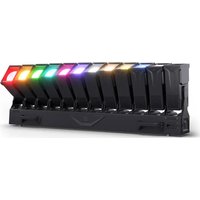

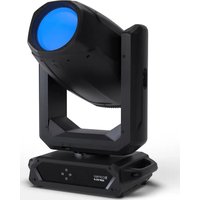
- OTOS® W3
- CONTENTS / INHALTSVERZEICHNIS / CONTENU / CONTENIDO / TREŚĆ / CONTENUTO
- ENGLISH
- DEUTSCH
- INFORMATION ON THIS USER MANUAL
- INTENDED USE
- EXPLANATIONS OF TERMS AND SYMBOLS
- SAFETY INSTRUCTIONS
- DANGER
- WARNING
- ATTENTION
- CAUTION
- CAUTION! IMPORTANT NOTES ON LIGHTING PRODUCTS
- SIGNAL TRANSMISSION BY RADIO
- (FOR EXAMPLE, W-DMX OR AUDIO RADIO SYSTEMS)
- TRANSMISSION VIA W-DMX
- ATTENTION! POTENTIAL DAMAGE FROM EXTERNAL LIGHT SOURCES
- NOTES ON PORTABLE OUTDOOR DEVICES
- PACKAGING CONTENT
- INTRODUCTION
- CONTROL FUNCTIONS
- FEATURES
- 1 POWER IN
- 2 POWER OUT
- 3 DMX IN
- 4 DMX OUT
- 5 NET IN / OUT
- 6 FUSE
- 7 LC DISPLAY
- 8 TOUCH-SENSITIVE CONTROLS
- PRESSURE EQUALISATION ELEMENT
- W-DMX™ ANTENNA
- OPERATION
- NOTES
- MAIN DISPLAY
- WIRELESS DMX
- CONTROL MENU (CONTROL)
- SETTING THE DMX START ADDRESS (DMX ADDRESS)
- SETTING THE DMX OPERATING MODE (DMX MODE)
- NETWORK (NETWORK)
- STAND-ALONE MENU (STAND ALONE)
- SLAVE MODE (SLAVE)
- SYSTEM SETTINGS (SETTINGS)
- SERVICE MENU (SERVICE)
- SYSTEM INFORMATION (SYSTEM INFO)
- QUICKLIGHT (QUICKLIGHT)
- SETUP AND INSTALLATION
- CARE, MAINTENANCE, AND REPAIR
- CARE (CARRIED OUT BY USER)
- MAINTENANCE AND REPAIR (BY QUALIFIED PERSONNEL ONLY)
- DIMENSIONS (MM)
- EXPLANATION OF IP PROTECTION CLASS
- MINIMUM DISTANCE TO ILLUMINATED SURFACE
- MINIMUM DISTANCE TO NORMALLY FLAMMABLE MATERIALS
- DISPOSAL
- PACKAGING
- DEVICE
- MANUFACTURER'S DECLARATIONS
- MANUFACTURER'S WARRANTY AND LIMITATION OF LIABILITY
- CE CONFORMITY
- EC DECLARATION OF CONFORMITY
- NETZWERK (NETWORK)
- REMARQUES À PROPOS DES APPAREILS PORTABLES POUR EXTÉRIEUR
- RÉGLAGE DU MODE DE FONCTIONNEMENT DMX (DMX MODE)
- RÉSEAU (NETWORK)
- PARAMÈTRES SYSTÈME (SETTINGS)
- AJUSTE DEL MODO OPERATIVO DMX (DMX MODE)
- RED (NETWORK)
- AJUSTES DEL SISTEMA (SETTINGS)
- USTAWIANIE TRYBU PRACY DMX (DMX MODE)
- USTAWIENIA SIECIOWE (NETWORK)
- USTAWIENIA SYSTEMOWE (SETTINGS)
- KONFIGURACJA I INSTALACJA
- NOTE SUI DISPOSITIVI PORTATILI PER ESTERNI
- IMPOSTAZIONE DELLA MODALITÀ OPERATIVA DMX (DMX MODE)
- RETE (NETWORK)
- IMPOSTAZIONI DI SISTEMA (SETTINGS)
Brand : Cameo
Model : OTOS W3
Category : Lamp