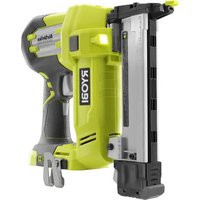
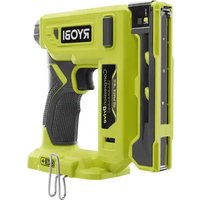
P360 - Stapler RYOBI - Free user manual and instructions
Find the device manual for free P360 RYOBI in PDF.


| Product Type | Cordless Stapler |
| Brand | RYOBI |
| Model | P360 |
| Magazine Capacity | 105 staples |
| Stapling Speed | Up to 60 shots/min |
| Staple Sizes | 1/4 inch narrow crown, length 3/8 to 1-1/2 inch |
| Power Source | Ryobi compatible lithium-ion (Li-ion) battery pack |
| Trigger Modes | Single sequential and contact trip |
| Air Pressure Adjustment | Air pressure dial + drive depth adjustment |
| Applications | Finish, trim, framing, cabinetry, flooring, paneling, furniture making |
| Weight (approx.) | Approximately 2.5 kg (with battery) |
| Dimensions (approx.) | Approximately 30 x 25 x 10 cm |
| Noise Level | Not specified in manual, hearing protection recommended |
| Eye Protection | Mandatory: ANSI Z87.1 certified side shields |
| Dry Fire Lockout | Yes, prevents operation when magazine is nearly empty |
| LED Indicators | Indicate battery status and diagnostics |
| Maintenance | Clean with a clean cloth, avoid solvents |
| Spare Parts | Use exclusively genuine Ryobi parts |
| Warranty | 3-year limited warranty (proof of purchase required) |
| Customer Service | 1-800-525-2579 or www.ryobitools.com |
Frequently Asked Questions - P360 RYOBI
User questions about P360 RYOBI
0 question about this device. Answer the ones you know or ask your own.
Ask a new question about this device
Download the instructions for your Stapler in PDF format for free! Find your manual P360 - RYOBI and take your electronic device back in hand. On this page are published all the documents necessary for the use of your device. P360 by RYOBI.
USER MANUAL P360 RYOBI
General Power Tool SafetyWarnings. 2-3
Stapler SafetyWarnings.3-5
Symbols. 6
Glossary 7
Features. 7
Assembly. 7
Operation. 8-10
■ Maintenance. 11
Troubleshooting 11
■ Illustrations. 12-13
Parts Ordering and Service .Back page
WARNING: To reduce the risk of injury, the user must read and understand the operator's manual before using this product.
SAVE THIS MANUAL FOR FUTURE REFERENCE
TABLE DES MATIÈRES
****************
Read all safety warnings and all instructions. Failure to follow the warnings and instructions may result in electric shock, fire and/or serious injury.
Save all warnings and instructions for future reference. The term "power tool" in the warnings refers to your mains-operated (corded) power tool or battery-operated (cordless) power tool.
WORK AREA SAFETY
- Keep work area clean and well lit. Cluttered or dark areas invite accidents.
- Do not operate power tools in explosive atmospheres, such as in the presence of flammable liquids, gases or dust. Power tools create sparks which may ignite the dust or fumes.
- Keep children and bystanders away while operating a power tool. Distractions can cause you to lose control.
ELECTRICAL SAFETY
Power tool plugs must match the outlet. Never modify the plug in any way. Do not use any adapter plugs with earthed (grounded) power tools. Unmodified plugs and matching outlets will reduce risk of electric shock.
- Avoid body contact with earthed or grounded surfaces such as pipes, radiators, ranges and refrigerators. There is an increased risk of electric shock if your body is earthed or grounded.
- Do not expose power tools to rain or wet conditions. Water entering a power tool will increase the risk of electric shock.
- Do not abuse the cord. Never use the cord for carrying, pulling or unplugging the power tool. Keep cord away from heat, oil, sharp edges or moving parts. Damaged or entangled cords increase the risk of electric shock.
- When operating a power tool outdoors, use an extension cord suitable for outdoor use. Use of a cord suitable for outdoor use reduces the risk of electric shock.
If operating a power tool in a damp location is unavoidable, use a ground fault circuit interrupter (GFCI) protected supply. Use of a GFCI reduces the risk of electric shock.
Use this product only with batteries and chargers listed in tool/appliance/battery pack/charger correlation supplement 987000-432.
PERSONAL SAFETY
- Stay alert, watch what you are doing and use common sense when operating a power tool. Do not use a power tool while you are tired or under the influence of drugs, alcohol or medication. A moment of inattention while operating power tools may result in serious personal injury.
Use personal protective equipment. Always wear eye protection. Protective equipment such as dust mask, non-skid safety shoes, hard hat, or hearing protection used for appropriate conditions will reduce personal injuries.
Prevent unintentional starting. Ensure the switch is in the off-position before connecting to power source and/or battery pack, picking up or carrying the tool. Carrying power tools with your finger on the switch or energising power tools that have the switch on invites accidents.
- Remove any adjusting key or wrench before turning the power tool on. A wrench or a key left attached to a rotating part of the power tool may result in personal injury.
- Do not overreach. Keep proper footing and balance at all times. This enables better control of the power tool in unexpected situations.
- Dress properly. Do not wear loose clothing or jewellery. Keep your hair, clothing and gloves away from moving parts. Loose clothes, jewellery or long hair can be caught in moving parts.
If devices are provided for the connection of dust extraction and collection facilities, ensure these are connected and properly used. Use of dust collection can reduce dust-related hazards.
- Do not wear loose clothing or jewelry. Contain long hair. Loose clothes, jewelry, or long hair can be drawn into air vents.
- Do not use on a ladder or unstable support. Stable footing on a solid surface enables better control of the power tool in unexpected situations.
POWER TOOL USE AND CARE
- Do not force the power tool. Use the correct power tool for your application. The correct power tool will do the job better and safer at the rate for which it was designed.
- Do not use the power tool if the switch does not turn it on and off. Any power tool that cannot be controlled with the switch is dangerous and must be repaired.
- Disconnect the plug from the power source and/or the battery pack from the power tool before making any adjustments, changing accessories, or storing power tools. Such preventive safety measures reduce the risk of starting the power tool accidentally.
Store idle power tools out of the reach of children and do not allow persons unfamiliar with the power tool or these instructions to operate the power tool. Power tools are dangerous in the hands of untrained users. - Maintain power tools. Check for misalignment or binding of moving parts, breakage of parts and any other condition that may affect the power tool's operation. If damaged, have the power tool repaired before use. Many accidents are caused by poorly maintained power tools.
GENERAL POWER TOOL SAFETY WARNINGS
- Keep cutting tools sharp and clean. Properly maintained cutting tools with sharp cutting edges are less likely to bind and are easier to control.
Use the power tool, accessories and tool bits etc. in accordance with these instructions, taking into account the working conditions and the work to be performed. Use of the power tool for operations different from those intended could result in a hazardous situation.
BATTERY TOOL USE AND CARE
- Recharge only with the charger specified by the manufacturer. A charger that is suitable for one type of battery pack may create a risk of fire when used with another battery pack.
Use power tools only with specifically designated battery packs. Use of any other battery packs may create a risk of injury and fire. - When battery pack is not in use, keep it away from other metal objects, like paper clips, coins, keys, nails, screws or other small metal objects, that can make a
connection from one terminal to another. Shorting the battery terminals together may cause burns or a fire.
Under abusive conditions, liquid may be ejected from the battery; avoid contact. If contact accidentally occurs, flush with water. If liquid contacts eyes, additionally seek medical help. Liquid ejected from the battery may cause irritation or burns.
SERVICE
Have your power tool serviced by a qualified repair person using only identical replacement parts. This will ensure that the safety of the power tool is maintained.
- When servicing a power tool, use only identical replacement parts. Follow instructions in the Maintenance section of this manual. Use of unauthorized parts or failure to follow Maintenance instructions may create a risk of shock or injury.
STAPLER SAFETY WARNINGS
Always assume that the tool contains fasteners. Careless handling of the stapler can result in unexpected firing of staples and personal injury.
- Do not point the tool towards yourself or anyone nearby. Unexpected triggering will discharge the staple causing an injury.
- Do not actuate the tool unless the tool is placed firmly against the workpiece. If the tool is not in contact with the workpiece, the staple may be deflected away from your target.
- Disconnect the tool from the power source when the fastener jams in the tool. While removing a jammed fastener, the tacker may be accidentally activated if it is plugged in.
Use caution while removing a jammed staple. The mechanism may be under compression and the staple may be forcefully discharged while attempting to free a jammed condition.
- Do not use this tool for fastening electrical cables. It is not designed for electric cable installation and may damage the insulation of electric cables thereby causing electric shock or fire hazards.
Hold power tool by insulated gripping surfaces, when performing an operation where the fastener may contact hidden wiring. Fasteners contacting a "live" wire may make exposed metal parts of the power tool "live" and could give the operator an electric shock.
- Know your power tool. Read operator's manual carefully. Learn its applications and limitations, as well as the specific potential hazards related to this power tool. Following this rule will reduce the risk of electric shock, fire, or serious injury.
Always wear eye protection with side shields marked to comply with ANSI Z87.1. Everyday glasses have only impact resistant lenses. They are not safety glasses. Following this rule will reduce the risk of serious personal injury.
Eye protection which conforms to ANSI specifications and provides protection against flying particles both from the FRONT and SIDE should ALWAYS be worn by the operator and others in the work area when loading, operating or servicing this tool. Eye protection is required to guard against flying fasteners and debris, which could cause severe eye injury.
The employer and/or user must ensure that proper eye protection is worn. We recommend Wide Vision Safety Mask for use over eyeglasses or standard safety glasses that provide protection against flying particles both from the front and side. Always use eye protection which is marked to comply with ANSI Z87.1.
Additional safety protection will be required in some environments. For example, the working area may include exposure to noise level which can lead to hearing damage. The employer and user must ensure that any
STAPLER SAFETY WARNINGS
necessary hearing protection is provided and used by the operator and others in the work area. Some environments will require the use of head protection equipment. When required, the employer and user must ensure that head protection conforming to ANSI Z89.1-1997 is used.
- Keep fingers away from trigger when not driving fasteners to avoid accidental firing.
Use safety equipment. Always wear eye protection. Dust mask, nonskid safety shoes, hard hat, or hearing protection must be used for appropriate conditions. - Protect your lungs. Wear a face or dust mask if the operation is dusty. Following this rule will reduce the risk of serious personal injury.
- Protect your hearing. Wear hearing protection during extended periods of operation. Following this rule will reduce the risk of serious personal injury.
- Battery tools do not have to be plugged into an electrical outlet; therefore, they are always in operating condition. Be aware of possible hazards when not using your battery tool or when changing accessories. Following this rule will reduce the risk of electric shock, fire, or serious personal injury.
- Do not place battery tools or their batteries near fire or heat. This will reduce the risk of explosion and possibly injury.
- Do not crush, drop or damage battery pack. Do not use a battery pack or charger that has been dropped or received a sharp blow. A damaged battery is subject to explosion. Properly dispose of a dropped or damaged battery immediately.
Batteries can explode in the presence of a source of ignition, such as a pilot light. To reduce the risk of serious personal injury, never use any cordless product in the presence of open flame. An exploded battery can propel debris and chemicals. If exposed, flush with water immediately. - Do not charge battery tool in a damp or wet location.
- Do not use, store, or charge battery packs or products in locations where the temperature is less than 50°F or more than 100°F . Do not store outside or in vehicles.
Under extreme usage or temperature conditions, battery leakage may occur. If liquid comes in contact with your skin, wash immediately with soap and water. If liquid gets into your eyes, flush them with clean water for at least 10 minutes, then seek immediate medical attention. Following this rule will reduce the risk of serious personal injury.
Use the tool only for its intended use. Do not discharge fasteners into open air.
Use the tool only for the purpose for which it was designed.
Use only the staples recommended for this tool. Use of the wrong staples could result in poor staple feeding, jammed staples, and staples leaving the tool at erratic angles. If staples are not feeding smoothly and properly, discontinue their use immediately. Jammed and improperly feeding staples could result in serious personal injury.
- Never use this tool in a manner that could cause a fastener to be directed toward anything other than the workpiece.
Do not use the tool as a hammer.
Always carry the tool by the handle.
- Do not alter or modify this tool from the original design or function without approval from the manufacturer.
Always be aware that misuse and improper handling of this tool can cause injury to yourself and others.
- Never clamp or tape the trigger or workpiece contact in an actuated position.
Never leave tool unattended if the battery is installed.
- Do not operate this tool if it does not contain a legible warning label.
- Keep the tool and its handle dry, clean and free from oil and grease. Always use a clean cloth when cleaning. Never use brake fluids, gasoline, petroleum-based products, or any strong solvents to clean your tool. Following this rule will reduce the risk of loss of control and deterioration of the enclosure plastic.
OPERATION
- Do not use tool if trigger does not actuate properly. Any tool that cannot be controlled with the trigger is dangerous and must be repaired.
Check operation of the workpiece contact mechanism frequently. Do not use the tool if the workpiece contact mechanism is not working correctly as accidental driving of a fastener may result. Do not interfere with the proper operation of the workpiece contact mechanism.
Do not use a tool that does not work correctly.
Always assume that the tool contains fasteners. - Do not carry the tool from place to place holding the trigger. Accidental discharge could result.
Always handle the tool with care:
- Respect the tool as a working implement.
- Never engage in horseplay.
- Never pull the trigger unless nose is directed toward the work.
-
Keep others a safe distance from the tool while tool is in operation as accidental actuation may occur, possibly causing injury.
-
Choice of triggering method is important. Check manual for triggering options.
STAPLER SAFETY WARNINGS
The stapler is designed for single-hand use. Do not hold the tool by the front of the magazine. Do not put hands, head, or other parts of your body near the bottom of the magazine where the staple exits the tool, as serious personal injury could result.
- Do not point the tool toward yourself or anyone whether it contains fasteners or not.
- Do not actuate the tool unless you intend to drive a fastener into the workpiece.
Always ensure that the workpiece contact is fully positioned above the workpiece. Positioning the workpiece contact only partially above the workpiece could cause the fastener to miss the workpiece completely and result in serious personal injury.
- Do not drive fasteners near edge of material. The workpiece may split causing the fastener to ricochet, injuring you or a co-worker. Be aware that the fastener may follow the grain of the wood, causing it to protrude unexpectedly from the side of the work material or deflect, possibly causing injury.
- Keep hands and body parts clear of immediate work area. Hold workpiece with clamps when necessary to keep hands and body out of potential harm. Be sure the workpiece is properly secured before pressing the fastener against the material. The workpiece contact may cause the work material to shift unexpectedly.
- Keep face and body parts away from back of the tool cap when working in restricted areas. Sudden recoil can result in impact to the body, especially when driving fasteners into hard or dense material.
During normal use the tool will recoil immediately after driving a fastener. This is a normal function of the tool. Do not attempt to prevent the recoil by holding the stapler against the work. Restriction to the recoil can result in a second fastener being driven from the stapler. Grip the handle firmly, let the tool do the work and do not place second hand on top of tool or near exhaust at any time. Failure to heed this warning can result in serious personal injury.
- Do not drive fasteners on top of other fasteners or with the tool at an overly steep angle as this may cause deflection of fasteners which could cause injury.
LOADING TOOL
- Do not load the tool with fasteners when any one of the operating controls is activated.
When loading tool:
Never place a hand or any part of body in fastener discharge area of tool.
Never point tool at anyone.
- Do not pull the trigger or depress the workpiece contact as accidental actuation may occur, possibly causing injury.
SAVE THESE INSTRUCTIONS
Refer to them frequently and use them to instruct others who may use this tool. If you loan someone this tool, loan them these instructions also.
SYMBOLS
| The following signal words and meanings are intended to explain the levels of risk associated with this product. | ||
| SYMBOL | SIGNAL | MEANING |
| DANGER: | Indicates a hazardous situation, which, if not avoided, will result in death or serious injury. | |
| WARNING: | Indicates a hazardous situation, which, if not avoided, could result in death or serious injury. | |
| CAUTION: | Indicates a hazardous situation, that, if not avoided, may result in minor or moderate injury. | |
| NOTICE: | (Without Safety Alert Symbol) Indicates information considered important, but not related to a potential injury (e.g. messages relating to property damage). | |
| Some of the following symbols may be used on this product. Please study them and learn their meaning. Proper interpretation of these symbols will allow you to operate the product better and safer. SYMBOL NAME DESIGNATION/EXPLANATION | ||
| Safety Alert Indicates a potential | personal injury hazard. | |
| Read Operator's Manual | To reduce the risk of injury, user must read and understand operator's manual before using this product. | |
| Eye Protection | Always wear eye protection with side shields marked to comply with ANSI Z87.1. | |
| Keep Hands Away Keep hands and body away from the discharge area of the tool. | ||
| Wet Conditions Alert Do not expose to rain or use in damp locations. | ||
| Recycle Symbol | This product uses lithium-ion (Li-ion) batteries. Local, state or federal laws may prohibit disposal of batteries in ordinary trash. Consult your local waste authority for information regarding available recycling and/or disposal options. | |
| V Volts Voltage | ||
| A Amperes Current | ||
| Hz Hertz Frequency (cycles per second) | ||
| min Minutes Time | ||
| = | Direct Current Type or a characteristic of current | |
| no | No Load Speed | Rotational speed, at no load |
| .../min | Per Minute | Revolutions, strokes, surface speed, orbits etc., per minute |
GLOSSARY
Activate (operating controls)
To move an operating control so that it is in a position that allows the tool to be actuated or that satisfies one requirement for the tool to be actuated.
Actuate (tool)
To cause movement of the tool component(s) intended to drive a fastener.
Actuation system
The use of a trigger, workpiece contact, and/or other operating control, separately or in some combination or sequence, to actuate the tool.
- Single sequential actuation
An actuation system in which there is more than one operating control and the operating controls must be activated in a specific sequence to actuate the tool. Additional actuation can occur when a specific operating control, other than a workpiece contact, is released and re-activated.
- Contact actuation
An actuation system in which there is more than one operating control and the operating controls can be activated in any sequence to actuate the tool. Additional actuation can occur when any operating control is released and re-activated.
Fastener
A staple, pin, brad, nail, or other fastening device which is designed and manufactured for use in the tools within the scope of this standard.
Jam
An obstruction in the feed or drive areas of the tool.
Operating control
A control that separately, or as part of an actuation system, can cause the actuation of a tool.
Trigger
A tool operating control activated by a tool operator's fingers.
Workpiece
The intended object into which a fastener is to be driven by a tool.
Workpiece contact
An operating control element or assembly on the tool intended to be activated by the material to be fastened.
FEATURES
PRODUCT SPECIFICATIONS
Magazine Capacity. 105 Staples
Stapler Speed... up to 60 shots/min.
Staple Type. 1/4 in. Narrow Crown Staple
Staple Size (Length) 3/8 in to 1-1/2 in.
ASSEMBLY
WARNING:
Do not use this product if it is not completely assembled or if any parts appear to be missing or damaged. Use of a product that is not properly and completely assembled or with damaged or missing parts could result in serious personal injury.
WARNING:
Do not attempt to modify this product or create accessories or attachments not recommended for use with this product. Any such alteration or modification is misuse and could result in a hazardous condition leading to possible serious personal injury.
If any parts are damaged or missing, please call 1-800-525-2579 for assistance.
OPERATION

WARNING:
Do not allow familiarity with this product to make you careless. Remember that a careless fraction of a second is sufficient to inflict serious injury.

WARNING:
Always remove battery pack from the tool when you are assembling parts, making adjustments, cleaning, or when not in use. Removing battery pack will prevent accidental starting that could cause serious personal injury.

WARNING:
Always wear eye protection with side shields marked to comply with ANSI Z87.1, along with hearing protection. Failure to do so could result in objects being thrown into your eyes and other possible serious injuries.
APPLICATIONS
You may use this tool for the purposes listed below:
Finish and Trim (Interior and exterior)
Door & Window Casing
Door Jambs
Baseboard
Crown Molding
Cabinetry
Cap and Shoe Molding
Molding
Staircases
Door and Window Trim
Chair Rail
Brickmold
Hardwood Flooring
Paneling
Furniture
ATTACH BELT CLIP
See Figure 1, page 12.
The belt clip can be installed on the left or right side of the stapler, depending on operator preference.
Align belt clip and screw with right or left side screw hole.
Using a phillips screwdriver (not included) tighten securely.
INSTALLING/REMOVING BATTERY PACK
See Figure 2, page 12.
Insert the battery pack into the product as shown.
Make sure the latches on each side of the battery pack snap into place and the battery pack is secured in the product before beginning operation.
Depress the latches to remove the battery pack.
NOTE: Squeeze LED light grip switch to activate stapler.
For complete charging instructions, see the operator's manuals for your battery pack and charger.
NO-MAR PAD
See Figure 3, page 12.
The no-mar pad attached to the nose of the tool helps prevent marring and denting when working with softer woods.
To remove or replace the pad:
Remove the battery pack.
Remove the pad by pulling it down and away from the nose.
To replace the pad, fit it into place over the nose and push up to reseat.
On-board storage for the pad is located on the magazine of the tool. An extra no-mar pad is provided in the on-board storage area.
LOADING THE TOOL WITH STAPLES
See Figures 4 - 5, pages 12 - 13.

WARNING:
Use only the staples recommended for use with this tool. The use of any other staples can result in tool malfunction, leading to serious injuries.

WARNING:
Keep the tool pointed away from yourself and others when loading fasteners. Failure to do so could result in possible serious personal injury.
Remove battery pack from the tool.
Hold the tool upside down with the nose pointed upward and tilted away from you.
- Squeeze the magazine release button located at the rear of the magazine and slide the magazine cover open.
Place staples in the channel with the staple tips pointing upward and the crown resting on the bottom of the channel.
Push the magazine cover closed. Make sure it securely snaps into place.
- Reinstall battery, and reactivate the tool by pressing the worklight grip switch.
OPERATION
REMOVING STAPLES FROM THE TOOL
Remove the battery pack.
Depress the magazine release button.
Remove staples and close the magazine.
SETTING THE AIR PRESSURE
See Figure 6, page 13.
The amount of air pressure required will depend on the size of the fastener and the workpiece material.
Begin testing the depth of drive by driving a test fastener into the same type of workpiece material used for the actual job.
Remove battery pack from the tool, if installed.
Turn air pressure dial clockwise to increase air pressure or counterclockwise for decreased pressure.
It may be possible to achieve the desired depth with air pressure adjustments alone. If finer adjustments are needed, use the depth of drive adjustment on the tool.
NOTE: Under some conditions, the unit may not deliver a fastener when the air pressure dial is turned to the MAXIMUM pressure setting. The user may need to decrease the pressure setting for desired operation.
ADJUSTING DEPTH OF DRIVE
See Figure 7, page 13.
The driving depth of the fastener may be adjusted beyond air pressure. It is advisable to test the depth on a scrap workpiece to determine the required depth for the application.
To determine depth of drive, first adjust the air pressure and drive a test fastener. To achieve the desired depth, use the depth of drive adjustment on the tool. Harder materials and longer fasteners will require more force to drive the staple.
Remove battery pack from the tool, if installed.
Turn the depth of drive adjustment left or right to change the driving depth.
- Reinstall battery and reactivate the tool by pressing the worklight grip switch.
Drive a test staple after each adjustment until the desired depth is set.
NOTE: Set depth of drive at the shallowest depth that will meet your needs.
DRIVING STAPLES
See Figures 8 - 9, page 13.
WARNING:
Never wedge or hold back the workpiece contact mechanism during operation of the tool. Doing so could result in possible serious injury.
The mode selector lets the operator choose between Single Sequential Actuation for precise fastener placement and Contact Actuation for higher productivity.
The tool will drive a fastener each time the trigger is depressed, as long as the workpiece contact is depressed.
Single sequential actuation mode:
Single sequential actuation provides the most accurate fastener placement.
Remove battery pack from the tool.
Slide the selector to position).
WARNING:
The stapler will not function properly if the selector is not securely seated in either position (T) or (J) Always assure the selector is seated properly to avoid an unexpected fastener discharge and possible serious personal injury.
Reinstall the battery and reactivate the tool.
Grip the tool firmly to maintain control. Position the nose of the tool onto the work surface.
Push the tool against the work surface to depress the workpiece contact.
Squeeze the trigger to drive a fastener.
NOTE: Hold trigger until drive cycle is complete.
Always remove your finger from the trigger when the desired number of fasteners has been driven.
OPERATION
Contact actuation mode:
Contact actuation allows very fast repetitive fastener placement.
Remove battery pack from the tool.
Slide the selector to position
Reinstall the battery and reactivate the tool.
Grip the tool firmly to maintain control.
- Squeeze and hold the trigger. Push the tool against the work surface to depress the workpiece contact and drive a staple.
- Lift the tool from the workpiece to drive the next staple. NOTE: Hold trigger until drive cycle is complete.
Always remove your finger from the trigger when the desired number of fasteners has been driven.
NOTE: In Contact Actuation Mode, the tool may also be operated by depressing the workpiece contact against the surface and squeezing the trigger.
DRY-FIRE LOCKOUT
The dry-fire lockout feature keeps the tool from operating when fasteners are low in the magazine.
The low staple indicator window in the magazine shows how many staples remain in the tool.
When the magazine has 0-5 staples remaining, the dry-fire lockout feature will not allow continued operation.
To resume operation, reload the tool with staples.
CONSTRUCTION RULER
A construction ruler located along the left side of the magazine allows the operator to make quick measurements while working.
LED WORKLIGHTS/DIAGNOSTIC FEEDBACK
See Figure 10, page 13.
The LED Worklights provide feedback to indicate whether the battery pack is charged sufficiently and/or if the tool is functioning properly.
To turn on the worklights, press the LED worklight grip switch while firmly holding tool in normal operating position.
If worklights are flashing, install fully charged battery. If lights continue to flash, see Troubleshooting section for more information.
REMOVING A JAMMED STAPLE
See Figure 11, page 13.
WARNING:
Remove the battery pack before removing staples or clearing a jammed staple. Failure to do so could result in serious personal injury.
Remove the battery pack from the tool.
Open the magazine and remove staples.
Insert a flat blade screwdriver into the driving mechanism and push the driver mechanism back, freeing the jam.
Remove the bent staple.
Reinsert staples and close the magazine.
Reinstall the battery and reactivate the tool.
NOTE: Driving too deeply into the material, excess debris, or jammed fasteners may lead to a driver blade being stuck at its bottom position.
MAINTENANCE

WARNING:
When servicing, use only identical replacement parts. Use of any other parts could create a hazard or cause product damage.
GENERAL MAINTENANCE
Avoid using solvents when cleaning plastic parts. Most plastics are susceptible to damage from various types of commercial solvents and may be damaged by their use. Use clean cloths to remove dirt, dust, oil, grease, etc.
TROUBLESHOOTING
| PROBLEM POSSIBLE | CAUSE SOLUTION | |
| Work-contacting element does not depress fully - tool does not operate. | Low staples Work-contacting element is jammed | Replenish staples Remove battery and clear debris |
| Tool operates properly, but fasteners do not drive fully | Air pressure is too low Depth of drive isn't deep enough Staple is too long for wood hardness | Increase air pressure Adjust depth of drive Use staple length that is appropriate for wood |
| Tool operates properly, but fasteners are driven too deep | Air pressure is too high Depth of drive is too deep | Decrease air pressure Adjust depth of drive |
| Tool jams frequently Incorrect staples | Damaged staples Loose magazine Dirty magazine | Verify that staples are the correct size Replace staples Tighten screws Clean magazine |
| Tool stops and LEDs flash rapidly Battery | Tool is low or has no charge Tool is hot | Recharge battery Allow tool to cool |
| Tool has charged battery and LEDs are slowly flashing or LEDs do not turn off after approximately ten seconds of non-use. | Tool has malfunctioned Take tool to nearest authorized repair center | |
NOTE: ILLUSTRATIONS START ON PAGE 12 AFTER FRENCH AND SPANISH LANGUAGE SECTIONS.
AVERTISSEMENTS DE SECURITE GENÉRALES RELATIVES AUX OUTILS ÉLECTRIQUES

AVERTISSEMENT
No permitted that you can use the hammers. No permit to use the hammers.

ADVERTENCIA:
To request service, purchase replacement parts, locate an Authorized Service Center and obtain Customer or Technical Support: Visit www.ryobitools.com or call 1-800-525-2579
If any parts or accessories are damaged or missing, do not return this product to the store. Call 1-800-525-2579 for immediate service.
Please obtain your model and serial number from the product data plate. This product is covered under a 3-year limited Warranty. Proof of purchase is required.
MODEL NUMBER SERIAL NUMBER
RYOBI is a trademark of Ryobi Limited and is used pursuant to a license granted by Ryobi Limited.

- TABLE DES MATIÈRES
- WORK AREA SAFETY
- ELECTRICAL SAFETY
- PERSONAL SAFETY
- POWER TOOL USE AND CARE
- GENERAL POWER TOOL SAFETY WARNINGS
- BATTERY TOOL USE AND CARE
- SERVICE
- STAPLER SAFETY WARNINGS
- OPERATION
- LOADING TOOL
- SAVE THESE INSTRUCTIONS
- SYMBOLS
- GLOSSARY
- ACTIVATE (OPERATING CONTROLS)
- ACTUATE (TOOL)
- ACTUATION SYSTEM
- SINGLE SEQUENTIAL ACTUATION
- CONTACT ACTUATION
- FASTENER
- JAM
- OPERATING CONTROL
- TRIGGER
- WORKPIECE
- WORKPIECE CONTACT
- FEATURES
- PRODUCT SPECIFICATIONS
- ASSEMBLY
- WARNING
- APPLICATIONS
- ATTACH BELT CLIP
- INSTALLING/REMOVING BATTERY PACK
- NO-MAR PAD
- TO REMOVE OR REPLACE THE PAD
- LOADING THE TOOL WITH STAPLES
- REMOVING STAPLES FROM THE TOOL
- SETTING THE AIR PRESSURE
- ADJUSTING DEPTH OF DRIVE
- DRIVING STAPLES
- SINGLE SEQUENTIAL ACTUATION MODE
- CONTACT ACTUATION MODE
- DRY-FIRE LOCKOUT
- CONSTRUCTION RULER
- LED WORKLIGHTS/DIAGNOSTIC FEEDBACK
- REMOVING A JAMMED STAPLE
- MAINTENANCE
- GENERAL MAINTENANCE
- AVERTISSEMENTS DE SECURITE GENÉRALES RELATIVES AUX OUTILS ÉLECTRIQUES
- AVERTISSEMENT
- ADVERTENCIA
Brand : RYOBI
Model : P360
Category : Stapler