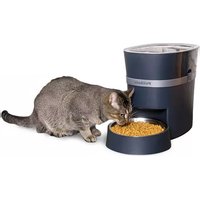
PFD00-16828 - Pet feeder PETSAFE - Free user manual and instructions
Find the device manual for free PFD00-16828 PETSAFE in PDF.


| Product Type | Connected kibble dispenser |
| Brand | PetSafe |
| Model | PFD00-16828 |
| Dimensions (approx.) | 34 x 28 x 28 cm |
| Weight (approx.) | 2.5 kg |
| Hopper capacity | Approximately 5.5 kg of kibble |
| Main power | Power adapter (included) |
| Backup power | 4 D alkaline batteries (not included) |
| Connectivity | Wi-Fi 2.4 GHz (802.11 b/g/n) |
| Mobile app | My PetSafe (iOS 9+ / Android 6.0+) |
| Meal scheduling | Yes, via the app |
| Slow feed mode | Yes (to slow down fast eaters) |
| "Feed Now" function | Yes, via the app or manual button |
| Low food notification | Yes, via the app |
| Activity log | 14-day history |
| Bowl material | Stainless steel |
| Suitable for | Adult dogs and cats |
| Usage | Indoor only |
| Maintenance and cleaning | Clean the bowl, bowl holder, hopper, and auger with soapy water. Do not immerse the control panel. |
| Safety | Do not immerse the base unit, do not use with puppies/kittens, do not modify the device. |
| Spare parts | Bowl, bowl holder, hopper, lid, auger, power adapter |
| Warranty | 2-year limited warranty (non-transferable) |
| General information | Manufactured by Radio Systems Corporation |
Frequently Asked Questions - PFD00-16828 PETSAFE
User questions about PFD00-16828 PETSAFE
0 question about this device. Answer the ones you know or ask your own.
Ask a new question about this device
Download the instructions for your Pet feeder in PDF format for free! Find your manual PFD00-16828 - PETSAFE and take your electronic device back in hand. On this page are published all the documents necessary for the use of your device. PFD00-16828 by PETSAFE.
USER MANUAL PFD00-16828 PETSAFE
natural_image
Illustration of a pet safe device with a lid and base, enclosed in a circular frame (no text or symbols on the device itself)Works with iPhone iOS 9 or later and Android 6.0 or later
Please read this entire guide before beginning.
You and your pet were made for each other. Our aim is to help you have the best companionship and the most memorable moments together. Your new Smart Feed Automatic Pet Feeder is designed to give you peace of mind knowing your pet will be fed on time.
We know that safe pets make happy owners. Before getting started, please take a moment to read through the important safety information. If you have any questions, please don't hesitate to contact us.
Hereinafter Radio Systems Corporation, Radio Systems PetSafe Europe Ltd., Radio Systems Australia Pty Ltd. and any other affiliate or brand of Radio Systems Corporation may be referred to collectively as "We" or "Us."
IMPORTANT SAFETY INFORMATION
Explanation of Attention Words and Symbols used in this guide

This is the safety alert symbol. It is used to alert you to potential personal injury hazards. Obey all safety messages that follow this symbol to avoid possible injury or death.
WARNING
WARNING indicates a hazardous situation which, if not avoided, could result in death or serious injury.
CAUTION
CAUTION, used without the safety alert symbol, indicates a hazardous situation which, if not avoided, could result in harm to your pet.
NOTICE
NOTICE is used to address safe use practices not related to personal injury.
⚠ WARNING
- Do NOT immerse control panel in water. Base unit should NOT be submerged in water at any time, as this may damage electronic components.
- Do NOT place anything on top of the pet feeder. The unit starts automatically. Keep clear.
- Dispose of all packaging materials properly. Some items may be packed in polybags; these bags could cause suffocation; keep away from children and pets.
- Do NOT allow small children to play with, in or around pet feeder.
• To reduce the risk of injury, close supervision is necessary when an appliance is used by or near children. - Pet feeder should be placed on a level surface.
- To protect against electric shock, if using power cord do not place power cord or plug in water or other liquids.
- Only use attachments recommended or sold by the manufacturer.
- Do not unplug by pulling on power cord. To unplug, grasp the plug, not the power cord.
- Do not operate any appliance if it has a damaged power cord or plug, or if it is malfunctioning or has been damaged. Call the Customer Care Centre immediately for further instructions.
- For a portable appliance - To reduce the risk of electrical shock, do not place or store an appliance where it can fall or be pulled into a tub or sink.
- Always unplug any appliance when not in use, before putting on or taking off parts and before cleaning. Never pull on the electrical power cord to remove the plug from the wall outlet.
- Do not use an appliance for anything other than its intended use.
- If the plug of this device gets wet, turn off the electricity to that wall outlet. Do not attempt to unplug.
- Examine this appliance after installation. Do not plug in if there is water on the power cord or plug.
- To avoid tripping, always position power cord out of the way of foot traffic.
- Do not use pet feeder for anything other than intended use. The use of attachments not recommended or sold by the manufacturer may cause an unsafe condition. Do not modify the pet feeder.
CAUTION
- Do not allow pets to chew on or swallow any parts. If you are concerned about the power cord, purchase a cord conduit (a hard plastic protector) at any hardware store to protect the power cord.
• Intended for use with dogs or cats only. - Do NOT use this pet feeder with puppies, kittens, dogs or cats not able to reach the food tray or with any physical disability.
- Before leaving for extended time, always replace batteries with new batteries.
- Check operation frequently to be sure the pet feeder is dispensing properly.
NOTICE
- Do not attempt repairs on the pet feeder yourself.
- If an extension cord is necessary, an extension cord with a proper rating should be used.
- Do not install or store pet feeder where it will be exposed to weather or temperatures below 4^ C .
- Do not lift pet feeder by lid, hopper, bowl or bowl holder. Lift and carry feeder using both hands and hopper base, while keeping unit in upright position.
- Do NOT use outdoors. FOR INDOOR HOUSEHOLD USE ONLY.
- For dry food use only.
- Do NOT use wet, canned or moist food.
- Do NOT place any foreign object in the pet feeder.
- Do NOT disassemble the pet feeder other than components as instructed in the quick start guide.
- Do not mix old and new batteries.
- Do not mix standard, alkaline or rechargeable batteries.
- Do not use rechargeable batteries.
- Exhausted batteries should be removed immediately. Do not dispose of batteries with household waste.
- Read and observe all important notices listed on the pet feeder and in the packaging.
SAVE THESE INSTRUCTIONS
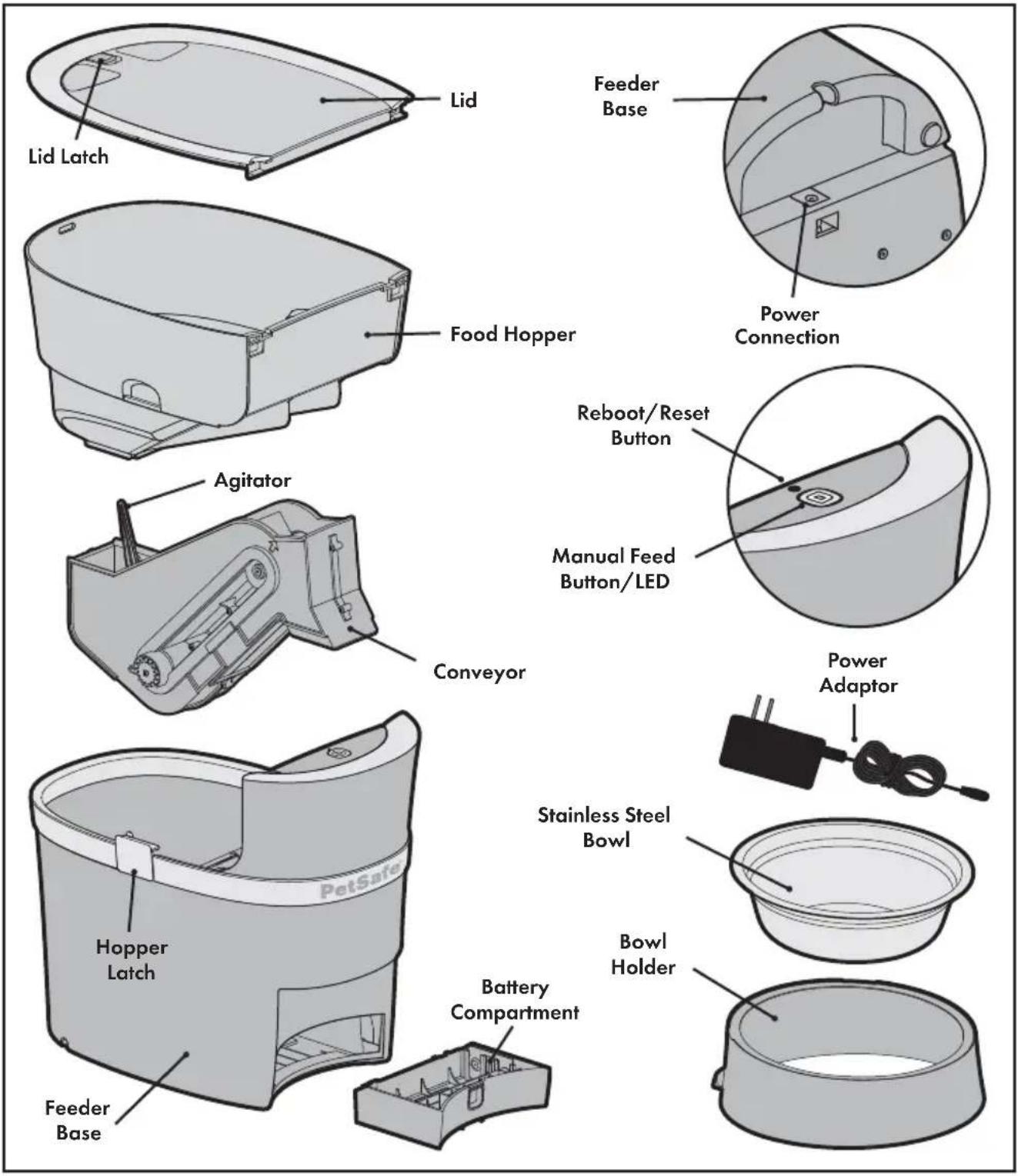
System Requirements
- iPhone or iPod with iOS 9 or later or compatible Android smartphone 6.0 or later
• Wireless router 2.4GHz (802.11b/g/n)
• High-speed internet connection
Setup and Assemble Feeder
-
Remove the components that are located inside the food hopper.
-
We recommend you wash and rinse the bowl, the bowl holder, food hopper, lid and conveyor. Once the parts are dry, ensure a conveyor belt lip is aligned with the arrows on the side. Replace the conveyor and the food hopper.
-
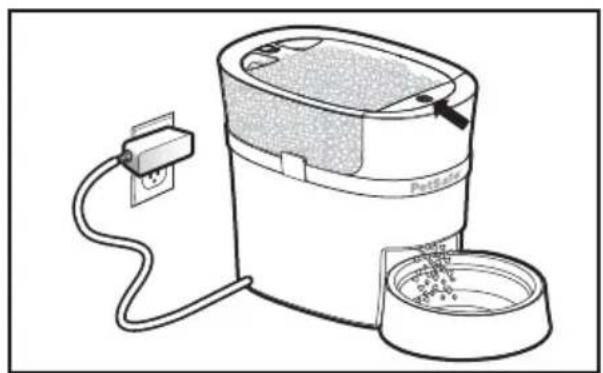
Plug in the power adaptor. If you want, install four (4) D-Cell alkaline batteries in case of a power outage. The LED will blink yellow indicating that the feeder is on and it is in setup mode.
CAUTION
Batteries are for back-up power only and should not be used as the main power source.
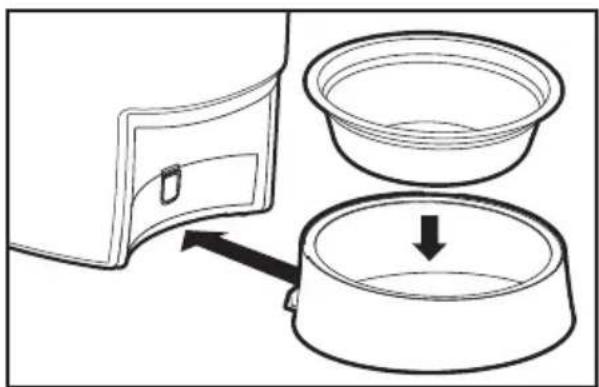
- Place the bowl into the bowl holder. Lift the feeder and slide the holder notch into the groove on the bottom of the feeder.
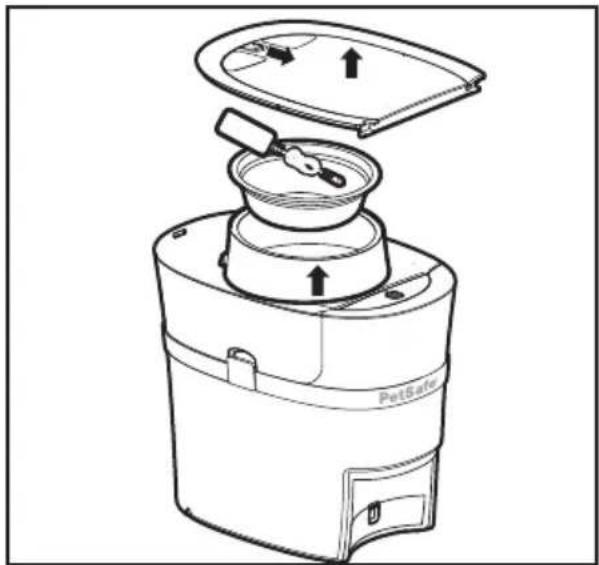
natural_image
Line drawing of a pet filter device with lid and base components (no text or symbols)
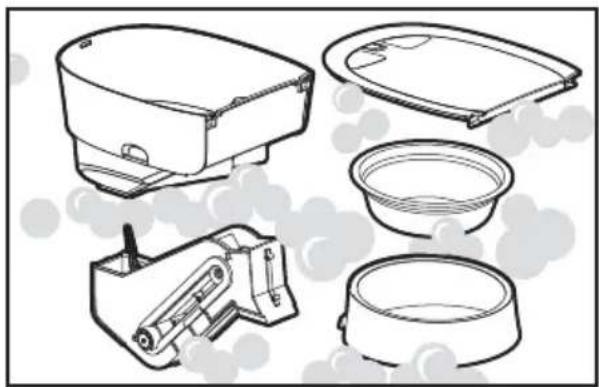
natural_image
Line drawings of various household appliances including a microwave oven, sink, and washing bowl (no text or labels)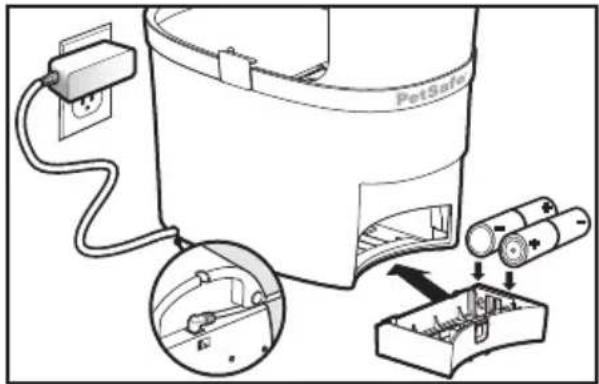
natural_image
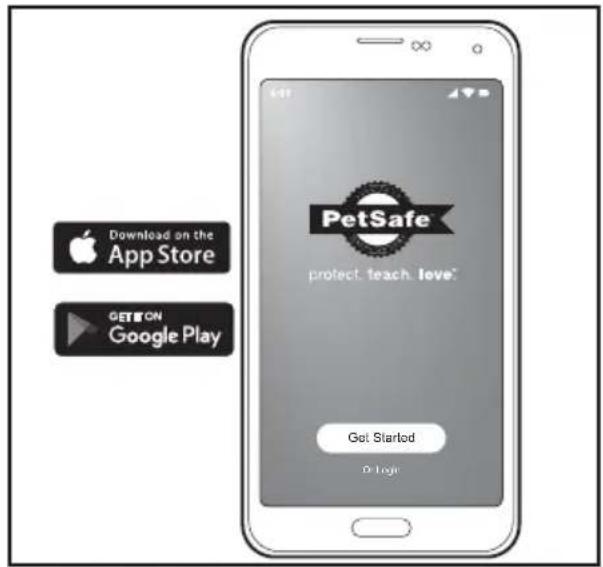
Diagram showing a microwave oven with a lid and a bowl, connected to a container with an arrow indicating direction (no text or symbols)- Download the My PetSafe ^® app from your phone's app store. Open the app and follow the on-screen instructions to connect to your feeder. You will need a valid email address and your home Wi-Fi password. Complete all instructions and app setup before filling the feeder with food.
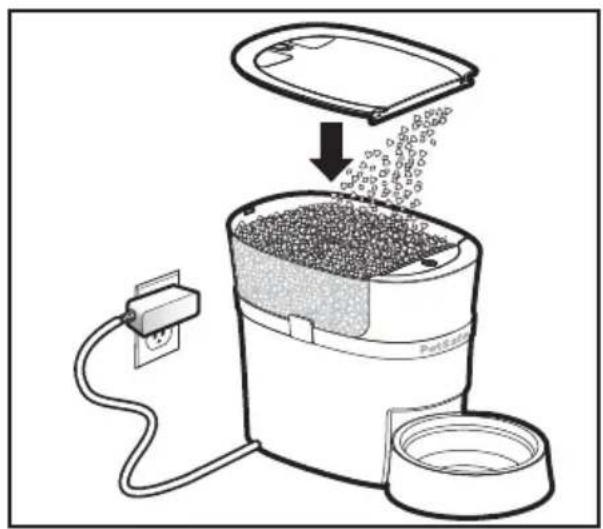
- Fill the hopper with your pet's favourite dry or semi-moist food. Level the food, and replace the lid.
natural_image
Illustration of a portable rice cooker with granular contents being inserted, connected to a power outlet (no text or symbols)- Prime the feeder by pressing and holding the manual feed button until the food starts to dispense into the bowl or use the "Feed Now" feature in the app.
Note: The feeder conveyor must be primed anytime the food gets low to ensure that the correct meal sizes are dispensed.
Your Smart Feed Automatic Pet Feeder is now ready for use! Use the Smart Feed app to schedule meals and set up notifications.
natural_image
Line drawing of a portable water heater with a power outlet connected to a bowl (no text or symbols)Setup Troubleshooting
If you went through the setup process and were unable to get your feeder connected, first try the instructions within the app. If you are still having issues, then try the steps below:
- Ensure that your home Wi-Fi is working properly and your phone is connected to it.
- Place your feeder near your router during initial setup.
- If you are an Android user, make sure to select "stay connected" to your Wi-Fi during setup. Or if you receive a "no internet access" notification, open it to reconnect to your Wi-Fi.
Smart Feed Application
| Icon Description | |
 | Main Screen: Where you access the application features and view the next scheduled meal time and amount. |
 | Activity Log: Shows the last 2 weeks of the feeder's activities, including when a meal was dispensed and any errors with the feeder. |
 | Settings: Shows the feeder and app settings and where they can be turned on or changed, including the pet lock feature, notifications, and Wi-Fi network. Also, this is where the feeder can be deleted from the app. |
 | Feed Now: Push to prime the feeder conveyor or to immediately feed a snack or extra meal. |
 | Meal Schedule: This is where you program your pet's meal times and amounts, and where the meal schedule can be turned off to keep the feeder from dispensing food. |
 | Slow Feed Mode: Slowly dispenses all scheduled meals with amounts more than 1/8 cup over a 15-minute period to help slow down fast eaters. |
 | Low Food: Shows when the food level is low inside the food hopper and the feeder needs to be refilled. |
| Light Color and Pattern What It Means | |
| Yellow Blinking Feeder has power and it is in setup mode. | |
| Yellow Solid Smartphone is connected to the feeder in setup mode. | |
| Blue Blinking Slow Feeder is connected to Wi-Fi, but there is no internet. | |
| Blue Blinking Fast Feeder is trying to connect to Wi-Fi or it is offline. | |
| Blue Solid Feeder is connected to Wi-Fi with internet and it is fully operational. | |
| White Blinking | Reboot mode which triggers the feeder to attempt to reconnect to your Wi-Fi without losing the programmed settings. |
| White Solid Factory reset mode which deletes all programmed settings and returns the feeder to setup mode. | |
| Red Blinking Wi-Fi credentials failed during setup. | |
| Red Solid | Mechanical error such as a jam or a motor issue. |
Reboot / Reset Button
A reboot tries to reconnect the feeder to your Wi-Fi while saving all the programmed meals and settings.
- Use the end of a paper clip to press and hold the reboot/reset button for 3 to 5 seconds until the LED blinks white to show a successful reboot.
- If the feeder successfully reconnects to your Wi-Fi with internet, the LED will blink blue and then it will turn solid to show that it is fully connected and operational.
A reset deletes all the programmed meals and settings and it returns the feeder to setup mode.
- Press and hold the reboot/reset button with the end of a paper clip for 8 or more seconds until the LED is solid white to show a successful reset.
- The LED will then blink yellow to show that the feeder has returned to setup mode.
Terms of Use and Limitation of Liability
- Terms of Use: The use of this product is subject to your acceptance without modification of the terms, conditions and notices contained with this product. Use of this product implies acceptance of all such terms, conditions, and notices. If you do not wish to accept these terms, conditions, and notices, please return the product, unused, in its original packaging and at your own cost and risk to the relevant Customer Care location together with proof of purchase for a full refund.
- Proper Use: Proper Use includes, without limitation, reviewing the entire product manual and any specific safety information statements. The specific temperament or size/weight of your pet may not be suitable for this product. If you are unsure whether this product is appropriate for your pet, please consult your veterinarian or certified trainer prior to use. For products used with pets where training is desired, Radio Systems Corporation recommends that these training products are not used if your pet is aggressive and accepts no liability for determining suitability in individual cases.
- No Unlawful or Prohibited Use: This product is designed for use with pets only. This device is not intended to harm, injure, or provoke. Using this product in a way that is not intended could result in violation of Federal, State or local laws.
- Limitation of Liability: In no event shall Radio Systems Corporation or any of its associated companies be liable for (i) any direct, indirect, punitive, incidental, special or consequential damage and/or (ii) any loss or damages whatsoever arising out of or connected with the use or misuse of this product. The Purchaser assumes all risks and liability from the use of this product to the fullest extent permissible by law.
- Modification of Terms and Conditions: Radio Systems Corporation reserves the right to change the terms, conditions and notices governing this product from time to time. If such changes have been notified to you prior to your use of this product, they shall be binding on you as if incorporated herein.
Compliance
CE
Radio Systems Corporation declares under its own responsibility, that the following product is in compliance with the essential requirements under the EMC Directive 2014/30/EU, and the RoHS 2 Directive (EU) 2015/863. Unauthorised changes or modifications to the equipment that are not approved by Radio Systems Corporation may violate EU EMC regulations, could void the user's authority to operate the equipment, and will void the warranty. Hereby, Radio Systems Corporation, declares that this product is in compliance with the essential requirements and other relevant provisions. The Declaration of Conformity can be found at www.petsafe.com/customercare/eu_docs.php.
IC
This device complies with Industry Canada license-exempt RSS standard(s). Operation is subject to the following two conditions: (1) this device may not cause interference, and (2) this device must accept any interference, including interference that may cause undesired operation of the device.
ACMA
This device complies with the applicable EMC requirements specified by the ACMA (Australian Communications and Media Authority).

Important Recycling Advice
Please respect the Waste Electrical and Electronic Equipment regulations in your country. This equipment must be recycled. If you no longer require this equipment, do not place it in the normal municipal waste system. Please return it to where it was purchased in order that it can be placed in our recycling system. If this is not possible, please contact the Customer Care Centre for further information.
Two Year Non-Transferable Limited Warranty
This Product has the benefit of a limited manufacturer's warranty. Complete details of the warranty applicable to this Product and its terms can be found at www.petsafe.com and/or are available by contacting your local Customer Care Centre.
Europe
Radio Systems PetSafe Europe Ltd.
2nd Floor, Elgee Building, Market Square
Dundalk, Co. Louth, A91 YR9X Ireland
Canada
Radio Systems Corporation
10427 PetSafe Way
Knoxville, TN 37932 USA
Australia/New Zealand – In compliance with the Australian Consumer Law, Warranties Against Defects, effective January 1, 2012, warranty details of this Product are as follows: Radio Systems Australia Pty Ltd. (hereinafter referred to as "Radio Systems") warrants to the original retail purchaser, and not any other purchaser or subsequent owner, that its Product, when subject to normal and proper residential use, will be free from defects in material or workmanship for a period of three (3) years from the purchase date. An "original retail consumer purchaser" is a person or entity who originally purchases the Product, or a gift recipient of a new Product that is unopened and in its original packaging. When serviced by Radio Systems Customer Service, Radio Systems covers labour and parts for the first three years of ownership; after the first three years, a service or upgrade charge will apply relative to replacement of the Product with new or refurbished items at Radio Systems' sole discretion.
The limited warranty is non-transferable and shall automatically terminate if the original retail consumer purchaser resells the Radio Systems Product or transfers the property on which the Radio Systems Product is installed. This Limited Warranty excludes accidental damage due to dog chews; lightning damage; or neglect, alteration, and misuse. Consumers who purchase products outside of Australia, New Zealand, or from an unauthorised dealer will need to return the Product to the original place of purchase for any warranty issues.
Please note that Radio Systems does not provide refunds, replacements, or upgrades for change of mind, or for any other reason outside of these Warranty terms.
Claims Procedure: Any claim made under this Warranty should be made directly to Radio Systems Australia Pty Ltd. Customer Care Centre at:
Radio Systems Australia Pty Ltd.
PO Box 3442, Australia Fair
QLD 4215, Australia
Australia Residents: 1800 786 608
New Zealand Residents: 0800 543 054
Email: aus-info@petsafe.net
To file a claim, a proof of purchase must be provided. Without a proof of purchase, Radio Systems will not repair or replace faulty components. Radio Systems requests the Consumer to contact the Radio Systems Customer Care Centre to obtain a Warranty Return number, prior to sending the Product. Failure to do so may delay in the repair or replacement of the Product.
If the Product is deemed to be faulty within 30 days from date of original purchase, Radio Systems will organise for a replacement to be sent in advance of returning the faulty Product. A Post Bag will be included with the replacement Product for the return of the faulty Product. The Product must be returned within 7 days of receiving the replacement. If the Product is deemed to be faulty after 30 days from the date of original purchase, the consumer will be required to return the Product to Radio Systems at the consumer's own expense. Radio Systems will test and replace the faulty device or its components and return to the consumer free of charge, provided the Product is within its said warranty period. This warranty is in addition to other rights and remedies available to you under the law. Radio Systems goods come with guarantees that cannot be excluded under the Australia Consumer Law. You are entitled to a replacement or refund for a major failure and for compensation for any other reasonably foreseeable loss or damage. You are also entitled to have the goods repaired or replaced if the goods fail to be of acceptable quality and the failure does not amount to a major failure.
Should you have any queries or require any further information, please contact our Customer Care Centre on 1800 786 608 (Australia) or 0800 543 054 (New Zealand).
Bienvenue
natural_image
Line drawing of a pet solar air purifier with lid and base components (no text or symbols)natural_image
Line drawings of various household appliances including a microwave oven, sink bowl, and washing machine (no text or labels)natural_image
Diagram showing a microwave oven with a lid and a bowl, connected by an arrow indicating direction (no text or symbols)natural_image
Illustration of a rice cooker with granular material being processed, showing a lid and power outlet (no text or symbols)natural_image
Line drawing of a portable electric water heater with a power outlet connected to a sink (no text or symbols)2nd Floor, Elgee Building, Market Square
Dundalk, Co. Louth, A91 YR9X Ireland
Canada
Radio Systems Corporation
10427 PetSafe Way
Knoxville, TN 37932 USA
Welkom
natural_image
Line drawing of a pet food oven with lid and side arm, showing internal components and directional arrows (no text or symbols)
natural_image
Line drawings of various household appliances including a microwave oven, sink bowl, and washing machine (no text or labels)natural_image
Diagram showing a microwave oven with a lid and a bowl, connected to a container with an arrow indicating flow (no text or symbols)natural_image
Diagram of a portable rice cooker with granular material being inserted, connected to a power outlet (no text or symbols)natural_image
Line drawing of a portable water heater with plug, power cord, and base (no text or symbols)Radio Systems PetSafe Europe Ltd. 2nd Floor, Elgee Building, Market Square Dundalk, Co. Louth, A91 YR9X Ireland
Canada
Radio Systems Corporation 10427 PetSafe Way Knoxville, TN 37932 USA
Bienvenido
natural_image
Line drawing of a PetGator device with lid and internal components, no text or symbols present
natural_image
Technical line drawings of various household appliances and fixtures (no text or symbols)natural_image
Diagram showing a microwave oven with a lid and a bowl, connected to a container with an arrow indicating flow (no text or symbols)natural_image
Illustration of a portable rice cooker with granular material being inserted, connected to a power outlet (no text or symbols)natural_image
Line drawing of a portable water heater with plug, power cord, and base bowl (no text or symbols)Radio Systems PetSafe Europe Ltd. 2nd Floor, Elgee Building, Market Square Dundalk, Co. Louth, A91 YR9X Ireland
Canada
Radio Systems Corporation 10427 PetSafe Way Knoxville, TN 37932 USA
Benvenuti
natural_image
Line drawing of a PetGator device with lid and internal components, no text or symbols present
natural_image
Line drawings of various household appliances including a microwave oven, sink bowl, and washing machine (no text or labels)natural_image
Diagram showing a microwave oven with lid and two empty bowls, one with a downward arrow indicating flow or movement (no text or symbols)natural_image
Illustration of a rice cooker with granular material being inserted, connected to a power outlet and cable (no text or symbols)natural_image
Line drawing of a portable water heater with plug, power cord, and base bowl (no text or symbols)2nd Floor, Elgee Building, Market Square
Dundalk, Co. Louth, A91 YR9X Ireland
Canada
Radio Systems Corporation
10427 PetSafe Way
Knoxville, TN 37932 USA
Willkommen
natural_image
Line drawing of a pet food oven with lid and side arm, showing internal components and directional arrows (no text or symbols)
natural_image
Line drawings of various household appliances including a microwave oven, sink bowl, and washing machine (no text or labels)natural_image
Diagram showing a microwave oven with lid and two empty bowls, one with a downward arrow indicating flow or insertion (no text or symbols)natural_image
Diagram of a rice cooker with granular material being processed, showing internal components and power outlet (no text or symbols)natural_image
Line drawing of a portable water heater with a power outlet connected to a sink (no text or symbols)2nd Floor, Elgee Building, Market Square
Dundalk, Co. Louth, A91 YR9X Irland
Canada
Radio Systems Corporation
10427 PetSafe Way
Knoxville, TN 37932 USA
Apple, the Apple logo, iPhone, iPad, and iPod touch are trademarks of Apple Inc., registered in the U.S. and other countries. App Store is a service mark of Apple Inc. Android, Google Play and the Google Play logo are trademarks of Google Inc.
Radio Systems PetSafe Europe Ltd. 2nd Floor, Elgee Building, Market Square Dundalk, Co. Louth, A91 YR9X Ireland +353 (0) 76 892 0427
Radio Systems Australia Pty Ltd. Suite 11001 Australia Fair Office Towers 36 Marine Parade Southport, QLD 4215, Australia +61 (0) 7 5556 3800
petsafe.com
YU40 0-2431-19/2
©2020Radio Systems Corporation