Platinum OctoPre - Audio Preamplifier FOCUSRITE - Free user manual and instructions
Find the device manual for free Platinum OctoPre FOCUSRITE in PDF.


User questions about Platinum OctoPre FOCUSRITE
0 question about this device. Answer the ones you know or ask your own.
Ask a new question about this device
Download the instructions for your Audio Preamplifier in PDF format for free! Find your manual Platinum OctoPre - FOCUSRITE and take your electronic device back in hand. On this page are published all the documents necessary for the use of your device. Platinum OctoPre by FOCUSRITE.
USER MANUAL Platinum OctoPre FOCUSRITE
IMPORTANT SAFETY INSTRUCTIONS....1
INTRODUCTION 2
REAR PANEL CONNECTIONS....2
GETTING STARTED 3
TIPS FOR OBTAINING A GOOD QUALITY VOCAL SOUND....3
TIPS FOR OBTAINING A GOOD QUALITY ELECTRIC GUITAR SOUND..4
FACILITIES AND CONTROLS 4
DIGITAL OUTPUT OPTIONS 6
DIGITAL OUTPUT FRONT PANEL CONTROLS....6
DIGITAL OUTPUT REAR PANEL CONNECTIONS AND SWITCHES......7
A BEGINNER'S GUIDE TO COMPRESSION ....8
FREQUENTLY ASKED QUESTIONS 9
TROUBLESHOOTING....10
CONTACTING US....10
SPECIFICATIONS....11
DISTRIBUTOR LIST 60
IMPORTANT SAFETY INSTRUCTIONS
Please read all of these instructions and save them for future reference. Follow all warnings and instructions marked on the unit.
- Do not obstruct air vents in the rear panel. Do not insert objects through any apertures.
- Do not use a damaged or frayed power cord.
- Unplug the unit before cleaning. Clean with a damp cloth only. Do not spill liquid on the unit.
- Ensure adequate airflow around the unit to prevent overheating. We recommend leaving a blank 1U panel above the unit to aid ventilation.
- Unplug the unit and refer servicing to qualified service personnel under the following conditions: If the power cord or plug is damaged; if liquid has entered the unit; if the unit has been dropped or the case damaged; if the unit does not operate normally or exhibits a distinct change in performance. Adjust only those controls that are covered by the operating instructions.
- Do not defeat the safety purpose of the polarised or grounding-type plug. A polarised plug has two blades with one wider than the other. A grounding type plug has two blades and a third grounding prong. The wider blade or the third prong is provided for your safety. When the plug provided does not fit into your outlet, consult an electrician for replacement of the obsolete outlet.
WARNING: THIS UNIT MUST BE EARTHED BY THE POWER CORD. UNDER NO CIRCUMSTANCES SHOULD THE MAINS EARTH BE DISCONNECTED FROM THE MAINS LEAD.
This unit is supplied pre-configured to operate only at the voltage indicated on the rear panel. Ensure correct mains voltage is available and the correct fuse value is fitted before connecting to the mains supply. To avoid the risk of fire, replace the mains fuse only with the correct value fuse, as marked on the rear panel. The internal power supply unit contains no user serviceable parts. Refer all servicing to a qualified service engineer, through the appropriate Focusrite dealer.
RACK VENTILATION: PLEASE ENSURE THE OCTOPRE IS PLACED TOWARDS THE BOTTOM OF YOUR EQUIPMENT RACK, WITH SUFFICIENT SPACE ABOVE AND BELOW FOR VENTILATION.

text_image
Focusrite OFF/REF: 100% OFF: 100% OFF: 200% OFF: 300% OFF: 400% OFF: 500% OFF: 600% OFF: 700% OFF: 800% OFF: 900% OFF: 1000% OFF: 1100% OFF: 1200% OFF: 1300% OFF: 1400% OFF: 1500% OFF: 1600% OFF: 1700% OFF: 1800% OFF: 1900% OFF: 2000% OFF: 2100% OFF: 2200% OFF: 2300% OFF: 2400% OFF: 2500% OFF: 2600% OFF: 2700% OFF: 2800% OFF: 2900% OFF: 3000% OFF: 3100% OFF: 3200% OFF: 3300% OFF: 3400% OFF: 3500% OFF: 3600% OFF: 3700% OFF: 3800% OFF: 3900% OFF: 4000% OFF: 4100% OFF: 4200% OFF: 4300% OFF: 4400% OFF: 4500% OFF: 4600% OFF: 4700% OFF: 4800% OFF: 4900% OFF: 5000% OFF: 5100% OFF: 5200% OFF: 5300% OFF: 5400% OFF: 5500% OFF: 5600% OFF: 5700% OFF: 5800% OFF: 5900% OFF: 6000% OFF: 6100% OFF: 6200% OFF: 6300% OFF: 6400% OFF: 6500% OFF: 6600% OFF: 6700% OFF: 6800% OFF: 6900% OFF: 7000% OFF: 7100% OFF: 7200% OFF: 7300% OFF: 7400% OFF: 7500% OFF: 7600% OFF: 7700% OFF: 7800% OFF: 7900% OFF: 8000% OFF: 8100% OFF: 8200% OFF: 8300% OFF: 8400% OFF: 8500% OFF: 8600% OFF: 8700% OFF: 8800% OFF: 8900% OFF: 9000% OFF: 9100% OFF: 9200% OFF: 9300% OFF: 9400% OFF: 9500% OFF: 9600% OFF: 9700% OFF: 9800% OFF: 9900% OFF: 100 MAX/RESET GCTD-PREINTRODUCTION
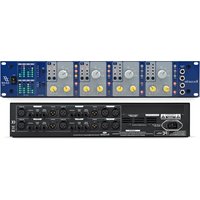
The OctoPre is an eight channel Class A microphone preamplifier, featuring a classic Focusrite mic pre and a revolutionary compressor/limiter circuit on each channel. As well as eight analogue outputs, there is a choice of two optional 8-channel, 24 bit / 96 kHz A/D boards for connection to any digital audio workstation or digital console.
The mic pres featured in the OctoPre are similar to those featured elsewhere in the award winning Focusrite Platinum range. They are a transistor-based Class A design utilising the same full bandwidth philosophy as the legendary Focusrite Red and ISA mic pres, ensuring detail and organic clarity without obvious colouration.
The revolutionary compressor/limiter circuit provides each channel with warm-sounding compression, which morphs into brick wall limiting to avoid critical 'overs' when recording digitally.
The first two channels also feature phase reverse, as well as unbalanced 1/4" jack inputs on the front fascia for quick and easy. D1-free plug-in of guitars and basses.
With Class A Focusrite analogue signal processing and comprehensive A/D interface options, OctoPre is the perfect partner for a Pro Tools™ system or any other digital audio workstation, making high quality, multi-channel recording easy. Equally, it could be utilised as part of a compact multi-channel location recording solution (with a laptop or ADAT™, for example), or as an additional set of professional-quality mic pres for any analogue or digital console or hard disk recorder.
REAR PANEL CONNECTIONS
The OctoPre features eight microphone inputs on rear-panel XLR connectors. Channels 1 and 2 each feature an unbalanced 1/4" jack instrument input on the front fascia. Eight line level balanced (+4 dBu) analogue inputs and outputs are provided via 25-pin D-type connectors.
These D-type connectors may be routed to 8 XLRs by means of an 8-way 25-pin D-type to 8 XLR breakout cable, available from your local dealer, or in the UK from Studiospares (tel +44 (0)20 7482 1692):
Line output - stock number 573-610
Line input - stock number 573-630
Hosa manufacture suitable cables as follows:
Line output - DTM 805
Line input - DTF 805
The pin-out of the 25-pin D-type connectors follows the typical 'TDIF' format. For details of the digital output options, please see the 'Digital Output Options' section on page 6.

text_image
LINE INPUTS LINE OUTPUTS LINE OUTPUTS LINE INPUTS CEGETTING STARTED
- Ensure that nothing other than the mains supply is connected to your OctoPre, then switch it on via the POWER switch on the right hand side of the unit. If your unit is permanently connected to a patchbay, ensure audio is not being fed to any connected speakers to avoid any turn-on speaker pops.
- Connect the analogue line outputs of the OctoPre to your recorder or audio interface (via the 25-pin D-type connector on the rear panel). If using a digital output option, connect the appropriate digital output to the digital input of your recorder or audio interface. See page 6 for more information on the OctoPre digital output options.
- Ensure that each channel's LEVEL and DYNAMICS controls are set fully anticlockwise.
- Connect your inputs to the eight channels as required. Microphones should be plugged into the XLR MIC INPUTS on the rear panel. If you wish to connect line-level sources (to use the OctoPre's dynamics processing when mixing down, for example) connect these to the LINE INPUTS via the upper 25-pin D-type connector on the rear panel. You may connect an electric guitar or bass to the INSTRUMENT INPUTS on channels 1 and 2 via the unbalanced 1/4" jack inputs on the front fascia.
- Check that the correct input is selected on each of the OctoPre's eight channels. If recording a line level source connected to the rear panel LINE INPUTS via the 25-pin D-type connector, ensure the LINE switch is engaged. If using the INSTRUMENT INPUT on channels 1 and 2, ensure the INST switch is engaged. If a microphone is connected to a channel's rear panel MIC INPUT, ensure that channel's LINE switch is disengaged.
- If using a condenser microphone that requires phantom power, switch the channel's +48V in. If you are unsure whether your microphone requires this phantom power, refer to its user guide, as phantom power will damage some microphones, most notably ribbon microphones.
- Increase the LEVEL control for each channel you wish to use, ensuring that the green SIG LED is always illuminated, and that the red O/L LED does not illuminate, except occasionally and briefly when the loudest signal is present.
- If using microphones, ensure that the microphone placement is at its best. Before you start recording, alter the microphone placement until you get as close as
ENGLISH
possible to the sound you want. Note that moving the microphone may have an effect on the level of the signal entering the OctoPre, requiring an alteration to the LEVEL setting.
- If required, add compression using the DYNAMICS control. Increasing this control increases the amount of compression. The yellow COMP LED will light when compression is being applied, and the red LIM LED will light when the limiter is active. For more information on the DYNAMICS control please see page 5.
TIPS FOR OBTAINING A GOOD QUALITY VOCAL SOUND
MICROPHONE POSITIONING
Recording vocals requires a different technique to that used when singing on stage, where the vocalist usually sings with the microphone touching his or her lips - in a studio recording situation it is usually desirable for the vocalist to be at least 50 cm away from the microphone. If this affects the vocal performance (or if the vocal sounds weak), allow the vocalist to move closer to the microphone, but use a pop shield on the mic. It may also be necessary to use the OctoPre's High Pass Filter to remove excessive bass tip-up caused by singing very close to the microphone (the so-called 'proximity effect').
USING THE DYNAMICS CONTROL
If the vocalist is having difficulty staying a consistent distance from the microphone, the recorded performance will get softer and louder as the distance from the mic varies. The vocalist may also vary the volume of their performance to such an extent that when they are singing loudly, the vocal is far too dominant, and when they are singing quietly, the vocal is lost in the mix. To even out these variations, use the DYNAMICS control to compress the vocal signal. Always start with the control fully anti-clockwise and gradually increase it, listening carefully to the results as you go. Remember that it's much easier to add more compression after the vocal is recorded, than to remove it if too much is applied!
TIPS FOR OBTAINING A GOOD QUALITY ELECTRIC GUITAR SOUND
USE OF EFFECTS PEDALS
Connect any effects foot pedals between the guitar and the INST input to the OctoPre. The output (whether analogue or digital) from the OctoPre should be connected directly to your recorder.
USING THE DYNAMICS SECTION
It is sometimes helpful to add compression to clean electric guitar signals. This will even out inconsistencies in volume, helping it to sit nicely in the track. Compression will also have the effect of adding more sustain to a guitar. (Note: overdriven guitar is often already heavily compressed and adding extra compression will not improve the sound.) Experiment with various settings for the DYNAMICS control until the desired sound is achieved.

FACILITIES AND CONTROLS
POWER
Turns the unit on and illuminates the blue LED directly below it. We recommend that the unit be powered up before connecting to any equipment that it is feeding, to avoid clicks or thumps which may harm output devices. It is also a good idea to allow the unit to stabilise for a couple of minutes before use to ensure that the internal circuitry is properly initialised.
text_image
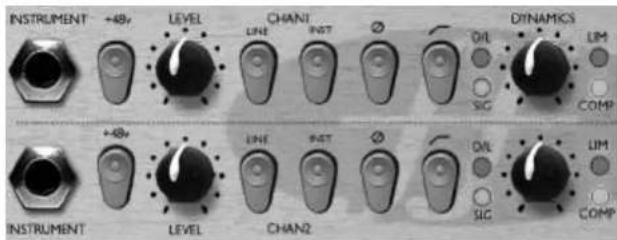
INSTRUMENT +48v LEVEL CHANI LINE INST Ø OIL SIG DYNAMICS LIM COMP INSTRUMENT +48v LEVEL LINE INST Ø OIL SIG LIM COMP INSTRUMENT LEVEL CHAN2INSTRUMENT INPUT [CHANNELS 1 & 2 ONLY]
This is a high impedance 1/4" jack input that allows you to connect an electric guitar or bass guitar to the unit without loading the pickups, and without the need for a DI box. This input only functions when the channel's INST switch is engaged (in).
INST (Switch) [CHANNELS 1 & 2 ONLY]
When engaged (in), this routes the INSTUMENT INPUT to the channel, bypassing the rear panel MIC and LINE INPUTS. Note that this will override the LINE switch (see below) if this is also engaged – the LED in the LINE switch cap will go out and only the INST switch cap LED will be lit.
ø (Phase Reverse Switch) [CHANNELS 1 & 2 ONLY]
This allows the phase of the input signal to be reversed, to correct phase problems that may occur when using multiple microphones, or when incorrect wiring polarity has occurred.
ENGLISH
text_image
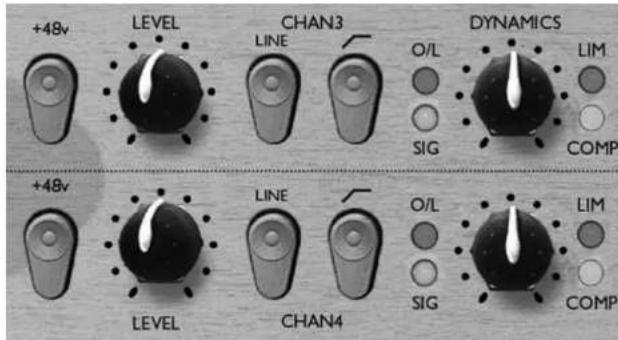
+48v LEVEL CHAN3 DYNAMICS LINE O/L LIM SIG COMP +48v LEVEL LINE CHAN4 O/L LIM SIG COMPLINE (Switch)
When engaged (in), this switch selects the corresponding rear panel LINE INPUT for the channel, and an LED is illuminated in the switch cap to indicate that the LINE INPUT is active. If this is disengaged (out), the corresponding MIC INPUT is active.
+4 8 V (Switch)
This provides +48V of phantom power for condenser microphones when engaged, affecting the channel's corresponding MIC INPUT only. If you are unsure whether your microphone requires phantom power, refer to its user guide before connecting, as it is possible to damage some microphones (most notably ribbon microphones) by providing them with phantom power.
(Switch)
This is a high-pass filter, which removes unwanted low frequencies such as stage rumble via microphone stands or 'proximity effect' (where low frequencies are over-emphasised when using certain types of microphone at close range.)
LEVEL (Knob)
This sets the signal level for the channel. Connect an input signal to the unit, ensuring that the LEVEL control is set fully anti-clockwise, and increase the LEVEL control so that the green SIG LED is always illuminated when there is a signal present. The red
O/L (Overload) LED may light occasionally, but only if the input signal gets particularly loud. If the O/L LED stays on continuously for any period, or you hear the unit distort during loud peaks, you should reduce the LEVEL.
With the MIC INPUT selected, the LEVEL control provides 0dB (fully anti-clockwise) to +60dB (fully clockwise) of gain. With the INST input selected (channels 1 & 2 only), the LEVEL control provides +4dB to +34 dB of gain.
With the LINE INPUT selected, the gain is adjustable from -10dB to +10dB. Setting the LEVEL control to the 12 o'clock position will not alter the gain of a line level input signal.
DYNAMICS (Knob)
The DYNAMICS control allows compression to be applied to the signal. With the control fully anti-clockwise, no compression is applied. As the control is turned clockwise, the compression threshold is reduced and ratio increased, resulting in heavier and heavier compression of the signal. The yellow COMP LED increases in intensity as compression is applied.
A compressor acts like an automatic volume control, effectively turning down the volume of a signal if it gets too loud. It therefore reduces variation between loud and quiet parts of a signal, by automatically reducing the gain when the signal rises above a certain volume (the 'threshold'). Compression tends to even out a performance, stopping the instrument from leaping out of the mix, or disappearing into it, as well as protecting any following processes (such as A/D conversion) from overloading. Compression can also make things sound louder, without actually increasing the peak level. For more information on compression, refer to the 'Beginner's Guide to Compression' on page 8.
The Dynamics control incorporates a 'brick-wall' limiter with a fixed threshold of +20 dBu, to prevent the A/D converter from overloading (which would result in unpleasant digital distortion). The red LIMIT LED lights when limiting is taking place. Note that the limiter is always in circuit (unless the pot is set fully anti-clockwise) to catch signal peaks. However, the more compression is applied (i.e. the higher the setting of the DYNAMICS control), the less likely the limiter is to be activated.
DIGITAL OUTPUT OPTIONS
In addition to the analogue outputs, the OctoPre can be fitted with one of two digital output options. These are described below.
24-bit/96 kHz ADAT™ interface card
This card provides digital outputs for all eight OctoPre channels, which operate over the full sample frequency range (44.1, 48, 88.2 and 96 kHz) and can be dithered to 16-, 20-, or 24-bit depths depending upon the destination. External word clock synchronisation is possible using the rear panel BNC connector.
The card features two ADAT™-type 'lightpipe' output connectors. For speeds up to 48KHz both connectors transmit all 8 channels simultaneously. However, ADAT™-type connectors are bandwidth limited at sample rates above 48 kHz - each audio channel uses two ADAT™ digital channels to accommodate the increased quantity of data, hence the need for two ADAT™ connectors to allow 8 channels of conversion at high speed.
The ADAT™ output connectors operate as follows:
44.1/48Khz sample rates:
Connector 1 = channels 1 to 8 in parallel.
Connector 2 = channels 1 to 8 in parallel (identical to connector 1)
88.2/96Khz sample rates:
Connector 1 = channels 1 to 4.
Connector 2 = channels 5 to 8.
ADATTM lightpipe cables are available from your local dealer, or in the UK from Studiospares (tel +44 (0)20 7482 1692): stock number 585-510.
24-bit/96 kHz AES/SPDIF/ADAT™ interface card
This card contains exactly the same ADATTM-type digital output facilities as described above, with the addition of AES and SPDIF format outputs via a 9-pin D-type connector on the rear panel. As with the ADATTM-type outputs, the full range of sample rates and bit depths are available, and the converter may be synchronised to an external word clock source if required.
To access the digital signals from the 9-pin D-type AES/SPDIF output connector the A/D card must be purchased with either an AES or SPDIF D-Type conversion cable as follows: (Note: cables need to be purchased separately - since there are two different
ENGLISH
cable options, (XLR for AES and RCA/phono for SPDIF) these are not included with the A/D converter options.)
AES cable: 9-pin D-type to 4 male XLR connectors.
SPDIF cable: 9-pin D-type to 4 male RCA (phono) connectors.
Each connector routes two channels of digital audio – i.e. connector 1 routes channels 1 & 2, connector 2 routes channels 3 & 4, etc.
AES and SPDIF D-type conversion cables are available from your local Focusrite dealer. Either 8 AES or 8 SPDIF outputs can be used simultaneously with 8 ADAT™ outputs and the OctoPre's analogue outputs.
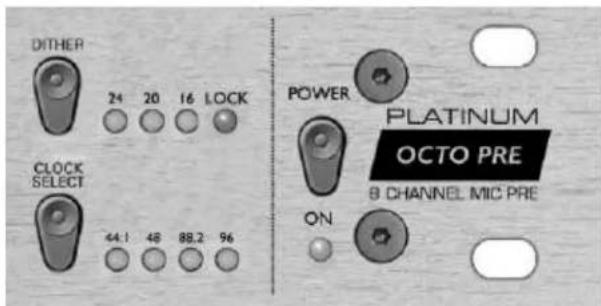
DIGITAL OUTPUT FRONT PANEL CONTROLS
text_image
DITHER 24 20 16 LOCK CLOCK SELECT 44.1 48 88.2 96 POWER PLATINUM OCTO PRE 8 CHANNEL MIC PRE ONCLOCK SELECT (non-latching switch)
This switch is used to select the digital output sample rate. Pressing the switch steps through the four available sample rates: 44.1, 48, 88.2 and 96 kHz. The green LEDs indicate the currently selected sample rate.
ENGLISH
DITHER (non-latching switch)
This switch is used to select the digital output bit depth, which should be set to match the receiving device. Pressing the switch steps through the three available bit depths: 24-, 20- and 16-bit. The green LEDs indicate the currently selected bit depth.
LOCK LED
This LED indicates that the internal A/D chips are correctly synchronised to the external clock signal entering the rear panel Word clock BNC connector. This LED will only operate when the EXT SYNC switch is engaged on the rear panel (see below).
DIGITAL OUTPUT REAR PANEL CONNECTIONS AND SWITCHES

text_image
AEVSPDF SPOF 5-8 — 9MHz — 1-4 1-8 — 4MHz — 1-8 EXT SYNC AESEXT SYNC (Switch)
This switch allows the digital output to be synchronised to an external word clock source. When the unit is successfully synchronised the front panel LOCK LED will be lit (see above).
PLEASE NOTE: the expected sample frequency of the incoming wordclock must be selected (using the CLOCK SELECT switch on the OctoPre front panel) to ensure correct synchronisation. If for example the OctoPre is set to 48 kHz and the external word clock is 44.1 kHz the unit will not lock, and the front panel LOCK LED will not be lit.
OPTO (2 x ADAT™-type 'lightpipe' connector)
These connectors provide the ADAT™-type multi-channel digital outputs as described above.
EXT SYNC (BNC-type connector)
This connector allows the digital converter to be synchronised to an external word clock source, as described above.
SPDIF (Switch) [AES/SPDIF/ADAT™ Interface card only]
This switch, when engaged, sets the 9-pin D-type digital outputs to the appropriate voltage level, balance and professional/consumer status bits for SPDIF operation. When disengaged the digital outputs operate in AES format.
AES/SPDIF (9-pin D-type connector) [AES/SPDIF/ADAT™ interface card only]
This connector provides the AES or SPDIF format digital outputs. It must be used in conjunction with a separate conversion cable (not included with the A/D options) as described above.
A BEGINNER'S GUIDE TO COMPRESSION
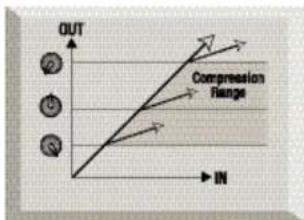
Compressors are probably the most widely used signal processors in the audio industry. A compressor can be thought of as an automatic volume control. Once the volume of the signal exceeds a certain level (called the 'threshold'), the compressor reduces the gain (or, in other words, 'turns the volume down'), causing the signal to be less loud than it would otherwise have been.
text_image
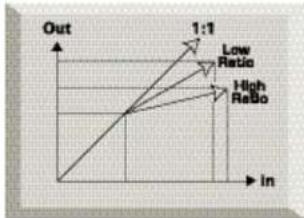
OUT Compression Range INThe amount by which the compressor reduces the gain is determined by the 'ratio'. The ratio is conventionally expressed as a numerical value, e.g. '4:1', which represents the amount by which the gain is reduced when the volume of the signal rises above the threshold.
line
| In | Out | |---|---| | Low Ratio | 1:1 | | High Ratio | 1:1 |ENGLISH
Let's take an example with some real numbers. If the threshold is set to -10 dB and the ratio is set to 4:1, any signal whose level exceeds -10 dB needs to rise in level by 4 dB for the output of the compressor to rise by 1 dB. Therefore an input signal with a peak at -6 dB (which is 4 dB above the threshold) would emerge from the compressor with a peak at -9 dB (1 dB above the threshold). Signal levels below the threshold are unaffected, so if the signal in the above example varied between -20 dB and -6 dB before entering the compressor, it will vary between -20 and -9 dB after being compressed – its dynamic range (the difference between the quietest and loudest parts of the signal in dB) is reduced from 14 dB to 11 dB.
Compression has the result that any variations in the volume of the signal (in other words, the signal's dynamic range) are reduced – the amount of this reduction is determined by the threshold (the level above which the gain is reduced) and the ratio (the amount by which the gain is reduced.) Higher ratios are referred to as hard ratios; lower ratios are called soft ratios.
Because compression causes a reduction in volume level of loud signals, gain must be applied after the compressor to bring the overall volume level back up, so that the maximum volume before the compressor is the same as that after the compressor. This is called 'make-up gain', and is necessary so that the maximum level of the signal is always the same, for correct level matching with any further processing or other equipment.
Once 'make-up gain' has been applied, the part of the signal that was lower than the threshold volume (and hence not compressed) will now be louder than it was before the compressor. This will cause any compressed instrument to sound louder. One use for this phenomenon is to give guitars more sustain.
In most pop music, the backing instruments (such as drums, bass guitars, rhythm guitars etc) tend to be compressed heavily (using a fairly hard ratio and low threshold), so that they remain at a consistent volume level throughout the track. This will provide a solid backing, without occasional drum hits or bass notes poking through (or disappearing from) the mix untidily.
A soft ratio tends to be used on instruments such as lead guitars or vocals that 'sit' on top of the mix. In this situation it is often desirable to preserve more of the dynamics of the original performance, to retain more expression. A reduction in variation of volume level is still required (for the reasons mentioned above), but not to the same extent.
Visit www.focusrite.com for further information and a comprehensive 'Guide to Compression'.
FREQUENTLY ASKED QUESTIONS
Is the OctoPre a Class A device, and why is that important?
Yes, the OctoPre is a Class A device. Why? Well, Class A is a type of amplifier design in which you have a standing DC current running through your amplifier circuits all the time. As the signal comes along you vary what you're taking from that, rather than switching between supplying a positive current for one half of the waveform and a negative current for the other half. This results in the ability to represent audio in a linear (distortion free) manner all the way through the circuit. Cheaper processors use IC amplifiers which run close to Class B and don't have the same standing DC current, which means the transistors inside the chips switching off and on, inevitably resulting in less linear performance.
My OctoPre gets quite hot when in use. Should I be worried about this?
No. This is a result of the high-quality Class A circuitry inside your OctoPre and should not be a problem. As a precaution, it is wise to rack hotter units lower down your rack than cooler units. If space is available, fit a blank panel between units to allow extra ventilation.
Should I use balanced connectors with my OctoPre?
Yes, the line level analogue inputs and outputs are balanced, operating at +4 dBu. See the 'Rear panel connections' section on page 2 for more information on connecting the analogue line level inputs and outputs. However, if using an unbalanced instrument source, you should connect to the unbalanced 1/4" inputs on channels 1 and 2.
Does the OctoPre have the same kind of spectacular bandwidth that has given the Red and ISA range units their reputation for 'open-ended' sound?
Yes. The audio bandwidth of the OctoPre is 10 Hz to 200 kHz!
Can I take my OctoPre with me when I travel internationally?
It depends. There are two versions of the OctoPre mains transformer. One is suitable for use in North America and Japan, with mains voltages in the 100-120V range. The other version is designed for use in the UK and Europe, with mains voltages in the 200-240V range. If you buy an OctoPre in a particular territory, it will be configured for ONLY that territory's mains voltage range. For example, if you're travelling from the USA to the UK, you CANNOT use your US model OctoPre. But if the mains voltage in the country you're visiting is in the same range, you can use the OctoPre
ENGLISH
with no problems – so taking an OctoPre from the USA to Japan, or from Germany to France, for example, would be fine.
Is there an optional digital input card?
No, because all the processing in the OctoPre is entirely analogue - so even if there were a digital input, the digital signal would have to be immediately pass through a D/A converter to allow processing!
Why is the 24 bit 96 kHz specification important?
An A/D converter works by sampling the audio waveform at regular points in time, and then quantising those values into a binary number, which relates to the number of bits specified. The quantised signal must then be passed through a D/A converter before it becomes audible. In simple terms, the D/A essentially 'joins the dots' plotted by the A/D converter when the signal was first converted to digital. The number of dots to join, combined with how little those dots have been moved, determines how accurate the final signal will be compared to the original. The greater the sample rate and bit rate, the more accurate the whole digital process is. So 24 bit/96 kHz performance will ensure more accurate digital transfer of your audio information compared to the old 16 bit/44.1kHz standards. This is especially important if further digital signal processing is to be applied to the signal once converted to digital, as any mathematical operations taking place on the data (for example as a result of a gain change, or dynamic effect process) may result in quantisation and rounding errors. The higher the resolution of the digital data, the smaller the audible effect of these errors.
Can I retrofit a digital board to an analogue OctoPre at a later date?
Yes, and you can do it yourself - it can easily be retro-fitted by the customer without any soldering etc, just a few screws to undo, and one clip-connector to join to the main PCB.
How are the multiple digital outputs configured?
At 48kHz or lower: the 8 AES or SPDIF (switch-selected from rear panel) outputs can run simultaneously with 8 ADAT ^™ outputs, plus 8 ADAT ^™ outputs from the second port (hence 24 simultaneous outputs in total). The ADAT ^™ outputs are exact duplicates of each other. All output formats put out the same set of 8 channels in terms of sample rate, dither etc.
At 96kHz: same as above, except that the two ADAT™ ports carry output channels 1-4 and 5-6 respectively (hence 16 simultaneous outputs in total).
In simple terms, the A/D puts out three separately buffered sets of 8 channels at 48kHz, or two separately buffered sets of 8 channels at 96kHz.
TROUBLESHOOTING
No LEDs illuminate
• Is the POWER switched on?
- Is the voltage selector next to the mains connector on the rear of the unit set correctly? If set incorrectly, the fuse may blow, requiring the correct fuse to be refitted and the voltage to be correctly set.
No output when using the MIC INPUT
• Is the power switched on?
- Is the LINE switch on the front panel switched out?
• Is the INST switch on the front panel switched out? ? (Channels 1 & 2 only.)
• Is the LEVEL set correctly? (See 'Facilities and Controls' section for details.)
- For microphones that require phantom power, is the +48V switch switched in? (If you are unsure whether your microphone requires phantom power, check the user guide for your microphone.)
No output when using the LINE INPUT
• Is the power switched on?
- Is the LINE switch on the front panel switched in?
• Is the INST switch on the front panel switched out? (Channels 1 & 2 only.)
- Is the LEVEL set correctly? (See 'Facilities and Controls' section for details.)
No output when using the INSTRUMENT INPUT (Channels 1 & 2 only)
• Is the power switched on?
- Is the INST switch on the front panel switched in?
• Is the LEVEL set correctly? (See 'Facilities and Controls' section for details.)
The DYNAMICS control seems to have no effect
- Is the LEVEL set correctly? If set too low, the signal level may not be high enough to activate the compressor.
- Is the DYNAMICS control set correctly? If set too low, the input level may not reach the threshold at which compression starts.
CONTACTING US
If have any questions about your OctoPre, or are continuing to have difficulty, you can email us for help at tech@focusrite.com. Alternatively, telephone us on +44 (0)1494 462246, or contact your local distributor (see listing at the back of this manual).
['ADAT™' is a registered trade mark of Alesis Corporation Inc.] ['Pro Tools™' is a registered trade mark of Digidesign Inc.]
ENGLISH
SPECIFICATIONS
Inputs
Electronically balanced 20kΩ.
Nominal level +4dBu / -10dBV
Input Connectors
1/4" jack (channels one and two only)
25 pin D-type 8 channel line level analogue connector.
8 XLR inputs for Mic
Front Panel Controls
Phantom Power: On/Off: +48V
Gain (mic): 0dB to 60dB
Gain (line): -10dB to +10 dB
Gain (instrument): 0dB to 60dB (Impedance > 1MΩ)
Phase Reverse: On/Off (Channel 1 & 2 only)
High Pass filter: On/Off: -12dB / octave. -6dB at 75 Hz
Dynamics: Limiter threshold is fixed at 20dBu.
Compressor threshold and ratio is variable
Frequency select: Switchable (44.1, 48, 88.2, 96 kHz)
Dither: 24, 20 or 16 bit
Metering
Signal Present: -20dBFS (green LED)
Overload: +22dBu (red LED)
Compressor mode: Yellow LED intensity increases with compression
Hard Limit mode: Red LED on when limiting (threshold = +20 dBu)
Analogue Output
25 pin D-type 8 channel analogue connector.
Digital Output
See page 6 for details.
Performance specifications
THD: 0.001% @ 20dBu input, mic and line at 0dB gain
Noise: -96 dB at unity gain through the unit
Mic EIN: -128 dBu @ 6dB of gain with 150Ω termination
impedance
Frequency response: -1 dB at 10 Hz to 200 kHz
Dimensions:
480mm (w) x 44 mm (H) x 265 (D)
Weight:
3.2 Kg
ENGLISH
IN HALT
INHALT 13
DIGITAL AUSGANGS OPTIONEN 18
TROUBLESHOOTING....22
KONTAKT 22
TECHNISCHE DATEN 23
DIGITAL AUSGANGS OPTIONEN
24-bit/96 kHz ADAT™ Interface Karte
44.1/48kHz sample rates:
88.2/96kHz sample rates:
24-bit/96 kHz AES/SPDIF/ADAT™ Interface Karte
AES/SPDIF (9-Pin Sub-D Anschluss) [nur AES/SPDIF/ADAT™ Interface Karte]
text_image
OUT Compression Range INline
| Point | Value | |---|---| | Low Ratio | 1:1 | | High ReBo | In |DEUTSCH
Phantomspeisung: On/Off: +48V
High Pass Filter: On/Off: -12dB/Oktave, -6dB @ 75 Hz
Signal: -20 dBFS (Green LED)
Overload: +22 dBu (Rote LED)
QUESTIONS COURANTES....33
ASSISTANCE 34
CONTACTEZ-NOUS 34
CARACTÉRISTIQUES TECHNIQUES....35
INSTRUCTIONS RELATIVES À LA SÉCURITÉ
text_image
OUT Compression Range INBruit entrée micro : -128 dBu @ 6dB of gain with 150 ohm termination impedance
text_image
LOW INPUTS LOW OUTPUTS LOW OUTPUTS LOW OUTPUTS CEITALIANO
PER COM INCIARE
24-BIT/96 KHZ ADAT INTERFACE CARD
text_image
OUT Compression Range INline
| Point | Value | |---|---| | Low Ratio | 1:1 | | High ReBo | In-1 |Phantom Power: On/Off: +48V
Gain (mic): 0 dB / 60 dB
Gain (line): -10 dB / +10 dB
Gain (strumento): 0dB / 60dB (Impedenza > 1MΩ)
Dither: 24, 20 o 16 bit
METERING
THD: 0.001% @ 20dBu input, mic and line at 0dB gain
Noise: -96 dB a unity gain
Mic EIN: -128 dBu @ 6dB of gain with 150 ohm
termination impedance
text_image
USB SRVRS USB OUTPUTS USB OUTPUTSESPANOL
PUESTA EN MARCHA
Tarjeta interface 24-bit/96 kHz ADAT
Tarjeta interface 24-bit/96 kHz AES/SPDIF/ADAT
Cable AES: Sub-D 9 a 4 conectores XLR macho
Cable SPDIF: Sub-D 9 a 4 conectores RCA macho
text_image
AIS/PDF SPOF I/O — 50Hz — I-4 I/O — 40Hz — I-8 EXT SYNC AISEXT SYNC (Pulsador)
text_image
OUT Compression Range IN['ADAT™' is a registered trade mark of Alesis Corporation Inc.]
['Pro Tools™' is a registered trade mark of Digidesign Inc.]
ESPECIFICACIONES
Entradas
Balanceadas electrónicamente Nivel nominal +4dBu/-10dBv
Electric Factory Pty Ltd
Phone: +61 3 9480 5989
Fax: +61 3 9484 6708
Email: elfa@ozmail.com.au
Austria
TC Electronic Austria
Phone: +43 1810 1002
Fax: +43 1B10 1001
Email: TCA@tcelectronic.com
Belgium
EMI
Phone: +32 11 23 23 55
Fax: +32 11 23 21 72
Email: info@eml.be
Brazil
Pride Music
Phone: +55 11 6975-2711
Fax: +55 11 6975-2772
Email: info@pridemusic.com.br
Bulgarla
Almar Co Ltd
Phone: +359-2-511538
Fax: +359-2-795917
Email: almar@aster.net
Canada
c/o Digidesign (USA)
Phone: +1 650 731 6300
Fax: +1 650 731 6399
Email: prodinfo@digidesign.com
Croatia, Slovenia, Bosnia,
Macedonia and Serbia
Music Export
Phone: +49 89 746 123 90
Fax: +49 89 746 123 92
Email: Music.Exports@t-online.de
Cyprus
Technosound
Phone: +357 2 499971
Fax: +357 2 499986
Email: technosd@cylink.com.cy
Czech Republic
Audiopolis Studio Systems
Phone: +420 2 4148 3501
Fax: +420 2 4148 3505
Email: sales@audiopolis.cz
Mediapor
Phone: +420 2 7173 5610
Fax: +420 2 7273 4897
Email: info@mediaport.cz
Denmark
New Musik AG
Phone: +45 86 190@99
Fax: +45 86 193199
Email: saudio@intouch.com
Finland
Studiotec Ky
Phone: +358 9 5123 5330
Fax: +358 9 5123 5355
Email: sales@studiotec.fi
France
Dynamic Audio
Phone: +33 1 48 63 04 43
Fax: +33 1 48 63 02 01
Email: infos@dynamicaudio.fr
Germany
Greece Bon Studio S A
Phone: +201.3
Phone: +52-13602003-8 Fax: +70-1 2827969
Fax: +30/13827d6 Email: bon@bonstur
Hong Kong/China
Digital Media Technology
Phone: +852 2721 0343
Fax: +552 2366 6883
Email: dmthk@dmtpro.com
Hungary
Absolute 21 004.05
Phone: +361 252 0196
Fax: +361 341 0272
PT Santika Multi Jaya
Phone: +62 21 650 6040
Fax: +62 21 650 880
Email: yupo@indosat.net.id
Israel
Sontronics
Phone: +972 3 570 5223
Fax: +972 3 619 9297
Email: sontrncs@inter.net.il
Italy
Grisby Music Professional
Phone: +39 0 71 7108471
Fax: +39 0 71 7108477
Email: grisbymusic@tin.it
Japan
All Access Inc
Phone: +81 52 443 5537
Fax: +81 52 443 7738
Email: info@allaccess.co.jp
R. O. Maldives
Island Acoustics
Phone: +960 32 0032
Fax: +960 31 8624
Email: islmusio@dhivehinet.net.mv
Mexico
Email: ventaspa@varinter.com.mx
Netherlands
Total Audio BV
Phone: +31 20 4476447
Fax: +31 20 4476464
Email: info@total-audio.nl
New Zealand
Protel
Phone: +64 4 801 94
Fax: +64 4 384 2112
Email: rob@wm.protel.co.nz
Norway
Lydrommet
Phone: +47 22 80 94 50
Fax: +47 22 80 94 60
Russia, Baltics, Ukraine
AT Trade
Phone: +7 095 956 1105
Fax: +7 095 956 6882
Email: alpha-brand@attrade.ru
Singapore/ Malaysia
Team 108
Phone: +65 748 9333
Fax: +65 747 7273
Email: 108@team108.com.sg
Slovakia
Cantron
Phone: +421 264 780767
Fax: +421 264 7B0042
Email: centron@be.profinet.sk
South Africa
Powerhouse Electronics
Phone: +27 11 444 206
Fax: +27 11 444 8416
Email: earle@powerhouse-sa.com
South Korea
Best Logic Sound Co.
Phone: +82 2 515 7385
Fax: +82 2 516 7385
Email: bscoltd@hitel.net
Spain
Media Sys S.L
Phone: +34 93 426 6500
Fax: +34 93 424 7337
Email: mediasys@interplanet.es
Sri Lanka
HiFi Centre Ltd
Phone: +94 1 580442
Fax: +94 1 503174
Email: hifi@eureka.lk
Sweden
Polysonic ab
Phone: +46 31 7069050
Fax: +46 31 7069110
Email: polysonic@polysonic.com
Switzerland
Bleuel Electronic ag
Phone: +41 1 751 7550
Fax: +41 1 751 7500
Email: bleuel-elac@swisonline.ch
Taiwan
Digital Media Technology (DMT)
(Taiwan) Ltd
Phone: +886 2 25164318
Fax: +886 2 25159881
United Arab Emirates
NMK Electronics Ent.
Phone: +971 4626683
Fax: +971 626682
Email: nmk@emirates.net.ae
United Kingdom & Ireland
Focusrite Audio Engineering Ltd
Phone: +44 (0) 1494 46224
Fax: +44 (0) 1494 459920
Email: sales@focusrite.com
USA
Digidesign
Phone: +1 650 731 6300
Fax: +1 650 731 6399
Email: procinfo@c.g design.com
Dino_Virella@digidesign.com
Venezuela
Avcom C.A
Phone: +58 212 237 776
Fax: +58 212 237 8275
Email: jmendez@avcom.com.ve
Vietnam
Vistar
Phone: +84 4 824 3058
Fax: +84 4 825 0099
Email: hanoimusic@netnam.org.vn
Other territories not listed:
Please contact Focusrite United
Kingdom