
FC 156 - Fan QLIMA - Free user manual and instructions
Find the device manual for free FC 156 QLIMA in PDF.
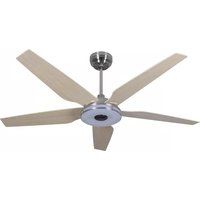


| Product type | Ceiling fan with integrated LED light |
| Brand | Qlima |
| Model | FC 156 |
| Power supply | Mains adapter: input 100-240 V~, 50/60 Hz, 1.5 A; output 24 Vdc, 3.0 A, 72.0 W |
| Maximum supported weight | 15.9 kg (35 lb) maximum for outlet box |
| Fan weight | Less than 15.9 kg |
| Minimum mounting height (Europe) | 2.3 m from floor |
| Minimum mounting height (Australia) | 2.1 m from floor |
| Number of blades | Not specified, but multiple blades included |
| Control type | RF remote control + smartphone app (WiFi) |
| Fan functions | Multiple speeds, Nature mode, summer/winter reverse |
| LED light functions | On/off, warm/cool variation, dimming |
| WiFi compatibility | 2.4 GHz only |
| App | Tuya Smart Life (iOS and Android) |
| Warranty | 2 years against material and workmanship defects |
| Maintenance | Clean with a soft brush or lint-free cloth; do not use water; check fastenings twice a year |
| Short-circuit protection | Switched-mode power supply (SMPS) adapter with short-circuit-proof isolating transformer |
| Operating temperature | 10 to 40 °C |
| IP rating | IP20 (indoor only) |
| Material | Metal (motor) and wood/plastic (blades) – not specified |
| Package contents | Fan, remote control, adapter, mounting kit, blades, lampshade, screws and accessories |
Frequently Asked Questions - FC 156 QLIMA
User questions about FC 156 QLIMA
0 question about this device. Answer the ones you know or ask your own.
Ask a new question about this device
Download the instructions for your Fan in PDF format for free! Find your manual FC 156 - QLIMA and take your electronic device back in hand. On this page are published all the documents necessary for the use of your device. FC 156 by QLIMA.
USER MANUAL FC 156 QLIMA
guarantee

YEARS
| D | BEDIENUNGSANLEITUNG | 2 |
| F | MANUEL D’UTILISATION | 22 |
| GB | OPERATING MANUAL | 42 |
| IT | MANUALE UTENTE | 60 |
| NL | GEBRUIKSHANDLEIDING | 80 |
(Fig. 1)
External wrench
Wire stripper
(Fig. 4)
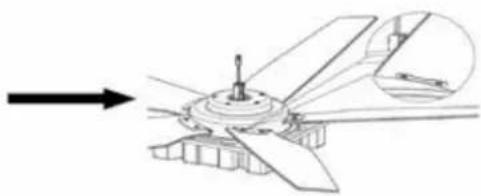
(Fig. 5)
ASSEMBLY
(Fig. 14)
HANGING THE CEILING FAN, ATTACHING THE POWER SUPPLY, AND CONNECTING THE FAN:
(Fig. 15)
(Fig. 17) (Fig. 18)
(Fig. 19)
(Fig. 1)
(Fig. 4) (Fig. 5)
ASSEMBLY
FIXING THE FAN
(Fig. 14)
HANGING THE CEILING FAN AND INSTALLING THE POWER ADAPTER AND FAN WIRING:
(Fig. 15)
(Fig. 17) (Fig. 18)
(Fig. 19)
INSTRUCTIONS FOR USING THE REMOTE CONTROL:
WARRANTY CONDITIONS
Congratulations with the purchase of your ceiling fan. You have acquired a high quality product which will give you many years of pleasure, if you use it responsibly. Please read the user's manual first in order to ensure the optimum life span of your ceiling fan. On behalf of the manufacturer, we provide a two-year warranty on material- or manufacturing defects.
Enjoy your ceiling fan.
Yours sincerely,
PVG Holding B.V.
Customer Service Department
1 PLEASE READ THE USER'S MANUAL FIRST.
If you have any doubts, consult your dealer.
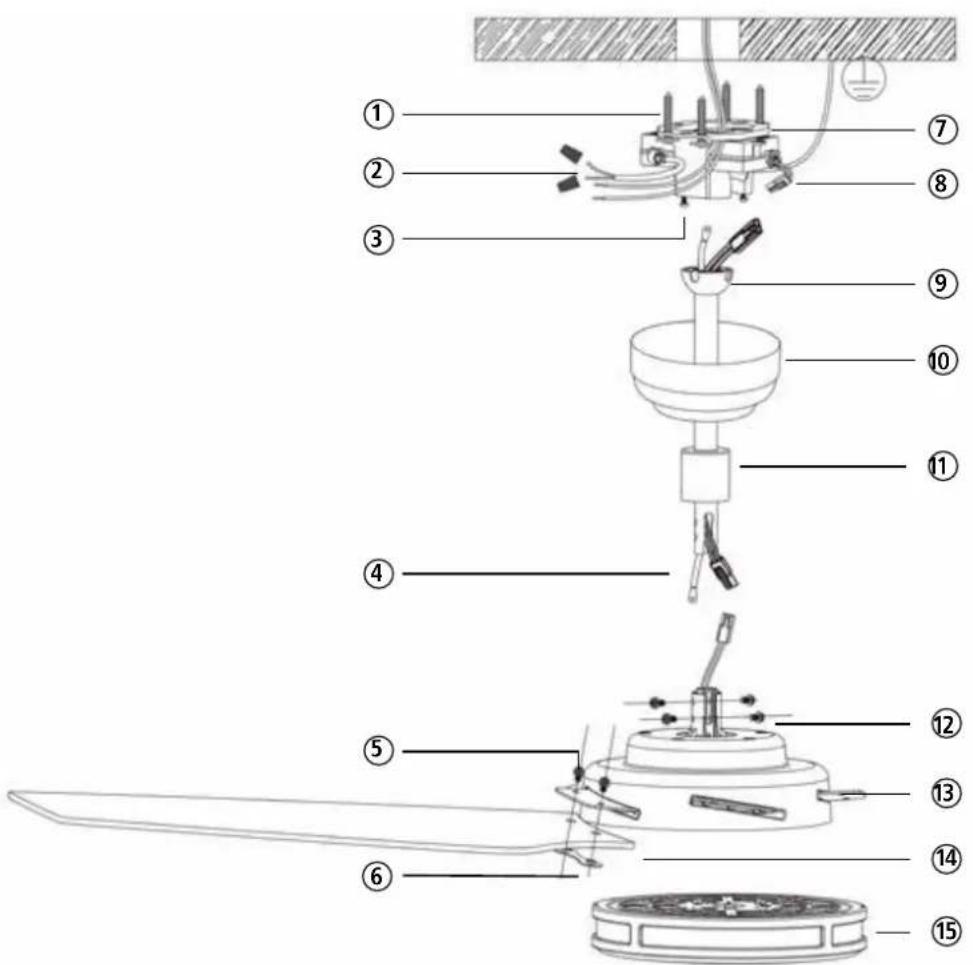
(Fig. 1)
| 16 | 17 | 18 | 19 | 20 |
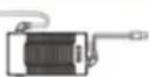 AC Adapter AC Adapter |  ST5x24 Setscrew ST5x24 Setscrew |  Wiring cap Wiring cap | 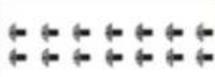 M6x12 Screws M6x12 Screws | 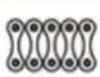 Airfoil Grommets Airfoil Grommets |
| 1 pc | 4 pcs | 3 pcs | 14 pcs | 5 pcs |
(Fig. 2)
IMPORTANT COMPONENTS
① ST5x24 Setscrew ② Input AC 100-240V ③ M4x10 Screws ④ Safety Cable ⑤ M6x12 Screw ⑥ Grommets ⑦ Mounting bracket ⑧ AC Adapter ⑨ Downrod ⑩ Canopy ⑪ Wiring cover ⑫ M6x12 Screws ⑬ Motor hub ⑭ Airfoil ⑮ Lampshade ⑯ AC Adapter ⑰ ST5x24 Setscrew ⑱ Wiring cap ⑲ M6x12 screws ⑳ Airfoil grommets
DIRECTIONS FOR USE (GB)
- Read this user manual carefully before using the appliance and keep it for future reference. Install this device only when it complies with local/national legislation, ordinances and standards.
- The electric ceiling fan is designed for indoor use.
- After unpacking, check the appliance for any damages. When in doubt, do not use the appliance, but contact customer service at your local dealer's. Keep the packaging materials (plastic bags, etc.) away from children, as they may cause hazardous situations to children.
- No modifications to the safety system are allowed.
- This product is constructed in conformity with relevant texts in the EN 60335 standard.

SAFETY PRECAUTION:
Important: please read before installation:
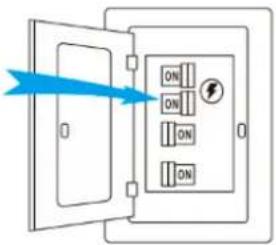
- Before you begin installing the fan, shut power off at the circuit breaker of the fuse box.
- CAUTION: Read all instructions and safety information before installing your new fan. Review accompanying assembly diagrams.
- Make sure that all electrical connections are in accordance with National Electrical Code, ANSI/NFPA 70 and local codes. Hire a licensed electrician if you are unfamiliar
with installing electrical wiring.
- Make sure the installation site you choose allows the fan blades to rotate without any obstructions. Allow a minimum clearance of 2.1m (7 feet) from the floor and 18 inches from the tip of the blades to the wall.
- WARNING: To reduce the risk of fire, electric shock, or personal injury, mount to outlet box marked "Acceptable for Fan Support of 15.9 kg (35 lbs) or less" and use mounting screws provided with the outlet box.
- CAUTION: To reduce the risk of injury, use only the screws provided with the outlet box in conjunction with the lock washers provided with the fan.
- The outlet box and support structure must be securely mounted and capable of reliably supporting a minimum of 35 pounds. Use only CE. Listed outlet boxes marked "Acceptable for Fan Support of 15.9 kg (35 lbs) or less".
• After you install the fan, make sure that all mounting components are secured to prevent the fan from falling.
- Do not insert anything into the fan blades while the fan is operating.
- To change the direction of the rotation of the blades the fan must be in operation mode.
- All set screws must be checked and retightened where necessary before installation.
- WARNING: To reduce the risk of personal injury, do not bend the blade bracket when installing the brackets, balancing the blades, or cleaning the fan. Do not insert
foreign objects in between rotating fan blades.
- CAUTION: To reduce the risk of electric shock, disconnect the electrical supply circuit to the fan before installing light kit.
- After making the wire connections, the wires should be spread apart with the grounded conductor and the equipment-grounding conductor on one side of the outlet box and the ungrounded conductor on the other side of the outlet box.
- The splices, after being made, should be turned upward and pushed carefully up into the outlet box. Conductor wiring identified as grounded is to be connected to a grounded conductor of the power supply. Conductor wiring identified as ungrounded is to be connected to an ungrounded conductor. Conductor wiring identified for equipment grounding is to be connected to an equipment-grounding conductor.
- This device complies with part 15 of the FCC Rules. Operation is subject to the following two conditions: (1) This device may not cause harmful interference, and (2) this device must accept any interference received, including interference that may cause undesired operation.
- WARNING: To reduce the risk of fire or electric shock, this fan must be installed with a general use, isolating wall control/switch.
WARNING: To reduce the risk of fire or electric shock, do not use this fan with any solid-state speed control device.
NOTE: The important safeguards and instructions appearing in this manual are
not meant to cover all possible conditions and situations that may occur. It must be understood that common sense, caution and care are factors which cannot be built into this product. These factors must be supplied by the person(s) installing, caring for and operating the unit.
- Please remember to respect local regulations: hand in non-working electrical equipment to an appropriate waste disposal centre. The packaging material is recyclable. Dispose of the packaging in an environmentally friendly manner and make it available for the recyclable material collection service.
- This appliance is only intended for indoor use.
- This appliance can be used by children aged from 8 years and above and persons with reduced physical, sensory or mental capabilities or lack of experience and knowledge if they have been given supervision or instruction concerning use of the appliance in a safe way and understand the hazards involved. Children shall not play with the appliance. Cleaning and user maintenance shall not be made by children without supervision.
- Regarding the instructions for cleaning and maintenance, please refer to the corresponding paragraph of the manual.
- WARNING: If unusual oscillating movement is observed, immediately stop using the ceiling fan and contact the manufacturer, its service agent or suitably qualified persons.
• The fixing means for attachment to the
ceiling such as hooks or other devices shall be fixed with sufficient strength to withstand 4 times the weight of the ceiling fan;
- That the mounting of the suspension system shall be performed by the manufacturer, its service agent or suitably qualified persons;
- That the fan is to be installed so that the blades are more than 2.3 m above the floor (Europe only);
- That the fan is to be installed so that the blades are more than 2.1 m above the floor (Australia only);
- The model or type reference of a luminaire that may be installed in a fan constructed for this purpose.
- The external flexible cable or cord of this luminaire cannot be replaced; if the cord is damaged, the luminaire shall be destroyed.
CAUTION: The light source is designed for this specific application and can overheat if serviced by untrained personnel. If any servicing is required, the product should be returned to an authorized service facility for examination or repair.
If you fail to consult and/or follow up the rules, instructions and explanation, the warranty will no longer be valid, and the manufacturer will no longer deal with any damage to the appliance and/or your environment under the warranty.
BEFORE YOU START
Contact a licensed electrician if you are uncomfortable performing electrical work. A licensed electrician must install the fan if required by local code. Do not use the fan with a dimmer switch. Turn off power at breaker.
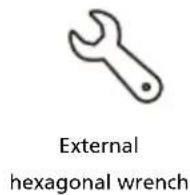
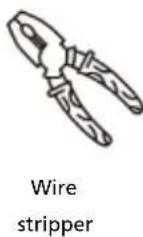
Tools and Materials Required
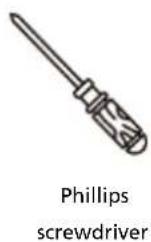
(Fig. 3)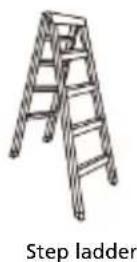
INSTALLATION
Install Airfoils:
1.1 Moving clockwise M6x12 Screws, align each airfoil with Grommets on the fan motor (Fig.4). 1.2 Make sure each airfoil matches the corresponding place on the fan Hub (Fig.5).
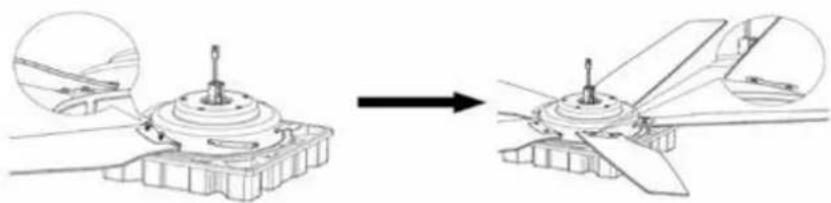
(Fig.4) (Fig. 5)
Attach Downrod:
2.1 Assemble down rod as pictured in Fig. 6. (Please select the suitable length of rod for your ceiling.)
NOTE: If you choose to install a safety cable/chain onto your ceiling fan, you will need to run it through the downrod prior to installation.
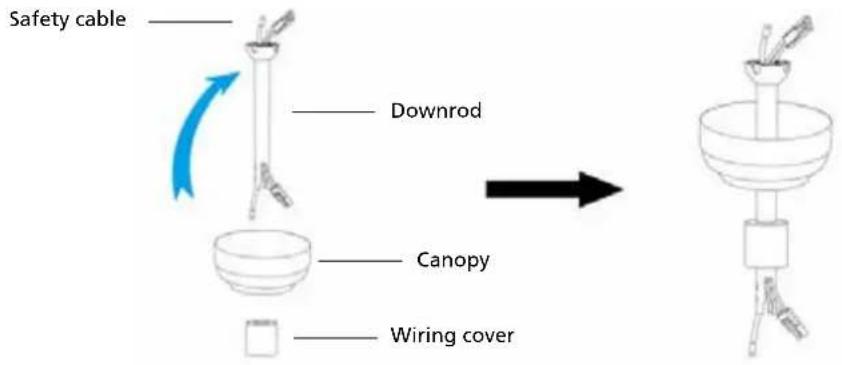
(Fig. 6)
2.2 Remove the screw which is already fixed in the motor shaft, then connect the safety cable with the motor shaft firmly by this screw. (See Fig 7)
Connect the wiring harness from the down rod to the receptacle from the motor wire as shown in Fig.8. After finishing, hide the wire into the down rod.
NOTE: Take out the end of the safety cable from the downrod before lowering the downrod onto the motor hub. (See Fig 9)
Install the screws and washers in opposite directions from each other (2 sets on each side) and make sure the screws and washers are tightened firmly with a screwdriver. (See Fig 10)
(Fig. 7) (Fig. 8) (Fig. 9) (Fig. 10)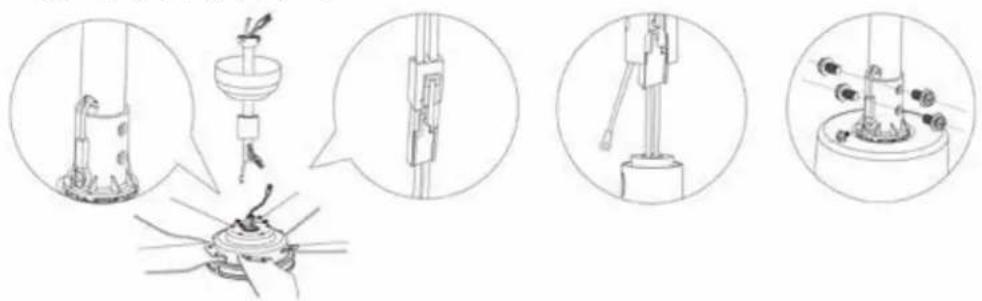
ASSEMBLY
HANGING THE FAN
Install the mounting bracket to the ceiling box, as shown in Fig 11 below. Rotate the mounting bracket in different directions so that the bracket mounting holes match the screw holes of the ceiling box.
Note: This mounting bracket is a standard cable box. If the mounting bracket is installed at the outlet box, it should be installed on the outlet box with two screws matching the outlet box itself, as shown in Fig 11.
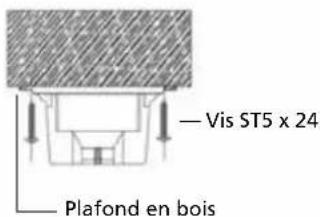
This bracket can also be mounted to the wooden ceiling beam, and then the four ST5x24 screws can be used to lock the corresponding holes on the left and right sides of the bracket.
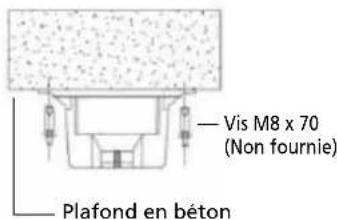
Note: The wooden ceiling beam must meet the tensile test of 30KG for installation, as shown in Fig 12. It is also possible to install the mounting bracket directly to the concrete ceiling and install four screws to the left and right corresponding holes of the bracket to lock the ceiling, as shown in Fig 13.
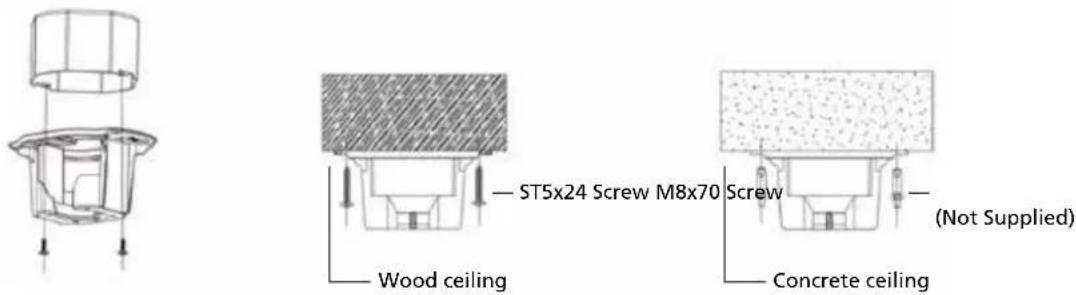
(Fig. 11) (Fig. 12) (Fig. 13)
If you have an angled or vaulted ceiling: (Fig 14)
- When installing the mounting bracket, the bracket groove is upward.
- You will need a longer downrod.
- If your ceiling angle is wider than 25° , you will also need an Angled Mounting Kit.
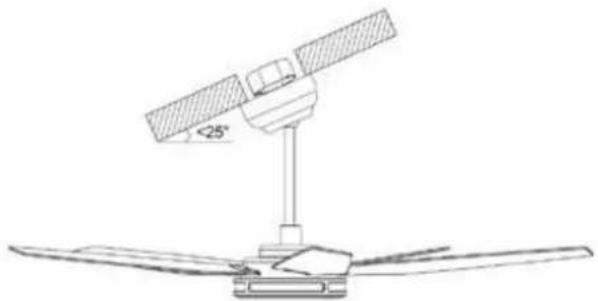
(Fig. 14)
HANGING CEILING FAN & INSTALLING POWER ADAPTER & WIRING THE FAN:
WARNING: To reduce the risk of fire, electric shock or other personal injury, mount the fan only to an outlet box or supporting system marked acceptable for fan support and use the mounting screws provided with the outlet box.
WARNING: Check to see that all connections are tight, including ground, and that no bare wires are visible at the wire nuts (except for the ground wire).
WARNING: To reduce the risk of fire or electric shock, do not use this fan with any solid-state speed control device.
WARNING: To avoid possible electrical shock, be sure electricity is turned off at the main fuse box before wiring.
Hang the installed ceiling fan on the mounting bracket that mounted to the ceiling as shown in Fig 15, pay attention to the enlarged image as shown in Fig15. The pivot ball on the down rod needs to hang from inside the socket of the bracket and match up with a slot to lock the pivot ball in place.
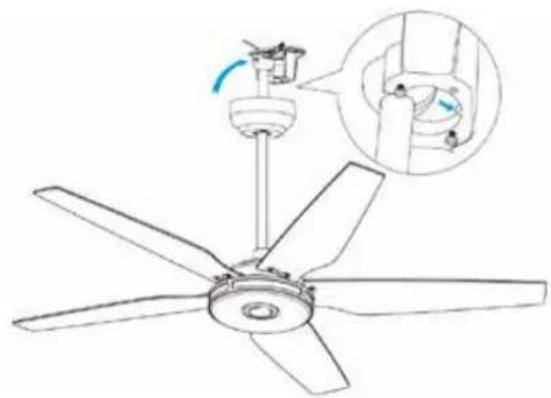
(Fig. 15)
Connect the wire of the power adapter through the bracket as below Fig 16:
The wires will need to be bound together with electrical tape for added stability. Put the AC Adapter inside the bracket and connect the DC output wire with the wire from motor through the downrod.
Make sure all wires are tucked in the canopy. Connect the AC input to the house electricity.
WARNING: Put AC adapter into the flat side of bracket and push it through to the other side which the ceiling fan hangs from. Please see the Arrow direction showed in Fig 16, otherwise the wires are too short to be connected.
Note: The Green/Yellow wire from the bracket connects with the ground wire from the supply power, using the wiring cap to tuck the wires together and then hide inside the ceiling.
The White wire from the AC Adapter connects with the Neutral wire from the supply power, and the Black wire from the AC Adapter connects with the Live wire from the supply power, using the wiring cap to tuck the wires together. (Make sure all the wires connect with the correct colors as shown below in Fig 16.)
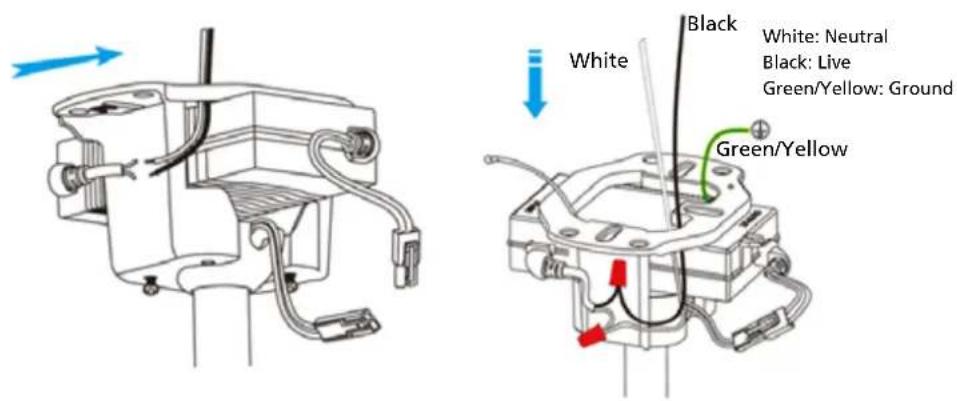
(Fig. 16)
RAISE CANOPY
For the ceiling fan with black color, canopy installation is as below:
Make sure all wires are tucked in the canopy. Raise the canopy to the mounting bracket, aligning the two screws on the canopy with the holes on the bracket. Secure the canopy to the mounting bracket with the screws, see Fig 17.
For the ceiling fan with other colors, canopy installation is as below:
Make sure all wires are tucked in the canopy. Raise the canopy to the mounting bracket, align the two screws into the slot inside the canopy, rotate and twist the canopy to lock into place. See Fig 18.
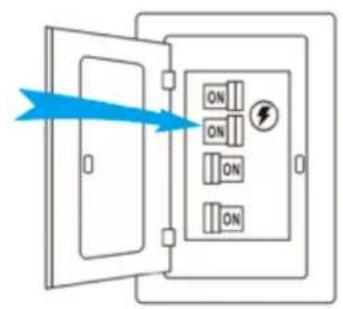
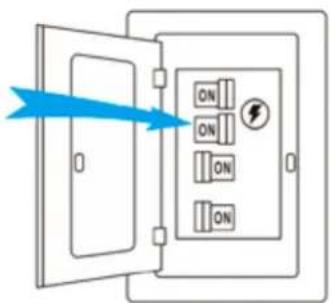
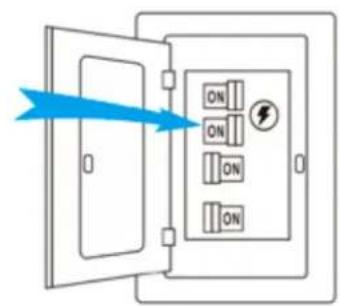
Installation is now complete. Turn on the power switch as in Fig 19. Then the fan lights are on. Test and pair your fan immediately using the remote control.
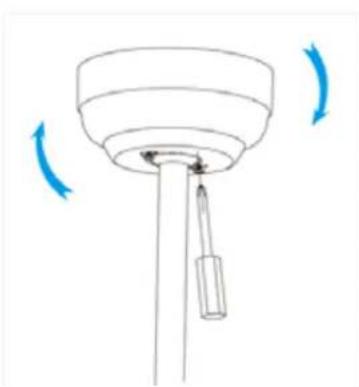
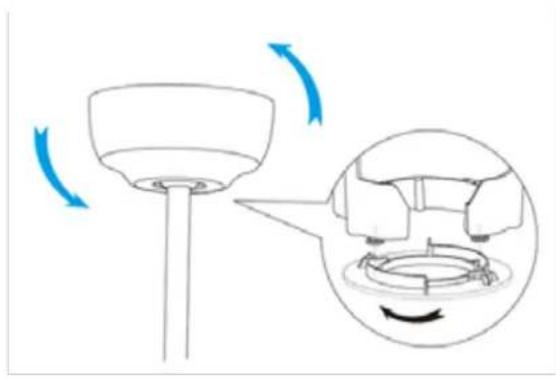
(Fig. 17) (Fig. 18)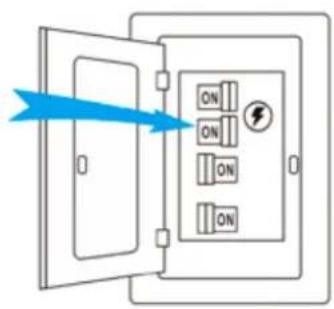
(Fig. 19)
REMOTE CONTROL OPERATING INSTRUCTIONS
Pairing the Remote Control to Your Fan
Within 10 min. of plugging fan to power source, press and hold the ⏻ button for 5 sec. to pair remote control and fan. Successful pairing will trigger a beep alert.
Remote Control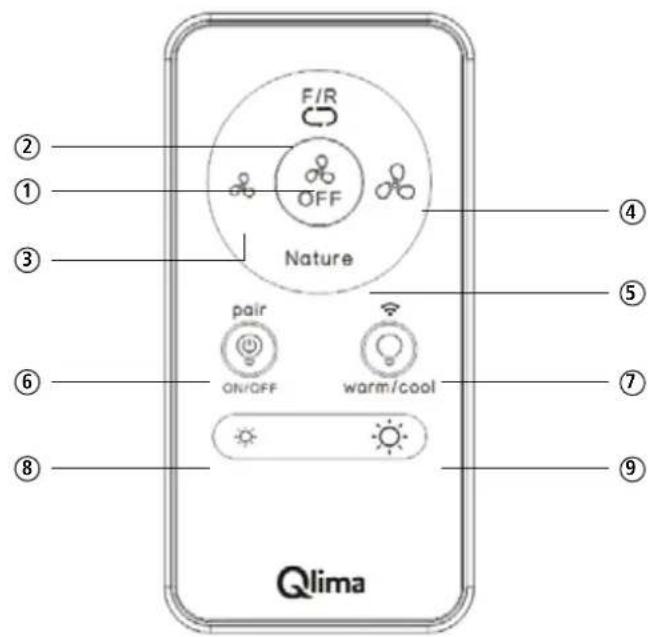
(Fig. 20)
Remote Control button definitions
- Turns the fan off.
- Switch between summer mode and winter mode.
- Summer mode - (Counter-clockwise) A downward airflow creates a cooling effect.
- Winter mode - (Clockwise) An upward airflow moves warm air off the ceiling area and redistributes the warm air that hovers around the ceiling to the living space.
- Turns the fan on and decreases fan speed.
- Turns the fan on and increases fan speed.
- Switch the fan speed between nature mode and normal mode. Simulate a natural breeze to make you comfortable when you sleep.
Note: Press and hold this button for 5 seconds to turn off the beep. Press and hold the button for 5 seconds again to turn it on.
- Turns the lights on or off and RF pairing.
Note: Press and hold the button for 5 seconds within 10 minutes of plugging the fan to the power source to pair the remote and fan.
- Switch between warm light and cool light. WIFI troubleshooting.
Note: Press and hold the button for 5 seconds until a beep alert. The fan will switch to AP Mode, then select AP Mode on the APP, follow the APP control instructions will enable fan Wi-Fi.
- Press and hold the button to decrease the desired light level.
- Press and hold the button to increase the desired light level.
Warning: Do not expose the remote control to rain or water.
Install / Replace Batteries
Use two dry alkaline batteries (1.5V). Do not use rechargeable batteries.
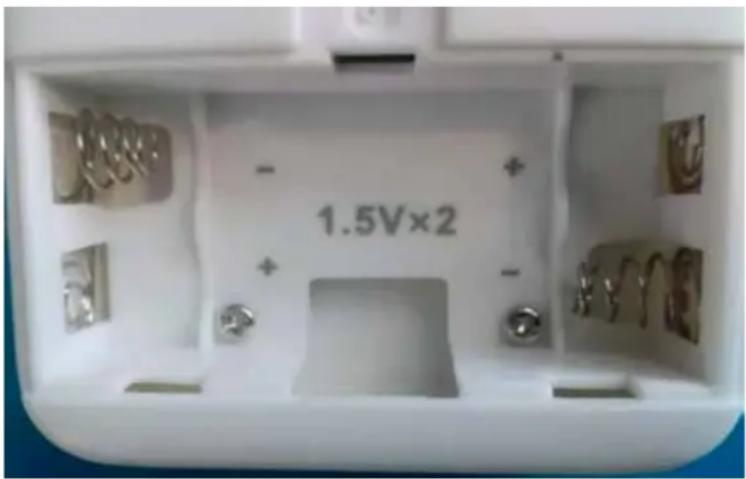
- Remove the battery cover on the back of the Remote Control.
- Insert new batteries making sure that the (+) and (-) of the battery are installed correctly.
- Reattach the cover by sliding it back into position.
NOTE!
- When replacing batteries, do not use old batteries or a different type of battery. This may cause the remote controller to malfunction.
- If you do not use the remote controller for several weeks, remove the batteries. Otherwise, battery leakage may damage the remote controller.
- The average battery life under normal use is about 6 months.
- Replace the batteries when there is no response from the unit.
- Never mix new and old batteries. Never use different battery types (e.g., alkaline and manganese dioxide) simultaneously. Non-rechargeable batteries are not to be recharged.
- Batteries are to be inserted with the correct polarity.
- Exhausted batteries are to be removed from the appliance and safely disposed of.
- If the appliance is to be stored unused for a long period, the batteries should be removed. The supply terminals are not to be short-circuited.
APP CONTROL CONNECTION
- First download the app for free from the App Store or Google Play, or scan the barcode below.
- Open the app to create your account. The account can be registered through E-mail or Mobile phone. If you already have an account, just log in with your username and password.
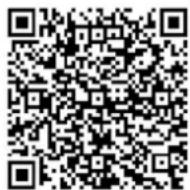
Google Play / Apple Store
- Set up a Wi-Fi connection (EZ Mode or AP Mode).
EZ Mode
a. Turn on Wi-Fi in phone settings. b. Tap "Add device" (make sure the fan is powered on and there is a red light blinking fast in the center of the ceiling fan lampshade). c. Tap "Qlima smart ceiling fan" button under "Air circulation" menu. Tap "Next" (the default pairing mode is EZ Mode for Wi-Fi connection). d. Select your home Wi-Fi and enter password, tap "Confirm". e. Wait for the connection to be completed; you will enter the main control UI.
If you are unable to set up a Wi-Fi connection via EZ Mode, try AP Mode and follow the steps below.
AP Mode
a. Press and hold the button for 5 seconds.

b. Tap "Add device".
(Make sure the fan is powered on and there is a red light blinking slowly in the center of the ceiling fan lampshade.)
(Make sure the fan is powered on and there is a red light blinking slowly in the center of the ceiling fan lampshade.)
c. Tap the "Qlima smart ceiling fan" button under the "Air circulation" menu. d. Tap "Net Pairing Mode", select "AP Mode". Tap "Next". e. Select your home Wi-Fi and enter the password, tap "Confirm". f. Connect to the "Smart life" Wi-Fi signal. g. Reopen the app. h. Wait for the connection to be completed; you will enter the main control UI.
- The app will walk you through the main screen and show you how to create schedules, change fan speeds, dim the light, switch between Summer/Winter mode, invite users, create groups and much more. Refer to app instructions for more details. If necessary, you can reconnect the device according to the above steps.
INPUT: 100-240 V AC, 1.5 A, 50/60 Hz OUTPUT: 24.0 V DC, 3.0 A, 72.0 W TA: 10~40°C TC: 80°C IP20
INPUT: 100-240 V AC, 1.5 A, 50/60 Hz; OUTPUT: 24.0 V DC, 3.0 A, 72.0 W; TA: 10~40°C; TC: 80°C; IP20
Non-inherently short-circuit proof transformer with non-self-resetting or non-replaceable, protective device and non-replaceable intentional weak parts shall have an information explaining the protective devices, cannot be reset or replaced after a short-circuit or an overload;
- Non-inherently short-circuit proof transformer with non-self-resetting or non-replaceable protective device and non-replaceable intentional weak parts shall have information explaining that the protective devices cannot be reset or replaced after a short-circuit or an overload.
- For associated transformers and IP00 transformers, an informative note shall indicate that a 10% over or under voltage may appear in the supply, and the rated output of the transformer shall be selected accordingly.
- The external flexible cable or cord of this transformer cannot be replaced; if the cord is damaged, the transformer shall be scrapped.
| CE | Product complies with the European Safety Regulations |
 | For indoor use only |
 | SMPS incorporating a short-circuit-proof isolating transformer(inherently or non-inherently) |
 | SMPS(switch mode power supply unit) |
CARE AND CLEANING
- Check the support connections, brackets, and airfoil attachments twice a year. Make sure they are secure. Because of the fan's natural movement, some connections may become loose over time. It is not necessary to remove the fan from the ceiling.
- Clean your fan periodically. Use only a soft brush or lint-free cloth to avoid scratching the finish. The plating is sealed with a lacquer to minimize discoloration or tarnishing.
- (Optional) Apply a light coat of furniture polish to the wood blades.
- (Optional) Cover small scratches with a light application of shoe polish.
- That the replacement of parts of the safety suspension system device shall be performed by the manufacturer, its service agent or suitably qualified persons.
- "The light source contained in this luminaire shall only be replaced by the manufacturer or his service agent or a similar qualified person."
Do not:
- Use water when cleaning. Water could damage the motor, or the wood, or possibly cause an electrical shock.
- Apply oil to your fan or motor. The motor has permanently-lubricated sealed ball bearings.
Note: Power off the fan before product maintenance or cleaning the fan.
WARNING: Changes or modifications to this unit not expressly approved by the party responsible for compliance could void the user's authority to operate the equipment.
TROUBLESHOOTING
Your fan may occasionally jerk forward and backward upon start up. This is normal and does not affect fan operation.
Try these troubleshooting steps before contacting Customer Service.
| Issue Solution | |
| The fan will not start. | 1. Make sure the fan is receiving power.2. Check your circuit breaker or fuse panel and wall switch for functionality.3. Make sure the fan is properly wired and grounded. Check all connections for any damaged, broken, or frayed wires.4. Make sure the plastic film in the remote's battery tray has been removed.5. Remote control must be paired within 10mins of connecting ceiling fan to power source.6. Check to make sure remote control is correctly paired.7. Any wires connecting ceiling fan to power source must be in ON position.8. Try to search the WIFI signal on your phone settings and connect with the app, check to see if the app is able to find the fan.9. If you have paired the remote or the app and the fan still does not start, then try to reset the fan: To reset the fan, cut the power for 10 minutes, then turn the power on and press the pairing button on the remote for 5 seconds until “beep”, then pair the app again to reconnect. |
| The fan wobbles and noisy | 1. Blade screws with the plastic round part against the motor or not.2. Check all the pin wire connect against the moving part.3. Check the down fan cup hit the motor.4. The light kit slanting.5. Check the down rod slanting or not.6. Make sure the colour sticker on the motor and blades match each other.7. Turn off the fan then make the fan running by hand and listen still have noise or not.8. Take out the middle black cover on the light kit and check the middle big nut loose or not.9. When the fan running, touch the light kit by hand, try to make the light kit stable.10. Check the downrod and pivot ball hanging on the bracket if it is seated correctly and in the retention slot.11. Check all mounting points and bracket to see if there are any screws loose.12. The ceiling beam must meet the tensile test strength of 30KG for installation.13. Make sure the airfoils or brackets have not been bent or deformed. |
| LED OFF 1. Make sure LED wires connect with the controller.2. Make sure the whole fan is powered.3. Make sure the remote control code is matching. | |
| Unable to pair remote and app | 1. Check if the wires are connected in the right position or not.2. Check the batteries on the remote.3. Disconnect the power for 10 minutes, then reconnect the power and pair the remote with the fan again within 5 seconds. Also try to pair the app again to reconnect.4. The WIFI must be 2.4Ghz, incompatible with 5Ghz WIFI. |
| Try these troubleshooting steps before contacting Customer Service. For additional operation, maintenance, and troubleshooting information, please contact our service center directly. | |
GUARANTEE CONDITIONS
The appliance is supplied with a 24-month guarantee, commencing on the date of purchase. All material and manufacturing defects will be repaired or replaced free of charge within this period. The following rules apply:
- We expressly refuse all further damage claims, including claims for collateral and/or consequential damage.
- Repairs to or replacement of components within the guarantee period will not result in an extension of the guarantee.
- The guarantee is invalidated if any modifications have been made, non-genuine parts are fitted or repairs are carried out by third parties.
- Components subject to normal wear are not covered by the guarantee.
- The guarantee is valid only when you present the original, dated purchase invoice and if no modifications have been made to it.
- The guarantee is invalid for damage caused by neglect and/or by actions that deviate from those in this instruction booklet.
- Transportation costs and the risks involved during the transportation of the appliance or components of the appliance shall always be for the account of the purchaser.
- Damage caused by not using suitable spare parts is not covered by the guarantee.
To prevent unnecessary expense, we recommend that you always first carefully consult the instructions for use. Take the appliance to your dealer for repairs if these instructions do not provide a solution.
www.qlima.com
ENVIRONMENTAL PROTECTION
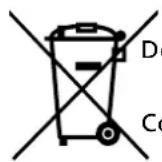
Never dispose of non-biodegradable products in the environment, but dispose of them in accordance with current national legislation.
Do not dispose of electrical appliances as unsorted municipal waste, use separate collection facilities.
Contact your local government for information regarding the collection systems available.
If electrical appliances are disposed of in landfills or dumps, hazardous substances can leak into the groundwater and get into the food chain, damaging your health and well-being. When replacing old appliances with new ones, the retailer is legally obligated to take back your old appliance for disposal at least for free of charge.
(Fig. 1)
(Fig.4) (Fig.5)
(Fig. 14)
(Fig. 15)
(Fig. 17) (Fig. 18)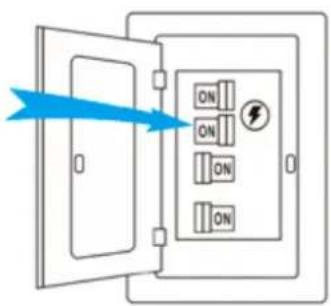
(Fig. 19)
REMOTE CONTROL INSTRUCTIONS
(Fig. 1)
IMPORTANT PARTS
(Fig.4) (Fig.5)
Attach the rod:
ASSEMBLY
HANGING THE FAN
(Fig. 14)
HANG THE CEILING FAN AND INSTALL THE POWER ADAPTER AND FAN WIRING:
(Fig. 15)
(Fig. 17) (Fig. 18)
(Fig. 19)
NL
WARNING: Changes or modifications to this unit not expressly approved by the party responsible for compliance could void the user's authority to operate the equipment.
TROUBLESHOOTING
Distributed in Europe by PVG Holding B.V.
If you need more information or encounter any problems, please visit our website at www.qlima.com or contact our customer service (phone number available on www.qlima.com). For any additional information or if you have any problems with the device, please refer to www.qlima.com or contact your local customer service center (phone numbers can be found on www.qlima.com). If you need information or have a problem, please visit our website at www.qlima.com or contact our customer service (you will find the phone number on www.qlima.com). If you would like to obtain additional information or if you encounter a problem, please visit our website (www.qlima.com) or contact our customer service (you will find the address and phone number on www.qlima.com). If you need service assistance, additional information, or if you have problems with the device, please visit our website at www.qlima.com or ask for advice from the PVG consumer service center (www.qlima.com). If you need information or if you have a problem, please visit our website (www.qlima.com) or contact our sales support (you will find its phone number on www.qlima.com). For information and in case of problems, please visit the website www.qlima.com or contact the Customer Assistance Center (to find out the phone number, consult www.qlima.com). If you need information, or if you have a problem with the product, you can visit the website www.qlima.com. Alternatively, you can contact the PVG consumer service (phone number on www.qlima.com). If you need information or if you have a problem, please visit our website (www.qlima.com) or contact the sales support department (address and phone on www.qlima.com). If you need information or if you have problems, please visit the website www.qlima.com or contact the Assistance Center (phone number on www.qlima.com). In case of problems and for detailed information, please visit the Qlima website at www.qlima.com or contact the Qlima contact center (www.qlima.com). If you need service or information or have problems with the device, you can visit www.qlima.com or contact Qlima customer service (you will find the phone number on www.qlima.com). If you need additional information, please visit the company's website at www.qlima.com or call the phone number (www.qlima.com). If you need more information or if you encounter a problem, please visit the Qlima website at www.qlima.com or contact the Qlima customer center in your country (phone number: www.qlima.com).
- ASSEMBLY
- HANGING THE CEILING FAN, ATTACHING THE POWER SUPPLY, AND CONNECTING THE FAN
- FIXING THE FAN
- HANGING THE CEILING FAN AND INSTALLING THE POWER ADAPTER AND FAN WIRING
- INSTRUCTIONS FOR USING THE REMOTE CONTROL
- WARRANTY CONDITIONS
- IMPORTANT COMPONENTS
- DIRECTIONS FOR USE (GB)
- SAFETY PRECAUTION
- IMPORTANT: PLEASE READ BEFORE INSTALLATION
- BEFORE YOU START
- INSTALLATION
- INSTALL AIRFOILS
- ATTACH DOWNROD
- HANGING THE FAN
- IF YOU HAVE AN ANGLED OR VAULTED CEILING: (FIG 14)
- HANGING CEILING FAN & INSTALLING POWER ADAPTER & WIRING THE FAN
- RAISE CANOPY
- REMOTE CONTROL OPERATING INSTRUCTIONS
- PAIRING THE REMOTE CONTROL TO YOUR FAN
- REMOTE CONTROL BUTTON DEFINITIONS
- INSTALL / REPLACE BATTERIES
- NOTE
- APP CONTROL CONNECTION
- INPUT: 100-240 V AC, 1.5 A, 50/60 HZ OUTPUT: 24.0 V DC, 3.0 A, 72.0 W TA: 10~40°C TC: 80°C IP
- NON-INHERENTLY SHORT-CIRCUIT PROOF TRANSFORMER WITH NON-SELF-RESETTING OR NON-REPLACEABLE, PROTECTIVE DEVICE AND NON-REPLACEABLE INTENTIONAL WEAK PARTS SHALL HAVE AN INFORMATION EXPLAINING THE PROTECTIVE DEVICES, CANNOT BE RESET OR REPLACED AFTER A SHORT-CIRCUIT OR AN OVERLOAD
- CARE AND CLEANING
- DO NOT
- TROUBLESHOOTING
- GUARANTEE CONDITIONS
- ENVIRONMENTAL PROTECTION
- REMOTE CONTROL INSTRUCTIONS
- IMPORTANT PARTS
- ATTACH THE ROD
- HANG THE CEILING FAN AND INSTALL THE POWER ADAPTER AND FAN WIRING
- DISTRIBUTED IN EUROPE BY PVG HOLDING B.V
Brand : QLIMA
Model : FC 156
Category : Fan