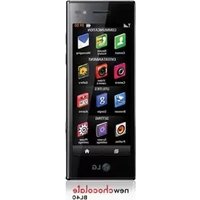
New Chocolate - Smartphone LG - Free user manual and instructions
Find the device manual for free New Chocolate LG in PDF.


User questions about New Chocolate LG
0 question about this device. Answer the ones you know or ask your own.
Ask a new question about this device
Download the instructions for your Smartphone in PDF format for free! Find your manual New Chocolate - LG and take your electronic device back in hand. On this page are published all the documents necessary for the use of your device. New Chocolate by LG.
USER MANUAL New Chocolate LG
* Make sure the number is correct before making a call.

PRINTED WITH
SOYINK
CE0168①

P/N:MMBB0352235(1.0)G

LG
natural_image
Exterior view of a modern mobile phone with a LG logo and cable (no text or symbols visible)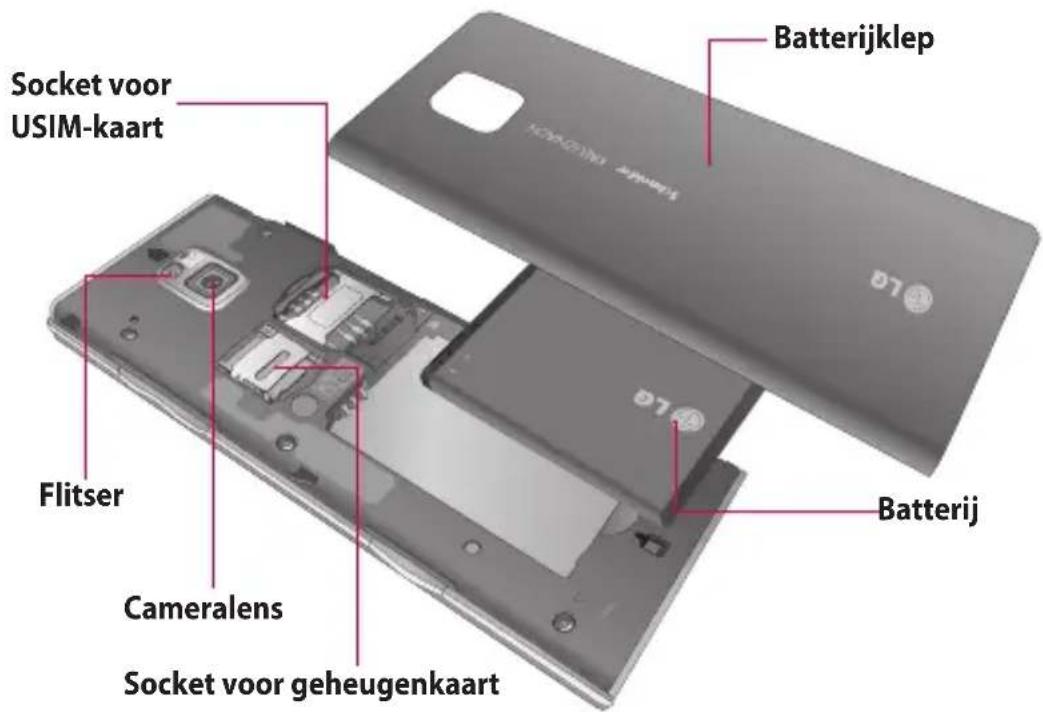
natural_image
Illustration of a smartphone showing the left side with hands holding a cable and the right side with a close-up of its internal components (no text or symbols visible)natural_image
Close-up of a smartphone showing internal components and a magnified view of the screen (no text or symbols visible)natural_image
3D rendering of a smartphone rear panel with red arrows indicating internal components (no text or symbols)Geheugenkaart
natural_image
Interior view of a smartphone showing internal components and casing (no text or symbols visible)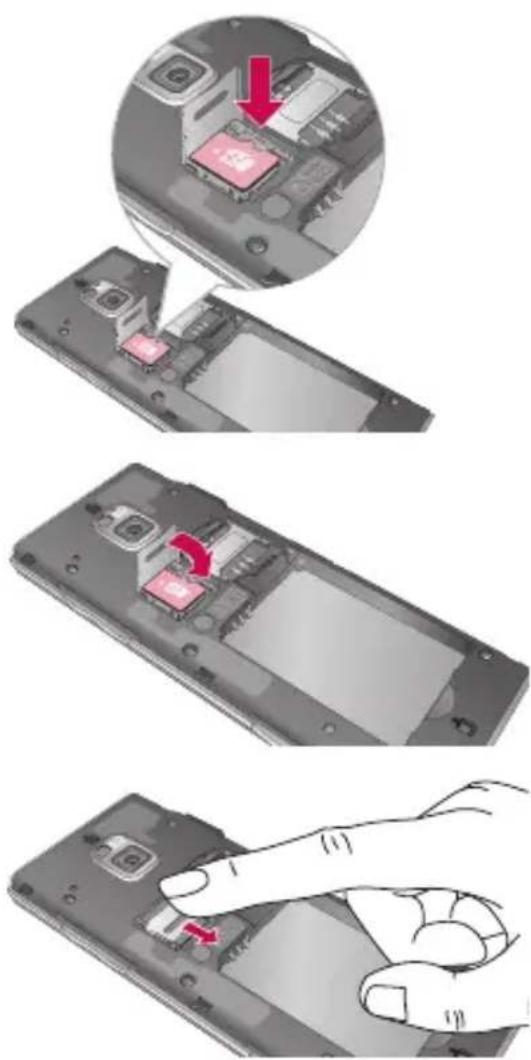
text_image
Diagram illustrating smartphone internal components with red arrows indicating changes, showing a close-up of the chip and hand gesture.Geheugenkaart
De geheugenkaart formatteren
YouTube: U kunt met uw mobiele apparaat video's bekijken op YouTube Mobile. You may want to contact your carrier for more information about the availability of data streaming on your mobile device.
ABOUT DIVX VIDEO: DivX® is a digital video format created by DivX, Inc. This is an official DivX Certified device that plays DivX video. Visit www.divx.com for more information and software tools to convert your files into DivX video.
ABOUT DIVX VIDEO-ON-DEMAND: This DivX Certified® device must be registered in order to play DivX Video-on-Demand (VOD) content. To generate the registration code, locate the DivX VOD section in the device setup menu. Go to vod.divx.com with this code to complete the registration process and learn more about DivX VOD.
Pat. 7,295,673
Instellingen
Profielen personaliseren
natural_image
Exterior view of a gray rectangular electronic device (no visible text or symbols)cd-rom
Declaration of Conformity

LG Electronics
Suppliers Details
Name
LG Electronics Inc
address
LG Electronics Inc. LG Twin Towers 20,
Yeouido-dong, Yeongdeungpo-gu, Seoul, Korea 150-721
Product Details
Product Name
GSM/W-CDMA Terminal Equipment
Model Name
BL40
Trade Name
LG
CE 0168 Ⓙ
Applicable Standards Details
RATTE Directive 1999/5/EC
EN 301 489-01 V1.6.1; EN 301 489-07 V1.3.1; EN 301 489-09 V1.3.1
EN 301 511 V9.0.2
EN 301 908-1 V3.2.1 EN 301 908-2 V3.2.1
EN 50360-2001/EN62209-1:2006
EN 60950-1:2001
Supplementary Information
The conformity to above standards is verified by the following Notified Body(BABT)
BABT, Ballour House, Churchfield Road, Wallon-on-Thames, Surrey, KT12 2TD, United Kingdom
Notified Body Identification Number : 0168
Declaration
I hereby declare under our sole responsibility that the
product mentioned above to which this declaration
relates complies with the above mentioned standards and Directives.
European Standard Center
LG Electronics Logistics and Services B.V.
Veluwezcom 15, 1327 AE Almere, The Netherlands
Tel: +31-38-547-8940, Fax: +31-38-547-8794 e-mail: iacob@ioe.com
Name Issued Date
Seung Hyoun, Jr. Director 31.Jul.2008

Signatures of representatives
Probleemoplossing
natural_image
Pure diagram of a vertical cylindrical object with internal lines, no text or symbols presentTouches de volume
natural_image
Black rectangular electronic device with a red connector and USB cable, no visible text or symbols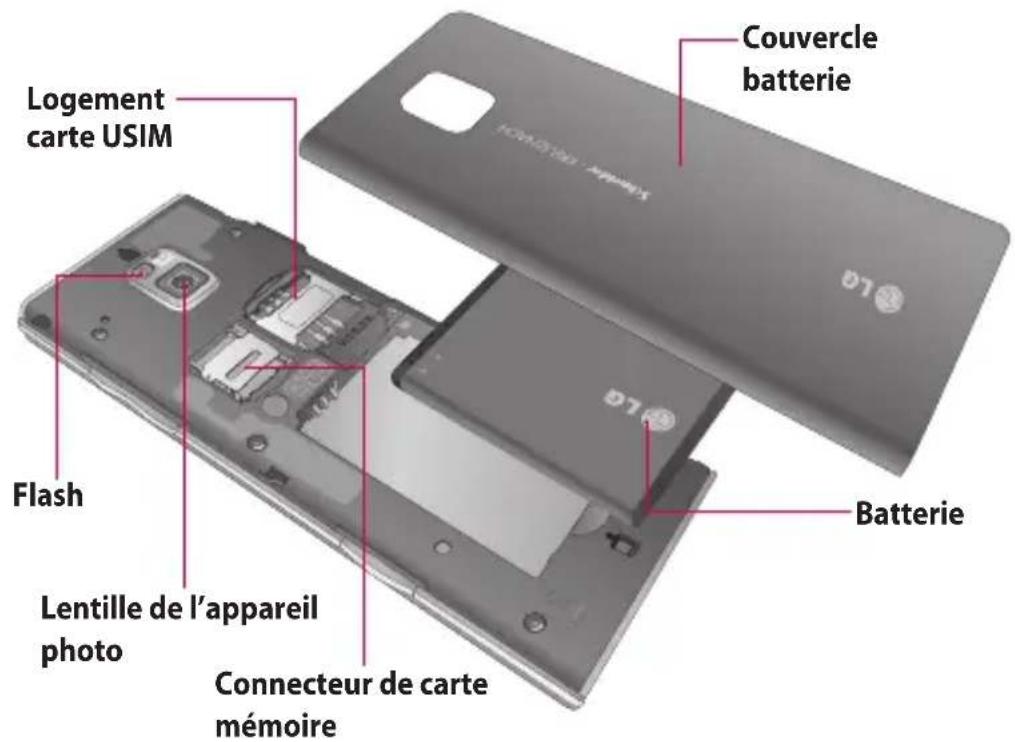
natural_image
Illustration of a hand holding a smartphone with a close-up view showing internal components (no text or symbols)natural_image
Close-up of a smartphone showing internal components and a magnified inset (no text or symbols visible)natural_image
3D rendering of a device casing with internal components and red directional arrows indicating movement (no text or symbols)Carte mémoire
natural_image
3D rendering of a smartphone showing internal components and casing (no text or symbols visible)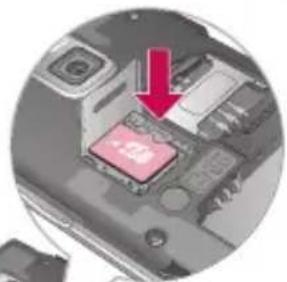
natural_image
Close-up of a computer motherboard with a red arrow pointing to a pink chip (no visible text or symbols)
natural_image
Interior view of a smartphone showing internal components (no visible text or symbols)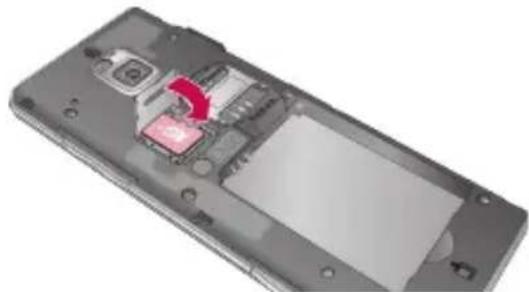
natural_image
Interior view of a smartphone showing internal components and a red arrow indicating a specific area (no text or symbols visible)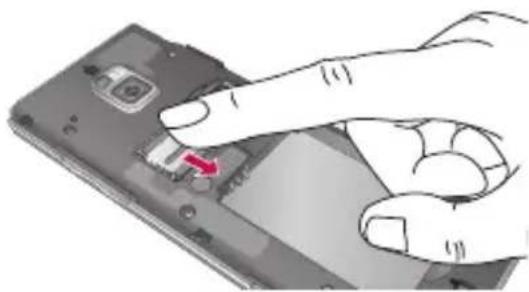
natural_image
Hand inserting a small electronic component into a smartphone (no text or symbols visible)Communication > Email >
Nouveau compte de
natural_image
Vertical toolbar with circular design elements and icons (no readable text or symbols)ABOUT DIVX VIDEO: DivX® is a digital video format created by DivX, Inc. This is an official DivX Certified device that plays DivX video. Visit www.divx.com for more information and software tools to convert your files into DivX video.
ABOUT DIVX VIDEO-ON-DEMAND: This DivX Certified® device must be registered in order to play DivX Video-on-Demand (VOD) content. To generate the registration code, locate the DivX VOD section in the device setup menu. Go to vod.divx.com with this code to complete the registration process and learn more about DivX VOD.
Pat. 7,295,673
Réglages
natural_image
Exterior view of a gray rectangular electronic device (no visible text or symbols)Casque stéréo
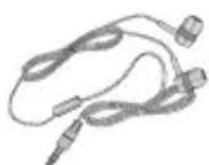
CD-ROM
R&TTE Directive 1999/5/EC
EN 301 489-01 V1.6.1, EN 301 489-07 V1.3.1, EN 301 489-09 V1.3.1
EN 301 489-17 V1.2.1, EN 301 489-19 V1.2.1, EN 301 489-24 V1.4.1
EN 301 511 V9.0.2
EN 301 908-1 V3.2.1 EN 301 908-2 V3.2.1,
EN 300 328 V1.7.1, EN 301 357-2 V1.3.1
EN 50360:2001/EN62209-1:2006
EN 60950-1:2001
LG Electronics Logistics and Services B.V.
Veluwezoom 15, 1327 AE Almere, Pays-Bas
Tél : +31 - 36 - 547 - 8940, Fax : +31 - 36 - 547 - 8794
e-mail: jacob@lge.com
Nom Date de publication
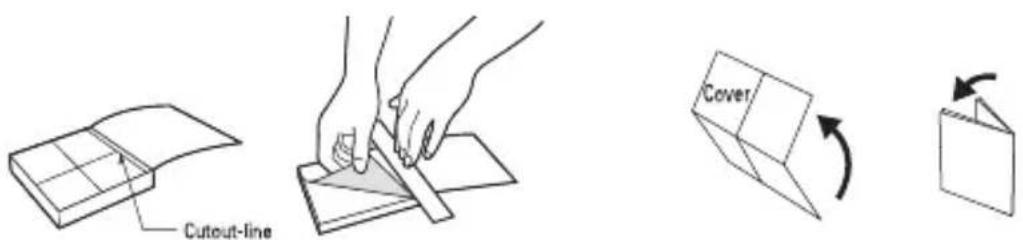
Cut out Quick Reference Guide bound to this manual along the cutout line and fold as illustrated below.
How to cut
Cut out Quick Reference Guide along the cutout line. You can place a scale on the cutoff line and cut as illustrated below.
- Be careful not to cut yourself when using scissors.
How to fold
Fold Quick Reference Guide along the perforated line so that the cover faces upwards as illustrated below.
text_image
Cutout-line Cover
LG
BL40
QUICK REFERENCE GUIDE
WELCOME AND THANK YOU FOR CHOOSING LG MOBILE PHONE
For more details, please refer to the User Guide.
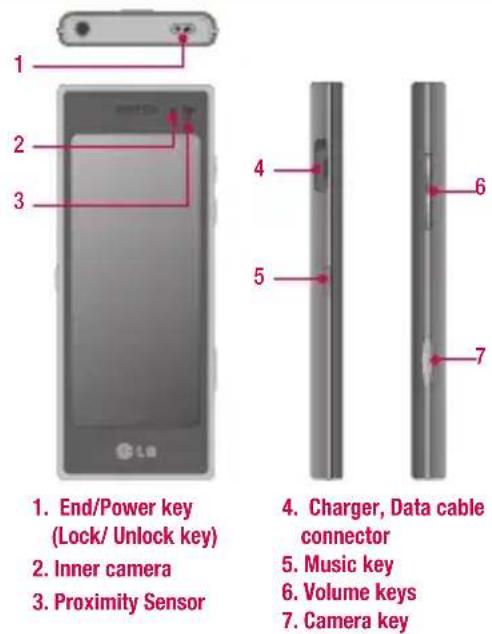
Parts of the phone
text_image
1. End/Power key (Lock/ Unlock key) 2. Inner camera 3. Proximity Sensor 4. Charger, Data cable connector 5. Music key 6. Volume keys 7. Camera keyYour standby screen
The touch reactive LCD gives an interactive and ultra convenient experience. You'll be more than pleased! From the standby screen, you can access menu options, make a quick call and as well as many other things.
The main menu
- Touch in the standby screen to open a Top menu.
- You can access further menus: Communicate, Entertainment, Utilities and Settings.
- Just touch the icon that you want to open.
MP3 player
Your LG BL40 has a built-in MP3 player so you can play all your favourite music.
All tracks: Contains all of the songs you have on your phone.
▶ Playlists: Contains any playlists you have created as well as On the go, Recent songs and Favourite songs.
▶ Artists/Albums/Genres: Browse through your music collection by artist, album or genre.
▶ Shuffle tracks: Play your tracks in a random order.
Playing a song
- Touch then select Music from the Entertainment tab.
- Touch All tracks.
- Select the song you want to play then touch
- Touch to pause the song.
- Touch to skip to the next song. (Touch long to go FF)
- Touch go back to the previous song. (Touch long to go REW)
- Touch to return to the Music menu.
Camera
Using the camera module built in your phone, you can take pictures or record videos. Additionally, you can send photos to other people and select photos as wallpaper.
Tip: When using the camera, power consumption increases. If icon appears on the wallpaper, indicating low battery, recharge the battery before use.
- To take a picture
- Press and hold down the Camera key on the right side of the phone.
- Holding the phone horizontally, point the lens towards the subject of the photo.
- Press the capture button lightly and a focus box will appear in the centre of the viewfinder screen.
- Position the phone so you can see the photo subject in the focus box.
- When the focus box turns green, the camera has focused on your subject.
- Press the capture button fully to capture the shot.
Video camera
- Press and hold the camera key on the right side of the phone.
- Alternatively, draw down on the view finder in camera mode to switch to video mode.
- Press the capture button once or touch to the view finder to start recording.
- ●REC will appear at the bottom of the viewfinder with a timer showing the length of the video.
- To pause the video, touch and resume recording by selecting
- Touch on the screen to stop recording.
FM radio
Your LG BL40 has a built-in FM radio tuner so you can listen to your favourite stations on the move.
Note: You will need to attach your earphones to listen to the radio. Insert them into the earphones socket.
Searching for stations
You can tune your phone to radio stations by searching for them manually or automatically. They will then be saved to specific channel numbers, so you don't have to keep re-tuning. You can store up to 48 channels on your phone.
Automatic tuning:
- Touch and choose FM radio from the Entertainment tab.
- Touch
- Touch Autoscan. The stations found will be allocated to channel numbers in your phone.
Note: You can also manually tune to a station by using the wheel displayed next to the radio frequency.
Voice recorder
Use your voice recorder to record voice memos or other sounds.
Recording your voice memo
- From the home screen select then scroll to Voice recorder in the Utilities tab.
- Touch Record to begin recording.
- Touch Stop to end recording.
- If you touch New, it will automatically restart the voice recording after saving the previous one.
Note: You can listen to all of the voice recordings you have saved by selecting Options and Go to my sounds.
LIMITED WARRANTY STATEMENT
1. WHAT THIS WARRANTY COVERS:
LG offers you a limited warranty that the enclosed phone and its enclosed accessories will be free from defects in material and workmanship, according to the following terms and conditions:
(1) The limited warranty for the product remains in effect for a period of 24 months from the date of purchase of the product. The limited warranty for the batteries remains in effect for a period of 12 months from the date of purchase of the product. Accessories only have a 6 month warranty.
(2) The limited warranty extends only to the original purchaser of the product and is not assignable or transferable to any subsequent purchaser/end user.
(3) This warranty is good only to the original purchaser of the product during the warranty period, but limited to certain country if specified.
(4) The external housing and cosmetic parts shall be free of defects at the time of shipment and, therefore, shall not be covered under these limited warranty terms.
(S) Upon request from LG, the consumer must provide information to reasonably prove the date of purchase.
(6) The customer shall bear the cost of shipping the product to the Customer Service Department of LG. LG shall bear the cost of shipping the product back to the consumer after the completion of service under this limited warranty.
2. WHAT THIS WARRANTY DOES NOT COVER:
(1) Defects or damages resulting from use of the product in other than its normal and customary manner.
(2) Defects or damages from abnormal use, abnormal conditions, improper storage, exposure to moisture or dampness, unauthorized modifications, unauthorized connections, unauthorized repair, misuse, neglect, abuse, accident, alteration, improper installation, or other acts which are not the fault of LG, including damage caused by shipping, blown fuses, spills of food or liquid.
(3) Breakage or damage to antennas unless caused directly by defects in material or workmanship.
(4) That the Customer Service Department at LG was not notified by consumer of the alleged defect or malfunction of the product during the applicable limited warranty period.
(5) Products which have had the serial number removed or made illegible.
(6) This limited warranty is in lieu of all other warranties, express or implied either in fact or by operations of law, statutory or otherwise, including, but not limited to any implied warranty of marketability or fitness for a particular use.
(7) Damage resulting from use of non-LG approved accessories.
(8) All plastic surfaces and all other externally exposed parts that are scratched or damaged due to normal customer use.
(9) Products operated outside published maximum ratings.
(10) Products used or obtained in a rental program.
(11) Consumables (such as fuses).
3. CONDITIONS:
No other express warranty is applicable to this product.
THE DURATION OF ANY IMPLIED WARRANTIES, INCLUDING THE IMPLIED WARRANTY OF MARKETABILITY, IS LIMITED TO THE DURATION OF THE EXPRESS WARRANTY HEREIN.
LG ELECTRONICS INC. SHALL NOT BE LIABLE FOR THE LOSS OF THE USE OF THE PRODUCT, INCONVENIENCE, LOSS OR ANY OTHER DAMAGES, DIRECT OR CONSEQUENTIAL, ARISING OUT OF THE USE OF, OR INABILITY TO USE, THIS PRODUCT OR FOR ANY BREACH OF ANY EXPRESS OR IMPLIED WARRANTY, INCLUDING THE IMPLIED WARRANTY OF MARKETABILITY APPLICABLE TO THIS PRODUCT.
Some do not allow the exclusive of limitation of incidental or consequential damages or limitations on how long an implied warranty lasts; so these limitations or exclusions may not apply to you. This warranty gives you specific legal rights and you may also have other rights which vary from country to country.