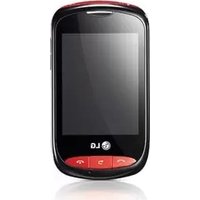
Arena - Smartphone LG - Free user manual and instructions
Find the device manual for free Arena LG in PDF.


User questions about Arena LG
0 question about this device. Answer the ones you know or ask your own.
Ask a new question about this device
Download the instructions for your Smartphone in PDF format for free! Find your manual Arena - LG and take your electronic device back in hand. On this page are published all the documents necessary for the use of your device. Arena by LG.
USER MANUAL Arena LG
* Make sure the number is correct before making a call.
CE 0168
P/N:MMBB0333312(1.0)H

LG
natural_image
Front view of a silver LG smartphone with blank screen and control buttons (no text or symbols on screen)Software-upgrade 112
Accessoires 113
Netwerkservice 114
natural_image
Pure technical diagram of a mechanical component with no visible text, numbers, or symbols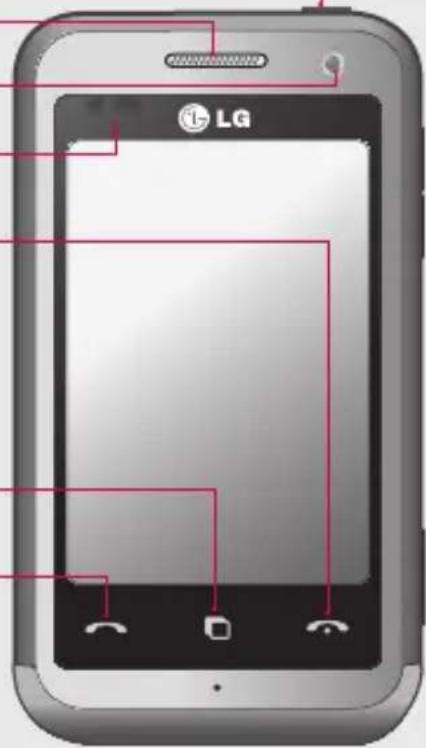
text_image
LGnatural_image
Pure diagram of a cylindrical object with a red arrow pointing to its side (no text or symbols)natural_image
Pure diagram of a cylindrical object with internal cutouts and no visible text or symbolsVolumetoetsen
natural_image
3D rendering of a flip phone showing its open and closed sides (no text or symbols visible)natural_image
3D rendering of a smartphone showing internal components and a partially open base (no visible text or symbols)natural_image
3D rendering of a mobile phone casing with an inset showing two batteries (no text or symbols visible)natural_image
3D cutaway view of a smartphone showing internal components and battery (no text or symbols visible)Laad de telefoon op
natural_image
Illustration of a smartphone with two connected USB ports and a close-up view of the port (no text or symbols)Geheugenkaart
natural_image
3D rendering of a device casing with internal components (no visible text or symbols)
natural_image
Close-up of a device showing internal components and a red arrow indicating a specific area (no text or symbols present)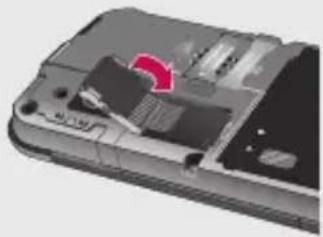
natural_image
Close-up of a device's internal components with a red arrow indicating a specific area (no text or symbols visible)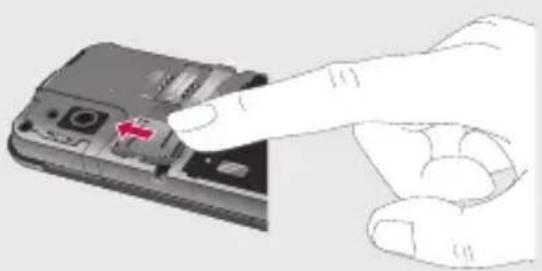
natural_image
Hand inserting a smartphone into a device (no text or symbols visible)De geheugenkaart formatteren
text_image
Document2 SUPPORTING INFORMATION Please use your computer to create a new document. It is not to read any text, but it is not to read a new document on the page. The image is designed to view the content of this document as an important feature, and it is designed to read about it. Please note that this document is not linked to it. For all other documents, if there are no further information in this document, you can be able to write out the image. If you can write out the image, you can write out the image. You can write out the image. You can write out the image. You can write out the image. You can write out the image. You can write out the image. You can write out the image. You can write out the image. You can write out the image. You can write out the image. You can write out the image. You can write out the image. You can write out the image. You can write out the image. You can write out the image. You can Write out the image. You can Write out the image. You can Write out the image. You can Write out the image. You can Write out the image. You can Write out the image. You can Write out the image. You can Write out the image. You can Write out the image. You can Write out the image. You can Write out the image. You can Write out the image. You can Write out the image. You can Write out the image. You can Write out The Image. You can write out the image from this document. You can write out the image from this document. You can write out the image from this document. You can write out the image from this document. You can write out the image from this document. You can write out the image from this document. You can write out the image from this document. You can write out the image from this document. You can write out the image from this document. You can write out the image from this document. You can write out the image from this image. You can write out the image from this document. You can write out the image from this document. You can write out the image from this document. You can write out the image from this document. You can write out the image from this document. You can write out the image from this document. You can write out the image from this document. You can write out the image from this document. You can write out the image from this document. You can write out the image from this documents. You can write out the image from this documents. You can write out the image from this documents. You can write out the image from this documents. You can write out the image from this documents. You can write out the image from this documents. You can write out the image from this documents. You can write out the image from this documents. You can write out the image from this documents. You can write out the image from this documents. You can write out the image from this document. You can write out the image from this documents. You can write out the image from this documents. You can write out the image from this documents. You can write out the image from this documents. You can write out the image from this documents. You can write out the image from this documents. You can write out the image from this documents. You can write out the image from this documents. You can write out the image from this document. You can write out the image from this document. You can write out the image from this document. You can write out the image from this document. You can write out the image from this document. You can write out the image from this document. You can write out the image from this document. You can write out the image from this document. You can write out the image from this document. You can write out the image from this device. You can write out the image from this device. You can write out the image from this device. You can write out the image from this device. You can write out the image from this device. You can write out the image from this device. You can write out the image from this device. You can write out the image from this device. You can write out the image from this device. You can write out the image from this device. You can write out the image from this devices. You can write out the image from this device. You can write out the image from this device. You can write out the image from this device. You can write out the image from this device. You can write out the image from this device. You can write out the image from this device. You can write out the image from this device. You can write out the image from this device. You can write out the image from this device. You can write out the image from this equipment. You can write out the image from this equipment. You can write out the image from this equipment. You can write out the image from this equipment. You can write out the image from this equipment. You can write out the image from this equipment. You can write out the image from this equipment. You can write out the image from this equipment. You can write out the image from this equipment. You can write out the image from this equipment. You can write out the image from this device. You can write out the image from this device. You can write out the image from this device. You can write out the image from this device. You can write out the image from this device. You can write out the image from this device. You can write out the image from this device. You can write out the image from this device. You can write out the image from this device. You can write out the image from this vehicle. You can write out the image from this vehicle. You can write out the image from this vehicle. You can write out the image from this vehicle. You can write out the image from this vehicle. You can write out the image from this vehicle. You can write out the image from this vehicle. You can write out the image from this vehicle. You can write out the image from this vehicle. You can write out the image from this vehicle. You can write out the image from this car car car car car car car car car car car car car car car car car car car car car car car car car car car car car car car car car car car car car car car car car car car car car car car car car car car Car
text_image
Document201
02
03
04
05
06
07
08
Uw basisscherm
natural_image
Black and white close-up of a rose flower with blurred petals, no visible text or symbolstext_image
Spraakrecorder 00:00:04 00:06:00 Pauze Stopnatural_image
Illustration of a pair of earphones with coiled leads (no text or symbols)Declaration of Conformity

LG Electronics
Suppliers Details
Name
LG Electronics Inc
Address
LG Twin Tower 20, Yeouido-dong, Yeongdeungpo-gu, Seoul, Korea 150-721
Product Details
Product Name
E-GSM 900 / DCS 1800 / GSM 850 / PCS 1900 Quad Band and WCDMA Terminal Equipment
Model Name
KM900
Trade Name
LG
CE 0168 Ⓖ
Applicable Standards Details
R&TTE Directive 1999/5/EC
EN 301 489-1 V1.6.1 / EN 301 489-7 V1.3.1 / EN 301 489-9 V1.3.1 / EN 301 489-17 V1.2.1 /
EN 301 489-19 V1.2.1 / EN 301 489-24 V1.3.1
EN 60950-1:2001
EN 50360 / EN 50361: 2001
EN 301 511 V9.0.2 / EN 301 908-1 V3.2.1 / EN 301 908-2 V3.2.1
EN 300 328 V1.7.1
EN 301 357-1 V1.4.1
Supplementary Information
The conformity to above standards is verified by the following Notified Body(BABT)
BABT, Balfour House, Churchfield Road, Walton-on-Thames, Surrey, KT12 2TD, United Kingdom Notified Body Identification Number : 0168
Declaration
I hereby declare under our sole responsibility that the product mentioned above to which this declaration relates complies with the above mentioned standards and Directives
European Standard Center
LG Electronics Logistics and Services B.V.
Veluwezoom 15, 1327 AE Almere, The Netherlands
Tel: +31-36-547-8940, Fax: +31-36-547-8794
e-mail : jacob @ lge.com
Name
Issued Date
Seung Hyoun, Ji / Director
8, January, 2009
Signature of representative
natural_image
Front view of a silver LG smartphone with blank screen and control buttons (no text or symbols on screen)natural_image
Pure diagram of a cylindrical object with internal components and red alignment markers (no text or symbols)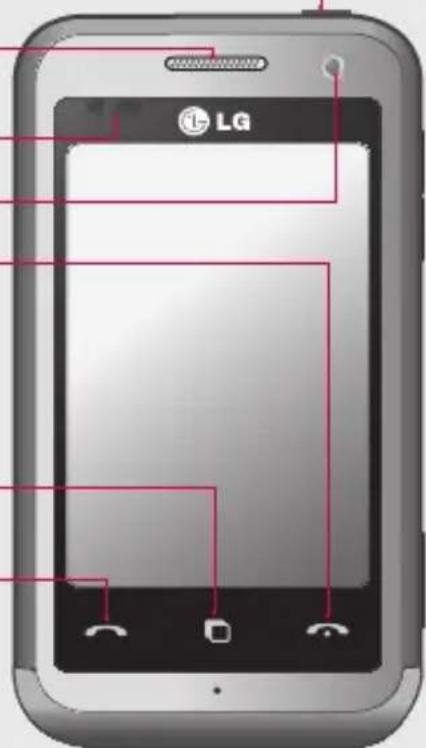
text_image
LGnatural_image
Pure diagram of a cylindrical object with a red arrow pointing to its side (no text or symbols)natural_image
Pure 3D diagram of a cylindrical object with internal cutouts and no visible text or symbolsTouches de volume
natural_image
3D rendering of a smartphone showing its open lid and internal compartments (no text or symbols visible)natural_image
3D rendering of a smartphone showing internal components and a partially open case (no visible text or symbols)natural_image
Interior view of a smartphone showing internal components and battery stack (no text or symbols)natural_image
3D cutaway view of a smartphone showing internal components and a partially open screen (no visible text or symbols)natural_image
Close-up of a smartphone with attached USB port and cable connector (no text or symbols visible)Carte mémoire
natural_image
3D cutaway view of a smartphone showing internal components and casing (no text or symbols visible)
natural_image
Close-up of a mechanical component with a red arrow indicating a specific feature, shown from two views (no text or symbols present)
natural_image
Close-up of a device's internal structure showing a highlighted component (no text or symbols visible)
natural_image
Hand pointing to a device with a red arrow indicating the button (no text or symbols visible)text_image
Screenshot of a mobile phone interface showing status bar, clock, and status icons with time and date fieldstext_image
Document2 SUPPORTIFICATION Please use existing image information to ensure that the most recent printing things are found. The image is not currently written or designed to be extracted from the image. It is also designed to find the image with the label, description, and labeling functions. We also need to write the image as an image file. Hold the images on the left (if otherwise, if there is no visible text). We can do it in order to write the image as an image file. For example, you can use the image file as an image file. If you use the image file as an image file, you can use the image file as an image file. If you use the image file as an image file, you can use the image file as an image file. If you use the image file as an image file, you can use the image file as an image file. If you use the image file as an image file, you can use the image file as an image file. If you use the image file as an image file, you can use the image file as an image file. Command your image files required to create a new document. But this does not have any other content. If you use the image file, you can use the image file as an image file. If you use the image file as an image file, you can use the image file as an image file. If you use the image file as an image file, you can use the image file as an image file. If you use the image file as an image file, you can use the image file as an image file. If you use the image file as an image file, you can use the image file as animage file. Description: The image files required to create a new document. But this does not have any other content. If you use the image file, you can use the image file as an image file. If you use the image file as an image file, you can use the image file as an image file. If you use the image file as an image file, you can use the image file as an image file. Instructions: - Use your images to create a new document. - Use your images to create a new image file. - Use your images to create a new image file. - Use your images to create a new image file. - Use your images to create a new image file. - Use your images to create a new image file. - Use your images to create a new image file. - Use your images to create a new image file. - Use your images to create a new image file. - Use your images to create a new image file. - Use your images to create a new image file. Description: - Use your images to create a new document. - Use your images to create a new image file. - Use your images to create a new image file. - Use your images to create a new image file. - Use your images to create a new image file. - Use your images to create a new image file. - Use your images to create a new image file. - Use your images to create a new image file. - Use your images to create a new image file. The images are designed to create a new document. Description: - Use your images to create a new document. - Use your images to create a new image file. - Use your images to create a new image file. - Use your images to create a new image file. - Use your images to create a new image file. - Use your images to create a new image file. - Use your images to create a new image file. - Use your images to create a new image file. - Use your images to create a new image - Use your images to create a new image file. - Use your images to create a new image file. - Use your images to create a new image file. - Use your images to create a new image file. - Use your images to create a new image file. - Use your images to create a new image file. - Use your images to create a new image file. - Use your images to create a new image file. - Use your images to create a new image file. Use your images to create a new image file. - Use your images to create a new image file. - Use your images to create a new image file. - Use your images to create a new image file. - Use your images to create a new image file. - Use your images to create a new image file. - Use your images to create a new image file. - Use your images to create a new image file. - Use your images to create a new image file. - Use Your Image File - Use Your Image File - Use Your Image File - Use Your Image File - Use Your Image File - Use Your Image File - Use Your Image File - Use Your Image File - Use Your Image File - Use Your Image File - Use Your Image File - Use Your Image File - Use Your Image File - Use Your Image File - Use Your Image File - Use Your Image File - Use Your Image File - Use Your Video - Use Your Video - Use Your Video - Use Your Video - Use Your Video - Use Your Video - Use Your Video - Use Your Video - Use Your Video - Use Your Video - Use Your Video - Use Your Video - Use Your Video - Use Your Video - Use Your Video - Use Your Video - Use Your Video - Use Your Video - Use Your Video - Use Your Video - Use Your Audio - Use Your Audio - Use Your Audio - Use Your Audio - Use Your Audio - Use Your Audio - Use Your Audio - Use Your Audio - Use Your Audio - Use Your Audio - Use Your Audio - Use Your Audio - Use Your Audio - Use Your Audio - Use Your Audio - Use Your Audio - Use Your Audio - Use Your Audio - Use Your Audio - Use Your Audio - Use Your Video - Use Your Video - Use Your Video - Use Your Video - Use Your Video - Use Your Video - Use Your Video - Use Your Video - Use Your Video - Use Your Video - Use Your Video - Use Your Video - Use Your Video - Use Your Video - Use Your Video
text_image
Document201
02
03
04
05
06
07
08
natural_image
Close-up of a plant leafy field with camera control buttons visible (no readable text or symbols)natural_image
Microscopic view of plant leaves with no visible text or symbolsnatural_image
Black and white close-up of a blooming rose with no visible text or symbolstext_image
01:02:35 / 02:05:14 Save Undo Trim Previewnatural_image
Black and white photo of a motorcycle driving on a highway with headlights illuminating the vehicle (no visible text or symbols)natural_image
Illustration of a medical or laboratory device with coiled tubing and connectors (no text or symbols)LG Twin Tower 20, Yeouido-dong, Yeongdeungpo-gu, Seoul, Korea 150-721
Détails du produit
Nom du produit
E-GSM 900 / DCS 1800 / GSM 850 / PCS 1900 Quad Band and WCDMA Terminal Equipment
Modèle
KM900
Nom commercial
LG
CE 0168 Ⓘ
R&TTE Directive 1999/5/EC
EN 301 489-1 V1.6.1 / EN 301 489-7 V1.3.1 / EN 301 489-9 V1.3.1 / EN 301 489-17 V1.2.1 /
EN 301 489-19 V1.2.1 / EN 301 489-24 V1.3.1
EN 60950-1:2001
EN 50360 / EN 50361: 2001
EN 301 511 V9.0.2 / EN 301 908-1 V3.2.1 / EN 301 908-2 V3.2.1
EN 300 328 V1.7.1
EN 301 357-1 V1.4.1
BABT, Balfour House, Churchfield Road, Walton-on-Thames, Surrey, KT12 2TD, United Kingdom Notified Body Identification Number: 0168
Déclaration
European Standard Center
LG Electronics Logistics and Services B.V.
Veluwezoom 15, 1327 AE Almere, The Netherlands
Tel: +31-36-547-8940, Fax: +31-36-547-8794
e-mail: jacob@lge.com
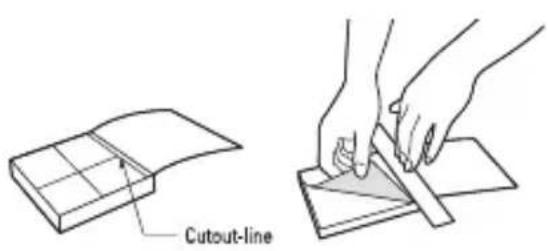
Cut out Quick Reference Guide bound to this manual along the cutout line and fold as illustrated below.
How to cut
Cut out Quick Reference Guide along the cutout line.
You can place a scale on the cutoff line and cut as illustrated below.
- Be careful not to cut yourself when using scissors.
text_image
Cutout-lineDefining features
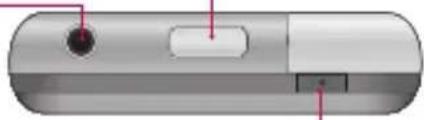
Battery release button
Handsfree or Stereo earphone connector
Power key
Turns the phone on/off.
Earpiece
Proximity Sensor
Inner camera
End key
- Rejects a call.
- Press once to return to the home screen.
Multi-tasking key
Call key
Dials a phone number and answers incoming calls.
natural_image
Pure diagram of a rounded rectangular object with a circular element and internal structure, no text or symbols present.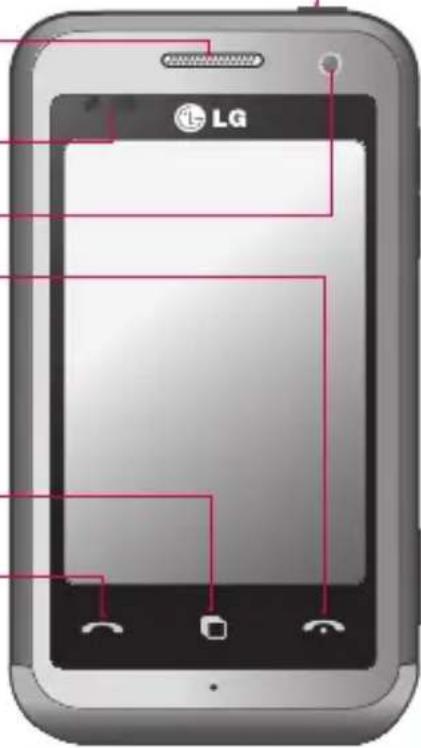
text_image
LG
WARNING: Putting a heavy object on the phone or sitting t can damage its LCD and touch screen functionality.
Do not cover the protection film on proximity s It can be caused the malfunction of sensor.
Defining features

natural_image
Pure 3D rendering of a cylindrical object with a small rectangular cutout and a red arrow pointing to its side (no text or symbols)Charger, Data cable (USB cable)
TIP: Before connecting the USB cable, wait until the phone has powered up and has registered on the network.

natural_image
3D rendered mechanical part with no visible text or symbolsVolume keys
- When the screen is idle: key tone volume.
- During a call:earpiece volume.
- When playing a track: controls volume continuously.
Camera key
- Go to the camera menu directly by pressing and holding the key.
Touchscreen
From this screen you can access menu options, make a call, view the status of your phone and much more.
Touch screen tips
The home screen is also a great place to get used to using the touch screen. To select an item, touch the centre of the icon.
- Do not to press too hard; the touchscreen is sensitive enough to pick up on a light, firm touch.
- Use the tip of your finger to touch the option you require.
Be careful not to touch any other keys.
- When the screen light is off, either press the power key or hold down the Unlock/Lock key on the touch screen to return the home screen.
- Whenever your KM900 is not in use, it will return to the lock screen.
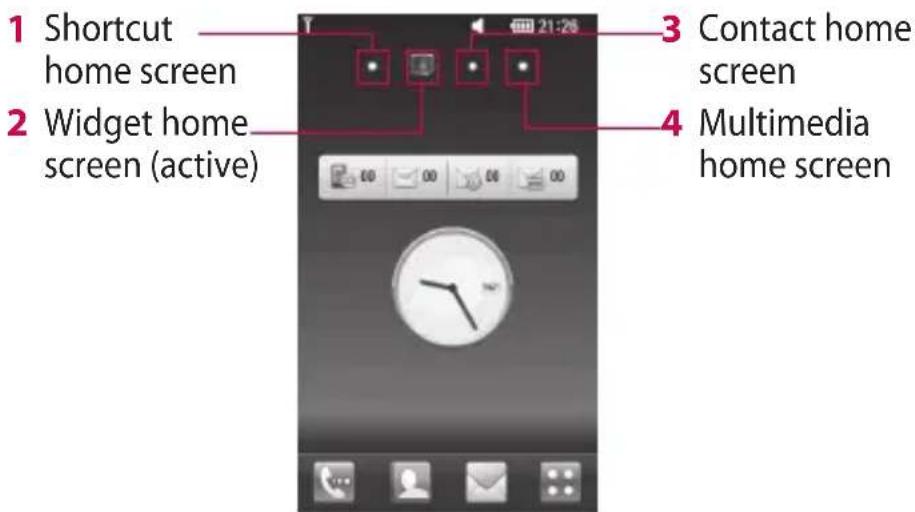
Customising the home screen
text_image
1 Shortcut home screen 2 Widget home screen (active) 3 Contact home screen 4 Multimedia home screenTruly Mobile Life - Wireless Applications
Wireless Internet
Wireless Manager allows you to manage Internet connections per Wi-Fi (Wireless LAN) on your device. It allows the phone to connect to local wireless networks, or access the Internet wirelessly. Wi-Fi is faster and has a greater range than Bluetooth wireless technology and can be used for fast emailing and Internet browsing.
NOTE: The KM900 supports WEP, WPA-PSK/2 encryption, and not EAP, WPS encryption. If your Wi-Fi service provider or network administrator sets encryption for network security, fill in the key in the pop-up window. If encryption is not set, this pop-up window will not be shown. You can obtain the key from your Wi-Fi service provider or network administrator.
1. How to set up Wi-Fi
1 Touch Wi-Fi from the Settings tab and turn Wi-Fi on
2 AP (Access Point) Search
- Searches which AP it can connect to.
3 AP Connect
- Connects to the desired AP from the AP search list.
- If the AP is security type WEP or WPA-PSK/2, enter the security key.
2. Wi-Fi network profile support
1 Wi-Fi profile support (how to connect to a frequently-used AP or Hidden AP)
1) If the AP does not appear in the search list, you can connect to it by saving it as a profile.
Truly Mobile Life - Wireless Applications
2) Saving the frequently-used AP as a profile makes it easier to enter the Security key when connecting to an AP with that Security type.
3) If the AP does not support DHCP, you can connect to the AP using a static IP address.
2 Description of each field in the Wi-Fi profile.
1) Network name: SSID (ID)
2) Security type: WEP, WPA-PSK/2 support.
3) Security key: saves the security key.
4) IP/DNS setting: this allows you to set to Automatic or Static depending on whether the AP supports DHCP.
For Static, enter the field value of the IP address and DNS server to use with the static IP address when connecting.
3 How to save the Wi-Fi profile
1) Select Saved networks from the Options menu, then select New network and enter values into each field.
2) It is possible to select and save the AP search list by selecting Wi-Fi On and then Refresh (Searching AP).
3) After connecting to an AP with this Security type, the profile will be saved automatically.
Truly Mobile Life - Wireless Applications
3. How to obtain MAC-address
For setting up a connection in some wireless networks with MAC filter you may need to enter the MAC address of your KM900 into the router.
1 Touch Wi-Fi from the settings tab, then open the options menu.
2 Select My MAC Address and it will be displayed.
Geo-Tagging
Geo-tagging uses GPS to determine the exact spot where a photo was taken, also indicating shutter speed, aperture, date and time taken and so on. When photos are uploaded or used with popular organization software, users can search for photos based on location or even plot them on an interactive map. and preset all your favourite stations.
Music
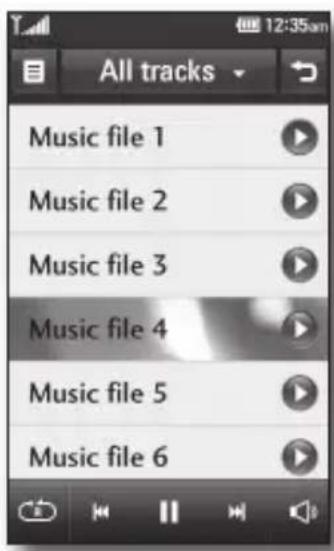
Your LG KM900 is also an MP3 player. No need for an extra device clogging up your pockets, all you need is your mobile phone to provide the soundtrack to your days.
If there's a song you fancy listening to that you don't have, don't be restricted by access to a computer, just connect to Music and download the track.
text_image
All tracks Music file 1 Music file 2 Music file 3 Music file 4 Music file 5 Music file 6The KM900 also allows you to organise your music as you would on your computer or MP3 player. Start creating playlists or sorting songs by genre. If you prefer, you can listen to the radio and preset all your favourite stations.
Camera
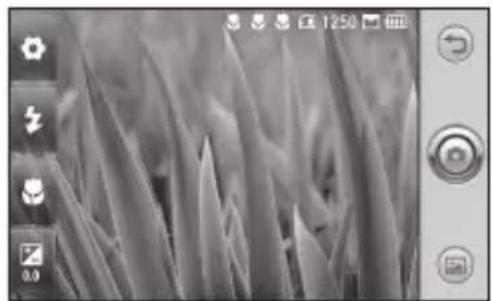
This is no ordinary mobile phone camera. The LG KM900 beautifully conceals a huge 5.0 megapixel digital zoom camera, closing the gap between your camera and your camera phone.
Use in landscape or portrait mode so you can get the perfect shot whatever the subject and, thanks to the effective flash, whatever the time of day too.
Your KM900 camera packs all the settings options you'd expect from a high-quality digital camera, including a continuous shot function.
You can also determine the image size, white balance and ISO for a really professional approach.
natural_image
Microscopic view of fibrous material under grayscale imaging (no text or symbols visible)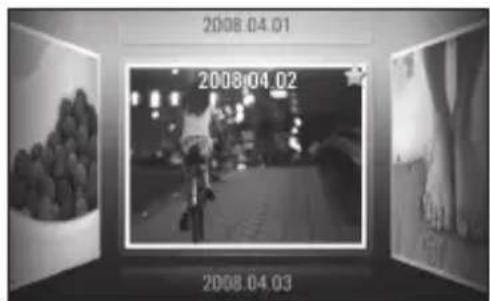
text_image
2008.04.01 2008.04.02 2008.04.03(Photo Gallery>
FM Radio
Using the radio
Your LG KM900 has an built-in FM radio feature so you can tune into your favourite stations and listen on the move.
NOTE: You will need to attach your headphones to listen to the radio. Insert them into the headphone socket.
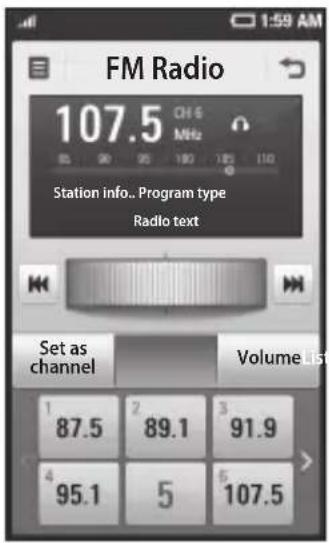
text_image
FM Radio 107.5 CHS MHz Station info.. Program type Radio text Set as channel VolumeList 1 87.5 2 89.1 3 91.9 4 95.1 5 107.5Searching for stations
You can tune your phone to radio stations by searching for them manually or automatically. They will then be saved to specific channel numbers, so you don't have to keep re-tuning. You can store up to 30 channels on your phone.
To tune automatically
1 Touch then select FM radio from Multimedia tab.
2 Touch
3 Touch Auto scan then Yes. The stations found will be allocated to channel numbers in your phone by selecting Set, Skip and Stop.
NOTE: You can also manually tune to a station by using the wheel displayed next to the radio frequency.
FM Radio
Resetting channels
1 Touch then select FM radio from Multimedia tab.
2 Touch
3 Choose Reset to reset the current channel or choose Reset all to reset all of the channels. If you reset all of the channels, each channel will return to the starting 87.5Mhz frequency.
Warning! If you connect the headset not specifically made for it to the phone, the radio reception can be interfered.
Listening to the radio
1 Touch then select FM radio from Multimedia tab.
2 Touch the channel number of the station you would like to listen to.
TIP! To improve radio reception, extend the headset cord, which functions as the radio aerial.
LIMITED WARRANTY STATEMENT
1. WHAT THIS WARRANTY COVERS :
LG offers you a limited warranty that the enclosed phone and its enclosed accessories will be free from defects in material and workmanship according to the following terms and conditions:
(1) The limited warranty for the product remains in effect for a period of 24 months from the date of purchase of the product. The limited warranty for the batteries remains in effect for a period of 12 months from the date of purchase of the product. Accessories only have a 6 month warranty.
(2) The limited warranty extends only to the original purchaser of the product and is not assignable or transferable to any subsequent purchaser/end user.
(3) This warranty is good only to the original purchaser of the product during the warranty period, but limited to certain country if specified.
(4) The external housing and cosmetic parts shall be free of defects at the time of shipment and, therefore, shall not be covered under these limited warranty terms.
(5) Upon request from LG, the consumer must provide information to reasonably prove the date of purchase.
(6) The customer shall bear the cost of shipping the product to the Customer Service Department of LG. LG shall bear the cost of shipping the product back to the consumer after the completion of service under this limited warranty.
2. WHAT THIS WARRANTY DOES NOT COVER :
(1) Defects or damages resulting from use of the product in other than its normal and customary manner.
(2) Defects or damages from abnormal use, abnormal conditions, improper storage, exposure to moisture or dampness, unauthorized modifications, unauthorized connections, unauthorized repair, misuse, neglect, abuse, accident, alteration, improper installation, or other acts which are not the fault of LG, including damage caused by shipping, blown fuses, spills of food or liquid.
(3) Breakage or damage to antennas unless caused directly by defects in material or workmanship.
(4) That the Customer Service Department at LG was not notified by consumer of the alleged defect or malfunction of the product during the applicable limited warranty period.
(5) Products which have had the serial number removed or made illegible.
(6) This limited warranty is in lieu of all other warranties, express or implied either in fact or by operations of law, statutory or otherwise, including, but not limited to any implied warranty of marketability or fitness for a particular use.
(7) Damage resulting from use of non-LG approved accessories.
(8) All plastic surfaces and all other externally exposed parts that are scratched or damaged due to normal customer use.
(9) Products operated outside published maximum ratings.
(10) Products used or obtained in a rental program.
(11) Consumables (such as fuses).
3. CONDITIONS :
No other express warranty is applicable to this product.
THE DURATION OF ANY IMPLIED WARRANTIES, INCLUDING THE IMPLIED WARRANTY OF MARKETABILITY, IS LIMITED TO THE DURATION OF THE EXPRESS WARRANTY HEREIN.
LG ELECTRONICS INC. SHALL NOT BE LIABLE FOR THE LOSS OF THE USE OF THE PRODUCT, INCONVENIENCE, LOSS OR ANY OTHER DAMAGES, DIRECT OR CONSEQUENTIAL, ARISING OUT OF THE USE OF, OR INABILITY TO USE, THIS PRODUCT OR FOR ANY BREACH OF ANY EXPRESS OR IMPLIED WARRANTY, INCLUDING THE IMPLIED WARRANTY OF MARKETABILITY APPLICABLE TO THIS PRODUCT.
Some do not allow the exclusive of limitation of incidental or consequential damages or limitations on how long an implied warranty lasts; so these limitations or exclusions may not apply to you. This warranty gives you specific legal rights and you may also have other rights which vary from country to country.