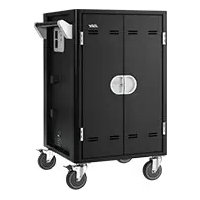
C20i - Battery charger AVer - Free user manual and instructions
Find the device manual for free C20i AVer in PDF.


| Product type | Mobile device charging cart |
| Brand | AVer |
| Model | C20i |
| Capacity | Up to 20 devices (2 shelves of 10 bays) |
| Compatible devices | Laptops, Chromebooks, tablets up to 16 inches |
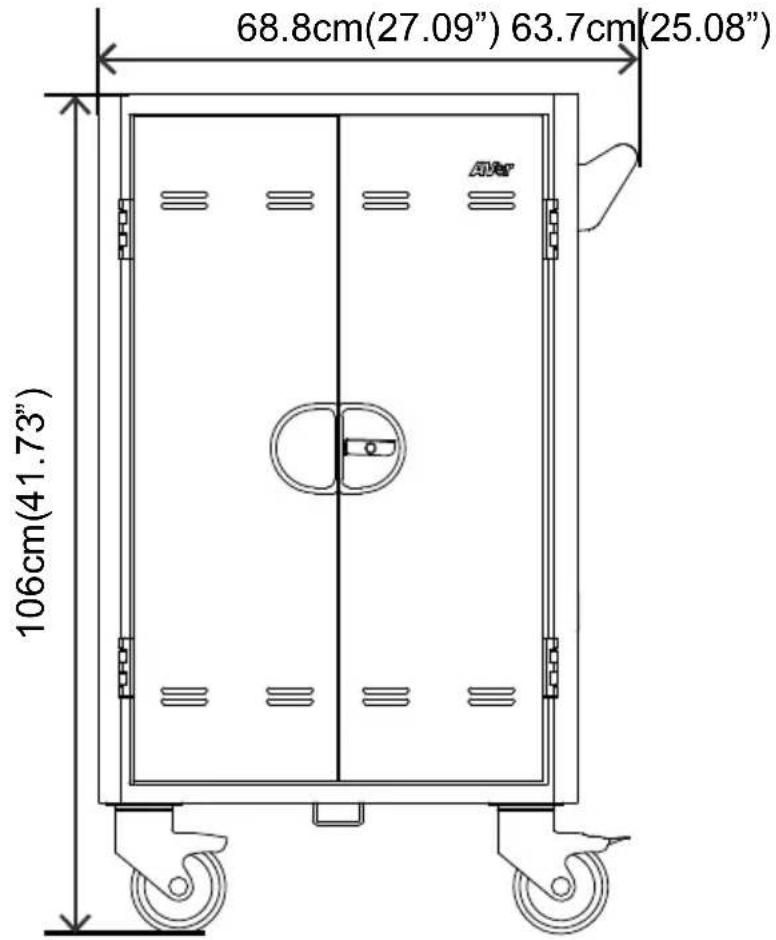
| Dimensions (L x W x H) | 68.8 x 63.7 x 106 cm |
| Weight | 66.6 kg |
| Power supply | AC input 220-240 V, 50/60 Hz, 8 A; outputs 20 ports 220-240 V, 6 A; 2 auxiliary ports 2 A |
| Smart charging | Yes, with intelligent timer (2 zones of 10 bays) |
| LED indicators | Power LED: solid green (on), blinking orange (overload), blinking red (fault); status LED: solid blue (charging) |
| Security | 3-point locking on front and rear doors, lock holes, 2 lockable wheels |
| Warranty | Cart and shelves: 10 years; electrical components: 5 years |
| Operating temperature | 0 to 30 °C |
| Operating humidity | 10 to 90% RH |
| Firmware update | Via USB type A port, USB drive FAT/FAT32, max 32 GB |
| Cable management | Cable ties (not included) recommended |
| Maintenance and cleaning | Clean with a soft dry cloth; do not use liquids |
| Spare parts and repairability | Contact AVer support (global website) for parts and repairs |
| General information | Indoor use only; do not climb, sit, or lean; max load per shelf: 22.7 kg |
Frequently Asked Questions - C20i AVer
User questions about C20i AVer
0 question about this device. Answer the ones you know or ask your own.
Ask a new question about this device
Download the instructions for your Battery charger in PDF format for free! Find your manual C20i - AVer and take your electronic device back in hand. On this page are published all the documents necessary for the use of your device. C20i by AVer.
USER MANUAL C20i AVer
natural_image
Line drawing of a modular industrial machine with wheels and doors (no text or symbols)C20i
User Manual
English Deutsch Español
Français Italiano

WARNING
ALWAYS FOLLOW SAFETY PRECAUTIONS
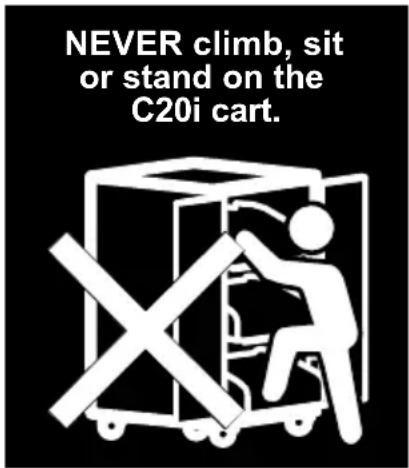
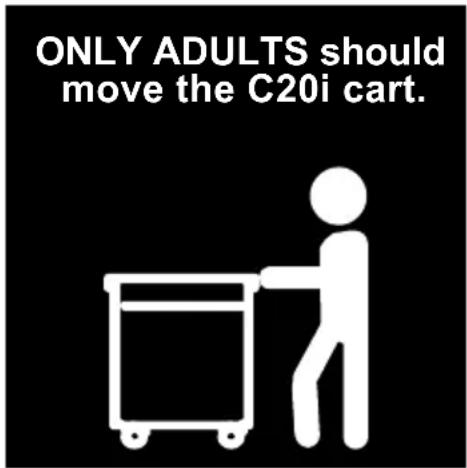
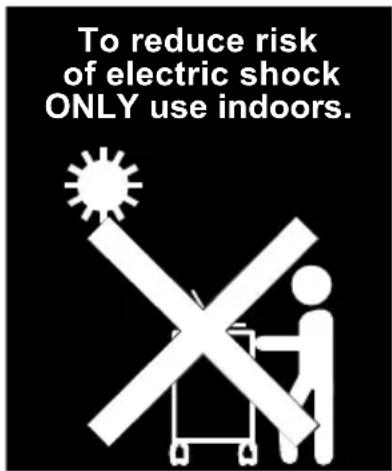
■ DO NOT allow anyone to sit, stand or climb on the C20i cart.
■ DO NOT lift the C20i cart.
■ DO NOT block the ventilation holes used for air circulation.
■ DO NOT overload objects on the C20i shelves. (work platform maximum loading = 45kg / 99.20lbs; each pull-out shelf maximum loading = 22.7kg / 50.04lbs)
■ Before moving C20i cart, disconnect the power from the wall outlet.
■ While moving C20i cart, make sure the power cord is secured and tightly wrapped.
FCC NOTICE (Class A)

This device complies with Part 15 of the FCC Rules. Operation is subject to the following two conditions: (1) this device may not cause harmful interference, and (2) this device must accept any interference received, including interference that may cause undesired operation.
Federal Communications Commission Statement
NOTE- This equipment has been tested and found to comply with the limits for a Class A digital device, pursuant to Part 15 of the FCC Rules. These limits are designed to provide reasonable protection against harmful interference in a residential installation. This equipment generates uses and can radiate radio frequency energy and, if not installed and used in accordance with the instructions, may cause harmful interference to radio communications. However, there is no guarantee that interference will not occur in a particular installation. If this equipment does cause harmful interference to radio or television reception, which can be determined by tuning the equipment off and on, the user is encouraged to try to correct the interference by one or more of the following measures:
■ Reorient or relocate the receiving antenna.
■ Increase the separation between the equipment and receiver.
■ Connect the equipment into an outlet on a circuit different from that to which the receiver is connected.
■ Consult the dealer or an experienced radio/television technician for help.
Class A ITE
Class A ITE is a category of all other ITE which satisfies the class A ITE limits but not the class B ITE limits. Such equipment should not be restricted in its sale but the following warning shall be included in the instructions for use:
Warning - This is a class A product. In a domestic environment this product may cause radio interference in which case the user may be required to take adequate measures.
European Community Compliance Statement (Class A)

This product is herewith confirmed to comply with the requirements set out in the Council Directives on the Approximation of the laws of the Member States relating to Electromagnetic Compatibility Directive 2014/30/EU.
Warning - This is a Class A product. In a domestic environment this product may cause radio interference in which case the user may be required to take adequate measures to correct this interference.
DISCLAIMER
No warranty or representation, either expressed or implied, is made with respect to the contents of this documentation, its quality, performance, merchantability, or fitness for a particular purpose. Information presented in this documentation has been carefully checked for reliability; however, no responsibility is assumed for inaccuracies. The information contained in this documentation is subject to change without notice.
In no event will AVer Information Inc. be liable for direct, indirect, special, incidental, or consequential damages arising out of the use or inability to use this product or documentation, even if advised of the possibility of such damages.
TRADEMARKS
“AVer” is a trademark owned by AVer Information Inc. Other trademarks used herein for description purpose only belong to each of their companies.
COPYRIGHT
©2016 AVer Information Inc. All rights reserved.
All rights of this object belong to AVer Information Inc. Reproduced or transmitted in any form or by any means without the prior written permission of AVer Information Inc. is prohibited. All information or specifications are subject to change without prior notice.
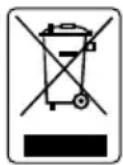
The mark of Crossed-out wheeled bin indicates that this product must not be disposed of with your other household waste. Instead, you need to dispose of the waste equipment by handing it over to a designated collection point for the recycling of waste electrical and electronic equipment. For more information about where to drop off your waste equipment for recycling, please contact your household waste disposal service or the shop where you purchased the product.
Package Contents
The following items are included in the package. Please check if each item is available before using.
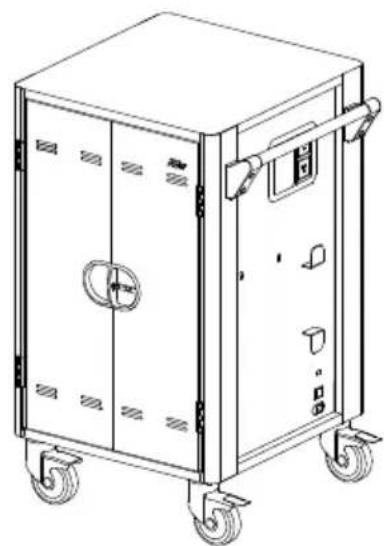
natural_image
Line drawing of a rectangular industrial machine with wheels and control panels (no text or symbols)C20i Cart
User Manual
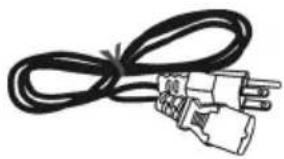
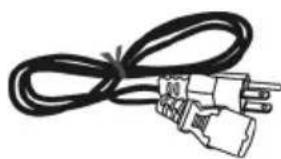
natural_image
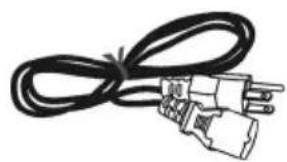
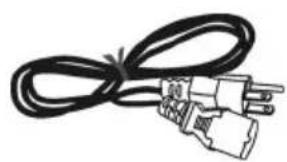
Coiled black cable with two terminal connectors (no text or symbols visible)Power Cord
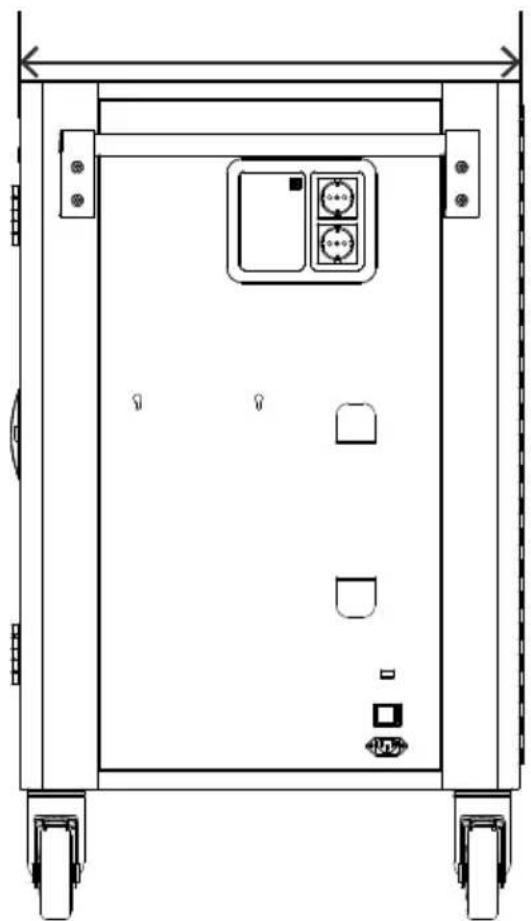
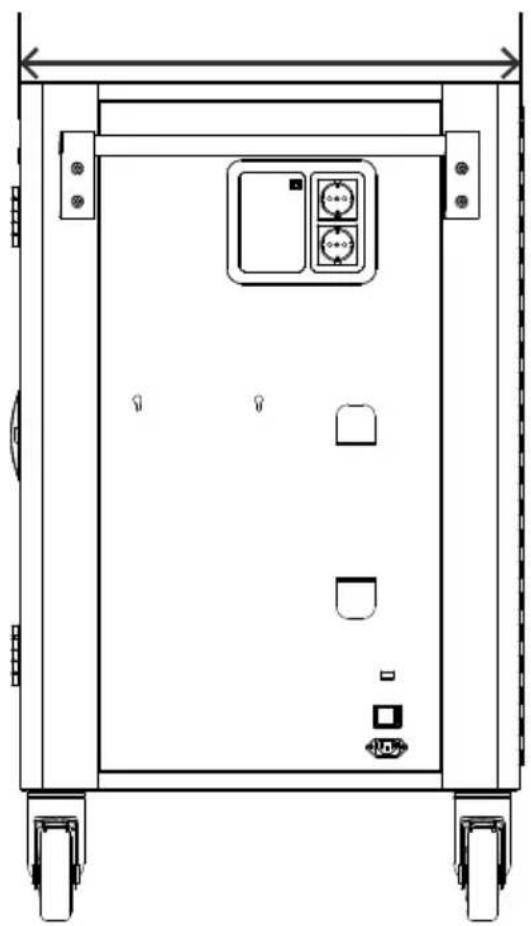
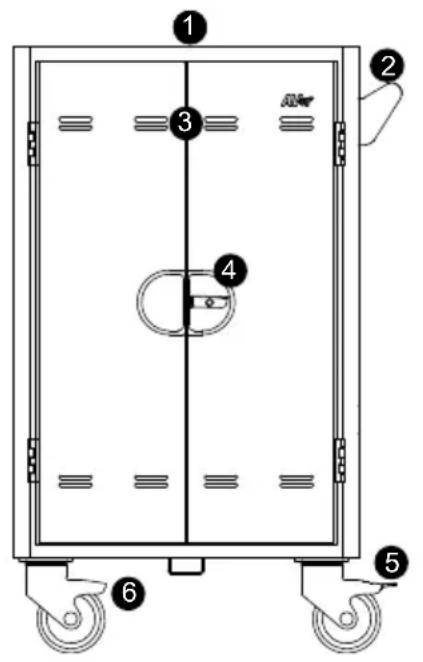
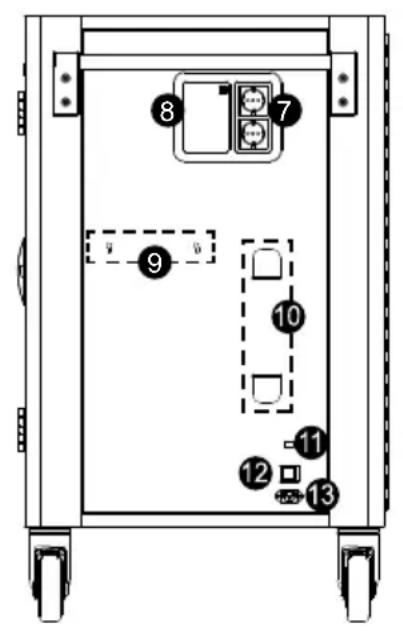
Dimensions
natural_image
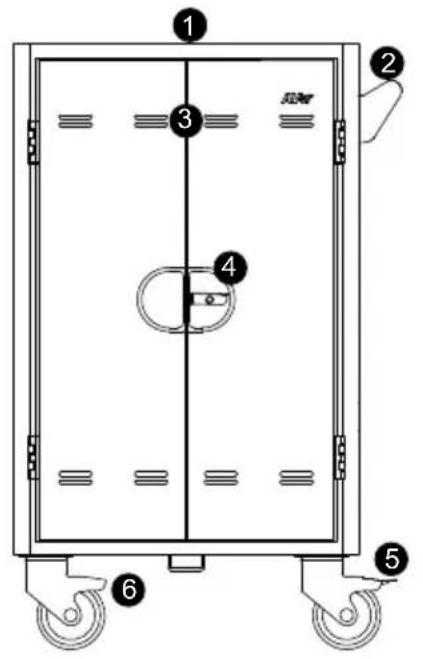
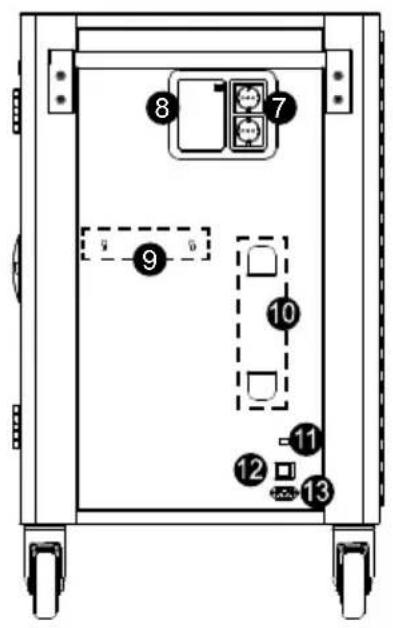
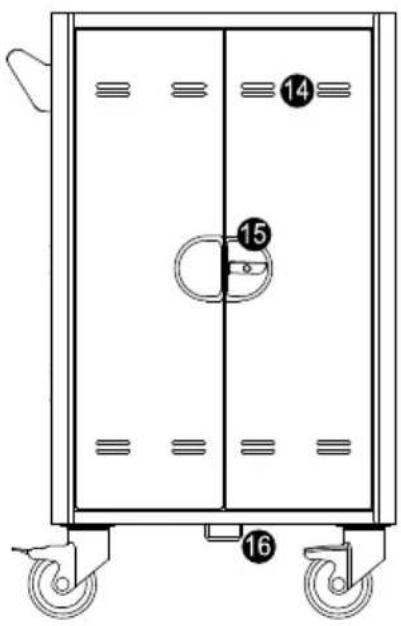
Technical line drawing of a rectangular electronic device with mounting holes and control panel (no text or symbols)Diagram
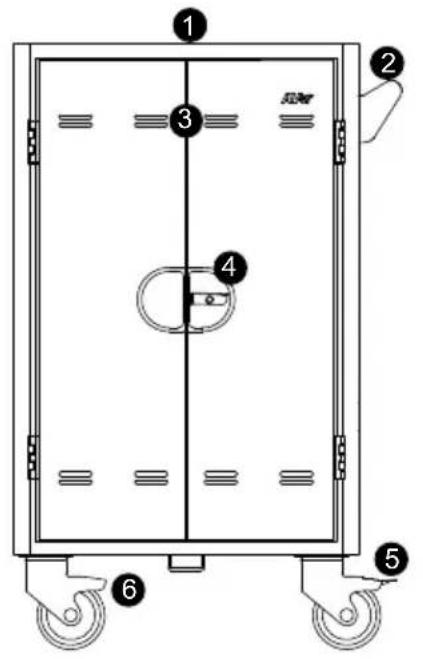
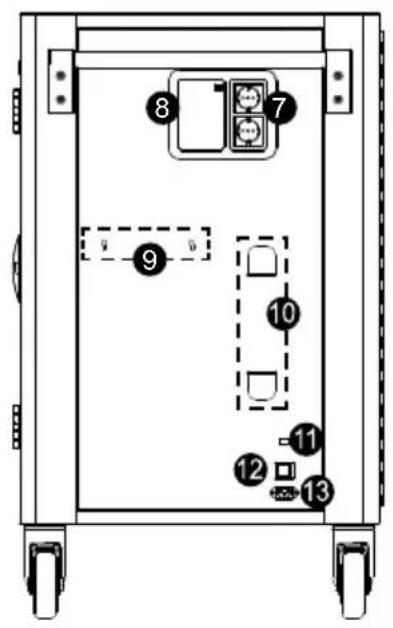
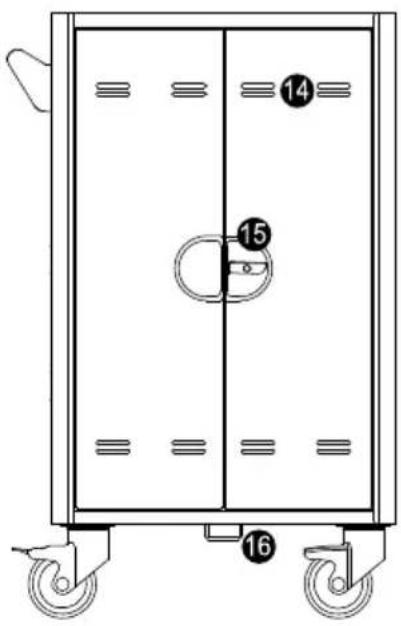
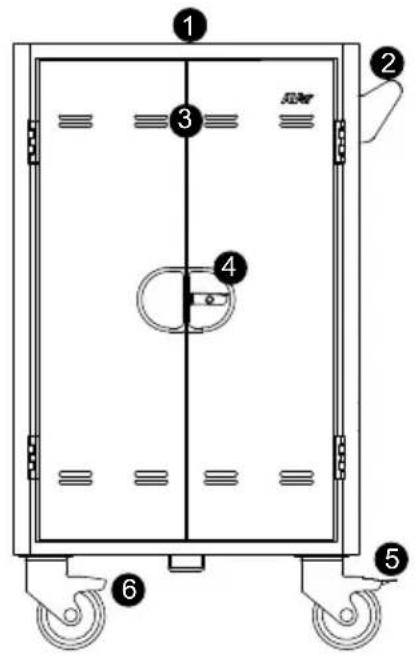
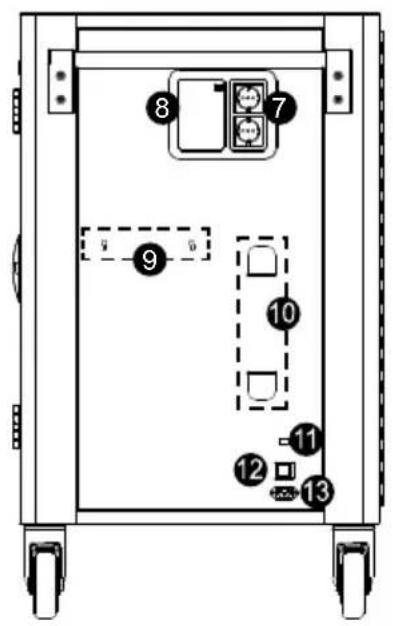
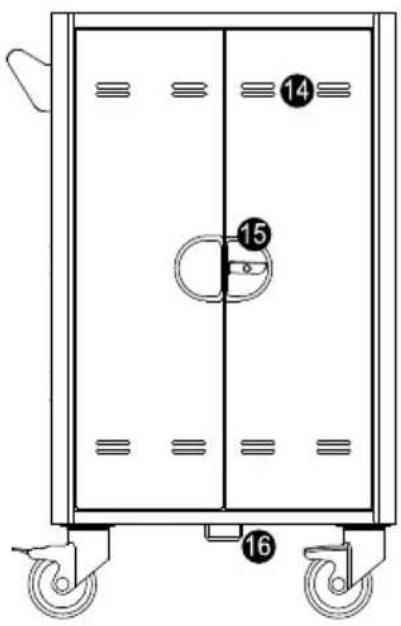
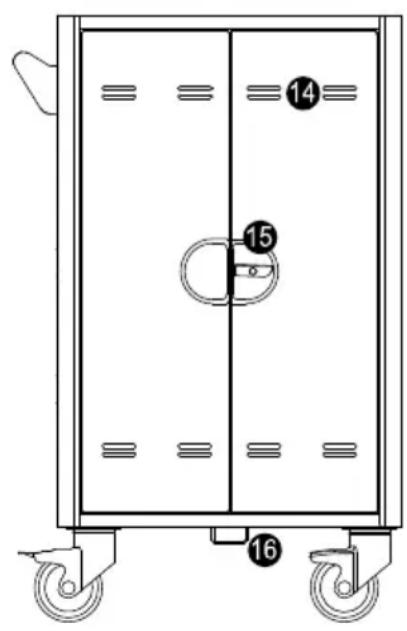
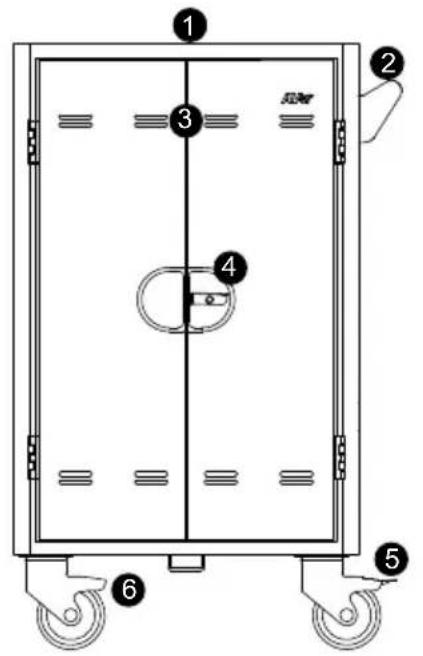
Front Side Back
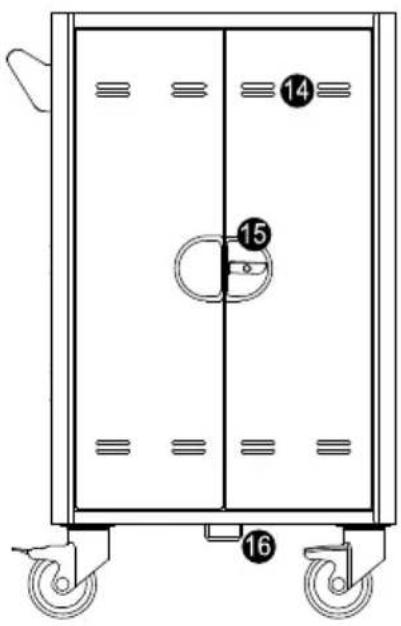
- Work platform
- Handle
- Ventilation holes
- Door lock
- 5" Locking caster
-
5" Caster
-
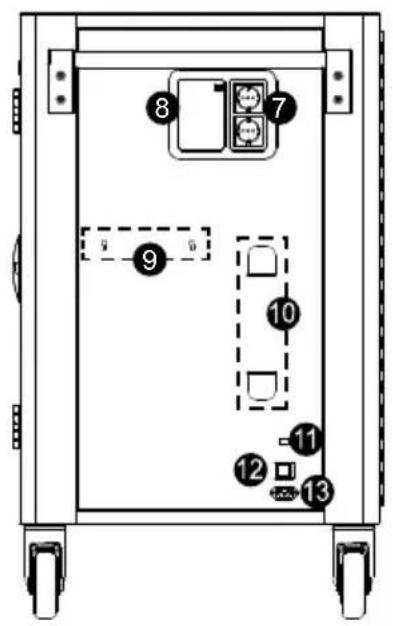
Auxiliary outlets*
- LED panel
- Mounting points for Access point holder(optional)
- Power cable wrap brackets
- USB firmware upgrade port
- Power switch
-
Power inlet
-
Ventilation holes
- Door lock
- Security hook
* Auxiliary outlet type may vary as they are country dependent.
LED Indicators
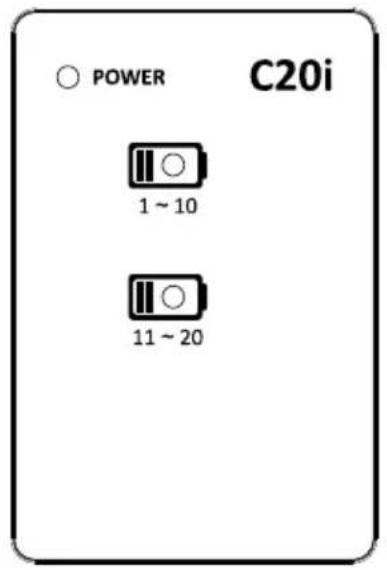
| LED Status | |
| Power x1 | 1. Solid Green: ON2. Flashing Orange: Current Overload3. Flashing Red: Abnormal Failure (Contact Support) |
| Device Status x2 | 1. OFF: No Charging2. Solid Blue: Charging |
Secure the Cart
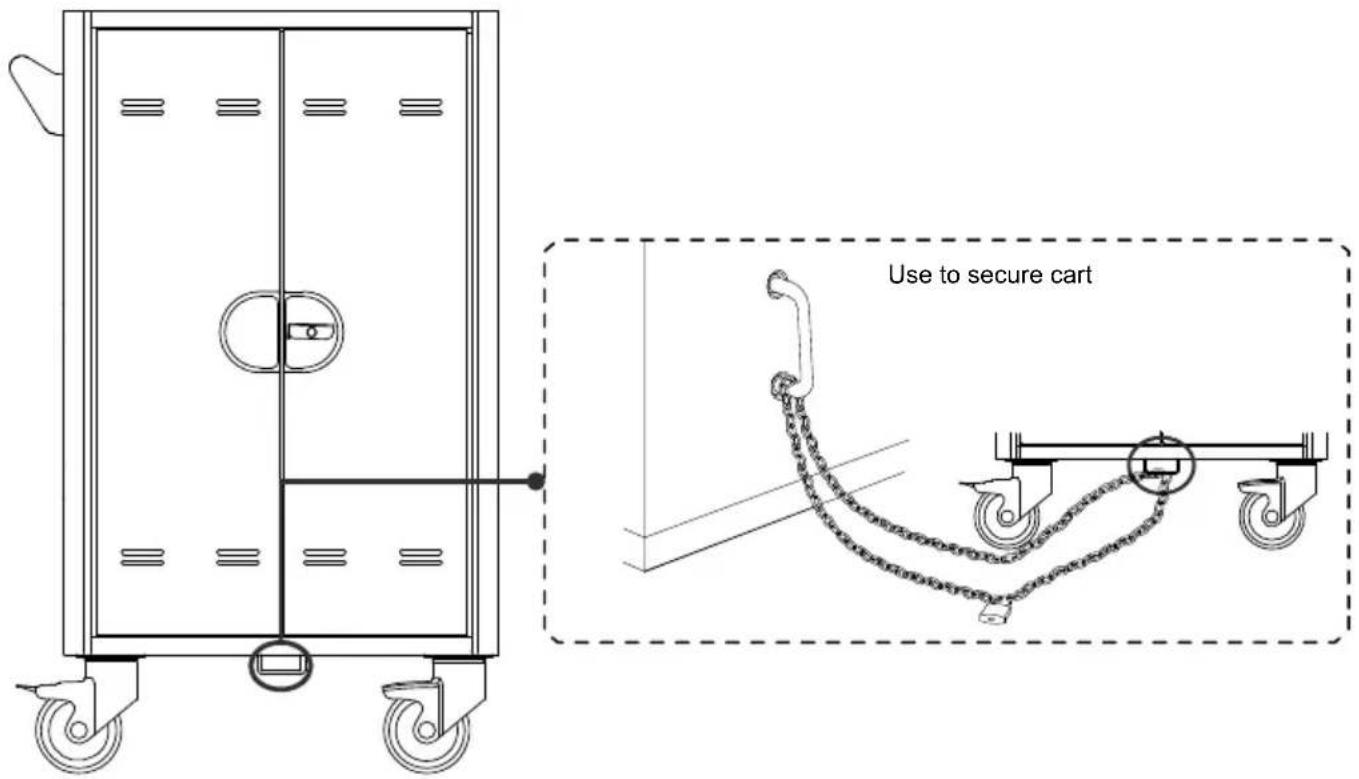
Door Lock
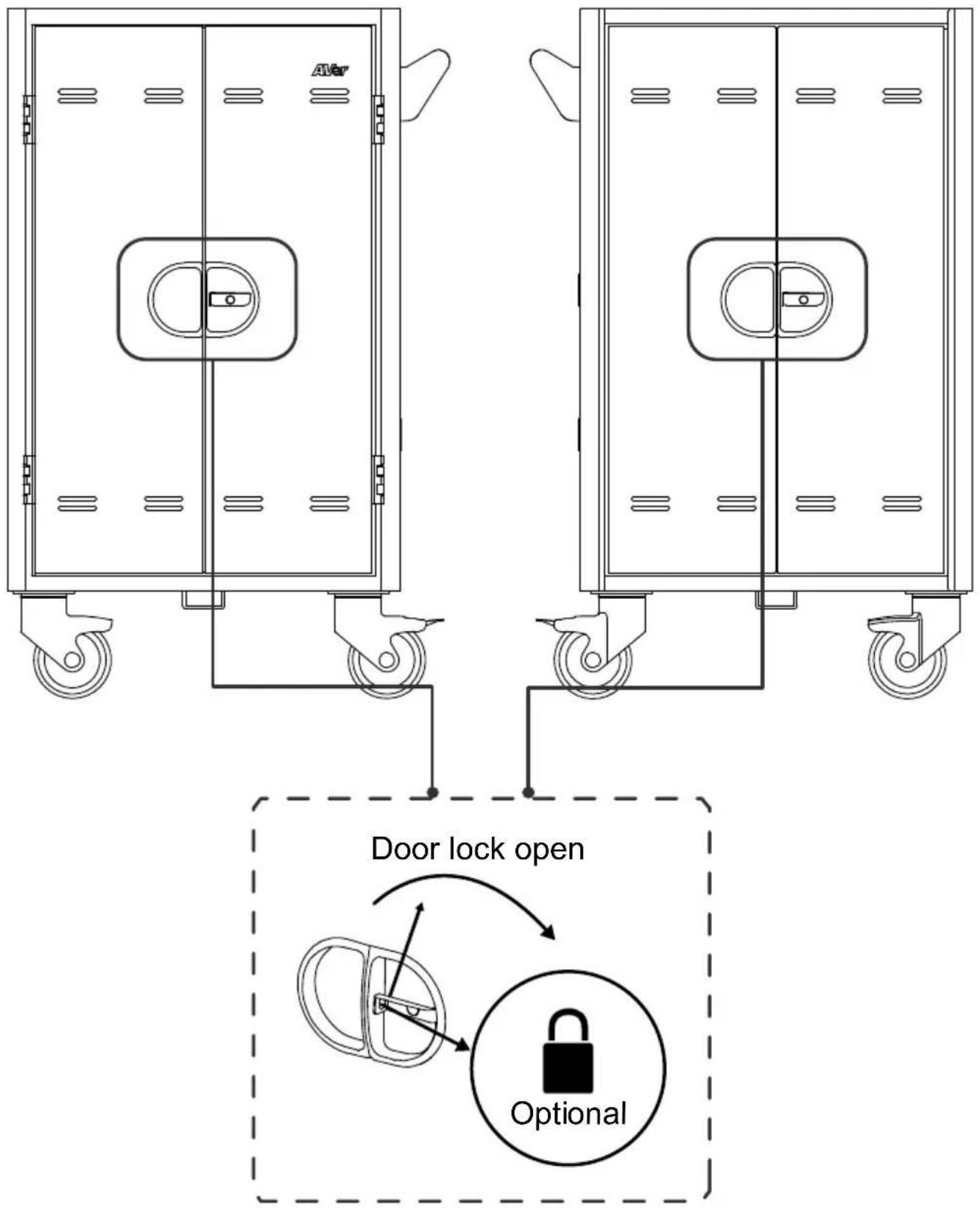
[Note] The shackle dimension of front and back doors are limited to ∅8mm (0.31").
Cable Management
[Note]
- It is recommended to use cable ties (optional) to secure and manage cables.
- It is recommended to allocate 2 human resources for efficient device cabling.
Back
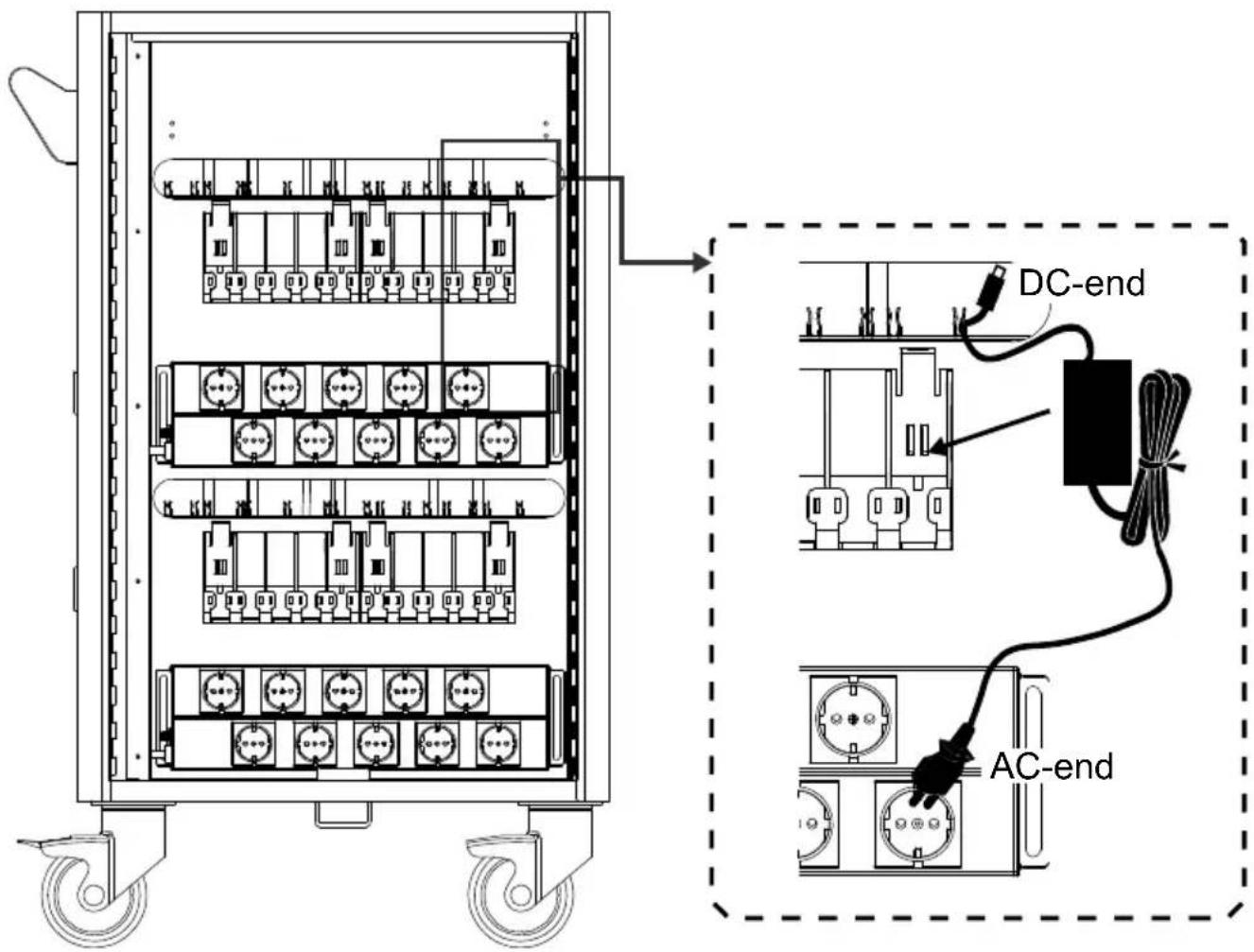
- Open the rear door.
- Place the power adapter in to the individual adapter compartment.
-
Pass the DC-end of the adapter cable to the front of the cart through the space provided.
-
Follow the order as below figure show to plug-in the AC-end power cord to the corresponding power AC socket.
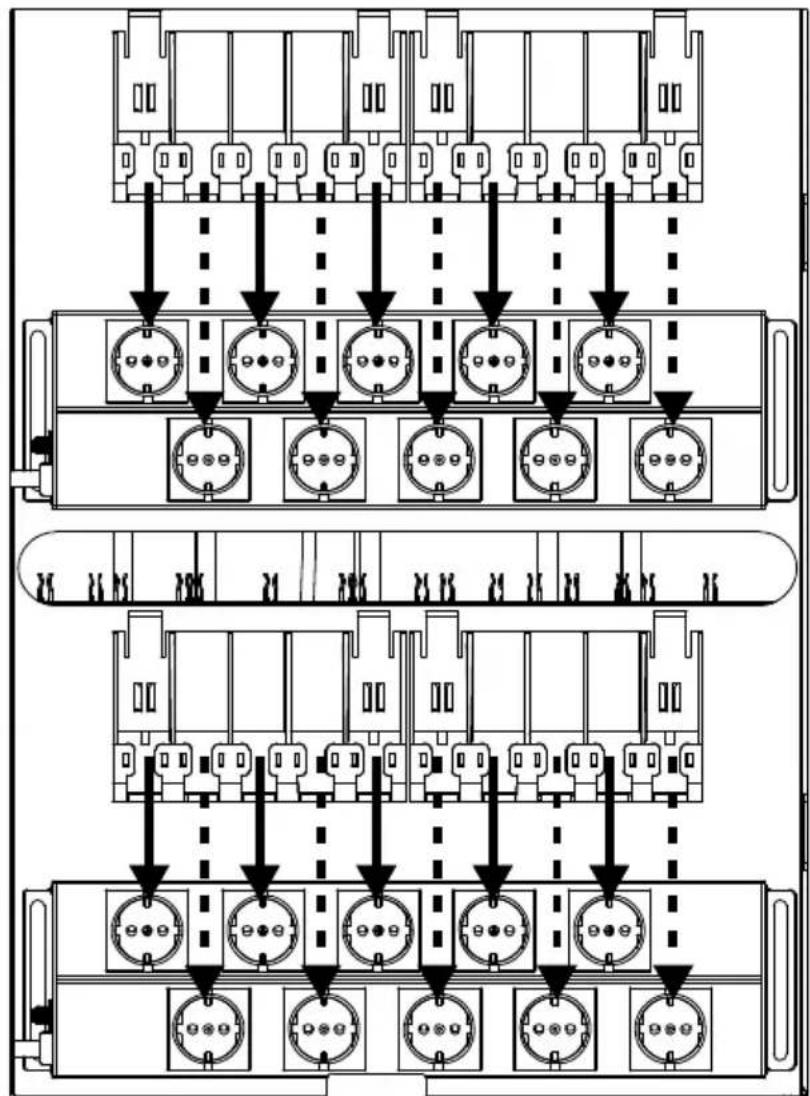
flowchart
graph TD
    A["Top Panel"] --> B["Conventional Connectors"]
    B --> C["Conventional Connectors"]
    C --> D["Conventional Connectors"]
    D --> E["Conventional Connectors"]
    E --> F["Conventional Connectors"]
    F --> G["Conventional Connectors"]
    G --> H["Conventional Connectors"]
    H --> I["Conventional Connectors"]
    I --> J["Conventional Connectors"]
    J --> K["Conventional Connectors"]
    K --> L["Conventional Connectors"]
    L --> M["Conventional Connectors"]
    M --> N["Conventional Connectors"]
    N --> O["Conventional Connectors"]
    O --> P["Conventional Connectors"]
    P --> Q["Conventional Connectors"]
    Q --> R["Conventional Connectors"]
    R --> S["Conventional Connectors"]
    S --> T["Conventional Connectors"]
    T --> U["Conventional Connectors"]
    U --> V["Conventional Connectors"]
    V --> W["Conventional Connectors"]
    W --> X["Conventional Connectors"]
    X --> Y["Conventional Connectors"]
- Secure the bundle cables with cable tie or zip-tie (not supplied).
Front
1. Open front doors
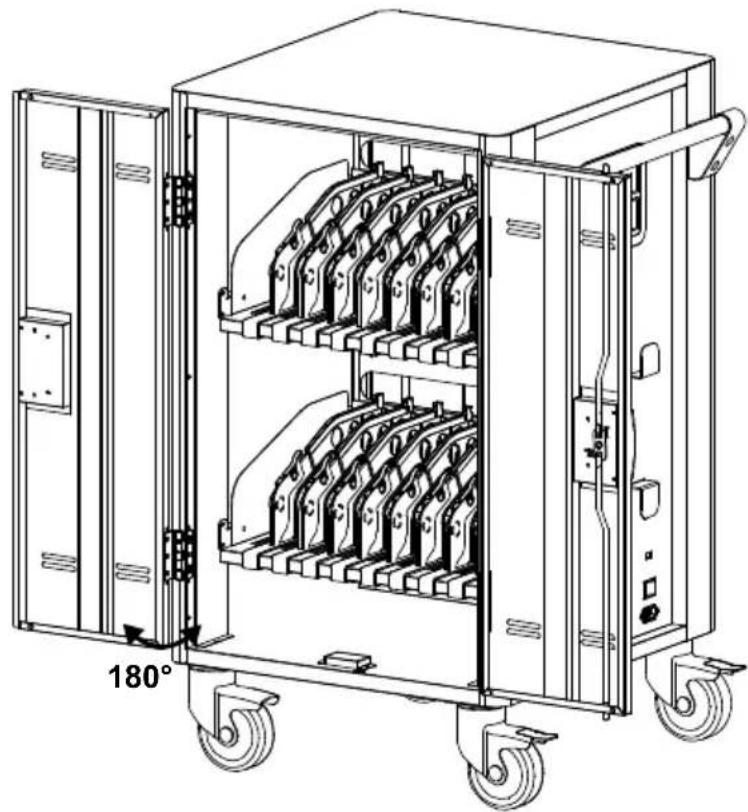
natural_image
Technical line drawing of a multi-level industrial machine with wheels and internal compartments (no text or symbols)- Release the partition locking piece.
- Route the adaptor DC-end cable. Along with the V-shape routing groove.
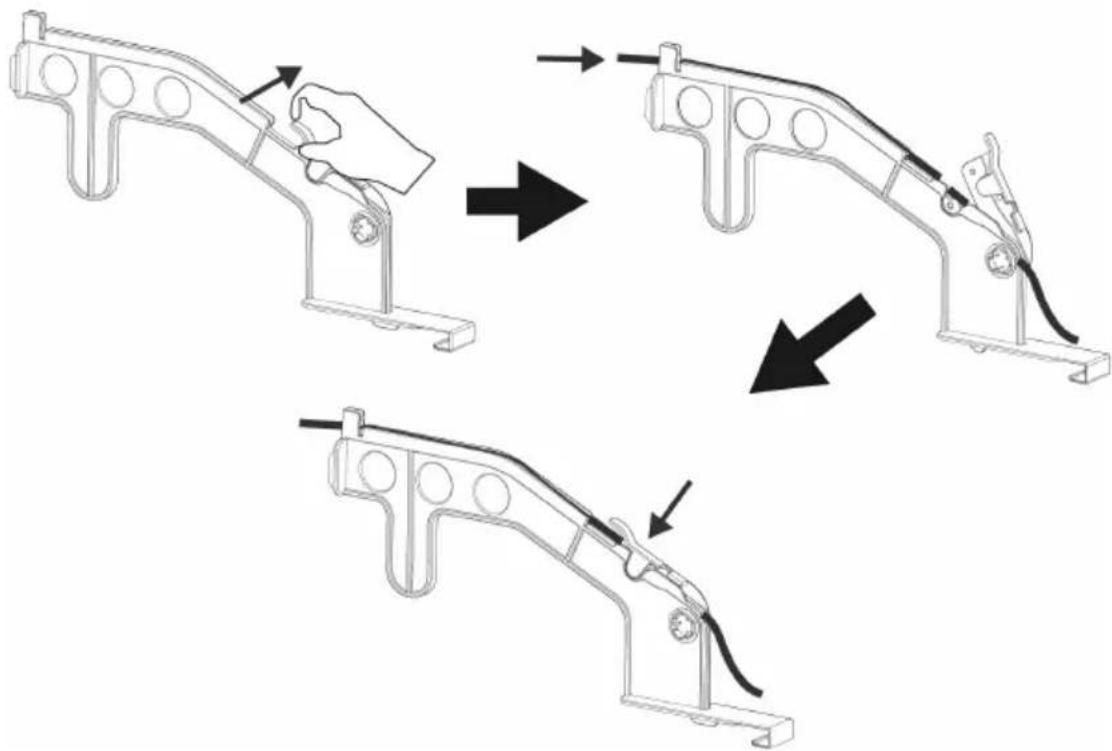
natural_image
Three-step diagram showing a hand holding a bracket being adjusted, then to adjust the frame (no text or symbols present)- Snap the locking piece to firmly secure the DC-end cable.
- Place the mobile device into the bay.
- Plug in the DC-connector to the mobile device.
Charging Cart
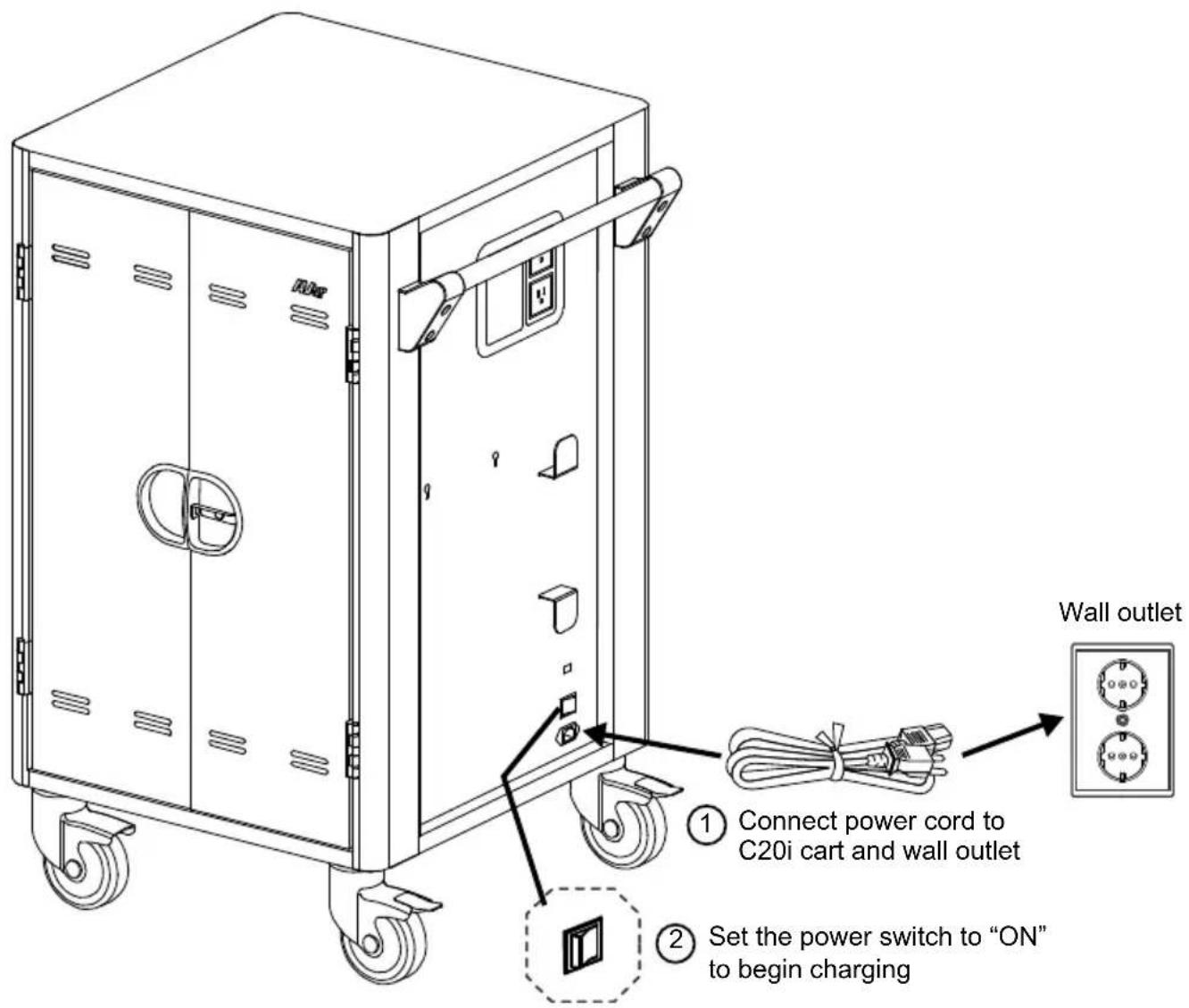
[Note]
- Set the power switch to the OFF position before plugging the cart to wall outlet.
2.* Auxiliary outlet and power inlet type may vary as they are country dependent.
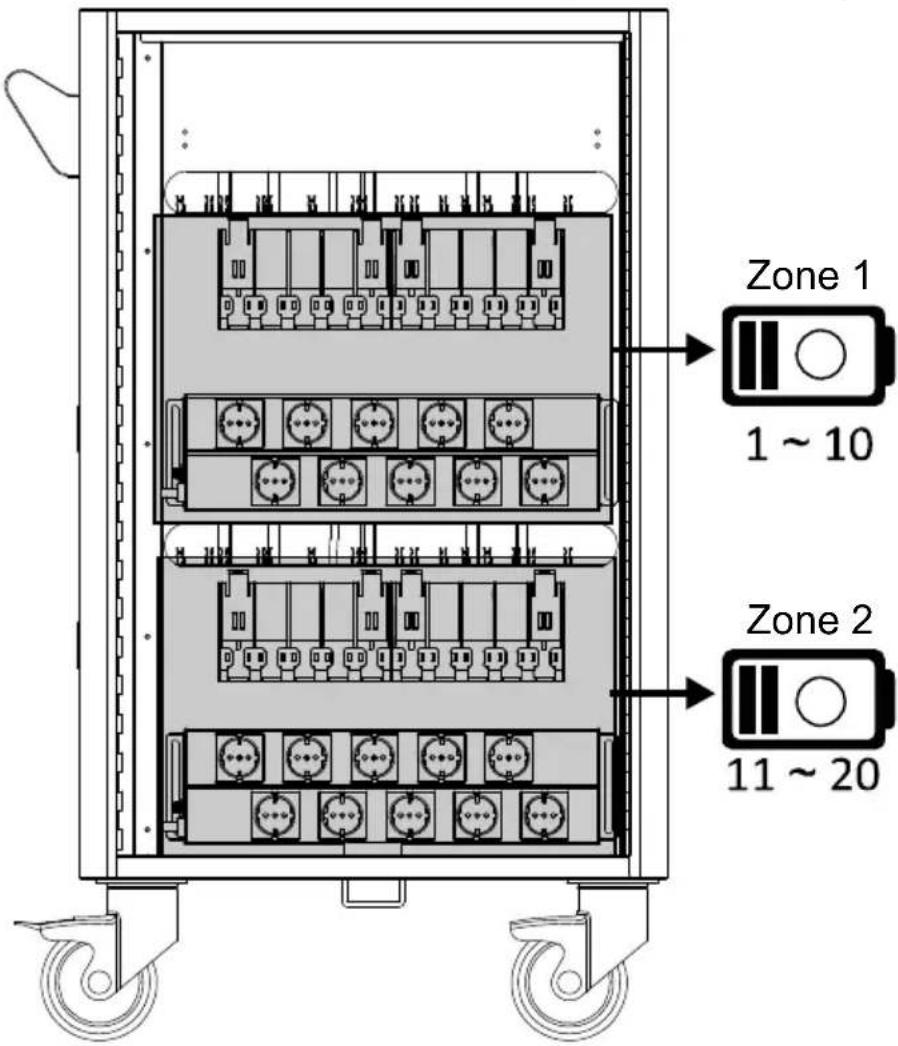
Intelligent Timer
20 bays for C20i are divided into 2 zones (10 bays for each zone).
Firmware
Firmware can be upgraded from the external USB type-A port via typical USB thumb-drive. Please follow the steps below to upgrade your Firmware:
- Prior to updating, make sure the USB thumb-drive is formatted to FAT or FAT32 filesystem
- Copy the Firmware binary file (*.bin) to USB thumb-drive
- Turn OFF C20i and then insert the USB thumb-drive
- Turn ON C20i and the Firmware upgrade will update automatically. The Power LED will cycle through the following display RED → AMBER → GREEN → RED.
[Note] Status LEDs are OFF during the upgrading.
- Once the Firmware upgrade is completed, the Power LED will still display RED → AMBER → GREEN → RED in cycle, but the charging status LED's will turn ON.
- Turn OFF C20i, remove the USB thumb-drive.
[Note]
C20i supports USB thumb-drive for the following criteria:
- FAT or FAT32 filesystem (need to format if necessary).
- 32GB capacity maximum.
- USB 2.0 high speed interface.
Troubleshooting
Q: Why are all of my devices plugged in but not charging?
A: 1. Make sure power cords are undamaged.
2. Make sure power cords are firmly inserted into the available socket with stable current.
3. Make sure the power plug and current consumption are compliant with your country specification standards.
Q: My cart's main power cord or cart components are damaged. Are they covered under warranty?
A: We provide a 10 year warranty on the cart and tray, and 5 years warranty on the electrical components.
Q: How do I know if my devices will exceed more than the allotted current?
A: Have a qualified electrician verify the current consumption of your devices. Perform the test with devices installed and batteries discharged.
Q: When I plug in the device it trips the circuit breaker. What is wrong?
A: You may have other equipment or appliances sharing the same circuit that is causing a circuit overload. Have a qualified electrician check that adequate power is available in the circuit.
Specifications
| Model | C20i |
| Capacity | Up to 20 Devices (2 shelves, 10 bays per shelf) |
| Supported Devices | Laptops/Chromebooks/Tablets up to 16" |
| AUX Outlets | 2 |
| LEDs Status Indicators | Status LED (x2): Solid Blue when charging |
| Charging Type | AC Intelligent Charging |
| Power Specification | AC IN: 220~240V, 50/60Hz,8APower Strip (x20 ports): 220~240V, 50/60Hz,6AOutlet( 2 ports): 220~240V, 50/60Hz, 2A |
| Security | Front Doors: 3-point locking mechanism with padlock holeRear Doors: 3-point locking mechanism with padlock hole[Note] Padlock is not included in the package |
| Casters | Four 5" casters: two are lockable |
| Intelligent Charging | Yes |
| Working Temperature | 0°~30°C |
| Working RH% | 10%~90% |
| Storage Temperature | -40°C~60°C |
| Storage RH% | 5%~95% |
| Warranty | 10 years cart and tray5 years electrical components |
| Cart Dimensions(W x D x H) | 68.8 (W) x 63.7 (D) x 106 (H)cm27.09"(W) x 25.08"(D) x 41.73"(H) |
| Slot Dimensionsfor 16 bays (H x W x D) | 33(H) x 4.375(W) x 41.9(D)cm13"(H) x 1.722"(W) x 16.5"(D) |
| Slot DimensionsFor 20 bays (H x W x D) | 33(H) x 3.615(W) x 41.9(D)cm13"(H) x 1.423"(W) x 16.5"(D) |
| Weight without Devices | 146.83lbs (66.6kg) |
Service and Warranty
All of our products come with a quality and safety assurance.
For customers located in North America, please visit the AVer USA support site for comprehensive RMA, Warranty, and Service information:
http://averuesa.com/classroom-technology/support/
For customers located outside North America, please visit AVer Global support site: http://www.aver.com/
natural_image
Line drawing of a multi-compartment industrial machine with wheels and control panel (no text or symbols)C20i-Wagen

Bedienungsanleitung
natural_image
Coiled black cable with three terminal connectors (no text or symbols visible)Stromkabel
Abmessungen

natural_image
Technical line drawing of a rectangular electronic device with control panel and wheels (no text or symbols)Diagramm
flowchart
graph TD
    A["Top Panel"] --> B["Conventional Connectors"]
    B --> C["Conventional Connectors"]
    C --> D["Conventional Connectors"]
    D --> E["Conventional Connectors"]
    E --> F["Conventional Connectors"]
    F --> G["Conventional Connectors"]
    G --> H["Conventional Connectors"]
    H --> I["Conventional Connectors"]
    I --> J["Conventional Connectors"]
    J --> K["Conventional Connectors"]
    K --> L["Conventional Connectors"]
    L --> M["Conventional Connectors"]
    M --> N["Conventional Connectors"]
    N --> O["Conventional Connectors"]
    O --> P["Conventional Connectors"]
    P --> Q["Conventional Connectors"]
    Q --> R["Conventional Connectors"]
    R --> S["Conventional Connectors"]
    S --> T["Conventional Connectors"]
    T --> U["Conventional Connectors"]
    U --> V["Conventional Connectors"]
    V --> W["Conventional Connectors"]
    W --> X["Conventional Connectors"]
    X --> Y["Conventional Connectors"]
natural_image
Technical line drawing of a multi-level industrial machine with wheels and internal compartments (no text or symbols)http://averuesa.com/classroom-technology/support/
natural_image
Line drawing of a rectangular industrial machine with wheels and control panel (no text or symbols)Carro C20i
Manual del usuario
natural_image
Coiled black cable with three terminal connectors (no text or symbols visible)natural_image
Technical line drawing of a rectangular electronic device with mounting holes and internal components (no text or symbols)Diagrama
natural_image
Line drawing of a mechanical cabinet with wheels and side panels (no text or symbols)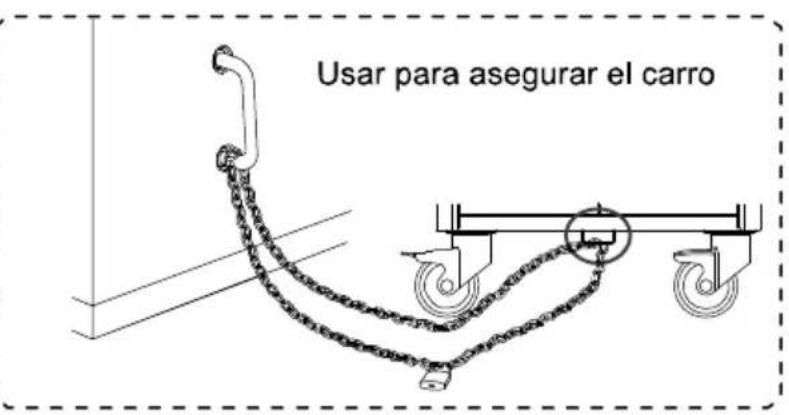
flowchart
graph TD
    A["Top Panel"] --> B["Conventional Connectors"]
    B --> C["Conventional Connectors"]
    C --> D["Conventional Connectors"]
    D --> E["Conventional Connectors"]
    E --> F["Conventional Connectors"]
    F --> G["Conventional Connectors"]
    G --> H["Conventional Connectors"]
    H --> I["Conventional Connectors"]
    I --> J["Conventional Connectors"]
    J --> K["Conventional Connectors"]
    K --> L["Conventional Connectors"]
    L --> M["Conventional Connectors"]
    M --> N["Conventional Connectors"]
    N --> O["Conventional Connectors"]
    O --> P["Conventional Connectors"]
    P --> Q["Conventional Connectors"]
    Q --> R["Conventional Connectors"]
    R --> S["Conventional Connectors"]
    S --> T["Conventional Connectors"]
    T --> U["Conventional Connectors"]
    U --> V["Conventional Connectors"]
    V --> W["Conventional Connectors"]
    W --> X["Conventional Connectors"]
    X --> Y["Conventional Connectors"]
natural_image
Technical line drawing of a multi-level industrial machine with wheels and internal compartments (no text or symbols)natural_image
Three-step diagram showing a hand holding a tool interacting with a bracket, demonstrating mechanical assembly (no text or symbols)http://averuesa.com/classroom-technology/support/
natural_image
Line drawing of a four-wheeled industrial machine with wheels and control panel (no text or symbols)Chariot C20i
natural_image
Coiled black cable with two connectors (no text or symbols visible)natural_image
Technical line drawing of a rectangular electronic device with mounting holes and control panel (no text or symbols)Diagramme
Avant Côté Arrière
flowchart
graph TD
    A["Top Panel"] --> B["Conventional Connectors"]
    B --> C["Conventional Connectors"]
    C --> D["Conventional Connectors"]
    D --> E["Conventional Connectors"]
    E --> F["Conventional Connectors"]
    F --> G["Conventional Connectors"]
    G --> H["Conventional Connectors"]
    H --> I["Conventional Connectors"]
    I --> J["Conventional Connectors"]
    J --> K["Conventional Connectors"]
    K --> L["Conventional Connectors"]
    L --> M["Conventional Connectors"]
    M --> N["Conventional Connectors"]
    N --> O["Conventional Connectors"]
    O --> P["Conventional Connectors"]
    P --> Q["Conventional Connectors"]
    Q --> R["Conventional Connectors"]
    R --> S["Conventional Connectors"]
    S --> T["Conventional Connectors"]
    T --> U["Conventional Connectors"]
    U --> V["Conventional Connectors"]
    V --> W["Conventional Connectors"]
    W --> X["Conventional Connectors"]
    X --> Y["Conventional Connectors"]
natural_image
Technical line drawing of a multi-level industrial machine with wheels and internal compartments (no text or symbols)natural_image
Three-step diagram showing a hand holding a tool interacting with a bracket, then adjusting the handle (no text or symbols present)http://averuesa.com/classroom-technology/support/
natural_image
Symbolic illustration of a person climbing a cart with a 'X' mark, no text or symbols presentnatural_image
Silhouette of a person pushing a trash bin on a black background (no text or symbols)natural_image
Symbolic illustration of a person crossing a barrier with a sunburst (no text or numbers present)natural_image
Line drawing of a four-wheeled industrial machine with wheels and control panel (no text or symbols)Carrello C20i
Manuale dell'utente
natural_image
Coiled black cable with two terminal connectors (no text or symbols visible)natural_image
Technical line drawing of a rectangular electronic device with mounting holes and control panel (no text or symbols)Schema
flowchart
graph TD
    A["Top Panel"] --> B["Conventional Connectors"]
    B --> C["Conventional Connectors"]
    C --> D["Conventional Connectors"]
    D --> E["Conventional Connectors"]
    E --> F["Conventional Connectors"]
    F --> G["Conventional Connectors"]
    G --> H["Conventional Connectors"]
    H --> I["Conventional Connectors"]
    I --> J["Conventional Connectors"]
    J --> K["Conventional Connectors"]
    K --> L["Conventional Connectors"]
    L --> M["Conventional Connectors"]
    M --> N["Conventional Connectors"]
    N --> O["Conventional Connectors"]
    O --> P["Conventional Connectors"]
    P --> Q["Conventional Connectors"]
    Q --> R["Conventional Connectors"]
    R --> S["Conventional Connectors"]
    S --> T["Conventional Connectors"]
    T --> U["Conventional Connectors"]
    U --> V["Conventional Connectors"]
    V --> W["Conventional Connectors"]
    W --> X["Conventional Connectors"]
    X --> Y["Conventional Connectors"]
natural_image
Technical line drawing of a multi-level industrial machine with wheels and internal compartments (no text or symbols)http://averuesa.com/classroom-technology/support/
- C20i
- User Manual
- WARNING
- ALWAYS FOLLOW SAFETY PRECAUTIONS
- FCC NOTICE (Class A)
- Federal Communications Commission Statement
- Class A ITE
- European Community Compliance Statement (Class A)
- DISCLAIMER
- TRADEMARKS
- COPYRIGHT
- Package Contents
- Diagram
- Front Side Back
- LED Indicators
- Secure the Cart
- Door Lock
- Cable Management
- [Note]
- Back
- Front
- Open front doors
- Intelligent Timer
- Firmware
- Troubleshooting
- Service and Warranty
- Diagramm
- Diagrama
- Diagramme
- Avant Côté Arrière
- Schema
Brand : AVer
Model : C20i
Category : Battery charger