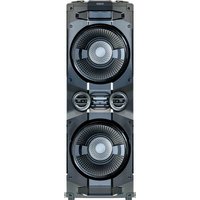
658057 - Bluetooth speaker Schwaiger - Free user manual and instructions
Find the device manual for free 658057 Schwaiger in PDF.


| Product Type | Bluetooth Party Soundsystem (Karaoke) |
| Brand | Schwaiger |
| Model | 658057 / PSS-400 |
| Dimensions (LxWxH) | 326 x 952 x 340 mm |
| Weight | 12.9 kg |
| Power Supply | 100-240 V AC, 50/60 Hz |
| Power Consumption (operating/standby) | 200 W / < 0.5 W |
| Speaker Power | 4 x 100 W (THD 10%) |
| Speakers | Woofer 6.5" + 2 tweeters 2" |
| Bluetooth Version | V5.1 with A2DP profile |
| Bluetooth Range | Greater than 10 m |
| Audio Inputs | 1x AUX 3.5 mm, 2x jack 6.35 mm (micro/guitar), 1x USB-A |
| USB Charging Output | 5 V DC, 500 mA |
| Supported USB Formats | MP3, FAT16/FAT32, up to 32 GB |
| FM Radio | 87.5 - 108 MHz, wire antenna |
| Display | LED |
| Equalizer | 5 presets: Rock, Jazz, Pop, Samba, Balance |
| LED Light Effects | 4 modes (L-1 to L-4) + customizable by color |
| Special Features | Mega Bass (bass boost), microphone echo, auto standby mode |
| Package Contents | Speaker, power cord, microphone (cable 3 m) |
| Housing Material | ABS and wood |
| Color | Black |
| Operating Temperature | 0 °C to 40 °C |
| Care and Cleaning | Unplug before cleaning; use a soft dry cloth |
| Safety | Do not expose to water; repairs by professional only |
Frequently Asked Questions - 658057 Schwaiger
User questions about 658057 Schwaiger
0 question about this device. Answer the ones you know or ask your own.
Ask a new question about this device
Download the instructions for your Bluetooth speaker in PDF format for free! Find your manual 658057 - Schwaiger and take your electronic device back in hand. On this page are published all the documents necessary for the use of your device. 658057 by Schwaiger.
USER MANUAL 658057 Schwaiger
Bluetooth® Party Soundsystem
GB USER GUIDE AND SAFETY INSTRUCTIONS
BLUETOOTH® PARTY SOUND SYSTEM
F MODE D'EMPLOI ET CONSIGNES DE SÉCURITÉ
SYSTÈME DE SONORISATION DE FÊTE BLUETOOTH®
ISTRUZIONI PER L'USO E AVVERTENZE DI SICUREZZA
SISTEMA AUDIO BLUETOOTH® PER FESTE
natural_image
Close-up of a modern electronic device with dual circular fans and a textured central grille (no visible text or symbols)ALLGEMEINES
natural_image
Line drawing of a coiled electrical plug and power outlet with labeled section 2 (no text or symbols on the cable itself)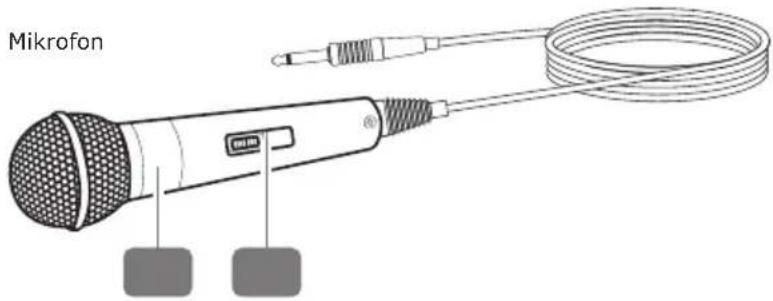
Read the user guide and keep it in a safe place.
Congratulations and thank you for purchasing this Schwaiger Product.
This user manual is an integral part of this product. It contains important information on commissioning and handling.
This user manual is intended to assist you in using the product. Read through the instructions for use carefully. Store this guide safely throughout the product's entire service life and pass it on to any subsequent users or owners. Check that the supplied package is complete and ensure that none of the parts are defective or damaged.
INTENDED USE
This is a consumer electronics device. The sole purpose of this product is to receive and play FM radio stations and audio files via USB, Bluetooth® or LINE IN (AUX IN). The product can also be used as a karaoke system, as well as an announcement or guitar amplifier when a microphone or guitar is connected. The product is intended for private use only and is not suitable for commercial use.
Only use the product as described in this user manual. Any other use is considered improper and may result in property damage.
PACKAGE CONTENTS
Device overview
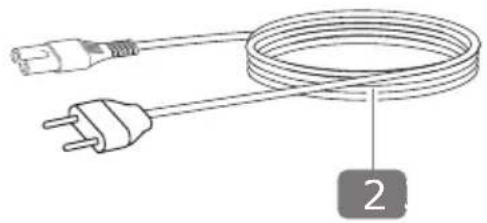
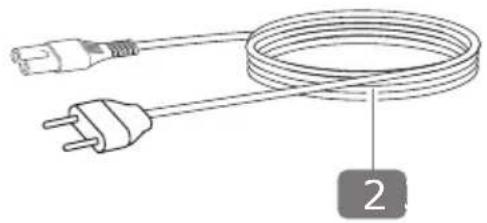
Power cord
natural_image
Line drawing of a coiled electrical plug with a terminal outlet, labeled with number 2 (no text or symbols on the cable itself)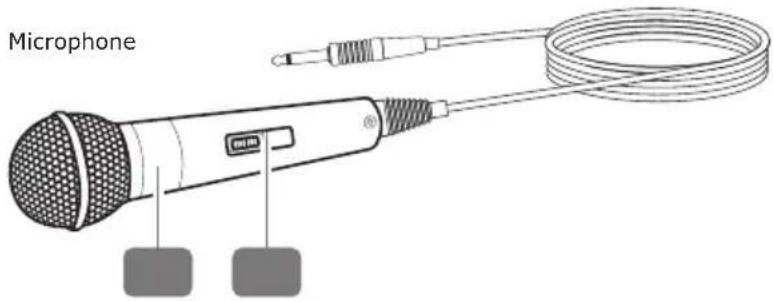
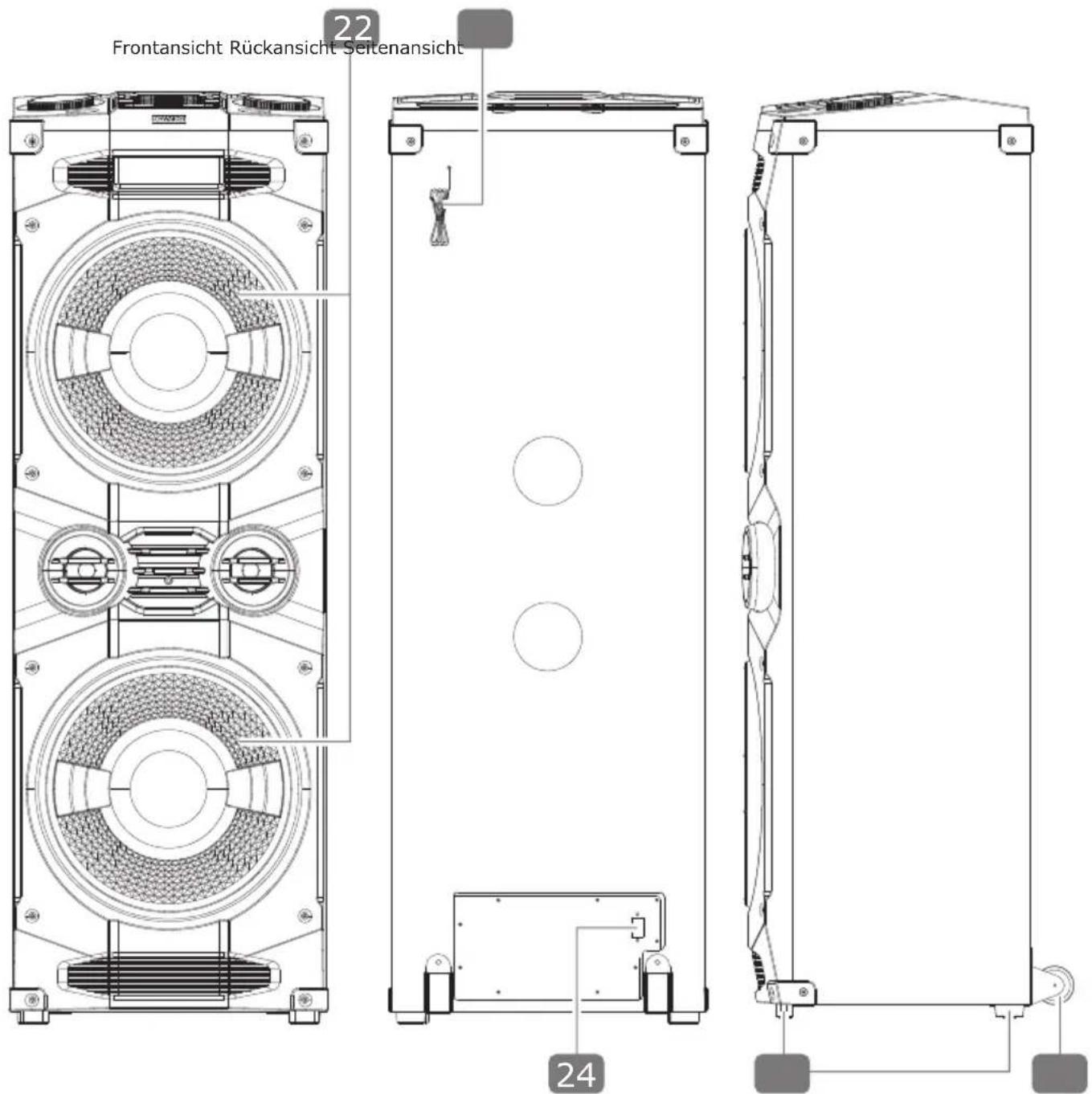
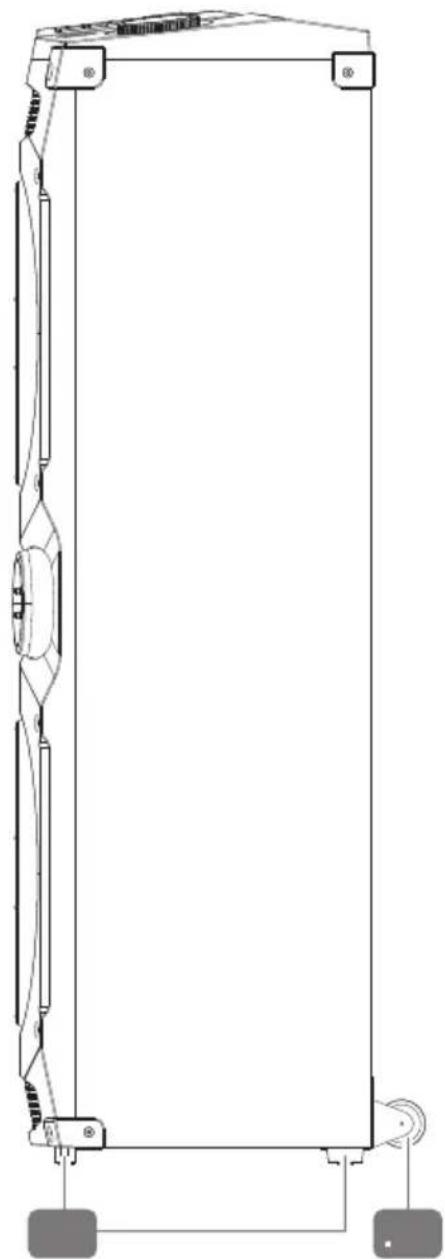
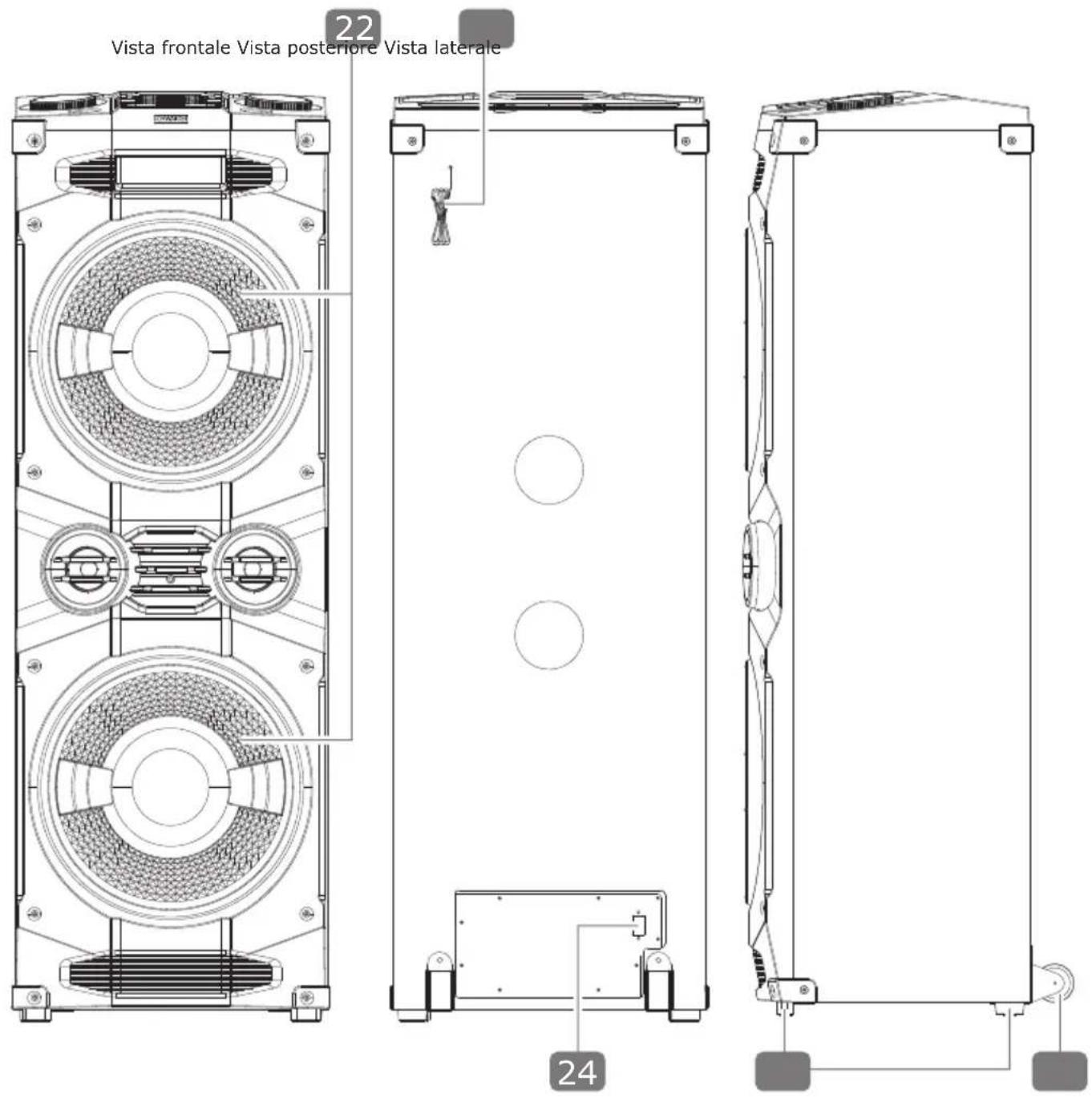
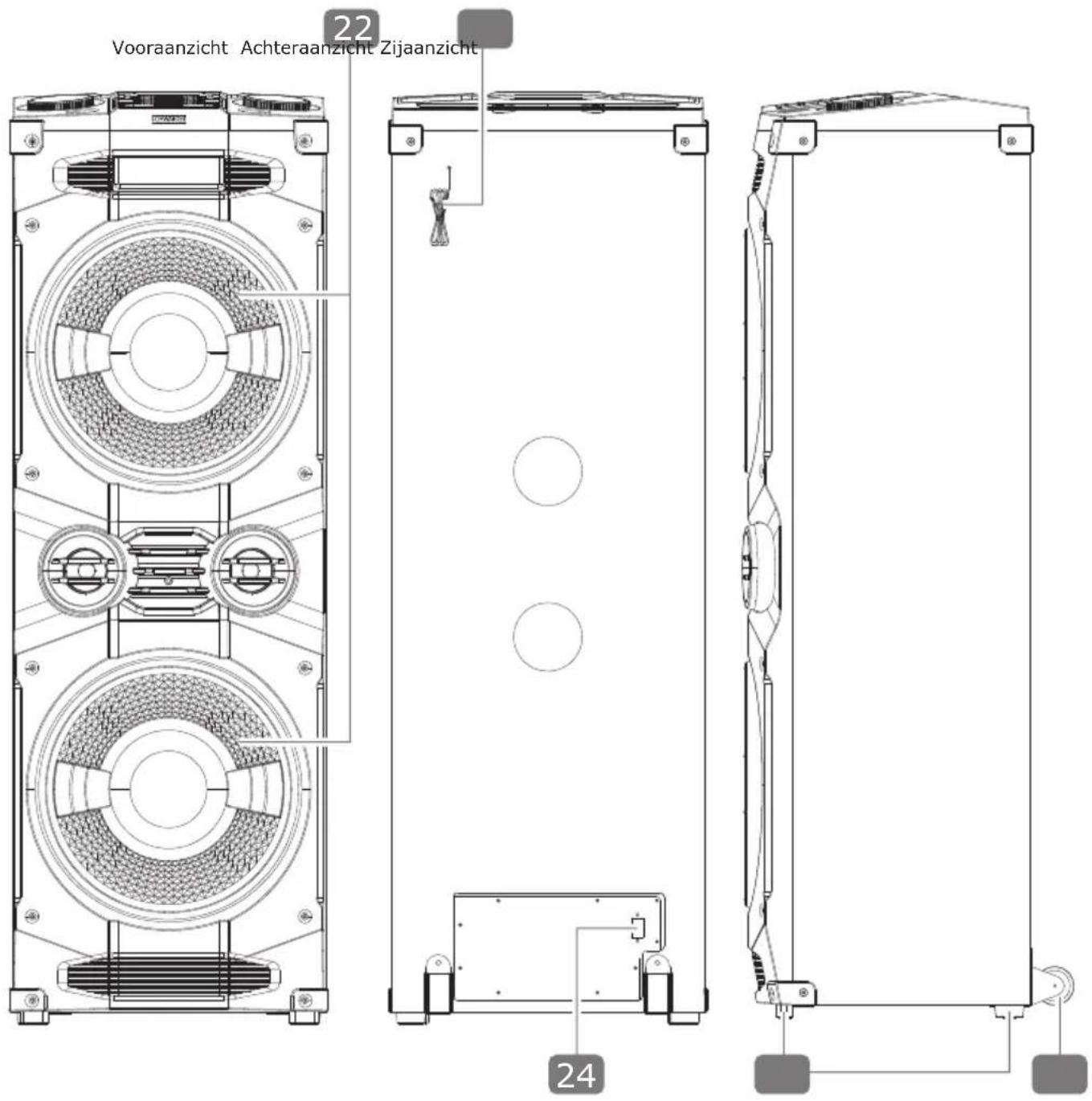
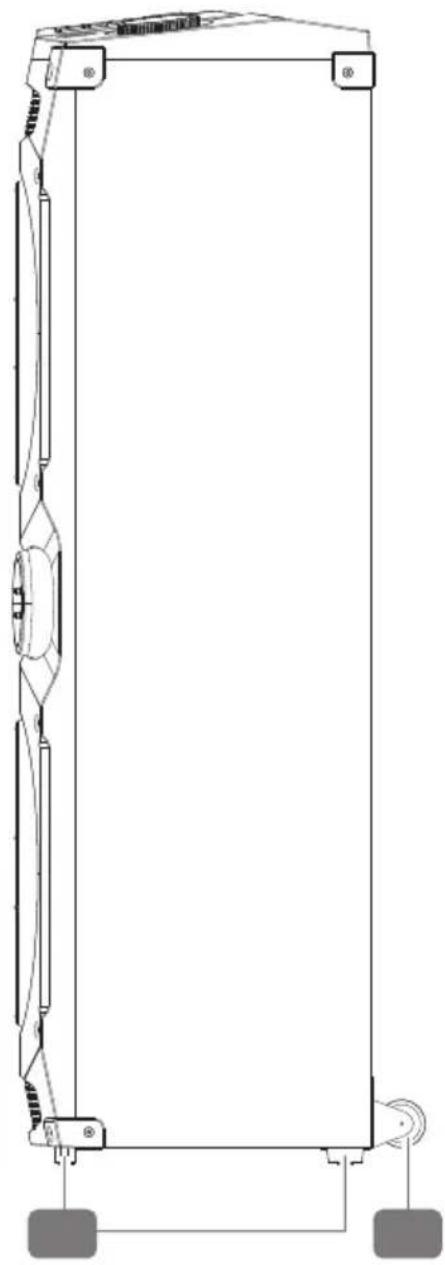
22 Front view Back view Lateral view
natural_image
Technical line drawing of a mechanical device with two circular components and mounting brackets (no text or symbols)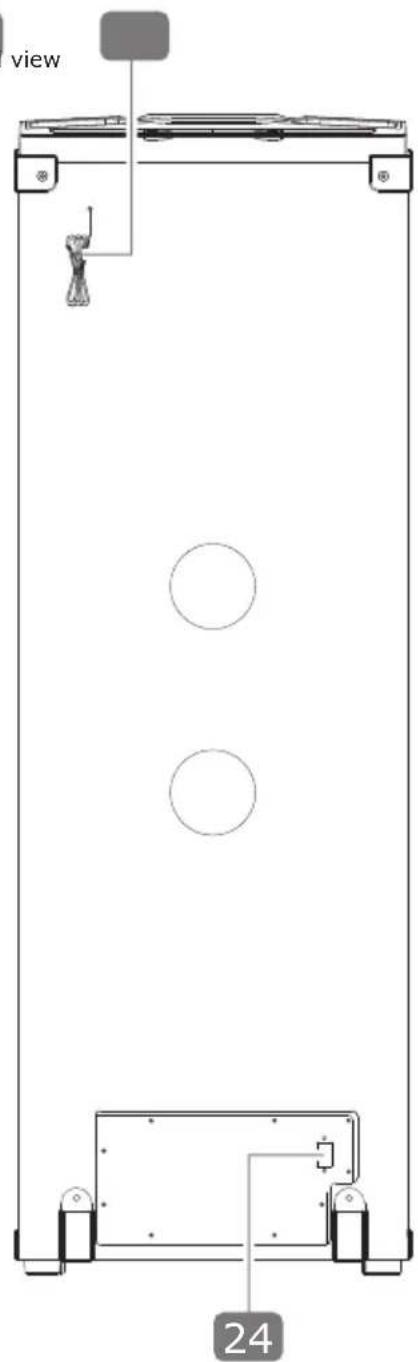
natural_image
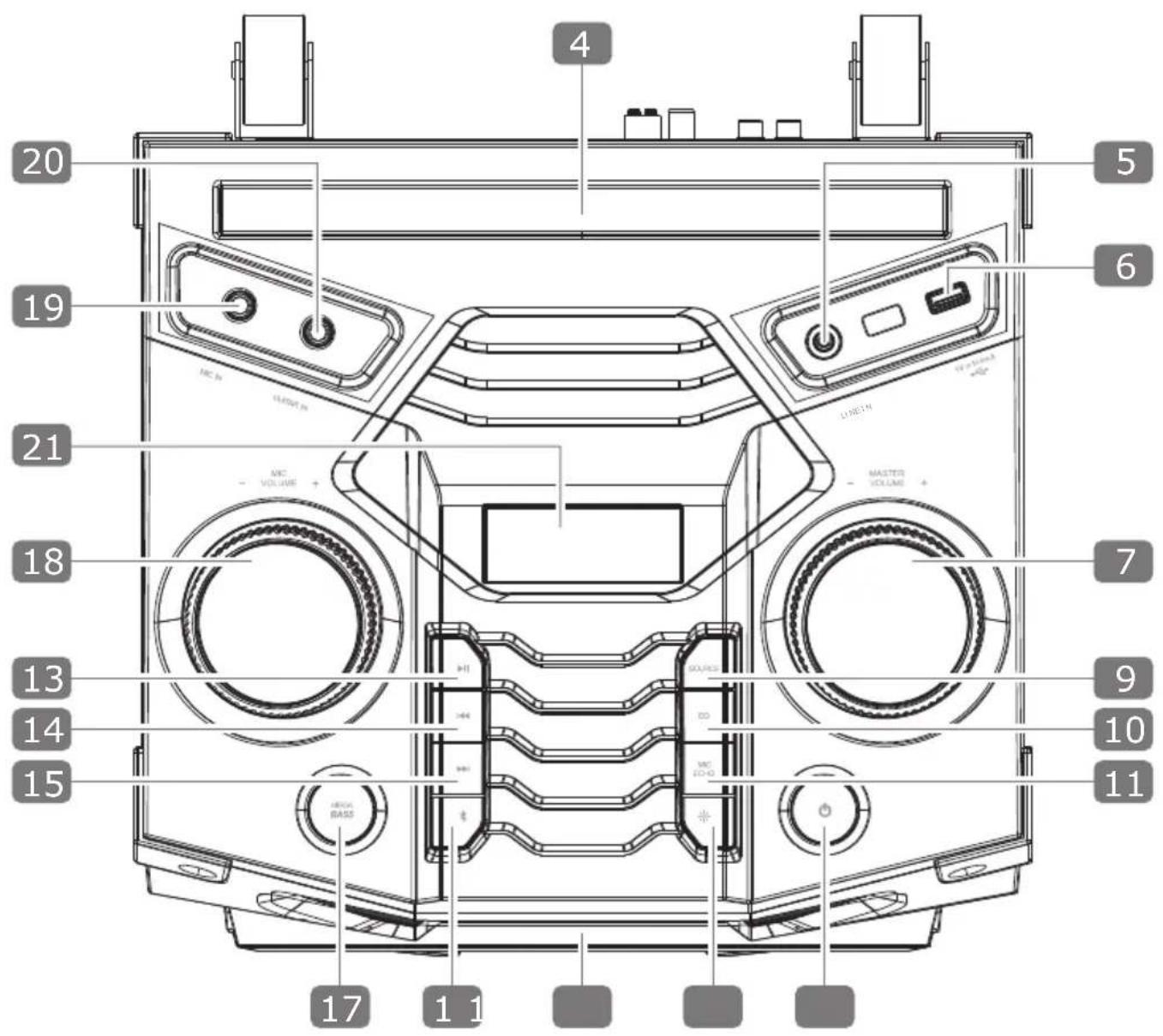
Pure technical line drawing of a mechanical component without any text, numbers, or symbols| Button / component Functional description | ||
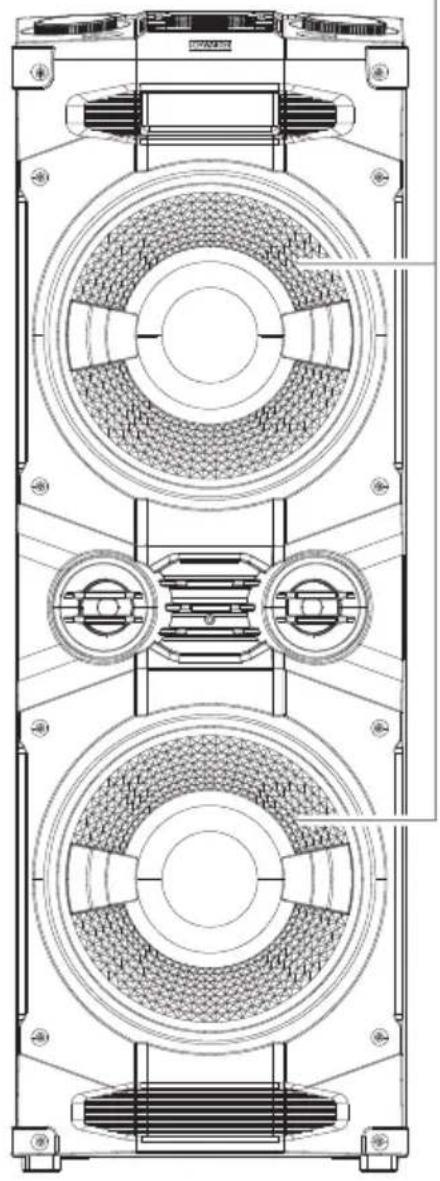
| 1 | Party Sound System | |
| 2 | Power cord | |
| 3 | Microphone | |
| 4 | Tablet computer /smartphone tray | |
| 5 | LINE IN AUX audio input (3,5 mm jack plug) | |
| 6 | USB port | USB input for playback of MP3 files / charging socket for mobile devices (output 5 V DC, 500 mA) |
| 7 | MASTER VOLUME +/- Volume control | |
| 8 | ON/OFF Switch device on/off | |
| 9 | SOURCE Select playback source USB | /LINE(AUX)/BT/FM |
| 10 | EQ | Select pre-installed equalizer setting (Rock / Jazz / Pop / Samba / Balance) |
| 11 | MIC ECHO Select microphone echo sound effect, switch on/off | |
| 12 | LIGHT Select LED light effect, switch | on/off |
| 13 | PLAY/PAUSE | Start/pause playback / press and hold to disconnect in Bluetooth® mode |
| 14 | PREVIOUS TRACK | Play previous title / select descending program position / select descending radio frequency |
| 15 | NEXT TRACK | Play next title / select ascending program position / select ascending radio frequency |
| 16 | BLUETOOTH Establish Bluetooth | ® connection |
| 17 | MEGA BASS Switch bass amplification | on/off |
| 18 | MIC VOLUME +/- Microphone volume control | |
| 19 | MIC IN Microphone input (6,3 mm jack plug) | |
| 20 | GUITAR IN Guitar input (6,3 mm jack plug) | |
| 21 | Display | |
| 22 | Speaker Speaker with LED light effects | |
| 23 | FM antenna VHF pigtail antenna | |
| 24 | Mains connection AC MAINS ~ | Mains connection (100-240 V AC, 50/60 Hz) |
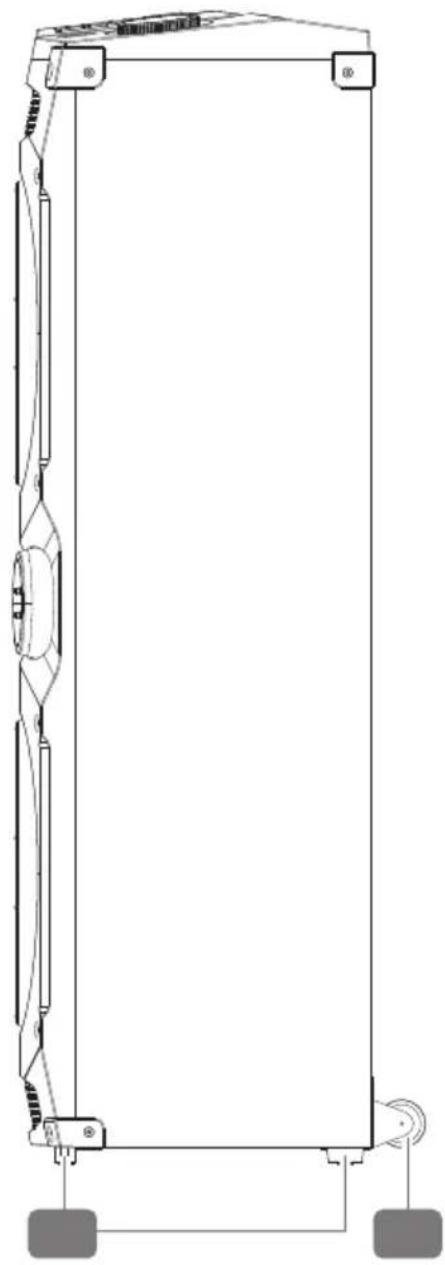
| 25 | Stands | |
| 26 | Transport wheels | |
| 27 | MIC ON/OFF | Switch microphone on/off |
GENERAL SAFETY AND WARNING INSTRUCTIONS

WARNING!
Risk of electric shock!
Faulty electrical installation or excessive mains voltage can lead to electric shock.
- Do not operate the product if it shows visible damage or if the power cord is defective.
- Always check the product for damage before use. Damaged electrical equipment as well as kinked power cords or bare wires increase the risk of electric shock.
- The mains plug of the device must fit into the socket. The power plug is not allowed to be modified in any way. Do not use adapter plugs together with protective grounded electrical equipment. Unmodified power plugs and matching outlets reduce the risk of electric shock.
- Do not open the housing but leave the repair to specialists. Contact a specialist workshop for this purpose. Liability and warranty claims are excluded in the event of repairs carried out independently, improper connection or incorrect operation.
- Only parts that correspond to the original device data may be used for repairs. This product contains electrical and mechanical parts which are essential for protection against sources of danger.
- Never immerse the product in water.
- Never touch the product or the connecting cable or the mains plug with wet hands.
- Never pull the mains plug out of a socket by the connecting cable, but always hold the mains plug.
- Keep the product away from open flames and hot surfaces.
- Position the product and the connecting cable so that it does not become a trip hazard.
- Do not bend the connecting cable and do not place it over sharp edges.
- Never operate the product in moist rooms or in the rain.
- Do not expose the product to rain or extreme weather conditions, e.g., minus temperatures, hail, extreme heat.
- Never place the product in such a way that it can fall into water.
- Never reach for an electrical device if it has fallen into water.
- Make sure that no liquid gets into the product and, if necessary, dry the product thoroughly before using it again.
- Ensure that children do not insert any objects into the product.
- When you are not using the product, cleaning it or if a malfunction occurs, always switch off the product and disconnect the power plug.
- If there are large fluctuations in temperature or humidity, condensation may cause moisture to form inside the product, which may cause an electrical short circuit. After transporting the product, wait until it has reached ambient temperature before putting it into operation.

WARNING!
Hazards for children and persons with reduced physical, sensory or mental abilities (for example, partially disabled persons, elderly persons with reduced physical and mental abilities) or lack of experience and knowledge (for example, older children).
- This product can be used by children aged from eight years and above and persons with reduced physical, sensory, or mental capabilities or lack of experience and knowledge if they have been given supervision or instruction concerning use of the product in a safe way and understand the hazards involved. Children must not play with the product. Cleaning and user maintenance must not be carried out by children without supervision.
- Keep children younger than eight years away from the product and the connecting cable.
- Do not leave the product unattended during operation.
- Do not allow children to play with the packaging film. Children can get caught in it while playing and suffocate.

WARNING!
Fire hazard!
Improper handling of the product may cause a fire.
- Keep the product away from water, other liquids, open flames, and hot surfaces.
- Do not cover the product with objects or clothing.
- Keep a distance of at least 5 cm from easily flammable materials.
- Ensure that the product is adequately ventilated. Keep a distance of at least 5 cm from the rear panel of the device and at least 1 cm from both sides to walls or other objects.
- Do not place any open fire sources, such as burning candles, on or near the product.
- Do not use the product in areas subject to explosion hazards. This includes, for example, tank farms, fuel storage areas or areas where solvents are processed. Also, do not use this product in areas with particle-polluted air (e.g., flour or wood dust).

CAUTION!
Risk of injury!
The LED light of the product is bright and can damage the eyes when viewed from an insufficient distance.
- Never investigate an illuminated LED lamp from a short distance.
- Never view an illuminated LED lamp with a magnifying glass or other optical instruments.

CAUTION!
Risk of injury!
Continuous listening at high volume can cause hearing damage.
- Prevent damage to health and avoid listening at high volume levels for long periods of time.
• Always keep a certain distance from the product at high volumes and never keep your ears directly to the speaker.

ATTENTION!
Risk of damage!
Improper handling of the product may result in damage to the product.
- Place and operate the product on an easily accessible, level, dry, heat-resistant, vibration-free, and sufficiently stable base to prevent the product from falling. Do not place the product at the edge or on the edge of the base.
- Keep at least 1 m away from high-frequency and magnetic interference sources (TV set, other speaker boxes, etc.) to avoid malfunctions.
- Never place the product on or near hot surfaces (e.g., stove tops).
- Do not bring the product into contact with hot parts.
- Never expose the product to high temperature (heating, etc.) or weather conditions (rain, etc.).
• Never pour liquid into the product. - Operate the product only from grounded outlets rated 100 - 240 V AC, 50/60 Hz. If you are unsure of the power supply at the installation site, check with the relevant power supplier.
- The power outlet must be located near the product and must be easily accessible.
- To disconnect the power supply to the product, unplug the product from the power outlet. Always hold the power plug itself when unplugging. Never pull on the power cord to avoid damage.
- All multimedia devices connected to the product must comply with the requirements of the Low Voltage Directive.
• Unplug the product during lightning storms or when unused for long periods of time. - Never immerse the product in water or use a steam cleaner to clean it. The product may otherwise be damaged.
- Do not use the product if the plastic components of the product are cracked or deformed. Replace damaged components only with suitable original spare parts.
OPERATION IN DETAIL
Set up product
- Place the Party Sound System 1 with the stands 25 securely on an easily accessible, flat, dry, heat-resistant, vibration-free and sufficiently stable surface.
- If you place the product on furniture, please note that some aggressive furniture lacquers may attack and damage the stands 25 of the product. If necessary, place the product on a firm base.
- When transporting the product, always use the transport wheels 26 on the lower rear side of the product to avoid damage.

When connecting the product to an external device, disconnect the power cord from the product at first.
Connect power cable
- Connect the supplied power cord 2 to the AC MAINS \~ mains connection 24 on the rear side of the product.
- Connect the plug of the power cord 2 to a suitable mains socket. Only use the product on easily accessible, grounded sockets with an input voltage of 100 - 240 V AC, 50/60 Hz.
Switch device on/off
- Press the ON/OFF 8 key to switch on the product.
• The display 21 lights up. - Press the ON/OFF 8 key again to switch the product off.
• The display 21 no longer lights up.

The product continues to consume a small amount of power even when it is switched off. Therefore, unplug the power cord and disconnect the product from the mains to turn it off completely.
To reduce energy consumption, the product has a stand-by mode. If the product does not receive an audio signal for 15 minutes, it switches off automatically. Press the ON/OFF 8 key to turn the product on again. The product does not switch to stand-by mode if playback is only paused or the product is on radio mode.
Start/pause playback
- Start the playback of titles by pressing the PLAY/PAUSE 13 key.
- To pause playback, press the PLAY/PAUSE 13 key again.
Title selection
- Press the PREVIOUS TRACK 14 key to jump back to the beginning of the currently playing title. Press the key twice in quick succession to jump to the previous title.
- Press the NEXT TRACK 15 key to skip to the following title.
Adjust volume
Turn the MASTER VOLUME 7 knob in the direction + to increase the volume or in the direction - to decrease the volume.
The product always starts with the last volume setting after it is switched on.
LINE IN (AUX IN)
You can connect an external playback device (e.g., smartphone, CD player or MP3 player) to the LINE IN 5 input of the product using a 3.5 mm jack cable (not included).
- First switch off the product as described above.
- Turn off your external playback device.
- Insert one plug of the 3.5 mm jack cable into the LINE IN 5 input on the top of the product.
- Connect the other plug of the 3.5 mm jack cable to the corresponding jack of your external playback device.
- Turn on your external playback device.
- Switch on the product as described above.
- Press the SOURCE 9 key several times until the text LINE is displayed in the display 21.
The audio signal from your external device will now be played through the product's speakers.

While wired signal transmission, the playback functions (PLAY / PAUSE / PREVIOUS TITLE / NEXT TITLE) are not available via the buttons on the product. In this case, use the control options on your external device.
USB
You can use the USB port 6 to connect USB storage devices (e.g., USB sticks) to the product for audio playback.
- If necessary, remove the protective cap and insert the USB storage medium into the USB port 6 on the top of the product.
- Press the SOURCE 9 key repeatedly until the text USB appears in the display 21.
- Playback automatically starts with the first track on the USB storage medium.
You can pause or resume audio playback at any time by pressing the PLAY/PAUSE 13 key on the product.
Please observe the following notes on the USB memory that can be used:
- Due to the numerous different file systems and file formats, the function of connected storage media cannot be guaranteed.
- Depending on the available data volume of the storage medium, it may take longer until the system is recognized by the product.
- USB memory devices with a storage capacity of up to max. 32 GB are supported.
- Supported file systems are FAT16 and FAT32; the supported file format is MP3.
- External hard disks are not supported.
- USB extension cables are supported.
Additional playback functions in USB mode
After inserting an USB storage medium into the USB port 6 on the product, playback of the tracks stored on it starts automatically in numerical order.
In USB mode, the following playback functions are also available:
Fast forward / rewind
Press and hold the PREVIOUS TRACK 14 key to perform a fast rewind within a title. Use the NEXT TRACK 15 key to perform a fast forward. Release the respective key at the desired point of the title to continue playback from there on.
Repeat functions
- During playback, press and hold the PLAY/PAUSE 13 key until the display 21 shows the text ONE REPEAT to repeat the current title permanently.
- Press and hold the PLAY/PAUSE 13 key again until the display 21 shows the text ALL REPEAT to repeat all tracks permanently.
- Press and hold the PLAY/PAUSE 13 key again until the text OFF REPEAT appears in the display 21 to deactivate the repeat function again.
Connect device via Bluetooth®
The Bluetooth ^® function enables wireless reception of audio signals from an external, Bluetooth ^® -enabled audio output device. Make sure that the distance between the two devices does not exceed 10 meters.
Only one Bluetooth ^® device can be paired with the product at a time.
To output the sound of your Bluetooth®-enabled external player (e.g., smartphone) wirelessly via the product, the two devices must first be connected to each other. To do this, proceed as follows:
- Switch on the product as described above.
- Press the SOURCE 9 key several times to switch to Bluetooth® mode or press the BLUETOOTH 16 key once.
- The text BT is shown in the display 21 and the product is on search mode.
- The product automatically tries to connect to the last audio output device paired via Bluetooth ^® . If this is not possible, the product remains on search mode.
- Turn on the Bluetooth® function of your player and let your player/smartphone search for Bluetooth® devices to pair the two devices. You can find more information about this in the operating instructions of your external player.
-
After searching, the product „Schwaiger PSS-400“ should also be listed in the list of devices found.
-
Select „Schwaiger PSS-400“ and pair the two devices with each other.
-
If a password is required, enter the code „0000”.
-
The pairing of the two devices is completed as soon as a signal tone sounds from the speaker.
-
To disconnect the Bluetooth connection, press and hold the PLAY/PAUSE 13 key until you hear an audio signal or press the SOURCE 9 key to switch to another playback mode. To re-establish the connection, switch to Bluetooth mode again using the SOURCE 9 key or select „Schwaiger PSS-400“ again in the list of your external player.
You can now start audio playback either on your external player/smartphone or by pressing the PLAY/PAUSE 13 button on the product.

When transmitting signals via Bluetooth ^® , not all operating functions may be available via the keys on the product. In this case, use the control options on your external device.
It is also recommended that you set the volume on your audio output device to the maximum level and fine-tune the volume on the product.
You can use the tablet/smartphone tray 4 on top of the product to safely store your external device during playback.
Radio operation
To be able to receive radio stations via FM, a FM antenna 23 is connected to the product. This antenna is permanently installed and cannot be removed from the product.
- Unroll the pigtail antenna completely so that the largest possible reception area is available.
- For the best possible radio reception, make sure that the antenna is not covered.
Press the SOURCE 9 key several times to switch to radio mode. The display 21 shows the text FM and the currently set frequency.
Set station
To tune in a radio station manually, proceed as follows:
- Press the PLAY/PAUSE 13 key so that the first available frequency is shown in the display 21.
- Press one of the keys PREVIOUS TRACK 14 or NEXT TRACK 15 repeatedly to manually set a specific frequency.
Save station
The product can start an automatic scan and search for all stations available in the reception area. During an automatic search, the product continuously saves all the programs which can be found without limiting the number of channels.
- Press and hold the PLAY/PAUSE 13 key until the automatic station search starts.
- All stations found are now automatically saved in sequence and assigned to a program position.
- Press the PLAY/PAUSE 13 key again to stop the automatic saving process.
- After the search is completed, the product plays the station stored in program position P01.
Call up station
To call up an automatically stored station, press the PLAY/PAUSE 13 key once so that a stored program position (e.g., P01) is shown on the display 21. Then press the PREVIOUS TRACK 14 key or NEXT TRACK 15 key once or several times to select the desired program position and play the station stored there. The display 21 shows the respective program position (e.g., P01).
Connect microphone
You have the option of connecting a microphone to one of the product's 6.3 mm jack sockets. A suitable microphone is already included in the scope of delivery.

Microphones can be used in any operating mode. It is recommended to always connect a microphone to the microphone input. If the microphone is connected to the guitar input, the microphone echo sound effects are not available.
To connect the microphone, proceed as follows:
- Switch off the product as described above.
- Connect the microphone to the MIC IN input 19 or to the GUITAR IN input 20 on top of the product.
-
Switch on the product as described above.
-
Slide the MIC ON/OFF 27 switch on the supplied microphone 3 to the position ON to turn the microphone on.
-
Turn the MIC VOLUME knob 18 in the direction + to increase the microphone volume or in the direction - to decrease the microphone volume.
-
Press the MIC ECHO 11 key to activate an echo sound effect for the connected microphone. The text ECHO1 appears in the display 21. Press the MIC ECHO 11 key again to select the second echo sound effect. The text ECHO2 appears in the display 21.
-
Press the MIC ECHO 11 key again to deactivate the echo sound effect for the connected microphone.
-
After use, slide the MIC ON/OFF 27 switch of the supplied microphone 3 to the position OFF to turn the microphone off.
Connect guitar
You have the possibility to connect a guitar to one of the 6.3 mm jacks of the product and use the speaker as a guitar amplifier. A guitar is not included in the scope of delivery.

The volume of the guitar cannot be adjusted on the product. To do this, use the adjustment options on the guitar.
Follow the steps below to connect a guitar:
- Switch off the product as described above.
- Connect the guitar to the guitar input GUITAR IN 20.
- Then turn on the product as described above. Guitars can be used in any operating mode.
Bass Booster
The product has a special „Bass Booster“ function for a more powerful sound, which can increase the bass of the speakers in addition to the volume.
- Press the MEGA BASS 17 key to amplify the low frequencies and switch on the bass amplifier. The display 21 shows the text ON-BASS.
- Press the MEGA BASS 17 key again to switch off the bass amplifier. The text OFF-BASS appears in the display 21.
EQ settings
The product has 5 equalizer (EQ) settings to adjust the sound output according to the style of music being played.
Press the EQ 10 key once or repeatedly to activate one of the preset equalizer settings (ROCK, JAZZ, POP, SAMBA, or BALANCE). The selected equalizer setting is shown in the display 21.
LED lighting effects
Press the LIGHT 12 key several times to activate one of the pre-installed light effects L-1 to L-4 on the speaker 22. The selected light effect is shown accordingly in the display 21.
L-1 Slow color change (CLEIO)
L-2 Blue light (PEACE)
L-3 Fast color change (POWER)
L-4 Permanent red light (CUSTOM) / Press and hold the LIGHT (12) key for approx. 2 seconds to change the light color. You can choose between the colors RED, GREEN, BLUE, YELLOW, CYAN, PINK and WHITE. The selected color is shown as a text in the display 21 accordingly.
L-OFF Light effect disabled
Press the LIGHT 12 key repeatedly until the text L-OFF appears in the display 21 to deactivate the LED light effects again.
Charge external device via USB
In addition to playing MP3 files from USB storage media, the USB port 6 can also be used to charge external devices (e.g., smartphones). The current output voltage is 5 V DC, 500 mA.
- Connect the external device to the USB port 6 on top of the product using an USB charging cable (not included).
The battery of your external device is now being charged.

Please note that it may not be possible to charge every mobile device, as the USB port only supports charging mobile devices up to a maximum of 1A
| Technical data | |
| Item number 658057 | |
| Modell number PSS-400 | |
| Power supply 100 - 240 V AC, 50/60 Hz | |
| Power consumption | 200 W (in operation)< 0,5 W (in stand-by) |
| Charging voltage (output USB) 5 V DC, 500 mA | |
| Speaker output power 4x 100 W | |
| Speaker driver 6,5" Woofer + 2x 2" Tweeter | |
| THD 10% | |
| Bluetooth® version V5.1 | |
| Bluetooth® profile A2DP | |
| Bluetooth® range >10 m | |
| Bluetooth® frequency 2,4 GHz | |
| Bluetooth® transmission power (max.) 0,55 mW | |
| EQ settings 5 (Rock / Jazz / Pop / Samba / Balance) | |
| Display LED | |
| FM band | 87,5 - 108 MHz |
| FM antenna | Pigtail antenna |
| Microphone cable length | 3 m |
| Microphone frequency | 70 Hz - 12 kHz |
| Microphone sensitivity (dB) | -53 +/- 3 dB |
| Microphone impedance (Ohm) | 600 Ohm |
| Connections | 1x mains connection1x 3,5 mm jack plug (AUX)2x 6,3 mm jack plug (Mic, Guitar)1x USB 2.0 A socket |
| Ambient temperature | In operation: 0°C - +40°C |
| Relative humidity | 5% ~ 90% |
| Product material | ABS, wooden cabinet |
| Color | black |
| Weight | 12,9 kg |
| Dimensions (WxDxH) | 326 x 952 x 340 mm |
| Power cord length | 1,5 m |
MAINTENANCE & CLEANING

WARNING!
Risk of electric shock!
Always unplug the power cord before cleaning the product.

ATTENTION!
Short circuit hazard!
Water or other liquids entering the housing can cause a short circuit.
- Never immerse the product in water or other liquids.
• Make sure that no water or other liquids get into the housing.

ATTENTION!
Risk of damage!
Improper handling of the product may result in damage to the product.
- Do not use aggressive cleaning agents, brushes with metal or nylon bristles, or sharp or metallic cleaning objects such as knives, hard spatulas, and similar. These can damage the surfaces.
- Disconnect the power plug before cleaning the product.
- Clean the product with a soft, dry cloth.
- If the product is stubbornly dirty, use a slightly damp cloth and some mild detergent if necessary.
- Let all parts dry completely afterwards.
Storage
All parts must be completely dry before storing.
• Always store the product in a dry place.
- Store the product out of children's reach in a securely locked place and at a storage temperature between 5 °C and 20 °C (room temperature).
Disposal

Do not dispose of batteries or electric and electronic devices in the normal household waste. The consumer is legally obliged to return electrical and electronic devices and batteries that are at the end of their useful life to the point of sale or public collection points that have been set up for this purpose. Legislation in the country of use governs individual details regarding disposal. The symbol on the product, the user guide or the packaging indicates legal requirement.
Simplified declaration of conformity as per the RED Directive

Schwaiger GmbH hereby declares that the described radio system product complies with Directive 2014/53/EU and other directives applicable to the product. The complete EU declaration of conformity is available online at: http://konform.schwaiger.de
Disclaimer
Schwaiger GmbH does not accept any liability or warranty for damages that are sustained due to improper installation or mounting, improper use of the product or non-compliance with the safety instructions.
Manufacturer's information
Dear Customer,
Please contact our Technical Support if you need technical advice and your retailer is unable to help you.
Office Hours (Technical Support in German)
Monday to Friday: 8:00 a.m. - 5:00 p.m.
GÉNÉRALITÉS
natural_image
Line drawing of a coiled electrical plug with a terminal outlet, labeled with number 2 (no text or symbols on the cable itself)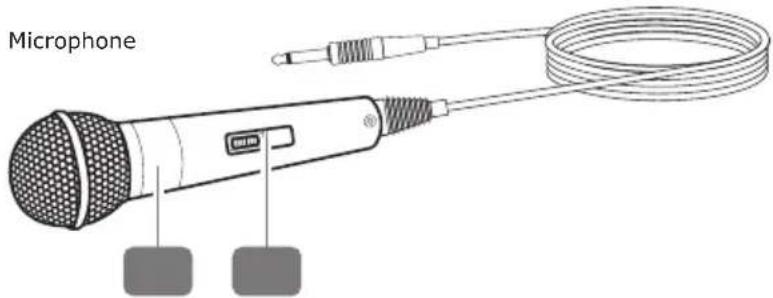
natural_image
Technical line drawing of a mechanical device with two circular components and mounting brackets (no text or symbols)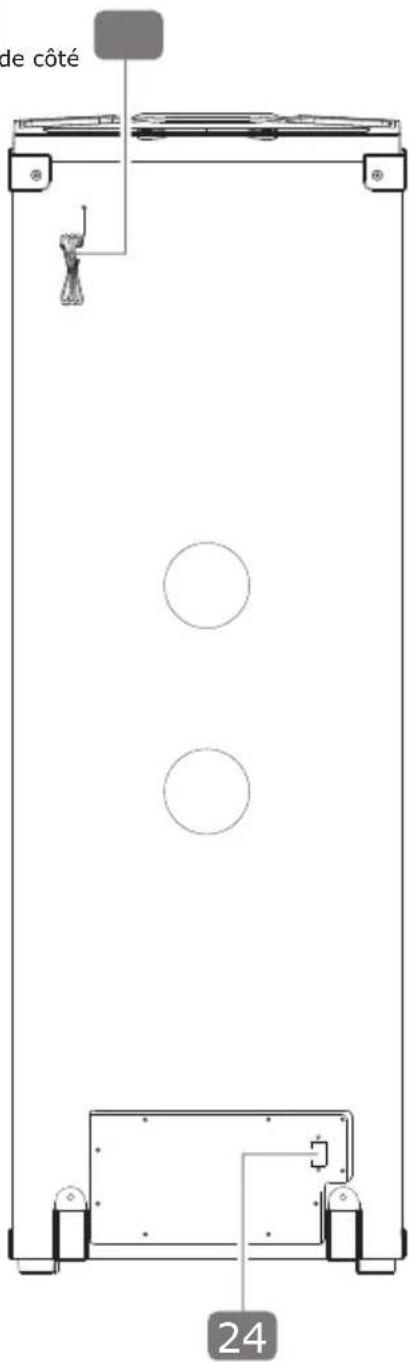
natural_image
Pure mechanical diagram showing a frame structure with no text, numbers, or symbolsnatural_image
Line drawing of a coiled electrical plug with a terminal outlet, labeled with number 2 (no text or symbols on the cable itself)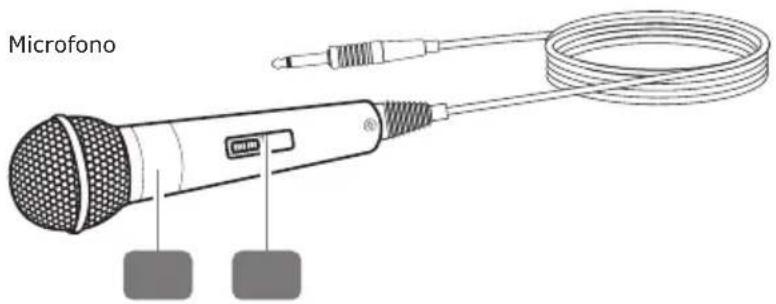
natural_image
Line drawing of a coiled electrical plug and power outlet with labeled section 2 (no text or symbols on the diagram itself)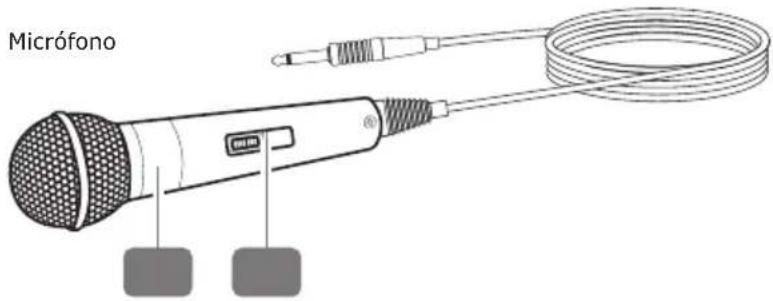
natural_image
Technical line drawing of a mechanical device with circular components and mounting brackets (no text or symbols)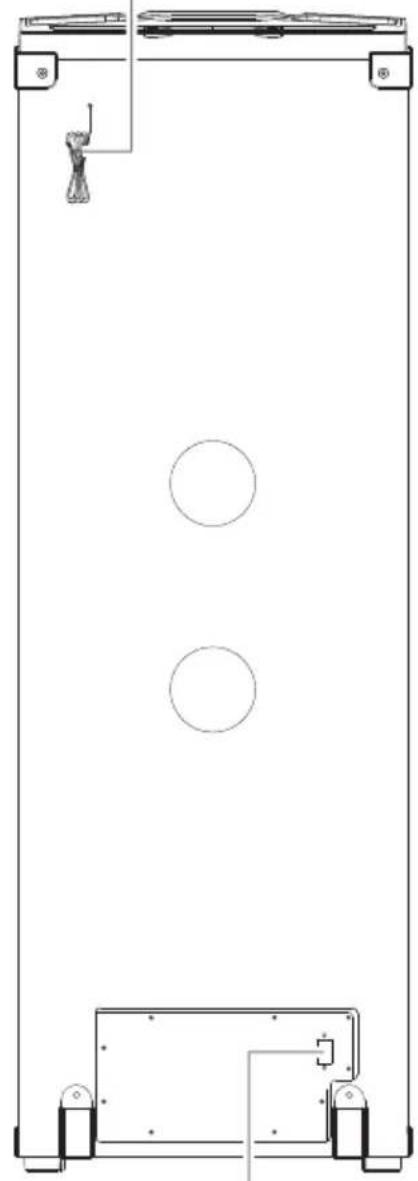
natural_image
Pure technical line drawing of a vertical panel with two circular holes and mounting brackets (no text or symbols)24
natural_image
Pure technical line drawing of a mechanical frame or bracket with no text, numbers, or symbolsnatural_image
Line drawing of a coiled electrical plug and power outlet with labeled section 2 (no text or symbols on the cable itself)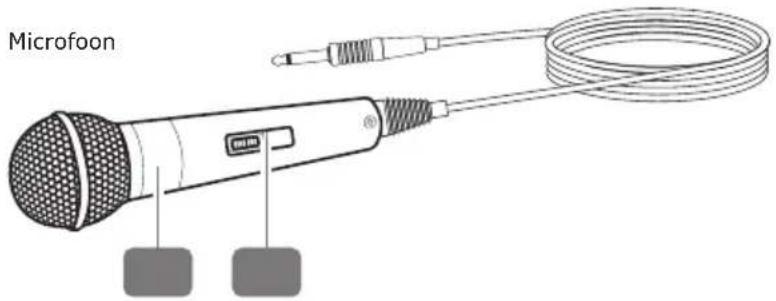
ALGEMENE VEILIGHEIDSINSTRUCTIES EN WAARSCHUWINGEN

WAARSCHUWING!
Stroomslaggevaar!
Przewód sieciowy
natural_image
Line drawing of a coiled electrical plug and power outlet, labeled with number 2 (no text or symbols on the diagram itself)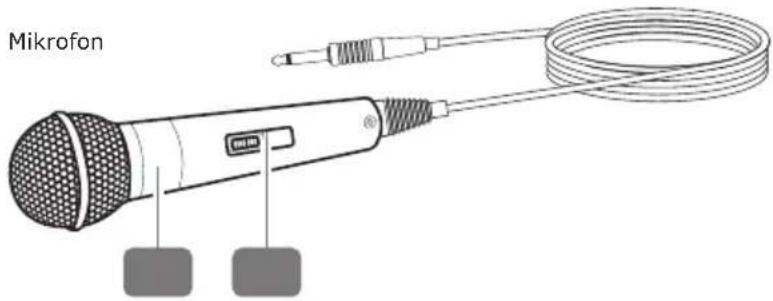
natural_image
Technical line drawing of a dual-chamber electric fan assembly (no text or symbols)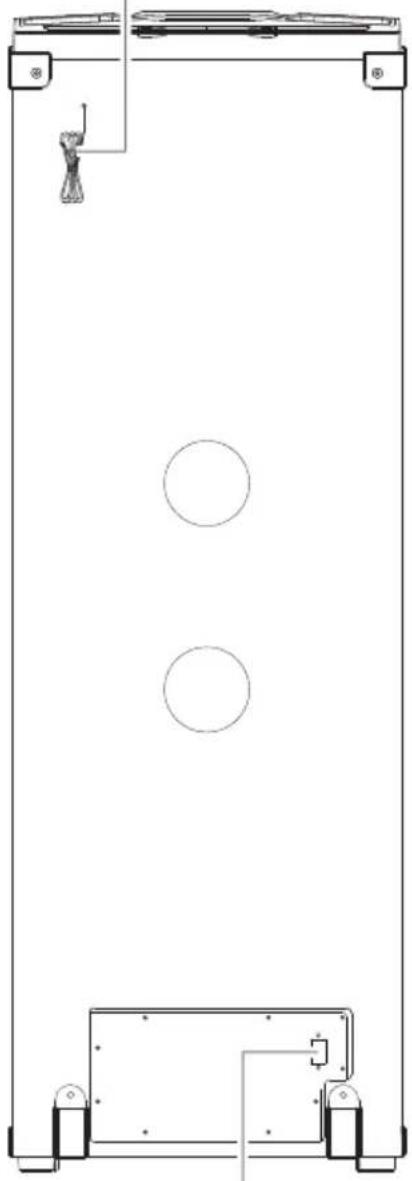
natural_image
Pure technical line drawing of a vertical rectangular structure with two circular holes and mounting feet (no text or symbols)24
natural_image
Pure technical line drawing of a mechanical frame structure without any text, numbers, or symbols- Bluetooth® Party Soundsystem
- ALLGEMEINES
- Read the user guide and keep it in a safe place.
- INTENDED USE
- PACKAGE CONTENTS
- GENERAL SAFETY AND WARNING INSTRUCTIONS
- WARNING!
- Risk of electric shock!
- Fire hazard!
- CAUTION!
- Risk of injury!
- ATTENTION!
- Risk of damage!
- OPERATION IN DETAIL
- Set up product
- Connect power cable
- Switch device on/off
- Start/pause playback
- Title selection
- Adjust volume
- LINE IN (AUX IN)
- USB
- Additional playback functions in USB mode
- Fast forward / rewind
- Repeat functions
- Connect device via Bluetooth®
- Radio operation
- Set station
- Save station
- Call up station
- Connect microphone
- Connect guitar
- Bass Booster
- EQ settings
- LED lighting effects
- Charge external device via USB
- MAINTENANCE & CLEANING
- Short circuit hazard!
- Storage
- Disposal
- Simplified declaration of conformity as per the RED Directive
- Disclaimer
- Manufacturer's information
- Office Hours (Technical Support in German)
- GÉNÉRALITÉS
- ALGEMENE VEILIGHEIDSINSTRUCTIES EN WAARSCHUWINGEN
- WAARSCHUWING!
- Stroomslaggevaar!
Brand : Schwaiger
Model : 658057
Category : Bluetooth speaker