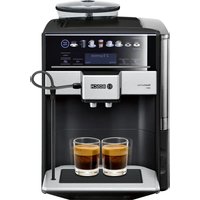
TIU20307 - Coffee machine BOSCH - Free user manual and instructions
Find the device manual for free TIU20307 BOSCH in PDF.


User questions about TIU20307 BOSCH
0 question about this device. Answer the ones you know or ask your own.
Ask a new question about this device
Download the instructions for your Coffee machine in PDF format for free! Find your manual TIU20307 - BOSCH and take your electronic device back in hand. On this page are published all the documents necessary for the use of your device. TIU20307 by BOSCH.
USER MANUAL TIU20307 BOSCH
appliance and join the R
the Bosch
family of perks:
bosch-home.com/us mybosch
Fully automatic espresso machine
300 Series
TIU20...
[en-us] Use and Care Manual Fully automatic espresso machine 2
Further information and explanations are available online:
text_image
QR code image containing encoded data, no visible human-readable textTable of contents
1 Safety...... 4
1.1 Safety definitions...... 4
1.2 IMPORTANT SAFEGUARDS ..... 4
1.3 General information...... 5
1.4 Intended use 5
1.5 Restrictive Use.... 5
1.6 Safety instructions...... 6
1.7 State of California Proposition 65 Warnings....8
2 Environmental protection and energy-saving 9
2.1 Disposal of packaging...... 9
2.2 Saving energy....9
3 Installation and connection...... 9
3.1 Contents of package ..... 9
3.2 Installing and connecting the appliance .... 10
4 Familiarizing yourself with your appliance.... 10
4.1 Appliance 10
4.2 Control panel.... 12
4.3 Display.... 13
5 Accessories.... 13
6 Before using for the first time .. 13
6.1 Preparing and cleaning the appliance .... 13
6.2 Performing initial start-up ..... 15
6.3 Checking the water hardness.... 15
6.4 Overview of water hardness levels 16
6.5 Water filter 16
6.6 General instructions ..... 18
7 Basic Operation ...... 18
7.1 Switching the appliance on or off.... 18
7.2 Dispensing beverages...... 19
7.3 Dispensing a coffee drink made from fresh beans ..... 19
7.4 Dispensing drinks with milk ..... 19
7.5 Dispensing a coffee drink with milk 19
7.6 Frothing milk 19
7.7 Beverage settings 20
8 Grinder.... 21
8.1 Setting the grinding level...... 21
9 Cup warmer ^1 22
9.1 Activating and deactivating the cup warmer ^1 ..... 22
10 Basic settings.... 22
10.1 Changing the basic settings .... 22
10.2 Overview of the basic settings 23
11 Cleaning and maintenance..... 23
11.1 Dishwasher-safe components 23
11.2 Cleaning agents 24
11.3 Cleaning the appliance...... 24
11.4 Cleaning the drip tray and coffee dregs container...... 25
11.5 Cleaning the milk frother ...... 26
11.6 Cleaning the brewing unit...... 26
11.7 Service programs.... 28
12 Troubleshooting.... 31
13 Transportation, storage and disposal 36
13.1 Activate frost protection...... 36
13.2 Disposal of your old appliance 36
14 Customer Service 36
14.1 Model number (E-Nr.) and production number (FD) ...... 37
15 Technical specifications...... 37
16 STATEMENT OF LIMITED PRODUCT WARRANTY ...... 37
16.1 What this warranty covers & Who it applies to 37
16.2 Obtaining warranty service..... 38
16.3 How long the warranty lasts .... 38
16.4 Repair/replace as your exclusive remedy 38
16.5 Out of warranty product...... 39
16.6 Warranty exclusions...... 39
16.7 Product information...... 41
Observe the following safety instructions.
1.1 Safety definitions
Here you can find explanations of the safety signal words used in this manual.

WARNING
This indicates that death or serious injuries may occur as a result of non-observance of this warning.

CAUTION
This indicates that minor or moderate injuries may occur as a result of non-observance of this warning.
NOTICE:
This indicates that damage to the appliance or property may occur as a result of non-compliance with this advisory.
Note: This alerts you to important information and/or tips.
1.2 IMPORTANT SAFEGUARDS
WARNING
When using electrical appliances, basic safety precautions should always be followed including the following:
▶ Read all instructions.
▶ Do not touch hot surfaces. Use handles or knobs.
To protect against fire, electric shock and injury to persons do not immerse cord or plugs in water or other liquid.
▶ Close supervision is necessary when any appliance is used by or near children.
▶ Unplug from outlet when not in use and before cleaning. Allow to cool before putting on or taking off parts, and before cleaning the appliance.
Do not operate any appliance with a damaged cord or plug or after the appliance malfunctions, or has been damaged in any manner. Return appliance to the nearest authorized service facility for examination, repair or adjustment.
The use of accessory attachments not recommended by the appliance manufacturer may result in fire, electric shock or injury to persons.
▶ Do not use outdoors.
▶ Do not let cord hang over edge of table or counter, or touch hot surfaces.
▶ Do not place on or near a hot gas or electric burner, or in a heated oven.
▶ Always attach plug to appliance first, then plug cord into the wall outlet. To disconnect, turn any control to "off," then remove plug from wall outlet.
▶ Do not use appliance for other than intended use.
▶ Save these instructions.
1.3 General information
■ Read this manual carefully.
- Keep the manual and the product information in a safe place for future reference or for the next owner.
■ Do not connect the appliance if it has been damaged in transit.
1.4 Intended use
Only use this appliance:
■ for preparing hot drinks.
■ for normal household use and in enclosed spaces in a residential environment.
■ up to an altitude of max. 6,560 ft (2000 m) above sea level.
1.5 Restrictive Use
This appliance is not intended for use by persons (including children) with reduced physical, sensory or mental capabilities, or lack of experience and knowledge, unless they have been given supervision or instruction concerning use of the appliance by a person responsible for their safety.
Do not let children play with the appliance.
When children become old enough to use the appliance, it is the responsibility of the parents or legal guardians to ensure that they are instructed in safe practices by qualified persons.
Children should be supervised to ensure that they do not play with the appliance.
1.6 Safety instructions
WARNING
Children may pull packaging material over their heads, or wrap themselves up in it and suffocate.
▶ Keep packaging material away from children.
▶ Do not allow children to play with packaging material.
Children may breathe in or swallow small parts, causing them to suffocate.
- Keep small parts away from children.
▶ Do not allow children to play with small parts.
WARNING
Incorrect installation is dangerous.
- Connect and operate the appliance only in accordance with the specifications on the rating plate.
- Connect the appliance to a power supply with alternating current only via a correctly installed socket outlet with grounding.
The protective conductor system of the domestic electrical installation must be properly installed.
If the appliance or the power cord is damaged, this is dangerous.
▶ Never operate a damaged appliance.
▶ Never operate an appliance with a cracked or broken surface.
▶ Never pull on the power cord to unplug the appliance. Always unplug the appliance at the power outlet.
If the appliance or the power cord is damaged, immediately unplug the power cord or switch off the breaker in the circuit breaker box.
▶ Call Customer Service. -Page 36
Improper repairs are dangerous.
▶ Only original spare parts may be used to repair the appliance.
If the power cord of this appliance becomes damaged, it must be replaced by the manufacturer, the manufacturer's Customer Service, or an authorized service provider in order to prevent injury.
An ingress of moisture may cause an electric shock.
▶ Never immerse the appliance or the power cord in water.
▶ Liquids must not be spilled on the appliance plug connection.
▶ Use the appliance in enclosed spaces only.
▶ Never expose the appliance to intense heat or humidity.
- Do not use any steam cleaners or high-pressure cleaners to clean the appliance.
WARNING
The appliance gets hot.
▶ Ventilate the appliance adequately.
▶ Never operate the appliance in a cupboard.
It is dangerous to use an extended power cord and non-approved adapters.
▶ Do not use extension cords or multiple socket strips.
▶ Only use adapters and power cords approved by the manufacturer.
▶ If the power cord is too short and a longer one is not available, please contact an electrician to have the domestic installation adapted.
WARNING
Some parts of the appliance become very hot.
▶ Never touch hot appliance parts.
▶ Allow hot appliance parts to cool down before touching.
WARNING
Freshly prepared beverages are very hot.
▶ Let drinks cool down if necessary.
▶ Do not let escaping liquids or steam come into contact with your skin.
WARNING
Improper use of the appliance may endanger the user.
▶ To avoid injuries, only use the appliance for its intended purpose.
Trapped fingers when closing the appliance door.
▶ Be careful of your fingers when closing the appliance door.
The grinder rotates.
▶ Never reach into the grinder.
WARNING
The appliance contains permanent magnets. They may affect electronic implants, e.g. pacemakers or insulin pumps.
▶ Persons with electronic implants must stand at least 25.4" (10 cm) away from the appliance.
This minimum distance of 25.4" (10 cm) must also be observed for the water tank, even when removed.
WARNING
During filtering there may be a slight increase in the potassium level, which is possibly not good for dialysis patients and people with kidney disease.
- Consult a doctor before use if you have kidney disease or follow a special potassium diet.
Soiling on the appliance may be harmful to health.
▶ To ensure hygiene, follow the cleaning instructions for the appliance.
Water from the hot water circuit can be harmful to health.
▶ Only ever use the appliance with fresh, cold, non-carbonated drinking water.
1.7 State of California Proposition 65 Warnings
This product may contain a chemical known to the State of California, which can cause cancer or reproductive harm. Therefore, the packaging of your product may bear the following label as required by California:
STATE OF CALIFORNIA PROPOSITION 65 WARNING:

WARNING
Cancer and Reproductive Harm - www.P65Warnings.ca.gov
2 Environmental protection and energy-saving
2.1 Disposal of packaging
The packaging materials are environmentally compatible and can be recycled.
- Sort the individual components by type and dispose of them separately.
2.2 Saving energy
If you follow these instructions, your appliance will use less energy.
Set the interval for automatic switch-off to the lowest value.
√ If the appliance is not being used, it will switch itself off earlier.
→ "Basic settings", Page 22
Descale the appliance regularly.
√ Limescale deposits increase the appliance's energy consumption.
3 Installation and connection
3.1 Contents of package
After unpacking all the parts, check for any damage in transit and for completeness of delivery.
Note: Different accessories are enclosed depending on the appliance model. The accessory is identified by a frame with a dashed line.
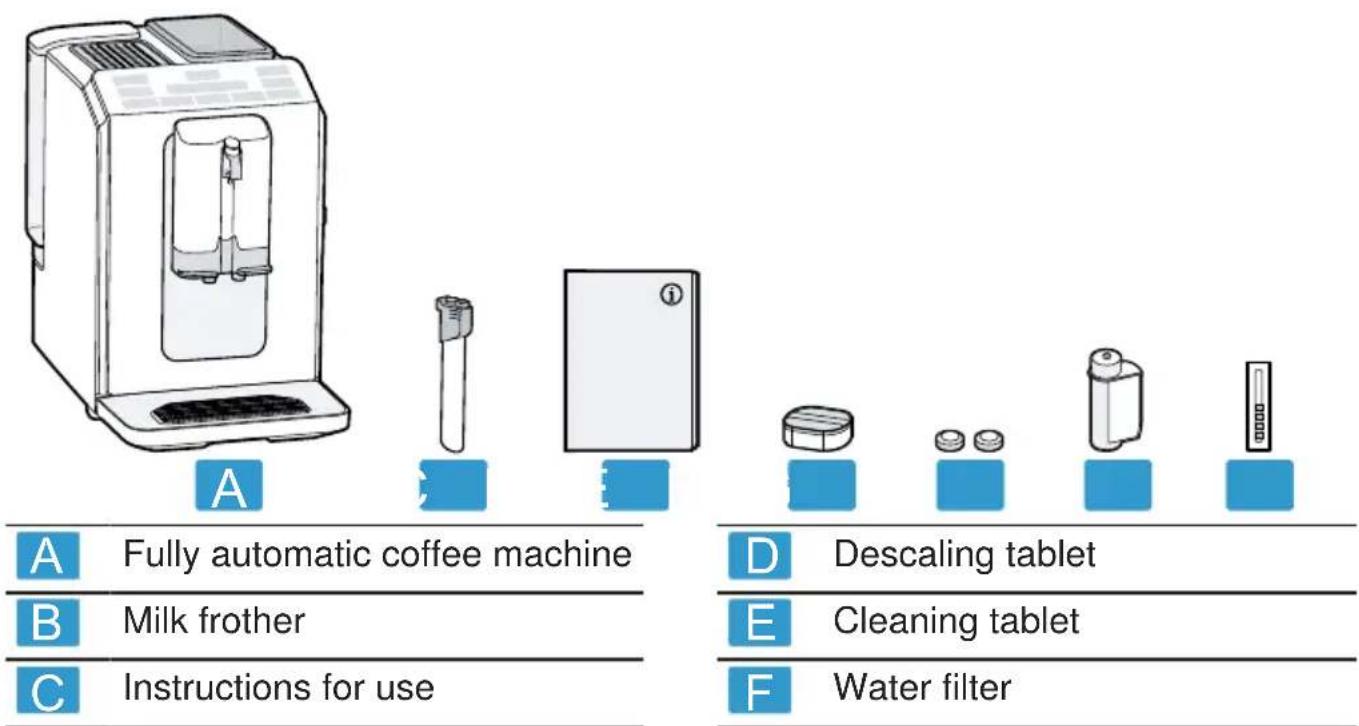
A Fully automatic coffee machine
B Milk frother
C Instructions for use
D Descaling tablet
E Cleaning tablet
F Water filter

Water hardness testing strip
3.2 Installing and connecting the appliance
NOTICE:
Risk of damage to the appliance. If the appliance is not started up correctly, it may be damaged.
- Only use the appliance in frost-free rooms.
▶ If the appliance has been transported or stored below 32 °F (0 °C), wait 3 hours at room temperature before starting it up.
▶ After plugging in, always wait approx. 5 seconds.
-
Place the appliance on a level, water-resistant surface that is capable of bearing its weight.
-
Connect the appliance with the electrical plug to a properly grounded wall outlet.
4 Familiarizing yourself with your appliance
4.1 Appliance
Here you can find an overview of the parts of your appliance.
Note: Individual details and colors may differ, depending on the appliance model.
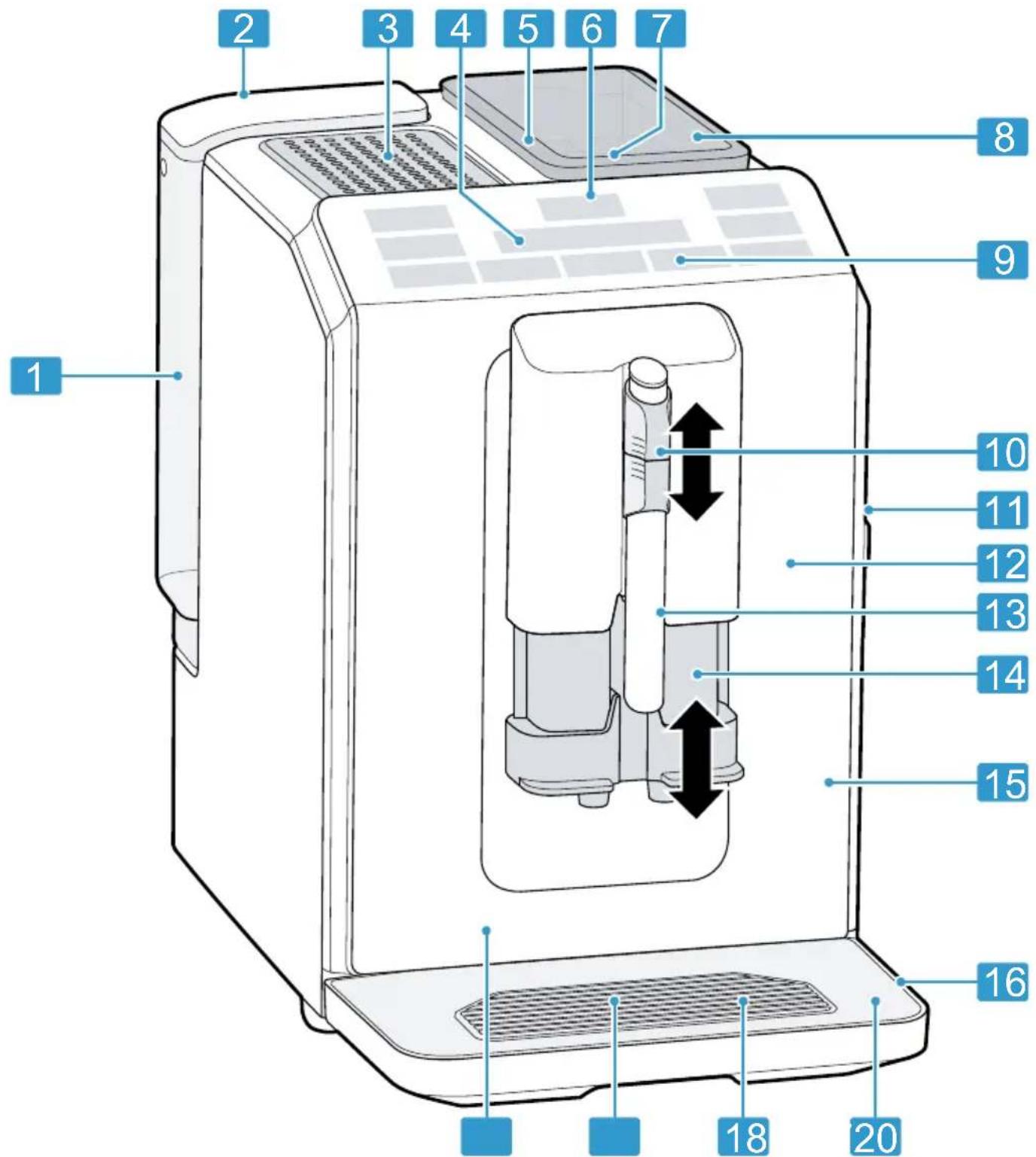
text_image
Labeled diagram of a 20-pin smart water heater with numbered parts and directional arrows indicating internal components.1 Water tank
2 Lid for water tank
3 Cup warmer ^1
^1 Depending on the appliance specifications
4 Display
5 Rotary selector for grinding level adjustment
6 On/off button
1 Depending on the appliance specifications
en-us Familiarizing yourself with your appliance
| 7 | Aroma lid |
| 8 | Bean container |
| 9 | Control panel |
| 10 | Milk frother holder |
| 11 | Brewing unit |
| 12 | Rating plate |
| 13 | Milk frother |
^1 Depending on the appliance specifications
4.2 Control panel
You can use the control panel to configure all functions of your appliance and to obtain information about the operating status.
| Switch the appliance on or off. | |
| Espresso | Dispense espresso. |
| Coffee | ■ Dispense coffee■ Display navigation "<" back without saving |
| Cappuccino | ■ Dispense cappuccino■ Display navigation▼ down |
| 1 Depending on the appliance specifications | |
| 14 | Outlet system |
| 15 | Brewing chamber door |
| 16 | Drip tray |
| 17 | Drip plate |
| 18 | Fill level indicator, mechanical |
| 19 | Drip grate |
| 20 | Coffee dregs container |
1 Depending on the appliance specifications
| Latte Macchiato | ■ Dispense latte macchiato■ Display navigation "ok" confirm and save |
| Milk | Froth milk. |
| ➊ | Strength → "Adjusting the cof-fee strength", Page 20 |
| calc'n Clean | Start service pro-gram. → Page 29 |
| Simultaneously dis-pense 2 cups of espresso or caffe crema. → Page 21 | |
| Switch the cup warmer ^1 on or off. | |
| ^1 Depending on the appliance specifications | |
Display screen
| Lit up and display shows message | Fill water tankWater tank missingChange water filter | |
| lit upflashing | Empty traysClose brewing chamber door |
LEDs ■ lit up
■ pulsating
■ flashing
■ off
■ Ready for operation
■ Dispensing
■ Waiting for operation, e.g. with calc'nClean
■ Not available
4.3 Display
The display shows the selected beverages, settings and setting options, as well as messages about the operating status. The display shows additional information and action steps. The information will be hidden after a short
period or by pressing a button. The action steps are hidden once they have been completed.
Note: If no display language is available in your national language, select a display language that is available, e.g. English.
5 Accessories
Only use original accessories. These are designed especially for your appliance.
Accessories Retail Customer Service
| Accessories small appliances | TCZ7003US 12008246 |
| Cleaning tablets TCZ8001US 00312423 | |
| Descaling tablets TCZ8002US 00312422 | |
| Care set TCZ8004US 00312421 | |
6 Before using for the first time
Prepare the appliance for use.
6.1 Preparing and cleaning the appliance
Clean the appliance and the individual parts.
NOTICE:
Unsuitable beans can block up the grinder.
- Only use pure, roasted bean mixes that are suitable for use in fully automatic coffee or espresso machines.
▶ Do not use coated coffee beans. - Do not use caramelized coffee beans.
▶ Do not use oily coffee beans. - Do not use coffee beans that have been treated with additives containing sugar.
en-us Before using for the first time
▶ Do not add ground coffee.
- Remove the protective films on the appliance.
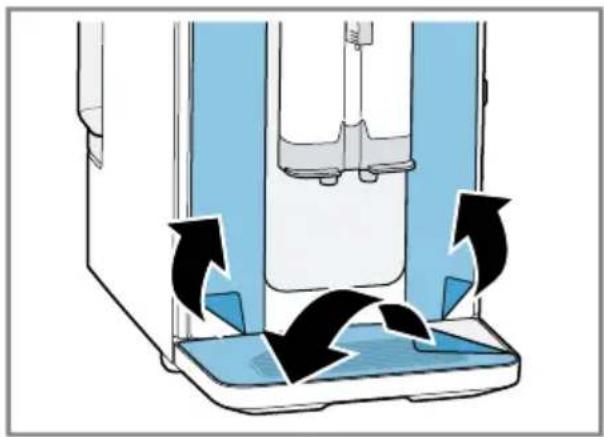
natural_image
Diagram of a mechanical device with blue components and black arrows indicating motion or force (no text or symbols)- Clean the milk frother.
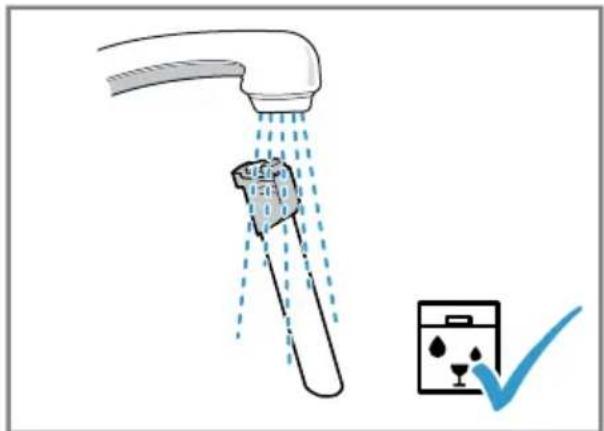
natural_image
Illustration of a faucet releasing liquid into a bucket with a checkmark indicating inspection (no text or symbols)- Place the milk frother on the milk frother holder.
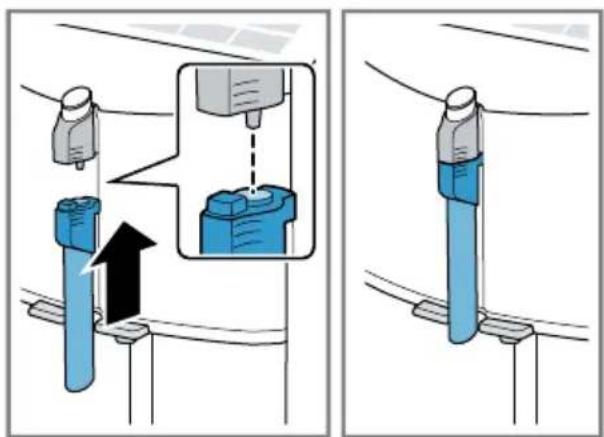
text_image
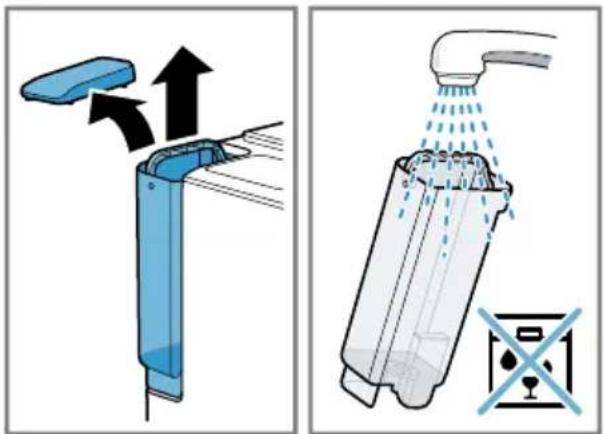
Technical diagram showing mechanical assembly steps with blue components and directional arrows indicating motion- Open the lid and take out the water tank by the handle.
- Clean the water tank and lid.
text_image
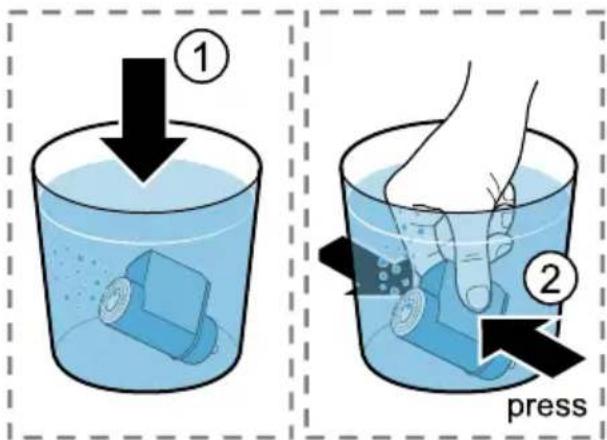
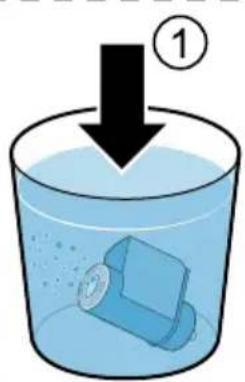
Diagram illustrating a mechanical device with force application and water spray, showing fluid flow and safety symbols.- Immerse the water filter in a glass of water with the opening facing up and press the sides together lightly until no more air bubbles rise to the surface.
→ "Water filter", Page 16
text_image
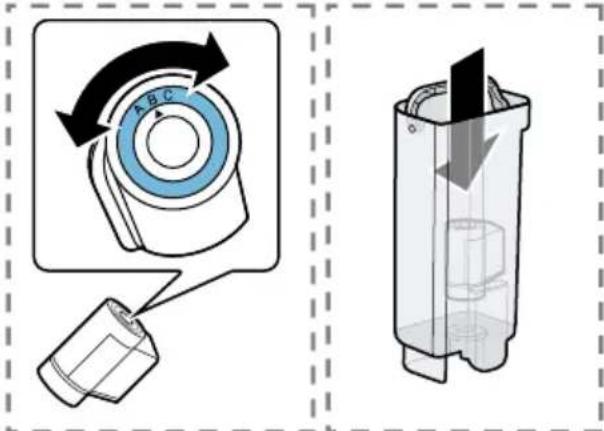
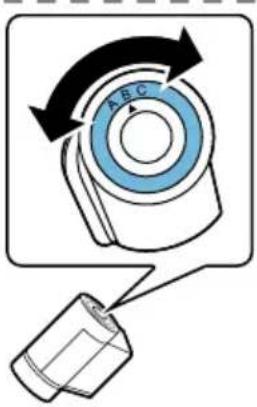
① ② press- Set the water hardness on the aroma ring of the water filter.
- Press the water filter firmly into the empty water tank.
text_image
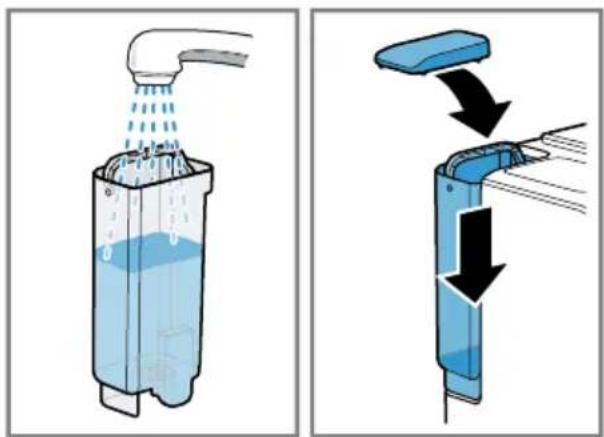
Diagram illustrating a rotary switch mechanism and its internal structure, with labeled components and directional arrows.You can find out the water hardness from your local water supplier.
- Fill the water tank with water up to the max marking and insert.
text_image
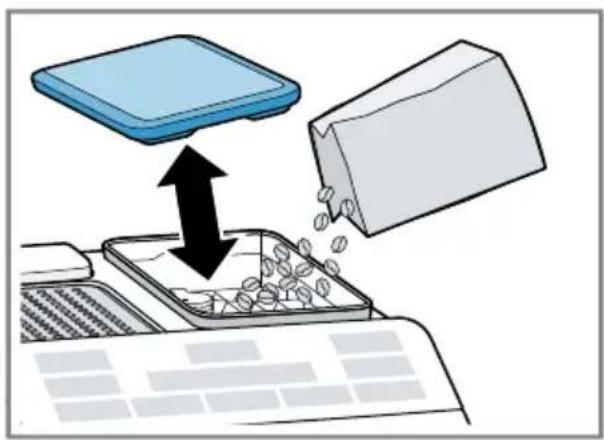
Diagram illustrating a water filtration or drainage system with labeled components and directional arrows indicating flow or movement.- Open the aroma lid and add coffee beans.
natural_image
Illustration of a computer processing process with a blue box and black arrows indicating flow (no text or symbols)Note: Fill the water tank with fresh, cold, non-carbonated drinking water every day.
Tip: To keep the coffee beans at their best, store them in a sealed container in a cool place.
You can keep the coffee beans in the bean container for several days without them losing their aroma.
6.2 Performing initial start-up
After connecting the appliance to the power supply, configure the settings for language selection. The language selection step only appears when the machine is switched on for the first time.
- Press to switch the appliance on.
√ The display shows the preset language.
-
Press ▼ button Cappuccino repeatedly until the display shows the required language.
-
To confirm these settings, press "ok" button Latte Macchiato
√ The machine rinses itself. When the display shows "Choose beverage", the appliance is ready for use.
Tip: You can change the language at any time.
6.3 Checking the water hardness
It is important to set the right water hardness so your appliance indicates in good time that it needs descaling.
You can use the enclosed test strip to check the water hardness or ask your local water company.
en-us Before using for the first time
- Briefly dip the test strip in fresh tap water.
- Allow the water to drain off the test strip.
- Read the water hardness off the test strip after 1 minute.
→ "Overview of water hardness levels", Page 16
Note: Please use the test strip even if you have a water softening system installed as they generate different water hardnesses.
Tips
■ You can change the settings at any time.
→ "Basic settings", Page 22
■ If the water hardness is higher than 21.9 gr/gal (US), you can fill the water tank with prefiltered water to reduce limescale deposits in the water tank.
6.4 Overview of water hardness levels
The table shows allocation of the levels to the different degrees of water hardness.
| Level Ring setting on INTENZA filter1 | Degree of German hardness in °dH | Water hardness in gr/gal (US) |
| 1 A 1 - 7 < 7.3 | ||
| 2 A 8 - 14 7.3 - 14.6 | ||
| 3 B 15 - 21 14.6 - 21.9 | ||
| 42 | C 22 - 30 > 21.9 | |
| 1 For more information see leaflet "INTENZA filter". | ||
| 2 Factory setting | ||
6.5 Water filter
You can use a water filter to minimize limescale deposits and reduce impurities in the water.
The limescale content of the water influences the aroma and crema of coffee. There is an aroma ring on the underside of the BRITA INTENZA water filter. Turn the aroma ring to set the optimum aroma level for your mains water.
Inserting or replacing a water filter
If you have to change the inserted water filter, lights up on the display.
NOTICE:
Possible damage to the appliance due to limescale build-up.
- Change the water filter at the correct time.
▶ Change the water filter after 2 months at the latest.
▶ Observe the display messages.
Requirement: The appliance is switched on.
- Press and hold and calc'n Clean buttons simultaneously for at least 3 seconds.
- Press ▼ button until the display shows "W. hardness".
- Confirm with "ok" button Latte Macchiato.
- Press ▼ button until the display shows "Water filter".
- Confirm with "ok" button Latte Macchiato.
√ The display shows "Filter act.".
- Immerse the water filter in a glass of water with the opening facing up and press the sides together lightly until no more air bubbles rise to the surface.
→ "Water filter", Page 16
text_image
①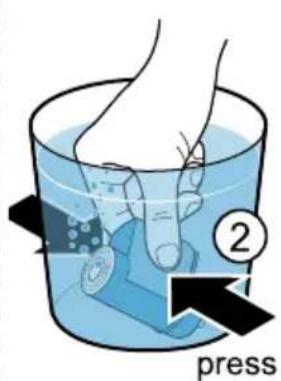
text_image
press- Set the water hardness on the aroma ring of the water filter.
- Press the water filter firmly into the empty water tank.
text_image
REC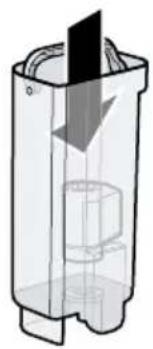
natural_image
Cross-sectional diagram of a mechanical device with internal components and a downward arrow indicating motion (no text or symbols)You can find out the water hardness from your local water supplier.
- Fill the water tank with water up to the max mark.
- Insert the water tank in the appliance.
- Place a container with a capacity of at least 33.8 oz. (1 l) under the outlet.
- Press "ok" button to store the setting and start rinsing.
√ Water now flows through the filter.
- To exit the menu, press "<" button Coffee.
- Empty the container.
√ The appliance is ready for operation.
Removing the water filter
You can also operate your appliance without a water filter.
- Remove the water filter.
- Set the water hardness.
Tips
■ You should also change your water filter for sanitation reasons.
en-us Basic Operation
■ With a water filter you need to descale your appliance less frequently.
■ If you use a water filter, your coffee will be more flavorful.
■ The water filter can be purchased from retailers or customer service.
→ "Accessories", Page 13
6.6 General instructions
Please bear this information in mind so that you can get the best out of your appliance.
Notes
■ The appliance has been programmed at the factory with standard settings for optimum operation.
■ The grinder has been factory-set for optimum operation. If coffee is only dispensed drop by drop or is too thin and with too little crema, you can adjust the grinding level when the grinder is running.
→ "Setting the grinding level", Page 21
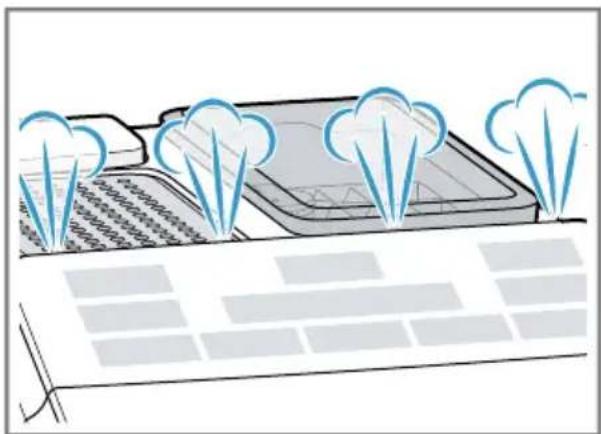
■ During operation water droplets may form at the ventilation slits.
If you do not perform any actions on the appliance for a certain period, it will automatically switch off. You can change the duration in the basic settings. Page 22
■ For technical reasons steam can escape from the appliance.
natural_image
Illustration of a solar panel with cooling towers emitting blue clouds above it, no text or symbols present.■ When you press a button, a signal tone sounds. You can switch off the signal tone in the basic settings.
Tip: Before using your appliance, check and set the water hardness.
Note
The first beverage will not yet have its full aroma if:
■ You are using the appliance for the first time.
■ You have run a machine care cycle.
■ You have not used the appliance for a long time.
Tip: You will get a stable, fine-pored crema after you have started up your appliance and dispensed a few cups.
7 Basic Operation
7.1 Switching the appliance on or off
Press
When the appliance is switched on or off, it will rinse itself automatically. When switched off, the appliance will emit steam into the drip tray for cleaning. The
appliance will not rinse itself if the appliance is still warm when switched on or if no beverage was dispensed before it was switched off.
7.2 Dispensing beverages
Find out how to prepare a drink of your choice.

WARNING
Freshly prepared beverages are very hot.
▶ Let drinks cool down if necessary.
- Do not let escaping liquids or steam come into contact with your skin.
7.3 Dispensing a coffee drink made from fresh beans
- Place a cup under the outlet system.
- To set the coffee strength, press Ⓞ button repeatedly.
- Press of button. Espresso Coffee
√ The coffee is brewed and then runs into the cup.
Tip: To stop the current dispensing step early, press or button.
7.4 Dispensing drinks with milk
You can make coffee drinks with milk or froth up milk.

WARNING
The milk frother gets very hot.
- Let the milk frother cool down before touching it.
NOTICE:
Milk residues can dry on and are difficult to remove.
- Clean the milk frother after each use.
Tips
■ You can also use plant-based alternatives to milk, e.g. soy milk.
■ The quality of the milk froth depends on the type of milk or plant-based alternative used.
7.5 Dispensing a coffee drink with milk
You can choose between cappuccino and latte macchiato.
- Fill a large cup or large glass with approx. 3.4 oz. (100 ml) milk for cappuccino or approx. 5.1 oz. (150 ml) milk for latte macchiato.
- Place the cup or glass under the outlet system.
- Slide the outlet system and milk frother right down.
- To set the coffee strength, press Ⓞ button repeatedly.
- Press Cappuccino Latte Macchiato button.
√ Milk is first frothed up in the cup or glass. The coffee is then brewed and runs into the cup or glass.
Tip: To stop the current dispensing step early, press of Latte Macchiato button.
Note: Do not use creamers.
7.6 Frothing milk
- Fill a large cup or large glass with approx. 3.4 oz. (100 ml) milk.
en-us Basic Operation
- Place the cup or glass under the outlet system.
- Slide the outlet system and milk frother right down.
- Press Moulton.
√ The milk is frothed up.
Note: To stop dispensing early, press Milk button.
7.7 Beverage settings
Make a drink according to your taste.
Adjusting the coffee strength
Before making a drink, you can adjust the coffee strength.
To adjust the coffee strength, press Ⓞ button repeatedly.
| 0 | Very mild |
| 00 | Mild |
| 000 | Normal |
| 000 | Strong |
| 000 | Very strong |
| 000 | aromaIntense ^1 |
| ^1 Depending on the model | |
Note: The coffee strength selected is then active for all drinks made with coffee.
Adjusting the fill level
You can adjust the fill level of your drinks.
- Place a cup under the outlet system.
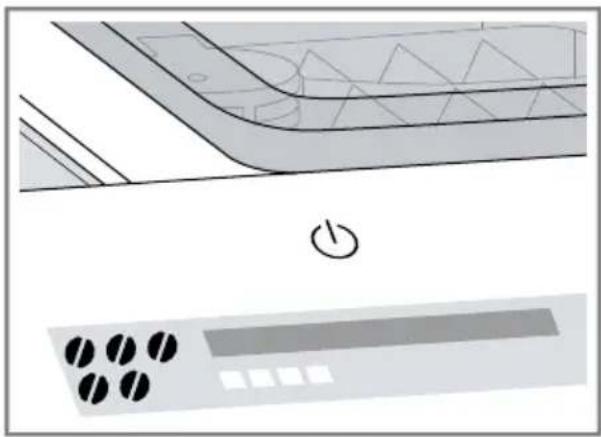
- Press and hold of Espresso Coffee button for 3 seconds.
√ Dispensing takes place, with the button selected flashing.
√ The display shows the progress.
natural_image
Diagram of a kitchen appliance with a power button and control panel (no text or symbols)- Once the required fill level is reached, press the button selected to stop.
Notes
■ The new fill level is only apparent when the next drink is dispensed.
■ You can set the fill level between 0.8-2 oz. (25-60 ml) for espresso or 2.7-6.8 oz. (80-200 ml) for coffee.
■ The appliance always brews a minimum quantity of approx. 0.8 oz. (25 ml) for espresso and approx. 2.7 oz. (80 ml) for coffee.
Tip: You can change the settings at any time.
→ "Basic settings", Page 22
Adjusting the frothing time
You can adjust the frothing time of your drinks.
- Fill a large cup or large glass with approx. 3.4 oz. (100 ml) milk for cappuccino or approx. 5.1 oz. (150 ml) milk for latte macchiato.
- Place the cup or glass under the outlet system.
- Slide the outlet system and milk frother right down.
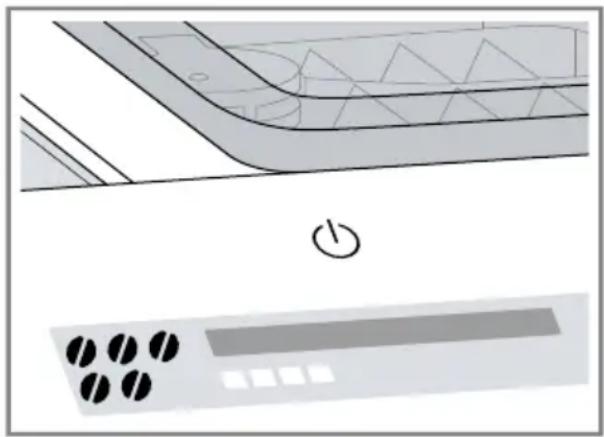
- Press and hold button, Cappuccino Latte Macchiato or Milk for 3 seconds.
√ The milk is frothed up, and the button selected flashes.
√ The display shows the progress.
natural_image
Diagram of a kitchen appliance with a power button and control panel (no text or symbols)- Once the required frothing time is reached, press the button selected to stop.
Notes
■ You can set a limited time depending on the drink.
■ The setting for the frothing time has no impact on the fill level.
Tip: You can change the settings at any time.
→ "Basic settings", Page 22
Dispensing two cups at once
Depending on your beverage, you can make 2 cups at the same time.
- Press button.
√ The display shows "Double cup on" for 5 seconds.
-
Place two cups on the right and left under the outlet system.
-
Press of button. Espresso Coffee
√ The LED in the button pulsates.
√ The drink is prepared in 2 steps. The beans are ground in 2 grinding operations.
√ The drinks are brewed and then run into the cups.
- Wait until the process is complete.
- To switch off the double cup function, press button.
Notes
■ You can set the double cup function for Espresso. Coffee
■ If you have set the double cup function, you cannot dispense other drinks.
■ If you do not press any other button within 90 seconds, the appliance automatically switches to the "Double cup off" setting.
8 Grinder
Your appliance has an adjustable grinder, which you can use to customize the right coffee grind size of your coffee beans.
8.1 Setting the grinding level
Set the required grinding level while the coffee beans are being ground.

WARNING
The grinder rotates.
▶ Never reach into the grinder.
NOTICE:
Risk of damage to the grinder. The grinder may be damaged if the grinding level is not set properly.
▶ Only set the grinding level when the grinder is running.
▶ Select the grinding level step by step using the rotary selector.
Grinding level Setting
Fine grinding level for light-roasted beans
Turn rotary selector counterclockwise.

Coarse grinding level for dark- roasted beans
Turn rotary selector clockwise.

The grinding level setting only takes effect after the second cup.
Tip: If the coffee is only dispensed drop by drop, set a coarser grinding level. If the coffee is dispensed too quickly and with too little crema, set a finer grinding level.
9 Cup warmer ^1
You can use the cup warmer to pre-heat your cups.
9.1 Activating and deactivating the cup warmer ^1
WARNING
The cup warmer ^1 can become hot.
- Don't touch the cup warmer ^1 while hot.
- Allow the hot cup warmer ^1 to cool down before touching it.
Tip: To optimally warm the cups, place the cups with the cup base on the cup warmer ^1 .
- To activate or deactivate the cup warmer ^1 , press the 🔊 button.
10 Basic settings
You can configure the basic settings for your appliance to meet your needs and call up additional functions.
10.1 Changing the basic settings
- Press and hold and calc'n Clean buttons simultaneously for at least 3 seconds.
- Press ▼ button Cappuccino repeatedly until the display shows the required setting.
- Confirm with "ok" button Latte Macchiato.
- To change the setting, press ▼ button Cappuccino
- Confirm with "ok" button Latte Macchiato.
√ The display shows "Settings saved".
- To exit the menu, press "<" button Coffee.
Note: If you do not press any other button within 90 seconds, the appliance switches to the Select beverage setting without saving.
Tip: You can change the settings at any time.
→ "Basic settings", Page 22
10.2 Overview of the basic settings
Here is an overview of the basic settings.
| Setting Selection Description | ||
| Language See selection on the appliance. | Set menu language. Changes will be immediately displayed. | |
| Factory reset Select the required language. | Reset to the factory settings.Note: The appliance rinses and deletes all individual settings. | |
| W. hardness ■ "W. hardness" 1, 2, 3, 4■ Water filter■ H2O-Softener | Set the appliance to the local water hardness.Tip: Ask your local water supplier about the water hardness.Note: If a water softening system is installed in your house, select "H2O-Softener". | |
| Auto Stand-by See selection on the appliance. | Set how long the appliance should wait after preparing the last drink before switching off automatically. | |
| Sound ■ Sound on ■ Sound off | Switch tones on or off. | |
11 Cleaning and maintenance
To keep your appliance working efficiently for a long time, it is important to clean and maintain it carefully.
11.1 Dishwasher-safe components
Here is an overview of the components you can clean in the dishwasher.
NOTICE:
Some components are sensitive to heat and may be damaged if they are cleaned in a dishwasher.
- Follow the operating instructions of the dishwasher.
▶ Only clean dishwasher-safe components in the dishwasher.
- Only use programs that do not heat the components above 140 °F (60 °C).
Suitable:
■ Drip plate
Drip grate
■ Coffee dregs container
■ Mechanical fill level indicator
■ Milk frother
Not suitable:
Water tank
■ Lid for water tank
■ Aroma lid
■ Brewing unit
■ Drip tray
11.2 Cleaning agents
Only use suitable cleaning agents.
NOTICE:
Unsuitable cleaning agents may damage the surfaces of the appliance.
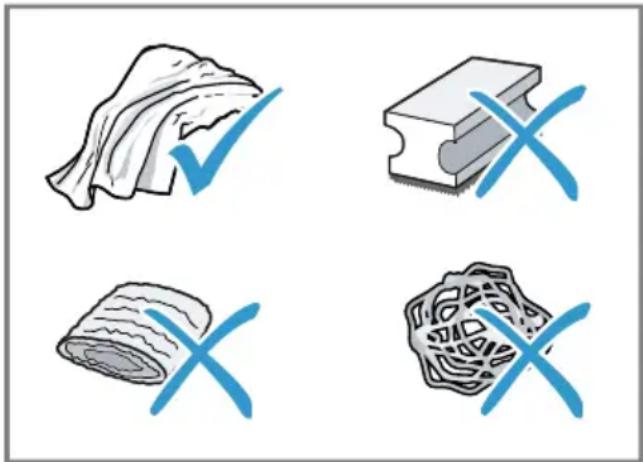
- Do not use strong or abrasive cleaning agents.
- Do not use cleaning agents containing alcohol or spirits.
- Do not use hard scouring pads or cleaning sponges.
Unsuitable cleaning and descaling agents may damage the appliance.
- Do not use pure citric acid, vinegar or any vinegar-based agents to descale the appliance.
- Do not use descaling agent with phosphoric acid.
- Only use cleaning tablets and descaling tablets that have been specially developed for the appliance.
→ "Accessories", Page 13
natural_image
Four symbolic illustrations: a rolled parchment, a rectangular block with X marks, a rolled parchment, and a textured rectangular block with X marks (no text or symbols present)Tips
■ Wash new sponge cloths thoroughly to remove any salt adhering to them. Salt can cause rust film to develop on stainless steel surfaces.
■ Always remove any residues of limescale, coffee, milk and cleaning/descaling solutions immediately to prevent corrosion.
11.3 Cleaning the appliance
WARNING
Moisture intrusion may cause an electric shock.
▶ Never immerse the appliance or the power cord in water.
- Liquids must not be spilled on the appliance plug connection.
- Do not use any steam cleaners or high-pressure cleaners to clean the appliance.

WARNING
Some parts of the appliance become very hot.
▶ Never touch hot appliance parts.
- Allow hot appliance parts to cool down before touching.
- Disconnect the appliance from the power supply.
- Clean the housing, the high-gloss surfaces and the control panel with a microfiber cloth.
- Clean the outlet system with a soft, damp cloth after beverages have been dispensed.
- Rinse the water tank with fresh, clean water.
- If the appliance has not been used for a long time, e.g. after a vacation, clean the entire appliance, including moving parts such as the brewing unit or water tank.
Note: The appliance will rinse itself automatically if you switch it on when it is cold or switch it off after it has dispensed coffee. In other words the system cleans itself.
11.4 Cleaning the drip tray and coffee dregs container
Clean and empty the drip tray and coffee dregs container every day to prevent deposits.
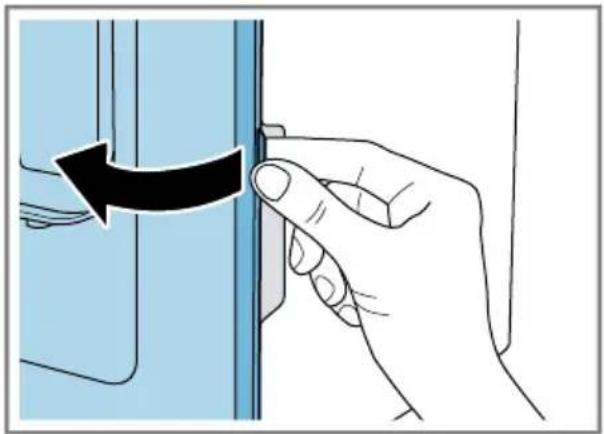
- Open the brewing chamber door.
natural_image
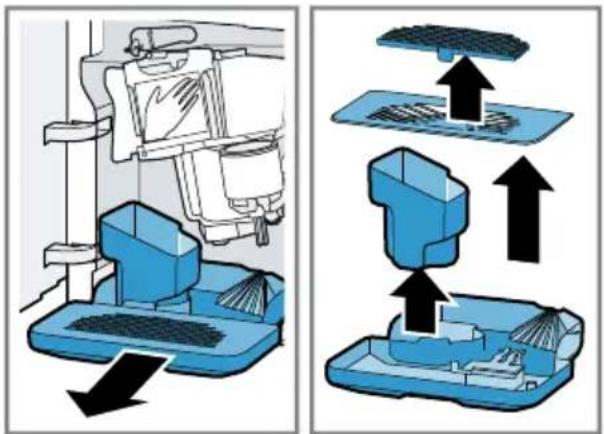
Hand holding a small object with a black arrow indicating rotation (no text or symbols)- Pull the drip tray and the coffee dregs container forward and out.
text_image
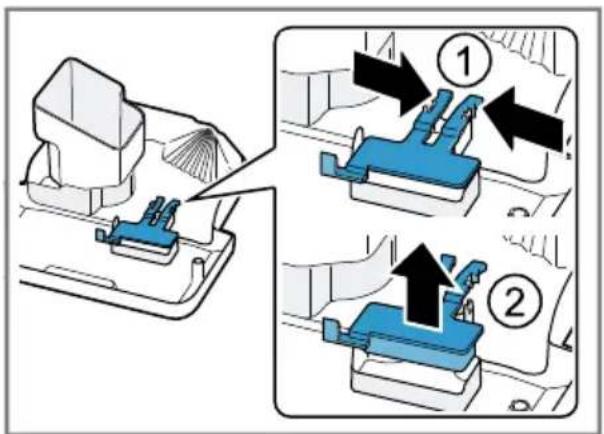
Diagram illustrating a 3D printing machine operation with labeled components and directional arrows indicating assembly or processing steps.- To remove the mechanical fill level indicator, press both brackets inwards.
text_image
Diagram illustrating a mechanical assembly process with numbered steps and directional arrows indicating movement or assembly.en-us Cleaning and maintenance
- Clean the appliance interior.
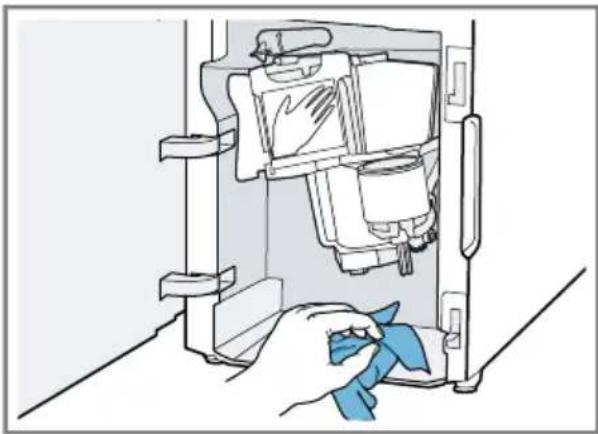
natural_image
Illustration of a hand cleaning a refrigerator interior with a blue cloth (no text or symbols)- Clean the drip tray and the coffee dregs container and reinsert in the appliance.
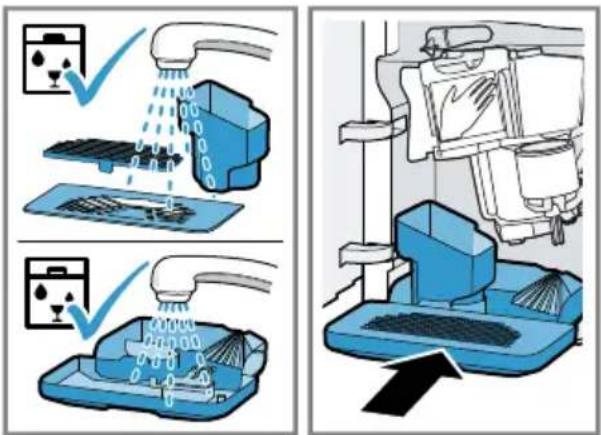
text_image
Diagram illustrating cleaning and cleaning process with labeled steps and icons for washing machine components11.5 Cleaning the milk frother
Clean the milk frother after each use to remove residues and ensure its proper function.

WARNING
The milk frother gets very hot.
- Let the milk frother cool down before touching it.
- Half-fill a glass with water and place it under the outlet system.
- Slide the milk frother right down.
- Press Milkton.
√ The milk system is cleaned.
- Slide the milk frother right up and leave to cool down.
- Remove the milk frother and clean thoroughly.
- Attach the milk frother again.
Note: To stop the process early, press Milk button.
Tip: You can clean the milk frother in the dishwasher. After rinsing, remove detergent residues thoroughly from the milk frother.
11.6 Cleaning the brewing unit
In addition to automatic rinsing, you should also remove and clean the brewing unit regularly.

WARNING
Some parts of the appliance become very hot.
▶ Never touch hot appliance parts.
- Allow hot appliance parts to cool down before touching.
NOTICE:
The brewing unit may be damaged by improper cleaning.
▶ Do not use dish detergent.
- Do not use cleaning agents containing vinegar or acids.
- Do not clean in the dishwasher.
- Use to switch the appliance off.
- Open the brewing chamber door.
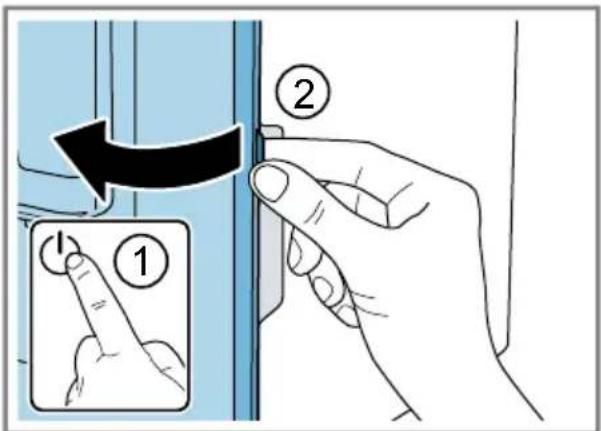
text_image
Diagram showing finger pressing a button on a device, labeled with step 1 and step 2- Remove the drip tray with the coffee dregs container.
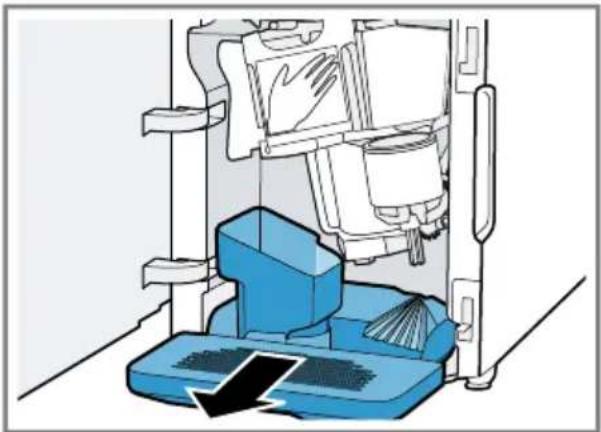
natural_image
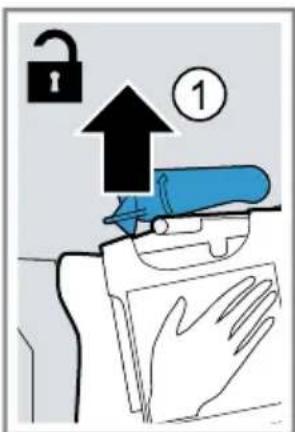
Diagram of a cleaning machine with blue components and a downward arrow indicating flow or inspection (no text or symbols)- Push the red lever up.
- Hold the brewing unit by the handle and carefully pull forward and out.
text_image
Diagram illustrating a lock mechanism with an upward arrow and numbered step, showing hand positioning and safety symbols.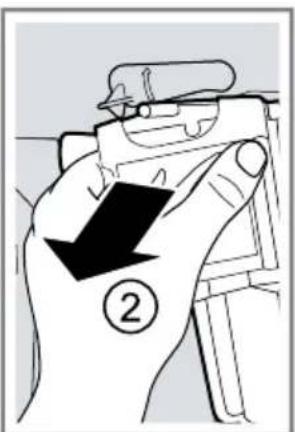
text_image
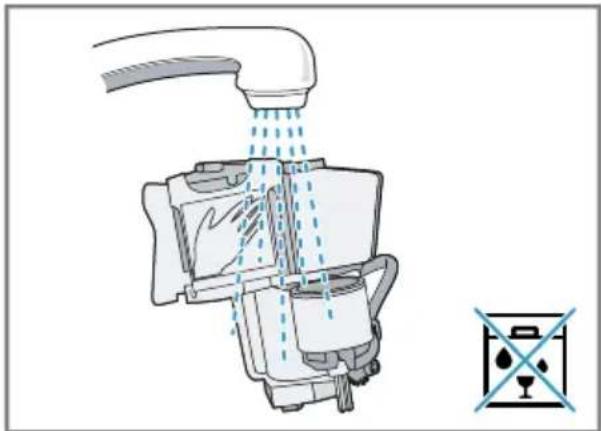
Diagram showing a hand holding a device with a black arrow and number 2, indicating a step or action.- Clean the brewing unit thoroughly under warm running water.
natural_image
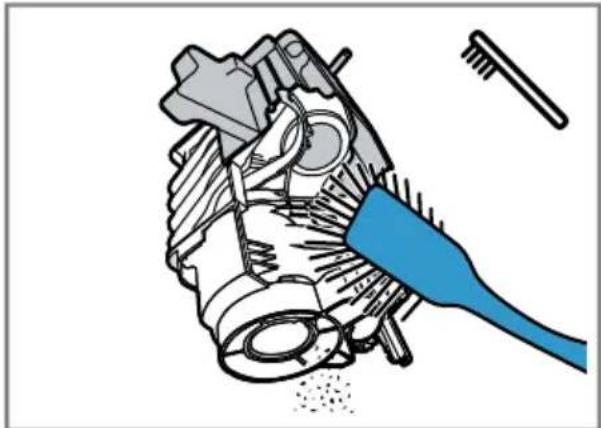
Diagram of a kitchen sink with faucet spraying water, showing internal components and a water level symbol (no text or labels)- Remove all coffee residues.
natural_image
Mechanical assembly diagram showing a gear and tool interacting with a component (no text or labels)- Dry the brewing unit thoroughly.
natural_image
Illustration of hands cleaning a device with a blue cloth (no text or symbols)en-us Cleaning and maintenance
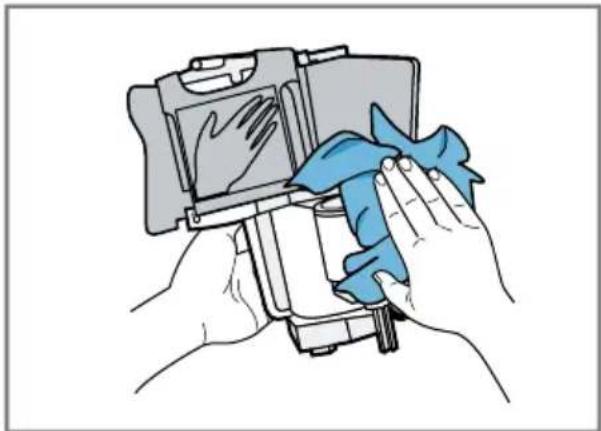
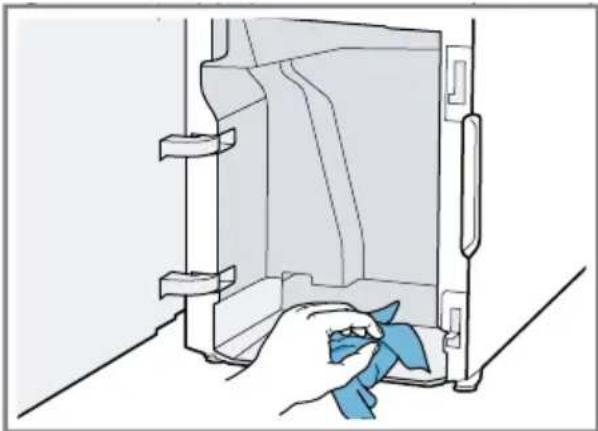
- Clean the appliance interior with a damp cloth and remove any coffee residues.
- Leave the brewing unit and the appliance interior to dry.
natural_image
Illustration of a hand cleaning a wall-mounted device with a blue cloth (no text or symbols)-
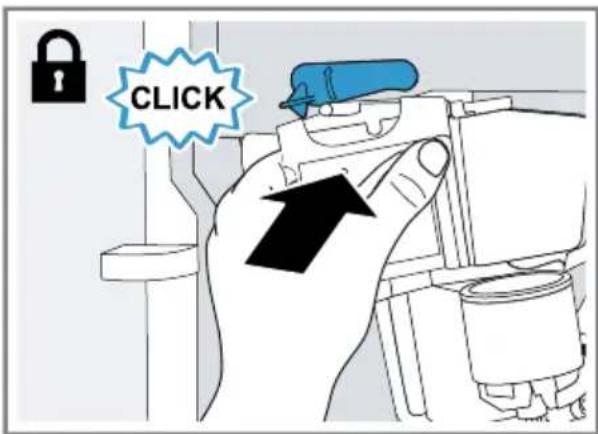
Hold the brewing unit by the handle.
-
Push the red lever up.
- Position the brewing unit under the lever and slide it back as far as it will go.
text_image
CLICK√ The lever will click into place.
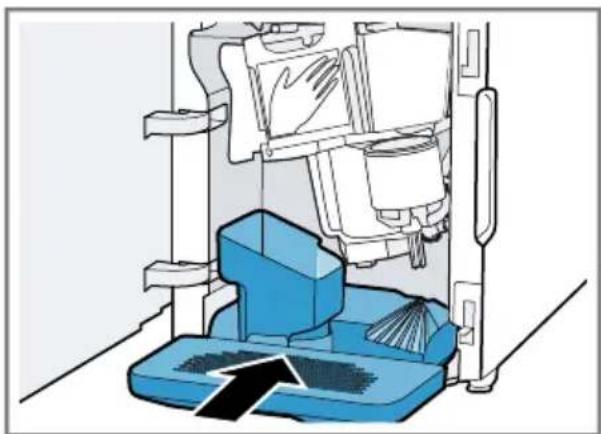
- Insert the drip tray with the coffee dregs container.
natural_image
Diagram of a cleaning or cleaning machine with blue components and a directional arrow indicating flow (no text or symbols)- Close the brewing chamber door.
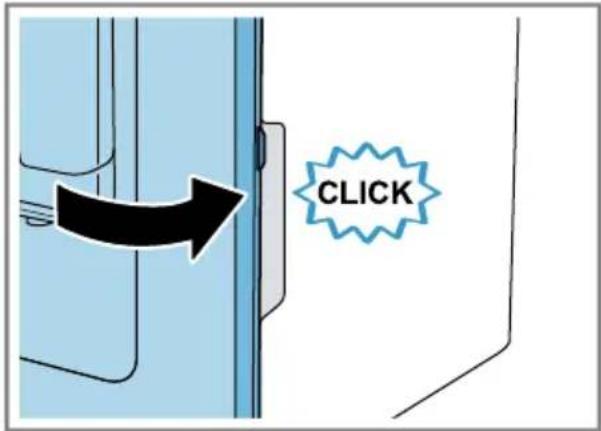
text_image
CLICKNote: The door can only be closed if the brewing unit and drip tray are inserted correctly.
11.7 Service programs
The button lights up and the display shows "Calc'nClean required!" depending on the water hardness and use of your appliance. Use the program to descale and clean your appliance.
NOTICE:
Improper cleaning and descaling or a delay in doing so may damage the appliance.
- Immediately perform calc'nClean according to the instructions.
▶ Only put cleaning tablets in the shaft of the brewing unit.
- Do not put descaling tablets or other products in the shaft of the brewing unit.
Notes
■ If you do not descale and clean the appliance in good time, it will locked and the display shows "Device locked".
■ To unlock the appliance, run the service program.
Tip: Before starting the service program, remove, clean and reinsert the brewing unit. Clean the milk frother.
Starting Calc'nClean
The process takes approx. 40 minutes.
- Press and hold button for at least 5 seconds.
√ symbol lights up. - Open the door.
- Remove and empty the drip tray and coffee dregs container.
- Remove and clean the brewing unit.
- Put a cleaning tablet into the shaft of the brewing unit and reinsert the brewing unit.
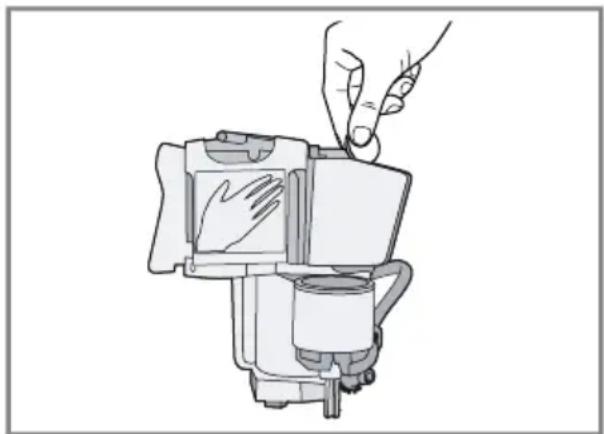
natural_image
Line drawing of a hand pressing down on a mechanical component (no text or symbols)- Insert the drip tray and coffee dregs container again and close the door.
√ symbol lights up. - If there is a water filter, remove it.
- Fill the empty water tank with lukewarm water up to the 16,9 oz. (0.5 l) mark and dissolve a Bosch descaling tablet in it.
- Reinsert the water tank and place a container with approx. 33.8 oz. (1 l) capacity under the outlet system.
- When flashes, press calc'n Clean button.
√ The program starts, cleans and descales the appliance.
√ calpúlsatos.
√ The process takes approx. 20 minutes minutes.
√ symbol lights up.
- Empty the container and open the door.
- Empty the drip tray and reinsert.
- Close the door and place the container under the outlet system again.
√ symbol lights up.
- Clean the water tank.
If you have removed the water filter, reinsert it.
- Fill the water tank with fresh, cold, non-carbonated drinking water up to the max mark.
- When cal's clean, press calc'n Clean button.
√ The program starts, cleans and rinses the appliance.
√ calpulsates.
symbol lights up.
en-us Cleaning and maintenance
- Remove and empty the drip tray and coffee dregs container.
- Clean the drip tray and the coffee dregs container and reinsert.
√ The program has ended and the appliance is ready for operation again.
Resetting a service program
If the service program is interrupted, e.g. by a power failure, can't Clean
will light up.
- Clean the water tank.
If you have removed the water filter, reinsert it. - Fill the water tank with fresh, cold, non-carbonated drinking water up to the max mark.
- Press button.
√ The service program starts and rinses the appliance. The process takes approx. 2 minutes.
4. Empty the drip tray, clean and reinsert.
5. Close the door.
√ The program has ended and the appliance is ready for operation again.
12 Troubleshooting

WARNING
Improper repairs are dangerous.
▶ Only original spare parts may be used to repair the appliance.
If the power cord of this appliance becomes damaged, it must be replaced by the manufacturer, the manufacturer's Customer Service, or an authorized service provider in order to prevent injury.
Issue Cause and troubleshooting
| Appliance no longer responds. | Appliance has an error.1. Unplug the appliance and wait 60 seconds.2. Plug it back in. | |
| Appliance only dispenses water, not coffee. | Empty bean container is not detected by the appliance.Pour in coffee beans. | |
| Coffee beans are too oily and do not fall into the grinder.Gently tap the bean container.Change the type of coffee.Do not use oily beans.Clean the empty bean container with a damp cloth. | ||
| Brewing unit is not inserted properly.Slide the brewing unit right back. | ||
| Coffee or milk froth quality varies considerably. | Build-up of limescale in the appliance.Descale the appliance. | |
| Coffee is not dispensed or has slowed to a trickle. | Grinding level is set too fine.Set a coarser grinding level. "Setting the grinding level", Page 21 | |
| Set quantity is not reached. | Heavy build-up of limescale in the appliance.Descale the appliance. | |
| Air in the water filter.1. Immerse the water filter in water with the opening facing upwards until no more air bubbles escape.2. Reinsert the filter. | ||
| Appliance is soiled.Clean the brewing unit.Descale and clean the appliance. | ||
| Issue Cause and troubleshooting | ||
| Coffee is not dispensed or has slowed to a trickle. Set quantity is not reached. | Residues of limescale remover are blocking the water tank.1. Remove the water tank.2. Clean the water tank thoroughly. | |
| Coffee strength is set too high. ▶ Reduce the coffee strength. | ||
| Milk or milk-based drinks are too hot. Milk froth is too thin, loud sucking noise. | Too little milk in the glass or cup.1. Use more milk.2. Change the frothing time. | |
| Milk or milk-based drinks are too cold. | Too much milk in the glass or cup.1. Use less milk.2. Change the frothing time. | |
| Milk in the glass or cup is too cold. ▶ Warm the milk. | ||
| Coffee has no crema. Type of coffee is not optimal. ▶ Use a coffee variety with a higher proportion of Robusta beans. | ||
| Coffee beans are no longer freshly roasted. ▶ Use fresh coffee beans. | ||
| Grinding level is not appropriate for coffee beans. ▶ Adjust the grinder to a finer setting. → "Setting the grinding level", Page 21 | ||
| Coffee is too acidic. Grinding level is set too coarse. ▶ Adjust the grinder to a finer setting. → "Setting the grinding level", Page 21 | ||
| Type of coffee is not optimal. ▶ Use a coffee variety with a higher proportion of Robusta beans. | ||
| Coffee is too bitter. Grinding level is set too fine. ▶ Set a coarser grinding level. → "Setting the grinding level", Page 21 | ||
| Type of coffee is not optimal. ▶ Change the type of coffee. | ||
Issue Cause and troubleshooting
| Coffee tastes burnt. Grinding level is set too fine.► Set a coarser grinding level.→ "Setting the grinding level", Page 21 | |
| Type of coffee is not optimal.► Change the type of coffee. | |
| Milk froth quality varies considerably. | Milk froth quality depends on the type of milk or plant-based alternative used.► Optimize the result through the selection of the milk or plant-based drink type. |
| Appliance is not dispensing milk froth. | Heavy build-up of limescale in the appliance.► Descale the appliance. |
| Milk frother is soiled.► Clean the milk frother in the dishwasher. | |
| Milk frother is not inserted in the milk.1. Use more milk.2. Check whether the milk frother is inserted in the milk.3. Slide the outlet system right down. | |
| Appliance is not dispensing drinks. | Air in the water filter.1. Immerse the water filter in water with the opening facing upwards until no more air bubbles escape.2. Reinsert the filter.► Firmly press the water filter straight down into the tank connection. |
| Residues of limescale remover are blocking the water tank.1. Remove the water tank.2. Clean the water tank thoroughly. | |
| Water has dripped inside at the base of the appliance. | Drip tray was removed too soon.► Wait a few seconds after the last drink was dispensed before removing the drip tray. |
| Brewing unit cannot be removed. | Locking mechanism cannot be released, brewing unit is jammed.► Switch the appliance off and back on after 3 minutes. |
| Grinder will not start. Appliance is too hot.1. Disconnect the appliance from the power supply.2. Wait 1 hour so the appliance can cool down. | |
| Issue Cause and troubleshooting | |
| Display shows "Fill water tank" despite the water tank being full. | Water tank is inserted wrong.► Insert the water tank correctly. |
| Carbonated water is in the water tank.► Fill the water tank with fresh drinking water. | |
| Float is stuck in the water tank.1. Remove the water tank.2. Clean the water tank thoroughly. | |
| New water filter was not rinsed as per instructions.1. Rinse the water filter according to the instructions.2. Place the water filter into operation. | |
| Air in the water filter.1. Immerse the water filter in water with the opening facing upwards until no more air bubbles escape.2. Reinsert the filter. | |
| Water filter is old.► Insert a new water filter. | |
| Limescale deposits in the water tank are blocking the system.1. Clean the water tank thoroughly.2. Start the Calc'nClean service program. | |
| Display shows "Clean brewing unit". | Brewing unit is soiled.► Clean the brewing unit. |
| Mechanism of brewing unit is stiff.► Clean the brewing unit. | |
| Display shows "Incorrect voltage". | There are problems with the power supply.► Only operate the appliance at 120 V ~. |
| Display shows "Calc'nClean required!" very frequently. | Decalcified water still contains small amounts of lime.1. Insert a new water filter.2. Set the corresponding water hardness. |
| Incorrect or too little descaling agent used.► When descaling, only use suitable tablets. | |
| Appliance cannot be operated.Change displays. | Appliance is in demo mode.1. To deactivate demo mode, press and hold button for at least 5 seconds.2. Remove the water tank.3. Fill the water tank with fresh water.4. Reinsert the water tank. |
| Display shows "Close door" despite the door being closed. | Door is not closed properly.▸ Press the door firmly shut. |
| Appliance is too hot.1. Disconnect the appliance from the power supply.2. Wait 1 hour so the appliance can cool down. | |
| Display shows "Empty trays" despite the drip tray being empty. | Appliance is switched off and does not detect emptying.1. Switch the appliance on and remove the drip tray.2. Reinsert the drip tray. |
| Display shows "Fill water tank" and LEDs flashing. | Water tank is missing or wrongly inserted.▸ Insert the water tank correctly. |
| Pipe system in the appliance is dry.▸ Fill the water tank with fresh, cold, non-carbonated drinking water. | |
| Air in the water filter.1. Immerse the water filter in water with the opening facing upwards until no more air bubbles escape.2. Reinsert the filter. | |
| Display shows "Device too cold". | Ambient temperature is too cold.▸ Operate the appliance at temperatures over 41 °F (5 °C). |
| Display shows "Restart appliance".LEDs flashing. | Brewing unit is heavily soiled or cannot be removed.▸ Restart the appliance.▸ Clean the brewing unit. |
| Display shows "Restart appliance".No LED is lit up. | Appliance has an error.▸ Restart the appliance. |
| Display shows "Clean/ fill water tank"; and calc'n Clean and Late lit up. | Descaling process was interrupted.▸ Proceed as described in section → "Resetting a service program", Page 30. |
13 Transportation, storage and disposal
13.1 Activate frost protection
Protect your appliance from frost during transport and storage.
NOTICE:
Residues of liquid in the appliance may damage it during transport or storage.
▶ Empty the pipe system before transport or storage.
Requirements
■ The appliance is ready for operation.
■ The water tank was filled.
-
Place a large container under the outlet system and slide the milk frother down.
-
Press and hold Muitton for at least 5 seconds.
√ The LED in the button flashes, and the appliance heats up.
-
Remove the water tank when steam escapes from the milk frother.
-
Leave the appliance to cool down and wait until the display shows "Water tank empty".
-
Use to switch the appliance off.
-
Empty the water tank and drip tray and clean the appliance thoroughly.
-
Disconnect the appliance from the power supply.
You can now transport or store the appliance.
Note: The brewing unit is now secured and cannot be removed.
13.2 Disposal of your old appliance
Environmentally compatible disposal allows valuable raw materials to be recycled.
-
Unplug the appliance from the power supply.
-
Cut through the power cord.
-
Dispose of the appliance in an environmentally responsible manner.
Information about current disposal methods can be obtained from your specialist dealer or local authority.
14 Customer Service
With any warranty repair, we will make sure your appliance is repaired by an authorized service provider using genuine replacement parts. We use only genuine replacement parts for all repairs.
Detailed information on the warranty period and terms of warranty can be found in the Statement of Limited Product Warranty, from your retailer, or on our website.
If you contact Customer Service, you will need the model number (E-Nr.) and the production number (FD) of your appliance.
USA:
(800)701-5231
www.bosch-home.com/us/owner-support/get-support
www.bosch-home.com/us/shop CA:
(800)701-5231
www.bosch-home.ca/en/service/get-support
www.bosch-home.ca/en/service/
cleaners-and-accessories
14.1 Model number (E-Nr.) and production number (FD)
You can find the model number (E-Nr.) and the production number (FD) on the appliance's rating plate.
Making a note of your appliance's details and the Customer Service telephone number will enable you to find them again quickly.
15 Technical specifications
| Voltage 120 V ~ | |
| Frequency 60 Hz | |
| Power rating 1600 W | |
| Maximum static pump pressure | 15 bar |
| Maximum capacity of water tank (without filter) | 44 oz.(1.3 l) |
| Maximum capacity of bean container | 8.8 oz.(≈250 g) |
| Power cord length 39 38 " (1 m) | |
| Appliance height 15.1" (38.3 cm) | |
| Appliance width 9.9" (25.1 cm) | |
| Appliance depth 17" (43.3 cm) | |
| Weight, empty 17.6-19.8 | Ibs(≈8-9 kg) |
| Type of grinding unit Ceramic | |
16 STATEMENT OF LIMITED PRODUCT WARRANTY
THIS LIMITED WARRANTY GIVES YOU SPECIFIC LEGAL RIGHTS, AND YOU MAY ALSO HAVE OTHER RIGHTS WHICH VARY FROM STATE TO STATE.
16.1 What this warranty covers & Who it applies to
The limited warranty provided by BSH Home Appliances (“Bosch”) in this Statement of Limited Product Warranty applies only to the Bosch appliance (“Product”) sold to you provided that the Product was purchased:
■ For your normal, household (non-commercial) use (i.e., no more than 7,000 cups during the warranty period), and has in fact at all times only been used for normal, non-commercial household purposes.
■ New at retail from a BSH authorized dealer or directly from BSH (not a display, floor, “As Is”, or “B” stock appliances), and not for resale, or commercial use.
■ Within the United States or Canada, and has at all times remained within the country of original purchase.
The warranties stated herein apply to the original purchaser of the product warranted herein purchased for ordinary household use during the term of the warranty.
Please make sure to register your product; failure to register will not affect your warranty rights. Registering
your product is the best way for Bosch to notify you in the unlikely event of a safety notice or product recall. Upon purchase or receipt of the product, it is recommended to register it using the QR code on the side of the machine or at https://registerbosch.com/
16.2 Obtaining warranty service
To obtain warranty service for your product, you should contact Bosch Customer Service at (800)701-5231 to arrange a repair.
16.3 How long the warranty lasts
Bosch warrants that the Product is free from defects in materials and workmanship for a period of seven hundred thirty (730) days from the date of the original delivery. The foregoing timeline begins to run upon the date of the original delivery.
The warranty shall only be extended for the time that elapsed between the date of your warranty claim and the date of the completed repair or replacement.
This Product is also warranted to be free from cosmetic defects in material and workmanship (such as scratches of stainless steel, paint/porcelain blemishes, chips, dents, or other damage to the finish) of the Product, for a period of thirty (30) days from the date of delivery. This cosmetic warranty excludes slight color variations due to inherent differences in painted and porcelain parts, as well as differences caused by kitchen lighting, product location, or other similar factors. This cosmetic warranty specifically excludes any display, floor, "As Is", or "B" stock appliances. UNDER THIS SPECIFIC WARRANTY, A PROOF OF PURCHASE (E.G., RECEIPT) IS REQUIRED. If proof of purchase cannot be provided, date of production plus three months will be used as the purchase date. You may be required to provide clear images (e.g., pictures of the Product and/or including the data tag showing model and serial number), but failure to do so will not diminish your warranty rights.
16.4 Repair/replace as your exclusive remedy
During this warranty period, Bosch or one of its authorized service providers will repair your Product without charge to you (subject to certain limitations stated herein) under a valid warranty claim under the terms of the applicable warranty.
Bosch will cover the cost of returning the Bosch Product to Bosch via ground shipping, and the original Product (removed parts and components) shall become the property of Bosch.
CONSUMERS MUST USE THE SHIPPING TOTE OR SPECIAL PACKAGING INSTRUCTIONS PROVIDED BY BOSCH. This warranty does not cover for shipping damage or loss of product during shipping.
If reasonable attempts to repair the Product have been made without success, then Bosch will replace your
Product with a new or factory certified (i.e., refurbished) replacement (upgraded models may be available to you, in Bosch's sole discretion, for an additional charge). Bosch may repair a part of the original Product with a factory certified (i.e., refurbished) part. You have the right to reject a replacement Product that materially differs from the original Product. Bosch's sole liability and responsibility hereunder is to repair the Product under a valid warranty claim, using a Bosch technician or one of its authorized service providers during normal business hours. For safety and property damage concerns, Bosch highly recommends that you do not attempt to repair the Product yourself, or use a non-authorized service provider; Bosch will have no responsibility or liability for damage resulting from repairs or work performed by a non-authorized service provider. Authorized service providers are those persons or companies that have been specially trained on Bosch products, and who possess, in Bosch's opinion, a superior reputation for customer service and technical ability (note that they are independent entities and are not agents, partners, affiliates or representatives of Bosch). Nevertheless, having your roduct serviced by a repair shop that is not affiliated with or an authorized dealer of Bosch will not void this warranty. Also, using third-party parts will not void this warranty.
16.5 Out of warranty product
Bosch is under no obligation, at law or otherwise, to provide you with any concessions, including repairs, prorates, or Product replacement, once this warranty has expired.
16.6 Warranty exclusions
This Limited Warranty does not cover any of the following:
■ Products sold outside of the United States of America, USA Territories, and Canada
■ Consumables (e.g., water filter)
■ Repairs made by non-authorized retailer or dealers
■ Products purchased on eBay or auctions
■ Shipping damage or loss of product during shipping
■ Use and care related repairs
■ Use of care products not sold by Bosch (e.g., descalers, cleaners, etc.)
The warranty coverage described herein excludes all defects or damage caused by, including without limitation, one or more of the following:
■ Use of the Product in anything other than its normal, household (non-commercial), and intended manner (including without limitation, any form of commercial use, use or storage of an indoor product outdoors, use of the Product in conjunction with air or water-going vessels).
■ Use of the Product with voltage or frequency outside of the dataplate rating.
■ Use of the product on a generator, solar, inverter, or DC to AC converter.
- Any party's willful misconduct, negligence, misuse, abuse, accidents, neglect, improper operation, failure to maintain according to Use & Care Manual, improper or negligent installation, tampering, failure to follow operating instructions, mishandling, unauthorized service (including self-performed "fixing" or exploration of the appliance's internal workings).
■ Adjustment, alteration or modification of any kind.
■ A failure to comply with any applicable state, local, city, or county electrical, plumbing and/or building codes, regulations, or laws, including failure to install the product in strict conformity with local fire and building codes and regulations.
■ Ordinary wear and tear, spills of food, liquid, grease accumulations, or other substances that accumulate on, in, or around the Product.
■ Any external, elemental and/or environmental forces and factors, including without limitation, rain, wind, sand, floods, fires, mud slides, freezing temperatures, excessive moisture or extended exposure to humidity, lightning, power surges, structural failures surrounding the appliance, and acts of God.
■ Service calls to correct the installation of your Product, to instruct you how to use your Product, to replace house fuses, or correct house wiring.
■ Damage or defects caused by labor or parts installed by any non-authorized service provider, unless approved by Bosch before service is performed.
In no event shall Bosch have any liability or responsibility whatsoever for damage to surrounding property, including cabinetry, floors, ceilings, and other structures or objects around the Product. Also excluded from this warranty are Products, on which the serial numbers have been altered, defaced, or removed; any type of service to teach you how to use the Product, or servicing where there is nothing wrong with the Product; correction of installation problems (you are solely responsible for any structure and setting for the Product, including all electrical, or other connecting facilities, for proper foundation/flooring, and for any alterations including without limitation cabinetry, walls, floors, shelving, etc.); and resetting of breakers or fuses.
TO THE EXTENT ALLOWED BY LAW, THIS WARRANTY SETS OUT YOUR EXCLUSIVE REMEDIES WITH RESPECT TO PRODUCT, WHETHER THE CLAIM ARISES IN CONTRACT OR TORT (INCLUDING STRICT LIABILITY, OR NEGLIGENCE) OR OTHERWISE. THIS WARRANTY IS IN LIEU OF ALL OTHER WARRANTIES, WHETHER EXPRESS OR IMPLIED. ANY WARRANTY IMPLIED BY LAW, WHETHER FOR MERCHANTABILITY OR FITNESS FOR A PARTICULAR PURPOSE, OR OTHERWISE, SHALL BE EFFECTIVE ONLY FOR THE PERIOD THAT THIS
EXPRESS LIMITED WARRANTY IS EFFECTIVE. IN NO EVENT WILL THE MANUFACTURER BE LIABLE FOR CONSEQUENTIAL, SPECIAL, INCIDENTAL, INDIRECT, "BUSINESS LOSS", AND/OR PUNITIVE DAMAGES, LOSSES, OR EXPENSES, INCLUDING WITHOUT LIMITATION TIME AWAY FROM WORK, HOTELS AND/OR RESTAURANT MEALS, REMODELLING EXPENSES IN EXCESS OF DIRECT DAMAGES WHICH ARE DEFINITIVELY CAUSED EXCLUSIVELY BY BOSCH, OR OTHERWISE. SOME STATES DO NOT ALLOW THE EXCLUSION OR LIMITATION OF INCIDENTAL OR CONSEQUENTIAL DAMAGES, AND SOME STATES DO NOT ALLOW LIMITATIONS ON HOW LONG AN IMPLIED WARRANTY LASTS, SO THE ABOVE EXCLUSIONS OR LIMITATIONS MAY NOT APPLY TO YOU. THIS WARRANTY GIVES YOU SPECIFIC LEGAL RIGHTS, AND YOU MAY ALSO HAVE OTHER RIGHTS WHICH VARY FROM STATE TO STATE.
No attempt to alter, modify or amend this warranty shall be effective unless authorized in writing by an officer of BSH.
16.7 Product information
For handy reference, copy the information below from the rating plate. Keep your invoice and/or delivery documents for warranty validation.
| Production number (FD) | |
| Date of delivery |
text_image
QR code image containing encoded data, no visible human-readable textTable des matières
1 Sécurité.... 44
www.P65Warnings.ca.gov
text_image
Labeled diagram of a 20-pin smart appliance with numbered parts and directional arrows indicating internal components.natural_image
Diagram of a mechanical device with arrows indicating motion or force direction (no text or symbols)natural_image
Illustration of a faucet releasing liquid into a bucket with a checkmark indicating inspection (no text or symbols)text_image
Technical diagram showing two steps of a mechanical assembly with blue components and a magnified inset highlighting a component detail.text_image
Diagram illustrating a mechanical device with airflow and water displacement, showing top-down and side-view views.text_image
Diagram illustrating a mechanical device with rotation and component assembly, showing labeled parts A, B, C and directional arrows.text_image
Diagram illustrating a water spray device being compressed into a pipe, with labeled components and flow arrows indicating process steps.natural_image
Illustration of a computer with a blue box and arrow indicating process, showing coins falling into a tray (no text or symbols)text_image
Diagram illustrating a mechanical device with labeled components and directional arrows, including a circular component with 'A' and 'C' labels.natural_image
Illustration of a solar panel with cooling towers and cooling fins (no text or symbols)natural_image
Diagram of a kitchen appliance with a power button and control panel (no text or symbols)natural_image
Diagram of a kitchen appliance with a power button and control panel (no text or symbols)natural_image
Four symbolic icons: a rolled document, a rectangular block with X marks, a rolled cloth, and a textured surface (no text or symbols)Conseils
natural_image
Hand holding a small object with an arrow indicating rotation (no text or symbols)text_image
Diagram illustrating a mechanical assembly process with labeled components and directional arrows indicating movement or force.text_image
Diagram illustrating a mechanical assembly process with numbered steps and directional arrows indicating movement or assembly.natural_image
Illustration of a hand cleaning a refrigerator interior with a blue cloth (no text or symbols)text_image
Diagram illustrating a cleaning or disinfection procedure with labeled steps and icons for washing machine components.text_image
Diagram showing finger pressing a door panel with numbered instructions and directional arrownatural_image
Diagram of a robotic arm with blue components and a black arrow indicating motion (no text or symbols)text_image
Diagram illustrating a lock mechanism with an upward arrow and numbered step, showing hand positioning and lock status.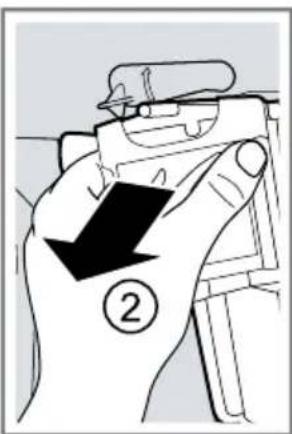
text_image
Diagram showing a hand holding a device with a black arrow and number 2, likely indicating a step or direction of action.natural_image
Diagram of a kitchen sink with hand cleaning and water spray, showing no text or symbolsnatural_image
Diagram of a mechanical component with a blue tool and a brush, no visible text or symbolsnatural_image
Illustration of hands cleaning a device with a blue cloth (no text or symbols)natural_image
Illustration of a hand cleaning a wall-mounted device with a blue cloth (no text or symbols)natural_image
Diagram of a mechanical device with blue components and a black arrow indicating direction (no text or symbols)natural_image
Line drawing of a hand pressing down on a mechanical component (no text or symbols)www.bosch-home.com/us/owner-support/get-support
www.bosch-home.com/us/shop CA:
(800)701-5231
www.bosch-home.ca/en/service/get-support
www.bosch-home.ca/en/service/cleaners-and-accessories
text_image
QR code image containing encoded data, no visible human-readable textTabla de contenidos
text_image
Labeled diagram of a 20-pin smart appliance with numbered parts and directional arrows indicating internal components.natural_image
Diagram of a mechanical device with arrows indicating motion or force, showing fluid flow around a platform (no text or symbols)natural_image
Illustration of a faucet releasing water with a drop pipe, accompanied by a cleaning device (no text or symbols)text_image
Diagram illustrating a mechanical assembly or mounting process with labeled components and directional arrows indicating movement.text_image
Diagram illustrating a mechanical device with airflow and water release, showing a lever mechanism and a water dispenser.text_image
Diagram illustrating a rotary device with labeled components and directional arrows, alongside a 3D schematic of the device's internal structure.text_image
Diagram illustrating a water spray device being compressed into a pipe, with labeled components and flow direction arrows.text_image
Illustration showing a blue box being inserted into a tray with coins, with arrows indicating the process and disposal direction.natural_image
Diagram of a cylindrical device with a vertical panel and internal structure, showing no text or symbols.natural_image
Illustration of a roof structure with cloud patterns and ventilation ducts (no text or symbols)natural_image
Diagram of a kitchen appliance with a power button and control panel (no text or symbols)natural_image
Diagram of a kitchen appliance with a power button and control panel (no text or symbols)natural_image
Four symbolic illustrations: a rolled-up document, a rectangular block with X marks, a rolled-up dough, and a textured food item (no text or symbols present)Recomendaciones
natural_image
Hand inserting a component into a blue container with a black arrow indicating rotation (no text or symbols)text_image
Diagram illustrating a robotic vacuum cleaner's internal structure and its 3D printing process with upward arrows indicating motion.text_image
Diagram illustrating a mechanical assembly process with numbered steps and directional arrows indicating movement or assembly.natural_image
Line drawing of a hand cleaning a refrigerator interior with a blue cloth (no text or symbols)text_image
Diagram illustrating a cleaning or cleaning process with labeled steps and icons, showing tool application and machine operation.text_image
Diagram showing finger pressing a button on a door panel, with numbered instructions and directional arrow indicating motion.natural_image
Diagram of a mechanical device with blue components and a black arrow indicating motion (no text or symbols)text_image
Diagram illustrating a lock mechanism with an upward arrow and numbered step 1, showing hand positioning and lock symbols.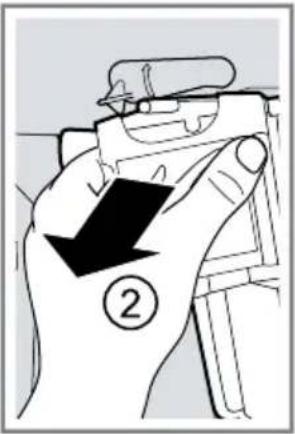
text_image
Diagram showing a hand holding a device with a black arrow and number 2, indicating a step or direction of action.natural_image
Diagram of a kitchen sink with faucet spraying water, showing no text or symbolsnatural_image
Technical illustration of a mechanical assembly with a blue tool and a tool handle (no text or symbols)natural_image
Illustration of hands cleaning a device with a blue cloth (no text or symbols)natural_image
Illustration of a hand cleaning a wall-mounted device with a blue cloth (no text or symbols)natural_image
Diagram of a mechanical device with blue components and directional arrows indicating movement or force (no text or symbols)natural_image
Line drawing of a hand pressing down on a mechanical component (no text or symbols)www.bosch-home.com/us/owner-
support/get-support
www.bosch-home.com/us/shop
CA:
(800)701-5231
www.bosch-home.ca/en/service/get-support
www.bosch-home.ca/en/service/
cleaners-and-accessories
Register your appliance to enjoy customized benefits.
Thank you for being a Bosch customer!
Simply create a MyBosch account, then register your appliance.
You'll find a variety of customized information in MyBosch such as:
• Discounts for filters, cleaners, accessories & parts
- Easy access to manuals & appliance specifications
- Easy access to part lists
- Customized offer for the Bosch Appliance Service Plan (sent by mail after appliance registration)
Register here:
www.bosch-home.com/us/owner-support/mybosch
BOSCH
HOME APPLIANCES
SERVICE
Looking for help?
You'll find it here.
No matter what, no matter when: Bosch is here to support you.
We're here to assist with usage instructions, cleaning tips, accessories & parts, troubleshooting, and repairs.
Find online resources such as FAQs, how-to-videos, manuals, warranties and authorized Bosch servicers at:
www.bosch-home.com/us/owner-support/get-support
Contact us:
Please have your Model Number (E-Nr) ready when contacting us.
1-800-944-2904
www.bosch-home.com/us/owner-support/contact-us
BSH Home Appliances Corporation
1901 Main Street, Suite 600
Irvine, CA 92614
USA
www.bosch-home.com
(800)701-5231
© 2024 BSH Home Appliances Corporation

8001316772 (040604)
en-us, fr-ca, es-mx