TO-128308 - Toaster Emerio - Free user manual and instructions
Find the device manual for free TO-128308 Emerio in PDF.


| Product type | Toaster |
| Brand | Emerio |
| Model | TO-128308 |
| Power | 800 W |
| Voltage | 220-240 V ~ 50-60 Hz |
| Number of slots | 2 |
| Browning setting | 7 levels (1 to 7) |
| Functions | Toasting, reheat, defrost, eject |
| Display | Screen with browning level and icons |
| Pastry rack | Yes, foldable |
| Crumb tray | Removable |
| Auto shut-off | Yes |
| Safety | Hot surface, do not immerse, auto shut-off |
| Cleaning | Removable crumb tray, wipe exterior with damp cloth |
| Warranty | 2 years |
| After-sales service | Emerio B.V., www.emerio.eu/service |
Frequently Asked Questions - TO-128308 Emerio
User questions about TO-128308 Emerio
0 question about this device. Answer the ones you know or ask your own.
Ask a new question about this device
Download the instructions for your Toaster in PDF format for free! Find your manual TO-128308 - Emerio and take your electronic device back in hand. On this page are published all the documents necessary for the use of your device. TO-128308 by Emerio.
USER MANUAL TO-128308 Emerio
natural_image
Modern stainless steel two-tanist toaster with dual handles and digital display (no visible text or symbols)Toaster (EN)
Toaster (DE)
Grille-pain (FR)
Brödrost (SE)
Broodrooster (NL)
Toster (PL)
Tostadora (ES)
Content – Inhalt – Teneur – Innehåll – Inhoud – Treść – Contenido
Instruction manual – English ...... - 2 -
Instruction manual – English
SAFETY INSTRUCTIONS
Before use make sure to read all of the below instructions in order to avoid injury or damage, and to get the best results from the appliance. Make sure to keep this manual in a safe place. If you give or transfer this appliance to someone else make sure to also include this manual.
In case of damage caused by user failing to follow the instructions in this manual the warranty will be void. The manufacturer/importer accepts no liability for damages caused by failure to follow the manual, a negligent use or use not in accordance with the requirements of this manual.
- This appliance can be used by children aged from 8 years and above and persons with reduced physical, sensory or mental capabilities or lack of experience and knowledge if they have been given supervision or instruction concerning use of the appliance in a safe way and understand the hazards involved.
- Children shall not play with the appliance.
- Cleaning and user maintenance shall not be made by children unless they are older than 8 and supervised.
- Keep the appliance and its cord out of reach of children less than 8 years.
- If the supply cord is damaged, it must be replaced by the manufacturer, its service agent or similarly qualified persons in order to avoid a hazard.
- The bread may burn, therefore do not use the toaster near or below combustible material, such as curtains.
- This appliance is not intended to be operated by means of an external timer or separate remote-control system.
- Regarding the instructions for cleaning the surfaces which come in contact with food, please refer to the paragraph "cleaning and maintenance" of the manual.
- This appliance is intended to be used in household and similar applications such as: staff kitchen areas in shops, offices and other working environments; farm houses; by clients in hotels, motels and other residential type environment; bed and breakfast type environments.
- Before inserting the plug into the mains socket, please check that the voltage and frequency comply with the specifications on the rating label.
- If an extension cord is used it must be suited to the power consumption of the appliance, otherwise overheating of the extension cord and/or plug may occur. There is a potential risk of injuries from tripping over the extension cord. Be careful to avoid dangerous situations.
- Disconnect the mains plug from the socket when the appliance is not in use and before cleaning.
- Ensure that the mains cable is not hung over sharp edges and keep it away from hot objects and open flames.
- Do not immerse the appliance or the mains plug in water or other liquids. There is danger to life due to electric shock!
- To remove the plug from the plug socket, pull the plug. Do not pull the power cord.
- Do not touch the appliance if it falls into water. Remove the plug from its socket, turn off the appliance and send it to an authorized service center for repair.
- Do not plug or unplug the appliance from the electrical outlet with a wet hand.
- Never attempt to open the housing of the appliance, or to repair the appliance yourself. This could cause electric shock.
- Never leave the appliance unattended during use.
- This appliance is not designed for commercial use.
- Do not use the appliance for other than intended use.
- Do not wind the cord around the appliance and do not bend it.
-
Place the appliance at least 5cm off the wall or flammable objects (such as curtains, candles or towels).
-
Warning!! Should any pieces of toast or other items happen to get stuck in the toaster, never try to remove them with a knife or any other object, since contact with live parts can cause an electric shock. Let the appliance cool down and take the plug out of the socket before removing the bread.
- Don't place bread or any other objects directly on top of the toaster. Only when a bun warmer is supplied, the toaster is suitable for this purpose.

- Caution, hot surface.
WARNING!! Please do not touch surface while in use. The temperature of accessible surfaces may be high when the appliance is operating.
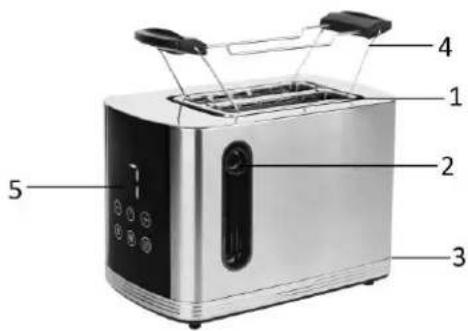
FUNCTIONAL CHARACTERISTICS
- Toast aperture
- Toasting lever
- Crumb collector
- Bun warmer
- Control panel
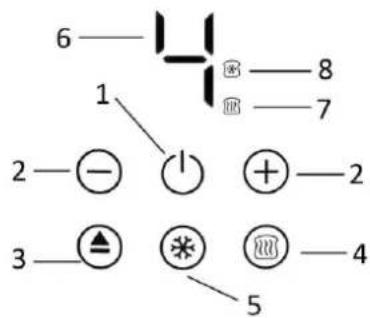
Control panel
1) Standby / cancel button
2) Browning control button +/-
3) Eject button
4) Reheat button
5) Defrost button
6) Browning degree
7) Reheat icon
8) Defrost icon
INSTRUCTIONS FOR USE
Before initial use:
- Before using the toaster for the first time, clean your toaster (see Chapter "CLEANING AND MAINTENANCE"). Operate the toaster at least twice without bread and on the highest setting. Ventilate the room during this period.
- This appliance may emit a characteristic smell when you switch it on for the first time. This is normal, and no harm.
• Make sure the crumb collector is completely positioned in place before using.
Use:
- Insert the power plug and cable into the socket and the appliance is in standby mode.
- Insert up to two slices of bread in the browning slot.
-
Press the standby/cancel button, the browning degree 4 will be on the display. You can press the browning control button + / - to select your desired degree of browning between 1 and 7 (1 = lightest; 7 = darkest degree of browning). No. 4 is recommended for first use. The degree of browning chosen depends on the type of bread and individual taste.
-
Press the toasting lever down until it engages. The toasting process starts automatically.
- Please remember that the toasting lever will not engage if the power plug is not inserted in the socket and the toaster is not switched on.
- The toaster switches itself off automatically and the toasted bread is ejected when the desired degree of browning has been reached. The eject button or the standby / cancel button can always be used to cancel the browning process.
Reheat function:
Insert toasts into the appliance. Press the standby/cancel button, and than press the reheat button. The reheat icon will illuminate.
Press the toasting lever down until it engages. The appliance starts automatically.
Note: No need to adjust the browning degree for this function. The heating time is about 30 seconds.
Defrost function:
Press the defrost button to prolong the toasting time of frozen bread.
Insert toasts into the appliance. Press the standby/cancel button, and then press the defrost button. The defrost icon will illuminate.
Press the button + / - to select your desired degree of browning between 1 and 7.
Press the toasting lever down until it engages. The appliance starts automatically.
Note:
1) Take care when removing bread as the bread and the top of the toaster will still be hot.
2) Do not place any rolls etc. directly on the toast aperture but place them on the bun warmer.
3) Make sure if toasting on the bun warmer, do not insert bread into the toast aperture. A fire may occur.
4) Wait 30 seconds between two toast cycles to get the same degree of browning.
5) If you want to adjust the setting after pressing down the toasting lever, you can adjust it within 10 seconds of starting.
6) The bun warmer is foldable. When the bun warmer is needed, rotate the rack outward and put it on the toaster. If the bun warmer is not needed, fold up the rack and deposit.
7) The display will be off if no operation for about 5 minutes. Press any button to activate it.
CLEANING AND MAINTENANCE
- Before cleaning, make sure that you have removed the power plug from the socket. Let the toaster cool down first.
- Pull the crumbs collector out to clean it up, reset it before using the appliance again.
- Clean the outside of the toaster with a slightly damp cloth and wipe dry with a soft cloth. Never dip the toaster in water to clean it!
- To clean the inside, turn it upside down and shake it over the sink until any crumbs adhering to the inside fall out. Clean the crumb collector regularly to avoid crumbs accumulating inside.
TECHNICAL DATA
Operating voltage: 220-240V \~ 50-60Hz
Power: 800W
GUARANTEE AND CUSTOMER SERVICE
Before delivery our devices are subjected to rigorous quality control. If, despite all care, damage has occurred during production or transportation, please return the device to your dealer.
For the purchased device we provide 2 years guarantee, commencing from the day of sale. If you have a defective product, you can directly go back to the point of purchase.
Defects which arise due to improper handling of the device and malfunctions due to interventions and repairs by third parties or the fitting of non-original parts are not covered by this guarantee. Always keep your receipt, without the receipt you can't claim any form of warranty. Damage caused by not following the instruction manual, will lead to a void of warranty, if this results in consequential damages then we will not be liable. Neither can we hold responsible for material damage or personal injury caused by improper use if the instruction manual is not properly executed. Damage to accessories does not mean free replacement of the whole appliance. In such case please contact our service department. Broken glass or breakage of plastic parts is always subject to a charge. Defects to consumables or parts subjected to wearing, as well as cleaning, maintenance or the replacement of said parts are not covered by the warranty and are to be paid.
The crossed out wheelie bin symbol means that this product shall not be disposed of with normal household waste. Electronic and Electrical Equipment not included in the selective sorting process are potentially dangerous for the environment and human health due to the presence of hazardous substances. Please dispose of responsibly at an approved waste or recycling facility.
Emerio B.V.
Oudeweg 115
2031 CC Haarlem
The Netherlands
Customer service:
T: +31 (0) 23 3034369
www.emerio.eu/service
Kundeninformation:
T: +49 (0) 3222 1097 600
www.emerio.eu/service
Klantenservice:
T: +31 (0) 23 3034369
www.emerio.eu/service
Looking for spare parts? Have a look at https://spareparts.emerio.eu
CUSTOMER SERVICE
SPARE PARTS
Looking for spare parts? Have a look at https://spareparts.emerio.eu
KUNDENDIENST
ERSATZTEILE
- Attention, surface chaude.
Looking for spare parts? Have a look at https://spareparts.emerio.eu
SERVICE CLIENT
PIÈCES DÉTACHÉES
Bruksanvisning – Swedish
SÄKERHETSANVISNINGAR
Looking for spare parts? Have a look at https://spareparts.emerio.eu
KUNDTJÄNST
RESERVDELAR
Looking for spare parts? Have a look at https://spareparts.emerio.eu
KLANTENSERVICE
RESERVEONDERDELEN
INSTRUKCJE DOTYCZĄCE BEZPIECZEŃSTWA
Looking for spare parts? Have a look at https://spareparts.emerio.eu
OBSŁUGA KLIENTA
CZEŚCI ZAMIENNE
Manual de Instrucciones – Spanish
Looking for spare parts? Have a look at https://spareparts.emerio.eu
PIEZAS DE RECAMBIO

- Content – Inhalt – Teneur – Innehåll – Inhoud – Treść – Contenido
- Instruction manual – English
- SAFETY INSTRUCTIONS
- FUNCTIONAL CHARACTERISTICS
- Control panel
- INSTRUCTIONS FOR USE
- Before initial use:
- Use:
- Reheat function:
- Defrost function:
- Note:
- CLEANING AND MAINTENANCE
- TECHNICAL DATA
- GUARANTEE AND CUSTOMER SERVICE
- Bruksanvisning – Swedish
- SÄKERHETSANVISNINGAR
- INSTRUKCJE DOTYCZĄCE BEZPIECZEŃSTWA
- Manual de Instrucciones – Spanish
Brand : Emerio
Model : TO-128308
Category : Toaster