
323000 - Television LG - Free user manual and instructions
Find the device manual for free 323000 LG in PDF.



| Product Type | LCD Television |
| Brand | LG |
| Model | 323000 (series 19/22/26/32/37/42/47/52LG30, 32/37/42/47/52LG50, 19/22LS4D) |
| Weight (with stand, depending on model) | From 5.1 kg to 29.2 kg |
| Weight (without stand, depending on model) | From 4.6 kg to 24.6 kg |
| Power supply | Alternating current (AC) – voltage as indicated in specifications |
| Remote control | Yes, with AAA batteries (2 x 1.5 V) |
| Video inputs | HDMI, SCART (AV1/AV2), Component, S-Video, RGB (PC) |
| Audio inputs | Audio RGB/DVI, SCART, External audio |
| Digital audio output | Optical (except models 19/22LS4D) |
| Headphone jack | Yes (except models 19/22LS4D) |
| Connectivity | RF antenna, RS-232C, PCMCIA (depending on country) |
| Safety features | Mandatory grounding, circuit breaker recommended, anti-fall wall mounting |
| Screen cleaning | Soft cloth slightly dampened (warm water + fabric softener), wring out then wipe gently |
| Chassis cleaning | Soft, dry, lint-free cloth |
| Installation | Stand provided or wall mount (minimum 10 cm clearance around) |
| OSD menu languages | French, English, German, Spanish, etc. (depending on version) |
| Full user manual | On CD-ROM (PDF format) |
Frequently Asked Questions - 323000 LG
User questions about 323000 LG
0 question about this device. Answer the ones you know or ask your own.
Ask a new question about this device
Download the instructions for your Television in PDF format for free! Find your manual 323000 - LG and take your electronic device back in hand. On this page are published all the documents necessary for the use of your device. 323000 by LG.
USER MANUAL 323000 LG
| User's Guide Specification | Nam dng | KIM JO 08.01.24 | |||||
| CHOI MJ 08.01.24 | |||||||
| 1. Model Description | Part No. | MFL34441622 (0802-REV02) | |||||
| MODEL | 19/22LS4D-ZC, 19/22/26/32/37/42LG3000-ZA, 32/37/42/47/52LG5000-ZA | BRAND | LG | ||||
| SUFFIX | EU | Product Name | 19/22LS4D*, 19/22/26/32/37/42LG 30**, 32/37/42/47/52LG50** | ||||
| 2. Printing Specification | |||||||
| NOTES | 1. Trim Size (Format): 185 mm x 260 mm 2. Printing Colors: 1 Color (BLACK) 3. Stock (Paper) - Cover: Coated paper, S/W 150 g/m² - Inside: Uncoated paper, 彻底呈白 60 g/m² 4. Printing Method: Off-set 5. Bindery: Perfect bind 6. Language: EN/GE/FR/IT/SP/PO/NE/GR/HU/PL/CZ/SK/RO/BU/SW/NO/ DA/FI/ES/LI/LA/SV (22) 7. Number of pages: 400 pages | ||||||
| “This part contain Eco-hazardous substances (Pb, Cd, Hg, Cr6+, PBB, PBDE, etc.) within LG standard level, Details should be followed Eco-SCM management standard[LG(56)-A-2524]. Especially, Part should be followed and controlled the following specification. (1)Eco-hazardous substances test report should be submitted when Part certification test and First Mass Production. (2)Especially, Don't use or contain lead(Pb) and cadmium(Cd) in ink. | |||||||
| 3. Special Instructions | |||||||
| (1) Origin Notification * LGEIN: Printed in Indonesia * LGEWA: Printed in U.K. * LGEMA: Printed in Poland * LGESP: Printed in Brazil * LGEMX: Printed in Mexico * LGEND: Printed in China * LGEIL: Printed in India * Other Oversea Factories: NON | |||||||
| 3. Changes | |||||||
| 10 | |||||||
| 9 | |||||||
| 8 | |||||||
| 7 | |||||||
| 6 | |||||||
| 5 | |||||||
| 4 | |||||||
| 3 | |||||||
| 2 | 02/28/08 | CHOI MJ | S8-11537 | Added a sentence to the cover for Italian. | |||
| 1 | 02/15/08 | CHOI MJ | S8-09755 | Amended a sentence for In-Store mode. | |||
| REV. NO. | MM/DD/YY | SIGNATURE | CHANGE NO. | CHANGE CONTENTS | |||
Pagination sheet
| Front Cover (EN) P/NO. | 2 | 3 | 4 | ... | 19 | UK Only | |
| Front Cover (GE) | 2 | 3 | 4 | ... | 16 | 17 | Back Cover (GE) |
| Front Cover (FR) | 2 | 3 | 4 | ... | 16 | 17 | Back Cover (FR) |
| Front Cover (IT) | 2 | 3 | 4 | ... | ... | 19 | Back Cover (IT) |
| Front Cover (SP) | 2 | 3 | 4 | ... | 16 | 17 | Back Cover (SP) |
| Front Cover (PO) | 2 | 3 | 4 | ... | 16 | 17 | Back Cover (PO) |
| Front Cover (NE) | 2 | 3 | 4 | ... | 16 | 17 | Back Cover (NE) |
| Front Cover (GR) | 2 | 3 | 4 | ... | 16 | 17 | Back Cover (GR) |
| Front Cover (HU) | 2 | 3 | 4 | ... | 16 | 17 | Back Cover (HU) |
| Front Cover (PL) | 2 | 3 | 4 | ... | 16 | 17 | Back Cover (PL) |
Pagination sheet
| Front Cover (CZ) | 2 | 3 | 4 | ... | 16 | 17 | Back Cover (CZ) |
| Front Cover (SK) | 2 | 3 | 4 | ... | 16 | 17 | Back Cover (SK) |
| Front Cover (RO) | 2 | 3 | 4 | ... | 16 | 17 | Back Cover (RO) |
| Front Cover (BU) | 2 | 3 | 4 | ... | 16 | 17 | Back Cover (BU) |
| Front Cover (SW) | 2 | 3 | 4 | ... | 16 | 17 | Back Cover (SW) |
| Front Cover (NO) | 2 | 3 | 4 | ... | 16 | 17 | Back Cover (NO) |
| Front Cover (DA) | 2 | 3 | 4 | ... | 16 | 17 | Back Cover (DA) |
| Front Cover (FI) | 2 | 3 | 4 | ... | 16 | 17 | Back Cover (FI) |
| Front Cover (ES) | 2 | 3 | 4 | ... | 16 | 17 | Back Cover (ES) |
| Front Cover (lith) | 2 | 3 | 4 | ... | 16 | 17 | Back Cover (lith) |
Pagination sheet
| Front Cover (Lat) | 2 | 3 | 4 | ... | 16 | 17 | Back Cover (Lat) |
| Front Cover (SV) | 2 | 3 | 4 | ... | 16 | 17 | Back Cover (SV) |
LCD TV OWNER'S MANUAL
LCD TV MODELS
19LS4D 42LG30*
22LS4D 32LG50*
19LG30 37LG50
22LG30 42LG50
26LG30 47LG50
32LG30 52LG50
37LG30**

ENERGY STAR

Digital Video Broadcasting
Trade Mark of the DVB Digital Video Broadcasting Project (1991 to 1996)
ID Number(s): 5018:22LS4D-ZC
5088:19LG3000-ZA
5080:26LG3000-ZA
5087:37LG3000-ZA
5085:32LG5000-ZA
5083:42LG5000-ZA
5081:52LG5000-ZA
5386:47LG5010-ZD
5388: 37LG5010-ZD
5390: 52LG5020-ZB
5392:42LG5020-ZB
5394: 32LG5020-ZB
5396:47LG5030-ZE
5398: 37LG5030-ZE
5019: 19LS4D-ZC
5090:22LG3000-ZA
5089:32LG3000-ZA
5086:42LG3000-ZA
5084:37LG5000-ZA
5082:47LG5000-ZA
5385: 52LG5010-ZD
5387:42LG5010-ZD
5389: 32LG5010-ZD
5391:47LG5020-ZB
5393: 37LG5020-ZB
5395: 52LG5030-ZE
5397:42LG5030-ZE
5399:32LG5030-ZE
Please read this manual carefully before operating your TV.
Retain it for future reference.
Record model number and serial number of the TV. Refer to the label on the back cover and quote this information.
To your dealer when requiring service.
Extended Owner's Manual that contains advanced features of these LG TV-sets is located on CD-ROM in electronic version.
To read it You need to open chosen files by using
Personal Computer (PC) equipped with CD-ROM drive.
P/NO: MFL34441622 (0802-REV02)
Printed in Korea
CONNECTING YOUR UNIT
Image shown may differ from your TV.
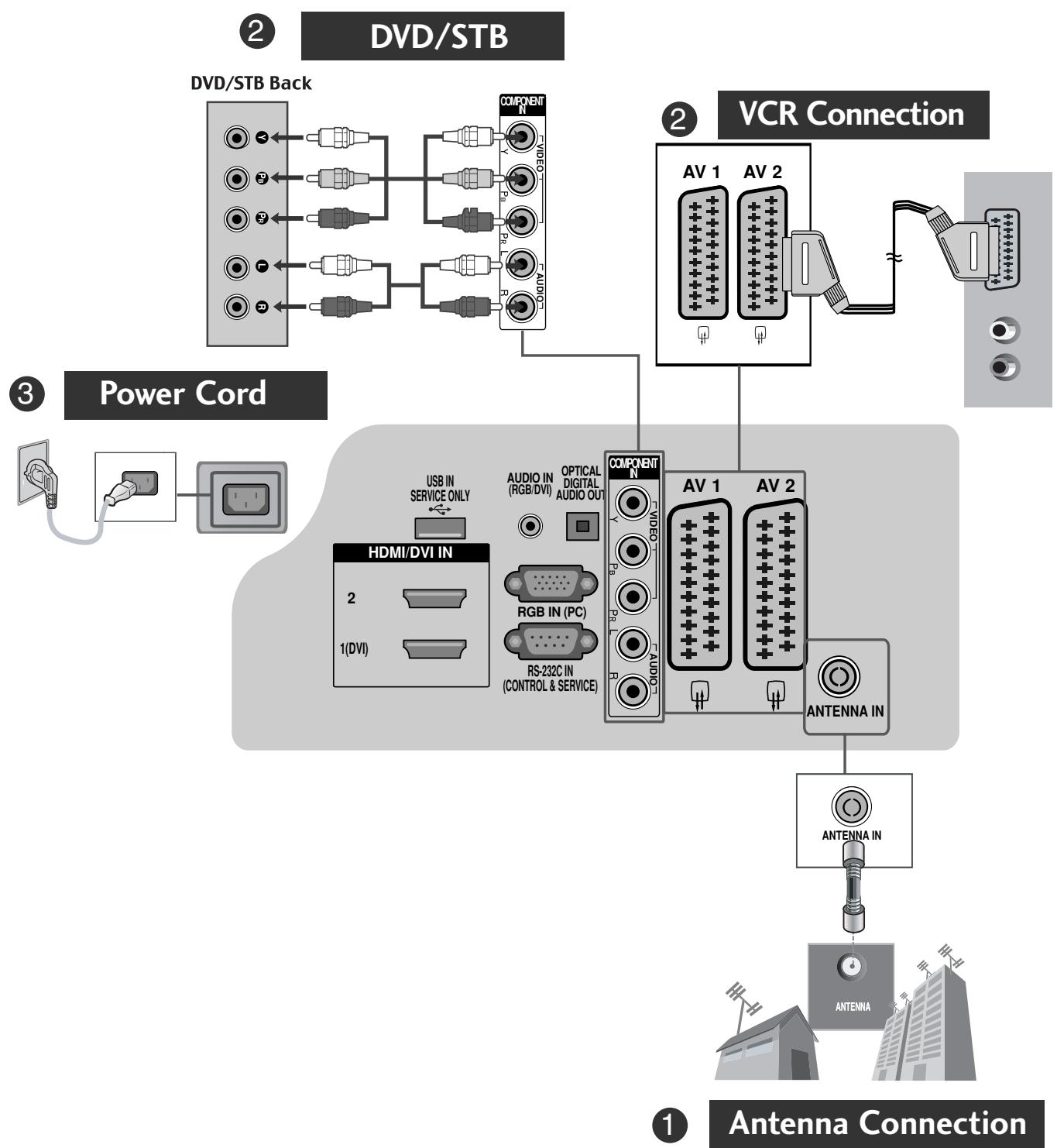
- To connect an additional equipment, see the External equipment Setup section in CD Manual.
Image shown may differ from your TV.
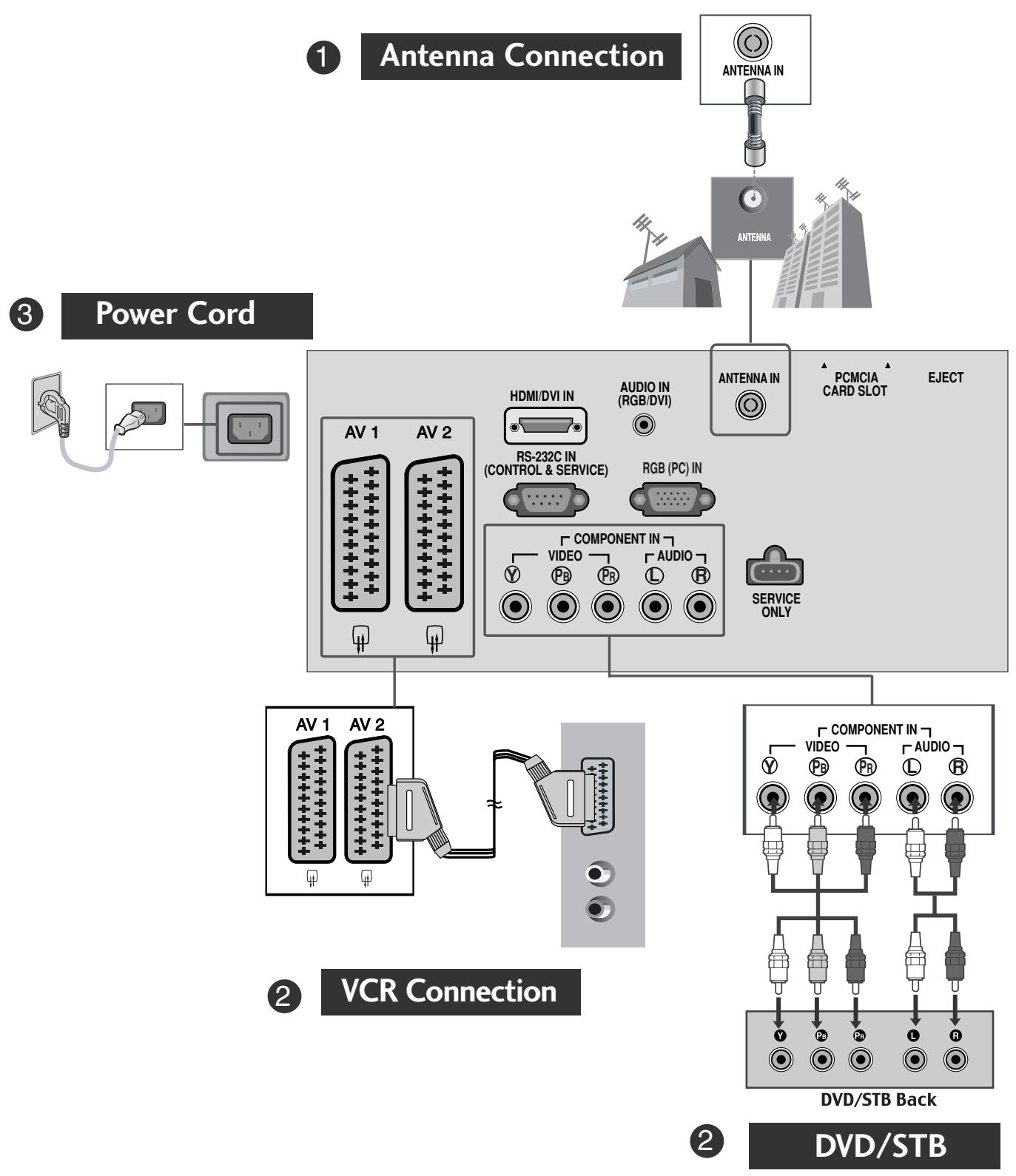
- To connect an additional equipment, see the External equipment Setup section in CD Manual.
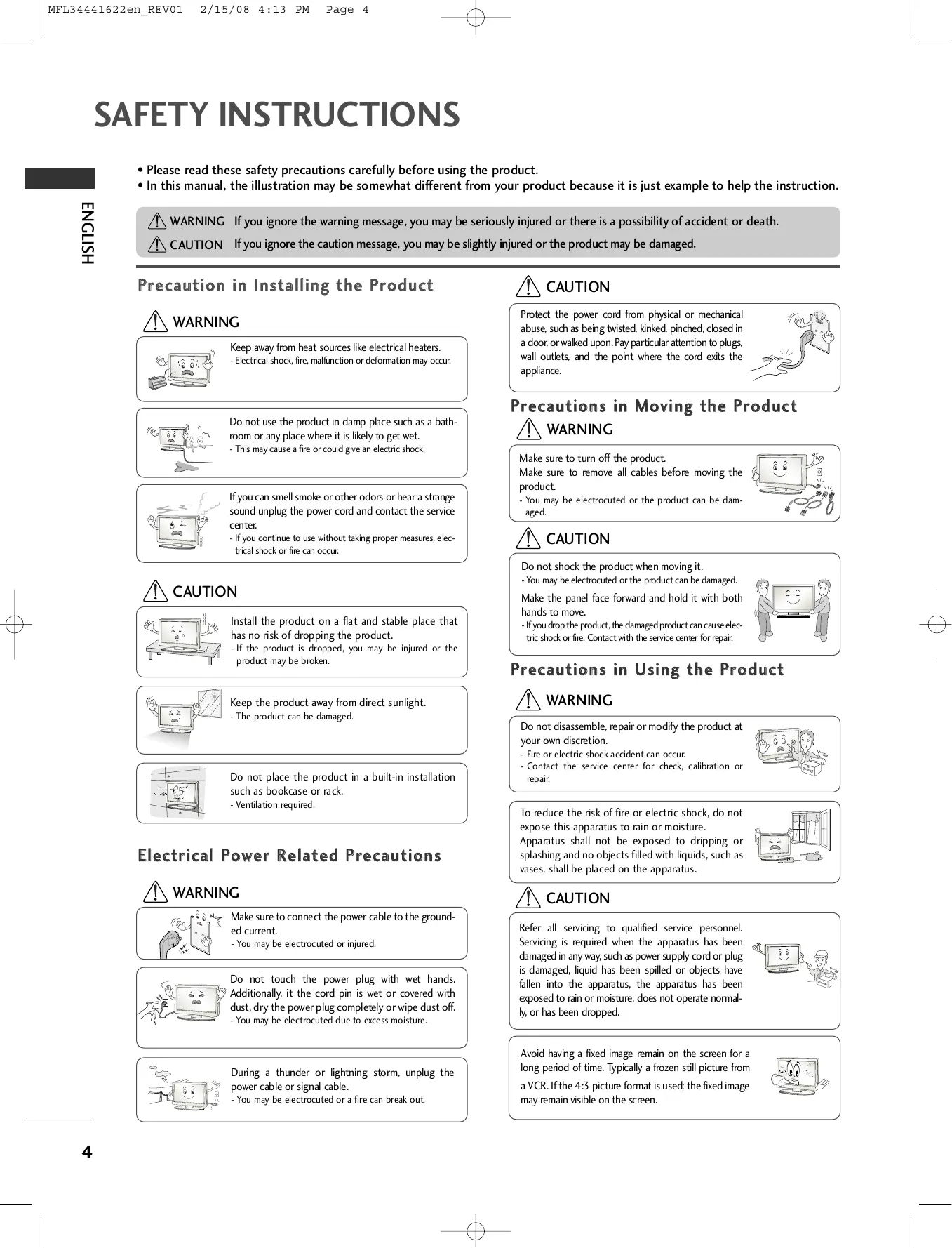
SAFETY INSTRUCTIONS
- Please read these safety precautions carefully before using the product.
- In this manual, the illustration may be somewhat different from your product because it is just example to help the instruction.
WARNING If you ignore the warning message, you may be seriously injured or there is a possibility of accident or death.
CAUTION If you ignore the caution message, you may be slightly injured or the product may be damaged.
Precaution in Installing the Product
WARNING

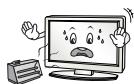
Keep away from heat sources like electrical heaters.
- Electrical shock, fire, malfunction or deformation may occur.

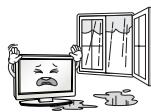
Do not use the product in damp place such as a bathroom or any place where it is likely to get wet.
- This may cause a fire or could give an electric shock.
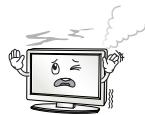
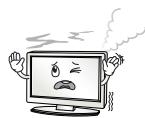
If you can smell smoke or other odors or hear a strange sound unplug the power cord and contact the service center.
- If you continue to use without taking proper measures, electrical shock or fire can occur.
CAUTION
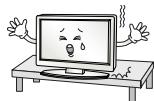
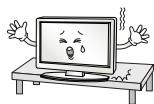
Install the product on a flat and stable place that has no risk of dropping the product.
- If the product is dropped, you may be injured or the product may be broken.

Keep the product away from direct sunlight.
- The product can be damaged.

Do not place the product in a built-in installation such as bookcase or rack.
- Ventilation required.
Electrical Power Related Precautions
WARNING
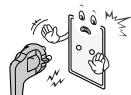
Make sure to connect the power cable to the grounded current.
- You may be electrocuted or injured.

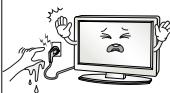
Do not touch the power plug with wet hands. Additionally, it the cord pin is wet or covered with dust, dry the power plug completely or wipe dust off.
- You may be electrocuted due to excess moisture.

During a thunder or lightning storm, unplug the power cable or signal cable.
- You may be electrocuted or a fire can break out.
CAUTION
Protect the power cord from physical or mechanical abuse, such as being twisted, kinked, pinched, closed in a door, or walked upon. Pay particular attention to plugs, wall outlets, and the point where the cord exits the appliance.

Precautions in Moving the Product
WARNING
Make sure to turn off the product.
Make sure to remove all cables before moving the product.
- You may be electrocuted or the product can be damaged.

CAUTION
Do not shock the product when moving it.
- You may be electrocuted or the product can be damaged.
Make the panel face forward and hold it with both hands to move. - If you drop the product, the damaged product can cause electric shock or fire. Contact with the service center for repair.

Precautions in Using the Product
WARNING
Do not disassemble, repair or modify the product at your own discretion.
- Fire or electric shock accident can occur.
- Contact the service center for check, calibration or repair.

To reduce the risk of fire or electric shock, do not expose this apparatus to rain or moisture.
Apparatus shall not be exposed to dripping or splashing and no objects filled with liquids, such as vases, shall be placed on the apparatus.
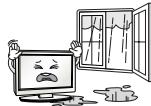
CAUTION
Refer all servicing to qualified service personnel. Servicing is required when the apparatus has been damaged in any way, such as power supply cord or plug is damaged, liquid has been spilled or objects have fallen into the apparatus, the apparatus has been exposed to rain or moisture, does not operate normally, or has been dropped.

Avoid having a fixed image remain on the screen for a long period of time. Typically a frozen still picture from a VCR. If the 4:3 picture format is used; the fixed image may remain visible on the screen.

PREPARATION
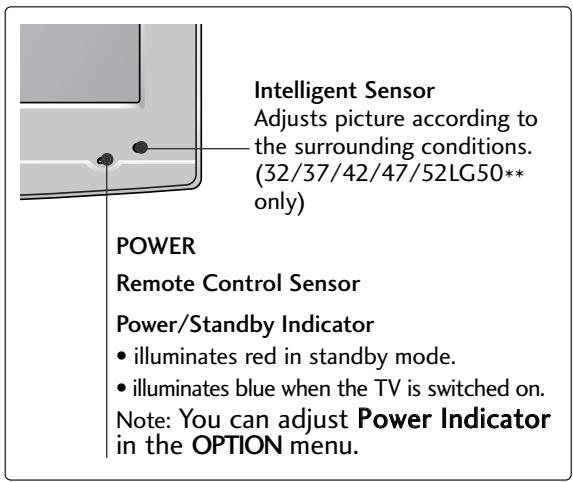
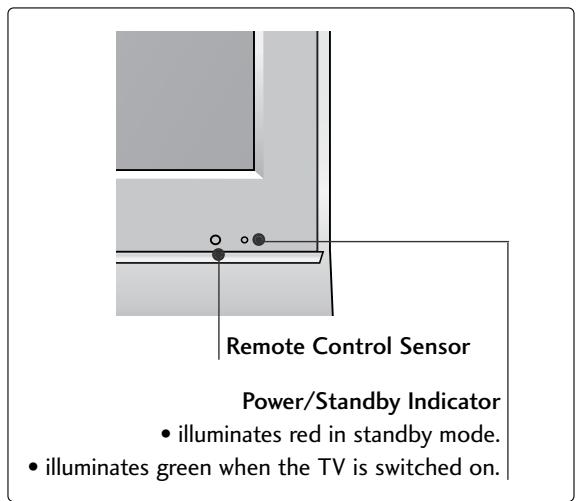
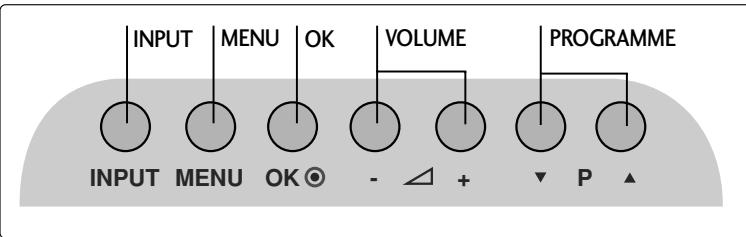
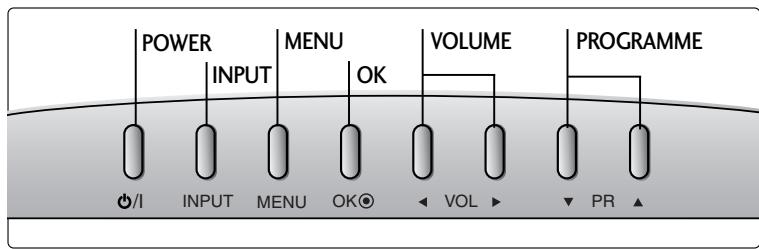
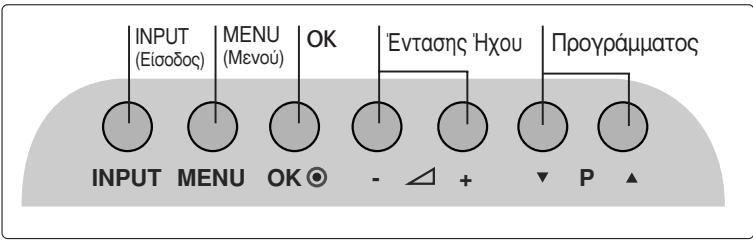
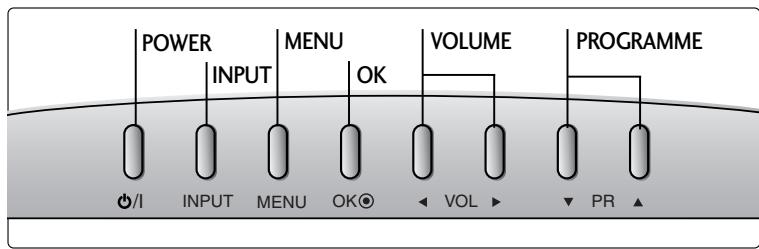
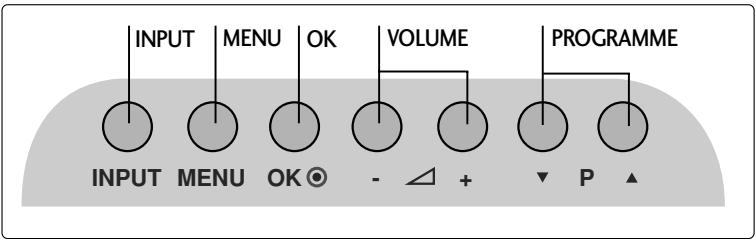
FRONT PANEL CONTROLS
Image shown may differ from your TV.
If your TV has a protection film attached, remove the film and then wipe the TV with a polishing cloth.
LCD TV Models :
26/32/37/42LG30, 32/37/42/47/52LG50

LCD TV Models : 19/22LG30**
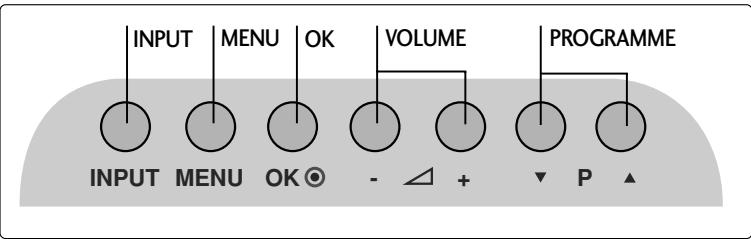
LCD TV Models : 19/22LS4D*

PREPARATION
BACK PANEL INFORMATION
Image shown may differ from your TV.


Power Cord Socket
This TV operates on an AC power. The voltage is indicated on the Specifications page. Never attempt to operate the TV on DC power.
RGB/DVI Audio Input
Connect the audio from a PC or DTV.
3 DIGITAL AUDIO OUT OPTICAL (Except for 19/22LS4D*)
Connect digital audio from various types of equipment.
Note: In standby mode, these ports do not work.
Euro Scart Socket (AV1/AV2)
Connect scart socket input or output from an external device to these jacks.
HDMI Input
Connect a HDMI signal to HDMI IN. Or DVI (VIDEO) signal to HDMI/DVI port with DVI to HDMI cable.
RGB IN (PC)
Connect the output from a PC.
RS-232C IN (CONTROL & SERVICE) PORT
Connect to the RS-232C port on a PC.
Component Input
Connect a component video/audio device to these jacks.
Antenna Input
Connect RF antenna to this jack.
10 PCMCIA (Personal Computer Memory Card International Association) Card Slot
(This feature is not available in all countries.)
Audio/Video Input (Except for 19/22LS4D*)
Connect audio/video output from an external device to these jacks.
S-VIDEO
Connect S-Video out from an S-VIDEO device.
12 Headphone Socket (Except for 19/22LS4D*)
Connect the headphone plug to this socket.
SERVICE ONLY PORT
STAND INSTALLATION
LCD TV Models: 26/32/37LG30, 32/37/42LG50
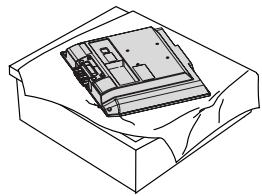
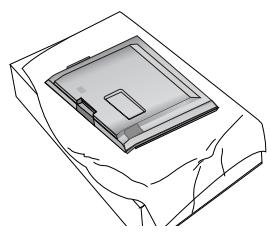
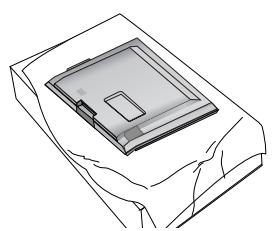
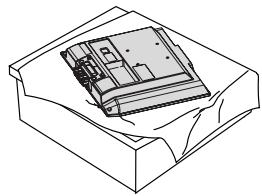
1 Carefully place the TV screen side down on a cushioned surface to protect the screen from damage.

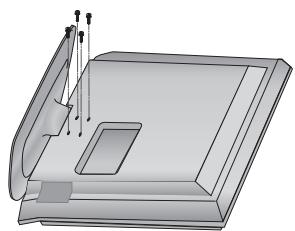
2 Assemble the parts of the Stand Body with the Cover Base of the TV.

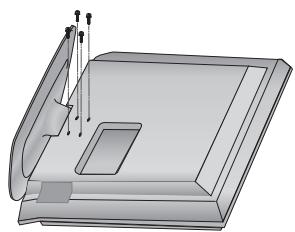
3 Assemble the TV as shown.
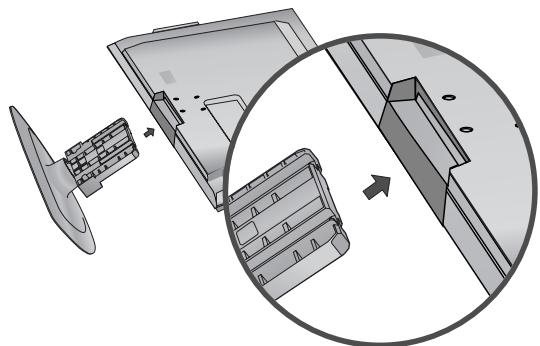
Fix the 4 bolts securely using the holes in the back of the TV.

STAND INSTALLATION (LCD TV Models: 19/22LG30**)


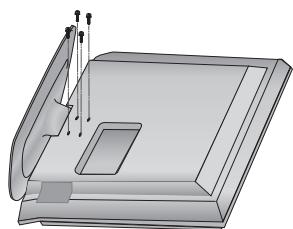
1 Carefully place the TV screen side down on a cushioned surface to protect the screen from damage.
2 Assemble the TV as shown.
Fix the 4 bolts securely using the holes in the back of the TV.
PREPARATION
HSITON3
STAND INSTALLATION
(Only 19/22LS4D*)
Image shown may differ from your TV.
Carefully place the TV screen side down on a cushioned surface to protect the screen from damage.

Hold the Hinge Body and bend it upward.

Hinge Body
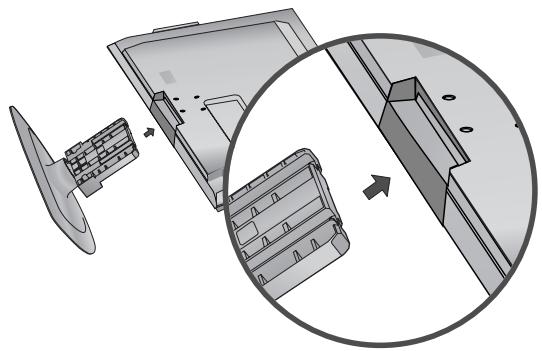
3 Insert the Stand Body into the TV until clicking sound.
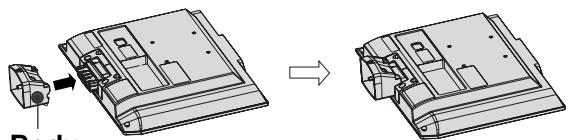
Stand Body
4 Assemble the parts of the Stand Body with the Cover Base of the TV.

DETACHING STAND
(Only 19/22LS4D*)
1 Place the tv with its front facing downward on a cushion or soft cloth.

Pull the Cover Base backward during pressing a button on the Stand Body.
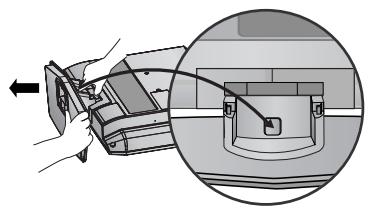
Hold the Cover Base and pull with shake it backward to separate from the Stand Body.

Hold the Stand Body and bend it upward.
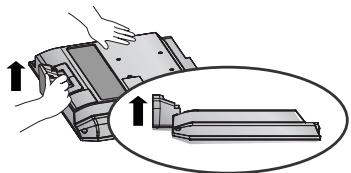
Pull stand body to separate from the TV during pressing 2 latches.

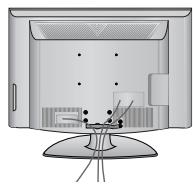
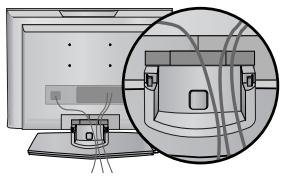
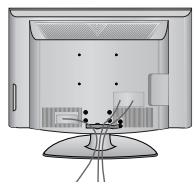
BACK COVER FOR WIRE ARRANGEMENT
LCD TV Models:
19/22/26/32/37/42LG30**
32/37/42/47/52LG50**

Connect the cables as necessary.
To connect additional equipment, see the External
Equipment Setup section of the manual.


Open the CABLE MANAGEMENT CLIP as shown and manage the cables.


Fit the CABLE MANAGEMENT CLIP as shown.

LCD TV Models : 19/22LS4D*

Connect the cables as necessary.
To connect additional equipment, see the External Equipment Setup section.


Install the CABLE MANAGEMENT CLIP as shown.
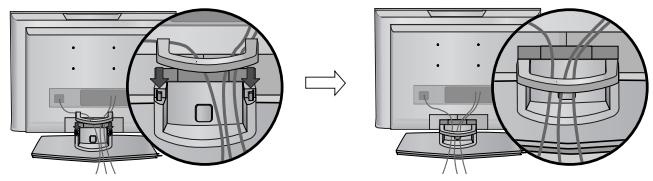
How to remove the cable management clip (LCD TV Models : 19/22LS4D*)
First, press the cable management. Hold the CABLE MANAGEMENT CLIP with both hands and pull it upward.


NOTE
Do not use the CABLE MANAGEMENT CLIP to lift the TV.
- If the TV is dropped, you may be injured or the TV may be damaged.
PREPARATION
PLEASE SET IT UP CAREFULLY SO THE PRODUCT DOES NOT FALL OVER.
- You should purchase necessary components to fix the TV to the wall on the market.
Position the TV close to the wall to avoid the possibility of it falling when pushed. - The instructions shown below are a safer way to set up the TV, which is to fix it to the wall, avoiding the possibility of it falling forwards if pulled. This will prevent the TV from falling forward and causing injury. This will also prevent the TV from damage. Ensure that children do not climb or hang from the TV.


Use the eye-bolts or TV brackets/bolts to fix the TV to the wall as shown in the picture. (If your TV has bolts in the eyebolts, loosen these bolts.)
* Insert the eye-bolts or TV brackets/bolts and tighten them securely in the upper holes.
Secure the wall brackets with the bolts on the wall. Match the height of the bracket that is mounted on the wall.

3 Use a sturdy rope to tie the TV. It is safer to tie the rope so it becomes horizontal between the wall and the TV.
NOTE
When moving the TV undo the cords first.
▶ Use a platform or cabinet strong and large enough to support the size and weight of the TV.
To use the TV safely make sure that the height of the bracket on the wall and on the TV is the same.
The TV can be installed in various ways such as on a wall, or on a desktop etc.
The TV is designed to be mounted horizontally.
EARTHING
Ensure that you connect the earth wire to prevent possible electric shock. If grounding methods are not possible, have a qualified electrician install a separate circuit breaker.
Do not try to earth the TV by connecting it to telephone wires, lightening rods or gas pipes.

DESKTOP PEDESTAL INSTALLATION
For adequate ventilation allow a clearance of 4^ (10cm) all around the TV.

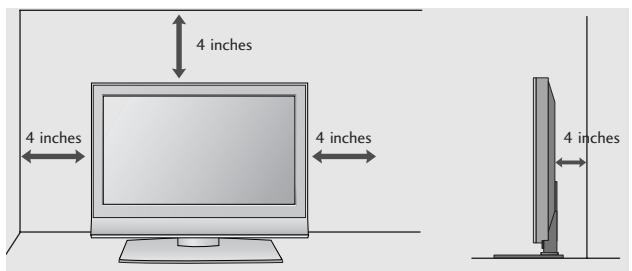
Attaching the TV to a desk (Only 26/32LG30**, 32LG50**)
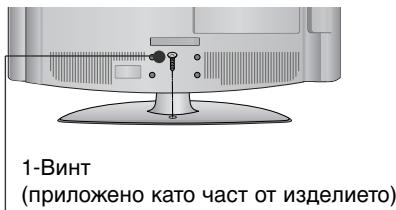
The TV must be attached to desk so it cannot be pulled in a forward/backward direction, potentially causing injury or damaging the product. Use only an attached screw.

1-Screw
(provided as parts of the product)

Desk
WARNING
To prevent TV from falling over, the TV should be securely attached to the floor/wall per installation instructions. Tipping, shaking, or rocking the machine may cause injury.
WALL MOUNT: HORIZONTAL INSTALLATION
For adequate ventilation allow a clearance of 4" (10cm) all around the TV. Detailed installation instructions are available from your dealer, see the optional Tilt Wall Mounting Bracket Installation and Setup Guide.

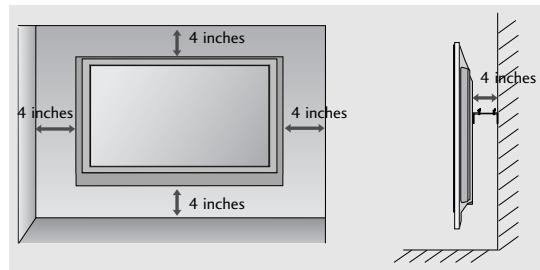
Not using the desk-type stand
(Except for 19/22LS4D*)
When installing the wall-mounted unit, use the protection cover for desk-type stand installation. Insert the PROTECTION COVER into the TV until clicking sound.

PREPARATION
- To prevent damage do not connect to the mains outlet until all connections are made between the devices.
ANTENNA CONNECTION
For optimum picture quality, adjust antenna direction.
An antenna cable and converter are not supplied.

Take care not to bend the bronze wire when connecting to an antenna port.

In poor signal areas, to achieve better picture quality it may be necessary to install a signal amplifier to the antenna as shown above.
If signal needs to be split for two TVs, use an antenna signal splitter for connection.
WATCHING TV /PROGRAMME CONTROL
REMOTE CONTROL KEY FUNCTIONS
When using the remote control, aim it at the remote control sensor on the TV.

or

1 MODE
Selects the remote operating modes.
Q.MENU
Select the desired quick menu source.
3 MENU
Selects a menu.
Cleared all on-screen displays and returns to TV viewing from any menu.
VOLUME UP /DOWN
Adjusts the volume.
5 POWER
Switches the TV on from standby or off to standby.
6 INPUT
External input mode rotate in regular sequence.
Switches the TV on from standby.
GUIDE
Shows programme schedule.
THUMBSTICK(Up/Down/LeftRight)
Allows you to navigate the on-screen menus and adjust the system settings to your preference.
OK
Accepts your selection or displays the current mode.
9 Programme UP/DOWN
Selects a programme.
10 Q.VIEW
Returns to the previously viewed programme.
Installing Batteries

- Open the battery compartment cover on the back and install the batteries matching correct polarity (+with +,-with -).
Install two 1.5V AAA batteries. Do not mix old or used batteries with new ones.
Close cover.
WATCHING TV /PROGRAMME CONTROL
TURNOING ON THE TV
- When your TV is turned on, you will be able to use its features.

Firstly, connect the power cord correctly.
At this stage, the TV switches to standby mode.

In standby mode to turn TV on, press the 12 / I, INPUT or P (or PR ▲▼) button on the TV or press the POWER, INPUT, D/A, P (or PR + -) or NUMBER button on the remote control and the TV will switch on.
Initializing setup
If the OSD (On Screen Display) is displayed on the screen after turning on the TV, you can adjust the Language, Select Mode, Country, Time Zone, Auto programme tuning.
Note:
a. It will automatically disappear after approx. 40 seconds unless a button is pressed.
b. Press the BACK or RETURN button to change the current OSD to the previous OSD.
c. For those countries without confirmed DTV broadcasting standards, some DTV features might not work, depending on the DTV broadcasting environment.
d. "Home" mode is the optimal setting for home environments, and is the TV's default mode.
e. "In Store" mode is the optimal setting for store environments. "If a user modifies image quality data, "In Store" mode initializes the product to the image quality set by us after a certain period of time.
f. The mode (Home, In Store) can be changed by executing Factory Reset in the OPTION menu.
ON-SCREEN MENU LANGUAGE / COUNTRY SELECTION
The installation guide menu appears on the TV screen when it is switched on for the first time.
Select your desired language.

Select your country.
- If you want to change Language/ Country selection
Select OPTION.

Select Menu Language or Country.
Select your desired language or country.

Save it.
NOTE
If you do not finish the set-up Installation Guide by pressing EXIT or RETURN or if you time out on the OSD (On Screen Display) the installation menu will continuously appear until the set up is completed whenever the TV is switched on
If you select the wrong local country, teletext may not appear correctly on the screen and some problems may occur during teletext operation.
The CI (Common Interface) function may not be applied based on country broadcasting circumstances.
DTV mode control buttons may not function based on country broadcasting circumstances.
In country that Digital broadcasting regulation isn't fixed, some DTV function may not work depending on digital broadcasting circumstances.
ON SCREEN MENUS SELECTION AND ADJUSTMENT
Your TV's OSD (On Screen Display) may differ slightly from what is shown in this manual.
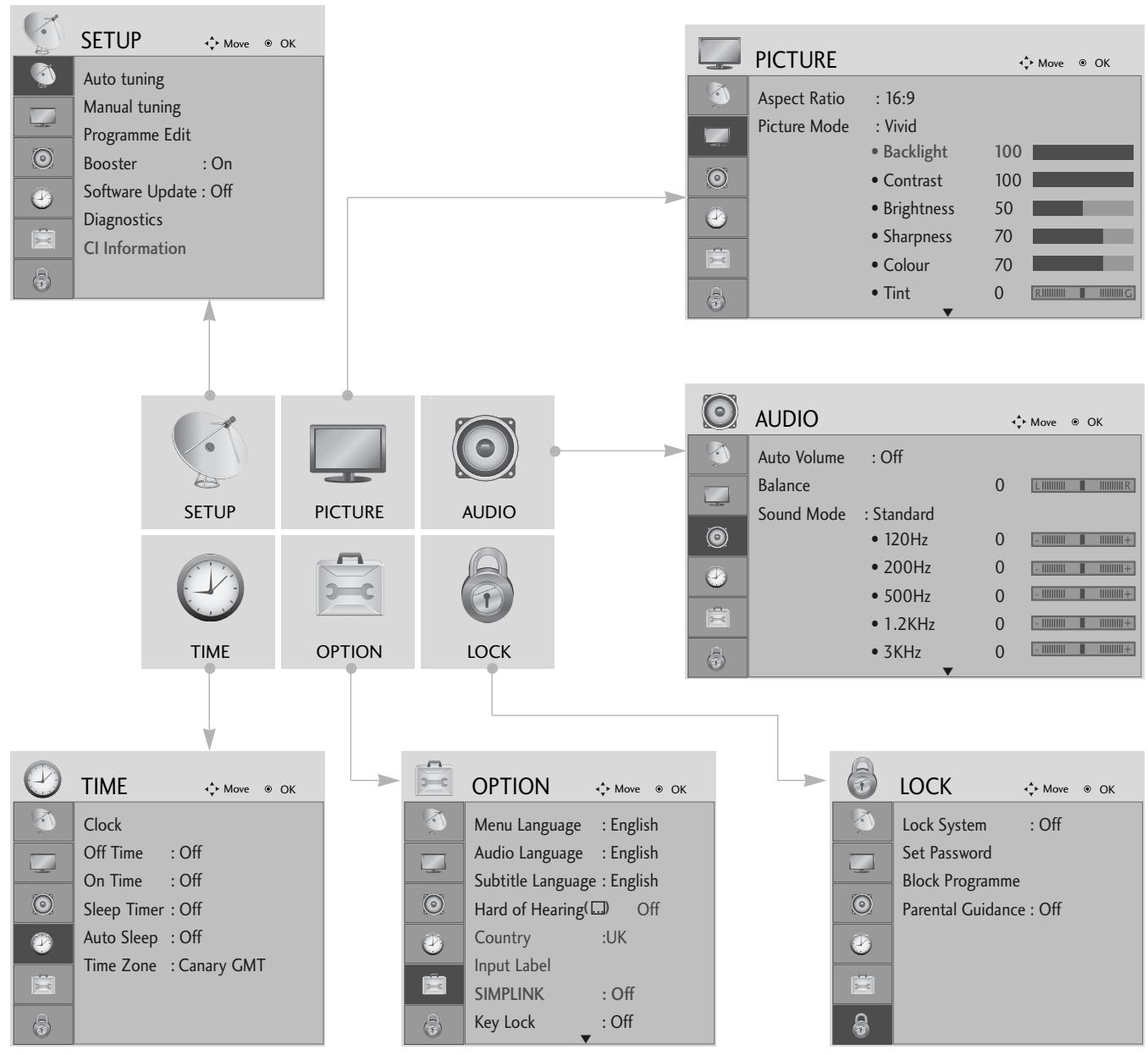

Display each menu.

Select a menu item.
Move to the pop up menu.
- Press the MENU or EXIT button to return to normal TV viewing.
- Press the BACK or RETURN button to move to the previous menu screen.
WATCHING TV /PROGRAMME CONTROL
AUTO PROGRAMME TUNING
Use this to automatically find and store all available programmes.
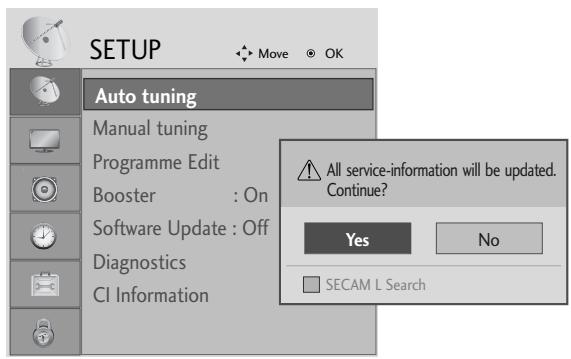
When you start auto programming in digital mode, all previously stored service information will be deleted.


Select SETUP.

Select Auto Tuning.
- Use NUMBER buttons to input a 4-digit password in Lock System 'On'.
- If you wish to keep on auto tuning select YES using the < button. Then, press the OK button. Otherwise select NO.
Select Yes.

Run Auto tuning.
- Press the MENU or EXIT button to return to normal TV viewing.
- Press the BACK or RETURN button to move to the previous menu screen.
APPENDIX
MAINTENANCE
Early malfunctions can be prevented. Careful and regular cleaning can prolong the life of your new TV.
Caution: Be sure to switch the power off and unplug the power cord before you begin any cleaning.
Cleaning the Screen
A good way to keep the dust off your screen for a while is to wet a soft cloth in a mixture of lukewarm water and a little fabric softener or dish washing detergent. Wring the cloth until it is almost dry, and then use it to wipe the screen.
2 Ensure there is no excess water on the screen. Allow any water or dampness to evaporate before switching on.
Cleaning the Cabinet
To remove dirt or dust, wipe the cabinet with a soft, dry, lint-free cloth.
Do not to use a wet cloth.
Extended Absence
CAUTION
If you expect to leave your TV dormant for prolonged periods (such as a holiday), unplug the power cord to protect against possible damage from lightning or power surges.
TO VIEW THE USER'S GUIDE ON THE CD-ROM
To view the User's guide on the CD-ROM, Adobe Acrobat Reader must be installed on your PC. The "ACRORD" folder on the CD-ROM contains the installation program for Acrobat Reader. If you want to install Acrobat Reader, Open "My Computer" Open the folder "LG" Open the folder "ACRORD" double-click your language.
To view the User's guide
The User's guide files are included in the supplied CD-ROM.
Load the supplied CD-ROM into the CD-ROM drive of your PC.
After a while, the web page of the CD-ROM will open automatically.(Windows users only)
If the web page does not appear automatically, open the User's guide file directly.
Open "My computer" Open the folder "LG" Double click the "index.htm" file.
APPENDIX
TROUBLESHOOTING
| The TV does not operate properly. | |
| The remote control does not work | ■Check to see if there is any object between the TV and the remote control causing an obstruction. Ensure you are pointing the remote control directly at the TV.■Ensure that the batteries are installed with correct polarity (+ to +, - to -).■Ensure that the correct remote operating mode is set: TV, STB etc.Install new batteries. |
| Power is suddenly turned off | ■Is the sleep timer set?■Check the power control settings. Has the Power supply been interrupted.Is Auto sleep activated on this station? |
| The video function does not work. | |
| No picture & No sound | ■ Check whether the TV is switched on. ■ Try another channel. The problem may be with the broadcast. ■ Is the power cord inserted correctly into the mains? ■ Check your antenna direction and/or location. ■ Test the mains outlet by plugging another product into the same outlet. |
| Picture appears slowly after switching on | ■ This is normal, the image is muted during the TV startup process. Please contact your service centre, if the picture has not appeared after five minutes. |
| No or poor color or poor picture | ■ Adjust Colour in menu option. ■ Allow a sufficient distance between the product and the VCR. ■ Try another channel. The problem may be with the broadcast. ■ Are the video cables installed properly? ■ Activate any function to restore the brightness of the picture. |
| Horizontal/vertical bars or picture shaking | ■ Check for local interference such as an electrical appliance or power tool. |
| Poor reception on some channels | ■ Station or cable channel experiencing problems, tune to another station. ■ Station signal is weak, reposition the antenna to receive weaker stations. ■ Check for sources of possible interference. |
| Lines or streaks in pictures | ■ Check antenna (Change the position of the antenna). |
| The audio function does not work. | |
| Picture OK & No sound | Press the VOLUME button. Sound muted? Press MUTE button. Try another channel. The problem may be with the broadcast. Are the audio cables installed properly? |
| No output from one of the speakers | Adjust Balance in menu option. |
| Unusual sound from inside the product | A change in ambient humidity or temperature may result in an unusual noise when the product is switched on or off and does not indicate a fault with the product. |
WEIGHT
| MODELS | 19LS4D* | 22LS4D* | 19LG30** | |
| 19LS4D-ZC | 22LS4D-ZC | 19LG3000-ZA | ||
| Weight | with stand | 5.1 kg / 11.3 lbs | 6.1 kg / 13.5 lbs | 5.02 kg / 11.1 lbs |
| without stand | 4.6 kg / 10.2 lbs | 5.7 kg / 12.6 lbs | 4.76 kg / 10.5 lbs | |
| MODELS | 22LG30** | 26LG30** | 32LG30** | |
| 22LG3000-ZA | 26LG3000-ZA | 32LG3000-ZA | ||
| Weight | with stand | 5.6 kg / 12.4 lbs | 10.1 kg / 22.3 lbs | 13.4 kg / 29.6 lbs |
| without stand | 5.34 kg / 11.8 lbs | 8.6 kg / 19.0 lbs | 11.9 kg / 26.3 lbs | |
| MODELS | 37LG30** | 42LG30** | 32LG50** | |
| 37LG3000-ZA | 42LG3000-ZA | 32LG5000-ZA | ||
| 32LG5010-ZD | ||||
| 32LG5020-ZB | ||||
| 32LG5030-ZE | ||||
| Weight | with stand | 18.8 kg / 41.5 lbs | 23.6 kg / 52.1 lbs | 14.1 kg / 31.1 lbs |
| without stand | 16.2 kg / 35.7 lbs | 21.0 kg / 46.3 lbs | 12.6 kg / 27.8 lbs | |
| MODELS | 37LG50** | 42LG50** | 47LG50** | |
| 37LG5000-ZA | 42LG5000-ZA | 47LG5000-ZA | ||
| 37LG5010-ZD | 42LG5010-ZD | 47LG5010-ZD | ||
| 37LG5020-ZB | 42LG5020-ZB | 47LG5020-ZB | ||
| 37LG5030-ZE | 42LG5030-ZE | 47LG5030-ZE | ||
| Weight | with stand | 18.3 kg / 40.4 lbs | 26.2 kg / 57.8 lbs | 29.2 kg / 64.4 lbs |
| without stand | 15.6 kg / 34.4 lbs | 23.5 kg / 51.8 lbs | 24.6 kg / 54.3 lbs | |
The specifications shown above may be changed without prior notice for quality improvement.
(UK only)
Keep this important information about how to re-tune your TV during the digital TV switchover
Keep this leaflet and your instruction manual safe - you'll need them

get set for digital
When does switchover happen?
*Copeland switches on October 17, 2007

Visit us at digitaluk.co.uk call us on 0845 6 50 50 50†
^ Calls charged at BT rate of 3p per minute daytime and 1p per minute evenings and weekends. Rates may vary for calls from non-BT lines.
Television in the UK is going digital, bringing us all more choice and new services. Starting in late 2007 and ending in 2012, television services in the UK will go completely digital, TV region by TV region.
Please see overleaf to find out when your area switches to digital.
Digital UK is the independent, non-profit organisation leading the process of digital TV switchover in the UK. Digital UK provides impartial information on what people need to do to prepare for the move to digital, and when they need to do it.
How the switchover affects your TV equipment:
Your new TV has a digital tuner built in, which means it is ready to receive the Freeview signal by simply plugging it into your aerial socket (check if you can get digital TV through your aerial now, or whether you'll have to wait until switchover, at www.digitaluk.co.uk).
When the TV switchover happens in your area, there are at least two occasions when you will need to re-tune your TV in order to continue receiving your existing TV channels, and also to pick up new ones. Digital UK, the body leading the digital TV switchover, will advise you when you need to re-tune during the switchover.
If you choose to connect your TV to satellite or cable with a digital box then it will not be affected by switchover, and you won't need to re-tune.
How to re-tune:
To find out how to re-tune your TV, check your manufacturer's instructions for details. Or see below for a typical sequence:
-
With your TV in digital TV mode, press 'Menu' on your remote control. (Some TVs will ask you for a code. If you have not already changed it, the default code is usually 0000, or check your instruction book.)
-
From the Menu options on screen, select 'SETUP'. Select 'Auto Tuning* to re-tune your digital TV (not 'add channels'). You may have to wait a couple of minutes for the re-tune to complete.
*Also sometimes referred to as 'Update', 'Rescan', 'Replace', 'Auto-Tuning', 'Channel Search', 'First Time Install', or 'Store Channels'.
- If you do not re-tune your channels when advised to do so by Digital UK, you may lose some or all of your channels until you do re-tune. You should re-tune your TV every few months to check for any new channels.
If you are missing any channels, it may be that they are not available in your area, or that your aerial needs upgrading.
If you have any questions, please contact your equipment supplier or call Digital UK on 0845 6 50 50 50 or visit www.digitaluk.co.uk
26/32/37/42LG30, 32/37/42/47/52LG50

LCD TV-MODELLE : 19/22LG30**


LCD TV-MODELLE : 19/22LS4D*
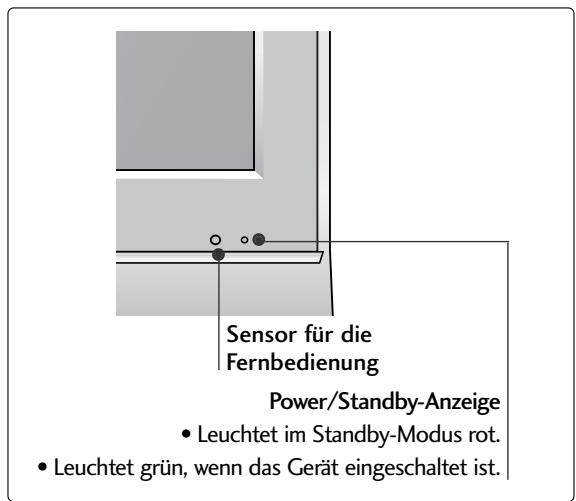
VORBEREITUNG
(LCD TV-MODELLE: 26/32/37LG30, 32/37/42LG50)

19/22/26/32/37/42LG30**
32/37/42/47/52LG50**

LCD TV-MODELLE : 19/22LS4D*

(MODES DE TV LCD: 26/32/37LG30, 32/37/42LG50)
INSTALLATION DU SOCLE (MODELES DE TV LCD: 19/22LG30**)


(Seulement 19/22LS4D*)
(Seulement 19/22LS4D*)

MODELES DE TV LCD: 19/22/26/32/37/42LG30 32/37/42/47/52LG50
26/32/37/42LG30, 32/37/42/47/52LG50

MODELLI DI TV AL LCD : 19/22LG30**

POWER
Sensore telecomando

MODELLI DI TV AL LCD : 19/22LS4D*

(MODELLI DI TV AL LCD: 26/32/37LG30**, 32/37/42LG50**)
(MODELLI DI TV AL LCD: 19/22LG30**)

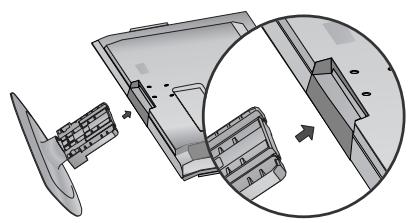
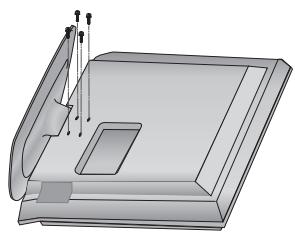
19/22/26/32/37/42LG30**
32/37/42/47/52LG50**
26/32/37/42LG30, 32/37/42/47/52LG50

Modelos de TV LCD : 19/22LG30**

Ligar/Desligar
(Modelos de TV LCD: 26/32/37LG30, 32/37/42LG50)
(Apenas no 19/22LS4D*)
(Apenas no 19/22LS4D*)
19/22/26/32/37/42LG30**
32/37/42/47/52LG50**

26/32/37/42LG30, 32/37/42/47/52LG50

LCD-tv-modelen : 19/22LG30**
LCD-tv-modelen : 19/22LS4D*


VOORBEREIDING
INFORMATIE ACHTERZIJDE
19/22/26/32/37/42LG30**
32/37/42/47/52LG50**

26/32/37/42LG30, 32/37/42/47/52LG50

MONTEA THAEOPASEQN LCD: 19/22LG30**

MONTEA THAEOPAEQN LCD: 19/22LS4D*


ΠΡΕΤΟΙΜΑΣΙA
(MONTEA THAEOPAÇE.ON LCD: 26/32/37LG30, 32/37/42LG50)
(Móvo yia 19/22LS4D*)
Aφaipεση βασης
(Móvo yia 19/22LS4D*)
H Eikova nou napatiEeata vEdeltaEeata va eival diapopetikn ano tyn tnlaopaon oac.
TooTheTnOte Tnv TnAeopaon Me Tnv oOvN npoc ta katw oE maakn Epiavia yia va npoataeUeTe Tnv oOvN ano tuxov OpeC.
KpatnoTe To owa Taou uveTcKau LuyioTe Tov npoc Ta navw.
Σωμa μεντεοε

EioayTe To owa Ta, Bao, OTo npoiov mexpu va akouoTe Tov xapaknpiotko nxo klik.

4 SuvapuoloynoTe Ta hepTou oWmuToC Tc BaoNc Me To KaLmuTa BaoNtou npoiovtoc.

1 TOnoTeTnToT nTv TnAeopaon oE eva maIalapi n oE eva maLakO UpaOma, eTv npooos Otpaumevn npoc Ta kAtw.

MONTEA THAEOPAEQN LCD: 19/22/26/32/37/42LG30 32/37/42/47/52LG50
1 Suvodot Ta kaawda onw aanaTtai. Tia va ouvodoe tKa iAaIoukeun, avatpeEeTcOTNV evoTnTa EYkataotaon EeWTEPIKwV OUKeUwV
AvoiETo SYNAEEMOTAKTOnOIHsKAAOIONoN onwoc paivetai oTo Oxma kaia taktonoiotc ta kalwaia.
MONTEAA THAEOPAEQN LCD: 19/22LS4D*
1 Suvodot Ta kaawda onwcaanitai. Tia va ouvdoetkai aaln ooukeun, avatpeTe OTnv Evotnta EYkaotaon 8eWTEPIKOWUOKEUVV

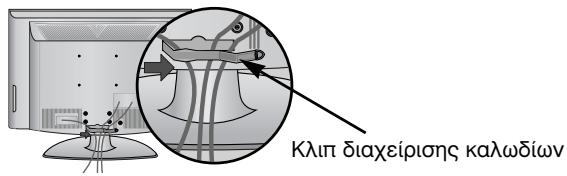
ToioeTnOte To KAIIN DIAXEIPIISH KAANION onwocpaivetai otynv Eikova.

ПОБAPTHESH THS THAEOPAHSE TPAΦEIO
(Móvo yla 26/32LG30, 32LG50)
(Móvo yia to μοντέλo 19/22LS4D*)
Kata Tny Toonthetaon TnC EInitoixiac Movadac, Xpooiopoinote To npootateutiko kALumua TnC EINITpaneciaac baonsc.
26/32/37/42LG30, 32/37/42/47/52LG50

LCD TV-TIPUSOK : 19/22LG30**

POWER
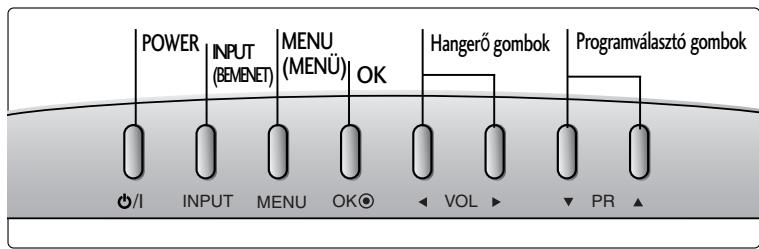
LCD TV-TIPUSOK : 19/22LS4D*

Tapellatas/keszenlét jelzofeny
(LCD TV-TIPUSOK: 26/32/37LG30, 32/37/42LG50)
19/22/26/32/37/42LG30**
32/37/42/47/52LG50**

LCD TV-TIPUSOK : 19/22LS4D*

26/32/37/42LG30, 32/37/42/47/52LG50

MODELE TELEWIZORÓW LCD : 19/22LG30**

Zasilanie
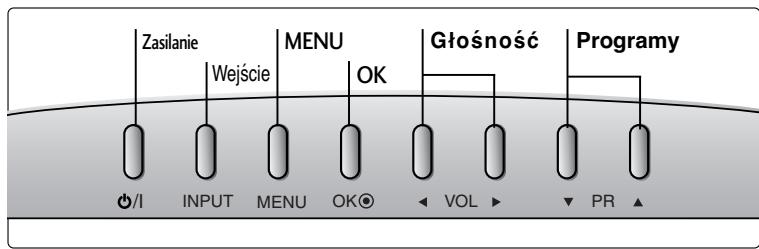
MODELE TELEWIZORÓW LCD : 19/22LS4D*

Wskaznik zasilania/czuwania
(MODELE TELEWIZORów LCD: 26/32/37LG30, 32/37/42LG50)
MODELE TELEWIZORÓW LCD: 19/22/26/32/37/42LG30 32/37/42/47/52LG50
MODELE TELEWIZORÓW LCD: 19/22LS4D*
(MODELE TELEWIZORÓW LCD: 19/22LS4D*)
26/32/37/42LG30, 32/37/42/47/52LG50

LCD televizory : 19/22LG30**
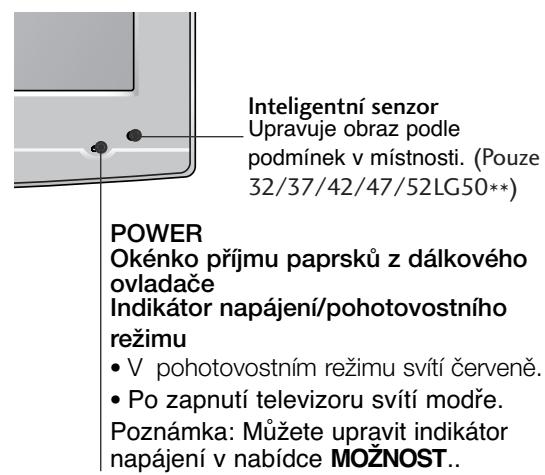

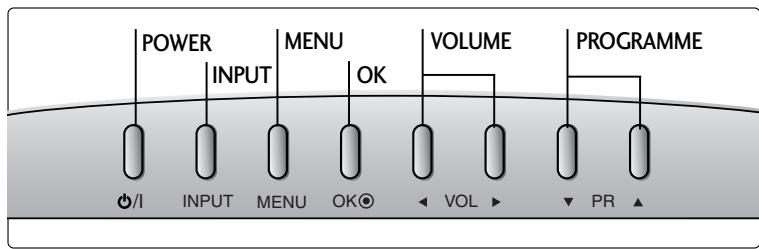
LCD televizory : 19/22LS4D*

PřÍPRAVA
INFORMACE O ZADNÍM PANELU
(LCD televizory: 26/32/37LG30, 32/37/42LG50)
19/22/26/32/37/42LG30**
32/37/42/47/52LG50**

26/32/37/42LG30, 32/37/42/47/52LG50

Modely LCD TV : 19/22LG30**
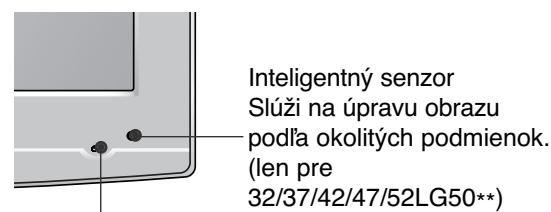
POWER
Senzor dialkového ovládania
Kontrolka zapnutia a pohotovostného režimu
V pohotovostnom rezime svieti na Červeno.
- po zapnuti televizora svieti na modro.
Poznámka. Kontrolku napájania možete nastavit' v. ponuke OPTION
(MOZNOSTI).
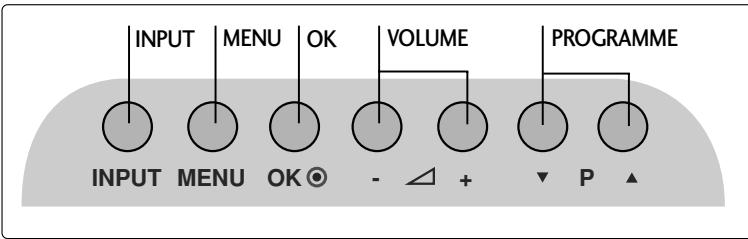
Modely LCD TV : 19/22LS4D*

(Modely LCD TV : 26/32/37LG30, 32/37/42LG50)
(Modely LCD TV : 19/22LG30**)

(len pre 19/22LS4D*)
(len pre 19/22LS4D*)
Modely LCD TV : 19/22/26/32/37/42LG30 32/37/42/47/52LG50
Pripojte kable podla potreby.
Ak chcete pripjit'dalsie
zariadenia, pozrite si cast'
Nastavenie externych
zariaden.

2 Podla uvedeného obrázka otvorte UCHYTKU NA KÁBLE a usporiadajte káble.

3 UCHYTKU NA KÁBLE pripevnite podla obrázka.

Modely LCD TV : 19/22LS4D*
Pripojte kable podla potreby.
Ak chcete pripojit'dalsie zariadenia, pozrite si'cast'Nastavenie externych zariaden.
Pripevnite UCHYTKU NA KÁBLE podla obrázka.

VYTIAHUTIE VEDENIA KÁBLA (Modely LCD TV : 19/22LS4D*)
Najskór stlačte úchytku na káble. Uchopte ÚCHYTKU NA KÁBLE oboma rukami a zatlačte ju smerom nahor.

POZNÁMKA
Pri premiestnovani vyrobku ho nedržte za VEDENIE KÁBLA.
- Ak by vyrobok spadol, mohli by ste sa zranit alebo vyrobok by sa mohol zničit
PRIPRAVA
TELEVÍZOR UMIESTNITE BEZPEČNE, ABY SA NEPREVRÁTIL.
26/32/37/42LG30, 32/37/42/47/52LG50

Modèle de televizioare cu LCD : 19/22LG30**

Modele de televizioare cu LCD : 19/22LS4D*


PREGÁTIREA
INFORMATI PRIVIND PANOUL POSTERIOR
(Cu exceptia 19/22LS4D*)
THUMBSTICK (Sus/Jos/Stånga Dreapta)
BnKTe HaIINca Bbpxy 3aHOTo KaIaue I ro CbObIeTe Ha npOdaBaay, KOraTO BN nOpTpa6Ba cepBu3.
Pa3shnPepo pkoBoDCTBO 3a co6CTBHeHnKa, KoETo cIbPka IOnbJIHnTeJHn
fynKcHn Ha Te3n TeJeBn3Opn LG ce HAMnpa Ha CD-ROM-a B eJekTpOHa fopMa.
3a Da ro npOeTeTe, Heo6xOJMo e da OTBOpHTe n36paHn faiNoBe ot BaShn
KOMNtbp Chabdeh Cbc CD-ROM yctpOietBO.
Yka3aHnja 3a 6e3OpacHOCT
- MoJra, npOyTeTe BHHMaTeJIHo Te3n IpEJa3Hm MepKn, IpEa Da non3BaTe npOyKta.
- IInIOCTpaIaIraTbTOBa pBKOBOcTBOMOKe IOHAKbIe Da ce pa3JIuHaBa OT BaIINr npOyKT, 3aIOTo e npocTo daIeHa 3a IIpIMep B NOMOII HA yKa3aHnIraT.
! NPEyPEXKDEHNE BHMAHNE
Ako He obpheTe BHMaHne Ha npedynpeDteHNO cbOeHne, MOKe cepno3HO da nocTpaTaTe, a MOKe da HMa BepoTHoCT OT 3nONJyKa IIN CMbpt. Ako He obpheTe BHMaHne Ha cbOeHne 3a BHMaHne, MOKe JIeKO da nocTpaTaTe IIN npOdyKtB Ta ca ne NobpeDi.
PpeIpa3Hm MepKn npn HnctaInpaHe Ha npOdykTa
!PPEyIPEXJEHNE
ДрьхтпpoуктдалачOTИЗТОУHINCHaTOnPIMHa,нанрIMePOTONITeHInu ypeN.
-Te MoTat Da IOBedaI Do TOKOB yIap,IOXkap,IOBpea IIM DeOpMaun.

He noI3BaIte npOdykTa BbB BlaJxHn NOMeUeHnA, KaTo 6aHa HApNIMep, INI Ha MeCTa, KbDeT0 NMa BepoTHOCT ToI Da CE N3MOKPn.
- ToBa MoKe Za npuHn Hoxap WIM Da DOBeE Do TOKOB yIap.
Ako yceuate Mnpnc Ha NIMn HnHa HeuO npyTo nIyBATE CTpAHN UymoBe, I3BaTeTe 3axpaHbuaa Ka6eI ON KOtakTa n Ce o6aTeTe B cepBn3a.
Ako npoIbIbKInTe da nOJIb3ATE npOlykTa, 6e3 da B3eMeTe CbOTBETHmTE MePKM, M0Ke Da nOcNeBa TOKOB YdAp INJ NoKap.
BHIMMAHNE
HNTaIpaIte npOdykTa Ha paBHO n CTaBnHO MACTO, KbTeTO HMA ONaCHOCT OT NaDaHe.
- Ako npodkytb6bde n3nychat,MOKe da ce HapaHnTe INI da ro CuynTe.

He n3naarTe npOyKta Ha npKa cnBnueBa CBETNIHa.
-TaMOKeJa rO noBpeiN.

He noctabraIte npoaykta BvB BrpaedHa HnCTaJIauH, HanpImep 6n6nOTeka nn CekUHa.
- Heo6xOaMa e BHTnlaun.
ПредпаЗн Меркп NO OTHошенье на щелекtpo3axpaHbaHeto
! PPEyPExJdeHMe

3axpaHbauT Ka6e Tp6Ba da 6bJe Cbbp3aH KbM 3a3eMeHa Bepira.
Mozke da Bn yapn Tok nnn da ce HapaHnite.
He nnaite 1e9cena c mokpn pue. Ocben ToBa, aKo uHnFt Ha 1e9cena e MOKbp nn 3aipaaH, noDCywe Tcncela n3qno nn 36bpuete npaxa.
He pa3rIIO6BaIte, He peMOHTnpaIte n He npabete IPOIN3BOJHn IN3MeHENI IO pOdykTA.
- Toba MoKe Da npEiN3BnKa ToKap Nm 3IOnOlyka OT KToKoB yIap.
-CbpykeTe cBeCc sebpn3a 3a npobepka, KaJIb6pnpaHe nIIN pEMoHT.

3a Da HamaJIne ToaCHOCTTa OT NOxKap IIN TOKOB yUap, He N3IaraiTe TOBa yCTPoICTBO Ha IbJxN IIN BILA.
YctpoMCTBOTO He 6bMa da 6bIe I3naraHO Ha kanIKu N npBcKn HnKaKBN PtBnHn C TeUHcTn PpeIMTeN, Ba3n HapnMpEep, He 6bMa da 6bDat NoCTABAHn Bbpxy Hero.
! BHIMAHNE
3a BCaKaBn peMoTHn DeHIOCTn Ce o6pbIaJIte KbM KBaIinCpuInapan CepBn3eH nepcoHaJI. C cepBImHO 06cnyKBAHe e Heo6XODIMO, KORATO anapaTbE b6II NIOBpeDeH IO HKAkbB NaHH, NaPIMeR NOBpeDeH 3axpaHbaU, Ka6eN IIN 5ueCeI, INTEkNa TceHOCHT NIN NpAHaN NpEdmTe B anapaTb E bIN INI3IOJKeH Na DbXkd ININ Blara, He pa6OTn HopMaJIHO INI e 6IN IN3pyckAH.

N36BraIte aocTabaTe HEnoDBrJxHO N36bpaXHe Ha ekpHa 3a dIbIbr nepIOO OT BpeM. OSeHOBeHO TOBa e BInDEKAcTeTOPOH OCTABeH Na Iy3a. Ako CeNoJI3Ba bOpMAT HA KapTINHata 4:3, ToBa HEnoDBrJxHO N36bpaXHe MoKe Da npOdbJnx DA ce OToEJIa3Ba Ha ekpHa.

ПОДГOTOBKA
OPRAHn 3A UYPABJIeHne HA JIuCEBnY IaHEJ
Ioka3aHOTOMOKeJacepa3nUyabaOTBaunTeJeBn3Op.
Ako Bbpxy Baunu ypei nMa NoctaBeHo npedna3HO fOJIO,OTCTpaHete fOJNOTO u CneI TOBa n36bpwe Te ypea c Kbpna 3a NOUcTbaHe.
MODEJI N TEJIEBN3OPN C TEUHOKPNUCTAJEN DINCSJIEN :
26/32/37/42LG30, 32/37/42/47/52LG50
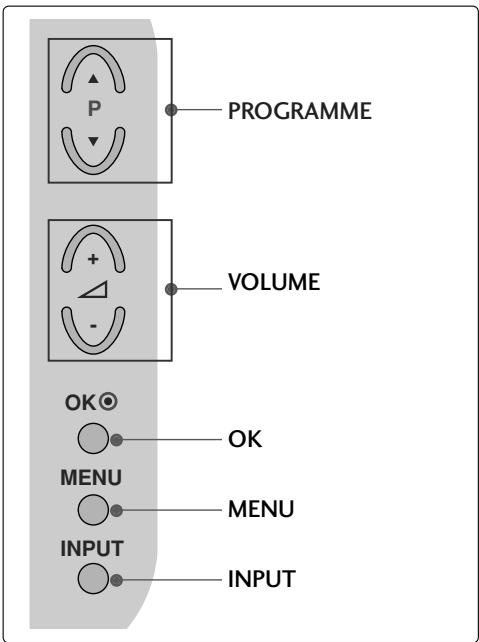
MODEJI N TEJIEBN3OPN C TEYHOKPNC
TALEN DINGPIE:19/22LG30**

MOIDEJI N TEJIEBN3OPN C TEUHOKPNC
TALEN DINGPJIEN:19/22LS4D*

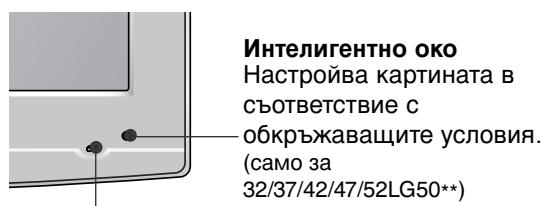
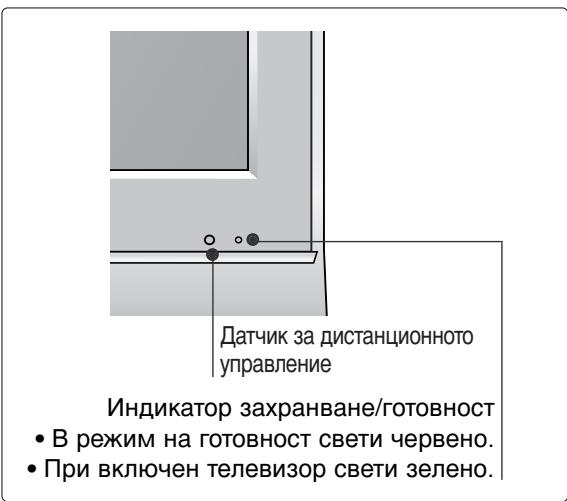
POWER
DatyHK 3a DnctanuOHHOTy ynpabJIeHne
ИнданковTop 3axpaHbaHe/rotOBHOCT
BpeKIM Ha rOToBHOCT CBETN cepBeHo.
-ПрИ ВКЮЧЕН TEЛЕВИЗОР CBETN CINHbO.
3a6eJexKa: MoKeTe Da peryInpaTe INdNkaTopa Ha 3axpaHbAHeTo B MeHIO OPTION (OPLIN).
ПОДГOTOBKA
26/32/37LG30, 32/37/42LG50)

IocTaBeTe BnMaTeJHo TeJeBn3Opa C ekpaHa HaOny BbPxMy MeKa NOBbpxHOCT, 3a Da npEdJa3nTe ekpHa OT NOBpeJa.


MOnTpaIte Yactnte Ha HoceIaTa BnIka KbM OCHOBaTa Ha TeJIeBn3Opa.


IocTaBte TeIeBn3opa, KaKTo e Ioka3aHo.

3aTeHHeTe HaJekdno 4-Te 6oJtHa rIbP6a Ha TeJIeBn3Opa B IpeDvIeHInTe OTBOpN.

MOHTAX HA CTOIKA
(MOДЕЛТЕЛEBИЗОПС TEЧHOKРИCTАЛЕн ДИСПЛЕй: 19/22LG30**)

1 NocTaBete BnImaTeIHO TeIeBn3Opa C eKpaHa HaIoNy Bbpy MeKa NOBbpxHOCT, 3a da npedna3nte ekpaHa OT nobpeda.
2 NocTaBete TeneBn3opa, KaKTo e noka3aHo.
3 3aterheTe HndexkDnO 4-Te 6oIHa Tbpa Ha TeJeBn3opa B npedBndeHnte OTbOpn.
ПОДГOTOBKA
MOHTAX HA CTOIKA
(camo 19/22LS4D*)
■ Noka3aHOTo MOKe Ia Ce pa3JIuYaba OT BaIiHa TeJIeBn3Op.
1 NocTaBeTe BnMaTeJIHo TeJeBn3Opa C ekpaHa HaIoIy BbPxMy MeKa nOBbpxHOCt, 3a da npedna3nte ekpaHa OT nobpeda.
XbaHete TAnOTo Ha 7apHnpa n ro orbHeTe Harope.

BkapaTe TAnTo Ha CToiKaTa B npOdyKTa Do UpaKaBaHe.

XbaHete cToiKaTa n a OrBHeTe HaRope.
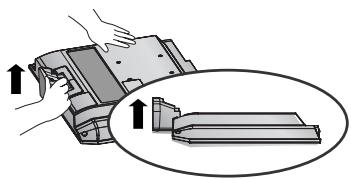
5 Дрьн electe TJILOTO Ha cToiKaTa, 3a daЯ OTdJIInTe OT anapata, KaTo HATnCKate 2-TaФИKcaTopa.

3AДЕН KANAK 3A ПОДPEЖДАНЕ HA KABELITE
MODEJI N TEJIEBN3OPN C
TEUHOKPNUCTAJEN DINCSJIEN:
19/22/26/32/37/42LG30
32/37/42/47/52LG50
1 CbpxkTe Ka6eHnTe KaKTo e Heo6xOIMO. 3a Da CbpxkTe DoIbHnTeHnO obOpyDbaHe, BIXTe pa3dela "HCTaHnpaHe Ha BbHsHo obOpyDbaHe".

OTBopeTe OPGAHN3ATOPA HA KABEJIIN, KaKTo e noka3aHo, n ppekapaiTe ka6eJIInTe.

3 Crtlo6eTe OPGAHN3ATOPA HA KABEJI, KaKTo e nOKa3aHO.

MOДЕЛТЕЛЕВИЗОПС TEЧHOKРИСТАLEН ДИСПЛЕМ: 19/22LS4D*
1 CbpxkTe Ka6eJnte KaKTo e Heo6xOJIMo. 3a da CbpxkTe DOnbJHnTeJnHO o6OpyDbaHe, BxKTe pa3dela "HcTaInpaHe Ha BbHsHo o6OpyDbaHe".
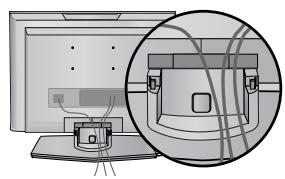
2 IHHCTaJIpaIte OPGAHN3ATOPA HA KABEJI, KaKTo e noka3aHo.
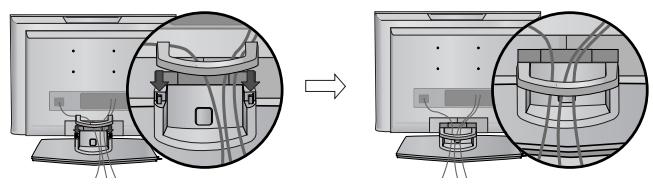
Kak da cBAJIte opraHn3aTopa Ha ka6eIN (MOdEJI N TEJIEBN3OPN C TEUHOKPNCTALEN DINCSIIEN : 19/22LS4D*)
LbpoHaTnchete Opran3aTopa Ha Ka6eN. XbaHeTe OPRAH3ATOPA HA KABEIN C DBe pue n ro n3DbpaNe Harope.

! BEJIEXKKA
He n3noJ3BaIte OPGAHN3ATOPA HA KABEJI 3a npemeCTbaHe Ha TeJeBn3opa.
-AkO npOdyKtBt 6bIe n3nyChaT, MoKe Ia ce HapaHnTe IIn Ia ro CuynTe.
ПОДГOTOBKA
Инсталва对接о Вимateлно, TAKA Que ДА Ная ВьзможноCT 3A падаHE.
Tp6Ba Da 3aKynIte Ha Na3apa KpeJexHInTe eJeMeHTn, Heo6xOuIMN 3a 3aKpePbAHe Ha TeJeBn3Opa KbM CTeHaTa.
CnojkeTe TeJEBn3Opa 6JIIN3KO IO CTeHaTa, 3a Da nI36erHete ONaCHOCTTa OT naJaHe, aKO 6bJe 6yTHaT.
B INHCTpykunnte no-dony e daenno 6e3onaceh hauin 3a IHCTaJnpahe Ha TeIeBn3opa, KOITo ce c bctOn B 3akpenBaHe KbM CTehata, TaKa ye ypeTb Da He NaDHe HAnpei, Ako 6bJe npnHaT. Taka Iue Ce npedOTbpatn panaHTo Ha TeIeBn3opa HAnpei, KoETO MoKe Da DoBePe Do HapaHBAhe Ha


1 N3noJ3BaIte 6oJIToBTe C yXO nJIn KOH3oJIte/6oJIToBTe 3a TeJIeBu3Opa, 3a da 3aKpeNITe ypeDa KbM cTeHaTa, KaKTO e NOKa3aHO Ha NJIIOCTpaunra.
(Ako 7apHnprHnte 6oJTOBe Ha TeIeBn3Opa Bn He ca pa3Xna6eHn, pa3BbptTe rN.)
* PbxheTe 6oNTOBeTe C yxo nJIn KOH3OJIte/6oNTOBeTe 3a TeJIeBn3Opa n IIN 3aTeIgHeTe 3dpaBO B TropHnTe DynKn.
2 3akpeeneCTeHHnTe KOH30JIc 6oJITOBete 3a CTeHaT. Tp6Ba da HaIacnte BnCOUnHata CbO6pa3HO KOH30JtA, MOHTnpaHa Ha CTeHaT.

3 I3noI3BaIte 3npaBO BbJKe, 3a da BbpKTe ypeJa. I0-6e3oNaCHO e da BbpKTe BbXeTo IIO TaKbB NaHH, ye da 3aCTaHe XOpN3OHTaJIHO MekdY CTeHaTaN ypeJa.
!БЕЛEXΚA
Korato npemecTBaTe ypeHa nDpyrO Macto, TbpBO OTkaueTe BbxkTaTa.
I3noJ3BaIte nocTAbKa 3a anapaTypa nnuIu KaΦ, KOITo Ca IOCTaTBUHO rOJIeMn 3dpaBn, 3a da n3DbPjKAT pa3Mepa n TerIoTO Ha npOdyKta.
3a da n3noJ3BaTe ypeDa 6e30nacHo, ce norgxKeTe TergTo, KOeTO MoKe Da n3DbpxKa KOH3OJaT, da e CbUTo, KaKTo TergTo Ha ypeDa.
TeIeBn3OpbT MoKe Da 6bJe MOHTnpaH nO pa3JIuHn HaunHn, HApnPmEp, Ha CTeHa, BbPxy 6Iopo n dp.
TeIeBn3OpbTe npedHa3NaueH 3a XOpN3OHTaJIe H MOHTaK.
3A3EMBAHE
YBepTe Ce, Ye CbBp3BaTe Jxuca 3a 3a3eMBAHe, 3a Da IpeIOTBpaTIne TOKOB yIap. AKO He E Bb3MOXHO da Ce HApRaBn 3a3eMBAHe, NOBnKaIte KBaJIncuIpaH eIeKTPoTeXnIK Da INCTaJInpa OTJeIeN IpeKbCBaHu BePurata. He Ce ONITBaIte Da 3a3eMIne anapaTa qpe3 CbBp3BaHe KbM TeJIeФOHn Ka6eJn, rpbMOOTBOINи ra3OpPOBOni.
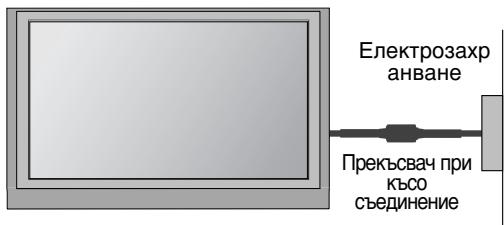
Mohtax Ha hactoJHaTa CToiKa
3a da mma do6po oxlaqdahe, ocTaBeTe pa3ctOHHne 10 cm MeKdy BCa Ka cTpaHa n cTeHaTa.


PA3ПОЛАГЕ HA TEЛEBИЗОРА HA ПОCTABKA
(camo 26/32LG30, 32LG50)
TeneBn3OpbT Tp6Ba Da ce pa3noIara Ha NoCTaBka Taka, Ye da He MoKe Da Ce Tern B Nocoka Hanpei/Ha3ad, KOeTo NoteHuaJIHO npuHnRa HapUshaBa HApUshaHe nJIn NobpeDa Ha n3dEJIneTo. Da ce n3NoJ3BA cAmO pNkauEHnT BVHT.

1 PENEYNPEXKDEHNE
3a da npedotbpatnte nadahe Ha TeleBn3opa, ToT Tp6Ba da 6bJe 3dpaBO 3akpehen KbM POna/CTeHaTa CnpoeYka3aHnHTa 3a MOHTax. HApnaHHe, KNaTeHe IInI JIOJIeEHe Ha ypeDa MOKe Da npedn3BnKa HapaHBAHe.
Стень моHTаж:Хорионлноюстаян.
3a da nma do6po oxnaqdahe, octabete pa3ctoHne 10 cm mejdy BCa k a ctpaHa u CTeHaTa. Ioppo6n yka3aHn 3a noCTaBHeTO MoKeTe Da nolnyte OT Baun TbproBeu. BxKTe DOnbHnTeJIHOTOp bkoBOcTBo "IocTabHne HacTpoKa Ha NaKIOHeHaT a KOH3OJa 3a CTeHe MOHTaX".


AKO HE I3ПОЛ3BATE HACTОЛHATA C TOИKA (Бe3 19/22LS4D*)
Korato MONTnPATE n3dJIeNETo Ha CTeHa, 3aTbPHeTe HAcToJHaTa CTOnKa, 3a Da nIpeDnA3nTe. NocTaBeTe IPEДПАЗHЯ KAPAK Ha TeNeBn3Opa Taka, Ye da YuyeTe UpaKaBaHe.

ПОДГOTOBKA
3a da n36berhe Te nobpe Da Ha yctpoiCTBaTa, He BkHouBaIte HnKaKbN 3axpaHbaUc Ka6eIn, npEn da cTe npNKIOuINi Cbbp3BaHTo Ha BCNUK yCTpoiCTBa.
Свьрзван ha aHTeHa
- PerулираиTe nocokata Ha aHTeHata 3a Na-Добpo KaueCTBO Ha obpa3a.
- Antehen Ka6en n ppeo6pa3yBaTeJ He ca BkIHOyeHn B IOCTaBkata.
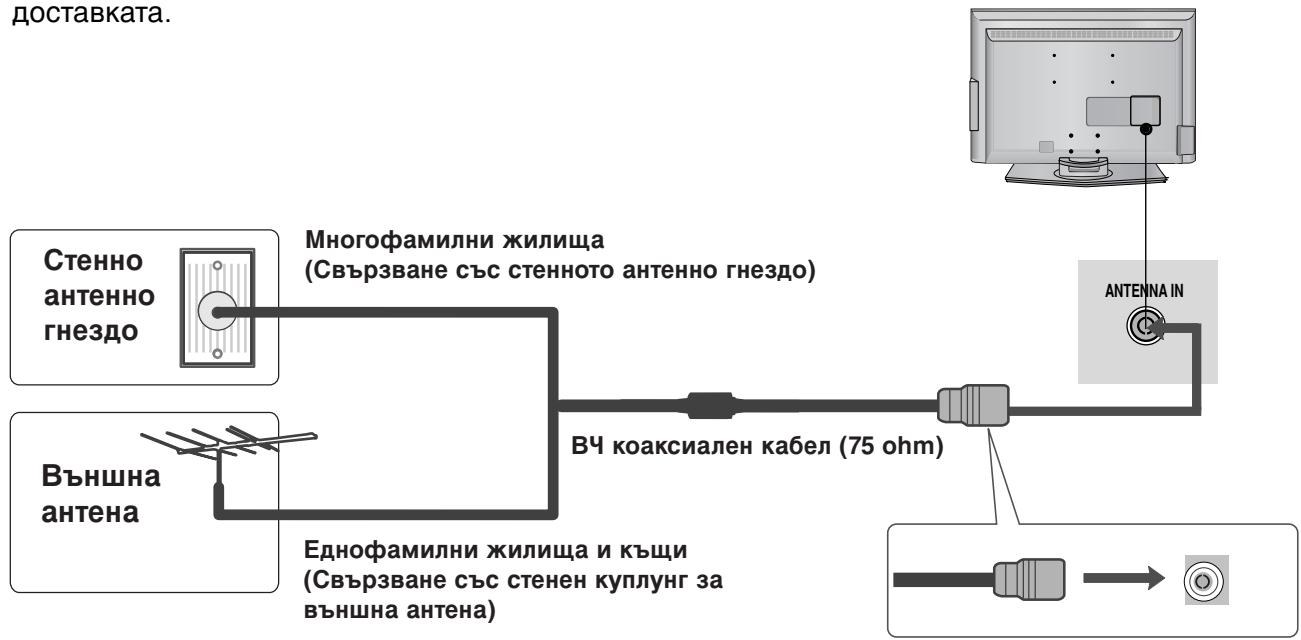

B 30H, B KOnTO CnHaJIbTe cIa6, 3a No-IO6po KaueCTBO Ha o6pa3a MOHTnpaIte aHTeHEn ycINBaTeJI KbM aHTeHaT, KaKTo e IOKa3aHO BdACHO.
Ako cnHaJIbT Tp6Ba Da 6bIe pa3dJeH MExdy DBA TeNeBn3Opa, 3a Cbbp3BaHe nOJI3BaIte aHTeHEn cIIInTeP.
ГледаHE HA TEJIEBN3Я /УпРавЛЕнE HA ПОТРAMITE
TEXHINUÇECKO OBCNJYKBAHE
PaHHnTe NOBpeNi MoRat Da 6bDat NpeDOnTbpaTeHn. BHNMaTeJHOTo N peDOBHO NoUcCTBaHe MoKe da yIbJIxN BpeMeTo, Ppe3 KoETo ige NpI3BaTe HOBn Cn TeJeBn3Op. PpoBepTe DaJIIn Cte N3KJIouHIneJekTpO3axpaHbAHeTo n CTe N3BaJInn Ka6eNa PpeNi Da 3aNoUHete NoUcCTBaHTo.
UcTpoIcTBOT He pa60TH HOpMaJIHO.
XOpH3OHTaJIH INI BepTnKaJIHIN IBNlU, INI TpENTHe Ha KapTHata
IpoBepTe DaJIH Na6JIH3O IMa CMyUaBaUu yCTpOJcTBA - eJIeKTpOpyeI, 6OpMaUHH N IpyrN POnObHn IHCTpyMeHTN.
26/32/37/42LG30, 32/37/42/47/52LG50

LCD-TV, Modeller : 19/22LG30**
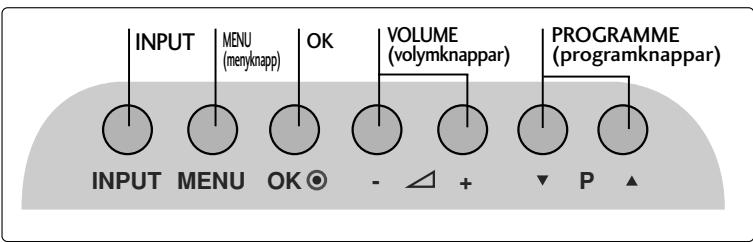
LCD-TV, Modeller : 19/22LS4D*
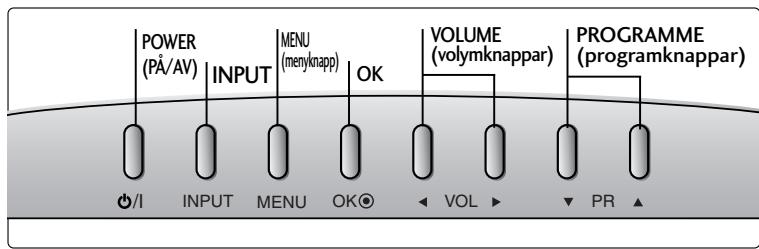

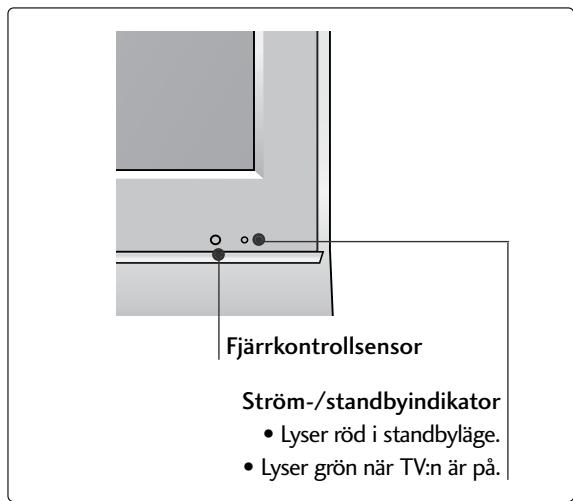
FÖRBEREDELS
INFORMATION PÅ BAKSIDAN
(LCD-TV, Modeller: 26/32/37LG30, 32/37/42LG50)
19/22/26/32/37/42LG30**
32/37/42/47/52LG50**

LCD-TV, Modeller : 19/22LS4D*

BORDSSTATIVET (Utom 19/22LS4D*)
26/32/37/42LG30, 32/37/42/47/52LG50
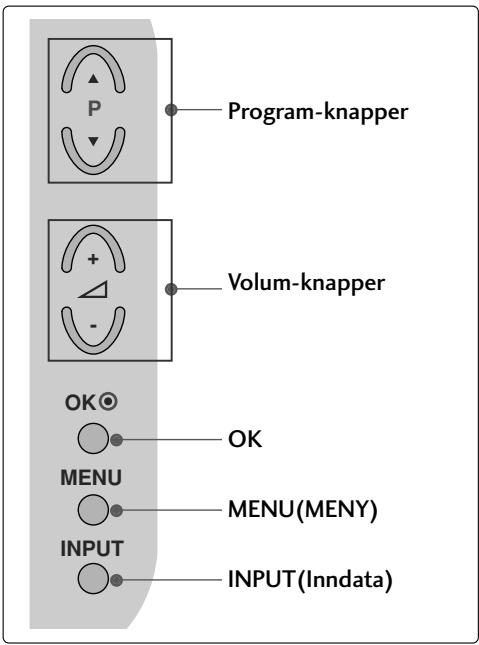
LCD-TV Modeller : 19/22LG30**

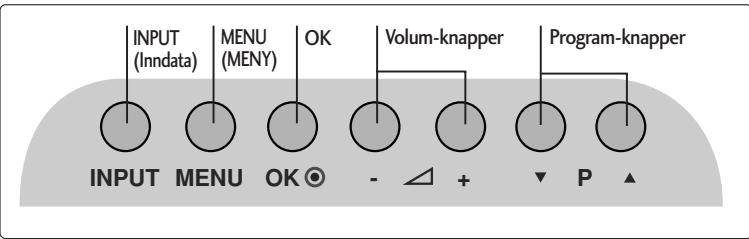
LCD-TV Modeller : 19/22LS4D*
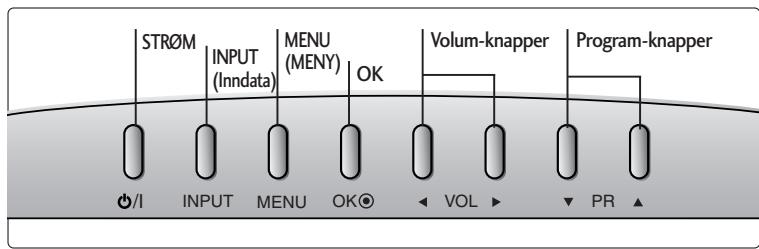

FORBERDELSER
INFORMASJON OM BAKPANELET
3 OPTICAL DIGITAL AUDIO OUT (OPTISK DIGITAL LYD UT) (Bortsett fra 19/22LS4D*)
(LCD-TV Modeller : 26/32/37LG30, 32/37/42LG50)
LCD-TV modeller : 19/22/26/32/37/42LG30 32/37/42/47/52LG50
Koble til kablene etter behov. Hvis du vil koble til ekstra utstyr, se avsnittet om eksternt utstyr.
SE PÅ TV / PROGRAMSTYRING
TASTEFUNKSJONER PÅ FJERNKONTROLLEN
Fjernkontrollen rettes mot fjernkontrollsensoren på TV-en.

or

1 MODE
Velger bruksmodi for fjernkontrollen.
Q.MENU
Velg oneself hurtigmenykilde.
3 MENU
Slár lyden på eller av.
Gár tilbake til TV-modus fra hvilken som helst meny.
4 VOLUME + /-
Jesterer volumet.
5 POWER
Slár apparatet på fra standby-modus eller av til standby-modus.
6 INPUT
Ekstern inngang-modus byttes etter fastrekefolge.
SE PÅ TV / PROGRAMSTYRING
SLÅ PÅ TV-EN
SE PÅ TV / PROGRAMSTYRING
AUTOMATISK KANALSØKING OG LAGRING
Brukdentilafinneoglagreallekanalerautomatisch.
Kjør Aut. innstilling.
26/32/37/42LG30, 32/37/42/47/52LG50

LCD-TV MODELLER : 19/22LG30**


LCD-TV MODELLER : 19/22LS4D*

KLARGØRING
BAGPANELET
(LCD-TV MODELLER: 26/32/37LG30, 32/37/42LG50)
SE TV/PROGRAMSTYRING
FJERNBETJENINGSKNAPPERNES FUNKTION
SE TV/PROGRAMSTYRING
TÄENDE TV'ET
SE TV/PROGRAMSTYRING
AUTOMATISK PROGRAMINDSTALLING
Brugdenne indstillingtilatfindeog gemmealleprogrammerne.
Abn "My computer" → abn "LG" → abn filing "index.htm".
APPENDIKS
FEJLFINDING
26/32/37/42LG30, 32/37/42/47/52LG50

LCD-TELEVISIONALLIT: 19/22LG30**
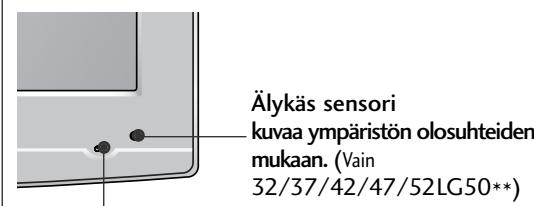
Virran painike
(LCD-TELEVISIONALLIT: 26/32/37LG30, 32/37/42LG50)
19/22/26/32/37/42LG30**
32/37/42/47/52LG50**

KAUKOSÄÄTIMEN NÄPPÄINTOIMINNOT
19/22/26/32/37/42LG30**
32/37/42/47/52LG50**
Avage "My computer" -> avage "LG" -> avage"index.htm" fail.
LISA
TörKEOTSING
26/32/37/42LG30, 32/37/42/47/52LG50

SKYSTUJUKRISTALUTELEVIZORI
MODELIAI : 19/22LG30**

SKYSTUJUKRISTALUTELEVIZORI
MODELIAI : 19/22LS4D*

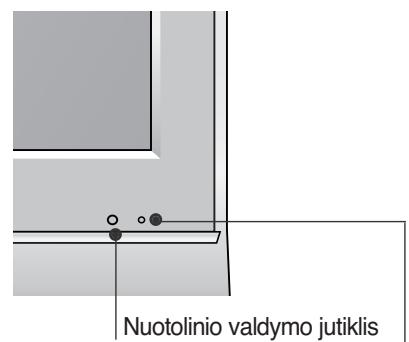
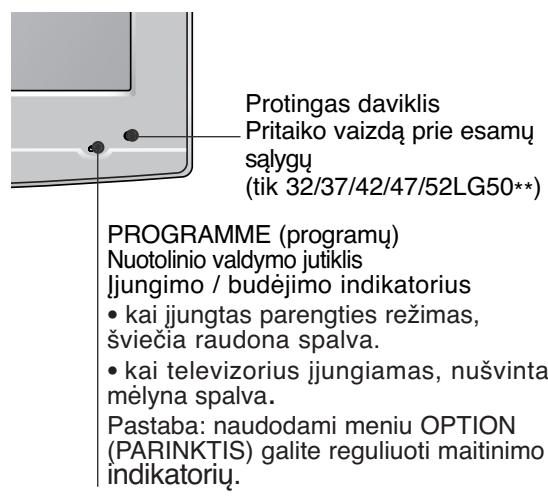
Jungimo / budèjimo indicatorius
- kai jungtasparentries rezimas, sviecia
raudona spalva.
26/32/37LG30, 32/37/42LG50)
SUMONTUOKITE ATIDžIAI, KAD GAMINYS NEAPVIRSTU.
Piezime: lespejams regulé Power
LCD TV modeli : 19/22LS4D*

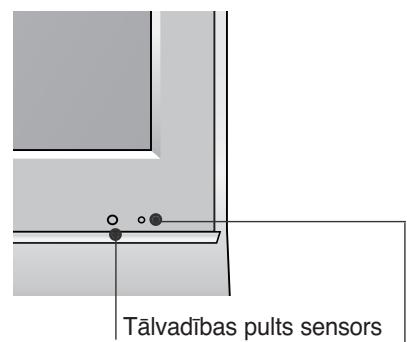
(LCD TV modeli : 26/32/37LG30, 32/37/42LG50)
Uzmanigi novietojiet televizora ekrana pusi uz polsteretas virsmas, lai nepiejautu ekrana bojajumus.

LCD TV modeli : 19/22/26/32/37/42LG30 32/37/42/47/52LG50
1 Pievienojiet kabelus pec vajadzibas. Papildu aparaturas pievienosanu skatit sadaÅ Arejas aparaturas iestatisana.
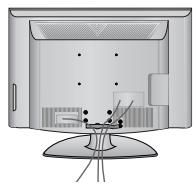
2 Atveriet KABELU TURETAJA SKAVU kā paradits attelā un iznemiet kabelus.
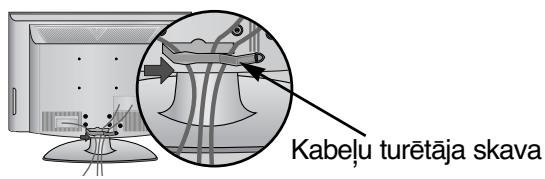
LCD TV modeli :19/22LS4D*
Pievienojiet kabelus pec vajadzibas. Papildu aparaturas pievienošanu skatit sadala ARejas aparaturas iestatišana.

Kā NONEMT KABELU SATURÉTAJU (LCD TV modeli :19/22LS4D*)
Vispirms piespieddiet kabelturetaju.
Ar abam rokam satveriet KABELU SATURETAJUn velciet to uz augsu.

PIEZIME
▶ Pārvietojot televizoru, neturiet to aiz KABELU SATURETÄJA.
- Ja televizors nokrit, varat iegūt traumu un televizors var tikt bojāts.
SAGATAVOSANAS
IERIKOJIET TO UZMANIGI, LAI PRODUKTS NEAPGAZTOS.
Jums tirgu jiaegadajas nepiecesamie componenti, laf fiksTu tevizoru pie sienes.
■ Novietojiet televizoru pie sienas, lai tas nevaretu apkrist, ja tiktu pagrusters.
Talak redzamas instrukcijas ir drosaks veins, kierikot televizoru, tas ir, fikset to pie sienas, la pavilksanas gadijumanepielautu tiespajmo krisanu uz prieksu. Tadejadi netiek pielaute televizora krisana uz prieksu un traumu radisana.
Tadejadi netiek pielauii televizora bojajumi. Nodro'siniet, lai bneri neraptos uz televizora un nekaratos taja.


(Paredzets tikai 19/22LS4D*)
Ierikojot pie sienas piestiprinatu ieri, lietojiet aizsargparsegu galda stativa uzstadi sanai.
Iebidiet TV aparata AlZSARGPÄRSEGU, lidz atskan klikskis.

SAGATAVOSANAS
26/32/37/42LG30, 32/37/42/47/52LG50
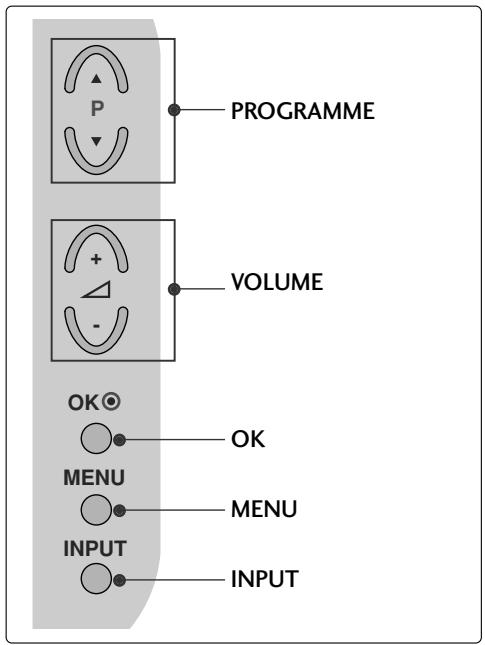
LCD TELEVIZIJSKI MODELI : 19/22LG30**
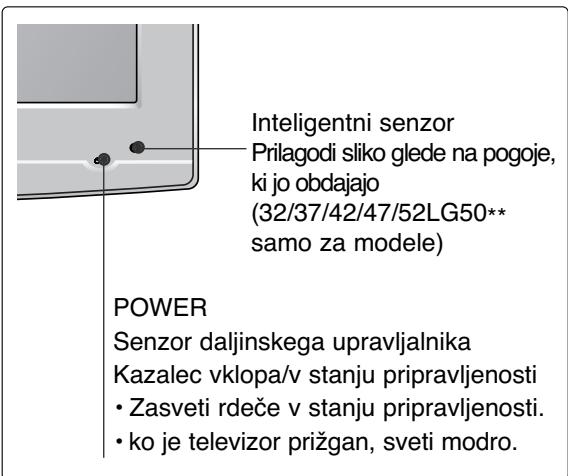

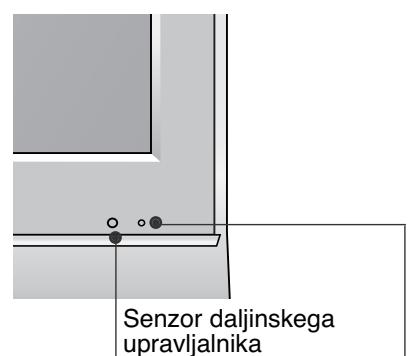
LCD TELEVIZIJSKI MODELI : 19/22LS4D*

(LCD TELEVIZIJSKI MODELI : 26/32/37LG30, 32/37/42LG50)
LCD TELEVIZIJSKI MODELI : 19/22/26/32/37/42LG30 32/37/42/47/52LG50
Uredite kable.
- Pagination sheet
- LCD TV OWNER'S MANUAL
- LCD TV MODELS
- Digital Video Broadcasting
- CONNECTING YOUR UNIT
- SAFETY INSTRUCTIONS
- Precaution in Installing the Product
- WARNING
- CAUTION
- Electrical Power Related Precautions
- Precautions in Moving the Product
- Precautions in Using the Product
- PREPARATION
- FRONT PANEL CONTROLS
- BACK PANEL INFORMATION
- STAND INSTALLATION
- STAND INSTALLATION (LCD TV Models: 19/22LG30**)
- HSITON3
- (Only 19/22LS4D*)
- DETACHING STAND
- BACK COVER FOR WIRE ARRANGEMENT
- LCD TV Models : 19/22LS4D*
- How to remove the cable management clip (LCD TV Models : 19/22LS4D*)
- NOTE
- PLEASE SET IT UP CAREFULLY SO THE PRODUCT DOES NOT FALL OVER.
- EARTHING
- DESKTOP PEDESTAL INSTALLATION
- Attaching the TV to a desk (Only 26/32LG30**, 32LG50**)
- WALL MOUNT: HORIZONTAL INSTALLATION
- Not using the desk-type stand
- ANTENNA CONNECTION
- WATCHING TV /PROGRAMME CONTROL
- REMOTE CONTROL KEY FUNCTIONS
- Installing Batteries
- TURNOING ON THE TV
- Initializing setup
- Note:
- ON-SCREEN MENU LANGUAGE / COUNTRY SELECTION
- ON SCREEN MENUS SELECTION AND ADJUSTMENT
- AUTO PROGRAMME TUNING
- APPENDIX
- MAINTENANCE
- Cleaning the Screen
- Cleaning the Cabinet
- Extended Absence
- TO VIEW THE USER'S GUIDE ON THE CD-ROM
- TROUBLESHOOTING
- (UK only)
- Keep this important information about how to re-tune your TV during the digital TV switchover
- When does switchover happen?
- Visit us at digitaluk.co.uk call us on 0845 6 50 50 50†
- How the switchover affects your TV equipment:
- How to re-tune:
- VORBEREITUNG
- LCD TV-MODELLE : 19/22LS4D*
- INSTALLATION DU SOCLE (MODELES DE TV LCD: 19/22LG30**)
- POWER
- (MODELLI DI TV AL LCD: 26/32/37LG30**, 32/37/42LG50**)
- (MODELLI DI TV AL LCD: 19/22LG30**)
- (Apenas no 19/22LS4D*)
- VOORBEREIDING
- INFORMATIE ACHTERZIJDE
- ΠΡΕΤΟΙΜΑΣΙA
- Aφaipεση βασης
- ПОБAPTHESH THS THAEOPAHSE TPAΦEIO
- LCD TV-TIPUSOK : 19/22LS4D*
- MODELE TELEWIZORÓW LCD: 19/22LS4D*
- PřÍPRAVA
- INFORMACE O ZADNÍM PANELU
- (len pre 19/22LS4D*)
- Modely LCD TV : 19/22LS4D*
- VYTIAHUTIE VEDENIA KÁBLA (Modely LCD TV : 19/22LS4D*)
- POZNÁMKA
- PRIPRAVA
- TELEVÍZOR UMIESTNITE BEZPEČNE, ABY SA NEPREVRÁTIL.
- PREGÁTIREA
- INFORMATI PRIVIND PANOUL POSTERIOR
- Yka3aHnja 3a 6e3OpacHOCT
- ! NPEyPEXKDEHNE BHMAHNE
- PpeIpa3Hm MepKn npn HnctaInpaHe Ha npOdykTa
- !PPEyIPEXJEHNE
- BHIMMAHNE
- ПредпаЗн Меркп NO OTHошенье на щелекtpo3axpaHbaHeto
- ! PPEyPExJdeHMe
- ! BHIMAHNE
- ПОДГOTOBKA
- OPRAHn 3A UYPABJIeHne HA JIuCEBnY IaHEJ
- MOHTAX HA CTOIKA
- (camo 19/22LS4D*)
- 3AДЕН KANAK 3A ПОДPEЖДАНЕ HA KABELITE
- Kak da cBAJIte opraHn3aTopa Ha ka6eIN (MOdEJI N TEJIEBN3OPN C TEUHOKPNCTALEN DINCSIIEN : 19/22LS4D*)
- ! BEJIEXKKA
- Инсталва对接о Вимateлно, TAKA Que ДА Ная ВьзможноCT 3A падаHE.
- !БЕЛEXΚA
- 3A3EMBAHE
- Mohtax Ha hactoJHaTa CToiKa
- PA3ПОЛАГЕ HA TEЛEBИЗОРА HA ПОCTABKA
- PENEYNPEXKDEHNE
- Стень моHTаж:Хорионлноюстаян.
- AKO HE I3ПОЛ3BATE HACTОЛHATA C TOИKA (Бe3 19/22LS4D*)
- Свьрзван ha aHTeHa
- ГледаHE HA TEJIEBN3Я /УпРавЛЕнE HA ПОТРAMITE
- TEXHINUÇECKO OBCNJYKBAHE
- UcTpoIcTBOT He pa60TH HOpMaJIHO.
- FÖRBEREDELS
- INFORMATION PÅ BAKSIDAN
- LCD-TV, Modeller : 19/22LS4D*
- FORBERDELSER
- INFORMASJON OM BAKPANELET
- SE PÅ TV / PROGRAMSTYRING
- TASTEFUNKSJONER PÅ FJERNKONTROLLEN
- SLÅ PÅ TV-EN
- AUTOMATISK KANALSØKING OG LAGRING
- KLARGØRING
- BAGPANELET
- SE TV/PROGRAMSTYRING
- FJERNBETJENINGSKNAPPERNES FUNKTION
- TÄENDE TV'ET
- AUTOMATISK PROGRAMINDSTALLING
- APPENDIKS
- FEJLFINDING
- KAUKOSÄÄTIMEN NÄPPÄINTOIMINNOT
- LISA
- TörKEOTSING
- SKYSTUJUKRISTALUTELEVIZORI
- SUMONTUOKITE ATIDžIAI, KAD GAMINYS NEAPVIRSTU.
- Kā NONEMT KABELU SATURÉTAJU (LCD TV modeli :19/22LS4D*)
- PIEZIME
- SAGATAVOSANAS
- IERIKOJIET TO UZMANIGI, LAI PRODUKTS NEAPGAZTOS.
- LCD TELEVIZIJSKI MODELI : 19/22LG30**
- LCD TELEVIZIJSKI MODELI : 19/22LS4D*
Brand : LG
Model : 323000
Category : Television