
305077 - Thermometer Arendo - Free user manual and instructions
Find the device manual for free 305077 Arendo in PDF.


| Product type | Wireless cooking thermometer with dual probe |
| Power supply | 2 AAA 1.5 V batteries (main unit) + 2 AAA 1.5 V batteries (transmitter) |
| Temperature range | -20 °C to 300 °C |
| Accuracy | ± 1 °C |
| Timer range | 00:01 min to 99:59 min (count up and countdown) |
| Wireless transmission | Up to 20 meters in open space (433 MHz) |
| Main functions | Preset programs for meat (beef, lamb, veal, pork, turkey, chicken, fish), doneness levels (rare to well done), temperature alarm, timer, backlight, °C/°F toggle |
| Number of probes | 2 stainless steel probes with 1 m heat-resistant wire |
| Display | LCD screen with backlight (5 seconds) |
| Care and cleaning | Clean the probe by hand (not dishwasher safe). Do not immerse the probe. Wipe the plug before connecting. |
| Safety | Use a heat-resistant glove to touch the probe. Keep out of reach of children. Do not use in microwave. Do not expose to an open flame or grill. Do not immerse in water. |
| Spare parts and repairability | Replacement probes available (standard model). No user-serviceable parts. |
| General information | Brand: Arendo - Model: 305077 - Contents: thermometer, 2 probes, instruction manual |
Frequently Asked Questions - 305077 Arendo
User questions about 305077 Arendo
0 question about this device. Answer the ones you know or ask your own.
Ask a new question about this device
Download the instructions for your Thermometer in PDF format for free! Find your manual 305077 - Arendo and take your electronic device back in hand. On this page are published all the documents necessary for the use of your device. 305077 by Arendo.
USER MANUAL 305077 Arendo
Sendeeinheit
Display
![8 BEEF 9 MED MELL MEDRUN MED FAIR 10 TEMP SET 888°C [888°C] 11 TEMP SET 888°C [888°C] 12 TEMP SET 888°C [888°C] 13 MODE LIGHT 15 MEAT MIN▲ TASTE 16 CLEAR SEC START STOP 17 20 21](/content/2026/04/686864/images/02b59a57dcf8a76d49debd6f9e948f9d36daf3510eca6682d29d9f55f42f7a3c.jpg)
• Always wear a heat resistant glove to touch the stainless steel probe or the heat-resistant wire during or just after cooking.
- Wash the stainless steel probe between uses thoroughly by hand (the probe is not dishwasher safe).
- Keep the stainless steel probe and heat-resistant wire out of reach of children.
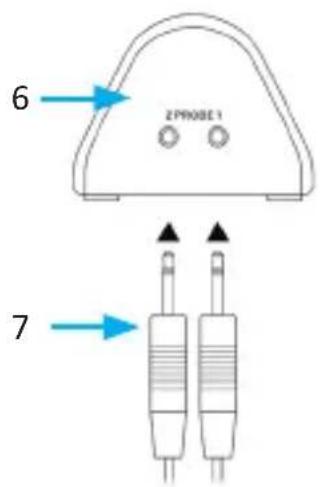
- If the meat temperature is not displayed on the screen after inserting the probe into the meat, check if the probe plug has been properly inserted into the side of the transducer.
- Do not place the main unit in direct sunlight and do not allow it to come into direct contact with moisture or hot surfaces.
- Do not use the device in a microwave!
- This probe should be used only for measuring the temperature of meat and poultry, not for measuring oven temperatures.
- Do not immerse the probe in water. Moisture inside the probe plug or thermometer could result in incorrect temperature readings. Always wipe the probe plug before connecting it to the transmitter.
- Do not expose the probe or probe wire to open flames or to grilling. Otherwise, the probe can be damaged.
Thank you for choosing an Arendo product. Please read the following user manual carefully so that you can get the most from the product you have purchased.
1. Scope of delivery
- Thermometer
- 2 probes
- User manual
2. Technical data
| Power supply • Two 1.5 | AAA batteries (main unit)• Two 1.5 AAA batteries (transmitter unit) |
| Temperature range -20°C to 300°C | |
| Timer range 00:01 min - | 99:59 min (up and down) |
| Accuracy ± 1°C | |
| Transmission power (EIRP) | -13 dBm |
| Frequency range 433 MHz | |
| Features • Preset cooking temperatures for different meats and tastes• Selection of taste setting• Alarms when the target temperature is reached• Stainless steel probe with 1 m (39") heat-resistant wire• °C/°F display can be changed• Backlight• 9:59:59 (hr: min: sec) up and down counter• Wireless transmission up to 20 meters (65 feet) in open space• Twin probe for checking 2 types of meat simultaneous | |
3. Product details
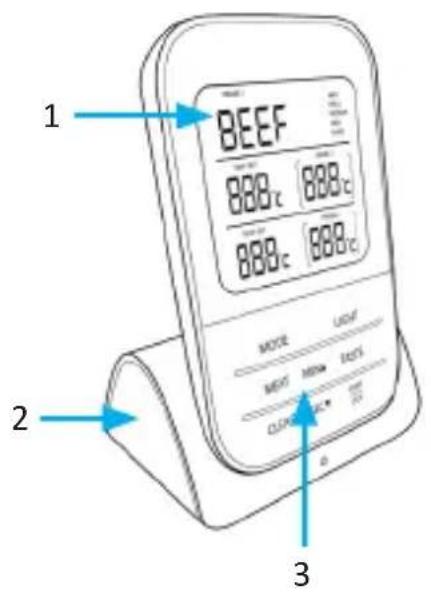
Main unit
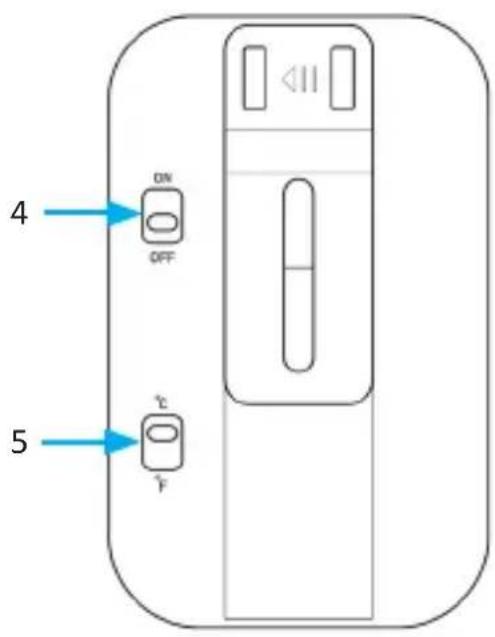
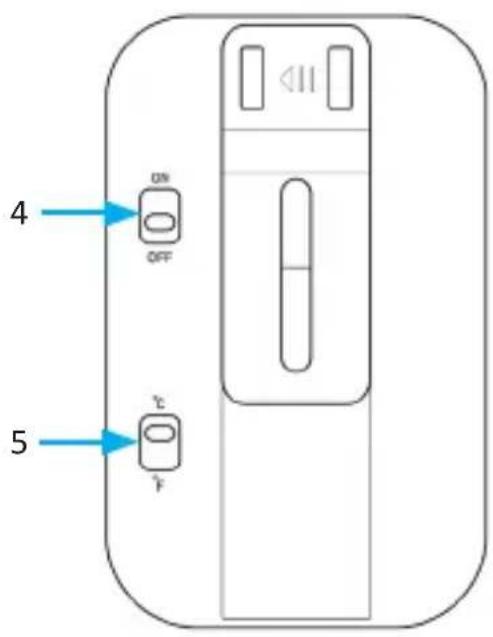
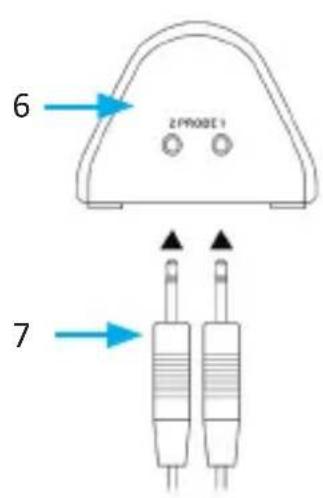
Transmitter unit
Display
![8 BEEF 9 HED WELL MEDIUM HED HARE 10 TEMP SET TEMP 1 888°C [888°C] 11 TEMP SET TEMP 2 888°C [888°C] 12 14 15 MODE LIGHT 16 17 MEAT MIN▲ TASTE 18 19 CLEAR SEC ▼ START STOP 20 21](/content/2026/04/686864/images/f1d16a6c9adc8520d2e9a76121c871a21a48dc45335e705a6fba18272df36622.jpg)
| Number Name | |
| 1 Display | |
| 2 Stand | |
| 3 Operating controls | |
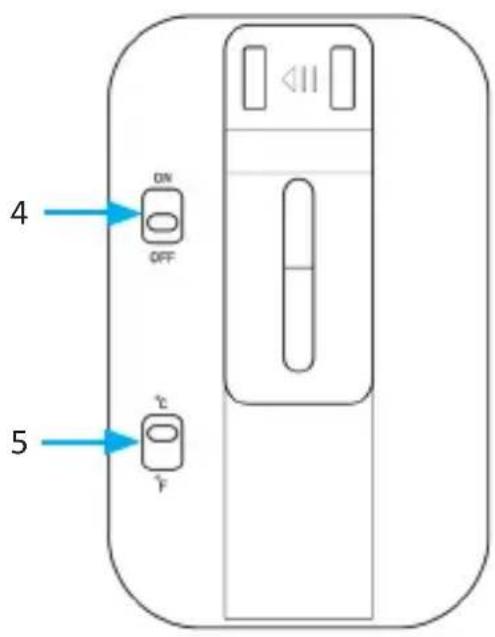
| 4 ON/OFF button | |
| 5 °C/°F switch | |
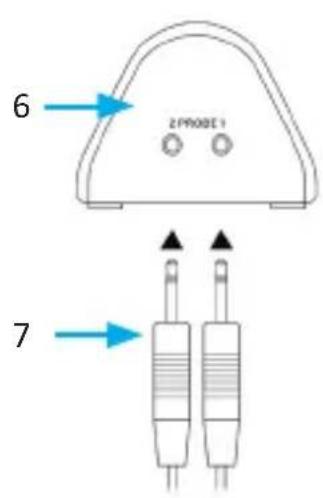
| 6 Transmitter unit | |
| 7 Probes | |
| 8 Program display | |
| 9 Cooking level display | |
| 10 Temperature set for | probe 1 |
| 11 Actual temperature of | probe 1 |
| 12 Temperature set for | probe 2 |
| 13 "MIN" button | |
| 14 Actual temperature of | probe 2 |
| 15 "MODE" button | |
| 16 "LIGHT" button | |
| 17 "MEAT" button | |
| 18 "TASTE" button | |
| 19 "CLEAR" button | |
| 20 "START/STOP" button | |
| 21 "SEC" button |
4. Built-in programs
The thermometer has built-in programs with the ideal temperature for the right taste of most types of meats
| Meat type Well | done Medium / | Well done | Medium Medium | m /Rare | Rare | |||||
| BEEF 76°C 170°F | 73°C | 165°F 71°C | 160°F | 62°C 145°F | 60°C | 140°F | ||||
| LAMB 76°C 170°F | 73°C | 165°F 71°C | 160°F | 62°C 145°F | ||||||
| CALF 76°C 170°F | 71°C | 160°F 62°C | 145°F | 60°C 140°F | ||||||
| HAMBURGER | 71°C | 160°F | ||||||||
| PORK 76°C 170°F | 73°C | 165°F 71°C | 160°F | |||||||
| TURKEY 79°C 175°F | ||||||||||
| CHICKEN 79°C 175°F | ||||||||||
| FISH 58°C 137°F | ||||||||||
| PROGM 71°C 160°F | ||||||||||
5. Inserting batteries into the main unit
- Remove the battery compartment cover at the back of the device.
- Insert two 1.5V AAA batteries as indicated and replace the battery compartment cover. Pay attention to the correct polarity of the contacts.
- Set the power switch at the back of the device to "ON" position.
6. Inserting batteries into the transmitter unit
- Remove the battery compartment cover at the back of the transmitter.
- Insert two AAA batteries as indicated and replace the battery compartment cover. Pay attention to the correct polarity of the contacts.
-
Set the switch at the bottom of the transmitter unit to "ON" position.
-
Once the transmitter is turned on, a red LED on the transmitter flashes 3 times and the current temperature is displayed on the main unit. The time and the current temperature are displayed on the monitor.
NOTE: If the probe is not connected to the transmitter, then the current temperature is shown as a minus temperature. The preset program for probe 1 is "BEEF", the taste display is "Well done", and the standard temperature for probe 2 is 80°C
IMPORTANT: The transmitter sends the temperature every 30 seconds if the temperature does not change. The transmitter is automatically updated as soon as the temperature changes.
7. Usage
7.1 Program selection
Press the "MEAT" button to select the type of meat you want to cook. The display shows the type of meat for which the thermometer is ready.
7.2 Selecting the cooking times
Press the "TASTE" button to select the cooking time for the meat you want to cook. The various cooking times are as follows:
WELL / MED WELL / MEDIUM / MED RARE / RARET - the corresponding preset temperature is displayed on the monitor as "Target temperature".
7.3 Selecting the temperature manually
- Press and hold the "START / STOP" button for 3 seconds, "Target Temp" starts flashing.
-
Press and hold the "SEC" button to display the temperature of the current channel.
-
Press and hold "CLEAR" to delete the data. The display shows "----".
- Press "START / STOP" button to switch the alarm function on and off. The alarm icon is displayed and the setting sequence is as follows:
Probe 1 ON - Probe 2 ON - Probe 1 Probe 2 ON - Probe 1 Probe 2 OFF
- Press and hold the "START / STOP" button to set the alarm temperature.
The set temperature starts flashing, press "MIN" and "SEC" buttons to change the values. Press "START / STOP" to confirm the setting. The set sequence is as follows: Probe 1 - Probe 2
The setup mode is exited if there is no activity for 30 seconds.
- If the alarm function is switched on, then an alarm is triggered if the alarm temperature is reached and the alarm icon starts flashing. A beep is head for 1 second for probe 1 and probe 2. If the alarm is switched on for two probes, then a beep is heard only for probe 2.
- Press any button to stop the beep when the alarm goes off. You will hear a beep again after 10 seconds.
- If the timer is switched on, then the timer icons start flashing, and you hear an alarm if the timer time is reached. You will hear only the timer beep if the timer time and the temperature is reached. Press the "MODE" button to toggle the timer mode and stop the alarm. Press any button to stop the alarm. The timer icon disappears.
Press the "LIGHT" button to turn on the back light for 5 seconds. Similarly, you can press any other button to turn on the back light.
8. Placing the thermometer
Insert the tip of the probe into the thickest part of the meat. The probe should be placed at the side of the meat. This ensures that the meat can be turned during cooking.
Avoid touching bones, fat or cartilage. Insert the long stainless steel probe into the meat and guide the heat-resistant wire away from the meat. Never place the transmitter in an oven or grill.
9. Changing between °C and °F
Press and hold the "MIN" button to change between Celsius and Fahrenheit.
10. CountUP and CountDOWN function (up and down counters)
The CountUP and CountDOWN timer works independently of the temperature sensor.
- Press the "MODE" button to change the timer function (CountUP or CountDOWN), the default setting is 00:00:00, the "TIMER▲icon is displayed.
- Press the "START / STOP" button when "00:00:00" is displayed on the monitor to start the CountUp timer.
- Press the "MEAT" button to set the minutes and seconds to start the countdown timer. Press the "MIN" button to set the minutes and press the "SEC" button to set the seconds.
- Press the "START/STOP" button to start the countdown timer.
- Press the "CLEAR" button to reset the countdown timer.
- The time will flash on the screen of the main unit once the countdown is completed. Press any button to stop the alarm.
- "TIMER" is displayed in the countdown mode, the maximum countdown time is 9:59:59.
- You will hear a beep for about 30 seconds once the timer time is reached. Press any button to stop the alarm.
- When the alarm temperature is reached in the timer mode, you will hear an alarm, and the alarm icon starts flashing. Press "MODE" to change the mode.
11. Safety instructions and disclaimer
Never try to open the device to repair or make modifications. Avoid contact with the mains voltage. Do not short-circuit the product. The device is not approved for outdoor use. Therefore please use it only in dry surroundings. Protect it from high humidity, water and snow. Keep the device away from high temperatures. Do not expose the device to sudden changes in temperature or strong vibrations, as this could damage the electronic components. Check the device for any damage before using it. The device should not be used if it was subject to impact or has been damaged in some other manner. Please comply with the local regulations and restrictions. Do not use the device for purposes other than those described in the user manual. This product is not a toy. Keep it out of the reach of children or mentally disabled persons. Any repair or modification to the device, which is not carried out by the original supplier, will void any warranty and guarantee claims. The product should be used only by persons who have read and understood this user manual. The specifications of the device may be changed without any special prior notification.
12. Disposal instructions
In line with the European WEEE directive, electrical and electronic devices should not be disposed of along with domestic waste. Their components have to be separately sent for recycling or disposal, because improper disposal of toxic and dangerous components may permanently damage the environment. According to the electrical and electronic equipment act (ElektroG), you are obliged (as a consumer) to return (free of charge) electrical and electronic devices to the manufacturer, the point of sale or public collection points at the end of their service life. The relevant local laws regulate the details in this regard. The symbol displayed on the product, in the user manual or/and on the packaging refers to these regulations. With this manner of sorting, recycling and disposal of used devices, you make an important contribution towards protecting our environment.
7. Instructions for battery disposal
In conjunction with the sale of batteries along with the supply of devices that include batteries, the supplier is obliged to point out the following to the customer: The customer is legally obliged to return used batteries. He can return used batteries which the supplier offers or has offered as new batteries in his assortment free of charge to the supplier's dispatch warehouse (shipping address). The symbols shown on the batteries indicate the following: Pb = battery contains more than 0.004 percent lead by weight, Cd = battery contains more than 0.002 percent cadmium by weight, Hg = battery contains more than 0.0005 percent mercury by weight.
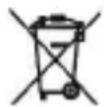
The symbol of the crossed-out dustbin means that the battery should not be disposed of in household waste.


WEEE directive 2012/19/EU WEEE Register no.: DE 67896761
The company WD Plus GmbH hereby certifies that the device 305077/20201030FZ015 complies with the fundamental requirements and all other relevant stipulations of the guideline 2014/53/EC. A complete conformity statement can be obtained from: WD Plus GmbH, Wohlenbergstraße 16, 30179 Hannover http://downloads.ganzeinfach.de/search/model/305077


Unité émettrice
Écran d'affichage
![8 BEEF 9 HOLD WELL MEDIUM HOLD NAME TEMP SET TEMP 1 10 888°C [888°C] 11 TEMP SET TEMP 2 12 888°C [888°C] 13 MODE LIGHT 15 16 17 MEAT MIN▲ TASTE 18 19 CLEAR SEC ▼ START STOP 20 21](/content/2026/04/686864/images/e725a0d716430f38625e395d7bcab73eaf843a1ff3c0d65fad3f56a8e0ea1f2a.jpg)
- Scope of delivery
- Technical data
- Product details
- Built-in programs
- Inserting batteries into the main unit
- Inserting batteries into the transmitter unit
- Usage
- Program selection
- Selecting the cooking times
- Selecting the temperature manually
- Placing the thermometer
- Changing between °C and °F
- CountUP and CountDOWN function (up and down counters)
- Safety instructions and disclaimer
- Disposal instructions
- Instructions for battery disposal
Brand : Arendo
Model : 305077
Category : Thermometer