304578 - Projector Mybeo - Free user manual and instructions
Find the device manual for free 304578 Mybeo in PDF.


User questions about 304578 Mybeo
0 question about this device. Answer the ones you know or ask your own.
Ask a new question about this device
Download the instructions for your Projector in PDF format for free! Find your manual 304578 - Mybeo and take your electronic device back in hand. On this page are published all the documents necessary for the use of your device. 304578 by Mybeo.
USER MANUAL 304578 Mybeo
ENG: Latest information, drivers, user manuals and data sheets can be found at www.ganzeinfach.de in our download area.
text_image
Warning sign with black starburst symbol inside yellow triangle, indicating laser warning or hazardtext_image
1 2 3 4 5 6 7 8 Remote Receiving Area Rows CE FED D E MADE IN CHINA- This device is suitable only for domestic use. Use the projector for private use only.
- Place the device on a flat and even surface.
- Never use the product outdoors.
- Do not use the device if it is defective.
- Do not use the projector if it has fallen down or the surface is damaged.
- Do not immerse the device under water and ensure that it does not come into contact with water.
-
Never dismantle the device under any circumstances. Warranty claims are rendered void in the event of improper use.
• This product is not a toy. -
Keep it out of the reach of children.
- This device is not intended to be used, cleaned or maintained by people (including children) with reduced physical, sensory or mental abilities or lack of experience and/or knowledge. Unless they are supervised by a person who is responsible for their safety or have received instructions from this person about how the device is to be properly used.
- Batteries should never be thrown into the fire nor be recharged.
- Do not use any chemical cleaning agents. Use only a soft cloth for cleaning.
- The product is a combination of LED light and laser projection. Never point the light at people or other animals.
Important safety guidelines for this product
When using laser equipment, it should be ensured that people are not present in the projection range of the laser beam of the device. Ensure that the beam is not reflected to areas where people are present. Before using this device, inform yourself about the legal requirements and preventive measures for operating such a laser device.
Never look into the laser beam and never point it at people or animals. Such laser radiation can cause eye injuries!
As soon as laser radiation impinges on the eye, the eyes must be closed immediately and the head must be moved away from the laser beam immediately.
Never point the laser beam at a mirror or other reflective surfaces. The uncontrolled beam may hit persons or animals!
Manipulations (modifications) to the laser equipment are not permitted.
This user manual should be kept carefully, and if you give the laser equipment away, it should be handed over along with it.
This product is equipped with a laser of Class 1.
text_image
Warning sign with black laser symbol inside yellow triangle, indicating explosion hazardThank you for choosing a mybeo product. Please read the following user manual carefully to get the most from the product you have purchased.
1. Scope of delivery
• Stars and Sky projector
- User manual
- MiniUSB power cable
- Mains adapter
2. Technical data
| Power supply | • Remote control: 2 AAA batteries • Projector: 5V DC 2A via miniUSB connector |
| Operating temperature -10°C to 40°C | |
| Max. transmission power | 2.04 dBm |
| Frequency range | 2402-2480MHz; Modulation type: GFSK |
| Laser power | <1mW (Laser Class 1) |
| Function Auto-off function | (after 4 hours) |
| USB flash drive FAT32 (recommended), MP3 file format | |
3. Initial use
Take the device out of the package and remove all the packaging material. Check the device for any damage. Insert two 1.5V AAA batteries into the remote control. Pay attention to the correct polarity of the contacts.
Connect the miniUSB cable to a suitable mains adapter (5V/2A) and to the star and sky projector.
4. Product details
text_image
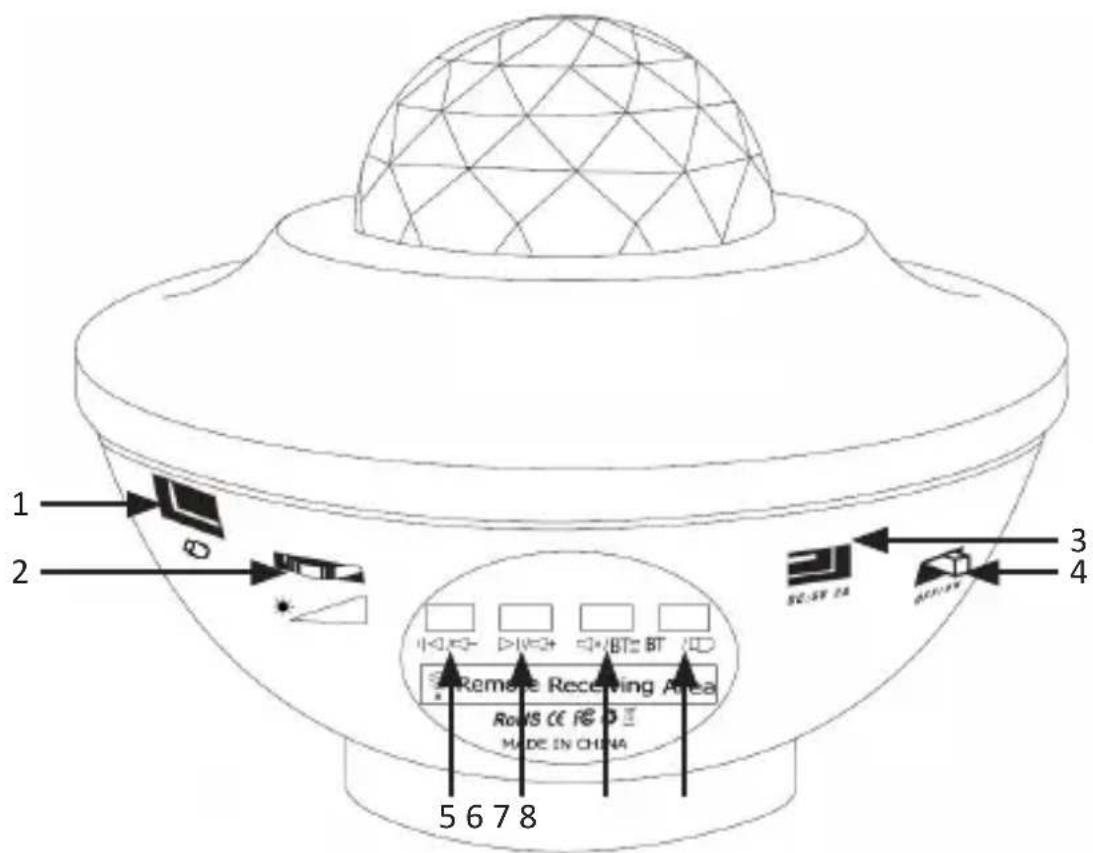
1 2 3 4 5 6 7 8 Remote Receiving Area Rows CE R E D MADE IN CHINA| No. Description | |
| 1 USB interface (music playback) | |
| 2 | Brightness setting (3 levels) |
| 3 | 5V DC / 2A power connection |
| 4 | ON/OFF switch |
| 5 | Reduce volume (press for long time) / last track (press briefly) |
| 6 Increase volume (press for long time) / next track (press briefly) | |
| 7 | Pause music playback (press briefly) / Turn on Bluetooth connection (press for long time) |
| 8 Switching between USB and Bluetooth mode (press briefly) | |
Button functions
text_image
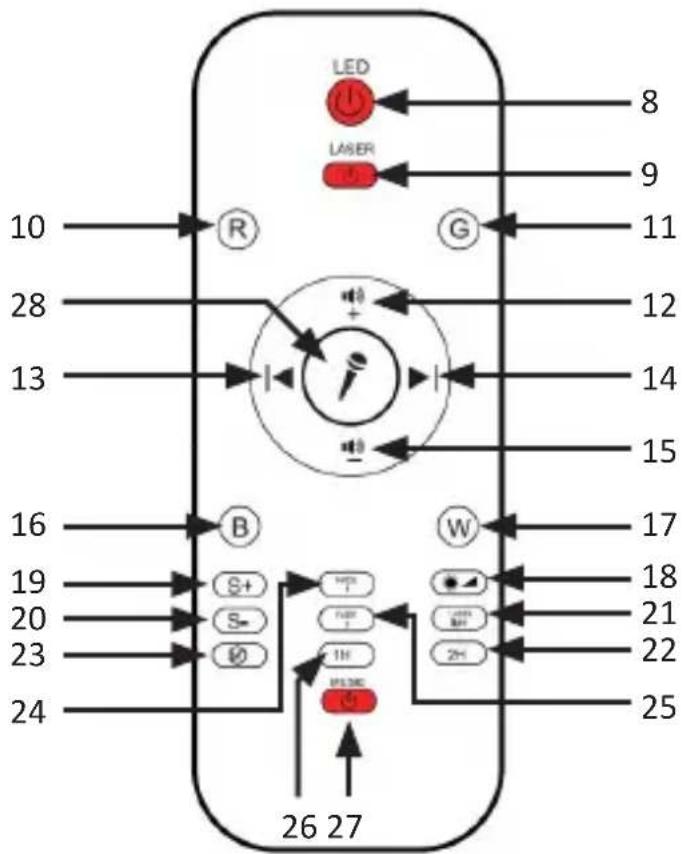
LED Laser 10 28 13 16 19 20 23 24 R G 12 14 15 B W 17 18 21 22 25 S+ S= Ø0 1H P33DC 26 27| No. Description | |
| 8 Switch LED on/off | |
| 9 | Switch Laser on/off |
| 10 | Switch red light on/off |
| 11 | Switch green light on/off |
| 12 | Increase the volume |
| 13 Previous track | |
| 14 Next track | |
| 15 Decrease the volume | |
| 16 Switch blue light on/off | |
| 17 Switch white light on/off | |
| 18 Adjust brightness (press several times for brightness setting) | |
| 19 | Increase wave pattern speed (Stop - Slow - Medium - Fast) |
| 20 | Decrease wave pattern speed (Fast- Medium - Slow - Stop) |
| 21 | Change laser mode (pulsation mode / bright mode) |
| 22 | Two-hour timer (press and hold for about 3 seconds to enable the timer function. The laser and LED flash briefly and you hear a "drip" sound. The timer has been set.) |
| 23 | Cancel timer function (press and hold for about 3 seconds to cancel the timer function. The laser and LED flash 3 time and you hear the "drip" sound 3 times.) |
| 24 Fade 1 (The colour selection changes between the different colours.) | |
| 25 | Fade 2 (The colour selection changes between the different colours in two-colour mode) |
| 26 | One-hour timer (press and hold for about 3 seconds to enable the timer function. The laser and LED flash briefly and you hear a "drip" sound. The timer is then set. |
| 27 Switching the music on/off | |
| 28 | In-built Music Player: Press the microphone icon when you connect to Bluetooth or connect a USB stick to play music. The display changes to the beat of the music being played. |
Caution! The device has an automatic default shutdown time of 4 hours!
5. Establishing a Bluetooth connection
You can connect any desired device to the projector via Bluetooth.
To do this, press and hold the "Bluetooth button" (7). Then start the scanning function of your device and scan for "BTK10". Then pair with the device.
Caution! If you insert the USB stick at the same time, the projector always prefers the files on the USB stick. To do this, switch the mode between USB and Bluetooth by pressing the Shift button (8) briefly.
6. Usage and function
6.1 Switching on the colours
You can switch the corresponding colours On / Off by pressing the colour buttons "Red (R)" (10), "Green (G)" (11), "Blue (B)" (16) and "White (W)" (17). Switching on multiple colours simultaneously affects the colour display of the projector. You can switch the colour change function on or off using the "Fade 1" (24) and "Fade 2" (25) buttons.
6.2 Adjusting the display speed
You can adjust the display speed using the speed setting buttons on the remote control. You can increase the speed (19) or decrease the speed (18). The cycle is as follows: Pause - Slow - Medium - Fast
6.3 Switching between USB mode and Bluetooth mode
You can change the music playback between USB mode and Bluetooth mode. To do this, press the Mode change button (8) to change the mode between USB and Bluetooth.
6.4 Timer function
You have the option to enable a 1-hour timer function (26) or a 2-hour timer function (22). To do so, press the corresponding button for about 3 seconds. To cancel the timer function, press and hold the button to cancel the timer function (23).
You hear a beep and a visual signal for each timer setting. The signals of the button functions are given in the table.
7. Cleaning and Care
Follow the safety instructions when cleaning. Once the device is switched off, you can clean the surface using a slightly damp, soft cloth. Do not use cleaning agents, solvents or scouring agents for cleaning. Use only a soft cloth to clean the device.

8. Safety instructions and disclaimer
Please do not try to open the device to carry out repairs or modifications. Avoid contact with the mains voltage. Do not short-circuit the product. The device is not waterproof. Please use it only in dry surroundings. Protect it from high humidity, water and snow. Do not expose the device to high temperatures. Do not expose the device to sudden changes in temperature or strong vibrations, as this could damage the electronic components. Check the device for any damage before using it. The device should not be used if it was subject to impact or has been damaged in some other manner. Please comply with the local regulations and restrictions. Do not use the device for purposes other than those described in the user manual. This product is not a toy. Keep it out of the reach of children or mentally disabled persons. Any repair or modifications to the device, which is not carried out by the original supplier will void any warranty and guarantee claims. The device should only be used by those who have read and understood this user manual. The specifications of the device may be changed without prior notice.

9. Disposal instructions
In line with the European WEEE directive, electrical and electronic devices should not be disposed of along with domestic waste. Their components have to be separately sent for recycling or disposal, because improper disposal of toxic and dangerous components may permanently damage the environment. According to the electrical and electronic equipment act (ElektroG), you are obliged (as a consumer) to return (free of charge) electrical and electronic devices to the manufacturer, the point of sale or public collection points at the end of their service life. The relevant local laws regulate the details in this regard. The symbol displayed on the product, in the user manual or/and on the packaging refers to these regulations. With this manner of sorting, recycling and disposal of used devices, you make an important contribution towards protecting our environment.
WEEE directive: 2012/19/EU WEEE Register no.: DE 67896761
The company WD Plus GmbH hereby certifies that the device 304578 complies with the fundamental requirements and all other relevant stipulations of the directive 2014/53/EU. A complete conformity statement can be obtained from: WD Plus GmbH, Wohlenbergstraße 16, 30179 Hannover, http://downloads.ganzeinfach.de/search/model/304578