303262 - Scale Mybeo - Free user manual and instructions
Find the device manual for free 303262 Mybeo in PDF.


User questions about 303262 Mybeo
0 question about this device. Answer the ones you know or ask your own.
Ask a new question about this device
Download the instructions for your Scale in PDF format for free! Find your manual 303262 - Mybeo and take your electronic device back in hand. On this page are published all the documents necessary for the use of your device. 303262 by Mybeo.
USER MANUAL 303262 Mybeo
natural_image
Diagram showing a battery being placed on its tray, with an arrow indicating the process (no text or symbols present)- This device is suitable only for domestic use. Use the scales only to check your body weight!
- Do not use the device on carpets or similar surfaces. Always use the scales on a flat and hard surface. This ensures consistent measurement.
- Never use the product outdoors!
- Ensure that your feet are not wet and that the device is dry when using it.
- Ensure that the scales does not topple over. There is a risk of injury!
- Do not use the scales if it is defective.
- Do not use the device if it has fallen down or the surface is damaged.
- Never place any objects on the scales.
- Do not immerse the device under water and ensure that it does not come into contact with water.
- Pay special attention to the correct polarity when inserting the batteries! Ensure that you do not reverse the battery polarity under any circumstances!
- Never dismantle the device under any circumstances. Warranty claims are rendered void in the event of improper use.
- Do not jump on and off the device under any circumstances.
• This product is not a toy!
- Keep it out of the reach of children.
- Avoid exposing the scales to direct sunlight. As far as possible, avoid placing the scales in places where the temperature and humidity are very high.
- This device is not intended to be used, cleaned or maintained by people (including children) with reduced physical, sensory or mental abilities or lack of experience and/or knowledge. Unless they are supervised by a person who is responsible for their safety or have received instructions from this person about how the device is to be properly used.
- Never overload the product. The maximum weighing capacity of the product is 180kg.
- Do not use the scales near combustible or inflammable surroundings or objects.
- Use only suitable batteries. Inferior quality batteries may leak and damage the device.
- Batteries should never be thrown into the fire nor be charged.
- If the scales is not used for a long duration of time, then ensure that the batteries are removed and stored in a dry place.
- Do not use any chemical cleaning agents. Use only a soft cloth for cleaning.
Thank you for choosing a mybeo product. Please read the following user manual carefully so that you can enjoy the purchased product for a long time.
1. Scope of delivery
- Bathroom scales
- User manual
2. Technical data
| Power supply Three 1.5V AAA batteries | |
| Weighing range 5-180kg | |
| Resolution 0.1kg | |
| Units KG, lb, ST | |
| Features | LCD displayBody fat measurementWater content percentageMuscle massBone weight percentage |
3. Product details
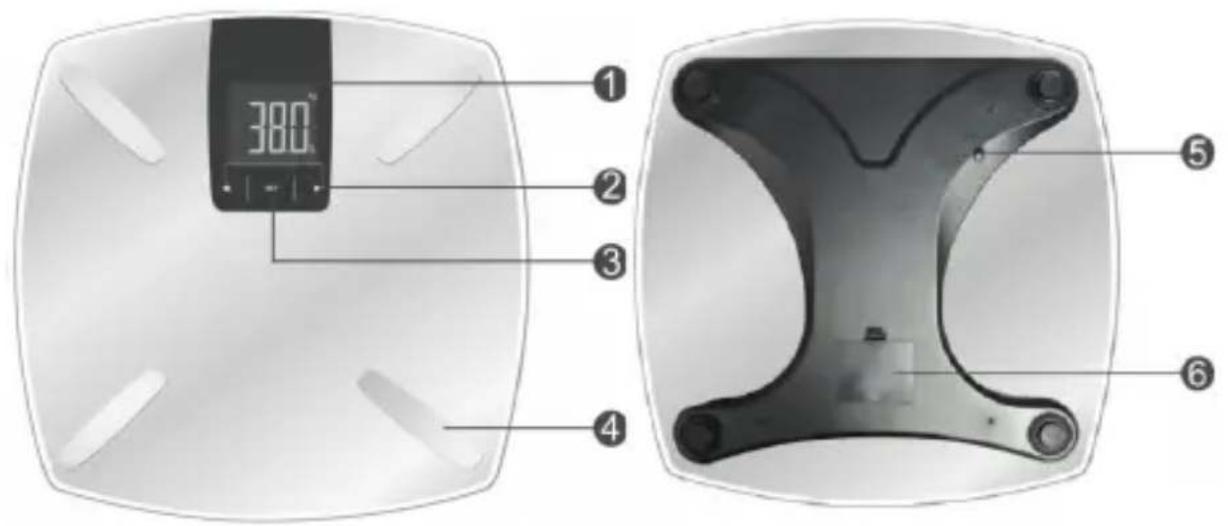
text_image
380° ① ② ③ ④ ⑤ ⑥| 1 Display | |
| 2 "Selection" buttons | |
| 3 "Set" button | |
| 4 Foot electrodes | |
| 5 "Unit" button | |
| 6 Battery compartment | |
4. Commissioning
Take the device out of the package and remove all the packaging material. Before using the bathroom scales, you need to insert 3 AAA 1.5V batteries into the battery compartment. Pay attention to the polarity of the contacts. Place the product only on a firm, even and dry surface.
Note: If you do not intend to use the device on a regular basis, please ensure that you remove the batteries when the device is not in use.
Caution! Ensure that you do not step on the edge of the scale since it can tip over. There is a risk of injury!
5. Selecting the weight unit
To change the displayed unit, press the "Unit" button on the back to choose between the following options:
ST = Stone; KG = Kilograms; LB = Pound
6. Weight function
You can also use the "Weight" function to check only your weight. If you do not want to use any of the special functions of the scales, then do not enable any profile in the data in this case. Stand with your feet evenly apart on the scales and do not move. Your weight is shown on the display after a few seconds. Wait until the display stops flashing. The scales will then switch off automatically thanks to the automatic shut-off function.
7. Se ngs and func on
Body fat percentage se ngs
- Press the "SET" button after switching on the scales. The personal data of the last user is displayed alternately.
- Press the "Unit" button at the bottom to select the unit (kg, lb, st).
- Then select a personal data profile. To do this, press the "SET" button on the scales until the personal data profile starts flashing. You can select one of 10 possible data profiles using the "Selection" buttons ( "<" and ">"). If you have selected your desired profile, confirm this using the "SET" button.
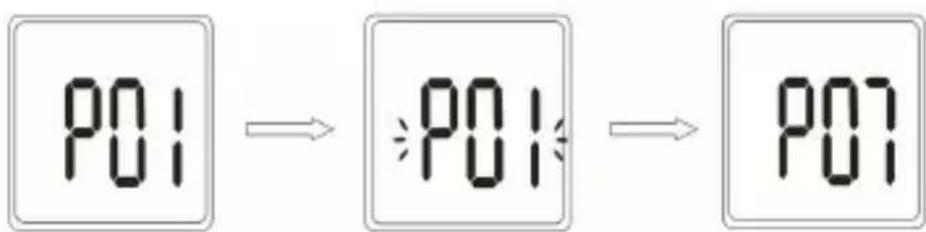
flowchart
graph LR
    A["PO1"] --> B["PO1"]
    B --> C["PO7"]
- Next, select the appropriate sex using the "Selection" button and confirm using the "SET" button.
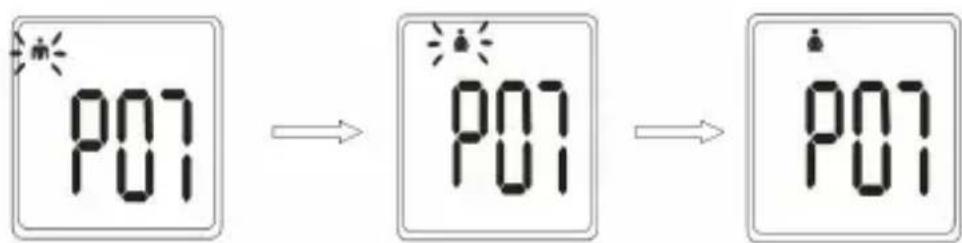
text_image
P01 P01 P01- Then enter the age of the person to be weighed. Select the appropriate age using the "Selection" button and confirm using the "SET" button. The age may range from 10 to 99 years.
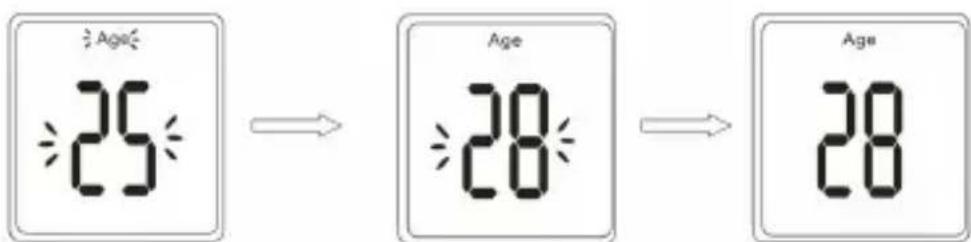
text_image
Age 25 Age 28 Age 28- Determine the height. Use the "Selection" button on the scales to determine the height of the person whose profile is being created.

text_image
≥170° → ≥167° → 167°Note: If you make a mistake while configuring the data, then you have to reconfigure the whole profile.
Measuring the body fat and weight
After making the settings or configuring the appropriate profiles, press the "SET" button and select the previously configured data profile using the "Selection" button. Stand on the scales once "0.0" is shown on the display.
Note: Your heels should be placed on the electrodes of the scales to ensure that the data is read accurately. If you do not stand on the scales within 10 seconds after "0.0" is displayed, it switches off thanks to the automatic power saving function.
Displaying additional values
After the weighing process is completed, the scales first displays your weight. Remain standing on the scales and the display shows "0000" in sequence from left to right. Your body fat percentage, water content, muscle mass, bone mass and the calories will then be displayed one after another. The values are displayed twice alternately. A symbol which indicates an approximate assessment of your weight compared to the default values is shown below the displayed value. When the symbol is on the left side, this signifies "underweight". If the symbol is in the middle, this signifies "normal". If the symbol is on the right side, this signifies "overweight".
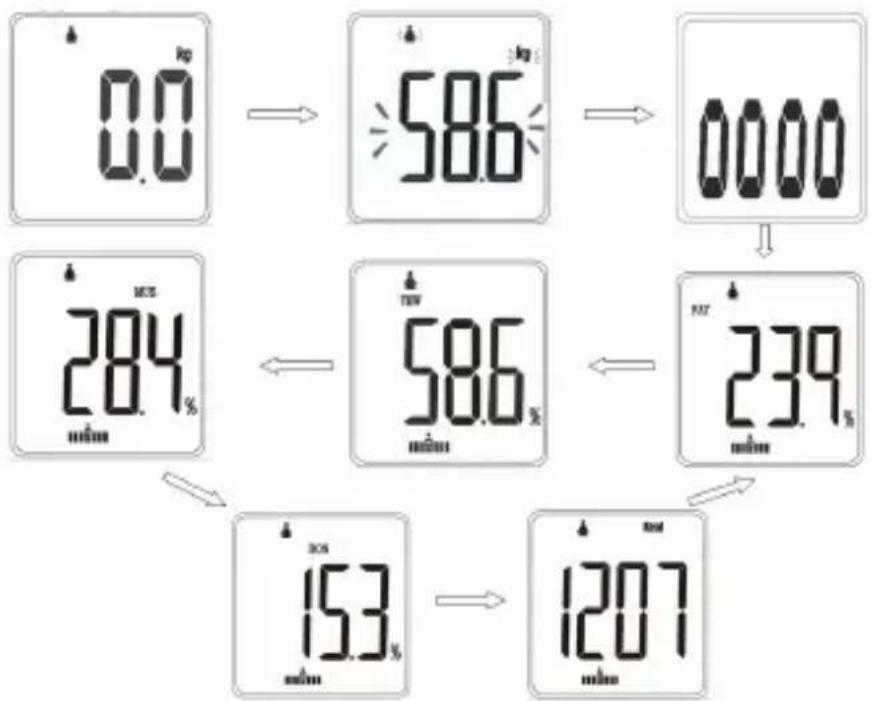
flowchart
graph TD
    A["0.0 kg"] --> B["586 kg"]
    B --> C["0000"]
    C --> D["239 %"]
    D --> E["153 %"]
    E --> F["1207 mAh"]
    G["284 %"] --> H["586 %"]
    H --> I["239 %"]
    I --> J["153 %"]
Note: Remain standing on the scales until all the values are displayed. Otherwise the readings may be erroneous. The elements are displayed twice alternately. Stand barefoot on the scales to use its advanced functions.
8. Value tables
Body fat values table
| AGE | FEMALE (%) MALE (%) | |||||
| Low Normal High Low Normal High | ||||||
| 10-19 <16 | 16 16-24 >24 | <11 11-19 >19 | ||||
| 20-29 <16 | 16 16-24 >24 | <12 12-20 >20 | ||||
| 30-39 <18 | 18 18-26 >26 | <14 14-22 >22 | ||||
| 40-49 <19 | 19-27 >27 | <15 15-23 >23 | ||||
| 50-59 <20 | 20-28 >28 | <16 16-24 >24 | ||||
| 60-99 <20 | 20-28 >28 | <17 17-25 >25 | ||||
Note: Due to natural differences between different people, you can use this chart only as an approximate reference.
Water content values table
| AGE | Female (%) Male (%) | |||||
| Low Nor | mal High Low | Normal High | ||||
| 10-19 <55.5 | 55.5-61.5 | >61.5 <58.5 | 58.5-64.5 >64.5 | |||
| 20-29 <55.5 | 55.5-61.5 | >61.5 <58.0 | 58.0-64.0 >64.0 | |||
| 30-39 <54.0 | 54.0-60.0 | >60.0 <56.5 | 56.5-62.5 >62.5 | |||
| 40-49 <53.0 | 53.0-59.0 | >59.0 <55.0 | 55.0-61.5 >61.5 | |||
| 50-59 <52.5 | 52.5-58.5 | >58.5 <55.0 | 55.0-61.0 >61.0 | |||
| 60-99 <52.5 | 52.5-58.0 | >58.0 <54.5 | 54.5-60.5 >60.5 | |||
Muscle mass values table
| Age | Female (%) Male (%) | |||||
| Low Nor | mal High Low | Normal High | ||||
| 10-19 <34.6 | 34.6-40.6 | >40.6 <43.0 | 43.0-55.0 >55.0 | |||
| 20-29 <32.6 | 32.6-38.6 | >38.6 <41.0 | 41.0-53.0 >53.0 | |||
| 30-39 <31.6 | 31.6-37.6 | >37.6 <40.0 | 40.0-52.0 >52.0 | |||
| 40-49 <29.6 | 29.6-35.6 | >35.6 <39.0 | 39.0-51.0 >51.0 | |||
| 50-59 <27.6 | 27.6-33.6 | >33.6 <37.0 | 37.0-49.0 >49.0 | |||
| 60-99 <27.6 | 27.6-33.6 | >33.6 <36.0 | 36.0-49.0 >49.0 | |||
Bone mass values table
| Female (%) Male (%) | |||||
| Low | Normal | High | Low | Normal | High |
| <10 | 10-16 | >16 | <12 | 12-18 | >18 |
9. Replacing the batteries
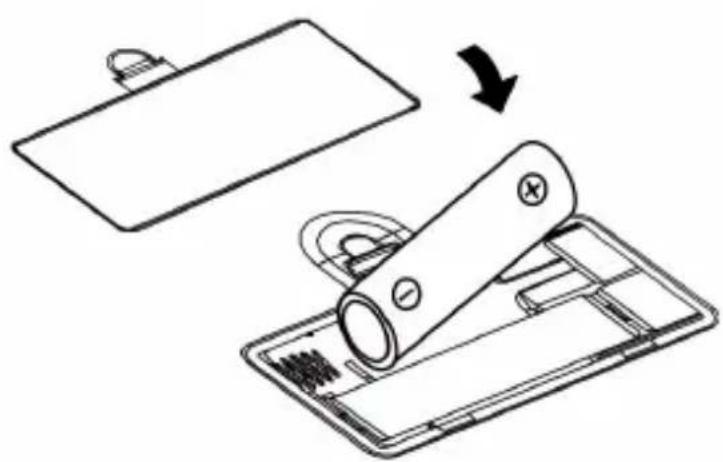
Open the battery compartment at the back of the device. Remove the discharged batteries from the battery compartment and dispose of them properly.
Then insert the new batteries into the battery compartment and pay attention to the correct polarity of the contacts.
Remove the batteries if you have not used the device for a long period.
natural_image
Diagram showing a battery being placed on a tray, with an arrow indicating the process (no text or symbols present)Note: Do not use rechargeable batteries as far as possible since this may eventually lead to restrictions in the functioning of the device!
10 Warning indicators
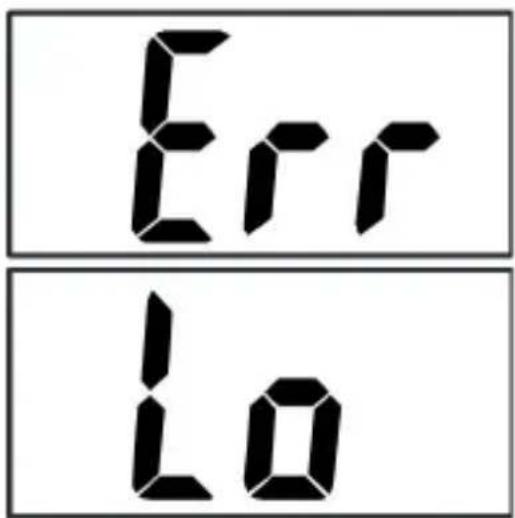
"Err" indicator:
The "Err" indicator implies that the device is overloaded.
"Lo" indicator:
The "Lo" indicator implies that the battery level is too low. Therefore replace the batteries as soon as possible.
text_image
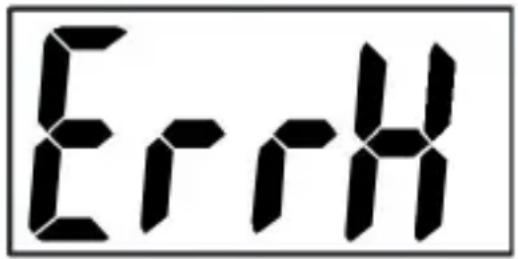
Err Lo"ErrH" indicator:
The "ErrH" indicator signals that the body values displayed are not accurate. Therefore carry out the measurement again.
text_image
ErHIf the scale indicates an error, it is advisable to reset the device. To do this, remove the batteries and wait for approx. 10 seconds. The batteries can then be inserted again.
11. Cleaning and care
Follow the safety instructions strictly when cleaning. Once the device is switched off, you can clean the surface using a damp, soft cloth.
Never use any cleaning agents, solvents or scouring agents for cleaning. Use only a soft cloth to clean the device.

12. Safety instructions and disclaimer
Please do not try to open the device to carry out repairs or modifications. Avoid contact with the mains voltage. Do not short-circuit the product. The device is not waterproof. Please use it only in dry surroundings. Protect it from high humidity, water and snow. Do not expose the device to high temperatures. Do not expose the device to sudden changes in temperature or strong vibrations, as this could damage the electronic components. Check the device for damage before using it. The device should not be used if it has been subject to impact or has been damaged in any other manner. Please comply with the local regulations and restrictions. Do not use the device for purposes other than those described in the user manual.
This product is not a toy. Keep it out of the reach of children or mentally disabled persons. Any repair or modification to the device, which is not carried out by the original supplier, will void any warranty and guarantee claims. The device should only be used by those who have read and understood this user manual. The specifications of the device may be changed without special prior notification.

13. Disposal instructions
In line with the European WEEE directive, electrical and electronic devices should not be disposed of along with domestic waste. Their components have to be sent separately for recycling or disposal, as improper disposal of toxic and dangerous components may permanently damage the environment. According to the electrical and electronic equipment act (ElektroG), you are obliged (as a consumer) to return (free of charge) all electrical and electronic devices to the manufacturer, the point of sale, or public collection points at the end of their service life. The relevant local laws regulate the details in this regard. The symbol on the product, in the user manual or/and the packaging refers to these regulations. With this manner of sorting, recycling and disposal of used devices, you make an important contribution towards protecting our environment.
WEEE Guideline: 2012/19/EU WEEE Register no.: DE 67896761
The company WD Plus GmbH hereby certifies that the device 303262/20180423GZ031 complies with the fundamental requirements and all other relevant stipulations. A complete conformity statement can be obtained from: WD Plus GmbH, Wohlenbergstraße 16, 30179 Hannover