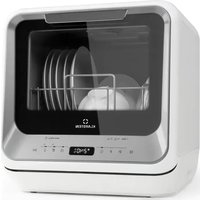
Amazonia Mini - Dishwasher Klarstein - Free user manual and instructions
Find the device manual for free Amazonia Mini Klarstein in PDF.


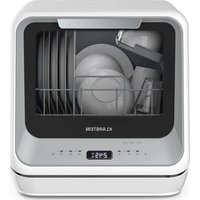
| Product type | Dishwasher |
| Brand | Klarstein |
| Model | Amazonia Mini |
| Dimensions (H x W x D) | 435 x 420 x 435 mm |
| Weight (estimated) | 22 kg |
| Power supply | 220-240 V, 50 Hz |
| Power consumption (eco cycle) | 0.425 kWh |
| Water consumption (eco cycle) | 5 L |
| Energy efficiency class | G |
| Noise level | 58 dB(A) |
| Noise emission class | D |
| Capacity | 2 standard place settings |
| Programs | Eco, 1 hour, Quick, Fruits, Baby bottle, Glass |
| Special functions | Delayed start (0-24h), Extra dry, Steam+, Fruit wash, Baby bottle |
| Installation type | Freestanding |
| Water fill | Permanent connection or manual fill |
| Salt reservoir capacity | Approximately 130 g |
| Filters | Removable filtration system, weekly cleaning recommended |
| Safety | Child safety, door lock, hydrogen protection |
| Control panel | LED display, physical buttons |
Frequently Asked Questions - Amazonia Mini Klarstein
User questions about Amazonia Mini Klarstein
0 question about this device. Answer the ones you know or ask your own.
Ask a new question about this device
Download the instructions for your Dishwasher in PDF format for free! Find your manual Amazonia Mini - Klarstein and take your electronic device back in hand. On this page are published all the documents necessary for the use of your device. Amazonia Mini by Klarstein.
USER MANUAL Amazonia Mini Klarstein
CLEANINGCI LEANINGLE ANINGLEAN NINGCLEAN NINGLEANINGCI GCLEANINGCI CLEANINGLE LEANINGLE ANINGLEAN

KLARSTEIN
www.klarstein.com

bar
| Category | Value | |---|---| | Category 1 | 100 | | Category 2 | 100 | | Category 3 | 100 | | Category 4 | 100 | | Category 5 | 100 | | Category 6 | 100 | | Category 7 | 100 | | Category 8 | 100 | | Category 9 | 100 | | Category 10 | 100 | | Category 11 | 100 | | Category 12 | 100 | | Category 13 | 100 | | Category 14 | 100 | | Category 15 | 100 | | Category 16 | 100 | | Category 17 | 100 | | Category 18 | 100 | | Category 19 | 100 | | Category 20 | 100 | | Category 21 | 100 | | Category 22 | 100 | | Category 23 | 100 | | Category 24 | 100 | | Category 25 | 100 | | Category 26 | 100 | | Category 27 | 100 | | Category 28 | 100 | | Category 29 | 100 | | Category 30 | 100 | | Category 31 | 100 | | Category 32 | 100 | | Category 33 | 100 | | Category 34 | 100 | | Category 35 | 100 | | Category 36 | 100 | | Category 37 | 100 | | Category 38 | 100 | | Category 39 | 100 | | Category 40 | 100 | | Category 41 | 100 | | Category 42 | 100 | | Category 43 | 100 | | Category 44 | 100 | | Category 45 | 100 | | Category 46 | 100 | | Category 47 | 100 | | Category 48 | 100 | | Category 49 | 100 | | Category 50 | 100 | | Category 51 | 100 | | Category 52 | 100 | | Category 53 | 100 | | Category 54 | 100 | | Category 55 | 100 | | Category 56 | 100 | | Category 57 | 100 | | Category 58 | 100 | | Category 59 | 100 | | Category 60 | 100 | | Category 61 | 100 | | Category 62 | 100 | | Category 63 | 100 | | Category 64 | 100 | | Category 65 | 100 | | Category 66 | 100 | | Category 67 | 100 | | Category 68 | 100 | | Category 69 | 100 | | Category 70 | 100 | | Category 71 | 100 | | Category 72 | 100 | | Category 73 | 100 | | Category 74 | 100 | | Category 75 | 100 | | Category 76 | 100 | | Category 77 | 100 | | Category 78 | 100 | | Category 79 | 100 | | Category 80 | 100 | | Category 81 | 100 | | Category 82 | 100 | | Category 83 | 100 | | Category 84 | 100 | | Category 85 | 100 | | Category 86 | 100 | | Category 87 | 100 | | Category 88 | 100 | | Category 89 | 100 | | Category 90 | 100 | | Category 91 | 100 | | Category 92 | 100 | | Category 93 | 100 | | Category 94 | 100 | | Category 95 | 100 | | Category 96 | 100 | | Category 97 | 100 | | Category 98 | 100 | | Category 99 | 100 | | Total (Total) = [sum of bars] / [values] * (sum of bars + bars) * (sum of bars + bars) * (sum of bars + bars). The values in the table represent the sum of the bars and the corresponding sum of the bars. There is no additional data series or categories specified in the code.INHALTSVERZEICHNIS
natural_image
Line drawing of a hand pouring liquid into a device with an electrical outlet (no text or symbols)(3) Gerät befüllen
natural_image
Two line drawings of a device with arrows indicating rotation and touch function, no text or symbols present.natural_image
Line drawing of a mechanical device with cylindrical components and base mount (no text or symbols)SPÜLMITTELARTEN
natural_image
Line drawing of a device with a brush and dots being inserted into a tray (no text or symbols)SPÜLPROGRAMME (EN 60436)
flowchart
graph LR
    A["Hand washing"] --> B["Laptop with screen"]
    B --> C["Bar chart with checkmark"]
    C --> D["Computer with screen"]
    D --> E["Product inspection"]
natural_image
Diagram of a car interior showing the front compartment with a hand valve and an arrow indicating direction (no text or symbols)natural_image
Symbol of a trash bin crossed with a diagonal line, no text or numbers presentBerlin Brands Group UK Limited
PO Box 42
272 Kensington High Street
London, W8 6ND
United Kingdom
Dear Customer,
Congratulations on purchasing this device. Please read the following instructions carefully and follow them to prevent possible damages. We assume no liability for damage caused by disregard of the instructions and improper use. Scan the QR code to get access to the latest user manual and more product information.

CONTENT
Safety Instructions 30
Quick Start Guide 32
Device Overview 34
Control Panel and Button Functions 35
Adding Rinsing Salt 36
Loading the Basket 38
Loading the Baskets (EN 60436) 39
Detergent Types 40
Adding Detergent 40
Washing Programmes (EN 60436) 41
Operation in Detail 42
Cleaning and Care 44
Troubleshooting 46
Product Data Sheet 50
Disposal Considerations 51
Manufacturer & Importer (UK) 51
SAFETY INSTRUCTIONS
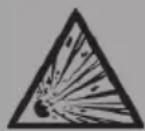
WARNING
Risk of explosion! Under certain conditions, Hydrogen gas may be produced in a hot-water system that has not been used for two weeks or more. HYDROGEN GAS IS EXPLOSIVE. If the hot-water system has not been used for such a period, before using the dishwasher turn on all hot-water faucets and let the water flow from each for several minutes. This will release any accumulated hydrogen gas. As the gas is fl ammable, do not smoke or use an open flame during this time.
- Do not abuse, sit on, or stand on the door or dish basket of the dishwasher.
- Do not touch the heating element during or immediately after use.
- Do not operate your dishwasher unless all enclosure panels are properly in place.
- Open the door very carefully if the dishwasher is operating. There is a risk of water squirting out.
- Do not place any heavy objects or stand on the door when it is open. The appliance could tip forward.
- When using your dishwasher, you should prevent plastic items from contacting with heating element.
- Check that the detergent receptacle is empty after completion of the wash cycle.
- Do not wash plastic items unless they are marked dishwasher safe or the equivalent.
- For plastic items not so marked, check the manufacturer's recommendations.
- Use only detergent and rinse additives designed for an automatic dishwasher.
- Never use soap, laundry detergent, or hand washing detergent in your dishwasher.
- Other means for disconnection from the supply must be incorporated in the fixed wiring with at least 3 mm contact separation in all poles.
- Keep children away from detergent and rinse aid, keep children away from the open door of the dishwasher, there could still be some detergent left inside.
- Young children should be supervised to ensure that they do not play with the appliance.
- This device may be only used by children 8 years old or older and persons with limited physical, sensory and mental capabilities and / or lack of experience and knowledge, provided that they have been instructed in use of the device by a responsible person who understands the associated risks.
-
Dishwasher detergents are strongly alkaline. They can be extremely dangerous if swallowed. Avoid contact with skin and eyes, and keep children away from the dishwasher when the door is open.
-
The door should not be left in the open position since this could present a tripping hazard.
- If the supply cord is damaged, it must be replaced by the manufacturer or its service agent or a similarly qualified person in order to avoid a hazard.
- Please dispose of packing materials properly.
- During installation, the power supply must not be excessively or dangerously bent or flattened.
- Do not tamper with controls.
- The appliance is to be connected to the water mains using new hose sets, and the old hose-sets
- should not be reused.
- Make sure that the carpet must not obstruct the openings at the bottom base.
- Use the dishwasher only for its intended function.
• The dishwasher is intended for indoor use only. - The dishwasher is not designed for commercial use. It is intended for use in domestic households and in similar working and residential environments.

CAUTION
Risk of injury! Locate sharp items so that they are not likely to damage the door seal. Load sharp knives with the handles up to reduce the risk of cut-type injuries. Warning: Knives and other utensils with sharp points must be loaded in the basket with their points down or placed in a horizontal position.

WARNING
Risk of suffocation! Packaging material could be dangerous for children! For disposing of package and the appliance please go to a recycling centre. Cut off the power supply cable and make the door closing device unusable.
QUICK START GUIDE
(1) Setting up water drainage
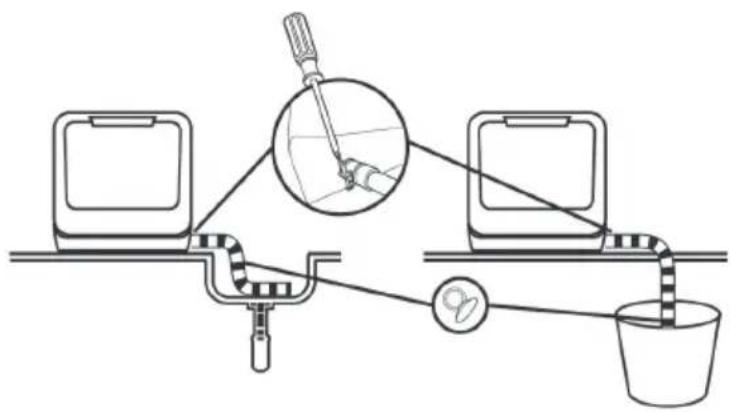
Insert the end of the drain hose into a sink or bucket. Fix the drain hose with suction cups.
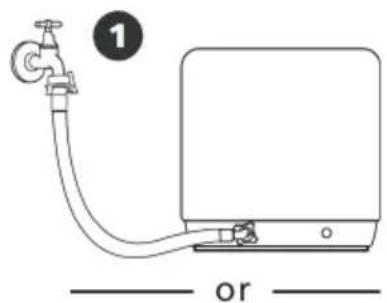
(2) Setting up the water supply
You can fill the device with water in two ways:
• Permanent connection via the tap (1)
- Manual filling via the cap at the top of the device (2)
How to tell if there is enough water in the tank:
Before starting: if the tank is filled with enough water, the device will beep several times.
After starting: if there is not enough water in the tank, the following symbol will appear:
As soon as there is enough water left in the tank, the symbol will go out and the device will beep several times.
natural_image
Simple line drawing of a water pump connected to a rectangular device with labeled parts (no text or symbols on the diagram itself)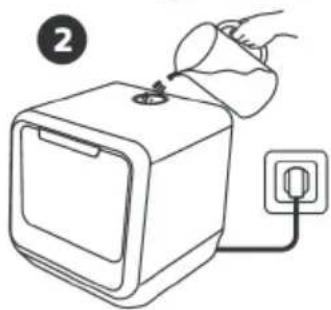
natural_image
Line drawing of a hand pouring liquid into a device with an electrical outlet (no text or symbols)(3) Filling the device
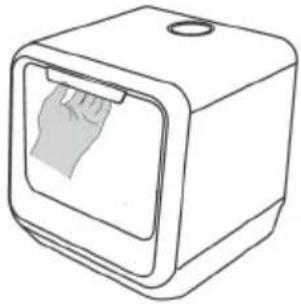
Remove the larger food residues from the dishes. Open the door, place the dishes in the basket and add detergent.
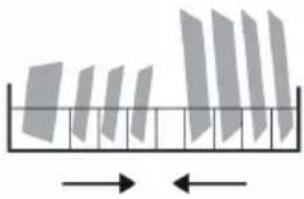
Note: populate the device by size and from both sides to the center. All cutlery should be tilted to improve cleaning performance. The arm may be blocked by improper placement of the cutlery, in which case dishes may not be properly cleaned.
 |  |
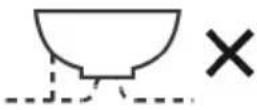 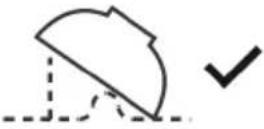 | 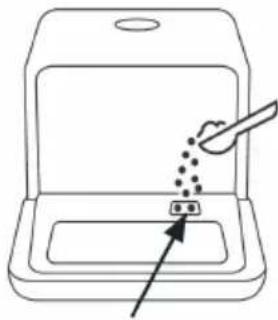 |
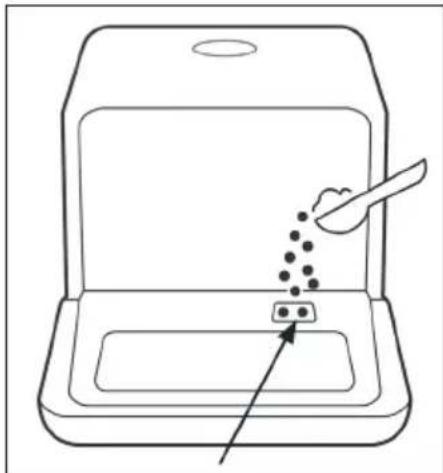
| Place the dishes dirty side down in the basket and tilt slightly to allow water to drain off. | The detergent is filled here. Do NOT use dishwashing liquid in the fruit and vegetable program. |
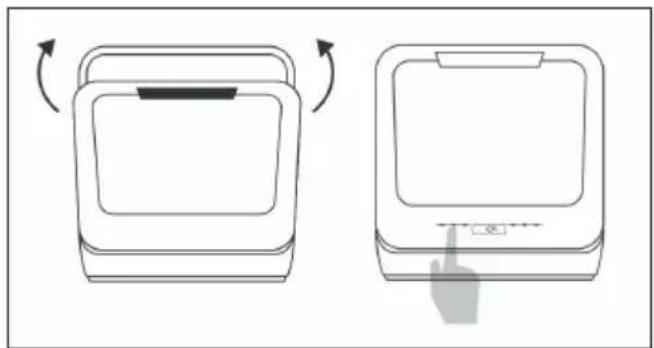
(4) Starting the device
natural_image
Two line drawings of a device with arrows indicating rotation and hand cursor pointing at the button (no text or symbols)Close the door, select a program and start the device.
DEVICE OVERVIEW
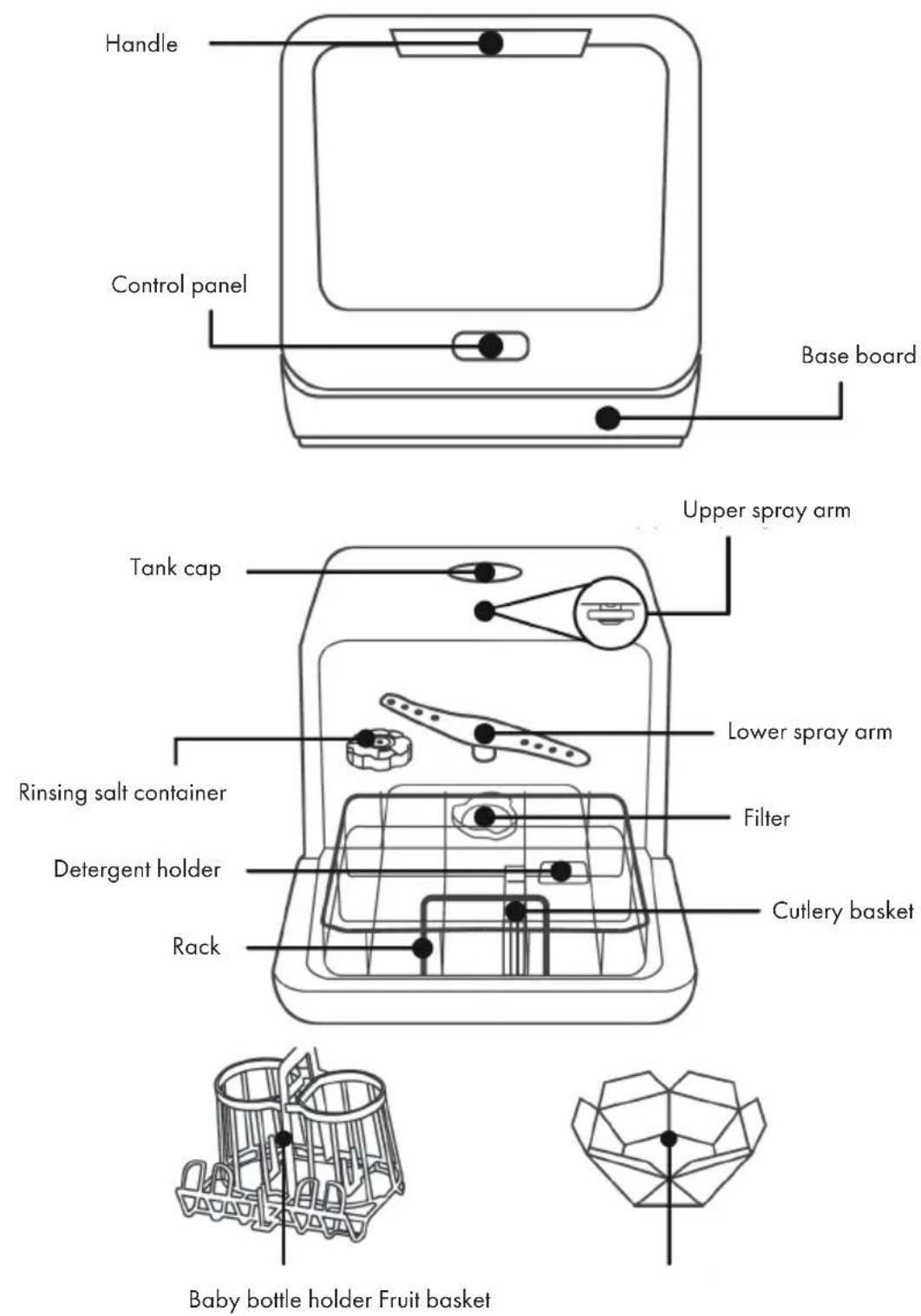
CONTROL PANEL AND BUTTON FUNCTIONS
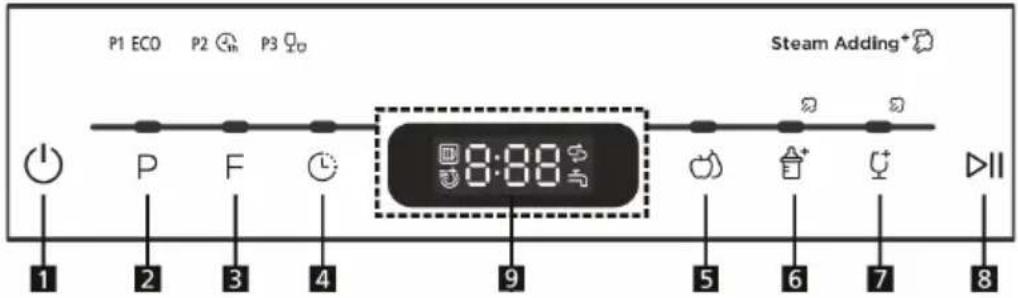
| 1 | Power | Switches device on and off. | |
| 2 | Programm | Press repeatedly to select one of the following programs: P1 (eco), P2 (hour), P3 (fast). | |
| 3 | Function | 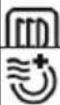 | Cupboard dry: prevents odor, moisture and mold |
| Extra dry | |||
| 4 | Delayed start | You can program the start so that the dishwasher starts with a delay of 0-24 hours. | |
| 5 | Wash fruit | Hot water: suitable for washing fruits with a larger surface, such as: apples, pears. | |
| Kaltwasser: Geeignet für Früchten mit einer kleinen Oberfläche, wie z. B. Erdbeeren. | |||
| 6 | Baby bottles | Suitable for washing baby bottles. | |
| 7 | Adding steam+ | If the salt indicator is not lit, steam is added during the wash cycle. This function cannot be used with the fruit washing programme. | |
| 8 | Start/Pause | Press this button to start or stop the dishwasher. The warning light will flash at startup. | |
| 9 | Display | Displays the time and functions. | |
ADDING RINSING SALT
Only use rinsing salt that is intended for use in the dishwasher.
The salt container is under the basket and should be filled as follows:
- Any other type of salt that is not specifically designed for the dishwasher, especially table salt, will damage the container. In the case of damage caused by the use of unsuitable salt, the guarantee will expire and the manufacturer will not be liable for any damage caused.
- Fill the device with rinsing salt before starting a run. This avoids spilled salt grains that remain on the floor of the machine for an indefinite period, which can lead to corrosion.
How to fill in the rinsing salt
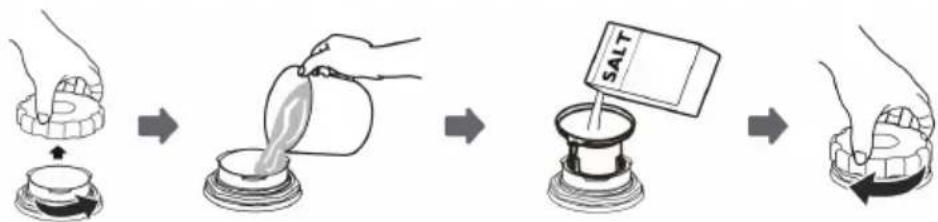 | |
| A | Remove the basket and unscrew the cap from the salt container. |
| B | Add 1 liter of water to the salt container before the first wash. |
| C | Insert the end of the funnel (supplied) into the hole and pour in about 130g of salt. It is normal for a small amount of water to come out of the salt container. |
| D | After filling, tighten the cap clockwise. |
| E | The salt warning lamp usually goes out within 2-6 days after filling the salt container. |
| F | Immediately after filling the salt into the salt container, a washing program should be started (e.g., the quick program). Otherwise, the filter system, the pump or other important parts of the machine may be damaged by salt water. |
Important instructions
- The salt container should only be refilled when the salt warning light on the control panel is lit. Depending on how well the salt dissolves, the salt warning light will still light up when the salt container is filled. If there is no salt warning light on the control panel (on some models), you can use the cycles the dishwasher has undergone to determine when to refill with salt.
- If you spill some salt, start the quick program to remove the excess salt.
How to adjust the amount of rinsing salt correctly
Step 1: Call up rinsing salt settings
Close the door within 60 seconds of powering on, press and hold the Start / Pause button for 5 seconds.
Step 2: Adjust the amount of rinsing salt according to water hardness
Press the Start / Pause button to select the correct setting according to your water hardness: H1>H2>H3>H4>H5>H.
Step 3: Leave rinsing salt settings
If you do not make another setting for 5 seconds, the unit will automatically exit the settings and enter standby mode.
Water hardness and salt quantity
| Water hardness | Softener setting | Digital display | Notes | |
| ^^1 | mmol/ I^2 | |||
| 0-5 0-0.9 | 1 | H1 | (1) German water hardness(2) millimoles, international water hardness(*) Default when first started | |
| 6-11 1.0- | 2.0 2 H2 | |||
| 12-17 | 2.1-3.0 | 3* H3 | ||
| 18-22 3.1 | -4.0 4 H4 | |||
| 23-34 4.1 | -6.1 5 H5 | |||
| 35-55 | 6.2-8.0 | 6 | H6 | |
LOADING THE BASKET
• We recommend only using dishes suitable for dishwashers.
• Use only mild detergents.
- For heat-sensitive dishes, we recommend a program with a lower temperature.
- To prevent damage, do not remove glasses and cutlery from the dishwasher immediately after the program has ended.
| Unsuitable dishes and cutlery Conditionally suitable dishes and cutlery | |
| Cutlery with wooden, horn or mother of pearl handlesHeat-resistant plastic dishesOlder cutlery with glued parts that are not heat resistant.Sheathed cutlery or crockery.Things made of tin and copper.Crystal glassThings made of non-stainless steelWooden dishesPlastic dishes and utensils | Certain types of glass, as they can become cloudy over time.Silver and aluminum parts, as they can change color over time.Glazed dishes, as the glaze disappears the more you wash it. |
What you should consider when loading
Remove larger food residues. Soak residues baked in pans beforehand. It is not necessary to rinse the dishes completely clean. Place the items in the dishwasher as follows:
- Place cups, glasses, pots and pans in the dishwasher with the inside facing down.
- Arched objects should be inverted standing so that the water can run off.
- Load the items into the unit so that they can not fall over.
- Make sure that the spray arms can rotate freely and are not obstructed by dishes or protruding objects.
- Do not wash small parts in the dishwasher as they could easily fall out of the basket.
• Make sure that dishes and cutlery do not overlap or cover each other.
• To prevent glass breakage, glasses should not touch. - Load large items that are difficult to clean in the basket.
- Long and sharp objects must be placed horizontally in the basket to avoid injury.
- For best results, do not overload the dishwasher.
LOADING THE BASKETS (EN 60436)
Crockery basket
| No. Description |
| 1 Melamine dessert plate |
| 2 Dessert plate |
| 3 Dessert bowl |
| 4 Saucer |
| 5 Mug |
| 6 Cup |
| 7 Glass |
| 8 Soup plate |
Cutlery basket
| No. Description | |
| 1 Knife | |
| 2 Serving fork | |
| 3 Fork | |
| 4 Soup spoon | |
| 5 Teaspoon | |
| 6 Dessert spoon | |
| 7 Serving spoon | |
| 8 Gravy ladle |
Loading the baby bottle holder
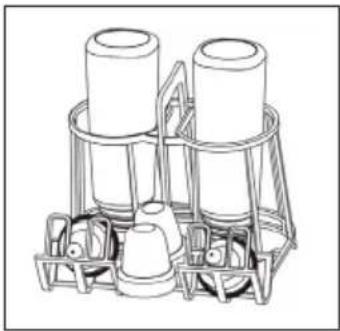
natural_image
Line drawing of a multi-tiered mechanical device with cylindrical components and base mount (no text or symbols)DETERGENT TYPES
Detergents
Due to their chemical composition, dishwashing detergents can be divided into two types:
• Conventional alkaline detergents with corrosive components
- Weak alkaline detergents with natural enzymes
Detergent tabs
The detergent tabs of different brands dissolve at different speeds in the machine. For this reason, they often can not develop their full cleaning power in short programs. Therefore always use the long programs in conjunction with detergent tabs to ensure that the tab dissolves completely.
ADDING DETERGENT
Always fill the detergent chamber immediately before starting a program and follow the instructions in the program table. Your dishwasher requires less detergent and rinse aid than standard equipment. Usually one tablespoon of detergent is enough for a normal rinse load. Heavily soiled dishes require more detergent. Put the detergent into the chamber shortly before starting, otherwise it may become damp and not dissolve as well.
natural_image
Line drawing of a device with a brush and dots inserted into a tray (no text or symbols)WASHING PROGRAMMES (EN 60436)
| Program Description Rinsing cycle | Detergent Pre/Main | Time (min) | Energy (kWh) | Water (L) | ||
| ECO | For cleaning normally soiled dishes. Most efficient programme in terms of energy and water consumption. | Wash (55°C) Rinse Rinse (68°C) Drying | 10 g 160 | 0.425 5.0 | ||
| *EN 60436 | ||||||
 | For lightly soiled crockery that does not require special drying. | Wash (50°C) Rinse Rinse (65°C) Drying | 10 g 60 | 0.400 5.0 | ||
| 1 Hour | ||||||
 | A shorter wash for lightly soiled crockery. | Wash (45°C) Rinse Rinse (55°C) | 10 g 29 | 0.350 5.0 | ||
| Rapid | ||||||
 | Hot water: Suitable for washing fruit with a larger surface, such as apples, pears. | Wash (36°C) Rinse | / 120.1 | 50 5.0 | ||
| Fruit wash | ||||||
 | Cold water: Suitable for fruits with a small surface, such as strawberries. | Rinse / 6 | 0.010 | 5.0 | ||
| Fruit wash | ||||||
| [20H0] | For rinsing baby bottles. | Wash (65°C) Rinse Rinse (70°C) Drying | 10 g | 1150.500 | 5.0 | |
| Baby care | ||||||
| [100c] | For lightly soiled vessels, such as glasses, crystal glass and fine porcelain (steam is added). | Wash (50°C) Rinse Rinse (65°C) Drying | 10 g 85 | 0.400 5.0 | ||
| Glass | ||||||
| *EN 60436: The ECO program was used for the test run in accordance with EN 60436. | ||||||
OPERATION IN DETAIL
Starting the washing process
1 Pull out the basket.
2 Add a suitable detergent.
3 Insert the plug into the socket.
4 Press the POWER button to turn on the unit.
5 Connect the inlet hose to the faucet and make sure that the water supply is set to full pressure OR manually add the water to the tank.
6 Select the desired program. When a program is selected, the corresponding indicator will light up.
7 Press the START / PAUSE button to start the dishwasher.
Note: If you press the Start / Pause button to pause while washing, the program light will stop flashing. The dishwasher will emit an audible alarm every minute until you press the Start / Pause button again.
Changing the program
If possible, a running program should be changed directly after the start. Otherwise, the detergent may have already dissolved and run out of the machine with the water. If this is the case, refill with detergent. Press the START / PAUSE button to stop the machine. With the door closed, hold down the button for more than three seconds to set the new program.
Display
The display shows the status of the device or the run as follows:
| Display Status | |
| -:- | The device is in standby mode. |
| H:MM | Display is not flashing: pause |
| H:MM | Display is flashing: wash run is in progress |
| END | The wash run has ended. |
Note: If you open the door while the unit is running, the machine will stop automatically. When you close the door again and press the Start / Pause button, the unit will continue to move for 10 seconds.
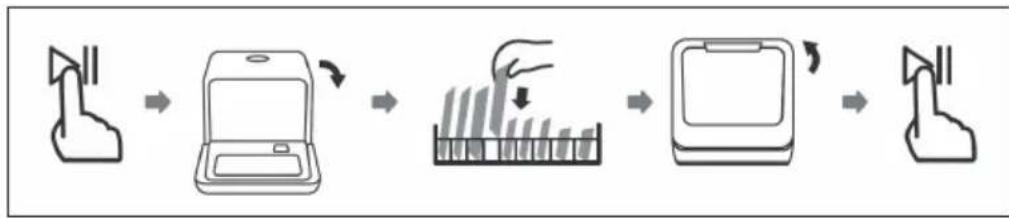
Adding dishes later
Forgotten dishes can be added at any time before the detergent dispenser opens. In this case, follow these instructions:
1 Open the door a little to stop the device.
2 When the spray arms stop turning, you can open the door completely.
3 Add the forgotten dishes.
4 Close the door.
5 Press the START / PAUSE button to start the dishwasher.
flowchart
graph LR
    A["Lightning with lid"] --> B["Device with screen"]
    B --> C["Tube with bar chart"]
    C --> D["Screen with lid"]
    D --> E["Packaging with lid"]
After the end of the program
At the end of the program, the buzzer will sound for 8 seconds. Press the POWER button to turn off the power. Turn off the tap and open the dishwasher door. Wait a few minutes before unloading the dishwasher as the dishes are still very hot after drying and can easily break. Empty the bottom basket first to prevent water from dripping from the top basket to the bottom.
CLEANING AND CARE
Cleaning the filter system
The filter system removes dirt and food residues, allowing the clean water to be recirculated for cleaning. In order for the device to perform at its best you should clean the filters once a week. We recommend removing coarse dirt and food residues after each wash and then washing the filter under clean water.
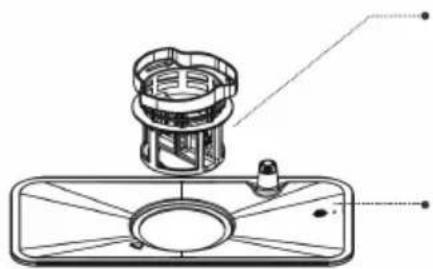 | Fine filter:Filters out dirt and residues and prevents them from getting back onto the dishes during the washing process. |
| Main filter:Leftovers and dirt particles are crushed by a special nozzle on the spray arm and discharged through the drain. | |
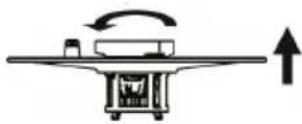 | Unscrew the complete filter set counterclockwise. |
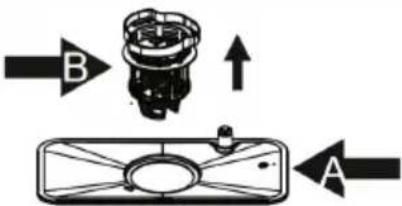 | Remove filter (B) from filter (A). When you have cleaned the filters, replace them in reverse order. |
Note: do not tap the filters when cleaning. Otherwise you may bend them, which would have a negative impact on the performance of the dishwasher.
Cleaning the dishwasher
- Clean the control panel with a slightly damp cloth and then dry it thoroughly.
- Maintain the housing with a suitable polishing wax.
- Do not use sharp objects, scouring pads or aggressive cleaning agents for cleaning.
- Clean the edge of the door with a warm, damp cloth. To prevent water from entering the locking mechanism, do not use spray cleaners.
How to protect the device from frost damage
In winter, take the following precautions to protect the machine against frost. Perform the following steps after every program run:
1 Pull the plug out of the socket.
2 Close the water supply and remove the inlet hose from the inlet valve.
3 Drain the water from the hose and valve into a vessel.
4 Reattach the inlet hose to the inlet valve.
5 Remove the filter from the bottom of the tub and use a sponge to soak up excess water.
Cleaning the spray arms
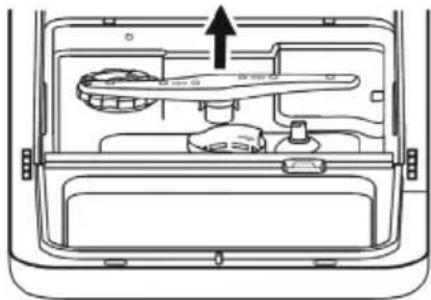
The spray arms can be easily removed for regular cleaning of the nozzles to avoid clogging.
1 Grasp the center of the spray arm and pull it up to remove it.
2 Wash under running water and reinsert carefully. Make sure that their rotation is not obstructed in any way.
natural_image
Diagram of a car interior showing a door, drawer, and seat with an arrow indicating direction (no text or symbols)TROUBLESHOOTING
| Problem Possible cause Solution | ||
| The dishwasher won't start. | The fuse is out or broken. Replace the fuse or replace the switch.Remove all other devices that are connected to the self-powered circuit. | |
| No power. Make sure the unit is turned on, the door is firmly closed, and the power cord is firmly plugged into the wall outlet. | ||
| The door is not closed properly. | When closing, make sure that the door lock engages. | |
| There is no water being pumped out of the dishwasher. | The drain hose is bent. Check the hose. | |
| Ein Filter ist verstopft. Überprüfen Sie die Filter. | ||
| A filter is clogged. Check the filters. | ||
| The sink is clogged. Check your drain and clean it if necessary. If you are still having problems, contact a specialist. | ||
| Mineralische Rückstände aus hartem Wasser. | Reinigen Sie die Innenflächen mit einem feuchten Lappen und etwas Spülmittel für Geschirrspüler. Benutzen Sie dabei Handschuhe und verwenden Sie kein anderes Spülmittel. | |
| Colored spots in the tub. Colored detergent. Only use detergents without color. | ||
| White film on the inside surfaces. | Mineral residues from hard water. | Clean the inside surfaces with a damp cloth and some dishwasher detergent. Use gloves and do not use any other washing up liquid. |
| Foam in the tub. Unsuitable | dishwashing detergent. | Only use dishwashing liquid that is suitable for dishwashers. If there is any foam in the tub, open the door and allow the foam to evaporate. Put some cold water in the tub and close the door. Run any wash program to remove the residue. |
| Overflowed rinse aid. Imme | diately clean up overflowed rinse aid. | |
| Rust stains on the cutlery. The | cutlery is not stainless. Only | wash stainless cutlery. |
| No program was started after rinsing salt was refilled | After filling, start the quick program with an empty dishwasher. | |
| The lid to the rinsing salt holder is loose. | Make sure the lid is firmly closed. | |
| Knocking noises in the interior. | The spray arm is striking against an object in the basket. | Interrupt the program and rearrange the dishes so that the spray arm is not obstructed. |
| Rattling noises in the interior. | The dishes are not secure. In | interrupt the program and place the dishes in a secure position. |
| Banging noise in the water pipe. | Can be caused by crossing the water pipes. | Does not affect the performance of the dishwasher. If you are not sure, contact a specialist. |
| Dishes are not clean. Dishes | were not properly loaded. | Follow the instructions for loading the dishwasher. |
| The program was not strong enough. | Use the intensive program. | |
| Too little detergent. Use more detergent or use a different detergent. | ||
| Objects are blocking the spray arms. | Place the dishes in the appliance so that the spray arms are not obstructed. | |
| The filter system is dirty or incorrectly inserted. | Clean the filters or insert them correctly. Clean the spray arms. | |
| The glass is fogged. Kombination aus weichem Wasser und zu viel Spülmittel. | Verwenden Sie weniger Spülmittel und benutzen Sie das kürzeste Programm, um das Glas zu waschen und zu säubern. | |
| Combination of soft water and too much detergent. | Use less detergent and use the shortest program to wash and clean the glass. | |
| Black or gray stripes on dishes. | Aluminum parts have rubbed on the dishes. | Use a mild scouring agent. |
| Detergent residues in the chamber. | The dishes are hindering the dissolution of the detergent. | Carefully load the dishes into the dishwasher. |
| Problem Possible cause Solution | ||
| Dishes do not dry. Wrong lo | ading. Follow the instructions | for loading the dishwasher. |
| The dishes were removed too soon. | After cleaning, leave the dishes in the dishwasher for about 15 minutes.Open the door so that the humid air can escape. | |
| Wrong program. In short programs, the washing and drying temperatures are lower.Use a program with a longer runtime. | ||
| Cutlery with inferior coating. | Such dishes and cutlery are not suitable for the dishwasher. | |
Error codes
| Code Meaning Possible cause | ||
| E1 During the water inlet step, if the flow meter can't detect the defined water after 4 Minutes, or can't detect 30 pulse after 60s, the dishwasher will warning for E1. | check the water supplycheck the inlet valvecheck the inletcheck the flowmetercheck the pressure switchcheck the draincheck the PCB | |
| E3 Temperature has not been reached. | Problems with the heating. Contact a qualified professional. | |
| E4 Water is overflowing. There is a leak | somewhere. Contact a qualified professional. | |
| Ed Communication problem. Contact a qualified professional. | ||
PRODUCT DATA SHEET
Information according to Regulation (EU) No. 2019/2017
| Name or trademark of the producer: Klarstein | ||||
| Address of the producer: Wallstraße 16, 10179 Berlin, Deutschland. | ||||
| Item number: 10032678A, 10032679A, 10033480A | ||||
| General product parameters: | ||||
| Parameter Value Parameter | Value | |||
| Standard place settings 2 D | Dimensions in mm | Height 435 | ||
| Width 420 | ||||
| Depth 435 | ||||
| EEI 67.5 Energy efficiency class G | ||||
| Cleaning performance index | 1.13 Drying performance index | 0.87 | ||
| Energy consumption in kWh [per cycle], based on the eco programme using cold water fill. Actual energy consumption will depend on how the appliance is used. | 0.425 | Water consumption in litres [per cycle], based on the eco program. Actual water consumption will depend on how the appliance is used and on the hardness of the water. | 5 | |
| Program duration (h:min) | 2:40 | Type | Free-standing | |
| Airborne acoustical noise emissions (dB(A) re 1 pW) | 58 | Airborne acoustical noise emission class | D | |
| Off-mode (W) 0.49 Standby mode | (W) | 0 | ||
| Delay start (W) (if applicable) | 0 | Networked standby (W) (if applicable) | 0 | |
| Minimum duration of the guarantee offered by the manufacturer: 24 months | ||||
| Additional information: | ||||
| Weblink to the supplier's website, where the information in point 6 of Annex II to Commission Regulation (EU) 2019/2022 is found: www.klarstein.co.uk | ||||
DISPOSAL CONSIDERATIONS
natural_image
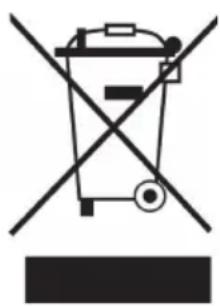
Symbol of a trash bin crossed with a diagonal line, no text or numbers presentIf there is a legal regulation for the disposal of electrical and electronic devices in your country, this symbol on the product or on the packaging indicates that this product must not be disposed of with household waste. Instead, it must be taken to a collection point for the recycling of electrical and electronic equipment. By disposing of it in accordance with the rules, you are protecting the environment and the health of your fellow human beings from negative consequences. For information about the recycling and disposal of this product, please contact your local authority or your household waste disposal service.
MANUFACTURER & IMPORTER (UK)
Manufacturer:
Chal-Tec GmbH, Wallstrasse 16, 10179 Berlin, Germany.
Importer for Great Britain:
Berlin Brands Group UK Limited
PO Box 42
272 Kensington High Street
London, W8 6ND
United Kingdom
Estimado cliente,
ÍNDICE
natural_image
Line drawing of a hand pouring liquid into a device with an electrical outlet (no text or symbols)(3) Llenar aparato
natural_image
Two line drawings of a device with directional arrows indicating rotation and touch points (no text or symbols)natural_image
Line drawing of a multi-tiered cylindrical device with a base and top unit (no text or symbols)TIPOS DE DETERGENTES LAVAVAJILLAS
Detergente concentrado
natural_image
Line drawing of a device with a brush and dots inserted into a tray (no text or symbols)PROGRAMAS DE LAVADO (EN 60436)
flowchart
graph LR
    A["Hand washing"] --> B["Laptop with screen"]
    B --> C["Bar chart with checkmark"]
    C --> D["Computer with screen"]
    D --> E["Product inspection"]
natural_image
Diagram of a car interior showing the front compartment with a hand valve and handle, no text or symbols presentnatural_image
Symbol of a trash bin crossed with a diagonal line, no text or numbers presentBerlin Brands Group UK Limited
PO Box 42
272 Kensington High Street
London, W8 6ND
United Kingdom
Chère cliente, cher client,
SOMMAIRE
natural_image
Line drawing of a hand pouring liquid into a device with an electrical outlet (no text or symbols)natural_image
Two line drawings of a device with arrows indicating rotation and touch screen control (no text or symbols)natural_image
Line drawing of a mechanical device with cylindrical components and base mount (no text or symbols)TYPES DE PRODUITS DE LAVAGE
Produits concentrés
natural_image
Line drawing of a device with a tool and dots inserted into a tray (no text or symbols)PROGRAMMES DE LAVAGE (EN 60436)
flowchart
graph LR
    A["Hand gesture"] --> B["Laptop"]
    B --> C["Packaging with vertical bars"]
    C --> D["Computer with scroll"]
    D --> E["Product"]
natural_image
Diagram of a vehicle rear door showing internal compartments and a central device with an arrow indicating direction (no text or symbols)IDENTIFICATION ET RÉSOLUTION DES PROBLÈMES
FICHE DE DONNÉES PRODUIT
natural_image
Symbol of a trash bin crossed with a diagonal line, no text or numbers presentBerlin Brands Group UK Limited
PO Box 42
272 Kensington High Street
London, W8 6ND
United Kingdom
Gentile cliente,
INDICE
natural_image
Line drawing of a hand pouring liquid into a device with an electrical outlet (no text or symbols)(3) Caricare la lavastoviglie
natural_image
Two line drawings of a device with arrows indicating rotation and touch control (no text or symbols)natural_image
Line drawing of a multi-tiered mechanical device with cylindrical components and base mount (no text or symbols)TIPI DI DETERSIVI
Concentrati
natural_image
Line drawing of a device with a tool interacting with a dot array, no text or symbols presentPROGRAMMI DI LAVAGGIO (EN 60436)
flowchart
graph LR
    A["Hand washing"] --> B["Laptop with screen"]
    B --> C["Bar chart with checkmark"]
    C --> D["Computer with screen"]
    D --> E["Product inspection"]
natural_image
Diagram of a car interior showing the intake tray and door panel with an arrow indicating direction (no text or symbols)RICERCA E RISOLUZIONE DEI PROBLEMI
natural_image
Symbol of a trash bin crossed with a diagonal line, no text or numbers presentPRODUTTORE E IMPORTATORE (UK)
Produttore:
Chal-Tec GmbH, Wallstraße 16, 10179 Berlin, Germania.
Berlin Brands Group UK Limited
PO Box 42
272 Kensington High Street
London, W8 6ND
United Kingdom

KLARSTEIN

- INHALTSVERZEICHNIS
- Gerät befüllen
- SPÜLMITTELARTEN
- SPÜLPROGRAMME (EN 60436)
- Dear Customer,
- CONTENT
- SAFETY INSTRUCTIONS
- WARNING
- CAUTION
- QUICK START GUIDE
- Filling the device
- Starting the device
- DEVICE OVERVIEW
- CONTROL PANEL AND BUTTON FUNCTIONS
- ADDING RINSING SALT
- How to fill in the rinsing salt
- Important instructions
- How to adjust the amount of rinsing salt correctly
- Step 1: Call up rinsing salt settings
- Step 2: Adjust the amount of rinsing salt according to water hardness
- Step 3: Leave rinsing salt settings
- Water hardness and salt quantity
- LOADING THE BASKET
- What you should consider when loading
- LOADING THE BASKETS (EN 60436)
- DETERGENT TYPES
- Detergents
- Detergent tabs
- ADDING DETERGENT
- WASHING PROGRAMMES (EN 60436)
- OPERATION IN DETAIL
- Starting the washing process
- Changing the program
- Display
- Adding dishes later
- After the end of the program
- CLEANING AND CARE
- Cleaning the filter system
- Cleaning the dishwasher
- How to protect the device from frost damage
- Cleaning the spray arms
- TROUBLESHOOTING
- PRODUCT DATA SHEET
- DISPOSAL CONSIDERATIONS
- MANUFACTURER & IMPORTER (UK)
- Manufacturer:
- Importer for Great Britain:
- Estimado cliente,
- ÍNDICE
- Llenar aparato
- TIPOS DE DETERGENTES LAVAVAJILLAS
- PROGRAMAS DE LAVADO (EN 60436)
- Chère cliente, cher client,
- SOMMAIRE
- TYPES DE PRODUITS DE LAVAGE
- Produits concentrés
- PROGRAMMES DE LAVAGE (EN 60436)
- IDENTIFICATION ET RÉSOLUTION DES PROBLÈMES
- FICHE DE DONNÉES PRODUIT
- Gentile cliente,
- INDICE
- Caricare la lavastoviglie
- TIPI DI DETERSIVI
- Concentrati
- PROGRAMMI DI LAVAGGIO (EN 60436)
- RICERCA E RISOLUZIONE DEI PROBLEMI
- PRODUTTORE E IMPORTATORE (UK)
- Produttore:
- KLARSTEIN
Brand : Klarstein
Model : Amazonia Mini
Category : Dishwasher