Homeland Unique Waterpro - Steam cleaner TAURUS - Free user manual and instructions
Find the device manual for free Homeland Unique Waterpro TAURUS in PDF.


| Product type | Cordless steam mop |
| Brand | Taurus |
| Model | Homeland Unique Waterpro |
| Power supply | Rechargeable battery with charging base and mains charger |
| Cleaning modes | Dry and wet |
| Maximum mode | Available for dry and wet |
| Self-cleaning function | Yes, accessible from the charging base |
| Battery indicator | Digital screen: blue >20%, orange <20% |
| Clean water tank | Removable, capacity not specified |
| Dirty water tank | Removable, capacity not specified |
| Brush type | Removable rotating roller |
| Charging base | Included with roller drying stand |
| Included accessory | Cleaning brush |
| Available consumables | On the official Taurus website (brushes, etc.) |
| Maintenance | Cleaning filters, roller, self-cleaning function |
| Safety | Do not use on animals, incandescent objects, foaming detergents |
| Warranty | In accordance with applicable legislation |
Frequently Asked Questions - Homeland Unique Waterpro TAURUS
User questions about Homeland Unique Waterpro TAURUS
0 question about this device. Answer the ones you know or ask your own.
Ask a new question about this device
Download the instructions for your Steam cleaner in PDF format for free! Find your manual Homeland Unique Waterpro - TAURUS and take your electronic device back in hand. On this page are published all the documents necessary for the use of your device. Homeland Unique Waterpro by TAURUS.
USER MANUAL Homeland Unique Waterpro TAURUS
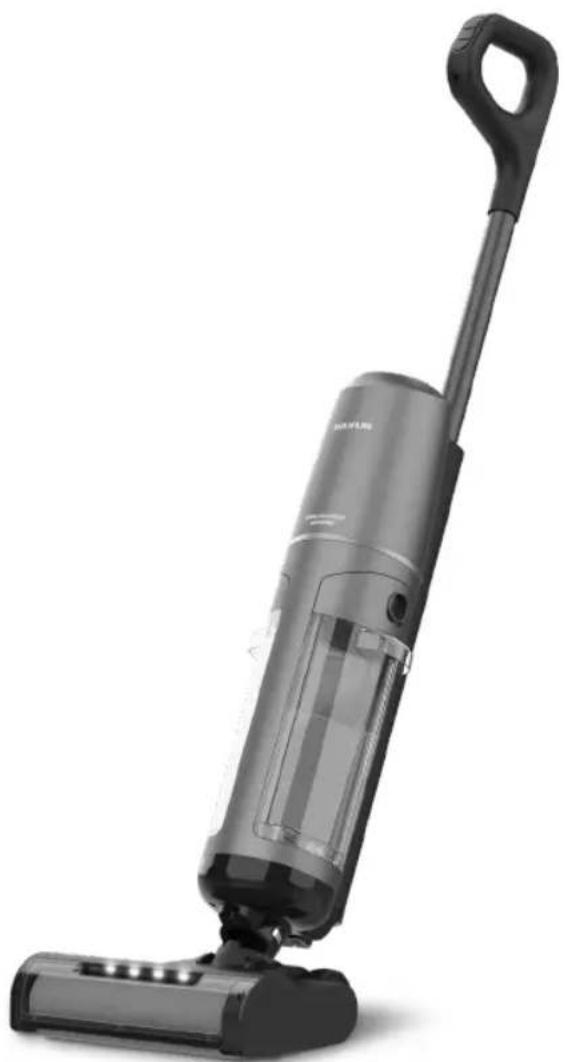
Homeland Unique Waterpro HVC7295B
natural_image
Black and white photo of a vacuum cleaner with handle and control lever (no visible text or symbols)EN. Instructions for use
FR. Mode d'emploi
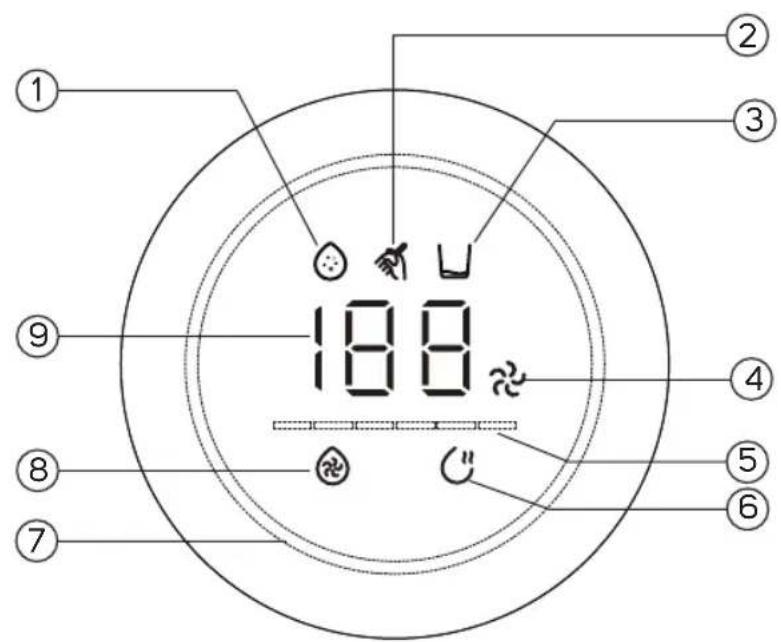
Fig. 1
natural_image
Illustration of two mechanical device configurations with hand gestures and directional arrows indicating motion (no text or symbols)Fig. 2
natural_image
Line drawing of a vacuum cleaner with a downward arrow indicating motion (no text or symbols)Fig. 3
natural_image
Line drawing of a vacuum cleaner with a hand operating the base, showing no text or symbols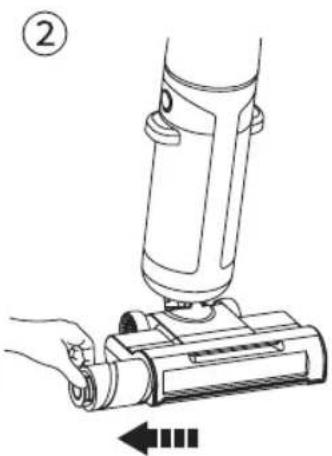
natural_image
Line drawing of a hand operating a handheld device with a lever, showing no text or symbols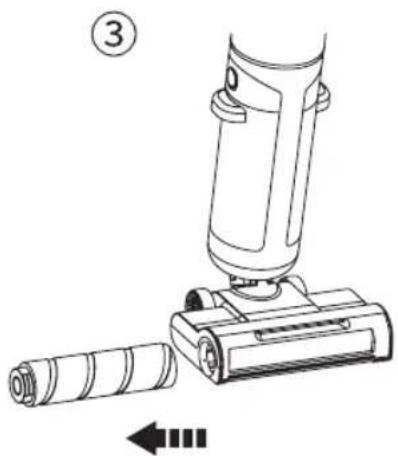
natural_image
Technical line drawing of a mechanical device with a cylindrical component inserted, showing no text or symbols.Fig. 4
natural_image
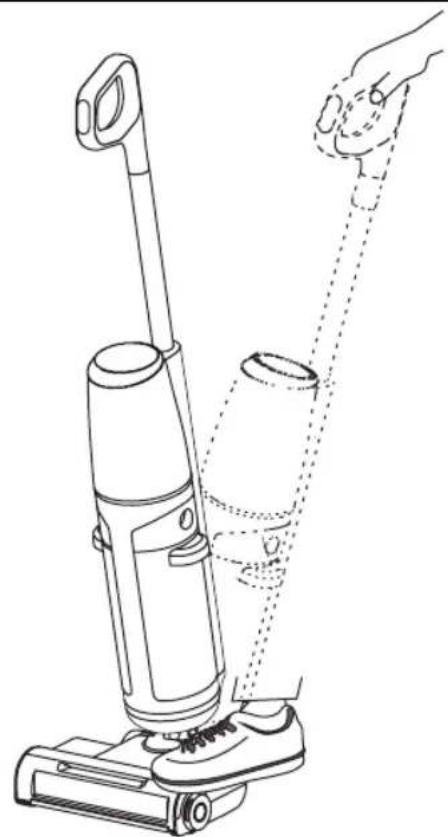
Line drawing of a vacuum cleaner with a hand adjusting its arm, showing body positioning and usage instructions (no text or symbols)Fig. 5
①
natural_image
Line drawing of a vacuum cleaner with handle and base mount (no text or symbols)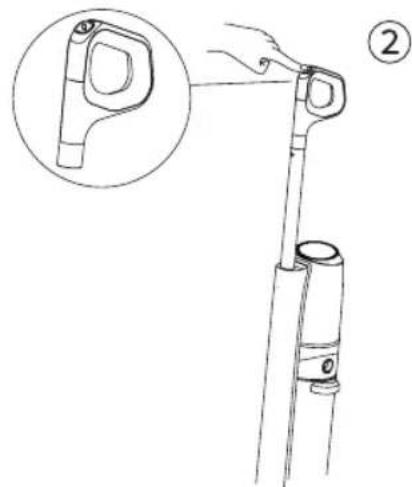
natural_image
Line drawing of a hand holding a vertical pole with a magnified inset showing the handle (no text or symbols)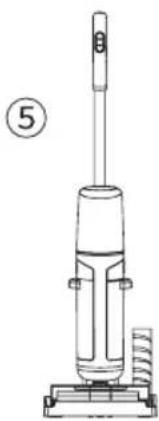
natural_image
Line drawing of a vacuum cleaner with handle and base (no text or symbols)
④
natural_image
Line drawing of a hand using a handheld device to press or install a cylindrical component, with no visible text or symbols.③
natural_image
Line drawing of a hand holding a screwdriver inserted into a mechanical device (no text or symbols)ES
(Original instructions)
DESCRIPTION
A Self-cleaning button
B On/off button
C Dry / Floor cleaning mode button
D Power / Standard mode button
E Pipe
F Display panel
G Sewage water tank unlocking key
H Clean water tank
I Sewage water tank
J Charging base
K Rolling brush
L Power adapter
M Cleaning brush
DISPLAY PANEL
Full sewage water tank
Self-cleaning mode
Clean water tank in shortage
Power cleaning mode
Cleaning mode (power/standard) indicator
Dry suction mode
Battery status:
Blue light > 20%
Orange light < 20%
Floor cleaner mode
Battery indicator
USE AND CARE:
Do not use the device if its accessories are not properly attached.
Do not use the appliance if the accessories attached to it are defective. Proceed to replace them immediately.
Do not use the appliance if its start/stop device does not work.
Do not use detergent that generates foam.
Do not use the appliance without placing the dirty and clean water tanks correctly.
Store this appliance out of the reach of children and/or people with reduced physical, sensory or mental capabilities or lack of experience and knowledge.
Do not act on areas that contain metal objects such as nails and/or screws.
Never vacuum up incandescent or sharp objects (cigarette butts, ashes, nails...).
Do not use the device on pets or animals.
Keep the device in good condition. Check
that the moving parts are not misaligned or stuck, that there are no broken parts or other conditions that could affect the proper functioning of the appliance.
HOW TO USE
NOTES BEFORE USE:
Make sure you have removed all packaging material from the product.
Confirm that the device and all accessories are included and correct.
Remove the clean water tank (H) using the button (G). Open the lid and fill with clean water to the maximum.
Replace the clean water tank in the body of the appliance.
IMPORTANT: DO NOT add liquids with a temperature higher than 60^ C. Fill only with clean water.
ASSEMBLY OF THE DEVICE:
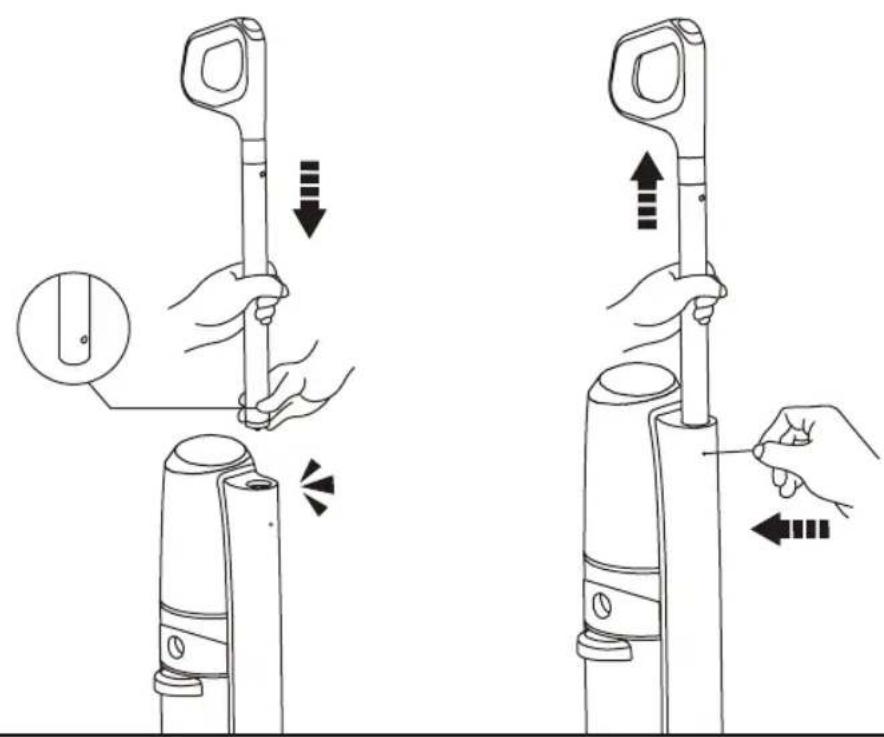
Place the tube together with the body until you hear a "click".
To disassemble the tube from the body, use a thin and hard object and proceed as indicated in Fig.1.
Place the charging base on a flat and stable surface and connect the charger to the hole on the back of the base. Plug the charger into the electrical network.
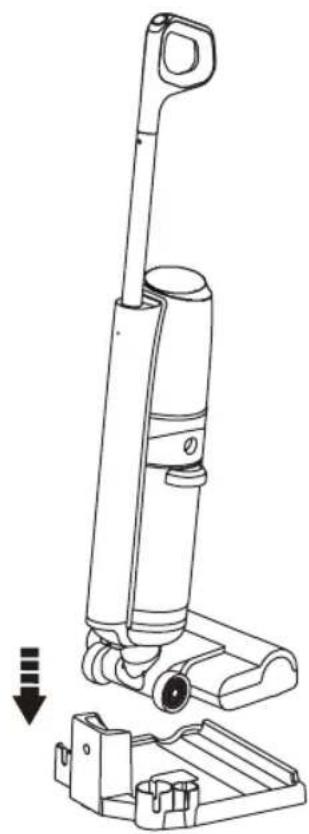
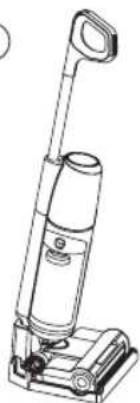
Place the device on top of the base as indicated in Fig.2.
ROLLER ASSEMBLY:
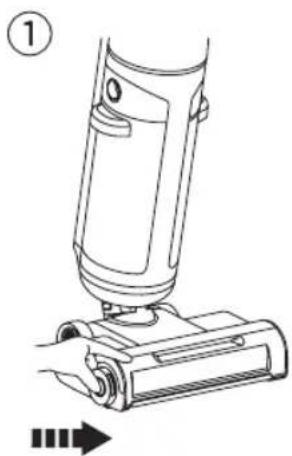
To remove the roller from the shoe, follow the steps as indicated in Fig.3.
To reinsert the roller into the shoe, follow the previous steps in reverse.
USE:
To start cleaning, step on the shoe, pull the handle back and upon hearing the locking latch release sound, the machine will enter standby mode (Fig.4).
Press the on/off button (B).
Press the button (C) to select the type of cleaning (dry or wet).
Press button (D) to activate maximum cleaning mode. Press this button again to return to standard mode. This function is suitable for both dry and wet cleaning.
The battery of the device is shown on the digital display through the indicators (7) and (9).
NOTES: when turning on the device, if the body is placed vertically (and not diagonally as previously mentioned for use), it will turn off after 5 seconds.
ONCE USE OF THE DEVICE IS FINISHED:
Press the on/off button (B).
Push the handle forward to straighten the body of the appliance and upon hearing the clicking sound, the appliance will enter power off mode. Empty the dirty water tank (I) and replace the tank in the body of the appliance.
Place the device on the charging base.
The flashing orange light indicates that the device is not fully charged.
The solid blue light indicates that the device is fully charged and after 1 minute the screen turns off.
CLEANING
Do not use solvents, or products with an acidic or basic pH factor such as bleach, or abrasive products to clean the device.
Do not allow water or other liquid to enter through the ventilation openings to avoid damage to the internal operating parts of the appliance.
Do not immerse the device in water or other liquid, or place it under the tap.
SELF-CLEANING FUNCTION:
Once the device is placed back on the charging base, make sure that the base charger is plugged in.
Fill the tank with clean water if it is not full.
Press the self-cleaning button (A).
When self-cleaning is complete, the device will start charging.
NOTE: For self-cleaning to be performed correctly, the device must have more than 5% battery.
FILTER CLEANING:
Remove the dirty water tank from the appliance.
Remove the tank cover by pulling it upwards.
Clean the filters with clean water. You can use the cleaning brush included in the box.
Once cleaning is completed, reattach all parts to the body of the appliance.
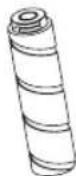
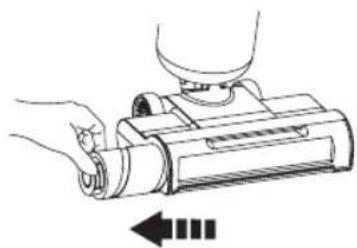
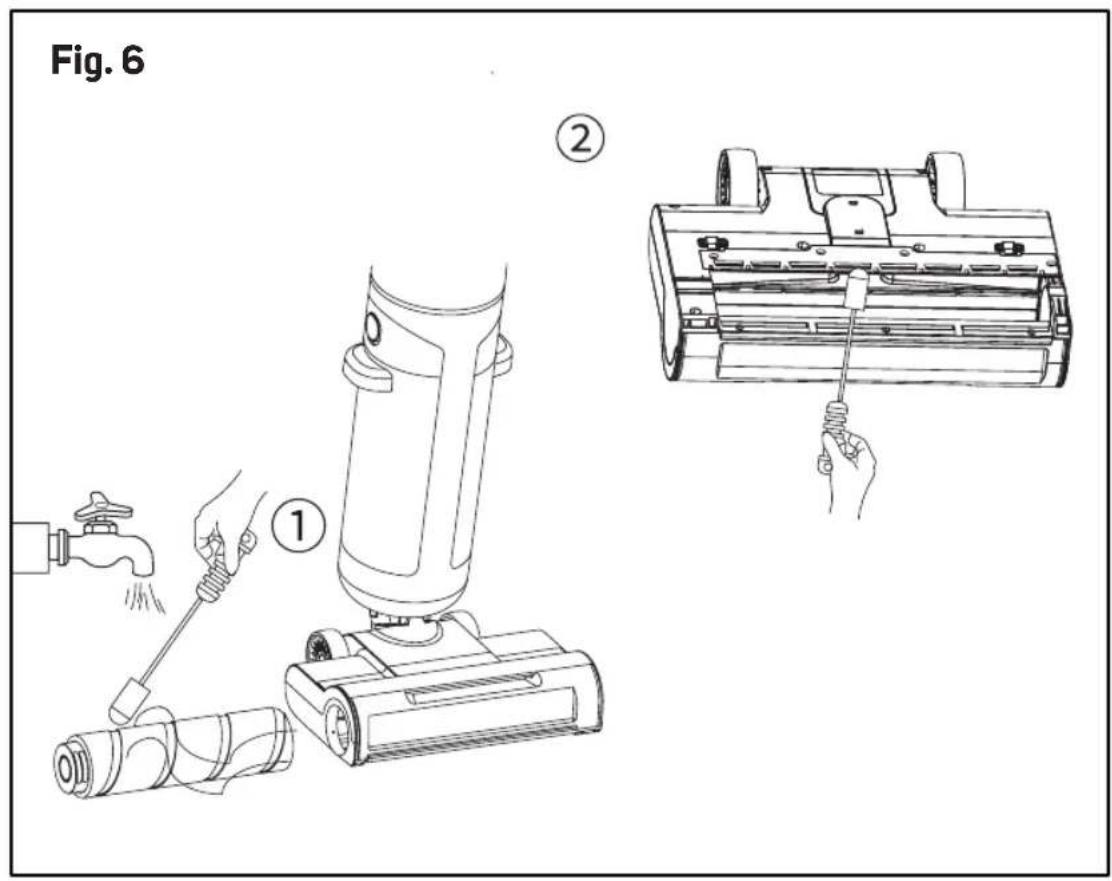
CLEANING THE ROLLER (FIG.5 + 6):
Once the self-cleaning program has been completed, remove the roller from the shoe as
indicated in Fig.5.
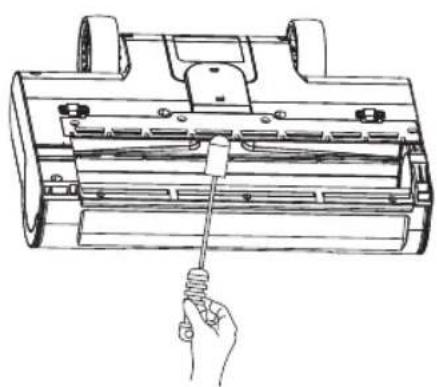
Clean the roller with the help of the cleaning brush.
Place it in the indicated space on the charging base for optimal drying.
Also clean the shoe to remove traces of dirt.
CONSUMABLES:
You can purchase consumables (e.g. cleaning brush) on the official Taurus website.
Always use original consumables, designed specifically for your device model.
TROUBLESHOOTING
| PROBLEM CAUSE SOLUTION | ||
| The device does not work | The device does not have Fully battery or low battery. | charge the device before using it. |
| The dirty water tank has reached maximum capacity. | Empty the dirty water tank. | |
| The rotating brush has become tangled with objects (e.g. hair). | Clean the rotating brush. | |
| Lack of water in the clean water tank. | Fill the clean water tank with water. | |
| The handle is not installed correctly. | Confirm that the handle is correctly positioned. | |
| The device is in a vertical position. | Tilt the product in a diagonal position. | |
| Self-cleaning program does not work | The rotating brush has become tangled with objects (e.g. hair). | Clean the rotating brush. |
| Poor contact between the product and the charging base. | Make sure the product is charging before starting the self-cleaning function. | |
| The dirty water tank is not in place or is full of water. | Replace the tank or empty the dirty water tank. | |
| The clean water tank is not in place or is missing water. | Replace the tank or fill the tank with clean water to the maximum. | |
| Reduction of the suction power of the device | The nozzle or suction pipe is blocked. | Clean obstacles inside the suction nozzle. |
| The HEPA filter is not in place, dirty, clogged, not dry or deformed. | Place the HEPA filter well, clean or dry. | |
| Low battery. Fully charge the device before using it. | ||
| Abnormal noise The suction nozzle is blocked. Check and clean obstacles inside the suction nozzle. | ||
| The device does not charge The interface between the device and the power adapter is not connected correctly. | Check and connect correctly. |
| Mismatched power adapter. Use the original adapter of the device. | |
| High ambient temperature. Let sit for a certain amount of time before charging it. | |
| Dirty contacts between the product and the charging base. | Clean the charging contacts of the charging base with a cloth. |
| No water flow in the clean water tank | There is no water in the clean water tank. |
| The clean water tank is not positioned correctly. | |
| The clean water tank is blocked. | |
| Water leak in the air outlet HEPA filter not installed or too wet. | Replace the HEPA filter properly or let it dry before using it. |
| Use it correctly. | |
FR
This product enjoys the recognition and protection of the legal guarantee in accordance with current legislation. To enforce your rights or interests you must go to any of our official technical assistance services.
You can find the closest one by accessing the following web link: http://taurus-home.com/
You can also request related information by contacting us.
You can download this instruction manual and its updates at http://taurus-home.com/
Français
GARANTIE ET ASSISTANCE TECHNIQUE
COUNTRY ADDRESS PHONE
| Algeria Zone d'Activite, N° 62, Constantine 213770777756 | ||
| Argentina Av. del Libertador 1298,(B1638BEY), Vicente López (Pcia. Buenos Aires) | 541153685223 | |
| Belgium Mariëndonkstraat 5, 5154 EG, Elshout 31620401500 | ||
| Bulgaria | 265,Okolovrasten Pat, Mladost 4, 1766, Sofia | 35929211120 / 35929211193 |
| Congo (Republic of) 98 Blvd General Charles de Gaulle, Pointe Noire 242066776656 | ||
| Cyprus 20, Bethlehem Str. / P.O.Box 20430, 2033, Strovolos | 35722711300 | |
| Czech Republic Milady Horakove 357/4, 568 02, Svitavy 420 461 540 130 | ||
| Equatorial Guinea | SN Av Patricio Lumumba y C/ Jesus B, Bata | 00240 333 082958 / 00240 333 082453 |
| Equatorial Guinea | Calle de las Naciones Unidas, PO box 762, Malabo | 240333082958 / 240333082453 |
| España | Avda Barcelona, S/N, 25790 Oliana (Lleida) atencioncliente@taurus.es | 902 118 050 |
| France | Za les bas musats 18, 89100, Malay-le-Grand | 03 86 83 90 90 |
| Ghana | Ederick Place, Accra-Ghana | 302682448 / 302682404 |
| Gibraltar | 11 Horse Barrack Lane, 54000, Gibraltar | 00350 200 75397 / 00350 200 41023 |
| Greece Sapfous 7-9, 10553, Athens | +30 21 0373 7000 | |
| Hong Kong | Unit H,13/F., World Tech Centre, Hong kong | (852) 2448 0116 / 9197 3519 |
| Hungary | Késmárk utca 11-13, 1158, Budapest | +36 1 370 4519 |
| India | C-175, Sector-63, Noida, Gautam Budh Nagar - 201301, Delhi | (+91) 120 4016200 |
| Ivory Coast 01 Rue Des Carrossiers-Zone 3, B.P 3747, Abidjan 01 (RCI) | 22521251820 / 225 21 353494 | |
| Luxembourg Mariëndonkstraat 5, 5154 EG, Elshout 31620401500 | ||
| Marruecos Big distribution society 4 Rue 13 Lot. SmaraOulfa, Casablanca | (+212) 522 89 40 21 | |
| Mauritania 134 Avenue Gamal Abdener Ilot D, Nouakchott 2225254469 / 2225251258 | ||
| Mexico Rosas Moreno N° 4-203 Colonia de San RafaelC.P. 06470 – Delegación Cuauhtémoc, Ciudad de México | (+52) 55 55468162 | |
| Montenegro Rastovac bb, 81400, Niksic +382 40 217 055 | ||
| Netherlands Mariëndonkstraat 5, 5154 EG, Elshout 31620401500 | ||
| Nigeria 8, Isaac; John Str,G.R.A Ikeja Lagos 23408023360099 | ||
| Paraguay Denis Roa 155 c/ Guido Spano, Asunción 21665100 | ||
| Peru Calle los Negocios 428, Surquillo, Lima (511) 421 6047 | ||
| Portugal | Avenida Rainha D. Amélia, n°12-B, 1600-677, Lisboa | +351 210966324 |
| Romania | Dudesti Pantelimon 23, 410554, Bucharest | 031.805.49.58 |
| Serbia | Rastovac bb, 81400, Niksic +382 40 217 055 | |
| Slovakia | Milady Horakove 357/4, 568 02, Svitavy | 420 461 540 130 |
| Southafrica | Unit 25 & 26, San Croy Office Park, Die Agora Road, Croydon, Kempton Park, 1619, Johannesburg | (+27) 011 392 5652 |
| Tunisia | 2, Rue de Turquie, Tunis | 21671333066 |
| Ukraine | Block 6, Ap Housing Estate Topol-2, B, 49000, Dnepropetrovsk | 380563704161 / 380563704161 |
| Uruguay | Luis Alberto de Herrera 3468, 11600, Montevideo | 598 2209 28 00 |
| Vietnam | Lot 7 Ind. Zone for, Ha Noi | 84437658111 / 84437658110 |
_
| _
一
1
_
| _
一
1
taurus
www.taurus-home.com
- Homeland Unique Waterpro HVC7295B
- ES
- (Original instructions)
- DESCRIPTION
- DISPLAY PANEL
- USE AND CARE:
- HOW TO USE
- NOTES BEFORE USE:
- ASSEMBLY OF THE DEVICE:
- ROLLER ASSEMBLY:
- USE:
- ONCE USE OF THE DEVICE IS FINISHED:
- CLEANING
- SELF-CLEANING FUNCTION:
- FILTER CLEANING:
- CLEANING THE ROLLER (FIG.5 + 6):
- CONSUMABLES:
- FR
- Français
- GARANTIE ET ASSISTANCE TECHNIQUE
- taurus
Brand : TAURUS
Model : Homeland Unique Waterpro
Category : Steam cleaner