i-SENSYS LBP215x - Printer CANON - Free user manual and instructions
Find the device manual for free i-SENSYS LBP215x CANON in PDF.


| Product type | Monochrome laser printer |
| Model | Canon i-SENSYS LBP215x |
| Print speed | Up to 43 pages/min (A4) |
| Print resolution | Up to 1200 x 1200 dpi |
| Print functions | Automatic duplex, N-up, booklet |
| Power supply | 220-240 V, 50/60 Hz |
| Wi-Fi frequency band | 2412-2472 MHz |
| Max RF power | 15.9 dBm |
| Network connections | Ethernet, Wi-Fi, USB 2.0 |
| Control panel | LCD screen, numeric keypad, navigation |
| Included software | Windows/macOS drivers, Application Library |
| Paper capacity | 250-sheet cassette, 100-sheet multipurpose tray |
| Supported paper sizes | A4, A5, B5, Letter, Legal, Envelopes |
| Toner cartridge | Canon Cartridge 052 (standard), 052 H (high capacity) |
| Laser safety | Class 1 (IEC 60825-1:2014) |
| Power consumption | Standby mode: approx. 0.8 W |
| Weight | Approx. 12.2 kg |
| Dimensions (W x D x H) | 438 x 373 x 305 mm |
| Noise | Sound level: approx. 53 dB (printing) |
| Maintenance | Clean the exterior with a soft dry cloth. Do not use solvents. |
| Country of origin | Vietnam (according to product label) |
Frequently Asked Questions - i-SENSYS LBP215x CANON
User questions about i-SENSYS LBP215x CANON
0 question about this device. Answer the ones you know or ask your own.
Ask a new question about this device
Download the instructions for your Printer in PDF format for free! Find your manual i-SENSYS LBP215x - CANON and take your electronic device back in hand. On this page are published all the documents necessary for the use of your device. i-SENSYS LBP215x by CANON.
USER MANUAL i-SENSYS LBP215x CANON
Please read "Important Safety Instructions" before operating this product. After you finish reading this guide, store it in a safe place for future reference.
The information in this document is subject to change without notice.


canon.com/oip-manual
Quick Setup
Getting Started
Please read "Important Safety Instructions" before operating this product.
P.138
After you finish reading this guide, store it in a safe place for future reference.
The information in this document is subject to change without notice.
Mise en route
canon.com/oip-manual to read the User's Guide that describes all functions of this machine.

Items Included with the Machine
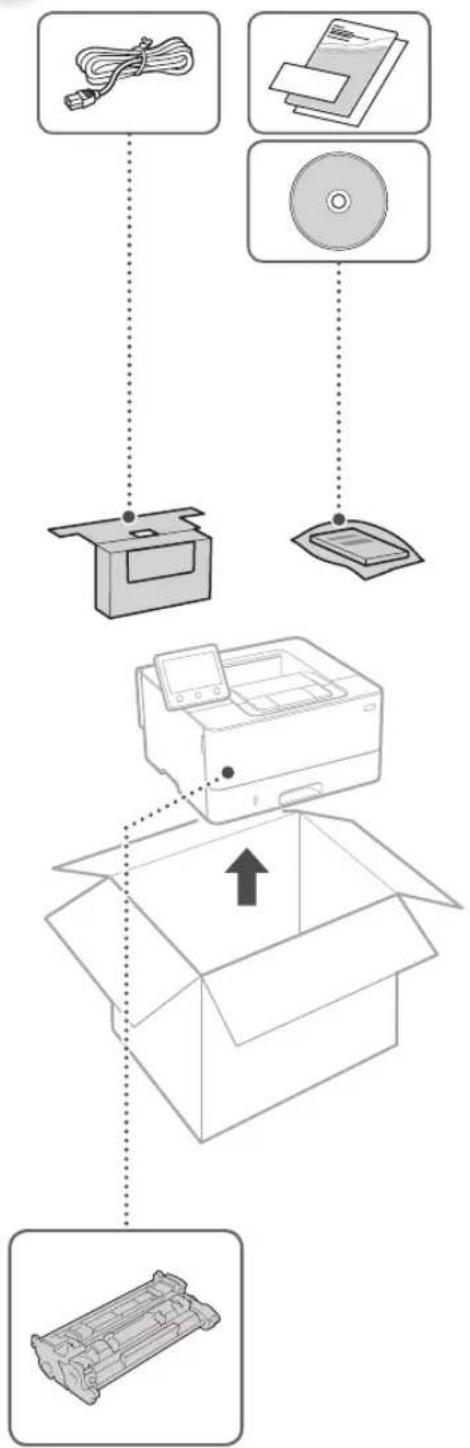
Toner cartridge (included with the machine)

Installing the Machine
Before starting the installation
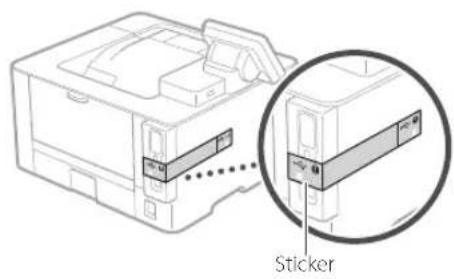
- Remove all of the tape.

- Do not remove the sticker that covers the USB port.
Installation Requirements
Provide a space of 100 mm or more around the machine.
LBP215x
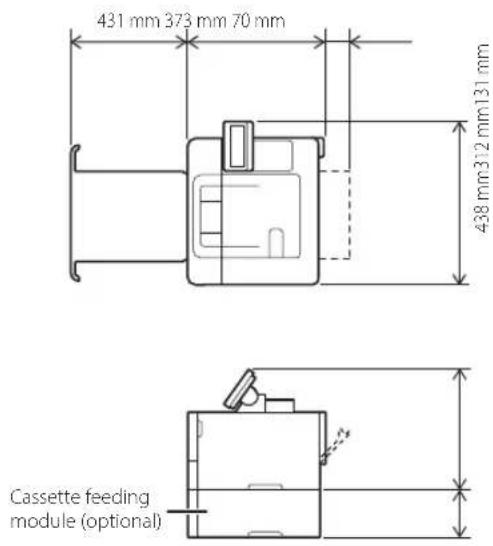
LBP214dw/LBP212dw
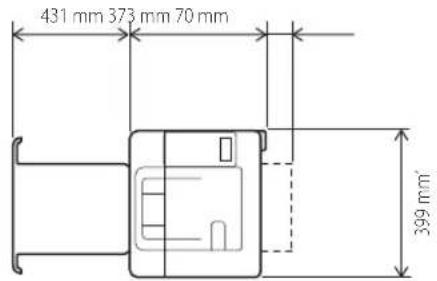
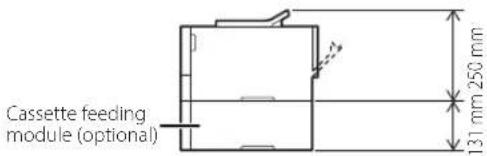
* The protruding portion is not included. The whole length, if the portion included, is 401mm.
1
natural_image
Line drawing of a person handling a printer with a hand pointing to it (no text or symbols present)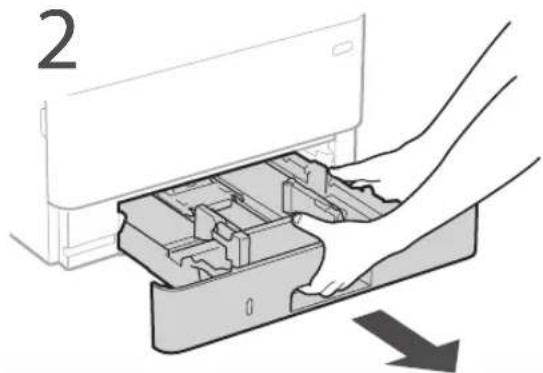
natural_image
Illustration of hands installing or removing a device into a plastic container (no text or symbols visible)3
4
5
natural_image
Diagram of a device's internal structure showing a rectangular component with a curved arrow indicating rotation (no text or symbols present)6

natural_image
3D line drawing of a rectangular electronic device with internal components, placed on a base (no text or symbols)7
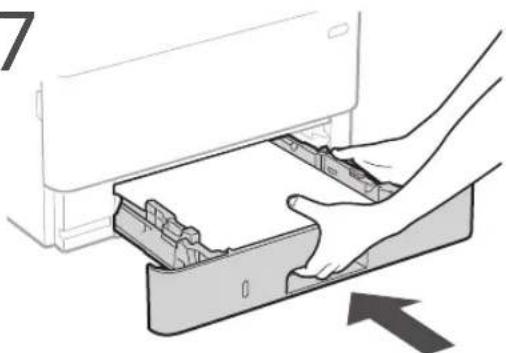
natural_image
Illustration of a hand inserting a device into a drawer with an arrow indicating direction (no text or symbols)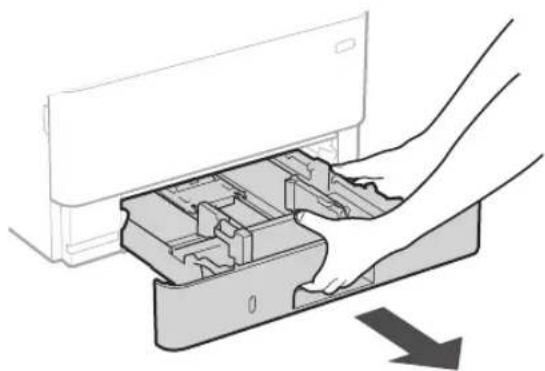
natural_image
Illustration of hands inserting a device into a plastic housing (no text or symbols visible)8
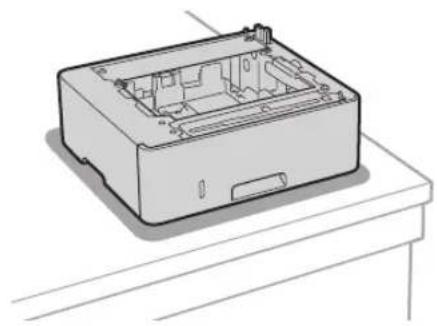
Install the cassette feeding module (optional).
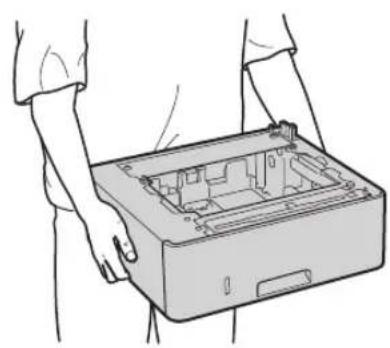
natural_image
Line drawing of hands holding an open device casing (no text or symbols)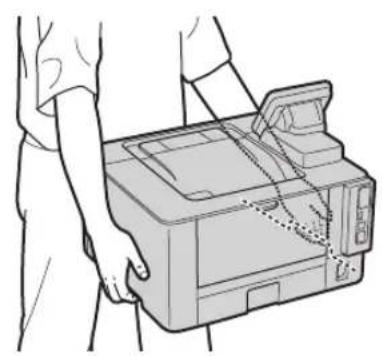
natural_image
Line drawing of a person handling a printer with a paper airplane (no text or symbols)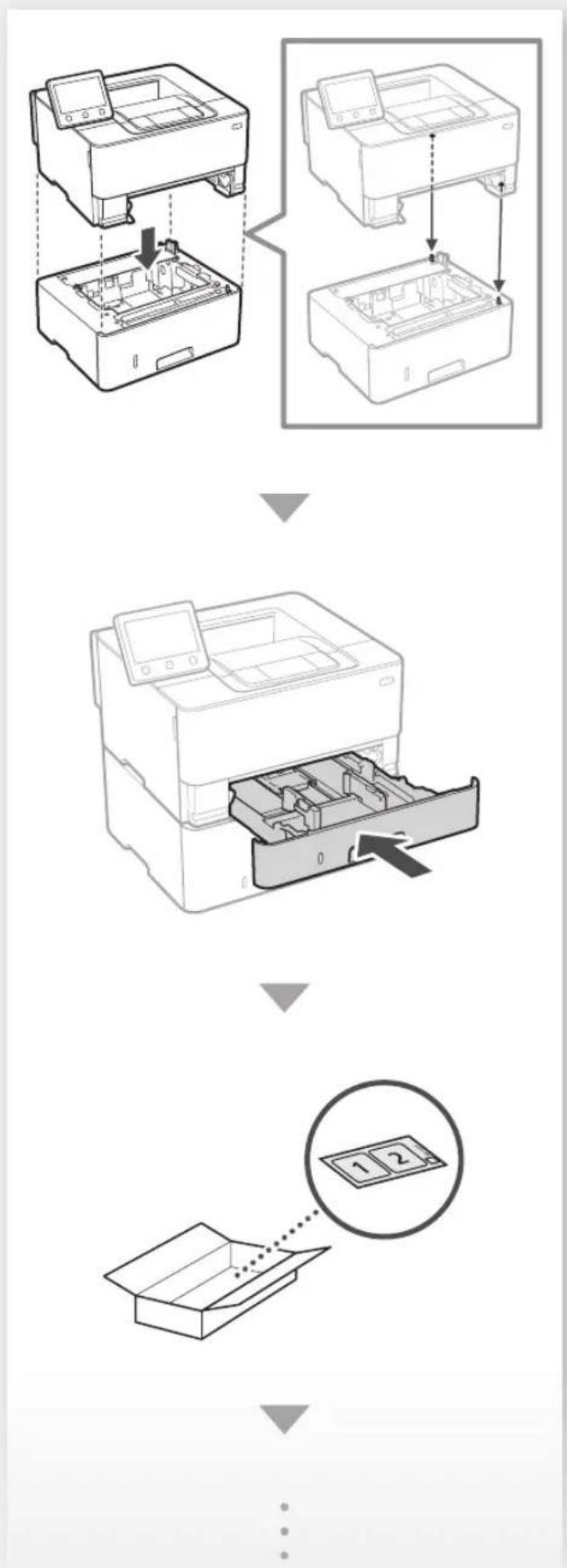
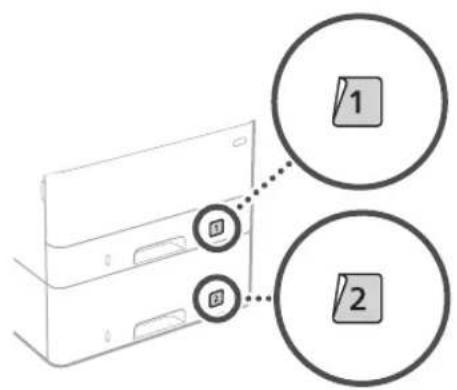
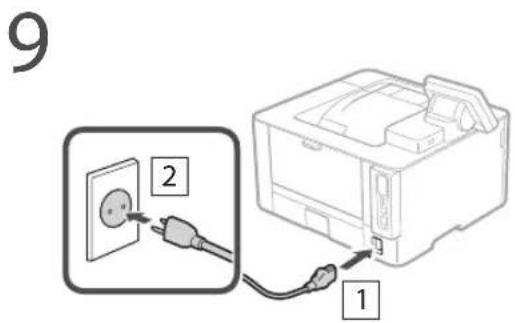
Next, proceed to configure the machine.
Configuring the Initial Settings of the Machine
The design of the operation panel differs depending on the model of your machine. The descriptions of the operation panel in this guide basically presumes that the model is LBP215x.
NOTE
Parts and functions of the operation panel.
P.134 "Start the Operation from the Operation Panel"
About Application Library\*
Application Library is an application that allows you to use useful functions for routine jobs or other convenient functions in a one-touch operation without necessity of making functional settings every time. You can access each registered function by simply pressing the appropriate button displayed in the Home screen. For the respective function, see the description displayed in the Setup Guide.
* This function may not be available, depending on the model of the machine.
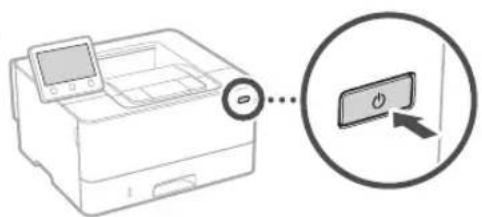
- Configure the initial settings, according to the screen.
-
Set the language and country/region.
-
Set the time zone and current date/time.
-
Configure the settings to prevent unauthorized access.
- For the purpose of confirmation, enter the same PIN twice.
Configuring the Method of Connecting to a Computer
Before starting the configuration
• The machine cannot be connected to both wired and wireless LANs at the same time.
• If the machine is connected to an unsecured network, your personal information might be leaked to a third party. Please be aware and careful of this.
• The machine does not come with a router. Please have one ready, if necessary.
• Even in an environment without wireless LAN router, you can use Access Point Mode to make a wireless connection to the machine directly from your mobile device (Direct Connection).
→ User's Guide
Specifying the connection method
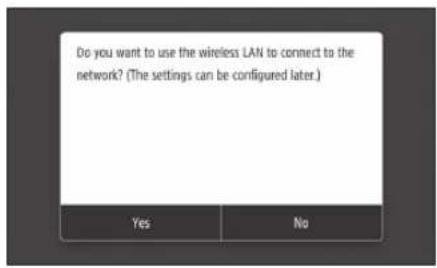
• To connect via wireless LAN :
• To connect via wired LAN or USB :
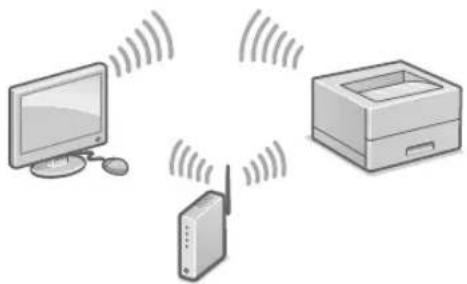
To connect via wireless LAN
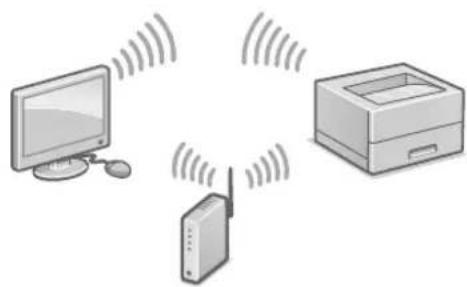
natural_image
Illustration of three electronic devices: a monitor, a printer with wireless signal, and a tower (no text or symbols)- Make sure that the computer is connected to a router properly.
- Check the network settings on the computer.
For details

"Setting Up Using the Setup Guide" in the User's Guide
-
Take note of the SSID and network key.
-
Check the label on the router. ➞ User's Guide
-
The setting operation is easier if the router is provided with a WPS mark. ➕ User's Guide
-
Set the access point and network key according to the screen below.
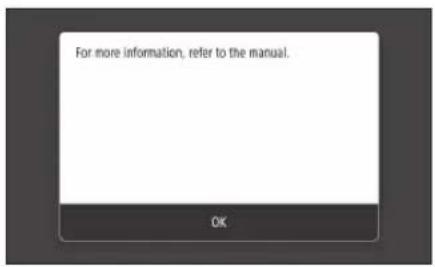
- Select
. - Select
. - Select
- Select the access point (SSID), and select
. - Enter a WEP key (network key), and select
. - Select
. - Wait until message
is displayed. -
Select
.
• The IP address will be automatically configured in a few minutes. -
Install the driver and software.

P.10 "Installing the software"
Now you are finished with the configuration of the initial settings.
To connect via wired LAN
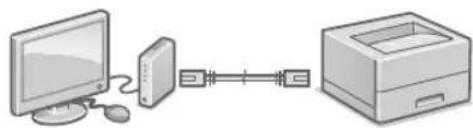
natural_image
Illustration of a computer connected via serial and folder links (no text or symbols)The machine does not come with a LAN cable. Please have one ready, if necessary.
- Make sure that the computer is connected to a router properly.
- Check the network settings on the computer.
- Connect the LAN cable.
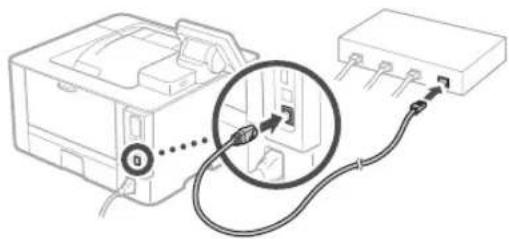
natural_image
Diagram of a device with cable and connector, showing connection point (no text or symbols)• After connecting the cable, wait a few minutes (until the IP address is set automatically).
- If a static IP address has been set on the computer, set the machine's IP address manually.
- Install the driver and software.

P.10 "Installing the software"
Now you are finished with the configuration of the initial settings.
To connect via USB
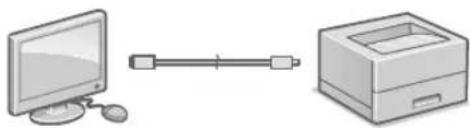
natural_image
Illustration of a desktop computer connected to a printer (no text or symbols present)- The machine does not come with a USB cable. Please have one ready, if necessary.
• Make sure that the USB cable you use has the following mark.

- Do not connect the USB cable before installing the driver. If you did, disconnect the USB cable from the computer, close the dialog box, and then perform the following procedure from step 1.
- Install the driver and software.
P.10 "Installing the software"
- When a screen with instructions for connecting the USB cable to the machine is displayed, remove the sticker that covers the USB port.
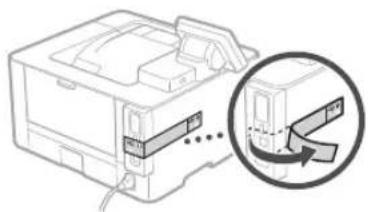
natural_image
Diagram of a mechanical device with an arrow indicating a process or operation, showing internal components and motion (no text or symbols present)Now you are finished with the configuration of the initial settings.
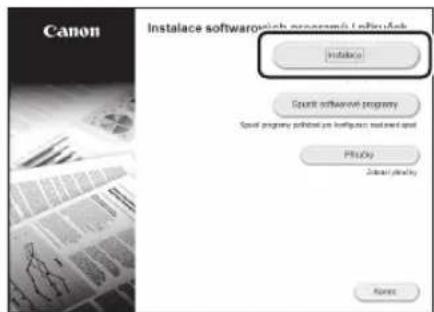
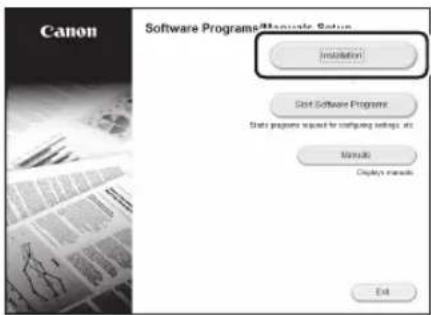
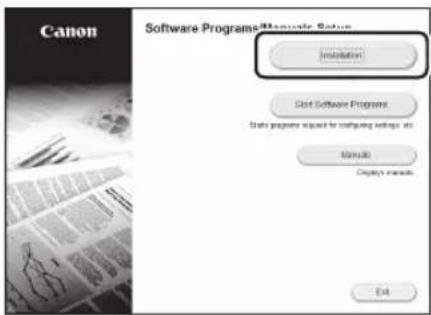
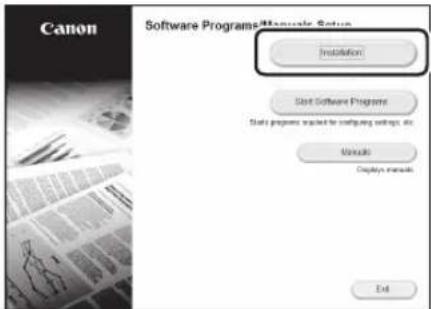
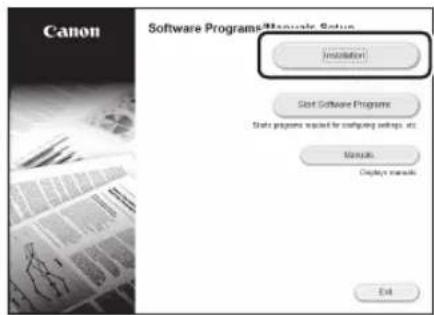
Installing the software
• The procedure described here is only applicable when your computer runs on the Windows OS. For more details on the software installation procedure, see the driver's manual.
- For the installation when your computer runs on the macOS, see the driver's manual.
- Your machine may not come with the driver for the macOS, depending on the time of purchase. New drivers are uploaded to the Canon website, and you can download and use the latest one.
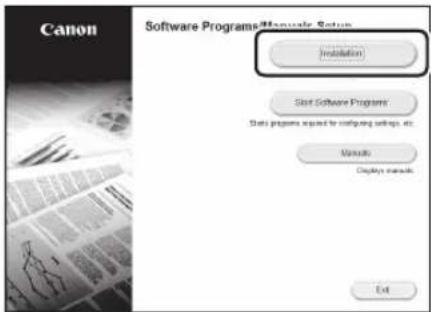
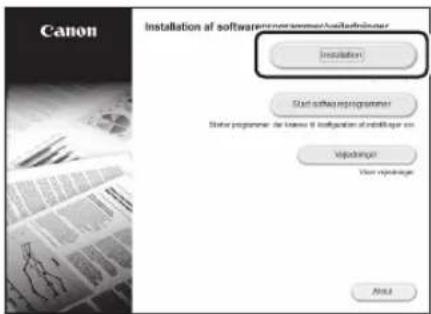
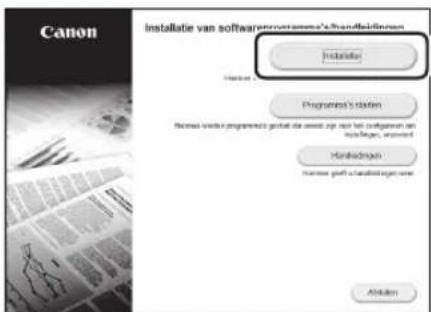
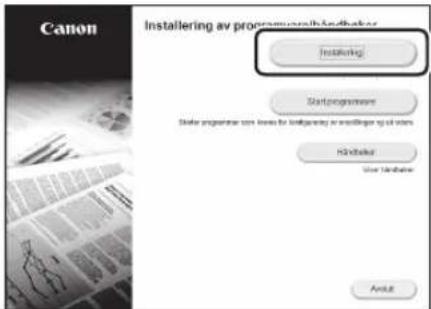
1.
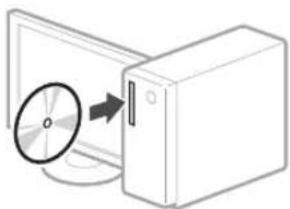
natural_image
Illustration of a CD or DVD disc being inserted into a computer tower (no text or symbols visible)2.
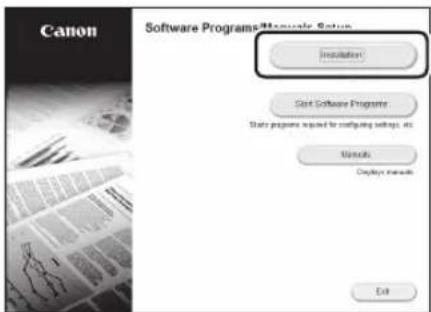
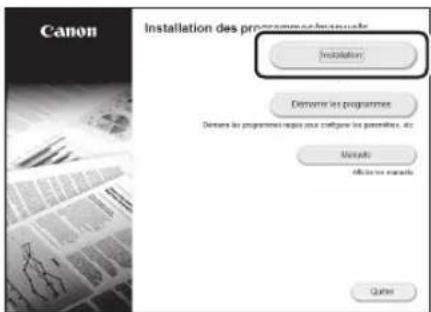
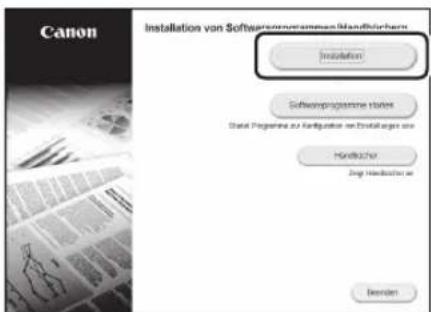
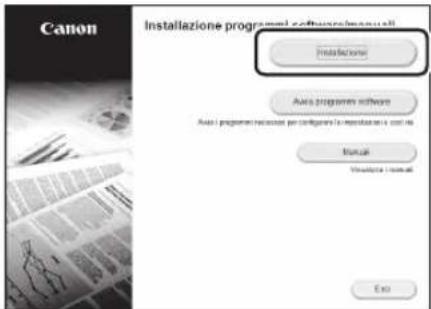
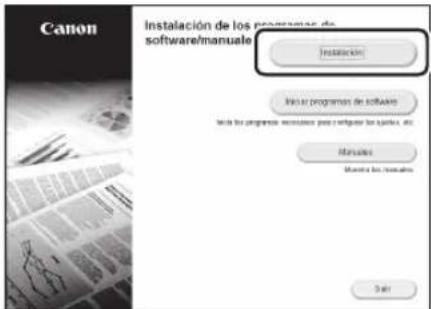
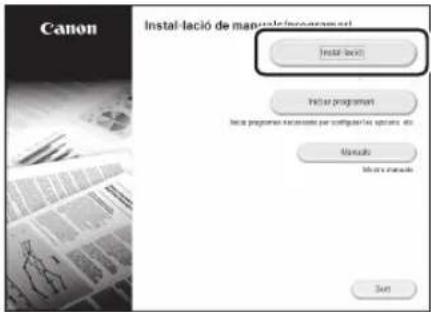
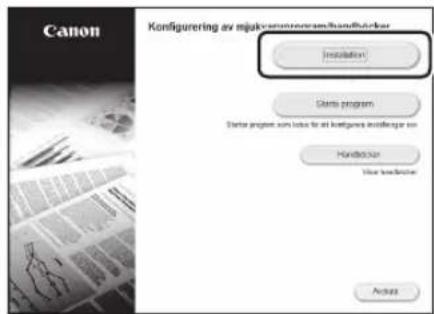
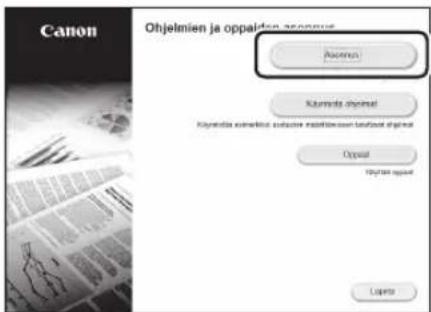
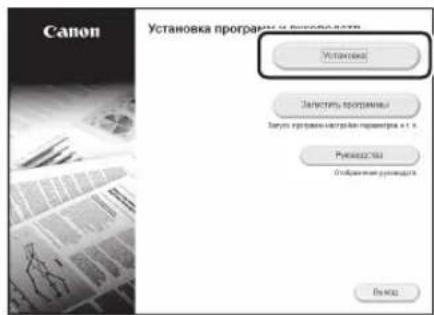
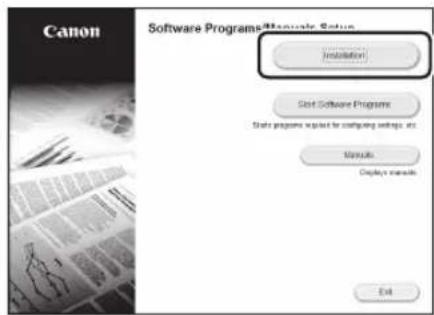
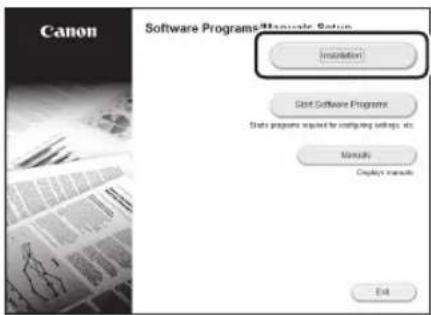
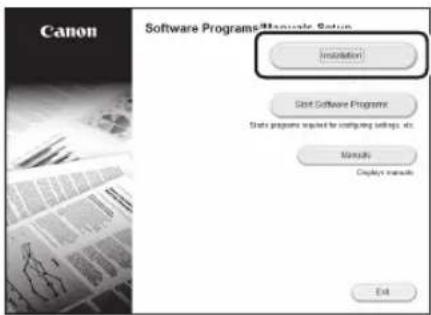
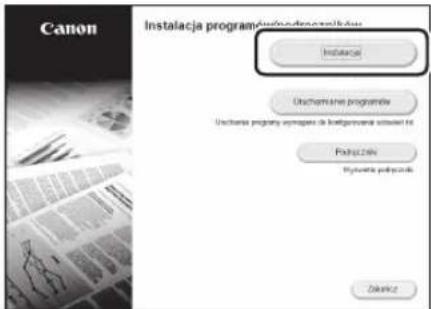
If the screen is not displayed properly, re-insert the CD-ROM/DVD-ROM or search for "D:\MInst.exe" on the Windows platform (This description assumes that "D:" is the CD-ROM/DVD-ROM drive name).
natural_image
Illustration of three electronic devices: a monitor, a printer, and a wireless router with signal waves (no text or symbols)natural_image
Illustration of a computer connected via a serial line to a printer (no text or symbols present)natural_image
Diagram of a device connection showing cable routing around a terminal block (no text or symbols present)natural_image
Illustration of a computer connected to a printer (no text or symbols present)natural_image
Diagram of a printer or printer device with a magnified inset showing a clamping mechanism (no text or symbols present)natural_image
Illustration of a computer monitor with an open CD and a CD inside, showing a magnified view of the disc (no text or symbols)2.
natural_image
Illustration of three electronic devices: a monitor, a tower, and a printer with wireless signal lines (no text or symbols)natural_image
Illustration of a desktop computer connected to a printer via a serial line (no text or symbols)natural_image
Diagram of a device with cable and connector, showing connection point and wiring (no text or symbols)natural_image
Illustration of a desktop computer connected to a printer (no text or symbols present)natural_image
Diagram of a printer or printer device with a magnified inset showing internal components (no text or symbols)natural_image
Diagram showing a CD or DVD disc being inserted into a computer tower (no text or symbols present)2.
natural_image
Illustration of three electronic devices: a monitor, a printer, and a wireless router with signal waves (no text or symbols)natural_image
Illustration of a desktop computer connected to a printer (no text or symbols present)natural_image
Diagram showing connection between a device with cable and connector (no text or symbols)natural_image
Illustration of a desktop computer connected to a printer (no text or symbols present)natural_image
Technical line drawing of a mechanical device with an inset showing a close-up of a component (no text or symbols present)natural_image
Diagram showing a CD or DVD disc being inserted into a computer tower (no text or symbols present)2.
natural_image
Illustration of three electronic devices: a monitor, a printer with wireless signal, and a printer (no text or symbols)natural_image
Illustration of a computer connected to a printer via serial communication (no text or symbols)natural_image
Diagram showing a device connected to an electronic component via cable, with no visible text or symbols.natural_image
Illustration of a computer connected to a printer (no text or symbols present)natural_image
Diagram of a printer or printer with a magnified inset showing internal structure (no text or symbols)natural_image
Illustration of a CD or DVD drive system with an open disk and a rectangular unit (no text or symbols)2.
natural_image
Illustration of three electronic devices: a monitor, a tower, and a printer with wireless signal lines (no text or symbols)natural_image
Illustration of a desktop computer connected to a printer via a serial link (no text or symbols)natural_image
Diagram of a device with cable and connector, showing connection point (no text or symbols)natural_image
Illustration of a computer connected to a printer (no text or symbols present)natural_image
Diagram of a printer or printer device with an arrow indicating a process or operation, showing no text or symbols.natural_image
Diagram showing a CD or DVD disc being inserted into a rectangular box (no text or symbols present)2.
natural_image
Illustration of three electronic devices: a monitor, a printer with wireless signal lines, and a server tower (no text or symbols)natural_image
Illustration of a desktop computer connected to a printer via serial communication (no text or symbols)natural_image
Diagram of a device with cable and connector, showing connection point (no text or symbols)natural_image
Illustration of a desktop computer connected to a printer (no text or symbols present)natural_image
Diagram of a printer or printer device with an arrow indicating a process or operation, showing no text or symbols.natural_image
Diagram showing a CD or DVD disc being inserted into a computer tower (no text or symbols present)2.
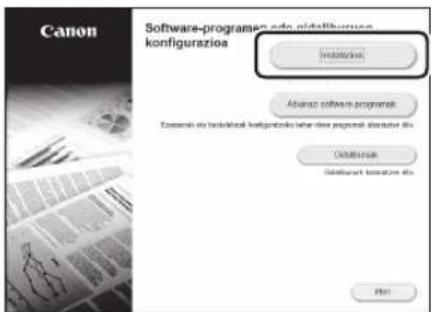
Pantaila behar bezala erakusten ez bada, instalatu CD-ROM/DVD-ROMa edo bilatu "D:\MInst.exe" Windows sisteman (Deskribapen honek CD-ROM/DVD-ROM unitateren hizkia "D:" dela suposatzen du).
Eu
natural_image
Illustration of three devices: a computer, a printer, and a server with wireless signal lines (no text or symbols)natural_image
Illustration of a desktop computer connected to a printer (no text or symbols present)natural_image
Diagram of a device with cable and connector, showing connection point (no text or symbols)natural_image
Illustration of a desktop computer connected to a file box (no text or symbols present)natural_image
Diagram of a printer or printer device with a magnified inset showing internal structure (no text or symbols)natural_image
Illustration of a computer tower with a CD inside, showing an arrow pointing to its disc (no text or symbols present)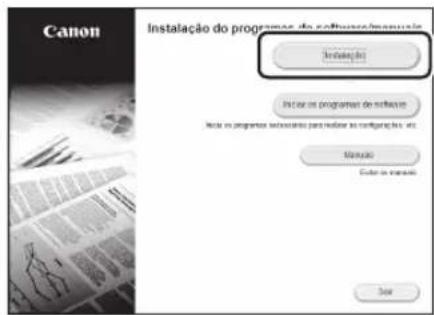
natural_image
Illustration of a wireless communication system with a desktop computer, printer, and router (no text or symbols)natural_image
Illustration of a desktop computer connected to a printer via serial and link (no text or symbols)natural_image
Diagram of a device with cable and connector, showing connection point (no text or symbols)natural_image
Illustration of a desktop computer connected to a printer (no text or symbols present)natural_image
Diagram of a printer or printer device with an inset showing a close-up of its internal structure (no text or symbols present)natural_image
Illustration of a CD or DVD drive system with an open disk (no text or symbols visible)2.
natural_image
Illustration of three electronic devices: a monitor, a tower, and a printer with signal waves (no text or symbols)natural_image
Illustration of a desktop computer connected to a server and a box (no text or symbols)natural_image
Diagram showing cable connection between a device and a terminal block (no text or symbols present)natural_image
Illustration of a desktop computer connected to a printer (no text or symbols present)natural_image
Diagram of a printer or printer with a magnified inset showing a close-up of the printer's internal structure (no text or symbols present)natural_image
Illustration of a CD or DVD drive system with an open disk and a rectangular unit (no text or symbols)2.
natural_image
Illustration of a desktop computer connected to a printer and a router, all emitting signal waves (no text or symbols)natural_image
Illustration of a computer connected via a serial line to a storage unit (no text or symbols)natural_image
Diagram of a device with cable and connector, showing connection point (no text or symbols)natural_image
Illustration of a computer connected to a printer (no text or symbols present)natural_image
Diagram of a printer or printer with a magnified inset showing a close-up of the printer's internal structure (no text or symbols present)natural_image
Diagram showing a CD or DVD disc being inserted into a computer tower (no text or symbols present)2.
natural_image
Illustration of a wireless communication system with monitor, printer, and tower (no text or symbols)natural_image
Illustration of a desktop computer connected to a printer (no text or symbols present)natural_image
Diagram of a device with cable and connector, showing connection point (no text or symbols)- Vent i et par minutter etter at kabelen er koblet til (til IP-adressen er automatisk innstilt).
-
Hvis det er angitt en statisk IP-adresse for datamaskinen, må maskinens IP-adresse stilles inn manuelt.
-
Installer driver og programvare.

side 54 "Installere programvaren"
natural_image
Illustration of a computer connected to a printer (no text or symbols present)natural_image
Diagram of a printer or printer device with an arrow indicating a process step, no text or symbols present.natural_image
Diagram showing a CD or DVD disc being inserted into a rectangular box (no text or symbols present)2.
natural_image
Illustration of three devices: a desktop computer, a printer, and a wireless router with signal waves (no text or symbols)natural_image
Illustration of a computer connected to a printer via serial and linear interfaces (no text or symbols)natural_image
Diagram showing connection between a printer and an electronic device with cable (no text or symbols present)natural_image
Illustration of a desktop computer connected to a printer (no text or symbols present)natural_image
Diagram showing a CD or DVD drive system with an output arrow, no text or symbols present2.
natural_image
Diagram showing a printer with a circular button connected to a screen, and a magnified inset highlighting the screen (no text or symbols present)natural_image
Illustration of three electronic devices: a monitor, a printer, and a router with signal waves (no text or symbols)natural_image
Illustration of a desktop computer connected to a printer (no text or symbols present)natural_image
Diagram of a device with cable and connector, showing connection point (no text or symbols)natural_image
Illustration of a computer monitor connected to a file box via a cable (no text or symbols)natural_image
Diagram of a printer or printer device with a magnified inset showing internal structure (no text or symbols)natural_image
Illustration of a CD or DVD drive system with an open disk and a rectangular unit (no text or symbols)2.
natural_image
Illustration of three electronic devices: a desktop computer, a printer with wireless signal, and a router (no text or symbols)natural_image
Illustration of a computer connected to a server and printer (no text or symbols)natural_image
Diagram of a device with cable and connector, showing connection point (no text or symbols)natural_image
Illustration of a desktop computer connected to a printer (no text or symbols present)natural_image
Diagram of a printer or printer device with a magnified inset showing internal components (no text or symbols)natural_image
Diagram showing a CD or DVD disc being inserted into a server unit (no text or symbols present)2.
natural_image
Illustration of three devices: a monitor, a printer with wireless signal, and a server with antenna (no text or symbols)natural_image
Illustration of a desktop computer connected to a printer via serial communication (no text or symbols)natural_image
Diagram of a device with cable and connector, showing connection point and wiring (no text or symbols)natural_image
Illustration of a desktop computer connected to a printer (no text or symbols present)natural_image
Diagram of a printer or printer with a magnified inset showing a mechanical component (no text or symbols present)natural_image
Illustration of a CD or DVD disc being inserted into a computer tower (no text or symbols)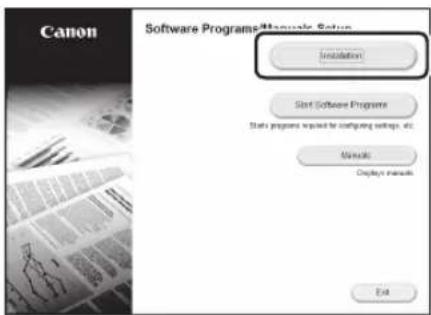
natural_image
Illustration of three electronic devices: a monitor, a printer with wireless signal, and a tower (no text or symbols)natural_image
Illustration of a computer connected via a serial port to a printer (no text or symbols present)natural_image
Diagram showing cable connection between a device and a terminal block (no text or symbols present)natural_image
Illustration of a desktop computer connected to a printer (no text or symbols present)natural_image
Diagram of a printer or printer device with a magnified inset showing internal structure (no text or symbols)natural_image
Illustration of a computer monitor and tower with a CD inside, showing an arrow pointing to the CD (no text or symbols present)2.
natural_image
Illustration of three electronic devices: a monitor, a tower with wireless signal, and a printer (no text or symbols)natural_image
Illustration of a desktop computer connected to a printer (no text or symbols present)natural_image
Diagram of a device with cable and connector, showing connection point (no text or symbols)natural_image
Illustration of a desktop computer connected to a printer (no text or symbols present)- Irenginys tiekiamas be USB kabelio. Prireikus, jj jsigykite.
natural_image
Diagram of a printer or printer with a magnified inset showing a mechanical component (no text or symbols present)natural_image
Illustration of a CD or DVD disc being inserted into a computer tower (no text or symbols)2.
natural_image
Illustration of three electronic devices: a monitor, a tower with wireless signal, and a printer (no text or symbols)natural_image
Illustration of a desktop computer connected to a printer (no text or symbols present)natural_image
Diagram of a device with cable and connector, showing connection point (no text or symbols)natural_image
Illustration of a desktop computer connected to a printer (no text or symbols present)natural_image
Diagram of a printer or printer device with a magnified inset showing internal structure (no text or symbols)natural_image
Illustration of a computer monitor and CD tower with a circular disc on the screen (no text or symbols)2.
natural_image
Illustration of three electronic devices: a monitor, a printer, and a wireless router with signal waves (no text or symbols)natural_image
Illustration of a desktop computer connected to a printer (no text or symbols present)natural_image
Diagram of a device with cable and connector, showing connection point (no text or symbols)natural_image
Illustration of a desktop computer connected to a printer (no text or symbols present)natural_image
Diagram of a printer or printer device with an arrow indicating a process or operation, showing internal components and a magnified inset (no text or symbols present)natural_image
Diagram showing a CD inside a computer tower with an arrow indicating disk transfer (no text or symbols present)2.
natural_image
Illustration of a wireless network device with monitor, printer, and tower (no text or symbols)natural_image
Illustration of a desktop computer connected to a printer via serial communication (no text or symbols)natural_image
Diagram of a device connection showing cable routing around a terminal block (no text or symbols)natural_image
Illustration of a desktop computer connected to a printer (no text or symbols present)natural_image
Diagram of a printer or printer device with an arrow indicating a process or operation, no text or symbols present.natural_image
Diagram showing a CD or DVD disc being inserted into a computer tower (no text or symbols present)2.
natural_image
Illustration of three electronic devices: a monitor, a printer, and a wireless router with signal waves (no text or symbols)natural_image
Illustration of a desktop computer connected to a printer via serial communication (no text or symbols)natural_image
Diagram of a device connection showing cable routing around a port with a magnified detail (no text or symbols)natural_image
Illustration of a computer connected to a printer (no text or symbols present)natural_image
Diagram of a printer or printer device with an arrow indicating a process or operation, showing no text or symbols.natural_image
Illustration of a computer monitor and tower with a CD inside, showing an arrow pointing to the CD (no text or symbols present)2.
natural_image
Illustration of three electronic devices: a desktop computer, a printer with wireless signal, and a printer (no text or symbols)natural_image
Illustration of a desktop computer connected to a printer via a serial line (no text or symbols)Naprava ni opremljena s kablom LAN, zato ga po potrebi zagotovite.
natural_image
Diagram of a device with cable and connector, showing connection point (no text or symbols)natural_image
Illustration of a computer connected to a printer (no text or symbols present)- Naprava ni opremljena s kablom USB, zato ga po potrebi zagotovite.
natural_image
Diagram of a printer or printer device with an arrow indicating a process or operation, no text or symbols present.natural_image
Illustration of a CD or DVD drive system with an external CD and a rectangular unit (no text or symbols)2.
- Konfigurirajte početne postavke u skladu sa zaslonom.
natural_image
Illustration of a wireless network device with monitor, printer, and tower (no text or symbols)natural_image
Illustration of a desktop computer connected to a printer (no text or symbols present)natural_image
Diagram showing connection between a device with cable and connector (no text or symbols)- Nakon što ste spojili kabel pričekajte par minuta (dok se adresa IP automatski postavi).
-
Ako je na računalu postavljena statička IP adresa, ručno postavite IP adresu uređaja.
-
Instalirajte upravljački program i softver.
Str. 102 „Instaliranje softvera“
natural_image
Illustration of a desktop computer connected to a printer (no text or symbols present)natural_image
Diagram of a printer or printer device with an arrow indicating a process step, no text or symbols present.natural_image
Diagram showing a CD inside a computer tower with an arrow indicating disk transfer (no text or symbols present)2.
Ako se zaslon ne prikazuje ispravno, ponovno umetnite CD-ROM/DVD-ROM ili potražite „D:\MInst.exe“ na sustavu Windows (U ovom se opisu „D:“ odnosi na pogon CD-ROM/DVD-ROM).
Hr
natural_image
Illustration of a printer with a magnified view showing a button labeled 'Power' (no text or symbols present)natural_image
Illustration of three electronic devices: a monitor, a printer, and a box with signal waves (no text or symbols)natural_image
Illustration of a desktop computer connected to a printer (no text or symbols present)natural_image
Diagram of a printer with cable and connector, showing internal components connected to a terminal block (no text or symbols)natural_image
Illustration of a computer connected to a printer (no text or symbols present)natural_image
Diagram of a printer or printer device with a magnified inset showing internal structure (no text or symbols)natural_image
Illustration of a CD or DVD drive system with an open disk and a server tower (no text or symbols)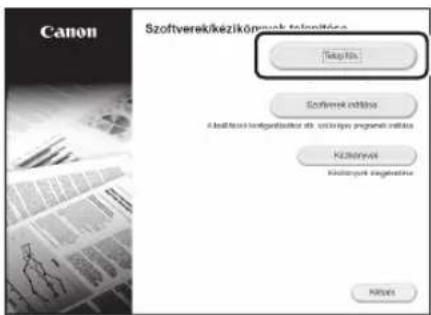
natural_image
Illustration of three electronic devices: a monitor, a printer, and a box with wireless signal lines (no text or symbols)natural_image
Illustration of a desktop computer connected to a printer (no text or symbols present)natural_image
Diagram of a device with cable and connector, showing connection point (no text or symbols)natural_image
Illustration of a desktop computer connected to a file box (no text or symbols present)natural_image
Diagram of a printer or printer device with an arrow indicating a process or operation, showing no text or symbols.natural_image
Illustration of a computer monitor and tower with a CD inside, showing an arrow pointing to the CD (no text or symbols present)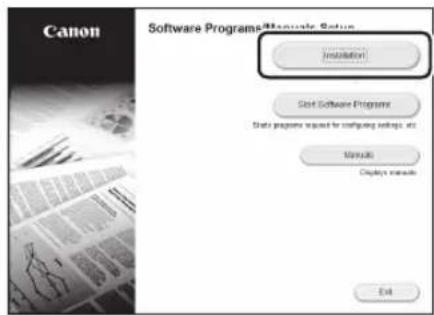
natural_image
Illustration of three electronic devices: a monitor, a printer with wireless signal, and a tower (no text or symbols)natural_image
Illustration of a desktop computer connected to a printer via a serial line (no text or symbols)natural_image
Diagram of a device with cable and connector, showing connection to an electronic component (no text or symbols present)natural_image
Illustration of a desktop computer connected to a printer (no text or symbols present)natural_image
Diagram of a printer or printer device with a magnified inset showing internal structure (no text or symbols)natural_image
Illustration of a computer tower with a CD inside, showing an arrow pointing to its disc (no text or symbols present)2.
natural_image
Diagram showing a printer with a magnifying glass and a button labeled 'Power' pointing to it, connected by an arrow (no text or symbols present)natural_image
Illustration of three electronic devices: a monitor, a tower, and a printer with wireless signal lines (no text or symbols)natural_image
Illustration of a desktop computer connected to a printer (no text or symbols present)natural_image
Diagram of a device with cable and connector, showing connection point (no text or symbols)natural_image
Illustration of a computer connected to a printer (no text or symbols present)natural_image
Diagram of a printer or printer with a magnified inset showing a clamping mechanism (no text or symbols present)natural_image
Illustration of a computer tower with a CD inside and an arrow pointing to its disc (no text or symbols)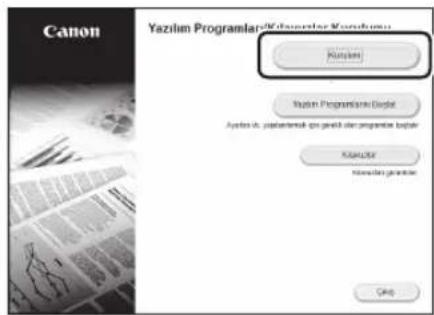
natural_image
Illustration of three electronic devices: a monitor, a printer, and a router with signal waves (no text or symbols)natural_image
Illustration of a desktop computer connected to a printer (no text or symbols present)natural_image
Diagram showing connection between a device with cable and connector (no text or symbols)natural_image
Diagram showing a CD or DVD drive system with an open CD and a rectangular unit (no text or symbols)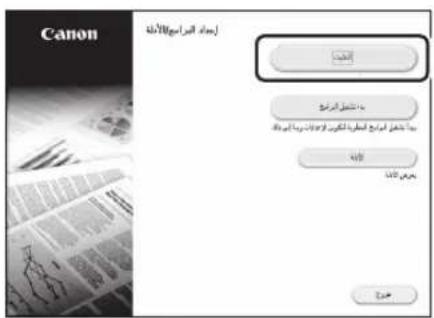
natural_image
Illustration of a computer monitor connected to a file box via a cable (no text or symbols)natural_image
Technical line drawing of a mechanical device with a magnified inset showing a bracket detail (no text or symbols)natural_image
Illustration of three electronic devices: a monitor, a printer with wireless signal lines, and a router (no text or symbols)natural_image
Illustration of a desktop computer connected to a printer (no text or symbols present)natural_image
Diagram of a device with cable and connector, showing connection point (no text or symbols)natural_image
Diagram showing a CD or DVD disc being inserted into a computer tower (no text or symbols present).
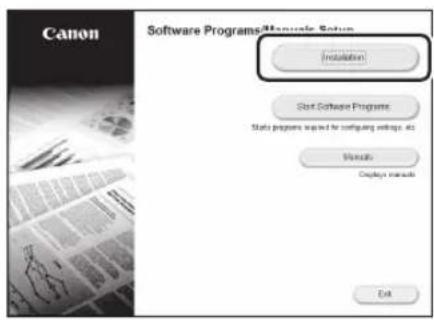
.
natural_image
Illustration of a computer monitor connected to a file box (no text or symbols)natural_image
Diagram of a printer or printer with a magnified inset showing a mechanical component (no text or symbols present)(12)
הכלה LAN
natural_image
Illustration of three electronic devices: a monitor, a tower, and a printer with wireless signal lines (no text or symbols)natural_image
Illustration of a computer setup with monitor, tower, and printer (no text or symbols)הכלהה. LAN
. וְרָה בַתִים אַל
natural_image
Diagram showing connection between a device and a terminal block with cable (no text or symbols).(הכלה)
. Connectivity <. Connected>
.
natural_image
Diagram showing a CD or DVD disc being inserted into a computer tower (no text or symbols present).1
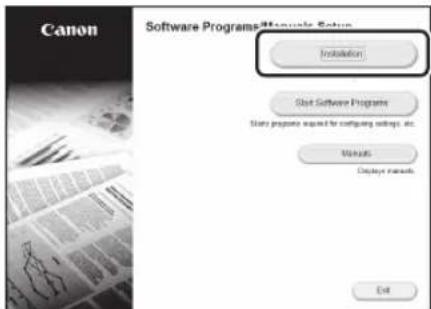
.2
natural_image
Illustration of a computer connected to a file box (no text or symbols present)• USB USB
natural_image
Technical line drawing of a mechanical component with an inset magnified view showing a disassembly or assembly (no text or symbols present)Start the Operation from the Operation Panel
The design of the operation panel differs depending on the model of your machine. The descriptions of the operation panel in this guide basically presumes that the model is LBP215x.
Machine (LBP215x)
![Operation Panel Display (screen) ([Energy Saver] key) ([Home] key)](/content/2026/04/685974/images/434648a64c85709b6b073587175190146c0bd9bb293271b24d5059960d8de438.jpg)
Machine (LBP214dw/LBP212dw)
![Operation Panel Display (screen) ([Home] key) ([Energy Saver] key) ([Back] key) OK Numeric keys [Clear] key (*) 0 c (#)](/content/2026/04/685974/images/5bb61beb80f7ce3ee56f88c4ad1070226b0776739bb8c73fd63da6e1d76ec289.jpg)
Navigating the Menu
Item selection or moving the cursor among the menu items
Select an item with [▲] or [▼].
Press OK or [▶] to proceed to the next hierarchy.
Press 📋 or [◀] to return to the previous hierarchy.
Setting confirmation
Press OK. However, when
Text Input Method
Changing entry mode
To change the entry mode, press
Entry mode Available text
Uppercase alphabetic letters and symbols
Lowercase alphabetic letters and symbols
<12> Numbers
Entering text, symbols, and numbers
Enter with the numeric keys or #
Moving the cursor (Entering a space)
Press [◀] or [▶], to move the cursor. To enter a space, move the cursor to the end of the text, and press [▶].
Deleting characters
Press □ Pressing and holding deletes all characters.
| Entry mode: | Entry mode: | Entry mode: | |
| 1 | @.-/_/1 | ||
| 2 | ABC abc 2 | ||
| 3 | DEF def | 3 | |
| 4 | GHI | ghi | 4 |
| 5 | JKL | jkl | 5 |
| 6 | MNO | mno | 6 |
| 7 | PQRS | pqrs | 7 |
| 8 | TUV tuv | 8 | |
| 9 | WXYZ | wxyz | 9 |
| 0 | (Not available) | 0 | |
| # | (space) @./-_!? & $ % # ( ) [ ] { } <> * + = ",; ' ^ ' | " | (Not available) | |

Printing
- Open the document to print, and select the print function of the application.
- Select the printer driver for the machine, and select [Preferences] or [Properties].
- Specify the paper size.
- Specify the paper source and paper type.
- Specify the print settings, as necessary.
- Select [OK].
- Select [Print] or [OK].
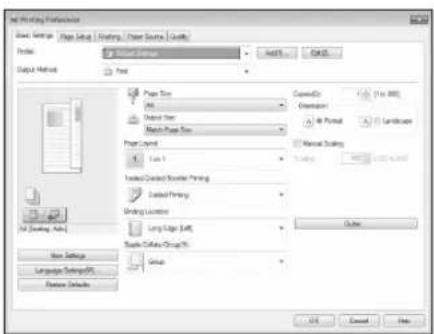
Useful print settings
■ 2-sided
■ Non 1
■ Booklet Printing

flowchart
graph TD
    A["Document Review"] --> B["Document Review"]
    B --> C["Document Review"]
    C --> D["Document Review"]
    D --> E["Document Review"]
    E --> F["Document Review"]
    F --> G["Document Review"]
    G --> H["Document Review"]
    H --> I["Document Review"]
    I --> J["Document Review"]
    J --> K["Document Review"]
    K --> L["Document Review"]
    L --> M["Document Review"]
    M --> N["Document Review"]
    N --> O["Document Review"]
    O --> P["Document Review"]
    P --> Q["Document Review"]
    Q --> R["Document Review"]
    R --> S["Document Review"]
    S --> T["Document Review"]
    T --> U["Document Review"]
    U --> V["Document Review"]
    V --> W["Document Review"]
    W --> X["Document Review"]
    X --> Y["Document Review"]
    Y --> Z["Document Review"]
For details
"Printing" in the User's Guide
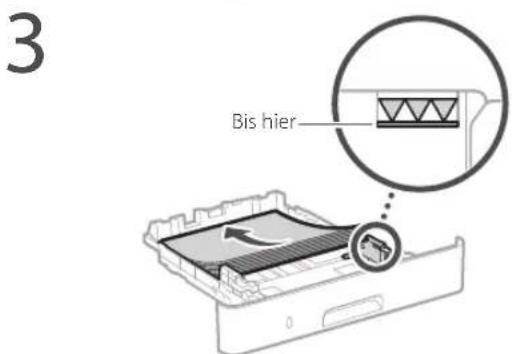
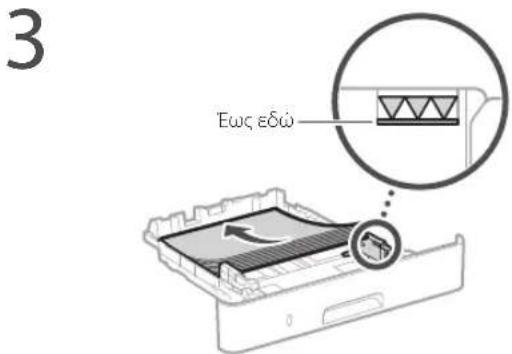
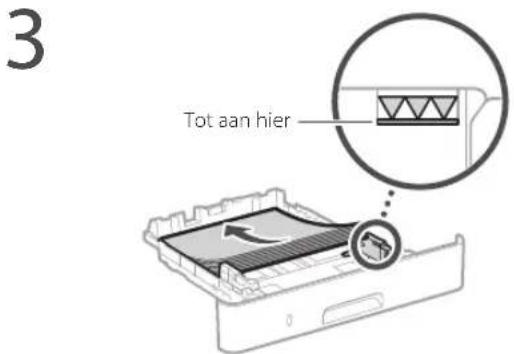
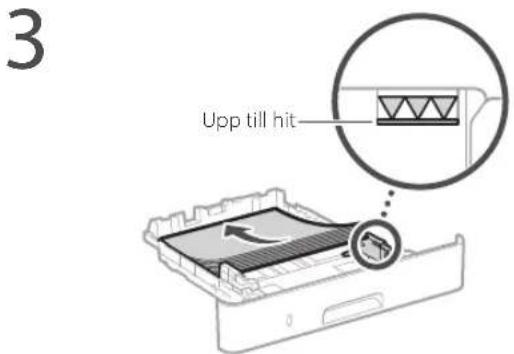
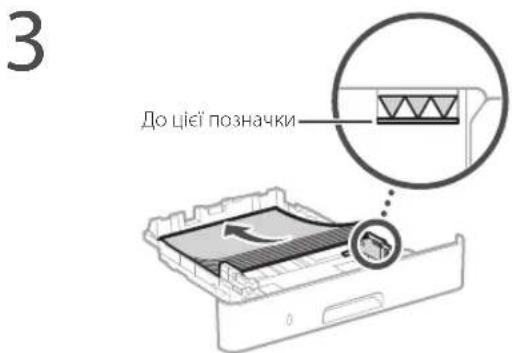
Loading in the Paper Drawer
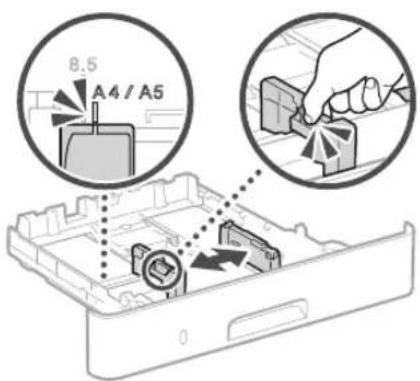
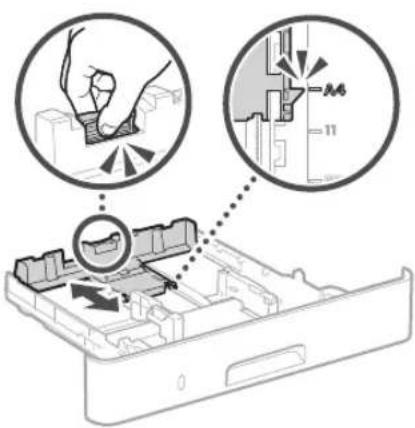
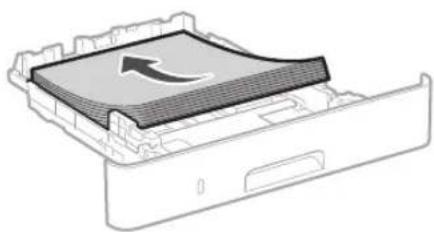
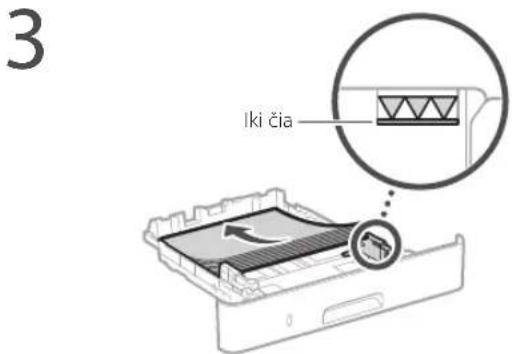
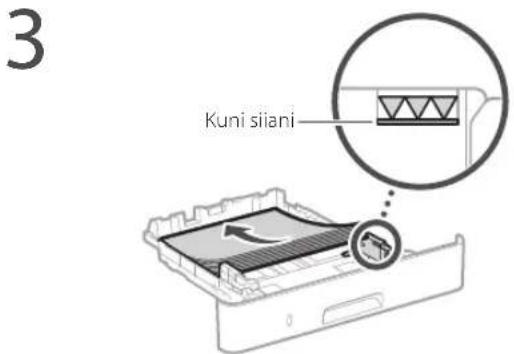
1 Pull out the paper drawer.
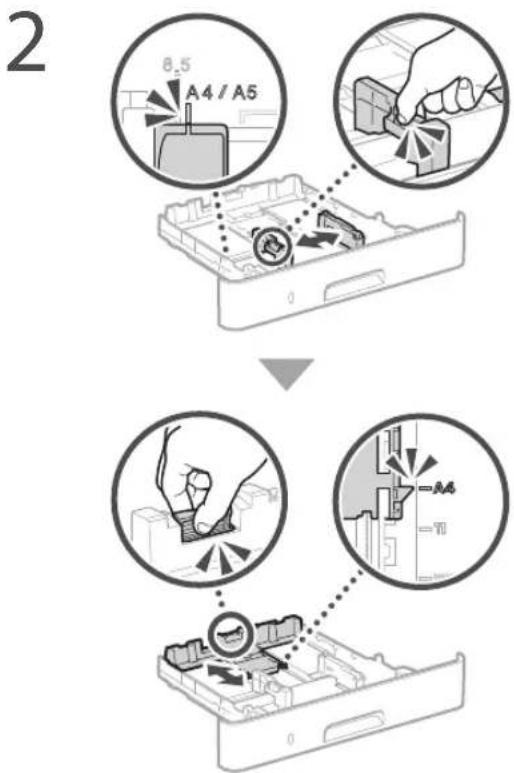
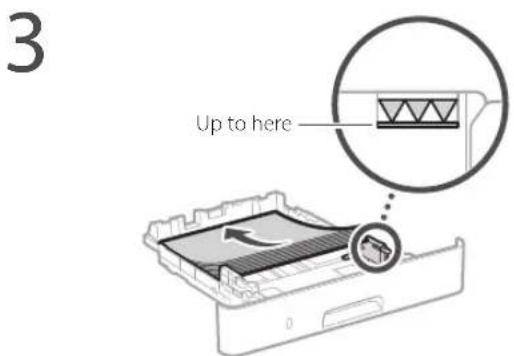
4 Insert the paper drawer into the machine.
If you load a different size or type of paper from the one before, make sure to change the settings.
5 Press and select
6 Specify the size and type of paper, according to the screen.
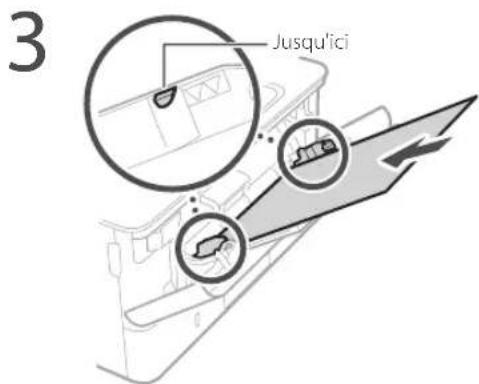
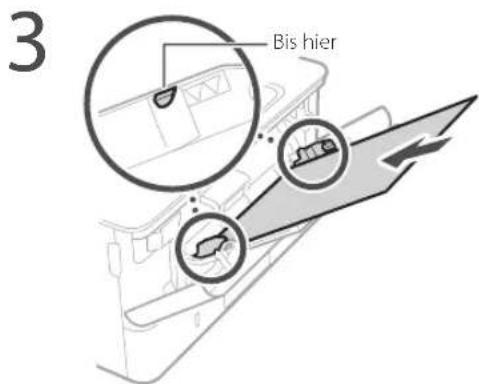
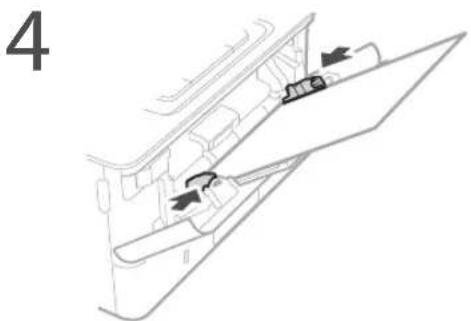
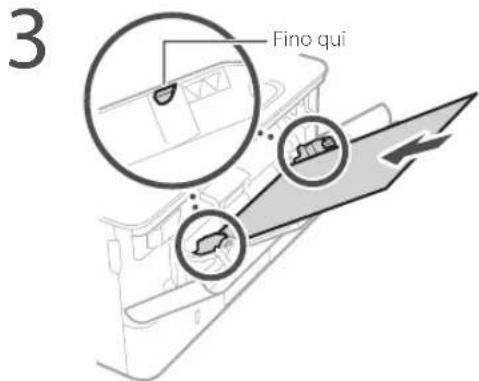
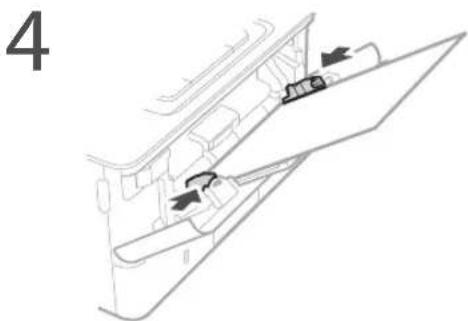
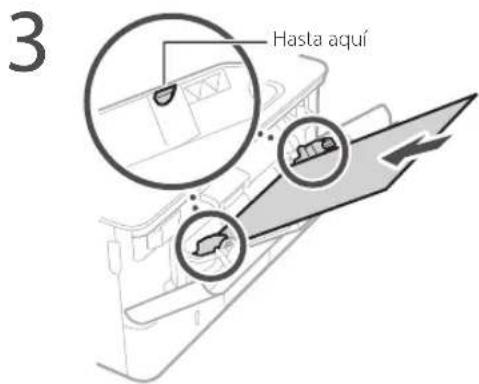
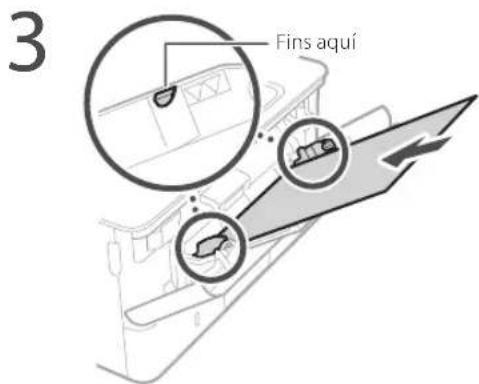
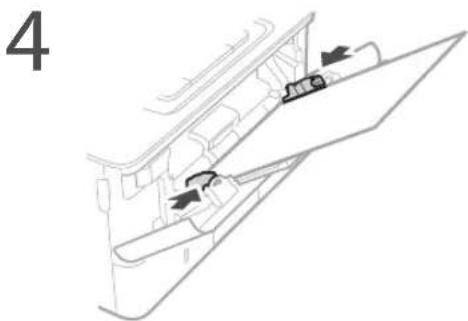
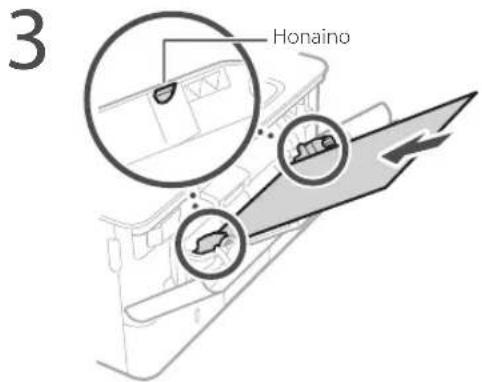
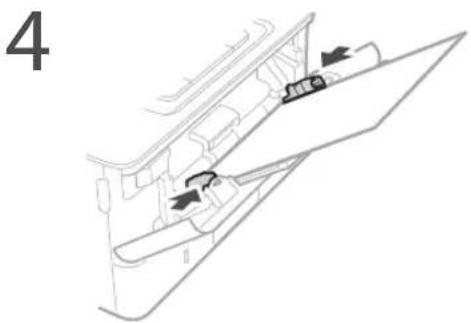
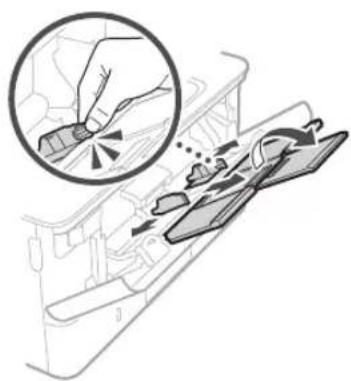
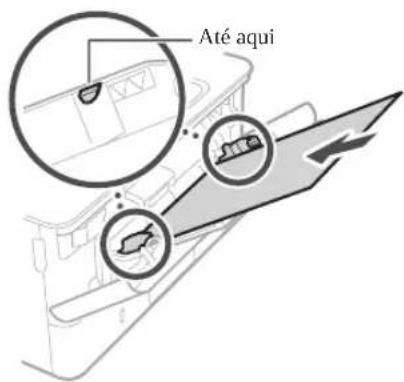
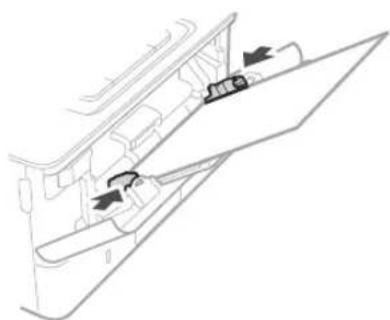
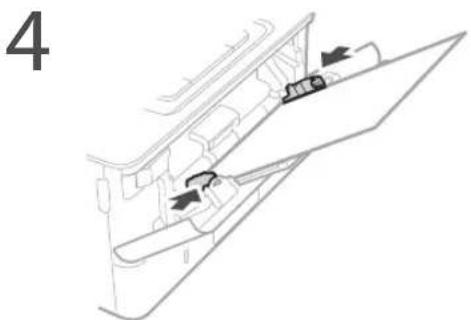
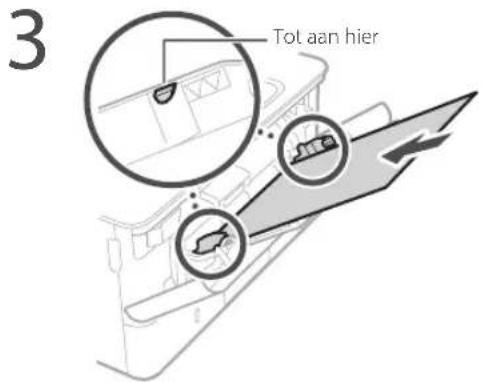
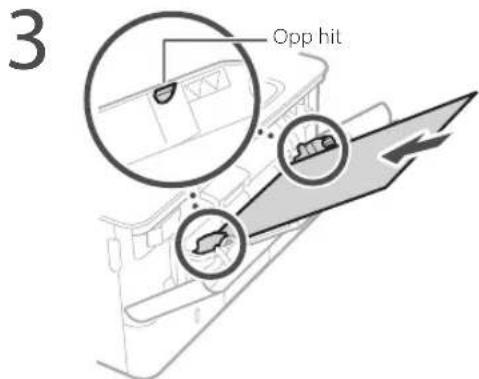
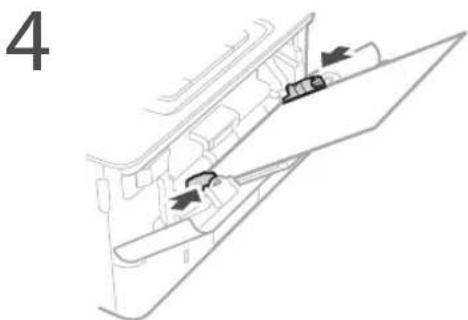
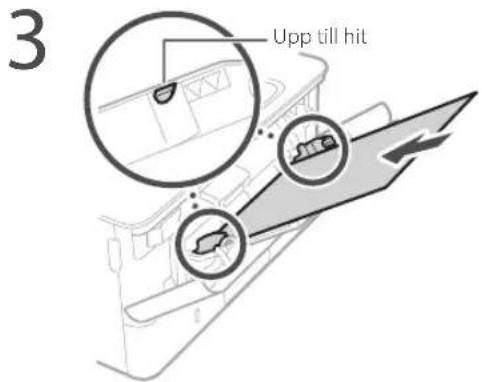
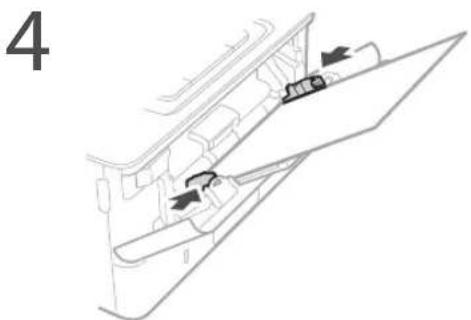
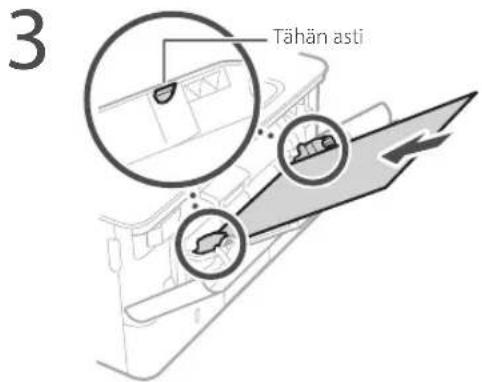
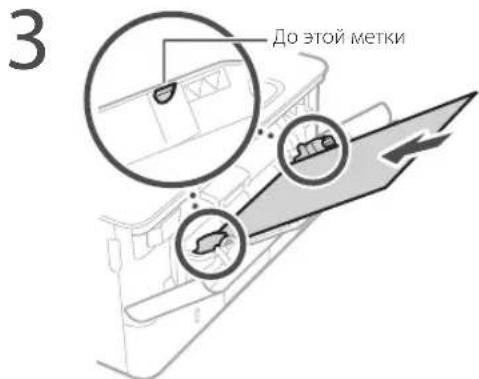
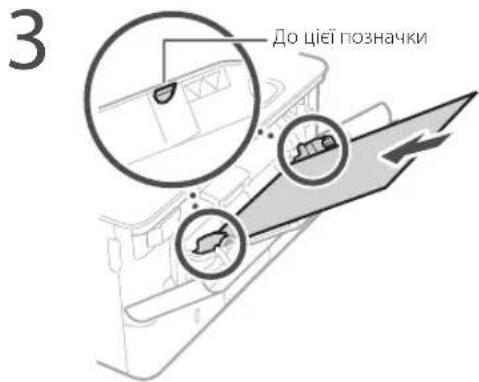
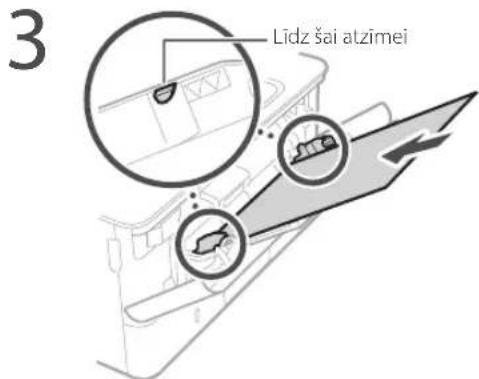
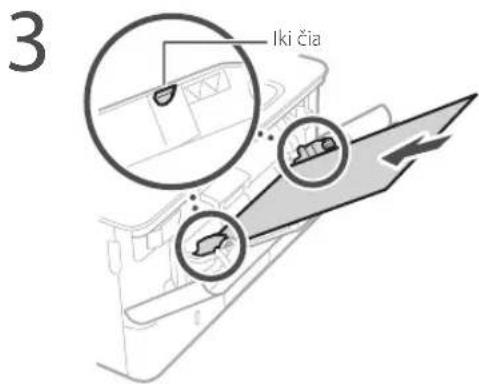
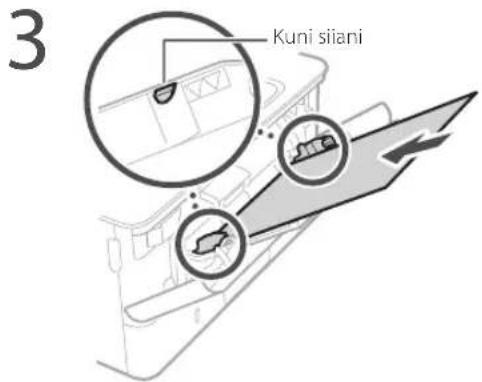
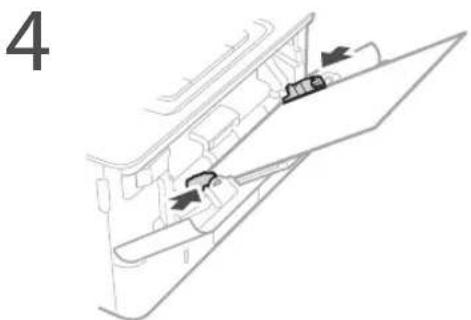
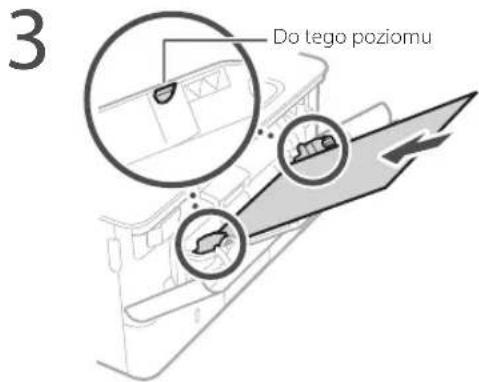
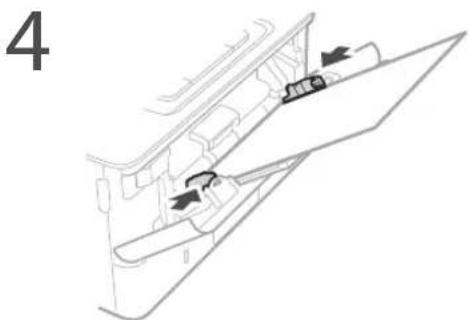
Loading in the Multi-Purpose Tray
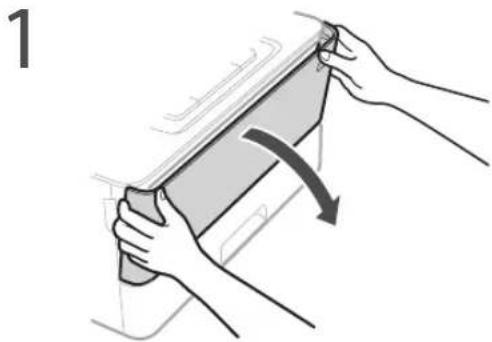
natural_image
Illustration of hands holding a device with a curved arrow indicating rotation (no text or symbols)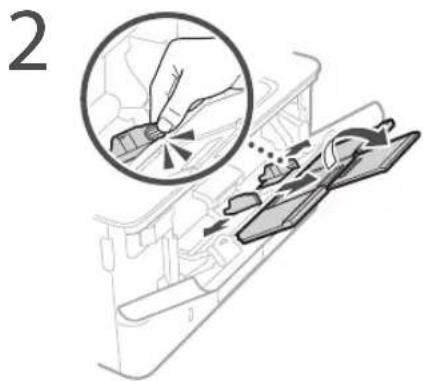
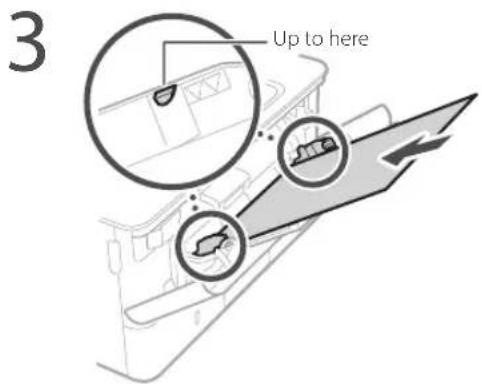
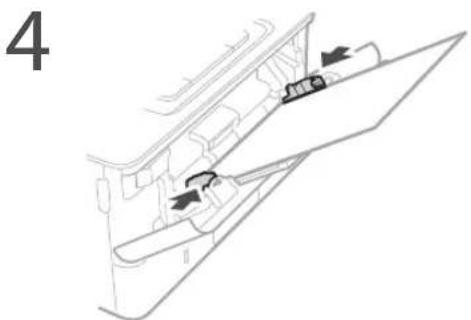
5 Specify the size and type of paper, according to the screen.
The Machine Does Not Seem to Work
Check the following.
- Is the power turned ON?
• Is the machine out of sleep mode?
If both the display and 📁 are not lit, press the power switch.
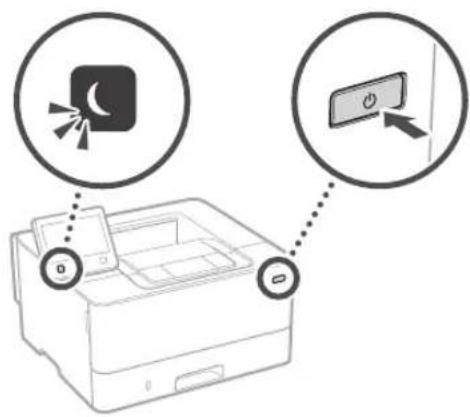
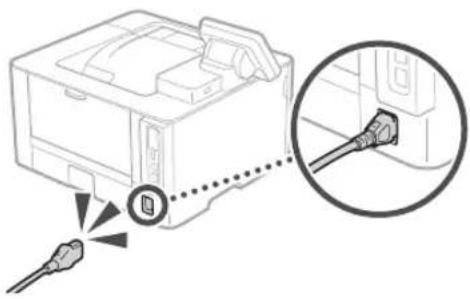
• Is the power cord connected correctly?
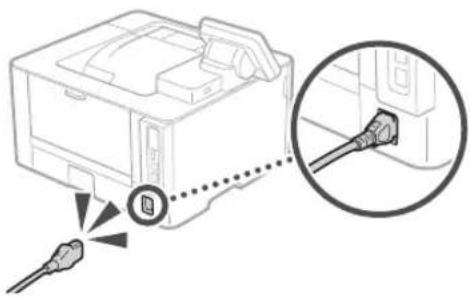
natural_image
Diagram showing a printer with cable connectors and a magnified inset highlighting the connector detail (no text or symbols present)If the problem persists, see the User's Guide.
Paper Jams Have Occurred
Clear the paper jams, according to the on-screen instructions.
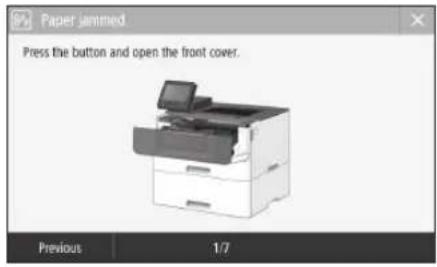
Replacing the Toner Cartridge
Replace the toner cartridge, according to the on-screen instructions.
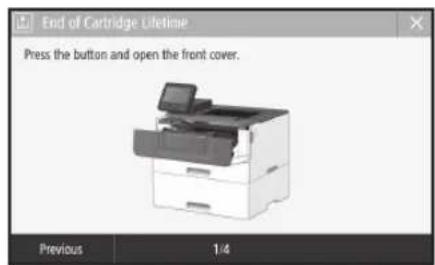
Model number of replacement toner cartridge
- Canon Cartridge 052
- Canon Cartridge 052 H
Appendix
Important Safety Instructions
This manual describes only warnings and cautions for the installation and the power supply. Be sure to read "Important Safety Instructions" described in the User's Guide also.

WARNING
Indicates a warning concerning operations that may lead to death or injury to persons if not performed correctly. To use the machine safely, always pay attention to these warnings.

CAUTION
Indicates a caution concerning operations that may lead to injury to persons if not performed correctly. To use the machine safely, always pay attention to these cautions.

IMPORTANT
Indicates operational requirements and restrictions. Be sure to read these items carefully to operate the machine correctly and avoid damage to the machine or properly.
Installation
To use this machine safely and comfortably, carefully read the following precautions and install the machine in an appropriate location.

WARNING
Do not install in a location that may result in a fire or electrical shock
- A location where the ventilation slots are blocked (too close to walls, beds, sofas, rugs, or similar objects)
• A damp or dusty location
• A location exposed to direct sunlight or outdoors
• A location subject to high temperatures
• A location exposed to open flames - Near alcohol, paint thinners or other flammable substances
Other warnings
- Do not connect unapproved cables to this machine. Doing so may result in a fire or electrical shock.
- Do not place necklaces and other metal objects or containers filled with liquid on the machine. If foreign substances come in contact with electrical parts inside the machine, it may result in a fire or electrical shock.
- If any foreign substance falls into this machine, unplug the power plug from the AC power outlet and contact your local authorized Canon dealer.

CAUTION
Do not install in the following locations
The machine may drop or fall, resulting in injury.
• An unstable location
• A location exposed to vibrations
Other cautions
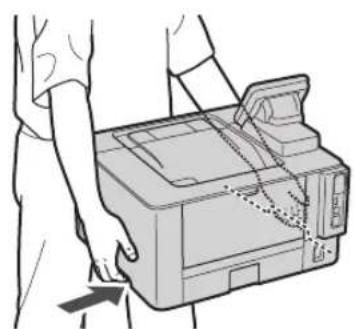
- When carrying this machine, follow the instructions in this manual, if carried improperly, it may fall, resulting in injury.
- When installing this machine, be careful not to get your hands caught between the machine and the floor or walls. Doing so may result in injury.
Avoid poorly ventilated locations
This machine generates a slight amount of ozone and other emissions during normal use. These emissions are not harmful to health. However, they may be noticeable during extended use or long production runs in poorly ventilated rooms. To maintain a comfortable working environment, it is recommended that the room where the machine operates be appropriately ventilated. Also avoid locations where people would be exposed to emissions from the machine.
Power Supply
A WARNING
- Use only a power supply that meets the specified voltage requirements. Failure to do so may result in a fire or electrical shock.
- Do not use power cords other than the one provided, as this may result in a fire or electrical shock.
- The provided power cord is intended for use with this machine. Do not connect the power cord to other devices.
- Do not modify, pull, forcibly bend, or perform any other act that may damage the power cord. Do not place heavy objects on the power cord. Damaging the power cord may result in a fire or electrical shock.
-
Do not plug in or unplug the power plug with wet hands, as this may result in an electrical shock.
-
Do not use extension cords or multi-plug power strips with the machine. Doing so may result in a fire or electrical shock.
- Do not wrap the power cord or tie it in a knot, as this may result in a fire or electrical shock.
- Insert the power plug completely into the AC power outlet. Failure to do so may result in a fire or electrical shock.
- Remove the power plug completely from the AC power outlet during a thunder storm. Failure to do so may result in a fire, electrical shock, or damage to the machine.
• Make sure that the power supply for the machine is safe, and has a steady voltage. - Keep the power cord away from a heat source; failure to do this may cause the power cord coating to melt, resulting in a fire or electrical shock.
Avoid the following situations:
If excessive stress is applied to the connection part of the power cord, it may damage the power cord or the wires inside the machine may disconnect. This could result in a fire.
- Connecting and disconnecting the power cord frequently.
- Tripping over the power cord.
- The power cord is bent near the connection part, and continuous stress is being applied to the power outlet or the connection part.
- Applying excessive force on the power plug.
CAUTION
Install this machine near the power outlet and leave sufficient space around the power plug so that it can be unplugged easily in an emergency.
Handling
CAUTION
Laser Safety
This product is confirmed as a Class 1 laser product in ILC60825-1:2014 and LN60825-1:2014.
CLASS 1 LASER PRODUCT
LASERKLASSE1
APPAREIL À LASER DE CLASSE 1
APPARECCHIO LASER DI CLASSE 1
PRODUCTO I ÁSFR DE CL ASF
APAREIHO A1 ASFR DE CLASSE 1
LUOKAN 1 LASER TUOTE
LASERPRODUKT KLASS 1
The laser beam can be harmful to human bodies. Since radiation emitted inside the product is completely confined within protective housings and external covers, the laser beam cannot escape from the machine during any phase of user operation. Read the following remarks and instructions for safety.
- Never open covers other than those instructed in the manuals for this machine.
- If the laser beam should escape and enter your eyes, exposure may cause damage to your eyes.
- Use of controls, adjustments, or performance of procedures other than those specified in this manual may result in hazardous radiation exposure.
Laser Safety Label
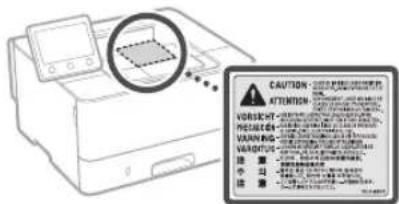
Safety-Related Symbols
Power switch: "ON" position
Power switch: "OFF" position
Power switch: "STAND-BY" position
① Push-push switch "ON" "OFF"
Protective earthing terminal
Dangerous voltage inside. Do not open covers other than instructed.
CAUTION: Hot surface. Do not touch.
Class equipment
Moving parts: Keep body parts away from moving parts
- Some of symbols shown above may not be affixed depending on the product.
Consumables
A WARNING
Do not dispose of used toner cartridges in open flames. Also, do not store toner cartridges or paper in a location exposed to open flames. This may cause the toner or paper to ignite, and result in burns or fire.
Notice
Product Name
Safety regulations require the product's name to be registered.
In some regions where this product is sold, the following name(s) in parentheses () may be registered instead.
LBP215x / LBP214dw / LBP212dw (F173500)
EMC requirements of EC Directive
This equipment conforms with the essential EMC requirements of EC Directive. We declare that this product conforms with the EMC requirements of EC Directive at nominal mains input 230 V, 50 Hz although the rated input of the product is 220 to 240 V, 50/60 Hz. Use of shielded cable is necessary to comply with the technical EMC requirements of EC Directive.
EU WEEE and Battery Directives
You can see the WEEE and Battery Directives information in the latest User's Guide (HTML manual) from the Canon website (canon.com/oip-manual).
Wireless LAN Regulatory Information
Regulatory information for users in Jordan LBP215x / LBP214dw / LBP212dw includes approved Wireless LAN Module (Model name Type1KA).
Contains Wireless LAN Module approved by TRC/LPD/2017/19
Regulatory information for users in UAE
LBP215x / LBP214dw / LBP212dw includes approved Wireless LAN Module (Model name: Type1KA).
TRA
REGISTERED No: ER51217/17
DEALER No: DA0073692/11
RE Directive
(Only for European radio equipment)
RE Declaration of Conformity
English (EN) Hereby, Canon Inc. declares that this equipment is in compliance with Directive 2014/53/EU.
The full text of the EU declaration of conformity is available at the following internet address: http://www.canon-europe.com/ce-documentation Wireless LAN Specifications
Frequency band(s):2412-2472MHz
Maximum radio-frequency power: 15.9 dBm
- The information in this document is subject to change without notice.
- CANON INC. MAKES NO WARRANTY OF ANY KIND WITH REGARD TO THIS MATERIAL, EITHER EXPRESS OR IMPLIED, EXCEPT AS PROVIDED HEREIN, INCLUDING WITHOUT LIMITATION, THEREOF, WARRANTIES AS TO MARKETABILITY, MERCHANTABILITY, FITNESS FOR A PARTICULAR PURPOSE OF USE, OR NON-INFRINGEMENT. CANON INC. SHALL NOT BE LIABLE FOR ANY DIRECT, INCIDENTAL, OR CONSEQUENTIAL DAMAGES OF ANY NATURE, OR LOSSES OR EXPENSES RESULTING FROM THE USE OF THIS MATERIAL.
Illustrations and Displays Used in This Manual
Illustrations and displays used in this manual are which of LBP215x unless specified.
About This Manual
Trademarks
Mac is a trademark of Apple Inc.
Microsoft, Windows, Windows Vista, Windows Server, Internet Explorer, Excel, and PowerPoint are either registered trademarks or trademarks of Microsoft Corporation in the United States and/or other countries.
Other product and company names herein may be the trademarks of their respective owners.
Third Party Software
This Canon product (the "PRODUCT") includes third-party software modules. Use and distribution of these software modules, including any updates of such software modules (collectively, the "SOFTWARE") are subject to license conditions (1) through (9) below.
(1) You agree that you will comply with any applicable export control laws, restrictions or regulations of the countries involved in the event that this PRODUCT including the SOFTWARE is shipped, transferred or exported into any country.
(2) Rights holders of the SOFTWARE retain in all respects the title, ownership and intellectual property rights in and to the SOFTWARE. Except as expressly provided herein, no license or right, expressed or implied, is hereby conveyed or granted by rights holders of the SOFTWARE to you for any intellectual property of rights holders of the SOFTWARE.
(3) You may use the SOFTWARE solely for use with the PRODUCT.
(4) You may not assign, sublicense, market, distribute, or transfer the SOFTWARE to any third party without prior written consent of rights holders of the SOFTWARE.
(5) Notwithstanding the foregoing, you may transfer the SOFTWARE only when (a) you assign all of your rights to the PRODUCT and all rights and obligations under the license conditions to transferee and (b) such transferee agrees to be bound by all these conditions.
(6) You may not decompile, reverse engineer, disassemble or otherwise reduce the code of the SOFTWARE to human readable form.
(7) You may not modify, adapt, translate, rent, lease or loan the SOFTWARE or create derivative works based on the SOFTWARE.
(8) You are not entitled to remove or make separate copies of the SOFTWARE from the PRODUCT.
(9) The human-readable portion (the source code) of the SOFTWARE is not licensed to you.
Notwithstanding (1) through (9) above, the PRODUCT includes third-party software modules accompanying the other license conditions, and these software modules are subject to the other license conditions.
Please refer to the other license conditions of third-party software modules described in Appendix of Manual for the corresponding the PRODUCT. This Manual is available at http://canon.com/oip-manual.
By using the PRODUCT, you shall be deemed to have agreed to all applicable license conditions. If you do not agree to these license conditions, please contact your service representative.
V_170601
natural_image
Illustration of hands holding a device with a curved arrow indicating rotation (no text or symbols)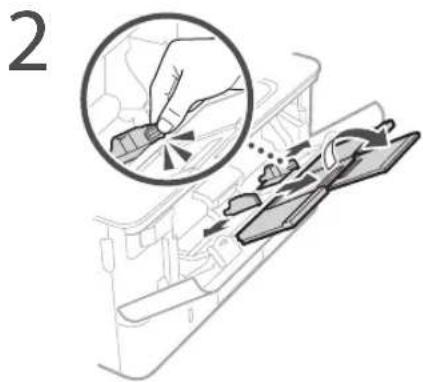
natural_image
Diagram showing a printer with cable connectors and a magnified inset highlighting the connector detail (no text or symbols present)CLASS 1 LASER PRODUCT LASER KLASSE 1
APPAREIL À LASER DE CLASSE 1
APPARECCHIO LASER DI CLASSL 1
PRODUCTO LÁSER DE CLASE 1
APARLIJO A LASER DE CLASSE
LUOKAN 1 LASER-TUOTE
LASERPRODUKT KLASS 1
Regulatory information for users in Jordan
LBP215x / LBP214dw / LBP212dw includes approved Wireless LAN Module (Model name: Type1KA). Contains Wireless LAN Module approved by TRC/LPD/2017/19
Regulatory information for users in UAE
LBP215x / LBP214dw / LBP212dw includes approved Wireless LAN Module (Model name: Type1KA).
TRA
REGISTERED No: ER51217/17
DEALER No: DA0073692/11
RE Directive
(Only for European radio equipment)
RE Declaration of Conformity
English (EN) Hereby, Canon Inc. declares that this equipment is in compliance with Directive 2014/53/EU.
The full text of the EU declaration of conformity is available at the following internet address: http://www.canon-europe.com/ce-documentation/Wireless LAN Specifications
Frequency band(s):2412-2472MHz
Maximum radio-frequency power: 15.9 dBm
natural_image
Illustration of hands holding a rectangular object with an arrow indicating rotation (no text or symbols)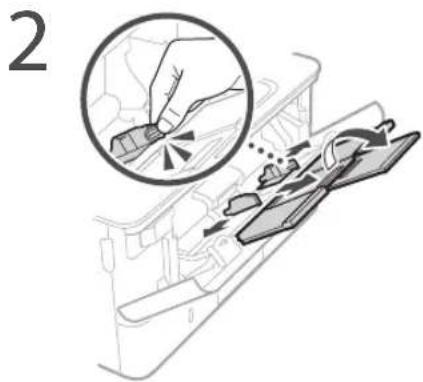
natural_image
Diagram showing a printer with cable connectors and a magnified inset highlighting the connector detail (no text or symbols present)CLASS 1 LASER PRODUCT
LASER KLASSE 1
APPAREL À LASER DE CLASSE 1
APPARECCHIO LASER DI CLASSE 1
PRODUCTO LÁSER DE CLASE 1
APARELHO A LASER DE CLASSE 1
LUOKAN 1 LASER-TUOTF
LASERPRODUKT KI ASS 1
Regulatory information for users in Jordan
LBP215x / LBP214dw / LBP212dw includes approved Wireless LAN Module (Model name: Type1KA).
Contains Wireless LAN Module approved by TRC/LPD/2017/19
Regulatory information for users in UAE
LBP215x / LBP214dw / LBP212dw includes approved Wireless LAN Module (Model name: Type1KA).
TRA
REGISTERED No: ER51217/17
DEALER No: DA0073692/11
RE Directive
(Only for European radio equipment)
RE Declaration of Conformity
English (EN) Hereby, Canon Inc. declares that this equipment is in compliance with Directive 2014/53/EU.
The full text of the EU declaration of conformity is available at the following internet address: http://www.canon-europe.com/ce-documentation/Wireless LAN Specifications
Frequency band(s):2412-2472MHz
Maximum radio-frequency power: 15.9 dBm
natural_image
Illustration of hands holding a rectangular object with an arrow indicating rotation (no text or symbols)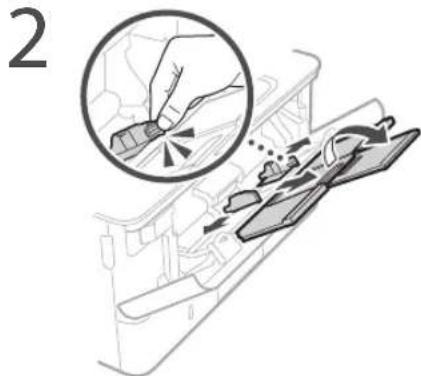
natural_image
Diagram showing a printer with cable connectors and a magnified inset highlighting the connector detail (no text or symbols present)CLASS 1 LASER PRODUCT
LASER KLASSE 1
APPAREIL À LASER DE CLASSE 1
APPARECCHIO LASER DI CLASSE 1
PRODUCTO LÁSER DE CLASE 1
APARELHO A LASER DE CLASSE 1
LUOKAN 1 LASER-TUOTE
LASERPRODUKT KLASS 1
Regulatory information for users in Jordan LBP215x / LBP214dw / LBP212dw includes approved Wireless LAN Module (Model name: Type1KA).
Contains Wireless LAN Module approved by TRC/LPD/2017/19
Regulatory information for users in UAE
LBP215x / LBP214dw / LBP212dw includes approved Wireless LAN Module (Model name: Type1KA).
TRA
REGISTERED No: ER51217/17
DEALER No: DA0073692/11
RE Directive
(Only for European radio equipment)
RE Declaration of Conformity
English (EN) Hereby, Canon Inc. declares that this equipment is in compliance with Directive 2014/53/EU.
The full text of the EU declaration of conformity is available at the following internet address: http://www.canon-europe.com/ce-documentation/Wireless LAN Specifications
Frequency band(s):2412-2472MHz
Maximum radio-frequency power: 15.9 dBm
natural_image
Illustration of hands holding a device with a curved arrow indicating rotation (no text or symbols)
natural_image
Diagram showing a printer with cable connectors and a magnified inset highlighting the connector detail (no text or symbols present)CLASS 1 LASER PRODUCT
LASERKLASSE 1
APPAREIL À LASER DE CLASSE 1
APPARECCHIO LASER DI CLASSE 1
PRODUCTO LÁSER DE CLASE 1
APARELHO A LASER DE CLASSE 1
LUOKAN 1 LASER-TUOTE
LASERPRODUKT KLASS 1
Regulatory information for users in Jordan
LBP215x / LBP214dw / LBP212dw includes approved Wireless LAN Module (Model name: Type1KA).
Contains Wireless LAN Module approved by TRC/LPD/2017/19
Regulatory information for users in UAE
LBP215x / LBP214dw / LBP212dw includes approved Wireless LAN Module (Model name: Type1KA).
TRA
REGISTERED No: ER51217/17
DEALER No: DA0073692/11
RE Directive
(Only for European radio equipment)
RE Declaration of Conformity
English (EN) Hereby, Canon Inc. declares that this equipment is in compliance with Directive 2014/53/EU.
The full text of the EU declaration of conformity is available at the following internet address: http://www.canon-europe.com/ce-documentation/Wireless LAN Specifications
Frequency band(s):2412-2472MHz
Maximum radio-frequency power: 15.9 dBm
natural_image
Illustration of hands holding a device with a curved arrow indicating rotation (no text or symbols)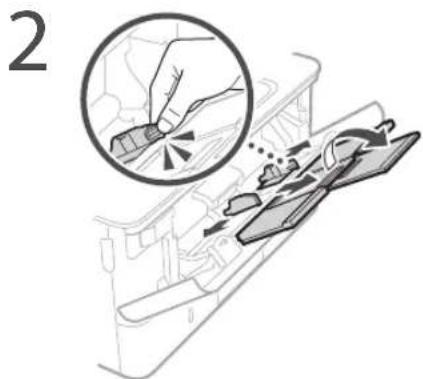
natural_image
Diagram showing a printer with cable connectors and a magnified inset highlighting the connection point (no text or symbols present)CLASS 1 LASER PRODUCT
LASERKLASSE1
APPAREIL À LASER DE CLASSE
APPARECCHIO LASER DI CLASSE 1
PRODUCTO LASER DE CLASE 1
APARELIO A LASER DE CLASSE 1
LUOKAN 1 LASER-TUOTE
LASERPRODUKT KLASS 1
Regulatory information for users in Jordan
LBP215x / LBP214dw / LBP212dw includes approved Wireless LAN Module (Model name: Type1KA).
Contains Wireless LAN Module approved by TRC/LPD/2017/19
Regulatory information for users in UAE
LBP215x / LBP214dw / LBP212dw includes approved Wireless LAN Module (Model name: Type1KA).
TRA
REGISTERED No: ER51217/17
DEALER No: DA0073692/11
RE Directive
(Only for European radio equipment)
RE Declaration of Conformity
English (EN) Hereby, Canon Inc. declares that this equipment is in compliance with Directive 2014/53/FU.
The full text of the EU declaration of conformity is available at the following internet address: http://www.canon-europe.com/ce-documentation/Wireless LAN Specifications
Frequency band(s):2412-2472MHz Maximum radio-frequency power: 15.9 dBm
natural_image
Illustration of hands holding a rectangular object with an arrow indicating rotation (no text or symbols)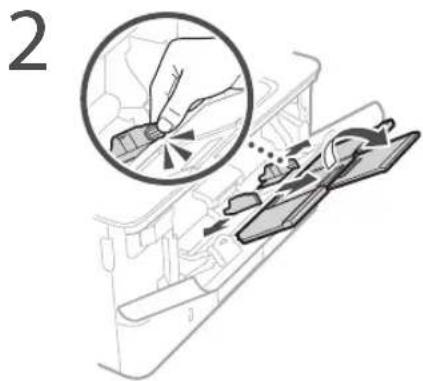
natural_image
Diagram showing a printer with cable connectors and a magnified inset highlighting the connector detail (no text or symbols present)CLASS 1 LASER PRODUCT
LASER KLASSE 1
APPAREIL À LASER DE CLASSE 1 APPARECCHIO LASER DI CLASSE 1
PRODUCTO LÁSER DE CLASE 1
APARELHO A LASER DE CLASSE 1
LUOKAN 1 LASER-TUOTE
LASERPRODUKT KLASS 1
Regulatory information for users in Jordan
LBP215x / LBP214dw / LBP212dw includes approved Wireless LAN Module (Model name: Type1KA). Contains Wireless LAN Module approved by TLPD/2017/19
Regulatory information for users in UAE
LBP215x / LBP214dw / LBP212dw includes approved Wireless LAN Module (Model name: Type1KA).
TRA
REGISTERED No: ER51217/17
DEALER No: DA0073692/11
RE Directive
(Only for European radio equipment)
RE Declaration of Conformity
English (EN) Hereby, Canon Inc. declares that this equipment is in compliance with Directive 2014/53/EU.
The full text of the EU declaration of conformity is available at the following internet address: http://www.canon-europe.com/ce-documentation/Wireless LAN Specifications
Frequency band(s):2412-2472MHz
Maximum radio-frequency power: 15.9 dBm
natural_image
Illustration of hands holding a device with a curved arrow indicating rotation (no text or symbols)2
natural_image
Diagram showing a hand using a tool to cut a component, with an inset magnified view of the tool's tip (no text or symbols present)3
4
5
natural_image
Diagram showing a printer with cable connectors and a magnified inset highlighting the connector detail (no text or symbols present)Se o problema persistir, consulte o Manual do utilizador.
CLASS 1 LASER PRODUCT
LASER KLASSE 1
APPAREIL À LASER DE CLASSE 1
APPARECCHIO LASER DI CLASSE 1
PRODUCTO LÁSER DE CLASE 1
APARELHO A LASER DE CLASSE 1
LUOKAN 1 LASER-TUOTE
LASERPRODUKT KLASS
Regulatory information for users in Jordan LBP215x / LBP214dw / LBP212dw includes approved Wireless LAN Module (Model name: Type1KA). Contains Wireless LAN Module approved by TRC/LPD/2017/19
Regulatory information for users in UAE
LBP215x / LBP214dw / LBP212dw includes approved Wireless LAN Module (Model name: Type1KA).
TRA
REGISTERED No: ER51217/17
DEALER No: DA0073692/11
RE Directive
(Only for European radio equipment)
RE Declaration of Conformity
English (EN) Hereby, Canon Inc. declares that this equipment is in compliance with Directive 2014/53/EU.
The full text of the EU declaration of conformity is available at the following internet address: http://www.canon-europe.com/ce-documentation/Wireless LAN Specifications
Frequency band(s):2412-2472MHz
Maximum radio-frequency power: 15.9 dBm
natural_image
Illustration of hands holding a rectangular object with an arrow indicating rotation (no text or symbols)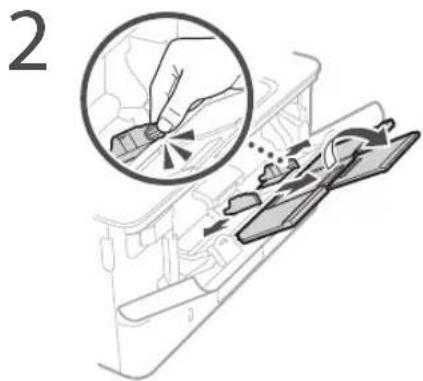
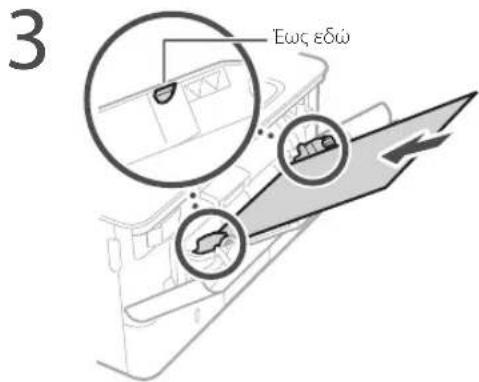
natural_image
Diagram of a printer with cable connectors and a magnified inset showing the connector detail (no text or symbols present)CLASS 1 LASER PRODUCT LASER KLASSE 1
APPAREIL À LASER DE CLASSE 1 APPARECCHIO LASER DI CLASSE 1 PRODUCTO LASER DE CLASSE 1
APARFI HO A LASFR DE CI ASSE 1 LUOKAN 1 LASFR-TUOTE LASERPRODUKT KLASS 1
Regulatory information for users in Jordan LBP215x / LBP214dw / LBP212dw includes approved Wireless LAN Module (Model name: Type1KA). Contains Wireless LAN Module approved by TRC/LPD/2017/19
Regulatory information for users in UAE LBP215x / LBP214dw / LBP212dw includes approved Wireless LAN Module (Model name: Type1KA).
TRA
REGISTERED No: ER51217/17
DEALER No: DA0073692/11
RE Directive
(Only for European radio equipment)
RE Declaration of Conformity
English (EN) Hereby, Canon Inc. declares that this equipment is in compliance with Directive 2014/53/EU. The full text of the EU declaration of conformity is available at the following internet address: http://www.canon-europe.com/ce-documentation Wireless LAN Specifications Frequency band(s):2412-2472MHz Maximum radio-frequency power: 15.9 dBm
natural_image
Illustration of hands holding a rectangular object with an arrow indicating rotation (no text or symbols)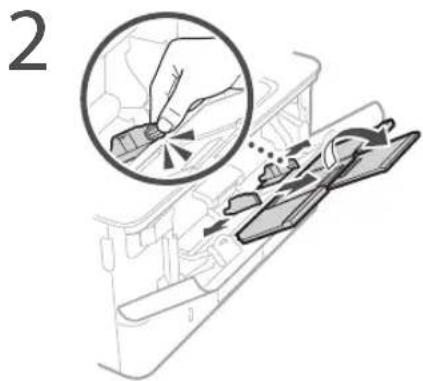
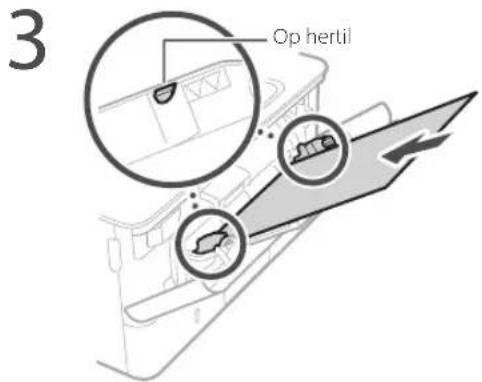
natural_image
Diagram showing a printer with cable connectors and a close-up of the connector (no text or symbols present)CLASS 1 LASER PRODUCT
LASFR KI ASSE 1
APPAREL À LASFR DE CLASSE 1
APPARFCCHIO | ASER DI CLASSE 1
PRODUCTO LÁSER DE CLASE 1
APARELHO A LASER DE CLASSE 1
LUOKAN 1 LASER-TUOTE
LASERPRODUKT KI ASS 1
Regulatory information for users in Jordan
LBP215x / LBP214dw / LBP212dw includes approved Wireless LAN Module (Model name: Type1KA).
Contains Wireless LAN Module approved by TRC/LPD/2017/19
Regulatory information for users in UAE
LBP215x / LBP214dw / LBP212dw includes approved Wireless LAN Module (Model name: Type1KA).
TRA
REGISTERED No: ER51217/17
DEALER No: DA0073692/11
RE Directive
(Only for European radio equipment)
RE Declaration of Conformity
English (EN) Hereby, Canon Inc. declares that this equipment is in compliance with Directive 2014/53/EU.
The full text of the EU declaration of conformity is available at the following internet address: http://www.canon-europe.com/ce-documentation/Wireless LAN Specifications
Frequency band(s):2412-2472MHz
Maximum radio-frequency power: 15.9 dBm
natural_image
Illustration of hands holding a rectangular object with an arrow indicating rotation (no text or symbols)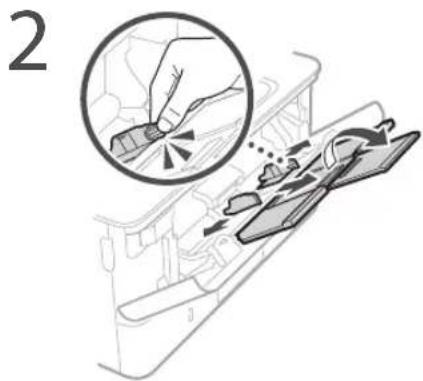
natural_image
Diagram of a vehicle interior showing directional arrows and a component (no text or symbols)natural_image
Diagram showing a printer with cable connectors and a magnified inset highlighting the connector detail (no text or symbols present)CLASS 1 LASER PRODUCT
LASER KLASSE 1
APPAREL À LASER DE CLASSE 1
APPARLCCHIO LASLR DI CLASSE 1
PRODUCTO LÁSLR DE CLASE 1
APARELHO A LASER DE CLASSE 1
LUOKAN 1 LASER-TUOTE
LASERPRODUKT KLASS 1
Regulatory information for users in Jordan
LBP215x / LBP214dw / LBP212dw includes approved Wireless LAN Module (Model name: Type1KA).
Contains Wireless LAN Module approved by TRC/LPD/2017/19
Regulatory information for users in UAE
LBP215x / LBP214dw / LBP212dw includes approved Wireless LAN Module (Model name: Type1KA).
TRA
REGISTERED No: ER51217/17
DEALER No: DA0073692/11
RE Directive
(Only for European radio equipment)
RE Declaration of Conformity
English (EN) Hereby, Canon Inc. declares that this equipment is in compliance with Directive 2014/53/EU.
The full text of the EU declaration of conformity is available at the following internet address: http://www.canon-europe.com/ce-documentation/Wireless LAN Specifications
Frequency band(s):2412-2472MHz
Maximum radio-frequency power: 15.9 dBm
4 Skyv papirskuffen inn i maskinen.
natural_image
Illustration of hands holding a device with a curved arrow indicating rotation (no text or symbols)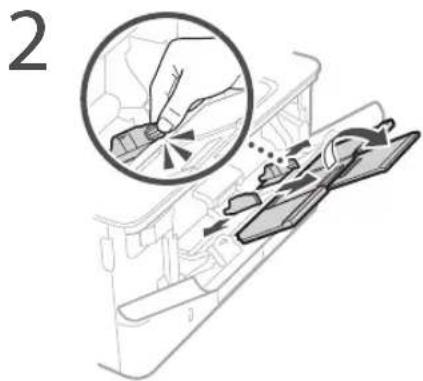
natural_image
Diagram showing a printer with cable connectors and a close-up of the connector (no text or symbols present)Se bruksanvisningen hvis problemet vedvarer.
CLASS 1 LASER PRODUCT
LASERKLASSE1
APPAREL À LASER DE CLASSE 1
APPARFCCHIO LASER DI CLASSE 1
PRODUCTO LASER DE CLASE
APARELHO A LASER DE CLASSE 1
LUOKAN 1 LASER TUOTE
LASERPRODUKT KLASS
Regulatory information for users in Jordan
LBP215x / LBP214dw / LBP212dw includes approved Wireless LAN Module (Model name: Type1KA).
Contains Wireless LAN Module approved by TRC/LPD/2017/19
Regulatory information for users in UAE
LBP215x / LBP214dw / LBP212dw includes approved Wireless LAN Module (Model name: Type1KA).
TRA
REGISTERED No: ER51217/17
DEALER No: DA0073692/11
RE Directive
(Only for European radio equipment)
RE Declaration of Conformity
English (EN) Hereby, Canon Inc. declares that this equipment is in compliance with Directive 2014/53/EU.
The full text of the EU declaration of conformity is available at the following internet address: http://www.canon-europe.com/ce-documentation/Wireless LAN Specifications
Frequency band(s):2412-2472MHz
Maximum radio-frequency power: 15.9 dBm
natural_image
Illustration of hands holding a device with a curved arrow indicating rotation (no text or symbols)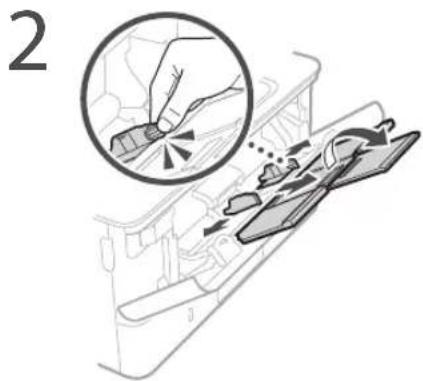
natural_image
Diagram of a vehicle interior showing airflow or movement arrows, no text or symbols presentnatural_image
Diagram showing a printer with cable connectors and a magnified inset of the connector (no text or symbols present)CLASS 1 LASER PRODUCT
LASERKLASSE1
APPARIL À LASER DE CLASSE 1
APPARECCHIO LASFR DI CLASSE 1
PRODUCTO LASER DE CLASE 1
APARELHO A LASER DE CLASSE 1
LUOKAN I LASER TUOTE
LASERPRODUKT KLASS 1
Regulatory information for users in Jordan LBP215x / LBP214dw / LBP212dw includes approved Wireless LAN Module (Model name: Type1KA). Contains Wireless LAN Module approved by TRC/LPD/2017/19
Regulatory information for users in UAE
LBP215x / LBP214dw / LBP212dw includes approved Wireless LAN Module (Model name: Type1KA).
TRA
REGISTERED No: ER51217/17
DEALER No: DA0073692/11
RE Directive
(Only for European radio equipment)
RE Declaration of Conformity
English (EN) Hereby, Canon Inc. declares that this equipment is in compliance with Directive 2014/53/EU. The full text of the EU declaration of conformity is available at the following internet address: http://www.canon-europe.com/ce-documentation/Wireless LAN Specifications Frequency band(s):2412-2472MHz Maximum radio-frequency power: 15.9 dBm
natural_image
Illustration of hands holding a rectangular object with an arrow indicating rotation (no text or symbols)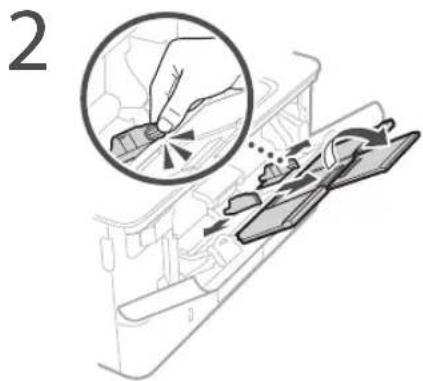
natural_image
Diagram showing a printer with cable connectors and a magnified inset of the connector (no text or symbols)CLASS 1 LASER PRODUCT
LASER KLASSE 1
APPARIL À LASER DE CLASSE 1
APPARFCCHIO LASFR DI CLASSE 1
PRODUCTO LÁSER DE CLASE 1
APARELHO A LASER DE CLASSE 1
LUOKAN 1 LASER TUOTE
LASERPRODUKT KLASS 1
Regulatory information for users in Jordan
LBP215x / LBP214dw / LBP212dw includes approved Wireless LAN Module (Model name: Type1KA). Contains Wireless LAN Module approved by TRC/LPD/2017/19
Regulatory information for users in UAE
LBP215x / LBP214dw / LBP212dw includes approved Wireless LAN Module (Model name: Type1KA).
TRA
REGISTERED No: ER51217/17
DEALER No: DA0073692/11
RE Directive
(Only for European radio equipment)
RE Declaration of Conformity
English (EN) Hereby, Canon Inc. declares that this equipment is in compliance with Directive 2014/53/EU. The full text of the EU declaration of conformity is available at the following internet address: http://www.canon-europe.com/ce-documentation Wireless LAN Specifications Frequency band(s):2412-2472MHz Maximum radio-frequency power: 15.9 dBm
natural_image
Illustration of hands holding a rectangular object with an arrow indicating rotation (no text or symbols)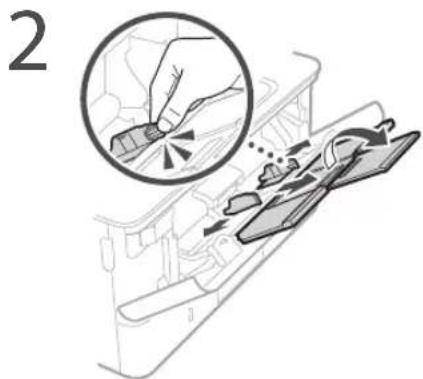
natural_image
Diagram showing a printer with cable connectors and a close-up of the connector (no text or symbols present)CLASS 1 LASER PRODUCT
LASERKLASSE 1
APPAREIL À LASER DE CLASSE 1
APPARECCHIO LASER DI CLASSE 1
PRODUCTO LÁSER DE CLASE 1
APARELHO A LASER DE CLASSE 1
LUOKAN 1 LASER-TUOTE
LASERPRODUKT KLASS 1
Regulatory information for users in Jordan
LBP215x / LBP214dw / LBP212dw includes approved Wireless LAN Module (Model name: Type1KA).
Contains Wireless LAN Module approved by TRC/LPD/2017/19
Regulatory information for users in UAE LBP215x / LBP214dw / LBP212dw includes approved Wireless LAN Module (Model name: Type1KA).
TRA
REGISTERED No: ER51217/17
DEALER No: DA0073692/11
RE Directive
(Only for European radio equipment)
RE Declaration of Conformity
English (EN) Hereby, Canon Inc. declares that this equipment is in compliance with Directive 2014/53/EU. The full text of the EU declaration of conformity is available at the following internet address: http://www.canon-europe.com/ce-documentation Wireless LAN Specifications Frequency band(s):2412-2472MHz Maximum radio-frequency power: 15.9 dBm
Корисні параметри
друку
natural_image
Illustration of hands holding a rectangular object with an arrow indicating rotation (no text or symbols)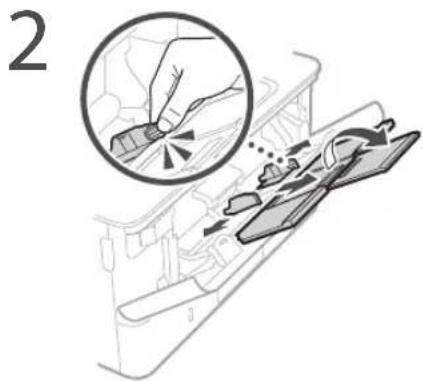
natural_image
Diagram of a printer with cable connectors and a close-up inset showing the connector detail (no text or symbols present)CLASS 1 LASER PRODUCT
LASER KLASSE 1
APPAREIL À LASER DE CLASSE 1 APPARECCHIO | ASFR DI CLASSE 1
PRODUCTO I ÁSFR DE CL ASF 1
APARELHO A LASER DE CLASSE 1
LUOKAN 1 LASER TUOTE
LASERPRODUKT KLASS 1
Regulatory information for users in Jordan LBP215x / LBP214dw / LBP212dw includes approved Wireless LAN Module (Model name: Type1KA). Contains Wireless LAN Module approved by TRC/LPD/2017/19
Regulatory information for users in UAE LBP215x / LBP214dw / LBP212dw includes approved Wireless LAN Module (Model name: Type1KA).
TRA
REGISTERED No: ER51217/17
DEALER No: DA0073692/11
RE Directive
(Only for European radio equipment)
RE Declaration of Conformity
English (EN) Hereby, Canon Inc. declares that this equipment is in compliance with Directive 2014/53/EU.
The full text of the EU declaration of conformity is available at the following internet address: http://www.canon-europe.com/ce-documentation Wireless LAN Specifications
Frequency band(s):2412-2472MHz
Maximum radio-frequency power: 15.9 dBm
natural_image
Illustration of hands holding a rectangular object with an arrow indicating rotation (no text or symbols)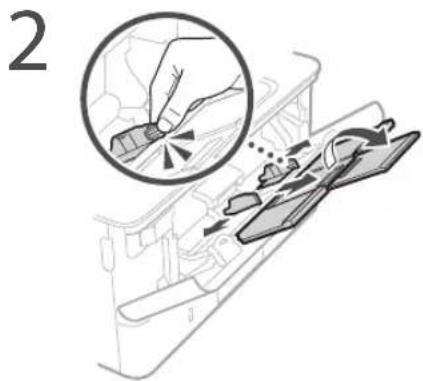
natural_image
Diagram of a vehicle interior showing directional arrows and components (no text or symbols)natural_image
Diagram of a printer with connectors and a close-up inset showing the cable attachment (no text or symbols present)Indicates a warning concerning operations that may lead to death or injury to persons if not performed correctly. To use the machine safely, always pay attention to these warnings.
A UZMANIBU!
CLASS 1 LASER PRODUCT LASER KLASSE 1
APPAREIL À LASER DE CLASSE 1 APPARECCHIO LASER DI CLASSE 1
PRODUCTO I ÁSFR DE CL ASF 1
APARELHO A LASER DE CLASSE 1
LUOKAN 1 LASER TUOTE
LASERPRODUKT KLASS 1
Wireless LAN Regulatory Information
Regulatory information for users in Jordan LBP215x / LBP214dw / LBP212dw includes approved Wireless LAN Module (Model name: Type1KA). Contains Wireless LAN Module approved by TRC/LPD/2017/19
Regulatory information for users in UAE LBP215x / LBP214dw / LBP212dw includes approved Wireless LAN Module (Model name: Type1KA).
TRA
REGISTERED No: ER51217/17
DEALER No: DA0073692/11
RE Directive
(Only for European radio equipment)
RE Declaration of Conformity
English (EN) Hereby, Canon Inc. declares that this equipment is in compliance with Directive 2014/53/EU. The full text of the EU declaration of conformity is available at the following internet address: http://www.canon-europe.com/ce-documentation Wireless LAN Specifications Frequency band(s):2412-2472MHz Maximum radio-frequency power: 15.9 dBm
natural_image
Illustration of hands holding a rectangular object with an arrow indicating rotation (no text or symbols)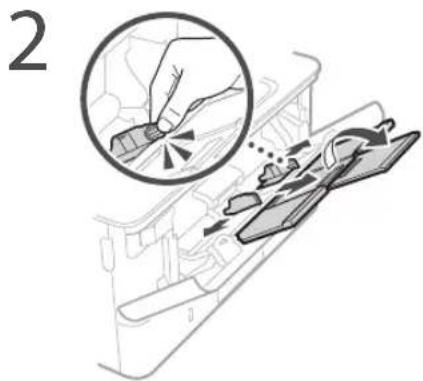
natural_image
Diagram of a vehicle interior showing airflow or flow direction with arrows and a label '4' (no readable text or symbols)• Ar tinkamai prijungtas maitinimo laidas?
natural_image
Diagram showing a printer with cable connectors and a close-up of the connector (no text or symbols present)CLASS 1 LASER PRODUCT
LASER KI ASSE 1
APPAREIL À LASER DE CLASSE 1 APPARECCHIO LASER DI CLASSE 1
PRODUCTO LÁSER DE CLASE I
APARELHO A LASER DE CLASSE 1
LUOKAN 1 LASFR-TUOTF
LASERPRODUKT KLASS 1
Regulatory information for users in Jordan
LBP215x / LBP214dw / LBP212dw includes approved Wireless LAN Module (Model name: Type1KA).
Contains Wireless LAN Module approved by TRC/LPD/2017/19
Regulatory information for users in UAE
LBP215x / LBP214dw / LBP212dw includes approved Wireless LAN Module (Model name: Type1KA).
TRA
REGISTERED No: ER51217/17
DEALER No: DA0073692/11
RE Directive
(Only for European radio equipment)
RE Declaration of Conformity
English (EN) Hereby, Canon Inc. declares that this equipment is in compliance with Directive 2014/53/EU.
The full text of the EU declaration of conformity is available at the following internet address: http://www.canon-europe.com/ce-documentation/Wireless LAN Specifications
Frequency band(s):2412-2472MHz
Maximum radio-frequency power: 15.9 dBm
Kasulikud printimisseaded
■ Kahepoolne
■ N paanitud 1-le
■ Brošüüri printimine

flowchart
graph TD
    A["Document Review"] --> B["Document Review"]
    B --> C["Document Review"]
    C --> D["Document Review"]
    D --> E["Document Review"]
    E --> F["Document Review"]
    F --> G["Document Review"]
    G --> H["Document Review"]
    H --> I["Document Review"]
    I --> J["Document Review"]
    J --> K["Document Review"]
    K --> L["Document Review"]
    L --> M["Document Review"]
    M --> N["Document Review"]
    N --> O["Document Review"]
    O --> P["Document Review"]
    P --> Q["Document Review"]
    Q --> R["Document Review"]
    R --> S["Document Review"]
    S --> T["Document Review"]
    T --> U["Document Review"]
    U --> V["Document Review"]
    V --> W["Document Review"]
    W --> X["Document Review"]
    X --> Y["Document Review"]
    Y --> Z["Document Review"]
Üksikasjad
„Printimine“ kasutusjuhendis
Paberi asetamine paberisahtlisse
4 Sisestage paberisahtel seadmesse.
natural_image
Illustration of hands holding a rectangular object with an arrow indicating rotation (no text or symbols)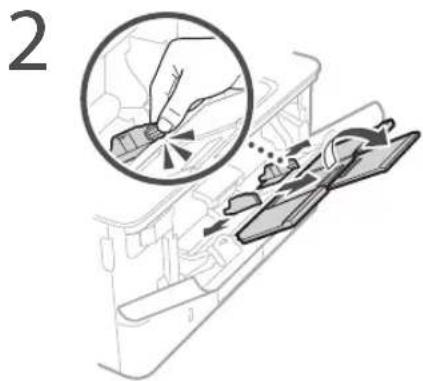
natural_image
Diagram showing a printer with cable connectors and a magnified inset highlighting the connector detail (no text or symbols present)CLASS 1 LASER PRODUCT
LASER KI ASSE 1
APPAREIL À LASER DE CLASSE 1
APPARECCHIO LASER DI CLASSE I
PRODUCTO LÁSER DE CLASE 1
APARELHO A LASER DE CLASSE 1
LUOKAN 1 LASER-TUOTF
LASERPRODUKT KLASS 1
Regulatory information for users in Jordan
LBP215x / LBP214dw / LBP212dw includes approved Wireless LAN Module (Model name: Type1KA).
Contains Wireless LAN Module approved by TRC/LPD/2017/19
Regulatory information for users in UAE
LBP215x / LBP214dw / LBP212dw includes approved Wireless LAN Module (Model name: Type1KA).
TRA
REGISTERED No: ER51217/17
DEALER No: DA0073692/11
RE Directive
(Only for European radio equipment)
RE Declaration of Conformity
English (EN) Hereby, Canon Inc. declares that this equipment is in compliance with Directive 2014/53/EU.
The full text of the EU declaration of conformity is available at the following internet address: http://www.canon-europe.com/ce-documentation Wireless LAN Specifications
Frequency band(s):2412-2472MHz
Maximum radio-frequency power: 15.9 dBm
flowchart
graph TD
    A["Initial Image"] --> B["Document Review"]
    B --> C["Approval"]
    C --> D["Final Output"]
    style A fill:#f9f,stroke:#333
    style D fill:#bbf,stroke:#333
Szczególy
natural_image
Illustration of hands holding a device with a curved arrow indicating rotation (no text or symbols)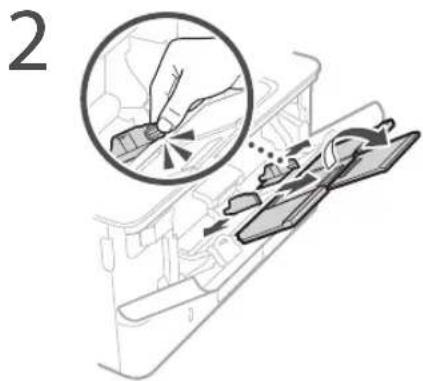
natural_image
Diagram of a vehicle interior showing directional arrows and a component (no text or symbols)natural_image
Diagram of a printer with cable connectors and a close-up inset showing the connector detail (no text or symbols present)CLASS 1 LASER PRODUCT
LASER KLASSE 1
APPAREIL À LASER DE CLASSE 1
APPARLECCHIO LASER DI CLASSE 1
PRODUCTO I ÁSFR DE CI ASF 1
APARFI HO A LASFR DE CLASSF 1
LUOKAN 1 LASER TUOTE
LASERPRODUKT KLASS 1
Regulatory information for users in Jordan
LBP215x / LBP214dw / LBP212dw includes approved Wireless LAN Module (Model name: Type1KA).
Contains Wireless LAN Module approved by TRC/LPD/2017/19
Regulatory information for users in UAE
LBP215x / LBP214dw / LBP212dw includes approved Wireless LAN Module (Model name: Type1KA).
TRA
REGISTERED No: ER51217/17
DEALER No: DA0073692/11
RE Directive
(Only for European radio equipment)
RE Declaration of Conformity
English (EN) Hereby, Canon Inc. declares that this equipment is in compliance with Directive 2014/53/EU.
The full text of the EU declaration of conformity is available at the following internet address: http://www.canon-europe.com/ce-documentation/Wireless LAN Specifications
Frequency band(s):2412-2472MHz Maximum radio-frequency power: 15.9 dBm
natural_image
Illustration of hands holding a rectangular object with an arrow indicating rotation (no text or symbols)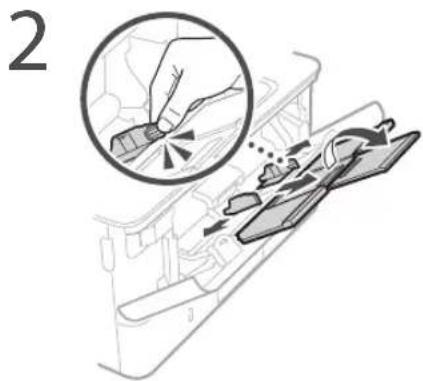
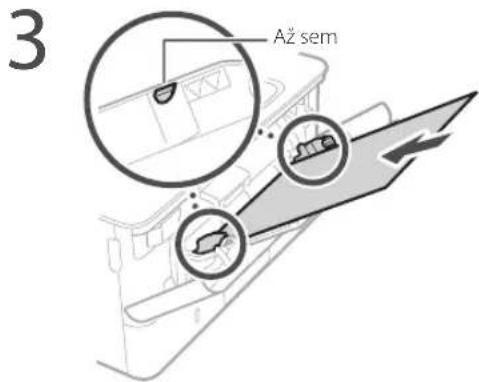
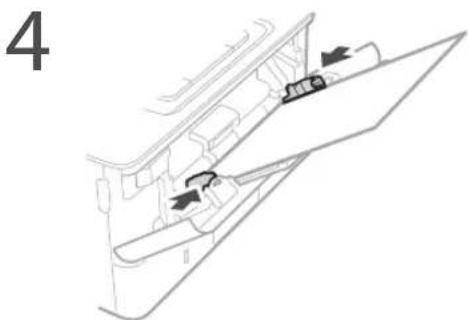
natural_image
Technical line drawing of a mechanical component with arrows indicating direction (no text or symbols)natural_image
Diagram showing a printer with cable connectors and a magnified inset highlighting the connector detail (no text or symbols present)CLASS 1 LASER PRODUCT
LASERKLASSE
APPAREIL À LASER DE CLASSE 1
APPARECCHIO LASER DI CLASSE 1
PRODUCTO LASER DE CLASE
APARELHO A LASER DE CLASSE 1
LUOKAN 1 LASER-TUOTE
LASERPRODUKT KLASS 1
Regulatory information for users in Jordan
LBP215x / LBP214dw / LBP212dw includes approved Wireless LAN Module (Model name: Type1KA).
Contains Wireless LAN Module approved by TRC/LPD/2017/19
Regulatory information for users in UAE
LBP215x / LBP214dw / LBP212dw includes approved Wireless LAN Module (Model name: Type1KA).
TRA
REGISTERED No: ER51217/17
DEALER No: DA0073692/11
RE Directive
(Only for European radio equipment)
RE Declaration of Conformity
English (EN) Hereby, Canon Inc. declares that this equipment is in compliance with Directive 2014/53/EU.
The full text of the EU declaration of conformity is available at the following internet address: http://www.canon-europe.com/ce-documentation/Wireless LAN Specifications
Frequency band(s):2412-2472MHz
Maximum radio-frequency power: 15.9 dBm
Užitočné nastavenia pre tlač
■ Obojstranná
■ N na 1
■ Tlač brožúry
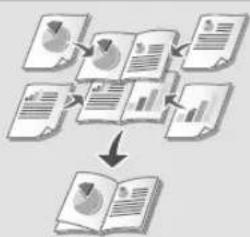
flowchart
graph TD
    A["Document Review"] --> B["Document Review"]
    B --> C["Document Review"]
    C --> D["Document Review"]
    D --> E["Document Review"]
    E --> F["Document Review"]
    F --> G["Document Review"]
    G --> H["Document Review"]
    H --> I["Document Review"]
    I --> J["Document Review"]
    J --> K["Document Review"]
    K --> L["Document Review"]
    L --> M["Document Review"]
    M --> N["Document Review"]
    N --> O["Document Review"]
    O --> P["Document Review"]
    P --> Q["Document Review"]
    Q --> R["Document Review"]
    R --> S["Document Review"]
    S --> T["Document Review"]
    T --> U["Document Review"]
    U --> V["Document Review"]
    V --> W["Document Review"]
    W --> X["Document Review"]
    X --> Y["Document Review"]
    Y --> Z["Document Review"]
natural_image
Illustration of hands holding a rectangular object with an arrow indicating rotation (no text or symbols)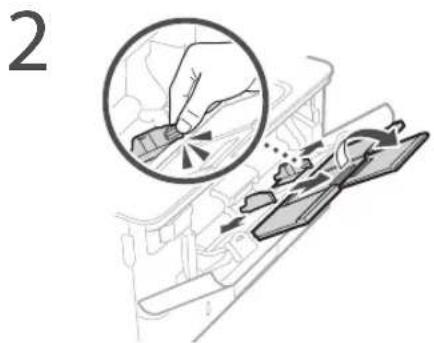
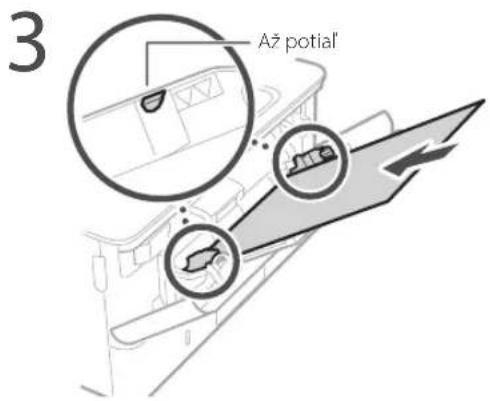
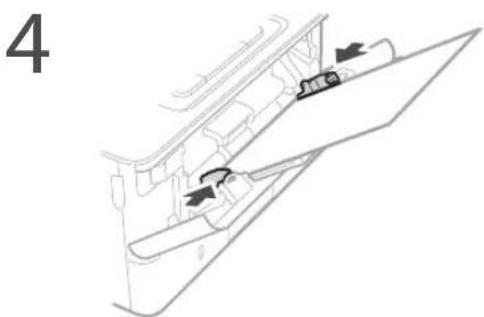
natural_image
Diagram of a vehicle interior showing airflow or movement arrows, no text or symbols presentnatural_image
Diagram showing a printer with cable connectors and a magnified inset highlighting the connector detail (no text or symbols present)CLASS 1 LASER PRODUCT
LASERKLASSE 1
APPAREIL À LASER DE CLASSE 1
APPARECCHIO LASER DI CLASSE 1
PRODUCTO LÁSER DE CLASE 1
APARLIHO A LASER DE CLASSE 1
LUOKAN 1 LASLR-TUOTL
LASERPRODUKT KLASS 1
Regulatory information for users in Jordan LBP215x / LBP214dw / LBP212dw includes approved Wireless LAN Module (Model name: Type1KA). Contains Wireless LAN Module approved by TRC/LPD/2017/19
Regulatory information for users in UAE LBP215x / LBP214dw / LBP212dw includes approved Wireless LAN Module (Model name: Type1KA).
TRA
REGISTERED No: ER51217/17
DEALER No: DA0073692/11
RE Directive
(Only for European radio equipment)
RE Declaration of Conformity
English (EN) Hereby, Canon Inc. declares that this equipment is in compliance with Directive 2014/53/EU.
The full text of the EU declaration of conformity is available at the following internet address: http://www.canon-europe.com/ce-documentation Wireless LAN Specifications
Frequency band(s):2412-2472MHz
Maximum radio-frequency power: 15.9 dBm
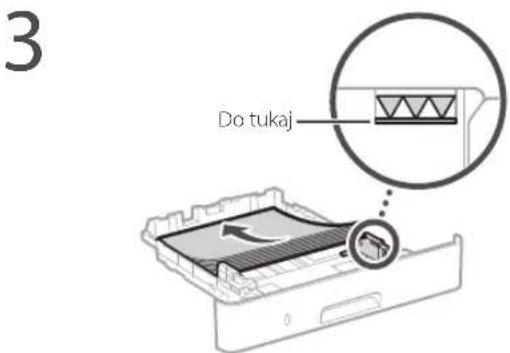
4 Vstavite predal za papir v napravo.
natural_image
Illustration of hands holding a rectangular object with an arrow indicating rotation (no text or symbols)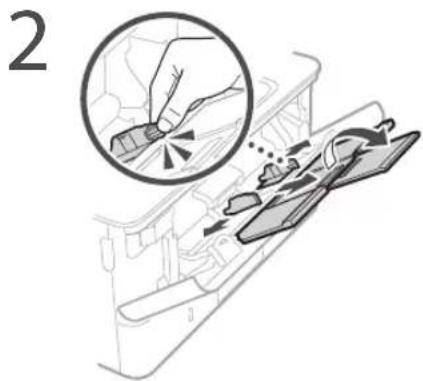
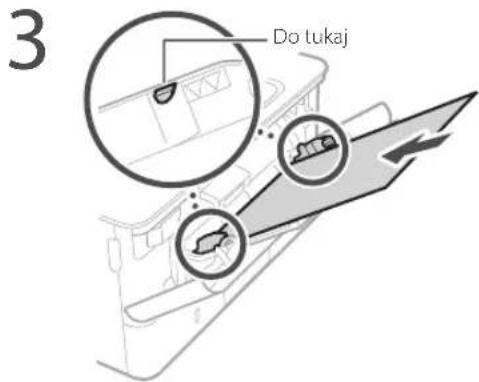
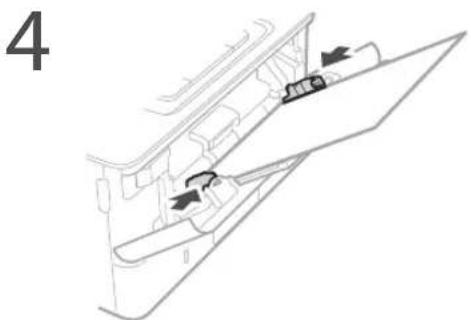
natural_image
Diagram of a vehicle interior showing directional arrows and a component (no text or symbols)natural_image
Diagram of a printer with connectors and a magnified inset showing internal components (no text or symbols)CLASS 1 LASER PRODUCT
LASERKLASSE1
APPAREL À LASER DE CLASSE 1
APPARFCCHIO LASER DI CLASSF 1
PRODUCTO LASER DE CLASE
APARELHO A LASER DE CLASSE 1
LUOKAN 1 LASER TUOTE
LASERPRODUKT KLASS
Regulatory information for users in Jordan
LBP215x / LBP214dw / LBP212dw includes approved Wireless LAN Module (Model name: Type1KA).
Contains Wireless LAN Module approved by TRC/LPD/2017/19
Regulatory information for users in UAE
LBP215x / LBP214dw / LBP212dw includes approved Wireless LAN Module (Model name: Type1KA).
TRA
REGISTERED No: ER51217/17
DEALER No: DA0073692/11
RE Directive
(Only for European radio equipment)
RE Declaration of Conformity
English (EN) Hereby, Canon Inc. declares that this equipment is in compliance with Directive 2014/53/EU.
The full text of the EU declaration of conformity is available at the following internet address: http://www.canon-europe.com/ce-documentation Wireless LAN Specifications
Frequency band(s):2412-2472MHz
Maximum radio-frequency power: 15.9 dBm
natural_image
Illustration of hands holding a rectangular object with an arrow indicating rotation (no text or symbols)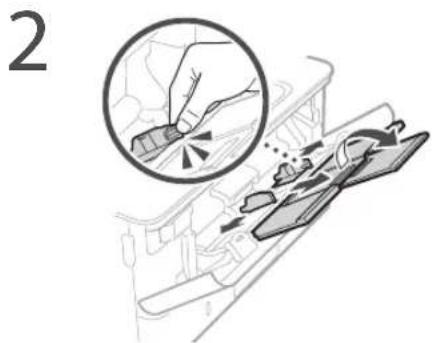
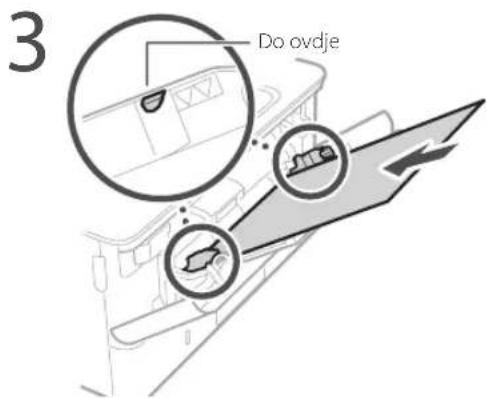
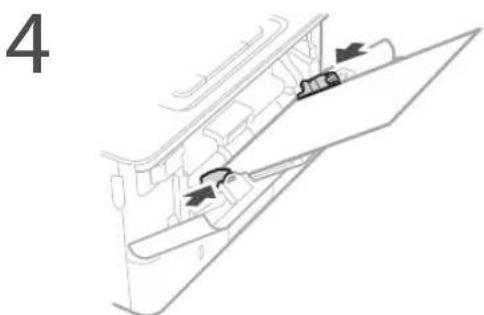
natural_image
Diagram of a vehicle interior showing airflow or movement arrows, no text or symbols present5 Navedite veličinu i vrstu papira sukladno zaslonu.
Ako je došlo do problema
Za detalje
„Otklanjanje poteškoća“ u Korisničkom vodiču
natural_image
Diagram showing a printer with cable connectors and a close-up of the connector (no text or symbols present)Ako problem i dalje postoji, pogledajte Korisnički vodič.
Došlo je do zaglavljivanja papira
Uklonite zaglavljeni papir u skladu s uputama na zaslonu.
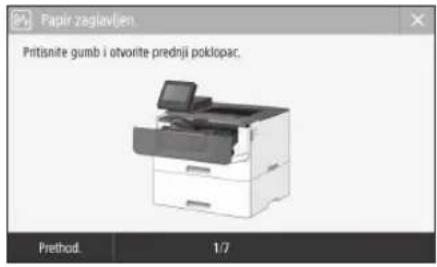
CLASS 1 LASER PRODUCT
LASER KI ASSE 1
APPAREIL À LASER DE CLASSE 1
APPARECCHIO LASER DI CLASSE I
PRODUCTO LÁSER DE CLASE 1
APARELHO A LASER DE CLASSE 1
LUOKAN 1 LASER-TUOTF
LASERPRODUKT KLASS 1
Regulatory information for users in Jordan
LBP215x / LBP214dw / LBP212dw includes approved Wireless LAN Module (Model name: Type1KA).
Contains Wireless LAN Module approved by TRC/LPD/2017/19
Regulatory information for users in UAE
LBP215x / LBP214dw / LBP212dw includes approved Wireless LAN Module (Model name: Type1KA).
TRA
REGISTERED No: ER51217/17
DEALER No: DA0073692/11
RE Directive
(Only for European radio equipment)
RE Declaration of Conformity
English (EN) Hereby, Canon Inc. declares that this equipment is in compliance with Directive 2014/53/EU.
The full text of the EU declaration of conformity is available at the following internet address: http://www.canon-europe.com/ce-documentation Wireless LAN Specifications
Frequency band(s):2412-2472MHz
Maximum radio-frequency power: 15.9 dBm
natural_image
Illustration of hands holding a device with a curved arrow indicating rotation (no text or symbols)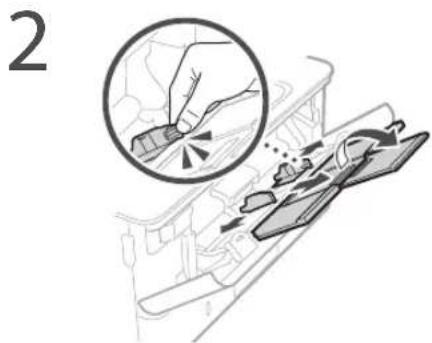
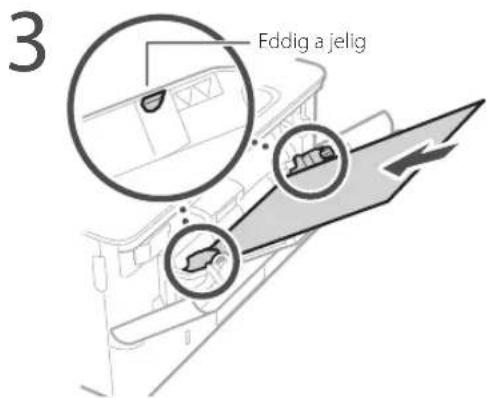
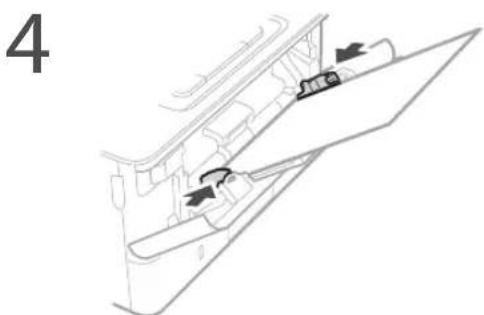
natural_image
Diagram of a vehicle interior showing airflow or movement arrows, no text or symbols presentnatural_image
Diagram showing a printer with cable connectors and a close-up of the cable connector (no text or symbols present)CLASS 1 LASER PRODUCT
LASER KLASSE 1
APPAREL À LASER DE CLASSE 1
APPARFCCHIO LASER DI CLASSE 1
PRODUCTO LÁSER DE CLASE 1
APARELHO A LASER DE CLASSE 1
LUOKAN 1 LASER-TUOTE
LASERPRODUKT KLASS 1
Regulatory information for users in Jordan
LBP215x / LBP214dw / LBP212dw includes approved Wireless LAN Module (Model name: Type1KA).
Contains Wireless LAN Module approved by TRC/LPD/2017/19
Regulatory information for users in UAE
LBP215x / LBP214dw / LBP212dw includes approved Wireless LAN Module (Model name: Type1KA).
TRA
REGISTERED No: ER51217/17
DEALER No: DA0073692/11
RE Directive
(Only for European radio equipment)
RE Declaration of Conformity
English (EN) Hereby, Canon Inc. declares that this equipment is in compliance with Directive 2014/53/EU.
The full text of the EU declaration of conformity is available at the following internet address: http://www.canon-europe.com/ce-documentation/Wireless LAN Specifications
Frequency band(s):2412-2472MHz
Maximum radio-frequency power: 15.9 dBm
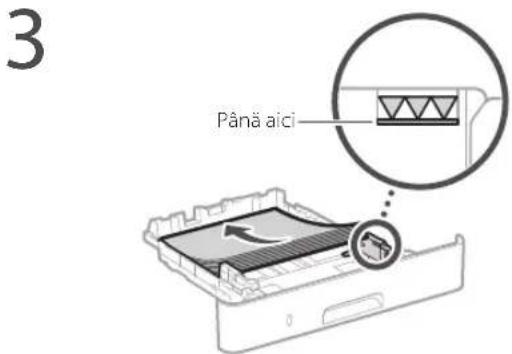
natural_image
Illustration of hands holding a rectangular object with an arrow indicating rotation (no text or symbols)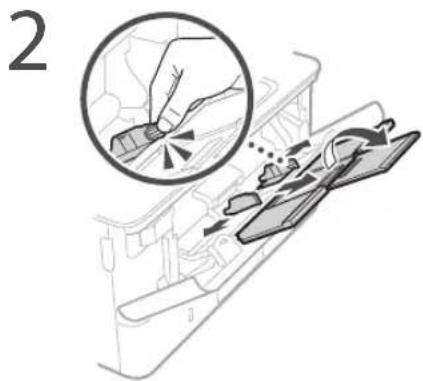
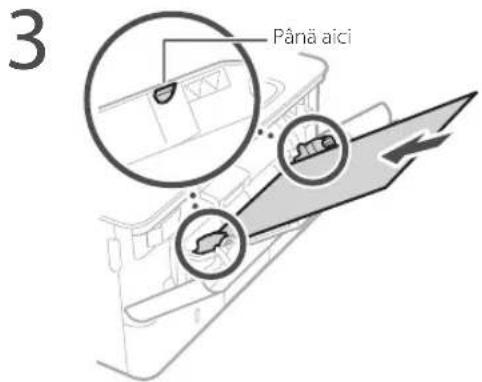
natural_image
Diagram showing a printer with cable connectors and a close-up of the connector (no text or symbols present)CLASS 1 LASER PRODUCT
LASERKLASSE1
APPAREIL À LASER DE CLASSE 1
APPARECCHIO LASER DI CLASSE 1
PRODUCTO LÁSER DE CLASE
APARELHO A LASER DE CLASSE 1
LUOKAN 1 LASER-TUOTE
LASERPRODUKT KLASS
Regulatory information for users in Jordan LBP215x / LBP214dw / LBP212dw includes approved Wireless LAN Module (Model name: Type1KA). Contains Wireless LAN Module approved by TRC/LPD/2017/19
Regulatory information for users in UAE
LBP215x / LBP214dw / LBP212dw includes approved Wireless LAN Module (Model name: Type1KA).
TRA
REGISTERED No: ER51217/17
DEALER No: DA0073692/11
RE Directive
(Only for European radio equipment)
RE Declaration of Conformity
English (EN) Hereby, Canon Inc. declares that this equipment is in compliance with Directive 2014/53/EU.
The full text of the EU declaration of conformity is available at the following internet address: http://www.canon-europe.com/ce-documentation/Wireless LAN Specifications
Frequency band(s):2412-2472MHz
Maximum radio-frequency power: 15.9 dBm
natural_image
Illustration of hands holding a rectangular object with an arrow indicating rotation (no text or symbols)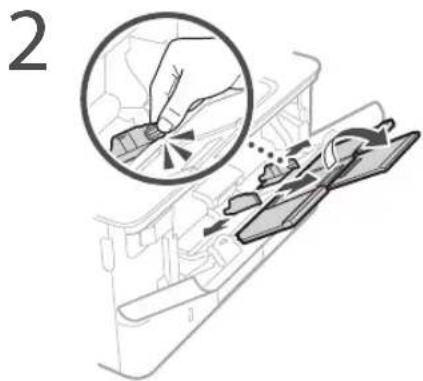
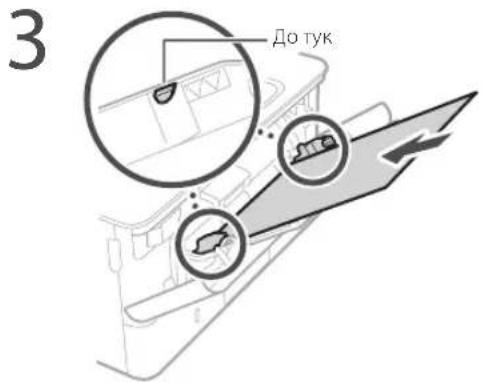
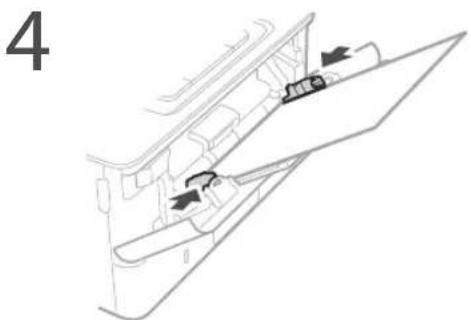
natural_image
Diagram of a vehicle interior showing directional arrows and a component (no text or symbols)natural_image
Diagram showing a printer with cable connectors and a close-up of the connector detail (no text or symbols)CLASS 1 LASER PRODUCT LASER KLASSE 1
APPARIL À LASLR DE CLASSE 1 APPARLCCHIO LASLR DI CLASSE 1 PRODUCTO I ÁSER DE CLASE 1 APARELHO A I ASER DE CLASSE 1
LUOKAN 1 LASER TUOTE LASERPRODUKT KLASS 1
Regulatory information for users in Jordan
LBP215x / LBP214dw / LBP212dw includes approved Wireless LAN Module (Model name: Type1KA). Contains Wireless LAN Module approved by TRC/LPD/2017/19
Regulatory information for users in UAE
LBP215x / LBP214dw / LBP212dw includes approved Wireless LAN Module (Model name: Type1KA).
TRA
REGISTERED No: ER51217/17
DEALER No: DA0073692/11
RE Directive
(Only for European radio equipment)
RE Declaration of Conformity
English (EN) Hereby, Canon Inc. declares that this equipment is in compliance with Directive 2014/53/EU.
The full text of the EU declaration of conformity is available at the following internet address: http://www.canon-europe.com/ce-documentation/Wireless LAN Specifications
Frequency band(s):2412-2472MHz
Maximum radio-frequency power: 15.9 dBm
natural_image
Illustration of hands holding a device with a curved arrow indicating rotation (no text or symbols)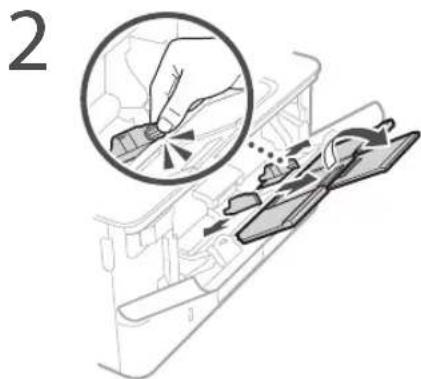
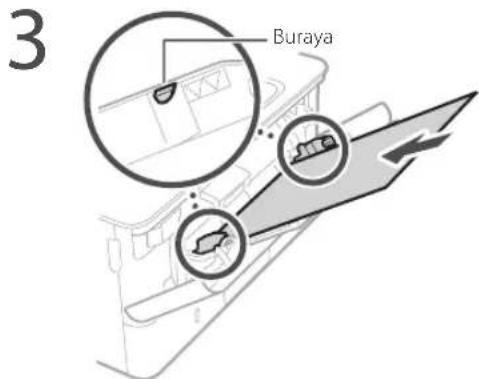
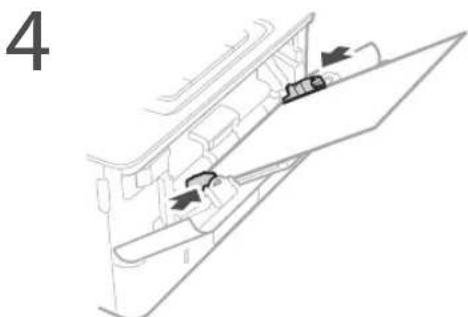
natural_image
Diagram showing a printer with cable connectors and a close-up of the connector (no text or symbols present)CLASS 1 LASER PRODUCT
LASERKLASSE 1
APPAREIL À LASER DE CLASSE 1
APPARECCHIO LASER DI CLASSE 1
PRODUCTO LÁSER DE CLASE 1
APARELHO A LASER DE CLASSE 1
LUOKAN 1 LASER-TUOTE
LASERPRODUKT KLASS
Regulatory information for users in Jordan
LBP215x / LBP214dw / LBP212dw includes approved Wireless LAN Module (Model name: Type1KA).
Contains Wireless LAN Module approved by TRC/LPD/2017/19
Regulatory information for users in UAE
LBP215x / LBP214dw / LBP212dw includes approved Wireless LAN Module (Model name: Type1KA).
TRA
REGISTERED No: ER51217/17
DEALER No: DA0073692/11
RE Directive
(Only for European radio equipment)
RE Declaration of Conformity
English (EN) Hereby, Canon Inc. declares that this equipment is in compliance with Directive 2014/53/EU.
The full text of the EU declaration of conformity is available at the following internet address: http://www.canon-europe.com/ce-documentation/Wireless LAN Specifications
Frequency band(s):2412-2472MHz
Maximum radio-frequency power: 15.9 dBm

natural_image
Line drawing of a printer with a screen and dotted line indicating measurement (no text or symbols)![الشمسة (مفتاح [新房سية] (مفتاح [新房سية] ([م Fortطانه])](/content/2026/04/685974/images/eb82bb16c61fce5da79829c2557f535e7b1d56121405fa15d8bccc4beb9c5a66.jpg)
لوحة التشفيل
natural_image
Line drawing of a printer with a handheld device on top, no text or symbols presentلوحة التشغيل
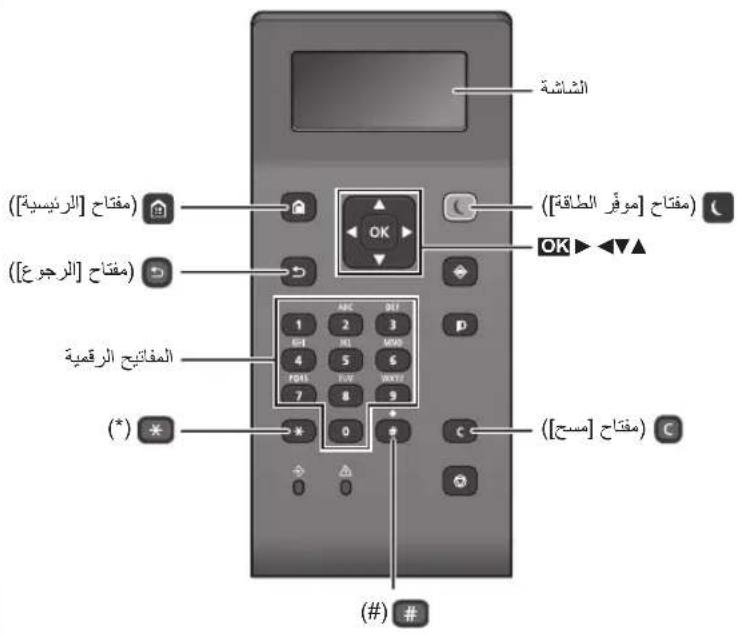
natural_image
Diagram showing a printer with cable connectors and a magnified inset highlighting the connector detail (no text or symbols present)Regulatory information for users in Jordan
LBP215x / LBP214dw / LBP212dw includes approved Wireless LAN Module (Model name: Type1KA).
Contains Wireless LAN Module approved by TRC/LPD/2017/19
Regulatory information for users in UAE LBP215x / LBP214dw / LBP212dw includes approved Wireless LAN Module (Model name: Type1KA).
TRA
REGISTERED No: ER51217/17
DEALER No: DA0073692/11
RE Directive
(Only for European radio equipment)
RE Declaration of Conformity
English (EN) Hereby, Canon Inc. declares that this equipment is in compliance with Directive 2014/53/EU.
The full text of the EU declaration of conformity is available at the following internet address:
http://www.canon-europe.com/ce-documentation
Wireless LAN Specifications
Frequency band(s):2412-2472MHz
Maximum radio-frequency power: 15.9 dBm
natural_image
Line drawing of a printer with a screen and dotted line indicating measurement (no text or symbols)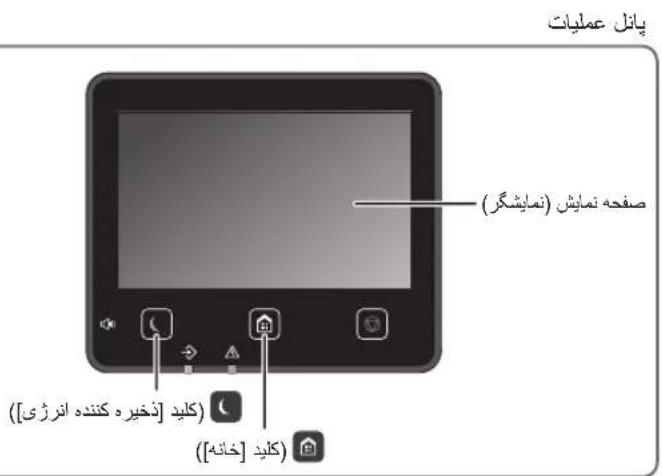
natural_image
Line drawing of a printer with a handheld device on top, showing no text or symbols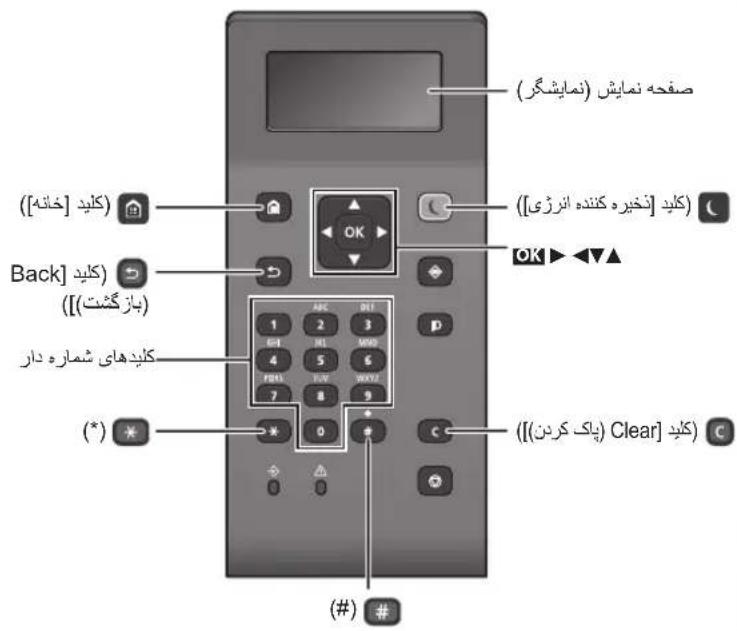
تعويض کارتريج تونر
natural_image
Diagram showing a printer with cables and a close-up of the cable being inserted (no text or symbols present)Regulatory information for users in Jordan
LBP215x / LBP214dw / LBP212dw includes approved Wireless LAN Module (Model name: Type1KA).
Contains Wireless LAN Module approved by TRC/LPD/2017/19
Regulatory information for users in UAE
LBP215x / LBP214dw / LBP212dw includes approved Wireless LAN Module (Model name: Type1KA).
TRA
REGISTERED No: ER51217/17
DEALER No: DA0073692/11
RE Directive
(Only for European radio equipment)
RE Declaration of Conformity
English (EN) Hereby, Canon Inc. declares that this equipment is in compliance with Directive 2014/53/EU.
The full text of the EU declaration of conformity is available at the following internet address:
http://www.canon-europe.com/ce-documentation Wireless LAN Specifications
Frequency band(s):2412-2472MHz Maximum radio-frequency power: 15.9 dBm
CLASS 1 LASER PRODUCT
LASER KLASSE 1
APPAREIL À LASER DE CLASSE 1
APPARECCHIO LASER DI CLASSE 1
PRODUCTO LÁSER DE CLASE 1
APARELHO A LASER DE CLASSE 1
LUOKAN 1 LASER-TUOTE
LASERPRODUKT KLASS 1
natural_image
Line drawing of a printer with a screen and dotted line indicating measurement (no text or symbols)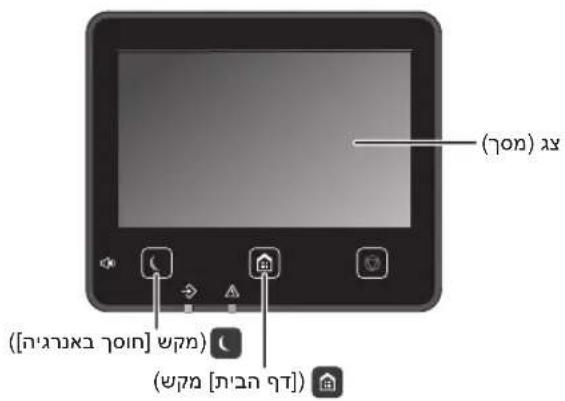
(LBP214dw/LBP212dw)
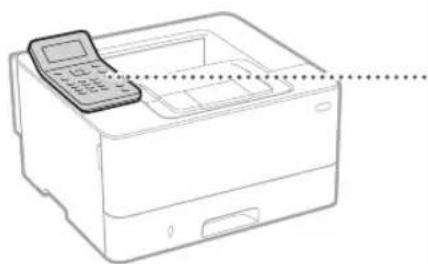
natural_image
Line drawing of a printer with a handheld device on top, showing no text or symbols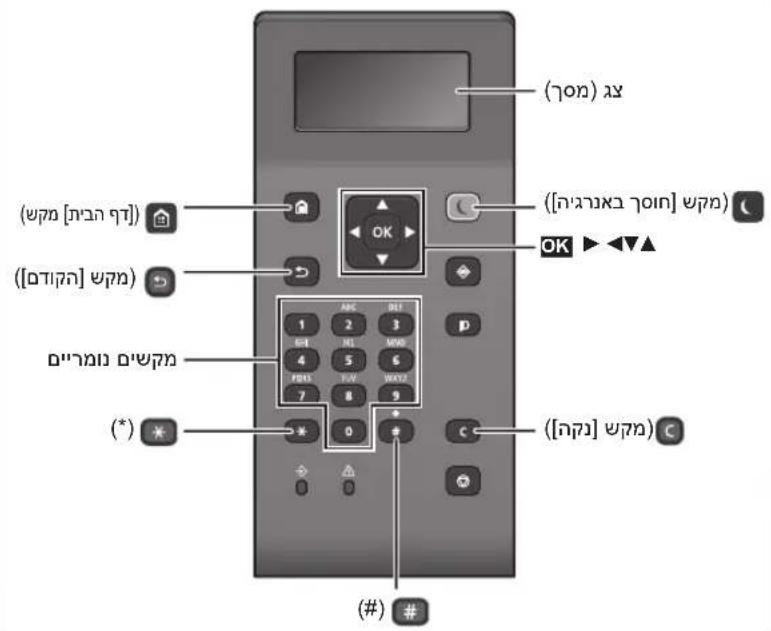
He
natural_image
Diagram showing a printer with cables and a close-up of the cable being inserted (no text or symbols present)Regulatory information for users in Jordan
LBP215x / LBP214dw / LBP212dw includes approved Wireless LAN Module (Model name: Type1KA).
Contains Wireless LAN Module approved by TRC/LPD/2017/19
Regulatory information for users in UAE LBP215x / LBP214dw / LBP212dw includes approved Wireless LAN Module (Model name: Type1KA).
TRA
REGISTERED No: ER51217/17
DEALER No: DA0073692/11
RE Directive
(Only for European radio equipment)
RE Declaration of Conformity
English (EN) Hereby, Canon Inc. declares that this equipment is in compliance with Directive 2014/53/EU. The full text of the EU declaration of conformity is available at the following internet address: http://www.canon-europe.com/ce-documentation Wireless LAN Specifications Frequency band(s):2412-2472MHz Maximum radio-frequency power: 15.9 dBm
CLASS 1 LASER PRODUCT
LASER KLASSE 1
APPAREIL À LASER DE CLASSE 1
APPARECCHIO LASER DI CLASSE 1
PRODUCTO LÁSER DE CLASE 1
APARELHO A LASER DE CLASSE 1
LUOKAN 1 LASER-TUOTE
LASERPRODUKT KLASS 1
.הכלההוּרָהוּרָהוּרָהוּרָהוּרָהוּרָהוּרָהוּרָהוּרָהוּרָהוּרָהוּרָהוּרָהוּרָהוּרָה
30-2, Shimomaruko 3-chome, Ohta-ku, Tokyo 146-8501, Japan
One Canon Park, Melville, NY 11747, U.S.A.
CANON EUROPA N.V.
Bovenkerkerweg 59, 1185 XB Amstelveen, The Netherlands
2F Jinbao Building No.89, Jinbao Street,
Dongcheng District, Beijing 100005, PRC
CANON SINGAPORE PTE LTD
1 Fusionopolis Place, #15-10, Galaxis, Singapore 138522
CANON AUSTRALIA PTY LTD
Building A, The Park Estate, 5 Talavera Road, Macquarie Park, NSW 2113, Australia
CANON GLOBAL WORLDWIDE SITES
http://www.canon.com/