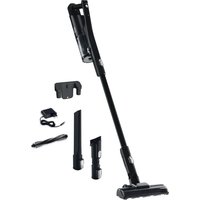
VM 7051 Aura Dark - Vacuum Cleaner AMICA - Free user manual and instructions
Find the device manual for free VM 7051 Aura Dark AMICA in PDF.


| Product type | Cordless rechargeable vacuum cleaner |
| Brand | Amica |
| Model | VM 7051 Aura Dark |
| Power supply | Lithium-ion battery 21.6 V / Charger 230 V ~ 50/60 Hz |
| Nominal power | 150 W |
| Maximum power | 165 W |
| Net weight | 2.6 kg |
| Runtime (max mode) | Approximately 15 minutes |
| Runtime (min mode) | Approximately 30 minutes |
| Charging time | 4 to 6 hours |
| Battery type | Lithium-ion 21.6 V |
| Filters | Washable (foam and fibers) |
| Electric brush | Yes, with LED lighting |
| Wall mount | Included (plugs and screws) |
| Supplied accessories | Electric brush, hose, wall mount |
| Dustbin type | Bagless |
| Power modes | 2 levels (max/min) |
| Overheating protection | Yes (automatic motor shut-off) |
Frequently Asked Questions - VM 7051 Aura Dark AMICA
User questions about VM 7051 Aura Dark AMICA
0 question about this device. Answer the ones you know or ask your own.
Ask a new question about this device
Download the instructions for your Vacuum Cleaner in PDF format for free! Find your manual VM 7051 Aura Dark - AMICA and take your electronic device back in hand. On this page are published all the documents necessary for the use of your device. VM 7051 Aura Dark by AMICA.
USER MANUAL VM 7051 Aura Dark AMICA
natural_image
White vacuum cleaner with extended handle and black base (no visible text or symbols)PL INSTRUKCJA OBSŁUGI 2
EN USER MANUAL 6
CS NÁVOD K OBSLUZE 10
SK NÁVOD NA OBSLUHU 14
Montaż
natural_image
Technical line drawing of a mechanical assembly (no text or symbols visible)natural_image
Technical line drawing of a mechanical device with no visible text or symbolsnatural_image
White cylindrical device with lid and base, showing internal components (no visible text or symbols)natural_image
Exploded view diagram of a handheld device showing internal components (no text or labels)natural_image
Technical line drawings of mechanical components including a top view, front and side views (no text or symbols)Wskazówki:
- If the power cord or plug is damaged, it should be replaced by a professional repair shop in order to avoid hazard.
- This appliance is not intended for use by persons (including children) with physical, mental or sensory handicaps, or by persons inexperienced or unfamiliar with the appliance, unless under supervision or in accordance with the instructions as communicated to them by persons responsible for their safety. Children shall not play with the appliance.
- This appliance can be used by children aged 8 years and older or by persons with physical, mental or sensory handicaps, or by those who are inexperienced or unfamiliar with the appliance, provided they are supervised or have been instructed how to safely use the appliance and are familiar with risks associated with the use of the appliance. Ensure that children do not play with the appliance. Do not allow children to clean and maintain the appliance unless they are 8 years or older and are supervised by a competent person.
- Do not use the appliance if it shows any signs of damage to the power cord, or if the appliance has been dropped on the floor.
- Do not expose the appliance to rain or humidity, and do not
use it outdoors. Do not operate the appliance with wet hands.
- This appliance is not intended for use at altitude greater than 2000 metres above sea level
- If you want to turn off the appliance completely, pull the plug out of the wall outlet.
In accordance with European Directive 2012/19/EU and Polish legislation regarding used electrical and electronic goods, this appliance is marked with the symbol of the crossed-out waste container. This marking indicates that the appliance must not be disposed of together with other household waste after it has been used. The user
is obliged to hand it over to waste collection centre collecting used electrical and electronic goods. The collectors, including local collection points, shops and local authority departments provide recycling schemes. Proper handling of used electrical and electronic goods helps avoid environmental and health hazards resulting from the presence of dangerous components and the inappropriate storage and processing of such goods.
Carefully read this instruction before using the appliance.
This appliance is for household use only.
Note! Packaging materials (bags, polyethylene, polystyrene, etc.) should be kept away from children during unpacking.
Children do not realize the dangers that can arise when using electrical appliances; therefore keep the appliance out of reach of children.
Do not immerse the body of the appliance in water or other liquids. Immersing in water may cause an electric shock.
If water spills on the external components of the appliance, dry it thoroughly before switching back on. Do not touch wet surfaces in contact with the appliance connected to power supply, immediately disconnect it from the mains.
When pulling out the plug from the wall outlet, never pull by the cord, only the plug, holding the socket with your other hand.
Do not attempt to remove any parts of the housing.
Using attachments that were not supplied with the product may cause damage to the appliance.
Never place the appliance on hot surfaces.
Do not place the cord over sharp edges or near hot surfaces.
Before you put the plug into the wall outlet, make sure your hands are dry.
Do not put any objects inside the appliance.
Make sure that the voltage indicated on the nameplate corresponds to that of your home electrical mains. Alternating current must be used, typically marked \~.
This appliance is intended for use at home or in facilities, such as kitchen for employees; in shops, offices and other working environments, use by the customers of hotels, motels and other residential facilities, in rural residential buildings, in the accommodation facilities.
Pull the plug from the wall outlet before replacing accessories.
Do not pull the vacuum cleaner or move it by the cord, do not use the cord as a handle, do not close the door squeezing the cord, do not place the cord over sharp edges or near hot surfaces. Be careful not to move the vacuum cleaner on the cord.
Do not insert any objects into the openings in the vacuum cleaner. Do not use the vacuum cleaner when any opening is blocked, dispose of dust, lint, hair and anything that may restrict air flow. Keep hair, loose clothing parts, fingers and other body parts away from the openings and moving parts.
Do not use the vacuum cleaner to collect flammable substances such as petrol, and do not use it in places where similar substances may be present.
If the appliance has a winder, hold the plug while winding up the cord. Do not let the plug was left loose during retracting.
Do not collect any items that burn or smoke, such as cigarettes, matches or hot ashes.
Do not use the vacuum cleaner without a dust bag and/or fi Iters. If the opening, which sucks air, hose or telescopic tube are clogged, you should immediately turn off the vacuum cleaner Before restarting the vacuum cleaner, fi rst remove the blocking item.
Do not use the vacuum cleaner too close to heaters, radiators, cigarette butt s, etc.
Before using the vacuum cleaner, remove sharp objects from the floor to avoid damaging the dust bag.
Do not collect fi ne parti cles such as: fl our, gypsum, printer toners, etc., as this may clog fi lters and damage the vacuum cleaner.
Make sure that extension tube is fully withdrawn before you put away your vacuum cleaner either in verti cal or horizontal positi on. Store the lithium ion batt ery in a cool and dry place.
The lithium-ion batt ery comes pre-charged by the manufacturer to 40%. After purchase, charge it up to 100%. This is to extend the life of the batt ery.
Liquids leaking from the batter may cause irritati on and burns. If the liquid contacts your skin, seek medical att enti on, wash and rinse off the liquid as soon as possible with soap and water, and neutralize with a weak acid such as lemon juice or vinegar. If the liquid gets into your eyes, rinse your eyes immediately with clean water for at least 10 minutes.
When not in use, keep the batt ery away from metal objects such as paper clips, coins, keys, nails, screws, or other small metal objects that could short-circuit the two batt ery terminals. Short circuit between batt ery terminals may cause burns or fire.
The appliance is designed for operation at temperature from 4.5°C to 40°C,
Do not use a damaged or modified appliance or battery. Damaged or modified batteries may be unreliable, causing fire, explosion, or injury.
Do not expose the appliance or battery to heat or fire. Temperature above 130^ C may cause an explosion. Recycling and proper disposal of the battery helps to conserve natural resources. The product contains a lithium-ion battery. You must dispose of the battery properly. Before disposing of the vacuum cleaner, dispose of the battery in an environmentally safe manner. Do not dispose of the battery with domestic municipal waste.
The properties of lithium-ion batt eries may slightly deteriorate over time depending on use. You can purchase a 21,6V/230V batt ery or have it replaced by authorised service centre. For detailed information, please go to our website: http://czescizamienne.amica.pl/Product/Part
SPECIFICATION:
| Power specifi cati on: 21,6V/230V 50Hz / 60Hz | |
| Nominal power: 150W | |
| Maximum power: 165W | |
| Net weight: 2,6 kg | |
Note! Figures are for illustrative purposes only Individual models may vary.
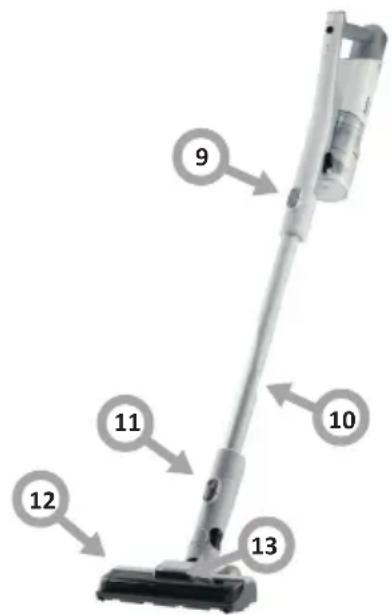
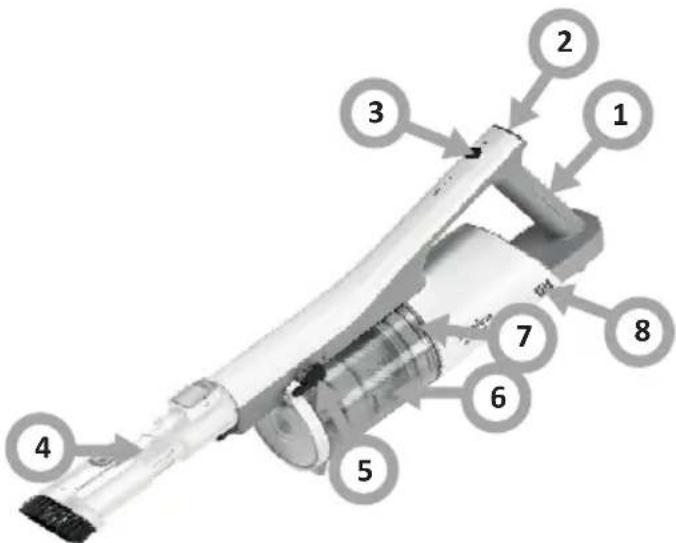
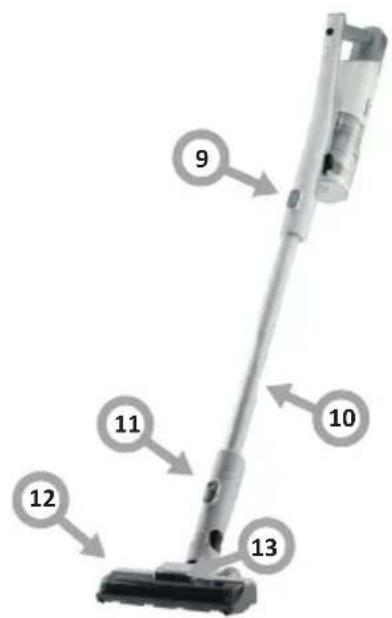
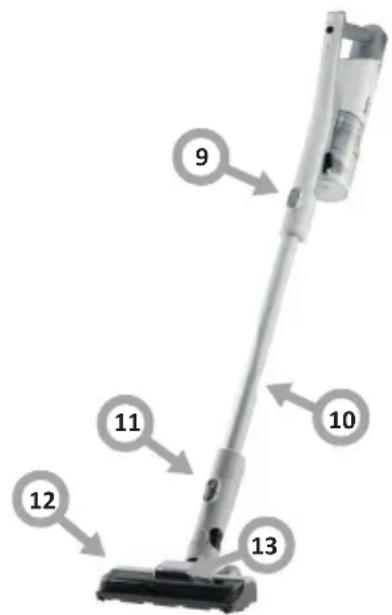
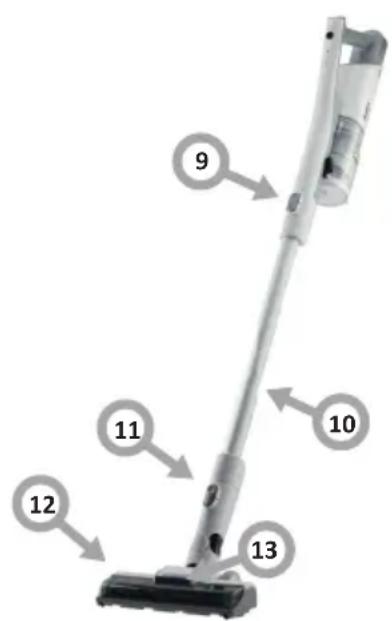
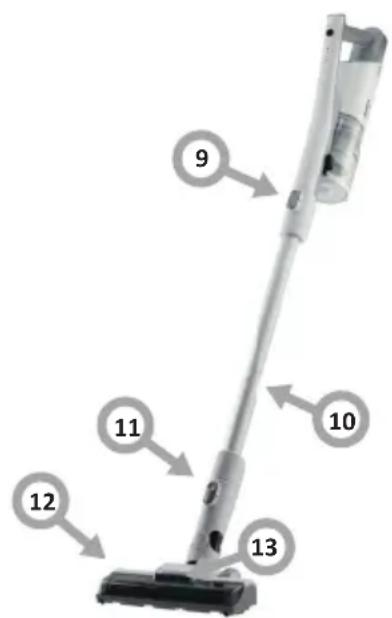
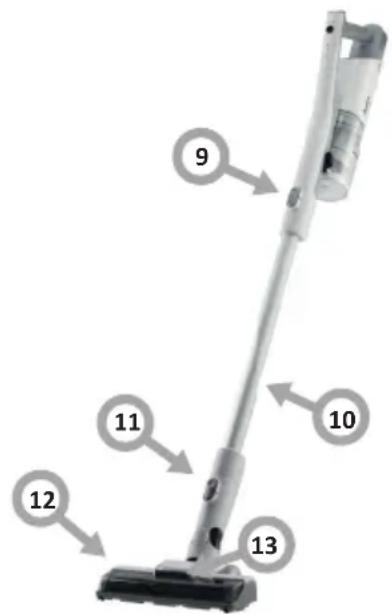
Features and components
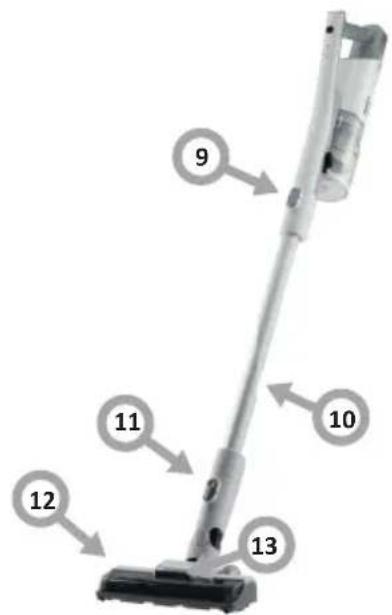
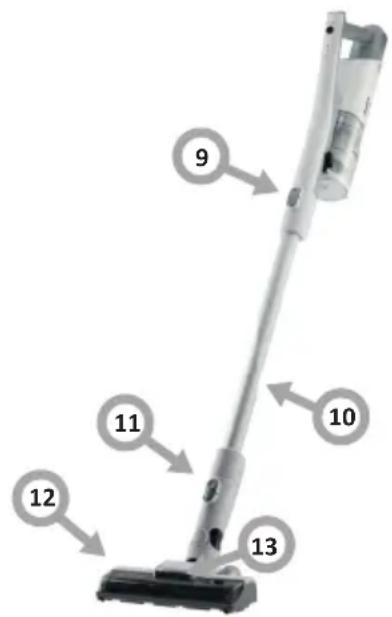
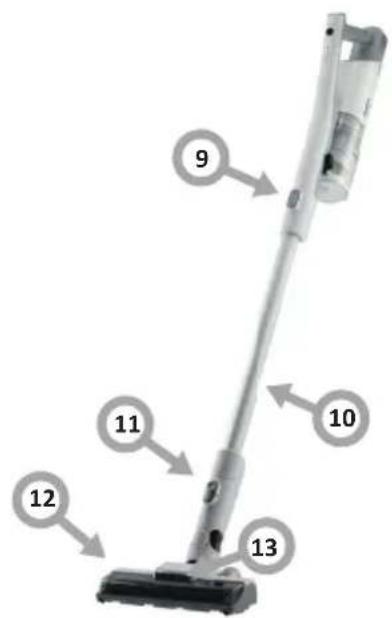
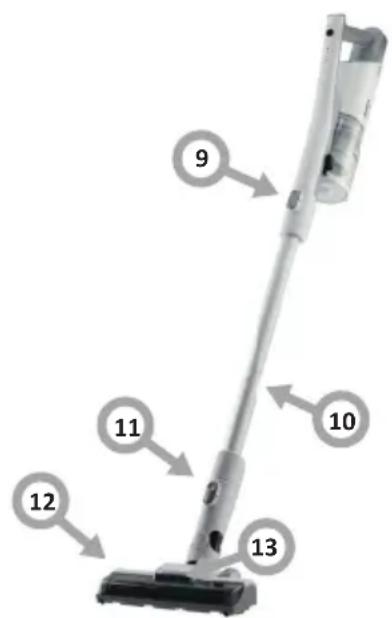
- Handle
- Power on/off
- Mode change butt on
- Tip
- Dust bin lid release lever
- Dust bin
- Pump filter cover
- Lithium ion batt ery
- Release butt on for handheld vacuum cleaner
- Tube
- Floor brush release butt on
- Electric brush
- Electric brush LED backlight
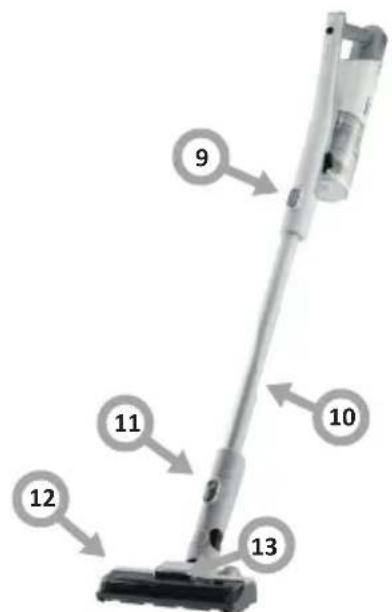
Assembly
- Place the motor unit on a fl at surface. Connect the adapter to the charging socket on the battery and insert the plug into a power socket. While charging, the power indicator fl ashes, one minute aft er charging, the indicator turns off.
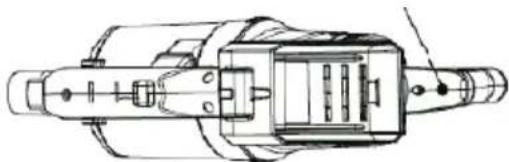
natural_image
Technical line drawing of a mechanical assembly (no text or symbols visible)- Insert the tube into the hand vacuum cleaner until it clicks into place.
- Insert the tube into the floor brush until you hear a click.
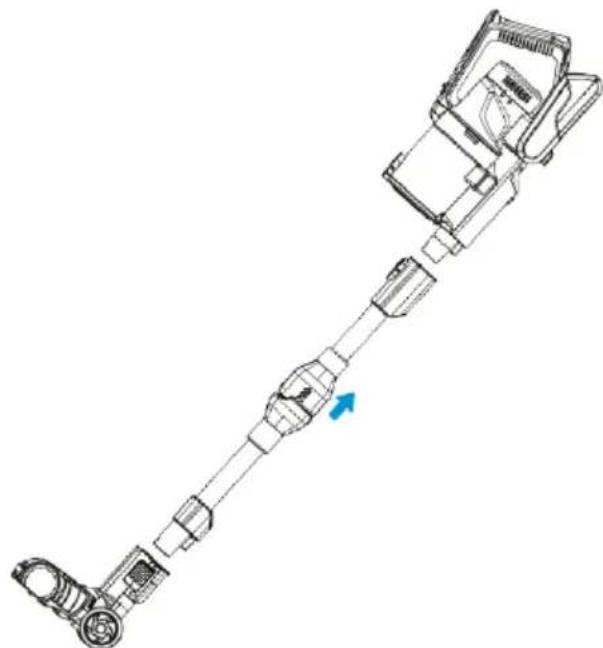
natural_image
Technical line drawing of a mechanical device with a blue arrow indicating direction (no text or symbols)Install a wall bracket
- Choose a place near an electrical outlet.
- The height should be sufficient so that the brush tube hangs freely.
- Place the bracket on the wall and use a pencil to mark the holes to be drilled.
- Drill holes and insert wall plugs. Put the bolts through the holes in the handle and tighten.
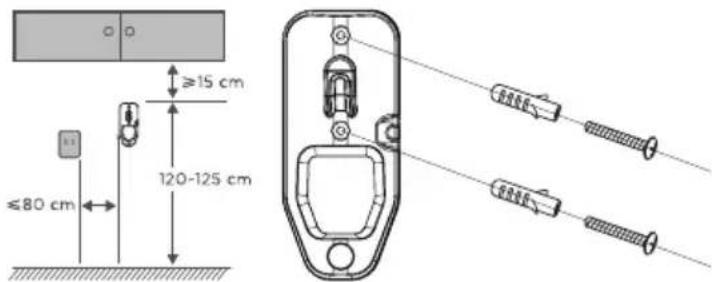
Attention:
The location of the handle should be away from potential sources of high and low temperatures, such as a radiator.
Charge the battery and store accessories
- Hang the assembled vacuum cleaner on the wall bracket.
- Plug the charger into an electrical socket and then into the charging socket on the handheld vacuum cleaner.
- Place the accessories in the appropriate places on the wall bracket.
Battery indicators show the charge level.
- When fully charged, the indicators stop flashing.
- Fully charge the battery before first use. This may take 4-6 hours. Duration: At maximum power: approx. 15 minutes. At lowest power: approx. 30 minutes The operating time of the vacuum cleaner may vary depending on the brushes used and the conditions of use.
Operation
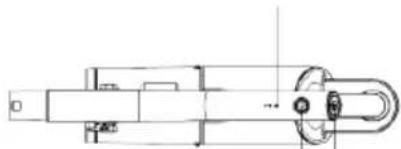
- Press ON/OFF to start the appliance.
- Press ON/OFF again to turn off the appliance.
- Press the "Mode Change Button" to change the mode.
- Charge the appliance when only one power indicator flashes.
natural_image
Technical line drawing of a mechanical assembly (no text or symbols)Mode change button
ON/OFF power button
CLEANING AND CARE
Empty the dust bin
Instructions:
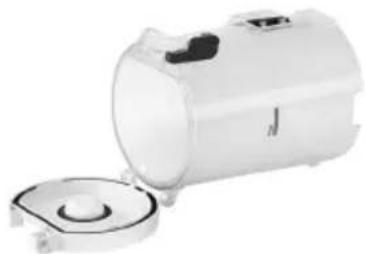
- To maintain the suction power of the vacuum cleaner, empty the dust bin regularly.
- Press the release button, open the bottom cover and dispose of the dust.
natural_image
White cylindrical device with lid and base, showing internal components (no visible text or symbols)Use the vacuum cleaner and accessories
• Always turn the vacuum cleaner off before attaching accessories.
Cleaning and maintenance
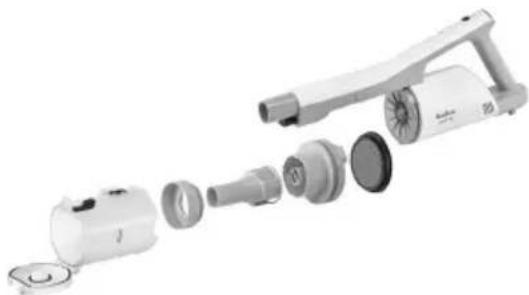
- Press the dust bin release button and remove the bin.
- Remove the filter from the dust bin.
• Dismantle the filter and clean it. All parts of the filter are washable. - When all parts are cleaned, reassemble them in the reverse order.
natural_image
Exploded view diagram of a handheld device showing internal components (no text or labels)Electric brush cleaning and maintenance
Note!
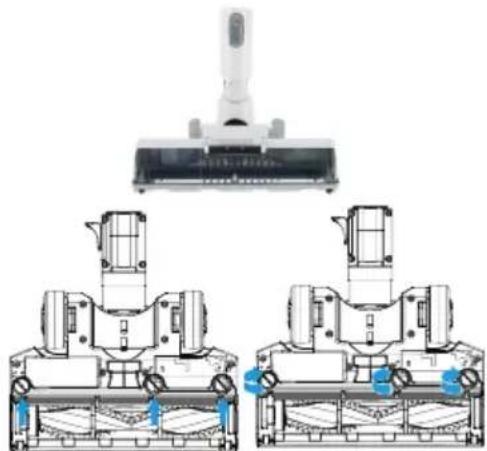
In order to ensure proper operation of the brush, regularly clean the brush roller and wheels from dust and tangled hair and threads. Make sure the appliance is turned off before removing the main brush. Press the release button and remove the brush. Open the brush cover, then remove and clean the brush roller. After cleaning the roller, replace it in the reverse order.
Note! Figures are for illustrative purposes only Individual models may vary.
natural_image
Technical line drawing of a vacuum cleaner assembly with three views (top, front, side) showing internal components and mounting brackets (no text or symbols)Instructions:
- Do not wash the brush. If hair is caught in the brush, remove it with scissors or a knife.
Clean the dust filter at least once a month, depending on frequency of use.
- Turn the dust bin and remove it.
- Twist the strainer and remove it.
- Remove the foam filter and bracket.
- Separate the foam fi lter from the fl eece fi lter by sliding them apart.
- Rinse and dry thoroughly. Assemble when dry.
| Descripti on of the problem Procedure: | |
| 1. The vacuum cleaner does not clean well.. | Empty the dust container.Remove excess dust from the fi Iters.Wash the fi Iters.Ensure there is no blockage. |
| 2. The vacuum cleaner has turned off or is not working. | Charge the vacuum cleaner(check that the mains socket is working and that the switch is on).The appliance may be clogged - check points 1 to 4 above.Product thermal protecti on acti vated. Turn off the vacuum cleaner and let the motor cool down for an hour before using it again. |
| 3. The floor brush motor overheats and turns off . | The floor brush is blocked— refer to the “Electric brush cleaning and maintenance” secti on of this manual.Roller brush motor overheated due to heavy load. This may be due to prolonged use on a long-pile carpet or soft rug. Allow the vacuum cleaner to cool down for a minimum of an hour before using it again. |
Montáž
natural_image
Technical line drawing of a mechanical assembly (no text or symbols visible)natural_image
Technical line drawing of a mechanical device with no visible text or symbolsnatural_image
White cylindrical device with lid and base, showing internal components (no visible text or symbols)natural_image
Exploded view diagram of a handheld device with internal components (no text or symbols visible)natural_image
Technical line drawing of a vacuum cleaner assembly with two views of the device (no text or symbols present)Pokyny:
Montáž
natural_image
Technical line drawing of a mechanical assembly (no text or symbols visible)natural_image
Technical line drawing of a mechanical device with no visible text or symbolsnatural_image
White cylindrical water heater with lid removed, no visible text or symbolsnatural_image
Exploded view diagram of a handheld device with internal components (no text or symbols visible)natural_image
Technical line drawing of a vacuum cleaner assembly with two views of the device (no text or symbols present)Pokyny:
Montage
natural_image
Technical line drawing of a mechanical assembly (no text or symbols visible)natural_image
Technical line drawing of a mechanical device with a blue arrow indicating direction (no text or symbols)natural_image
Technical line drawing of a device with two screws connected by wires, showing internal components (no text or symbols)Aufmerksamkeit:
natural_image
White cylindrical device with lid and base, showing internal components (no visible text or symbols)natural_image
Exploded view diagram of a handheld device with internal components (no text or symbols visible)natural_image
Technical line drawing of a vacuum cleaner assembly with three views (top, front, side) showing internal components and mounting brackets (no text or symbols)Hinweise:
Montage
natural_image
Technical line drawing of a mechanical assembly (no text or symbols visible)natural_image
Technical line drawing of a mechanical device with a blue arrow indicating direction (no text or symbols)Installation du support mural
natural_image
Technical line drawing of a device with two screws connected by wires, no text or symbols presentAttention:
natural_image
White cylindrical device with a lid and small circular base, no visible text or symbolsnatural_image
Exploded view diagram of a handheld device with internal components (no text or symbols visible)natural_image
Technical line drawing of a vacuum cleaner assembly with three views (top, front, side) showing internal components and mounting brackets (no text or symbols)Consignes :
Montaje
natural_image
Technical line drawing of a mechanical assembly (no text or symbols visible)natural_image
Technical line drawing of a mechanical device with no visible text or symbolsnatural_image
White cylindrical device with lid and base, showing internal components (no visible text or symbols)natural_image
Exploded view diagram of a handheld device showing internal components (no text or labels)natural_image
Technical line drawing of a vacuum cleaner assembly with two views of the device (no text or symbols present)Indicaciones:
Монтаж
natural_image
Technical line drawing of a mechanical assembly (no text or symbols visible)natural_image
Technical line drawing of a mechanical device with a blue arrow indicating direction (no text or symbols)natural_image
Technical line drawing of a device with two screws connected by wires, showing internal components (no text or symbols)Внимание:
natural_image
White cylindrical device with lid and base, showing internal components (no visible text or symbols)natural_image
Exploded view diagram of a handheld device with internal components (no text or symbols visible)natural_image
Technical line drawing of a vacuum cleaner assembly with mounting brackets and control panel (no text or symbols)Указания:
Felszerelés
natural_image
Technical line drawing of a mechanical assembly (no text or symbols visible)natural_image
Technical line drawing of a mechanical device with no visible text or symbolsnatural_image
White cylindrical water heater with lid and side vent, no visible text or symbolsnatural_image
Exploded view diagram of a handheld device with internal components (no text or symbols visible)natural_image
Technical line drawing of a vacuum cleaner assembly with two views (top and side), no text or symbols present.Tanácsok:
Монтаж
natural_image
Technical line drawing of a mechanical assembly (no text or symbols visible)natural_image
Technical line drawing of a mechanical device with a blue arrow indicating direction (no text or symbols)natural_image
White cylindrical device with lid and base, showing internal components (no visible text or symbols)natural_image
Exploded view diagram of a handheld device with internal components (no text or symbols visible)natural_image
Technical line drawing of a vacuum cleaner assembly with two views (top and side), no text or symbols present.Вказівки:
Montajul
natural_image
Technical line drawing of a mechanical assembly (no text or symbols visible)natural_image
Technical line drawing of a mechanical device with no visible text or symbolsnatural_image
Technical line drawing of a device with two screws connected by wires (no text or symbols)Atentie:
natural_image
White cylindrical device with lid and base, showing internal components (no visible text or symbols)natural_image
Exploded view diagram of a handheld device with internal components (no text or symbols visible)natural_image
Technical line drawing of a vacuum cleaner assembly with two views of the device (no text or symbols present)Indicatii:

- Montaż
- Wskazówki:
- Features and components
- Assembly
- Attention:
- Charge the battery and store accessories
- Battery indicators show the charge level.
- Operation
- CLEANING AND CARE
- Empty the dust bin
- Instructions:
- Use the vacuum cleaner and accessories
- Cleaning and maintenance
- Electric brush cleaning and maintenance
- Note!
- Clean the dust filter at least once a month, depending on frequency of use.
- Montáž
- Pokyny:
- Montage
- Aufmerksamkeit:
- Hinweise:
- Installation du support mural
- Consignes :
- Montaje
- Монтаж
- Внимание:
- Указания:
- Felszerelés
- Tanácsok:
- Вказівки:
- Montajul
- Atentie:
Brand : AMICA
Model : VM 7051 Aura Dark
Category : Vacuum Cleaner