REON POCKET RNPK-5 - Portable heater SONY - Free user manual and instructions
Find the device manual for free REON POCKET RNPK-5 SONY in PDF.


| Product Type | Portable thermal device |
| Brand | Sony |
| Model | REON POCKET RNPK-5 |
| Dimensions (device only) | 55 mm × 23 mm × 117 mm |
| Dimensions (with collar and long cover) | 125 mm × 45 mm × 170 mm |
| Weight (device only) | 116 g |
| Weight (with collar and long cover) | 160 g |
| Power Supply | Built-in rechargeable lithium-ion battery 3.7 V DC; charging via USB 5 V DC (power adapter ≥ 1 A recommended) |
| Main Functions | Cooling (COOL) and warming (WARM) via dedicated "REON POCKET" app; quick start button; automatic start/stop |
| Connectivity | Bluetooth® 2.4 GHz |
| Operating Temperature | 5 °C to 40 °C |
| Charging Time (typical) | Approx. 100 min for 90%, 170 min for 100% (depending on adapter) |
| Care and Cleaning | Soft cloth; diluted neutral detergent if necessary; do not use alcohol, benzene or thinner |
| Safety | Do not use while sleeping; check skin condition every hour; avoid extreme temperatures; do not expose to moisture |
| Spare Parts and Repairability | Collar (RNPB-N4), ventilation covers (long/short), USB Type-C® cable; repair by authorized SONY center |
| General Information | App compatible with iOS and Android; European warranty included; CE certification |
Frequently Asked Questions - REON POCKET RNPK-5 SONY
User questions about REON POCKET RNPK-5 SONY
0 question about this device. Answer the ones you know or ask your own.
Ask a new question about this device
Download the instructions for your Portable heater in PDF format for free! Find your manual REON POCKET RNPK-5 - SONY and take your electronic device back in hand. On this page are published all the documents necessary for the use of your device. REON POCKET RNPK-5 by SONY.
USER MANUAL REON POCKET RNPK-5 SONY
©2025 Sony Thermo Technology Inc.
Printed in China
CFU0673-020012

RNPK-5
JP

https://reonpocket.sony.co.jp/app/download/
natural_image
Line drawing of a person's head and neck with a bandage device attached (no text or symbols)natural_image
Diagram of a curved mechanical component with an arrow indicating direction (no text or symbols)[COOL]でのおすすめの使いかた
natural_image
Illustration of a laptop and smartphone displaying a mobile app interface (no text or symbols visible)https://rd1.sony.net/help/reonpocket/rnpk5/h_zz/
JP
LEDが赤く点滅した場合は
natural_image
Illustration of hands using a handheld device to clean or manage a cable (no text or symbols visible)低温やけど防止のために
Bluetooth 5.0 Low Energy
出力:
Bluetooth標準規格 Power Class 2
使用周波数带域:
2.4 GHz带 (2.4000 GHz - 2.4835 GHz)
外部インタフェース
USB Type-C™
USB充電の推奨環境
推奨のUSB ACアダプター
AC-UD20 (別売)
市販のUSB ACアダプター
https://rd1.sony.net/help/reonpocket/rnpk5/h_zz/
商標について
- The REON POCKET is intended for use in daily outings, commuting, and light exercise (e.g. walking, golfing). Please note that this product is not waterproof.
Please refrain from using the product in the following environments.
- Strenuous work or exercise (e.g. running) at a level that causes intense sweating
- Rain, snow, or other conditions where the unit is exposed to moisture
- Prolonged use under hot sun
- Since the product is a precision device, do not subject the product to strong impacts such as dropping or throwing it.
- When the unit is operated with the setting [COOL], warm air may be ventilated from the air vent depending on the temperature of the surrounding environment. If you are concerned about this, lower the temperature setting level of [COOL], or refrain from using the unit.
Notice on heat stroke
The REON POCKET is not intended to be used as a heat stroke prevention device.
Please refer to the information website of Ministry of the Environment, Government of Japan for guidelines on daily living to prevent heat stroke.
| Air temperature (typical value) | Guideline for life activities that need attention | Precautions |
| Danger (above 35°C) | Risks in all life activities | The elderly are at high risk of developing heat stroke, even in a resting state.Avoid going outside as much as possible and move to a cool room. |
| Severe Warning (31°C – 35°C) | Avoid hot sun when going out, and be careful of rising room temperature when indoors. | |
| Warning (28°C – 31°C) | Risks in moderate or increased life activities | Take regular and sufficient rest when exercising or doing strenuous work. |
| Caution (below 28°C) | Risks in strenuous life activities | Generally, there is little danger, but there is a risk of occurrence during strenuous exercise or heavy labor. |
From the website "Heat Illness Prevention Information," Ministry of the Environment, Government of Japan
Checking the package contents
The unit and the air vent cover (long) are attached to the neckband at the time of purchase.
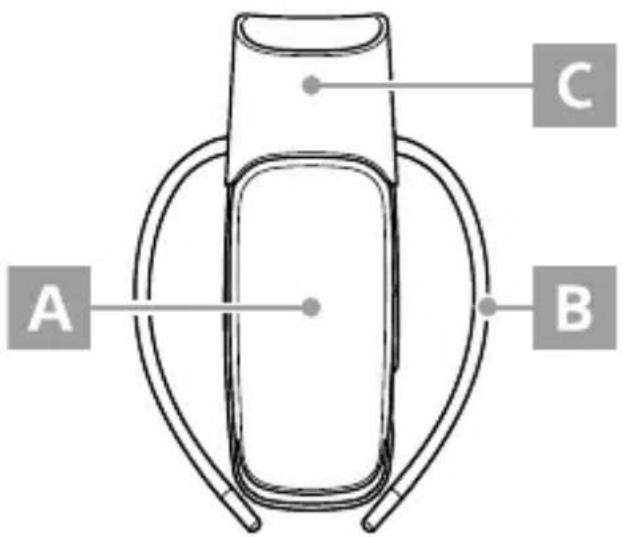
A REON POCKET unit (RNP-5)
B NECKBAND (RNPB-N4)
Air vent cover (long) (short)
- L-shaped USB Type-C® cable (USB-A — USB-C®)
• EUROPEAN GUARANTEE INFORMATION DOCUMENT* (Warranty applies to the REON POCKET unit (RNP-5) only.)
- Warranty (valid only in Japan)*
- Startup Guide (this manual)
* For details on warranty in countries and regions other than Europe or Japan, refer to the page below.
https://reonpocket.sony.com/support/warranty/
USB AC adaptor is not included. Use a commercially available USB AC adaptor.
Identifying parts
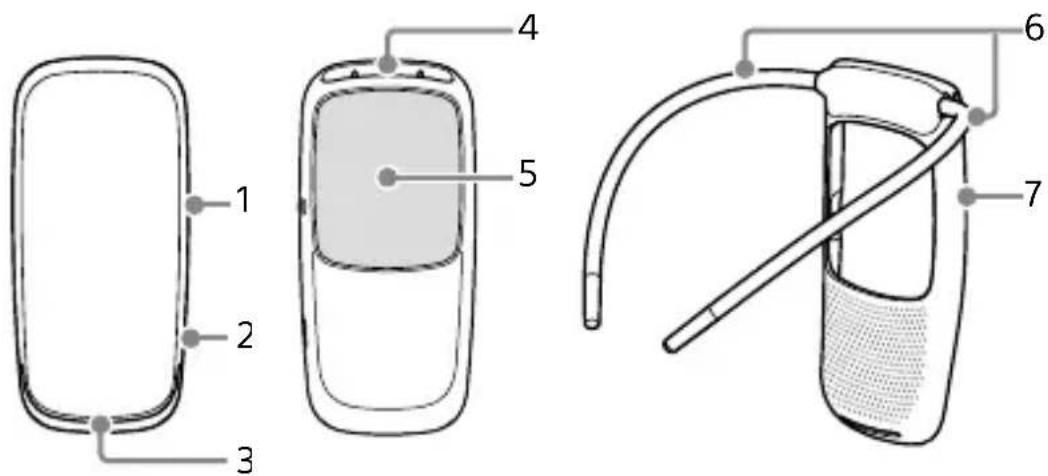
1 Button with an LED
2 USB port
3 Air inlet
4 Air vent
5 Cooling/warming section (Material: Stainless steel SUS316L)
6 Band
7 Case
Charging
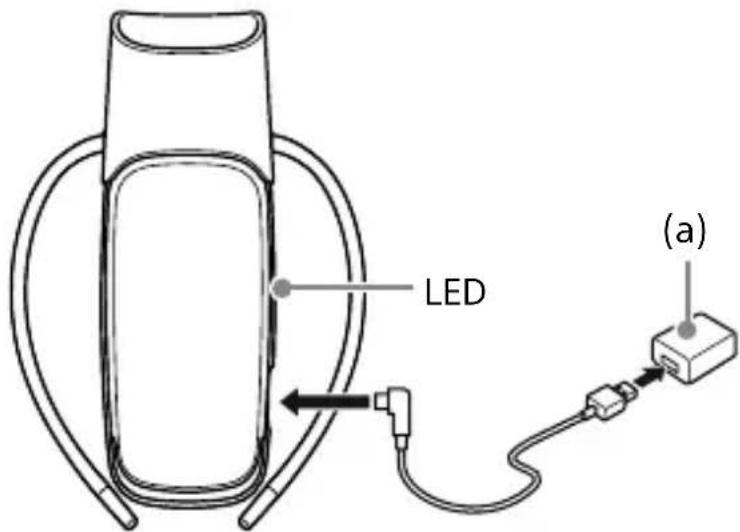
① Use a USB AC adaptor that you have (a) and the supplied USB cable to connect the unit to the wall outlet.
② The LED lights up in red and charging starts.
③ When the LED turns off, charging is complete.
When charging starts from the discharged state, the battery will be 90% charged in about 100 minutes, and fully charged in about 170 minutes. (This may vary depending on the USB adaptor you are using.)
To check the battery level
The remaining battery level is displayed on the screen of the dedicated app "REON POCKET."

- Do not touch the unit, USB cable, or USB AC adaptor with wet hands.
- Depending on the model of the USB AC adaptor, it may not be possible to charge the battery.
Installing the app on the smartphone and performing the initial setup


① Install the dedicated app "REON POCKET" on your smartphone.
EN
https://reonpocket.sony.com/app/download/
② Start the “REON POCKET” app and follow the on-screen instructions to perform the initial setup.
Connect the unit to your smartphone via Bluetooth®.
If you already have the app installed
Be sure to update the app to the latest version before use.
Wearing the unit
natural_image
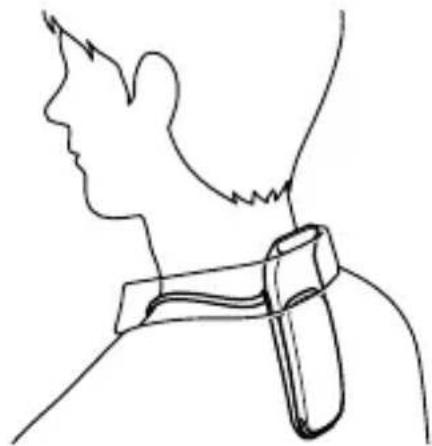
Line drawing of a person's head and neck with a bandage device attached (no text or symbols)Wear the neckband by placing the band around the bottom of your neck so that the cooling/warming section of the unit comes into direct contact with your skin.
At the time of purchase, the air vent cover (long) is attached to the neckband. To divert exhaust from the air vent at the top of the unit, use the long or short type of air vent cover depending on your clothing. (See page 11.)
If you use the unit without the air vent cover, make sure that your clothing does not block the air vent.
To detach the unit from the neckband
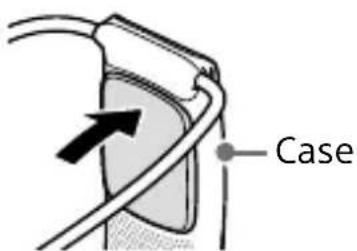
Hold the case of the neckband and push the cooling/warming section of the unit with a small amount of force.
To attach the unit to the neckband, place the bottom part of the unit inside the case of the neckband, and then push the upper part of the unit into the case until it clicks.
Adjusting the band
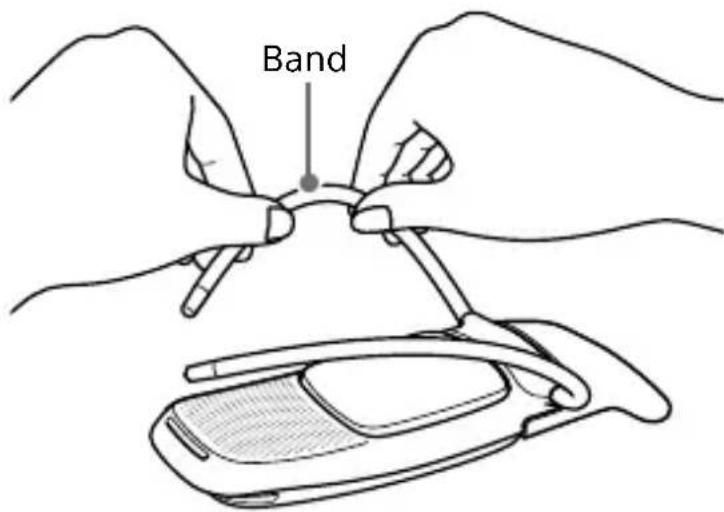
To adjust the band size around your neck, or to improve the contact of the cooling/warming section with your skin, take the neckband off, then adjust the band.
The band can be bent freely. Hold the band and adjust the width and angle with a small amount of force.
EN
Starting cooling or warming
Start cooling ([COOL]) or warming ([WARM]) with the "REON POCKET" app.
Refer to the Help Guide (Web manual) for details on usage and each function. (See page 13.)
- AUTO START/STOP
You can also start/stop cooling/warming automatically without using the app by setting the AUTO START/STOP function. The unit will automatically start cooling/warming when you attach it to your neck and also automatically stop cooling/warming when you remove the unit and place it on a desk, etc.
- QUICK LAUNCH
Without using the app, you can start the same operation that you used the previous time by pressing the button for about 2 seconds. When using this button operation for the first time, cooling operation starts.
To use the unit for a long time
Cooling or warming is possible while the unit is being powered by a USB connection with a portable battery, computer or a USB AC adaptor. (The built-in battery of the unit is not charged during cooling or warming.)

Be sure to use a portable battery or a USB AC adaptor that has an overcurrent protection function.
Using the air vent cover
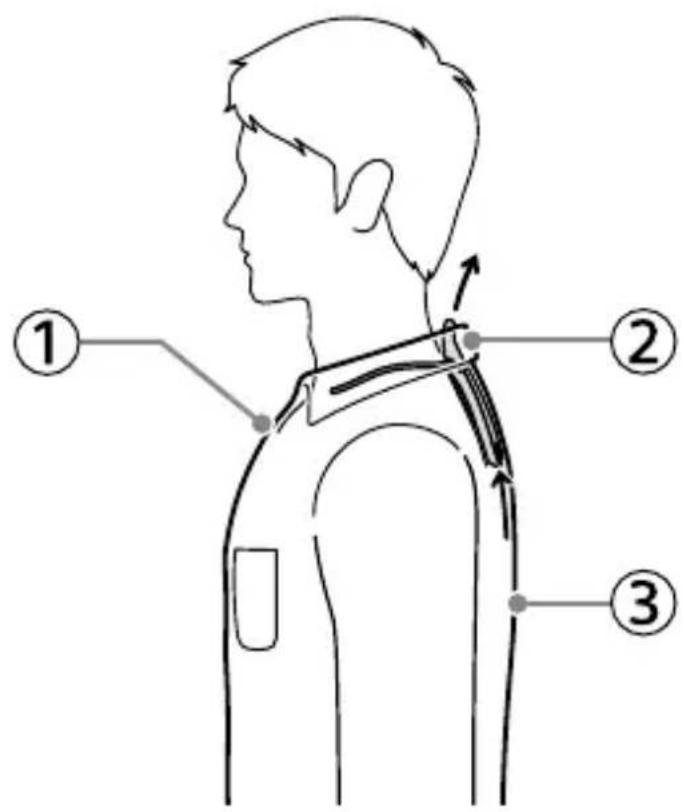
Use the air vent cover to divert exhaust from the air vent at the top of the unit. The long type is suitable for collared shirts, and the short type is suitable for T-shirts and so on.
To detach the air vent cover
Hold the air vent cover and detach it.
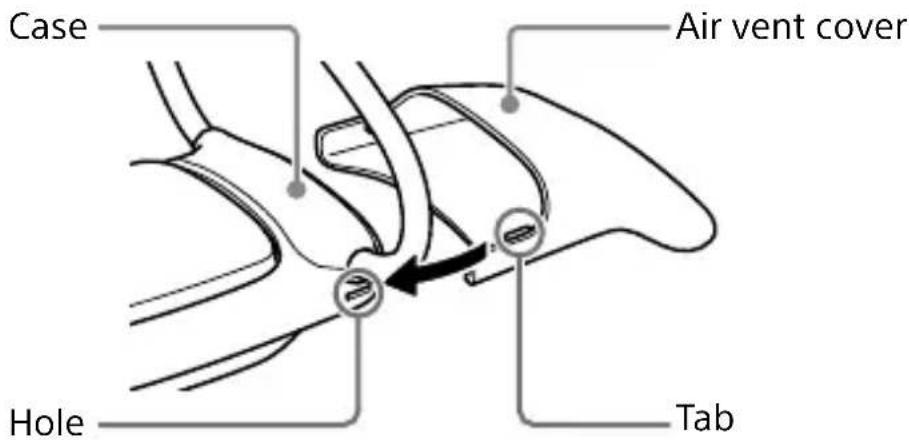
To attach the air vent cover
① Hook one of the tabs inside the air vent cover into the hole under the base of the band.
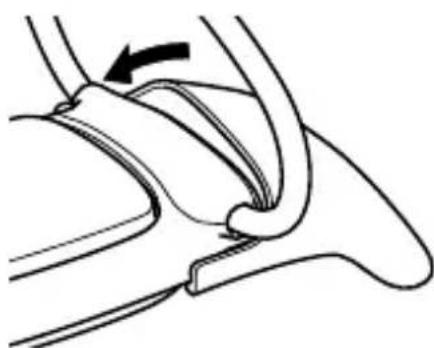
EN
② Hook the other tab on the opposite side to the case and push in the air vent cover.
natural_image
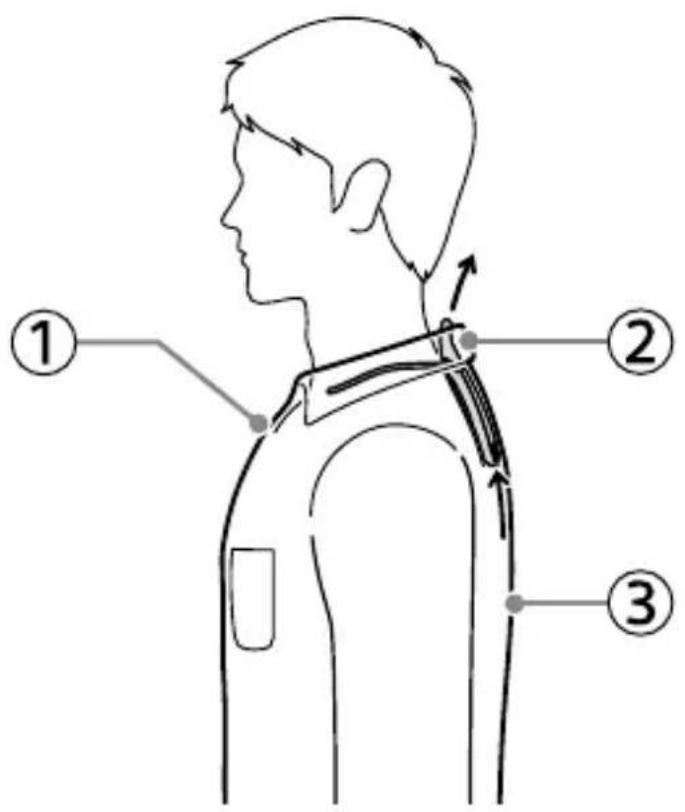
Diagram of a medical or anatomical procedure showing a curved structure with an arrow indicating direction (no text or labels)Recommended use when the unit is set to [COOL]
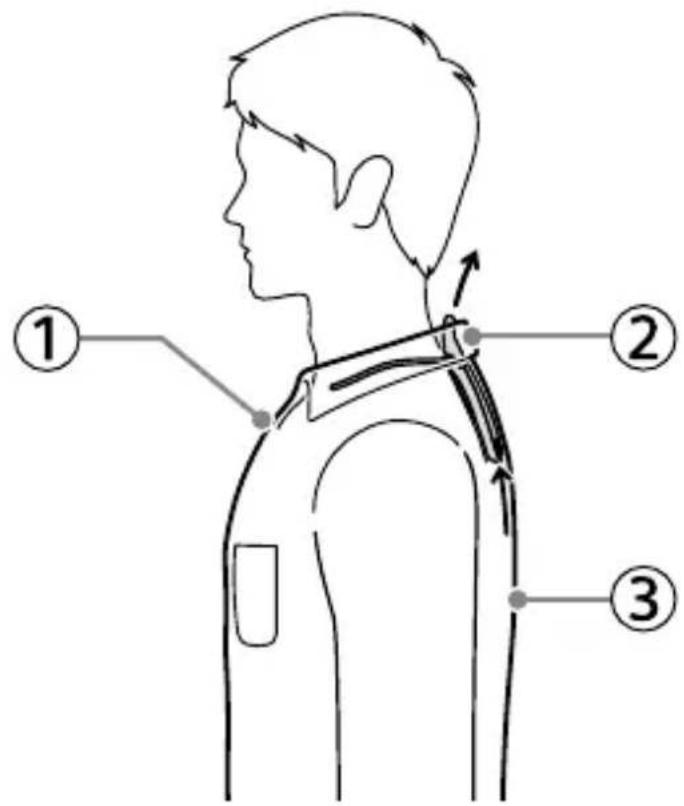
① Be sure to create adequate room around your neck by taking off your tie, opening the top button of your shirt, etc. This will improve air flow from the air vent.
② Attach the air vent cover to the neckband to divert exhaust from the air vent at the top of the unit. The long type is suitable for collared shirts, and the short type is suitable for T-shirts and so on.
If you use the unit without the air vent cover, make sure that your clothing does not block the air vent.
③ Wear breathable and loose-fitting clothing. Also, wear white or other light-colored clothing that absorbs less heat from the sun than dark clothing.
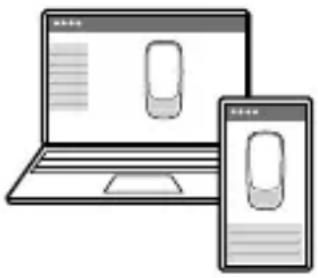
Using the Help Guide (Web manual) for detailed instructions
The "Help Guide" is an instruction manual provided on the Internet. It explains how to use the REON POCKET in detail. Use a smartphone or computer to view the Help Guide.
natural_image
Illustration of a laptop and smartphone displaying a mobile phone interface (no text or symbols visible)https://rd1.sony.net/help/reonpocket/rnpk5/h_zz/
EN
Checking frequently asked questions and update information
For frequently asked questions and update information, refer to the REON POCKET support site.
REON POCKET support site
https://reonpocket.sony.com/support/rnpk-5/
When the LED flashes in red
The unit is temporarily unable to operate due to the temperature inside being too hot. For details, refer to the Help Guide (Web manual).
When the unit cannot be operated or charged
When you cannot operate or charge the unit, or if an abnormality occurs, press and hold the button on the unit for about 15 seconds to reset the unit.
Safety Information
For Customers in Europe
Notice for customers: the following information is only applicable to equipment sold in countries/regions applying EU directives and/or UK applying relevant statutory requirements.
This product has been manufactured by or on behalf of Sony Thermo Technology Inc.
EU and UK Importer: Sony Europe B.V. Inquiries to the EU Importer or related to product compliance in Europe should be sent to the manufacturer's authorized representative, Sony Belgium, bijkantoor van Sony Europe B.V., Da Vincilaan 7-D1, 1930 Zaventem, Belgium.
sony.com/country
Inquiries to the UK Importer or related to product compliance in the UK should be sent to the manufacturer's authorized representative, Sony Europe B.V., The Heights, Brooklands, Weybridge, Surrey KT13 0XW, United Kingdom.
Hereby, Sony Thermo Technology Inc. declares that this equipment is in compliance with Directive 2014/53/EU.
The full text of the EU declaration of conformity is available at the following internet address:
https://compliance.sony.eu
CE
Hereby, Sony Thermo Technology Inc. declares that this equipment is in compliance with the UK relevant statutory requirements. The full text of the declaration of conformity is available at the following internet address:
https://compliance.sony.co.uk

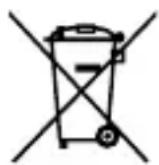
Disposal of waste batteries and electrical and electronic equipment (applicable in the European Union and other countries with separate collection systems)
This symbol on the product, the battery or on the packaging indicates that the product and the battery shall not be treated as household waste. On certain batteries this symbol might be used in combination with a chemical symbol. The chemical symbol for lead (Pb) is added if the battery contains more than 0.004% lead. By ensuring that these products and batteries are disposed of correctly, you will help to prevent potentially negative consequences for the environment and human health which could be caused by inappropriate waste handling. The recycling of the materials will help to conserve natural resources. In case of products that for safety, performance or data integrity reasons require a permanent connection with an incorporated battery, this battery should be replaced by qualified service staff only. To ensure that the battery and the electrical and electronic equipment will be treated properly, hand over these products at end-of-life to the appropriate collection point for the recycling of electrical and electronic equipment. For all other batteries, please view the section on how to remove the battery from the product safely. Hand the battery over to the appropriate collection point for the recycling of waste batteries.
For more detailed information about recycling of this product or battery, please contact your local Civic Office, your household waste disposal service or the shop where you purchased the product or battery.
The validity of the CE marking is restricted to only those countries/regions where it is legally enforced, mainly in the EEA (European Economic Area) countries/regions and Switzerland.
The validity of the UKCA marking is restricted to only those countries/regions where it is legally enforced, mainly in the UK.
For Customers in Singapore
Complies with IMDA Standards DB00353
If odor, overheating, discoloration, or deformation is detected during use, battery charge, or storage, immediately follow the instructions below:
① If you are charging the unit, disconnect the USB Type-C® cable.
② Contact the Sony Authorised Service Centre.
The nameplate and important information concerning safety are attached in the following location: The underside of the cooling/warming section.
Do not expose the batteries (battery pack or batteries installed) to excessive heat, such as sunshine, fire or the like, for a long time.
Do not subject the batteries to extreme low temperature conditions that may result in overheating and thermal runaway.
Do not subject the battery to extremely low air pressure that may result in an explosion or the leakage of flammable liquid or gas.
Do not dismantle, open, or shred secondary cells or batteries.
Secondary cells and batteries need to be charged before use. Always refer to the manufacturer's instructions or product manual for proper charging instructions.
After extended periods of storage, it may be necessary to charge and discharge the cells or batteries several times to obtain maximum performance.
Dispose of properly.
Caution
- Do not throw the unit into fire or apply heat.
- Do not use the unit when it is wet.
- Use only the supplied USB cable for charging.
- Do not cover or wrap the unit with cloth or bedding while charging.
- Do not disassemble or modify the unit.
- If water or foreign objects get inside the unit, disconnect the USB Type-C® cable immediately.
-
Do not use the unit in a high-temperature environment. Doing so may cause fire, ignition, or smoking. Avoid using the unit in a location where the ambient temperature exceeds 40irc C or where the unit is exposed to direct sunlight.
-
Do not let conductive foreign objects (pieces of metal, pencil lead, etc.) come into contact with the USB port, and do not allow dust to enter the USB port. Doing so may cause fire, burns, injury, or electric shock.
- Do not let any foreign objects enter the USB port of this unit. Doing so may cause a malfunction or failure due to short circuit of the USB port.
- When disposing of this unit, do not mix it with general waste. This unit contains a lithium-ion rechargeable battery that may cause fluid leakage, overheating, fire or explosion if the unit is subject to shock or pressure during garbage collection.
- Wireless functions are incorporated into the unit. Radio waves may affect the operation of other devices. When using the unit on an airplane, follow the instructions of the cabin crew. Do not use the wireless function in the following locations.
- near automatically-controlled equipment such as automatic doors or fire alarms - near medical equipment
- Do not place this product close to medical devices. This product has magnet(s) which may interfere with pacemakers, programmable shunt valves for hydrocephalus treatment, or other medical devices. Do not place this product close to persons who use such medical devices. Consult your doctor before using this product if you use any such medical device.
- Do not use the unit if it is damaged. Doing so may cause injury. If the unit is damaged, stop using the unit immediately and contact the Sony Authorised Service Centre.
On placement
- Keep the unit out of the reach of babies and small children.
- Do not place the unit in a humid place such as bathroom, or in a dusty place.
- Place the unit on a stable surface. If the unit is placed on an unsteady table or inclined surface, it may fall and cause injury. Also, make sure that such place is strong enough to support the unit.
- Do not place the unit in locations subject to high temperatures (e.g. by a fire, near a heater, in direct sunlight, in a car in the hot sun).
On your health
The use of the unit might cause itching, rashes, eczema, or other symptoms depending on the user's physical condition. If abnormalities are developed by using the unit, immediately stop using and receive medical treatment.
If the rechargeable battery leaks
Do not touch the leakage with bare hands. Consult the Sony Authorised Service Centre if the battery has leaked as battery liquid may remain in the unit. If the liquid gets into your eyes, do not rub your eyes as this may lead to blindness. Wash out your eyes with clean water and consult a doctor.
If the liquid gets onto your body or clothes, wash it off immediately. Failure to do so may cause burns or injury. Consult a doctor if you are burned or injured by the liquid from the battery.
Precautions
On the waterproof property
Although this unit is designed to be splash-proof, it does not completely prevent dust and water droplets from entering the unit.
Please do not use the unit in a humid place such as a bathroom, or expose it to rain or other liquids. Note that if trouble is diagnosed as exposure to water or other liquid, repair of the unit may not be covered by warranty or repair may not be possible. Repair, when possible, is not covered by warranty and is carried out at cost.
On handling the unit
- To prevent damage to the neckband when you are using a backpack or a baby carrier sling, be careful not to put the load on the neckband. Also, be careful when you lean against the back of a chair.
- Do not expose the unit to direct sunlight or ultraviolet rays for many hours. It may cause discoloration of the unit.
- Do not subject the unit to strong impact such as dropping it on a floor. Do not drive a nail into the unit, hit it with a hammer, or step on it. Also, do not deform the USB port. Doing so may cause a malfunction.
- Avoid spraying the unit with insect repellent. It may cause deformation or discoloration.
- If the unit is not to be used for a long time, disconnect the USB Type-C® cable, carefully wipe off any perspiration, dirt, or moisture, and store in a proper location, avoiding locations subject to excessively high or low temperatures and high humidity. If a battery with expired service life is left in the unit for a long time, battery leakage may damage the mechanical parts.
On Bluetooth® communications
Microwaves emitting from a Bluetooth device may affect the operation of electronic medical devices. Turn off this unit and other Bluetooth devices in the following locations, as it may cause an accident:
- in hospitals
- near priority seating in trains
- locations where inflammable gas is present
- near automatic doors
- near fire alarms
Note on charging
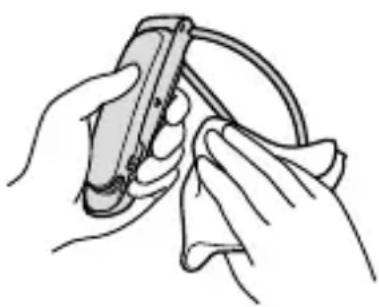
Before charging, make sure that there is no moisture such as sweat on the USB port area or USB cable. If there is moisture on them, wipe it off with a soft, dry cloth, and leave the unit at room temperature to dry before charging.
natural_image
Illustration of hands using a handheld device to clean or manage a cable (no text or symbols visible)To prevent low-temperature burns
Although this product is designed to prevent low-temperature burns, please pay special attention to the following points when using the product.
- Check the condition of your skin about once an hour. If you notice any abnormalities, stop using the unit immediately.
- If the unit feels too hot, stop using it immediately.
- Do not use the unit when sleeping.
- Do not use the unit in bedding or near heaters such as stoves.
- Pay special attention when someone with poor circulation or impaired skin sensation uses the unit.
On cleaning
- Wipe off any dirt gently with a soft cloth. If the unit is very dirty, soak a soft cloth in neutral detergent diluted with water, wring it out hard, wipe off the stain, and then wipe dry with a dry cloth. Do not use alcohol, benzene, thinner, etc.
- Strongly wiping off the unit using a cloth with dust may scratch the surface of the unit.
Specifications
Power source
DC 3.7 V: Built-in lithium-ion rechargeable battery
DC 5 V: When charged using USB
Operating temperature range
5irc C-40irc C
Dimensions (w/h/d)
Approx. 125 mm × 45 mm × 170 mm (when the unit and the air vent cover (long) are attached to the neckband, including the band)
Approx. 55 mm × 23 mm × 117 mm (unit only)
Mass
Approx. 160 g (when the unit and the air vent cover (long) are attached to the neckband)
Approx. 116 g (unit only)
Communication specification
Communication system:
Bluetooth 5.0 Low Energy
Output:
Bluetooth Specification Power Class 2
Frequency band:
2.4 GHz band (2.4000 GHz - 2.4835 GHz)
External interface
USB Type-C®
System requirements for battery charge using USB
USB AC adaptor
A commercially available USB AC adaptor capable of supplying an output current of 1 A (1 000 mA) or more
Eco and energy saving
Power consumption (Off mode):
Not available
Power consumption (Standby mode/Low power mode):
0.5 W
Power consumption (Networked standby mode):
2.0 W (Bluetooth)
Low power mode activated:
Not available
Networked standby mode activated:
Within 5 seconds (default)
How to turn on or off the Bluetooth function
To turn off the Bluetooth function, press and hold the button on the unit for about 15 seconds.
To turn on the Bluetooth function, press the button on the unit.
Supported operating systems
Check the following support page for supported operating systems.
https://reonpocket.sony.com/support/rnpk-5/device.html
Design and specifications are subject to change without notice.
Trademarks and copyrights
- REON POCKET is a trademark or registered trademark of Sony Thermo Technology Inc.
- The Bluetooth® word mark and logos are registered trademarks owned by Bluetooth SIG, Inc. and any use of such marks by Sony Group Corporation and its subsidiaries is under license.
- Google Play and Google Play logo are trademarks of Google LLC.
- App Store is a service mark of Apple Inc.
- USB Type-C® and USB-C® are registered trademarks of USB Implementers Forum.
- System and/or product names mentioned in this document are, in general, registered trademarks or trademarks of their respective developers and the “TM” and “®” marks are omitted in the text. Furthermore, any copyrights not explicitly mentioned in this document are the property of their respective owners.
Notes on the License
This product contains software that Sony uses under a licensing agreement with the owner of its copyright. We are obligated to announce the contents of the agreement to customers under requirement by the owner of copyright for the software.
Please access the following URL and read the contents of the license.
https://rd1.sony.net/help/reonpocket/rnpk5/h_zz/
EN

https://reonpocket.sony.com/app/download/
FR
natural_image
Line drawing of a person's head and neck with a bandage device attached (no text or symbols)natural_image
Diagram of a medical or anatomical procedure showing a curved tube with an arrow indicating direction (no text or labels)natural_image
Illustration of a laptop and smartphone displaying a mobile phone interface (no text or symbols visible)https://rd1.sony.net/help/reonpocket/rnpk5/h_zz/
https://compliance.sony.eu
Précautions relatives aux communications Bluetooth®
natural_image
Illustration of hands cleaning a cable or wire (no text or symbols)Bluetooth 5.0 Low Energy
Bluetooth Specification Power Class 2
https://rd1.sony.net/help/reonpocket/rnpk5/h_zz/

https://reonpocket.sony.com/app/download/
DE
natural_image
Line drawing of a person's head and neck with a bandage device attached (no text or symbols)natural_image
Diagram of a mechanical or anatomical structure with curved and straight lines, no visible text or symbolsnatural_image
Illustration of a laptop and smartphone displaying a mobile phone interface (no text or symbols visible)https://rd1.sony.net/help/reonpocket/rnpk5/h_zz/
natural_image
Illustration of hands using a handheld device to clean or manage a cable (no text or symbols visible)Bluetooth 5.0 Low Energy
Ausgabe:

https://reonpocket.sony.com/app/download/
ES
natural_image
Line drawing of a person's head and neck with a bandage device attached (no text or symbols)natural_image
Diagram of a mechanical component with curved and straight lines, no visible text or symbolsnatural_image
Illustration of a laptop and smartphone displaying a mobile phone interface (no text or symbols visible)https://rd1.sony.net/help/reonpocket/rnpk5/h_zz/
natural_image
Illustration of hands using a tool to clean or adjust a cable (no text or symbols visible)(2,4000 GHz - 2,4835 GHz)
Interfaz externa
USB Type-C®
https://rd1.sony.net/help/reonpocket/rnpk5/h_zz/
ES
Note sull'utilizzo

https://reonpocket.sony.com/app/download/
natural_image
Line drawing of a person's head and neck with a bandage device attached (no text or symbols)natural_image
Diagram of a medical or anatomical procedure showing a curved structure with an arrow indicating direction (no text or labels)natural_image
Illustration of a laptop and smartphone displaying two devices (no text or symbols visible)https://rd1.sony.net/help/reonpocket/rnpk5/h_zz/
natural_image
Illustration of hands cleaning a cable or wire (no text or symbols)Bluetooth 5.0 Low Energy
Uscita:
(2,4000 GHz - 2,4835 GHz)
Interfaccia esterna
USB Type-C®

https://reonpocket.sony.com/app/download/
natural_image
Line drawing of a person's head and neck with a bandage device attached (no text or symbols)natural_image
Diagram of a medical procedure showing a curved tube being inserted into a device (no text or labels)裝置設定為 [COOL] 時的建議用法
natural_image
Illustration of a laptop and smartphone displaying a stylized object (no text or symbols present)https://rd1.sony.net/help/reonpocket/rnpk5/h_zz/
查閱常見問題和最新資訊
如果LED燈亮起紅燈
natural_image
Illustration of hands using a handheld device to clean or manage a cable (no text or symbols visible)如何避免低溫燙傷
https://rd1.sony.net/help/reonpocket/rnpk5/h_zz/
CT
사용 관련 공지 사항
https://reonpocket.sony.com/support/warranty/

https://reonpocket.sony.com/app/download/
natural_image
Line drawing of a person's head and neck with a bandage device attached (no text or symbols)natural_image
Diagram of a mechanical or anatomical structure with curved and straight lines, no visible text or symbolsnatural_image
Illustration of a laptop and smartphone displaying a stylized object (no text or symbols present)https://rd1.sony.net/help/reonpocket/rnpk5/h_zz/
LED가 적색으로 깜박이는 경우
natural_image
Illustration of hands cleaning a cable with a handheld device (no text or symbols)저온 화상을 방지하려면
https://rd1.sony.net/help/reonpocket/rnpk5/h_zz/
KR
- [COOL]でのおすすめの使いかた
- LEDが赤く点滅した場合は
- 低温やけど防止のために
- 出力:
- 使用周波数带域:
- 外部インタフェース
- USB充電の推奨環境
- 推奨のUSB ACアダプター
- 市販のUSB ACアダプター
- 商標について
- Notice on heat stroke
- Checking the package contents
- Identifying parts
- Charging
- To check the battery level
- Installing the app on the smartphone and performing the initial setup
- Wearing the unit
- Wear the neckband by placing the band around the bottom of your neck so that the cooling/warming section of the unit comes into direct contact with your skin.
- To detach the unit from the neckband
- Adjusting the band
- Starting cooling or warming
- - AUTO START/STOP
- - QUICK LAUNCH
- To use the unit for a long time
- Using the air vent cover
- To detach the air vent cover
- To attach the air vent cover
- Recommended use when the unit is set to [COOL]
- Using the Help Guide (Web manual) for detailed instructions
- Checking frequently asked questions and update information
- REON POCKET support site
- When the LED flashes in red
- When the unit cannot be operated or charged
- Safety Information
- For Customers in Europe
- CE
- For Customers in Singapore
- Caution
- On placement
- On your health
- If the rechargeable battery leaks
- Precautions
- On the waterproof property
- On handling the unit
- On Bluetooth® communications
- Note on charging
- To prevent low-temperature burns
- On cleaning
- Specifications
- Power source
- Operating temperature range
- Dimensions (w/h/d)
- Mass
- Communication specification
- External interface
- System requirements for battery charge using USB
- Eco and energy saving
- Power consumption (Off mode):
- Power consumption (Standby mode/Low power mode):
- Power consumption (Networked standby mode):
- Low power mode activated:
- Networked standby mode activated:
- How to turn on or off the Bluetooth function
- Supported operating systems
- Trademarks and copyrights
- Notes on the License
- Précautions relatives aux communications Bluetooth®
- Ausgabe:
- Interfaz externa
- Note sull'utilizzo
- Uscita:
- Interfaccia esterna
- 裝置設定為 [COOL] 時的建議用法
- 查閱常見問題和最新資訊
- 如何避免低溫燙傷
- 사용 관련 공지 사항
- 저온 화상을 방지하려면
Brand : SONY
Model : REON POCKET RNPK-5
Category : Portable heater