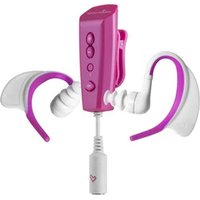
Aquatic 2 - Mp3 player ENERGY SISTEM - Free user manual and instructions
Find the device manual for free Aquatic 2 ENERGY SISTEM in PDF.


User questions about Aquatic 2 ENERGY SISTEM
0 question about this device. Answer the ones you know or ask your own.
Ask a new question about this device
Download the instructions for your Mp3 player in PDF format for free! Find your manual Aquatic 2 - ENERGY SISTEM and take your electronic device back in hand. On this page are published all the documents necessary for the use of your device. Aquatic 2 by ENERGY SISTEM.
USER MANUAL Aquatic 2 ENERGY SISTEM
the heart of your music
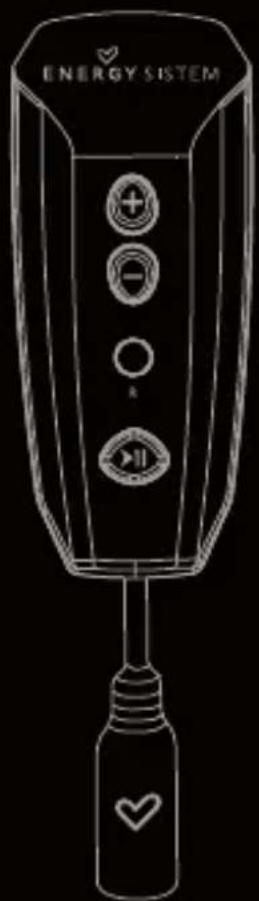
Energy Sistem™ Energy MP3 Aquatic 2 series.
Brazalete de neopreno
▶ Auriculares acuáticos Hi-Fi.
ALIMENTACIÓN
natural_image
3D rendered image of a handheld device with a 360° angle annotation and directional arrows (no text or symbols on the device itself)Energy Sistem™ Energy MP3 Aquatic 2 series
Energy Sistem™ thanks you for buying your new MP3 Energy. We wish you enjoy using it. This compact music player allows you to enjoy your favorite music into aquatic environments, and it is submergible up to 3 meters deep, for up to 3 hours.
We recommend that you fully read this user manual in order to enjoy the product in a safe way and with the best results.
CARE AND MAINTENANCE
- Do not expose your MP3 Energy™ to violent shakes, prolonged direct sunlight or extreme temperatures.
▶ Do not use abrasive or corrosive cleansers.
▶After each use, clean the device of chlorine and sea water with fresh water and a dry cloth.
▶Recharge the battery when depleted or when the LED indicator blinks faster than usual.
Do not disassemble the device. Any repairs must be performed by qualified Energy Sistem Soyntec's personnel
MAIN FEATURES
Plays MP3 / WMA music.
Hydrodynamic and isolated Hi-Fi aquatic earphones.
Sequential and random playback modes.
▶ Rechargeable Li-Ion Battery.
▶ Upgradeable firmware.
▶ No drivers needed.
PRODUCT CONTENT
Energy Sistem™ Energy MP3 Aquatic 2 Series.
▶ Hi-Fi aquatic earphones.
USB 2.0 cable for charging and PC
connection.
▶ User manual.
▶ Neoprene armband.
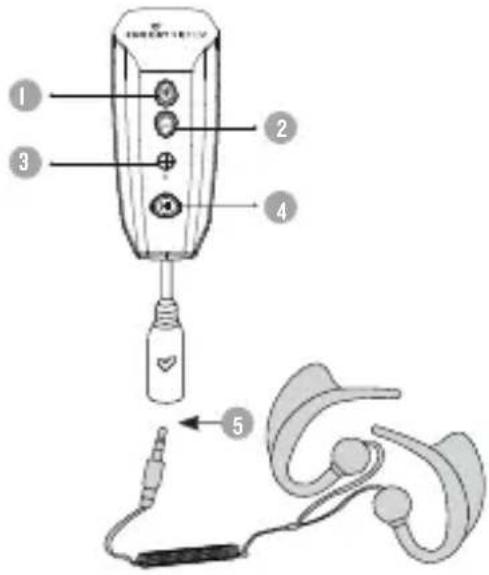
GENERAL OVERVIEW
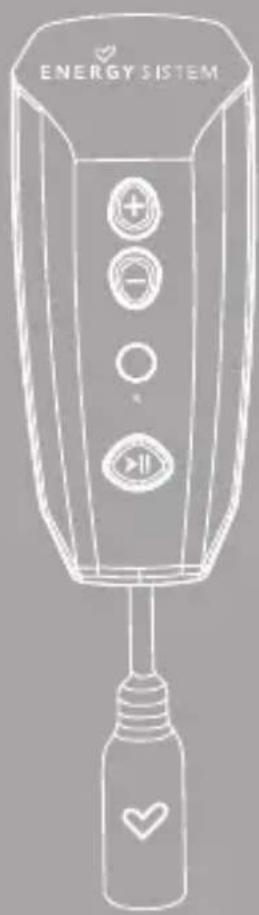
- BUTTON +: Increase volume / Next song
- BUTTON -: Decrease volume / Previous song..
- Reset switch.
- PLAY: Playback / Pause / On-Off.
- Earphones connector / USB 2.0 connector
BATTERY
Your MP3 Energy has an integrated rechargeable Li-Ion battery. It comes fully charged from factory, but it is recommended to perform a full recharge before the first use. Recharge the battery connecting the player to a computer using the bundled USB 2.0 cable. Optionally you can recharge the battery with an AC/DC adaptor with a type mini-B 5 pin USB connector.
Important: Always connect first the USB cable to the earphones connector, and then the USB connector to the computer or USB charger in order to avoid shortcircuits chances. It's also advisable to connect the player while powered off.
During the charge, the PLAY button LED light will blink. Charging time is between 2 and 3 hours. To keep the battery in good conditions, we recommend not leaving the player charging for more than 8 hours. Your MP3 Energy optimizes battery usage but turning off the player after 5 minutes idle.
POWER ON / OFF
To power on your MP3 Energy press PLAY for a few seconds until the LED light turns on. Note: When powering on, the device performs a memory check. The power on time depends on the total amount of memory and the current amount of used memory. Press PLAY for a few seconds to power off the device while it is on. At that moment, the device will save your current playback position.
Note: If you power off the device directly with the reset button, your last changes regarding playback song and position will be lost.
Your MP3 Energy allows you to enjoy MP3 / WMA codified music due to its high fidelity sound processor. To start, resume or pause the music playback press the PLAY button. Pressing briefly the BUTTON +/- you will access the next / previous music track. Holding the BUTTON +/- you can set the volume up/down respectively. You can switch between sequential and random playback by pushing both BUTTON + and - at the same time.
AQUATIC EARPhONES
This MP3 Energy player comes bundled with one pair of in-ear Hi-Fi waterproof earphones, so you can enjoy your favorite music with the maximum audio quality even underwater, and with the freedom of movement required for watersports. First you must set the arc piece around your ear, then insert totally the earphone so the water can not get inside while swimming or diving. The earphones have engraved the L and R letters to mark the left and right ear earphone respectively.
BACKCLIP
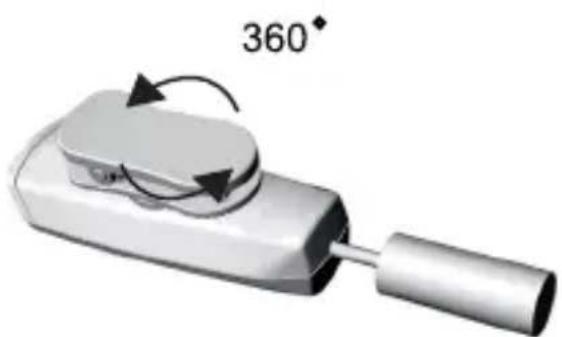
The backclip of your MP3 Energy can rotate 360°. This allows you to always have the best access to the player controls and the best position for the earphones connector so its cable does not tangle. You can clip the player to your clothing such as the swimming suit, the swimming googles, the scuba glasses or to the bundled neoprene armband.
natural_image
3D rendered image of a handheld device with a handle and circular arrow indicating 360° rotation (no text or symbols on the device itself)FIRMWARE REINSTALLATION
Your MP3 Energy™ has an installed operating system, usually called firmware, which sometimes needs to be reinstalled. The process is easy, but has to be performed carefully, and only when it is really necessary. If you see that the player halts, reboots randomly, or you have problems to access the memory content from your computer, then try pressing the RESET button with a needle or clip. If the problem persists then the firmware might be damaged and you should reinstall the latest version available.
To reinstall the firmware, access manually from a web browser to www.energysistem.com. Select your model at the products section and download the latest version available from the download zone. Uncompress the file in your computer and follow the included instructions in PDF format.
PC CONNECTION
In order to enjoy the best sound for your favorite music with your MP3 Energy, you have to first copy the music files from your PC to its internal memory.
Connect your player to a free USB port of your computer using the USB connector. The device will be detected automatically without installing any driver. Once detected, you can read/write to the device's memory just as if you where using a regular disk drive.
After all the data is transferred, disconnect the player from the computer.
Important: To avoid any data loss, always perform a safe USB device extraction before disconnecting the USB cable from the device of the PC. In Windows XP, for example, you can find the safe extraction icon in the task bar, next to the system clock.
Important: Always connect first the USB cable to the earphones connector, and then the USB connector to the computer or USB charger in order to avoid shortcircuits chances. It's also advisable to connect the player while powered off.

WARRANTY
Energy Sistem Soyntec S.A. is liable for any lack of conformity which exists at the time the goods were purchased during a period of 36 months. Batteries are excluded from the 36-month warranty, having a warranty period of 12 months.
This warranty covers any defects in workmanship or materials. This warranty doesn't cover any failure of the product due to accidents, misuse or alteration made by an unauthorized person. The special 36-months warranty is valid for the European Union. For other countries, please refer to your specific legislation or your local distributor.
WARRANTY PROCEDURE
- Visit the Support section at http://support.energysistem.com and select your product to view the FAQ (Frequently Asked Questions). The solution to your problem is very likely to have been already published there. You will also be able to download user manuals, user guides, drivers and updates. You can check the availability of the user manual in your language at http://www.energysistem.com/en-en/support/manuals
- Alternatively, you may prefer to contact the distributor from which you purchased the product, presenting the purchase receipt or invoice.
Important: This warranty doesn't cover any damage or loss to any data stored in the product memory, therefore Energy Sistem™'s Technical Service will not assume any loss of the above mentioned information so it is recommended to make a backup of your data and to remove any data or personal info from its internal memory before you send the product, or to send it only with the original factory default values.
Specifications are subject to change without notice.
Trademarks. All company, brand and product names are trademarks or registered trademarks of their respective companies.
© 2013 by Energy Sistem Soyntec S.A. All rights reserved.
CE
DECLARATION OF CONFORMITY
Manufacturer Name: Energy Sistem Soyntec S.A
29/05/2013
Address: Pol. Ind. Finestrat, C/.Calpe, I - 03509, Finestrat, Alicante (Spain)
Tel: 902 388 388
Fax: 902119034
NIF: A53107488
We declare under our own exclusive responsibility that the product:
Energy Sistem™ EnergyMP3 Aquatic 2 Series
Is in compliance with the essential norms and standards of the Directive 2004/108/EC of the European Parliament and of the Council of December 15th 2004.
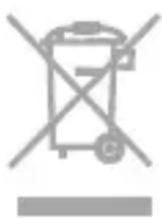
This symbol on the product or the instructions means that your electrical and electronic equipment should be disposed at the end of life separately from your household waste. For more information, please contact the local authority or dealer where you purchased the product.
ChARGEMENT
natural_image
3D rendered image of a handheld device with a 360° angle annotation and directional arrows indicating rotation (no text or symbols on the device itself)RÉINSTALLATION DU FIRMWARE
CONDITIONS DE GARANTIE
Energy Sistem™ Energy MP3 Aquatic 2 series
CARREGAMENTO
DECLARATION OF CONFORMITY
Nome do Fabricante: Energy Sistem Soyntec S.A.
29/05/2013
Energy Sistem™ Energy MP3 Aquatic 2 series
natural_image
Simple heart-shaped outline on black background (no text or symbols)www.energysistem.com