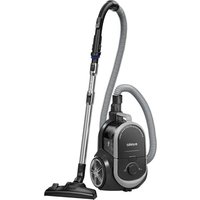
NEN180 - Vacuum Cleaner EUREKA - Free user manual and instructions
Find the device manual for free NEN180 EUREKA in PDF.

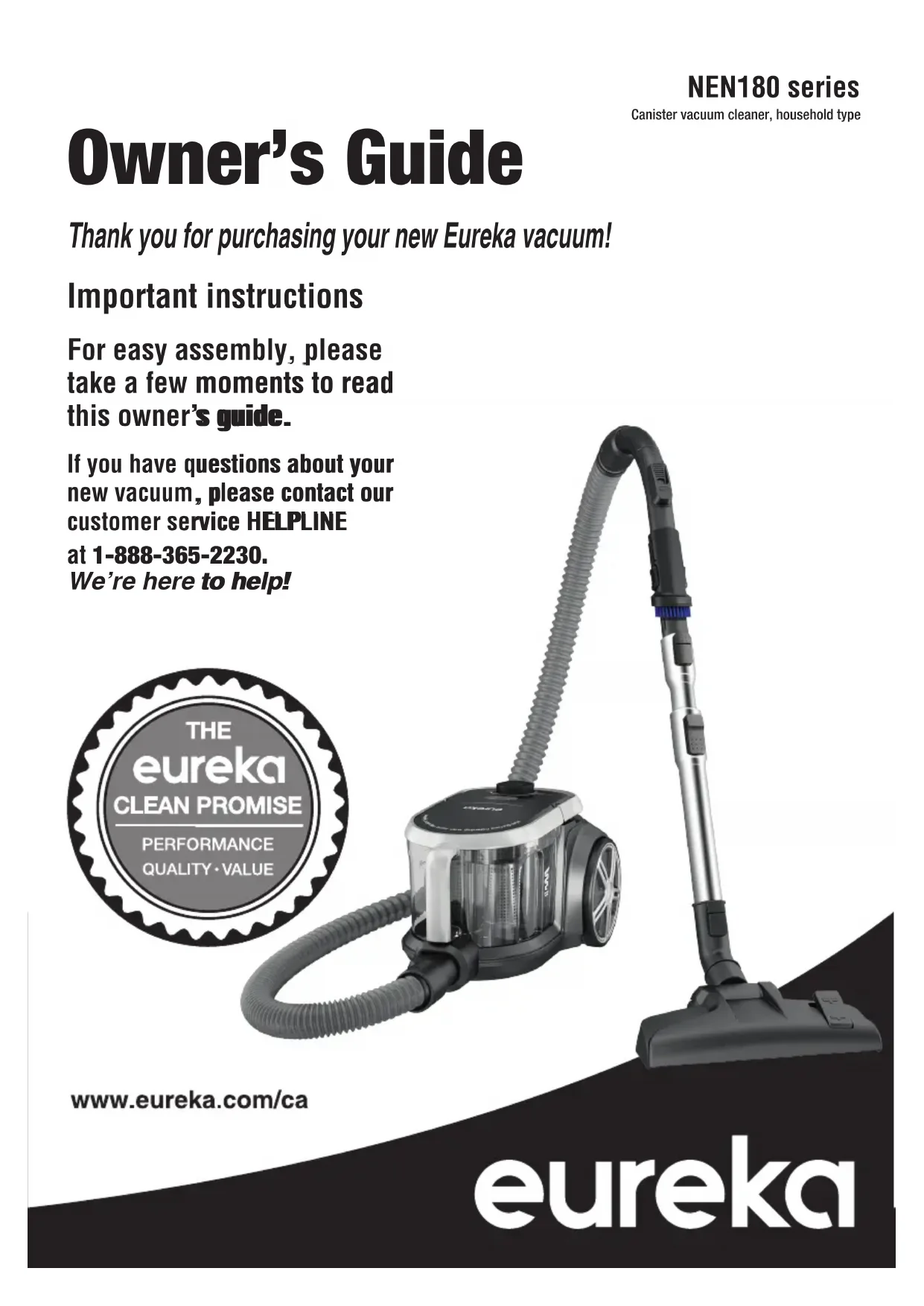

| Product Type | Canister Vacuum |
| Brand | Eureka |
| Model | NEN180 |
| Power Supply | 120 V, 60 Hz |
| Main Filter | Washable HEPA Filter |
| Pre-Motor Filter | Washable Foam Filter |
| Dust Cup Capacity | Clear dust cup with max fill line |
| Cord Length | Cord rewinder (yellow and red markers) |
| Suction Control | Suction control button on handle |
| Nozzle Adjustment | Carpet/hard floor selection by pedal |
| Included Accessories | Floor nozzle, telescopic tube, hose, crevice tool, upholstery tool, pet tool |
| Safety Feature | Thermal cut-off with 30-minute cool down |
| Warranty | 3-year limited |
| Customer Service | 1-888-365-2230 (Canada) |
| Website | www.eureka.com/ca |
| Available Replacement Parts | HEPA filter (12175000095362), floor nozzle (12175000095759), crevice tool (12175000001261), upholstery tool (12175000003755), pet tool (12175000095406) |
Frequently Asked Questions - NEN180 EUREKA
User questions about NEN180 EUREKA
0 question about this device. Answer the ones you know or ask your own.
Ask a new question about this device
Download the instructions for your Vacuum Cleaner in PDF format for free! Find your manual NEN180 - EUREKA and take your electronic device back in hand. On this page are published all the documents necessary for the use of your device. NEN180 by EUREKA.
USER MANUAL NEN180 EUREKA
Thank you for purchasing your new Eureka vacuum!
Important instructions
For easy assembly, please take a few moments to read this owner's guide.
If you have questions about your new vacuum, please contact our customer service HELPLINE
at 1-888-365-2230.
We're here to help!
text_image
THE eureka CLEAN PROMISE PERFORMANCE QUALITY·VALUEwww.eureka.com/ca
eureka
Where to find important vacuum information
Please Retain
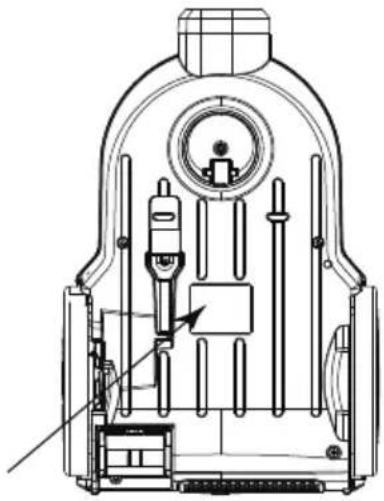
We suggest you record the model, type and serial numbers below. They are located on the bottom of your cleaner. For prompt and complete service information, always refer to these numbers when inquiring about service.
Model & Type
Serial No. ____
It is also important to keep your receipt as proof of date of purchase.
natural_image
Technical line drawing of a mechanical device with internal components and no visible text or symbolsThis Owner's Guide provides important instructions to prolong the life of your Eureka vacuum cleaner.
Registration: To register your product visit http://www.eureka.com/ca and click on the 'Register Your Product' link in the top right corner.
Inspection: Carefully unpack and inspect your new Eureka vacuum cleaner for shipping damage. Each unit is tested and thoroughly inspected before shipping. For instructions regarding any shipping damage, call Eureka Customer Service HELPLINE 1-888-365-2230 immediately.
Contents
Important safeguards .... 3
How to identify parts of your vacuum cleaner. . . . . . . 4
How to assemble your vacuum cleaner ..... 5
How to use your vacuum cleaner .... 6
How to maintain your vacuum cleaner ..... 7
Problem solving 9
The Eureka limited warranty ..... 11

Follow caution information wherever you see this symbol.
IMPORTANT SAFEGUARDS
When using an electrical appliance, basic precautions should always be followed, including the following:
READ ALL INSTRUCTIONS BEFORE USING THIS VACUUM CLEANER
WARNING

To reduce the risk of fire, electric shock, or injury:
- Do not use outdoors or on wet surfaces.
- Do not leave vacuum cleaner when plugged in. Turn off the switch and unplug the electrical cord when not in use and before servicing.
- Do not allow to be used as a toy. Close attention is necessary when used by or near children.
- Use only as described in this manual. Use only manufacturer's recommended attachments.
- Do not use with damaged cord or plug. If cleaner is not working as it should, has been dropped, damaged, left outdoors, or dropped into water, call the Eureka Customer Service HELPLINE at 1-888-365-2230.
- Do not pull or carry by the cord, use cord as a handle, close door on cord, or pull cord around sharp edges or corners. Do not run vacuum cleaner over cord. Keep cord away from heated surfaces.
- Do not use extension cords or outlets with inadequate current carrying capacity.
- Turn off all controls before unplugging.
- Do not unplug by pulling on cord. To unplug, grasp the plug, not the cord.
- Do not handle the vacuum cleaner with wet hands or operate without shoes.
- Do not put any objects into openings. Do not use with any opening blocked; keep free of dust, lint, hair and anything that may reduce airflow.
- This vacuum cleaner creates suction. Keep hair, loose clothing, fingers, and all parts of body away from openings and moving parts.
- Do not pick up anything that is burning or smoking, such as cigarettes, matches, or hot ashes.
- Do not use without dust bag or filter(s) in place.
- Use extra care when cleaning on stairs.
- Do not use to pick up flammable or combustible liquids such as gasoline, or use on areas where they may be present.
- Store your cleaner indoors in a cool, dry area.
- Keep your work area well lit.
- Unplug electrical appliances before vacuuming them.
- Belt pulleys can become hot during normal use. To prevent burns, avoid touching the belt pulley when servicing the drive belt.
- Turn off the power switch and unplug cleaner before rotating the nozzle.
- Hold plug when rewinding onto cord reel. Do not allow plug to whip when rewinding.
- Unplug before connecting accessories, such as pet tool, upholstery tool, etc.
SAVE THESE INSTRUCTIONS
To reduce the risk of electric shock, this appliance has a polarized plug (one blade is wider then the other).
This plug will fit in a polarized outlet only one way. If the plug does not fully fit into the outlet, reverse the plug. If it still does not fit, contact a qualified electrician to install the proper outlet. Do NOT change the plug in any way.
Thermal Cut Off
This vacuum cleaner has a special thermostat that protects the cleaner in case of motor overheating. If the cleaner suddenly shuts off, push the on/off switch off (0) and unplug the cleaner. Check the cleaner for a possible source of overheating such as a full dust bag, a blocked hose or clogged filter. If these conditions are found, fix them and wait at least 30 minutes before attempting to use the cleaner. After the 30 minute period, plug the cleaner back in and push the on/off switch on (1).

Do Not Oil the motor or the brushroll at any time. The bearings are permanently lubricated and sealed.
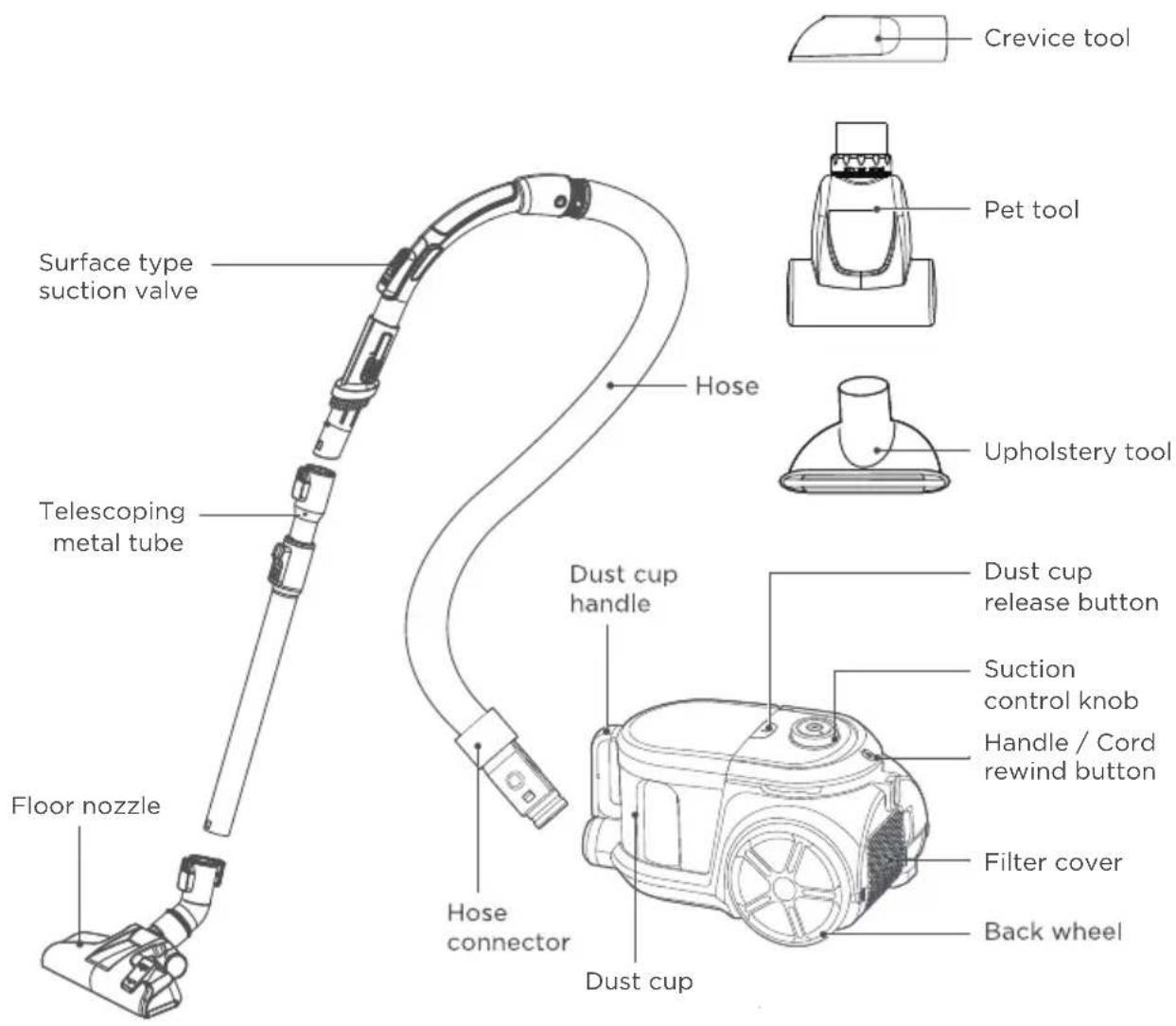
How to identify parts of your vacuum cleaner
text_image
Crevice tool Pet tool Surface type suction valve Telescoping metal tube Hose Upholstery tool Dust cup handle Dust cup release button Suction control knob Handle / Cord rewind button Filter cover Back wheel Floor nozzle Hose connector Dust cupHow to assemble your vacuum cleaner
ASSEMBLY
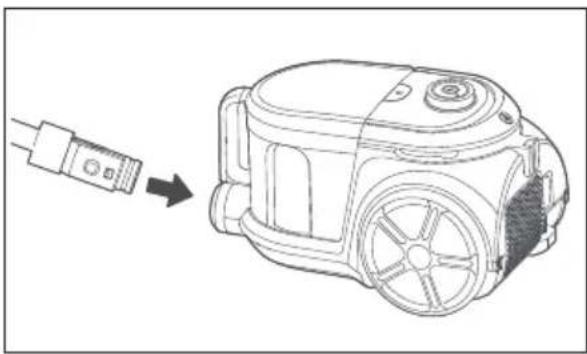
Always disconnect the vacuum cleaner from the electrical socket before attaching or removing accessories.
natural_image
Line drawing of a mechanical device with a cable connector, showing a transformation from a cable to a housing (no text or symbols present)Step 1: Attach the hose to the front of the vacuum cleaner by inserting it into the air inlet until an audible click is heard.
natural_image
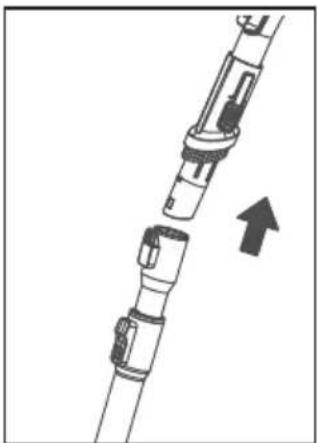
Diagram of a mechanical assembly with a directional arrow indicating movement (no text or symbols present)Step 2: Connect the telescoping metal wand to the hose
Attach the telescoping wand to the hose at the bend by pushing the two components together until an audible click is heard.
natural_image
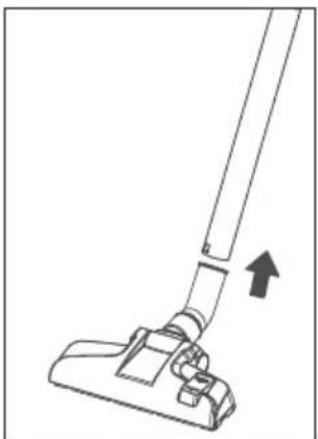
Line drawing of a vacuum cleaner with an arrow indicating motion (no text or symbols)Step 3: Attach the floor nozzle or attachments
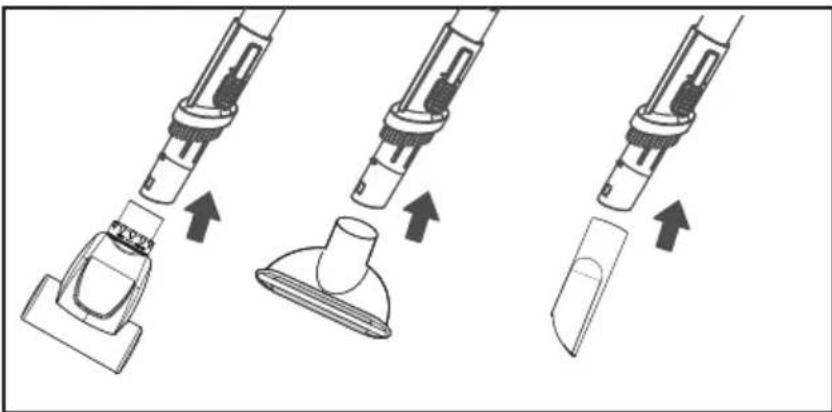
Attach the floor nozzle to the end of the telescoping metal wand and twist into position until you hear an audible click.
When using accessories, remove the nozzle and telescopic metal wand, attach the desired accessory to the hose by inserting it.
natural_image
Three-step diagram showing a vacuum cleaner's internal structure with arrows indicating assembly (no text or symbols)How to use your vacuum cleaner

CAUTION:
Always switch off the vacuum cleaner before connecting or disconnecting the hose/attachments or removing and emptying the dust cup.
Operation
Turn on the machine
-
Pull the power cord out of the vacuum cleaner and stop when you see the yellow mark. Plug the power cord into a power socket that conforms with the label on the power cord.
Note: Make sure the red mark is not visible or you have pulled too far. -
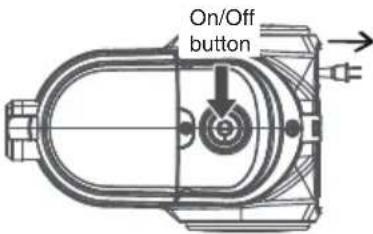
Switch the vacuum cleaner on or off using the On/Off button located on the top of the canister.
text_image
On/Off buttonCord rewind :
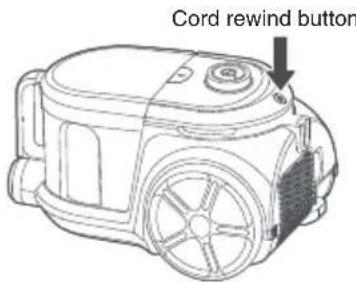
When done cleaning, turn off the power and unplug the cord from the electrical socket. To rewind the cord, press the rewind button and guide the cord with the other hand to maintain control of the cord.
text_image
Cord rewind buttonSwitching between carpet & hard floor
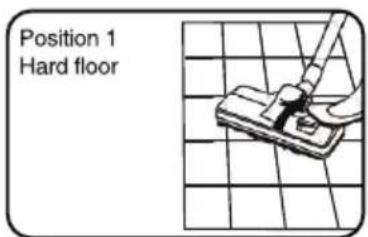
There is a switch located on the floor nozzle that can be pressed with your foot to switch between floor modes. The symbols shown below correspond to the type of floor the setting is for.
Position 1: Bristles extended for hard floor

Position 2: Bristles retracted for carpet

text_image
Position 1 Hard floor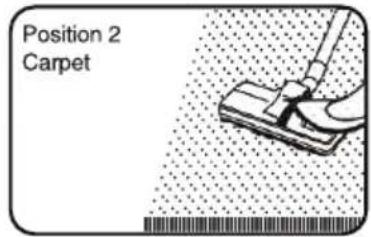
text_image
Position 2 Carpet
CAUTION:
Never operate vacuum without dust cup, filters and filter covers in proper position.
How to maintain your vacuum cleaner

CAUTION:
Always switch off the vacuum and unplug it from the electrical socket before conducting any maintenance or cleaning.
Emptying the dust cup
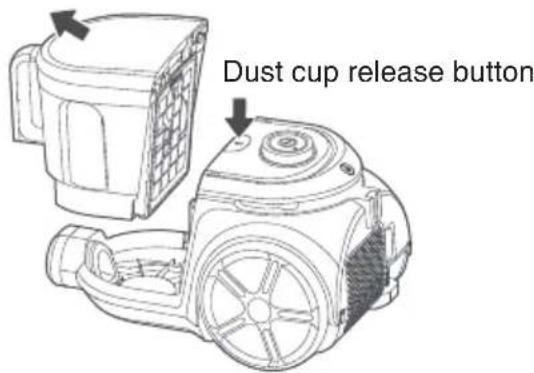
Empty the dust cup after each use or whenever the level of debris goes above the indicated max fill line mark on the side of the dust cup. A full dust cup will reduce the efficiency of the vacuum cleaner so be sure to empty the dust cup regularly.
- Press the dust cup release button and lift the dust cup up off the vacuum.
text_image
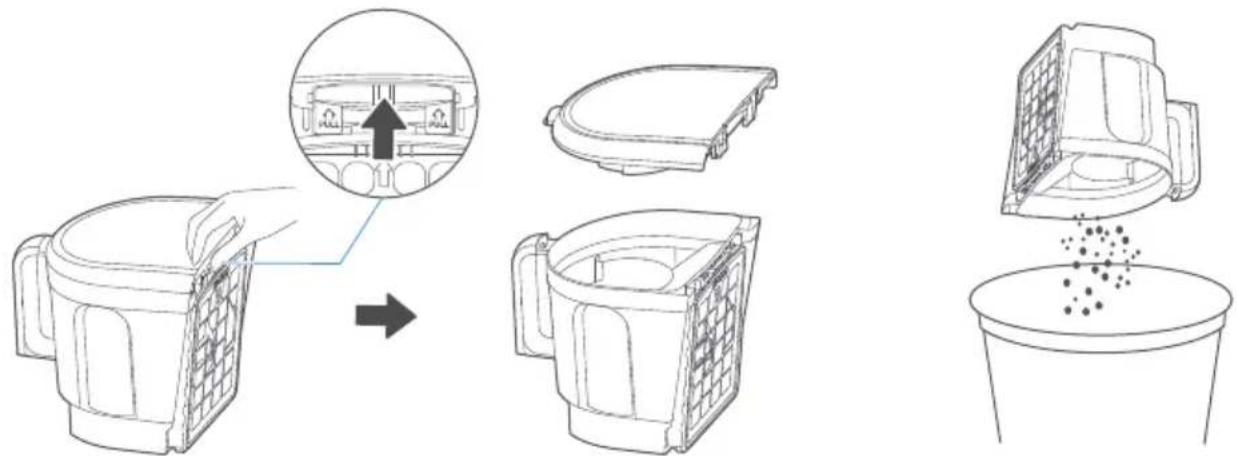
Dust cup release button- Remove the dust cup lid by locating the release button on the backside of the dust cup above the filter and press button up to pull lid off. Turn dust cup upside down to empty into trash bin.
text_image
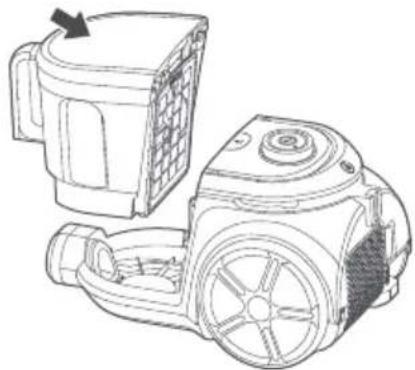
Diagram illustrating the process of cleaning a small container with labeled parts and material distribution.- After dust cup is emptied, place lid back on top of dust cup until an audible click is heard.
natural_image
Technical line drawing of a mechanical device with two views: top shows internal components, bottom shows external housing (no text or symbols)How to maintain your vacuum cleaner
Cleaning the filters
Lift the outlet filter cover lock and remove the grill to access the outlet HEPA filter.
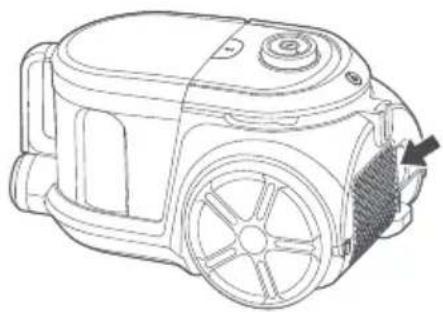
natural_image
Line drawing of a mechanical device with no visible text or symbolsRemove the dust cup from the vacuum and pull out the pre-motor filter.
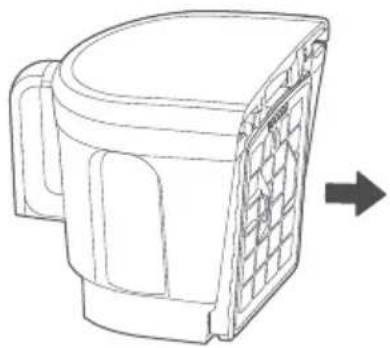
natural_image
Line drawing of a mechanical component with a grid pattern and an arrow indicating direction (no text or symbols)Rinse both the HEPA filter and the pre-motor filter in lukewarm water.
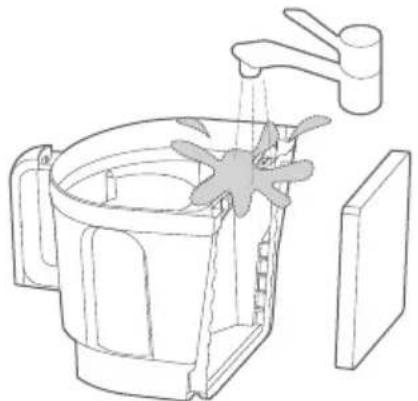
natural_image
Line drawing of a kitchen sink with faucet and side panel (no text or symbols)Remove the outlet HEPA filter from the machine.
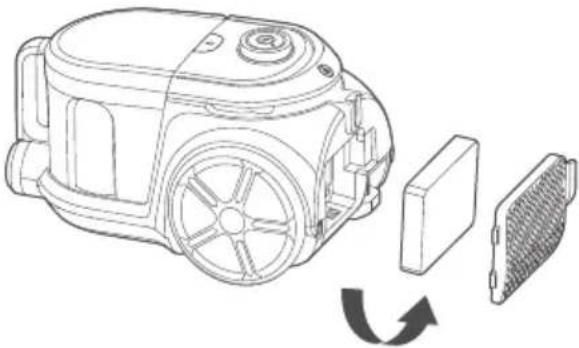
natural_image
Line drawing of a vacuum cleaner with internal components and heat dissipation indicator (no text or symbols)Tap filter over trash can to remove any external dust and debris.

natural_image
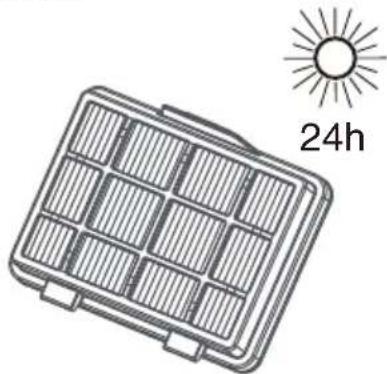
Diagram showing a hand pouring liquid into a container with particles, no text or symbols presentAllow the filters to air dry for 24 hours before placing them back.
natural_image
Illustration of a solar panel with a 24-hour sun symbol (no text or labels on the panel itself)
CAUTION:
Never operate vacuum without dust bags, filters and filter covers in proper position.
NOTICE: Thermal cut-off
| This vacuum cleaner has a special thermostat that protects the vacuum in case of motor overheating. If the vacuum suddenly shuts off, proceed as follows: 1) Push the power switch to off and unplug the vacuum. 2) Check the vacuum for a possible source of overheating such as a full dust cup, blocked hose or clogged filter. If these conditions are found, fix them and wait at least 30 minutes before attempting to use the vacuum. 3) After the 30 minute period, plug the vacuum back in and turn on the switch. If the vacuum still does not work, call the Eureka Customer Service HELPLINE at 1-888-365-2230. | ||
| Possible causeProblem | Solution | |
| The vacuum cleaner does not turn on | •Dust cup is full•Filter is blocked•Blockage in the floor nozzle or hose | •Empty the dust cup•Clean the filters•Clear any blockages |
| The vacuum cleaner suddenly stops | •The dust cup is full•The sponge filter is blocked•Suction inlet, hose or the other accessory is blocked.•Power cord has become unplugged•Thermal cutoff has occurred | •Empty the dust cup•Clean the sponge filter and dry thoroughly before reinstalling•Clean the blockage•Push plug securely into outlet, try another outlet or check circuit breaker•See detailed "thermal cut-off" instructions above |
Connecting to an electrical socket
Please check that the voltage indicated on the product corresponds with your supply voltage.
Please do not return this product to the store.
Other maintenance or service not included in the manual should be performed by an authorized service representative.
For any questions or concerns, EUREKA is happy to be of service.
Contact us directly at
Eureka Customer Service Helpline
1-888-365-2230
| Image | Part name | Part # (Fits models) |
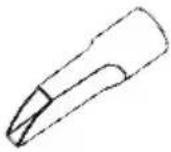 | Crevice tool 12175000001261 | |
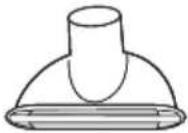 | Upholstery tool 12175000003755 | |
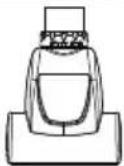 | 12175000095406Pet tool | |
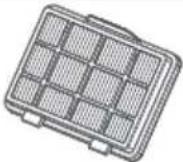 | HEPA filter | 12175000095362 |
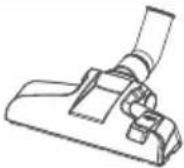 | Floor nozzle | 12175000095759 |
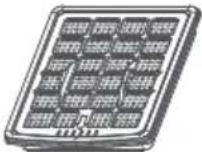 | 12175000095759 | 12175000077043 |
The Eureka three-year limited warranty
Midea America (Canada) Corp. ("Eureka"), subject to the terms and conditions herein, warrants this vacuum cleaner to be free from defects in material and workmanship for a term of three years from the date of original purchase when used in accordance with the Eureka operating and maintenance instructions and under normal household usage. This warranty is granted only to the original purchaser and members of immediate household, and is applicable only to original purchases from Eureka authorized resellers.
What Eureka will do:
Eureka will, at its option, repair or replace a defective vacuum or vacuum part that is covered by this warranty. Repairs may be performed using new or refurbished parts that meet or exceed Eureka specifications for new parts. If Eureka elects to replace the vacuum, the replacement may be a reconditioned unit. Depending on availability of products, Eureka reserves the right to provide you with a replacement product that is the same or similar, or substitute equivalent of the original product. As a matter of warranty policy, Eureka will not refund the consumer's purchase price.
This warranty does not cover:
- Normal wear and tear of the vacuum and vacuum parts that require replacement under normal use such as disposable dust bags, filters, drive belts, light bulbs, brush-roll, bristles, impellers and cleaning.
- Damages or malfunctions resulting from: improper or unreasonable use or maintenance, abuse, negligence, failure to follow instructions contained in any written materials that accompany the product, deterioration by reason of excess moisture, corrosive atmosphere, lightning, power surges, connections to improper voltage supply, unauthorized alteration, or other external causes such as extremes in temperature or humidity, modifications, scratches or discoloration, accidents, misuse, or acts of God. This warranty also does not cover damage resulting from repair or attempted repair by anyone other than Eureka. This warranty is not applicable to any product that has been altered or on which the serial number has been defaced, modified or removed. Altering, erasing, or forging any proof-of-purchase documents voids any applicable product warranty.
Obtaining warranty service:
To obtain warranty service you must contact the Eureka Service Team, toll free, at 1-888-365-2230 or email CanadaSupport@eureka.com, to discuss the warranty claim and procedures to be followed. All warranty claims must include submission of proof-of-purchase documentation. For additional information, you may also visit http://www.eureka.com/ca
Shipping charges:
You will be responsible for any initial shipping and insurance charges if the defective product(s) must be shipped for warranty service or warranty evaluation; however, Eureka will pay the return shipping charges if repairs are covered by the warranty. When returning parts for repair, you must include the model, type and serial number. If any product submitted for warranty service is found to be ineligible, an estimate of repair cost will be furnished and the repair performed only if requested by the owner and upon receipt of payment or acceptable arrangements for payment.
Further limitations and exclusions:
Any warranty that may be implied in connection with your purchase or use of the vacuum, including any warranty of Merchantability or any warranty of Fitness For A Particular Purpose is limited to the duration of this limited warranty. Some states do not allow limitations on how long an implied warranty lasts, so the above limitations may not apply to you.
Your relief for the breach of this warranty is limited to the relief expressly provided above. In no event shall the manufacturer be liable for any consequential or incidental damages you may incur in connection with your purchase or use of the vacuum. Some states do not allow the exclusion or limitation of incidental or consequential damages, so the above limitation or exclusion may not apply to you.
This warranty gives you specific legal rights. You may also have other rights, which may vary by state.
Markham, Ontario,L3R 5B4
Owner's Guide
Thank you for purchasing your new Eureka vacuum!
Important instructions
For easy assembly, please take a few moments to read this owner's guide.
If you have questions about your new vacuum, please contact our customer service HELPLINE
at 1-888-365-2230.
We're here to help!
text_image
THE eureka CLEAN PROMISE PERFORMANCE QUALITY · VALUEwww.eureka.com/ca
eureka
Guide d'utilisateur
natural_image
Technical line drawing of a mechanical device with internal components and no visible text or symbolsnatural_image
Line drawing of a vacuum cleaner with a cable connector, showing the engine and housing (no text or symbols)natural_image
Diagram of a mechanical assembly with a directional arrow indicating upward motion (no text or symbols present)natural_image
Line drawing of a mobile phone with a handle and antenna, showing no text or symbolsnatural_image
Three-step diagram showing a vacuum cleaner's internal structure with arrows indicating assembly (no text or symbols)natural_image
Technical line drawing of a mechanical device with no visible text or symbolstext_image
Diagram illustrating the process of cleaning a food container with labeled parts and a magnified view showing the interior structure.natural_image
Technical line drawing of a mechanical device with a side view showing internal components (no text or symbols)natural_image
Line drawing of a mechanical device with no visible text or symbolsnatural_image
Line drawing of a mechanical component with a grid pattern and an arrow indicating direction (no text or symbols)natural_image
Line drawing of a kitchen sink with faucet and lid (no text or symbols)natural_image
Technical line drawing of a mechanical device with internal components and a heat sink, showing no text or symbols.natural_image
Illustration of a hand pressing down on a tray with particles into a container (no text or symbols)natural_image
Illustration of a solar panel with a 24-hour sun symbol (no text or labels on the panel itself)
ATTENTION
Markham, Ontario, L3R 5B4