
303228 - Drill Brandson - Free user manual and instructions
Find the device manual for free 303228 Brandson in PDF.


| Brand | Brandson |
| Model | 303228 |
| Product type | Cordless drill/driver |
| Power supply | Lithium-ion battery 21 V DC, charger 100-240 V AC |
| Battery capacity | 1.5 Ah |
| Dimensions (H x W x D) | 220 mm x 74 mm x 190 mm |
| Weight (approx.) | 1.5 kg (with battery) |
| Rotation speed | Level 1: 0-350 rpm, Level 2: 0-1350 rpm |
| Rotational torque | 32 Nm |
| Number of speeds | 2 (mechanical) + electronic speed control |
| Torque adjustment | 18 positions + drilling |
| Chuck | Quick-release chuck, max. diameter 10 mm |
| Rotation direction switch | Yes |
| Battery level display | Yes, 3 LEDs |
| Sound pressure level | 73 dB(A) |
| Acoustic power level | 80 dB(A) |
| Total vibration | < 2.5 m/s² |
| Charging time | Approx. 1 hour |
| Package contents | Drill, 2 batteries, charger, 3 bit holders, carrying case |
| Maintenance and cleaning | Disconnect the battery, clean with a soft, dry cloth. Do not use chemicals. |
| Safety | Personal protective equipment recommended. Do not expose to moisture. Use insulated handles. |
| Spare parts and repairability | Any repairs should be carried out by a qualified technician. Use identical spare parts. |
| Warranty | Warranty valid subject to proper use. Any modification voids the warranty. |
| General information | Product complies with EU directives (2006/42/EC). Manufacturer: WD Plus GmbH, Hanover. |
Frequently Asked Questions - 303228 Brandson
User questions about 303228 Brandson
0 question about this device. Answer the ones you know or ask your own.
Ask a new question about this device
Download the instructions for your Drill in PDF format for free! Find your manual 303228 - Brandson and take your electronic device back in hand. On this page are published all the documents necessary for the use of your device. 303228 by Brandson.
USER MANUAL 303228 Brandson
ENG: Latest information, drivers, user manuals and data sheets can be found at www.ganzeinfach.de in our download area.
natural_image
Line drawing of a handheld electric drill bit with motion arrows indicating rotation (no text or symbols)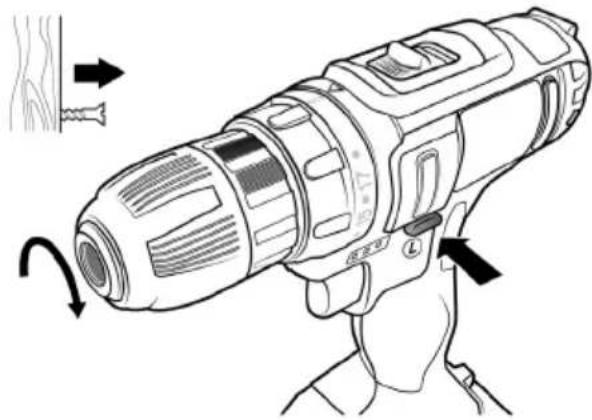
natural_image
Line drawing of a handheld electric drill bit with motion arrows indicating rotation (no text or symbols)natural_image
Illustration of a battery pack with an arrow indicating charging direction and a battery symbol nearby (no text or labels)IMPORTANT SAFETY GUIDELINES FOR THIS DE- VICE
Read all the safety guidelines and instructions carefully! Not following the safety guidelines and instructions may result in electric shock, fire and/or serious injuries.
Retain all the safety guidelines and instructions for future reference. The term "Power tool" used in the following safety instructions refers to power tools with a mains cable or to cordless power tools without a mains cable.
Workplace safety
- Keep the workplace organised and well lit. Dirty or dark workplaces result in accidents.
- Do not operate power tools in potentially explosive surroundings, e.g., near flammable liquids, gases, etc.
Power tools may generate sparks, which can ignite flammable materials! - Keep bystanders and children away when using the power tool. You could lose control of the tool if you get distracted.
Electrical safety
- The power tool plug must fit into a properly installed socket. The plug should not be changed or modified. Never use adapters with earthed power tools. Proper plugs and sockets reduce the risk of electric shock.
- Avoid body contact with earthed surfaces such as heaters, refrigerators or pipes. There is a risk of electric shock.
- Keep power tools away from moisture and rain. The risk of electric shock increases if water gets into the power tools!
- Do not misuse the cable under any circumstances! Never carry the power tool by its cable. Do not hang it by the cable or do not pull the cable to disconnect the plug from the socket. Keep the cable away from heat, oil, sharp edges or moving parts! Damaged or entangled cable increases the risk of electric shock!
- If you operate the power tool outdoors, make certain to use an extension cable suitable for outdoor use. Using a cable suitable for outdoor use reduces the risk of electrical shock.
Personal safety
- Ensure that you are always alert. Be aware of what you are doing and use common sense when working. Do not use a power tool if you are under the influence of alcohol, drugs or medication, or are tired! Carelessness when using power tools may result in serious physical injuries.
- Always wear personal protective equipment and safety glasses when using the power tool. Wearing appropriate protective clothing, such as ear protection, safety glasses, safety shoes and helmet, can reduce the risk of injuries, depending on the type and use of the power tool.
- Prevent the power tool from starting unintentionally. Always check whether the device is switched off before connecting it to the battery or the power supply, picking it up or carrying it. Accidents may occur if you keep your finger on the switch while carrying the tool or if you connect the power tool to the power supply when the tool is switched on.
-
Remove any setting tools or wrench before switching on the power tool. Any tool or object left in a rotating part of the device may result in injuries.
-
Always maintain a normal posture when using power tools and ensure that your footing is secure at all times and that you maintain your balance. This allows you to control the power tool better in unexpected situations
- Always wear suitable clothing when using a power tool. Never wear loose clothing or jewellery. Always keep your hair, clothing and gloves away from moving parts. This type of clothing or hair can get caught in moving parts!
- If connecting attachments for dust extractors and collectors are available, they should be properly mounted and used. The use of dust extractors can reduce risks caused by dust.
Use and handling of power tools
- Never overload the power tool under any circumstances. Always use the appropriate power tool for your work. Working with the incorrect power tool reduces the safety considerably.
-
Never use a power tool if the switch is faulty. A device that cannot be switched on or off must at all costs be repaired and may not be used.
-
Before changing the settings or the accessories on the power tool, or storing the device, it must be disconnected from the mains supply and/or the battery. These measures reduce the risk of the device switching on accidentally
- Keep the unused power tool out of reach of children. Do not allow those who are not familiar with the usage instructions of the device to use it. Power tools are dangerous in the hands of inexperienced users.
- Maintain your power tools properly. Check your tool for misalignment, damage and other conditions that may affect operation. If it is damaged, have the power tool repaired by a specialist before using it again.
- Keep the cutting tools clean and sharp. Well-maintained tools with sharp blades are less prone to damage, and are easier to handle.
- Use the power tool, accessories and tool inserts in accordance with these instructions. Take the conditions and the work to be carried out into account.
Use and handling of cordless tools
- Charge the battery using only the charger specified by the manufacturer. A charger that is suitable for a certain type of battery can be a fire hazard if used with a different battery.
- Use power tools only with the explicitly specified batteries. There is a risk of fire and injury if other batteries are used!
- Never store the battery when it is not being used along with other metal objects, such as paper clips, coins and screws. The battery terminals may be shorted under certain circumstances and cause a fire.
- In the event of misuse, fluid may start leaking from the battery. Avoid contact with the fluid. In the event of accidental contact, rinse the affected area immediately with water. If the fluid gets into the eye, obtain additional medical treatment. The fluid from the battery may cause burns and skin irritation.
Maintenance
- Have the device serviced by a qualified technician and use only identical spare parts.
- Keep the handles free of oil, grease and other liquids to ensure a firm grip.
Safety warnings for cordless screwdriver
- Hold the power tool using only the insulated handle surfaces. There is a risk of electric shock when working with current-carrying objects.
- If you are working at a height, ensure that there is no one below you. Ensure a secure footing and keep your balance when working with a power tool.
- Hold the device firmly and securely.
- Remember that the processed material can be very hot immediately after working on it. Do not touch the object immediately after working on it!
- Keep your hands, hair and other body parts, as well as objects away from rotating parts.
Ensure that you keep these safety instructions in a safe place!

Caution!: Always follow these safety guidelines! Familiarise yourself with the corresponding product! Not following and misusing the safety guidelines given in this manual may cause serious injuries!
Important safety instructions for batteries
- Please note all the safety instructions and warnings given in this manual and the warnings related to the battery, charger and power tool before using the battery.
- Do not disassemble the battery!
-
If the operating time of the battery is significantly lower than usual, then stop using the device immediately. There is a risk of overheating or explosion.
-
If battery fluid gets into your eyes, wash it out immediately! Obtain medical treatment immediately! There is a risk of losing your eyesight
- Do not short-circuit the battery. Do not touch the contacts using conductive materials. Do not store the appliance along with conductive materials.
- Do not allow any liquid to come into contact with the battery. A short circuit generates a very high flow of current and can result in overheating or burns.
- Do not store the power tool or the battery in places where the temperature exceeds 50°C!
- Never try to burn the battery even if it is damaged. The battery may explode in the fire!
- Ensure that the battery is never dropped or exposed to any impact. Do not use the battery if it has been dropped or has been shaken.
Notes on battery service life
- Charge the battery only when it is completely empty. Switch off the power tool if you notice a reduction in its capacity. Charge the battery subsequently.
• Overcharging the batteries reduces its service life. Avoid charging a fully charged battery.
- Allow the battery to cool down before charging it. Charge the battery at a room temperature between 10^ and 40^ .
Ensure that you keep these safety instructions in a safe place!
Thank you for choosing a Brandon product. Please read the following user manual carefully so as to get the most from the product you have purchased.
1. Scope of supply
- Cordless drill-driver
- 2 batteries
- 3 extension bits
- Charger/charging station
- Transport case
2. Technical data
| Power supply | 21V DC 1.5Ah battery100-240V AC (charger) |
| Dimensions HxWxD 220mm x 74mm x 190mm | |
| Number of gears 18 + 1 | |
| Speed | 0-350 (level 1)0-1350 (level 2) |
| Sound level ( L_pa ) 73 dB(A) | |
| Sound power level ( L_wa ) 80 dB(A) | |
| Total vibration: <2.5 m/ s^2 | |
| Torque 32nm | |
| Charging time 1 hour | |
| Gear type Planet gears, metal + plastic | |
| Drill diameter Max. 10mm | |
| Features | Quick release chuckBattery level indicationButton for changing the direction2 different speed levels |
3. Product details
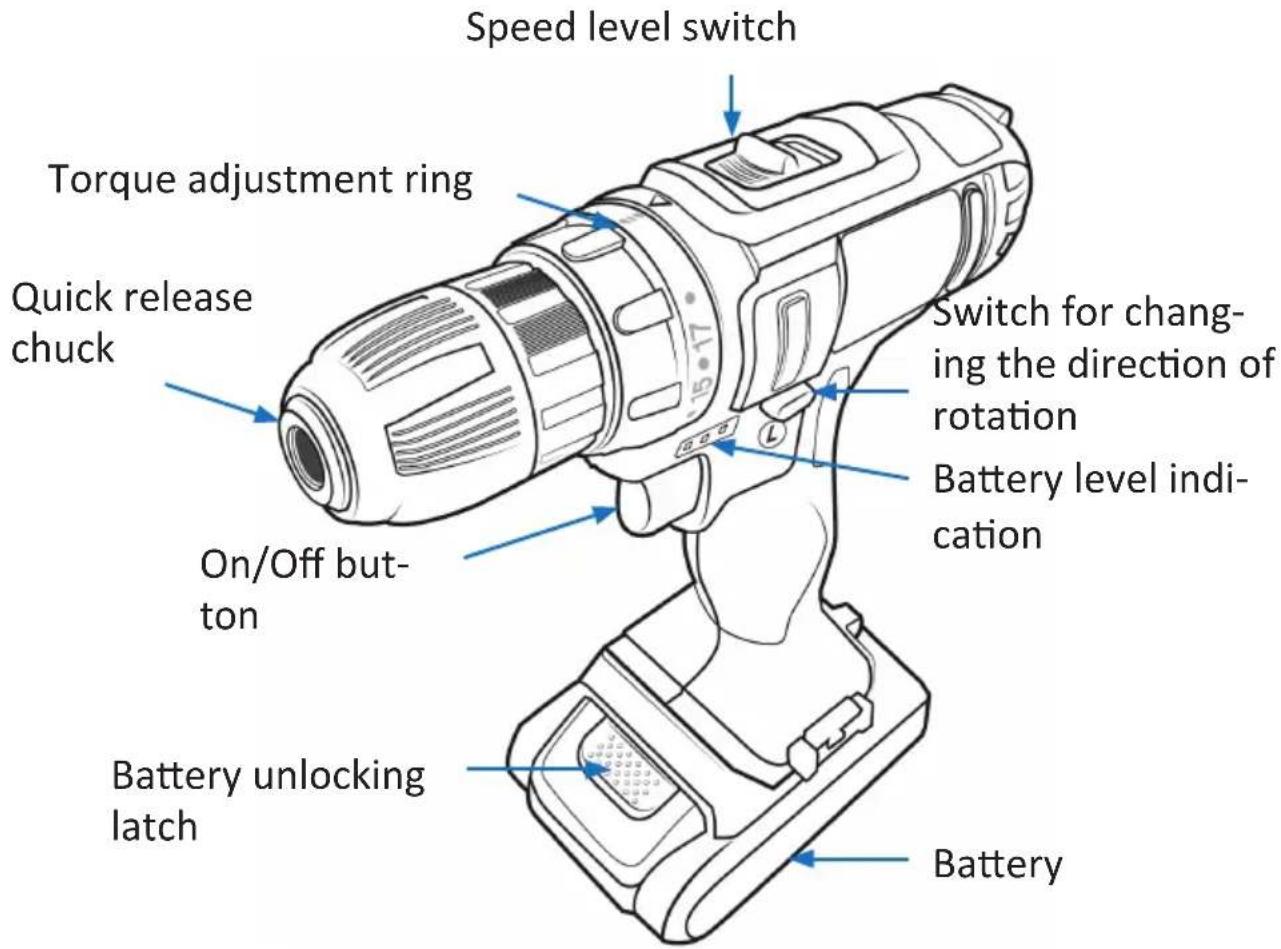
4. Commissioning
Take the device out of the package and remove all the packaging material. Check the scope of delivery for completeness. Charge the battery fully using the charger provided. Insert the desired screwer or drill bit into the quick release chuck and fix it.
Insert the charged battery at the bottom of the device into the port and make sure that it locks into place.
When using the device, keep one hand on the handle and the other hand at the bottom of the battery, so as to be better able to control the rotary action. Set the desired torque for your work using the rotating ring. Finally, set the desired direction of rotation. The device is now ready for use.
Note: If the speed reduces too much, then always reduce the load or stop using the device to avoid damage.
5. Usage - Screwer mode
Position the tip of the screwer insert at the appropriate place and apply pressure to the tool. Let the device start running slowly and gradually increase the speed. Release the "On/Off" button as soon as you reach the torque limit.
5.1 Usage - Driller mode
Rotate the torque adjustment ring to the drill symbol.
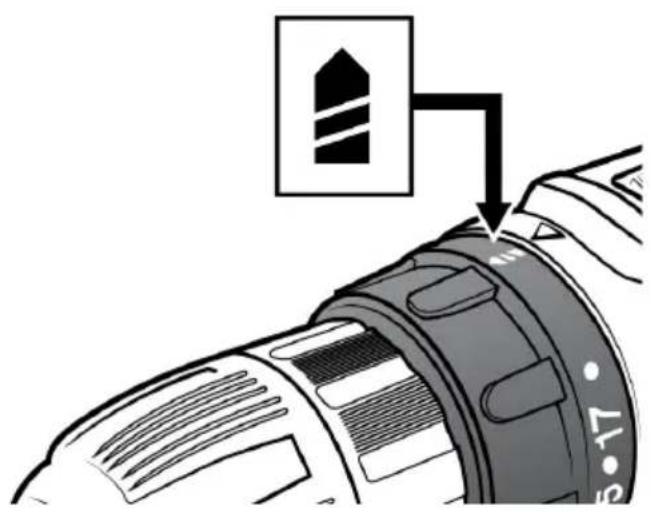
Wood drilling
Use a wood drill with centring tip to get the best results when drilling wood. The tip makes the work a lot easier because the drill bit is pulled into the material.
Metal drilling
It is advisable to mark the desired drilling point using a punch so that the drill bit can penetrate the material easily.
Note: Use a liquid to cool the drill bit when drilling metal.

CAUTION!
- Never use excessive pressure when drilling. This may damage the drill bit!
- Always hold the cordless screwdriver firmly! Remember that the drill can come out abruptly when drilling a hole through the material!
- If the drill is stuck and you want to release it by reversing the direction, make sure that the workpiece is properly clamped and/or hold it tightly!
• Always use a vice for clamping small workpieces! - If the device becomes too hot after using it continuously for a long time, allow it to cool for about 15 minutes!
5. Changing the tool bits
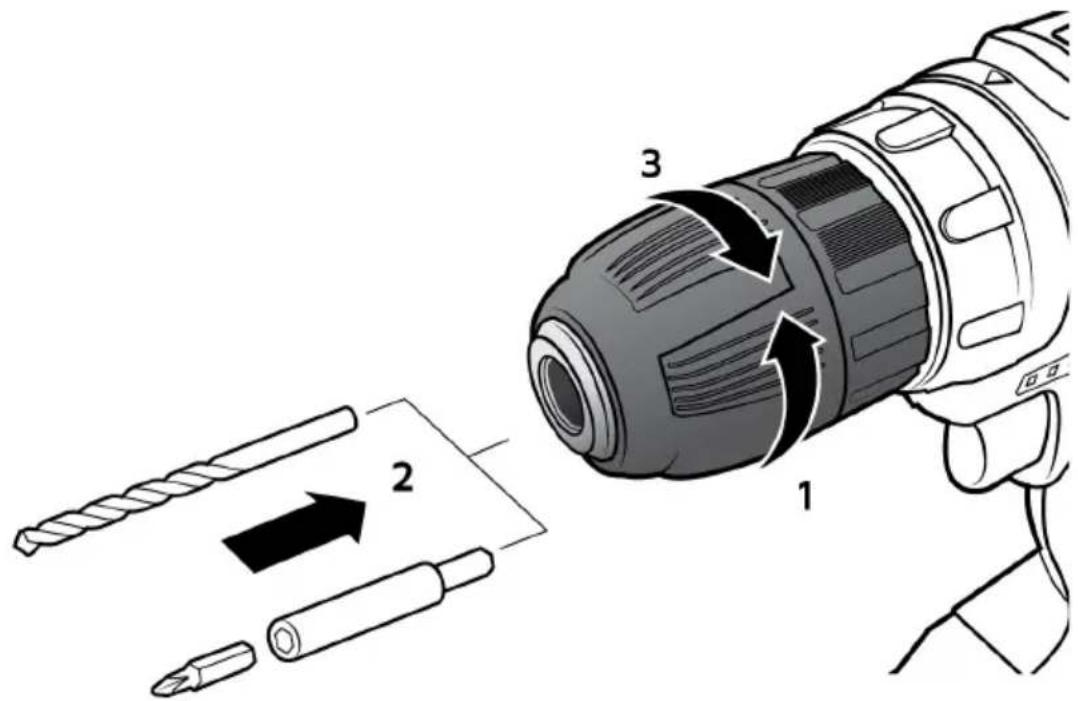
Open the chuck by rotating it (1). Insert the desired screwer or drill bit (2) and tighten the chuck again (3).
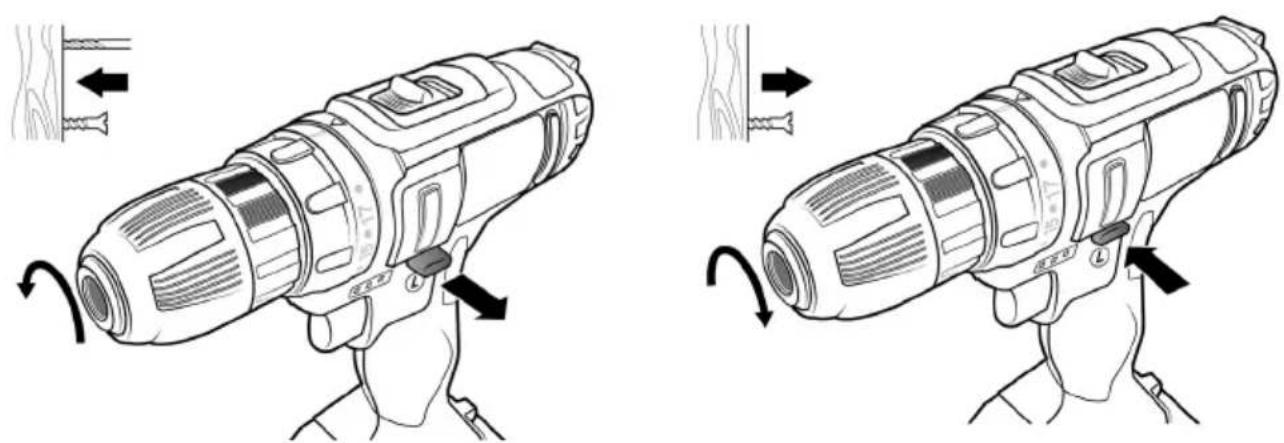
6. Changing the direction of rotation
natural_image
Illustration of a drill pen being adjusted for a wooden tool, showing motion and assembly steps (no text or symbols)Using the direction change switch, you can change the direction of rotation of the cordless screwdriver as desired.
7. Torque adjustment
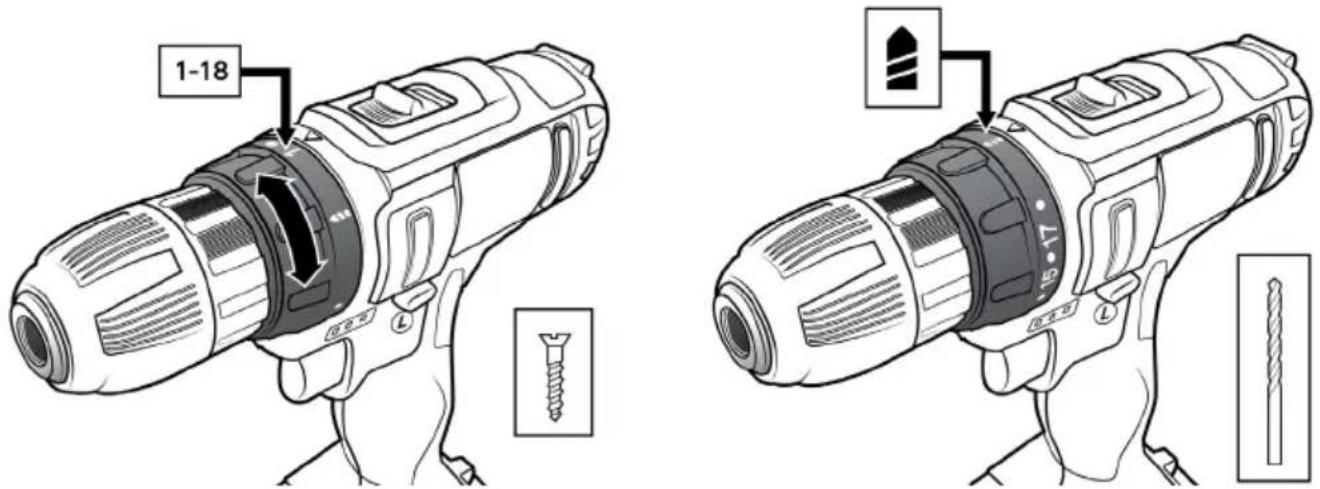
Select the desired torque and set it using the "torque-adjustment ring". Here "1" is the lowest and "18" the highest resistance. If you want to drill, select the drill symbol where there is no torque limit.
8. Selecting the speed
Select the desired speed using the "Speed level switch".
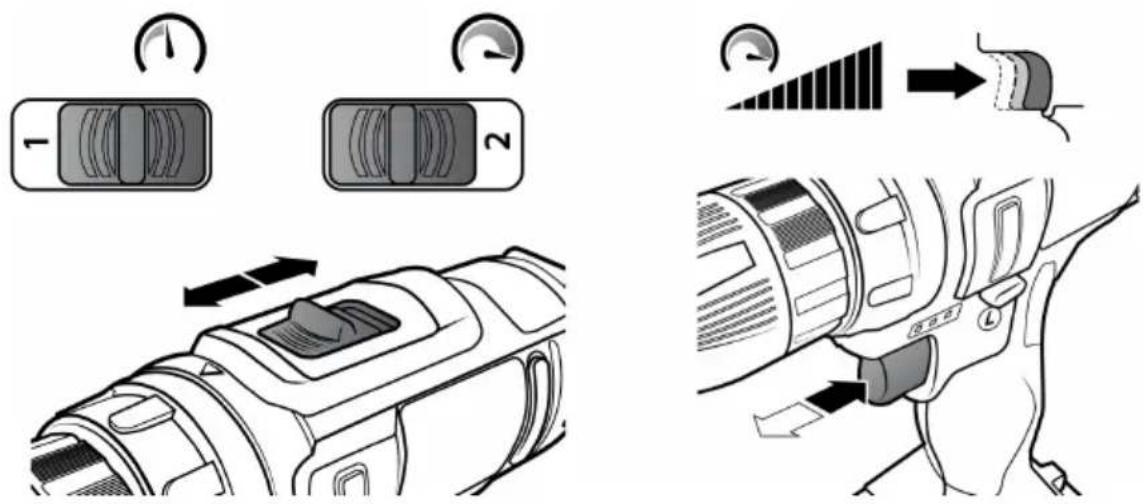
Caution! Never use it when the device is being operated!
| Speed | 0-350 (level 1)0-1350 (level 2) |
In addition, you can adjust the rotation speed depending on the amount of pressure using the "On/Off" button.
9. Changing the battery
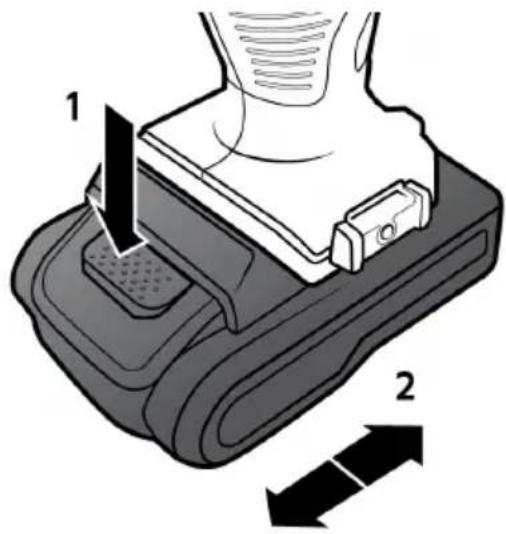
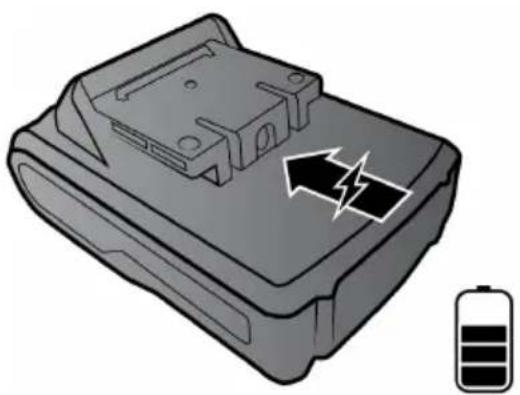
Unlock the battery by pressing the "Battery unlocking" button (1) and then slide the battery out of the device (2). To insert a new battery, slide the battery into the cordless screwdriver on (2) until it locks into place.
10. Charging the battery
natural_image
Illustration of a battery pack with an arrow indicating charging direction and a battery symbol nearby (no text or labels)The battery has a coaxial socket for charging the battery. Charge the battery using the charger/charging station provided. A status LED is present on the charger/charging station. As long as the LED is red, then charging is in progress. When the LED turns green, the battery is then fully charged and can be reused.
11. Cleaning and maintenance
Before cleaning and servicing, ensure that the device has been switched off and the battery has been removed. Do not use alcohol, thinners or other chemical and aggressive cleaning agents for cleaning purposes. Use only a dry and soft cloth to wipe the device. Do not immerse the device in water and ensure that liquids do not get into the appliance!

CAUTION!
12. Safety instructions and Disclaimer
Please do not try to open the device to carry out repairs or modifications. Avoid contact with the mains voltage. Do not short-circuit the product. The device is not waterproof. Please use it only in dry surroundings. Protect it from high humidity, water and snow. Do not expose the device to high temperatures.
Do not expose the device to sudden changes in temperature or heavy vibrations, as this could damage the electronic components. Check the device for any damage before using it. The device should not be used if it was subject to impact or has been damaged in some other manner. Please comply with the local regulations and restrictions. Do not use the device for purposes other than those described in the user manual.
This product is not a toy. Keep it out of the reach of children or mentally disabled persons. Any repair or modifications to the device, which is not carried out by the original supplier, will void any warranty and guarantee claims. The device should be used only by persons who have read and understood this user manual. The specifications of the device may be changed without prior notice.

13. Disposal instructions
In line with the European WEEE directive, electrical and electronic devices should not be disposed of along with domestic waste. Their components must be sent separately for recycling or disposal, as improper disposal of toxic and dangerous components may permanently damage the environment. According to the electrical and electronic equipment act (ElektroG), you are obliged (as a consumer) to return (free of charge) all electrical and electronic devices to the manufacturer, the point of sale, or public collection points at the end of their service life. The relevant local laws regulate the details in this regard. The symbol on the product, in the user manual or/and the packaging refers to these regulations. With this manner of sorting, recycling and disposal of used devices, you make an important contribution towards protecting our environment.

14. Instructions for battery disposal
In conjunction with the sale of batteries along with the supply of devices that include batteries, the supplier is obliged to point out the following to the customer: The customer is legally obliged to return used batteries. He can return used batteries which the supplier offers or has offered as new batteries in his assortment free of charge to the supplier's dispatch warehouse (shipping address). The symbols shown on the batteries mean the following: Pb = battery contains more than 0.004 percent lead by weight, Cd = battery contains more than 0.002 percent cadmium by weight, Hg = battery contains more than 0.0005 percent mercury by weight.
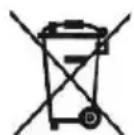
The symbol of the crossed-out dustbin means that the battery must not be disposed of in household waste.
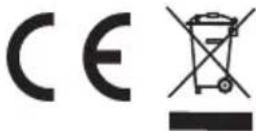
WEEE Guideline: 2012/19/EU WEEE Register no.: DE 67896761
WD Plus GmbH hereby certifies that the device 303228/20180122NT002 complies with the fundamental requirements and the other relevant stipulations of the guideline 2006/42/EC. A complete conformity statement can be obtained from: WD Plus GmbH, Wohlenbergstraße 16, 30179 Hanover, https://www.ganzeinfach.de/
CONSIGNES DE SÉCURITÉ IMPORTANTES POUR CET APPAREIL
natural_image
Line drawing of a handheld device with a rotating handle and wooden base, showing mechanical components and motion arrows (no text or symbols)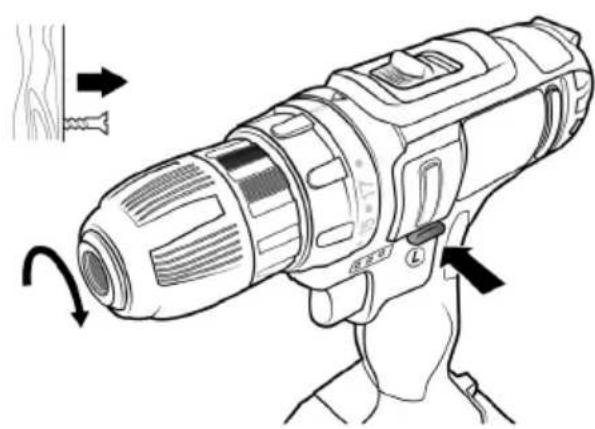
natural_image
Line drawing of a handheld device with a hand holding it, showing a curved arrow indicating rotation (no text or symbols present)natural_image
Illustration of a battery pack with an arrow indicating charging direction and a battery symbol nearby (no text or labels)natural_image
Illustration of a drill pen being adjusted for a wooden tool, showing motion and assembly steps (no text or symbols)natural_image
Illustration of a battery pack with an arrow indicating charging direction and a battery symbol (no text or labels)Taladrar madera
natural_image
Line drawing of a handheld device with a rotating handle and wooden base, showing mechanical components and motion arrows (no text or symbols)
natural_image
Line drawing of a handheld electric drill bit with motion arrows indicating rotation (no text or symbols)natural_image
Illustration of a battery pack with an arrow indicating charging direction and a battery symbol (no text or labels)
- IMPORTANT SAFETY GUIDELINES FOR THIS DE- VICE
- Workplace safety
- Electrical safety
- Personal safety
- Use and handling of power tools
- Use and handling of cordless tools
- Maintenance
- Safety warnings for cordless screwdriver
- Ensure that you keep these safety instructions in a safe place!
- Important safety instructions for batteries
- Notes on battery service life
- Scope of supply
- Technical data
- Product details
- Commissioning
- Usage - Screwer mode
- Usage - Driller mode
- Wood drilling
- Metal drilling
- CAUTION!
- Changing the tool bits
- Changing the direction of rotation
- Torque adjustment
- Selecting the speed
- Caution! Never use it when the device is being operated!
- Changing the battery
- Charging the battery
- Cleaning and maintenance
- Safety instructions and Disclaimer
- Disposal instructions
- Instructions for battery disposal
- CONSIGNES DE SÉCURITÉ IMPORTANTES POUR CET APPAREIL
- Taladrar madera
Brand : Brandson
Model : 303228
Category : Drill