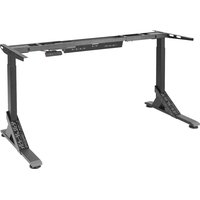
UPPSPEL 705.113.52 - Office IKEA - Free user manual and instructions
Find the device manual for free UPPSPEL 705.113.52 IKEA in PDF.


| Brand | IKEA |
| Model | UPPSPEL 705.113.52 |
| Product type | Electric sit-stand desk |
| Height adjustment range | 72 to 120 cm |
| Maximum load | 70 kg (154 lbs) |
| Power supply | 100-120 V AC, 50/60 Hz |
| Power unit | 24.0 V DC, 240 W |
| Standby consumption | < 0.1 W |
| Noise level | < 55 dB(A) |
| Operating temperature | +10 °C to +40 °C |
| Storage temperature | -18 °C to +70 °C |
| Humidity | 20 % to 80 % at 40 °C |
| Insulation | Double insulation |
| Number of memory positions | 4 |
| USB port | Yes |
| Intended use | Indoors, dry premises |
Frequently Asked Questions - UPPSPEL 705.113.52 IKEA
User questions about UPPSPEL 705.113.52 IKEA
0 question about this device. Answer the ones you know or ask your own.
Ask a new question about this device
Download the instructions for your Office in PDF format for free! Find your manual UPPSPEL 705.113.52 - IKEA and take your electronic device back in hand. On this page are published all the documents necessary for the use of your device. UPPSPEL 705.113.52 by IKEA.
USER MANUAL UPPSPEL 705.113.52 IKEA
IMPORTANT SAFETY INSTRUCTIONS
When using an electrical furnishing, basic precautions should always be followed, including the following:
Read all instructions before using the product.
DANGER
To reduce the risk of electric shock:
Always unplug this furnishing from the electrical outlet before cleaning.
WARNING
To reduce the risk of burns, fire, electric shock, or injury to persons:
- Unplug from outlet before putting on or taking off parts.
- Close supervision is necessary when this furnishing is used by, or near children, invalids, or disabled persons.
- Use this furnishing only for its intended use as described in these instructions. Do not use attachments not recommended by the manufacturer.
- Never operate this furnishing if it has a damaged cord or plug, if it is not working properly, if it has been dropped or damaged, or dropped into water. Return the furnishing to a service center for examination and repair.
- Keep the cord away from heated surfaces.
- Do not use outdoors.
- Do not operate where aerosol (spray) products are being used or where oxygen is being administered.
- The table must not be overloaded – maximum load is 70kg/154lbs
An electro-mechanically height adjustable work-surface with control interface to adjust height up and down.
This appliance can be used by children aged from 8 years and above and persons with reduced physical, sensory or mental capabilities or lack of experience and knowledge if they have been given supervision or instruction concerning use of the appliance in a safe way and understand the hazards involved by a person responsible for their safety.
Children shall not play with the appliance. Cleaning and user maintenance shall not be made by children without supervision.
SAVE THESE INSTRUCTIONS
Electrical sit and stand desk
| Advice and instructions for UPPSPEL |
| Input:100-120VAC, 50/60Hz |
| Standby power consumption:<0.1 W. |
| Sound level:Lower than 55 dB(A). |
| Height setting interval:72-120 cm/28.3-47.2 inch. |
| Maximum load:70kg/154lbs. |
| Temperature interval at usage:+50 up to +104 °F/+10 °C up to +40 °C. |
| Temperature interval at storage:0 up to 158 °F/-18 °C up to 70 °C. |
| Humidity:20% up to 80% at 104 °F/40 °C. |
| Power supply unit:24.0V DC, 240 W. |
This appliance shall only be used together with the included power supply unit.
Every person who is responsible for this table at installation or employment of the table in daily use or in service and repair work should carefully read these instructions. Keep these instructions close to your sit/stand table.
Installation instructions
- The table is assembled according to separate assembly instructions.
- Connect the electrical cable to a power source.
NOTE! The electrical cable must have full mobility.
- The table is now ready for use. The motors stop automatically when the table reaches its lowest and highest position respectively.
Usage
- The table shall only be used as a gaming table with the possibility to continuously adjust the working height between sitting and standing position.
- The table shall only be used indoors and in dry premises (office environment or similar).
The table must not be overloaded - maximum load is 70KG/154lbs. The system may be run continuously for a maximum of 2 minutes. Afterwards, the motors must stand idle for approx. 18 minutes before they can be used again.

Double insulation
SERVICING OF DOUBLE-INSULATED PRODUCT.
In a double-insulated product, two systems of insulation are provided instead of grounding. No grounding means is provided on a double-insulated product, nor is a means for grounding to be added to the product.
Servicing a double-insulated product requires extreme care and knowledge of the system, and to be done only by qualified service personnel. Replacement parts for a double-insulated product must be identical to the parts they replace. A double-insulated product is marked with the words, "DOUBLE-INSULATION" or "DOUBLE INSULATED".
The symbol (square within a square) is also able to be marked on the product.
QUICK GUIDE
Follow these instructions when adjusting table height:
- Make sure no objects are in the way of the table.
- In order to move the table up/down, press the up and down arrow button respectively.
- The display switches off when not in use for about 10 seconds. Press any button to wake the controller up.
Safety regulations
- When the table is moving up/down, keep the necessary safety distance to avoid the risk of being squeezed between the moving table top and fixed objects in the surrounding area.
- When the table is moving up/down, the user shall make sure that nobody is injured and that no object is damaged. The table top must not bump into a fixed object, causing the table to overturn. Always remove any chair before the table is moved up/down.
- The table tripod must not be altered or reconstructed in any way. In service and repair work of the table, the electrical cable must always be disconnected from the power source.
- Modifications to the legs are absolutely forbidden!
- The table must not be used as a hoisting device for persons.
Maintenance and repair instructions
• After approx. 1 week of use, check that the screws are properly tightened.
- If the table cannot be lowered or raised, check that all electrical connections are connected properly.
- If any part of the electrical system is replaced, the electrical cable must first be disconnected from the power source. Replace the electrical part and then connect the electrical cable to the power source. The table is now ready for use. If the table still does not work, please contact your nearest IKEA store or customer service.
Manufacturer:
IKEA of Sweden AB
Address:
Box 702, SE-343 81 ÄLMHULT
CONFORMS TO UL STD. 962
CERTIFIED TO CSA STD. C22.2 NO.68.
Product servicing
Do not attempt to repair this product yourself, since opening or removing protective covers may expose you to dangerous voltage points or other risks.
Troubleshooting guide
NOTE!
Always disconnect the cable from the wall socket before maintenance!
| Symptom Check Try | ||
| The desk does not move. | Is the main power supply connected to the legs? | Try to connect a lamp or similar to the main power supply to check that the supply voltage is OK. |
| Are all plugs mounted correctly between the legs and power supply? | See assembly instructions. Check all connections. | |
| Is there visible damage to the cables, controls or the legs? | Damaged parts must be exchanged - Contact IKEA Customer Service. | |
| The desk stops and can only then move in the opposite direction. | Is the desk in its fully raised or lowered position? | When the desk has reached its upper position it can only move downwards. |
| Is there a lot of weight on the desk compared to when the desk functioned normally? | Remove some of the load and try again. | |
| The desk will only move downwards even though the desk is not overloaded. | Perform Basic settings. | |
| The desk does not move up to its fully raised position. It always stops at the same position. | The system has a new end stop position upwards. Perform Basic settings to remove this stop. | |
| The desk only moves a little bit upwards and stops. | Have the correct screws been used when mounting the frame to the legs? | Check if any screw used has the correct length (assembly instruction). If the screw is too long it can damage the leg. |
| Are all connections correct? Check all connections. | ||
| Does the desk have too much weight on it? Reduce the weight load and try again. A Basic setting might be needed before the desk will move upwards. | ||
| The USB doesn't work. | Contact your nearest IKEA store or customer | service. |
Basic Setting:
Push the arrow down button until the legs have reached the lowest position and keep pressure on the button for 6 seconds more. Upon certain errors, this must be done twice in succession. Now the desk is in initial position.
Initialisation instructions:
Step 1. Continuously press the ▼arrow down button for a few seconds until the desk reaches its lowest position.
Step 2. Continuously press the ▼arrow down button a second time until the display shows "RST".
Step 3. Continuously press the ▼arrow down button a third time until the desk moves slightly downwards.
When the desk stops moving and the display shows "72", it is ready to use.
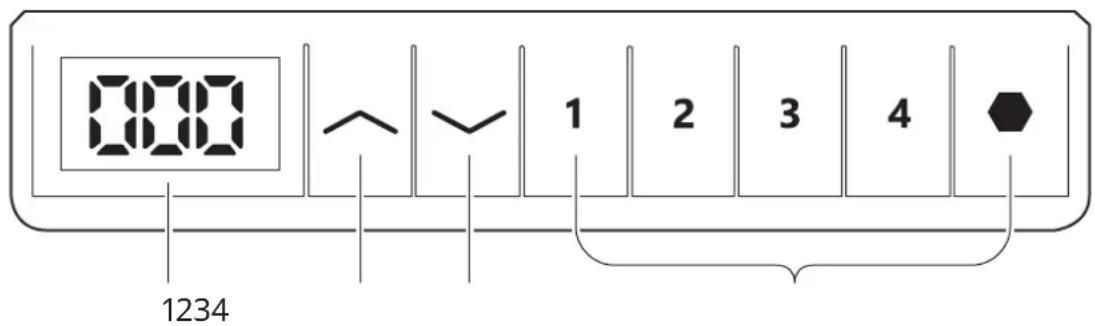
Height Adjustment Controller
text_image
000 1234 1 2 3 4- LED Display: Press any key once to wake up the LED display.
- Up key arrow up: Press and hold to raise the desk.
- Down key (Arrow down): Press and hold to lower the desk.
- Memory setting: ♦, 1, 2 3 4
- To save this current height: Press the button, the display will show "S-", then press preferred memory button 1, 2, 3. This will bind the height to this number.
- For Example, if you press 1 the display will show "S-1" etc...
- Memory button 1, 2, 3, 4
te:
The desk's movement can be stopped at any time by pressing any button.
Height settings will remain even if the desk's power is cut.
Reset process:
Step 1: Press/hold the down button for a few seconds until the table reaches its lowest position.
Step 2: Press/hold the down button a second time until the display shows "RST".
Step 3: Press/hold the down button a third time until the table slowly lowers. Once the table stops moving and the display shows "72", your desk is ready to use.
Lock/Unlock controller:
Lock the controller: Press and hold the symbol for 10 seconds until the display shows "LOC".
Unlock the controller: Press and hold the symbol for 10 seconds until the display shows the actual height of the table.
Highest /lowest limit setting
- To save the current height as the highest limit:
Step 1: Press the button, the display will show "S-".
Step 2: Press arrow up button until the display flashes.
Step 3: Press the button again, the highest limit setting is completed when the display shows "999".
- To save this current height as the lowest limit:
Step 1: Press the button, the display will show "S-".
Step 2: Press Arrow down button until the display flashes.
Step 3: Press the button again, the lowest limit setting is completed when the display shows "000".
- To cancel the limits:
Step 1: Press the button, the display will show "S-".
Step 2: Press the button again, the limit setting is canceled/removed when the display shows "555".
Adjust the Minimum height
- Follow RESET process, go to the reset situation, it shows RST.
- Press for 5 seconds, the screen shows height and flashes
- Then, press or to adjust the height to what you need, and wait for 5 seconds, the screen displays RST, successfully adjust.
Error Code Instructions
| Error Code | Reason Solution | |
| E01E02 | Overcurrent protection/short circuit Remove the excess load on the desk first. Then, see instructions for Reset/Initialisation. | |
| E07E08 | Motor line open circuit error Make sure all the cables connect well first.Then, see instructions for Reset/Initialisation. | |
| E13 Overcurrent protection/short Circuit See instructions for Reset/Initialisation. | ||
| H01 Over-heating Unplug from the wall socket and re-plug – or wait 18 minutes to let the motors cool before using them again. | ||
| RST Power failure See instructions for Reset/Initialisation. | ||
| 888/000 Controller error Please contact IKEA Customer Service. | ||
This device complies with Part 15 of the FCC Rules. This device contains licence-exempt transmitter(s)/receiver(s) that comply with Innovation Science and Economic Development Canada's licence-exempt RSS standard(s). Operation is subject to the following two conditions:
(1) this device may not cause harmful interference, and
(2) this device must accept any interference received, including interference that may cause undesired operation of the device.
WARNING:
Any changes or modifications to this unit not expressly approved by the party responsible for compliance could void the user's authority to operate the equipment.
NOTE:
This equipment has been tested and found to comply with the limits for a Class B digital device, pursuant to part 15 of the FCC Rules. These limits are designed to provide reasonable protection against harmful interference in a residential installation.
This equipment generates, uses and can radiate radio frequency energy and, if not installed and used in accordance with the instructions, may cause harmful interference to radio communications. However, there is no guarantee that interference will not occur in a particular installation. If this equipment does cause harmful interference to radio or television reception, which can be determined by turning the equipment off and on, the user is encouraged to try to correct the interference by one or more of the following measures:
- Reorient or relocate the receiving antenna.
- Increase the separation between the equipment and receiver.
- Connect the equipment into an outlet on a circuit different from that to which the receiver is connected.
- Consult the dealer or an experienced radio/TV technician for help.
WARNING
Risk of Injury - maximum load 154 lbs. (70 kg)
WARNING
Risk of electric shock, fire and injury. Review the assembly instruction to confirm that the appropriate critical components and accessories are being used with the furnishing.
WARNING
Risk of fire and shock, Use only SJT type 18 AWG cord
The crossed-out wheeled bin symbol indicates that the item should be disposed of separately from household waste. The item should be handed in for recycling in accordance with local environmental regulations for waste disposal. By separating a marked item from household waste, you will help reduce the volume of waste sent to incinerators or land-fills and minimise any potential negative impact on human health and the environment. For more information, please contact your IKEA store.