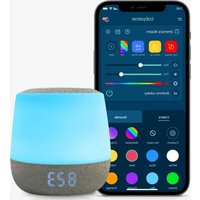
Dreamer - White noise machine BABYSENSE - Free user manual and instructions
Find the device manual for free Dreamer BABYSENSE in PDF.


| Product type | White noise machine with nightlight |
| Brand | Babysense |
| Model | Dreamer |
| Dimensions | 110 × 110 × 108 mm |
| Power supply | AC power adapter 100-240V, DC output 5V/1A; built-in rechargeable Li-ion battery 2600 mAh |
| Battery life | Up to 8 hours |
| Connectivity | WiFi 2.4 GHz, compatible with Babysense app (iOS and Android) |
| Main functions | White noise, multicolor nightlight (fixed color or rainbow), time display (12/24h) and temperature (°C/°F), touch control and via app |
| Speaker | 40 mm, 4 Ω, 3 W, sound level 40 to 110 dB |
| Maintenance | Clean with a soft cloth |
| Safety | Keep out of reach of children (risk of strangulation, suffocation); do not expose to water, heat; do not open; indoor use only |
| Repairability | Repair by a qualified technician only; do not attempt to repair yourself |
| Warranty | 1 year against manufacturing defects |
| Operating temperature | 0 to 40 °C, 5 to 90% relative humidity |
| Package contents | Dreamer device, USB cable, power adapter, user guide |
Frequently Asked Questions - Dreamer BABYSENSE
User questions about Dreamer BABYSENSE
0 question about this device. Answer the ones you know or ask your own.
Ask a new question about this device
Download the instructions for your White noise machine in PDF format for free! Find your manual Dreamer - BABYSENSE and take your electronic device back in hand. On this page are published all the documents necessary for the use of your device. Dreamer by BABYSENSE.
USER MANUAL Dreamer BABYSENSE
For any product related question please contact us at: support@babysensemonitors.com
www.babysensemonitors.com
ENG
02-16
Dreamer
Sound & Light Machine
By babysense
FRA
17-30
SPAGER
31-4561-76
ITA
46-60
Imported by Hisense Ltd.,
27 Shaked Street, Hevel Modi'in Industrial Park, 731990 ISRAEL
Tel: +(972) 3 956 66 04
www.babysensemonitors.com
ENG
1. Overview
1.1 Pack Contents
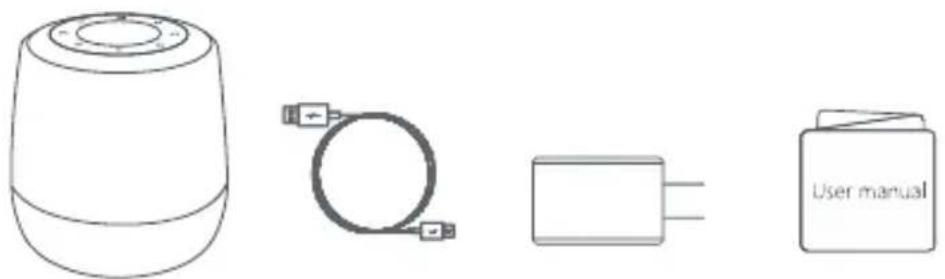
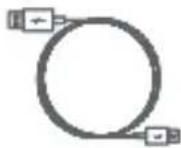
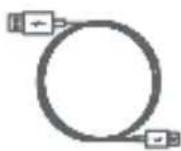
User ManualDevice USB Cable
Note: The Dreamer is supplied with a non-removable pre-installed battery.
1.2 Device Overview
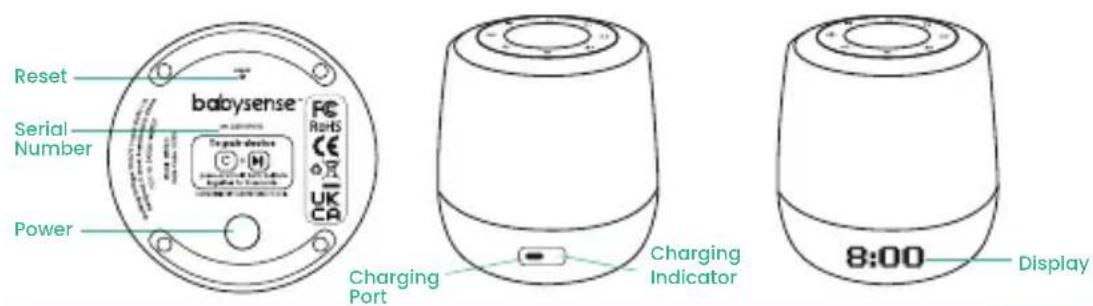
ENG
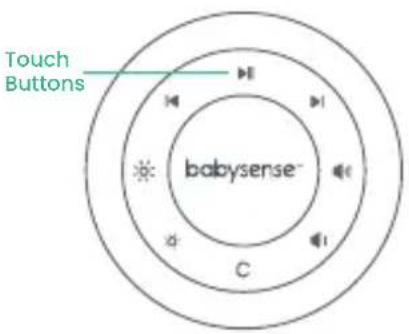
| Play/Pause Volume Up | |||
| Previous Sound Volume Down | |||
| Next Sound Brightness Up | |||
| C | Color Change Brightness Down | ||
 | Long press to activate Standby Mode & short press to reactivate and change between favorite ambiances | ||
Note:
- Brightness Control – Press the Brightness Up or Brightness Down button to increase or decrease the brightness of the light. When the main light is off, pressing these buttons will increase or decrease the brightness level of the clock and/or temperature display.
- Color Control – Press the C button to cycle through the colors: you can select a solid color or the rainbow options where the colors automatically switch every 5 seconds. Long press to switch the light off.
2. Getting Started
Step 1:
- Connect the power cable to the Dreamer and then plug it into your electrical power outlet.
- Press power button to switch the Dreamer on (Illustration 1.2)
Step 2:
- Ensure your cellular device's Bluetooth and WiFi is ON
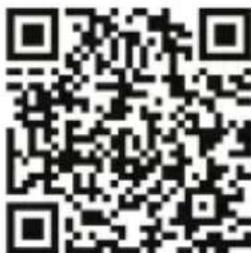
- Download the app: Use the QR Code below or search for Babysense app in the Apple App Store or Google Play Store and download to your cellular device.
- Follow app installation instructions
Note: The Babysense Dreamer is compatible with 2.4GHz networks only.
ENG
Note: When turning the device on for the first time the following will occur:
- The backlights on the top panel will light up.
- The Babysense Dreamer's body will illuminate in white
- The letter P will appear on the clock/temperature display and will blink for 3 minutes indicating the device is in pairing mode. If no P appears or to reactivate pairing mode press and hold both C and ▶buttons together for 5 seconds.
3. Tips for Usage
- Charge Dreamer until the charging indicator changes from red to green.
- When the battery is low and needs to be recharged, LO will be seen on the display.
- The clock can be displayed in either 12hr or 24hr or you can select to switch the time display off, through the app.
- The temperature can be displayed in either Fahrenheit or Celsius or you can select to switch the temperature display off, through the app.
4. Troubleshooting
| Problem Solution | |
| The time displayed is not accurate | To accurately set the time to your time zone please download and connect to the app. |
| The temperature reading is not correct, it is reading higher | The Dreamer LEDs warm up when the light is being used which may result in the temperature reading being slightly higher. |
| My Dreamer is non-responsive | Reset the device by inserting a small, firm object into the reset hole (found on the bottom of the device) and press for 5 seconds. |
| Unable to connect to Wi-Fi | Ensure your Wi-Fi is on.Only supports 2.4GHz networks. |
ENG
5. Warnings and Safety Instructions
Follow these safety precautions to prevent fire, injury or damage to the product.
Read and keep instructions: It is very important that you read all the safety and operating instructions before the Babysense Dreamer Sound & Light Machine is operated.
Please retain your purchase receipt as you will need to produce it if warranty service is required.
5.1 Important:
- Strangulation Hazard: Children can become entangled in cords. Make sure the Sound & Light machine's power adaptor cable is kept out of reach of your baby and other young children at all times.
- Choking Hazard: This product contains small parts which may cause choking. Exercise care when unpacking and assembling the product and keep the small parts away from children.
- Risk Of Suffocation: Keep all packaging materials out of reach of children.
ENG
- Do Not Handle Roughly, Drop Or Throw: Babysense Dreamer Sound & Light Machine is a high-quality electronic device which must be handled with care.
- This Product Is Not A Toy: It should be kept out of children's reach.
- Water And Moisture: The product should not be exposed to rain, moisture, or splashing. Never use or place the product in or near moisture or water. This product is designed for INDOOR USE ONLY. If the product becomes dirty, use a soft cloth to wipe surfaces.
- Keep Away From Sources Of Heat: This unit should not be exposed to direct heat sources such as a candle, stove, radiator, heat register or other appliance that emit heat.
- Power Source: This product should only be used with the AC power adapter supplied by the manufacturer, as included in this package.
- Ventilation: This product should not be used on a bed, sofa, rug or similar surface that may block the ventilation or speaker openings, or be placed in an enclosed area, such as a bookcase or drawer that may impede air flow. Never cover the product with clothes, towels, blankets or any other item.
ENG
- Damage Requiring Service: This product should be serviced by qualified personnel only.
- Do Not Try To Open And Repair The Product: If you have any problems with the product, please contact the authorized distributor or manufacturer. In case of unusual noises or smells originating from the device, immediately disconnect the product from the power outlet and contact the authorized distributor or manufacturer.
5.2 Safety Instructions for AC Power Adapter
- The adapter should not be exposed to direct heat sources such as a candle, stove, radiator, heat register or other appliance that emit heat.
- During continual use, the power adapters may become warm to the touch. This is normal and should not be a cause of concern. Examine intactness of the power cord and its plug.
- The adapter must be handled with care: Do not handle roughly, drop or throw.
- When removing the power adapter from the wall outlet, hold and pull from the receptacle.
ENG
- Do not pull on the cable itself or bend the cable as that will put additional stress on the cable and could lead to damages.
- Do not touch the power adapter with wet hands or allow liquids to spill on it.
- Make sure the mains adaptor cables are kept out of reach of your baby and other young children at all times. To avoid possible danger from power cords, the cords should be secured and never be hung on or near the crib.
- Do not replace the plugs or cable on your power adapter.
- Never cut, damage or bend the power cord.
- Do not put any objects on top of the power cord, which could cause overheating, damage, combustion and electrocution.
- Do not leave the power adapter connected to the wall outlet when it is not plugged into the Sound and Light Machine.
- Do not remove the warning label from the power cable.
WARNING:
- Do not replace the power cord with non-original substitutes Improper connection may cause electrocution.
- Do not place the AC adaptor cable in a high wear and tear location. Never use a frayed or compromised cord.
ENG
5.3 Safety Instructions for Li-ion battery (Non removable pre-installed battery)
- Do not attempt to open the device and replace the pre-installed battery, as improper use may present a risk of fire, explosion, or other hazards, and will invalidate the warranty.
- Do not attempt to repair or adjust any of the electrical or mechanical functions of the unit.
- Do not dismantle, cut, open, crush, bend, puncture, or shred cells or batteries.
- If a battery leaks, do not let the battery liquid touch skin or eyes. If this happens, immediately flush the affected areas with water, and seek medical assistance.
- The battery should not be exposed to direct sunlight or heat sources such as a candle, stove, radiator, heat register or other appliance that emit heat.
- Do not modify, remanufacture, attempt to insert foreign objects into the battery, or immerse or expose it to water or other liquids. Batteries may explode if damaged.
- If you believe the battery is damaged, remove product from the charger and stop using the product.
- Never use a damaged battery.
5.4 Information on disposal of product
Always dispose of your product (with the non-removable pre-installed battery) in an environmentally responsible way and in accordance with your local waste disposal requirements. All cardboard and paper packaging materials should be recycled in accordance with your local council waste regulations.
Thank you for choosing the Babysense Dreamer Sound & Light Machine.
6. FCC Statements
This device complies with part 15 of the FCC Rules. Operation is subject to the following two conditions:
(1) This device may not cause harmful interference.
(2)This device must accept any interference received, including interference that may cause undesired operation.
NOTE 1: This equipment has been tested and found to comply
ENG
with the limits for a Class B digital device, pursuant to part 15 of the FCC Rules. These limits are designed to provide reasonable protection against harmful interference in a residential installation.
This equipment generates, uses and can radiate radio frequency energy and, if not installed and used in accordance with the instructions, may cause harmful interference to radio communications. However, there is no guarantee that interference will not occur in a particular installation. If this equipment does cause harmful interference to radio or television reception, which can be determined by turning the equipment off and on, the user is encouraged to try to correct the interference by one or more of the following measures:
- Reorient or relocate the receiving antenna.
- Increase the separation between the equipment and receiver.
- Connect the equipment into an outlet on a circuit different from that to which the receiver is connected.
- Consult the dealer or an experienced radio/TV technician for help.
NOTE 2: Any changes or modifications to this unit not expressly approved by the party responsible for compliance could void the user's authority to operate the equipment.
7. Specifications
| Model No MBZ221 | |
| Frequency 2.4GHz WiFi | |
| Input Voltage DC5V/1A | |
| Power Adapter Input AC 100-240V <50/60Hz; Output: 5V/1A | |
| Operational Environment Indoor use only; Temperature: 32-104°F / 0-40°C Humidity: 5% to 90% rh. (relative humidity) | |
| Working Voltage 3.7V | |
| Dynamic Current light off<200MA / light on<600MA | |
| Static Current 20uA | |
| Size 110*110*108mm | |
| Speaker Diameter 40mm 4Ω 3W | |
| Sound Level 40dB~110dB | |
| Battery 2600MA rechargeable battery | |
| Battery Operating Time Up to 3 hours | |
ENG
8. Warranty Terms
We take quality very seriously. This is why all of our products come with a one-year warranty from the original purchase date against defects in workmanship and materials. Please register your warranty online. If you have warranty or support issues, please contact our customer service.
support@babysensemonitors.com
9. Customer Support
If you have any further questions about using the product, please contact us via:
Email - support@babysensemonitors.com US Toll-Free number (833) 568-2229 (USA ONLY) Website - www.babysensemonitors.com
Please retain your purchase receipt and attach to the back page of this user manual as you will need to produce this if warranty service is required.
16
babysense™
Dreamer
support@babysensemonitors.com
8. Service Client
Email - support@babysensemonitors.com Website - www.babysensemonitors.com
support@babysensemonitors.com
www.babysensemonitors.com | www.hisense.co.il
SPA
Dispositivo
support@babysensemonitors.com
Email - support@babysensemonitors.com
Website - www.babysensemonitors.com
Dispositivo
support@babysensemonitors.com
Email - support@babysensemonitors.com
Website - www.babysensemonitors.com
support@babysensemonitors.com
www.babysensemonitors.com | www.hisense.co.il
GER
1. Übersicht
1.1 Packungsinhalt
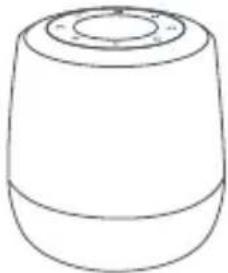
Gerät
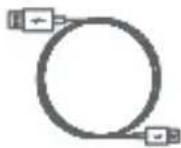
USB-Kabel
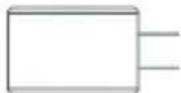
Netzteil
Benutzerhandbuch
GER
support@babysensemonitors.com
8. Kundenbetreuung
Email - support@babysensemonitors.com
Website - www.babysensemonitors.com

- DREAMER
- OVERVIEW
- 1.1 PACK CONTENTS
- 1.2 DEVICE OVERVIEW
- ENG
- NOTE
- GETTING STARTED
- STEP 1
- STEP 2
- TIPS FOR USAGE
- TROUBLESHOOTING
- WARNINGS AND SAFETY INSTRUCTIONS
- 5.1 IMPORTANT
- 5.2 SAFETY INSTRUCTIONS FOR AC POWER ADAPTER
- WARNING
- 5.3 SAFETY INSTRUCTIONS FOR LI-ION BATTERY (NON REMOVABLE PRE-INSTALLED BATTERY)
- 5.4 INFORMATION ON DISPOSAL OF PRODUCT
- FCC STATEMENTS
- SPECIFICATIONS
- WARRANTY TERMS
- CUSTOMER SUPPORT
- 16
- BABYSENSE™
- SERVICE CLIENT
- GER
- ÜBERSICHT
- 1.1 PACKUNGSINHALT
- KUNDENBETREUUNG
Brand : BABYSENSE
Model : Dreamer
Category : White noise machine