
See+ - Baby monitor BABYSENSE - Free user manual and instructions
Find the device manual for free See+ BABYSENSE in PDF.


Pick your language and provide your email: we'll send you a specifically translated version.
| Product Type | Video Baby Monitor |
| Brand | Babysense |
| Model | See+ |
| Display | 2.8 inch LCD color screen |
| Resolution | 320 x 240 pixels |
| Camera Night Vision | Infrared LEDs, automatic activation |
| Field of View | 65 degrees |
| Audio | Two-way talk, built-in microphone and speaker |
| Temperature Sensor | Yes, displays room temperature |
| Range (Indoor) | Up to 50 meters |
| Range (Outdoor) | Up to 300 meters |
| Power Supply Camera | AC adapter (5V, 1A) |
| Power Supply Parent Unit | Rechargeable lithium battery (1000 mAh) or AC adapter |
| Battery Life Parent Unit | Up to 10 hours |
| Dimensions Camera | 6.5 x 6.5 x 12 cm |
| Dimensions Parent Unit | 7.5 x 4.5 x 2 cm |
| Weight Camera | 150 g |
| Weight Parent Unit | 120 g |
| Main Features | Pan & tilt camera (remote), lullabies, volume control, eco mode |
| Cleaning and Maintenance | Wipe with a dry cloth; do not use liquids near device |
| Safety Certifications | CE, RoHS |
| Spare Parts and Repairability | Replacement adapters and batteries available from manufacturer |
| General Information | Manufacturer: Babysense; product category: baby monitor |
Frequently Asked Questions - See+ BABYSENSE
How do I pair the camera and parent unit?
Press and hold the pairing button on the camera for 3 seconds until the LED flashes. Then press the 'Pair' button on the parent unit menu. The units will connect automatically.
The screen shows 'No Signal' – what should I do?
Check that the camera is powered on and within range. Move the parent unit closer to the camera and ensure both are on the same channel. If the issue persists, reset both units by unplugging them.
How can I adjust the camera angle remotely?
Use the arrow keys on the parent unit to pan (left/right) and tilt (up/down) the camera. The camera motor allows 330° pan and 90° tilt.
Can I use the monitor at night?
Yes, the camera automatically switches to night vision when the room is dark. The infrared LEDs provide clear black-and-white video.
How do I play lullabies?
Press the 'Menu' button on the parent unit, select 'Lullabies', and choose from 5 pre-installed melodies. You can also adjust the volume or loop them.
What is the temperature range displayed?
The temperature sensor measures from 0°C to 50°C (32°F to 122°F). If the temperature is outside this range, the display will show '--'.
How do I enable Eco mode?
Eco mode can be turned on from the parent unit menu. It reduces power consumption by muting the display and only transmitting when sound is detected.
The battery does not hold a charge – can I replace it?
Yes, the parent unit has a replaceable lithium battery. Contact Babysense support or order a compatible battery (model BS-BAT-1000) online.
Can I add multiple cameras?
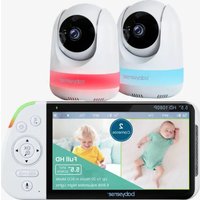
The See+ supports up to 2 cameras. You can cycle through camera feeds using the 'Camera' button on the parent unit.
Is the monitor safe to use near baby?
Yes, the camera meets safety standards and emits low radiation. Keep the camera at least 1 meter away from the crib and use the included wall mount if needed.
User questions about See+ BABYSENSE
0 question about this device. Answer the ones you know or ask your own.
Ask a new question about this device
No questions yet. Be the first to ask one.
Download the instructions for your Baby monitor in PDF format for free! Find your manual See+ - BABYSENSE and take your electronic device back in hand. On this page are published all the documents necessary for the use of your device. See+ by BABYSENSE.
USER MANUAL See+ BABYSENSE
Manual assistant
Powered by Anthropic
Waiting for your message
Product information
Brand : BABYSENSE
Model : See+
Category : Baby monitor