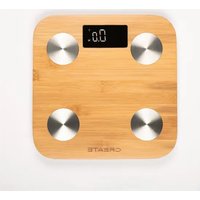
BALANCE BODY BAMBOO SMART - Scale Create - Free user manual and instructions
Find the device manual for free BALANCE BODY BAMBOO SMART Create in PDF.


User questions about BALANCE BODY BAMBOO SMART Create
0 question about this device. Answer the ones you know or ask your own.
Ask a new question about this device
Download the instructions for your Scale in PDF format for free! Find your manual BALANCE BODY BAMBOO SMART - Create and take your electronic device back in hand. On this page are published all the documents necessary for the use of your device. BALANCE BODY BAMBOO SMART by Create.
USER MANUAL BALANCE BODY BAMBOO SMART Create
natural_image
Simple diagram with four circles arranged around a central rectangle, enclosed in a rounded square border (no text or symbols)MULTIFUNCTION DIGITAL SMART SCALE BÁSCULA INTELIGENTE DIGITAL MULTIFUNCIÓN
CREATE CREATE CREATE ATE CREATE CREATE CRE CREATE CREATE CREATE ATE CREATE CREATE CRE CREATE CREATE CREATE ATE CREATE CREATE CRE CREATE CREATE CREATE ATE CREATE CREATE CRE CREATE CREATE CREATE ATE CREATE CREATE CRE CREATE CREATE CREATE ATE CREATE CREATE CRE CREATE CREATE CRE CREATE CREATE CRE ATE CREATE CREATE CRE CREATE CREATE CRE CREATE CREATE CRE CREATE CREATE CRE ATE CREATE CREATE CRE CREATE CREATE CRE ATE CREATE CRE CREATE CREATE CRE
CREATE CREATE CREATE ATE CREATE CREATE CRE CREATE CREATE CREATE ATE CREATE CREATE CRE CREATE CREATE CREATE ATE CREATE CREATE CRE CREATE CREATE CREATE ATE CREATE CREATE CRE CREATE CREATE CREATE ATE CREATE CREATE CRE CREATE CREATE CREATE ATE CREATE CREATE CRE CREATE CREATE CREATE CREATE CREATE CREATE ATE CREATE CREATE CRE CREATE CREATE CREATE CREATE CREATE CREATE ATE CREATE CREATE CRE CREATE CREATE CREATE CREATE CREATE CREATE CREATE CREATE CRE
INDEX
ENGLISH
Safety warnings 6
Getting started 7
Error icons 8
Using the scale without Wi-Fi 8
Frequently asked questions 8
6
ESPAÑOL
Thank you for choosing our scale. Before using the appliance, and to guarantee the best use, read these instructions carefully.
The safety precautions listed here reduce the risk of fire, electric shock, and injury when followed correctly. Please keep the manual in a safe place for future reference, as well as the warranty, sales receipt and box. If applicable, give these instructions to the future owner of the appliance. Always follow basic safety instructions and risk prevention measures when using an electrical appliance. The manufacturer will not be held responsible for any damage resulting from the failure of the user to follow these instructions.
SAFETY WARNINGS
Use the device only as described in the instructions. The company will not be held responsible for any damages which may derive from an improper use.
- Please take off shoes and socks and keep your bare feet in touch with the electrodes when measuring body weight, BMI, BFR, muscle, moisture, bone mass, BMR, visceral fat, protein rate, body age, standard weight or body fat.
- Please check the batteries if the scale malfunctions. Replace them if necessary.
- Please use soft tissue with alcohol or glass cleaner to clean the surface if it is dirty. No soap or other chemicals. Keep it away from water, heat and extreme coldness.
- The scale is a high precision measuring device. Never jump or stomp on the scale or disassemble it and please handle it carefully to avoid breaking when moving it.
- The scale is for family use only and not suitable for professional use. Body weight, BMI, BFR, muscle, moisture, bone mass, BMR, visceral fat, protein rate, body age, standard weight, body fat measured are for reference only. You should consult a doctor when you undertake any diet or exercise program.
- Caution: Slippery when wet! The scale platform may be pretty slippery when wet, thus please make sure both the scale platform and your feet are dry before use. Never step on the scale platform with wet feet.
- Please use the scale on a hard and flat surface. Do not use on a carpet or soft surface.
- Carefully step on the platform of the scale. Stand as stationary as possible until the weight reading is shown and locked on the display.
- The scale will be automatically off if there is no operation for a while.
- This device can be used by children 8 years of age and older, and adults, with reduced physical, sensory or mental capabilities or lack of experience and knowledge, if they have been given supervision or instruction regarding the safe use of the device and understand the hazards involved.
GETTING STARTED
- Make sure your mobile device is running iOS 8 or higher or Android 4.1x or higher.
- Make sure you are connecting to a 2.4GHz Wi-Fi network (it can't connect to 5Ghz networks).
iPhone OS Android OS
- Download CREATE Home app from App Store or Google Play.
-
Register an account on your CREATE Home app.
-
Enter your mobile phone number or email address.
-
Enter the verification code and create a password.
-
Add your devide.
-
Open CREATE Home app, click “+”, then click on “Add new device”. Choose the scale category. Then you will need to select your Wi-Fi network and enter your password.
- At this moment, please power on your scale and then long press the button (inside of the battery cover), until the the □ and 🔺 icons flash, it means the scale is in WiFi configuration mode.
- Next, select the indicator light status, you can choose “Fast flashing” if your light is flashing every 0.5 seconds or “Slow flashing” if your light is flashing every 3 seconds.
-
Wait until the display shows 100%. Keep the scale always on while the screen shows and if the scale powers off, please power on again and long press the unit button again until the display shows 0.0 and the Wi-Fi icon stops flashing. This means the scale is successfully connected to the app. If the Wi-Fi icon is still flashing it means the scale is no connected to the app.
-
Once your device is successfully connected, the app is ready to be used to measure your weight. After the measuring is done, you can claim your weight on the "See" button. You can have more than one user registered on the app, check which user is on before using the scale.
-
There are 2 ways to change units:
-
On the app: Click “set up”, “unit switching” to select weight unit between: kg / lb / st (st measure will only be shown on the app not on the scale screen).
-
On the scale: Short press the unit button on the back side of the scale to switch between kg and lb.
-
Overload or error in measurement: The display will indicate "Err" when the scale is over max capacity. Please remove the weight to avoid any damage.
- Low battery: The display will indicate "Lo". Open the battery cover and replace them.
- Faulty measurement: The display will show "Err1" for these 2 reasons:
• Body fat percentage is less than 5% or over 50%.
- Unsuccessful test.
USING THE SCALE WITHOUT WI-FI
- If you can't connect the scale to a Wi-Fi network, just stand on the scale. The scale will only measure your body weight.
FREQUENTLY ASKED QUESTIONS
-
Can I share the scale with family and friends?
-
Yes, you can share your scale with family and friends who will have access to the app. In order to share the device, the other users should have downloaded the app and registered a new account. Press the Profile button and click on the “Home Management” button. You can give or revoke sharing permissions.
- What's the wireless range?
- The range of your home Wi-Fi is heavily dependent on your home router and the conditions of the room. Check with your router specifications for exact data range.
- The device appears offline or unreachable?
- Make sure your Wi-Fi router is online and in range. Make also sure that you have the latest app functionality by clicking “Check for firmware update” in your device settings.
- Cannot connect to your Wi-Fi network.
- Make sure you entered the correct Wi-Fi password during the Wi-Fi setup. Check whether there are any internet connection problems. If the Wi-Fi signal is too weak, reset your Wi-Fi router and try again.
- How many scales can I control?
- CREATE Home app can control an unlimited amount of devices in an unlimited amount of locations. Your router may have a limit of how many devices can be connected to it.
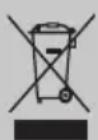
In compliance with Directives: 2012/19/EU and 2015/863/EU on the restriction of the use of dangerous substances in electric and electronic equipment as well as their waste disposal. The symbol with the crossed dustbin shown on the package indicates that the product at the end of its service life shall be collected as separate waste. Therefore, any products that have reached the end of their useful life must be given to waste disposal centres specialising in separate collection of waste electrical and electronic equipment, or given back to the retailer at the time of purchasing new similar equipment, on a one for one basis. The adequate separate collection for the subsequent start-up of the equipment sent to be recycled, treated and disposed of in an environmentally compatible way contributes to preventing possible negative effects on the environment and health and optimises the recycling and reuse of components making up the apparatus. Abusive disposal of the product by the user involves application of the administrative sanctions according to the laws.
VEILIGHEIDSWAARSCHUWINGEN

Brand : Create
Model : BALANCE BODY BAMBOO SMART
Category : Scale