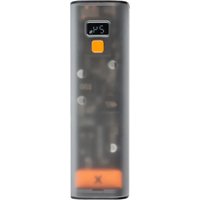
XCP240 - Power bank Xtorm - Free user manual and instructions
Find the device manual for free XCP240 Xtorm in PDF.


| Product type | Portable battery (Power bank) |
| Estimated capacity | ~24000 mAh (240 Wh) |
| Input power | USB-C PD up to 100 W |
| Output power | USB-A (fast charging compatible) |
| Fast charging function | Yes (USB-C PD 20 W and above) |
| Full recharge time | Approximately 2.5 hours with 100 W charger |
| Battery level display | LED screen with percentage (0-100%) |
| Fast charging indicator | Yes, lights up with compatible cable |
| Power button | Single press to display, double press to turn on/off |
| Recycling | WEEE compliant, recycle through local channels |
| Safety | Do not discard, disassemble, expose to water or heat |
| Warranty | Void in case of improper use |
| Box contents | USB-C cable, manual |
Frequently Asked Questions - XCP240 Xtorm
User questions about XCP240 Xtorm
0 question about this device. Answer the ones you know or ask your own.
Ask a new question about this device
Download the instructions for your Power bank in PDF format for free! Find your manual XCP240 - Xtorm and take your electronic device back in hand. On this page are published all the documents necessary for the use of your device. XCP240 by Xtorm.
USER MANUAL XCP240 Xtorm
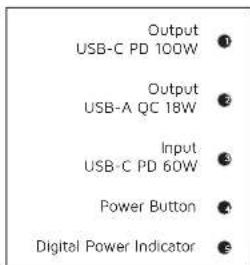
CHARGING YOUR DEVICE3 RECHARGING THE POWER BANK 4
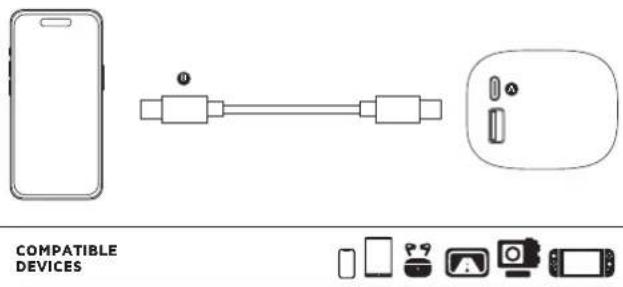
3A Connect the USB-C end of the charging cable to the USB-C PD output of the Power Bank and the other end to the input of your device. The charging will start automatically.
3B Charging some devices requires a charging cable other than the one supplied. E.g. an Apple Lightning or a Micro USB cable.
natural_image
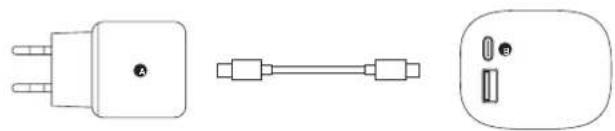
Three technical line drawings of electrical plug connectors: a three-pin socket, a straight connector, and a multi-pin socket (no text or symbols present)4A Connect the USB-C end of the charging cable to output 3 of the Power Bank and the USB end to a wall charger.
4B For the fastest charging possible use a 100W USB-C PD charger. This will fully recharge the Power Bank within 2.5 hours.
LED POWER INDICATOR5 IN THE BOX 6
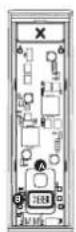
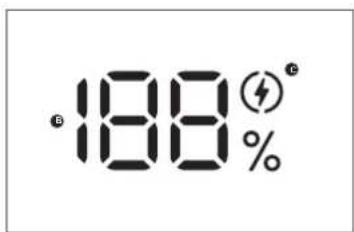
5A Press the Power Button once to display the battery level remaining in the Power Bank via the LED display. Improved Power Button function:
- single press to turn on/off the display
- double press to fully turn on/off the Power Bank
5B The display shows the remaining battery percentage between 0% (empty) and 100% (fully charged).
5C The fast charge indicator will light up when you are using the correct cable for fast charging your device. (20W USB-C PD and higher).
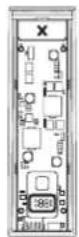
1

2

3
XCP240
Cyber Power Bank

USB-C PD Cable

Manual

EN - ENGLISH
1 SPECIFICATIONS
2 PRODUCT OVERVIEW
3 CHARGING YOUR DEVICE
3.A Connect the USB end of the charging cable to the USB-A output of the Power Bank and the other end to the input of your device. The charging will start automatically.
3.B Charging some devices requires a charging cable other than the one supplied. E.g. an Apple Lightning ^4 or a Micro USB cable.
4 RECHARGING THE POWER BANK
4.A Connect the USB-C end of the charging cable to output 3 of the Power Bank and the USB end to a wall charger.
4.B For the fastest charging possible use a 100W USB-C PD charger. This will fully recharge the Power Bank within 2.5 hours.
5 LED POWER INDICATOR
5A Press the Power Button once to display the battery level remaining in the Power Bank via the LED display. Improved Power Button function:
- single press to turn on/off the display
- double press to fully turn on/off the Power Bank
5B The display shows the remaining battery percentage between 0% (empty) and 100% (fully charged).
5C The fast charge indicator will light up when you are using the correct cable for fast charging your device. (20W USB-C PD and higher).
6 IN THE BOX
NL - NEDERLANDS
1 SPECIFICATIES
2 PRODUCT OVERZICHT
3 OPLADEN VAN JOUW APPARAAT
EN When recycling this product, please follow WEEE battery recycling procedures. Contact your local recycling organization for more information.
XTORM SAFETY CHECK WARNINGS


1. TEMPERATURE CONTROL
Provided with a temperature control chip that prevents overheating.

2. OVERLOAD PROTECTION
Protects both the internal battery as well as the battery of the attached device from overcharging.

3. SECURED POWER MANAGEMENT
Automatically picks the correct charging speed and efficiently devides power between attached devices.

4. SHORT CIRCUIT PROTECTION
Breaks the circuit automatically when an overcurrent is detected. This protects the Xtorm charger and your device from short circuit damage.

5. A-CLASS BATTERY CELLS
We only use the best battery cells that provide the fast charging you need and meet all safety requirements.

6. HIGH EFFICIENCY
Our power products are built to power your device as efficient as possible. This ensures the least possible loss of energy during the charging process.
EN Warnings
Don't crop, disseme or attempt to repair the charger by yourself. Avoid exposure to water or high humidity. Don't expose to any heat source. Keep out of reach of children. Don't use in the presence of flamimabla gas. The warranty will lease in the event of limoper use. Telco Accessories has tested the product in a test environment. All statements/declarations made by Telco Accessories about the operation of the product are based on the results obtained from such tests. These results/statements/declarations cannot be guaranteed, for example in cases of deviating or injudicious use and/or use in a different environment.
NL Waarschuwingen
EU DECLARATION OF CONFORMITY


- CHARGING YOUR DEVICE3 RECHARGING THE POWER BANK 4
- LED POWER INDICATOR5 IN THE BOX 6
- EN - ENGLISH
- SPECIFICATIONS
- PRODUCT OVERVIEW
- CHARGING YOUR DEVICE
- RECHARGING THE POWER BANK
- LED POWER INDICATOR
- IN THE BOX
- NL - NEDERLANDS
- SPECIFICATIES
- PRODUCT OVERZICHT
- OPLADEN VAN JOUW APPARAAT
- XTORM SAFETY CHECK WARNINGS
- TEMPERATURE CONTROL
- OVERLOAD PROTECTION
- SECURED POWER MANAGEMENT
- SHORT CIRCUIT PROTECTION
- A-CLASS BATTERY CELLS
- HIGH EFFICIENCY
- EN Warnings
- NL Waarschuwingen
Brand : Xtorm
Model : XCP240
Category : Power bank