HD500 - Sewing machine SINGER - Free user manual and instructions
Find the device manual for free HD500 SINGER in PDF.


User questions about HD500 SINGER
0 question about this device. Answer the ones you know or ask your own.
Ask a new question about this device
Download the instructions for your Sewing machine in PDF format for free! Find your manual HD500 - SINGER and take your electronic device back in hand. On this page are published all the documents necessary for the use of your device. HD500 by SINGER.
USER MANUAL HD500 SINGER
natural_image
Line drawing of a vintage sewing machine with decorative swirls and no text or symbols
SINGER®
IMPORTANT SAFETY INSTRUCTIONS
When using an electrical appliance, basic safety precautions should always be followed, including the following:
Read all instructions before using this sewing machine.
Keep the instructions at a suitable place close to the machine. Make sure to hand them over if the machine is given to a third party.
DANGER – TO REDUCE THE RISK OF ELECTRIC SHOCK:
A sewing machine should never be left unattended when plugged in. The electrical socket, to which the machine is plugged in should be easily accessible. Always unplug this sewing machine from the electric outlet immediately after using and before cleaning, removing covers, lubricating or when making any other user servicing adjustments mentioned in the instruction manual.
WARNING — TO REDUCE THE RISK OF BURNS, FIRE, ELECTRIC SHOCK, OR INJURY TO PERSON:
- This appliance is intended for use by adults. The appliance can be used with adult supervision by (i) children aged from 8 to 12 years and (ii) persons with reduced physical, sensory or mental capabilities or lack of experience and knowledge if they have been given instruction concerning use of the appliance in a safe way and understand the hazards involved. Cleaning and user maintenance shall not be made by children without supervision. It is not allowed for anyone to play with the machine. Children up to 8 years are not allowed to use the machine.
- Do not allow to be used as a toy. Close attention is necessary when this sewing machine is used by or near children.
- Use this sewing machine only for its intended use as described in this manual. Use only attachments recommended by the manufacturer as contained in this manual.
- Never operate this sewing machine if it has a damaged cord or plug, if it is not working properly, if it has been dropped or damaged, or dropped into water. Return the sewing machine to the nearest authorized dealer or service center for examination, repair, electrical or mechanical adjustment.
- Never operate the sewing machine with any air openings blocked. Keep ventilation openings of the sewing machine and foot control free from the accumulation of lint, dust, and loose cloth.
- Keep fingers away from all moving parts. Special care is required around the sewing machine needle.
• Always use the proper needle plate. The wrong plate can cause the needle to break. - Do not use bent needles.
- Do not pull or push fabric while stitching. It may deflect the needle causing it to break.
- Wear safety glasses.
- Switch the sewing machine off (“0”) when making any adjustment in the needle area, such as threading needle, changing needle, threading bobbin, or changing presser foot, etc.
- Never drop or insert any object into any opening.
- Do not use outdoors.
- Do not operate where aerosol (spray) products are being used or where oxygen is being administrated.
- To disconnect, turn all controls to the off ("0") position, then remove plug from outlet.
- Do not unplug by pulling on cord. To unplug, grasp the plug, not the cord.
- The foot control is used to operate the machine. Never place other objects on the foot control.
-
Do not use the machine if it is wet.
-
If the LED lamp is damaged or broken, it must be replaced by the manufacturer or its service agent or a similarly qualified person, in order to avoid a hazard.
- If the cord connected with the foot control is damaged, it must be replaced by the manufacturer or its service agent or a similarly qualified person, in order to avoid a hazard.
- The noise level under normal operating conditions is less than 76dB(A).
- The machine must only be used with foot control of type FC-2902D(220-240 area) / 4C-326G(230\~ area ) manufactured by Wakaho Electric Ind. Co., Ltd.(Vietnam)
SAVE THESE INSTRUCTIONS
TABLE OF CONTENTS
INTRODUCTION....1
Intended Use 1
Machine Overview....1
Needle Area Overview....2
Top of Machine 2
Overview Accessories 3
Included Accessories (Not Pictured).... 3
Presser Feet....4
Optional Accessories 4
Stitch Overview.... 5
Utility Stitches 5
Decorative Stitches 5
PREPARATIONS......6
Unpacking the Machine....6
Connect to the Power Supply 6
Packing Machine after Sewing 6
Free Arm/Removable Accessory Tray 7
Presser Foot Lifter....7
Thread Knife....7
Spool Pin 8
Wind the Bobbin 9
Insert the Bobbin 9
Thread the Machine.... 10
Needle Threader....11
Needles 11
Change the Needle.... 12
Thread Tension.... 13
Sew without Feed Teeth 13
Presser Foot Pressure.... 13
Change the Presser Foot 14
Attaching the Edge/Quilting Guide 14
OPERATING YOUR MACHINE....15
Select a Stitch.... 15
For sewing the grey stitch patterns 15
For sewing the blue or red stitch patterns 15
Stitch Width Dial & Stitch Length Dial 16
Three Needle Position Dial....16
Reverse Sewing 16
SEWING 17
Sewing....17
Start to Sew – Straight Stitch.... 17
Change Sewing Direction....18
Finish Sewing 18
Straight Stretch Stitch....18
Multi-Step Zigzag Stitch.... 19
Slant Overedge Stitch.... 19
Closed Overlock Stitch 20
Blind Hems 20
Darning and Mending 21
Repair Large Holes 21
Repair Tears 21
One-Step Buttonhole....22
Sew Zippers.... 23
MAINTENANCE....24
Cleaning the Machine....24
Cleaning the Bobbin Area....24
Cleaning under the Bobbin Area.... 24
Troubleshooting....25
INTRODUCTION
Intended Use
Optimal use and maintenance are described in these instructions. This product is not intended for industrial or commercial use. Additional assistance, by region, may be found online at www.singer.com.
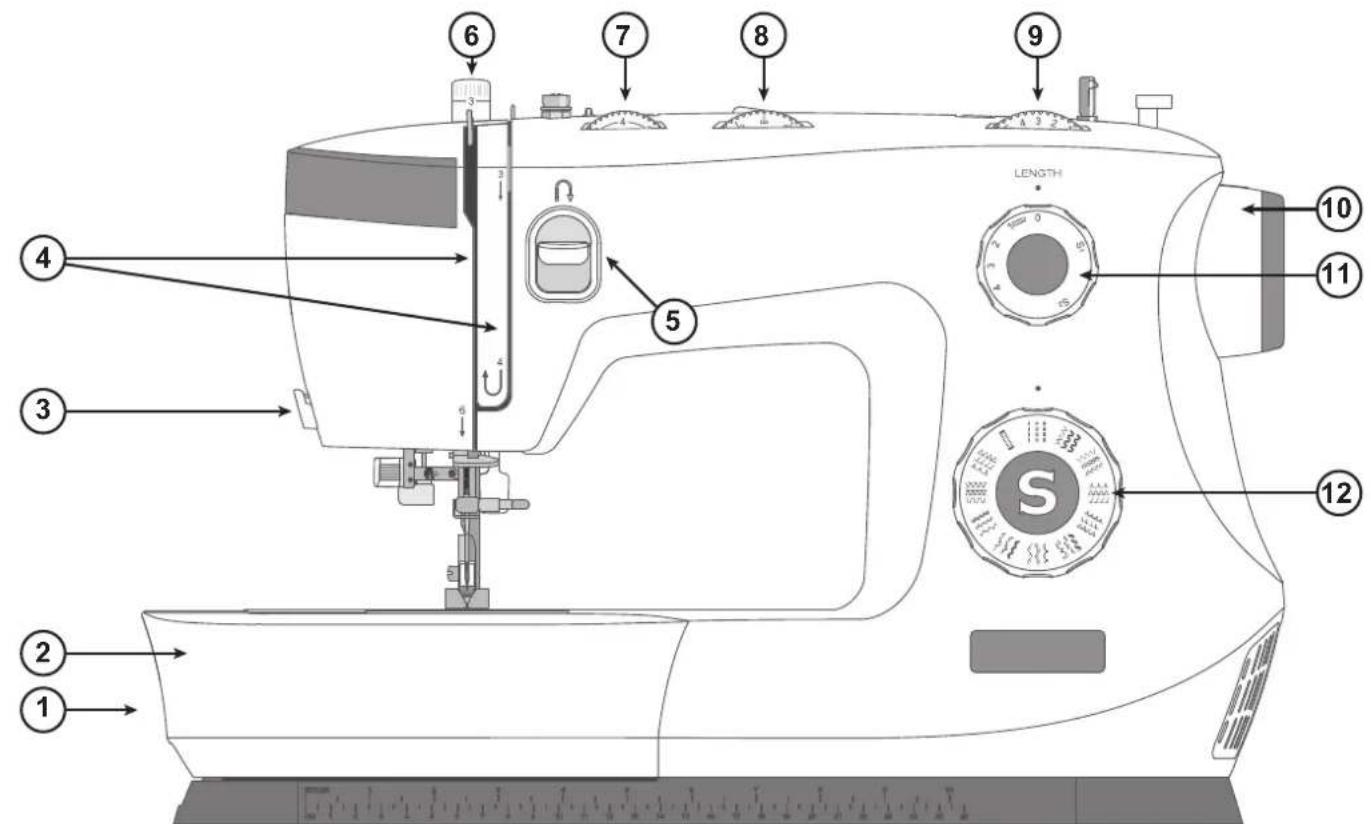
Machine Overview
text_image
1 2 3 4 5 6 7 8 9 LENGTH 10 11 12 S- Feed Teeth Lever — move from side to side to engage or disengage the feed teeth. Positioned at the back of the free arm.
- Accessory Tray / Free Arm — provides a flat surface when sewing and allows storage for your accessories. Remove the accessory tray to use the free arm which makes it easier to sew, e.g., trouser hems and sleeves.
- Thread Knife — for trimming thread ends at the end of sewing.
- Threading Slots — thread paths with tension discs and take up lever.
- Reverse Sewing Lever — reverses stitching direction, for example, when securing the beginning or ending of a seam.
-
Presser Foot Pressure—controls the pressure the presser foot exerts onto the fabric.
-
Thread Tension Dial — adjustable for setting the desired tension for your stitch, thread and fabric.
- Three Needle Position Dial — the needle position can be altered as desired (see page 16).
- Stitch Width Dial — controls the width of stitches, making them narrower or wider (see page 16).
- Hand Wheel—used to manually control the movement of the needle and the thread take-up lever.
- Stitch Length Dial — controls the length of stitches, making them shorter or longer as desired. It is also used for stretch stitch selection (see page 16).
- Stitch Selector Dial — is used to select stitch patterns and buttonhole settings (see page 15).
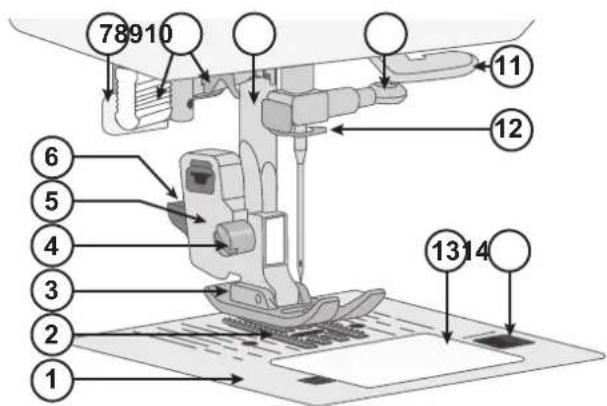
Needle Area Overview
- Needle Plate — provides a flat area around presser foot for sewing. Guidelines indicate various seam allowances used to guide fabric while sewing.
- Feed Teeth — feed the fabric under the presser foot when sewing.
- Presser Foot — holds fabric against feed teeth which draw fabric under the presser foot as you sew.
- Presser Foot Holder Screw — loosen the screw to remove the presser foot holder.
- Presser Foot Holder — holds the presser foot.
- Presser Foot Release Button — press this button to release the presser foot from the holder.
- Buttonhole Lever — used for buttonhole sewing.
- Built-in Needle Threader — thread the needle quickly and easily.
- Presser Foot Bar — accommodates the presser foot holder.
- Needle Clamp Screw — secures the needle.
- Thread Guide — helps maintain thread flow when sewing.
- Needle Thread Guide — helps maintain thread flow when sewing.
- Bobbin Cover — protects the bobbin while sewing.
- Bobbin Cover Release Button — push to open the bobbin cover.
Top of Machine
- Bobbin winding tension disc
- Thread guides
- Handle
- Spool pin
- Hole for auxiliary spool pin
- Bobbin winding spindle
- Bobbin winding stopper
- Thread tension discs
- Thread take-up lever
text_image
78910 11 12 6 5 4 3 2 13 14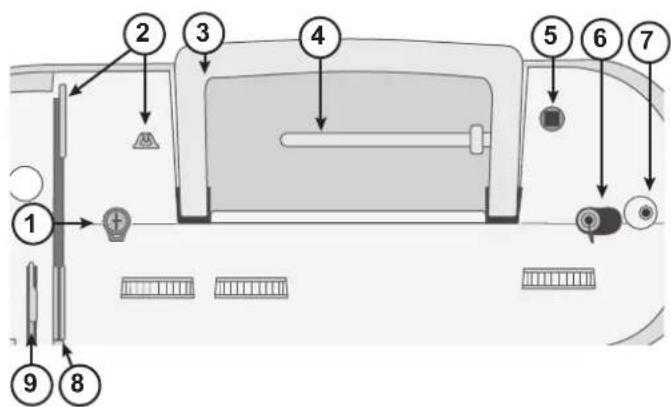
text_image
Diagram of a car interior with numbered parts and directional arrows indicating components like traffic, display, and control buttons.Overview Accessories

Bobbin x4 — Only use the type of transparent bobbins delivered with your machine (SINGER® Class 15 transparent bobbins). One of the bobbins is inserted in the machine upon delivery.
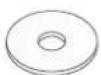
Felt Pad — Used to cushion the spool of thread when using the Auxiliary Spool Pin.
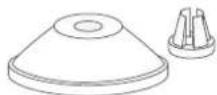
Spool Cap — Two sizes (large and small) for various thread spool styles.
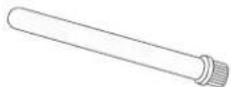
Auxiliary Spool Pin — For sewing with large thread spools or when using specialty threads.
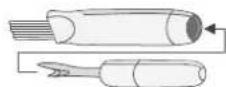
Brush and Seam Ripper — Used to remove stitches/brush off lint.
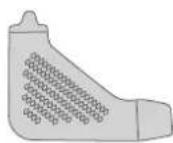
L-Screwdriver — Used to remove the needle plate, presser foot holder or needle screw.
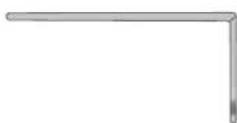
Edge/Quilting Guide — Used for straight and accurate sewing, e.g., when quilting. Insert the guide into the slot at the back of the presser foot holder. Adjust the position to fit your project.
Included Accessories (Not Pictured)
- Needles
- Foot control
- Power cord
Presser Feet
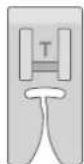
All-purpose Foot (T)
(attached to the machine upon delivery)
This foot is used for general sewing on most types of fabric. The bottom of the foot is flat, so that the fabric is held down firmly against the feed teeth while sewing. It also has a wide slot so that the needle can move from left to right, depending on which stitch you sew.
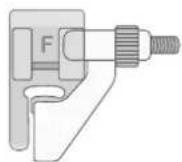
Blind Hem Foot (F)
The Blind Hem Foot is used for sewing blind hems in garments and home decor. There is an adjustable guide with an extension at the front, used to guide the fold of the hem while stitching.
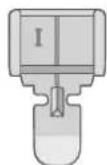
Zipper Foot (I)
This foot is used for inserting zippers. Attach the foot to the presser foot holder on either side of the foot, depending on which side of the zipper is being sewn. The Zipper Foot can also be used to create and insert piping.
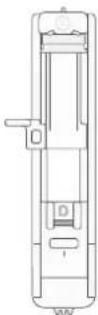
One-Step Buttonhole Foot (D)
This foot allows you to make perfectly sized buttonholes for your button. It has a space at the back for a button, used to set the size of the buttonhole. The machine will automatically sew a buttonhole to fit that button size.
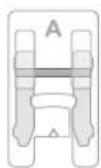
Satin Stitch Foot (A)
The Satin Stitch Foot is used for satin stitches and other more dense decorative stitches. It has a groove on the underside that allows the dense stitching to pass freely underneath the foot.
Optional Accessories
Additional optional accessories are available for your machine. Check with your authorized SINGER ^® retailer for more information.
Stitch Overview
Utility Stitches
The stitches described in the below chart are utility stitches, used mainly for utility sewing. When sewing, use a thread tension between 3–5. Always test sew on a piece of scrap fabric, and adjust the tension if necessary.
| M | Application | ||
| Straight Stitch Center Position | 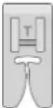 | The basic stitch used for sewing. The most common use for a straight stitch is to sew two pieces of fabric together. | |
| Straight Stretch Stitch | 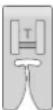 | Stronger than a regular straight stitch, on stretch knit fabrics, because it locks three times — forward, backward and forward again. Use it to reinforce seams of sportswear and for curved seams which take a lot of strain. | |
| Zigzag Stitch A | very versatile  | stitch for decorative sewing, applique, attaching trims, and more. | |
| Multi-Step Zigzag Stitch | 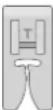 | Finish scam allowances to prevent the fabric from unravelling. When scam finishing, the smaller step of the stitches will help keep fabric more flat than a regular zigzag. It can also be used for mending tears and sewing elastic. | |
| Overlock Stitch | Sew and 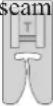 | overcast in one step. For medium and medium/heavy stretch fabrics. | |
| Blind Hcm Stitch | 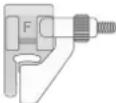 | Sew hems that are practically invisible from the right side of the fabric. It is used for skirts, dresses, trousers, curtains, etc, made with non-stretch fabrics. | |
| Stretch Blind Hem Stitch | 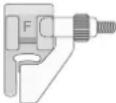 | Sew hems that are practically invisible from the right side of the fabric. It is used for garments and other projects made with stretch knit fabrics. | |
| Slant Overedge Stitch | 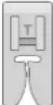 | Seam and overcast in one step. For medium and heavy stretch fabrics. | |
| Closed Over-lock Stitch | 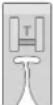 | Sew decorative hems and overlapped seams, belts and bands. For medium/heavy stretch fabrics. | |
| Honeycomb Stitch | [K8CB] | For elastic insertion, decorative stitching, smocking, couching and hemming. | |
| Buttonhole Screw | butt s or 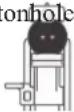 | home decor, garments, crafts and more. | |
Decorative Stitches
Your machine also features decorative stitches. The stitches not described in the previous chart are decorative stitches. When sewing the decorative stitches, make sure to use a stabilizer underneath the fabric for better appearance. Use a thread tension between 3–5. Always test sew on a piece of scrap fabric, and adjust the tension if necessary.
PREPARATIONS
Unpacking the Machine
- Place the box on a steady, flat surface. Lift the machine out of the box, and remove the packaging.
- Remove all outer packing material and the plastic bag.
- Wipe off the machine with a dry cloth to remove any lint and/or excess oil around the needle area.
Note: Your sewing machine is adjusted to provide the best stitch result at normal room temperature. Extreme hot and cold temperatures can affect the sewn result.
Connect to the Power Supply
Among the accessories you will find the power cord and the foot control.
Note: Consult a qualified electrician if in doubt as how to connect the machine to the power source. Unplug the power cord when the machine is not in use.
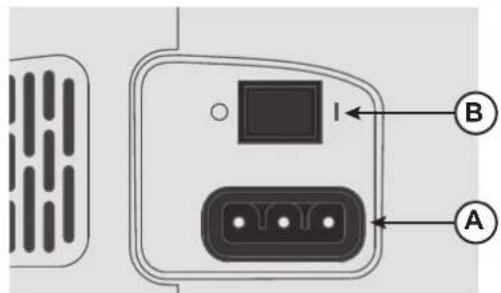
On the bottom right side of the sewing machine, you find the connecting sockets and the ON/OFF button.
- Connect the power cord to the rear socket on the bottom right side of the machine (A). Plug the cord into the wall socket.
- Press the ON/OFF switch (B) to "I" to turn on power and light.
Sewing speed is regulated by pressing the foot control.
Note: After turning off the machine, residual power may remain in the machine. This could cause the light to stay on for a few seconds while the power is consumed. This is normal for an energy efficient appliance.
text_image
Diagram of a device rear panel with labeled ports A and B, showing internal components and connection points.For the USA and Canada
This sewing machine has a polarized plug (one blade wider than the other). To reduce the risk of electric shock, this plug is intended to fit in a polarized outlet only one way. If the plug does not fit fully in the outlet, reverse the plug. If it still does not fit, contact a qualified electrician to install the proper outlet. Do not modify the plug in any way.
Packing Machine after Sewing
- Switch the main switch off. After switching off, residual power may still remain in the machine. This may cause the light to stay on for a few seconds while the power is consumed. This is normal behavior for an energy efficient appliance.
- Unplug the cord from the wall socket and then from the machine.
- Wind the cord around the foot control for easy storage.
- Place all accessories in the accessory tray. Slide the tray on to the machine around the free arm.
- Place the foot control and cord in the space above the free arm.
- Place the soft cover on the machine to help protect it from dust and lint.
Free Arm/Removable Accessory Tray
Store presser feet, bobbins, needles and other accessories in the accessory tray so that they are easily accessible.
Keep the accessory tray on the machine to provide a larger, flat work surface.
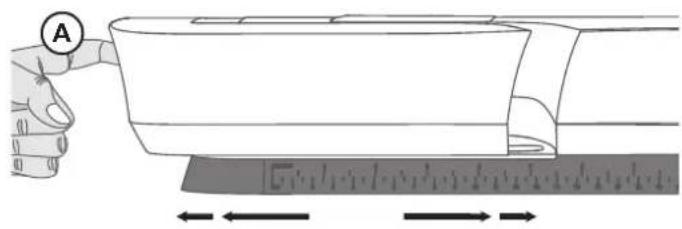
Use the free arm to facilitate sewing trouser legs and sleeve hems. To use the free arm, slide off the accessory tray. When attached, a hook keeps the accessory tray securely attached to the machine. Remove the tray by sliding it to the left.
When the accessory tray is removed from the machine, open the door by putting a finger in the groove at the left side of the accessory box (A) and carefully pull it open. Push the door closed before putting the tray back onto the machine.
Presser Foot Lifter
The presser foot lever is located at the back side of the sewing machine head. The lever is used to raise and lower the presser foot. Raise the lever up for machine threading, lower it for sewing.
By raising the presser foot lever and then pressing it farther upwards, the lift height of the presser foot is increased to an extra height allowing you to place thick fabric layers under the foot.
Thread Knife
To use the thread knife, pull the thread from back to front as illustrated. Doing this will leave the thread ends long enough so that the needle doesn't become unthreaded when you start to sew again.
text_image
Diagram showing a hand pressing a measuring tool with measurement markings and directional arrows indicating measurement direction.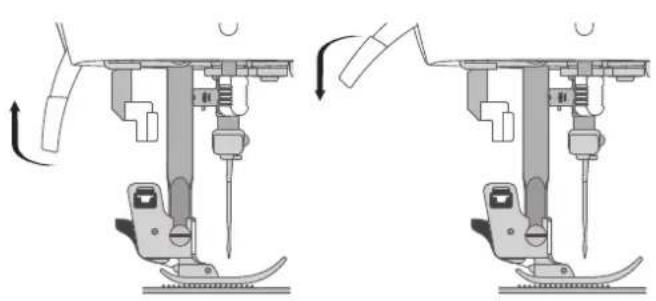
natural_image
Mechanical assembly diagram showing two sequential steps of a sewing machine tool (no text or labels)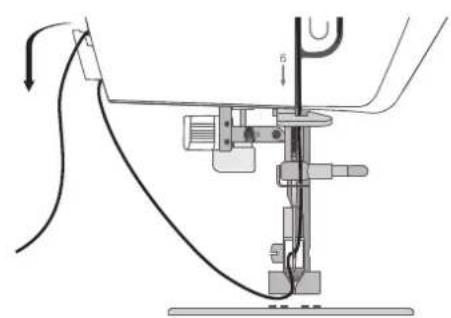
natural_image
Mechanical assembly diagram showing a lever mechanism with no visible text or symbolsSpool Pin
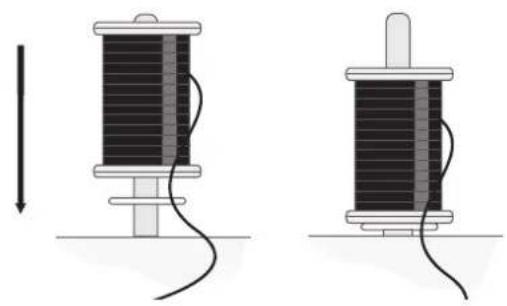
Your machine has two spool pins, a main spool pin and an Auxiliary Spool Pin. The spool pins are designed for various types of thread. The main spool pin is used in a horizontal position (the thread reels off the spool) and the Auxiliary Spool Pin in a vertical position (the thread spool rotates). Use the horizontal position for normal threads and the vertical position for large spools or specialty threads.
Main Spool Pin
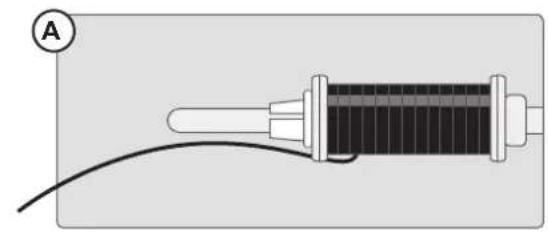
Place the thread spool on the spool pin. Make sure that the thread reels off the spool counter clockwise and slide on a spool cap. Use a spool cap slightly larger than the thread spool. For narrow thread spools (A), use a smaller spool cap in front of the spool. For large thread spools (B), use a larger spool cap in front of the spool. The flat side of the spool cap should be pressed firmly against the spool. There should be no space between the spool cap and the thread spool.
Note: Not all thread spools are manufactured in the same way. If you experience problems with the thread, turn it in the opposite way or use the vertical position.
natural_image
Diagram of a cylindrical device with a wire and cable, labeled with point A (no text or symbols on the device itself)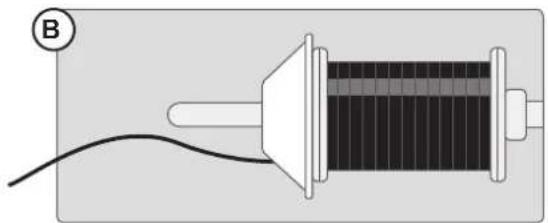
natural_image
Simple diagram of a solenoid connected to a wire, no text or symbols presentAuxiliary Spool Pin
The Auxiliary Spool Pin is used when winding a bobbin thread from a second spool of thread or when sewing with large spools or with specialty threads. Insert the Auxiliary Spool Pin into the designated hole at the top of the machine. Place a felt pad under the thread spool. This is to prevent the thread from reeling off too fast. Do not place a spool cap on top of the spool pin as that would prevent the spool from rotating.
natural_image
Two diagrams showing a coiled cable or wire between two spools, with no text or symbols present.Wind the Bobbin
text_image
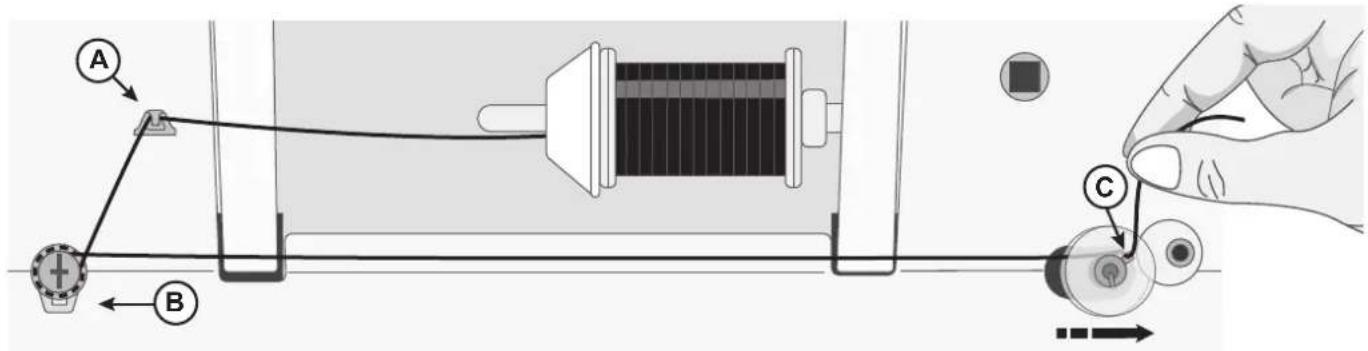
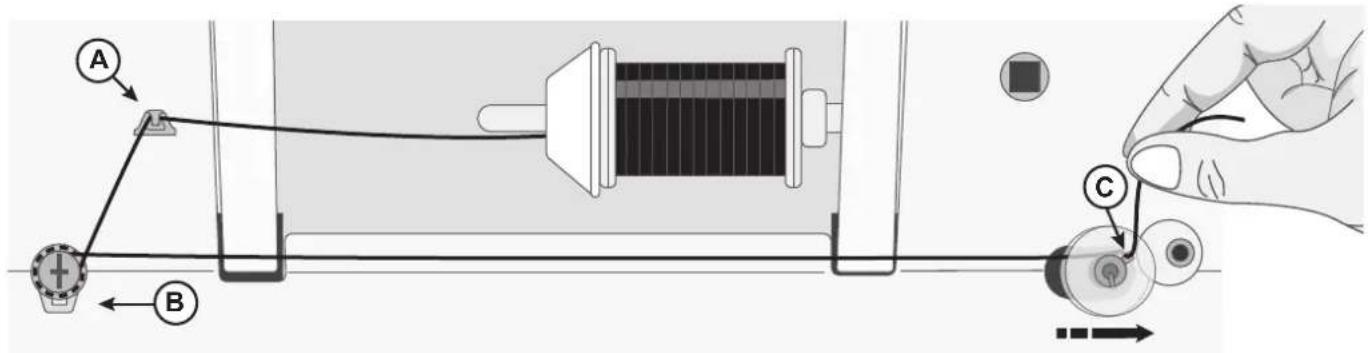
Diagram illustrating a mechanical or electrical setup with labeled components A, B, and C, showing connections and directional arrows.- Place the thread spool on the spool pin. Slide a spool cap firmly against the spool.
- Place the thread into the thread guide (A) from front to the back. Bring the thread clockwise around the bobbin winding tension disc, making sure that the thread is pulled snuggly between the discs.
- Thread through the hole in the bobbin (C) from the inside to the outside.
- Place the bobbin on the bobbin winding spindle. Make sure the bobbin is pushed down firmly.
- Push the bobbin winding spindle to the right. Hold the thread end, and press the foot control to start winding.
After a few turns, take your foot off the foot control to stop winding. Cut the excess thread tail above the bobbin, making sure to trim it close to the bobbin. Step on the foot control to resume winding. When the bobbin is full, the bobbin winding will slow down and stop automatically.
- Push the bobbin winding spindle to the left. Remove the bobbin and cut the thread.
Note: When the bobbin winding spindle is pushed to the right, the machine will not sew. Make sure to push the bobbin spindle back to the sewing position (left) before sewing.
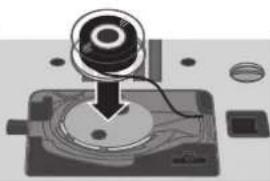
Insert the Bobbin
Note: Make sure that the needle is fully raised and the machine is turned off before inserting or removing the bobbin.
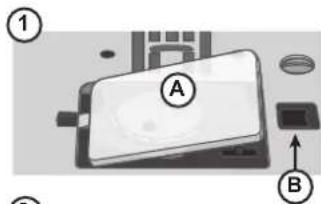
- Remove the bobbin cover (A) by pushing the small button to the right of the cover (B) towards the right.
- Insert the bobbin in the bobbin case with the thread running in a counterclockwise direction.
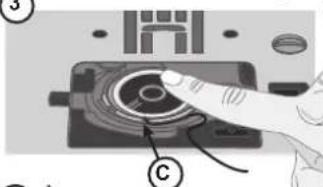
- Pull the thread through the slit (C).
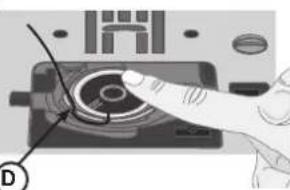
- Draw the thread clockwise until it slips into the notch (D).
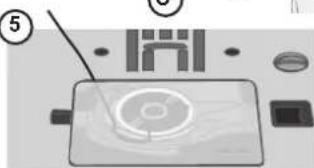
- Pull out about 15cm (6 inches) of thread and attach the bobbin cover plate.
text_image
Diagram of a device with labeled parts A and B, showing components like a battery, lens, and housing.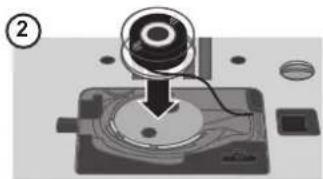
natural_image
Mechanical assembly diagram showing a dial indicator on a base with no visible text or symbols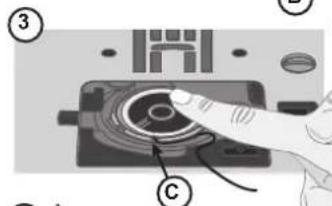
text_image
Diagram showing a hand pressing a circular component labeled with parts C and numbered ③, likely illustrating a mechanical or electronic process.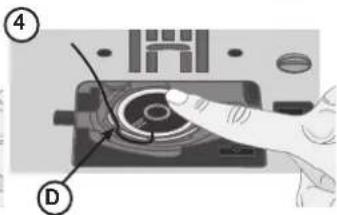
text_image
Diagram showing a hand pressing a button on a device with labeled parts (④ and ①)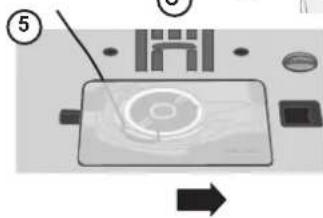
text_image
Diagram of a device with labeled components and directional arrow, showing a screen with a circular button and surrounding parts.Thread the Machine
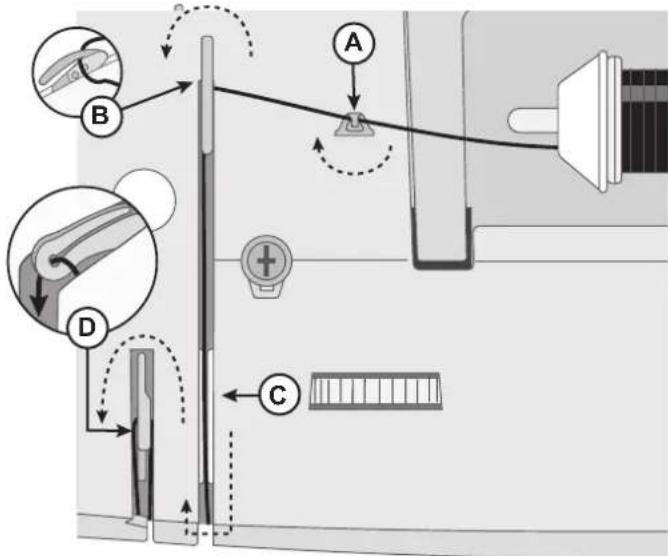
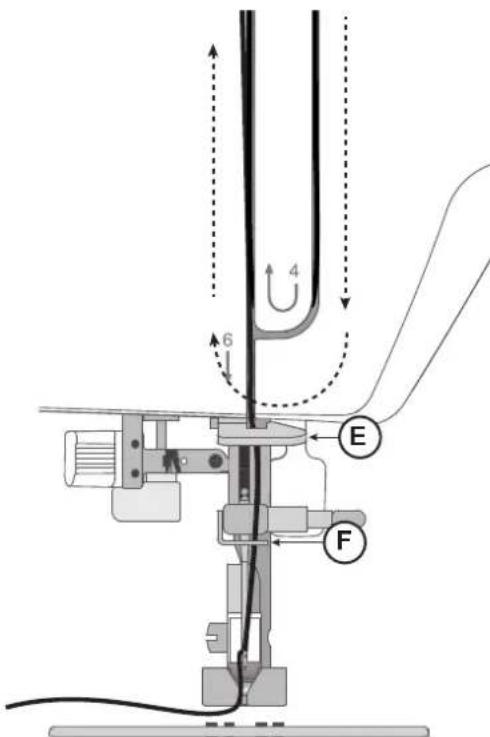
Important! Make sure that the presser foot is raised and the needle is in its highest position by turning the handwheel toward you. This is very important to help ensure that the machine is correctly threaded. Not doing so can result in poor stitch quality when you start to sew.
- Place the thread on the spool pin and fit the appropriately sized spool cap.
- Pull the thread into the thread guide (A) from front to the back and thread guide (B) from back to front. Pull the thread between the tension discs (C).
- Continue bringing the thread down through the right threading slot, around the U-turn, then back upwards through the left threading slot.
- Bring the thread from the right into the take-up lever (D) and down in the left-hand threading slot, into the lower thread guide (E) and to the needle thread guide (F).
- Thread the needle from front to back.
text_image
Diagram illustrating a mechanical or electrical setup with labeled components A, B, C, D and directional arrows indicating motion or movement.Machine from above
text_image
Technical diagram of a mechanical device with labeled components and directional arrows indicating motion or forceMachine from front
Needle Threader
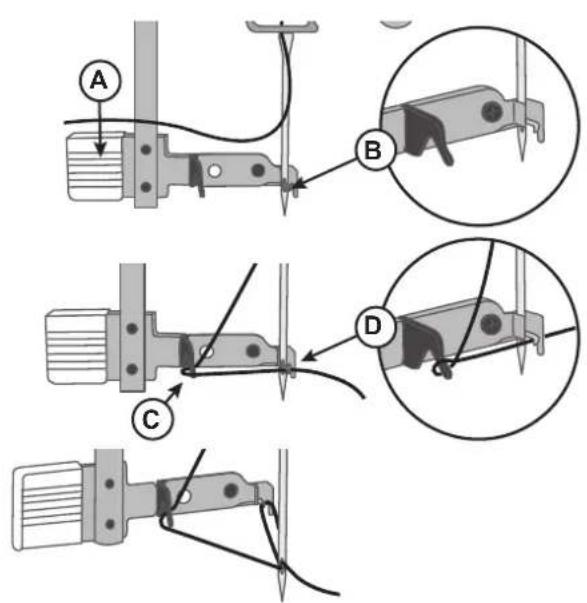
The built-in needle threader allows you to thread the needle quickly and easily.
The needle must be in its highest position to use the built-in needle threader. Turn the hand wheel towards you until the needle is in its highest position. It is also recommended that you lower the presser foot.
- Use the handle (A) to pull the needle threader all the way down. The metal flanges cover the needle. A small hook will pass through the needle eye (B).
- Place the thread from the back over the thread guide (C) and under the small hook (D).
- Let the needle threader gently swing back. The hook pulls the thread through the needle eye and forms a loop behind the needle. Pull the thread loop out behind the needle.
- Raise the presser foot and place the thread under it.
- Pull out about 6–8" (15–20cm) of thread beyond the needle eye. This will prevent the machine from coming unthreaded when you start to sew.
Note: The needle threader is designed to be used for size 70-110 needles. You cannot use the needle threader for size 60 needles or smaller, wing needles or twin needles. There are also some optional accessories that require manual threading of the needle. When threading the needle manually, make sure that the needle is threaded from front to back.
text_image
Technical diagram showing three mechanical assembly steps labeled A, B, C, D with magnified views of the component.Needles
The sewing machine needle plays an important role in successful sewing. Use only quality needles. We recommend needles of system 130/705H. The needle package included with your machine contains needles of the most frequently used sizes.

Be sure to match the needle to the thread you are using. Heavier threads require a needle with a larger needle eye. If the needle eye is too small for the thread the needle threader may not work properly.

Universal Needle
Universal needles have a slightly rounded point and come in a variety of sizes. For general sewing in a variety of fabric types and weights.

Stretch Needle
Stretch needles have a ball point and a special scarf to eliminate skipped stitches when there is a flex in the fabric. For knits, swimwear, fleece, synthetic suedes and synthetic leathers.

Denim Needle
Denim needles have a sharp point to penetrate tightly woven fabrics without deflecting the needle. For canvas, denim, microfibers.

Embroidery Needle
Embroidery needles have a special scarf, a slightly rounded point and a slightly larger eye to avoid damage to thread and materials. Use with metallic and other specialty threads for free-motion embroidery and decorative sewing.
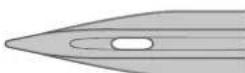
Wing Needle
Wing needles have wide extensions on each side of the needle to poke holes in the fabric when sewing entredeux and other hemstitches on natural fiber fabrics.
Note: To avoid the needle break, use only medium/low speed and recommended needle on thick fabrics works.
Important Needle Information
Change the needle often. As a general rule, needles should be changed every 6-8 hours of actual stitching time.
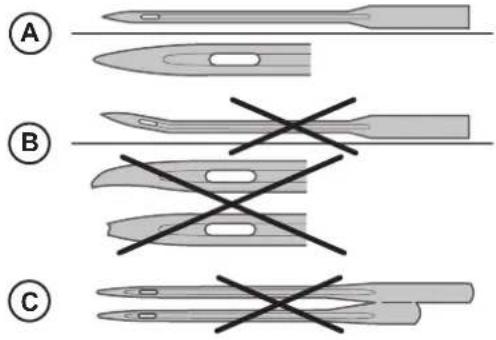
Always use a straight needle with a sharp point and make sure the point is not bent or damaged (A).
A damaged needle (B) can cause skipped stitches, breakage or snapping of the thread. It can also damage the needle plate.
Do not use asymmetrical twin needles (C), they can damage your sewing machine.
text_image
A B CSelection Guide — Needle Size, Fabric, Thread
| Needle Size Fabric Thread | ||
| 70 (9)80 (12) | Lightweight fabrics: Fine cotton, voile, silk, muslin, interlock, tricot, jersey, crepe, polyester, chiffon, organza, organdy | Light duty all-purpose thread |
| 80 (12)90 (14) | Medium weight fabrics: Quilting cotton, satin, double knit, lightweight wool, rayon, polyester, lightweight linen | Use polyester threads on synthetic fabrics and all-purpose or cotton thread on natural fabrics for best results. |
| 90 (14) Medium weight fabrics: Firm woven, medium weight linen, cotton/polyester blend, terrycloth, chambray, double knit | ||
| 100 (16) Heavy weight fabrics: Canvas, wool, denim, home decor, fleece, heavy knit | Polyester or all-purpose thread. | |
| 110 (18) Heavy weight fabrics: Coat weight wool, upholstery fabrics | Heavy duty thread for needle, with all-purpose thread for the bobbin. | |
Change the Needle
Note: Before you begin changing the needle, it can be helpful to place a small piece of paper or fabric underneath the needle area, over the hole in the needle plate, so that the needle doesn't accidentally fall down into the machine.
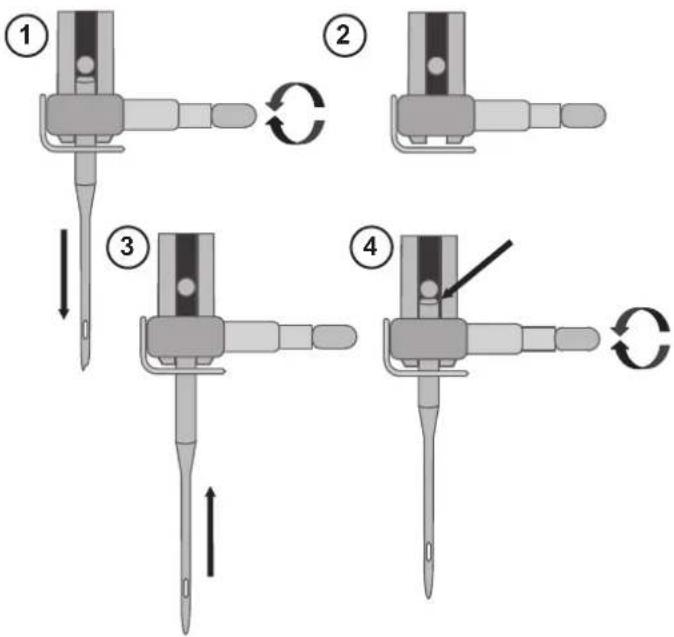
- Loosen the needle clamp screw. If it feels tight, use the screwdriver from your accessories to aid with loosening the screw.
- Remove the needle.
- Push the new needle upwards into the needle clamp with the flat side of the needle away from you.
- When the needle will go up no further, tighten the screw securely.
flowchart
graph TD
    A["Step ①"] --> B["Step ②"]
    B --> C["Step ③"]
    C --> D["Step ④"]
    D --> E["Step ④"]
    style A fill:#f9f,stroke:#333
    style B fill:#f9f,stroke:#333
    style C fill:#f9f,stroke:#333
    style D fill:#f9f,stroke:#333
    style E fill:#f9f,stroke:#333
Thread Tension
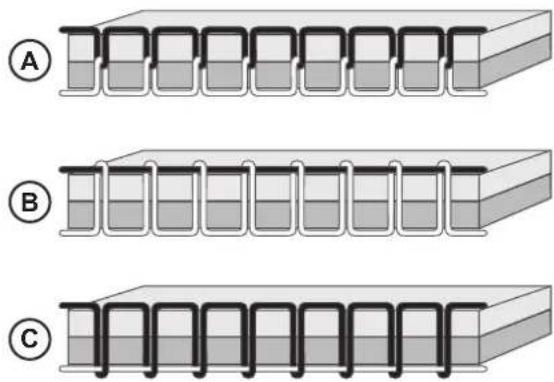
To set the thread tension, turn the dial on top of the machine. Depending on the fabric, thread, etc, the tension may need to be adjusted. For the best stitch appearance and durability, make sure the needle thread tension is correctly adjusted. For general sewing, the threads evenly meet between the two layers of fabric (A).
If the bobbin thread is visible on the top side of the fabric, the needle thread tension is too tight (B). Reduce the needle thread tension.
If top thread is visible on the underside of the fabric, the needle thread tension is too loose (C). Increase the needle thread tension.
For decorative stitches and buttonholes, the top thread should be visible on the underside of the fabric.
Make a few tests on a scrap piece of the fabric you are going to sew and check the tension.
Sew without Feed Teeth
When sewing on buttons or doing other sewing techniques where you don't want the fabric to feed, you need to lower the feed teeth.
The feed teeth lever is found at the back of the free arm.
-
Lower the feed teeth by moving the lever to the "Feed Teeth Down" position.
-
Raise the feed teeth by moving the lever to the "Feed Teeth Up" position.
Note: The feed teeth will not raise immediately when the lever is switched. Turn the hand wheel toward you one full turn or start sewing to re-engage the feed teeth.
Presser Foot Pressure
The presser foot pressure is used to control the amount of pressure that the presser foot exerts onto the fabric, to ensure smooth feeding of the fabric while sewing. The presser foot pressure has been pre-set to the standard value "2". Though it needs no adjustment for most fabrics, it can be adjusted for very thick or very thin fabric - increase for heavy weight fabrics, decrease for lightweight fabrics.
Note: If the dial is turned counterclockwise too much, it could come off. If this happens, simply replace the dial and turn it clockwise until it stays in place.
Note: If the dial is turned clockwise until it comes to a stop, it has reached the maximum pressure available. Do not try to turn the dial any further!
text_image
Diagram showing three labeled configurations (A, B, C) of a multi-layered container or structure with internal channels.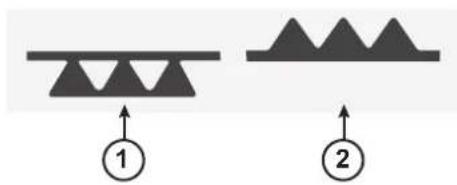
text_image
Diagram showing two triangular patterns labeled 1 and 2 with upward arrows, likely illustrating a geometric or physical concept.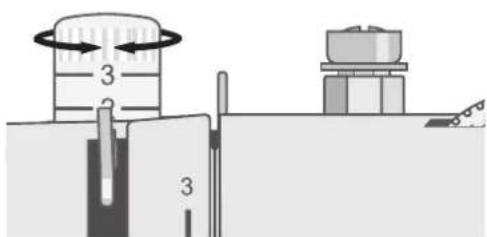
text_image
Diagram showing a mechanical setup with labeled components and directional arrows indicating motion or flow.Change the Presser Foot
-
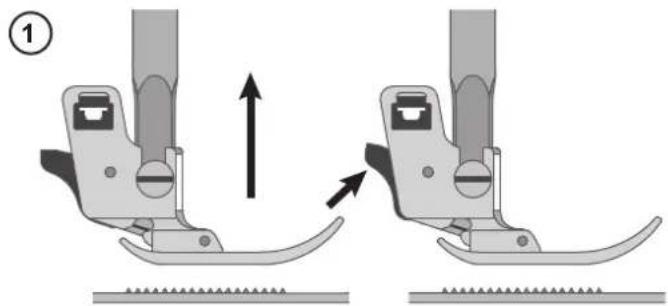
Make sure that the needle is in the highest position and the presser foot is lifted. The presser foot release button extends out the back of the presser foot holder. Press this button to release the presser foot.
-
To attach a presser foot to the holder, place the desired presser foot with its pin directly under the slot in the presser foot holder. Lower the presser foot lifter and the presser foot will snap into place.
Note: If you find it difficult to place the presser foot in the correct position, keep the release button pressed while lowering the presser foot. Use your thumb to carefully guide the presser foot into the correct position and it will snap into place.
natural_image
Mechanical assembly diagram showing two configurations of a sewing machine with arrows indicating motion direction (no text or symbols)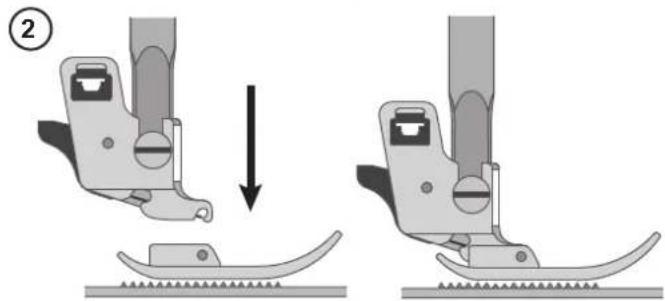
natural_image
Two-step diagram showing a sewing machine's base and side view, with no text or symbols present.Attaching the Edge/Quilting Guide
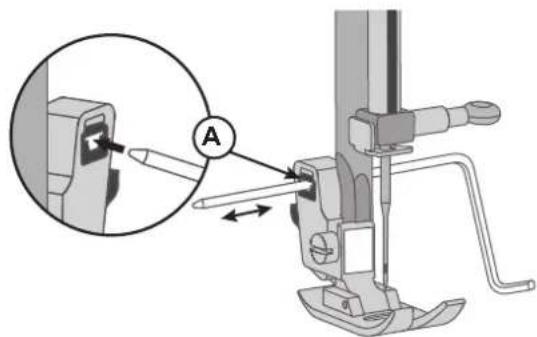
Attach the edge/quilting guide in the slot (A) as illustrated. Adjust as needed for hems, pleats, quilting, etc.

Turn power switch to off ("O") when carrying out any of the above operations!
text_image
Technical diagram showing a mechanical assembly with labeled component A and an inset view of a tool interacting with a clip.text_image
A B C LENGTH D E SA. Reverse sewing lever
D. Stitch length dial
B. Three needle position dial
E. Stitch selector dial
C. Stitch width dial
The stitch selector dial is used to select the stitch you want to sew. The dial can be turned to the left or to the right.
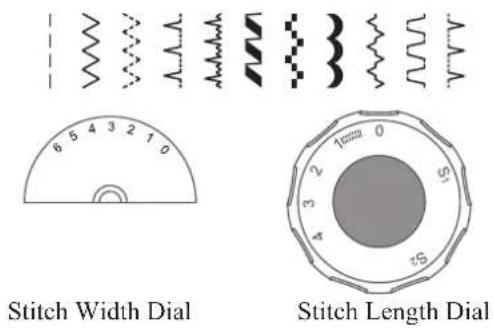
For sewing the grey stitch patterns
Turn the Stitch Selector Dial until it clicks in place under the dot directly above the dial on the machine.
Set the Stitch Length Dial according to the length you want. It can be set anywhere between 0.5 and 4, with 4 being the longest setting.
For straight stitch sewing, the Stitch Width Dial can be set at 0 for the center needle position or 6 for the left needle position.
For sewing the blue or red stitch patterns
Turn the Stitch Selector Dial until it clicks in place under the dot directly above the dial on the machine.
Set the Stitch Length Dial so that the S1 or S2 is lined up with the dot above this dial. This dial must be set at the S1 marking for the blue stitches or the S2 marking for the red stitches, or the stitch pattern will not sew.
Set the Stitch Width Dial to a wide setting (4-6). If desired, you can set it to a lower setting, depending on the look you want.
text_image
Stitch Width Dial Stitch Length Dial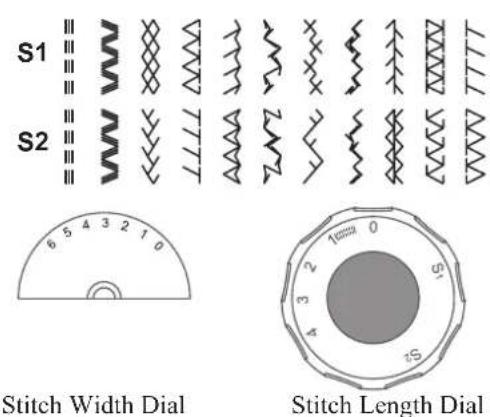
text_image
S1 S2 6 5 4 3 2 1 0 Stitch Width Dial Stitch Length DialStitch Width Dial & Stitch Length Dial
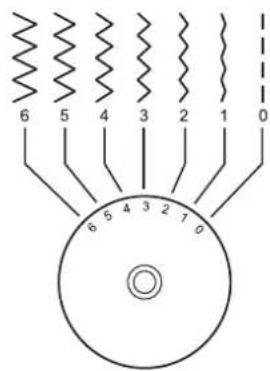
Function of stitch width dial
The maximum zigzag stitch width for zigzag stitching is 6mm; however, the width can be reduced on any pattern. The width increases as you move zigzag dial from "0" - "6". (1)
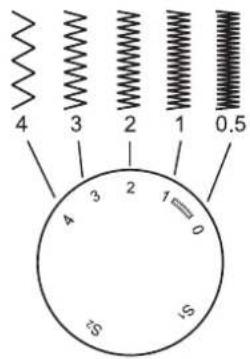
Function of stitch length dial while zig-zag stitching
Set the Stitch Selector Dial to zig-zag. The density of zig-zag stitches increase as the setting of stitch length dial approaches "0". Standard zigzag stitches are usually achieved at "3" or below. Dense zig-zag stitches are called satin stitches.
Function of stitch length dial for straight stitching
For straight stitch sewing, turn the Stitch Selector Dial to the straight stitch setting. Turn the Stitch Length Dial, and the length of the individual stitches will decrease as the dial approached "0". The length of the individual stitches will increase as the dial approaches "4". Generally speaking, use a longer stitch length when sewing heavier weight fabrics or when using a thicker needle or thread. Use a shorter stitch length when sewing lighter weight fabrics or when using a finer needle or thread.
Three Needle Position Dial
The needle position can be altered with the three needle position dial. For normal work, the needle position is middle. For edge stitching or sewing parallel lines of top stitch, select needle position left or right. For twin needle stitching, needle position is middle.
-
Straight
-
Zigzag
L. Left needle position
M. Center needle position
R. Right needle position
Reverse Sewing
To secure the beginning and the end of a seam, press down the reverse lever. Sew a few reverse stitches. Release the lever and the machine will sew forward again.
①
text_image
6 5 4 3 2 1 0 6 5 4 3 2 1 0②
text_image
4 3 2 1 0.5 4 3 2 1 0 5 1S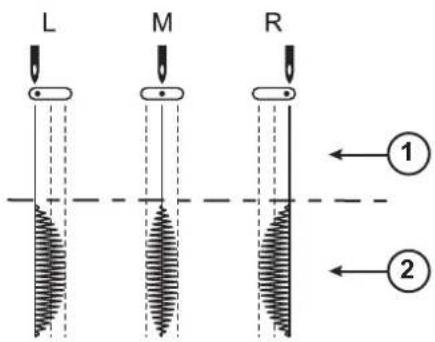
text_image
L M R ① ②
text_image
Diagram showing a medical or laboratory setup with a catheter and a hanging device, including a directional arrow and a labeled component T.SEWING
Sewing
Next to each stitch or sewing technique described in this section of the manual is a chart showing the recommended settings and presser foot. See sample of the chart to the right.
The recommended settings are also shown on the display, but might need adjustment to fit a special technique.
Note: Some fabrics have a lot of excess dye which can cause discoloration on other fabric but also on your sewing machine. This discoloring may be very difficult or impossible to remove. Fleece and denim fabric in especially red and blue often contain a lot of excess dye. If you suspect that your fabric/ready-to-wear garment contains a lot of excess dye, always pre-wash it before sewing to avoid the discoloring.
Note: For best sewing result, use the same thread on top and bobbin. If sewing with specialty/decorative threads, use regular sewing thread in the bobbin.
| 3.5 | 2.5 | 3-5M |
Stitch
B. Presser foot
C. Stitch length in mm
D. Stitch width in mm
E. Thread tension
F. Three needle position
Start to Sew – Straight Stitch
Set your machine for straight stitch (see chart to the right).
Raise the presser foot and position the fabric under it, next to a scam allowance guide line on the needle plate. On the bobbin cover there is a 1/4" (6mm) guide line.
Place the top thread underneath the presser foot.
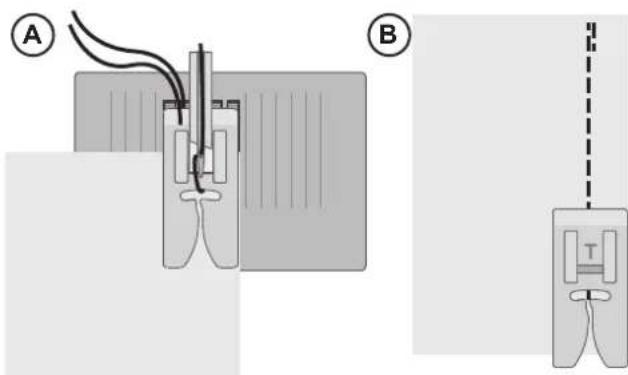
Lower the needle to the point where you want to start. Bring the threads toward the back and lower the presser foot. Press the foot control. Gently guide the fabric along the seam guide letting the machine feed the fabric (A). If the bobbin thread isn't pulled up, it will be automatically as you start to sew.
To secure the beginning of a seam, press and hold the reverse lever. Sew a few reverse stitches. Release the reverse lever and the machine will sew forward again (B).
| ---- | ||||
| M2.0-4.03-5 |
Set up for straight stitch
text_image
Diagram illustrating a medical or laboratory procedure with labeled components A and B, showing fluid flow and measurement setup.Change Sewing Direction
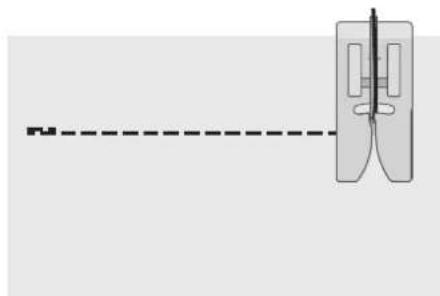
To change sewing direction, stop the machine with lower the needle.
Raise the presser foot.
Pivot the fabric around the needle to change sewing direction as desired. Lower the presser foot and continue sewing in the new direction.
natural_image
Pure diagram of a mechanical or optical component with dashed alignment line (no text or symbols)Finish Sewing
Press and hold the Reverse lever and sew a few stitches in reverse when you reach the end of the seam. Release the button and sew forward again to the end of the seam. This will secure the seam so the stitches don't unravel.
Turn the handwheel toward you to raise the needle to its highest position. Raise the presser foot and remove the fabric, pulling the threads to the back.
Pull the threads up and into the thread knife so that the threads are cut the proper length and your needle won't come unthreaded when you start the next seam.
Straight Stretch Stitch
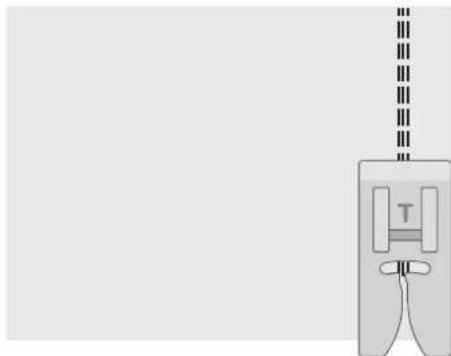
This stitch is stronger than regular straight stitch, due to the fact that it is a triple and elastic stitch. The Straight Stretch Stitch can be used for heavy stretch fabrics, for crotch seams which are subject to considerable strain and for topstitching heavy fabrics.
Carefully guide the fabric while sewing as the fabric moves back and forth.
| III III III | ! | ----- | ||
| M2.53-5 | ||||
Set up for Straight Stretch Stitch
natural_image
Diagram of a medical device with a labeled component 'T' and vertical dashed line, no readable text or symbols present.Multi-Step Zigzag Stitch
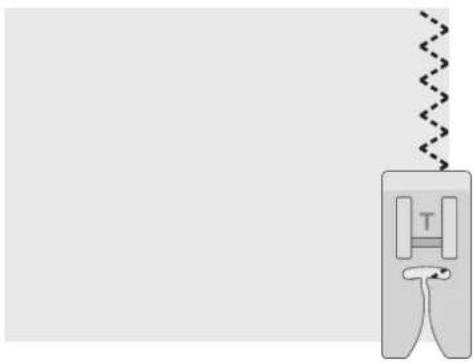
Multi-step zigzag stitch is used to overcast raw edges. Make sure the needle pierces the fabric on the left side and overcasts the edge on the right side.
The stitch can also be used as an elastic stitch to allow seams to stretch when sewing knit fabrics.
| 3.0-5.0 | 1.0 | 3-5M |
Set up for multi-step zigzag stitch
natural_image
Diagram of a sewing machine needle with a spring, showing no text or symbolsSlant Overedge Stitch
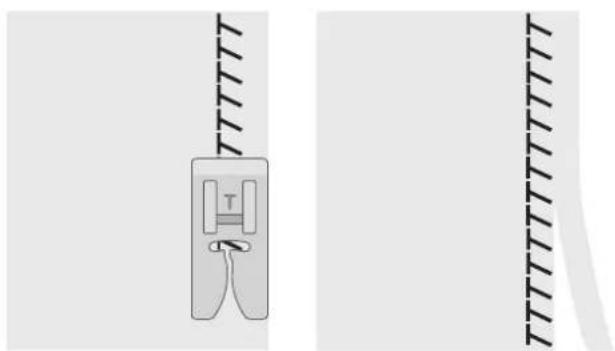
The slant overedge stitch sews the seam and overcasts the edge all at one time, perfect for stretch fabrics. This stitch is more elastic than normal seams, very durable and quickly sewn.
Place the fabric under the presser foot aligning the edge of the presser foot with the edge of the fabric. Once the seam is finished, trim excess fabric outside the seam.
Tip: You can also use the Blind Hem Foot to sew at the very edge of the fabric. Adjust the extension on the foot, and let it guide along the fabric edge. Always test sew on a piece of scrap fabric first, the result might vary due to the fabric weight and quality.
| 3.0-5.0 | 2.0-3.0 | 3-5M |
Set up for slant overedge stitch
natural_image
Diagram showing a mechanical component with a spring-like structure and two vertical guide rails (no text or symbols)Closed Overlock Stitch
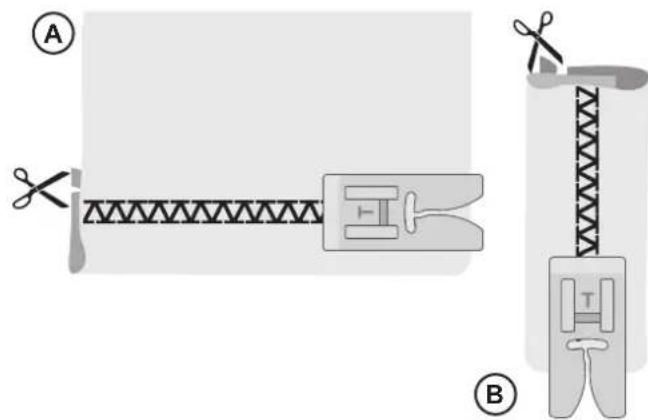
The closed overlock stitch can be used for sewing medium to heavier weight stretch fabrics.
Use this stitch to hem stretch fabrics (A) and for belt loops (B). Fold a hem to the wrong side and stitch with closed overlock stitch from the right side. Trim away excess fabric.
| 5.5 | 2.5 | 3-5M |
Set up for closed overlock stitch
text_image
Diagram illustrating textile sewing process with labeled parts A and B, showing fabric cutting and sewing stepsBlind Hems
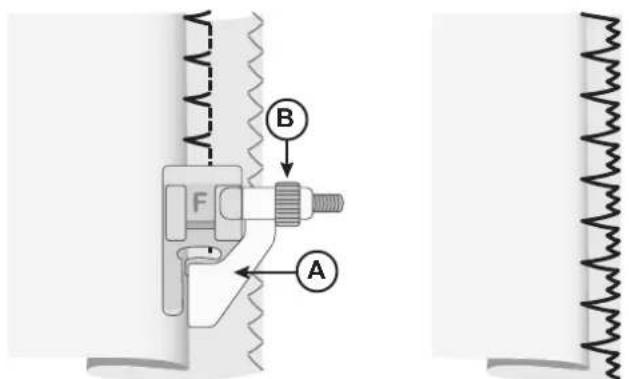
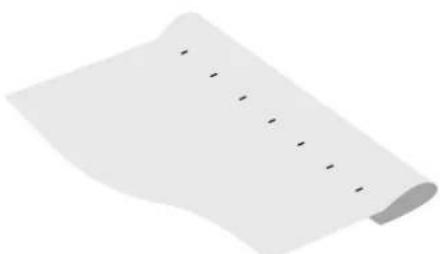
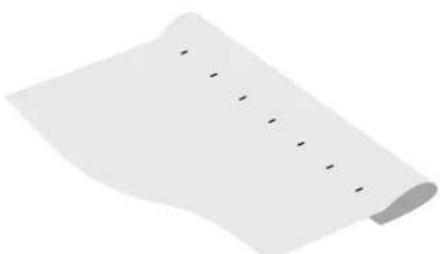
The blind hem stitch is used to make invisible hems on skirts, trousers and home décor projects. There are two types of blind hem; one is recommended for medium to heavy woven fabric (1), the other for medium to heavy stretch fabric (2).
- Finish the raw edge of the hem if sewing on a woven fabric. There is no need to finish the raw edge first on most knits.
- Fold and press the hem allowance to the wrong side.
- Fold the hem back on itself so approximately 3/8" (1 cm) of the finished edge extends beyond the fold. The wrong side of your project should now be facing up.
- Place the fabric under the presser foot so that the fold runs along edge guide (A).
- When the needle swings into the fold it should catch a small amount of fabric. If the stitches are visible on the right side, adjust edge guide (A) by turning the adjusting screw (B) until the stitch that catches the hem just barely shows.
| (1) | (2) | 3.0-5.0 | 1.0-2.0 | 3-5M |
Set up for blind hem
text_image
Technical diagram showing mechanical assembly with labeled parts A and B, including a spring mechanism and force F.Woven fabric Stretch fabric
natural_image
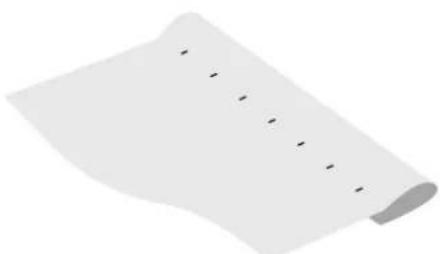
A blank white sheet with a row of small black dots, no text or symbols present.Right side of fabric
Darning and Mending
Repair Large Holes
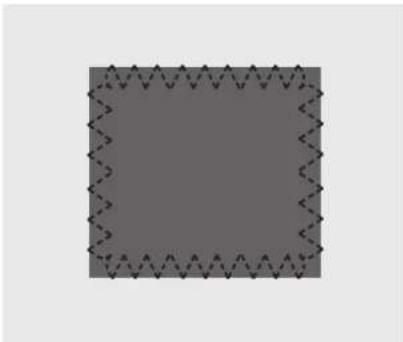
To cover large holes it is necessary to sew a new piece of fabric onto the damaged area.
Baste the new piece of fabric onto the damaged area on the right side of the fabric.
Sew over the fabric edges with the zigzag or the multi-step zigzag stitch.
Trim the damaged area close to the seam from the wrong side of the fabric.
| 4.0-6.0 | 2.0 | 3-5M |
Set up for zigzag
| 5.0 | 1.0-2.0 | 3-5M |
Set up for multi-step zigzag
natural_image
Abstract geometric pattern with a central square and irregular border (no text or symbols)Repair Tears
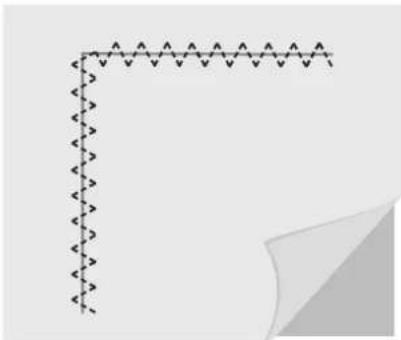
On tears, frayed edges or small holes it is useful to lay a piece of fabric on the wrong side of the fabric. The underlayed fabric reinforces the damaged area.
Lay a piece of fabric underneath the damaged fabric. It must be a little larger than the damaged area.
Sew over the damaged area using the zigzag or multi-step zigzag stitch.
Trim the piece of fabric used as reinforcement.
natural_image
Pure geometric diagram with arrow-like lines and a shaded corner (no text or symbols)One-Step Buttonhole
Sew buttonholes perfectly sized for your button. The fabric should be interfaced and/or stabilized where buttonholes are to be sewn.
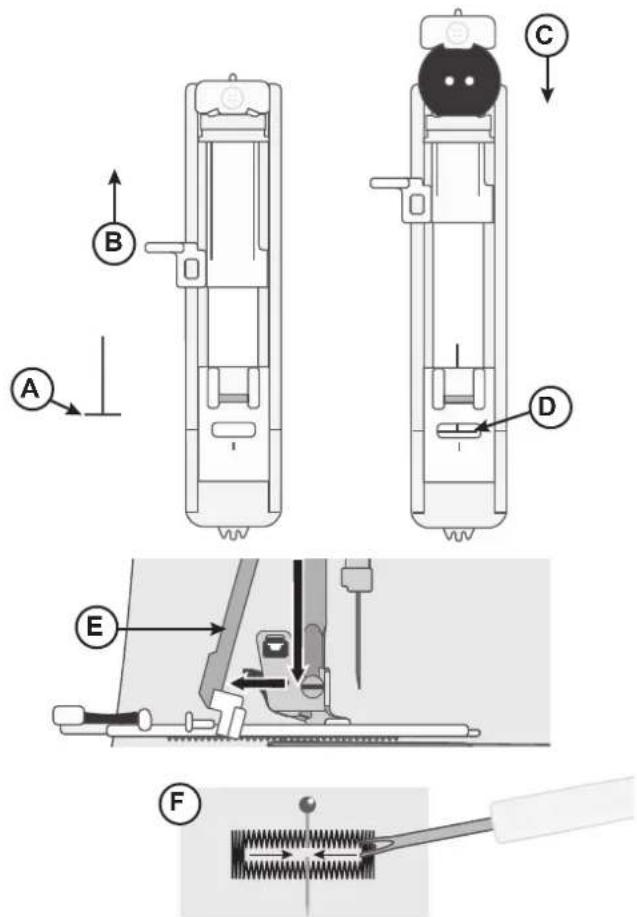
- Mark the start position of the buttonhole on the fabric (A).
-
On the One-Step Buttonhole Foot, push the button holder open by pushing the lever backwards (B). Insert the button. Push the button holder forward until the button is locked in place (C). The button will determine the length of the buttonhole.
-
Attach the One-Step Buttonhole Foot.
-
Make sure that the thread is pulled though the hole in the presser foot and placed under the foot.
-
Position your fabric under the presser foot so that the marking on the fabric is aligned with the center of the Buttonhole Foot (D).
-
Lower the Buttonhole Lever (E) and gently push it back.
-
Hold the end of the upper thread and start sewing. The button-hole is sewn from the front of the presser foot to the back. Stop sewing when the buttonhole is finished.
-
Once the buttonhole is finished, raise the presser foot. Push the buttonhole lever all the way up.
-
To secure the bartack, thread the end of the top thread into a hand sewing needle, pull to the wrong side and tie the end before cutting excess thread.
-
Use a seam ripper and cut the buttonhole open from both ends towards the middle (F).
If you want to sew another buttonhole, do not push the button-hole lever up when the buttonhole is finished. Instead, push it away from you again. Sew another buttonhole.
Note: Always sew a test buttonhole on a piece of scrap fabric.
| 5.0 | 3-5M |
Set up for buttonhole
Sew Zippers
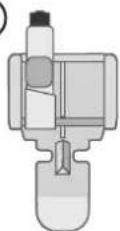
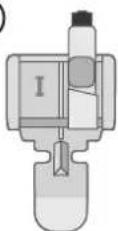
The Zipper Foot can be attached on either the right or the left of the needle, making it easy to sew both sides of the zipper.
To sew the right side of the zipper, attach the foot in the left presser foot position (A).
To sew the left side of zipper, attach the foot in the right presser foot position (B).
| ---- | ||||
| M1.5-3.03-5 |
Set up for sewing zippers
A
B
Centered Zipper
- Place the fabric pieces right sides together and pin. Mark the zipper length on your fabric.
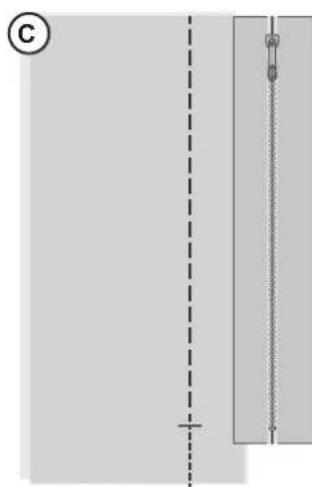
- Baste the zipper seam using the specified seam allowance (use straight stitch with stitch length 4mm, thread tension 2). Baste to the end of zipper marking (C).
- Set up the machine for straight stitch (see table above), backstitch a few stitches and sew the rest of the seam using the specified seam allowance (C).
- Press the seam allowances open. Place the right side of the zipper to the wrong side of the seam, tape in place (D).
- Flip your project, making sure that the right side is facing up. Snap on the Zipper Foot, to the left side of the needle (A).
- Sew along the right side of the zipper to the end of your zipper, remember to backstitch in the beginning. Stop with the needle down in the fabric, lift the presser foot and turn your project to sew across the bottom of the zipper (E).
- Attach the Zipper Foot to the right side of the needle (B). Sew the remaining zipper side as you did with the first side (F).
- Flip your project to remove the tape on the back side.
- Flip your project to the right side again and remove the basting stitches.
natural_image
Pure diagram of a vertical rod with a dashed line and cross mark, no text or symbols present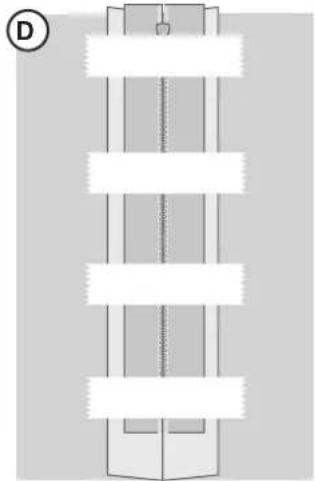
natural_image
Pure diagram of a vertical structure with horizontal bars and a diagonal line, no text or symbols present.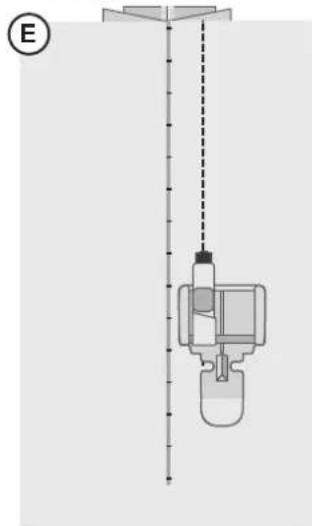
natural_image
Diagram of a vertical container with a bottle and side port, connected by a dashed line (no text or symbols)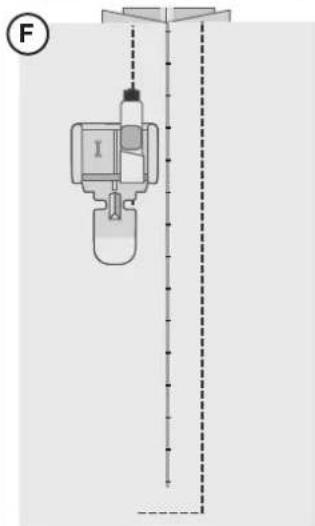
text_image
FMAINTENANCE
Cleaning the Machine
To keep your sewing machine operating well, clean it often. No lubrication (oiling) is needed. Wipe the exterior surface of your machine with a soft cloth to remove any dust or lint built up.
Cleaning the Bobbin Area

Raise the needle and turn off the machine.
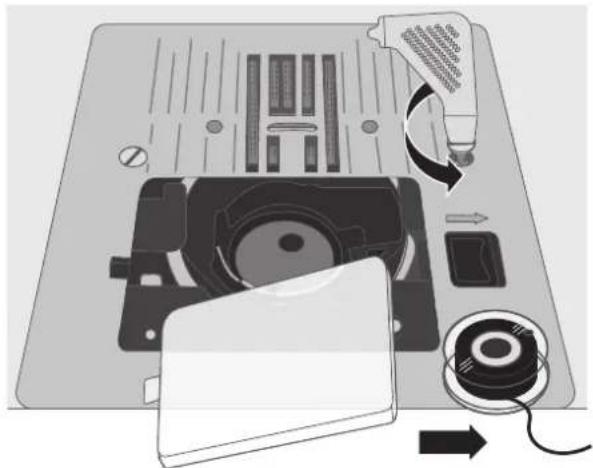
Remove the presser foot. Slide off the bobbin cover and remove the bobbin.
Remove the screws in the needle plate by using the L-screwdriver. Lift up and remove the needle plate.
Clean the feed teeth and the bobbin area with the brush found among the accessories.
Place the needle plate over the feed teeth, replace and tighten the screws.
Attach the presser foot, insert the bobbin and replace the bobbin cover.
natural_image
Diagram of a device's internal components including a CD, fan, and cable being inserted into a laptop (no text or symbols present)Cleaning under the Bobbin Area

Raise the needle and turn off the machine.
Clean the area under the bobbin case after sewing several projects or any time you notice an accumulation of lint in the bobbin case area.
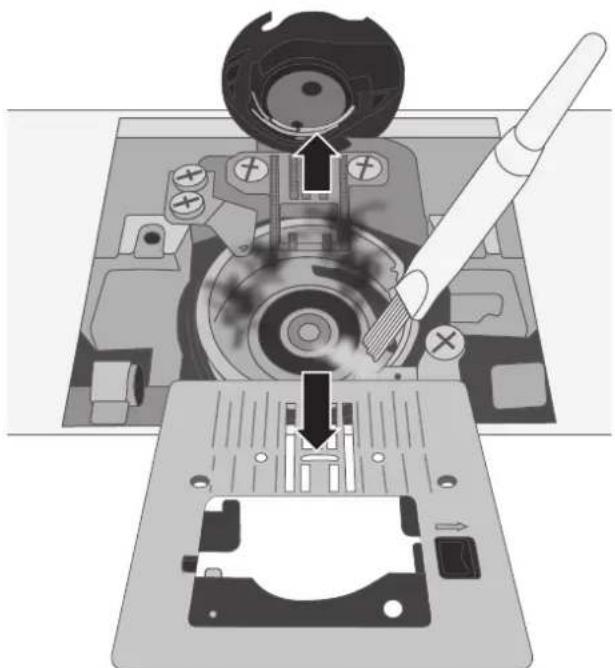
Remove the presser foot. Slide off the bobbin cover and remove the bobbin.
Remove the screws in the needle plate by using the L-screwdriver. Lift up and remove the needle plate.
Clean the area with the brush or with a dry cloth.
Note: Do not blow air into the bobbin case area. The dust and lint will be blown into your machine.
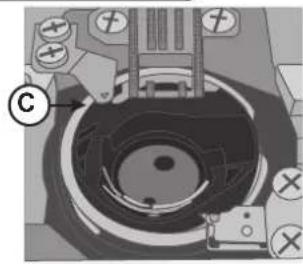
Guide the "forked" end of the bobbin case (A) under the bobbin case holder (B) and under the feed teeth. Move the bobbin case slightly from right to left until it slips correctly into the hook race (C). To make sure the bobbin case is properly replaced, turn the handwheel towards you. The hook race (C) should rotate freely in a counter-clockwise direction.
Place the needle plate over the feed teeth, replace and tighten the screws.
Attach the presser foot, insert the bobbin and replace the bobbin cover.
natural_image
Mechanical assembly diagram showing a disassembly or disassembly process with a tool and component (no text or symbols visible)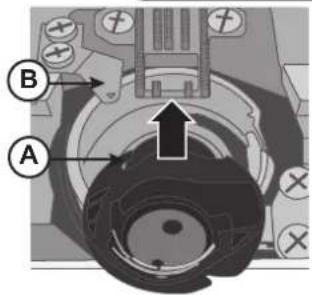
text_image
Technical diagram of a mechanical assembly with labeled parts A and B, showing directional arrows and components.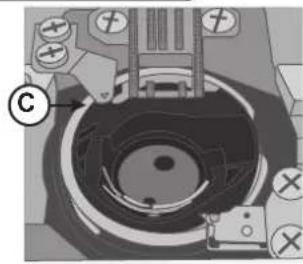
natural_image
Mechanical assembly diagram showing a circular component with mounting holes and a central hub (no text or symbols)Troubleshooting
Thread Loops on Underside of Fabric
Possible cause:
Thread looping on the underside of the fabric is always an indication that the upper thread is not correctly threaded. This happens when the upper thread is not correctly placed in the thread tension mechanism and has not been threaded through the take up lever.
Solution:
Rethread the machine, making sure to first raise the presser foot lifter before starting to thread, so thread can be properly seated in the tension mechanism and take up lever. To know if you have rethreaded the machine correctly, try this test:
- Raise the presser foot lifter and thread the top of the machine.
- Thread the needle, but don't put the thread under the presser foot yet. As you pull the upper thread to the left, it should pull freely.
- Put the presser foot lifter down. As you pull the upper thread to the left, you should feel resistance. This means you are threaded correctly.
- Put the thread under the presser foot, and then draw up the bobbin thread. Slip both thread tails under the presser foot towards the back. Lower the presser foot and begin sewing.
If you put the presser foot lifter down, but the thread still pulls freely (you feel no difference whether the presser foot is up or down), this means that you have threaded incorrectly. Remove the upper thread and rethread the machine.
Bobbin Thread Breaking
Possible cause:
Bobbin threaded incorrectly.
Solution:
Check that bobbin is placed correctly in the bobbin holder.
Possible cause:
Bobbin wound too full or unevenly.
Solution:
Bobbin thread may not have been correctly placed into bobbin winding tension disc during the bobbin winding process.
Possible cause:
Dirt or lint in bobbin holder.
Solution:
Clean bobbin holder.
Possible cause:
Wrong bobbins being used.
Solution:
Use bobbins that are the same style as those that come with the machine (SINGER® Class 15 transparent bobbins) – don't substitute.
Bobbin Thread Showing on Top of Fabric
Possible cause:
Top thread too tight.
Solution:
Reduce upper thread tension.
Possible cause:
Thread path is obstructed, putting extra tension on top thread.
Solution:
Check that the top thread path is not obstructed and thread is moving freely through the thread path.
Possible cause:
Bobbin thread not in bobbin case tension.
Solution:
Rethread bobbin.
Bobbin Winding Difficulties
Possible cause:
Bobbin thread loosely wound on bobbin.
Solution:
Rewind bobbin, making sure that the thread is placed snuggly in the bobbin winding tension disc.
Possible cause:
Bobbin winding spindle not fully engaged, therefore bobbin not winding.
Solution:
Check that the bobbin winding spindle has been fully engaged before starting to wind.
Possible cause: Bobbin is winding sloppily because thread end not held at beginning of winding process.
Solution: Before starting to wind, hold the thread tail (coming out of the bobbin) securely, allow the bobbin to partially fill, then stop to trim the thread tail close to the bobbin.
Fabric Puckers
Possible cause: Top thread is too tight.
Solution: Reduce top thread tension.
Possible cause: Stitch length is set too short.
Solution: Increase stitch length setting.
Possible cause: Wrong style needle for fabric type.
Solution: Use correct needle style and size for your fabric.
Fabric Is Tunneling Under Stitches
Possible cause: Fabric is not properly stabilized for the density of the stitches (for example, satin stitch applique).
Solution: Add a fabric stabilizer underneath the fabric to help keep the stitches from tunneling in together, forming a puckered ridge in fabric.
Loud Noise When Sewing
Possible cause: Thread not in take-up lever.
Solution: Rethread the machine, making sure the take up lever is in its highest position so thread goes in the eye of the take up lever — turn machine hand wheel toward you to raise the take up lever to its highest position for threading.
Possible cause: Thread path is obstructed.
Solution: Check that thread is not caught on the thread spool or behind the spool cap.
Machine is Not Feeding Fabric
Possible cause: Presser foot lifter has not been lowered onto fabric after threading.
Solution: Lower the presser foot lifter before starting to sew. Don't "push" or "pull" the fabric as you sew.
Possible cause: Feed teeth lever may have been returned to "up" position, but the handwheel has not yet been turned one full turn to completely re-engage the feed teeth.
Solution: The feed teeth need to be raised and re-engaged by turning the handwheel one full revolution.
Possible cause: Stitch length is set at zero.
Solution: Increase stitch length setting.
Machine Will Not Run
Possible cause: Bobbin winding spindle is engaged when you try to sew.
Solution: Disengage bobbin winding spindle by pushing it to the left.
Possible cause: Power cord and/or foot control not plugged in correctly.
Solution: Make sure power cord/foot control are correctly seated in machine and power supply.
Possible cause: Wrong bobbins being used.
Solution: Use bobbins that are the same style as those that come with the machine (SINGER® Class 15 transparent bobbins)—don't substitute.
Needles Breaking
Possible cause: Bent, dull or damaged needle.
Solution: Discard needle, insert new needle.
Possible cause: Wrong size needle for fabric.
Solution: Insert appropriate needle for fabric type.
Possible cause: Machine not threaded correctly.
Solution: Rethread the machine completely.
Possible cause: "Pushing" or "pulling" fabric.
Solution: Don't manually push/pull fabric in order to sew, but allow the machine's feed teeth to draw fabric under the presser foot as you guide it.
Needle Threader Not Working
Possible cause: Needle not in correct position.
Solution: Raise needle to its highest position by turning hand wheel toward you.
Possible cause: Wrong size needle for fabric.
Solution: Needle all the way up in the needle clamp.
Possible cause: Needle is bent.
Solution: Remove the bent needle, insert new needle.
Possible cause: Hook pin damaged.
Solution: Needle Threader needs replacement. Contact authorized service center.
Skipping Stitches
Possible cause: Needle inserted incorrectly.
Solution: Check that flat side of needle top is toward back of machine and needle is up as far as it can go, then tighten needle clamp screw.
Possible cause: Wrong needle for fabric sewn.
Solution: Use correct needle style and size for your fabric.
Possible cause: Bent, dull or damaged needle.
Solution: Discard needle and insert new needle.
Stitches Distorted
Possible cause: "Pushing" or "pulling" the fabric.
Solution: Don't manually push/pull fabric in order to sew, but allow the machine's feed teeth to draw fabric under presser foot as you guide it.
Possible cause: Incorrect stitch length setting.
Solution: Adjust stitch length setting.
Possible cause: Stabilizer may be needed for technique.
Solution: Place stabilizer underneath fabric.
Thread Bunching at Beginning
Possible cause: Top and bobbin threads have not been properly placed underneath presser foot before starting to sew.
Solution: Ensure that both the top thread and the bobbin thread are under the presser foot and toward the back before starting to sew.
Possible cause: Sewing was started with no fabric under the presser foot.
Solution: Place fabric under foot, making sure that needle comes down into fabric; lightly hold both thread tails for first few stitches.
Possible cause: Stabilizer may be needed for technique.
Solution: Place stabilizer underneath fabric.
Upper Thread Breaking
Possible cause: Thread path obstructed
Solution: Check if thread is caught on thread spool (rough spots on the spool itself) or behind spool pin or spool cap (if the thread has fallen behind the spool cap and therefore cannot feed freely through the machine path).
Possible cause: Machine is not threaded correctly.
Solution: Remove upper thread completely, raise presser foot lifter, rethread machine making sure thread is in take-up lever (raise take up lever to its highest position by turning hand wheel toward you.
Possible cause: Upper tension too tight.
Solution: Reduce upper thread tension.
Technical Specification
| Sewing SpeedMaximum 1000 ± 100 rpm(using straight stitch with default stitch length) | Rated Voltage240 V/50Hz, 230 V/50Hz, 220 V/50-60Hz, 127 V/60 Hz, 120 V/60 Hz,100V/50-60Hz, 120V/60Hz | Presser Foot Rise Height6.5mm |
| Protection ClassII (Europe) | Stitch Width0–6.0mm | Stitch Length0–4.5mm |
| Type of LampLED light | Machine DimensionsLength: ≈450mmWidth: ≈197mmHeight: ≈281mm | Weight6.6kg |
We reserve the right to change the machine equipment and the assortment of accessories without prior notice, or make modifications to the performance or design. Such modifications, however, will always be to the benefit of the user and the product.
INTELLECTUAL PROPERTY
SINGER, and the Cameo “S” Design, are exclusive trademarks of The Singer Company Limited S.à.r.l. or its Affiliates.
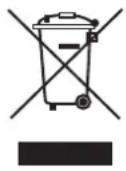
Please note that on disposal, this product must be safely recycled in accordance with relevant National legislation relating to electrical/electronic products. Do not dispose of electrical appliances as unsorted municipal waste, use separate collection facilities. Contact your local government for information regarding the collection systems available. When replacing old appliances with new ones, the retailer may be legally obligated to take back your old appliance for disposal free of charge.
If electrical appliances are disposed of in landfills or dumps, hazardous substances can leak into the groundwater and get into the food chain, damaging your health and well-being.
MANUEL D'INSTRUCTIONS
HD500
natural_image
Line drawing of a vintage sewing machine with decorative swirls and no text or symbols
SINGER®
CONSIGNES DE SÉCURITÉ IMPORTANTES
Point zigzag multi-point 19
text_image
Diagram of a car interior with numbered components and directional arrows indicating parts of the dashboard or seat.text_image
double I B Anatural_image
Illustration of a hand pressing down on a mechanical component with measurement markings (no text or symbols)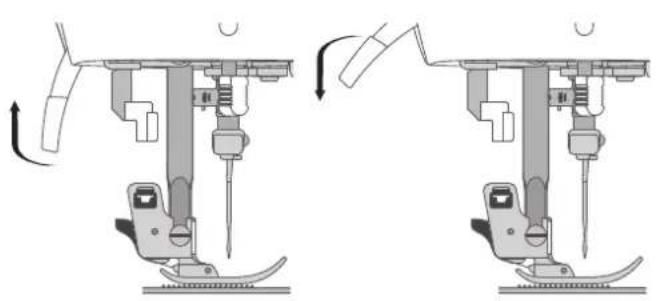
natural_image
Mechanical assembly diagram showing two sequential steps of a sewing machine tool (no text or labels)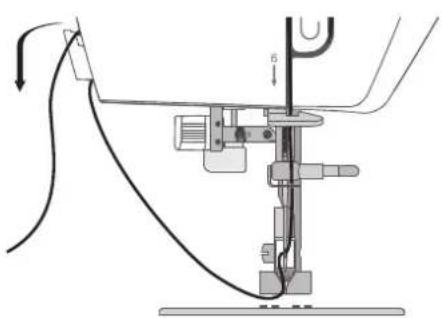
natural_image
Mechanical assembly diagram showing a lever mechanism with no visible text or symbolsBroche porte-bobine
natural_image
Simple diagram of a cylindrical device with a wire and probe, connected to a curved cable (no text or symbols)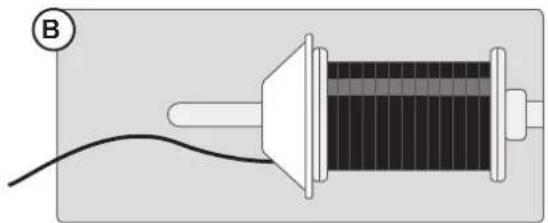
natural_image
Simple diagram of a solenoid connected to a wire, no text or symbols presentBroche porte-bobine repliable
natural_image
Two diagrams showing a coiled cable or wire between two spools, with no text or symbols present.Bobiner la canette
text_image
Diagram illustrating a mechanical or electrical setup with labeled components A, B, and C, showing connections and components.natural_image
Illustration of a computer monitor with an 'A' button and a small screen icon, no readable text or symbols present.B
②
natural_image
Diagram of a mechanical device with a rotating knob and surrounding components (no text or symbols)③
text_image
Diagram showing a hand pressing a button on a device with labeled parts C and D4
natural_image
Close-up of a hand pressing down on a mechanical component with a circular dial (no visible text or symbols)5
natural_image
Diagram of a device with a central circular component and surrounding components (no text or symbols)→
Enfilage de la machine
text_image
Diagram illustrating a mechanical or electrical setup with labeled components A, B, C, D and directional arrows indicating motion or movement.text_image
Technical diagram of a mechanical device with labeled components and motion indicatorsMachine vue de face
Enfile-aiguille
text_image
Technical diagram showing three mechanical assembly steps labeled A, B, and C, with detail views of component details.Aiguilles
text_image
Diagram showing three labeled configurations (A, B, C) of a multi-layered container or structure with internal channels and fluid levels.text_image
Diagram showing two triangular patterns labeled 1 and 2 with upward arrows, likely illustrating a geometric or physical concept.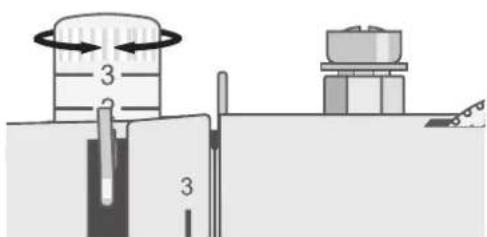
text_image
Diagram showing a mechanical setup with labeled components and directional arrows indicating motion or flow.Changer le pied-de-biche
natural_image
Diagram showing two mechanical components with directional arrows indicating movement, no text or symbols present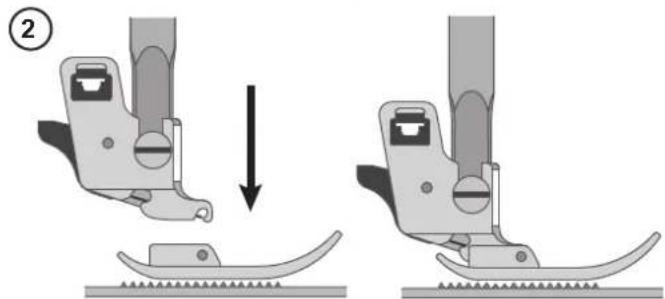
natural_image
Mechanical assembly diagram showing two steps of a sewing machine tool, one with a downward arrow indicating motion (no text or symbols present)Joindre le guide de bordure/quilting
text_image
Technical diagram showing a mechanical assembly with labeled component A and directional arrows indicating movement or force.FONCTIONNEMENT DE VOTRE MACHINE
text_image
A B C D E S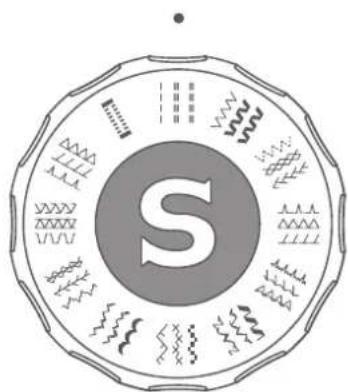
natural_image
Circular emblem with central 'S' and surrounding symbols (no readable text or numbers)text_image
L M R ① ②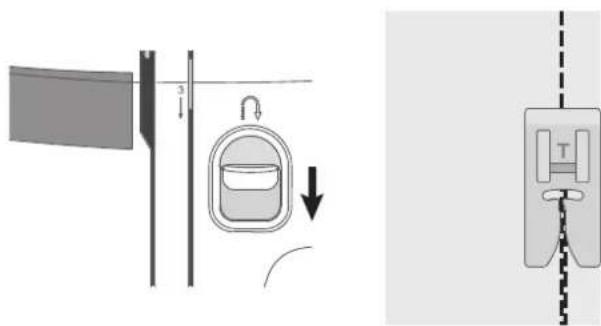
text_image
Diagram illustrating a mechanical or electrical system with labeled components and directional arrows, including a hanging container and a hanging device.COUTURE
Couture
text_image
Diagram illustrating a medical or laboratory procedure with labeled components A and B, showing tubing and a vertical dashed line indicating measurement or alignment.natural_image
Pure diagram of a mechanical or optical component with dashed line indicating alignment (no text or symbols)Terminer la couture
natural_image
Diagram of a medical device with a labeled component 'T' and vertical dashed line, no readable text or symbols present.Point zigzag multi-point
natural_image
Diagram of a sewing machine needle with a spring, showing no text or symbolsnatural_image
Diagram showing a mechanical component with a spring-like structure and two vertical guide rails (no text or symbols)Point surjet fermé
text_image
Diagram illustrating textile sewing process with labeled parts A and B, showing fabric cutting and sewing stepsOurlet invisible
text_image
Technical diagram showing mechanical assembly with labeled parts A and B, including a spring-like component labeled F.Tissé Tissu extensible
natural_image
A blank white sheet with a row of small black dots, no text or symbols present.Endroit du tissu
natural_image
Abstract geometric pattern with a central square and jagged border (no text or symbols)natural_image
Pure geometric diagram with arrow-like shapes and a shaded corner (no text or symbols)text_image
Technical diagram of a sewing machine with labeled parts and exploded view, showing front, side, and top views.natural_image
Pure diagram of a vertical rod with a dashed line and cross mark, no text or symbols present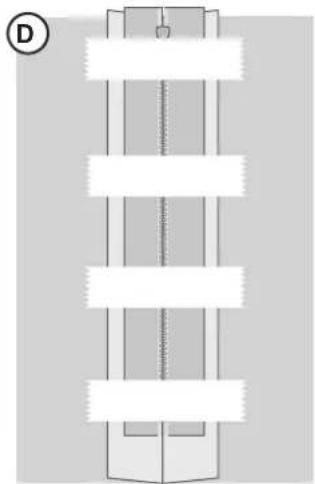
natural_image
Pure diagram of a vertical structure with horizontal bars, no text or symbols present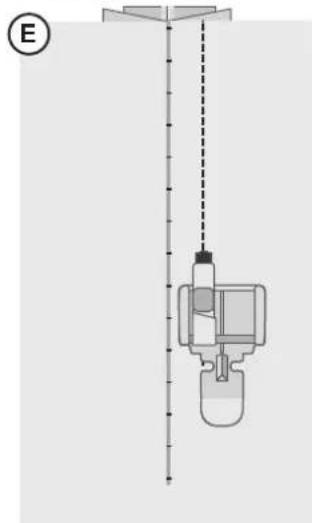
natural_image
Diagram of a vertical container with a bottle and side arm, connected by a dashed line to a top platform (no text or symbols)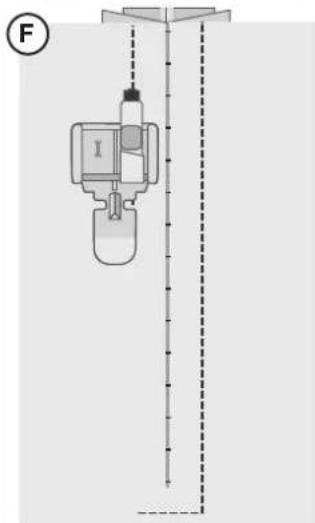
text_image
FENTRETIEN
Nettoyage de la machine
natural_image
Diagram of a device's internal components including a CD, fan, and cable being inserted into a laptop (no text or symbols present)natural_image
Mechanical assembly diagram showing a disassembly or disassembly process with a tool and component (no text or symbols visible)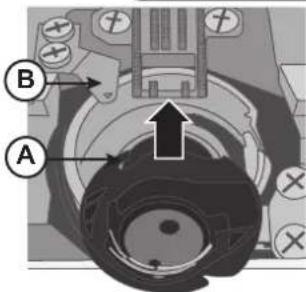
text_image
Technical diagram of a mechanical assembly with labeled parts A and B, showing directional arrows and components.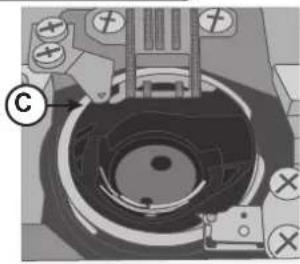
natural_image
Mechanical assembly diagram showing a circular component with labeled parts (no readable text or symbols)Dépannage
natural_image
Line drawing of a vintage sewing machine with decorative swirls and no text or symbols
SINGER®
text_image
Diagram of a car interior with numbered parts and directional arrows indicating components like traffic, display, and control buttons.natural_image
Illustration of a hand pressing down on a mechanical component with ruler markings (no text or symbols)Palanca del prensatelas
natural_image
Mechanical assembly diagram showing two sequential steps of a sewing machine (no text or labels)Cuchilla de hilo
natural_image
Mechanical assembly diagram showing a lever mechanism with no visible text or symbolsPortacarretes
natural_image
Diagram of a cylindrical device with a wire and cable, labeled with point A (no text or symbols on the device itself)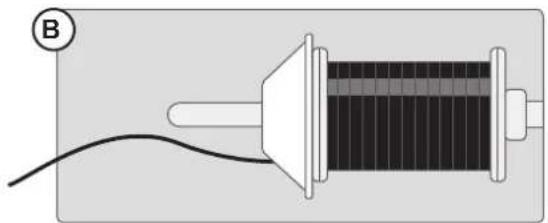
natural_image
Diagram of a solenoid connected to a wire, labeled with circled B (no text or symbols on the diagram itself)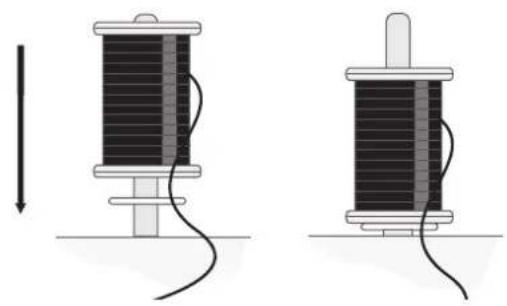
natural_image
Two diagrams showing a coiled cable or wire between two spools, with no text or symbols present.text_image
Diagram illustrating a mechanical or electrical setup with labeled components A, B, and C, showing connections and directional arrows.text_image
Diagram of a device with labeled parts A and B, showing internal components and connections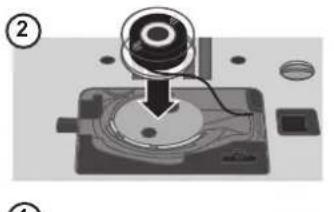
natural_image
Mechanical assembly diagram showing a device with a circular component inserted into a base plate (no text or symbols visible)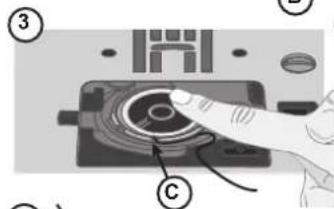
text_image
Diagram showing a finger pressing a circular component labeled with parts ③ and ⑤, likely illustrating a mechanical or electrical process.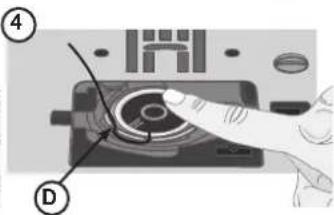
text_image
Diagram showing a hand pressing a button on a device with labeled parts (④ and ①)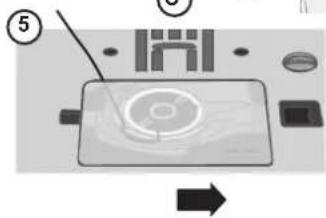
text_image
Diagram of a device with labeled components and directional arrow, showing a screen with a circular button and surrounding parts.Enhebre la máquina
text_image
Diagram illustrating a mechanical or electrical setup with labeled components A, B, C, D and directional arrows indicating motion or movement.text_image
Technical diagram of a mechanical device with labeled parts E and F, showing motion paths and directional arrows.text_image
Technical diagram showing three mechanical assembly steps labeled A, B, and C, with detail views of each step.Agujas
text_image
Diagram showing two triangular patterns labeled 1 and 2 with upward arrows, likely illustrating a geometric or physical concept.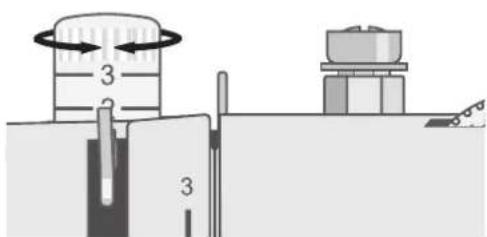
text_image
Diagram showing a mechanical setup with labeled components and directional arrows indicating motion or flow.natural_image
Diagram showing two mechanical foot manipulator mechanisms with arrows indicating movement, no text or symbols present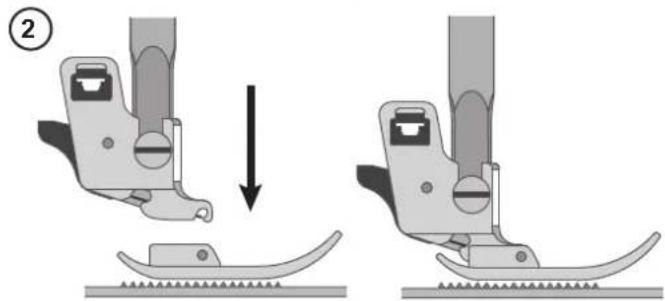
natural_image
Two-step diagram showing a sewing machine's base and side view, with no text or symbols present.text_image
Technical diagram showing a mechanical assembly with labeled component A and an inset magnified view of a tool or device.text_image
A B C LENGTH D E SA. Palanca de costura inversa
text_image
Technical diagram showing various waveform and scale indicators with labeled ranges and symbolstext_image
L M R ① ②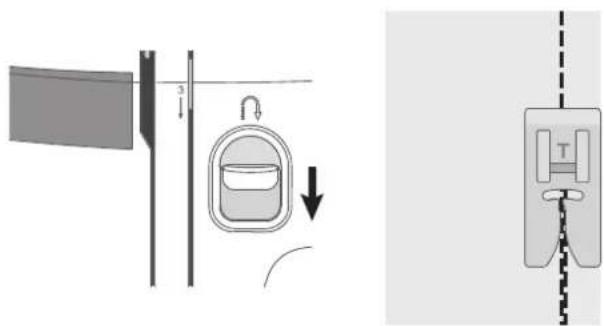
text_image
Diagram illustrating a medical or laboratory procedure with labeled components and directional arrows, including a hanging container and a separate device.COSTURA
Costura
text_image
Diagram illustrating a medical or laboratory procedure with labeled components A and B, showing fluid flow and measurement setup.natural_image
Pure diagram of a mechanical or optical component with dashed line indicating alignment (no text or symbols)Termine la costura
natural_image
Diagram of a medical device with a labeled component 'T' and vertical dashed line, no readable text or symbols present.Puntada de Zig-zag múltiple
natural_image
Diagram of a sewing machine needle with a spring, showing no text or symbolsPuntada para borde inclinado
natural_image
Diagram showing a mechanical component with a spring-like structure and two vertical guide rails (no text or symbols)Puntada Overlock cerrada
text_image
Diagram illustrating textile sewing process with labeled parts A and B, showing fabric cutting and sewing stepstext_image
Technical diagram showing mechanical assembly with labeled parts A and B, including a spring mechanism and force F.Tejido no elástico Tejido elástico
natural_image
A blank white sheet with a row of small black dots, no text or symbols present.natural_image
Abstract geometric pattern with a central square and irregular border (no text or symbols)Repare desgarrones
natural_image
Pure geometric diagram with arrow-like lines and a shaded corner (no text or symbols)Ojalador en 1 paso
text_image
Technical diagram of a mechanical device with labeled parts and exploded view, including assembly steps A through F.Cosa cremalleras
natural_image
Pure diagram of a vertical rod with a dashed line and cross mark, no text or symbols present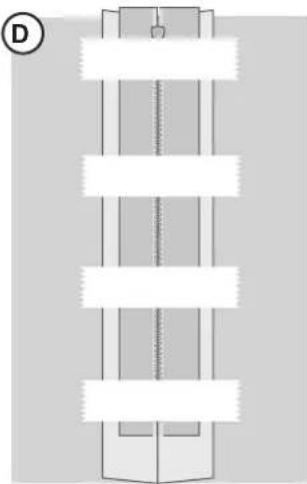
natural_image
Pure diagram of a vertical cylindrical structure with horizontal bars, no text or symbols present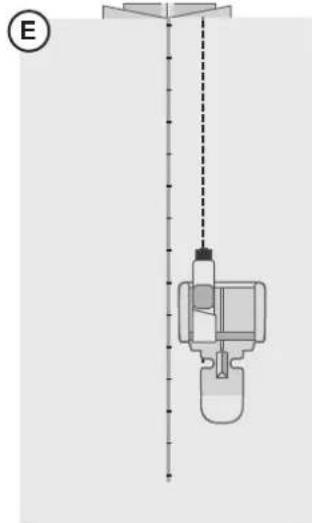
natural_image
Diagram of a mechanical device with a vertical line and dashed alignment lines, no visible text or symbols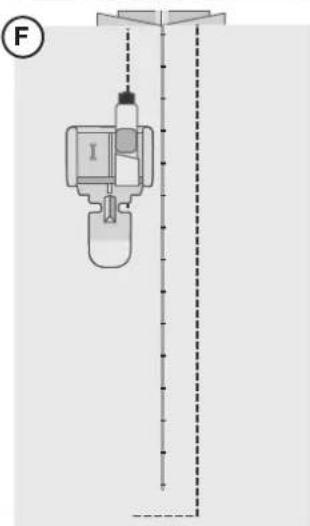
text_image
FMANTENIMIENTO
natural_image
Diagram of a device's internal components including a CD, fan, and cable being inserted into a laptop (no text or symbols present)natural_image
Mechanical assembly diagram showing a disassembly or disassembly process with a tool and component (no text or symbols visible)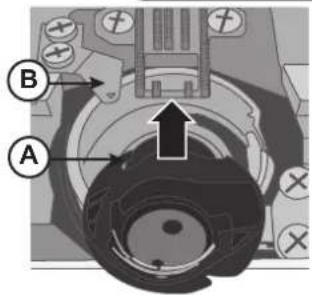
text_image
Technical diagram of a mechanical assembly with labeled parts A and B, showing directional arrows and components.