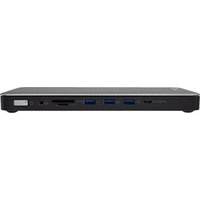
DOCKTB4PT - Docking station V7 - Free user manual and instructions
Find the device manual for free DOCKTB4PT V7 in PDF.


| Product Type | Docking Station |
| Brand | V7 |
| Model | DOCKTB4PT |
| Host Interface | Thunderbolt 4 (40 Gbit/s), compatible with Thunderbolt 3, USB4 |
| Power Supply | 20 V / 7.5 A (150 W) power adapter included |
| Video Ports | 2 downstream Thunderbolt 4 ports (max 8K/30 Hz or 2x 4K/60 Hz), HDMI/DisplayPort combo (see details) |
| USB Ports | 1x USB-C 3.2 Gen 2 (10 Gbit/s) with PD 30 W, 2x USB-A 3.2 Gen 2 (10 Gbit/s), 1x USB-A 3.2 Gen 1 (5 Gbit/s) |
| Ethernet Port | RJ45 2.5 Gigabit (10M/100M/1000M/2.5G), Wake-On-LAN |
| Card Reader | SD 4.0 / TF 4.0 (312 MB/s), two simultaneous slots |
| Audio | 3.5 mm jack (stereo + microphone), automatic CTIA/MTTP detection |
| Security | Kensington nano lock (K-Lock) |
| Host Charging | Up to 96 W via upstream Thunderbolt 4 port (5 V/9 V/15 V at 3 A or 20 V at 4.8 A) |
| Operating Temperature | 5 °C to 35 °C (41 °F to 95 °F) |
| Package Contents | Docking station, Thunderbolt cable, power adapter, user manual |
| Maintenance and Cleaning | Clean with a dry cloth. Do not immerse in liquid. |
| Warranty | Limited warranty (void if disassembled) |
Frequently Asked Questions - DOCKTB4PT V7
User questions about DOCKTB4PT V7
0 question about this device. Answer the ones you know or ask your own.
Ask a new question about this device
Download the instructions for your Docking station in PDF format for free! Find your manual DOCKTB4PT - V7 and take your electronic device back in hand. On this page are published all the documents necessary for the use of your device. DOCKTB4PT by V7.
USER MANUAL DOCKTB4PT V7
natural_image
Line drawing of a rectangular electronic device with ports and indicator lights (no text or symbols)INTRO
Copyright
This document contains proprietary information protected by copyright. All rights reserved. No part of this manual may be reproduced by any mechanical, electronic or other means, in any form, without prior written permission of the manufacturer.
Trademarks
All trademarks and registered trademarks are the property of their respective owners or companies.
Package Contents
- Docking Station
- Cable to connect computer to Docking Station
- Power Adapter
- User's Manual
IMPORTANT
- Confirm that you are connecting the Docking Station with the supplied USB cable to the fastest USB port available on your computer
- Confirm all of your cables and devices are working properly by using them directly connected to your computer
- Confirm you are using the latest software and drivers from the manufacturer of the computer including Chipset Drivers, Firmware Updates, Bios, etc.
- Confirm your computer's operating system power saving mode setting is not set to turn off USB connectivity. This can results in USB input devices being ignored during sleep mode so you can't wake up your computer.
- Still having trouble?
Contact our customer service team. Contact information is on our website www.v7world.com
OVERVIEW
BACK
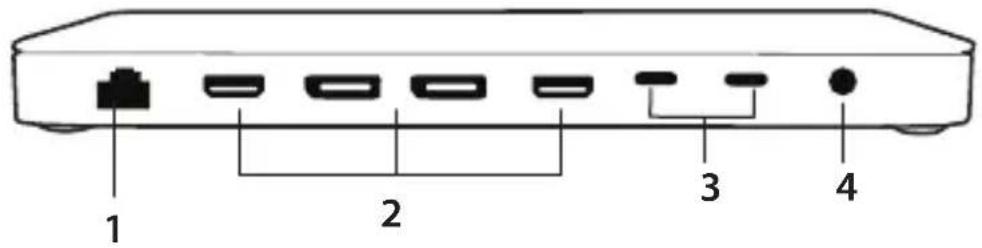
1. RJ45 x1
• 10M/100M/1000M/2.5G bandwidth
- Complies with IEEE 802.3, IEEE 802.3u, IEEE 802.3ab, IEEE 802.3bz. support IEEE 802.3az-2010(EEE), IEEE 802.1P, IEEE 802.1Q, IEEE 802.3x
• Supports Wake-On-LAN and Wake-On-WAN
• LED indicator: 1) No light: power off. 2) Orange: power on. 3) Blue: Host connection OK.
2.
| One Display DisplayPort: | |
| Max 8K/30Hz | |
| 4K UHD 60/120/144Hz | |
| 2KWQHD 60/120/144/240Hz | |
| 1080P 60/120/144/240Hz | |
| HDMI: | |
| Max 4K UHD 30/60Hz | |
| 2KWQHD 60/120/144/240Hz | |
| 1080P 60/120/144/240Hz | |
| Two Displays HDMI / DisplayPort: | |
| Max 4K UHD 30/60Hz | |
| 2KWQHD 60/120/144/240Hz | |
| 1080P 60/120/144/240Hz | |
| Three Displays HDMI / DisplayPort: | |
| Max 4K UHD 30/60Hz | |
| 2KWQHD 60/120/144/240Hz | |
| 1080P 60/120/144/240Hz | |
| HDMI / DisplayPort #2: | |
| Max 4K UHD 30Hz | |
| 2KWQHD 60/120/144/240Hz | |
| 1080P 60/120/144/240Hz |
OVERVIEW
BACK
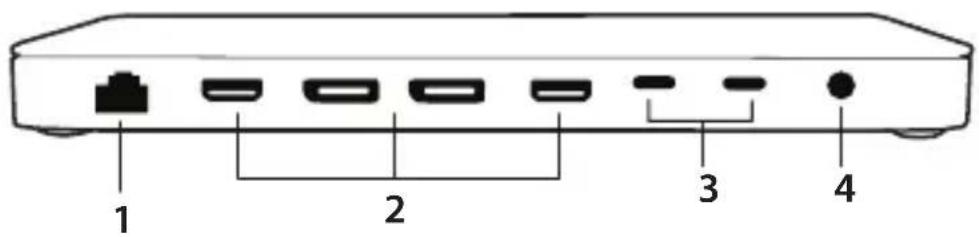
3. Thunderbolt™ 4 downstream port x 2
- Thunderbolt 4 up to 40Gbps, compatible with Thunderbolt 3, USB4, DP Alt mode, USB
- Cascade Thunderbolt devices up to 6 levels
• Max 8K or dual 4K/60Hz resolution video
• Each Thunderbolt 4 port supports 15W downstream charging for connected device
• Note: These 2 ports do not support PD charging from Power Supply
4. DC Power Jack (use included V7 DC 20V/7.5A 150W Power Adapter Only)
- Thunderbolt 4 up to 40Gbps, compatible with Thunderbolt 3, USB4, DP Alt mode, USB
- Cascade Thunderbolt devices up to 6 levels
• Max 8K or dual 4K/60Hz resolution video
• Each Thunderbolt 4 port supports 15W downstream charging for connected device
• Note: These 2 ports do not support PD charging from Power Supply
OVERVIEW
FRONT
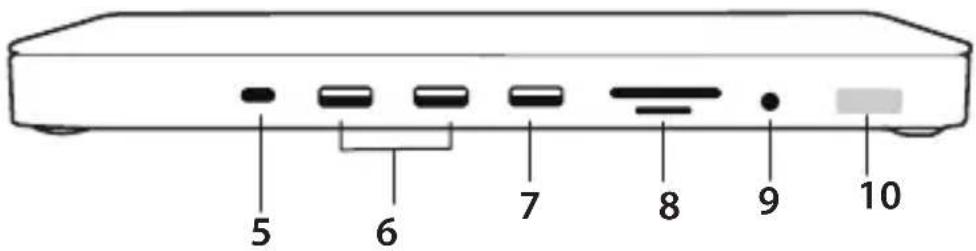
5. USB-C PD & Data x 1
• USB3.2 Gen 2 with max 10Gbps data transmission
• PD3.0 max 30W output charging
- 5V/3A, 9V/3A, 15V/2A, or 20V/1.5A output
6. USB A 3.2 Gen2 x 2
• USB3.2 Gen 2 with max 10Gbps data transmission
- The port (next to USB-C) support max 1.5A downstream charging, and middle USB port supports max 900mA downstream charging
7. USB A 3.2 Gen1 x 1
• USB3.2 Gen 1 with max 5Gbps data transmission
• Max 900mA downstream charging
8. SD4.0/TF 4.0
• SD/TF supports SD4.0 with max 312MBps
• Supports 2 card slots simultaneously
9. 3.5mm Audio JACK x 1
• 16/24/32-bit 8/16/22.05/24/32/44.1/48/96/176.4/192/384KHz Sample Rate
• Supports both Stereo output and microphone input
• Automatic detection switch CTIA/MTP mode
10. Power Switch & Power indicator LED
- The product is off by default. After connecting the power supply, you need to press the switch to power it on.
- The LED is bright orange when the product is powered on and bright blue when the product is connected to the host.
OVERVIEW
SIDES
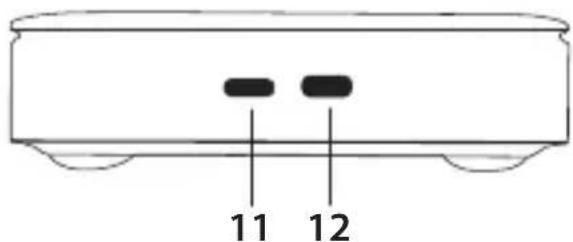
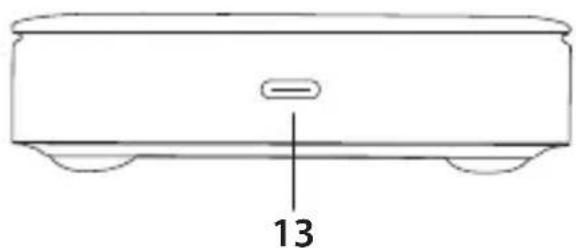
natural_image
Line drawing of a rectangular electronic device with a labeled component (13), no text or symbols present.- Kensington (K-Lock) Anti-theft Lock
- Standard Nano Anti-theft lock
-
Thunderbolt 4 Female (to host)
-
Max 40Gbps
• Supports Thunderbolt 4 based Computers
• Supports max 96W, 5V/9V/15V@3A, or 20V@4.8A Host charging
Product Safety Instructions:
Read this guide for important safety and health information and for regulatory information.
Warning: Failure to properly set up, use, and care for this product can increase the risk of serious injury or death, or damage to the device or devices. Read this instruction and keep all printed manuals, instruction for future references. This Product Safety Instructions includes important information about many V7 products. Refer to sections that apply to the feature of your device.
AC Powered Devices: These precautions apply to all products that plug into a standard wall power outlet. Failure to take the following precautions can result in serious injury or death from electric shock or fire or in damage to the device.
To select an appropriate power source for your device:
- Use only the power supply unit and AC power cord that came with your device or that you received from an authorized repair center.
- Confirm that your electrical outlet provides the type of power indicated on the power supply unit (in terms of voltage [V] and frequency [Hz]). If you are not sure of the type of power supplied to your home, consult qualified electrician.
- Do not use non-standard power sources, such as generators or inverters, even if the voltage and frequency appear acceptable. Only use AC power provided by a standard wall outlet.
- Do not overload your wall outlet, extension cord, power strip, or other electrical receptacle. Confirm that they are rated to handle the total current (in Amps [A]) drawn by the device (indicated on the power supply unit) and any other devices that are on the same circuit.
• To prevent damaging the power cords and power supply: - Protect the power cords from being walked on.
- Protect cords from being pinched or sharply bent, particularly where they connect to the power outlet, the power supply unit, and the device.
- Do no jerk, knot, sharply bend, or otherwise abuse the power cords.
- Do not expose the power cords to sources of heat.
- Keep children and pets away from the power cords. Do not allow them to bite or chew on them.
- When disconnecting the power cord, pull the plug – do not pull on the cord.
- Unplug this power cord during lightning storms or when unused for a long period of time.
If a power cord or power supply becomes damaged in any way, stop using it immediately. Unplug your device during lightning storms or when unused for long periods of time. For devices with an AC power cord that connects to the power supply or the equipment itself, always connect the power cord accordingly to the following instructions:
- Plug the AC power cord into the power supply unit or the equipment itself until it stops.
- Plug the other end of the AC power cord into the wall outlet.
Do not attempt repairs. Do not attempt to take apart, disassemble, service, or modify the hardware device or power supply. Doing so could present risk of electronic shock or other hazard. Any evidence of any attempt to dissemble and/or modify the device, including peeling, puncturing, or removal of any of the labels, will void the Limited Warranty.
Do not abuse the device: Do not immerse the device to any liquid or expose to moisture. Clean only with dry cloth. Do not use the device outside the specified operating temperature range of 5irc C ( 41irc F) to 35irc C ( 95irc F). If the device is exposed to environment outside of its prescribed operation, turn off the device and allow the temperature to stabilize within the specified operating range before using the device.
▼SEVEN
DOCKTB4PT

natural_image
Line drawing of a rectangular electronic device with ports and indicator lights (no text or symbols)EINFÜHRUNG
Copyright
natural_image
Line drawing of a rectangular electronic device with a labeled component (13), no text or symbols present.natural_image
Line drawing of a rectangular electronic device with ports and indicator lights (no text or symbols)INTRODUCCIÓN
Copyright
7.1 puerto USB A 3.2 Gen1
natural_image
Line drawing of a rectangular electronic device with a labeled component (13), no text or symbols present.natural_image
Line drawing of a rectangular electronic device with ports and indicator lights (no text or symbols)INTRODUCTION
Copyright
natural_image
Line drawing of a rectangular electronic device with a labeled component (13), no text or symbols present.natural_image
Line drawing of a rectangular electronic device with ports and indicator lights (no text or symbols)INTRODUZIONE
Copyright
natural_image
Line drawing of a rectangular electronic device with a labeled component (13), no text or symbols present.- INTRO
- Copyright
- Trademarks
- Package Contents
- IMPORTANT
- OVERVIEW
- BACK
- RJ45 x1
- Thunderbolt™ 4 downstream port x 2
- DC Power Jack (use included V7 DC 20V/7.5A 150W Power Adapter Only)
- FRONT
- USB-C PD & Data x 1
- USB A 3.2 Gen2 x 2
- USB A 3.2 Gen1 x 1
- SD4.0/TF 4.0
- 3.5mm Audio JACK x 1
- Power Switch & Power indicator LED
- SIDES
- Product Safety Instructions:
- ▼SEVEN
- EINFÜHRUNG
- INTRODUCCIÓN
- puerto USB A 3.2 Gen1
- INTRODUCTION
- INTRODUZIONE
Brand : V7
Model : DOCKTB4PT
Category : Docking station