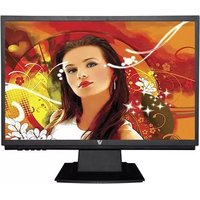
Ultra Slim WM1S80 - Screen V7 - Free user manual and instructions
Find the device manual for free Ultra Slim WM1S80 V7 in PDF.


Pick your language and provide your email: we'll send you a specifically translated version.
| Product Type | Ultra-slim LED-backlit LCD monitor |
| Screen Size | 24 inches (display area) |
| Resolution | Full HD 1920 x 1080 pixels |
| Aspect Ratio | 16:9 widescreen |
| Panel Type | IPS (In-Plane Switching) technology |
| Brightness | 250 cd/m² (typical) |
| Contrast Ratio | 1000:1 (typical) |
| Viewing Angles | 178° horizontal / 178° vertical |
| Response Time | 5 ms (gray-to-gray) |
| Refresh Rate | 60 Hz |
| Connectivity | HDMI 1.4, VGA, DisplayPort 1.2 |
| VESA Mounting | 75 x 75 mm (bracket not included) |
| Power Supply | Internal adapter, 100-240V AC, 50/60 Hz |
| Power Consumption | 25W typical, <0.5W standby |
| Dimensions (with stand) | 540 x 400 x 180 mm (W x H x D) |
| Weight (with stand) | 3.5 kg |
| Design | Ultra-slim profile with thin bezel |
| Additional Features | Flicker-free technology, low blue light mode |
| Cleaning Instructions | Wipe with a dry, soft microfiber cloth; do not apply liquids directly |
| Safety Notes | Maintain ventilation; use only certified power cables; avoid exposing to moisture |
| Spare Parts & Repair | Stand and power cable replaceable; VESA screws standard 75x75 |
| General Information | Multilingual OSD menu; supported on Windows, macOS, and Linux |
Frequently Asked Questions - Ultra Slim WM1S80 V7
What is the native resolution of the V7 Ultra Slim WM1S80?
The native resolution is Full HD 1920 x 1080 pixels, which provides crisp and sharp images for everyday computing and entertainment.
How can I connect multiple devices to the monitor?
The monitor offers HDMI, VGA, and DisplayPort inputs. You can connect up to three devices simultaneously and switch between them using the OSD (On-Screen Display) menu.
Does the monitor support wall mounting?
Yes, the monitor is compatible with a VESA 75x75 mm wall mount bracket. Remove the stand and attach the bracket using the four screw holes on the rear panel.
How do I clean the ultra-slim screen without damaging it?
Use a dry, soft microfiber cloth to gently wipe the screen. If stubborn smudges remain, slightly dampen the cloth with distilled water. Never spray liquids directly onto the display or use harsh chemicals.
Why is there no image on the display?
First, check that the power cable is securely connected and the monitor is turned on. Then verify the video cable (HDMI/VGA/DisplayPort) is attached to both the monitor and the computer. Use the source button to cycle through active inputs. If the problem persists, test with another cable or device.
Can I adjust the screen brightness and contrast?
Yes, press the menu button on the monitor to open the OSD. Navigate to the Picture settings to adjust brightness, contrast, and other visual parameters like sharpness or color temperature.
Is the monitor energy efficient?
The monitor consumes 25W typical power and less than 0.5W in standby mode. It includes energy-saving features such as automatic sleep when no signal is detected, helping reduce electricity usage.
What should I do if the screen flickers?
Ensure the monitor is set to its native 1920x1080 60Hz refresh rate via your computer's display settings. A faulty or low-quality cable can also cause flickering; replace it with a certified cable. The monitor itself features flicker-free technology to minimize eye strain.
Are there built-in speakers in the monitor?
No, the V7 Ultra Slim WM1S80 does not have integrated speakers. Use the HDMI or DisplayPort connection to transmit audio to an external soundbar, speakers, or amplifier via your computer's audio output.
How do I enable the blue light filter?
Open the OSD menu and look for Low Blue Light or Eye Care mode. You can select a preset level (e.g., 0-3) to reduce blue light emission, which helps prevent eye fatigue during long sessions.
User questions about Ultra Slim WM1S80 V7
0 question about this device. Answer the ones you know or ask your own.
Ask a new question about this device
No questions yet. Be the first to ask one.
Download the instructions for your Screen in PDF format for free! Find your manual Ultra Slim WM1S80 - V7 and take your electronic device back in hand. On this page are published all the documents necessary for the use of your device. Ultra Slim WM1S80 by V7.
USER MANUAL Ultra Slim WM1S80 V7


Manual assistant
Powered by Anthropic
Waiting for your message
Product information
Brand : V7
Model : Ultra Slim WM1S80
Category : Screen