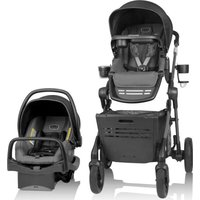
Pivot Troop - Stroller Evenflo - Free user manual and instructions
Find the device manual for free Pivot Troop Evenflo in PDF.


| Product Type | Stroller |
| Brand | Evenflo |
| Model | Pivot Troop |
| Maximum child weight (toddler seat) | 25 kg (55 lb) |
| Maximum child height | 102 cm (40 in) |
| Maximum pet basket weight | 15.8 kg (35 lb) |
| Maximum parent storage basket weight | 4.5 kg (10 lb) |
| Maximum cup holder weight | 450 g (1 lb) |
| Total basket weight | 20.4 kg (45 lb) |
| Compatible car seats | Evenflo SafeMax, LiteMax (only) |
| Child use | From sitting up unassisted |
| Harness | 5-point convertible to 3-point |
| Seat recline | Multi-position (do not recline with child) |
| Parent handle | Height adjustable |
| Canopy | With visibility window, removable |
| Footrest | Adjustable |
| Child tray | Removable |
| Cup holder and waste bag holder | Included, removable |
| Water and treat container | Included, water bowl for pet |
| Pet basket | With ramp, zipper, divider |
| Brakes | Rear lever brakes |
| Fold | Compact with side lock |
| Care and cleaning | Clean with cold water and mild soap; air dry; wipe metal/plastic parts |
| Limited warranty | 90 days from delivery |
| Customer service | ParentLink: 1-800-233-5921 (U.S.) |
Frequently Asked Questions - Pivot Troop Evenflo
User questions about Pivot Troop Evenflo
0 question about this device. Answer the ones you know or ask your own.
Ask a new question about this device
Download the instructions for your Stroller in PDF format for free! Find your manual Pivot Troop - Evenflo and take your electronic device back in hand. On this page are published all the documents necessary for the use of your device. Pivot Troop by Evenflo.
USER MANUAL Pivot Troop Evenflo
Up to 55 lbs (25 kg)
Up to 40 in (102 cm)
POUSSETTE
BASKET/PANIER/CANASTA
Total Weight/Poids total/Peso total: Up to 45 lbs
(20.4kg)/Jusqu'à 20,4 kg (45 lb)/Hasta 20,4 kg (45 lb)
Pet/Animal de compagnie/Mascota: Up to 35 lbs
(15.8 kg)/Jusqu'à 15,8 kg (35 lb)/Hasta 15,8 kg (35 lb)
Parent Storage/Rangement pour parent/Canasta de almacenamiento:
Up to 10 lbs (4.5 kg)/Jusqu'à 4,5 kg (10 lb)/ Hasta 4,5 kg (10 lb)
Read all instructions before assembly and use of product.
KEEP INSTRUCTIONS FOR FUTURE USE.
Identification of Parts.... 3
Features 4
Warnings....5
Important Information 8
Assembling Your Stroller.... 9
Using Your Stroller 13
Using your Stroller with the Recommended Infant Car Seats ...... 21
Care and Maintenance 23
Limited Warranty 23
ParentLink®
answers. advice. affirmation.™
- www.evenflo.com • USA: 1-800-233-5921 8 AM – 5 PM E.T.
- Canada: 1-937-773-3971 • México: 800-706-1200
natural_image
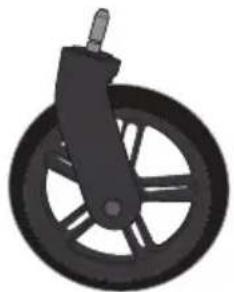
Illustration of a black bicycle steering wheel with a lever (no text or symbols)Front Wheel Assembly (2)
natural_image
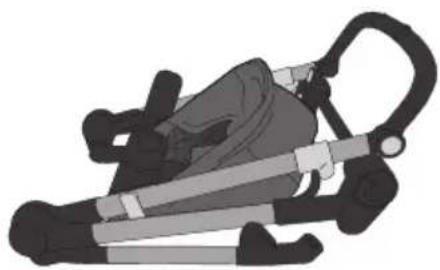
Illustration of a person using a portable device with a strap (no text or symbols)Frame
natural_image
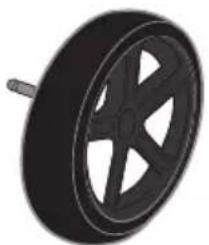
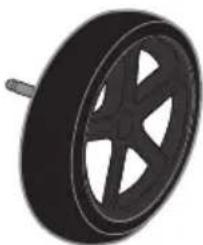
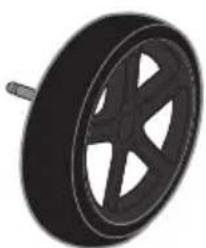
Black and white illustration of a car wheel with five spokes (no text or symbols)Rear Wheel (2)
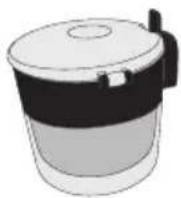
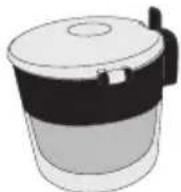
Water Bowl and Treat Container
natural_image
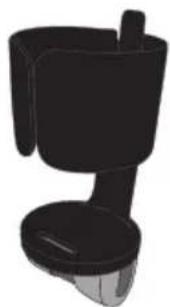
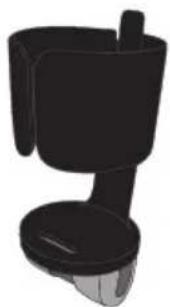
3D rendering of a black ceramic coffee maker with handle and spout (no text or symbols)Cupholder+ Waste Bag Holder
natural_image
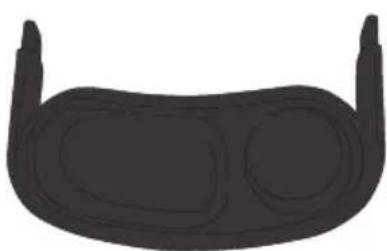
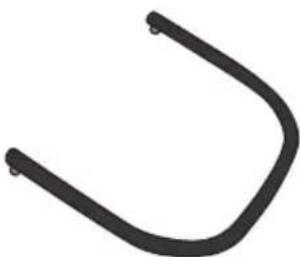
Silhouette of a curved, rounded object with two protruding ends (no text or symbols)Child Tray Basket Assembly
natural_image
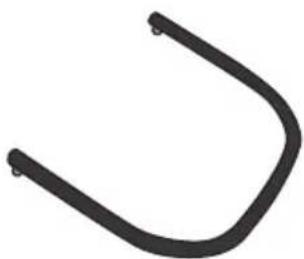
Simple black curved line drawing on white background (no text or symbols)Bar
natural_image
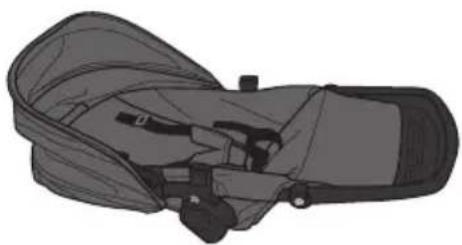
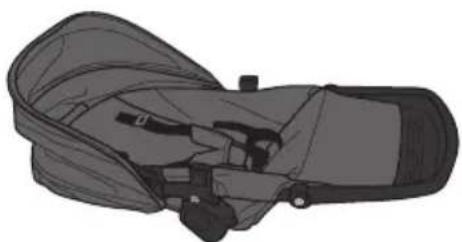
Illustration of a mechanical device with a strap and handle (no text or symbols)Toddler Seat
Features
Holds Evenflo SafeMax™ or LiteMax™ Infant Car Seats Only
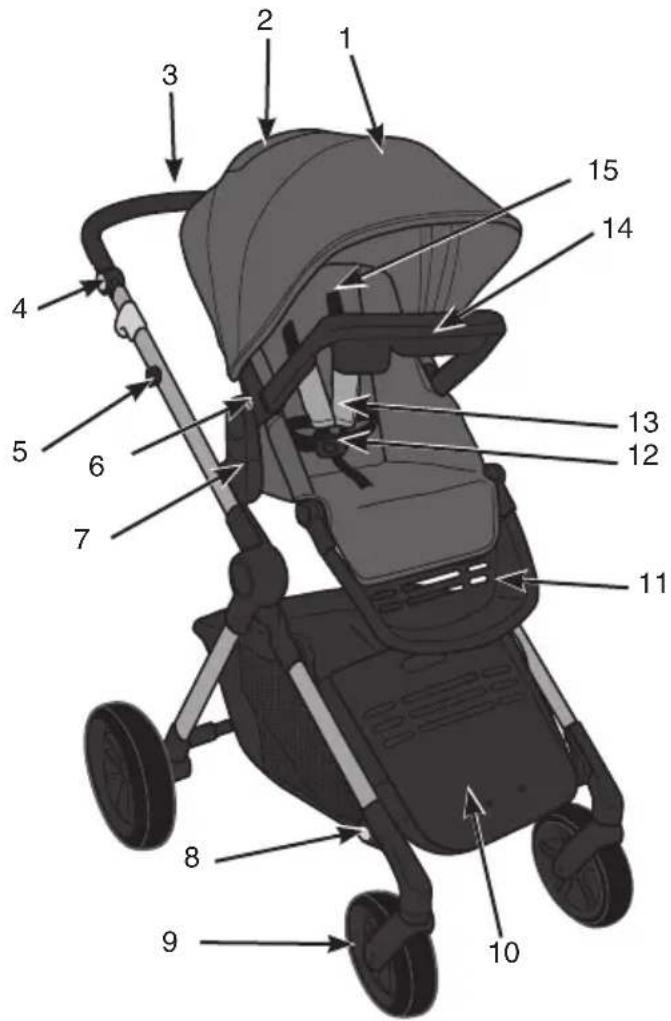
- Canopy
- Canopy Window
- Parent Handle
- Adjustable Handle Button
- Attachment for Cupholder + Waste Bag Holder or Water Bowl and Treat Container
- Toddler Seat Release Button
- Toddler Seat Mount
- Pet Basket Expansion Buttons
- Swivel Wheel
- Pet Ramp
-
Footrest
-
Harness Buckle
- Harness Cover
- Child Snack Tray
- Shoulder Straps
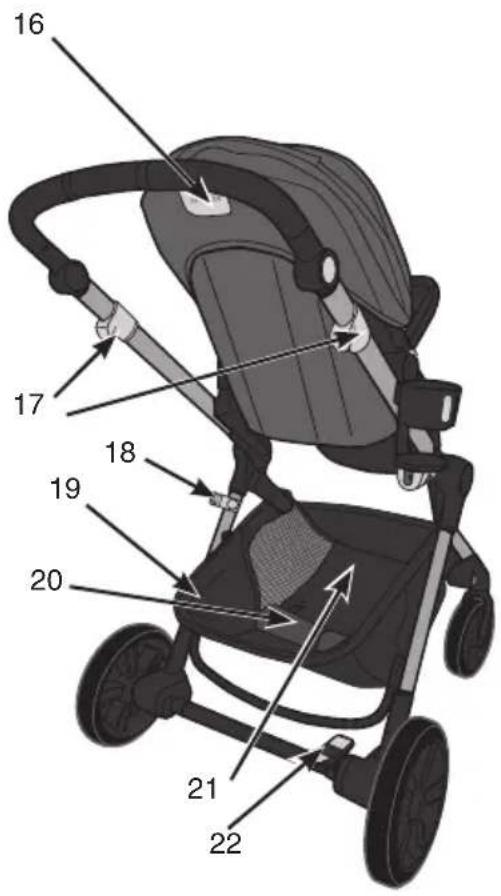
- Multi-Position Recline Lever
- Fold Release Levers
- Side Frame Lock
- Parent Storage Basket
- Pet Divider
- Pet Basket
- Brakes

WARNING!
DEATH or SERIOUS
INJURY can occur.
READ AND FOLLOW ALL WARNINGS AND INSTRUCTIONS! FAILURE TO DO SO COULD RESULT IN SERIOUS INJURY OR DEATH!
- Only use Evenflo SafeMax and LiteMax infant car seats with this stroller.
Other infant car seats or carriers are not designed to fit the stroller frame unless specified in the instructions. Any car seats used with this stroller that are not specified in the instructions may result in serious injury to your child. - NEVER leave child unattended. ALWAYS keep child in view while in the stroller.
- Adult assembly required. Take care when unpacking and assembling; contains small parts and some items with sharp edges.
- To prevent a possible choking hazard, remove and discard packing material before using this product.
- To avoid serious injury from child falling or slipping out of stroller, ALWAYS use the internal harness system.
- DO NOT carry or roll stroller on stairs or escalators with child in it.
- DO NOT hang items on handle bar or place them on the canopy as they can tip stroller over and injure child.
- The carriage or stroller will become unstable if the manufacturer's recommended load is exceeded.
- Be sure stroller is fully assembled and locked in unfolded position before using.
- ALWAYS exercise care when going over curbs or steps, and never use stroller for anything other than transporting your child or pet. Push stroller at a normal walking pace only; faster strolling can cause a loss of control and injury to the child or pet.
- DO NOT place hot liquids in cup holder. Spills can burn you or your child.
- To avoid serious injury from child falling out of stroller, DO NOT raise or recline seat with child in stroller.
- DO NOT use stroller if any parts are missing or broken.
- DO NOT allow child to climb on, into, out of, or around stroller.
- DO NOT allow child to stand on the footrest. Stroller may tip over and injure child.
WARNING! DEATH or SERIOUS INJURY can occur.
READ AND FOLLOW ALL WARNINGS AND INSTRUCTIONS! FAILURE TO DO SO COULD RESULT IN SERIOUS INJURY OR DEATH!
- DO NOT carry additional children, goods, or accessories in or on this stroller except as advised in these instructions. The stroller is intended for use with one child and to accommodate only the additional weights in storage as listed in these instructions.
- Care must be taken when folding or unfolding stroller to prevent finger injury to you or your child. Make sure child is not in the seat or near the stroller when folding or unfolding.
- NEVER leave stroller on a hill or incline, even with brakes set. Stroller may tip, injuring the child.
- To avoid accidental rolling, ALWAYS set brakes when stroller is not being pushed.
-
AVOID STRANGULATION:
-
DO NOT suspend strings or toys from the canopy.
- DO NOT place stroller anywhere near cords from window blinds, draperies, phone, etc.
- DO NOT place items with a string around your child's neck such as hood strings or pacifier cords.
-
If not properly secured, the child may slip into leg openings and strangle.
-
When making adjustments to the stroller, ALWAYS ensure that all parts of the child's body are clear of any moving parts of the stroller.
- The canopy is not intended to provide UV protection.
- Sharp or heavy objects placed in pockets may cause damage to the stroller, or injury to the child.
- To ensure safety for your baby, please refer to the manufacturer's instructions for the use of the recommended infant car seats and keep all instructions available for reference.
- DO NOT lift stroller by using the infant car seat handle when installed on stroller.
- If unable to securely attach the infant car seat to this stroller, remove the car seat and contact Evenflo ParentLink at 1-800-233-5921 (USA), 1-937-773-3971 (Canada), or 800-706-1200 (México).

WARNING!
DEATH or SERIOUS
INJURY can occur.
READ AND FOLLOW ALL WARNINGS AND INSTRUCTIONS! FAILURE TO DO SO COULD RESULT IN SERIOUS INJURY OR DEATH!
- To avoid stroller instability and tip-overs, DO NOT load cup holder with over 1 lb (0.45 kg), and the main cargo basket with over 35 lbs (15.8 kg) in the Pet Basket and 10 lbs (4.5 kg) in the Parent Storage Basket.
- NEVER use the toddler seat without the canopy attached.
- NEVER lift or carry the toddler seat by the child tray.
- NEVER use toddler seat in a motor vehicle or use it as a booster seat.
- To avoid falls, never remove toddler seat from the stroller with child in it.
- To avoid falls, always make sure the toddler seat or car seat is securely attached into the seat mounts on both sides of the stroller before placing child in the seat.
- To avoid serious injury, NEVER use the stroller in any other configuration other than what is shown in the instruction manual.
- DO NOT exceed the maximum weight limits defined in the infant car seat or accessory manuals.
- For additional use configurations with optional accessories, you can refer to the manuals that are provided with the Pivot Troop Accessories (sold separately). These include but are not limited to: infant car seat adapters for other manufacturer's coarseats, Market Basket, and a Rider Board.
- NEVER leave pet unattended. ALWAYS keep pet in view while in the stroller.
- DO NOT attach pet leash to stroller frame.
- Keep plastic waste bags away from children and pets.
- When using with a pet, keep pet basket fully zipped to ensure containment, or use a tether 24" or shorter to keep pet securely attached to the D Ring inside basket.
Important Information
Child Requirements - Only use the stroller in the upright position with a child who is capable of sitting upright unassisted.
• Maximum weight:
- 55 lbs (25 kg) in toddler seat
• Maximum height:
- 40 inches (101.6 cm) in toddler seat
- Basket Total:
- 45 lbs (20.4 kg)
Pet Basket:
- 35 lbs (15.8 kg)
Parent Storage Basket:
- 10lbs (4.5 kg)
IMPORTANT: Read instructions carefully before use. Save these instructions for future reference. It is very important to assemble the stroller according to these instructions. If you are missing parts, do not use stroller and call Evenflo ParentLink at 1-800-233-5921 (U.S.A.), 1-937-773-3971 (Canada), or 800-706-1200 (México) to order replacement parts.
Registration Information
Please register this product so we can reach you if there is a safety alert or recall. We will not sell, rent, or share your personal information. To register your product, please complete and mail the card that came with it or visit our online registration at www.evenflo.com/registerproduct.
For future reference, record the Model Number and Date of Manufacture below. You can find this information on one of the rear stroller legs.
Model Number: ____
Date of Manufacture: ____
WARNING! DEATH or SERIOUS INJURY can occur.
Care must be taken when folding or unfolding stroller to prevent finger injury to you or your child. Make sure child is not in the seat or near the stroller when folding or unfolding.
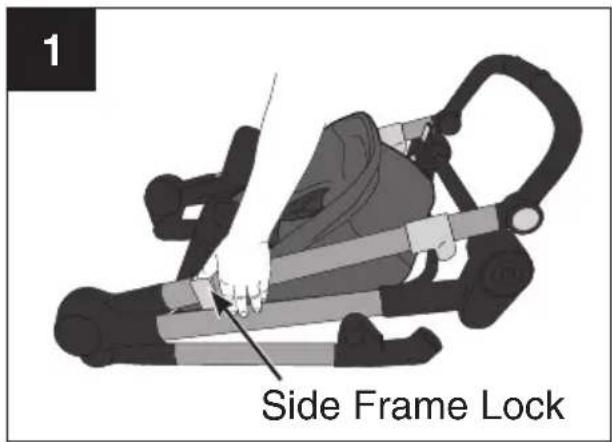
To protect flooring, place a protective covering (carton) beneath the stroller during assembly.
Unlatch side frame lock. Continue holding the lock open while unfolding the stroller.
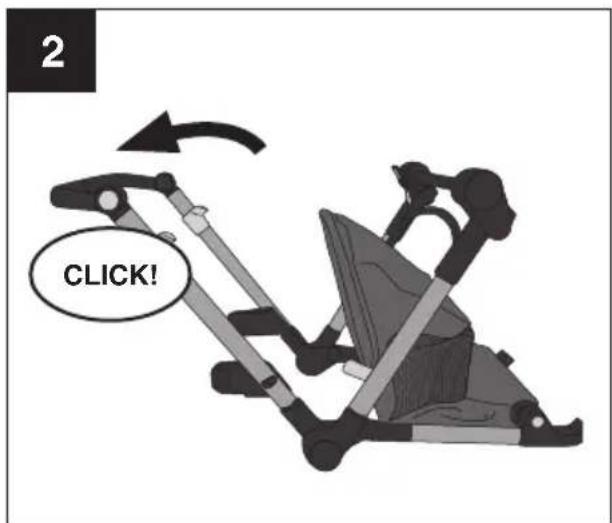
Grab the parent's handle and pull upward until the stroller opens fully with an audible click.
natural_image
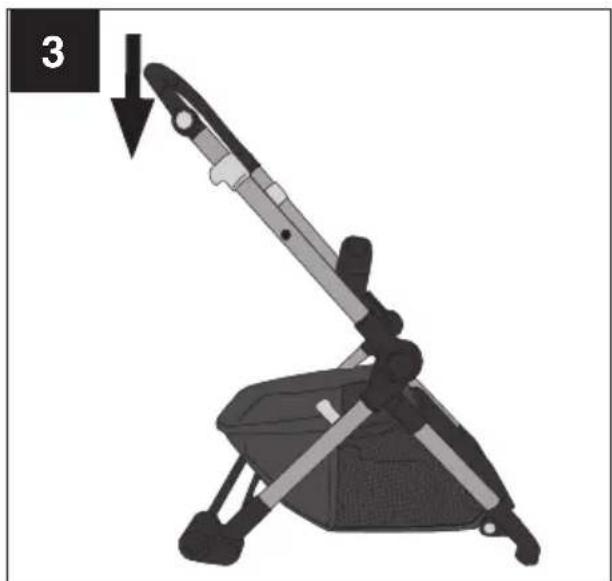
Mechanical device with a lever and seat, showing a press or lifting mechanism (no text or symbols visible)Make sure the stroller is locked in the open position by pushing down on the parent's handle.
Assembling Your Stroller - Wheels
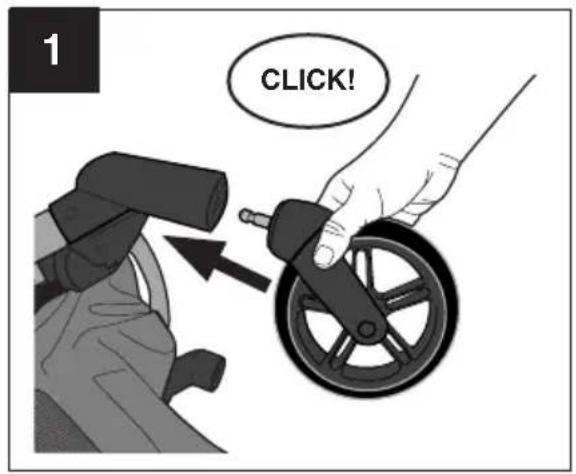
Turn the stroller so the front of the stroller is facing upwards as shown.
To attach front wheels, push wheel onto front leg tube until it clicks into place. Repeat on other side. Pull on wheels to make sure both of them are securely attached.
natural_image
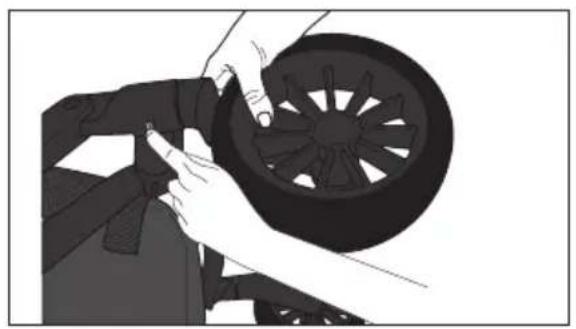
Illustration of hands installing or adjusting a black plastic wheel component (no text or symbols visible)To remove, press tire release button and pull wheel off stroller.
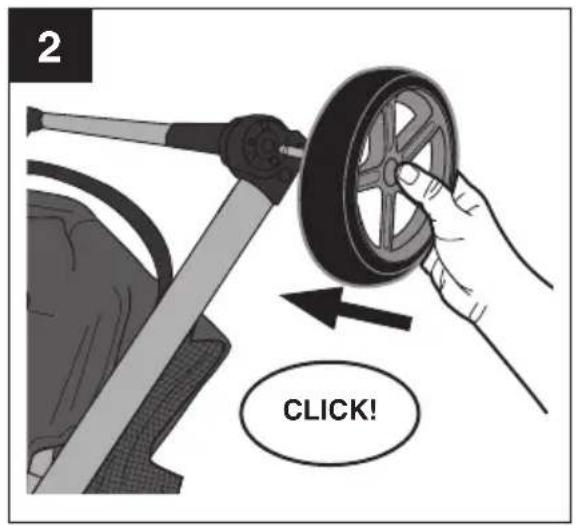
Turn the stroller upside down as shown so the rear of the stroller is facing upwards.
To attach rear wheels, push wheel onto rear leg tube until it clicks into place. Repeat on other side. Pull on wheels to make sure both of them are securely attached.
Assembling Your Stroller - Basket
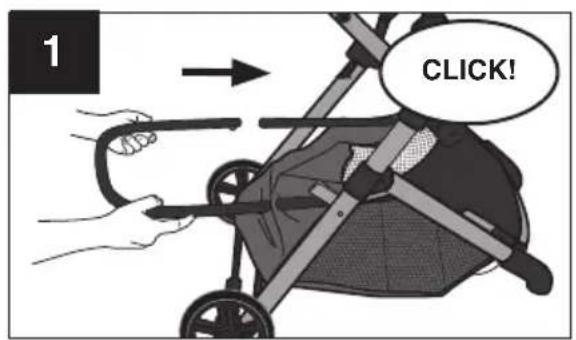
To attach basket, locate the basket assembly bar and ensure the push buttons are on the bottom. Push basket assembly bar onto frame until it clicks into place on both sides with an audible click.
Assembling Your Stroller - Basket
natural_image
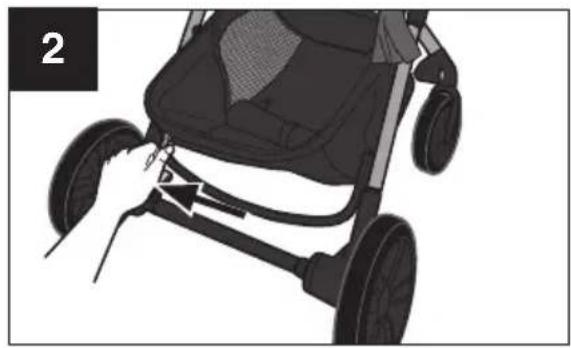
Side view of a stroller with wheels and a handle, no visible text or symbolsPull on basket assembly bar to make sure it is locked into place.
Complete assembly by zipping basket fabric around basket assembly bar.
Assembling Your Stroller - Toddler Seat Mode
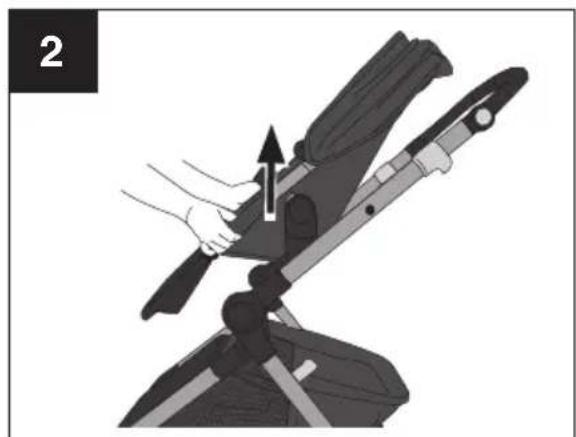
natural_image
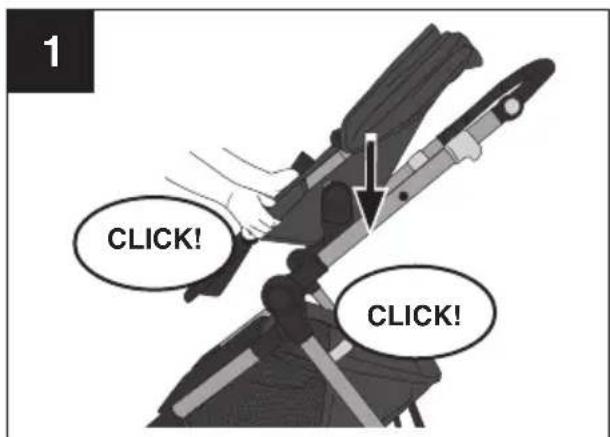
Illustration of a hand operating a mechanical device with an arrow indicating motion (no text or symbols present)To attach toddler seat, slide seat onto the mounts until they click into place on both sides of the frame. The toddler seat may be attached forward-facing or parent-facing.
CHECK to make sure it is securely attached by pulling up on it. IMPORTANT: Stroller cannot be folded with seat in parent-facing position.
Assembling Your Stroller - Toddler Seat Mode
WARNING! DEATH or SERIOUS INJURY can occur.
To avoid serious injury, DO NOT raise or recline seat with child in stroller.
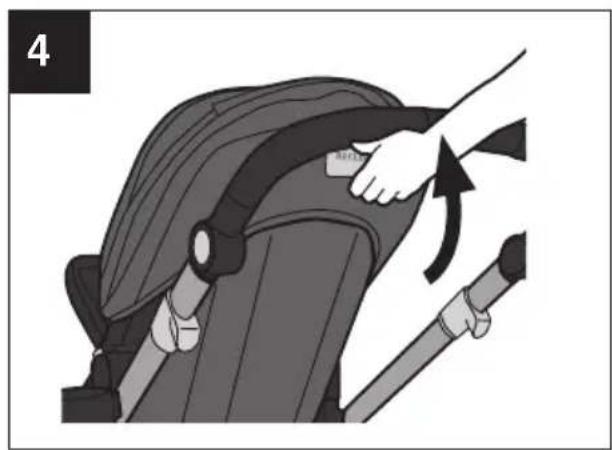
natural_image
Illustration of a person adjusting a seatbelt using a tool, showing the angle and direction (no text or symbols)To recline toddler seat, lift handle at the top of the seat and rotate seat to the desired position.
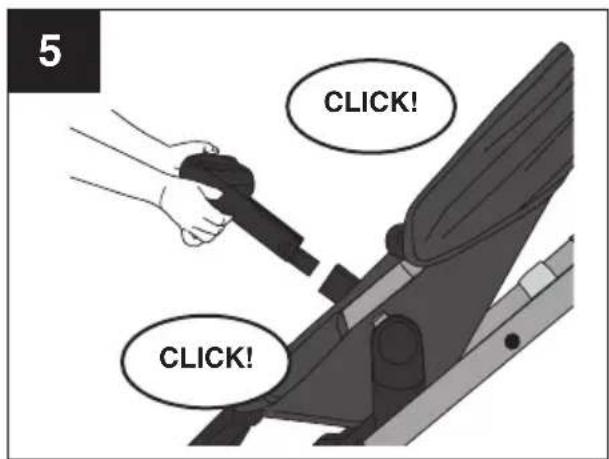
To attach child tray, push tabs into openings on either side of stroller frame until it clicks into place.
Pull on the child tray to make sure it is locked into place.
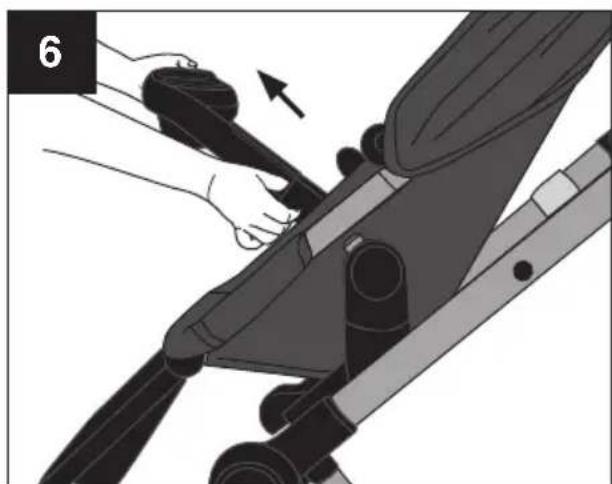
natural_image
Illustration of a person using a mechanical device to adjust or install a component, with no visible text or symbols.To remove the child tray, push both tabs and remove the child tray from the stroller.
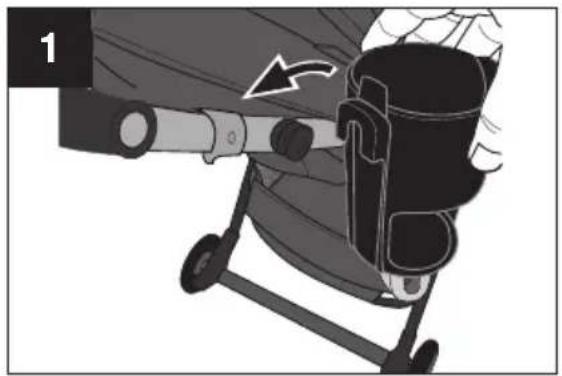
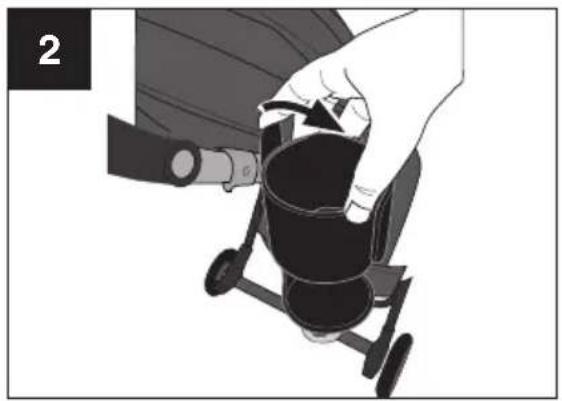
Using Your Stroller - Attach Cupholder or Treat Containe
natural_image
Illustration of a person using a device to interact with a cup, showing motion arrows (no text or symbols)To attach cupholder or snack cup, slide down on the mount on either side of stroller as shown.
natural_image
Illustration of a hand holding a black cylindrical object with a tool, next to a small mechanical component (no text or symbols visible)To remove cupholder or snack cup, press tab towards center and slide up as shown.
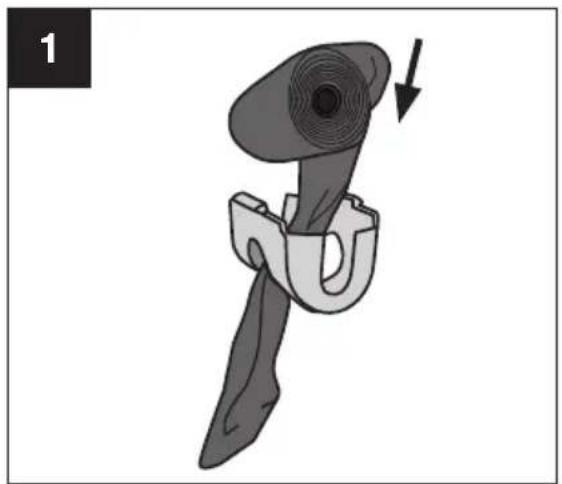
Using Your Stroller - Cupholder + Waste Bag Holde
natural_image
Illustration of a mechanical tool with a curved handle and circular head, showing a force or motion indicator (no text or symbols)To install waste bags (not included), insert the free end of the bag roll through the slot and pull through.
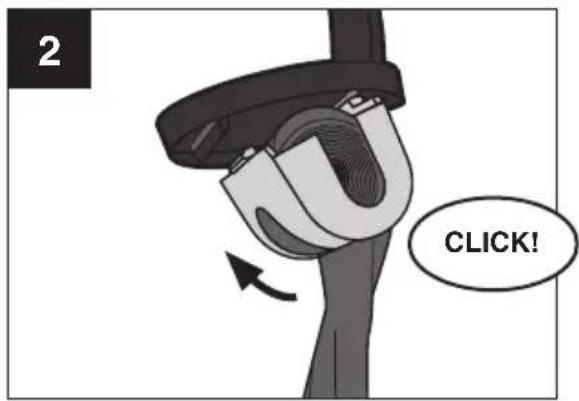
Then, insert one side of the waste bag holder into the slot under the cupholder, and squeeze waste bag holder to install the other side. A click will be heard.
Using Your Stroller - Water Bowl and Treat Container
natural_image
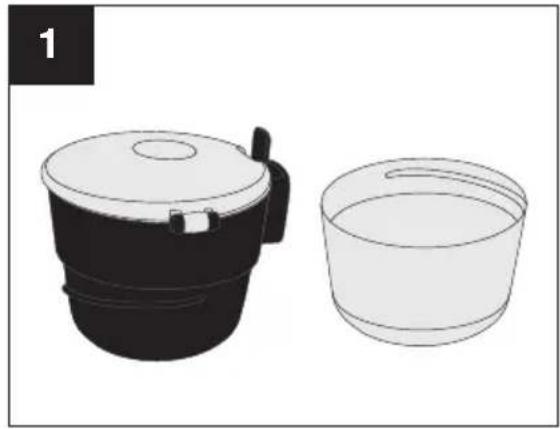
Illustration of a black and white cooking pot with lid and side bucket, no text or symbols presentTwist to separate water bowl and treat container. Lower container is a pet water bowl. Upper container is for snack storage.
Using Your Stroller - Footrest
natural_image
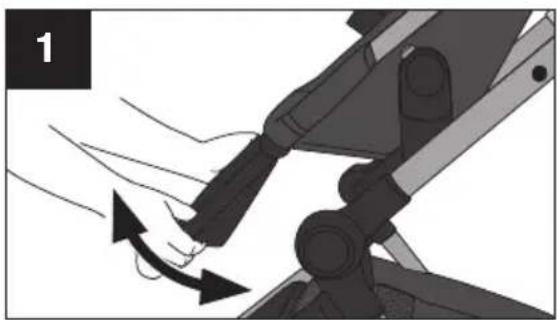
Illustration of a hand using a tool to lift a vehicle, showing motion direction (no text or symbols)To adjust the footrest, raise the footrest to the desired position. If the footrest doesn't stay in position, push all the way down first then raise to the desired position.
Using Your Stroller - Parent's Handle
natural_image
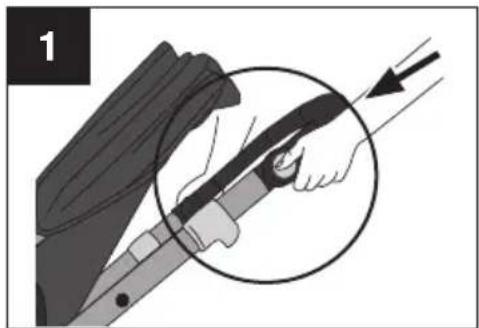
Illustration of a person holding a sword with a circular arrow indicating motion (no text or symbols)To adjust the parent handle, press the parent handle release buttons on both sides of the handle.
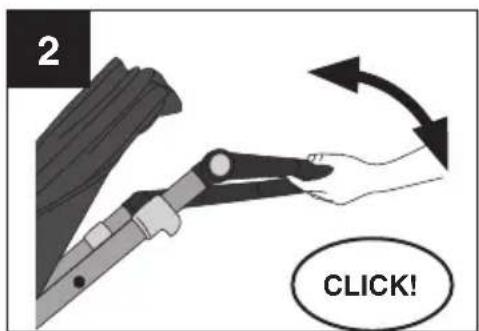
Lift or lower the parent handle to the desired height until a click is heard.
Using Your Stroller - Open Pet Basket
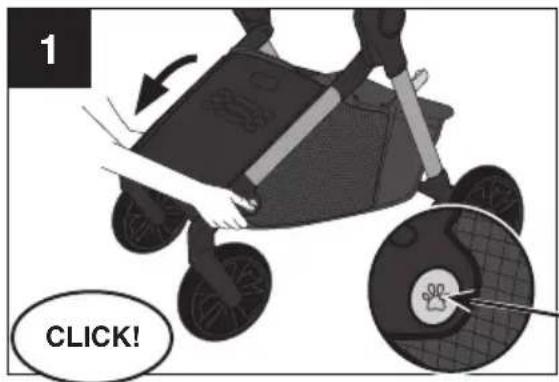
Push pet basket expansion buttons on both sides of stroller frame. Expand basket fully. A click will be heard.
Pet Basket Expansion Button
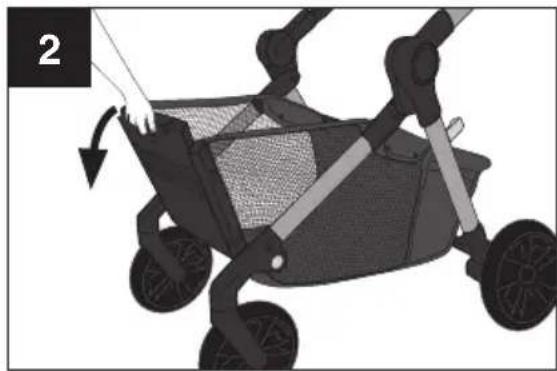
natural_image
Illustration of a baby stroller with a mesh net, showing body positioning and motion arrows (no text or symbols)Lift up pet ramp and lower to the floor to allow pet to have access to pet basket.
NOTE: Swivel wheels should be straight so that ramp can be lowered to floor.
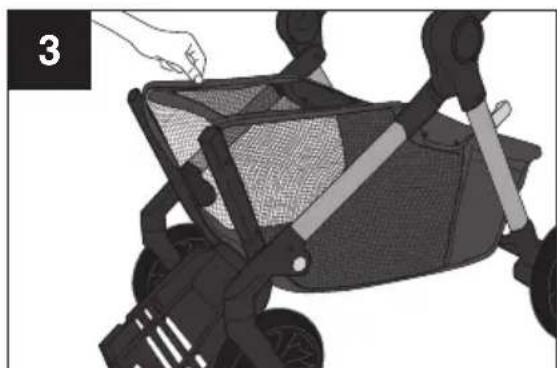
natural_image
Illustration of a person using a stroller to lift a net, with no visible text or symbolsUnroll fabric divider from inside of basket, and zip closed over pet basket.
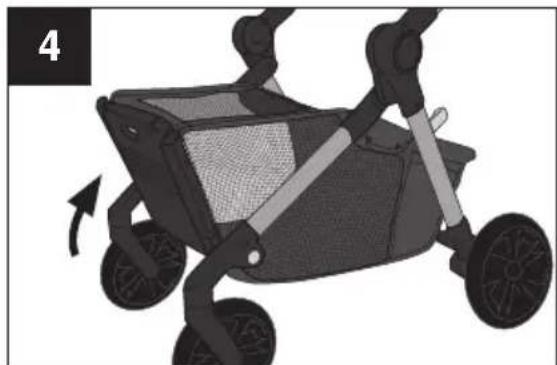
natural_image
Illustration of a two-wheeled stroller with wheels and a mesh seat, no text or symbols presentAfter pet is loaded, close pet ramp by lifting ramp up and over the basket towers.
NOTE: Use a tether 24" or shorter to keep pet securely attached to the D Ring inside basket.
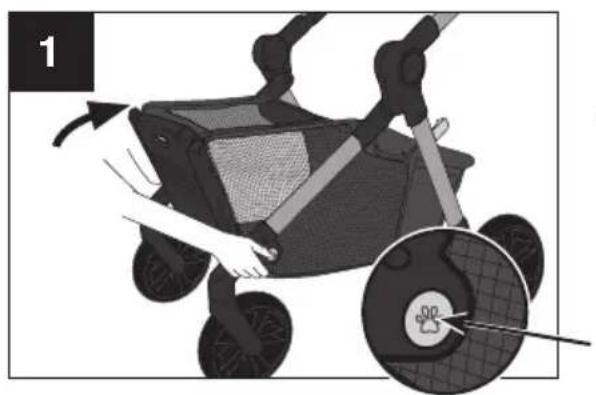
Using Your Stroller - Closing Pet Basket
natural_image
Illustration of a baby stroller with hands and a close-up of the wheel (no text or symbols)Push pet basket expansion buttons on both sides of stroller frame, and push pet basket into stroller frame.
Pet Basket Expansion Button
natural_image
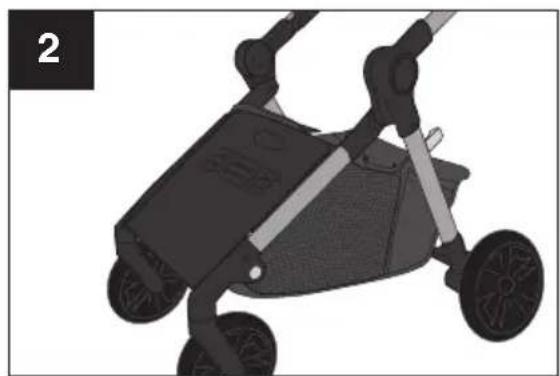
Black and white illustration of a two-wheeled stroller with wheels and handle (no text or symbols)Front frame of basket should be flush with stroller frame as shown.
IMPORTANT: To fold stroller, pet ramp must be secured and basket must be in the closed position.
natural_image
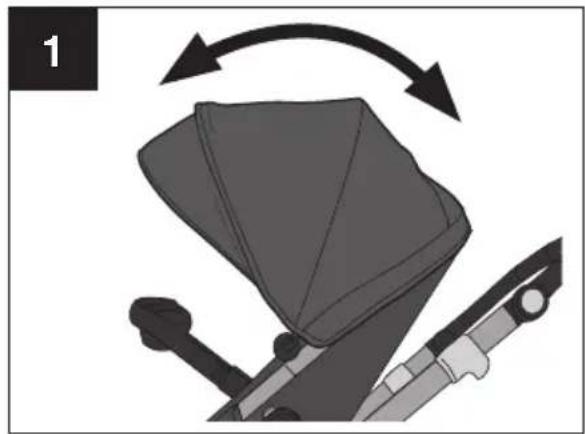
Mechanical assembly diagram showing a lever mechanism with curved arrows indicating motion (no text or symbols)To open or close canopy, push to the front or the rear of the stroller as shown.
natural_image
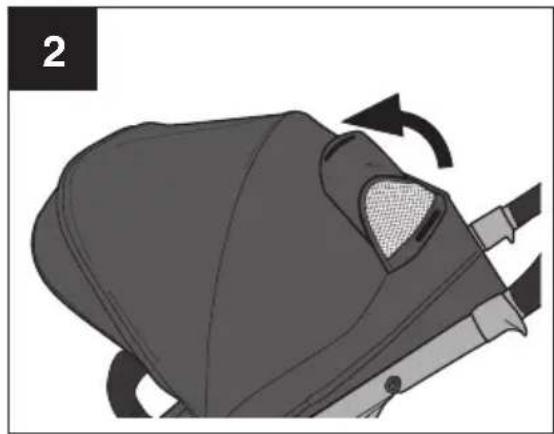
Illustration of a person's helmet being adjusted for a seatbelt, showing the seat area and movement arrows (no text or symbols)Canopy has a window that can be pulled back so you can view child in Toddler Seat Mode.
natural_image
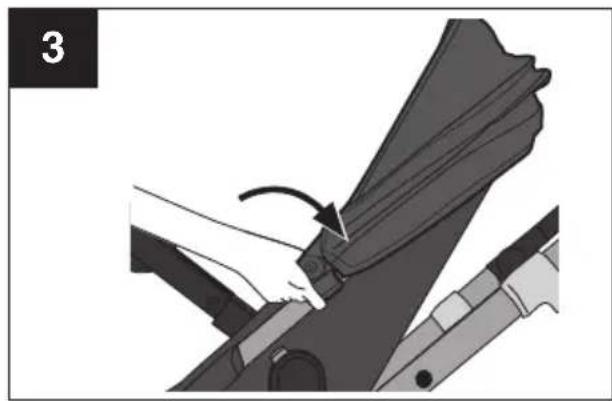
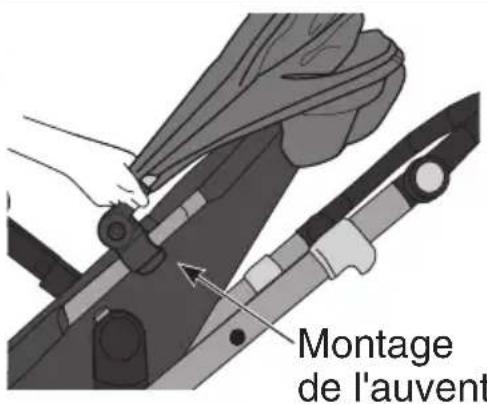
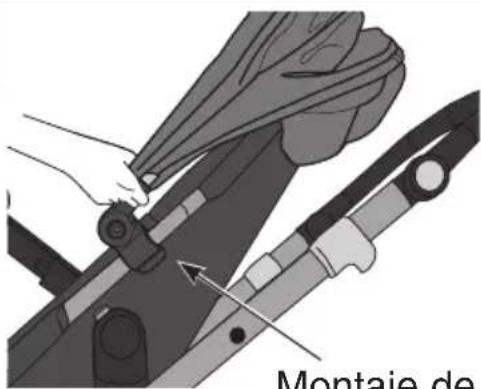
Mechanical assembly diagram showing a hand pressing down a component with an arrow indicating motion (no text or symbols present)To remove canopy, unfasten canopy mounts from sides of toddler seat as shown.
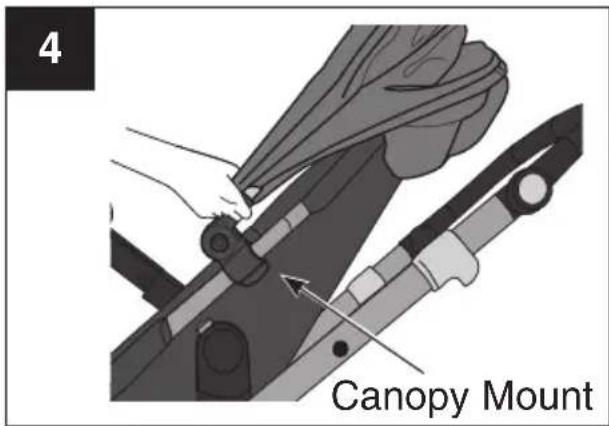
To re-attach canopy, reconnect canopy mounts to toddler seat.
Using Your Stroller - Harness
WARNING! DEATH or SERIOUS INJURY can occur.
To avoid serious injury from falling or sliding out, ALWAYS use waist restraint.
NOTE: Verify the stroller is locked in the open position by pushing down on the parent's handle.
Lock the rear brakes and remove the child tray.
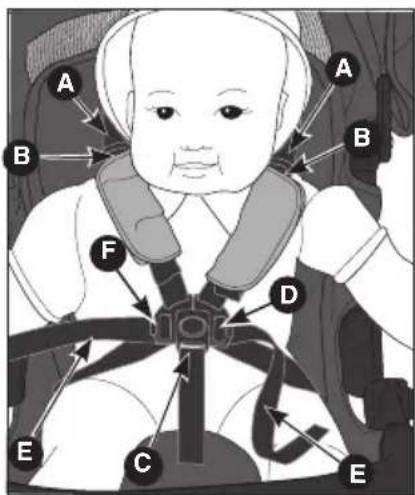
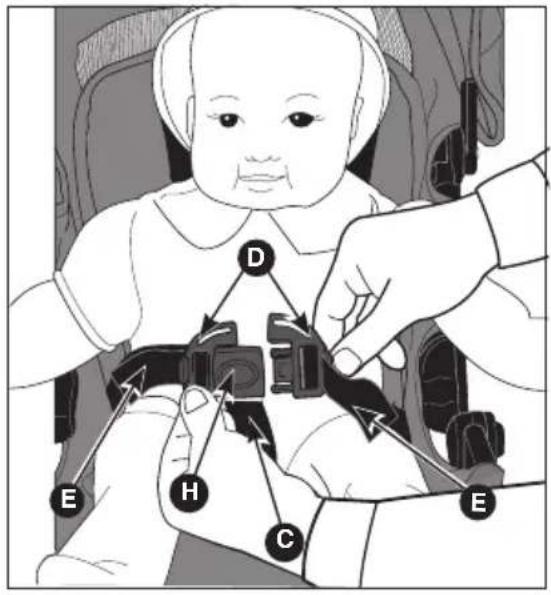
The harness shoulder straps Ⓐ must be at shoulder height or lower, closest to the baby's shoulders Ⓑ.
natural_image
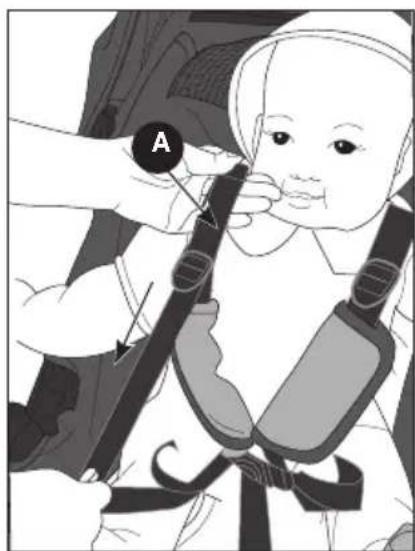
Illustration of a baby wearing a full-body seatbelt, adjusting its seatbelt with a hand (no text or symbols present)Place the baby in the seat and bring the crotch panel C up between the child's legs. Fasten each buckle D. For a snug, comfortable fit, pull the shoulder straps A to tighten the shoulder restraint and pull the waist restraint straps E to tighten the waist restraint.
NOTE: To loosen the waist straps Ⓔ, push in the release button ⓕ on the buckle and pull.

natural_image
Illustration of a baby wearing a full-body safety harness, with a hand adjusting the seatbelt (no text or symbols present)To loosen shoulder straps push up on the retainer Ⓖ while pulling down on the shoulder strap.
Once the child is properly restrained, re-attach the child tray. Make sure the child tray locks into position with audible clicks. Pull on the child tray to make sure it is locked into place.
3-Point Harness
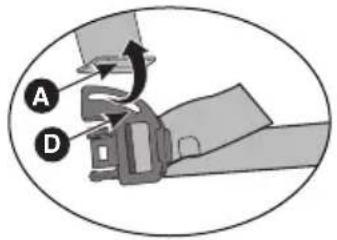
To change from 5-point to 3-point harness:
Unlock the Harness: Depress button Ⓗ as shown. Remove harness shoulder strap Ⓐ from each buckle Ⓓ as shown.
Store shoulder harness straps for future use.
Using Your Stroller - Brakes
WARNING! DEATH or SERIOUS INJURY can occur.
ALWAYS lock brakes. Make sure brakes are on by trying to push the stroller.
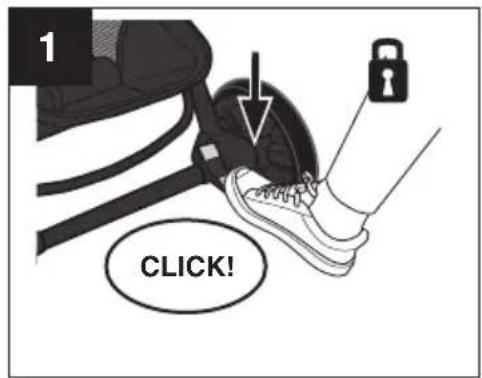
To lock, press brake lever DOWN at bottom of brake as shown, until a click is heard
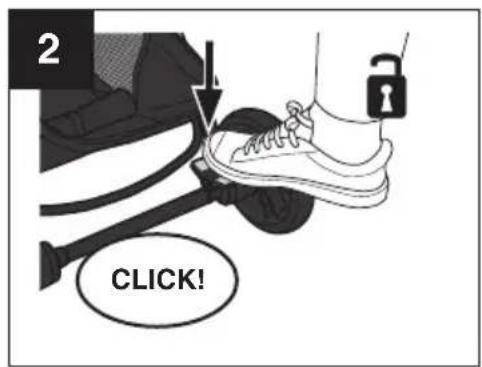
To unlock, push lever DOWN at top of brake as shown, until a click is heard.
Using Your Stroller - Folding Stroller
WARNING! DEATH or SERIOUS INJURY can occur.
Care must be taken when folding or unfolding stroller to prevent finger injury to you or your child. Make sure child is not in the seat or near the stroller when folding or unfolding.
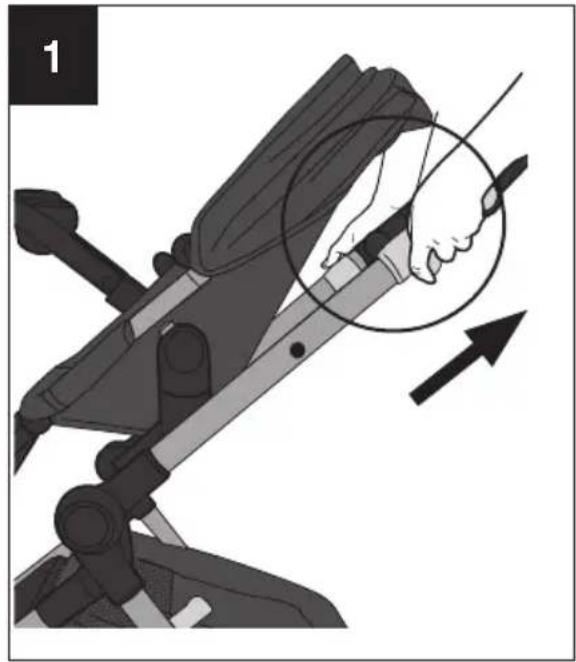
natural_image
Illustration of a person using a mechanical device with an arrow indicating motion (no text or symbols present)IMPORTANT: Stroller will not fold when toddler seat is parent-facing.
IMPORTANT: Pet basket ramp must be secured and pet basket in the closed position before folding (see page 16).
To fold the stroller, remove your child and pet, adjust seat back to upright position, lock the rear brakes, and close the canopy.
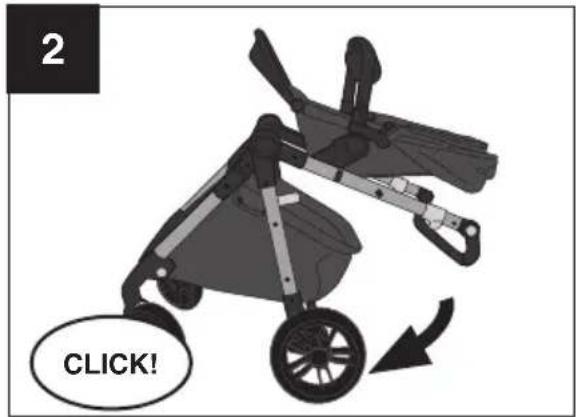
Make sure parent handle is in highest position (see page 14).
Pull the levers on both sides of the stroller and lower frame until the side frame lock clicks into place. Double check side frame lock is securely closed.
In order for stroller to stand when folded, make sure the front wheels are facing forward.
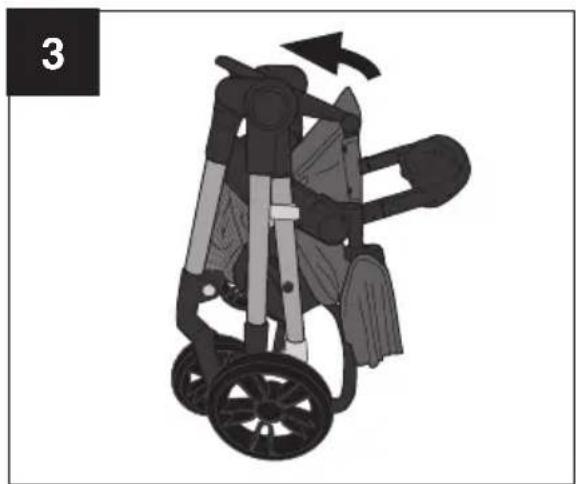
natural_image
Illustration of a wheelchair stroller with a handle and seat, showing motion direction (no text or symbols)For more compact fold, fold footrest down. The toddler seat can also be removed before folding the stroller frame.
To unfold stroller, see page 9.
Using Your Stroller with the Recommended Infant Car Seat
WARNING! DEATH or SERIOUS INJURY can occur.
- Only use Evenflo SafeMax or LiteMax infant car seats with this stroller. Other infant car seats or carriers are not designed to fit the stroller frame and if used with this stroller may result in serious injury to your child.
- Before using the infant car seat with this stroller, read all the instructions provided with it and keep the instructions stored properly for future use.
- DO NOT lift stroller by using the infant car seat handle when installed on stroller.
- If unable to securely attach your infant car seat to this stroller, remove the car seat and contact Evenflo ParentLink at 1-800-233-5921 (USA), 1-937-773-3971 (Canada), or 800-706-1200 (México).
- To avoid serious injury, make sure the infant car seat is securely snapped onto the car seat mounts.
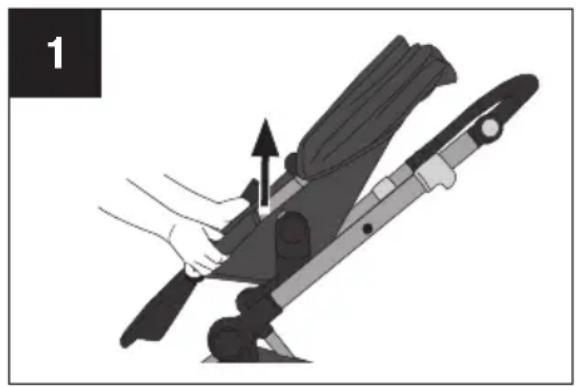
natural_image
Illustration of a hand using a tool to lift a device, showing mechanical components and motion direction (no text or symbols)To remove the toddler seat, press the release buttons down on both sides of the toddler seat and lift seat off stroller frame.
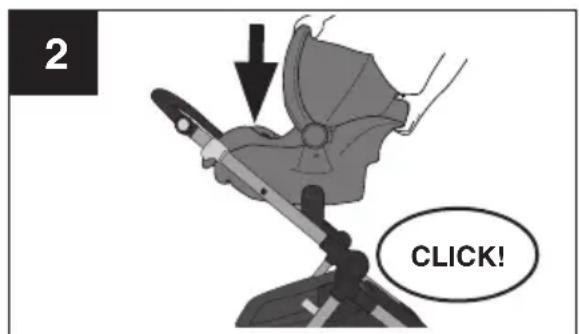
To attach car seat, insert car seat into the mounts until they both click into place on both sides of the frame.
Using your Stroller with the Recommended Infant Car Seats
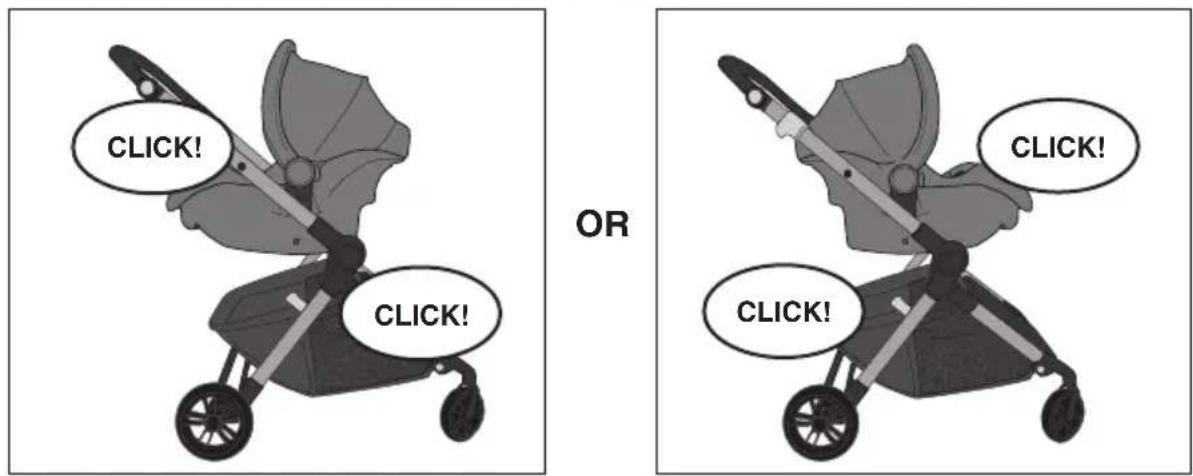
NOTE: The infant car seat may be installed parent-facing or forward-facing on the stroller frame.
natural_image
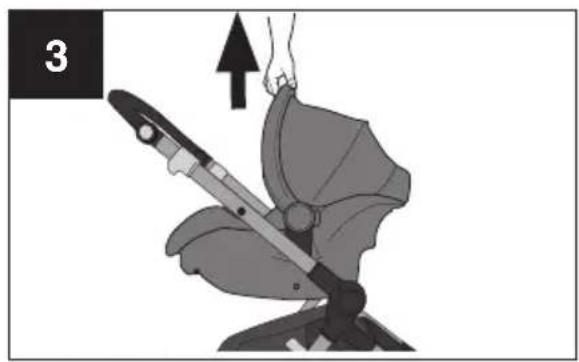
Illustration of a person using a sword to lift a seatbelt, with an upward arrow indicating motion (no text or symbols)Pull up on the infant car seat handle to test that it is properly locked into place.
natural_image
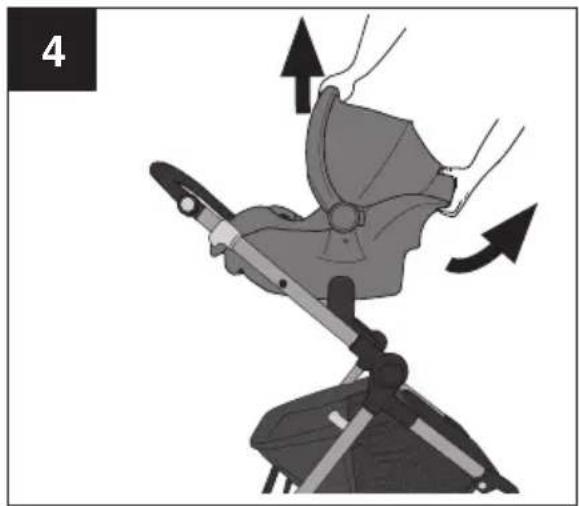
Mechanical assembly diagram showing a tool interacting with a component, with arrows indicating motion direction (no text or symbols)To remove infant car seat, lock brakes, squeeze handle on rear of seat and pull car seat up off of the stroller.
- Clean minor spills and stains on cloth or plastic surfaces with cold water and mild soap. Air dry.
- Metal and plastic parts can be wiped clean with a soft damp cloth and dried with a soft cloth. DO NOT use abrasive cleaners or solvents.
Limited Warranty
For a period of 90 days from the date of original delivery of this Product to the consumer, Evenflo warrants to the original end user (“Purchaser”) this Product (including any accessories) against defects in material or workmanship. Evenflo’s sole obligation under this express limited warranty shall be, at Evenflo’s option, to repair or replace any Product that is determined to be defective by Evenflo and determined to be covered by this warranty.
Repair or replacement as provided under this warranty is the exclusive remedy of the Purchaser. Proof of purchase and delivery in the form of a receipt, paid invoice, or bill of sale, and delivery confirmation evidencing that the Product is within the warranty period must be presented to obtain warranty service. This express limited warranty is extended by Evenflo ONLY to the original Purchaser of the Product and is not assignable or transferable to subsequent purchasers or end users of the Product. For warranty service, contact Evenflo's ParentLink Consumer Resource Center at 1-800-233-5921 or www.evenflo.com.
EXCEPT TO THE EXTENT PROHIBITED BY APPLICABLE LAW, ANY IMPLIED WARRANTY OF MERCHANTABILITY OR FITNESS FOR A PARTICULAR PURPOSE ON THIS PRODUCT IS HEREBY DISCLAIMED. EVENFLO SHALL NOT BE LIABLE FOR ANY INCIDENTAL, CONSEQUENTIAL, SPECIAL OR PUNITIVE DAMAGES OF ANY KIND FOR BREACH OF THE EXPRESS LIMITED WARRANTY ON THIS PRODUCT, OR ANY WARRANTY IMPLIED BY OPERATION OF LAW. OTHER THAN THE EXPRESS LIMITED WARRANTY SET FORTH ABOVE, THERE ARE NO OTHER WARRANTIES THAT ACCOMPANY THIS PRODUCT AND ANY ORAL, WRITTEN OR ANY OTHER EXPRESS REPRESENTATION OF ANY KIND IS HEREBY DISCLAIMED.
Note: This warranty gives you specific legal rights. You may also have other rights that may vary from state to state.
ParentLink®
answers. advice. affirmation.™
www.evenflo.com
USA: 1-800-233-5921 8 AM - 5 PM E.T.
Canada: 1-937-773-3971
México: 800-706-1200
Table des matières
answers. advice. affirmation.™
natural_image
Illustration of a black bicycle steering wheel with a handle (no text or symbols)natural_image
Illustration of a person using a walking gear device (no text or symbols)Châssis
natural_image
Black and white illustration of a car wheel with five spokes (no text or symbols)Roues arrière (2)
natural_image
3D rendering of a black ceramic coffee maker with lid and base (no text or symbols)natural_image
Top-down view of a black ergonomic device with two curved legs and two circular buttons (no text or symbols)Plateau pour enfant
natural_image
Simple black curved line drawing on white background (no text or symbols)natural_image
Illustration of a car seatbelt with visible seat, handle, and seat (no text or symbols)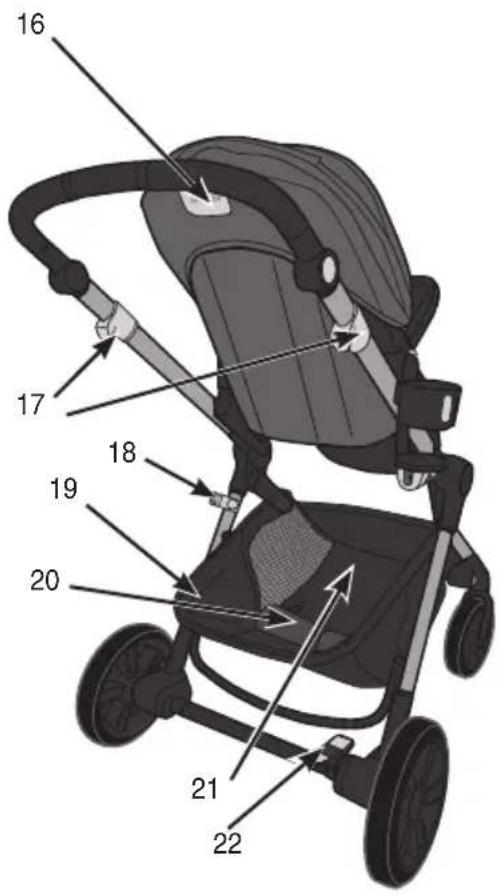
natural_image
Mechanical device with a lever and seat, shown in a chair-like arrangement (no text or symbols visible)natural_image
Illustration of hands installing or adjusting a black circular component with a fan (no text or symbols visible)natural_image
Illustration of a stroller with wheels and a directional arrow indicating motion (no text or symbols)natural_image
Illustration of a hand operating a mechanical device with an arrow indicating motion (no text or symbols present)natural_image
Illustration of a person adjusting a seatbelt using a tool, showing the angle and direction of movement (no text or symbols present)natural_image
Illustration of a person using a mechanical device to adjust or install a component, with no visible text or symbols.natural_image
Illustration of a person using a device to lift a vehicle, showing mechanical components and motion direction (no text or symbols)natural_image
Illustration of a hand holding a black mug and a small object, with no visible text or symbolsnatural_image
Mechanical component diagram showing a tool with a handle and blade, labeled with number 1 (no text or symbols on the object itself)natural_image
Illustration of a black and white cooking pot with lid and side bowl (no text or symbols)natural_image
Illustration of a mechanical device with hands adjusting a belt, showing motion direction (no text or symbols)natural_image
Illustration of a hand holding a sword with a circular arrow indicating motion (no text or symbols)natural_image
Illustration of a baby stroller with a hand adjusting the seat area, showing no text or symbols.natural_image
Illustration of a stroller with mesh netting and hand adjusting handle (no text or symbols)natural_image
Illustration of a two-wheeled stroller with wheels and a mesh seat, no text or symbols presentnatural_image
Illustration of a child's stroller with hands and a magnified view of the wheel (no text or symbols)natural_image
Illustration of a stroller with wheels and handle (no text or symbols)natural_image
Diagram of a mechanical device with directional arrows indicating rotation or movement (no text or symbols)natural_image
Illustration of a helmet with a mesh grille and directional arrows indicating rotation (no text or symbols)natural_image
Mechanical assembly diagram showing a hand pressing down a component with an arrow indicating motion (no text or symbols present)4
natural_image
Illustration of a baby wearing a full-body safety harness, with a hand adjusting the seatbelt (no text or symbols present)natural_image
Illustration of a baby wearing a safety harness and cap, with a hand adjusting the seatbelt (no text or symbols present)natural_image
Illustration of a person using a balance scale, showing hand positioning and tool path (no text or symbols)natural_image
Illustration of a stroller with motion arrows indicating rotation (no text or symbols)natural_image
Illustration of a hand using a device to lift a seatbelt, showing the lever and handle (no text or symbols)natural_image
Illustration of a person using a device to lift a seatbelt, with an upward arrow indicating motion (no text or symbols)natural_image
Mechanical assembly diagram showing a lever mechanism with arrows indicating motion direction (no text or symbols)answers. advice. affirmation.™
www.evenflo.com
answers. advice. affirmation.™
natural_image
Illustration of a black bicycle steering wheel with a lever (no text or symbols)natural_image
Illustration of a person using a walking harness (no text or symbols)Armazón
natural_image
Black and white illustration of a car wheel with five spokes (no text or symbols)Ruedas traseras (2)
Recipiente para agua y golosinas
natural_image
3D rendering of a black toilet with handle and base (no text or symbols)natural_image
Top-down view of a black plastic object with rounded edges and two circular cutouts (no text or symbols)natural_image
Simple black curved line drawing on white background (no text or symbols)de la canasta
natural_image
Illustration of a hand holding a small object, possibly a device or tool, with no visible text or symbols.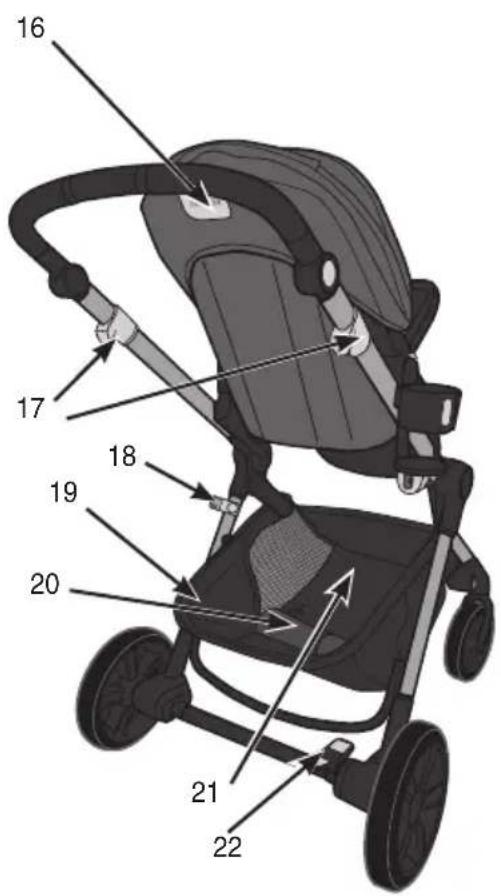
natural_image
Mechanical device with lever mechanism and seat, no visible text or symbolsnatural_image
Illustration of hands installing or adjusting a black circular component (no text or symbols visible)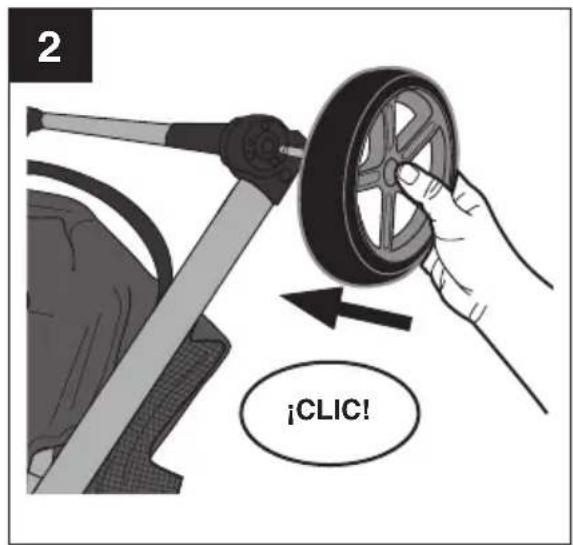
natural_image
Illustration of a stroller with wheels and a hand adjusting the seat (no text or symbols)natural_image
Illustration of a person using a device to lift a seatbelt, showing the handle and seat (no text or symbols)natural_image
Illustration of a person adjusting a seatbelt using a tool, showing the seatbelt being adjusted (no text or symbols present)natural_image
Illustration of a person using a mechanical device to adjust or install a component, with no visible text or symbols.natural_image
Illustration of a person using a device to lift a vehicle, showing mechanical components and motion direction (no text or symbols)natural_image
Illustration of a hand holding a black mug and a small object, with no visible text or symbolsnatural_image
Mechanical component diagram showing a tool interacting with a curved bracket, with an arrow indicating motion (no text or symbols)natural_image
Illustration of a black and white cooking pot with lid and side bowl, labeled '1' in top-left corner (no text or symbols on the objects themselves)natural_image
Illustration of a hand using a belt switch to lift a seatbelt, showing motion direction (no text or symbols)natural_image
Illustration of a hand holding a sword with a circular arrow indicating motion (no text or symbols)natural_image
Illustration of a baby stroller with motion arrows indicating movement (no text or symbols)natural_image
Illustration of a person using a stroller to lift a net, with no visible text or symbolsnatural_image
Illustration of a two-wheeled stroller with wheels and a mesh seat, no text or symbols presentnatural_image
Illustration of a child in a stroller with hands and a magnified inset showing the wheel (no text or symbols)natural_image
Illustration of a two-wheeled stroller with wheels and handle (no text or symbols)natural_image
Diagram of a mechanical device with a curved arrow indicating rotation or motion (no text or symbols)natural_image
Illustration of a helmet with arrows indicating rotation or movement (no text or symbols)natural_image
Mechanical assembly diagram showing a hand pressing down a component with an arrow indicating motion (no text or symbols present)4
natural_image
Illustration of a hand operating a mechanical device with a knife inserted, labeled 'Montaje de' (no other text or symbols)natural_image
Illustration of a baby wearing a full-body safety harness, with a hand adjusting the seatbelt (no text or symbols present)natural_image
Illustration of a baby wearing a full-body safety harness, with a hand adjusting the seatbelt (no text or symbols present)natural_image
Illustration of a person using a lever mechanism, showing hand positioning and motion direction (no text or symbols)natural_image
Illustration of a person in a wheelchair with a directional arrow indicating motion (no text or symbols)natural_image
Illustration of a hand using a tool to lift a device, showing mechanical components and an upward arrow (no text or symbols)natural_image
Illustration of a person using a baby seatbelt device to lift a child's back, with an upward arrow indicating motion (no text or symbols)natural_image
Mechanical assembly diagram showing a hand operating a tool on a device (no text or symbols visible)answers. advice. affirmation.™
www.evenflo.com
answers, advice, affirmation.™
www.evenflo.com
USA: 1-800-233-5921 8 AM - 5 PM E.T.
Canada: 1-937-773-3971
México: 800-706-1200

- POUSSETTE
- BASKET/PANIER/CANASTA
- ParentLink®
- Features
- WARNING!
- DEATH or SERIOUS
- INJURY can occur.
- READ AND FOLLOW ALL WARNINGS AND INSTRUCTIONS! FAILURE TO DO SO COULD RESULT IN SERIOUS INJURY OR DEATH!
- WARNING! DEATH or SERIOUS INJURY can occur.
- Important Information
- Registration Information
- Assembling Your Stroller - Wheels
- Assembling Your Stroller - Basket
- Assembling Your Stroller - Toddler Seat Mode
- Using Your Stroller - Attach Cupholder or Treat Containe
- Using Your Stroller - Cupholder + Waste Bag Holde
- Using Your Stroller - Water Bowl and Treat Container
- Using Your Stroller - Footrest
- Using Your Stroller - Parent's Handle
- Using Your Stroller - Open Pet Basket
- Pet Basket Expansion Button
- Using Your Stroller - Closing Pet Basket
- Using Your Stroller - Harness
- To change from 5-point to 3-point harness:
- Using Your Stroller - Brakes
- Using Your Stroller - Folding Stroller
- Using Your Stroller with the Recommended Infant Car Seat
- Using your Stroller with the Recommended Infant Car Seats
- Limited Warranty
- Table des matières
Brand : Evenflo
Model : Pivot Troop
Category : Stroller