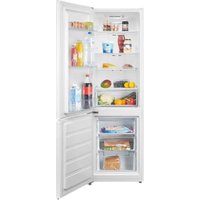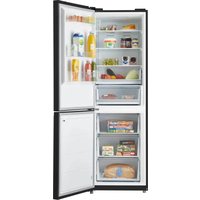
KV1850B - Fridge INVENTUM - Free user manual and instructions
Find the device manual for free KV1850B INVENTUM in PDF.


User questions about KV1850B INVENTUM
0 question about this device. Answer the ones you know or ask your own.
Ask a new question about this device
Download the instructions for your Fridge in PDF format for free! Find your manual KV1850B - INVENTUM and take your electronic device back in hand. On this page are published all the documents necessary for the use of your device. KV1850B by INVENTUM.
USER MANUAL KV1850B INVENTUM
natural_image
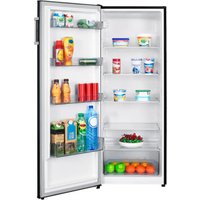
Interior view of a fully stocked refrigerator with open doors and grilles (no visible text or labels)Reversing the door opening page 3-13
1. Safety instructions page 26
2. Product description page 31
3. Prior to first use page 32
4. Usage page 32
5. Tips page 34
6. Cleaning & maintenance page 35
7. Troubleshooting page 36
general terms and conditions of service and warranty page 62
Deutsch
natural_image
Line drawing of a multi-tiered refrigerator with shelves and doors (no text or symbols)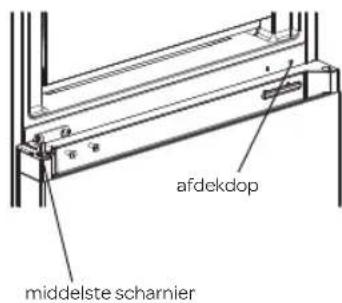
text_image
afdekdop middelste scharnier7
natural_image
Line drawing of a two-door refrigerator with top-mounted appliances (no text or symbols)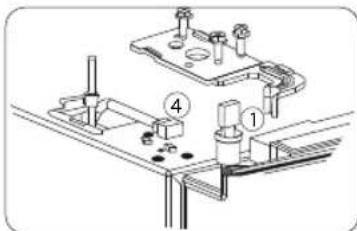
text_image
Technical diagram showing mechanical assembly with labeled parts 1 and 4, likely for assembly or maintenance instructions.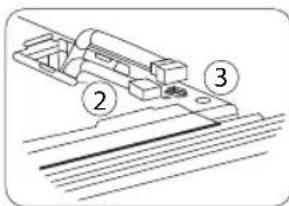
text_image
Technical diagram showing a mechanical assembly with labeled parts 2, 3, and 4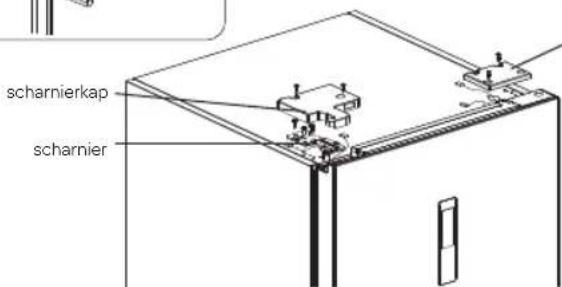
text_image
scharnierkap scharnier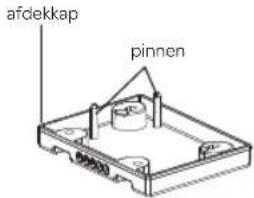
text_image
afdekkap pinnen| List of tools to be provided by the user | |||
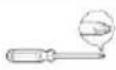 | Cross screwdriver | 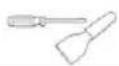 | Spatula flat screwdrive |
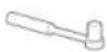 | 8 mm socket spanner Masking tape | 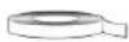 | |
1
text_image
1 hinge cover hinge cover ① ② ③ ④2
text_image
middle hinge cover cap3
text_image
Technical diagram showing assembly of a mechanical component into two views, with Chinese annotations indicating assembly steps.4
text_image
top door cap door signal cable sleeve stop stop screw5
text_image
sleeve stop stop screw6
natural_image
Line drawing of a multi-tiered refrigerator with shelves and doors (no text or symbols)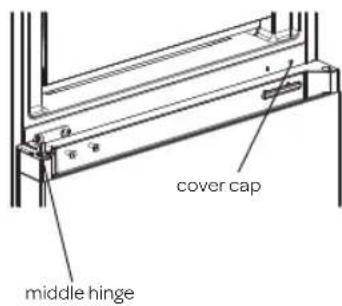
text_image
cover cap middle hinge7
natural_image
Line drawing of a two-door refrigerator with front and back panels (no text or symbols)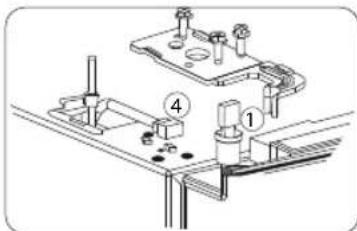
text_image
Technical diagram showing mechanical assembly with labeled components 1 and 4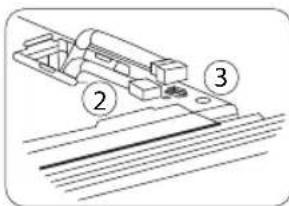
text_image
Technical diagram showing a mechanical assembly with labeled parts 2, 3, and 4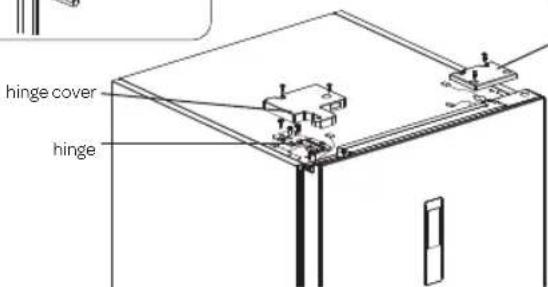
text_image
hinge cover hinge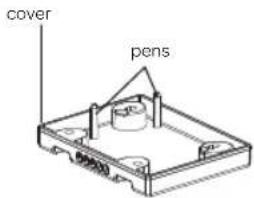
text_image
cover penstext_image
Technical diagram showing assembly of a mechanical component into two views, with Chinese annotations indicating assembly steps.4
natural_image
Line drawing of a multi-tiered refrigerator with shelves and doors (no text or symbols)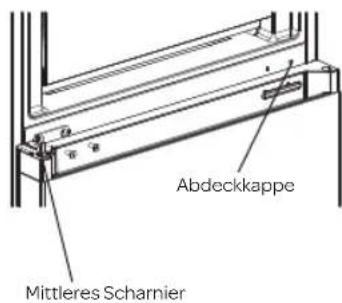
text_image
Abdeckkappe Mittleres Scharnier7
natural_image
Line drawing of a refrigerator with front door and side door (no text or symbols)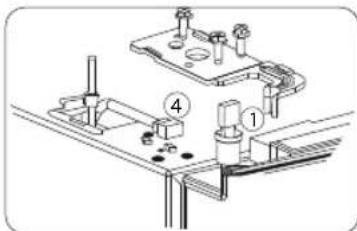
text_image
Technical diagram showing mechanical assembly with numbered components and alignment lines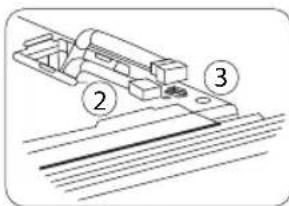
text_image
Technical diagram showing a mechanical assembly with labeled parts 2, 3, and 4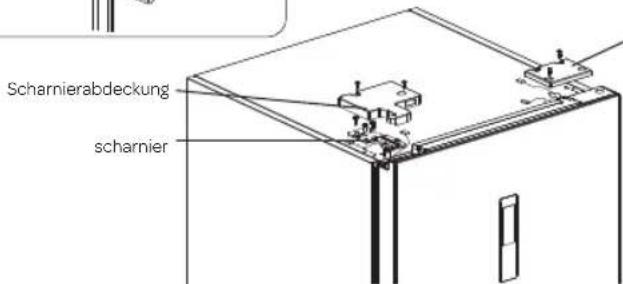
text_image
Scharnierabdeckung scharnier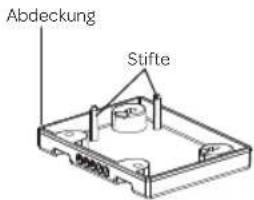
text_image
Abdeckung Stiftetext_image
Technical diagram showing assembly of a mechanical component into two views, with Chinese annotations indicating assembly steps.4
natural_image
Line drawing of a multi-tiered refrigerator with shelves and doors (no text or symbols)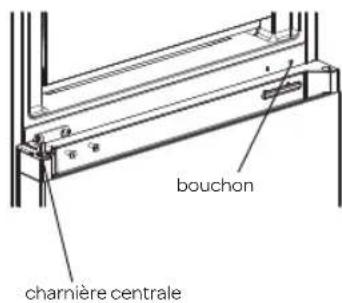
text_image
bouchon charnière centrale7
natural_image
Line drawing of a two-door refrigerator with front and back panels (no text or symbols)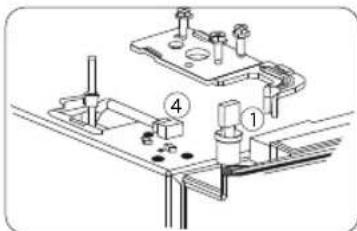
text_image
Technical diagram showing mechanical assembly with labeled components 1 and 4, likely for assembly or maintenance instructions.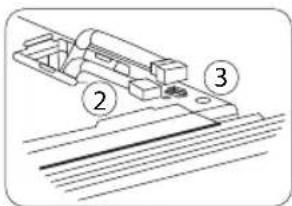
text_image
Technical diagram showing a mechanical assembly with labeled parts 2, 3, and 4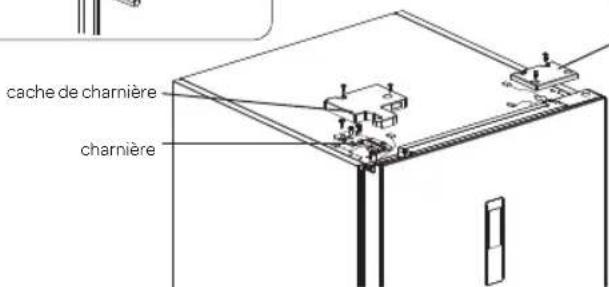
Reversing the door opening
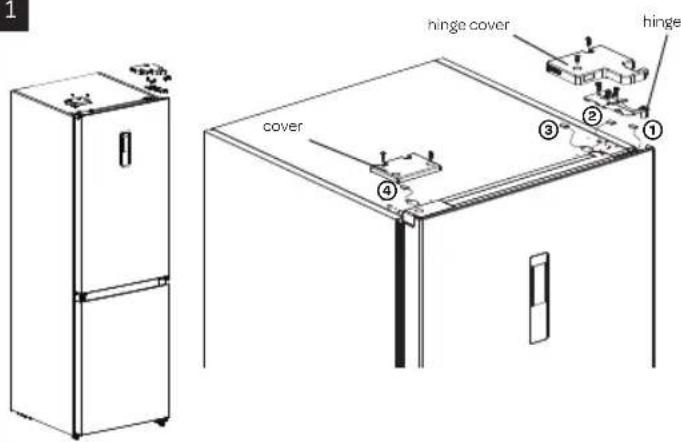
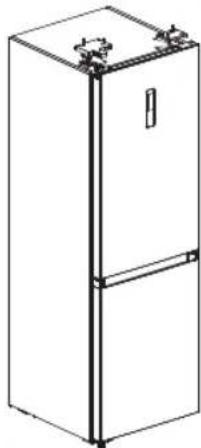
The door of the appliance can be opened on the right or left side. In order to reverse the door opening, please observe the instructions below. It would be best to do this with two people.
Attention: remove the plug from the socket. Remove all items from the appliance before reversing the door opening.
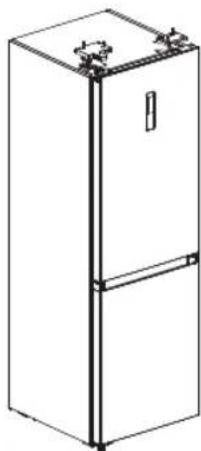
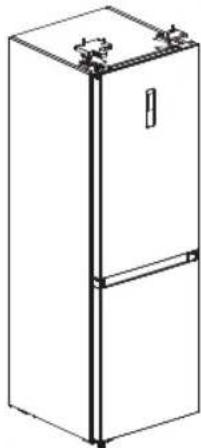
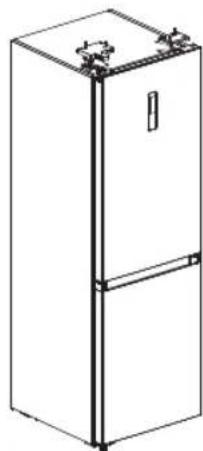
- Remove the cover at the top opposite the hinge side.
- Remove the hinge cap, disconnect the plug connections [① and ②] and loosen the top hinge.
- Carefully lift the door from the middle hinge and place it on a safe location.
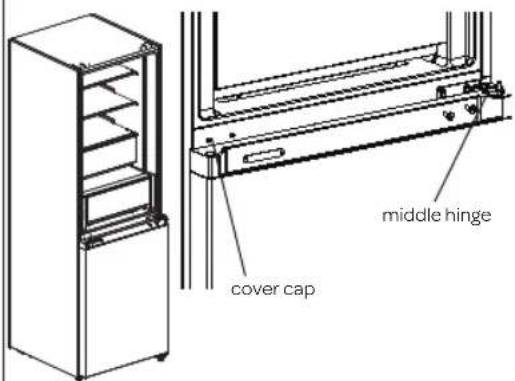
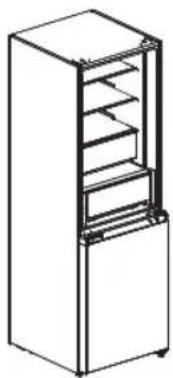
- Remove the middle hinge on the right side by loosening the bolts and put it aside for the moment. Move the cover caps from one side to the other side. Place them where the middle hinge used to be.
- Carefully remove the lower door by moving it towards you and lifting it off the lower hinge. Place the door on a safe location.
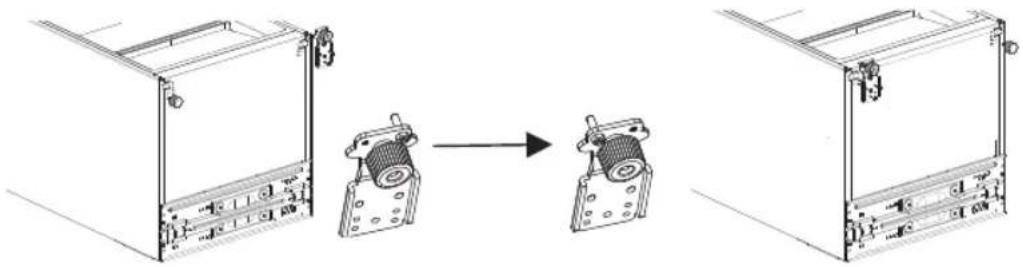
- Remove both adjustable feet and remove the lower hinge.
- Remove the pen and mount it in the other hole of the lower hinge. Fasten the lower hinge at the opposite side and mount both adjustable feet.
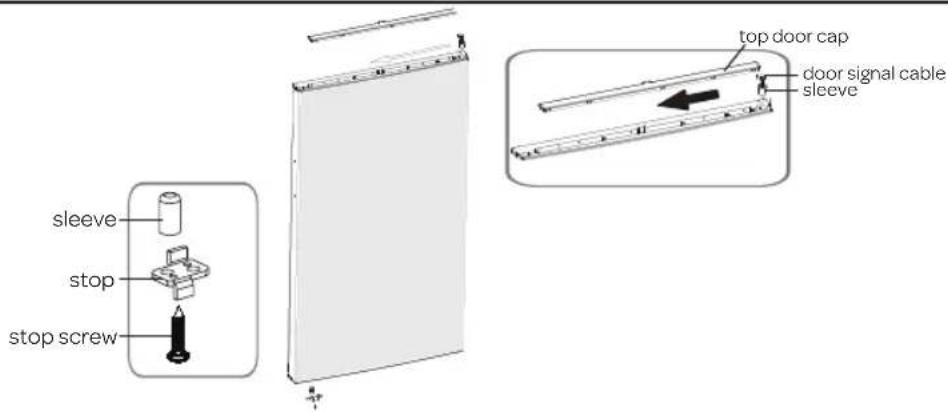
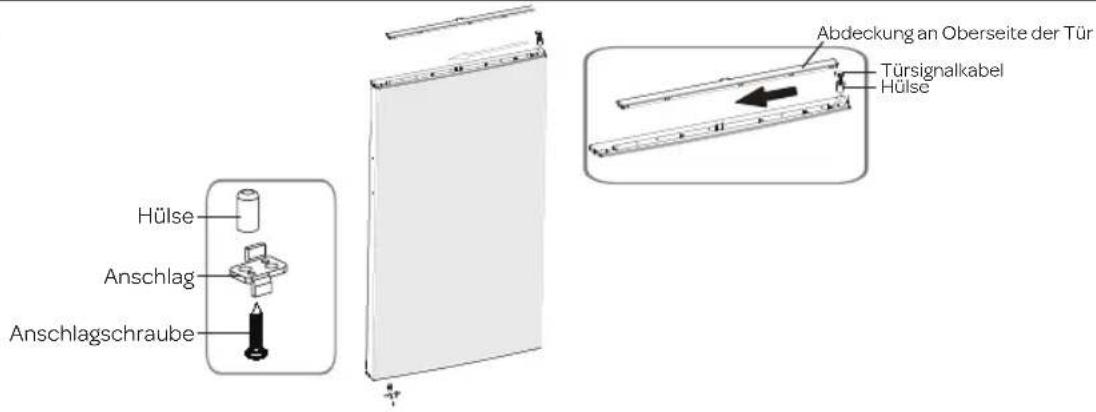
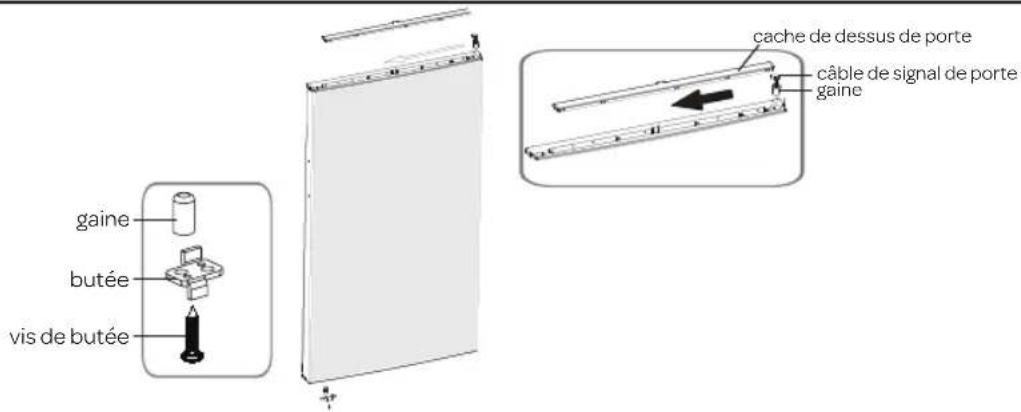
- Remove the cover on the top of the cooler section door, lay the door signal cable to the other side and push the cap back onto the top of the door.
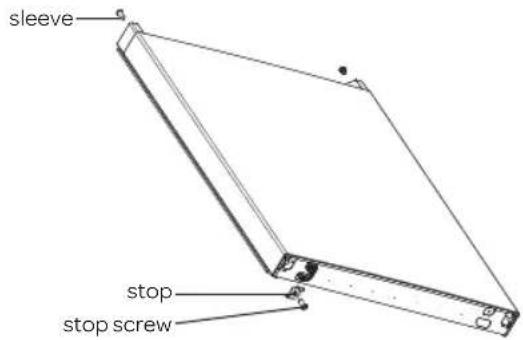
- Remove the stops at the bottom of both doors and remove the sleeves. Place the sleeve back on the opposite side and mount the stop for that side of the door (supplied as a separate accessory). Store the removed stop for future use.
- Place the bottom door against the appliance and make sure the bottom side is properly placed on the bottom hinge. Make sure the door is straight in relation to the exterior of the appliance.
- Now mount the middle hinge on the left side. Make sure the hinge is placed in the top side of the bottom door.
- Place the upper door against the appliance and make sure the bottom side is properly placed on the middle hinge.
-
Fasten the upper hinge for the opposite door (this hinge was supplied as a separate accessory).
-
Remove the switch from the removed hinge cap and place this switch in the hinge cap for the opposite side (supplied as a separate accessory).
- Reconnect all plug connections - ① to ④ and ② to ③.
- Place the hinge cap on the hinge. Carefully break or cut the two pens out of the cover and place them on the opposite side.
Allow the appliance to rest for approx. 3 hours before inserting the plug in the socket.
text_image
Diagram showing a mechanical or electrical component with labeled parts H and L, including a circular inset view of the component.4 gebruik
1 Safety instructions
- Carefully and fully read the instruction manual prior to using the appliance and carefully store the manual for future reference.
- Only use this appliance for the purposes described in the instruction. The appliance is suitable for storing food. It is possible to freeze fresh food in the freezer section.
- Only connect the appliance to alternate current, to an earthed wall socket, with a mains voltage that corresponds with the information provided on the information plate of the appliance.
- The appliance falls under protective class I and may only be used in combination with an earthed connection. The manufacturer is not liable for unsuitable operation and possible damage caused by unsuitable electric installations.
- Make sure that children are unable to play with the appliance, such as hide in it. This is dangerous.
- Keep the appliance out of reach of children. Children do not see the dangers when handling electrical appliances. Therefore, never allow children to work with electrical appliances without supervision. Keep the appliance and cord out of reach of children younger than 8 years of age.
- The appliance can be used by children of 8 years and older and persons with a limited physical, sensory or mental capacity or lack of experience or knowledge, provided they use the appliance under supervision or have been instructed about its safe use and understand the hazards involved.
- The appliance may not be cleaned or maintained by children, unless this is done under supervision.
- Do not locate multiple portable socket-outlets or portable power supplies at the rear of the appliance.
- Never bend the power cord sharply or allow it to run across hot parts.
- Make sure that the power supply cable does not get jammed during installation or is running along sharp edges.
- The connection point, socket and/or plug must always be accessible.
- Do not use the appliance if the plug, cord or appliance are damaged, or if the appliance no longer functions properly or if it is damaged in any other way. If this is the case, consult the shop or our technical service. Never replace the plug or cord yourself.
- The appliance must be moved and installed by two or more persons.
- When moving the appliance, do not lift it or pull the doors or handles.
- Be careful when moving the appliance to prevent the floor from getting damaged.
- During installation, do make sure the power cable is not damaged.
- Check that the appliance is not placed too close to a heat source.
- Do not place heat generating appliances such as (microwave) ovens on top of the appliance.
- In order to ensure proper ventilation, a free space of 10 cm should be maintained around the appliance.
• Install the appliance on a sturdy, flat and stable surface.
• Install the appliance in a dry and well ventilated room. The appliance is intended for use in a room where the ambient temperature falls within the applicable class, depending on the climate class found on the information plate on the back of the a
| Climate class Ambient temperature |
| SN From 10°C to 32°C |
| N From 16°C to 32°C |
| ST From 18°C to 38°C |
| T From 18°C to 43°C |
- Never cover the ventilation openings.
- Do not store explosive or highly flammable substances in the appliance. The vapours could cause a fire hazard or an explosion.
- Do not store glass bottles or jars with liquids in the freezer, as they could break when frozen.
- Do not use mechanical, electrical or chemical agents to speed up the defrosting process.
- Repairs to electrical appliances should only be performed by skilled persons.
- Only use the appliance indoors.
- Always remove the plug from the socket when the appliance must be cleaned or repaired.
- Never use the appliance with parts that are not recommended or supplied by the manufacturer.
- Do not pull the cord and/or appliance to remove the plug from the wall socket. Never touch the plug with wet or moist hands.
- Be careful with ice cubes and ice pops. If these are consumed directly out of the freezer, there is a risk of frostbite.
- Never submerge the appliance, cord or plug in water.
- Never clean the appliance with a high pressure cleaner or steam cleaner.
- The appliance cannot be used with a timer or separate remote control.
- This appliance is intended for household and similar use, such as:
- in staff kitchens, shops, offices and other work environments;
- by guests of hotels, motels and other residential environments;
- in Bed&Breakfast type environments;
- farms.
- If the appliance is not used as intended, no compensation can be claimed in case of defects or accidents and the warranty will be invalidated.
Refrigerant
The refrigerant isobutene (R600a) is contained within the refrigerant circuit of the appliance, a natural gas with a high level of environmental compatibility, which is nevertheless flammable. During transportation and installation of the appliance, ensure that none of the components of the refrigerant circuit becomes damaged. The refrigerant (R600a) is flammable.
WARNING: Refrigerators contain refrigerant and gases in the insulation. Refrigerant and gases must be disposed of professionally as they may cause eye injuries or ignition. Ensure that tubing of the refrigerant circuit is not damage prior to proper disposal.

WARNING: Risk of fire/ flammable materials
If the refrigerant circuit should be damaged:
- Avoid open flames and sources of ignition.
- Thoroughly ventilate the room in which the appliance is situated. It is dangerous to alter the specifications or modify this product in any way. Any damage to the cord may cause a shortcircuit, fire, and/or electric shock.
INFORMATION ABOUT HOW TO AVOID FOOD CONTAMINATION
To avoid contamination of food, please respect the following instructions:
- Opening the door for long periods can cause significant increase of the temperature in the compartments of the appliance.
- Clean regularly surfaces that come in contact with food and accessible drainage systems.
• Store raw meat and fish in suitable containers in the refrigerator, so that it is not in contact with or drip onto other food. - Two-star frozen-food compartments are suitable for storing pre-frozen food, storing or making ice cream and making ice cubes
- One-, two- and three-star compartments are not suitable for the freezing of fresh food.
| Order Com | partments TYPE | Target storage temp. [°C] | Appropriate food |
| 1 Fridge +2 - | +8 Eggs, cooked food | packaged food, fruits and vegetables, dairy products, cakes, drinks and other foods are not suitable for freezing. | |
| 2 (***)*-Freezer ≤-18 Seafood (fish, shrimp, shellfish), freshwater aquatic products and meat products (recommended for 3 months, the longer the storage time, the worst the taste and nutrition), suitable for frozen fresh food. | |||
| 3 ***-Freezer ≤-18 Seafood (fish, shrimp, shellfish), freshwater aquatic products and meat products (recommended for 3 months, the longer the storage time, the worst the taste and nutrition), suitable for frozen fresh food. | |||
| 4 **-Freezer ≤-12 Seafood (fish, shrimp, shellfish), freshwater aquatic products and meat products (recommended for 3 months, the longer the storage time, the worst the taste and nutrition), suitable for frozen fresh food. | |||
| 5 *-Freezer ≤-6 Seafood (fish, shrimp, shellfish), freshwater aquatic products and meat products (recommended for 3 months, the longer the storage time, the worst the taste and nutrition), suitable for frozen fresh food. | |||
| 6 0-star -6 - | 0 Fresh pork, beef, fish, chicken, some packaged processed foods, etc.(recommended to eat within the same day, preferably no more than 3 days). Partially encapsulated processed foods (non-freezable foods). | ||
| 7 Chill | -2 ~ +3 | Fresh/ frozen pork, beef, chicken, freshwater aquatic products, etc. (7 days below 0°C and above 0°C is recommended for consumption within that day, preferably no more than 2 days). Seafood (less than 0 for 15 days, it is not recommended to store above 0°C). | |
| 8 Fresh food | 0 ~ +4 | Fresh pork, beef, fish, chicken, cooked food, etc. (recommended to eat within the same day, preferably no more than 3 days). | |
| 9 Wine +5 ~ | +20 Red wine, white wine, sparkling wine, etc. | ||
NOTE:
Please store different foods according to the compartments or target storage temperature of your purchased products..
- If the refrigerating appliance is left empty for long periods, switch off. Defrost, clean and dry it and leave the door open to prevent mould developing within the appliance.
Water dispenser cleaning (special for water dispenser products):
- Clean water tanks if they have not been used for 48 h; flush the water system connected to a water supply if water has not been drawn for 5 days.
WARNING
- Food needs to be packed in bags and liquids in bottles or capped containers before putting into the refrigerator to avoid the problem that the inside of the appliance is not easy to clean.
ENVIRONMENTAL PROTECTION
The appliance is energy-efficient. Save even more energy when using the appliance with the following tips, and how to dispose of your appliance in an environmentally-friendly way.
Saving energy
- A high ambient temperature will have a negative effect on the energy consumption. Direct sunlight and other heat sources near the appliance also have a negative effect.
- Keep ventilation holes free. Covered and dirty holes cause a high energy consumption. Ensure sufficient space around the refrigerator, so that a proper ventilation and air flow around the appliance is possible.
- Do not open the doors of the appliance more often than necessary and leave the doors open as briefly as possible. - The distance between the shelves and the rear wall ensures a free air circulation. Do not place food against the rear wall.
- Set the thermostat to a lower setting if circumstances allow.
- Allow cooked food that you want to store in the appliance to cool down to room temperature before placing it in the appliance.
- A door rubber that does not close properly could increase the energy consumption. Therefore, have it replaced by a qualified person in time.
- If the instructions are not observed, this could lead to a higher energy consumption.
Environmentally-friendly disposal
Recycling - WEEE
- Dispose of packaging in an environmentally-friendly manner.
- This appliance is labelled in accordance with European Directive 2012/19/EU concerning used electrical and electronic appliances (waste electrical and electronic equipment - WEEE). The guideline determines the framework for the return and recycling of used appliances as applicable throughout the EU.
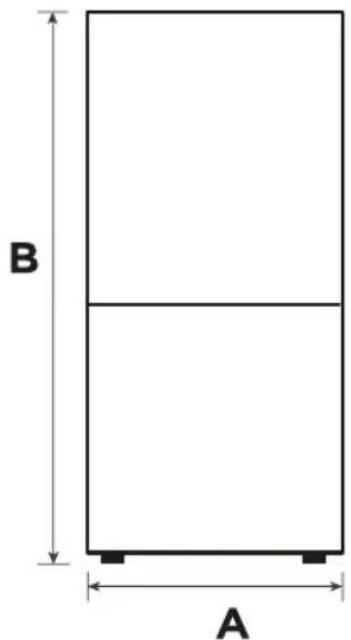
SPACE REQUIRED FOR INSTALLATION
Make sure there is enough space to open the door.
text_image
B A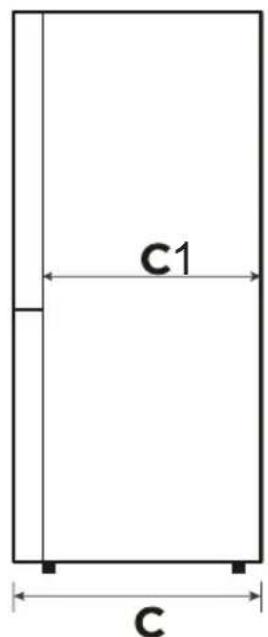
text_image
C1 C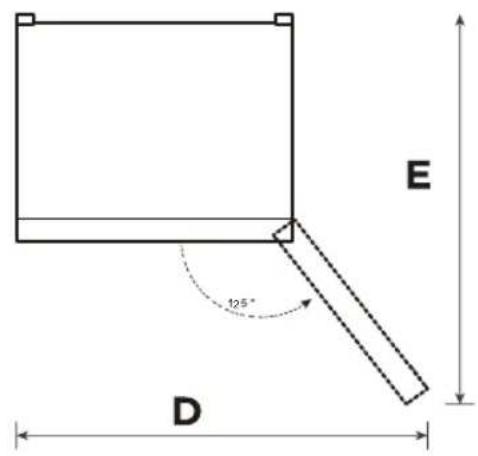
text_image
E 125° DCaution: the appliance is not suitable for use as a built-in appliance.
| Width Overall Height Depth | Appliance without door | Range - 125° Depth - 125° | ||
| A B C C1 D E | ||||
| 595 1850 700 590 920 1150 | ||||
30 • English
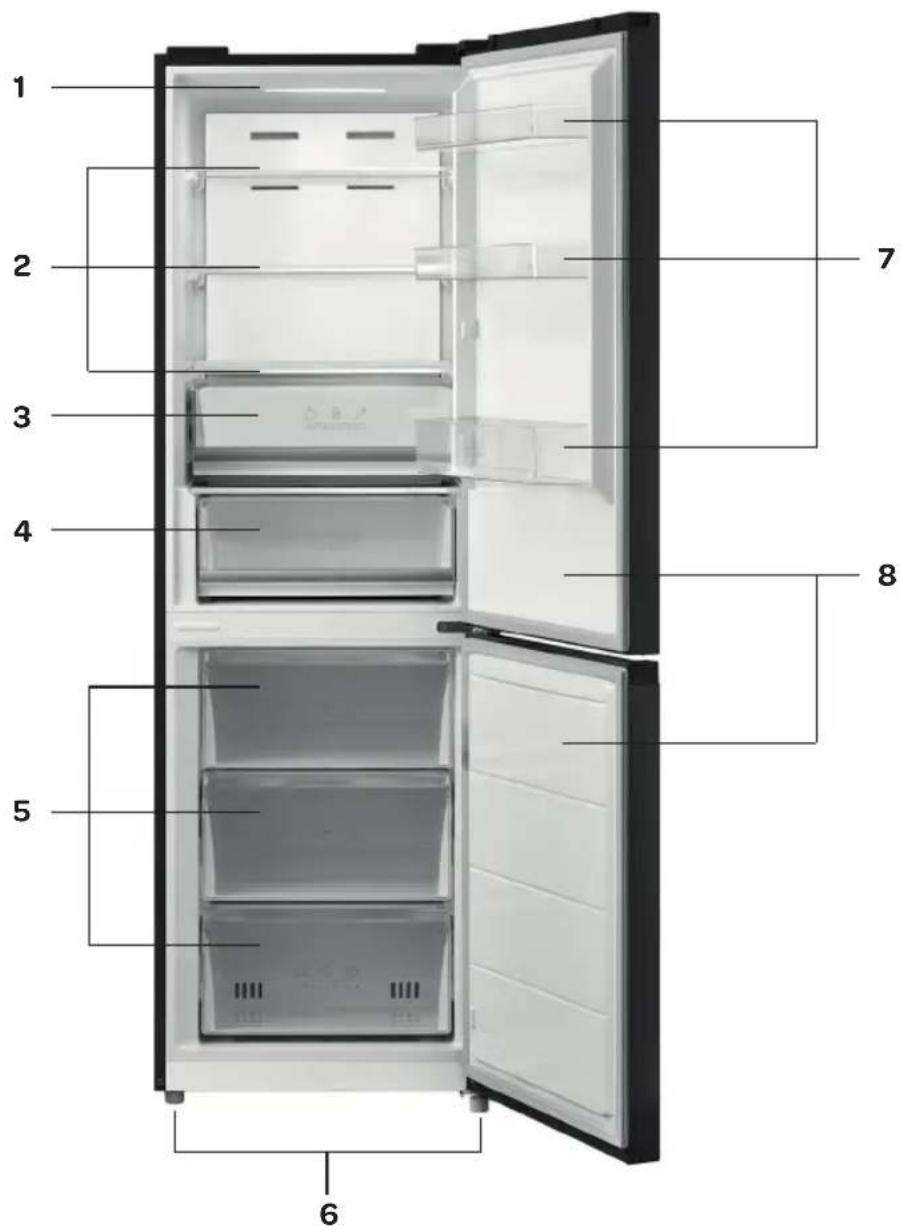
2 product description
- Led light
- Shelf
- Vegetable drawer
- Fresh drawer
- Freezer drawer
- Adjustable feet
- Door compartment
- Door
text_image
1 2 3 4 5 6 7 83 using the appliance for the first time
Before using the appliance for the first time, proceed as follows: carefully unpack the appliance and remove all packaging material and any promotional stickers. Keep the packaging (plastic bags, polystyrene and cardboard) out of reach of children. After unpacking the appliance, carefully check it for external damage that may have occurred during transport. Place the appliance on a sturdy, flat surface and make sure there is enough space around it for sufficient ventilation.
A minimum space of 10 cm is required between the appliance and the surrounding walls. In this way the appliance is able to release heat properly, cool well and function in an energy efficient way.
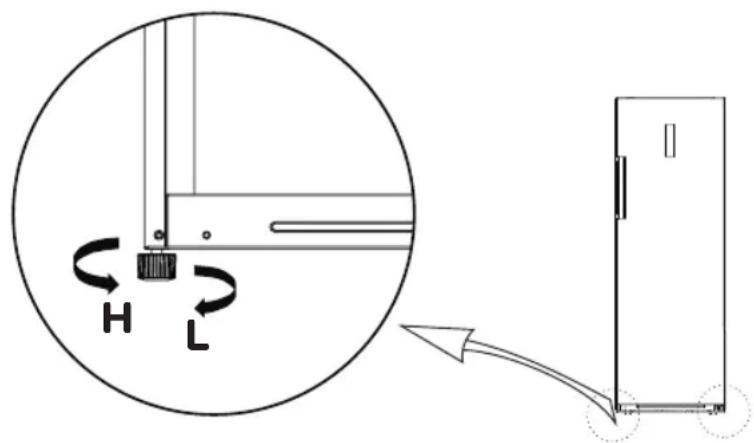
- You can use the adjustable feet to the left and right to level the appliance.
- Turn the adjustable feet clockwise to lower the appliance.
- Turn the adjustable feet counter-clockwise to raise the appliance.
Do not place the appliance near heat sources such as central heating or a stove. Do take note of the climate class of the appliance. When placed in a room that is too cold, the freezer will not function properly.
After placing the appliance, leave it for at least 12 hours before inserting the plug in the socket.
First clean the interior of the appliance. Use warm soapy water with, for instance, washing-up liquid, all-purpose cleaner or soda. Wipe the inside of the appliance after cleaning with clean water and properly wipe everything dry. Leave the appliance to dry for 1 to 2 hours.
Adjustable feet
text_image
Diagram showing a mechanical or electrical component with labeled parts H and L, including a circular inset view of the component.4 use
The control unit of the appliance is located on the outside. Check that the voltage corresponds with the voltage stated on the information plate and insert the plug in the socket.
Important: the operating panel will only light up when a key is pressed or one of the doors is opened. The rest of the time the operating panel will be standby and not light up.
Important: the operating panel locks automatically - ⚙. For adjusting the temperature or a function, the key for super cooling / super freezing must be pressed down for 3 seconds until the key lock indicator switches off on the control panel.
Instruction: the recommended temperature setting lies between 0^ C and 4^ C for the cooler section, and between -18^ C and -24^ C for the freezer section.
Instruction: The ambient temperature, the frequency of opening the door and the position of the appliance have an effect on the temperature in the appliance. Take this into account when setting the thermostat.
32 • English
Control panel
- Cooler section temperature indication
- Freezer section temperature indication
- Super cooling indication
- Super freezing indication
- Holiday mode indication
- Key lock indication
Keys
A. Key for setting the cooler section
B. Key for setting the freezer section
C. Key for setting super cooling / super freezing

text_image
Fridge °C 8 Freezer °C -24 5 3 4 A Fridge Vacation - B Freezer C Super / Super Cool / Frz. Freezer - UnlaidSETTING THE TEMPERATURE OF THE COOLER SECTION
Press key A on the operating panel to change the temperature of the cooler section. The temperature of the cooler section can be set between 2^ C and 8^ C.
Repeatedly press key A until the required temperature is shown on the display. After setting the temperature, the operating panel is locked automatically after approx. 30 seconds and after another 30 seconds the display lighting switches off.
The temperature of the cooler section is shown on the display when one of the doors is opened or a key is pressed.
FRESH DRAWER - 0 DEGREES ZONE
The fresh drawer is ideal for storing meat and fish. The temperature of the fresh drawer is determined by the set temperature. In case of a set temperature of 4^ C, the temperature in the fresh drawer will be 0^ C.
Caution: if the cooling temperature is set lower, such as 2-3°C, the temperature in the fresh drawer will be 3°C.
SETTING THE TEMPERATURE OF THE FREEZER SECTION
Press key B on the operating panel to change the temperature of the freezer section. The temperature of the freezer section can be set between -16^ and -24^ .
Repeatedly press key B until the required temperature is shown on the display. After setting the temperature, the operating panel is locked automatically after approx. 30 seconds and after another 30 seconds the display lighting switches off.
The temperature of the freezer section is shown on the display when one of the doors is opened or a key is pressed.
After setting the temperatures, the appliance continues to cool until the set temperatures have been reached. Allow the appliance to reach the required temperature with no food. Usually this will take 2 to 3 hours. After this, you are able to fill the appliance with food.
If the ambient temperature rises, set the appliance to a lower temperature position in order to be able to guarantee the interior temperature.
HOLIDAY MODE
This mode helps prevent energy waste when the refrigerator is not used as normally, such as during your holidays. When this mode is selected, the temperature of the freezer section is automatically set to -18^ C and the cooler section is switched off. The temperature of the cooler section on the display is also switched off.
To activate the holiday mode, press key A for 3 seconds until the holiday symbol - - flashes on the display.
To switch off the mode, press key A until the symbol no longer lights up. The temperatures return to their former settings prior to activating the holiday mode.
Important: when selecting this mode, remove all food and drink from the cooler section.
SUPER COOLING MODE
Use this mode when the appliance is getting warmer and no longer cools properly due to extremely hot weather, frequently opening the door or placing a large quantity of food in the appliance at once.
In order to restore the cold temperature in the cooler section, select the super cooling mode.
When this mode is selected, the temperature of the cooler section automatically drops to 2^ C for a maximum period of 6 hours. After this, the temperature returns to the preset temperature.
To activate the super cooling mode, press key C until the super cooling symbol lights up on the display. To switch off the mode, press key C until the symbol no longer lights up.
The setting sequence is as follows: super cooling → super freezing → cancel.
SUPER FREEZING MODE
Use this mode to super freeze food that is not yet frozen. In order to be able to freeze fresh food quickly, the temperature of the freezer section should be lowered timely in advance. It may be necessary to activate the super freeze mode 12 hours in advance.
When this mode is selected, the temperature of the freezer section automatically drops to -24^ for a maximum period of 24 hours. After 24 hours the temperature of the freezer section returns to the preset temperature.
To activate the super freezing mode, press key C until the super freezing symbol lights up on the display. To switch off the mode, press key C until the symbol no longer lights up.
The setting sequence is as follows: super cooling super freezing cancel.
LOCKING/UNLOCKING THE KEYS
In order to use the key lock, press key C until the key lock symbol lights up. The operating panel remains locked until it is unlocked.
To switch off the key lock, press key C until the symbol no longer lights up.
DOOR OPEN ALARM
If the door of the cooler or freezer section is opened for longer than 2 minutes, the alarm is activated and a sound can be heard every second until the door is closed or a random key is pressed.
Attention:
- Do not place hot food in the appliance.
- You should never place hazardous, highly flammable or explosive substances such as alcohol, acetone or petrol in the appliance, because there will be a hazard of explosion.
- Carefully package meat and fish to prevent unpleasant smells.
- Leave sufficient space between the different foods, to allow the air to circulate properly.
- Do not place food against the rear wall of the appliance. The shelves have a stopper to prevent this.
- Do not leave the doors open for longer than necessary.
5 tips
- A high ambient temperature will have a negative effect on the energy consumption. Direct sunlight and other heat sources near the appliance also have a negative effect.
- Keep ventilation holes free. Covered and dirty holes cause a higher energy consumption. Ensure sufficient space around the freezer, so that a proper ventilation and air flow around the appliance is possible.
- Do not open the door of the appliance more often than necessary and leave the door open as briefly as possible.
- Set the thermostat to a lower setting if circumstances allow.
- Allow cooked food that you want to store in the appliance to cool down to room temperature before placing it in the appliance.
- Frost or ice will increase power consumption. Therefore, these should be removed regularly once they are 3 to 5 mm thick.
- A door rubber that does not close properly could increase the power consumption. Therefore, have it replaced by a skilled person in time.
- If the instructions are not observed, this could lead to a higher power consumption.
6 cleaning and maintenance
Before cleaning the appliance, switch it off by removing the plug from the wall socket.
Remove the food from the appliance. Clean the interior of the appliance. Use warm soapy water with a neutral cleaning agent to prevent nasty smells. Wipe the inside of the appliance after cleaning with clean water and properly wipe everything dry. Leave the appliance to dry for 1 to 2 hours. The shelves and drawers can be removed from the appliance easily and washed by hand. These components may never be cleaned in the dishwasher.
For areas in the appliance that are difficult to clean, such as small openings or corners, it is recommended wiping them clean regularly with a soft cloth or brush. If necessary, a tool can be used, such as thin sticks (cocktail sticks, for example), to make sure no contamination can occur in these areas.
Clean the outside of the appliance and the door rubbers with a soft damp cloth.
Clean the back of the appliance and the surface on which it stands at least once a year with a vacuum cleaner, so that the ventilation holes remain clean and the appliance is able to function as well and energy efficient as possible.
Do not use hard brushes, steel wool, abrasives (such as toothpaste), organic solvents (such as alcohol, acetone, oil, etc.), boiling water, acid or alkaline product to clean the appliance, as this could damage the surface and/or interior of the appliance. Boiling water and benzene could deform or damage plastic components.
Defrosting
Both the cooler and freezer section are free from frost - no-frost. If used correctly, no ice will be formed.
If an ice layer is created after all, defrost the appliance when the ice layer has reached a 3 mm thickness. Remove all products from the freezer section. Store the frozen products on a cool location, packaged in newspapers and blankets. Remove the plug from the socket and keep the door of the cooler section closed while defrosting the freezer section.
Defrost the freezer section Defrosting can be accelerated by placing a tray with hot water in the freezer section. Do not use sharp metal objects to scrape the freezer section clean, use a plastic ice scraper.
Clean and dry the freezer section. Insert the plug in the socket and set the thermostat to the required setting. Place the frozen products back in the freezer section once it has reached the required temperature.
Warning: Never remove ice with sharp objects, defrosting sprays, a hair dryer, a heater or something similar.
This could lead to unsafe situations and cause irreparable damage to the appliance.
Replacing the LED lamp
This appliance has been provided with a LED lamp. This lamp lasts for a longer period of time. When the LED lamp in the appliance is broken, you are not able to replace it yourself. Contact the Inventum service department.
7 Resolving failures yourself
| Failure Solution | |
| Appliance does not do anything Check that the plug is properly inserted in the socket. | |
| Check the socket. Insert the plug in a different socket of which you are certain that it works. | |
| Temperature in the appliance is not cold enough | Check that the appliance is not overfilled. |
| Check that the interior temperature corresponds with the set temperature. | |
| Is the appliance located in direct sunlight or near a heat source? | |
| Check that the ambient temperature corresponds with the climate class of the appliance. | |
| Are the doors of the appliance opened regularly? As a result of the air humidity in the surrounding area, a lot of humidity may accumulate in the appliance when the doors are opened frequently. | |
| Temperature in the appliance is too cold | Increase the temperature of the appliance.The lowest temperature should only be used for quick freeze and should preferably be set 2 hours before food is placed in the appliance. If not, it is possible that the temperature of the appliance gets below 0^ , because the compressor is continuously active. |
| The surfaces on the inside are wet This is caused by condensation - dry the interior of the appliance. | |
| The exterior of the appliance is wet. This is caused by condensation - dry the exterior of the appliance. | |
| The appliance smells / has a nasty odour | Check if it contains food that has passed its use by date or if it contains any opened packagings.Check whether anything has leaked on the shelves and in the drawers of the appliance. If necessary, remove drawers to be able to check everything properly. If something has leaked and has not been cleaned, this could eventually lead to nasty smells. |
| The door does not close properly Check that there is nothing between the door that prevents it from closing. | |
| Appliance shows an error code - E1 to E7. | Contact the Inventum service department. |
During normal use of the cooling appliance, different types of noises can occur that do not have any effect on the correct operation of the larder.
Noises that can be heard during normal use of the appliance are caused by the operation of the thermostat, compressor (activation), cooling system (shrinkage and expansion of the material under the influence of temperature differences and flow of cooling liquid).
Deutsch
text_image
Diagram showing a mechanical or electrical component with labeled parts H and L, including a circular inset view of the component.4 Verwendung
text_image
Diagram showing a mechanical or electrical component with labeled parts H and L, including a circular inset view of the component.4 utilisation
General terms and conditions of service and warranty
5-year Inventum warranty!
- Customers enjoy a 5-year full manufacturer's warranty on all Inventum products.
- Within this period, a defective product or part, which makes normal functioning of the product or part impossible, will always be repaired free of charge or, if repair is not possible and/or does not provide a solution, replaced (by the same or equivalent product). The assessment of this lies with Inventum.
- In order to make a claim under the 5-year Inventum warranty you must, within two months after discovering the fault or defect, either return the product to the shop where you bought it, or contact the Inventum customer service department by using the form at www.inventum.eu/service.
- The warranty period starts from the date stated on the product's original sales receipt.
- To invoke the warranty, you must always send a copy of the original proof of purchase with the service request and present the original proof of purchase to the service technician.
- The 5-year warranty applies only to normal domestic use of Inventum products within the Netherlands.
Warranty exclusions
- The 5-year Inventum guarantee does not apply in case of: normal wear and tear, consumables, improper use, insufficient or incorrect maintenance, incorrect and/or inexpert assembly and installation of the appliance, repairs by unauthorised third parties, business or commercial use, missing serial number, damage caused by an external cause. This enumeration is not exhaustive.
- B-choice products and products that have been built-in in a showroom are not covered by the 5-year Inventum warranty. All optical damage such as dents, scratches and slight traces of use are excluded from any warranty.
Reporting malfunctions on Inventum products
- Faults or defects on Inventum products can be reported by using the service request form on the website www.inventum.eu/service or through the seller of the product.
- A copy of the original proof of purchase must be included with the request.
- Inventum's service department determines whether the product will be repaired or replaced, based on the request and the sales receipt.
Important to know
- Products sent without prior notification will not be accepted. Further to the notification you will be informed by Inventum whether a warranty applies and whether you must return the product.
- The replacement or repair of a defective product, or a part thereof, does not lead to an extension of the original warranty period.
- Products eligible for replacement or repair must be emptied and clean.
For a detailed explanation of the warranty conditions and items excluded from them, please visit Inventum's website www.inventum.eu/algemene-voorwaarden
These general warranty and service conditions apply to Inventum brand products purchased after 27 April 2022 and intended for use within the Netherlands.
For Inventum products used outside the Netherlands, but within a EU Member State, the warranty rules of that country apply. Inventum provides warranty and service by a white goods technician only in the Netherlands.
As a consumer, you are entitled by law to a properly working product. Does the product break down sooner than you might expect? This means that the product is not in conformity. In that case, the law offers you, the buyer, with a number of legal remedies for your protection. This legal protection is not affected by the above commercial warranty given by Inventum on Inventum products used within the Netherlands.
Modifications and errors reserved
INVENTUM
facebook.com/inventum1908
pinterest.com/inventum1908
youtube.com/inventum1908
instagram.com/inventum1908