
RYZ-CU164 - Video Conferencing System SONY - Free user manual and instructions
Find the device manual for free RYZ-CU164 SONY in PDF.


| Product type | Video conferencing system |
| Brand | Sony |
| Model | RYZ-CU164 |
| Dimensions (W x D x H) | 33 x 20 x 12 cm |
| Weight | 2.5 kg |
| Power supply | Mains 100-240 V AC, 50/60 Hz |
| Power consumption | 30 W |
| Operating temperature | 0 °C to 40 °C |
| Operating humidity | 20 % to 80 % (non-condensing) |
| Connectivity | Ethernet, USB, HDMI |
| Camera | 4K resolution, 120° field of view |
| Microphones | Integrated microphone array with noise reduction |
| Speakers | Built-in speaker |
| Main features | Face tracking, digital zoom, compatibility with major video conferencing applications |
| Installation | On desk, wall mount, or rack |
| Maintenance | Clean with a dry cloth; do not use liquid products |
| Safety | Do not expose to rain or moisture; unplug during thunderstorms |
| Spare parts | Available from Sony after-sales service |
| Warranty | 2 years |
Frequently Asked Questions - RYZ-CU164 SONY
User questions about RYZ-CU164 SONY
0 question about this device. Answer the ones you know or ask your own.
Ask a new question about this device
Download the instructions for your Video Conferencing System in PDF format for free! Find your manual RYZ-CU164 - SONY and take your electronic device back in hand. On this page are published all the documents necessary for the use of your device. RYZ-CU164 by SONY.
USER MANUAL RYZ-CU164 SONY
Operating Instructions GB
Instruction Manual CS
RYZ-CU164
- uIP The uIP TCP/IP stack
- uIP is an implementation of the TCP/IP protocol stack intended for
- small 8-bit and 16-bit microcontrollers.
- uIP provides the necessary protocols for Internet communication,
- with a very small code footprint and RAM requirements - the uIP
- code size is on the order of a few kilobytes and RAM usage is on
- the order of a few hundred bytes. * Copyright (c) 2001-2003, Adam Dunkels.
- All rights reserved.
- Redistribution and use in source and binary forms, with or without
- modification, are permitted provided that the following conditions
- are met:
- Redistributions of source code must retain the above copyright
- notice, this list of conditions and the following disclaimer.
- Redistributions in binary form must reproduce the above copyright
- notice, this list of conditions and the following disclaimer in the
- documentation and/or other materials provided with the distribution.
- The name of the author may not be used to endorse or promote
- products derived from this software without specific prior
- written permission.
- THIS SOFTWARE IS PROVIDED BY THE AUTHOR 'AS IS' AND ANY EXPRESS
- OR IMPLIED WARRANTIES, INCLUDING, BUT NOT LIMITED TO, THE IMPLIED
- WARRANTY OF MERCHANTABILITY AND FITNESS FOR A PARTICULAR PURPOSE
- ARE DISCLAIMED. IN NO EVENT SHALL THE AUTHOR BE LIABLE FOR ANY
- DIRECT, INDIRECT, INCIDENTAL, SPECIAL, EXEMPLARY, OR CONSEQUENTIAL
- DAMAGES (INCLUDING, BUT NOT LIMITED TO, PROCUREMENT OF SUBSTITUTE
- GOODS OR SERVICES; LOSS OF USE, DATA, OR PROFITS; OR BUSINESS
- INTERRUPTION) HOWEVER CAUSED AND ON ANY THEORY OF LIABILITY,
- WHETHER IN CONTRACT, STRICT LIABILITY, OR TORT (INCLUDING
- NEGLIGENCE OR OTHERWISE) ARISING IN ANY WAY OUT OF THE USE OF THIS
- SOFTWARE, EVEN IF ADVISED OF THE POSSIBILITY OF SUCH DAMAGE.
English
Before operating the unit, please read this manual thoroughly and retain it for future reference.
Important Safety Instructions
- Read these instructions.
- Keep these instructions. Heed all warnings.
- Follow all instructions.
- Do not use this apparatus near water. Clean only with dry cloth.
- Do not block any ventilation openings. Install in accordance with the manufacturer's instructions.
- Do not install near any heat sources such as radiators, heat registers, stoves, or other apparatus (including amplifiers) that produce heat.
- Do not defeat the safety purpose of the polarized or grounding-type plug. A polarized plug has two blades with one wider than the other. A grounding-type plug has two blades and a third grounding prong. The wide blade or the third prong are provided for your safety. If the provided plug does not fit into your outlet, consult an electrician for replacement of the obsolete outlet.
- Protect the power cord from being walked on or pinched particularly at plugs, convenience receptacles, and the point where they exit from the apparatus.
- Only use attachments/accessories specified by the manufacturer.
- Use only with the cart, stand, tripod, bracket, or table specified by the manufacturer, or sold with the apparatus. When a cart is used, use caution when moving the cart/apparatus combination to avoid injury from tip-over.

- Unplug this apparatus during lightning storms or when unused for long periods of time. Refer all servicing to qualified service personnel. Servicing is required when the apparatus has been damaged in any way, such as power-supply cord or plug is damaged, liquid has been spilled or objects have fallen into the apparatus, the apparatus has been exposed to rain or moisture, does not operate normally, or has been dropped.
WARNING
To reduce the risk of fire or electric shock, do not expose this apparatus to rain or moisture. To avoid electrical shock, do not open the cabinet. Refer servicing to qualified personnel only.
WARNING
This apparatus must be earthed.
WARNING
When installing the unit, incorporate a readily accessible disconnect device in the fixed wiring, or connect the power plug to an easily accessible socket-outlet near the unit. If a fault should occur during operation of the unit, operate the disconnect device to switch the power supply off, or disconnect the power plug.
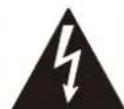
CAUTION
RISK OF ELECTRIC SHOCK DO NOT OPEN

ATTENTION
RISK OF ELECTRIC SHOCK DO NOT OPEN
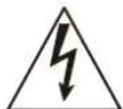
This symbol is intended to alert the user to the presence of uninsulated "dangerous voltage" within the product's enclosure that may be of sufficient magnitude to constitute a risk of electric shock to persons.
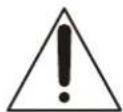
This symbol is intended to alert the user to the presence of important operating and maintenance (servicing) instructions in the literature accompanying the appliance.
Attention - when the product is installed in a rack:
- Prevention against overloading of branch circuit: When this product is installed in a rack and is supplied power from an outlet on the rack, please make sure that the rack does not overload the supply circuit.
- Providing protective earth:
When this product is installed in a rack and is supplied power from an outlet on the rack, please confirm that the outlet is provided with a suitable protective earth connection.
- Internal air ambient temperature of the rack: When this product is installed in a rack, please make sure that the internal air ambient temperature of the rack is within the specified limit of this product.
- Prevention against achieving hazardous condition due to uneven mechanical loading:
When this product is installed in a rack, please make sure that the rack does not achieve hazardous condition due to uneven mechanical loading.
- Install the equipment while taking the operating temperature of the equipment into consideration. For the operating temperature of the equipment, refer to the specifications of the Operation Manual.
- When performing the installation, keep the following space away from walls in order to obtain proper exhaust and radiation of heat.
Top, Bottom: 4.445 cm
(1.75 inches) or more
Right, Left: 4 cm
(1.57 inches) or more
Rear: 40 cm
(15.75 inches) or more
The ventilation should not be impeded by covering the ventilation openings with items, such as newspapers, table-cloths, curtains, etc.
No naked flame sources, such as lighted candles, should be placed on the apparatus.
CAUTION
For safety, do not connect the connector for peripheral device wiring that might have excessive voltage to the following ports:
PC UI connector
SPEAKERS 1 to 8 connectors
WARNING: THIS WARNING IS APPLICABLE FOR USA ONLY. If used in USA, use the UL LISTED power cord specified below.
DO NOT USE ANY OTHER POWER CORD.
Plug Cap Parallel blade with ground pin
(NEMA 5-15P Configuration)
Cord Type SJT, three 16 AWG wires
Length Minimum 1.5 m (4 ft 11 in)
Rating Minimum 10 A, 125 V
Using this unit at a voltage other than 120V may require the use of a different line cord or attachment plug, or both. To reduce the risk of fire or electric shock, refer servicing to qualified service personnel.
WARNING: THIS WARNING IS APPLICABLE FOR OTHER COUNTRIES.
- Use the approved Power Cord (3-core mains lead) / Appliance Connector / Plug with earthing-contacts that conforms to the safety regulations of each country if applicable.
- Use the Power Cord (3-core mains lead) / Appliance Connector / Plug conforming to the proper ratings (Voltage, Ampere).
If you have questions on the use of the above Power Cord / Appliance Connector / Plug, please consult a qualified service personnel.
WARNING
The apparatus shall not be exposed to dripping or splashing. No objects filled with liquids, such as vases, shall be placed on the apparatus.
CAUTION
The unit is not disconnected from the AC power source (mains) as long as it is connected to the wall outlet, even if the unit itself has been turned off.
Consult with Sony qualified personnel for the following types of installation location.
- Rack mount
This equipment is not suitable for use in locations where children are likely to be present.
For the customers in the U.S.A.
This equipment has been tested and found to comply with the limits for a Class A digital device, pursuant to part 15 of the FCC Rules. These limits are designed to provide reasonable protection against harmful interference when the equipment is operated in a commercial environment. This equipment generates, uses and can radiate radio frequency energy and, if not installed and used in accordance with the instruction manual, may cause harmful interference to radio communications. Operation of this equipment in a residential area is likely to cause harmful interference in which case the user will be required to correct the interference at his own expense.
You are cautioned that any changes or modifications not expressly approved in this manual could void your authority to operate this equipment.
This device complies with part 15 of the FCC Rules. Operation is subject to the following two conditions:
(1) This device may not cause harmful interference, and (2) this device must accept any interference received, including interference that may cause undesired operation.
For the customers in Canada
CANICES-3(A)/NMB-3(A)
For the customers in Europe
This product is intended for use in the following Electromagnetic Environments: E2 (commercial and light industrial), E3 (urban outdoors), E4 (controlled EMC environment, ex. TV studio).
WARNING
Operation of this equipment in a residential environment could cause radio interference.
ATTENTION
The electromagnetic fields at the specific frequencies may influence the sound of this unit.
For the customers in Europe
This apparatus shall not be used in the residential area.
For the customers in the U.S.A.
SONY LIMITED WARRANTY - Please visit http://www.sony.com/psa/warranty for important information and complete terms and conditions of Sony's limited warranty applicable to this product.
For the customers in Canada
SONY LIMITED WARRANTY - Please visit http://www.sonybiz.ca/pro/lang/en/ca/article/resources-warranty for important information and complete terms and conditions of Sony's limited warranty applicable to this product.
For the customers in Europe
Sony Professional Solutions Europe - Standard Warranty and Exceptions on Standard Warranty. Please visit http://www.pro.sony.eu/warranty for important information and complete terms and conditions.
For the customers in Korea
SONY LIMITED WARRANTY - Please visit http://bpeng.sony.co.kr/handler/BPAS-Start for important information and complete terms and conditions of Sony's limited warranty applicable to this product.
Usage Precautions
Avoid using and storing in the following locations.
- Extremely hot or cold places (operating temperature range is 5°C to 40°C (41°F to 104°F))
- Places exposed to direct sunlight or near heating appliances. Near places exposed to strong magnetism.
- Near television and radio broadcast stations that emit strong radio waves.
- Places exposed to strong vibration and impact.
If the unit is suddenly taken from a cold to a warm location, or if ambient temperature suddenly rises, moisture may form on the outer surface of the unit and/or inside of the unit. This is known as condensation. If condensation occurs, turn off the unit and wait until the condensation clears before operating the unit. Operating the unit while condensation is present may damage the unit.
The fan is a consumable part that will need periodic replacement.
When operating at room temperature, a normal replacement cycle will be about 5 years.
However, this replacement cycle represents only a general guideline and does not imply that the life expectancy of this part is guaranteed. For details on parts replacement, contact your dealer.
The life expectancy of the electrolytic capacitor is about 5 years under normal operating temperatures and normal usage.
The life expectancy changes depending on the usage environment.
SONY WILL NOT BE LIABLE FOR DAMAGES OF ANY KIND RESULTING FROM A FAILURE TO IMPLEMENT PROPER SECURITY MEASURES ON TRANSMISSION DEVICES, UNAVOIDABLE DATA LEAKS RESULTING FROM TRANSMISSION SPECIFICATIONS, OR SECURITY PROBLEMS OF ANY KIND.
Depending on the operating environment, unauthorized third parties on the network may be able to access the unit. When connecting the unit to the network, be sure to confirm that the network is protected securely.
Do not browse any other website in the Web browser while making settings or after making settings. Since the login status remains in the Web browser, close the Web browser when you complete the settings to prevent unauthorized third parties from using the unit or harmful programs from running.
Placing a wireless device or similar device close to the unit may cause muting of the audio in order to suppress noise.
When moving the unit, use the supplied packaging to protect against vibration and shock.
Overview
The RYZ-CU164 Control Unit is a device used for Sonic Surf VR. It enables a service whereby sound is directed to move around so that a different sound is audible, depending on the location, using a combination of a Player machine and RYZ-AS108 Multi-Channel Active Speaker.
Name and Function of Parts

WARNING
Installing
For details about installation, contact your dealer. Make sure that the installation has sufficient strength to withstand the weight of the unit and mounting hardware. If the mounting is not sufficiently stable, the unit may fall and cause an injury.
Check the installation at least once a year to ensure the unit does not become loose.

CAUTION
Use the mounting screws supplied with the unit. Using screws other than those supplied may damage the inside of the unit.
CAUTION
For safety, do not connect the connector for peripheral device wiring that might have excessive voltage to the following ports: For details about connections, refer to the Installation Manual. PC UI connector
SPEAKERS 1 to 8 connectors
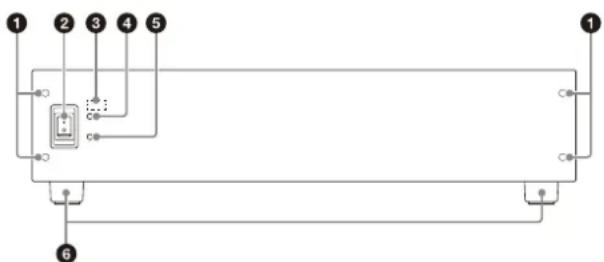
Front panel
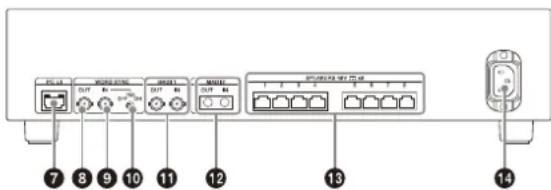
Rear panel
Front panel mounting screws
These screws are used to attach the front panel. Remove these screws to remove the front panel to access the DIP switches.
2Power switch
Use to turn the control unit on/off.
DIP switches
Use to switch to setup mode, select MADI inputs, and set the IP address.
The DIP switches are located behind the front panel. Remove the four front panel mounting screws to access the DIP switches.
For details about operating the DIP switches, refer to the installation manual.
4 POWER lamp
Lights up green when the control unit is turned on.
3 ALERT lamp
Flashes red when an error occurs in the control unit or with a connected RYZ-AS108 Multi-Channel Active Speaker.
For details about troubleshooting when the lamp is flashing, refer to the installation manual.
6Feet
Use when not mounting in a rack, for example, on a shelf. Remove the feet if mounting the unit in a rack.
PC UI connector (RJ-45)
Connect to network on which the Player PC (single player system) or Master Player PC (multi player system) is connected. It outputs the status of the control unit. In setup mode, use to configure the control unit by connecting directly to the setup PC.
WORD SYNC OUT connector (BNC)
Outputs a signal synchronized to the WORD SYNC signal used within the control unit.
WORD SYNC IN connector (BNC)
Input a WORD SYNC signal from a word clock generator.
1075Ω switch / lamp
Set the type of termination for the WORD SYNC IN connector. The lamp lights up when the 75Ω termination is active. ON: Sets to 75Ω
OFF: Sets to high impedance.
When set to ON and there is no signal input on the WORD SYNC IN connector, a 48 kHz WORD SYNC signal generated within the control unit is output.
MADI 1 OUT/IN connectors (BNC)
Connect a MADI signal from the Player PC to the IN connector using a 75Ω coaxial cable.
The OUT connector outputs the MADI signal that is input on the MADI 1 IN or MADI 2 IN connector. Select which signal on the input connectors to output using the DIP switches.
MADI 2 OUT/IN connectors (SC)
Connect a MADI signal from the Player PC to the IN connector using an optical fiber cable with SC connector. The OUT connector outputs the MADI signal that is input on the MADI 1 IN or MADI 2 IN connector. Select which signal on the input connectors to output using the DIP switches.
SPEAKERS 1 to 8 connectors (RJ-45)
Connect to RYZ-AS108 Multi-Channel Active Speaker to output audio signals and power.
Power supply connector
Connect to AC power supply.
Specifications
| General | |
| Power requirements 100 V to 240 V AC (50/60 Hz) | |
| Power consumption Rating: 100 W (when connected to eight RYZ-AS108 Multi-Channel Active Speaker) Max.: 180 W | |
| Dimensions (width / height / depth) | 424 × 87 × 365 mm (16 3/4 × 3 1/2 × 14 3/8 inches) (main unit only) |
| 424 × 105 × 365 mm (16 3/4 × 4 1/4 × 14 3/8 inches) (including feet) | |
| 482 × 87 × 387 mm (19 × 3 1/2 × 15 1/4 inches) (with L-shaped brackets for rack mount) | |
| Mass Approx. 6 kg (13 lb 3.6 oz.) | |
| Guaranteed operating temperature | 5 °C to 40 °C (41 °F to 104 °F) |
| Guaranteed operating humidity | 20% to 80% |
| Guaranteed storage temperature | -20 °C to +60 °C (-4 °F to +140 °F) |
| Guaranteed storage humidity | 20% to 80% |
| Input/output connectors | |
| Speaker output connectors | RJ-45 (8) |
| MADI 1 input connector BNC (1) | |
| MADI 1 output connector | BNC (1) |
| MADI 2 input/output connectors | SC (1 each) |
| WORD SYNC input connector | BNC (1) |
| WORD SYNC output connector | BNC (1) |
| PC UI RJ-45 (1) | |
| LED | |
| POWER lamp (1) | |
| ALERT lamp (1) | |
| 75 Ω lamp (1) | |
| Switches | |
| DIP switches (8) Control unit number setting, etc. | |
| Power switch Power supply on/off | |
| 75 Ω switch WORD SYNC IN connector termination method | |
| Supplied accessories | |
| L-shaped brackets for rack mount (2) | |
| Screws for attaching L-shaped brackets (8) | |
| Handles (2) | |
| Screws for attaching handles (4) | |
| Operating Instructions (1) | |
| Warranty (1) | |
Design and specifications are subject to change without notice.
Notes
- Always verify that the unit is operating properly before use.
- SONY WILL NOT BE LIABLE FOR DAMAGES OF ANY KIND INCLUDING, BUT NOT LIMITED TO, COMPENSATION OR REIMBURSEMENT ON ACCOUNT OF THE LOSS OF PRESENT OR PROSPECTIVE PROFITS DUE TO FAILURE OF THIS UNIT, EITHER DURING THE WARRANTY PERIOD OR AFTER EXPIRATION OF THE WARRANTY, OR FOR ANY OTHER REASON WHATSOEVER.
- SONY WILL NOT BE LIABLE FOR CLAIMS OF ANY KIND MADE BY USERS OF THIS UNIT OR MADE BY THIRD PARTIES.
- SONY WILL NOT BE LIABLE FOR THE TERMINATION OR DISCONTINUATION OF ANY SERVICES RELATED TO THIS UNIT THAT MAY RESULT DUE TO CIRCUMSTANCES OF ANY KIND.
Licenses
This product uses the following software.
- uip The uIP TCP/IP stack
- uIP is an implementation of the TCP/IP protocol stack intended for
- small 8-bit and 16-bit microcontrollers.
- uIP provides the necessary protocols for Internet communication,
- with a very small code footprint and RAM requirements - the uIP
- code size is on the order of a few kilobytes and RAM usage is on
- the order of a few hundred bytes. * * Copyright (c) 2001-2003, Adam Dunkels.
- All rights reserved.
- Redistribution and use in source and binary forms, with or without
- modification, are permitted provided that the following conditions
- are met:
- Redistributions of source code must retain the above copyright
- notice, this list of conditions and the following disclaimer.
- Redistributions in binary form must reproduce the above copyright
- notice, this list of conditions and the following disclaimer in the
- documentation and/or other materials provided with the distribution.
- written permission.
- products derived from this software without specific prior
- written permission. * * THIS SOFTWARE IS PROVIDED BY THE AUTHOR "AS IS" AND ANY EXPRESS
- OR IMPLIED WARRANTY, INCLUDING, BUT NOT LIMITED TO, THE IMPLIED
- WARRANTY OF MERCHANTABILITY AND FITNESS FOR A PARTICULAR PURPOSE
- ARE DISCLAIMED. IN NO EVENT SHALL THE AUTHOR BE LIABLE FOR ANY
- DIRECT, INDIRECT, INCIDENTAL, SPECIAL, EXEMPLARY, OR CONSEQUENTIAL
- DAMAGES (INCLUDING, BUT NOT LIMITED TO, PROCUREMENT OF SUBSTITUTE
- GOODS OR SERVICES; LOSS OF USE, DATA, OR PROFITS; OR BUSINESS
- INTERRUPTION) HOWEVER CAUSED AND ON ANY THEORY OF LIABILITY,
- WHETHER IN CONTRACT, STRICT LIABILITY, OR TORT (INCLUDING
- NEGLIGENCE OR OTHERWISE) ARISING IN ANY WAY OUT OF THE USE OF THIS
- SOFTWARE, EVEN IF ADVISED OF THE POSSIBILITY OF SUCH DAMAGE.
Chinese
Model name: Control unit
- uip The uIP TCP/IP stack
- uIP is an implementation of the TCP/IP protocol stack intended for
- small 8-bit and 16-bit microcontrollers.
- uIP provides the necessary protocols for Internet communication,
- with a very small code footprint and RAM requirements - the uIP
- code size is on the order of a few kilobytes and RAM usage is on
- the order of a few hundred bytes. * * Copyright (c) 2001-2003, Adam Dunkels.
- All rights reserved.
- Redistribution and use in source and binary forms, with or without
- modification, are permitted provided that the following conditions
- are met:
- Redistributions of source code must retain the above copyright
- notice, this list of conditions and the following disclaimer.
- Redistributions in binary form must reproduce the above copyright
- notice, this list of conditions and the following disclaimer in the
- documentation and/or other materials provided with the distribution.
- The name of the author may not be used to endorse or promote
- products derived from this software without specific prior
- written permission.
- THIS SOFTWARE IS PROVIDED BY THE AUTHOR 'AS IS' AND ANY EXPRESS
- OR IMPLIED WARRANTY, INCLUDING, BUT NOT LIMITED TO, THE IMPLIED
- WARRANTY OF MERCHANTABILITY AND FITNESS FOR A PARTICULAR PURPOSE
- ARE DISCLAIMED. IN NO EVENT SHALL THE AUTHOR BE LIABLE FOR ANY
- DIRECT, INDIRECT, INCIDENTAL, SPECIAL, EXEMPLARY, OR CONSEQUENTIAL
- DAMAGES (INCLUDING, BUT NOT LIMITED TO, PROCEDURE OF SUBSTITUTE
- GOODS OR SERVICES; LOSS OF USE, DATA, OR PROFITS; OR BUSINESS
- INTERRUPTION) HOWEVER CAUSED AND ON ANY THEORY OF LIABILITY,
- WHETHER IN CONTRACT, STRICT LIABILITY, OR TORT (INCLUDING
- NEGLIGENCE OR OTHERWISE) ARISING IN ANY WAY OUT OF THE USE OF THIS
- SOFTWARE, EVEN IF ADVISED OF THE POSSIBILITY OF SUCH DAMAGE.


- ENGLISH
- IMPORTANT SAFETY INSTRUCTIONS
- WARNING
- CAUTION
- ATTENTION
- ATTENTION - WHEN THE PRODUCT IS INSTALLED IN A RACK
- FOR THE CUSTOMERS IN THE U.S.A
- FOR THE CUSTOMERS IN CANADA
- FOR THE CUSTOMERS IN EUROPE
- FOR THE CUSTOMERS IN KOREA
- USAGE PRECAUTIONS
- OVERVIEW
- NAME AND FUNCTION OF PARTS
- INSTALLING
- FRONT PANEL
- REAR PANEL
- FRONT PANEL MOUNTING SCREWS
- POWER SWITCH
- DIP SWITCHES
- POWER LAMP
- ALERT LAMP
- FEET
- PC UI CONNECTOR (RJ-45)
- WORD SYNC OUT CONNECTOR (BNC)
- WORD SYNC IN CONNECTOR (BNC)
- Ω SWITCH / LAMP
- MADI 1 OUT/IN CONNECTORS (BNC)
- MADI 2 OUT/IN CONNECTORS (SC)
- SPEAKERS 1 TO 8 CONNECTORS (RJ-45)
- POWER SUPPLY CONNECTOR
- SPECIFICATIONS
- NOTES
- LICENSES
- CHINESE
- MODEL NAME: CONTROL UNIT
Brand : SONY
Model : RYZ-CU164
Category : Video Conferencing System