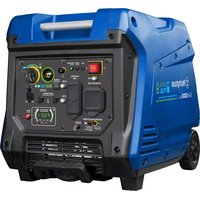
iGen5000DFcv - Generator WESTINGHOUSE - Free user manual and instructions
Find the device manual for free iGen5000DFcv WESTINGHOUSE in PDF.


| Product type | Portable generator |
| Brand | Westinghouse |
| Model | iGen5000DFcv |
| AC Voltage | 120 V |
| Gasoline power (running) | 3900 W |
| Gasoline power (peak) | 5000 W |
| Propane power (running) | 3500 W |
| Propane power (peak) | 4500 W |
| AC Current gasoline | 32.5 A |
| AC Current propane | 29.2 A |
| DC Voltage (USB ports) | 5 V |
| DC Current (USB ports) | 2.1 A (2 ports) |
| Frequency | 60 Hz |
| Phase | Single phase |
| Fuel | Unleaded gasoline (87-93 octane) and propane (LPG) |
| Gasoline tank capacity | 12.8 L (3.4 gallons) |
| Oil capacity | 0.6 L (0.63 quart) |
| Oil type | SAE 10W-30 |
| Spark plug | A7RTC |
| Spark plug gap | 0.6 - 0.8 mm |
| Valve clearance (intake) | 0.08 - 0.12 mm |
| Valve clearance (exhaust) | 0.13 - 0.17 mm |
| Operating temperature | -5°C to 40°C (23°F to 104°F) |
| Main features | RV 120V/30A outlet, duplex 120V/20A outlets, USB ports, parallel operation, ECO mode, CO sensor, data center |
| Safety | Carbon monoxide sensor with auto shutoff, low oil protection, circuit breakers, spark arrestor |
| Maintenance | Oil change, air filter cleaning, spark plug, spark arrestor, fuel drain |
| Warranty | Product registration required for coverage |
Frequently Asked Questions - iGen5000DFcv WESTINGHOUSE
User questions about iGen5000DFcv WESTINGHOUSE
0 question about this device. Answer the ones you know or ask your own.
Ask a new question about this device
Download the instructions for your Generator in PDF format for free! Find your manual iGen5000DFcv - WESTINGHOUSE and take your electronic device back in hand. On this page are published all the documents necessary for the use of your device. iGen5000DFcv by WESTINGHOUSE.
USER MANUAL iGen5000DFcv WESTINGHOUSE
Service Hotline/Company Address Back Page
INTRODUCTION
WARNING
Operating, servicing, and maintenance can expose you to chemicals in dust, carbon monoxide, phthalates, and known to the State of California. If birth defects or other reproductive exposure, avoid breathing exposures or wash your hands frequently with equipment. For more information, lungs.ca.gov.
DISCLAIMERS
All information, illustrations, and specifications in this manual were in effect at the time of publishing. The illustrations used in this manual are intended as representative reference views only. We reserve the right to make any specification or design change without notice.
ALL RIGHTS RESERVED
All rights reserved. No reproduction allowed in any form without written permission from Westinghouse Outdoor Power Equipment.

DANGER
using or performing maintenance on this product. Failure to follow the instructions and safety precautions in this manual can result in serious injury or death.
UPDATES
The latest User Manual for your Westinghouse products can be found under our support tab. wpowereq.com/pages/manuals.
Or scan the following QR code with your smartphone camera to be directed to the link.

PRODUCT REGISTRATION
For trouble-free warranty coverage, it is important to register your Westinghouse product.
You can register by:
- Completing and mailing the product registration card included in the carton.

- Registering your product on-line at: wpowereq.com/ pages/warranty-registration.
- Scanning the above QR code with your smartphone camera to be directed to the mobile registration link.
For Your Records
Date of Purchase:
Model Number:
Serial Number:
Place of Purchase:
- Sending the following product information to:
Westinghouse Outdoor Power
Warranty registration
777 Manor Park Drive
Columbus, OH 43228
IMPORTANT: Keep your purchase receipt for trouble-free warranty coverage.
SPECIFICATIONS
AC Voltage. 120V
Power (Running) gasoline 3900W
Power (Peak) gasoline . 5000W
Power (Running) propane 3500W
Power (Peak) propane. 4500W
AC Current gasoline/propane 32.5A/29.2A
DC Voltage .5V
DC Current . Two 2.1A
Frequency 60 Hz
Phase .... Single
RPM. 3,600
Power Factor 1.0
Insulation Class . F
Maximum Ambient Temperature. 104°F (40°C)
Fuel Type.... Unleaded gasoline (87-93 Octane)
Do not use E15 or E85 fuel in this product.
Fuel Capacity. 3.4 gallons (12.8 liters)
Oil Capacity .0.63quarts (0.6 liters)
Oil Type .SAE 10W-30
Spark Plug .F7RTC
Spark Plug Gap 0.024 - 0.032 in. (0.6 - 0.8 mm)
Valve Intake Clearance. 0.0031 - 0.0047 in. (0.08 - 0.12 mm)
Valve Exhaust Clearance .0.005-0.007 in. (0.13 - 0.17 mm)
AC Grounding System. Neutral floating
NOTICE
This product is designed and rated for
continuous operation at ambient temperatures between 23^(-5^) and 104^(40^) . If needed, this product can be operated in extremely hot or extremely cold temperatures for short periods. If the product is exposed to extreme temperatures during storage, it should be brought back within the optimal temperature range before operation. This product must always be operated outdoors in a well-ventilated area and far away from doors, windows, and other vents.
Maximum wattage and current are subject to and limited by such factors as fuel BTU content, ambient temperature, altitude, engine conditions, etc. Maximum power decreases about 3.5% for each 1,000 feet above sea level, and will also decrease about 1% for each 10^ (6^) above 60^ (16^) ambient temperature.
NOTICE
The effect of altitude on horse
power will be greater if no carburetor modification is made. A decrease in engine horsepower will decrease the power output of the generator. Contact our service team to order altitude kits.
NOTICE
Thank you for choosing Westing
house! PLEASE READ BEFORE RETURNING THIS PRODUCT FOR ANY REASON.
If you have a question or experience a problem with your Westinghouse purchase, call us at 1-855-944-3571 to speak with an agent.
SAVE THIS MANUAL FOR FUTURE REFERENCE.
HAVE QUESTIONS?
Email us at service@wpowereq.com
or call 1-855-944-3571
SAFETY DEFINITIONS
The words DANGER, WARNING, CAUTION, and NOTICE are used throughout this manual to highlight important information. Make sure that the meanings of this safety information is known to all who operate, perform maintenance on, or are near the generator.

This safety alert symbol appears with most safety statements. It means attention, become alert, your safety is involved! Please read and abide by the message that follows the safety alerts symbol.

DANGER
Indicates a hazardous situation
which, if not avoided, will result in death or serious injury.

WARNING
Indicates a hazardous situation
which, if not avoided, could result in death or serious injury.

CAUTION
Indicates a hazardous situation
which, if not avoided, could result in minor or moderate injury.
NOTICE
damage to the generator, personal property, and/or the environment, or cause the equipment to operate improperly.
NOTE: Indicates a procedure, practice or condition that should be followed for the generator to function in the manner intended.
SAFETY SYMBOLS
Follow all safety information contained in this user's manual as well as the information on the product labeling.
| SYMBOL | DESCRIPTION |
| ! | Safety Alert Symbol |
| Fire Hazard | |
| Electrical Shock Hazard | |
| Burn Hazard. Do not touch hot surfaces. | |
| Asphyxiation Hazard | |
| Do Not Operate in Wet Conditions | |
| Read Manufacturer's Instructions | |
| SFEET (L3) | Maintain Safe Distance |
| MEN#NA | Ground. Consult with electrician to determine grounding requirements before operation. |
| FROM OBJECTS | |
| CO | Carbon Monoxide |
IMPORTANT SAFETY INSTRUCTIONS
DANGER
Generator exhaust contains high
levels of carbon monoxide (CO), an invisible, odorless, and extremely poisonous gas. If you smell exhaust fumes, you are breathing carbon monoxide. But, even if you do not smell exhaust fumes you may be inhaling CO.
ONLY operate generators outside, in a well-ventilated area. NEVER operate generators indoors, doing so CAN KILL YOU IN MINUTES.
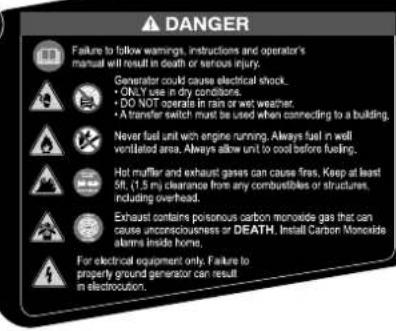
- Correct Use - Only use generators outside and downwind, far away from windows, doors and vents. Always direct exhaust away from occupied spaces. Always install battery-powered carbon monoxide detectors or plug-in carbon monoxide detectors with battery back-up in living areas. See Figure 1.
- Incorrect Use - NEVER use a generator in your home, garage, basement, attic, crawl space or any other fully or partially enclosed area. Areas such as these can allow dangerous levels of carbon monoxide to accumulate. An open door or a running fan WILL NOT provide adequate ventilation. See Figure 2.
If you start feeling dizzy, weak, or sick while using the generator, move to fresh air immediately. Contact a doctor. You may be experiencing carbon monoxide poisoning.
DANGER
Fire and electrocution hazard. Do
not connect to a building's electrical system unless the generator and a transfer switch have been properly installed and the electrical output has been verified by a qualified electrician. The connection must isolate the generator power from utility power and must comply with all applicable laws and electrical codes. Failure to properly isolate the generator power could cause property damage and create a dangerous backfeed of electricity which could kill or seriously injure utility workers.
DANGER
Electrocution hazard. NEVER
use the generator in a location that is wet or damp. NEVER expose the generator to rain, snow, water spray, or standing water while in use. Protect the generator from all hazardous weather conditions. Moisture or ice can cause a short circuit or other malfunction in the electrical circuit.
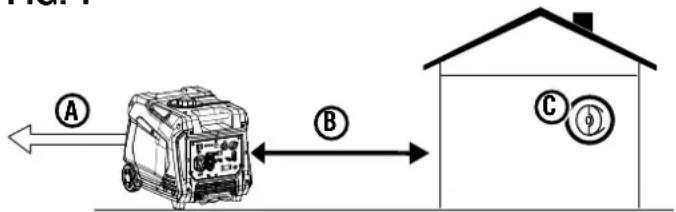
FIG.1
A - Exhaust (CO)
B - Only use OUTSIDE and FAR AWAY from windows, doors, and vents
C - CO detectors in living areas
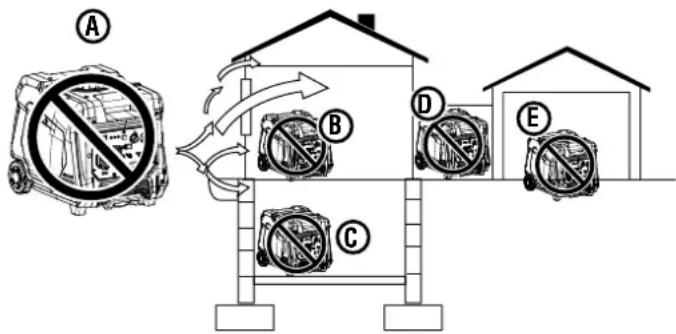
FIG. 2
A - Exhaust (CO)
B-Living area
C - Basement crawlspace
D - Entryway/Porch/Mudroom
E-Garage
WARNING
Familiarize yourself with all the
instructions, safety warnings, illustrations, and specifications provided with this product. Failure to follow the manufacturer's instructions may result in electric shock, fire, and/or carbon monoxide poisoning that can lead to death or serious injury.
NOTICE
Install battery-powered carbon
monoxide detectors or plug-in carbon monoxide detectors with battery back-up in living areas.
- This product should ONLY be used outdoors.
- NEVER use a generator in your home, garage, basement, attic, crawl space or any other fully or partially enclosed area. Areas such as these can allow dangerous levels of carbon monoxide to accumulate. Carbon monoxide (CO), an invisible, odorless, and extremely poisonous gas CAN KILL YOU IN MINUTES.
- Only use OUTSIDE and far away from windows, doors, and vents as recommended by the US Department of Health and Human Services Centers for Disease Control and Prevention. Your specific home and/or wind conditions may require additional distance.
- The National Electrical Code requires the use of a transfer switch or other suitable transfer equipment whenever a portable generator is connected to a building's electrical
system. Transfer switches isolate generator power from utility power and prevent backfeeding of electric power into the utility system.
NOTE: A transfer switch must be installed by a qualified electrician in accordance with applicable electrical codes. Some jurisdictions may require the installation to be inspected by local authorities. Keep all relevant installation, inspection, and maintenance information.
- Never use the generator to power medical support equipment.
- Never expose the generator to rain, snow, water spray, or standing water while in use. Store and operate the unit in a dry or covered (but not enclosed) location.
- Do not let children or untrained individuals operate the generator.
- Keep children, bystanders, and pets a minimum of 10 ft. away from a running generator.
- Maintain Safe Distance. While operating and storing, keep at least five feet of clearance on all sides of the generator, including overhead. Turn the unit off and allow it to cool a minimum of 30 minutes before storage. Heat created by the muffler and exhaust gases could be hot enough to cause serious burns and/or ignite combustible objects.
- Do not operate the unit in areas where combustible or hazardous materials are stored including gasoline and natural gas filling stations.
- Do not operate the generator while barefoot, with wet hands or feet, while standing in water or in wet conditions.
- Do not use this unit when you are tired or under the influence of drugs, alcohol, or medication.
- Burn Hazard. Do not touch hot surfaces.
- Do not contact the muffler or engine. They are very HOT and will cause severe burns. Do not put body parts or any flammable or combustible materials in the direct path of the exhaust.
- Keep hands, fingers, feet, and other body parts away from all moving parts of the generator.
- Do not connect worn or damaged electrical cords to the generator. NEVER touch frayed or exposed wires.
- Do not operate the generator on an incline. The unit should always be placed on a flat stable surface.
- Check the physical condition of the product prior to each use. Look for loose bolts, fluid leaks, and other signs of wear. Replace all damaged items. For replacement parts or assistance, contact our customer service team.
- For optimal performance, use the generator in temperatures between 23^ (-5^) and 104^ (40^) with a maximum relative humidity of 90% .
- Before starting the generator, check all fluids (oil and gasoline).
-
Do not remove the oil dipstick or fuel cap when the generator is running.
-
Securely tighten the oil dipstick after adding oil and the fuel cap after adding gasoline.
- Avoid skin contact with engine oil or gasoline. Wear protective clothing and equipment. Wash all exposed skin with soap and water. Prolonged skin contact with gasoline or engine oil may cause severe skin irritation and other adverse reactions.
- Generator's vibrate and bounce during normal operation. Check the generator and all of the cords connected to it for any damage that may have resulted from the vibration. Replace or repair damaged items as needed. Do not use the generator or any items that show signs of damage.
- All electrical tools and appliances operated from this generator must be properly grounded by use of a third wire or be double-insulated.
- Before transporting the generator, disconnect the spark plug boot, drain the fuel tank and properly restrain the unit.
- Fuel or oil may leak from the generator during transport. Place a towel, plastic sheet, or absorbent pad beneath the unit to protect your vehicle.
- To prolong the life of this product, follow the instructions in the Maintenance section of this manual.
- Replace damaged or worn items with recommended or equivalent replacement parts. Using an incorrect or incompatible part might create a hazard that could result in serious personal injury.
- Always remove any tools or other service equipment used during maintenance away from the generator before operating.
GROUNDING
See Figure 3.
WARNING
Shock hazard. Failure to properly
ground the generator can result in electric shock.
NOTICE
Only use grounded 3-prong extension
cords, tools, and appliances, or double-insulated tools and appliances.
The generator neutral is floating. The generator ground terminal is connected to the frame of the generator, the metal non-current-carrying parts of the generator, and the ground terminals of each receptacle. The generator (stator winding) is isolated from the frame and from the AC receptacle ground pin. Electrical devices that require a grounded receptacle pin connection may not function properly.
If this generator will be used only with cord and plug equipment connected to the receptacles mounted on the generator, National Electric Code does not require that the unit be grounded. However, other methods of using the generator may require grounding to reduce the risk of shock or electrocution.
Before using the ground terminal, consult a qualified electrician, electrical inspector, or local agency having jurisdiction for local codes or ordinances that apply to the intended use of the generator.
SAFETY PRECAUTIONS FOR GASOLINE AND GASOLINE VAPOR
DANGER
Fire and explosion hazard. Gas-ive and flammable and can cause h.
WARNING
Fire and Burn Hazard. NEVER
loosen or remove the fuel cap while the generator is running. Turn the unit off and allow it to cool for at least five minutes before adding gasoline. Loosen the fuel cap slowly.
WARNING
In case of a gasoline fire, do not use the flame unless the engine/fuel is the OFF position. Introducing an generator with an open fuel switch, torsion hazard.
- Fire Hazard. Gasoline is highly flammable. Handle with care.
- Never use gasoline as a cleaning agent.
Gasoline is a skin irritant and needs to be cleaned up immediately if it comes in contact with the skin. - Do not store gasoline near furnaces, water heaters, or any other appliances that produce heat or have automatic ignitions.
- Keep gasoline away from sparks, open flames, pilot lights, heat, and other sources of ignition.
- Store any containers containing gasoline in a well-ventilated area, away from any combustibles or source of ignition.
- ALWAYS store gasoline in a container approved for gasoline. Unapproved containers can break or deteriorate allowing gasoline or gasoline vapors to escape which can create a serious hazard.
Gasoline has a distinctive odor, this will help detect potential leaks quickly.
Gas vapors can cause a fire if ignited. - Do not smoke when handling fuel, adding fuel to the generator, or emptying the gas tank.
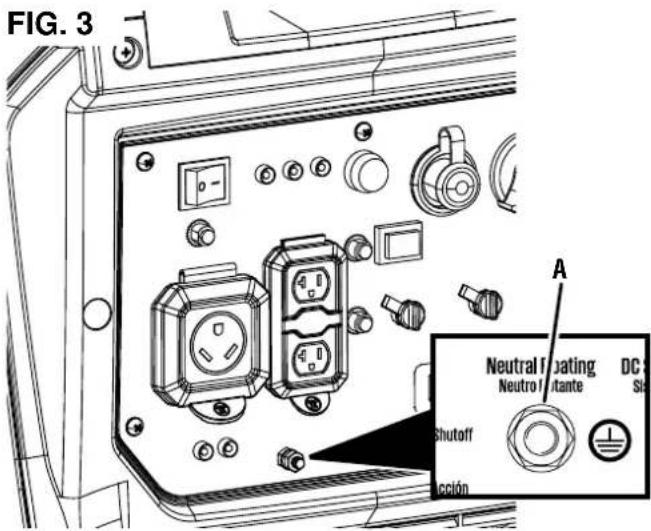
A - Ground terminal
- Wear eye protection while refueling.
- Before adding fuel to the generator, turn the unit off and allow it to cool a minimum of five minutes. If necessary, move the unit to level ground.
- Do not remove the fuel tank cap when the generator is running.
- Loosen the fuel cap slowly to safely release pressure, keep gasoline from escaping around the cap, and to avoid the heat from the muffler igniting fuel vapors.
- NEVER fill the generator's gasoline tank beyond the maximum fill ring on the fuel screen. Keeping gasoline levels at or below the fill ring will allow for fuel expansion. Overfilling the fuel tank can result in a sudden overflow of gasoline and result in spilled gasoline coming in contact with HOT surfaces.
- Spilled fuel can ignite. Wipe up spills immediately and allow area to dry before operating the generator. NEVER attempt to burn off spilled fuel.
- Securely tighten the fuel cap after adding gasoline.
- Do not cover the fuel cap while the generator is in operation. Covering the cap may cause the engine to fail or damage the product.
- Drain fuel before storing the unit. Store the unit and the fuel separately in well-ventilated areas away from sparks, open flames, pilot lights, heat, and other sources of ignition.
- Turn the unit off and allow it to cool a minimum of 30 minutes before draining fuel.
LIQUID PETROLEUM GAS (LPG/PROPANE)
WARNING
Fire and explosion hazard. Nev
er use a gas container, LPG/propane hose, propane cylinder or any other fuel item that appears to be damaged. If there is a strong smell of propane while operating the generator, fully close the propane cylinder valve immediately. Once the propane is off, use soapy water to check for leaks on the hose and connections on the tank valve and the generator. Do not smoke or light a cigarette or check for leaks using any open flame source such as a match or lighter. If a leak is found, contact a qualified technician to inspect and repair the LPG/propane system before using the generator.
CAUTION
Fire and explosion hazard. Only
use approved Propane cylinders with an Overfilling Prevention Device (OPD) valve. Always keep the tank in a vertical position with the valve on top and placed at ground level on a flat surface. Do not allow tanks to be near any heat source. When transporting and storing, turn the propane cylinder valve to the fully closed position and disconnect the tank. Make sure to always cover the generator inlet and tank outlet with protective plastic caps.
LPG/Propane is highly flammable and explosive.
- In case of a LPG/Propane fire, DO NOT attempt to extinguish the flame if the fuel valve is in the gas position. Introducing an extinguisher to a generator with an open fuel valve could create an explosion hazard.
- LPG/Propane can settle in low places because it is heavier than air.
- LPG/Propane has a distinctive odor added to help detect potential leaks. If there is a smell, DO NOT use the engine.
- Always keep a propane cylinder in an upright position.
- When exchanging propane cylinders, be sure the tank valve is the same type.
LPG/propane will burn the skin. Prevent skin contact at all times.
- Keep the propane cylinder away from the generator exhaust.
- Large (500-1,000 gallon) propane cylinders will require a certified plumber to install the fuel line to the generator and the loose regulator is not used (the regulator that is attached to the fuel tank). The pressure as measured at the regulator mounted to the generator must be 7 in. to 14 in. of water column. A certified plumber must ensure that the pressure is correct or install a step down regulator if needed.
- Make sure the generator and propane cylinder are on a flat surface before operating.
- If there is a propane odor do not start the unit because there may be a potential leak. Never place a propane cylinder near the engine exhaust.
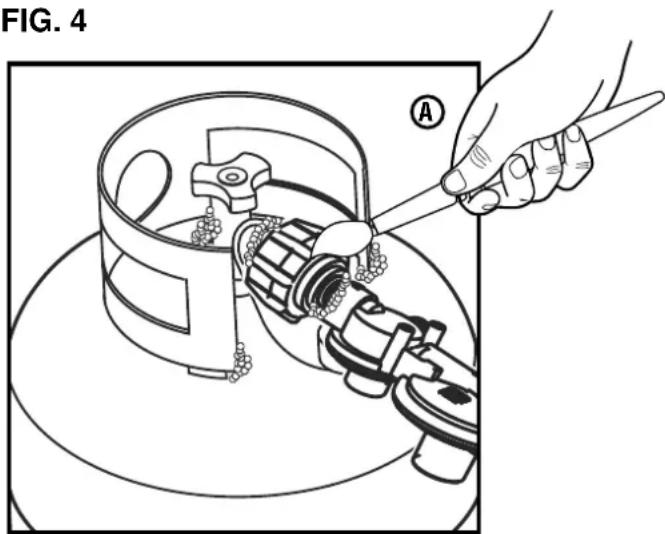
FIG. 4
A - Leak testing with soapy water (Propane)
- When transporting, make sure the propane cylinder and LPG/propane hose are not attached to the generator.
- Store propane cylinder away from sparks, open flames, pilot lights, heat, and other sources of ignition.
- Do not store propane cylinder near furnaces, water heaters, or any other appliances that produce heat or have automatic ignitions.
LEAK TESTING
See Figure 4.
NOTICE
Connections on the hose and the probe tested at the factory to make sure there are leaks. However, shipping and handling increased connections. We recommend that we wait for leaks before using the generator.
To test for LPG/Propane leaks:
- Connect the LPG/propane hose to the propane inlet on the generator and to the cylinder valve.
- Open the cylinder valve. If you hear a rushing sound, immediately turn off the cylinder valve. This noise indicates a significant leak at the connection. Replace the cylinder or have it repaired.
- Brush the inlet, hose connections, and LP gas cylinder with a soapy solution made of a 20/80 mixture of mild soap and water.
-
If bubbles begin growing, there is a leak.
-
If the leak is at the inlet, contact customer service. DO NOT USE THE GENERATOR.
- If the leak is at the hose connections, reinstall the hose securely and perform the check again. If the leaks persist, DO NOT USE THE GENERATOR.
- If the leak is at the cylinder, do not use or move the cylinder. Contact the fire department or the gas supplier.
IMPORTANT INFORMATION FOR THE CO SENSOR
The CO Sensor monitors for the accumulation of poisonous carbon monoxide gas around the generator when the engine is running. If increasing levels of CO gas are detected, the CO Sensor automatically shuts down the engine.
The CO Sensor will also detect the accumulation of carbon monoxide from other fuel burning sources used in the area of operation. For example, if the exhaust of fuel burning tools is pointed at a CO Sensor-equipped generator, a shut-off may be initiated due to rising CO levels. This is not an error. Hazardous carbon monoxide has been detected. Move and redirect any additional fuel burning sources to dissipate carbon monoxide away from personnel and occupied buildings.
NOTE: Remote start-equipped generators must be restarted with the START/STOP button on the control panel after an automatic shut-down occurs.
Generators are intended to be used outdoors, far from occupied buildings and the exhaust pointed away from personnel and buildings. If misused and operated in a location that results in the accumulation of CO, like in a partially enclosed area, the CO Sensor shuts off the engine and the RED indicator light will flash notifying the user that there are unsafe levels of carbon monoxide.
If the generator shuts off and the RED indicator light flashes, leave the area immediately. Wait for the carbon monoxide to dissipate and the RED indicator light to turn off before returning to the affected area. Once it is safe to return, read the Action Label for further steps to take. The CO Sensor DOES NOT replace carbon monoxide alarms. Install battery-powered carbon monoxide alarm(s) in your home.
WARNING
Automatic shutoff accompanied
with a flashing RED light in the CO Sensor portion of the control panel is an indication that the generator was improperly located which allowed carbon monoxide to accumulate to unsafe levels. If you start to feel sick, dizzy, weak, or carbon monoxide detectors in your home indicate an alarm, get to fresh air immediately. Call emergency services. You may have carbon monoxide poisoning.
UNDERSTANDING THE CO SENSOR'S INDICATOR LIGHTS
See Figure 5.
| COLOR DESCRIPTION | |
| RED | Unsafe levels of carbon mon-oxide accumulated around the generator. After shut-off, the RED indicator light in the CO Sensor area of the control panel will flash to provide notification that the gen-erator was shut-off due to carbon monoxide levels rising above a safe threshold. The RED light will flash for at least five minutes after a CO shut-off.When it is safe to do so, move the generator to an open, outdoor area far away from occupied spaces with exhaust pointed away. Once relocated to a safe area and the red light is off, the generator can be restarted. Introduce fresh air and ventilate the area where the generator had shut down. |
| YELLOW | A CO sensor system fault oc-curred. When a system fault oc-curs, the generator is automatically shut down and the YELLOW indicator light in the CO auto-shutoff area of the control panel will flash to provide notification that a fault has occurred. The YELLOW light will flash for at least five minutes after a fault. The generator can be restarted but may continue to shutoff. A CO sensor fault can only be diagnosed and repaired by an authorized Westinghouse service center. |
FIG. 5
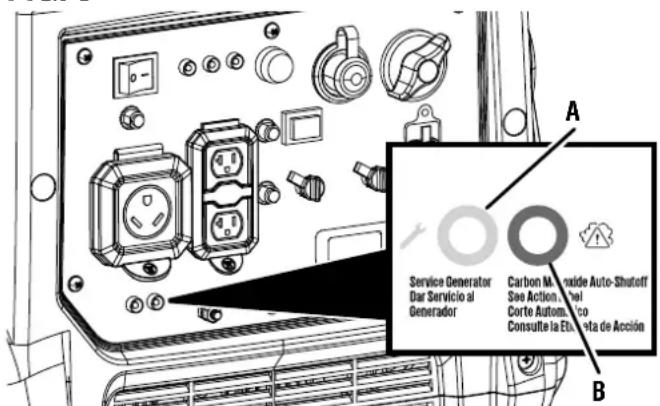
A - Service Generator LED
B - Automatic Shutoff LED
①

CAUTION HOT SURFACES

PRECAUION SUPERFICIES CALIENTES

ATENTION SURFACES CHAUDES



(6)

⑦
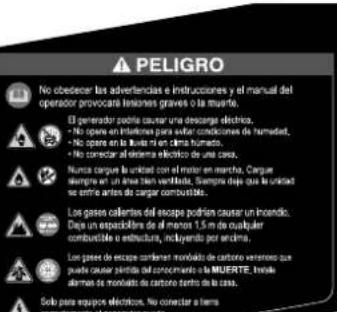
SAFETY LABELS AND DECALS
The following information is on your generator's labels and decals.
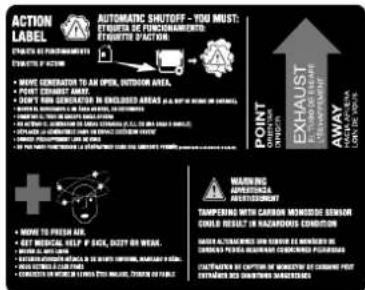
① Action Label
If unsafe levels of carbon monoxide accumulate around the generator, automatic shutoff will occur. If the unit shuts off, leave the area immediately. When it is safe to return, do the following:
- Move the generator to an open, outdoor area.
- Point exhaust away.
- Don't run generator in enclosed areas (e.g. not in house or garage).
- Move to fresh air.
Get medical help if sick, dizzy or weak. - WARNING-Tampering with carbon monoxide sensor could result in hazardous condition.
② Safety Symbols
(See page 4)
③ Exhaust Direction
Point exhaust away from body parts and flammable or combustible materials.
④ Hot Surface
Do not touch.
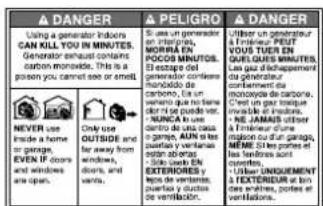
⑤ Carbon Monoxide
-
Using a generator indoors CAN KILL YOU IN MINUTES. Generator exhaust contains carbon monoxide. This is a poison you cannot see or smell.
-
NEVER use inside a home or a garage, EVEN IF doors and windows are open.
⑥ Specifications
(See page 3)
EZ Start Instructions
Starting procedures for gasoline or propane.
GENERATOR CAPACITY
NOTICE
Do not overload the generator's calling the generator's wattage/amperage damage the generator and/or electricals directed to it.
Review the Specifications for this generator and record the running (continuous) and peak (starting) watts. In general the higher the wattage, the more devices can be powered at the same time. The total power requirements of all connected devices must be considered. Power requirements are often listed on a device's data label or nameplate.
To determine power requirements:
- Choose the devices you want to power simultaneously.
- Record and total the running (continuous) watts of each device. The generator must continuously produce this amount of wattage to keep the devices running.
- Record the peak (starting) watts for each device. This is the momentary surge of power required to start electric motors in some tools and appliances.
- Select the device with the highest peak (starting) wattage. Add the peak (starting) watts for that device to the total running (continuous) watts for all the connected devices to determine the total peak wattage requirement for the generator.
NOTE: Total peak wattage requirement assumes intermittent starting of devices. Adjust estimate if devices reach peak wattage at the same time.
MANAGING GENERATOR POWER
To extend the service life of the generator, use caution when adding electrical loads. Disconnect all loads before starting the generator. The safest way to manage generator power is to add loads sequentially by doing the following:
- Remove all loads and start the generator as described later in this manual.
- Connect and start the largest device or appliance. Power requirements are often listed on a device's data label or nameplate.
- Allow the generator output to stabilize. Once stable, the engine should run smoothly and the device should function properly.
- Connect and start the next largest device or appliance.
- Allow the generator output to stabilize.
- Repeat this process for each additional load.
EXTENSION CORDS
WARNING
Asphyxiation hazard. Extension
cords running directly into the home increase the risk of carbon monoxide poisoning through any openings. If an extension cord running directly into your home is used to power indoor items, there is a risk of carbon monoxide poisoning to people inside the home. Always use battery-powered carbon monoxide detector(s) that meet current UL 2034 safety standards when running the generator. Regularly check the detector(s) battery.
WARNING
Asphyxiation hazard. When op
erating the generator with extension cords, make sure the generator is located in an open, outdoor area far away from occupied spaces with exhaust pointed away.
WARNING
Fire and electrocution hazard.
Never use worn or damaged extension cords. Damaged or overloaded extension cords could overheat, arc, and burn resulting in death or serious injury.
Before connecting an AC appliance or power cord to the generator:
- Use grounded 3-prong extension cords, tools, and appliances, or double-insulated tools and appliances.
- Make sure the tool or appliance is in good working order. Faulty appliances or power cords can create a potential for electric shock.
- Make sure the electrical rating of the tool or appliance does not exceed the rated power of the generator or the receptacle being used.
NOTICE
Do not exceed the unit's capacity.
Overloading the generator's wattage and/or amperage capacity could damage connected devices and critical generator components.
EXTENSION CORD SIZING
Make sure your extension cord can carry the required load. Cables that are too small may cause a voltage drop that can cause the cord to overheat or cause property damage. Refer to the cord manufacturer's guidelines for the appropriate size and length.
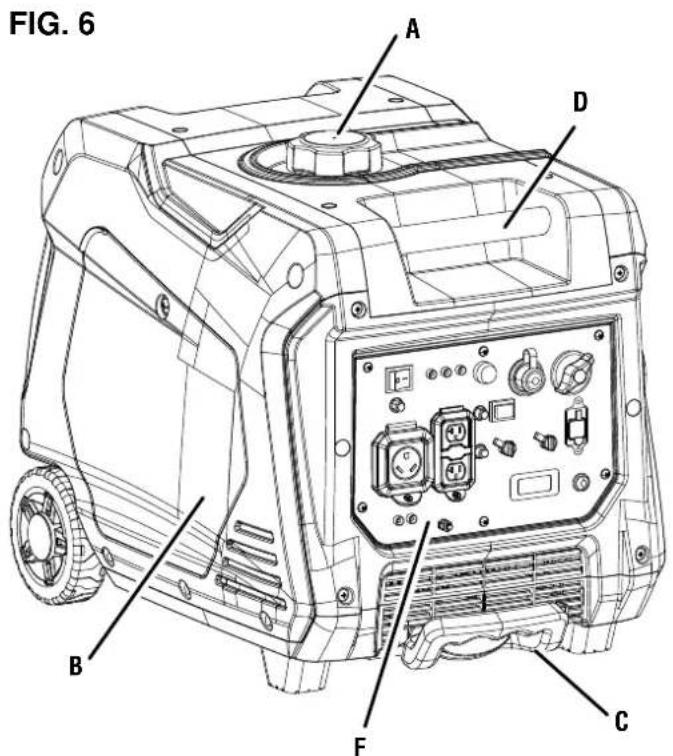
A - Fuel cap
B - Engine service cover
C - Extendable handle
D-Carry handle
E -Recoil handle
F - Control panel
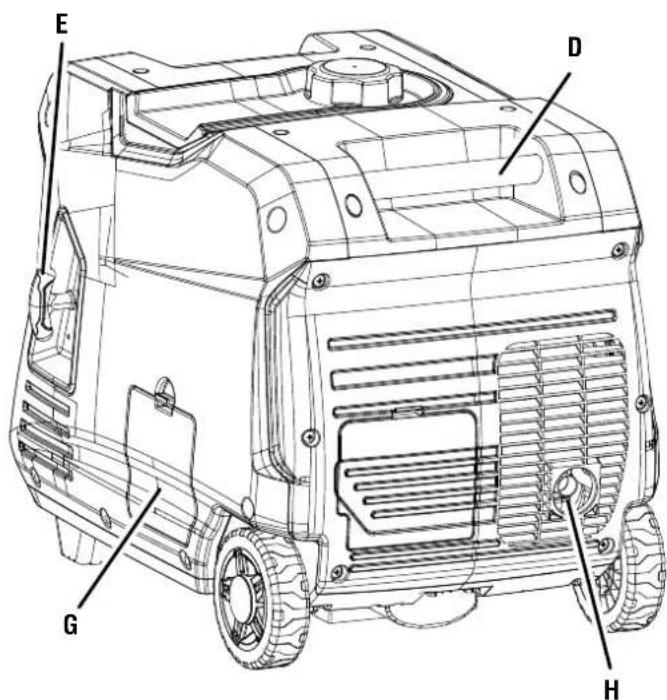
G - Oil access cover
H - Muffler/spark arrestor
UNDERSTANDING YOUR GENERATOR
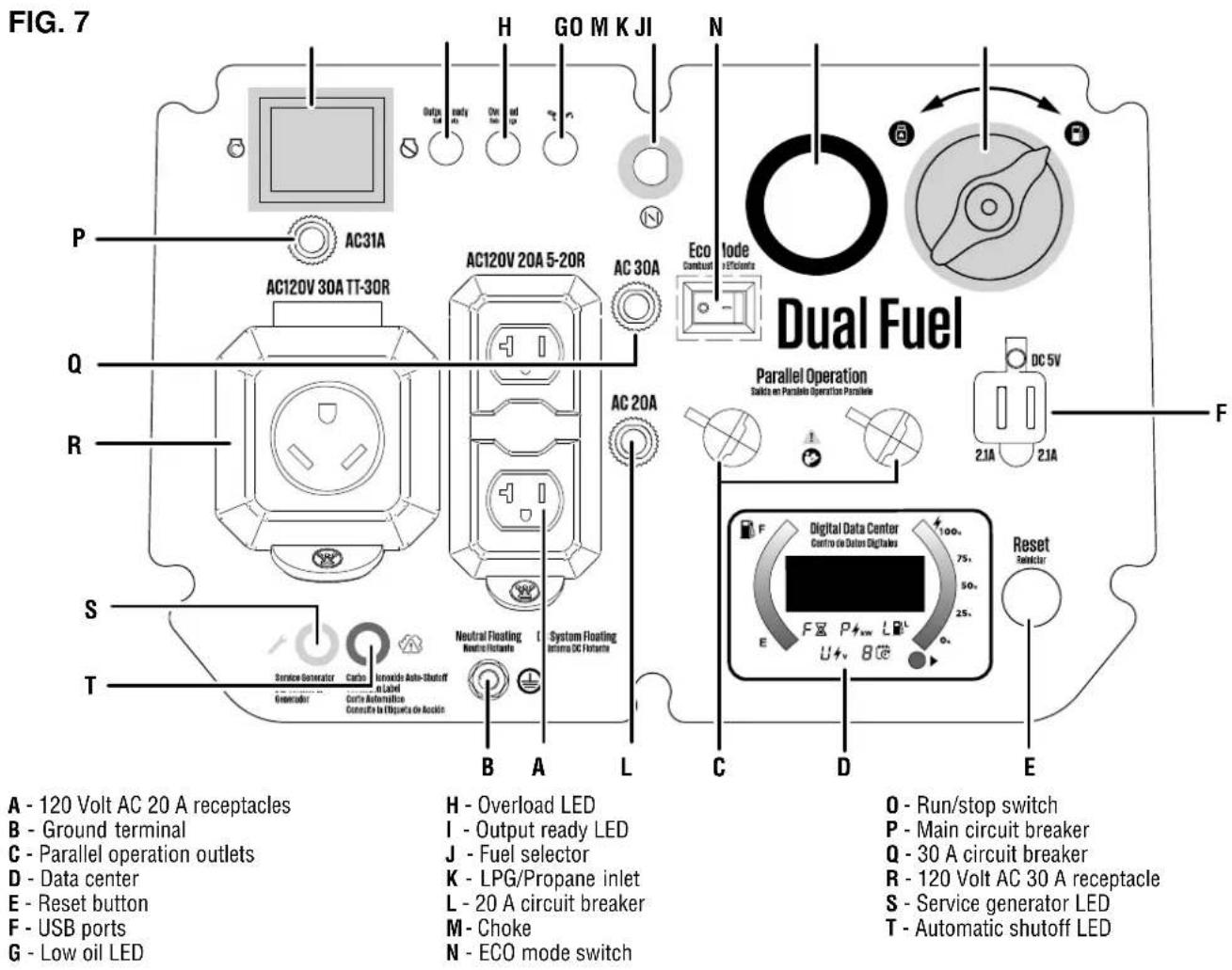
See Figures 6 - 7.
To reduce the risk of injury and product failure, read and understand the information in this user's manual as well as the information on the product labeling.
120 VOLT AC RECEPTACLES
This unit has a 120V, 30A RV receptacle and duplex 120V, 20A receptacles capable of powering a variety of appliances, tools, and equipment.
CIRCUIT BREAKERS
The circuit breakers protect devices and equipment connected to the receptacles from electrical overload.
CO SENSOR INDICATOR LIGHTS
The CO Sensor monitors for the accumulation of poisonous carbon monoxide gas. If increasing levels of CO gas are detected, the CO Sensor automatically shuts down the engine.
ECO MODE SWITCH
Eco mode minimizes fuel consumption and noise by adjusting the engine RPM to the minimum required for the current load.
FUEL SELECTION SWITCH
Rotate the engine/fuel control switch to set the choke and start or stop the flow of fuel.
ENGINE SERVICE PANEL
Loosen the screw and remove the engine service panel to service the spark plug and air filter.
FUEL TANK
The generator has a fuel tank with a capacity of 3.4 gallons.
GROUND TERMINAL
The ground terminal is used to externally ground the generator.
LED DATA CENTER
Displays remaining run time (F), power output in kW (P), fuel level in liters (L), voltage output (V), and lifetime hours.
LOW OIL LED
Indicates low oil level. When the oil level in the crankcase falls below the safe operating limit, the low oil level indicator will illuminate and the generator will automatically shut off the engine.
MUFFLER AND SPARK ARRESTOR
The spark arrester prevents sparks from exiting the muffler. It must be removed for servicing.
NOTICE The spark arrester is a safety device that prevents sparks from exiting the muffler and creating a fire hazard. In certain locations a spark arrester may be required by law. It is the operator's responsibility to know and follow all local laws and regulations related to fire prevention requirements.
OIL DIPSTICK
Unscrew the oil dipstick to check oil levels and add oil when needed.
OUTPUT READY LED
Illuminates when the generator is operating normally. Indicates the generator is producing electrical power at the receptacles.
OVERLOAD LED
Indicates that the generator is overloaded.
OVERLOAD RESET
The generator will automatically switch OFF all AC output to protect the generator if overloaded or if there is a short circuit in a connected appliance.
A parallel cord (not included) can be used to connect a compatible Westinghouse inverter generator for additional power output.
RECOIL HANDLE
Use the recoil handle (and the engine/fuel control switch) to start the generator.
SPARK PLUG SERVICE DOOR
Lift the spark plug service door to access the spark plug.
USB PORTS
Two-ports 5V/2.1A USB outlet. Accepts Type A USB plugs.
REMOVING CARTON CONTENTS
WARNING This product does not require assembly. Do not attempt to operate this product if it is not completely assembled. Using an improperly assembled product can be hazardous and could result in serious personal injury.
- Remove and inspect the carton contents. Verify that all the items in the INCLUDED LIST are present and undamaged.
- Recycle or dispose of the packaging materials properly.
INCLUDEDLIST
Generator, engine oil (SAE 10W 30), pressure reducing valve, battery charger, parallel cable, funnel, spark plug socket wrench, parallel cables, quick start guide, replacement parts list, and user manual.
If any parts are missing, contact our service team at service@wpowereq.com or call 1-855-944-3571.
OPERATION
DANGER Generator exhaust contains high levels of carbon monoxide (CO), an invisible, odorless, and extremely poisonous gas. If you smell exhaust fumes, you are breathing carbon monoxide. But, even if you do not smell exhaust fumes you may be inhaling CO.
ONLY operate generators outside, in a well-ventilated area. NEVER operate generators indoors, doing so CAN KILL YOU IN MINUTES.
- Correct Use - Only use generators outside and downwind, far away from windows, doors and vents. Always direct exhaust away from occupied spaces. Always install battery-powered carbon monoxide detectors or plug-in carbon monoxide detectors with battery back-up in living areas. See Figure 1.
- Incorrect Use - NEVER use a generator in your home, garage, basement, attic, crawl space or any other fully or partially enclosed area. Areas such as these can allow dangerous levels of carbon monoxide to accumulate. An open door or a running fan WILL NOT provide adequate ventilation. See Figure 2.
If you start feeling dizzy, weak, or sick while using the generator, move to fresh air immediately. Contact a doctor. You may be experiencing carbon monoxide poisoning.
WARNING Do not alter or modify this product unless instructed to so in this manual or by the manufacturer. Do not use attachments or accessories that are not recommended for use with this product. Making unauthorized modifications and using incompatible accessories can damage the unit and may void your warranty.
OVERVIEW
This portable generator can provide power to a wide range of items including household appliances, job-site tools, camping equipment, tailgating essentials, and much more.
NOTICE THIS GENERATOR HAS BEEN SHIPPED WITHOUT OIL. Do not attempt to crank or start engine before it has been properly serviced with recommended oil. Failure to add engine oil before starting will result in serious engine damage that is not covered under warranty.
WARNING Do not alter or modify this product unless instructed to so in this manual or by the manufacturer. Do not use attachments or accessories that are not recommended for use with this product. Making unauthorized modifications and using incompatible accessories can damage the unit and may void your warranty.
NOTICE In certain circumstances, the National Electric Code may require the generator to be grounded to an approved earth. Consult with a qualified electrician to determine grounding requirements before operation.
WARNING Avoid skin contact with engine oil or gasoline. Wear protective clothing and equipment. Wash all exposed skin with soap and water. Prolonged skin contact with gasoline or engine oil may cause severe skin irritation and other adverse reactions.
NOTICE Check the physical condition of the product prior to each use. Look for loose bolts, fluid leaks, and other signs of wear. Replace all damaged items.
KNOW HOW TO SAFELY LOCATE AND OPERATE YOUR GENERATOR

DANGER
Asphyxiation hazard. Place the
generator in a well-ventilated area. DO NOT place the generator near vents or intakes where exhaust fumes could be drawn into occupied or confined spaces. Carefully consider wind and air currents when positioning the generator.

WARNING
Electrocution hazard. Never use
the generator in a location that is wet or damp. Never expose the generator to rain, snow, water spray, or standing water while in use. Protect the generator from all hazardous weather conditions. Moisture or ice can cause a short circuit or other malfunction in the electrical circuit. Using a generator or electrical appliance in wet conditions, such as rain or snow, or near a pool or sprinkler system, or when your hands are wet, could result in electrocution.

WARNING
Fire hazard. Only operate the
generator on a solid, level surface. Operating the generator on a surface with loose material such as sand or grass clippings can cause debris to be ingested by the generator that could block cooling vents or the air intake system. Allow the generator to cool for 30 minutes before transport or storage.
- Read and understand all safety information before starting the generator (see pages 4 - 10).
- NEVER use a generator in your home, garage, basement, attic, crawl space or any other fully or partially enclosed area. Areas such as these can allow dangerous levels of carbon monoxide to accumulate. Carbon monoxide (CO), an invisible, odorless, and extremely poisonous gas CAN KILL YOU IN MINUTES.
DO NOT operate the generator in the back of a SUV, camper, trailer, truck bed (regular, flat, or otherwise), under stairs, next to walls or buildings, or in any other location that will not allow for adequate cooling of the generator and/or the muffler. Operating the generator in enclosed or partially enclosed areas will allow dangerous levels of CO to accumulate.
DO NOT contain generators during operation. - Only use OUTSIDE and far away from windows, doors, and vents as recommended by the US Department of Health and Human Services Centers for Disease Control and Prevention. Your specific home and/or wind conditions may require additional distance.
- Do not operate the generator on an incline. The unit should always be placed on a flat stable surface.
The generator should be on a flat, level surface at all times (even while not in operation).
The generator must have at least 5 ft. (1.5m) of clearance from all combustible material.
KNOW THE REGULATIONS FOR THE USE OF PORTABLE GENERATORS
Consider where and how you intend to use your generator, and familiarize yourself with any local, state, or federal ordinances concerning your intended use. It may be necessary to contact a qualified electrician or local governing agency for a full list of requirements.
ADDING OIL/CHECKING OIL LEVEL
See Figures 8 - 9.
If your product has a separate engine manual, disregard the information in this section and follow the instructions in the engine manual.
NOTICE
THIS GENERATOR HAS BEEN
SHIPPED WITHOUT OIL. Do not attempt to crank or start engine before it has been properly serviced with recommended oil. Failure to add engine oil before starting will result in serious engine damage that is not covered under warranty.
NOTICE
Use of 2-stroke/cycle oil or other untypes can cause severe engine damage under warranty.
The included, recommended oil type for typical use is 10W-30 engine oil. If running the generator in extreme temperatures, refer to the following chart.
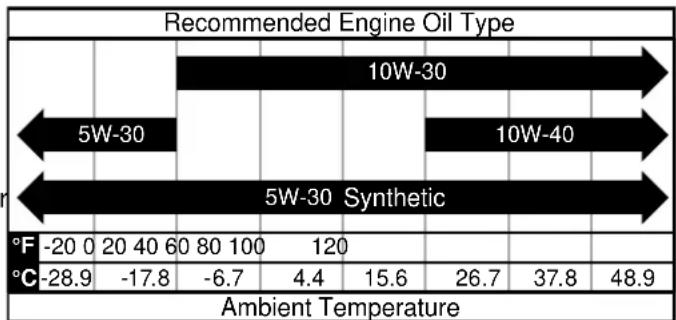
NOTE: Check the engine oil level before each use or every 8 hours of operation.
- Turn the generator off and allow the engine to cool for at least five minutes.
- Place the generator on a level surface in a well-ventilated area.
- Remove the engine service cover.
- Clean the area around the oil dipstick.
For initial oil fill:
-
Slowly unscrew and remove the oil dipstick.
-
Using the funnel, slowly pour the supplied engine oil into the oil fill hole. Stop frequently to make sure you do not overfill.
NOTE: Your generator was functionally tested in the factory and may contain minimum residual oil. Additional oil is required to operate the unit. Do not overfill.
- Replace and tighten the oil dipstick.
- Install the engine service cover and turn the lock knob to the locked position to secure.
To check oil level:
- Slowly unscrew and remove the oil dipstick.
- Clean the dipstick and re-seat it inside the oil fill hole. Do not thread the dipstick.
- Remove the dipstick and verify that the oil level is within safe operating range.
- If the oil level is low, add recommended engine oil incrementally and recheck until the level is within the safe operating range.
- Replace the oil dipstick and hand-tighten.
Install the engine service cover and turn the lock knob to the locked position to secure.
GASOLINE REQUIREMENTS
NOTICE Do not use E15 or E85 fuel in this product. Engine or equipment damage caused by stale fuel or the use of unapproved fuels (such as E15 or E85 ethanol blends) is not covered by warranty. Only use unleaded gasoline containing up to 10% ethanol.
- ALWAYS use CLEAN, FRESH, unleaded gasoline (87-93 octane) in this unit. NEVER use OLD, STALE, or CONTAMINATED gasoline.
- Up to 10% ethanol (gasohol) is acceptable (where available; non-ethanol fuel is recommended).
DO NOT use E85 or E15.
DO NOT use a gas oil mix.
DO NOT modify the engine to run on alternate fuels.
USING FUEL STABILIZER
Adding a fuel stabilizer (not included) extends the usable life of fuel and helps prevent deposits from forming that can clog the fuel system. Follow the manufacturer's instructions for use.
Always mix the correct amount of fuel stabilizer to gasoline in an approved gasoline container before fueling the generator. Run the generator for five minutes to allow the stabilizer to treat the entire fuel system.
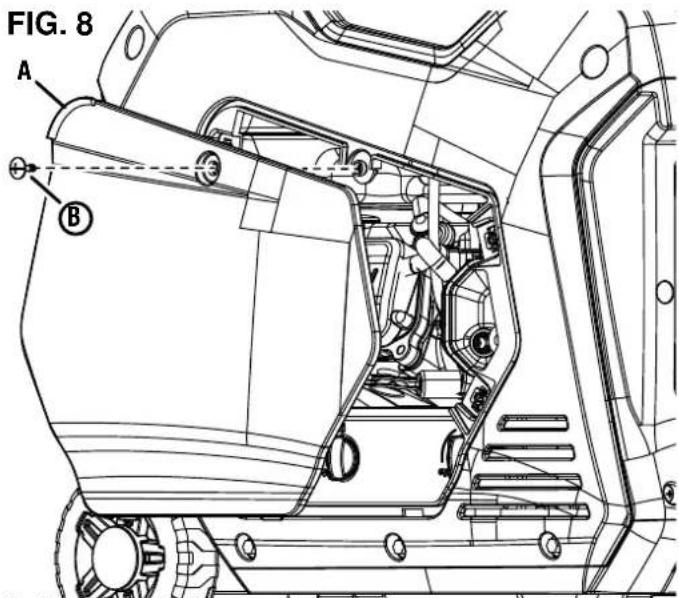
A-Engine service cover B-Screw
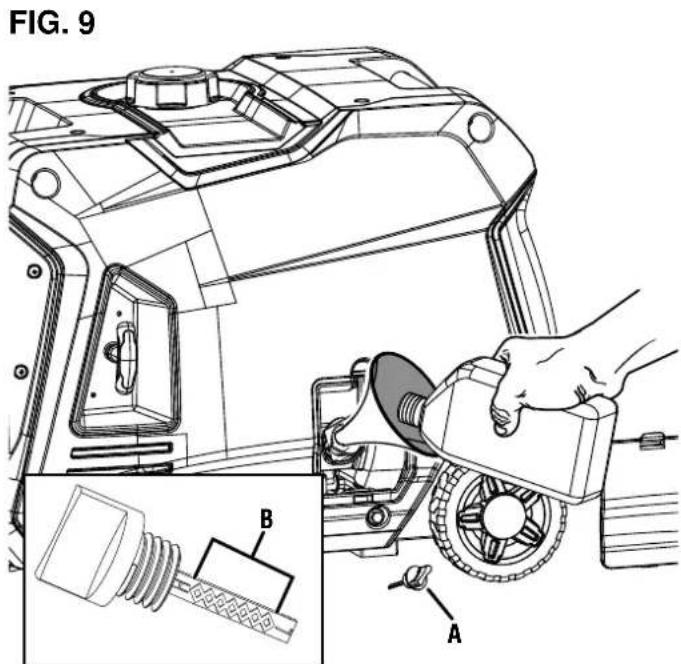
A-Oil Dipstick B-Safe Operating Range
LP GAS CYLINDER REQUIREMENTS
NOTICE Propane cylinders that use liquid withdrawal system can not be used on these models.
LP gas is extremely flammable and could ignite spontaneously when mixed with air. The LP gas cylinder used with this generator must meet the following requirements:
- The cylinder must be manufactured and labeled in accordance with the Specifications for LP Gas Cylinders of the U.S. Department of Transportation (D.O.T.) or the National Standard of Canada, CAN/CSA-B339, Cylinders, Spheres, and Tubes for Transportation of Dangerous Goods; and Commission.
- The cylinder must have a safety relief valve.
- The cylinder must include a UL listed Overfill Protection Device (OPD). Cylinders with this safety feature will have a unique triangular handwheel. Only use LP gas cylinders with this type of handwheel.
The cylinder must be periodically certified for use by the authority having local jurisdiction (AHJ). Before use, verify that the certification date on the cylinder has not expired. - All new cylinders must be purged of air and moisture prior to filling. Used cylinders that have not been plugged or kept closed must also be purged. The purging process should be done by a propane supplier (Cylinders from an exchange supplier should have been purged and filled properly).
CONNECTING AN LP GAS CYLINDER TO THE GENERATOR
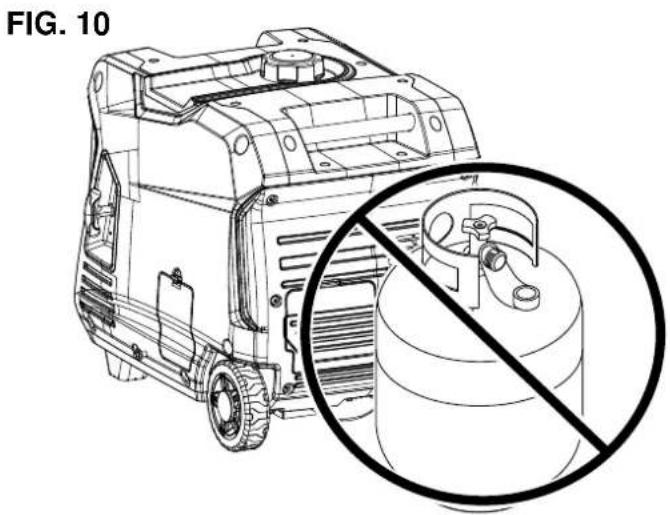
See Figures 10 - 11.
DANGER Fire and explosion hazard. Never connect or disconnect the LPG/propane hose while the engine is running. Do not smoke or create sparks while handling LPG/propane. Always turn the engine off and allow the generator to cool for at least five minutes before connecting the propane cylinder.
WARNING Never use a gas container, LPG/ propane hose, propane cylinder or any other fuel item that appears to be damaged.
WARNING To reduce the risk of injury, perform a leak test any time the LP gas cylinder is disconnected and reconnected.
- Turn the generator off and allow the engine to cool for at least five minutes.
- Place the generator on a level surface in a well-ventilated area. DO NOT connect or disconnect the LP gas cylinder indoors.
- Place the LP gas cylinder near the generator, but do not place it in the path of the muffler exhaust.
NOTE: The propane cylinder can be of any capacity but it must conform to the LP Gas Cylinder Requirements listed earlier in this section.
- Verify that the handwheel is in its full off position.
- Hold the LPG/propane hose firmly and push the nipple into the cylinder valve.
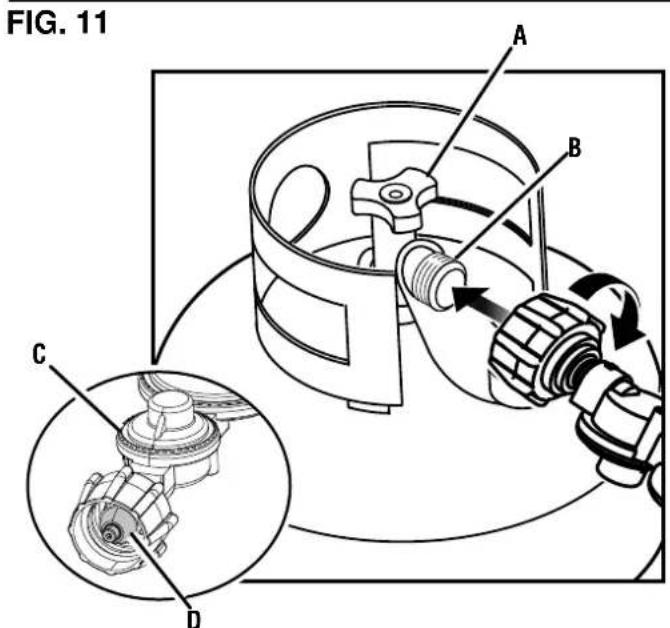
A-Handwheel
B-Cylinder valve
C - LPG/propane hose
D-Nipple
- Use your hand to thread the LPG/propane hose to the cylinder valve. Do not cross-thread. Do not use tools or sealants.
NOTE: You will feel some resistance as the hose seals in the cylinder valve. To complete the connection, turn the connector an additional one-half to three-quarters of a turn. If you are unable to complete the connection, disconnect the hose and try again. If you still cannot complete the connection, DO NOT use this hose! - Thread the propane hose onto the propane inlet. Gently pull the hose to see that it is secure.
ADDING GASOLINE
See Figures 12 - 13.
DANGER Fire and explosion hazard. Never remove the fuel cap or refuel the generator while the engine is running. Do not smoke or create sparks while fueling. Always turn the engine off and allow the generator to cool for at least five minutes before refueling.
DANGER Fire and explosion hazard. Do not overfill fuel tank. Fill only to the red maximum fill ring on the fuel screen. Overfilling may cause fuel to spill onto engine causing a fire or explosion hazard.
WARNING Never use a gasoline container, gasoline tank, or any other fuel item that is broken, cut, torn or damaged.
NOTICE Only fill the tank from an approved gasoline container. Make sure the gasoline container is internally clean and in good condition to prevent fuel system contamination.
- Turn the generator off and allow the engine to cool for at least five minutes.
- Place the generator on a level surface in a well-ventilated area. DO NOT fuel indoors.
- Clean area around fuel cap and remove the cap slowly.
- Slowly add the recommended fuel. Do not overfill.
NOTE: The gasoline level should NOT be higher than the red maximum fill ring on the fuel screen.
Install the fuel cap. Tighten securely.
- Clean up any spilled fuel.
- Move at least 30 ft. away from refueling area before restarting the engine.
NOTICE Fuel can damage paint and plastic. Use caution when filling the fuel tank. Damage caused by spilled fuel is not covered under warranty.
NOTICE Clean the fuel screen filter of debris before and after each fueling. Remove the fuel screen filter by slightly compressing it while removing it from the fuel tank.
SELECTING THE FUEL SOURCE
See Figure 14.
DANGER Fire and explosion hazard. DO NOT add gasoline to the fuel tank or connect the LPG/ propane hose to the generator while the generator is in operation.
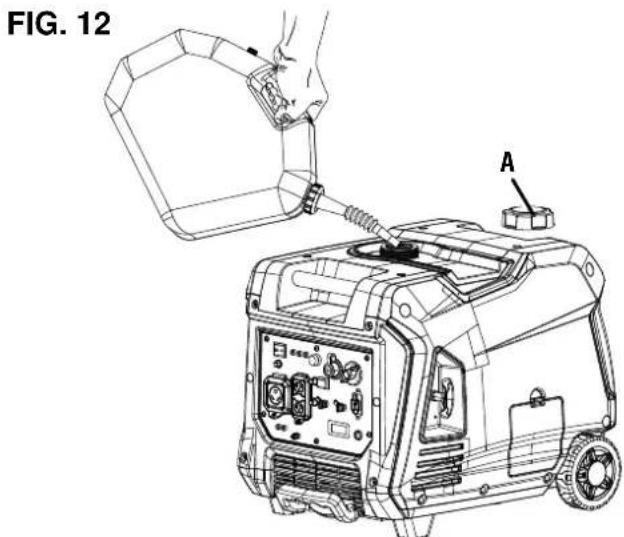
A - Fuel cap
FIG. 13
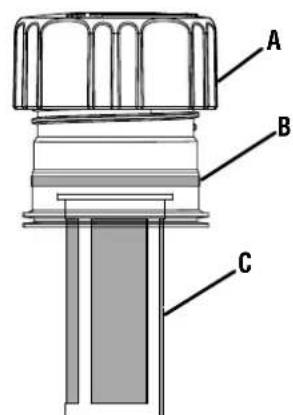
A-Fuel cap B-Max fill li C-Screen f
NOTICE Do not overload the generator. Load capacities differ depending on the fuel source. Before switching fuel sources, make sure the generator can supply enough running (continuous) and peak (starting) watts for the items your connected items.
The fuel source can be switched while the engine is off or while it is running if a propane tank is connected to the generator BEFORE operation. If you switch from gasoline to another fuel source while the engine is running, it may run rough for a few seconds as it purges gasoline from the carburetor.
To switch to gasoline:
- Turn the fuel valve to the open position to start the flow of gasoline.
- Rotate the fuel selector switch fully clockwise for GASOLINE.
- Turn off the flow of propane gas.
To switch to propane:
- Open the cylinder valve on the LP gas cylinder to start the flow of propane.
- Rotate the fuel selector switch fully counterclockwise for PROPANE.
- Turn off the flow of gasoline.
Engine power is reduced the higher you operate above sea level. Output will be reduced approximately 3.5% for every 1,000 feet of increased altitude from sea level.
High altitude adjustment is required for operation at altitudes over 5,000 ft. (1524 m). Operation without this adjustment will cause decreased performance, increased fuel consumption, and increased emissions.
NOTICE
DO NOT operate the generator at alti
tudes below 2,000 ft. (762 m) with the high altitude kit installed. Engine damage may occur.
High Altitude
Carburetor Kit
Part# 518527-01
DATA CENTER
See Figure 15.
Push the mode button to cycle through the data display modes.
Voltage: Displays current voltage output.
Frequency (Hz): Displays power output frequency in Hertz.
Lifetime Hours: Displays the lifetime run hours.
Fuel Level: Indicates how much gasoline remains in the fuel tank.
Run Time/Maintenance: Displays current run time. Resets to zero when shut down. Maintenance reminder displayed when required.
Maintenance Codes:
P25-Change engine oil
P50-Clean air filter, Change engine oil
P100-Change engine oil, clean air filter, replace fuel filter
BREAK-IN PERIOD
For proper break-in, do not exceed 50% of the rated running watts during the first five hours of operation.
Use supplied oil until first recommend oil change. Do not use full synthetic oil during break in period. Full synthetic oil may prevent proper breaking and seating of the piston rings.
Vary the load occasionally to allow stator windings to heat and cool and help seat the piston rings.
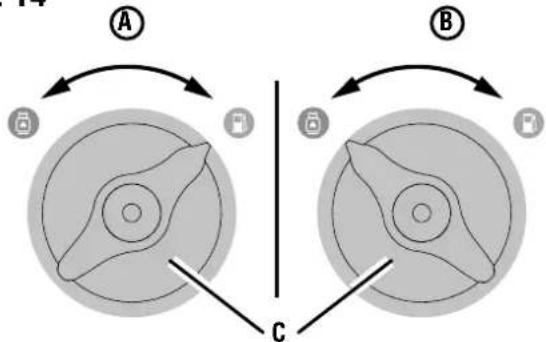
FIG. 14
A - Gasoline position
B - Propane position
C - Fuel selector switch
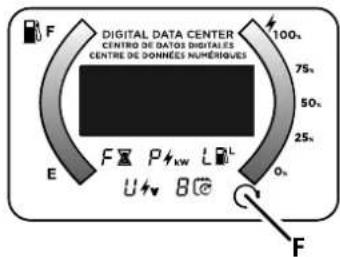
FIG. 15
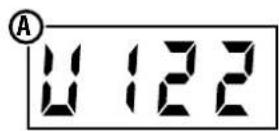
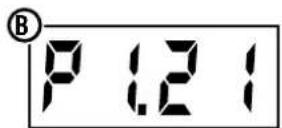
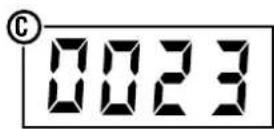
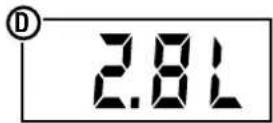
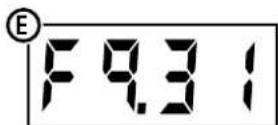
A - Voltage
B - Power output
C - Lifetime hours
D-Fuel level
E - Run time/maintenance reminder
F - Mode button
BEFORE STARTING THE GENERATOR
Verify that:
The generator is placed in a safe, appropriate location.
The generator is on a dry, flat, and level surface.
- Oil and fuel levels are within safe operating range.
- All loads are disconnected from the control panel receptacles.
- The ECO mode switch is in the OFF position.

DANGER
Fire and explosion hazard. DO
NOT move or tip the generator during operation.
STARTING THE GENERATOR: GASOLINE
See Figures 16 - 17.

DANGER
Fire and explosion hazard. DO
NOT move or tip the generator during operation.
- Place the generator in a safe, appropriate location.
- Unplug all loads.
- Be sure the ECO mode switch is in the OFF position.
- Check oil and fuel levels. If needed, add fuel or oil as described earlier.
- Turn the fuel selector switch on the control panel to gasoline operation. (See Figure 14).
- Place the run/stop switch in the on position.
- Manually close the choke if the engine is cold.
- Firmly grasp and slowly pull the recoil handle until you feel increased resistance. At this point, rapidly pull the recoil handle away from the generator until the engine starts.
NOTE: Gently return the recoil handle into place after starting the unit. Do not let it snap back against the unit. During initial starting, additional pulls may be required to prime the fuel pump.
- When the OUTPUT READY LED illuminates, you can safely connect loads to the control panel receptacles.
NOTE: Verify that all devices are turned off before connecting them to the generator.
NOTE: Make sure that the wattage requirements for all connected devices are in line with your generator's capabilities.
- Connect and start the largest device or appliance.
- Allow the generator output to stabilize. Once stable, the engine should run smoothly, and the device should function properly.
- Connect and start the next largest device or appliance.
- Allow the generator output to stabilize.
- Repeat this process for each additional load.
STARTING THE GENERATOR: PROPANE

DANGER
Fire and explosion hazard. Al
ways turn the propane tank valve to the fully closed position if not running the generator on propane.
- Place the generator in a safe, appropriate location.
- Unplug all loads.
- Be sure the ECO mode switch is in the OFF position.
- Check oil level. If needed, add oil as described earlier.
Make sure the LPG/propane hose is correctly connected to the generator and propane tank.
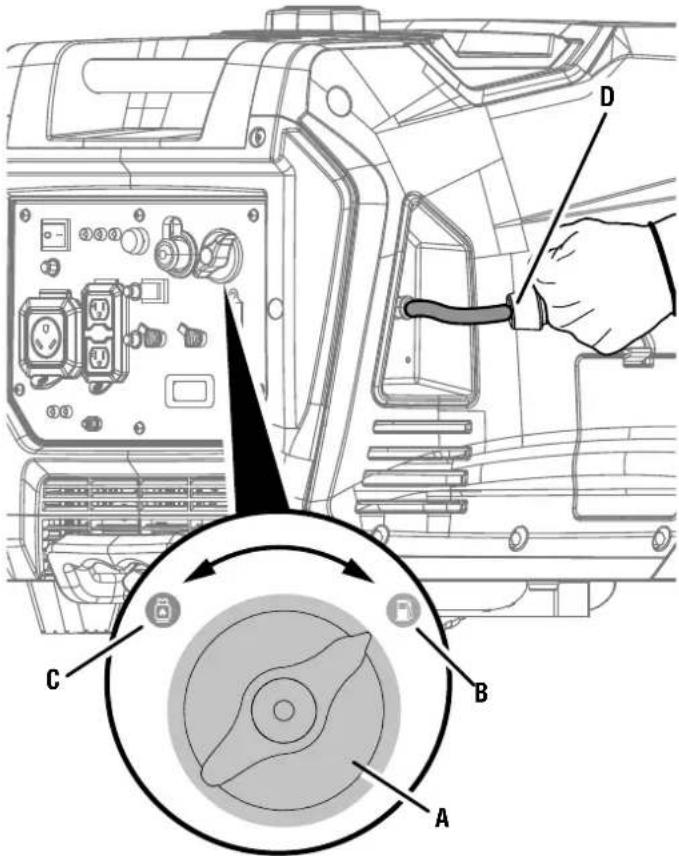
FIG. 16
A - Fuel selector switch
B - Gasoline
C - Propane
D -Recoil handle
- Turn the fuel selector switch to propane operation. (See Figure 14.)
- Fully open the valve on the propane tank.
- Place the run/stop switch in the on position.
- Manually close the choke if the engine is cold.
- Firmly grasp and slowly pull the recoil handle until you feel increased resistance. At this point, rapidly pull the recoil handle away from the generator until the engine starts.
NOTE: Gently return the recoil handle into place after starting the unit. Do not let it snap back against the unit. During initial starting, additional pulls may be required to prime the fuel pump.
- When the OUTPUT READY LED illuminates, you can safely connect loads to the control panel receptacles.
NOTE: Verify that all devices are turned off before connecting them to the generator.
NOTE: Make sure that the wattage requirements for all connected devices are in line with your generator's capabilities.
-
Connect and start the largest device or appliance.
-
Allow the generator output to stabilize. Once stable, the engine should run smoothly, and the device should function properly.
- Connect and start the next largest device or appliance.
- Allow the generator output to stabilize.
- Repeat this process for each additional load.
STOPPING THE GENERATOR
See Figures 16 - 17.
- Remove any connected loads from the control panel receptacles.
- Allow the generator to run at "no load" to reduce and stabilize engine and alternator temperatures.
- Turn the fuel selector switch to the propane position.
- Place the run/stop switch in the off position.
To stop the unit quickly in an emergency:
- Place the run/stop switch in the off position.
PARALLEL OPERATION
See Figure 17.
Parallel operation gives you the ability to link another compatible Westinghouse inverter generator for combined running and peak power output.
DANGER
Fire and electrocution hazard.
Never connect or disconnect the parallel cable leads when a generator is running. Failure to follow this rule may lead to serious personal injury or death.
WARNING
Correct connection of the cables
is very important when the generators are used with a transfer switch to supply power to a building. To avoid serious personal injury or damage to electrical devices, including the generators, do not try to power an electrical system in a building without using an approved transfer switch.
NOTICE
Connecting to a generator that is
not compatible can cause a low voltage output that may damage tools and appliances powered by the generator.
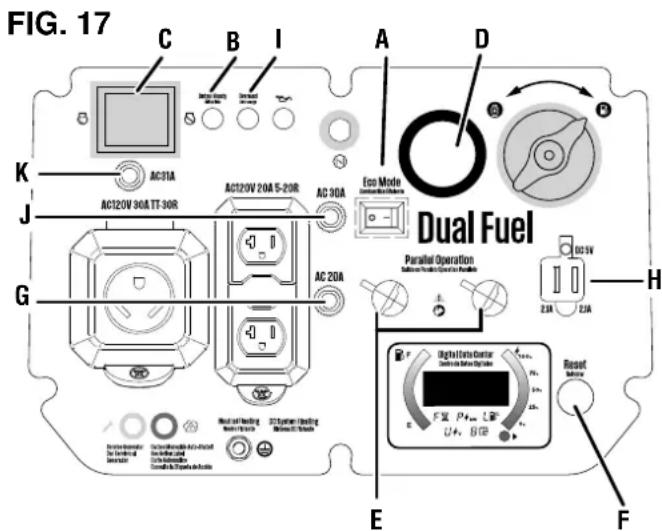
A - ECO mode switch
B-Output ready LED
C - Run/stop switch
D-Propane inlet
E - Parallel operation outlets
F-Reset button
G-20 amp circuit breaker
H-USB ports
I-OverloadLED
J - 30 amp circuit breaker
K - Main circuit breaker
A Westinghouse 507PC (50-amp) or 304PC (30-amp) parallel cord (purchased separately) is required for parallel operation. This cord can be purchased from an authorized Westinghouse Generator dealer.
NOTE: Compatible Westinghouse generators without parallel ports can be operated in parallel with the receptacle-mounted parallel cable, Part# 507PC.
Refer to the user manual included with your parallel cord or receptacle-mounted parallel cable for installation and operation instructions.
LOW OIL INDICATOR
See Figure 17.
The LOW OIL LED on the control panel will illuminate when the unit is low or out of oil. The generator will not start when the indicator is lit. To resume normal operation, add engine oil as described earlier in this section. Do not attempt to crank or start engine before it has been properly serviced with recommended oil.
ECO MODE
See Figure 17.
NOTICE
Always start the generator with the
ECO mode switch in the OFF position. Allow the engine speed to stabilize and the OUTPUT READY LED to illuminate before putting the ECO mode switch in the ON position.
NOTICE
allel operation with another Westinghouse inverter generator.
ECO mode minimizes fuel consumption and noise by adjusting the engine RPM to the minimum required for the current load.
Turn ECO mode ON when powering small appliances with continuous loads such as a computer or electric light.
Turn ECO mode OFF when powering large surge loads such as an air conditioner or electric pump.
To turn on ECO mode, verify that the OUTPUT READY LED is illuminated, then push the switch to the ON position. If no load is present, the generator RPM will drop to idle speed. The generator will detect loads as they are applied and increase engine RPM.
To run the generator at maximum power and RPM, push the ECO mode switch to the OFF position.
OVERLOAD RESET
See Figure 17.
Do not overload the generator. If the generator is approaching or has reached an overload condition, the OVERLOAD LED on the control panel will illuminate.
If the generator is close to overloading, the OVERLOAD LED will blink. Turn off and remove one or more connected devices to decrease the load and resume normal operation. If the load is not reduced, the unit will reach an overload condition. To extend the service life of the generator, avoid running the unit near capacity.
If the generator is overloaded or if there is a short circuit in a connected device, the OVERLOAD LED will turn solid, and the unit will automatically disconnect from the load. The engine will continue to run, but there will not be any electrical output.
To restore electrical output after an overload:
-
Remove any connected loads from the control panel receptacles.
-
Push the RESET button on the control panel until the OVERLOAD LED goes OFF and the OUTPUT READY LED is illuminated.
- Reset the circuit breaker(s) if activated.
- Verify that the intended running and surge loads do not exceed the generator's capacity.
- Reconnect electrical loads sequentially, allowing the generator to stabilize after each load is connected.
CIRCUIT BREAKERS
See Figure 17.
The 20 amp circuit breaker protects devices and equipment connected to the 120V , 20 amp receptacles from electrical overload. The 30 amp circuit breaker protects devices and equipment connected to the 120V , 30 amp receptacles. If a circuit breaker activates, turn off the connected device, remove it from the port or outlet, and press the circuit breaker to reset.
USB PORTS
See Figure 17.
Use the USB ports and USB cables (not included) to charge USB-compatible devices such as phones, tablets, and speakers (up to 2.1 Amps).
NOTE: The USB ports are designed for charging only and do not have data transfer or communication capabilities.
TRANSPORTING
- Turn off the generator.
- Allow the generator to cool a minimum of 30 minutes before transporting.
- Replace all protective covers on the generator control panel.
- Only use the generator's fixed handle to lift the unit or attach any load restraints such as ropes or tie-down straps. DO NOT attempt to lift or secure the generator by holding onto any of its other components.
- Keep the unit level during transport to minimize the possibility of fuel leakage or, if possible, drain the fuel or run the engine until the fuel tank is empty before transport.

CAUTION
Fire hazard. DO NOT up-end the
generator or place it on its side. Fuel or oil can leak and damage to the generator may occur.
WARNING the spark plug boot plug when performin
Accidental start-up. Disconnect (see figure 20) from the sparking maintenance on the generator.
WARNING
Replace damaged or worn items or equivalent replacement parts. If incompatible part might create a result in serious personal injury.
with recommended or equivalent replacement parts. Using an incorrect or incompatible part might create a hazard that could result in serious personal injury.
WARNING
Allow hot components to cool for erforming any maintenance pro
30 minutes before performing any maintenance procedure.
WARNING
Avoid skin contact with engine oil, otective clothing and equipment. n with soap and water. Prolonged oline or engine oil may cause seed other adverse reactions.
or gasoline. Wear protective clothing and equipment. Wash all exposed skin with soap and water. Prolonged skin contact with gasoline or engine oil may cause severe skin irritation and other adverse reactions.
NOTICE
Check the physical condition of the each use. Look for loose bolts, fluid or signs of wear. Replace all damaged placement parts or assistance, contact service team.
To prolong the life of this product, follow the maintenance instructions in this section. Contact customer service before servicing any recall or warranty parts.
CLEANING THE GENERATOR
Do not store or operate your generator in dirty, dusty, or corrosive environments. Do not allow foreign materials and debris to clog the vents on the unit.
NEVER clean the generator with a garden hose. Water can damage the generator's fuel system and electrical components. If the unit needs to be cleaned, use a soft brush and damp cloth to clean the exterior and use low pressure air (no greater than 25 psi) to clean the vents.
Never use gasoline as a cleaning agent.
CLEANING/ REPLACING THE AIR FILTER
See Figure 18.
Keep air filter clean. A dirty air filter can cause poor performance and decrease the service life of the product. NEVER operate the generator without an air filter in place.
- Turn the generator off and allow the engine to cool for 30 minutes.
- Remove the engine service cover.
- Unlock the knobs and remove the air filter cover.
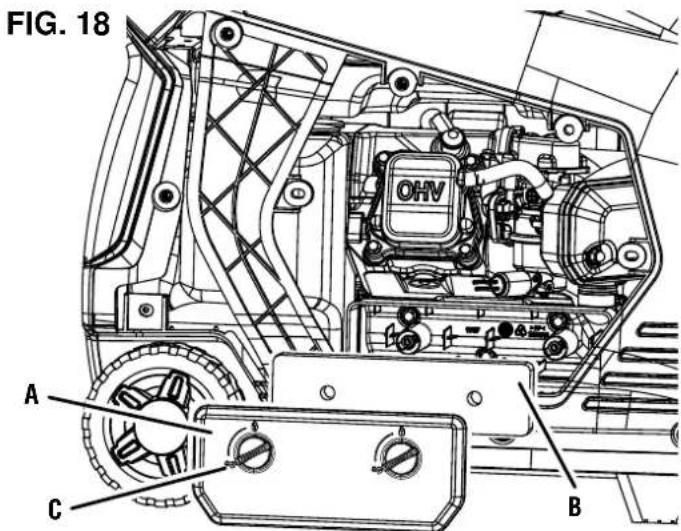
A - Air filter cover
B-Air filter
C - Lock knob
- Remove the air filter from the air cleaner housing and place it in a suitable cleaning container. Replace the air filter if damaged.
NOTE: The air filter may be covered in oil. Use an appropriate container. - Wash the air filter by submerging the filter in a solution of household detergent and warm water. Slowly squeeze the filter to thoroughly clean.
NOTICE
DO NOT twist or tear the air filter during driving. Only apply slow but firm squeezing
- Rinse the air filter by submerging it in fresh water and applying a slow squeezing action. Allow the filter to dry thoroughly.
NOTICE
Do not pollute. Follow the guidelines to other governmental agencies for proper hazardous materials. Consult local authorization facility.
- Dip the air filter in clean engine oil then squeeze out all excess oil. The engine will smoke when started if too much oil is left in the filter.
- Install the air filter in the air cleaner housing and reinstall the air filter cover.
- Install the engine service cover and turn the lock knob to the locked position to secure.
CHANGING THE ENGINE OIL
See Figure 19.
For optimal performance, change the engine oil according to the figures specified in the maintenance schedule or the engine manual (if applicable). When using the generator under extreme, dirty, dusty conditions or in extremely hot weather, change the oil more frequently.
NOTE: Change the oil while the engine is warm but not hot. Warm engine oil drains more quickly and thoroughly than cool lubricant. Contact with hot lubricant will cause serious burns.
- Turn the generator off and allow the engine to cool for 30 minutes.
- Place the generator on a level surface in a well-ventilated area.
- Remove the oil access cover.
- Place an oil pan (or suitable container) under the unit.
- Remove the rubber plug located beneath the oil drain bolt.
- Remove the oil drain bolt.
After the oil has drained completely, replace the oil drain bolt and rubber drain plug. - Refill the oil as described in the Operations section.
- Replace the oil dipstick and hand-tighten.
- Clean up any spilled oil.
Install the engine service cover.
CLEANING/ REPLACING THE SPARK PLUG See Figure 20.
NOTICE
ALWAYS use the Westinghouse OEM
or compatible non-resistor-type spark plug. Use of resistor-type spark plug can result in rough idling, misfire, or may prevent the engine from starting.
Make sure the spark is clean and properly gapped. To clean or replace your spark plug:
- Turn the generator off and allow the engine to cool for 30 minutes.
- Place the generator on a level surface in a well-ventilated area.
- Remove the engine service cover.
- Remove the spark plug boot by firmly pulling the spark boot directly away from the engine.
- Clean the area around the spark plug.
- Remove the spark plug with the included spark plug socket wrench.
NOTICE
Never apply any side load or move the rally when removing the spark plug.
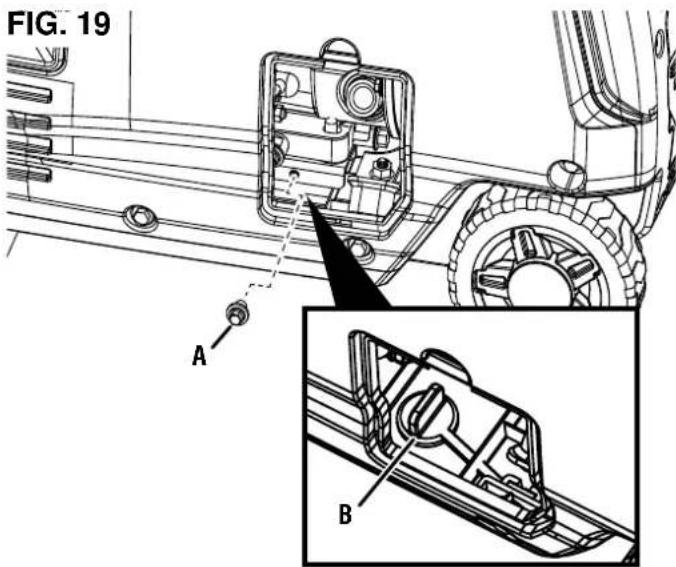
A-Oil drain bolt B-Rubber drain plug
FIG. 20
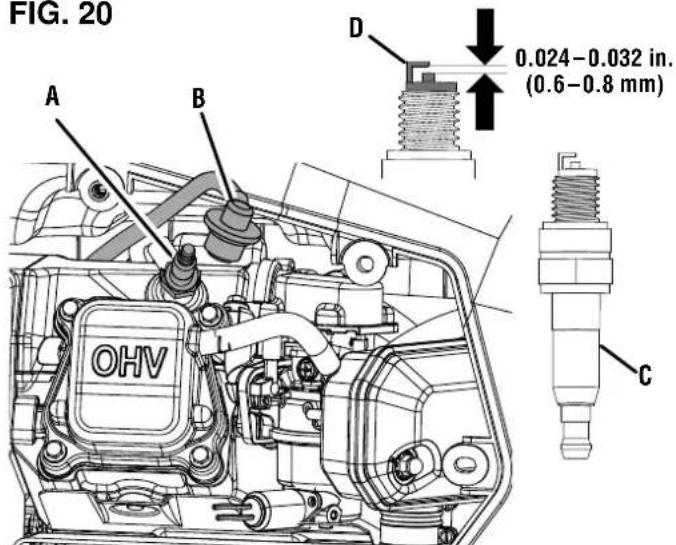
A - Spark Plug
B - Spark Plug Boot
C - Insulator
D - Electrode
- Inspect the spark plug. Replace if electrodes are pitted, burned, or the insulator is cracked. Only use a recommended replacement plug.
Measure the spark plug electrode gap with a wire-type feeler gauge. If necessary, correct the gap by carefully bending the side electrode.
Spark plug gap: 0.024 - 0.032 in. (0.6 - 0.8 mm)
- Carefully install the spark plug finger tight, then tighten as additional 3/8 to 1/2 turn with the spark plug wrench.
- Install the spark plug boot and close the spark plug service door.
CLEANING THE SPARK ARRESTOR
See Figure 21.
Check and clean the spark arrester according to the figures specified in the Maintenance Schedule or the engine manual (if applicable). Failure to clean the spark arrester will result in degraded engine performance.
- Turn the generator off and allow the engine to cool for 30 minutes.
- Place the generator on a level surface in a well-ventilated area.
- Remove the two screws securing the spark arrestor bracket.
- Remove the bracket, screen, and spark arrestor from the generator.
- Gently clean the screen and spark arrestor using a wire brush.
- Reinstall the spark arrestor, screen, and bracket. Tighten screws securely.
DRAINING THE FUEL TANK AND CARBURETOR FLOAT BOWL
See Figures 22 - 24.

WARNING
ALWAYS store gasoline in a con- gasoline. Unapproved containers rate allowing gasoline or gasoline, which can create a serious hazard.
Even properly stabilized fuel can leave residue and cause corrosion if left long term. If storing the generator for two to six months, drain the float bowl to prevent gum and varnish buildup in the carburetor. If storing the generator for longer than six months, drain the fuel tank to prevent fuel separation, deterioration, and deposits in the fuel system.
- Turn off the generator and allow the engine to cool for 30 minutes.
- Place the generator on a level surface in a well-ventilated area.
To drain the float bowl:
- Turn the fuel selection switch to the PROPANE position.
- Remove the engine service cover.
- Locate the drain valve on the bottom of the carburetor float bowl.
- Attach a drain hose onto the drain valve.
- Place the bottom end of the hose outside the generator into an approved gasoline container to catch the drained fuel.
- Rotate the drain valve counterclockwise to open.
- Close the drain valve by rotating clockwise when the float bowl is empty. Install the engine service cover.
To run the float bowl dry:
- Start the generator as described earlier.
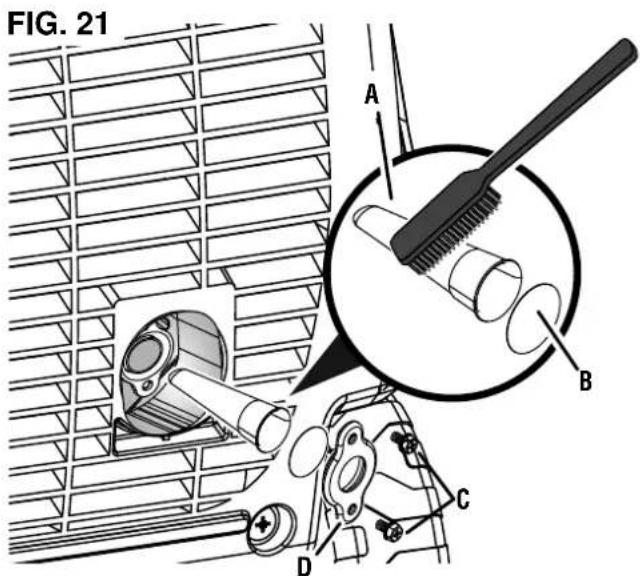
A - Spark Arrestor
B - Screen
C - Screws
D - Bracket
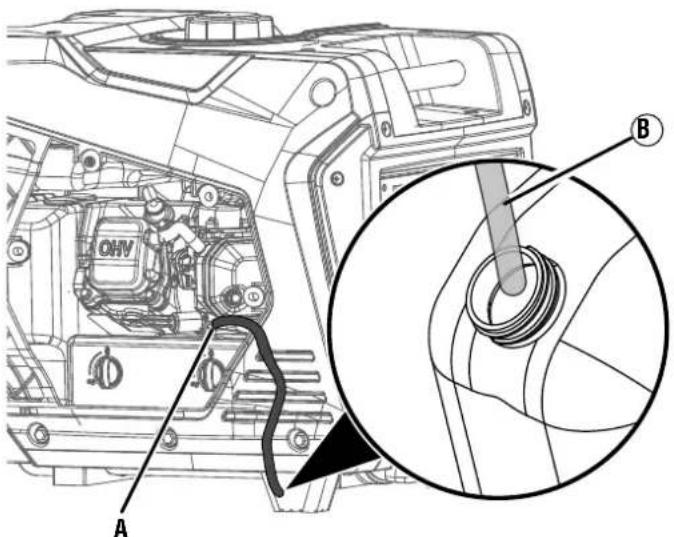
FIG. 22
A - Drain valve
B - Drain hose
After the engine starts, turn the fuel selection switch to the PROPANE position.
- Allow the generator to run until the fuel in the carburetor is depleted and the engine stops.
- Place the run/stop switch in the OFF position
To drain the fuel tank:
NOTICE
To prevent damage to the unit, drain the core emptying the fuel tank. See Chang-ze oil for details.
- Turn the fuel selector switch to the PROPANE position.
- Clean area around fuel cap and remove the cap slowly.
- Remove the fuel screen filter by slightly compressing it while removing it from the tank.
- Using a commercially available gasoline hand pump (not included), siphon the gasoline from the fuel tank into an approved gasoline container. DO NOT use an electric pump.
NOTE: The fuel tank can also be drained using the carburetor drain screw and drain hose as described earlier. Keep the fuel selector switch in the GASOLINE position to allow fuel to flow from the tank through the carburetor.
REPLACING THE FUEL FILTER
See Figure 25.
Overtime, the fuel filter may become dirty or clogged. To reduce the risk of engine failure, replace the fuel filter according to the figures specified in the maintenance schedule or the engine manual (if applicable).
- Turn the generator off and allow the engine to cool for 30 minutes.
- Drain the fuel tank as described previously.
- Remove the engine service cover.
- Locate the fuel filter and note the filter's orientation.
- Using pliers, squeeze the fuel line clips and slide the fuel lines away from the filter.
- Install the fuel lines onto the new filter. Make sure the fuel filter is oriented correctly.
- Replace the engine service cover and tighten screws securely.
FIG. 23
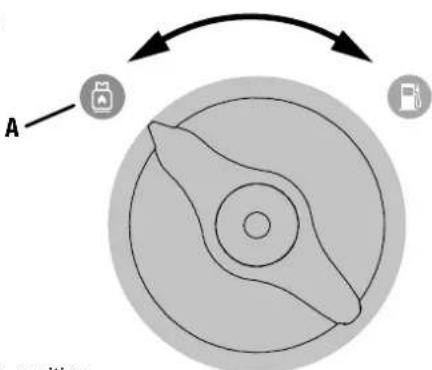
A - Propane position
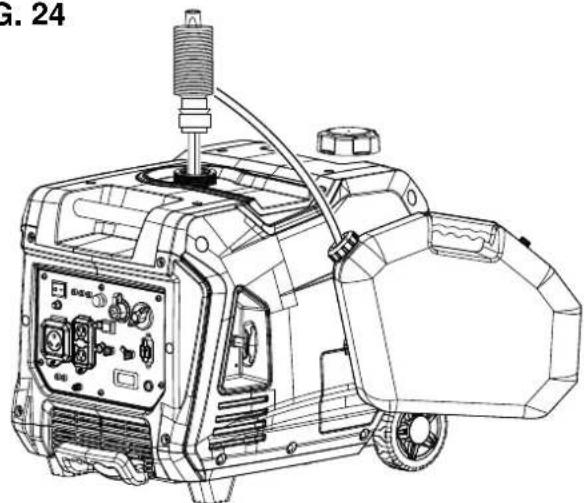
FIG. 24
FIG. 25
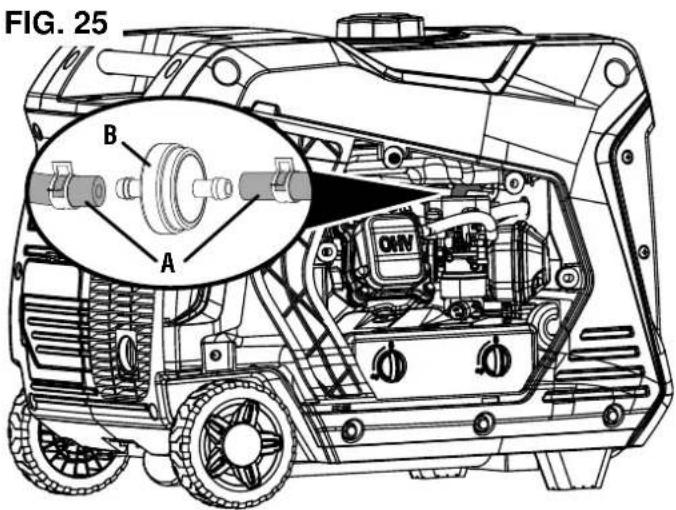
A-Fuel line B-Fuel filte
CHECKING/ADJUSTING THE VALVE CLEARANCE
See Figures 26 - 27.
NOTICE
Checking and adjusting valve clear-lone when the engine is cold.
- Turn the generator off and allow the engine to cool for 30 minutes.
- Place the generator on a level surface in a well-ventilated area.
- Remove the rocker arm cover and carefully remove the gasket. If the gasket is torn or damaged, it must be replaced.
- Remove the spark plug so the engine can be rotated more easily.
- Pull the recoil handle to rotate the engine to top dead center (TDC). Looking through the spark plug hole; the piston should be at the top (both valves are closed).
- Both rocker arms should be loose at TDC on the compression stroke. If they are not, rotate the engine 360^ .
- Insert a feeler gauge between the rocker arm and the valve stem to measure valve clearance.
| Intake Valve Exhaust Valve | ||
| Valve Clearance | 0.0031 – 0.0047 in (0.08 – 0.12 mm) | 0.005 – 0.007 in (0.13 – 0.17 mm) |
| Torque 8–12 Nm 8–12 Nm | ||
- If an adjustment is necessary, loosen the jam nut.
- Slide the appropriate feeler gauge between the rocker arm and the valve stem.
- Tighten the adjustment screw onto the push rod to obtain the specified clearance.
NOTE: You should be able to feel the rocker arm touch the feeler gauge.
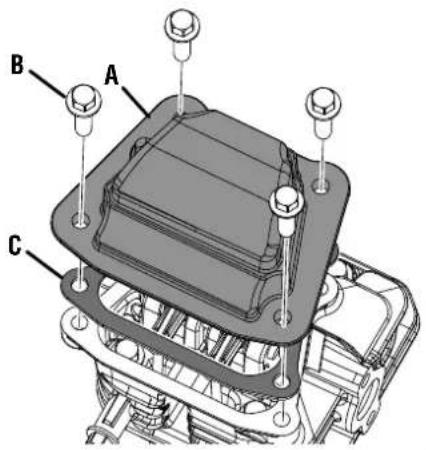
FIG. 26
A - Rocker arm cover
B-Bolt
C-Gasket
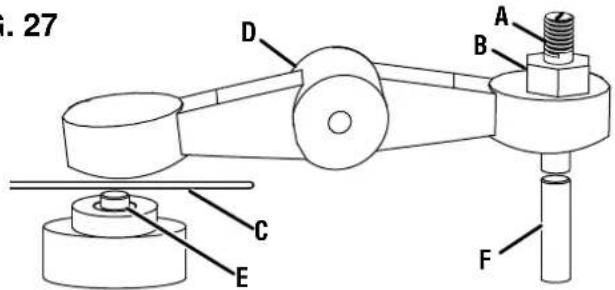
FIG. 27
A - Adjustment screw
B - Jam nut
C-Feeler gauge
D - Rocker arm
E - Valve stem
F-Pushrod
- Hold the adjustment screw in place and tighten the nut. Torque: 106 inch-pound (12 Nm)
- Recheck valve clearance.
If no further adjustments are needed, perform this procedure on the other valve. - When finished, install the gasket, rocker arm cover, and spark plug.
STORAGE
Turn the unit off and allow it to cool a minimum of 30 minutes before storage. Keep the unit upright. Do not store the generator on its side. Drain fuel before storing the unit. Store the unit and the fuel separately in well-ventilated areas away from sparks, open flames, pilot lights, heat, and other sources of ignition.
NOTICE
Gasoline stored for as little as 30 days can deteriorate, causing gum, varnish, and corrosive build up
in fuel lines, fuel passages, and the engine. This corrosive buildup restricts the flow of fuel, which can prevent the engine from starting after a prolonged storage period. The use of fuel stabilizer significantly increases the storage life of gasoline. Full-time use of fuel stabilizer is recommended. Follow the manufacturer's instructions for use.
| STORAGE TIME RECOMMENDED PROCEDURE | |
| Less than 1 month | Replace all protective covers on the generator control panel. Clean the exterior of the generator and remove any debris from the muffler cooling vents. |
| 2 to 6 months | Replace all protective covers on the generator control panel. Clean the exterior of the generator and remove any debris from the muffler cooling vents. Drain the carburetor float bowl. (Store gasoline in an approved gasoline container or dispose of it according to state and local ordinances.) |
| 6 months or longer | Replace all protective covers on the generator control panel. Clean the exterior of the generator and remove any debris from the muffler cooling vents. Drain the carburetor float bowl and the fuel tank. (Store gasoline in an approved gasoline container or dispose of it according to state and local ordinances.) Put a tablespoon of engine oil into the spark plug cylinder. Gently pull the recoil handle to slowly turn the engine and distribute the lubricant. Reinstall the spark plug Change the engine oil. |
MAINTENANCE SCHEDULE
Regular maintenance will improve performance and extend the service life of the generator. Follow the hourly or calendar intervals, whichever occurs first. More frequent service is required when operating in adverse conditions as noted below.
NOTE: If your product has a separate engine manual, disregard the information in this chart and follow the instructions in the engine manual.
| Before Each Use | After First 25 Hours or First Month | After 50 Hours or Every Six Months | After 100 Hours or Every Six Months | After 300 Hours or Every Year | |
| Check Engine Oil X | |||||
| Change Engine Oil1 | X | X | |||
| Clean Air Filter2 | X | ||||
| Inspect/Clean Spark Arrestor | X | ||||
| Inspect/Clean Spark Plug | X | ||||
| Inspect/Adjust Valve Clearance3 | X | ||||
| Replace Spark Plug | X | ||||
| Replace Air Filter X | |||||
| Replace Fuel Filter X | |||||
| 1Change oil every month when operating under heavy load or in high temperatures.2Clean more often under dirty or dusty conditions. Replace air filter if it cannot be adequately cleaned.3Recommend service to be performed by authorized Westinghouse service dealer. | |||||
| PROBLEM POSSIBLE | CAUSE CORRECTION | |
| Engine starts, then shuts down | Fuel level is low or depleted. Refuel. | |
| Incorrect engine oil level. Check engine oil level. | ||
| Dirty air filter. Clean the air filter. | ||
| Contaminated gasoline. Drain the fuel tank. Refuel with fresh gasoline. | ||
| Defective low oil level switch. Contact Westinghouse house customer service toll-free at 1-855-944-3571. | ||
| Engine lacks power | Air filter restricted. Clean or replace air filter. | |
| Stale gasoline, generator stored without treating or draining gasoline, or refueled with bad gasoline. | Drain the fuel tank. Refuel with fresh gasoline. | |
| Fuel system malfunction, ignition malfunction, valves stuck, etc. | Contact Westinghouse customer service toll-free at 1-855-944-3571. | |
| Engine will not start | Out of fuel. Refuel. | |
| Stale gasoline, generator stored without treating or draining gasoline, or refueled with bad gasoline. | Drain the gasoline tank. Refuel with fresh gasoline. | |
| Dirty air filter. Clean the air filter. | ||
| Low engine oil level stopped generator. If LOW OIL LED illuminated, turn run/stop switch OFF. Add engine oil. | ||
| Spark plug wet with fuel (flooded engine). Wait five minutes. Turn fuel selector switch to the PROPANE position. Pull recoil handle rapidly several times. If the generator does not start, remove spark plug and dry. | ||
| Spark plug faulty, fouled, or improperly gapped. | Gap or replace the spark plug. Reinstall. | |
| Fuel system malfunction, ignition malfunction, valves stuck, etc. | Contact Westinghouse customer service toll-free at 1-855-944-3571. | |
| CO sensor removed or modified. Return to original configuration. | ||
| CO sensor activated or system fault occurred. | Relocate generator / Contact Westinghouse customer service toll-free at 1-855-944-3571. | |
| Engine runs rough or bogs when load applied | Dirty air filter. Clean the air filter. | |
| Generator overloaded. Unplug some devices. | ||
| Faulty power tool or appliance. Replace or repair air tool or appliance. Stop and restart the engine. | ||
| Fuel system malfunction, ignition malfunction, valves stuck, etc. | Contact Westinghouse customer service toll-free at 1-855-944-3571. | |
| No power at AC receptacles | OUTPUT READY LED is OFF and OVERLOAD LED is ON. | Check AC load. Stop and restart engine. |
| Check the air inlet. Stop and restart the engine. | ||
| AC circuit breaker/s tripped. | Check AC loads and reset circuit breaker/s. | |
| Faulty power tool or appliance. Replace or repair air tool or appliance. Stop and restart the engine. | ||
| Faulty generator. | Contact Westinghouse customer service toll-free at 1-855-944-3571. | |
| Frost on the propane tank or regulator | If the temperature of the propane tank drops below the dew point, condensation on the tank may turn to frost or ice. This typically occurs in humid conditions. | Providing all the propane fuel handling equipment is functioning normally, no correction is needed. |
| The Propane tank is not equipped with an Overfilling Prevention Device (OPD). | If you suspect your propane fuel tank is not equipped with an OPD device, discontinue operation immediately and replace the propane fuel tank with a propane tank equipped with a an OPD. | |
| Propane fuel tank overfilled. If you suspect your propane fuel tank has been overfilled, discontinue operation immediately and return the propane fuel tank to the place of purchase or refilling. | ||
| Propane fuel smell Fuel | regulator or fuel hose and fittings not securely sealed. | Using a soap solution check each connection and tighten as needed. |
| Propane fuel regulator vent active. The propane fuel regulator is equipped with a vent that will allow a small amount of propane fuel vapor to escape from the regulator when the propane tank valve is opened. This can be normal providing the venting of the propane is brief. If you suspect that this is abnormal, immediately discontinue use and have the propane regulator inspected by a qualified technician. | ||
| Residual fuel from the carburetor dispersing after operation. | Normal, no correction is needed. | |
| Poor performance or engine stalling on Propane | Propane fuel line kinked or crushed. Inspect probe | propane fuel line and remove kinks or other obstructions. |
| Fuel selector valve not properly positioned. Roate the fuel valve fully until the pointer is directly in line with the desired fuel. | ||
| Gasoline not purged from the carburetor before switching to propane. | Close the propane fuel tank valve. Move the fuel selector switch to gas. Start the engine and allow the engine to run until the gasoline has been consumed in the carburetor. Begin propane start up procedure. |
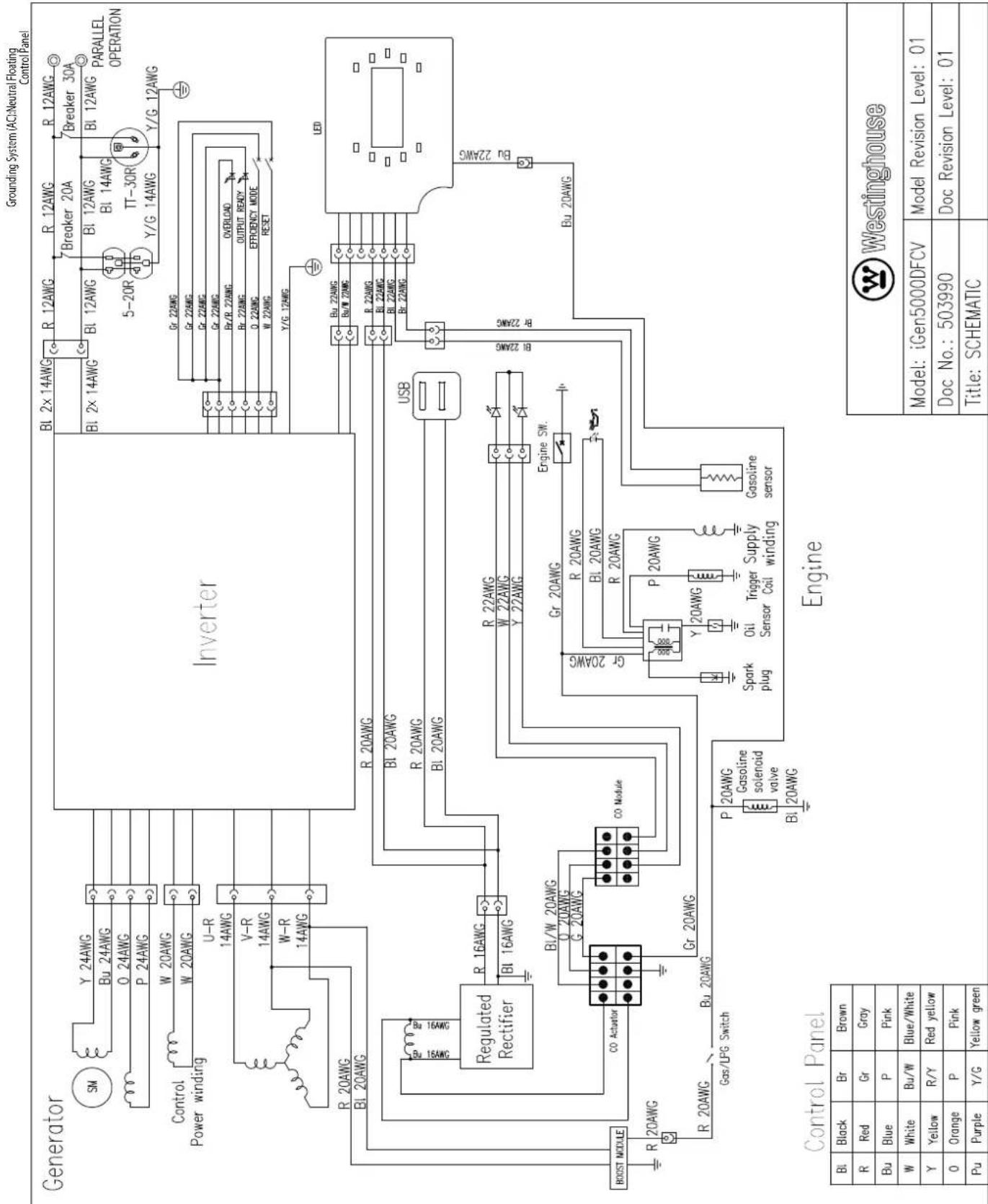
iGen5000DFcv
GENERADOR INVERSOR DIGITAL
Westinghouse Outdoor Power
Warranty registration
777 Manor Park Drive
Columbus, OH 43228
Failure to follow warnings, instructions and operator's manual will result in death or serious injury.
Generatior could cause electrical shock.
A. FOR THE PROODY CONDITION A. ADAPTIVE NOT ADAPTIVE A. Attractive switch must be used when
Never fuel unit with arginine running. Always fuel in well ventilated area. Always allow fuel to cool before fueling.
Hot muffler and exhaust gases can cause fires. Keep at least 5ft. (1.5 m) clearance from any combustibles or structures, including overhead.
Exhaust contains poisonous carbon monoxide gas that can cause unconsciousness or DEATH. Install Carbon Monoxide alarms inside home.
For electrical equipment only, Failure property ground generator can result in electrocution.

- Combinatorial of generator space, protocurve an electrocyclotic.
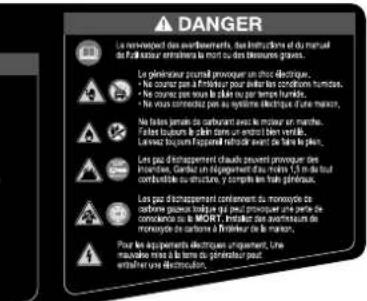

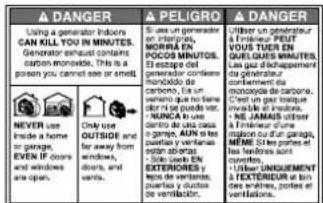
(6)
Westinghouse
Westinghouse Outdoor Power Equipment Co., Ltd. 3028176
Made in:
Faddeur de.


12 =


12 =

图1

13/14

12/12

13/14

13/14

= 12

1

12/12

19/19

19/19

12/12

14/14

m = 311


A
AD


设


。


NE PAS RETOURNER CE PRODUIT AU MAGASIN
Westinghouse Outdoor Power
Warranty registration
777 Manor Park Drive
Columbus, OH 43228
AVOIR DES QUESTIONS?
PRISES 120 VOLTS C.A.
CENTRE DE DONNÉES LED
www.WestinghouseOutdoorPower.com
Service Hotline (855) 944-3571
777 Manor Park Drive, Columbus, OH 43228

and Westinghouse are trademarks of Westinghouse Electric Corporation.
Used under license by Westinghouse Outdoor Power Equipment.
© 2024 MWE Investments, LLC All Rights Reserved.