5500 - Measuring equipment PeakTech - Free user manual and instructions
Find the device manual for free 5500 PeakTech in PDF.


User questions about 5500 PeakTech
0 question about this device. Answer the ones you know or ask your own.
Ask a new question about this device
Download the instructions for your Measuring equipment in PDF format for free! Find your manual 5500 - PeakTech and take your electronic device back in hand. On this page are published all the documents necessary for the use of your device. 5500 by PeakTech.
USER MANUAL 5500 PeakTech
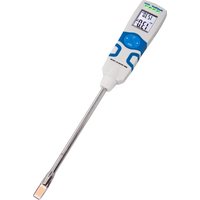
Deep Frying Oil Tester
natural_image
Hand using a digital thermometer to stir contents in a kitchen griddle bowl (no visible text or symbols)natural_image
Simple line drawing of a trash bin with diagonal lines crossing it, no text or symbols present.This device complies with all EU regulations on CE conformity (CE mark), 2014/30 / EU (electromagnetic compatibility), 2011/65 / EU (RoHS) and the legal regulations for articles that come into contact with foodstuffs
To ensure the operational safety of the device and to avoid serious injuries caused by burns, the following safety instructions for the operation of the device must be observed.
Damage caused by non-observance of these instructions is excluded from claims of any kind.
General:
▶ Check periodically whether a newer manual is available for download on the manufacturer's homepage, so that the data and descriptions are always up-to-date
▶ Only use this device within its specified parameters. Do not exceed the maximum permissible input values under any circumstances (serious risk of injury and / or destruction of the device)
This device has an IP65 degree of protection: it is dust-proof and protected against water jets from any angle (nozzle)
Before the measurement:
▶ Never operate the unit if it is not completely closed. Check the device and accessories for possible damage before use. In case of doubt, do not make any measurements.
Before recording the measurement, the device should be stabilized to the ambient temperature (important when moving from cold to warm rooms and vice versa).
▶ Observe all warnings in this manual and on the appliance.
When measuring:
▶ Use your personal protective equipment for each measurement to avoid injury.
▶ Watch your surroundings! Do not use the unit directly next to unprotected persons. Oil sprays can cause serious injuries to you or your fellow people!
The measurements may only be carried out by experts or trained personnel. These operating instructions should be handed over to each new user before the first use.
▶ Use the device only in regularly electrically tested systems. Never connect the conductive metal parts of the device with a voltage source!
▶ Carry out an optical inspection of the system for errors and damage before each measurement. In case of doubt, do not carry out any measurements!
▶ Avoid strong vibration or fall damage
▶ Do not leave the unit unattended - remove the tester from the hot oil when you leave the place
▶ Never touch the sensor or the metal shaft immediately after the measurement as these parts can be very hot (risk of burning)
▶ Avoid any proximity to explosive, easily flammable or chemical substances when the sensor is heated
▶ Replace the battery as soon as the battery symbol "BAT" lights up. Lack of battery power can result in imprecise results. Physical damage can result!
Cleaning, maintenance and storage:
▶ If the unit is not to be used for an extended period of time, remove the battery from the battery compartment.
▶ Clean the housing regularly after each use, but only in the cooled condition, with suitable material and a mild detergent. Do not use caustic detergents.
▶ Do not store the device together with chemical agents.
This device is intended for indoor use only and should never be subjected to excessive heat, moisture or UV radiation for a long period of time.
▶ Opening the unit for maintenance and repair work may only be carried out by qualified service technicians
▶ Do not place the unit on the working surface with the front side in order to avoid damage to the control elements.
▶ Do not make any technical modifications to the unit.
- Measuring instruments do not belong in children's hands –
2. Specifications
Function Parameters
Temperature : 30.0\~200.0 °C
TPM : 0.5\~40%
Accuracy
Temperature : ± 1.5 °C
TPM : ±3 % (30.0\~190.0 °C)
Resolution
Temperature : ± 0.5 °C
TPM : ± 0.1 %
Power
Battery : 2 X AAA Battery
The continuous use time is about 25 hours (corresponding to 500 measurements).
Other
Temperature Sensor: PTC Sensor
TPM Sensor: Capacitive sensor
Operating temperature: 0 \~ +50 °C
Storage temperature: -20 \~ +70 °C
Display: LCD, 2 line display
Weight: ca. 180g
Housing material: ABS
TPM response time: 2 < 30s
IP Level: IP 65
3. Introduction
Scope of application of the PeakTech 5500
natural_image
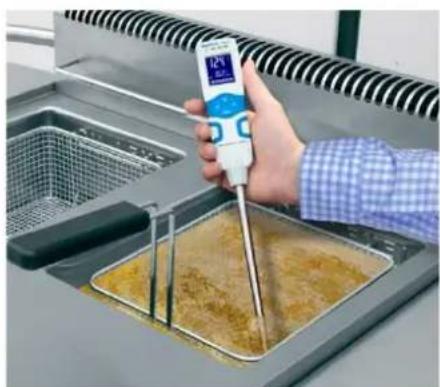
Person using a digital thermometer to stir contents in a stainless steel kitchen (no visible text or symbols)This device has been developed for the fast and reliable testing of frying oils in the catering industry, large kitchens, but also the private user.
This unit displays the oil temperature, so that the appliance settings and indicators of the fryer can be checked.
By measuring the TPM value (total polar material), the content of polar substances can be determined, which characterizes a reliable parameter for the extent of the aging of the frying oil / frying fat during frying.
For which types of oil / grease can this meter be used?
All commercially available oil varieties such as rapeseed oil, olive oil, soybean oil, peanut oil, sesame oil and palm oil, as well as other vegetable oils or animal fat can be measured.
Since all different types of grease and oil have different properties, the TPM readings can differ by a few percent depending on the variety used.
4. Description
text_image
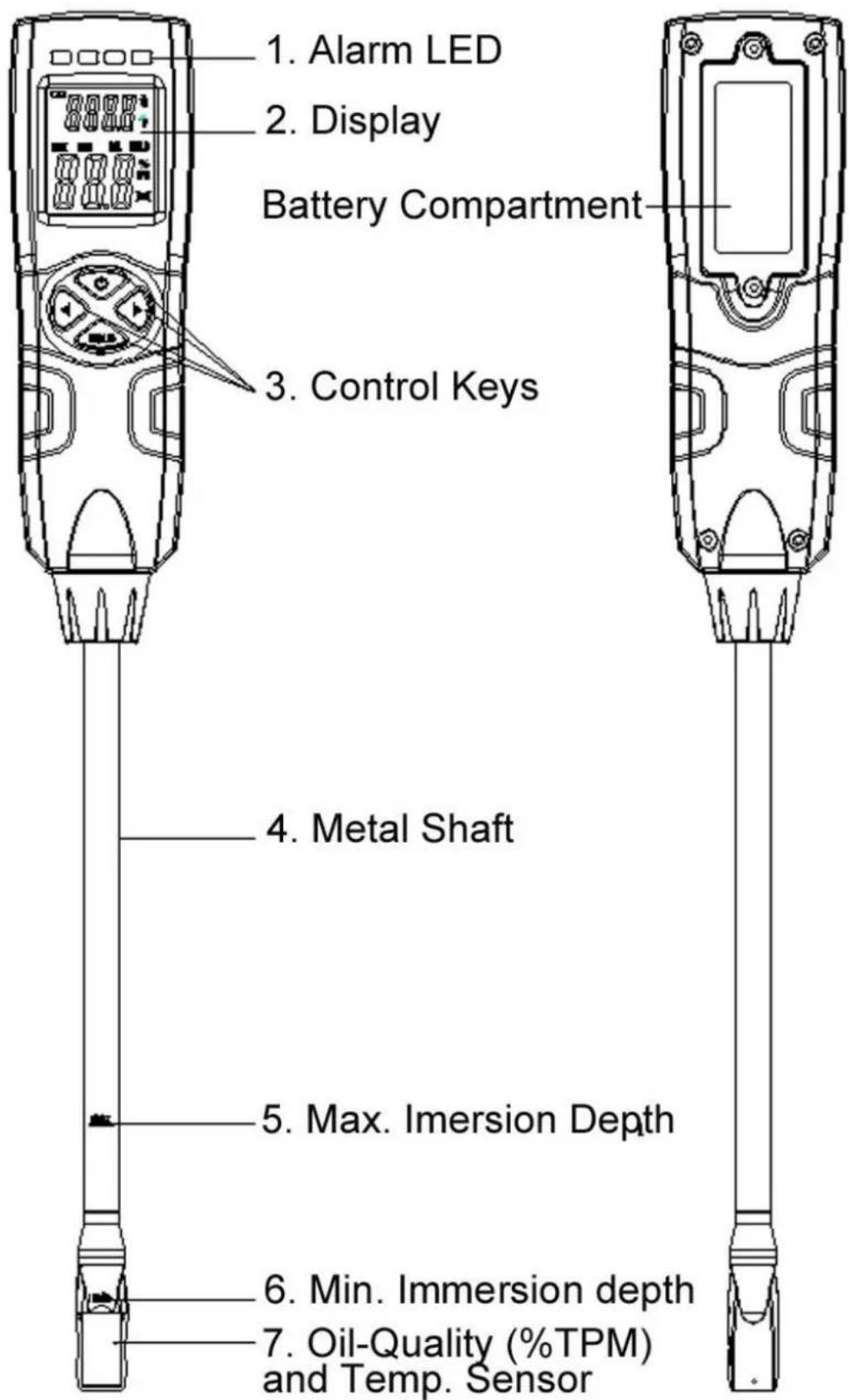
1. Alarm LED 2. Display Battery Compartment 3. Control Keys 4. Metal Shaft 5. Max. Imersion Depth 6. Min. Immersion depth 7. Oil-Quality (%TPM) and Temp. Sensor5. Perform measurements
Start measurement
- Press the power switch and release it - the instrument will turn on
- The temperature bar shows Lo
- The TPM value shows ---
- Insert the sensor into the hot frying oil so that the oil level is between the minimum and maximum markings on the metal shaft
- If you want to keep the measured value in the display, press the HOLD button to activate the HOLD mode.
- Press HOLD again to deactivate the measured value holding function
- When the temperature indicator flashes and indicates "HI", the oil is too hot and over the specified temperature range of 200 °C
- When the temperature indicator flashes and indicates "Lo", the oil is too cold and is below the specified temperature range of 30 °C
- When the TMP indicator flashes and indicates "Lo," the oil / grease used is not suitable for the test or is not oil
Please note the following information in order to achieve the best possible results:
▶ Switch off an induction heater during the measurement as the electromagnetic field adversely affects the measuring result.
▶ Take the fried items from the frying oil into the measurement and wait 5 minutes before the measurement.
▶ Clean the probe before each measurement or before the next measurement.
▶ Avoid direct contact with metal objects, such as, Frying baskets and pots as they can influence the results of the measurements. The minimum distance of the sensor to the metal is at least 1 cm per side.
▶ Uneven oil temperature in frying oil can lead to a measurement error. Therefore, stir the measuring instrument briefly in the frying oil.
If the results of the measurements indicate that they contain an error due to the water intake: Please repeat the measurement after 5 minutes (do not fry during this time to keep the fat high). If the new reading is too low, measure it again after 5 minutes until the reading is stable.
▶ Replace frying oil when 24% TPM is reached. Different countries have different limits. Be sure to replace the frying oil before reaching the limit.
6. Configuration mode
Activate the configuration mode by pressing the [HOLD] and [<] buttons for about 3 seconds. Now you can make the desired settings in each menu point and always confirm the setting with [HOLD], then enter the next menu automatically.
Switch the temperature unit
Turn the power on and press [Hold] and [<] simultaneously for at least 3 seconds while the instrument is in test mode until °C or °F appears on the display.
- Use [<] or [>] to set the temperature unit (°C / °F).
- Press [Hold] to confirm the set temperature unit.
Switch the acoustic alarm (ALA) on or off
- Press [<] or [>] to turn the buzzer alarm (ALA) on or off.
- Press the [Hold]
Turn the "auto power off" on or off
- Press [<] or [>] to turn the Auto Power Off function on or off.
- Press [Hold] to confirm.
Turn Alarm indicator on or off
- Press [<] or [>] to turn the LEDs on or off.
- Press [Hold] to confirm.
Switch calibration mode (CAL) on or off
-
Press [<] or [>] to turn the CAL mode on or off
-
Press [Hold] to confirm.
Factory Reset (RST)
- Press [<] or [>] to select Reset on or off.
- Press [Hold] to save and exit.
Switch the background lighting (BL) on or off
- Press [<] or [>] to turn the backlight on or off.
- Press [Hold] to save and exit.
(Press the [Power] key in the configuration mode to leave the configuration mode at any time)
7. Configuration Options
| Configuration | configuration options |
| Set the temperature | in °C or °F |
| Setting (LED) | on : LED alarm is activateoff : LED alarm is released |
| Set the sound ALA (Alarm) | on : sound alarm is activatedoff : The sound alarm is released |
| Perform calibration (CAL) | on : Perform calibrationoff : No calibration is performed |
| Execute Reset Reset (RST) | on : Resets to factory settingsoff : will not be reset |
| Set the automatic shutdown (OFF) | on : automatic shutdown is turned onoff : automatic shutdown off |
| Set the backlight (BL) | on : backlight turned onoff : backlight off |
8. Advanced alarm settings
Switch TMP Alarm (High) on
- Turn on the unit and press the [<] key for about 3 seconds until the LEDs turn red.
- Press the [<] or [>] button to set the alarm value
- Press [HOLD] to save the setting or [Power] to return to normal measurement mode without saving.
Switch TMP Alarm (Low) on
- Turn on the unit and press the [>] button for about 3 seconds until the LEDs turn green.
- Press the [<] or [>] button to set the alarm value
- Press [HOLD] to save the setting or [Power] to return to normal measurement mode without saving.
9. Calibration mode
Use a reference oil whose TPM is known for calibration
- Heat the calibration oil to 50 °C
- After turning on the calibration mode (see Config mode), CAL is displayed. Insert the sensor into the calibration oil, paying attention to the Min / Max markings on the sensor shaft.
- If the reading is stable, press the [<] and [>] buttons to adjust the reading in 0.5% increments.
- If the display value matches the reference value after setting, press the [HOLD] key to store the value.
10. Call up the factory settings
- Use the configuration menu to enter the factory settings (RST).
- Press the [>] and [HOLD] buttons at the same time to reset your calibration to factory defaults.
11. Statutory Notification about the Battery Regulations
The delivery of many devices includes batteries, which for example serve to operate the remote control. There also could be batteries or accumulators built into the device itself. In connection with the sale of these batteries or accumulators, we are obliged under the Battery Regulations to notify our customers of the following:

natural_image
Simple line drawing of a trash bin with diagonal lines crossing it, no text or symbols present.Please dispose of old batteries at a council collection point or return them to a local shop at no cost. The disposal in domestic refuse is strictly forbidden according to the Battery Regulations. You can return used batteries obtained from us at no charge at the address on the last side in this manual or by posting with sufficient stamps.
Batteries, which contain harmful substances, are marked with the symbol of a crossed-out waste bin, similar to the illustration shown left. Under the waste bin symbol is the chemical symbol for the harmful substance, e.g. „Cd“ for cadmium, „Pb“ stands for lead and „Hg“ for mercury.
You can obtain further information about the Battery Regulations from the Bundesministerium für Umwelt, Naturschutz und Reaktorsicherheit (Federal Ministry of Environment, Nature Conservation and Reactor Safety).
All rights, also for translation, reprinting and copy of this manual or parts are reserved. Reproduction of all kinds (photocopy, microfilm or other) only by written permission of the publisher.
This manual considers the latest technical knowing. Technical alterations reserved.
PeakTech provides a three-year warranty on all devices from the date of purchase.
We hereby confirm that all devices, the specifications mentioned in our documentation, are delivered and calibrated at the factory.
An annual repetition of the calibration over a calibration laboratory is recommended.
natural_image
Person using a digital thermometer to handle a yellow-brown cooking pan in a kitchen (no visible text or symbols)natural_image
Simple line drawing of a trash bin with diagonal lines crossing it, no text or symbols present.natural_image
Person using a digital thermometer to stir-fried food in a kitchen appliance (no visible text or symbols)natural_image
Simple line drawing of a trash bin with diagonal lines crossing the base and top (no text or symbols)TPM Sensor: Capacitive sensor
natural_image
Person using a digital thermometer to stir-fried food in a kitchen bowl (no visible text or symbols)natural_image
Simple line drawing of a trash bin with diagonal lines crossing it, no text or symbols present.DE-22926 Ahrensburg / Germany
+49-(0) 4102-97398 80 +49-(0) 4102-97398 99
info@peaktech.de www.peaktech.de