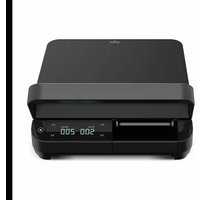
WPM2000B - Grill plate Witt - Free user manual and instructions
Find the device manual for free WPM2000B Witt in PDF.


| Product type | Electric grill plate (multigrill) |
| Model | WPM2000B |
| Brand | Witt |
| Power supply | 220–240 V ~ 50/60 Hz |
| Power | 2000 W |
| Plate material | Slip-Let non-stick coating |
| Control panel | Digital display with Start/Pause buttons, temperature adjustment and timer |
| Adjustable temperature | Yes (in steps, range not specified) |
| Timer | Built-in, adjustable (default 5 minutes) |
| Automatic preheating | Yes, audible beep when temperature reached |
| Automatic shutdown | Yes, after 30 minutes of inactivity |
| Pause function | Yes, via Start/Pause button |
| Removable plates | Yes, with release buttons |
| Grease collection tray | Yes, removable (not dishwasher safe) |
| Transport handle | Yes, on top |
| Usage | Indoor only, domestic use |
| Plate maintenance | Dishwasher safe (hand washing recommended) |
| Base maintenance | Never immerse, clean with a damp cloth |
| Safety | Hot surface, do not immerse, mandatory grounding |
| Warranty | 2 years on manufacturing defects (excluding professional use) |
| After-sales service | Contact the retailer or Witt via witt.dk |
Frequently Asked Questions - WPM2000B Witt
User questions about WPM2000B Witt
0 question about this device. Answer the ones you know or ask your own.
Ask a new question about this device
Download the instructions for your Grill plate in PDF format for free! Find your manual WPM2000B - Witt and take your electronic device back in hand. On this page are published all the documents necessary for the use of your device. WPM2000B by Witt.
USER MANUAL WPM2000B Witt
natural_image
Black wireless printer with digital display showing temperature and time (no readable text or symbols)Brugsanvisning DK: 3-10
Instructions UK: 11-19
natural_image
Open black plastic food kit with grating and control panel (no visible text or symbols)natural_image
Close-up of a black electronic device with a red arrow pointing to a small component (no visible text or symbols)SAFETY INSTRUCTIONS....12
DESCRIPTION.... 15
BEFORE USING IT FOR THE FIRST TIME....16
HEATING UP THE MULTI GRILL 16
PREPARING FOOD 16
CLEANING AND MAINTENANCE.... 18
SPECIFICATIONS....18
WARRANTY AND SERVICE 19
Safety instructions
Read these safety instructions carefully before using the product:
- Be careful! Hot surface. The device will be hot during and immediately after use. Do not touch the warm surfaces. Grab the handle and the operator button.
- In order to avoid electric shocks, the power cord, plug or device may not be lowered into water or other fluids.
- Children may not play with the product. Monitor the situation when the device is being used or when it is near children.
- Unplug the device when it is not used and before cleaning it. Let the device cool down before parts are installed or removed and before cleaning the device.
- Do not use the device if the cord or plug are damaged. If there are damaged parts, contact the store in which you bought the device or contact Witt customer service.
- Only use original parts. Unoriginal parts may damage the product.
- Only use the device for its intended purposes. The manufacturer is not liable for damage that occurs due to misusing the device or handling it incorrectly.
- The device is only intended for indoors use.
- Ensure that the power cord is not hanging out from the edge of the table, touching hot surfaces or getting tangled up.
- The device may not be placed on or near a hot gas stove, cooing plates or somewhere touching a hot oven.
- Be extremely careful if you move a device with heated oil or other warm fluids.
- Before using the device for the first time, ensure that your power supply matches the specifications shown at the bottom of the device.
- The device must be connected to a grounded socket.
- BE CAREFUL! To prevent electric shocks, only insert the plug into a grounded socket.
- Remember to turn off the device before unplugging it.
- Never leave the device unattended when it is in use.
- Never place the device in a corner or closely up against a wall to prevent overheating.
- Unplug the device when it is not being used.
- Never lower the heating plate into water and do not place it on an unstable surface.
- Never attempt to repair the device yourself. Contact the place where you bought it if you have problems with it or contact Witt customer service.
Instructions for the plug and cord
- Extension cords can be used if you are careful.
- If you use an extension cord:
- Make sure that the extension cord's rating matches or exceeds the device's rating.
- The device needs grounding, so the extension cord needs to be grounded as well.
- Make sure that the cord is not hanging over the edge of the table or getting stuck in the device when using it or storing it.
THIS DEVICE IS ONLY FOR HOUSEHOLD USE.
Read all of the safety instructions before using the device. The warranty will lapse and the manufacturer is not liable for damage that occurs due to commercial use or incorrect use and failing to comply with the instructions.
This device complies with all applicable standards and rules (electrical safety, foodstuffs, etc.). The manufacturer reserves the right to make product changes without prior notice.
- Only use original parts that come with the device or which have been purchased from an approved service centre. Do not use the parts for other devices or for other purposes.
- Do not use flambé recipes as these may damage the product.
- The device is not intended to be used in the following working environments and the warranty does not cover:
- kitchen staff at stores, offices and other working environments
- farms
- by customers in hotels, motels and other residential environments
- bed and breakfasts
- The device is not intended to be used with an external timer or a separate remote control.
- In the event of getting burnt, immediately flush the impacted area with lots of cold water and call a doctor if needed.
- Before using it for the first time: clean the plates with a soft sponge or moist rag, poor a little bit of oil on the plates and dry off with a paper towel.
- To avoid damaging the non-stick coating on the plates, always use wooden or plastic kitchen tools.
- Do not use aluminium foil or other objects between the plates and the food that you are preparing.
- Do not place kitchen tools on the device's hot plates.
- Do not prepare food wrapped in aluminium foil.
- Do not remove the drip tray when preparing food. If the drip tray is filled while preparing food: let the device cool down before emptying the drip tray.
- Please note: When using the device for the first time, you may experience some smoke and smells during the first five minutes. This is normal and due to the heating of some of the components. There is no cause for concern. Open the window and air out the room until the smoke and smells are gone.
Preventing accidents at home
- The device is not intended to be used by people with physical, sensor or mental impairments and/or lack of experience or knowledge or by children unless they have been guided and instructed in how to use the device by a person responsible for their safety. Keep an eye on children to ensure that they do not play with the device.
- Be careful! Hot surface. The device will be hot during and immediately after use. Never touch hot surfaces - use the handle.
- Steam from cooking can be dangerous for animals with sensitive respiratory organs, including birds. We recommend those who own birds to keep them away from the food preparation area.
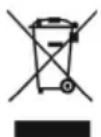
The symbol means that the product should not be thrown out together with regular household waste. Instead, it should be disposed of at an authorised recycling station which is suitable for this purpose or returned to a retailer that offers disposal services. Contact your local city council if you need more information.
Description
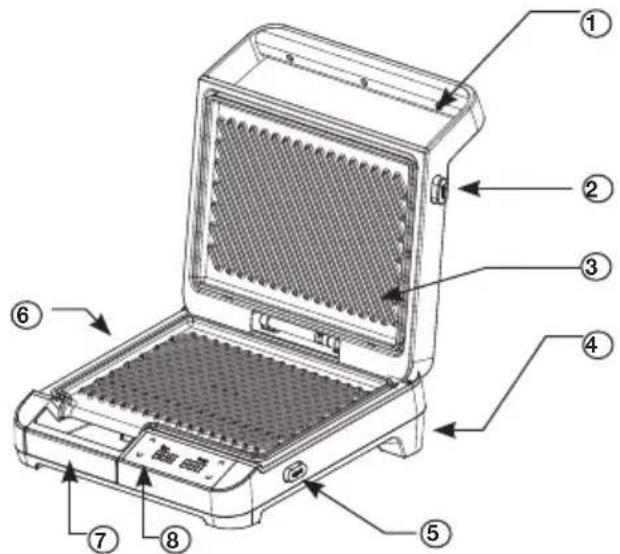
- Handle
- Release button for top grill plate
- Top grill plate
- On/Off button
natural_image
Open black plastic grater with a digital display and control panel (no visible text or symbols)- Release button for lower grill plate
- Lower grill plate
- Drip tray
- Control panel
Control panel
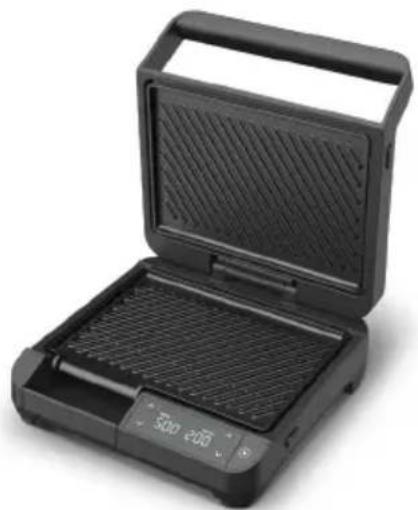
The menu on the device's control panel includes: "Start/Pause" button, temperature adjustment and time adjustment. See below:
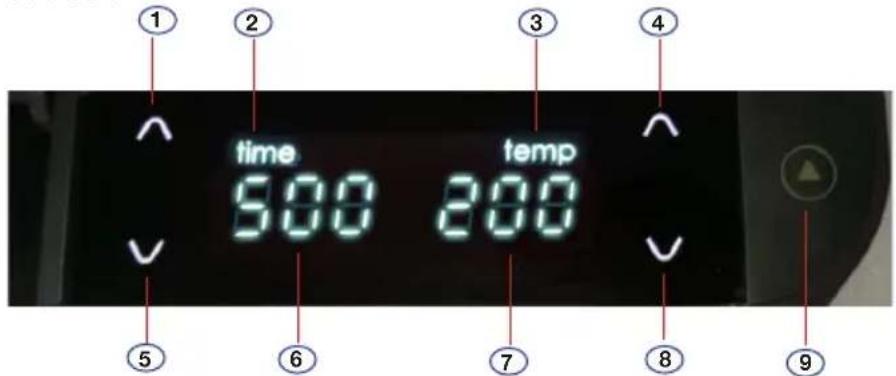
- Dial up the time
- Time
- Temperature
- Dial up the temperature
-
Dial down the time
-
Display preparation time
- Display temperature
- Dial down the temperature
- Start/Pause button
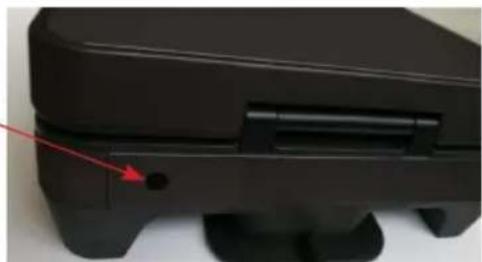
The On/Off button on the back
Turn the device on: The On/Off button is on the back of the device. Plug the device into a socket and then there will be heard a 'beep' when it is turned on and ready to use.
natural_image
Close-up of a black electronic device with a red arrow pointing to a small component (no visible text or symbols)Menu: The time and temperature display will remain turned on (white light), the adjustment buttons ∧ and ∨will remain turned on (white light). The time and temperature adjustment buttons will remain turned on. Standard setting: time: 5 minutes, temperature: 200 °C.
Before using it for the first time
- Press the release buttons for the grill plates when you want to take them out. Clean the grill plates and the drip tray in warm soapy water. Rinse and dry thoroughly. The grill plates can also be put in a dishwasher.*
NEWER LOWER THE BASE IN WATER AND DO NOT EXPOSE IT TO WATER.
Reinsert the grill plates into their positions before using the device.
PLEASE NOTE: Spray or use a bit of paper towel to rub a thin layer of oil over the grill plate's non-stick surfaces before using them for the first time. Repeat the procedure throughout the device's lifetime to maintain the non-stick surface as best as possible.
Place the device on a stable, clean and heat-resistant surface with at least 4-6 cm of air on all sides to ensure sufficient ventilation.
Heating up the multi grill
- Closed/heating position: The top part of the device is closed. Use this start position when starting up/heating the device and when preparing most types of food.
During the preheating process, the icon's function on the left side & will be locked while the icon's functions on the right side & will still be active and can be used to adjust the temperature. The user can adjust the temperature to suit whatever kind of food is being prepared.
When the temperature has been specified, press the right "Start/Pause" button to begin heating.
The temperature display will be blinking.
The timer display will remain turned on (not blinking).
Once the temperature has been reached, there will be some ‘beeps’ and then the temperature will be kept stable at that level.
Preparing food
When the preheating process is completed, both the left timer and right temperature button will be adjustable and the user can make adjustments to suit the kind of food that is being prepared.
Press the Start/Pause button to begin. The device will start a countdown and the temperature display will blink. When the preparation time has passed, there will sound one long beep and 'off' will appear on the screen and then it will close.
When the Start/Pause button is pressed again, the device will begin heating up.
If the Start/Pause button is pressed while food is being prepared, the device will go into pause mode. Press the button again to continue.
While preparing, the left time adjustment icons \& and the right temperature adjustment icons \& will turn off. If the Pause button is pressed, the icons will light up and time and temperature can be adjusted. Press the Pause button again to continue preparing the food.
After the food has been prepared, press the On/Off button on the back of the device and unplug it from the socket. When the device is connected again, it will start with the last specified setting (time: 5 minutes, temperature: 200 °C.).
If 30 minutes go by without any activity, the device will automatically shut down.
Tips for preparing food
Use the top and bottom grill plates in a “closed” position to prepare any kind of ingredients (vegetables, meat, cheese, etc.) that are placed in a sandwich or tortilla roll/pita bread. You can also heat vegetables and meat without using bread.
- Place the food on the bottom grill plate and press the top grill plate down over it. The device will automatically take into account the thickness of the food.
PLEASE NOTE: If you are preparing more than one ingredient at a time, the ingredients should be approximately the same thickness to ensure an even cooking process. - When the food has been prepared, remove it and unplug the device. Let the device cool down (at least 30 minutes) before storing or cleaning it.
BE CAREFUL: Always unplug the device from the socket after you have finished preparing your food and when the device is not being used.
WARNING: The grill plates and metal surfaces on the top part of the device become very hot when in use. Use heat-resistant gloves to avoid burns and only touch the handle on the device.
PLEASE NOTE: Only use heat-resistant wood, plastic or silicone tools to place and remove food. Never use metal tools, as they may scratch the surface.
PLEASE NOTE: The device may emit a small degree of smoke or odours when heating up for the first time. This is completely normal and is not a safety issue.
Cleaning and maintenance
WARNING: Always unplug the device from the socket and let it cool down before cleaning or storing it.
PLEASE NOTE: Never use detergents that can scratch or damage the non-stick coating to clean the device.
- Remove food residue from the grill plates with a suitable tool (made from wood, plastic or silicone).
- Clean the grill plate and drip tray in warm soapy water and then rinse and dry them.
* Please note: the grill plates can be put into a dishwasher. However, they will last longer if you wash them by hand.
NEWER LOWER THE BASE IN WATER AND DO NOT EXPOSE IT TO WATER OR OTHER FLUIDS.
- Use a moist rag to dry the exterior of the device. Finish drying with a paper towel or a soft, dry rag.
- Store the device in a dark and cool place.
Specifications
There is a 2-year warranty period if your new product stops working due to manufacturing or material faults which begins from the documented date of purchase. The warranty covers materials and the cost of labour. When inquiring about service, please state the product name and serial number. You can find this information on the type plate. You can write down the information here in these instructions so that you have them at hand. This makes it easier for the service technician to find the correct spare parts.
The warranty does not cover:
- Faults and damage that are not due to manufacturing or material issues
- Damage caused by failure to properly maintain the device - including failing to clean it
- Fire and/or water damage or moisture damage on the product
- Damage caused during transport if the product was transported without proper packaging
- Damage caused by the use of unoriginal spare parts
- Damage resulting from failing to follow the instructions on how to use the device
- If the device has not been set up/assembled as specified in the instructions
- If non-professionals have installed or repaired the product
- Batteries or any other parts subject to normal wear and tear
Damage during transport
If the product is damaged during transport and this is discovered when the retailer delivers the product to the customer, this is exclusively a matter between the customer and the retailer. In cases where customers have handled the transport of the product themselves, the supplier shall not be liable for any potential damage during transport. Any damage caused during transport must be reported immediately and no later than 24 hours after the product has been delivered. If not, the customer's claim will be rejected.
Unnecessary service
If the product is sent in to be serviced and it turns out that the fault could have been fixed independently by following the product's instruction manual, the customer will need to pay the service fee.
Commercial purchases
Commercial purchases are all purchases of devices that are not intended to be used in private households but instead intended to be used for commercial purposes (in restaurants, cafés, canteens, etc.) or intended to be rented out or otherwise used by multiple users in turn.
There is no warranty offered for commercial purchases, as this product is only intended for regular household use.
Service
For service and spare parts in England and Ireland please call below-mentioned number and you will be directed accordingly or send us an email.
Witt UK & Ireland Ltd.
(44) 148 351 6633 / info@witt.dk
If you want to use a service technician or get spare parts in Denmark, please contact the store that you bought the product from.
You can also claim warranty at witt.dk under the 'Service' tab.
We accept no liability for printing errors.
The manufacturer/distributor cannot be held liable for damage to products or individuals if the safety instructions were not followed. The warranty shall not cover cases where the instructions have not been followed.
Table des matières
CONSIGNES DE SÉCURITÉ 21
DESCRIPTION....24
AVANT LA PREMIÈRE UTILISATION....25
CHAUFFAGE DU MULTIGRILL....25
CUISSON DES ALIMENTS....25
NETTOYAGE ET ENTRETIEN 27
CARACTÉRISTIQUES 27
DROIT DE RÉCLAMATION ET SERVICE APRÈS-VENTE....28
natural_image
Open black plastic food kit with grating and control panel (no visible text or symbols)natural_image
Close-up of a black electronic device with a red arrow pointing to a small hole (no visible text or symbols)natural_image
Open black portable grill with digital display and grille, no visible text or symbols- Utløserknapp til nederste grillplate
- Nederste grillplate
- Dryppebrett
- Kontrollpanel
Kontrollpanel
natural_image
Close-up of a black electronic device with a red arrow pointing to a small component (no visible text or symbols)natural_image
Open black plastic food kit with grating and control panel (no visible text or symbols)- Frigöringsknapp för nedre grillplatta
- Nedre grillplatta
- Droppbricka
- Kontrollpanel
Kontrollpanel
natural_image
Close-up of a black electronic device with a red arrow pointing to a small component (no visible text or symbols)natural_image
Open black plastic grater with a digital display and control panel (no visible text or symbols)natural_image
Close-up of a black mechanical device with a red arrow pointing to a small hole (no text or symbols visible)RUOAN VALMISTUS....61
PUHDISTUS JA HUOLTO....63
LISÄTIEDOT 63
REKLAMAATIO JA ASIAKASPALVELU....64
natural_image
Open black plastic food kit with grating and control panel (no visible text or symbols)On/off-painike takana
natural_image
Close-up of a black electronic device casing with a red arrow pointing to a small component (no visible text or symbols)- Safety instructions
- Read these safety instructions carefully before using the product:
- Instructions for the plug and cord
- THIS DEVICE IS ONLY FOR HOUSEHOLD USE.
- Preventing accidents at home
- Description
- Control panel
- The On/Off button on the back
- Before using it for the first time
- Heating up the multi grill
- Preparing food
- Tips for preparing food
- Cleaning and maintenance
- Specifications
- The warranty does not cover:
- Damage during transport
- Unnecessary service
- Commercial purchases
- Service
- Table des matières
- Kontrollpanel
- On/off-painike takana
Brand : Witt
Model : WPM2000B
Category : Grill plate