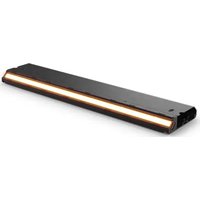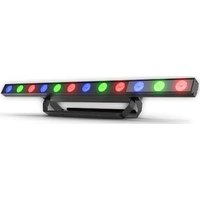
COLORband Pix ILS - Lamp Chauvet - Free user manual and instructions
Find the device manual for free COLORband Pix ILS Chauvet in PDF.


User questions about COLORband Pix ILS Chauvet
0 question about this device. Answer the ones you know or ask your own.
Ask a new question about this device
Download the instructions for your Lamp in PDF format for free! Find your manual COLORband Pix ILS - Chauvet and take your electronic device back in hand. On this page are published all the documents necessary for the use of your device. COLORband Pix ILS by Chauvet.
USER MANUAL COLORband Pix ILS Chauvet
natural_image
Technical line drawing of a mechanical component with circular holes and a rectangular housing (no text or symbols)About This Guide
The COLORband PiX ILS Quick Reference Guide (QRG) has basic product information such as mounting, menu options, and DMX values.
Disclaimer
The information and specifications contained in this QRG are subject to change without notice.
LIMITED WARRANTY
FOR WARRANTY REGISTRATION AND COMPLETE TERMS AND CONDITIONS PLEASE VISIT OUR WEBSITE.
For Customers in the United States and Mexico: www.chauvetlighting.com/warranty-registration.
For Customers in the United Kingdom, Republic of Ireland, Belgium, the Netherlands, Luxembourg, France, and Germany: www.chauvetlighting.eu/warranty-registration.
Chauvet warrants that this product shall be free from defects in material and workmanship under normal use, for the period specified in, and subject to the exclusions and limitations set forth in the full limited warranty on our website. This warranty extends only to the original purchaser of the product and is not transferable. To exercise rights under this warranty, you must provide proof of purchase in the form of an original sales receipt from an authorized dealer that shows the product name and date of purchase. THERE ARE NO OTHER EXPRESS OR IMPLIED WARRANTIES. This warranty gives you specific legal rights. You may also have other rights that vary from state to state and country to country. This warranty is valid only in the United States, United Kingdom, Republic of Ireland, Belgium, the Netherlands, Luxembourg, France, Germany and Mexico. For warranty terms in other countries, please consult your local distributor.
Safety Notes
These Safety Notes include important information about installation, use, and maintenance.

- ONLY connect this product to a grounded and protected circuit.
- DISCONNECT from power before cleaning or replacing the fuse.
- DO NOT look at the light source when the product is on.
- Make sure the power cord is not crimped or damaged.
- Never disconnect this product from power by pulling on the cord.
- When mounting this product overhead, ALWAYS use a safety cable.
- DO NOT allow flammable materials close to the product when it is operating.
-
DO NOT touch the product's housing when it is on because it will be hot.
-
The voltage of the outlet to which you are connecting this product must be within the range stated on the decal or rear panel of the product.
- This product is for indoor use only! (IP20) To prevent risk of fire or shock, do not expose this product to rain or moisture.
- Always mount this product in a location with adequate ventilation, at least 20 in (50 cm) from adjacent surfaces.

- Be sure that no ventilation slots on the unit's housing are blocked.
- Never connect this product to a dimmer or rheostat.
- Replace the fuse with the same type and rating.
- In the event of a serious operating problem, stop using immediately.
- DO NOT open this product. It contains no user-serviceable parts.
- Never carry the product by the power cord. Use only the hanging bracket or handle to carry this product.
• The maximum ambient temperature is 104 °F (40 °C). Do not operate this product at higher temperatures.
- To eliminate unnecessary wear and improve its lifespan, during periods of non-use completely disconnect the product from power via breaker or by unplugging it.
Contact
Outside the U.S., U.K., Ireland, Benelux, France, Germany, or Mexico, contact your distributor to request support or return a product. Refer to Contact Us at the end of this QRG for contact information.
What is Included
• COLORband PiX ILS
- Power cord
- Hanging bracket
- Quick Reference Guide
To Begin
Unpack the COLORband PiX ILS and make sure all parts have been received in good condition. If the box or contents appear damaged, notify the carrier immediately, not Chauvet.
AC Power
This product has an auto-ranging power supply that works with an input voltage range of 100 to 240 VAC, 50/60 Hz.

To eliminate wear and improve its lifespan, during periods of non-use completely disconnect the product from power via breaker or by unplugging it.
Power Linking
It is possible to power link up to 19 COLORband PiX ILS products on 120 VAC or up to 35 COLORband PiX ILS products on 230 VAC.
Fuse Replacement
- Disconnect the product from power.
- Using a Phillips-head screwdriver, unscrew the fuse holder and pull it straight out.
- Remove the blown fuse from the holder and replace with a fuse of the exact same type and rating.
- Re-insert the fuse holder and reconnect power.
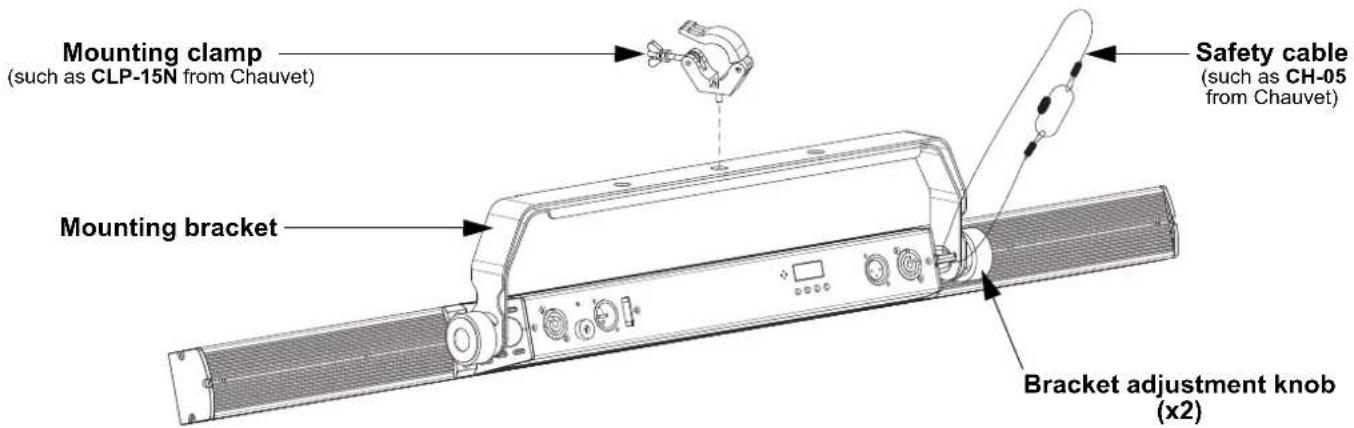
Mounting
Before mounting this product, read the Safety Notes.
Mounting Diagram
text_image
Mounting clamp (such as CLP-15N from Chauvet) Mounting bracket Safety cable (such as CH-05 from Chauvet) Bracket adjustment knob (x2)Control Panel Description
| Button Function | |
| Exits from the current menu or function | |
| Navigates upwards through the menu list and increases the numeric value when in a function | |
| Navigates downwards through the menu list and decreases the numeric value when in a function | |
| Enables the currently displayed menu or sets the currently selected value into the selected function | |
Menu Map
Refer to the COLORband PiX ILS product page on www.chauvetdj.com for the latest menu map.
| Mode Programming Levels Description | ||||
| DMX Mode | 3-Ch d 1-510 3-channel, 1-zone DMX mode | |||
| 4-Ch d 1-509 4-channel, 1-zone DMX mode | ||||
| 6-Ch d 1-507 6-channel, 2-zone DMX mode | ||||
| 7-Ch d 1-506 7-channel, 1-zone DMX mode | ||||
| 8-Ch d 1-505 8-channel, 1-zone DMX mode | ||||
| 9-Ch d 1-504 9-channel, 3-zone DMX mode | ||||
| 12Ch d 1-501 12-channel, 4-zone DMX mode | ||||
| 18Ch d 1-495 18-channel, 6-zone DMX mode | ||||
| 36Ch d 1-477 36-channel, 12-zone DMX mode | ||||
| 41Ch d 1-472 41-channel, 12-zone DMX mode | ||||
| ILS Mode iLS iLS1-4 Sets ILS mode | ||||
| Static Color C-- C 1-7 Static colors | ||||
| Programs P-- P 1-23 Automatic programs | ||||
| Speed | S-- | S. 1-100 | Automatic program speed | |
| Sound Mode | Snd | Snd | Sound-active program | |
| Sensitivity | SenS | u 0-100 | Sound sensitivity | |
| Manual Mode | U-- | r. 0-255 | Combine red, green, and blue for a custom static color | |
| G. 0-255 | ||||
| b. 0-255 | ||||
| Dimmer Speed | dIM | oFF | Sets the dimmer speed | |
| dIM1-3 | ||||
| RF Control | SEt | RF | oFF | Disables RFC remote control |
| Link | Link to a single remote by pressing and holding <freeze>, (RFC) or <BLACK OUT> (RFC-XL) until the display shows PASS (success) or ErrO (failure) | |||
| PubL | Public mode, control with any RFC or RFC-XL remote | |||
| GP1-4 | Sets to an RFC-XL remote receiving group | |||
| REST | Reset to factory default settings | |||
DMX Linking
The COLORband PiX ILS can work with a DMX controller. If you are not familiar with DMX, download the DMX Primer from www.chauvetdj.com.
Starting Address
To ensure full access to all channels available in each DMX mode, the highest recommended DMX address is 472.
Master/Slave Connection
The COLORband PiX ILS uses the DMX data connection for its Master/Slave mode.
RFC (Radio Frequency Control) and RFC-XL
The COLORband PiX ILS can be operated with the CHAUVET RFC and RFC-XL.
D-Fi USB Connectivity
The COLORband PiX ILS is able to become a D-Fi wireless receiver/transmitter with the use of the D-Fi USB from CHAUVET DJ. Simply set the DIP switch D-Fi receiving/transmitting channel, plug it into the USB port then set the product's DMX Personality and DMX Address.

WARNING! DO NOT plug anything other than a D-Fi USB into the USB port. Doing so may cause damage to the product.

Once plugged in, the D-Fi USB will take over the product. Wired DMX and manual display control/menu buttons will be unavailable until you unplug the D-Fi USB. The priority levels are:
- D-Fi USB
- Wired DMX
- IRC-6 Remote Control
- Manual Digital Display/Menu Buttons
Master/Slave Mode (D-Fi USB)
The D-Fi USB allows a single COLORband PiX ILS product (the "master") to control the actions of one or more COLORband PiX ILS products (the "slaves") without the need of a DMX controller or DMX cables. The master (transmitter) product will be set to operate in standalone mode, while the slave (receiver) products will be set to operate in DMX mode. Once set and connected, the slave products will operate in unison with the master product. Configure the products as indicated below.
Slave products:
- Press
- Press
. - Use
or to set the starting address to d 1. - Press
. - Set the D-Fi USB to receive on a specific channel, 1–16.
- Plug in the D-Fi USB.
- Finish setting and connecting all the slave products.
Master product:
- Set the master product to operate in standalone mode.
- Set the D-Fi USB to transmit on the D-Fi channel the slaves are receiving on.
-
Plug in the D-Fi USB.
-
All products must be set to the same DMX personality, DMX address, and D-Fi channel.
- Configure all the slave products before configuring the master to transmit.
- Never connect a DMX controller to a D-Fi channel configured for Master/Slave operation because the controller may interfere with the signals from the master.
ILS Mode
ILS (Integrated Lighting System) provides 4 modes that synchronize with the GigBAR MOVE+ILS: Modes 1 and 3 synchronize with side 1 of the GigBAR MOVE+ILS, whereas modes 2 and 4 synchronize with side 2 of the GigBAR MOVE+ILS. When linked, effects will sync with the most similar effect on the selected side of the GigBAR MOVE+ILS: Kinta effects will sync with one of the kintas, moving heads will sync with one of the moving heads, and wash effects will sync with one of the pars. Laser effects will sync with the laser, and strobe effects will sync with the strobe effects regardless of ILS mode.
This product will synchronize with the par effect on the selected side of the GigBAR MOVE+ILS.
To set the COLORband PiX ILS to respond to an ILS signal:
- Press
- Use
or to select from iLS1 (side 1), iLS2 (side 2), iLS3 (side 1), or iLS4 (side 2). - Press
DMX Values
| 3-Ch 4-Ch 6-Ch 7-Ch 8-Ch 9-Ch 12Ch 18Ch 36Ch 41Ch | ||||||||||
| Control | Pixel Full | Pixel Full | Full Pixel | Pixel Pixel | Pixel Full | |||||
| Z | o | n | e | s | 1 | 1 | 2 | 1 | 1 | 3 |
Full Control Modes
| 4-Ch | 7-Ch | 8-Ch | 41Ch | Function | Value | Percent/Setting | |
| 1 | 1 | 1 | 1 | Red 1 | Zone 1 | 000 ⇔ 255 | 0-100% |
| 2 | 2 | 2 | 2 | Green 1 | 000 ⇔ 255 | 0-100% | |
| 3 | 3 | 3 | 3 | Blue 1 | 000 ⇔ 255 | 0-100% | |
| - | 4 | Red 2 | Zone 2 | 000 ⇔ 255 | 0-100% | ||
| 5 | Green 2 | 000 ⇔ 255 | 0-100% | ||||
| 6 | Blue 2 | 000 ⇔ 255 | 0-100% | ||||
| 7 | Red 3 | Zone 3 | 000 ⇔ 255 | 0-100% | |||
| 8 | Green 3 | 000 ⇔ 255 | 0-100% | ||||
| 9 | Blue 3 | 000 ⇔ 255 | 0-100% | ||||
| 10 | Red 4 | Zone 4 | 000 ⇔ 255 | 0-100% | |||
| 11 | Green 4 | 000 ⇔ 255 | 0-100% | ||||
| 12 | Blue 4 | 000 ⇔ 255 | 0-100% | ||||
| 13 | Red 5 | Zone 5 | 000 ⇔ 255 | 0-100% | |||
| 14 | Green 5 | 000 ⇔ 255 | 0-100% | ||||
| 15 | Blue 5 | 000 ⇔ 255 | 0-100% | ||||
| 16 | Red 6 | Zone 6 | 000 ⇔ 255 | 0-100% | |||
| 17 | Green 6 | 000 ⇔ 255 | 0-100% | ||||
| 18 | Blue 6 | 000 ⇔ 255 | 0-100% | ||||
| 19 | Red 7 | Zone 7 | 000 ⇔ 255 | 0-100% | |||
| 20 | Green 7 | 000 ⇔ 255 | 0-100% | ||||
| 21 | Blue 7 | 000 ⇔ 255 | 0-100% | ||||
| 22 | Red 8 | Zone 8 | 000 ⇔ 255 | 0-100% | |||
| 23 | Green 8 | 000 ⇔ 255 | 0-100% | ||||
| 24 | Blue 8 | 000 ⇔ 255 | 0-100% | ||||
| 25 | Red 9 | Zone 9 | 000 ⇔ 255 | 0-100% | |||
| 26 | Green 9 | 000 ⇔ 255 | 0-100% | ||||
| 27 | Blue 9 | 000 ⇔ 255 | 0-100% | ||||
| 28 | Red 10 | Zone 10 | 000 ⇔ 255 | 0-100% | |||
| 29 | Green 10 | 000 ⇔ 255 | 0-100% | ||||
| 30 | Blue 10 | 000 ⇔ 255 | 0-100% | ||||
| - | 31 | Red 11 | Zone 11 | 000 ⇔ 255 | 0-100% | ||
| 32 | Green 11 | 000 ⇔ 255 | 0-100% | ||||
| 33 | Blue 11 | 000 ⇔ 255 | 0-100% | ||||
| 34 | Red 12 | Zone 12 | 000 ⇔ 255 | 0-100% | |||
| 35 | Green 12 | 000 ⇔ 255 | 0-100% | ||||
| 36 | Blue 12 | 000 ⇔ 255 | 0-100% | ||||
| - | 4 | 4 | 37 | Color macros | 000 ⇔ 014 | No function | |
| 015 ⇔ 255 | Color macros | ||||||
| 4-Ch | 7-Ch | 8-Ch | 41Ch | Function | Value | Percent/Setting | |
| - | 5 | 5 | 3 | Strobe (when Ch. 6/39 is 000⇔ 031) | 000 ⇔ 015 | No function | |
| 016 ⇔ 255 | Strobe, slow to fast | ||||||
| Program speed (when Ch. 6/39 is 032⇔ 223/229) | 000 ⇔ 255 | Program speed, slow to fast | |||||
| Sound sensitivity (when Ch. 6/39 is 224/230⇔ 255) | 000 ⇔ 010 | Sound sensitivity off | |||||
| 011 ⇔ 255 | Sound sensitivity, low to high | ||||||
| - | - | 6 | 3 | 9 P r o g r | 000 ⇔ 031 | No function | |
| 032 ⇔ 063 | Pulse effect, 0-100% | ||||||
| 064 ⇔ 095 | Pulse effect, 100-0% | ||||||
| 096 ⇔ 114 | Pulse effect, 100-0-100% | ||||||
| 115 ⇔ 119 | Automatic program 1 | ||||||
| 120 ⇔ 124 | Automatic program 2 | ||||||
| 125 ⇔ 129 | Automatic program 3 | ||||||
| 130 ⇔ 134 | Automatic program 4 | ||||||
| 135 ⇔ 139 | Automatic program 5 | ||||||
| 140 ⇔ 144 | Automatic program 6 | ||||||
| 145 ⇔ 149 | Automatic program 7 | ||||||
| 150 ⇔ 154 | Automatic program 8 | ||||||
| 155 ⇔ 159 | Automatic program 9 | ||||||
| 160 ⇔ 164 | Automatic program 10 | ||||||
| 165 ⇔ 169 | Automatic program 11 | ||||||
| 170 ⇔ 174 | Automatic program 12 | ||||||
| 175 ⇔ 179 | Automatic program 13 | ||||||
| 180 ⇔ 184 | Automatic program 14 | ||||||
| 185 ⇔ 189 | Automatic program 15 | ||||||
| 190 ⇔ 194 | Automatic program 16 | ||||||
| 195 ⇔ 199 | Automatic program 17 | ||||||
| 200 ⇔ 204 | Automatic program 18 | ||||||
| 205 ⇔ 209 | Automatic program 19 | ||||||
| 210 ⇔ 214 | Automatic program 20 | ||||||
| 215 ⇔ 219 | Automatic program 21 | ||||||
| 220 ⇔ 224 | Automatic program 22 | ||||||
| 225 ⇔ 229 | Automatic program 23 | ||||||
| 230 ⇔ 255 | Sound-active program | ||||||
| - | 6 | - | - | P r o g r a | 000 ⇔ 031 | No function | |
| 032 ⇔ 063 | Pulse effect, 0-100% | ||||||
| 064 ⇔ 095 | Pulse effect, 100-0% | ||||||
| 096 ⇔ 114 | Pulse effect, 100-0 -100% | ||||||
| 115 ⇔ 127 | Automatic chase | ||||||
| 128 ⇔ 159 | Automatic fade | ||||||
| 160 ⇔ 191 | Automatic 3-color snap | ||||||
| 192 ⇔ 223 | Automatic 7-color snap | ||||||
| 224 ⇔ 255 | Sound-active program | ||||||
| 4 | 7 | 7 | 40 | Dimmer | 000 ⇔ 255 | 0-100% | |
| -- | 8 41 Dimmer speed | 000 ⇔ 051 | Dimmer speed set from display menu | ||||
| 052 ⇔ 101 | Dimmer speed mode off | ||||||
| 102 ⇔ 152 | Dimmer speed mode 1 (fast) | ||||||
| 153 ⇔ 203 | Dimmer speed mode 2 (medium) | ||||||
| 204 ⇔ 255 | Dimmer speed mode 3 (slow) | ||||||
Pixel Control Modes
| 3-Ch | 6-Ch | 9-Ch | 12Ch | 18Ch | 36Ch | Function | Value | Percent/Setting | ||
| 1 | 1 | 1 | 1 | 1 | 1 | R e | d 1 Zone 1 | 000 ⇔ 255 | 0-100% | |
| 2 | 2 | 2 | 2 | 2 | 2 | Green 1 | 000 ⇔ 255 | 0-100% | ||
| 3 | 3 | 3 | 3 | 3 | 3 | Blue 1 | 000 ⇔ 255 | 0-100% | ||
| 4 | 4 | 4 | 4 | 4 | R e | d 2 Zone 2 | 000 ⇔ 255 | 0-100% | ||
| 5 | 5 | 5 | 5 | 5 | Green 2 | 000 ⇔ 255 | 0-100% | |||
| 6 | 6 | 6 | 6 | 6 | Blue 2 | 000 ⇔ 255 | 0-100% | |||
| 7 | 7 | 7 | 7 | R e | d 3 Zone 3 | 000 ⇔ 255 | 0-100% | |||
| 8 | 8 | 8 | 8 | Green 3 | 000 ⇔ 255 | 0-100% | ||||
| 9 | 9 | 9 | 9 | Blue 3 | 000 ⇔ 255 | 0-100% | ||||
| 10 | 10 | 10 Red 4 | Zone 4 | 000 ⇔ 255 | 0-100% | |||||
| 11 | 11 | 11 | Green 4 | 000 ⇔ 255 | 0-100% | |||||
| 12 | 12 | 12 | Blue 4 | 000 ⇔ 255 | 0-100% | |||||
| 13 | 13 Red 5 | Zone 5 | 000 ⇔ 255 | 0-100% | ||||||
| 14 | 14 | Green 5 | 000 ⇔ 255 | 0-100% | ||||||
| 15 | 15 | Blue 5 | 000 ⇔ 255 | 0-100% | ||||||
| 16 | 16 Red 6 | Zone 6 | 000 ⇔ 255 | 0-100% | ||||||
| 17 | 17 | Green 6 | 000 ⇔ 255 | 0-100% | ||||||
| 18 | 18 | Blue 6 | 000 ⇔ 255 | 0-100% | ||||||
| 19 Red 7 | Zone 7 | 000 ⇔ 255 | 0-100% | |||||||
| 20 | Green 7 | 000 ⇔ 255 | 0-100% | |||||||
| 21 | Blue 7 | 000 ⇔ 255 | 0-100% | |||||||
| 22 Red 8 | Zone 8 | 000 ⇔ 255 | 0-100% | |||||||
| 23 | Green 8 | 000 ⇔ 255 | 0-100% | |||||||
| 24 | Blue 8 | 000 ⇔ 255 | 0-100% | |||||||
| 25 Red 9 | Zone 9 | 000 ⇔ 255 | 0-100% | |||||||
| 26 | Green 9 | 000 ⇔ 255 | 0-100% | |||||||
| 27 | Blue 9 | 000 ⇔ 255 | 0-100% | |||||||
| 28 Red 10 | Zone 10 | 000 ⇔ 255 | 0-100% | |||||||
| 29 | Green 10 | 000 ⇔ 255 | 0-100% | |||||||
| 30 | Blue 10 | 000 ⇔ 255 | 0-100% | |||||||
| 31 Red 11 | Zone 11 | 000 ⇔ 255 | 0-100% | |||||||
| 32 | Green 11 | 000 ⇔ 255 | 0-100% | |||||||
| 33 | Blue 11 | 000 ⇔ 255 | 0-100% | |||||||
| 34 Red 12 | Zone 12 | 000 ⇔ 255 | 0-100% | |||||||
| 35 | Green 12 | 000 ⇔ 255 | 0-100% | |||||||
| 36 | Blue 12 | 000 ⇔ 255 | 0-100% | |||||||
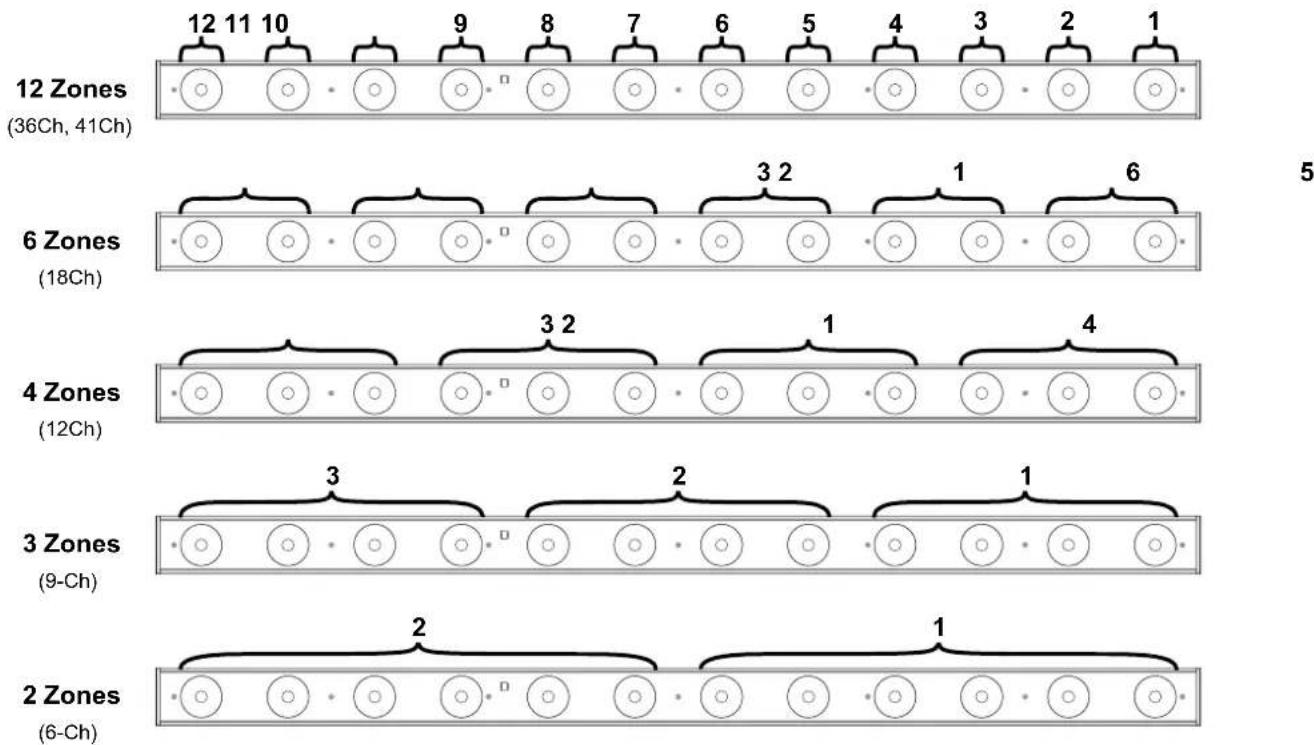
Zones for DMX Control
Acerca de esta guía
General Information Technical Support
Chauvet World Headquarters
Address: 3360 Davie Rd. Voice: (844) 393-7575
Davie, FL 33314 Fax: (954) 756-8015
Voice: (954) 577-4455 Email: chauvetcs@chauvetlighting.com
Fax: (954) 929-5560
Toll Free: (800) 762-1084 Website: www.chauvetdj.com
Chauvet U.K.
Address: Unit 1C Email: UKtech@chauvetlighting.eu
Brookhill Road Industrial Estate
Pinxton, Nottingham, UK Website: www.chauvetdj.eu
NG16 6NT
Voice: +44 (0) 1773 511115
Fax: +44 (0) 1773 511110
Chauvet Benelux
Address: Stokstraat 18 Email: BNLtech@chauvetlighting.eu
9770 Kruishoutem
Belgium Website: www.chauvetdj.eu
Voice: +32 9 388 93 97
Chauvet France
Address: 3, Rue Ampère
91380 Chilly-Mazarin
France Website: www.chauvetdj.eu
Voice: +33 1 78 85 33 59
Chauvet Germany
(Entrance by Calle 2)
Email: servicio@chauvet.com.mx
Zona Industrial Lerma Website: www.chauvetdj.mx
Visit the applicable website above to verify our contact information and instructions to request support. Outside the U.S., U.K., Ireland, Mexico, France, Germany, or Benelux, contact the dealer of record.
COLORband PiX ILS QRG ML6 Rev. 4
© Copyright 2022 Chauvet
All rights reserved

UL 1573
CSA C22.2 No. 166
E113093


RoHS