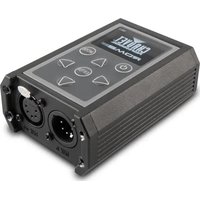
RDM2go - Lighting Chauvet - Free user manual and instructions
Find the device manual for free RDM2go Chauvet in PDF.


| Product Type | Portable RDM/DMX Interface |
| Brand | Chauvet |
| Model | RDM2go |
| Power Supply | Rechargeable lithium-ion battery via USB (USB-A to Micro USB-B cable included) |
| DMX Connection | 5-pin (3/5-pin adapters and 5-pin to bare wire adapter included) |
| Supported Protocols | DMX512A, RDM (Remote Device Management), Illumicode |
| Main Functions | RDM management, DMX sequences (read/edit/delete), cable test, scene playback/recording, white balance adjustment, static mode, strobe, power saving |
| Display | LCD screen with navigation menu |
| Controls | MODE, ENTER, navigation buttons (up/down/left/right) |
| Weight (approx.) | Approximately 200 g |
| Dimensions (approx.) | 150 x 80 x 30 mm |
| Operating Temperature | Max 45 °C |
| Protection Rating | IP20 (indoor use only) |
| Box Content | RDM2go, carry case, 2 power cables, DMX 3/5-pin adapters, 5-pin to bare wire adapter, USB-A to Micro USB-B cable, reference manual |
| Safety | Do not open (no user-serviceable parts), use indoors, mount with safety cable, avoid flammable sources, disconnect if not used for extended periods |
| Maintenance | Clean with a dry, lint-free cloth; avoid liquids and moisture |
Frequently Asked Questions - RDM2go Chauvet
User questions about RDM2go Chauvet
0 question about this device. Answer the ones you know or ask your own.
Ask a new question about this device
Download the instructions for your Lighting in PDF format for free! Find your manual RDM2go - Chauvet and take your electronic device back in hand. On this page are published all the documents necessary for the use of your device. RDM2go by Chauvet.
USER MANUAL RDM2go Chauvet
About This Guide
The RDM2go Quick Reference Guide (QRG) has basic product information such as connection, menu options, and DMX values. Download the User Manual from www.chauvetprofessional.com for more details.
Disclaimer
The information and specifications contained in this QRG are subject to change without notice.
Limited Warranty
FOR WARRANTY REGISTRATION AND COMPLETE TERMS AND CONDITIONS PLEASE VISIT OUR WEBSITE.
For Customers in the United States and Mexico: www.chauvetlighting.com/warranty-registration
For Customers in the United Kingdom, Republic of Ireland, Belgium, the Netherlands Luxembourg, France, and Germany: www.chauvetlighting.eu/warranty-registration/
Chauvet warrants that this product shall be free from defects in material and workmanship under normal use, for the period specified in and subject to the exclusions and limitations set forth in, the full limited warranty on our website. This warranty extends only to the original purchaser of the product and is not transferable.
To exercise rights under this warranty, you must provide proof of purchase in the form of an original sales receipt from an authorized dealer that shows the product name and date of purchase. THERE ARE NO OTHER EXPRESS OR IMPLIED WARRANTIES. This warranty gives you specific legal rights. You may also have other rights that vary from state to state and country to country. This warranty is valid only in the United States, United Kingdom, Republic of Ireland, Belgium, the Netherlands, Luxembourg, France, Germany and Mexico. For warranty terms in other countries, please consult your local distributor.
Safety Notes
• DO NOT open this product. It contains no user-serviceable parts.
- To eliminate unnecessary wear and improve its lifespan, during periods of non-use completely disconnect the product from power by unplugging it.
- DO NOT leave any flammable material within 50 cm of this product while operating or connected to power.
- CAUTION: When transferring product from extreme temperature environments, (e.g. cold truck to warm humid ballroom) condensation may form on the internal electronics of the product. To avoid causing a failure, allow product to fully acclimate to the surrounding environment before connecting it to power.
• The product is not intended for permanent installation.
- DO NOT operate this product outdoors or in any location where dust, excessive heat, water, or humidity may affect it. (IP20)
• DO NOT operate this product if the housing, screen or cables appear damaged.
• DO NOT connect this product to a dimmer or rheostat.
• ONLY connect this product to a grounded and protected circuit.
• In the event of a serious operating problem, stop using immediately.
- The maximum ambient temperature is 113 °F (45 °C). Do not operate this product at higher temperatures.
- Caution: Using product in lower temperature environments may affect battery life or battery efficiency.
Contact
Outside the US, United Kingdom, Ireland, France, Germany, Mexico, or Benelux, contact your distributor to request support or return a product. Visit www.chauvetdj.com for contact information.
What Is Included
- RDM2go
-
Carry Pouch
• 2 pc, 3- to 5-pin converters -
5-pin male to bare wire adaptor
• USB-A Male to Micro USB-B Male (3 ft) - Quick Reference Guide
DC Power
This product operates on a rechargeable lithium ion battery. To recharge the product, plug the included cable into any USB-A female outlet. Plug the Micro USB-B male end into the female socket located on top of the product. See the User Manual for more information on the charging indicators.

To eliminate unnecessary wear and improve its lifespan, during periods of non-use completely disconnect the product from power by unplugging it.
DMX Linking
The RDM2go will work as a DMX controller using the 5-pin DMX serial connection located at the bottom of the product. The RDM2go comes with 2 adaptors, which will convert the 5-pin DMX serial connections to 3-pin connections. See the User Manual for information about connecting and configuring the product for DM X operation. A DMX Primer is available from www.chauvetprofessional.com
DMX Connection
The RDM2go uses a 5-pin DMX data connection to control other products using DMX-512A protocol. This product can send, receive, and record DMX. See the User Manual for more information about connecting and configuring the product for DMX operation.
RDM (Remote Device Management)
Remote Device Management, or RDM, is a standard for allowing DMX-enabled devices to communicate bi-directionally along existing DMX cabling. The RDM2go supports RDM protocol that allows feedback to monitor and change menu map options on products that support this feature Download the User Manual from www.chauvetprofessional.com for more details.
Illumicode
The RDM2go will work as an Ilumicode addresser using the 5-pin DMX serial connection located at the bottom of the product and using the various adaptors included with this product and your Iluminarc product. See the User Manual for more information about connecting and configuring the product for Ilumicode operation.
Product Diagram
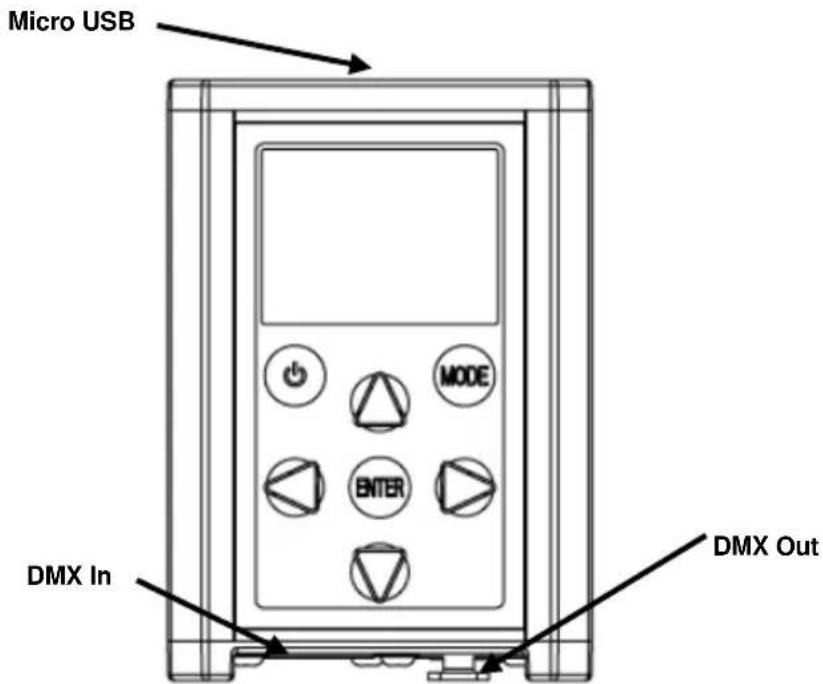
Control Panel Description
| Button | Function |
 | Turns product On/Off |
 | Exits from the current menu or function |
 | Enables the currently displayed menu or sets the currently selected value into the selected function |
 | Navigates upwards through the menu list or increases the numeric value when in a function |
 | Navigates downwards through the menu list or decreases the numeric value when in a function |
 | Navigates left through the menu list. |
 | Navigates right through the menu list. |
Menu Map
| Main Level | Programming Levels | Description | |||||
| RDM Discovering... | No Fixtures Found! | No RDM compatible products connected to the RDM2go | |||||
| * (choose from list of products connected) | * (choose from the attributes unique to each product) | Shows information about each product. Some attributes will allow changes to be made. See each individual products User Manual to determine which attributes are controllable | |||||
| Ilumicode | DMX | 001-512 | Sets the DMX starting address | ||||
| PERSON | VW | 2-channel: WW,CW control | |||||
| VW+D | 3-channel: WW,CW control + dimmer | ||||||
| ARC 1 | 3-channel: RGB control | ||||||
| ARC 1 + D | 4-channel: RGB control + dimmer | ||||||
| ARC2 | 4-channel: RGBW(A) control | ||||||
| ARC2 + D | 5-channel: RGBW(A) control + dimmer | ||||||
| ARC3 | 5-channel: RGBWA control | ||||||
| ARC3 + D | 6-channel: RGBWA control + dimmer | ||||||
| ARC FULL | 7-channel: RGB control + dimmer | ||||||
| REMOTE | Reserved for future use | ||||||
| SOLID | 1-channel: Dimmer | ||||||
| SPECIAL 1 | See each product's User Manual | ||||||
| SPECIAL 2 | |||||||
| CALIB | WHITE 01-11 | RED | 000-255 | Determines the white balance for the color macros | |||
| GREN | |||||||
| BLUE | |||||||
| COOL | |||||||
| WARM | |||||||
| RGBTOW AMBER | Determines the white balance when RGBTOW is active | ||||||
| DIMMER | OFF | Dimmer works in linear mode | |||||
| DIM 1 | Dimmer works in non-linear mode, from fast to slow | ||||||
| DIM 2 | |||||||
| DIM 3 | |||||||
| DIM 4 | |||||||
Menu Map (Cont.)
| Main Level | Programming Levels | Description | |||||||
| Illumicode (Cont.) | STATIC | RED | 000-255 | Configures the static color | |||||
| GREN | |||||||||
| BLUE | |||||||||
| COOL | |||||||||
| WARM | |||||||||
| AMBER | |||||||||
| SOLD | |||||||||
| STRB | 00-20 | Configures strobe speed | |||||||
| SETTINGS | COLOR | OFF | Maximum output, unbalanced white | ||||||
| RGBTOW | White output is as per CALIB > RGBTOW settings | ||||||||
| UC | Output matches that of product's previous versions | ||||||||
| RESET | NO/YES | Restores factory defaults | |||||||
| Send DMX | T001-T512 | 000-255(000-100) | Dimmer Check | On | Goes through each channel to verify light output, automatically switching off the previous channel | ||||
| Off | Manually navigate to a channel to check light output | ||||||||
| Show Level As | Decimal | Determines how the dimmer levels are displayed on the screen | |||||||
| Percent | |||||||||
| Clear All Channels | Sets all channels to "0" | ||||||||
| DMX Sequence | Play Sequence | Up/Down: Speed | 0.1"-60.0" | Uses Up/Down keys to adjust the Speed of the sequence | |||||
| Left/Right: Fade | Uses Left/Right keys to adjust the Fade Time of each step in the sequence | ||||||||
| Enter: Play/Stop | Plays the DMX sequence | ||||||||
| Edit Sequence | Step 001-100 | Scene End Of Sequence-032 | Set-up and edit the DMX sequence | ||||||
| Delete Sequence | No/Yes | Deletes/reset the DMX sequence | |||||||
| Store Scene | Scene 1-32 | Records current DMX values | |||||||
| Load Scene | Loads a previously recorded scene | ||||||||
Menu Map (Cont.)
| Main Level | Programming Levels | Description | |||
| Receive DMX | R001-R512 | Show Level As | Decimal | Determines how the dimmer levels are displayed on the screen | |
| Percent | |||||
| Store Scene | Scene 1-32 | Records the current DMX values as a scene | |||
| Load Scene | Playing Scene 1-32 | Scene 1-32 | Loads a previously recorded scene | ||
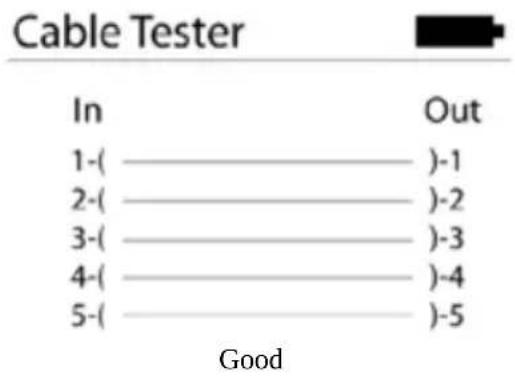
| Cable Test | In ———— ———— Out | Tests the cable for any breaks or shorts in the line. See Cable Test Chart | |||
| Power Options | Off | Power saver feature is turned off | |||
| 1 Minute | Product is powered off after 1 min of inactivity | ||||
| 5 Minute | Product is powered off after 5 min of inactivity | ||||
| 10 Minute | Product is powered off after 10 min of inactivity | ||||
| Information | Version | V1.3 | Shows the installed software version | ||
| UID | ——————— | Unique identifier | |||
Cable Test Chart
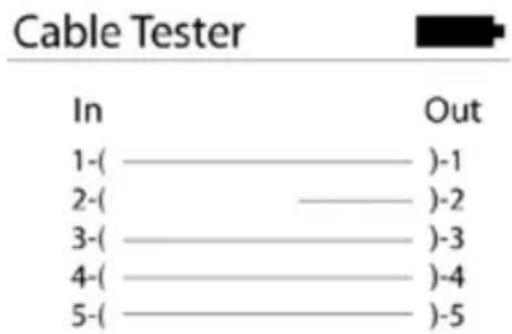
Bad Pin 2
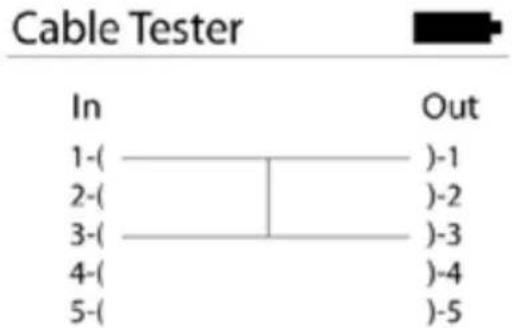
Pin 1 Shorted to Pin 3
Acerca de esta guía
Address: 5200 NW 108th Avenue
Sunrise, FL 33351
Voice: (954) 577-4455
Fax: (954) 929-5560
Toll free: (800) 762-1084
Technical Support
Voice: (844) 393-7575
Fax: (954) 756-8015
Email: chauvetcs@chauvetlighting.com
Website: www.chauvetdj.com
UNITED KINGDOM AND IRELAND - Chauvet Europe Ltd.
General Information
Address: Unit 1C
Brookhill Road Industrial Estate
Pinxton, Nottingham, UK
NG16 6NT
Voice: +44 (0)1773 511115
Fax: +44 (0)1773 511110
Technical Support
Email: uktech@chauvetlighting.com
Website: www.chauvetdj.eu
CHAUVET EUROPE - Chauvet BVBA
General Information
Visit the applicable website above to verify our contact information and instructions to request support. Outside the US, United Kingdom, Ireland, Mexico, France, Germany, or Benelux, contact the dealer of record.


Brand : Chauvet
Model : RDM2go
Category : Lighting