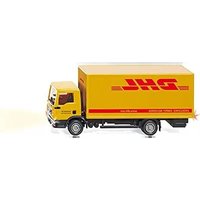
Control 87 - Model making Wiking - Free user manual and instructions
Find the device manual for free Control 87 Wiking in PDF.


| Product type | RC Model Kit |
| Brand | Wiking |
| Model | Control 87 |
| Category | Model Building |
| Vehicle power supply | Integrated LiPo battery (non-removable) |
| Remote control power supply | 4 AA batteries (not included) |
| Radio technology | 2.4 GHz with automatic connection |
| Driving functions | Digital progressive speed and direction control |
| Lighting | Front/rear lights, turn signals, hazard lights |
| Motorization | 1 drive motor and 1 servo motor |
| Category levels | Level A (vehicles), Level B (trailers), Level C (stationary installations) |
| Pairing capacity | Multiple models per level via SCAN button |
| Maintenance | Clean with a dry, lint-free cloth |
| Safety | For use by persons over 14 years of age, indoors only |
| Battery charging | Use only the original power supply unit, charge under supervision |
| Remote control compatibility | WIKING CONTROL 87 and SIKU CONTROL 82/87 |
| Box contents | Vehicle, remote control, power supply unit, instruction manual |
| Warranty and after-sales service | Factory replacement of battery for defects |
| Disposal | Do not dispose of with household waste, WEEE recycling |
Frequently Asked Questions - Control 87 Wiking
User questions about Control 87 Wiking
0 question about this device. Answer the ones you know or ask your own.
Ask a new question about this device
Download the instructions for your Model making in PDF format for free! Find your manual Control 87 - Wiking and take your electronic device back in hand. On this page are published all the documents necessary for the use of your device. Control 87 by Wiking.
USER MANUAL Control 87 Wiking
natural_image
Black-and-white illustration of various delivery trucks and a large autonomous shuttle (no text or symbols visible)WIKING
Die Symbole · The Symbols Les Symboles · De Pictogrammen

text_image
CONTROL 2.4 GHz ON OFF proportional proportional 1 2 2 1 cm 2 1:87 A B C SCANRadio controlled model
Adjustable (digital proportional) speed control
Adjustable (digital proportional) steering
Head lights / Rear light
Working indicators and hazard warning lights
Function – see description
One driving and one servo motor
Stationary Equipment
natural_image
Close-up of a mechanical device with no visible text or symbols
text_image
ON OFFInhaltsverzeichnis:
text_image
Four prohibition symbols: sun, flame, pencil, and smoke, each enclosed in red circles with a diagonal line.When taking the model out of the packaging, please check for transport damage. If this is the case, please contact your retailer directly.
Please use the cover page 3 for exact clarification of the mini-pictures.

The remote control module

text_image
proportional proportional 1 2 1 2 A B C SCAN WIKING WIKING CONTROL 87 RADIO CONTROLLED siku SIKU CONTROL 82 RADIO CONTROLLED ON OFFThe batteries required to operate the remote control module (4 x type AA) are not supplied.
Flashing beacons/horn or road noise (not for 0774 26 / 7426)
Without function

text_image
1 2Before you start: Charging the battery
Use only the original power supply unit for charging.

natural_image
Close-up of a mechanical device with a black connector and metallic components (no visible text or symbols)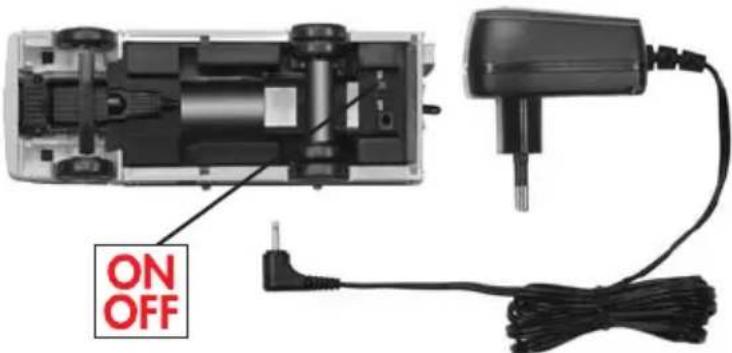
text_image
ON OFFTable of contents:
- Introduction
- Contents of package
- General safety information
3.1 Safety information for vehicle and remote control module
3.2 Safety information for battery and power supply - Charging the battery
- System start
5.1 Single operator/user – single model
5.2 Multiple operators/users – multiple models
5.3 Addition of further models
5.4 Deleting the model from the memory - Maintenance and cleaning
- Disposal of disused electrical equipment
- Information on batteries
Congratulations
on your purchase of this high-quality WIKINGCONTROL87 model.
On the following pages, we will give you the necessary information and tips on the correct handling of the vehicle.
We hope you will enjoy your WIKING product.
Please read these instructions carefully before using the product for the first time They provide you with important information for your safety and for the use and maintenance of this WIKINGCONTROL87 product. Keep these instructions safe for future reference or any warranty claims.
This WIKINGCONTROL87 product was manufactured under continuous quality monitoring. We incorporate the results of this monitoring into our development process. For this reason, we reserve the right to technical and design modifications, so that we are always able to offer our customers optimum product quality.
2. Contents of package
After unpacking, please check the contents for completeness and transport damage. Please contact your dealer if you have any complaints.
3. Safety information
- WIKING models are manufactured according to the latest safety requirements.

• Electronic components must be protected from wet conditions. Connection terminals must not be short-circuited.
• For use only by people aged at
least 14 years.
- Please retain the packaging, as it contains manufacturer information. Subject to colour changes and technical modifications.
• The charging process may be carried out only in dry indoor areas. Batteries may be charged only under supervision. Nominal voltage for power plug 230 Volt 50 Hz.
3.1 Safety information for vehicle and remote control module

• These models must be used only for their intended purpose, i.e. as a remote-controlled model vehicle in dry and enclosed spaces. For reasons of safety, the vehicle must not be operated in the vicinity of stairs and fan heaters. Any other use is not allowed and may be dangerous.
The manufacturer cannot be held responsible for any damage caused by failure to use the product other than for its intended purpose.
- 2.4 GHz radio technology is used to control the model. If used properly and according to the current state of the art, there are no health risks from radio waves. This model is well below the maximum transmission output permitted by law.
- Although the radio system used is very fault-resistant, dips in radio-signal quality due to spatial conditions and other radio systems can never be completely ruled out. A less-than-perfect radio signal can lead to a reduction in the range.
- Do not bring hair or loose clothing near to the rear axle or the wheels when the model is switched on (operating switch set to 'ON').
- In order to guarantee this model's inbuilt safety level in the long term, the model should be inspected regularly.
- The model must be switched off after a driving session.
- This WIKINGCONTROL87 model can be operated exclusively by means of the WIKINGCONTROL87 remote control module and/or the SIKUCONTROL87 remote control module.
- Only the stated battery types (4 x type AA) may be used for the operation of the remote control module; these are not included in the scope of delivery.
- Empty batteries must be removed from the remote control module. Loosen the screw on the underside of the remote control module in order to remove the battery compartment
cover, and remove the batteries. Comply with the correct polarity of the batteries (shown in the battery compartment) when inserting new batteries.
The functions of the buttons for this model are shown on page 13.
3.2 Safety information for battery and power supply
- Only the original WIKING power supply unit may be used for charging the battery. Check the power supply unit regularly for damage. Defective parts must not continue to be used.
- The vehicle becomes warm during the charging process. Never carry out the charging process on flammable surfaces or adjacent to flammable objects. If the vehicle becomes hot during the charging process, discontinue the charging process immediately.

text_image
Four prohibition symbols: sun, flame, pencil, and smoke, each with a red circle and no text.- Improper repairs and structural alterations (removal of original parts, attachment of inadmissible parts, changes to the electronics, etc.) completely nullify any claims under guarantee, and hazards for the user may arise.
- The charging process may be carried out only in dry indoor areas. The charging process may be carried out only under supervision. Nominal voltage for power plug 230 Volt 50 Hz.
• The battery for this WIKING-
CONTROL87-product is integrated into the vehicle, and cannot be removed. If the battery is defective, this can be replaced by the WIKING service team in the factory. In this case, please return the model to us. For this, please use the guarantee form on the last page of the manual for the model which you purchased.
- Please regularly examine the original WIKINGCONTROL87 power plug for damage. If there is damage, the power plug must not be used until it has been fully repaired.
4. Charging the battery
1) Put the operating switch of the model into the "OFF" position.
2) Insert the power supply unit into the socket. If the LED shows a green light, this indicates that the power supply unit is in the correct state, and that it is able to charge the battery.
3) Insert the jack plug at the end of the power supply unit's cable into the corres-
ponding socket underneath the WIKING-CONTROL87 model.
4) The LED on the power supply unit turns red. The battery is charging.
5) The charging process is complete when the LED on the power supply unit shows a continuous green light.
6) Pull the jack plug at the end of the power supply unit's cable out of the socket on the model.
7) Remove the power supply unit from the socket.
General information:
When the model begins to flash quickly in bursts of 5, and at intervals of 2 seconds, then you can continue driving for a maximum of three minutes. After this, the battery is empty and has to be recharged.
5. System start
The WIKINGCONTROL87 radio technology used in this model is fitted with automatic connection creation. You do not have to select a channel, as you do with various other products. The remote control module and the models connect with each other automatically, and do not interfere with other WIKING models running in the same area or devices using other radio technologies (e.g. WLAN or Bluetooth). To make things clearer and to make operation easier, current and future models are allocated to 3 different levels:
- Level A: Vehicles/Machines
- Level B: Trailers/Semi-trailers/Devices
- Level C: Stationary equipment
The LED displays for these three levels (marked A, B, C) can be seen on the remote control module. As soon as the remote control and the model are connected, this is stored within the appropriate level in the remote control module for the duration of the driving sequence. The corresponding button shines constantly.
This allocation, which is carried out at the beginning of every new driving sequence, requires a decision as to whether the user will drive the model(s) alone, or whether several people will drive several models at once.
If you want to drive one model on your own, then heed the information in section 5.1.
If you want to simultaneously operate several models with several persons, heed the information in section 5.2.
5.1 Single operator/user - single model
Turn the model on. For this, move the ON/OFF switch on the vehicle to the position „ON“. The model flashes, thus indicating its operational readiness.
Turn on the remote control module by pressing the logo The logo illuminates red. The remote control module is ready for operation.
Important information:
The model must always be switched on first, followed by the remote control module.
Now the connection between the model and the remote control module is established. This process can take up to five (5) seconds.
The connection between the remote control and the model has been established when the level A button (vehicles) and the headlights and rear lights shine constantly. The model is saved in the remote control module and is ready to run. The model can be operated only with this remote control module during this driving sequence. Driving can begin.
5.2 Multiple operators/users - multiple models
Before beginning a driving sequence with several drivers and models, the systems of the individual drivers must be started. To ensure that the remote control modules find only the models of the respective individual driver, each individual driver has to start up his system separately, one after another. The procedure for the start is the same as described in section 5.1.
Example:
4 people want to drive 4 WIKING CONTROL87 models in a room together.
To ensure that everything runs smoothly, the systems have to be started one after another. To begin with, all remote control modules and models have to be switched off. Driver 1 now switches on his model and then his remote control module. If driver 1's level A LED is shining, then his system is operational. Only then can driver 2 follow the procedure. Once his level A LED is shining, then it is the turn of driver 3, followed by driver 4.
Important information:
Error-free driving will be possible only if this rule is strictly observed.
5.3 Addition of further models
Using the WIKINGCONTROL87 radio system, you can control an almost limitless number of different models. If you have started your system with a single model, and after a time you want to add an additional model, then your remote control module has to find and save this model.
Leave the remote control, and the model which you are already driving, switched on. If you now switch the battery's operating switch from OFF to ON for the model which you want to add, then the model's lighting will begin to flash quickly. This is a signal that the model is ready to connect itself with the remote control module. To connect this model with the remote control module, press the SCAN button. After the connection has been successfully established, this model is allocated to the corresponding LEVEL, and is available immediately. During the SCAN process, the corresponding level button goes out and comes back on again, once the connection has been established. The model stored on this level up to now is not lost, but is kept in the background. By pressing the corresponding level button you can switch between both the models of a level. Repeat this procedure for further models.
The model that was last added is always the operational one. If you now want to switch between levels, press the level button once (or more than once depending on the number of models stored). Every time this button is pushed, the next model that is saved is triggered. A change in the level can take 3 to 10 seconds.
5.4 Deleting the model from the memory
Turning off the remote control module deletes the models stored in the internal memory of the module. If there are several vehicles, and a vehicle is switched off, it is deleted from the internal memory.
6. Maintenance and cleaning
Use only dry and dust-free cloths to clean and care for the WIKING products. In order to guarantee the design-related safety level of this model in the long term, the model must be checked regularly for any visible damage.
7. Disposal of disused electrical equipment
At the end of their useful life, these products must not be disposed of as normal household waste; instead they must be handed in to a collection point for the recycling of electrical and electronic devices. This is indicated by the symbol on the product, in the instructions for use, or on the packaging. The materials are recyclable as specified by their labelling. You make a major contribution to the protection of the environment by recycling, salvaging materials, or re-using spent goods in other ways. Please consult your local authority about the waste collection point in your area.

text_image
LiPo8. Information for batteries (Remote control module)
The remote control module is permitted to be operated only with type AA batteries. Regularly check that batteries are not leaking. Remove empty batteries from the remote control module. Non-rechargeable batteries must not be recharged. Before charging, remove rechargeable batteries from the remote control module. Charge rechargeable batteries only under supervision. Insert batteries the correct way round. Different battery types or new and used batteries must not be used together. If rechargeable batteries are used, the transmission power of the remote control module may be diminished. Do not throw away used batteries with domestic waste. Please comply with the special disposal regulations.
ATTENTION:
WIKING products are collector's items, and are not suitable for children. The WIKING-CONTROL87 remote control module is identical to the SIKUCONTROL32 remote control module, and can be utilized for both systems. When utilized together with the SIKUCONTROL32 additional safety precautions must be complied with. These are found in the operating instructions for your SIKUCONTROL32 product or may be viewed at www.siku.de.
| FAULT | CAUSE | FAULT ELIMINATION |
| No connection between the remote control module and the model. | Battery/storage battery voltage is too low.Transmission fault. | Change/charge batteries/storage batteries in the remote control module.Charge storage battery in the model.Switch off and on again or run scan on the remote control module (new connection set-up).Switch model off and on again. |
| Malfunctioning in the model on (jerking in steering, movement in engine without the corresponding keys on the remote control module being activated). | Battery/storage battery voltage is too low.Transmission fault. | Change/charge batteries/storage batteries in the remote control module.Charge storage battery in the model.Switch off and on again or run scan on the remote control module (new connection set-up).Switch model off and on again. |
| The corresponding level key light is not on although there is a connection to the model. | Transmission fault(The vehicle could not be assigned to the right level). | Switch off and on again or run scan on the remote control module (new connection set-up).Switch model off and on again. |
| The corresponding level key light is on but there is no connection to the model. | Transmission fault(The vehicle could be assigned to the right level but a connection could not be established). | Switch off and on again or run scan on the remote control module (new connection set-up).Switch model off and on again. |
| When switching through the stored models, it is not possible to establish a connection. | Fault in connection and transmission. | Press through the corresponding level keys again.Otherwise, switch off and on again or run scan on the remote control module (new connection set-up).Switch model off and on. |
natural_image
Close-up of a mechanical device with a black connector and metallic components (no visible text or symbols)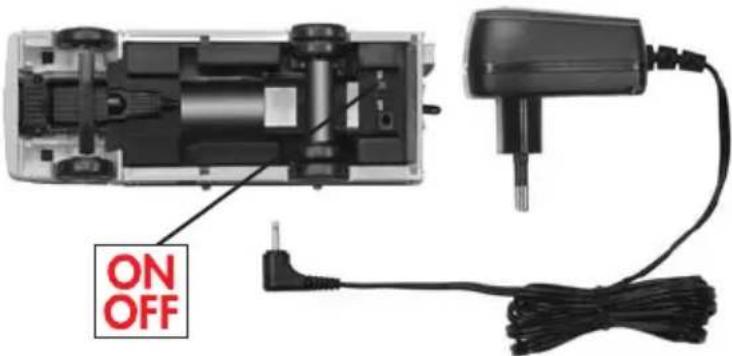
text_image
ON OFFnatural_image
Close-up of a mechanical device with a black connector and metallic components (no visible text or symbols)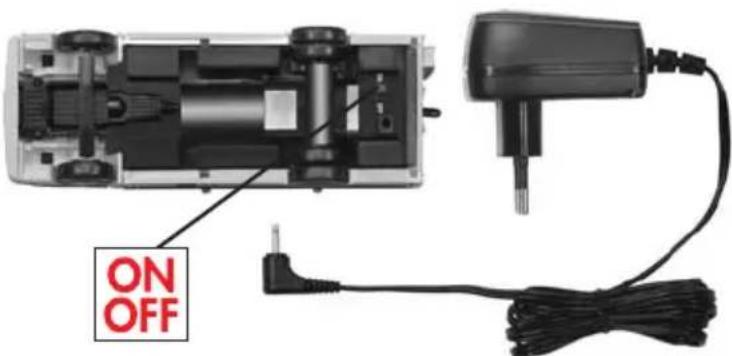
text_image
ON OFFInhoudsopgave:
Level C: Stationaire installations
68 Environmental protection instructions. At the end of its service life this product cannot be disposed of with ordinary solid domestic waste. It should be deposited at a collection point for recycling of electrical and electronic equipment. This is indicated by the symbol on the product, in the instructions for use or on the packaging. The materials are recyclable according to their identification. You make a major contribution to the protection of the environment by recycling, salvaging materials or reusing spent goods in other ways. Please consult your local authorities about the waste collection point for your area. More detailed information on environmental friendly waste disposal at www.toy.de.
Declaration of Conformity in accordance with the Directive 1999/5/EC (R&TTE)
D Hiermit erklärt Wiking-Modellbau & Co. KG, dass sich die Artikel 077410-077436 / 7410-7436 in Übereinstimmung mit den grundlegenden Anforderungen und den anderen relevanten Vorschriften der Richtlinie 1999/5/EG befinden.
GB Wiking-Modellbau & Co. KG hereby declares that the items 077410-077436 / 7410-7436 conform to the basic requirements and other relevant provisions of Directive 1999/5/EC.
F La société Wiking-Modellbau & Co. KG déclare par la présente que les Articles 077410-077436 / 7410-7436 sont conformes aux exigences fondamentales et autres prescriptions pertinentes de la directive 1999/5/CE.
E Por la presente, Wiking-Modellbau & Co. KG declara que los artículos 077410-077436 / 7410-7436 son coherentes con los requisitos básicos y otras normas relevantes de la directiva 1999/5/CE.
NL Hiermee verklaart de Wiking-Modellbau & Co. KG dat de artikelen 077410-077436 / 7410-7436 zich in ove-reenstemming bevinden met de principiele eisen en de andere relevante voorschriften van de richtlijn 1999/5/EG.
Con il presente Wiking-Modellbau & Co. KG dichiarà che gli articoli 077410-077436 / 7410-7436 sono conformi ai requisiti fondamentali e alle altre disposizioni rilevanti della Direttiva 1999/5/CE.
TRwiking-Modellbau & Co. KG şirketi, 077410-077436 / 7410-7436 ürünlerinin, 1999/5/AT yönetmeliğinin temel istemlerine ve diğer ilgili yönetmeliklere uygun oldukları beyan eder.
5 Härmed intygar företaget Wiking-Modellbau & Co. KG, att artiklarna 077410-077436 / 7410-7436 stämmer överens med grundläggande krav och andra relevanta föreskrifter i EU-direktivet 1999/5/EG.
FIN Wiking-Modellbau & Co. KG vakuuttaa täten, että tuotteet 077410-077436 / 7410-7436 ovat direktiivin 1999/5/EY perusvaatimusten mukaiset ja vastaavat direktiivin muita tärkeitä määräyksiä.
P A Wiking-Modellbau & Co. KG declara por este meio que os artigos 077410-077436 / 7410-7436 cumprem os requisitos básicos e outras disposições aplicáveis fixadas pela Diretiva 1999/5/CE.
GRΔια του παρόντος η Wiking-Modellbau & Co.
KG δηλώνει, ότι τα άρθρα 077410-077436 / 7410-7436 συμμορφώνονται με τις βασικές απαιτήσεις και τους λοιπούς σχετικούς κανονισμούς και τις οδηγίες 1999/5/ΕΚ.
DK Hermed erklærer Wiking-Modellbau & Co. KG at artiklerne nr. 077410-077436 / 7410-7436 er i overensstemmelse med de grundlæggende krav og andre relevante forskrifter i direktiv 1999/5/EF.
N Hermed erklærer Wiking-Modellbau & Co. KG at artiklene 077410-077436 / 7410-7436 er i overensstemmelse med de grunnleggende kravene og de andre relevante forskriftene i direktiv 1999/5/EU.
ISHér með lýsir Wiking-Modellbau & Co. KG því yfir að vörur númer 077410-077436 / 7410-7436 eru í samræmi við helstu kröfur og önnur viðeigandi ákvæði í tilskipun 1999/5/EB.
LKšiuo dokumentu „Sieper GmbH“ patvirtina, kad prekės 077410-077436 / 7410-7436 atitinka direktyvos 1999/5/EB pagrindinius reikalavimus ir kitus susijusius nurodymus.
LV Ar šo Wiking-Modellbau & Co. KG apliecina, ka izstrādājumi ar artikulu 077410-077436 / 7410-7436 atbilst direktūvas 1999/5/EK galvenajām prasībām un pārējiem svarīgajiem noteikumiem.
EST Käesolevaga kinnitab Wiking-Modellbau & Co. KG, et artiklid 077410-077436 / 7410-7436 vastavad direktiivi 1999/5/EÜ põhinõuetele ja muudele asjakohastele nõuetele.
PPrzedsiębiorstwo Wiking-Modellbau & Co. KG, oświ -adcza, że artykuły 077410-077436 / 7410-7436 są zgodne z podstawowymi wymaganiami i innymi istotnymi przepisami Dyrektywy 1999/5/WE.
Firma Wiking-Modellbau & Co. KG tímto prohlăšuje, že výrobky 077410-077436 / 7410-7436 jsou ve shodě se základními požadavky a dalšími relevantními předpisy směrnice 1999/5/ES.
SK Firma Wiking-Modellbau & Co. KG týmto vyhlasuje, že sa výrobky 077410-077436 / 7410-7436 zhodujú so základnými požiadavkami a inými dôležitými predpismi Smernice 1999/5/EÚ.
HROyim putem poduzeće Wiking-Modellbau & Co. KG izjavljuje da su proizvodi 077410-077436 / 7410-7436 u skladu s osnovnim zahtjevima i drugim relevantnim propisima Direktive 1999/5/EZ.
SLO Podjetje Wiking-Modellbau & Co. KG izjavlja, da so modeli 077410-077436 / 7410-7436 skladni z osnovnimi zahtevami in drugimi ustreznimi predpisi direktive 1999/5/ES.
HA Wiking-Modellbau & Co. KG czúton kijelenti, hogy a 077410-077436 / 7410-7436 cikk számú termék megfelel az 5/1999/EK irányelv alapvető követelményeinek és egyéb releváns előírásainak.
ROViking-Modellbau & Co. KG declară prin prezenta că articolele 077410-077436 / 7410-7436 îndeplinesc cerințele de bază și celelalte dispoziții relevante din Directiva 1999/5/CE.
BG настоящото Wiking-Modellbau & Co. KG декларира, че артикули 077410-077436 / 7410-7436 са в съответствие с основните изисквания и другите важни разпоредби на Директива 1999/5/EO.
Unsere vollständige Konformitätserklärung finden Sie im Internet unter: Our complete declaration of conformity can be found online under: Vous trouverez notre déclaration complète de conformité sur Internet sous le lien suivant: http://www.wiking.de/de/downloads.html
GB Should this item show any operational fault, please contact the specialist retailer where you purchased this model from. Should any repair work be necessary, please return the product to the address below giving details of the fault you have found together with this Certificate of Guarantee correctly filled out and signed by your dealer together with the receipt of purchase.