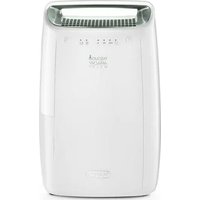
USER MANUAL Tasciugo AriaDry Multi DEX212SF DELONGHI
DEHUMIDIFIER
DEHUMIDIFIER
DEHUMIDIFIER
DEHUMIDIFIER
DEHUMIDIFIER
DEHUMIDIFIER
DEHUMIDIFIER
DEHUMIDIFIER
DEHUMIDIFIER
DEHUMIDIFIER
DEHUMIDIFIER
DEHUMIDIFIER
DEHUMIDIFIER


Read the safety warnings carefully before using the appliance.
INSTALLATION
Position the appliance in the room to be dehumidified. A free space of at least 50 cm must be left at the front of the dehumidifier, so as not to block the air outlet. For efficient ventilation a space of about 5-10 cm should be left at the back of the appliance. The condensate can be drained in one of the following ways:
a) Draining into the tank
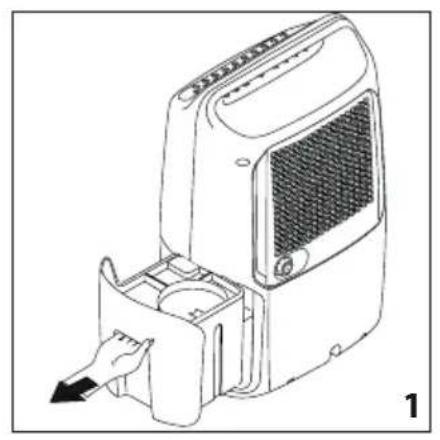
The condensate can be drained directly into the tank. The tank can be easily removed (Fig.1).
b) Continuous external draining
If the appliance is to be operated for long periods but you are unable to empty the tank regularly, you are recommended to use continuous draining.
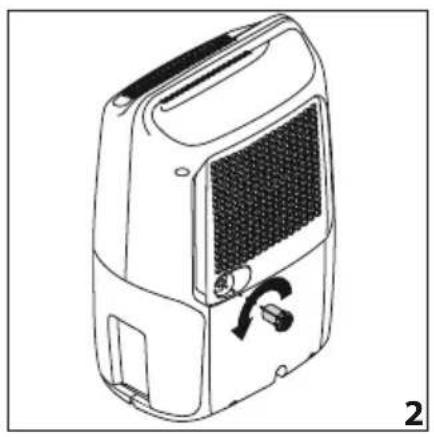
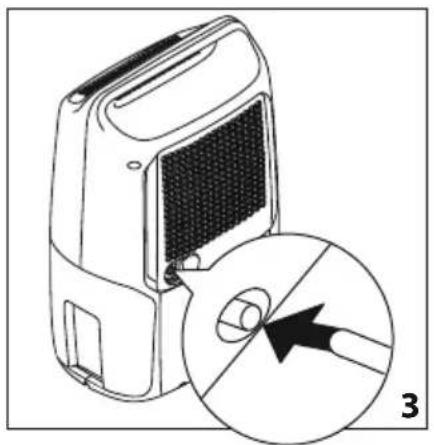
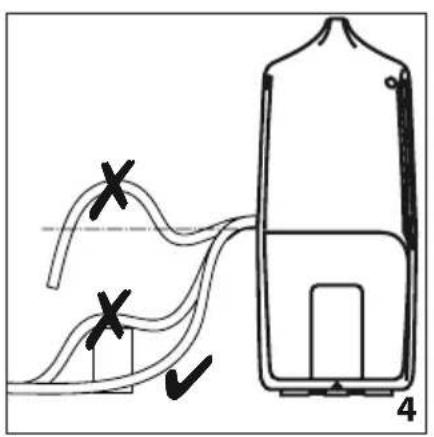
1) Remove the continuous drain cap by turning it counterclockwise (Fig. 2). 2) Apply the accessory tube to the spout as shown in Figure 3. 3) Make sure the end of the hose is no higher than the spout. Otherwise the water will flow into the tank of the appliance (Fig. 4).
Make sure there are no kinks in the hose.
DESCRIPTION (page 3)
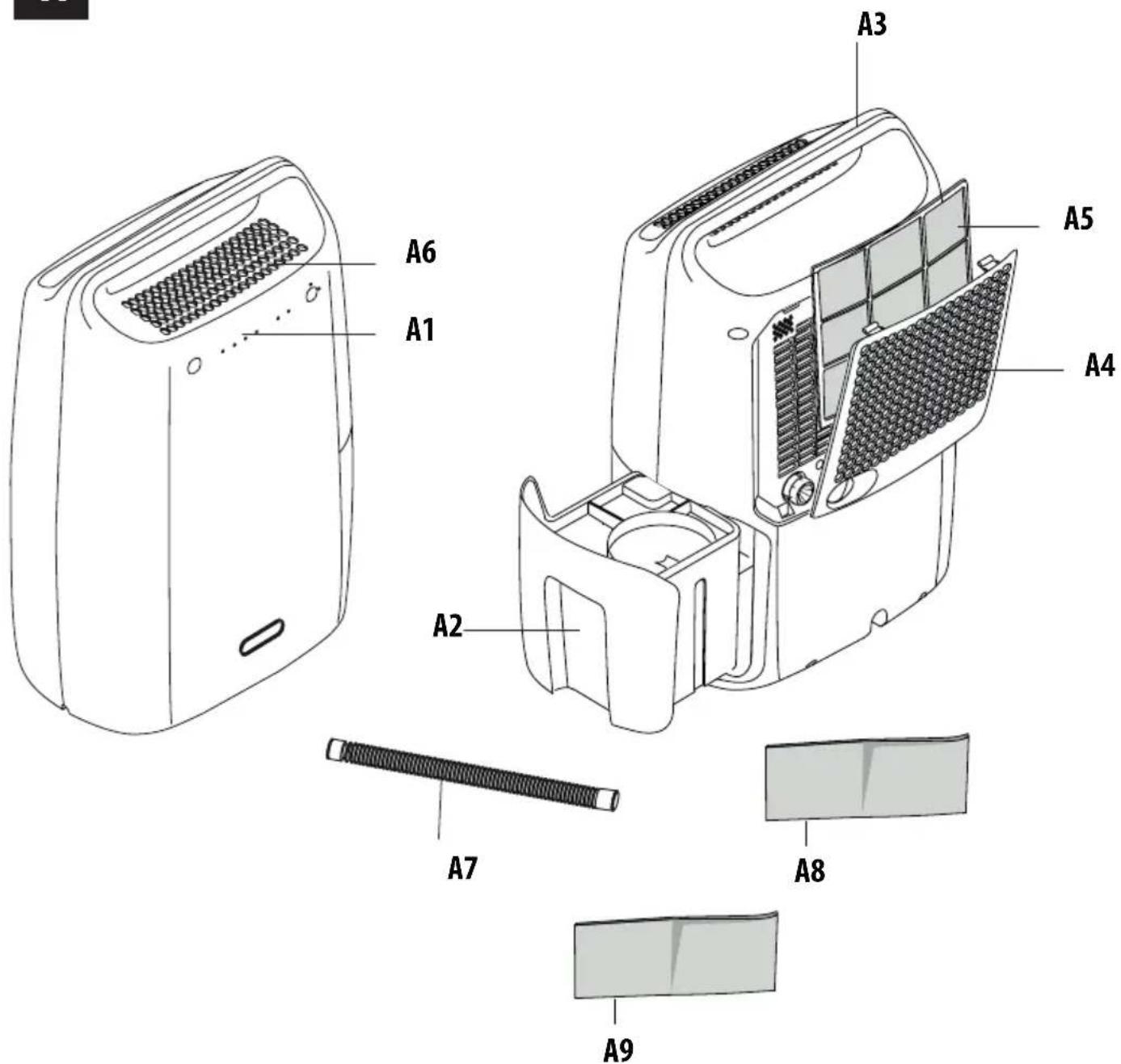
Appliance description (page 3 - A)
A1. Control panel A2. Condensate collection tank A3. Lifting handle A4. Air intake grill A5. Dust Air filter or silver-ion air filter (on certain models only) A6. Air outlet grill A7. Condensate drain hose (approx. 1 m) A8. Anti-allergen filter (on certain models only) A9. Activated carbon filter (only in certain models)
Control panel description (page 3 - B)
B1. ON/STAND-BY button B2. MODE button B3. Tank full/tank missing indicator light B4. Dehumidification/frost protection function light. B5. Set humidity level
HOW TO DEHUMIDIFY
- Connect the appliance into an outlet.
- Check that the "tank full/tank missing" indicator light ( ) is turned off, otherwise empty the tank or position it correctly.
- To turn the appliance on, press the ON/STAND BY button ⏻
- Press the "MODE" (B2) button to select the desired humidity ( , ◆ ◆ ◆ ◆ ◆ ◆ [ ] The appliance will adjust the humidity level according to your choice:
Approx 60% environment humidity Approx 50% environment humidity Approx 40% environment humidity
Selecting 📋, the "dry" function is activated, ideal to speed up the drying of laundry.
i Please note!
- If the humidity in the room is greater than the set humidity, the appliance will start to dehumidify and will stop functioning only when the desired level of humidity is reached.
INDICATOR LIGHTS
Tank control light (Tank control system)
This dehumidifier is equipped with a device that monitors the correct functioning of the appliance.
The corresponding indicator light, located on the control panel, turns on to warn the user when:
- the tank is full: empty the tank
- the tank is missing: reposition the tank
- the tank is positioned incorrectly: position it properly
- in continuous drain: remove the obstruction.
the hose is obstructed or the difference in level is too great (the water continues to be discharged into the tank)
Once the cause has been eliminated, the light goes out and the appliance resumes operation.
* C- PAUSE Low temperature operation indicator light
When the room temperature is too low, the electronic low temperature operation device is activated. The device makes the appliance operate by alternating dehumidification cycles and fan only cycles, thus avoiding the formation of frost. For frequent use in cold environments, it is recommended to heat the room
at the same time, even slightly. This allows the dehumidifier to operate in conditions that ensure better performance and faster dehumidification.

Please note!
- The appliance is equipped with a safety device (3-minute delay) that protects the compressor from too frequent starts and stops.
- When started up, or when power is restored, the appliance operates in the mode selected before it shut down.
CLEANING AND MAINTENANCE
Always unplug the appliance from the power socket before performing any cleaning or maintenance operations. For safety reasons, never wash the dehumidifier with a water jet.
Cleaning the cabinet
- Clean the appliance with a damp cloth, then dry it with a dry cloth.
- Never use petrol, alcohol, or solvents to clean the appliance.
- Never spray the appliance with insecticides or similar products. These could cause the plastic parts to warp.
Cleaning the dust air filter or silver-ion air filter (on certain models only)
If the filter is dirty, air circulation is compromised and dehumidifying efficiency decreases. Therefore, it is good practice to clean the filter at regular intervals. The frequency depends on the environment and the duration of operation. If the unit is used constantly or systematically, it is recommended to clean the filter once a week.
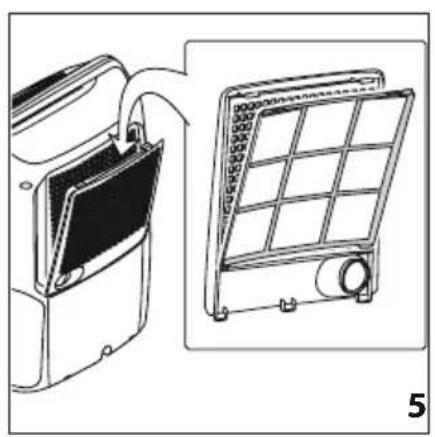
- To remove the air filter, remove the grill and extract the filter by pulling it (see Fig. 5).
- Use a vacuum cleaner to remove dust accumulations from the filter. If the filter is very dirty, rinse it well with lukewarm water. The water temperature should not exceed 40°C. After washing the filter, allow it to dry completely before re-inserting it. If present, the silver-ion air filter, besides retaining powder particles, also has an efficient antibacterial action. In addition, it greatly reduces irritants such as pollen and spores. The filter is treated with small particles of silver (on the scale of millionths of a millimetre) which are able to block the multiplication of and destroy any bacteria or spores coming into contact with them.
Anti-allergen filter (on certain models only)
Some models are equipped with an anti-allergen filter that can notably reduce the concentration of allergens transported by air in a quick and efficient way.
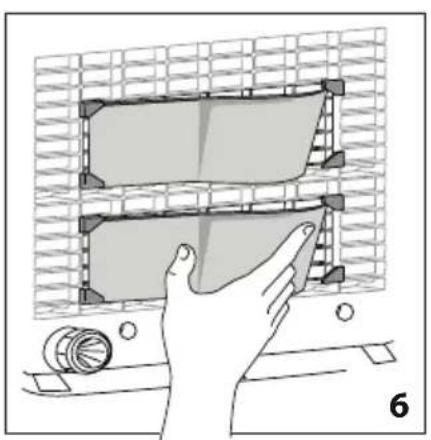
To apply the filter, remove it from the packaging and insert it into its place in the grill at the back of the appliance, as shown in Figure 6.
It is recommended to replace the filter every 2 years.
Activated carbon filter (only in certain models)
Certain models are equipped with an activated carbon filter that helps reduce odours.
Note: The activated carbon filters cannot be washed and/or regenerated; therefore, they must be replaced after about 1 year of use.
If the appliance is not used for long periods
- After unplugging the appliance from the power socket, empty the tank.
- Clean and reposition the filter.
- Cover the appliance with a plastic bag to protect it from dust.
TECHNICAL SPECIFICATIONS
Power supply voltage See rating plate
Absorbed power
Frost protection device Yes
Fan speeds 1
Air filter Yes
Anti-allergen filter (only on certain models) Yes
Tank capacity 2.1 litres
Operation limits:
temperature 2°C-30°C
relative humidity 30-90%
Check the following points before calling your local authorised Service Centre.
| PROBLEMS CAUSE SOLUTION | |
| The appliance is operating in dehumidifying mode, but the humidity does not decrease | The filter is blockedThe temperature or humidity in the room is too lowThe room is too big for the dehumidifying power of the appliance or there are too many sources of humidity (pots of boiling water, etc.)The humidity set point is too high | Clean the filterIn certain conditions, it is normal for the appliance not to dehumidify. Verify the operation limits of the appliance in the "Technical Specifications" section. In certain cases, it is recommended to heat the environmentDecrease the humidity set point |
| The appliance does not work for approx 3 minutes after start-up | The safety device has tripped Wait for 3 minutes to pass and restart | |
| The appliance does not work | The appliance is not plugged inThere is no currentThe appliance is set on low humidity levelThe tank is full of waterThe tank is not positioned correctly | Plug into the mainsCheck the power supplySet the appliance to a greater humidity levelEmpty the tankGently place the tank into the correct position |