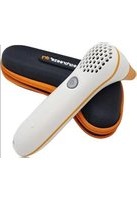
EBD.201 - Ear dryer Earbreeze - Free user manual and instructions
Find the device manual for free EBD.201 Earbreeze in PDF.


User questions about EBD.201 Earbreeze
0 question about this device. Answer the ones you know or ask your own.
Ask a new question about this device
Download the instructions for your Ear dryer in PDF format for free! Find your manual EBD.201 - Earbreeze and take your electronic device back in hand. On this page are published all the documents necessary for the use of your device. EBD.201 by Earbreeze.
USER MANUAL EBD.201 Earbreeze
text_image
QR code image containing encoded data, no visible human-readable textInhaltsverzeichnis
Lieferumfang 4
Geräteteile......4
Allgemeines....5
text_image
1 2 3 4 Freezer dry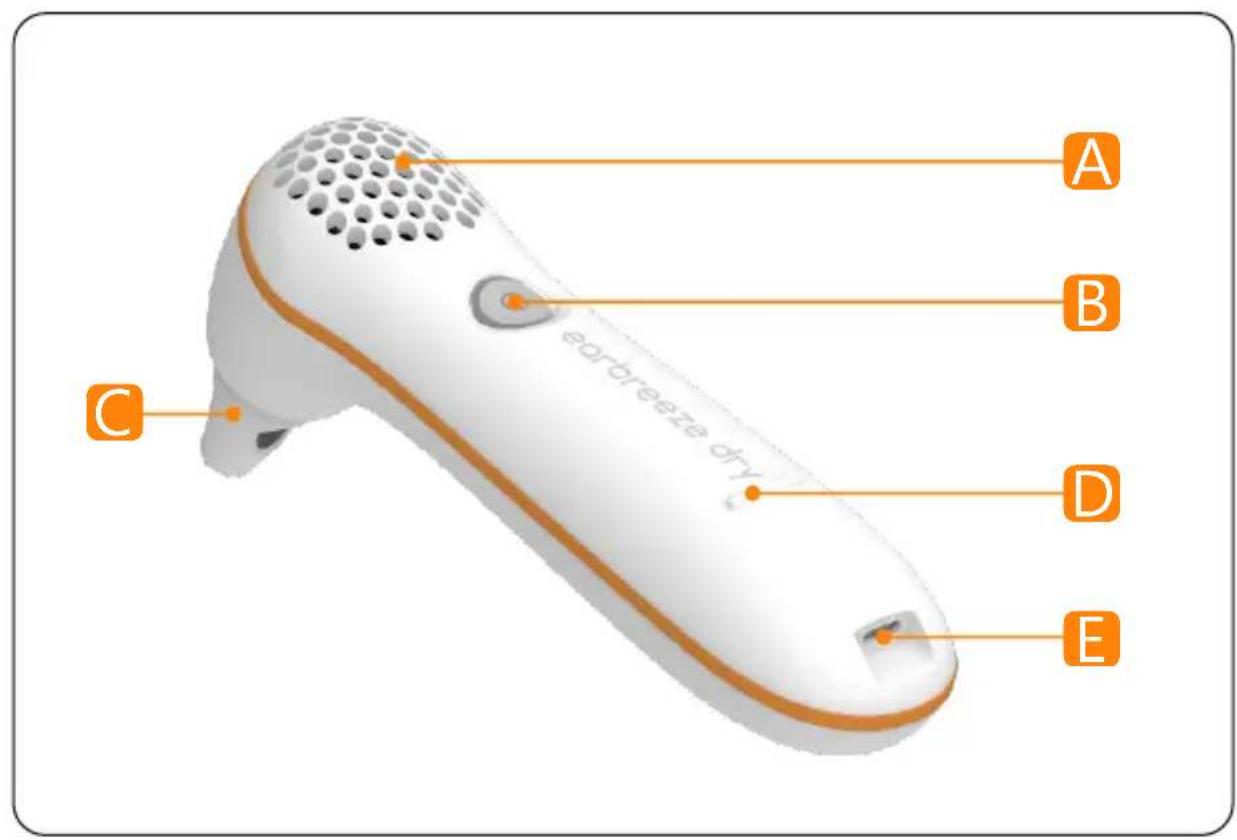
text_image
earbreeze dry A B C D ELieferumfang
natural_image
Close-up of a white medical or laboratory device with a small rectangular opening and a white connector, showing no visible text or symbols.DE
natural_image
Close-up of a white handheld device with a circular button and perforated grille, being pointed at by a finger (no text or symbols visible)natural_image
Line drawing of a hand holding a small cylindrical object, no text or symbols presentnatural_image
Close-up of a white and black plastic tool with a loop handle (no text or symbols visible)Scope of Delivery....16
Device Parts....16
General Information....17
Read and Store User Manual....17
Safety....17
Intended Use 17
Improper Use....17
Safety Instructions....17
Operating Conditions....18
Residual Risks 18
Initial Start-up....19
Check Content....19
Before Usage....19
Preparing Device for Use....20
Operation 20
Start Drying Cycle 20
Changing Air Velocity....21
Individual Drying....22
Care and Cleaning....22
Storage 23
Problem Solving....23
Technical Specifications....24
Declaration of Conformity 24
Disposal 25
Dispose of Packaging....25
Dispose of Old Appliances....25
Scope of Delivery
1 Base unit earbreeze ^® dry with integrated battery
2 Protective cap
3 Charging cable with USB-C and USB-A plug
4 Earpiece (already inserted in the device!)
o Transport case (without illustration)
Device Parts
Air inlet
B ON/OFF button incl. status LED
Air outlet
D Bumps for stable placement
E Charger receptacle (USB-C)
General Information
Read and Store User Manual

This manual contains information and important remarks on the safe use and handling of the product. Read the user manual carefully before using the device.
Observe the warning and safety instructions!
Keep this user manual for further use. If you pass on the device to third parties, be sure to provide this operating instruction.
Safety
Intended Use
The device is intended exclusively for drying the human ear canals after showering, bathing, swimming, diving, etc.
Use the device only as intended and within the stated operating conditions as well as in technically perfect condition.
The improper use or the disregard of the statements and instructions set out in this manual will result in the termination of all warranty and damage claims towards the manufacturer.
Improper Use
Do not use the device without knowledge of the user manual.
Do not use the device if injuries to the eardrum or ear canal are known. If in doubt, consult your doctor in advance.
Do not use the device in the shower and do not immerse the device in water or other liquids!
Do not make any changes to the construction of the device and do not disassemble the device.
Safety Instructions
- Do not use the device if it has visible damage, produces unusual noises or vibrations, or if the charging cable ③ or the USB power supply is defective.
- Only connect the power supply to a grounded, easily accessible power outlet so that you can quickly disconnect it from the power supply in the event of an accident.
- Never touch the power supply with wet hands.
- Never reach for the device when it has fallen into the water. In such a case, immediately disconnect the power supply from the power source.
- Do not allow the charging cable ③ to get into contact with hot parts.
- Do not bend the charging cable ③ and do not lay it over sharp edges.
- Avoid mechanical stress on the housing, the battery and on the contacts.
- Never touch the contacts with metallic objects - there is a risk of short-circuiting, fire, and explosion!
EN
- Do not use hair sprays, water atomizers or other atomizers during use near the device. Use those only when the device is switched off.
■ Never expose the device to fire or high temperatures.
■ Never open the device. - The device is not suitable for children under three years of age due to swallowable small parts - choking hazard!
■ Children and persons with reduced mental, sensory, or mental abilities or lack of experience and knowledge may use the product only if they are supervised or have been instructed about the safe use of the device and have understood the resulting dangers. - Let excessive fluid run out of the ear and dry it with an absorbent cloth before using the device.
■ Use the product while sitting. In exceptional cases, dizziness may occur during use.
Operating Conditions
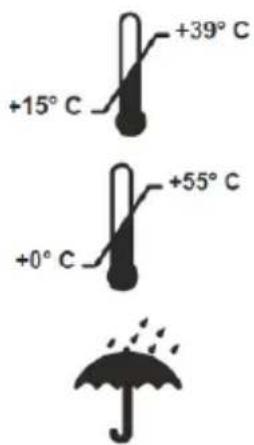
The device is intended for use under the following environmental conditions:
text_image
+15°C +39°C +0°C +55°COperating temperature
Storage and transport temperature
Keep the device dry!
Residual Risks
Despite the proper use of the product, certain residual risks remain.
Due to the design and construction of the device, hazardous situations may occur during its handling, which are marked in this operating instruction as follows:
This signal symbol/word denotes a hazard with a low level of risk which, if not avoided, may result in minor or moderate injury.

This signal word warns of possible damage to property.
Initial Start-up
Check Content
- Remove the device and other items from the transport case.
- Check if the delivery is complete (see chapter Scope of Delivery).
- Check the device and the parts for damage. Do not put a damaged device into operation and contact the manufacturer using the contact provided at the end of this manual.
Before Usage
Fully charge the device's built-in battery before using it.
To reach the specified capacity of the battery, charge the battery at room temperature.
Always charge the Ni-MH battery completely so that no capacity loss occurs. Avoid intermediate charges. Leave the device connected to the power source only until the battery is fully charged.
All device functions are deactivated for the duration of the charging process!
For charging, use the included charging cable ③:
- Completely unwind the charging cable ③.
- Insert the end of the cable with the USB-C plug into the charging socket ☐ on the device.
- Plug the other end of the charging cable ③ (USB-A plug) into a USB power adapter (not included!)
- Plug the AC adapter into a suitable power outlet.
During charging, the ON/OFF button Ⓑ pulses purple.
Once the battery is fully charged, the ON/OFF button B is permanently purple until the connection to the power source is disconnected.
Full charging takes about 7 hours.
- Disconnect the device (and, if applicable, the power supply) from the power source after charging.
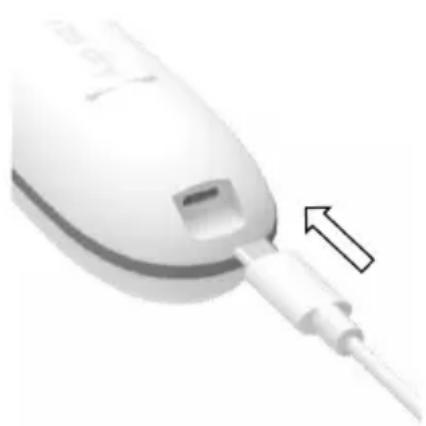
natural_image
Close-up of a medical or laboratory device with a white bulb and connector, showing a small inset component (no visible text or symbols)EN
Preparing the Device for Use
To make the device ready for use:
- Remove the protective cap ② by gently pulling it forward from the air outlet C.
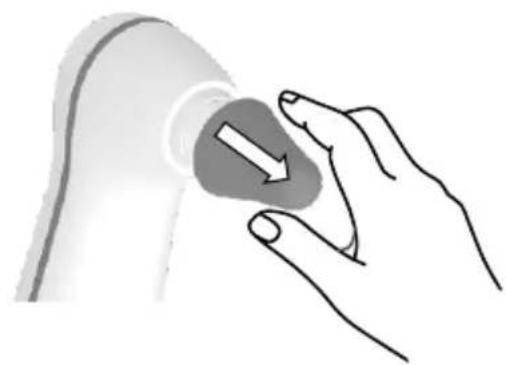
natural_image
Illustration of a hand holding a circular object with an arrow, no text or symbols present- Place the earpiece ④ on the air outlet C and press it gently until it snaps into place.
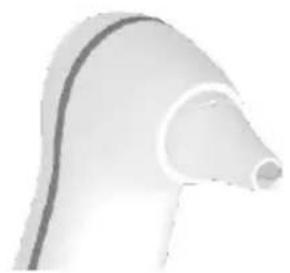
natural_image
Close-up of a curved, smooth object resembling a stylized bird or pipe (no text or symbols visible)Operation
Start Drying Cycle
CAUTION!
Risk of Injury!
A poorly fitted or damaged earpiece can cause ear injuries.
Before turning on the device, check the correct fit and the integrity of the earpiece. Replace a damaged earpiece if necessary!
CAUTION!
Risk of Infection!
Due to a soiled earpiece ④, germs can be transmitted.
- To prevent infections in the case of immediate subsequent use of the device by two or more users, as an intermediate step, cleaning of the earpiece 4 is required.
WARNING
Risk of Damage!
Insufficient air supply can damage the device.
- Do not cover the air inlet A!
The device can be damaged by penetrating liquid.
- Dry the ears with a towel before use!
- To turn on the device, press the ON/OFF button B and release it. During the following warm-up phase the ON/OFF button flashes B blue and the device vibrates.
When the device is warmed up, the ON/OFF button Ⓑ shines permanently green. The device starts running at the slowest speed level.
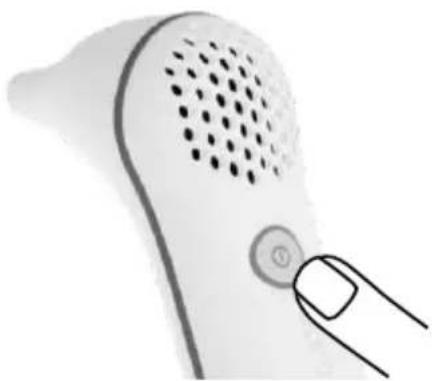
natural_image
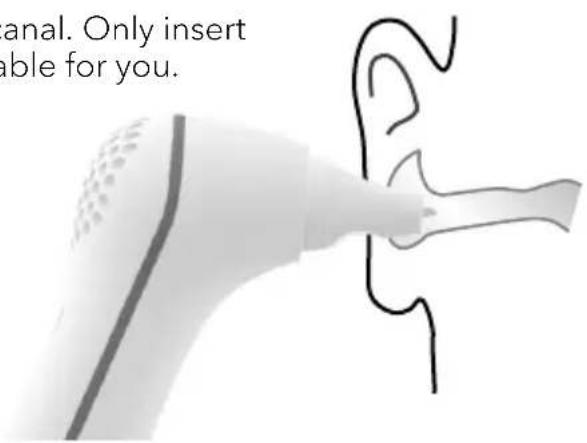
Close-up of a white handheld device with a circular button and perforated grille, being pointed at by a finger (no text or symbols visible)- Start the drying process by placing the device with its earpiece close to or in the outer ear canal. Only insert the earpiece as far as it feels comfortable for you.
The device stops automatically after 45 seconds. To start another application, briefly press the ON/OFF button B again.
text_image
anal. Only insert able for you.Changing Air Velocity
For optimal individual drying, you can choose between three air speeds.
The selection of the next higher speed level is done by pressing the ON/OFF button B.
The speed levels are also visually displayed via the ON/OFF button B:
■ slow: ON/OFF button Ⓑ shines permanently green
■ medium: ON/OFF button B flashes green
■ fast: ON/OFF button B quickly flashes green
When the ON/OFF button B is pressed in the fastest stage, the device turns off.
To start another application, briefly press the ON/OFF button B again.
EN
Individual Drying
To make the drying process even more individual, you have the option to rotate the earpiece 4. Depending on the ear shape or side, it may be advantageous to use a different orientation. Try different orientations to find out the best result for you.
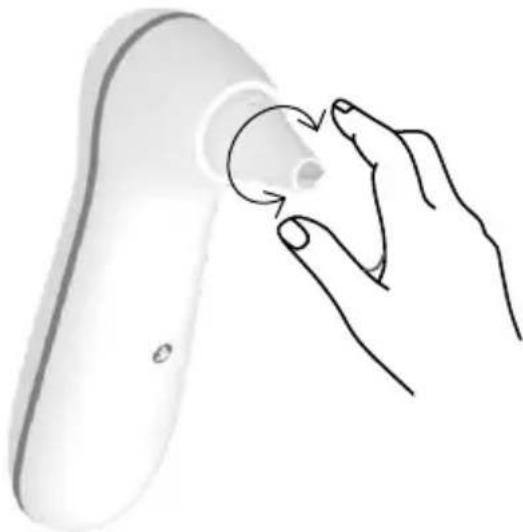
natural_image
Line drawing of a hand holding a small cylindrical object, possibly a medical or electronic device (no text or symbols present)Care and Cleaning
WARNING
Risk of damage!
Incorrect care and cleaning agents can cause damage to the device.
- Use a soft cloth to clean the outside of the device. Do not use abrasives.
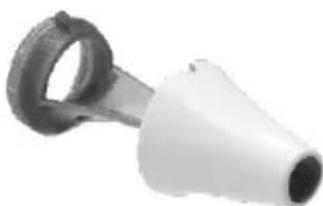
If possible, clean the device after each use. The earpiece is the most sensitive part of the device. It must be clean and intact to ensure a good effect. To be able to clean it better, the earpiece consists of two parts.
Follow the cleaning steps:
- Remove the earpiece from the device.
-
Carefully separate the two parts of the earpiece from each other.
-
Carefully clean the earpiece parts and device surfaces with a moistened cotton swab or with a soft cloth moistened with water. A skin-compatible surface disinfectant can also be used for cleaning.
-
Let the parts dry completely after cleaning.
-
Put the earpiece back together.
-
Reseat the dry earpiece in the device.
natural_image
Close-up of a white plastic tool with a black handle and circular end (no text or symbols visible)The device is now ready for operation again. If the earpiece is damaged, it must be replaced. Please contact the manufacturer's customer service.
Storage
Before storing or transporting the device, place the protective cap on the device to avoid damage.
Store the product in a dry, dust- and dirt-free place, protected from direct sunlight. Keep out of the reach of children!
If possible, store the cleaned and dry device in the closed transport case.
Problem Solving
| Problem/Issue | Possible cause | Remedy measure |
| The ON/OFF button shines/flashes green, but no airflow is noticeable! | 1. The protective cap is still above the earpiece.2. The air inlet is covered. | 1. Remove the protective cap.2. Free air inlet. |
| The ON/OFF button flashes slowly yellow and the device vibrates. | Battery charge level is low. | The battery has reached a low level, but further applications are possible! |
| The ON/OFF button flashes yellow quickly. | Battery charge level is critical! | Charge the battery!→ See chapter Initial Start-up. |
| The ON/OFF button flashes red. | 1. The ambient temperature is outside the limits of the operating temperature (+15°C to +39°C)!2. The earpiece is not placed on the air outlet. | 1. Use the device only within the intended temperature ranges.2. Place an earpiece on the air outlet. |
| The ON/OFF button is permanently red. | There is a serious error! | Contact the manufacturer's customer service. |
Technical Data
| Model | earbreeze® dry |
| Battery | Ni-MH battery, fixedRated voltage: 4.8V |
| Battery capacity | 2.000 mAh |
| Protection Class | |
| Protection rating | IP20 |
| Dimensions base unit (L x H x B) | 12 x 17 x 4.5 cm |
| Weight incl. packaging | 390 g |
| Weight base unit | 195 g |
| Conditions: | Temperature: +15 to +39°CRelative Humidity: <80% non-condensing |
| Storage and transport conditions | Temperature: 0°C bis +55°CRelative Humidity: <80% non-condensing |
| Article number | EBD.201 |
The serial number is located on the device.
Subject to technical changes.
Declaration of Conformity
earbreeze ^® dry complies to the essential requirements of applicable EU directives and is in particular in accordance with the essential requirements and other relevant provisions of the EMC Directive 2014/30/EU.

A comprehensive EU declaration of conformity can be requested at the address given at the end of this manual.
Disposal
Dispose of Packaging

Dispose of the packaging in a single-variety way. Add paper and cardboard to the wastepaper, foils in the recycling collection.
Dispose of Old Devices
Applicable in the European Union and other European countries with systems for separate collection of recyclables.
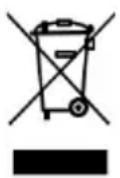
Old Devices must not be dumped in household waste!
Should the product no longer be able to be used, every consumer is legally obliged to hand over waste equipment separately from household waste, e.g., to a collection point of his municipality or district. This ensures that waste equipment is used professionally and negative effects on the environment are avoided. Therefore, electrical appliances are marked with the symbol shown above.
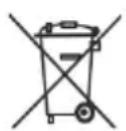
Batteries and rechargeable batteries must not be dumped in household waste!
As a consumer, you are legally obliged to hand over all batteries and rechargeable batteries, whether they contain pollutants* or not, to a collection point in your municipality/district or in the retail trade, so that they can be disposed of in an environmentally friendly manner.
* labelled with: Cd = cadmium, Hg = mercury, Pb = lead, Li = lithium
© Copyright
Reprint or reproduction (also in extracts)
only with the permission of the manufacturer!
This document, including all its parts,
is protected by copyright.
Any utilization outside the narrow limits
of copyright is without the consent of
Earbreeze GmbH inadmissible and punishable.
This applies in particular to reproductions,
translations, microfilming and the
feeding and processing in electronic
systems.
Manufactured by:
Earbreeze GmbH
MODEL: earbreeze® dry
ARTICLE NUMBER: EBD.201
06/2022
Indice
natural_image
Close-up of a white medical or laboratory device with a small inset component and an arrow pointing to it (no visible text or symbols)IT
natural_image
Illustration showing a hand pressing a button on a curved object, with no text or symbols present.Uso
natural_image
Close-up of a white handheld device with a circular button and dotted grille, being pointed at by a finger (no text or symbols visible)natural_image
Line drawing of a hand holding a small object near a curved surface (no text or symbols)natural_image
Close-up of a white plastic tool with a black handle and cylindrical body (no text or symbols visible)Stoccaggio
natural_image
Close-up of a white medical or laboratory device with a small inset component and a white arrow pointing to it (no visible text or symbols)natural_image
Illustration showing a hand pressing a button on a curved object, with no text or symbols present.Fonctionnement
natural_image
Close-up of a white remote control device with a finger pressing the button (no text or symbols visible)natural_image
Illustration of a hand holding a small circular object near a curved surface (no text or symbols)natural_image
Close-up of a white plastic tool with a black handle and cylindrical body (no text or symbols visible)Stockage
Ce fascicule, toutes parties incluses,