
D25300DH - Hammer DEWALT - Free user manual and instructions
Find the device manual for free D25300DH DEWALT in PDF.
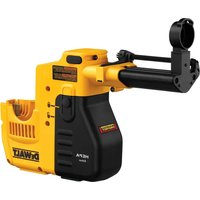


| Product Type | Dust extraction system for rotary hammer |
| Brand | DEWALT |
| Model | D25300DH |
| Supply voltage | 220-240 V |
| Insulation type | Double insulation (class II) |
| Weight | 1.5 kg |
| Max drilling depth | 120 mm |
| Max drilling diameter | 16 mm |
| Max stroke | 105 mm |
| Dust extraction capacity | 500 mm |
| Contact pressure | 60 N |
| Shutdown delay | 2 seconds |
| Sound pressure (L_PA) | 77 dB(A) |
| Sound power (L_WA) | 86 dB(A) |
| Uncertainty level | 3 dB(A) |
| Filter life cycle | >100 cycles |
| Hammer compatibility | D25313, D25323, D25324 |
| Package contents | Dust extraction system, dust brush, manual, exploded drawing |
| Warranty | 1 year (30-day satisfaction, 1 year free maintenance) |
| Maintenance | Filter cleaning, brush and filter replacement |
| Safety | Use with side handle, do not expose to moisture |
Frequently Asked Questions - D25300DH DEWALT
User questions about D25300DH DEWALT
0 question about this device. Answer the ones you know or ask your own.
Ask a new question about this device
Download the instructions for your Hammer in PDF format for free! Find your manual D25300DH - DEWALT and take your electronic device back in hand. On this page are published all the documents necessary for the use of your device. D25300DH by DEWALT.
USER MANUAL D25300DH DEWALT
English (original instructions)
B
C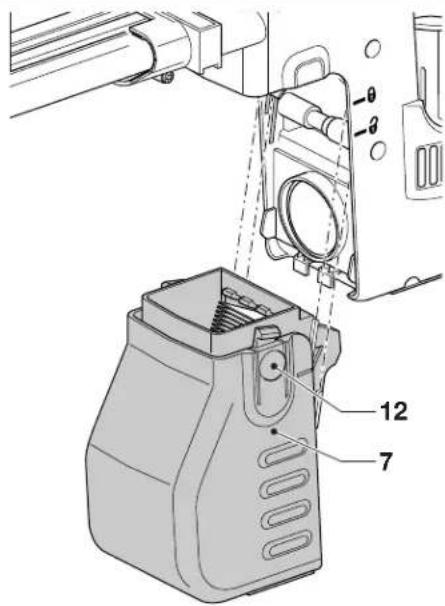
E
D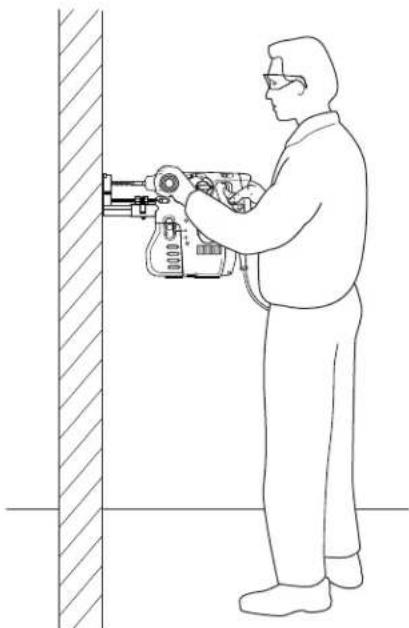
F
G
DANSK
ST∅VOPSAMLINGSSYSTEM D25300DH
Tillykke!
You have chosen a DEWALT tool. Years of experience, thorough product development and innovation make DEWALT one of the most reliable partners for professional power tool users.
Technical Data
| D25300DH-XJ | D25300DH-LX | |
| Voltage | V | 220-240 |
| Type 22 | ||
| Contact pressure N 60 60 | ||
| Max. stroke mm 105 105 | ||
| Max. drilling depth mm 120 120 | ||
| Max. drill diameter mm | 16 16 | |
| Suction capacity mm 500 500 | ||
| Switch-off delay s | 2 | 2 |
| Weight kg | 1.5 | 1.5 |
| Dust Collector | ||
| No. of Holes | ||
| 6 x 30 mm | 133 | 133 |
| 8 x 30 mm | 75 75 | |
| 12 x 50 mm 20 20 | ||
| Dust filter life cycle | >100 | >100 |
| Lpa | (sound pressure) | dB | 77 | 77 |
| Kpa | (sound pressure uncertainty) | dB | 3 | 3 |
| Lmn | (sound power) | dB | 86 | 86 |
| Kmn | (sound power uncertainty) | dB | 3 | 3 |
Definitions: Safety Guidelines
The definitions below describe the level of severity for each signal word. Please read the manual and pay attention to these symbols.

DANGER: Indicates an imminently hazardous situation which, if not avoided, will result in death or serious injury.

WARNING: Indicates a potentially hazardous situation which, if not avoided, could result in death or serious injury.

CAUTION: Indicates a potentially hazardous situation which, if not avoided, may result in minor or moderate injury.
NOTICE: Indicates a practice not related to personal injury which, if not avoided, may result in property damage.
110

Denotes risk of electric shock.

Denotes risk of fire.
EC-Declaration of Conformity MACHINERY DIRECTIVE

D25300DH
DEWALT declares that these products described under "technical data" are in compliance with: 2006/42/EC, EN 60745.
These products also comply with Directive 2004/108/EC. For more information, please contact DEWALT at the following address or refer to the back of the manual.
The undersigned is responsible for compilation of the technical file and makes this declaration on behalf of DEWALT.
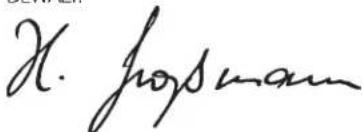
Horst Grossmann
Vice President Engineering and Product Development
D-65510, Idstein, Germany
31.12.2009

WARNING: To reduce the risk of injury, read the instruction manual.
ENGLISH
General Power Tool Safety Warnings

WARNING! Read all safety warnings and all instructions. Failure to follow the warnings and instructions may result in electric shock, fire and/or serious injury.
SAVE ALL WARNINGS AND INSTRUCTIONS FOR FUTURE REFERENCE
The term "power tool" in the warnings refers to your mains-operated (corded) power tool or battery-operated (cordless) power tool.
1) WORK AREA SAFETY
a) Keep work area clean and well lit. Cluttered or dark areas invite accidents. b) Do not operate power tools in explosive atmospheres, such as in the presence of flammable liquids, gases or dust. Power tools create sparks which may ignite the dust or fumes. c) Keep children and bystanders away while operating a power tool. Distractions can cause you to lose control.
2) ELECTRICAL SAFETY
a) Power tool plugs must match the outlet. Never modify the plug in any way. Do not use any adapter plugs with earthed (grounded) power tools. Unmodified plugs and matching outlets will reduce risk of electric shock. b) Avoid body contact with earthed or grounded surfaces such as pipes, radiators, ranges and refrigerators. There is an increased risk of electric shock if your body is earthed or grounded. c) Do not expose power tools to rain or wet conditions. Water entering a power tool will increase the risk of electric shock. d) Do not abuse the cord. Never use the cord for carrying, pulling or unplugging the power tool. Keep cord away from heat, oil, sharp edges or moving parts. Damaged or entangled cords increase the risk of electric shock. e) When operating a power tool outdoors, use an extension cord suitable for outdoor use. Use of a cord suitable for outdoor use reduces the risk of electric shock. f) If operating a power tool in a damp location is unavoidable, use a residual current device (RCD) protected supply. Use of an RCD reduces the risk of electric shock.
3) PERSONAL SAFETY
a) Stay alert, watch what you are doing and use common sense when operating a power tool. Do not use a power tool while you are tired or under the influence of drugs, alcohol or medication. A moment of inattention while operating power tools may result in serious personal injury. b) Use personal protective equipment. Always wear eye protection. Protective equipment such as dust mask, non-skid safety shoes, hard hat, or hearing protection used for appropriate conditions will reduce personal injuries. c) Prevent unintentional starting. Ensure the switch is in the off position before connecting to power source and/or battery pack, picking up or carrying the tool. Carrying power tools with your finger on the switch or energising power tools that have the switch on invites accidents. d) Remove any adjusting key or wrench before turning the power tool on. A wrench or a key left attached to a rotating part of the power tool may result in personal injury. e) Do not overreach. Keep proper footing and balance at all times. This enables better control of the power tool in unexpected situations. f) Dress properly. Do not wear loose clothing or jewellery. Keep your hair, clothing and gloves away from moving parts. Loose clothes, jewellery or long hair can be caught in moving parts. g) If devices are provided for the connection of dust extraction and collection facilities, ensure these are connected and properly used. Use of dust collection can reduce dust-related hazards. a) Do not force the power tool. Use the correct power tool for your application. The correct power tool will do the job better and safer at the rate for which it was designed. b) Do not use the power tool if the switch does not turn it on and off. Any power tool that cannot be controlled with the switch is dangerous and must be repaired. c) Disconnect the plug from the power source and/or the battery pack from the power tool before making any adjustments, changing accessories, or storing power tools. Such preventive safety measures reduce the risk of starting the power tool accidentally.
4) POWER TOOL USE AND CARE
d) Store idle power tools out of the reach of children and do not allow persons unfamiliar with the power tool or these instructions to operate the power tool. Power tools are dangerous in the hands of untrained users.
e) Maintain power tools. Check for misalignment or binding of moving parts, breakage of parts and any other condition that may affect the power tool's operation. If damaged, have the power tool repaired before use. Many accidents are caused by poorly maintained power tools.
f) Keep cutting tools sharp and clean. Properly maintained cutting tools with sharp cutting edges are less likely to bind and are easier to control.
g) Use the power tool, accessories and tool bits etc., in accordance with these instructions, taking into account the working conditions and the work to be performed. Use of the power tool for operations different from those intended could result in a hazardous situation.
5) SERVICE
a) Have your power tool serviced by a qualified repair person using only identical replacement parts. This will ensure that the safety of the power tool is maintained.
Additional Safety Instructions for Dust Extraction Systems
- This attachment is intended for use in hammer drilling applications in masonry or concrete, and with solid drill bits mounted to the power tool.
- Do not use the attachment for drilling applications in wood, steel or plastic.
- Do not use the attachment in core drilling applications.
- Do not use the attachment for chiselling applications.
- Do not use the attachment in any application involving hazardous substances (e.g., asbestos).
- Do not use this attachment with other tools than the models mentioned in this manual.
- Do not use the tool in damp or wet conditions.
- Do not expose the attachment to hot or glowing particles.
Residual Risks
In spite of the application of the relevant safety regulations and the implementation of safety devices, certain residual risks cannot be avoided. These are:
- Impairment of hearing. – Risk of squeezing fingers when changing the accessory. – Health hazards caused by breathing dust developed when working in concrete and/or masonry.
Markings on Dust Extraction System
The following pictograms are shown on the tool:

Read instruction manual before use.
DATE CODE POSITION
The Date Code, which also includes year of manufacture, is printed into the housing surface that forms the mounting joint between tool and dust box.
Example:
2010 XX XX
Year of Manufacture
Package Contents
The package contains:
1 Dust extraction system 1 Dust brush 1 Instruction manual 1 Exploded drawing - Check for damage to the tool, parts or accessories which may have occurred during transport. • Take the time to thoroughly read and understand this manual prior to operation.
Description (fig. A)

IG: Never modify the power tool or any part of it. Damage or personal injury could result.
1 Dust extraction head 2 Dust brush 3 Depth stop 4 Length stop 5 Release button
ENGLISH
6 Tool rest
7 Dust collector
INTENDED USE
Your dust extraction system D25300DH has been designed for the extraction of dust in professional hammerdrilling applications with your heavy duty rotary hammer drill.
The attachment is suitable for use with the following models: D25313, D25323, D25324.
DO NOT use under wet conditions or in presence of flammable liquids or gases.
The dust extraction system is an attachment for use with professional power tools.
DO NOT let children come into contact with the tool. Supervision is required when inexperienced operators use this tool.
Electrical Safety
The electric motor has been designed for one voltage only. Always check that the power supply corresponds to the voltage on the rating plate.

Your DEWALT tool is double insulated in accordance with EN 60745; therefore no earth wire is required.

IG: 115 V units have to
be operated via a fail-safe isolating transformer with an earth screen between the primary and secondary winding.
If the supply cord is damaged, it must be replaced by a specially prepared cord available through the DEWALT service organisation.
ASSEMBLY AND ADJUSTMENTS

To reduce the risk of injury, turn unit off and disconnect machine from power source before installing and removing accessories, before adjusting or changing set-ups or when making repairs. Be sure the trigger switch is in the OFF position. An accidental start-up can cause injury.
Attaching and Removing the Dust Extraction System

To reduce the risk of personal injury, ALWAYS operate the tool with the side handle properly installed and securely tightened. Failure
to do so may result in the side handle slipping during tool operation and subsequent loss of control.
Fitting the Attachment (Fig. B)
- Before fitting the attachment, prepare the tool as follows:
- Remove the drill bit if fitted.
- Remove the depth stop from the side handle (8). Do not remove the side handle!
- Set the mode selector switch (9) to the "hammerdrilling" position.
- Align the attachment with the tool as shown.
- Slide the attachment onto the tool, taking care that the contacts (10) enter the connection slots (11) in the bottom of the tool.
- Push the attachment into place until the locking device engages.
- To remove the attachment, press the release button (5) and pull the attachment off the tool.

WARNING: Do not fit the attachment when the tool is running.
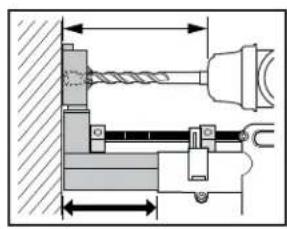
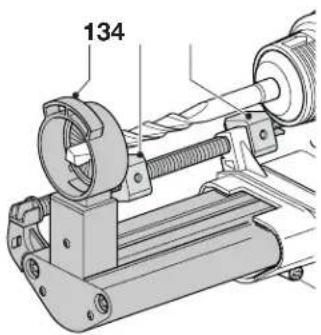
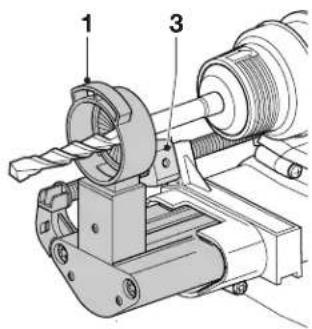
Adjusting the Drill Length (fig. C)
- Insert the appropriate drill bit.
- Press the depth stop (3) and move it toward the head (1). Release the stop.
- Press the length stop (4) and move it away from the head (1). Release the stop.
- Hold the tool and assembly with the head (1) against a wall.
- Push in the head to make the drill bit touch the surface.
- Press the length stop (4) and move it toward the head (1) as far as it will go. Release the stop.
- Gently withdraw the tool assembly from the wall, taking care that the spring-loaded mechanism is not released at once.
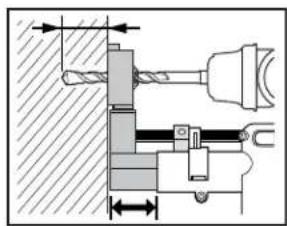
Setting the Drilling Depth (fig. D)
Press the depth stop (3) and move it to the required drilling depth. Release the stop.
Removing and Refitting the Dust Collector (fig. E)
REMOVING
Press the two release buttons (12) and pull the collector (7) off the attachment.
REFITTING
- Align the collector with the attachment as shown.
- Push the collector into place until the locking device engages.
OPERATION
Instructions for Use

NG: To reduce the risk of injury, turn unit off and disconnect machine from power source before installing and removing accessories, before adjusting or changing set-ups or when making repairs. Be sure the trigger switch is in the OFF position. An accidental start-up can cause injury.

VG: Always observe the safety instructions and applicable regulations.

VG: Always read and operate the tool as instructed in the tool instruction manual.

WARNING: Also refer to the manual of the machine to be used with this attachment.
Switching On and Off
Switch on the tool: the attachment automatically switches on.
Switch off the tool: the attachment will automatically switch off.
Electronic Switch-off Delay
After switching off the tool the attachment will run for a few seconds more to vacuum the dust particles left in the internal parts and collect the dust in the compartment.
Hammerdrilling (fig. F)
- Adjust the drill length.
- Set the drilling depth.
- Mark the spot where the hole is to be drilled.
- Place the drill bit on the spot and switch on the tool.
- Always hold the tool firmly with both hands and ensure a secure stance. Always operate the tool with the side handle properly mounted.
- Always switch off the tool when work is finished and before unplugging.
Emptying the Dust Collector (Fig. E)
The dust collector (7) should be emptied as soon as the performance has reduced noticeably.
- Remove the collector as described above.
- Empty the collector. Gently shake or knock the collector to help the dust come off the filter.
- Refit the collector as described above.
MAINTENANCE
Your DEWALT dust extraction system has been designed to operate over a long period of time with a minimum of maintenance. Continuous satisfactory operation depends upon proper care and regular cleaning.

WARNING: To reduce the risk of injury, turn unit off and disconnect machine from power source before installing and removing accessories, before adjusting or changing set-ups or when making repairs. Be sure the trigger switch is in the OFF position. An accidental start-up can cause injury.

WARNING: Use only DEWALT replacement parts.
Have the filter in the dust collector replaced after every 100–120 cycles of use.

WARNING: To prevent accidents, use original DEWALT spare parts only.
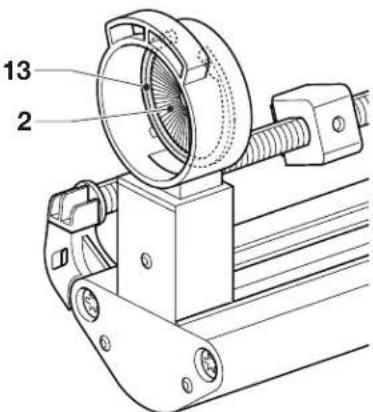
Replacing the Dust Brush (Fig. G)
The dust brush needs to be replaced when the bristles show heavy wear, or when the dust extraction efficiency has reduced significantly.
- Remove the circlip (13) using a pair of pliers.
- Replace the dust brush (2).
- Refit the circlip.

Cleaning

WARNING: Blow dirt and dust out of the main housing with dry air as often as dirt is seen collecting in and around the air vents. Wear approved eye protection and approved dust mask when performing this procedure.

Never use solvents or other harsh chemicals for cleaning the non-metallic parts of the tool. These
ENGLISH
chemicals may weaken the materials used in these parts. Use a cloth dampened only with water and mild soap. Never let any liquid get inside the tool; never immerse any part of the tool into a liquid.
Cleaning the Dust Filter (fig. E)
During intensive use the ribbons in the dust filter become clogged with dust. When the filter is worn it must be replaced.
Shake out excess dust by tapping the filter into a waste container.
WARNING: Do not use a brush to clean the filter.
Optional Accessories

WARNING: Since accessories, other than those offered by DEWALT, have not been tested with this product, use of such accessories with this tool could be hazardous. To reduce the risk of injury, only DEWALT recommended accessories should be used with this product.
Consult your dealer for further information on the appropriate accessories.
Protecting the Environment
Separate collection. This product must not be disposed of with normal household waste.
Should you find one day that your DEWALT product needs replacement, or if it is of no further use to you, do not dispose of it with household waste. Make this product available for separate collection.

Separate collection of used products and packaging allows materials to be recycled and used again. Re-use of recycled materials helps prevent environmental pollution and reduces the demand for raw materials.
Local regulations may provide for separate collection of electrical products from the household, at municipal waste sites or by the retailer when you purchase a new product.
DEWALT provides a facility for the collection and recycling of DEWALT products once they have reached the end of their working life. To take advantage of this service please return your product
to any authorised repair agent who will collect them on our behalf.
You can check the location of your nearest authorised repair agent by contacting your local DEWALT office at the address indicated in this manual. Alternatively, a list of authorised DEWALT repair agents and full details of our after-sales service and contacts are available on the Internet at:
www.2helpU.com.
GUARANTEE
DEWALT is confident of the quality of its products and offers an outstanding guarantee for professional users of the product. This guarantee statement is in addition to and in no way prejudices your contractual rights as a professional user or your statutory rights as a private non-professional user. The guarantee is valid within the territories of the Member States of the European Union and the European Free Trade Area.
• 30 DAY NO RISK SATISFACTION GUARANTEE •
If you are not completely satisfied with the performance of your DEWALT tool, simply return it within 30 days, complete with all original components, as purchased, to the point of purchase, for a full refund or exchange. The product must have been subject to fair wear and tear and proof of purchase must be produced.
• ONE YEAR FREE SERVICE CONTRACT •
If you need maintenance or service for your DEWALT tool, in the 12 months following purchase, you are entitled to one service free of charge. It will be undertaken free of charge at an authorised DEWALT repair agent. Proof of purchase must be produced. Includes labour. Excludes accessories and spare parts unless failed under warranty.
• ONE YEAR FULL WARRANTY •
If your DEWALT product becomes defective due to faulty materials or workmanship within 12 months from the date of purchase, DEWALT guarantees to replace all defective parts free of charge or – at our discretion – replace the unit free of charge provided that:
• The product has not been misused; • The product has been subject to fair wear and tear; • Repairs have not been attempted by unauthorized persons; • Proof of purchase is produced; • The product is returned complete with all original components.
If you wish to make a claim, contact your seller or check the location of your nearest authorized DEWALT repair agent in the DEWALT catalogue or contact your DEWALT office at the address indicated in this manual. A list of authorized DEWALT repair agents and full details of our after-sales service is available on the Internet at: www.2helpU.com.
Vice President Engineering and Product Development
DEWALT, Richard-Klinger-Straße 11, D-65510, Idstein, Germany
31.12.2009

SAVE ALL WARNINGS AND INSTRUCTIONS FOR FUTURE REFERENCE
1) WORK AREA SAFETY
Vice President Engineering and Product Development
DEWALT, Richard-Klinger-Strasse 11, D-65510, Idstein, Germany
31.12.2009

- DANSK
- ST∅VOPSAMLINGSSYSTEM D25300DH
- TILLYKKE
- DEFINITIONS: SAFETY GUIDELINES
- EC-DECLARATION OF CONFORMITY MACHINERY DIRECTIVE
- D25300DH
- ENGLISH
- GENERAL POWER TOOL SAFETY WARNINGS
- SAVE ALL WARNINGS AND INSTRUCTIONS FOR FUTURE REFERENCE
- WORK AREA SAFETY
- ELECTRICAL SAFETY
- PERSONAL SAFETY
- POWER TOOL USE AND CARE
- SERVICE
- ADDITIONAL SAFETY INSTRUCTIONS FOR DUST EXTRACTION SYSTEMS
- RESIDUAL RISKS
- MARKINGS ON DUST EXTRACTION SYSTEM
- DATE CODE POSITION
- PACKAGE CONTENTS
- DESCRIPTION (FIG. A)
- INTENDED USE
- ASSEMBLY AND ADJUSTMENTS
- ATTACHING AND REMOVING THE DUST EXTRACTION SYSTEM
- FITTING THE ATTACHMENT (FIG. B)
- ADJUSTING THE DRILL LENGTH (FIG. C)
- SETTING THE DRILLING DEPTH (FIG. D)
- REMOVING AND REFITTING THE DUST COLLECTOR (FIG. E)
- REMOVING
- REFITTING
- OPERATION
- INSTRUCTIONS FOR USE
- SWITCHING ON AND OFF
- ELECTRONIC SWITCH-OFF DELAY
- HAMMERDRILLING (FIG. F)
- EMPTYING THE DUST COLLECTOR (FIG. E)
- MAINTENANCE
- REPLACING THE DUST BRUSH (FIG. G)
- CLEANING
- CLEANING THE DUST FILTER (FIG. E)
- OPTIONAL ACCESSORIES
- PROTECTING THE ENVIRONMENT
- GUARANTEE
- DAY NO RISK SATISFACTION GUARANTEE
- ONE YEAR FREE SERVICE CONTRACT
- ONE YEAR FULL WARRANTY
Brand : DEWALT
Model : D25300DH
Category : Hammer