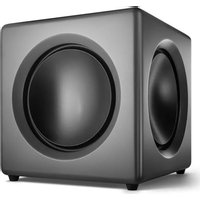
Fusion - Subwoofer Wavemaster - Free user manual and instructions
Find the device manual for free Fusion Wavemaster in PDF.


User questions about Fusion Wavemaster
0 question about this device. Answer the ones you know or ask your own.
Ask a new question about this device
Download the instructions for your Subwoofer in PDF format for free! Find your manual Fusion - Wavemaster and take your electronic device back in hand. On this page are published all the documents necessary for the use of your device. Fusion by Wavemaster.
USER MANUAL Fusion Wavemaster
natural_image
Blue triangular logo with white 'wm' text, no additional symbols or textwavemaster
FUSION
SUBWOOFER
natural_image
Exterior view of a modern gray audio player with two circular speakers (no text or symbols visible)Deutsch
Bedienungsanleitung
natural_image
Simple line drawing of a trash bin with two crossed lines and a horizontal bar below (no text or symbols)English
User Manual
Dear User,
we are pleased that you have chosen the FUSION active subwoofer from wavemaster and congratulate you on this choice.
With this wavemaster FUSION you have acquired a modern piece of audio technology that is in equal measure attractive and of high quality. We are sure that this product will provide useful service and a lot of fun to you over the coming years.
... Your wavemaster Team!
After unpacking
... you should first check that the contents are complete. In addition to this instruction manual there should be:
1 subwoofer box
1 Mains power cable
1 Audio connection cable (mono) RCA plug -> RCA plug
Advice on location, care and safety
- Connect the audio input to the line-out, non amplified output. Avoid connection to the speaker-out jack of your sound source. The amplified signal from the speaker-out may cause unnecessary distortion and may damage the speaker-circuit.
- To connect your sound-system with power supply system, please make sure to have a mains socket close to your sound-system.
- If the sound-system is not in use for a longer period of time, be sure that your system is disconnected from mains power.
- Do not use alcohol, benzene, thinner or acids to clean the cabinet.
- Do not place your sound-system near radiators, airconditioning or radio-controlled systems.
- Avoid leaving the sound-system in permanent strain such as direct sunlight, extreme moist or dryness, exceptional cold or heat, mechanical vibrations or shock.
- Do not open the cabinet, contact qualified personnel only.
- For service staff: Never open cabinet, when speaker system is connected to mains AC power supply system.
- CAUTION!! Power ON / STANDBY switch does not separate mains power!
- Deliberate harm to the equipment is not covered by the guarantee.
- Please contact your dealer in case of technical problems.
English
Assembly and operation
Assembly and operation of your FUSION subwoofer is very easy to do. General connections are described in the following drawing.
Please connect all components only when the mains power switch (AC POWER) is switched OFF.
- Place the subwoofer at its target area. The best position for the subwoofer is at the area in between the stereo speakers. Please keep a clearance of minimum 10cm to walls or other components to ensure a powerful bass radiation.
- First, connect the inputs (INPUT L or R resp. both) on the backside of FUSION with the subwoofer output of your sound source device. You can employ the provided RCA cable for this connection. Please follow the connection examples in the following chapter to understand the various possibilities with different sources.
- Before mains connections, check your mains power system to be appropriate to the FUSION. FUSION can be operated on 115V or 230V AC mains. The mains voltage is set automatically by the built-in power supply.
- Connect the mains cable to mains input socket and the Euro plug connect to your mains supply.
- Switch on the main switch AC POWER on the back.
- Adjust the subwoofer level with the LEVEL control on the backside.
Please care not to overstroke the woofer too much (audible distortions) since this can reduce the life-span of the woofers!
- POWER selector for automatic and manual ON-/STANDBY function:
With this switch you can manually deactivate (STANDBY) the subwoofer, chose the automatic ON-/STANDBY function (AUTO) or force continousthe subwoofer to remain ON continuously.
AUDIO SIGNAL SENSING: if the input signal is very low or off for more than 10 minutes, the audio signal sensing automatically changes to STANDBY. Once there is an audio signal, the audio signal sensing automatically switches ON again! This function is achieved when the POWER switch is set to the AUTO position.
English
Audio configurations
The following configurations explain typical connections for the FUSION subwoofer.
Please care to connect your FUSION subwoofer to a signal output after the system volume control to always keep the subwoofers volume balanced in the same fixed relation to the stereo loudspeakers that you adjusted by the subwoofer's controls.
Connection to an active stereo loudspeaker system with subwoofer output
Connect the input of your FUSION to the "SUBWOOFER" output of the active speaker system. In case there is just a single mono output, simply connect to just one of the RCA inputs L or R of FUSION.
Connection to a stereo amplifier or receiver with preamplifier output
Connect the input of your FUSION subwoofer to the "Pre-OUT" output of the preamplifier or receiver.
Connection to audio devices without preamplifier output
To operate FUSION by a common stereo amplifier which offers no dedicated preamplifier output, you should employ a high-level-adaptor as customary in the trade. The high-level-adaptor adapts the too high signal of the amplifier's speaker outputs to the line level of your FUSION line input. Further advise for the connection you should find in the instructions of the high-level-adaptors.
Adjustment controls
LEVEL: with the LEVEL control, the volume of your FUSION subwoofer can be adjusted in relation to the volume of the stereo speakers.
FREQUENCY: the FUSION subwoofer can operate audio frequencies in the range from 30 Hz (low cutoff) up to a high cutoff frequency that can be adjusted by the FREQUENCY control. With the FREQUENCY control the acoustical transition from subwoofer to the stereo speakers can be tweaked.
Generally, for large stereo speakers a lower high cutoff can be adjusted rather than for smaller stereo speakers, where a higher high cutoff may achieve better results. The control range of the high cutoff lowpass filter can be adjusted in the range from 40-180 Hz with 12 dB/octave slope.
PHASE: the phase adjustment shall achieve the same movement direction of the cones of the subwoofer and the stereo speakers, to let the sonic radiation of the subwoofer add best to the sonic radiation of the stereo speakers. If there is adverse adjustment of the phase, the sonic waves in the transition between subwoofer and stereo speakers could cancel each other. That might sound like when the low bass does not belong to the same music as played by the stereo sprekers.
Depending from the source output where FUSION is connected to, the initial setting of the phase control can be 0^ or 180^ .
English
Adjustment procedure
Set the LEVEL control to minimum position, the FREQUENCY cutoff control set to 180 Hz, the PHASE control set to 0^ . The first test is suitable e.g. playing a male voice with a normal depth share. Use a convenient medium volume.
Set the POWER switch of your FUSION to ON or AUTO.
Slowly turn up the LEVEL control of FUSION until the total volume of the bass response is getting elevated by the subwoofer. At first, subwoofer and stereo speakers work together in the upper bass range, though the bass level must be a little elevated, normally.
In case the bass of the voice drops considerably when turning up the LEVEL control; change the PHASE control to the 180^ position and start the level adjustment from the beginning.
Next, turn the FREQUENCY control slowly down from 180 Hz to a lower frequency, as much as that you hear the upper bass range elevation does no more appear. The subwoofer now only works at a frequency range below the stereo speakers.
Dependant from the positioning and type of the stereo speakers, adjusting the PHASE control can even improve the acoustical co-operation with the subwoofer. If you cannot hear any improvement after changing the PHASE control setting keep it in the initial position 0^ (resp. 180^ ).
Even if not every music playback is optimally played after the initial setting, a significant extension of the bass response without excessively booming can be achieved by repeated fine re-adjustments. Try it with some patience and use various audio tracks for testing. Probably a different placement of the subwoofer could make a big difference, nearer to or farer from the listening position.
The setting of a subwoofer is considered optimal, if playback without the subwoofer (OFF) sounds almost exactly like with the subwoofer (ON or AUTO) - while without the subwoofer, just the depth or darkness of the bass sound image is missing.
When the adjustment is accompanied by special acoustical measurements, the subwoofer setting results might match with the stereo speakers even more exactly. In spite of that, a subjective altering of the settings is often beneficial to achieve a particularly coherent interaction between the speakers.
English
Specifications
• Active subwoofer
• Built-in class-D amplifier with adjustable active filters
- 200mm (8") alumin cone woofer and 2x alumin cone passive radiators
- Controls for LEVEL, PHASE 0-180° and cutoff FREQUENCY 40-180 Hz
• Bass Boost 43 Hz +5 dB
- Power selector for manual or automatic operation ON-AUTO-STANDBY
- Power mode selector, controls and mains switch on the device backpanel
• AUDIO SIGNAL SENSOR for AUTO-ON and AUTO-STANDBY dependant from audio signal
• Line inputs with RCA sockets, ca. 600mV
- Connection through audio cable
• Frequency range: 30 - 180 Hz
- Amplifier output power (RMS): 125 W
- Mains voltages: 230/115 Volt \~ 50/60 Hz, standby consumption <0.5 W (230V)
• Dimensions (WxHxD): 260 x 260 x 260 mm
- System requirements: analogue audio source with RCA terminals
CE - Declaration of conformity
We herewith declare, that the wavemaster FUSION active subwoofer complies with the following standards or normative documents:
EMC Directive (2014/30/EU)
EN 55032:2015, EN 55020:2017 + A12:2016,
EN 61000-3-2:2014, EN 61000-3-3:2013
LVD Directive (2014/35/EU)
EN 60065: 2014 + A11:2017
This statement is based on the test reports of an EMV - laboratory.
All texts and illustrations were produced with greatest care. wavemaster cannot however accept any legal or other responsibility for any remaining incorrect information and its consequences.
Subject to change without further notice.
In case there is audible noise, possibly caused by strong radio waves (e.g. by mobile phones) we recommend to turn down the volume control of the unit.
If you have special questions to the product and cannot find a solution in this introduction, you can look for more informations at our homepage. Thank you!
www.wavemaster.eu
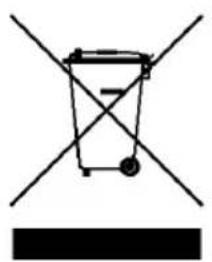
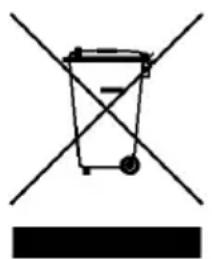
The device may not be disposed of with household rubbish. This appliance is labelled in accordance with European Directive 2002/96/EG concerning used electrical and electronic appliances (waste electrical and electronic equipment - WEEE).
The guideline determines the framework for the return and recycling of used appliances as applicable throughout the EU. To return your used device, please use the return and collection systems available to you.
natural_image
Simple line drawing of a trash bin with two crossed lines and a solid black rectangle below (no text or symbols)Francais
Mode d'emploi
Cher utilisateur,
natural_image
Simple line drawing of a trash bin with two crossed lines and a solid black bar below (no text or symbols)
natural_image
Blue triangular logo with white 'wm' text, no additional symbols or textwavemaster
CE - Declaration of conformity
We herewith declare, that the wavemaster FUSION active subwoofer complies with the following standards or normative documents:
EMC Directive (2014/30/EU)
EN 55032:2015, EN 55020:2017 + A12:2016,
EN 61000-3-2:2014, EN 61000-3-3:2013
LVD Directive (2014/35/EU)
EN 60065: 2014 + A11:2017
This statement is based on the test reports of an EMV – laboratory.
All texts and illustrations were produced with greatest care. wavemaster cannot however accept any legal or other responsibility for any remaining incorrect information and its consequences.
Subject to change without further notice.
In case there is audible noise, possibly caused by strong radio waves (e.g. by mobile phones) we recommend to turn down the volume control of the unit.
If you have special questions to the product and cannot find a solution in this introduction, you can look for more informations at our homepage. Thank you!
www.wavemaster.eu
The device may not be disposed of with household rubbish. This appliance is labelled in accordance with European Directive 2002/96/EG concerning used electrical and electronic appliances (waste electrical and electronic equipment - WEEE).
The guideline determines the framework for the return and recycling of used appliances as applicable throughout the EU. To return your used device, please use the return and collection systems available to you.