StreamPort - Bluetooth Receiver Wavemaster - Free user manual and instructions
Find the device manual for free StreamPort Wavemaster in PDF.


User questions about StreamPort Wavemaster
0 question about this device. Answer the ones you know or ask your own.
Ask a new question about this device
Download the instructions for your Bluetooth Receiver in PDF format for free! Find your manual StreamPort - Wavemaster and take your electronic device back in hand. On this page are published all the documents necessary for the use of your device. StreamPort by Wavemaster.
USER MANUAL StreamPort Wavemaster
natural_image
Blue triangular logo with white 'wm' text, no additional symbols or textwavemaster
STREAMPORT
BLUETOOTH REMOTE CONTROL
natural_image
Close-up of a black rotary dial with labeled buttons (PHONES, LINE, BT, LINE IN) and a blue indicator light on the dial (no readable text beyond labels)Deutsch
Bedienungsanleitung
natural_image
Simple line drawing of a trash bin with two crossed lines and a solid rectangle below (no text or symbols)English
User Manual
Dear User,
we are pleased that you have chosen the STREAMPORT Bluetooth remote control from wavemaster and congratulate you on this choice.
With this wavemaster STREAMPORT you have acquired a modern piece of audio technology that is in equal measure attractive and of high quality. We are sure that this product will provide useful service and a lot of fun to you over the coming years.
... Your wavemaster Team!
After unpacking
After unpacking you should first check that the contents are complete. In addition to this instruction manual there should be:
1 STREAMPORT wired cable remote control with Bluetooth function
Compatibility
ATTENTION: this STREAMPORT wired remote control is prepared for a connection to wavemaster products, which are especially marked to be STREAMPORT ready. To prevent any damage, please do never employ the STREAMPORT remote control to other products!
Further advice you can find in the instruction manual or on our homepage
www.wavemaster.eu
Advice on location, care and safety
- Without exception, connect the Line-In audio input only to a non-amplified Line-Out output. Avoid connection to the speaker-out jacks of your sound source. The amplified signal from the speaker-out may cause unnecessary distortion and may damage the speaker system.
- If the sound-system is not in use for a longer period of time, be sure that your system is disconnected from mains power.
- Do not use alcohol, benzene, thinner or acids to clean the cabinet.
- Do not place your STREAMPORT near radiators, airconditioning or radio-controlled systems.
- Avoid leaving the STREAMPORT in permanent strain such as direct sunlight, extreme moist or dryness, exceptional cold or heat, mechanical vibrations or shock.
- Do not open the cabinet, contact qualified personnel only.
- For service staff: Never open cabinet, when speaker system is connected to 110-240 V AC power supply system.
- CAUTION!! Power ON / STANDBY switch does not separate mains power!
- Deliberate harm to the equipment is not covered by the guarantee.
- Please contact your dealer in case of technical problems.
English
Assembly and operation
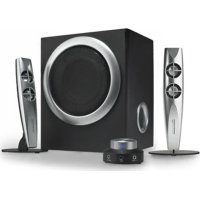
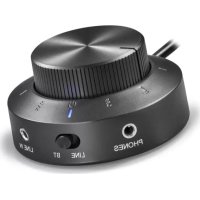
STREAMPORT replaces the wired remote control, provided with compatible wavemaster 2.1 sound systems. All known functions of the original remote control will be kept fully functional.
In addition, there is a selector switch on the front of STREAMPORT, to select between wired LINE-IN and Bluetooth playback (BT).
Playback of audio sources with 3.5mm phono sockets
Select LINE by the source selector switch.
For audio sources which provide a high line output level, like stationary HiFi or PC, connect to 3.5mm LINE-IN socket on the backside of the 2.1 system subwoofer.
For audio sources of lower line output level (smartphones), connect to the 3.5mm LINE-IN socket of your STREAMPORT.
Switch ON your sound system with the volume control knob.
For LINE playback, the operation control LED lights green.
Bluetooth Audio Playback
Activate the Bluetooth (BT / ✗ function of your audio source (e.g. your smartphone).
Switch on STREAMPORT by using the volume knob. Select BT by turning the source selector (left knob) to point to the BT position. For BT playback, the operation control LED lights blue.
- STREAMPORT confirms the activation of its Bluetooth function through slow flashing the operation control LED.
The BT system first tries to re-connect with previous BT source and is protected against any other device at this moment!
In case an earlier connected BT source is available, STREAMPORT will instantly connect to that BT source again. When connected, the BT control LED lights constantly. Now you can start BT playback through STREAMPORT.
- In case no prior connected source is available, after few seconds, STREAMPORT will search for new BT sources. This action will be confirmed by quick flashing of the BT control LED.
Just during this search phase the BT system is visible to other devices for apprx. 2 minutes and can be paired to a new source
Now start the Bluetooth search function of your BT source (e.g. smartphone). After a moment, you can find "wm STREAMPORT" in the BT devices list of your BT source. Select
"wm STREAMPORT" for pairing. Your BT source will now pair with STREAMPORT. Once the pairing procedure is finished the STREAMPORT BT control LED lights constantly.
When the BT connection is interrupted through foreign signals interference or by too long distance, playback will be stopped and the BT control LED shows flashing light. Once the BT source can be received again, playback continues and the BT control LED lights constant again.
To switch off the Bluetooth function switch the input selector knob of STREAMPORT to LINE position. This will completely deactivate the built-in BT function.
Bluetooth playback from PC: please note, for audio playback, the source device need to support the Bluetooth standard A2DP. In case of e.g. WINDOWS (TM) operating systems, it is inevitable to MANUALLY install the Bluetooth driver of the Bluetooth device maker! The Windows internal driver by the automatic driver installation is not suitable to support A2DP BT audio!
English
Specifications
- Bluetooth wired remote control for compatible Wavemaster 2.1 speaker systems
- Bluetooth Audio System for wireless digital signal transmission (BT 2.1 or above)
- Input selector for Line and Bluetooth
- Connections by audio cables or wireless by Bluetooth Audio System
•Frequency range Bluetooth: 20-20,000Hz
•Dimensions: D=80mm x H=36mm
- System requirements: compatibles wavemaster 2.1 speaker system, analogue stereo source with RCA or mini phono terminals or Bluetooth Audio System
CE - Declaration of conformity
We herewith declare, that the wavemaster STREAMPORT active speaker system complies with the following standards or normative documents:
EMC Directive (2004/108/EC)
EN55013:2001 +A1:2003 +A2:2006, EN55020:2007 +A11:2011, EMF: EN62479:2010, RF: EN300 328N1.7.1, EN301 489V1.9.2, EN301 17V2.2.1
LVD Directive 2006/95/EC
EN60065:2002 +A1:2006 +A11:2008 +A2:2010 +A12:2011
This statement is based on the test reports of an EMC laboratory.
All texts and illustrations were produced with greatest care. wavemaster cannot however accept any legal or other responsibility for any remaining incorrect information and its consequences.
Subject to change without further notice.
In case there is audible noise, possibly caused by strong radio waves (e.g. by mobile phones) we recommend to turn down the volume control of the unit.
If you have special questions to the product and cannot find a solution in this introduction, you can look for more informations at our homepage. Thank you!
www.wavemaster.eu
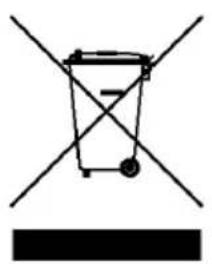
The device may not be disposed of with household rubbish. This appliance is labelled in accordance with European Directive 2002/96/EG concerning used electrical and electronic appliances (waste electrical and electronic equipment - WEEE).
The guideline determines the framework for the return and recycling of used appliances as applicable throughout the EU. To return your used device, please use the return and collection systems available to you.
natural_image
Simple line drawing of a trash bin with two crossed lines and a solid black rectangle below (no text or symbols)Francais
Mode d'emploi
Cher utilisateur,
LVD Directive (2006/95/EC)
EN60065:2002 +A1:2006 +A11:2008 +A2:2010 +A12:2011
text_image
Diagram showing a trash bin with crossed lines and a solid black rectangle below, indicating no text or symbols.wavemaster
CE - Declaration of conformity
We herewith declare, that the wavemaster STREAMPORT active speaker system complies with the following standards or normative documents:
EMC Directive (2004/108/EC)
EN55013:2001 +A1:2003 +A2:2006, EN55020:2007 +A11:2011, EMF: EN62479:2010, RF: EN300 328N1.7.1, EN301 489V1.9.2, EN301 17V2.2.1
LVD Directive 2006/95/EC
EN60065:2002 +A1:2006 +A11:2008 +A2:2010 +A12:2011
This statement is based on the test reports of an EMC laboratory.
All texts and illustrations were produced with greatest care. wavemaster cannot however accept any legal or other responsibility for any remaining incorrect information and its consequences.
Subject to change without further notice.
In case there is audible noise, possibly caused by strong radio waves (e.g. by mobile phones) we recommend to turn down the volume control of the unit.
If you have special questions to the product and cannot find a solution in this introduction, you can look for more informations at our homepage. Thank you!
www.wavemaster.eu
The device may not be disposed of with household rubbish. This appliance is labelled in accordance with European Directive 2002/96/EG concerning used electrical and electronic appliances (waste electrical and electronic equipment - WEEE).
The guideline determines the framework for the return and recycling of used appliances as applicable throughout the EU. To return your used device, please use the return and collection systems available to you.