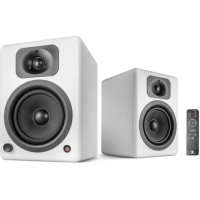
Two Neo - Speaker Wavemaster - Free user manual and instructions
Find the device manual for free Two Neo Wavemaster in PDF.


User questions about Two Neo Wavemaster
0 question about this device. Answer the ones you know or ask your own.
Ask a new question about this device
Download the instructions for your Speaker in PDF format for free! Find your manual Two Neo - Wavemaster and take your electronic device back in hand. On this page are published all the documents necessary for the use of your device. Two Neo by Wavemaster.
USER MANUAL Two Neo Wavemaster
natural_image
Blue triangular logo with white 'wm' text, no additional symbols or textwavemaster
TWO NEO TWO PRO
WIRELESS 2.0 SOUND SYSTEM
natural_image
Two modern audio speakers with speaker heads and sound waves, shown from different angles (no text or symbols visible)Deutsch
Bedienungsanleitung
text_image
1 2 3 4 5 6 7 8 TONE RESET LOUNLESS BASER 0 RearS SOURCE X MOUNTED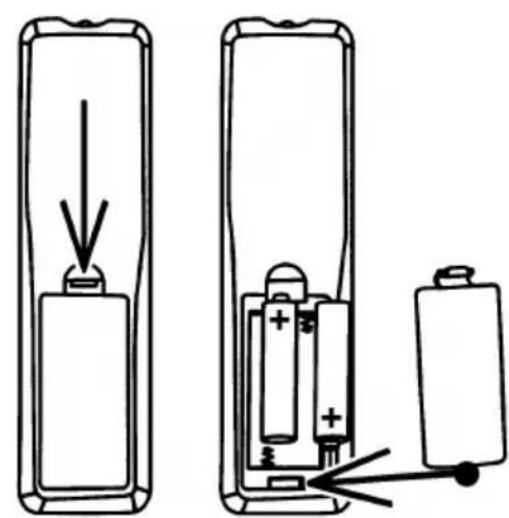
natural_image
Diagram showing two battery cells with an arrow indicating downward movement, no text or symbols presentnatural_image
Simple line drawing of a trash bin with crossed lines and a solid black rectangle below (no text or symbols)English
User Manual
Dear User,
we are pleased that you have chosen the TWO NEO/PRO loudspeaker system from wavemaster and congratulate you on this choice.
With this wavemaster TWO NEO/PRO you have acquired a modern piece of audio technology that is in equal measure attractive and of high quality. We are sure that this product will provide useful service and a lot of fun to you over the coming years.
... Your wavemaster Team!
After unpacking
After unpacking you should first check that the contents are complete. In addition to this instruction manual there should be:
2 Speaker boxes
1 Power cable
1 Infrared remote control
2 AAA Batteries
1 Speaker cable with stripped ends
1 Audio connection cable 2 x RCA plug -> 3.5 mm stereo mini phono plug
8 Adhesive silicone feet
English
Advice on location, care and safety
- Connect the audio input to the line-out, non amplified output. Avoid connection to the speaker-out jack of your sound source. The amplified signal from the speaker-out may cause unnecessary distortion and may damage the speaker-circuit.
- To connect your sound-system with power supply system, please make sure to have a mains socket close to your sound-system.
- Before mains connections, check your mains power system to be appropriate to the TWO NEO/PRO. The mains voltage (230V or 115V) of your power system you can set by the VOLTAGE SELECTOR of your TWO NEO/PRO (beside the POWER switch) and you can verify the actual setting of the mains voltage easily. Attention: if the mains voltage is set wrong, the device may become defective! Always set the correct mains voltage to avoid defects!
- If the sound-system is not in use for a longer period of time, be sure that your system is disconnected from mains power.
- Do not use alcohol, benzene, thinner or acids to clean the cabinet.
• Do not place your sound-system near radiators, airconditioning or radio-controlled systems. - Avoid leaving the sound-system in permanent strain such as direct sunlight, extreme moist or dryness, exceptional cold or heat, mechanical vibrations or shock.
- Do not open the cabinet, contact qualified personnel only.
- For service staff: Never open cabinet, when speaker system is connected to 110-240 V AC power supply system.
- CAUTION!! Power ON / STANDBY switch does not separate mains power!
- Deliberate harm to the equipment is not covered by the guarantee.
- Please contact your dealer in case of technical problems.
English
Assembly and operation
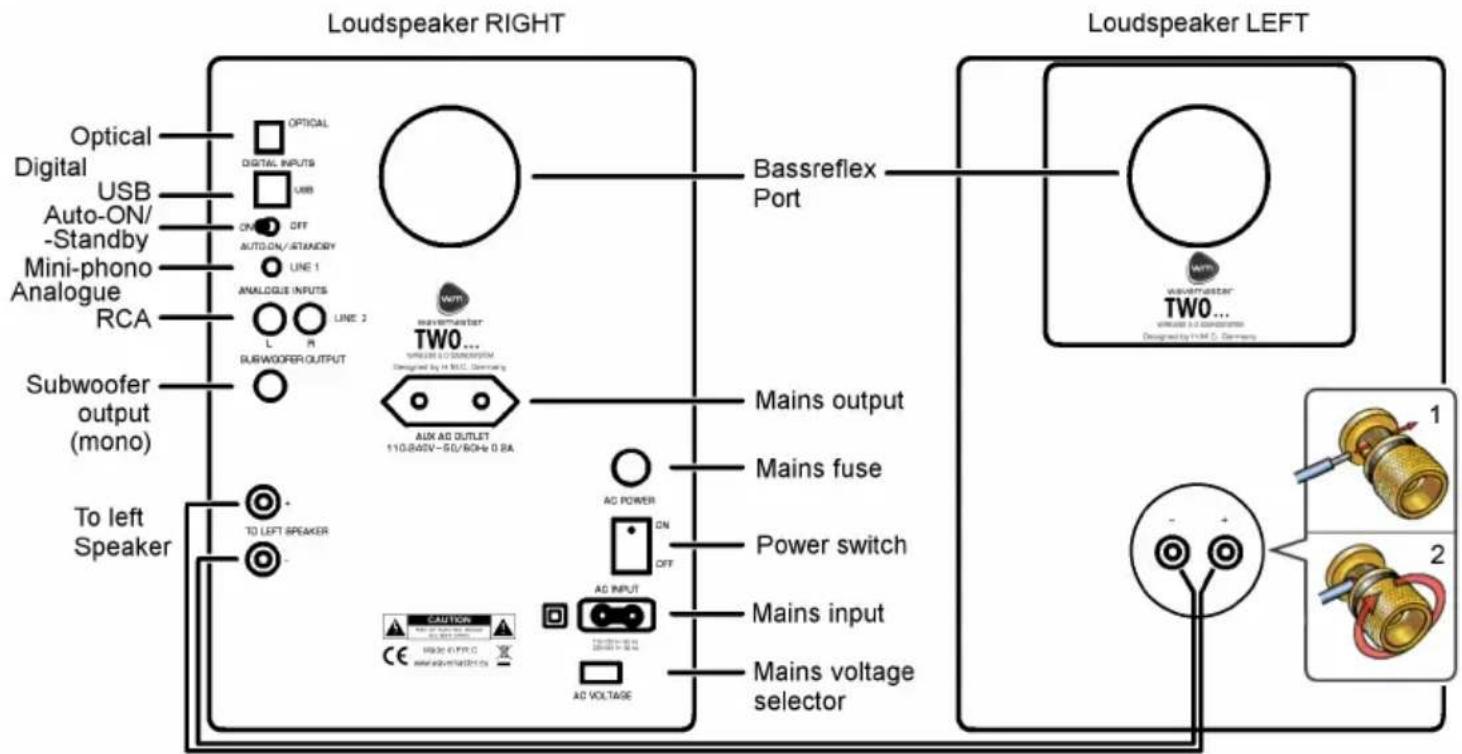
Assembly and operation of your TWO NEO/PRO speaker system is very easy to do. General connections are shown in the following drawing.
Please connect all components only when the mains power switch is switched OFF.
flowchart
graph TD
    subgraph "Loudspeaker RIGHT"
        direction TB
        A["Optical"] --> B["OPTICAL"]
        C["Digital"] --> D["DIGITAL INPUTS"]
        E["USB"] --> F["USB"]
        G["Auto-ON/-Standby"] --> H["ON OFF"]
        I["Mini-phono"] --> J["AUTO-ON/-STANDRY"]
        K["Analogue"] --> L["LINE 1"]
        M["RCA"] --> N["ANALOGUE INPUTS"]
        O["L"] --> P["LINE 2"]
        Q["SUBWOOFER OUTPUT"] --> R["O"]
    end

    subgraph "Loudspeaker LEFT"
        S["Bassreflex Port"] --> T["WMT"]
        T --> U["mains output"]
        T --> V["mains fuse"]
        T --> W["mains switch"]
        T --> X["mains input"]
        T --> Y["mains voltage selector"]
        Z["TWO..."] --> AA["mains output"]
        AA --> AB["mains fuse"]
        AA --> AC["mains switch"]
        AA --> AD["mains input"]
        AA --> AE["mains voltage selector"]
    end

    B --> F
    D --> H
    F --> J
    J --> L
    L --> N
    N --> O
    O --> P
    P --> R
    R --> S
    S --> T
    T --> AA
    AA --> W
    W --> X
    X --> Y
    Y --> AA
    AA --> AC
    AC --> AD
    AD --> AE
    AE --> S
- Place the speakers at their target area and start connecting.
- First, connect the left speaker to the right speaker by the speaker cable. The gold-plated binding posts can be turned and the stripped cable ends shall be fitted to connect red to red and black to black. Turn the binding posts tight by hand, so that the cables can achieve a good connection from the output of the right speaker (active) to the left speaker (passive).
- Please care to avoid short circuits between red and black connectors, not to cause malfunctions or defects!
- Connect the input socket on the back of your TWO NEO/PRO to your audio sources.
- The LINE 1 phono socket input is prepared for devices with lower Line signal level, like portable MP3-player, smartphones etc.
- The RCA sockets LINE 2 are prepared for audio devices with standard Line signal level, e.g. PC or stationary HiFi devices.
•The optical TOSLINK input socket can receive digital PCM stereo signals.
•The USB input offers direct connection to PCs and other USB sources.
English
- The multifunction knob at the front of the right TWO NEO/PRO speaker box offers push and turning function. This knob controls the basic functions of your TWO NEO/PRO :
- ON and manually OFF: a short push powers ON the device, manually OFF can be forced by a longer push (>2s) on the knob.
If manually set OFF a static red LED will confirm this.
In case of automatic standby, this will be visible through a slowly blinking red LED.
- VOLUME control: if the device is ON, by turning the knob, the volume can be increased or decreased.
After switching OFF and ON, the previous volume setting is recovered.
- Sequential input selection (short push on the knob when the device is ON):
| Input Socket Indication Colour Signal Source, Format | |||
| LINE 1 Phono Socket3.5mm stereo | green Smartphone, MP3-Player, lower level, approx. 500mV | ||
| LINE 2 RCA L, R white PC, stationary HiFi | standard level max. 2000mV | ||
| Bluetooth - blue Bluetooth Audio A2DP | |||
| Digital optical S/P-DIF TOSLINK orange PCM max. 24 Bit / 192 kHz | |||
| Digital USB | USB-B purple | PCM max 24 Bit / 96 kHz | |
- Before mains connections, check your mains power system to be appropriate to the TWO NEO/PRO. The mains voltage (230V or 115V) of your power system you can set by the VOLTAGE SELECTOR of your TWO NEO/PRO (beside the POWER switch) and you can verify the actual setting of the mains voltage easily. Attention: if the mains voltage is set wrong, the device may become defective! Always set the correct mains voltage to avoid defects!
- Connect the mains cable to the mains input socket and the wall socket plug connect to your mains supply.
- Switch on the main switch on the back.
- ON/STANDBY, source selection as well as volume you can control with the multifunction knob on the front of the right speaker box of your TWO NEO/PRO Sound System.
- The same and further settings like BASS, TREBLE, DEFEAT, LOUDNESS, and MUTING can be controlled by the infrared (IR) remote control.
Note: If you emphasize the bass control too much, the maximum total volume will be limited since the woofer may run at overstroke earlier. Please care not to overstroke the woofer too much (audible distortions) since this can reduce the life-span of the woofers!
English
- AUDIO SIGNAL SENSING: if the input signal is very low or off for more than 10 minutes, the audio signal sensing automatically switches to STANDBY. Once there is an audio signal, the audio signal sensing automatically switches ON again!
This technology is beneficial with many sources, especially with any kind of wireless sources such as Airplay (WLAN) or Bluetooth audio systems: you can operate the wireless audio source and the speaker system activates or deactivates according to the provided audio signals.
To activate/deactivate the AUDIO SIGNAL SENSOR function, there is a switch on the back named AUTO ON/STANDBY:
If the switch AUTO ON/STANDBY is in position OFF, the automatic function is deactivated and the system can not power ON nor STANDBY automatically but you can operate it completely manually.
In position ON, the system will wake up upon a recognized audio signal and - if there is no more audio signal over certain time - it can automatically change into STANDBY.
- The TWO NEO/PRO Sound System offers a AUX AC OUTLET (0.2A) on the back, for supply of a source device. With the audio signal sensing this enables very comfortable operation and perfect integration of your TWO NEO/PRO speaker system with your wireless home installations!
Audio Configurations
Connection to analogue audio sources with RCA- or phono connector outputs
To connect with conventional stereo use RCA-to-RCA or phono-to-phono audio cables and connect it to the LINE 1 or LINE 2 inputs on the back of your TWO NEO/PRO.
The input sensitivity of the 3.5mm phono socket LINE 1 is prepared for portable devices like smartphones, MP3-player etc.
The input sensitivity of the RCA input LINE 2 is prepared for high (standard) line levels, as provided by stationary HiFi or PC.
If your audio source is mains powered, like streaming devices, you can connect it to the mains socket on the back of your TWO NEO/PRO.
Connection to digital audio sources with S/P-DIF- or USB connectors
Digital optical socket (S/P-DIF TOSLINK): employ a standard optical cable and connect it to the OPTICAL input on the back of your TWO NEO/PRO. Please remember to never bend the optical cable in a small or sharp angle, to avoid damage of the optical fibre! The optical input of TWO NEO/PRO supports digital PCM STEREO signals up to 24 Bit / 192 kHz.
USB socket: employ an USB cable or adaptor with USB-B plug to connect your USB audio source to the USB socket on the back of your TWO NEO/PRO. The popular operating systems do not require the installation of a driver. The USB input of TWO NEO/PRO supports digital PCM STEREO signals up to 24 Bit / 96 kHz.
English
Bluetooth Audio Playback
Activate the Bluetooth (BT / *function of your audio source (e.g. your smartphone)). Switch on TWO NEO/PRO by pushing on the volume knob or the IR remote POWER button. Select BT by short pushing the volume knob (SOURCE on IR remote) until reaching the BT position (blue colour indication).
-
TWO NEO/PRO confirms the activation of its Bluetooth function through quick flashing the BT control LED.
The BT system first tries to re-connect with previous BT source and is protected against any other device at this moment!
In case an earlier connected BT source is available, TWO NEO/PRO will instantly connect to that BT source again. When connected, the BT control LED lights constantly. Now you can start BT playback through TWO NEO/PRO. -
In case no prior connected source is available, after few seconds, TWO NEO/PRO will search for new BT sources. This action will be confirmed by slow flashing of the BT control LED.
Just during this search phase the BT system is visible to other devices for apprx. 2 minutes and can be paired to a new source
Now start the Bluetooth search function of your BT source (e.g. smartphone). After a moment, you can find "wavemaster TWO NEO/PRO" in the BT devices list of your BT source. Select "wavemaster TWO NEO/PRO" for pairing. Your BT source will now pair with TWO NEO/PRO. Once the pairing procedure is finished the TWO NEO/PRO BT control LED lights constantly.
When the BT connection is interrupted through foreign signals interference or by too long distance, playback will be stopped and the BT control LED shows flashing light. Once the BT source can be received again, playback continues and the BT control LED lights constant again.
BT safety: Bluetooth offers a high safety and is protected against foreign access. To connect TWO NEO/PRO to a new BT source, after activating the BT function, it will be visible to other BT sources only during the BT search phase and can be paired to a new BT source. After approx. 2 minutes the search phase is ended and the system will be protected against foreign access again.
To switch off the Bluetooth function select any other input source. This will completely deactivate the built-in BT function.
AptX: if your BT source device supports AptX, this sophisticated transmission technology will be activated in both devices automatically.
After both devices have achieved a stable BT connection, the activation of the AptX function might be confirmed by the BT audio source device.
BT source devices without AptX automatically always use the normal BT audio connection.
Bluetooth playback from PC: please note, for audio playback, the source device need to support the Bluetooth standard A2DP. In case of e.g. WINDOWS (TM) operating systems, it is inevitable to MANUALLY install the Bluetooth driver of the Bluetooth device maker! The Windows internal driver by the automatic driver installation is not suitable to support A2DP BT audio!
Subwoofer Output
The subwoofer output of TWO NEO/PRO offers the connection to a active subwoofer with line input and electronic subwoofer filters, to extend the system playback at the range of lowest frequencies. This output provides the non-filtered mono summary signal of the actual playback source, in dependence from TWO NEO/PRO's volume control. All sound adjustments to match the subwoofer with TWO NEO/PRO need to be set by using the filters and other controls of a connected active subwoofer.
English
Infrared (IR) remote control
TWO NEO/PRO offers infrared remote control function. Beside the multifunktion knob's features, there are a lot more functions to be controlled by the infrared remote control.
Batteries:
Before operation of the IR remote control, the batteries need to be installed.
The battery compartment can be opened by pushing the clip hook's handle in direction to the battery cover and pulling out the battery cover.
text_image
1 2 3 4 5 6 7 8 TONE OUTPUT SOURCES SOURCE HOLDRESS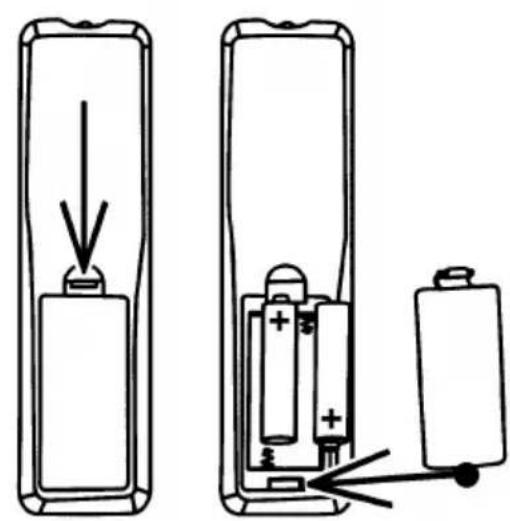
natural_image
Diagram showing two battery charging scenarios with a downward arrow indicating the battery discharge direction (no text or symbols present)Insert the batteries (2 x AAA batteries) with their polarity according to the markings in the battery compartment. Wrong polarity can cause a defect! With wrong polarity of the batteries, there can be no function of the remote control!
To close the battery cover, first insert the hook below it and clip-in the clip hook until you can see the cover is flush with the cabinet bottom side.
If you plan not to use the IR remote control for a longer time, it will be recommended to remove the batteries to avoid any damage by aged batteries.
IR remote control functions:
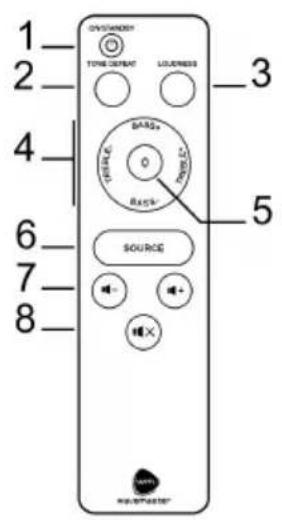
- ON/STANDBY (1) if the device is off, short push this button to power ON and manually force OFF.
Please note: if you manually force the device OFF the automatic power-ON will be deactivated, so the device cannot power-ON automatically by audio signals!
To utilize the automatic ON and STANDBY function, there is no need to power-OFF your TWO NEO/PRO manually but simply keep it ON. The automatic STANDBY function will power-down (STANDBY) for you. Prerequisite is the switch AUTO-ON/STANDBY on the speaker's backside is set to ON.
- TONE DEFEAT (2) With this button the sound effect set by tone controls BASS and TREBLE can be deactivated and activated again, without losing the settings.
English
- LOUDNESS (3) With this button, you can activate/deactivate a physiological sound correction to compensate the loss of low frequency range at low volume listening. The effect strength of the LOUDNESS correction accordingly is dependant from the actual volume control's setting.
Attention: the Loudness function has no effect at high volume. Whether the Loudness is activated or deactivated can be heard best with a bass-strong track at a low position of the volume knob. - BASS +/- and TREBLE +/- (4) This are the buttons to individually control the sound of your TWO NEO/PRO. You can change the sound by each +/- 5 steps. Each step changes low or high levels by 2 dB.
- Zero button 0 (5) This button is part of the sound control setting concept. It can reset the sound settings back to a neutral zero position. The 0 button has two functions:
- If you push the 0 button (within 20 seconds) right after setting of BASS or TREBLE controls, it will just set to zero the last controlled function – means: BASS or TREBLE will be set to zero. By this feature it will be possible to control the sound until the best setting is found, without re-setting both sound controls each time.
- If you push the 0 button without having operated any sound setting buttons before (within the last 20 seconds), both sound settings – means: BASS and TREBLE – will be reset to zero.
- SOURCE (6) With this button you can select the playback source, same way as the push function of the multifunction knob on the speaker front.
• Volume -/+ (7) With these buttons you can increase (+) or decrease (-) the playback volume, same way as by the turning function of the multifunktion knob on the speaker front. - MUTING (8) This button can mute the playback without changing the volume setting position. To unmute and continue the playback, push the MUTING button again.
English
Specifications
•2 channel 2-way stereo sound system
•2 built-in amplifier channels, toroidal power transformer and separate standby supply
- BLUETOOTH Audio System for wireless digital transmission (BT 2.1 or above, A2DP, AptX)
•Digital TOSLINK (optical) and USB inputs for stereo signals up to 24 bit/192 kHz
•Digital audio processing with high resolution native 24/192-able D/A converter
•Line input terminals by mini phono and RCA sockets and RCA subwoofer output
- Silk dome tweeters TWO NEO: 25 mm (1"), TWO PRO: 28 mm (1.1"), Kevlar cone woofers TWO NEO: 13 cm (5"), TWO PRO: 16 cm (6,5")
- Front control for VOLUME, INPUT SELECTION and ON/STANDBY manual switching
• Infrared (IR) remote control for all control functions
•BASS/TREBLE sound controls and switchable LOUDNESS function
•Mains power switch on the back
- Mains output socket for mains-powered sources (e.g. a WLAN audio receiver), max. 0.2 A
- AUDIO SIGNAL SENSING for auto-on and auto-standby depending from input signals, disengageable
- Connections by audio cables, digital cables or wireless by Bluetooth Audio System
• Frequency range: TWO NEO: 45 - 22,000 Hz; TWO PRO: 35 - 22,000 Hz; S/N >95 dBA
• Amplifier output power (RMS): TWO NEO: 2x 30 W; TWO PRO: 2 x 55 W
- Mains tension: 230/115 Volts \~ selectable, 50/60 Hz, standby power <0.5 W (230V)
• Dimensions (WxHxD): TWO NEO: 185 x 260 x 205 mm ; TWO PRO: 215 x 310 x 260 mm
- System requirements: analogue stereo source with RCA or mini phono terminals or digital stereo source with TOSLINK or USB connector or Bluetooth Audio System
CE - Declaration of conformity
We herewith declare, that the wavemaster TWO NEO/PRO active speaker system complies with the following standards or normative documents:
EMC directive 2014/30/EU: EN 55032:2012+AC:2013; EN 55020:2007+A12:2016; EN 61000-3-2:2014; EN 61000-3-3:2013; LVD directive 2014/35/EU: EN 60065:2014;
Erp: EU, EC 1275/2008; RED directive 2014/53/EU: ETSI EN 300 328 V2.1.1 (2016-11); ETSI EN 301 489-1 V2.2.0 (2017-03); ETSI EN 301 489-17 V3.2.0 (2017-03); EN 62311:2008
This statement is based on the test reports of an EMC laboratory.
All texts and illustrations were produced with greatest care. wavemaster cannot however accept any legal or other responsibility for any remaining incorrect information and its consequences.
Subject to change without further notice.
In case there is audible noise, possibly caused by strong radio waves (e.g. by mobile phones) we recommend to turn down the volume control of the unit.
If you have special questions to the product and cannot find a solution in this introduction, you can look for more informations at our homepage. Thank you!
www.wavemaster.eu
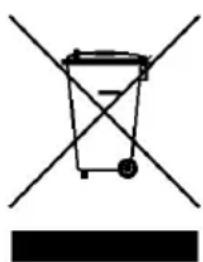
The device may not be disposed of with household rubbish. This appliance is labelled in accordance with European Directive 2002/96/EG concerning used electrical and electronic appliances (waste electrical and electronic equipment - WEEE).
The guideline determines the framework for the return and recycling of used appliances as applicable throughout the EU. To return your used device, please use the return and collection systems available to you.
natural_image
Simple line drawing of a trash bin with crossed lines and a solid black rectangle below (no text or symbols)Francais
Mode d'emploi
Cher utilisateur,
natural_image
Simple line drawing of a cylindrical object with an arrow pointing downward (no text or symbols)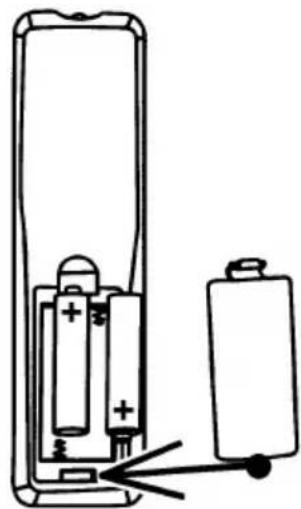
natural_image
Diagram of a battery inside a remote control with two batteries, showing internal components and wiring (no text or symbols)natural_image
Simple line drawing of a trash bin with crossed lines indicating no waste or restriction (no text or symbols)CE - Declaration of conformity
We herewith declare, that the wavemaster TWO NEO/PRO active speaker system complies with the following standards or normative documents:
EMC directive 2014/30/EU: EN 55032:2012+AC:2013; EN 55020:2007+A12:2016;
EN 61000-3-2:2014; EN 61000-3-3:2013; LVD directive 2014/35/EU: EN 60065:2014;
Erp: EU, EC 1275/2008; RED directive 2014/53/EU: ETSI EN 300 328 V2.1.1 (2016-11);
ETSI EN 301 489-1 V2.2.0 (2017-03); ETSI EN 301 489-17 V3.2.0 (2017-03); EN 62311:2008
This statement is based on the test reports of an EMC laboratory.
All texts and illustrations were produced with greatest care. wavemaster cannot however accept any legal or other responsibility for any remaining incorrect information and its consequences.
Subject to change without further notice.
In case there is audible noise, possibly caused by strong radio waves (e.g. by mobile phones) we recommend to turn down the volume control of the unit.
If you have special questions to the product and cannot find a solution in this introduction, you can look for more informations at our homepage. Thank you!
www.wavemaster.eu
The device may not be disposed of with household rubbish. This appliance is labelled in accordance with European Directive 2002/96/EG concerning used electrical and electronic appliances (waste electrical and electronic equipment - WEEE). The guideline determines the framework for the return and recycling of used appliances as applicable throughout the EU. To return your used device, please use the return and collection systems available to you.