Bluetooth Office Headset Pro+ - Earphones SANDBERG - Free user manual and instructions
Find the device manual for free Bluetooth Office Headset Pro+ SANDBERG in PDF.


| Product Type | Wireless Bluetooth Stereo Headset |
| Brand | Sandberg |
| Model | Bluetooth Office Headset Pro+ |
| Category | Earphone / Headset |
| Connection Technology | Bluetooth |
| Bluetooth Range | About 10 meters |
| Multipoint Pairing | Yes, up to 2 devices simultaneously |
| Battery Type | Rechargeable Lithium-ion |
| Charging | Via Micro USB cable (included) or magnetic stand |
| LED Indicators | Blue and red for battery, pairing, audio and call status |
| Control Buttons | Multifunction, volume +/-, microphone mute, on/off |
| Audio Functions | Play/pause, track skip, volume control |
| Phone Functions | Answer, hang up, reject call, redial, mute |
| Included Accessories | Magnetic charging stand, Micro USB cable |
| Care and Cleaning | Clean with a soft, dry cloth |
| Safety | Do not expose to water or humidity |
| Spare Parts and Repairability | Charging stand and Micro USB cable replaceable |
| General Information | Manual available at sandberg.world/manuals/126-18 |
Frequently Asked Questions - Bluetooth Office Headset Pro+ SANDBERG
User questions about Bluetooth Office Headset Pro+ SANDBERG
0 question about this device. Answer the ones you know or ask your own.
Ask a new question about this device
Download the instructions for your Earphones in PDF format for free! Find your manual Bluetooth Office Headset Pro+ - SANDBERG and take your electronic device back in hand. On this page are published all the documents necessary for the use of your device. Bluetooth Office Headset Pro+ by SANDBERG.
USER MANUAL Bluetooth Office Headset Pro+ SANDBERG
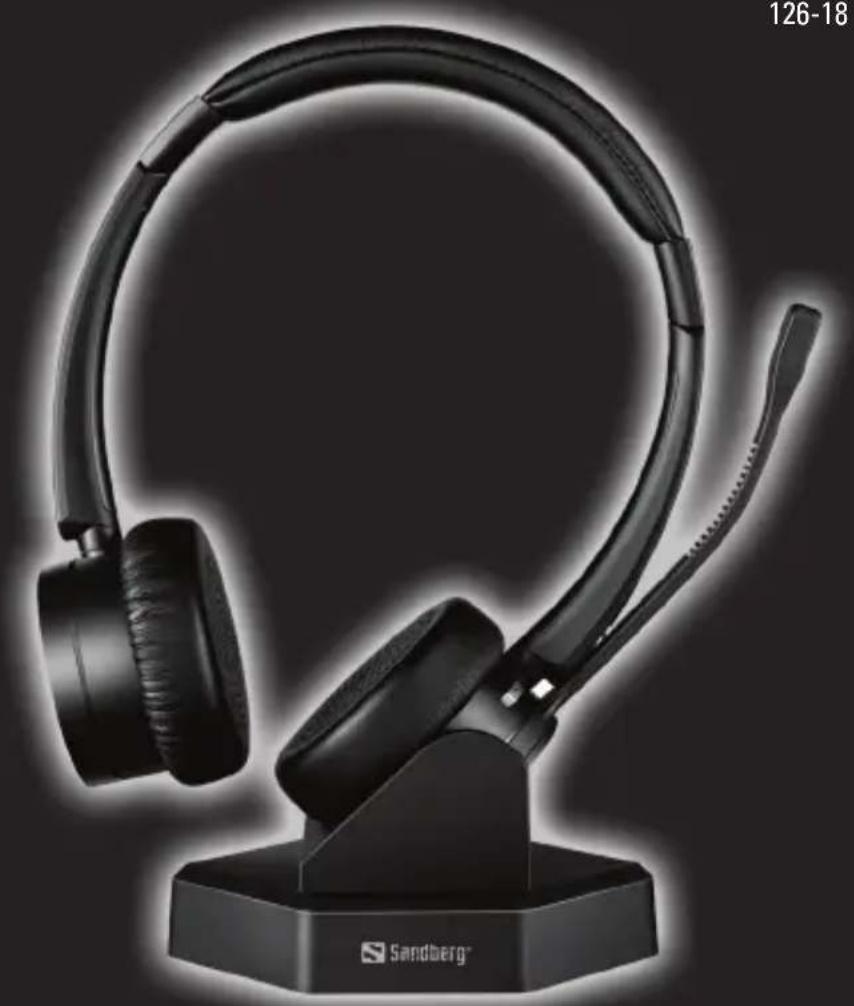
Bluetooth Office Headset Pro+
User guide
126-18
natural_image
Black hardcover head with ear strap and stand, no visible text or symbols on the device itself
Double Quality Tested
www.sandberg.world

Sandberg®
User guide

Follow these instructions for easy installation and operation of your new Sandberg product.

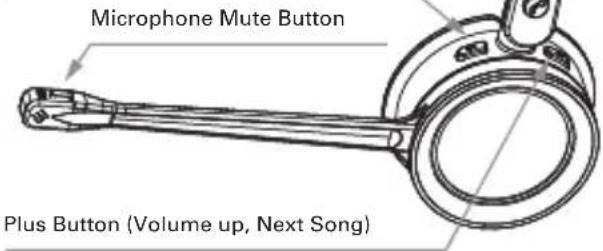
Blue LED Indicator (Battery, Pairing, Audio Status)
Red LED Indicator (Battery, Pairing, Call Status)
Multi-Function Button (Answer, Hang up, Pause and Play)
Minus Button (Volume Down, Last Song)
2. Introduction
Sandberg Bluetooth Office Headset Pro+ is a stylish and exceptionally comfortable wireless stereo headset, optimised for use with a mobile phone or for online conversations on your PC. It ensures crystal-clear voice reproduction. The headset can be connected with two devices simultaneously; for example, both your PC
and your mobile phone. With an integrated "busy" light-emitting diode, enabling your colleagues to easily see whether you are busy with a conversation in the headset.
The package includes an elegant base, in which the headset can be recharged when it is not in use.
3. Connecting the charging base stand
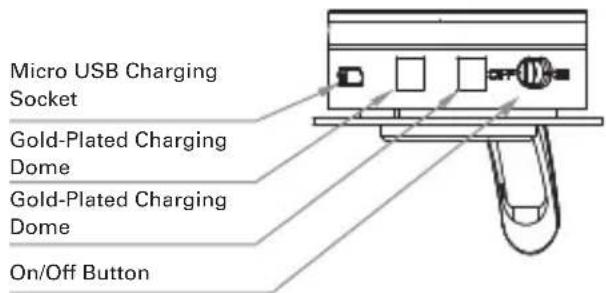
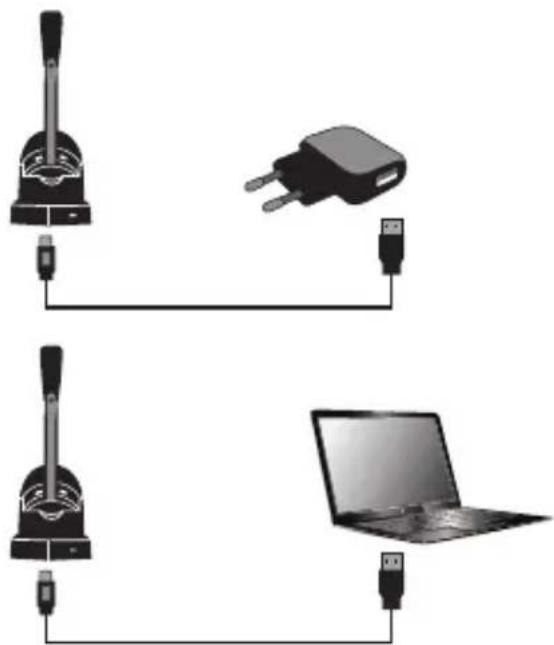
A magnetic charging base stand is included with your Sandberg Bluetooth Office Headset Pro. Use it to charge the headset when not in use. The magnetic holding function ensures correct positioning over the charging contacts, and easy retrieval when the phone rings.
Connect the base stand to a USB power source using the Micro USB cable supplied as shown on the illustration:
natural_image
Diagram showing connections between a microphone, a plug, and a laptop (no text or symbols present)4. Button Function
| Button Function | Action | |
| On/Off Button | Headset on | Slide switch to icon “ON” |
| Headset off | Slide switch to icon “OFF” | |
| Plus Button | Volume up | Tap the Plus button to increase the speaker volume |
| Next song | Hold the Plus button to switch to next song when playing music | |
| Mic Mute | Mic mute Press the mute button to activate mic mute during a call. There will be a “toot” every 3 seconds while muted. Press the mute button again to cancel mic mute. | |
| Minus Button | Volume down | Tap the Minus button to decrease the speaker volume |
| Last song | Hold the Minus button to switch to last song when playing music | |
| Multi-function Button | Pause | Tap the Plus button to increase the speaker volume |
| Answer /end call | Hold the Plus button to switch to next song when playing music | |
| Reject call Hold the Plus button to switch to next song when playing music | ||
5. Prompt Tone Introduction
| Headset Status Tone | |
| Power on | Power on |
| Power off | Power off |
| Pairing Successfully | Connect |
| Volume up/down | “toot” |
| Battery Low | “toot” every 5 minutes |
| Mic Mute | “toot” every 3 seconds |
6. Headset LED Indicators
| Headset Status LED Status | |
| Pairing Mode | Light flashes blue and red alternately |
| Pairing Successful | Light flashes blue repeatedly every 5 seconds |
| Battery Low | Light flashes red rapidly |
| Charging Mode | Red light continuously on |
| Fully Charged | Blue light continuously on |
| Audio Status | Blue light slowly brightening and dimming alternately and the red light off |
| Call(Busy) Status | Red light slowly brightening and dimming alternately and the blue light off |
7. Pairing with Bluetooth Device
- Be sure that your smart phone, laptop, or desk phone has Bluetooth functionality.
- Activate the Bluetooth function on your smart phone, laptop, or desk phone.
- Turn on your headset (slide switch to "ON"), you will hear a prompt tone "power on".
The LED indicator will flash red and blue alternately, which indicates the headset is in pairing mode. - (If pairing fails, the headset will power off automatically after indicator flashes for 5 mins, with prompt tone "power off" heard.)
- Pair headset to your smart phone, laptop, or desk phone.
1) Search for Bluetooth device on your smart phone, laptop, or desk phone. 2) Open “Bluetooth” menu and press “discover” or “add” to search “Sandberg Office Pro+” on your smart phone, laptop, or desk phone.
3) When "Sandberg Office Pro+" is displayed on your Bluetooth devices list, please click it to start pairing. Prompt tone "connect" will be heard when pairing is successful, and the LED indicator will repeatedly flash blue every 5 seconds.
4) This headset can remember devices with which it has previously been paired. When powered on, the headset will automatically connect to the first two remembered devices.
8. Additional functions
- Pair with 2 devices simultaneously
The headset can pair with 2 devices simultaneously.
1) Connect the first device with "Sandberg Office Pro+"
2) Turn off the Bluetooth functionality of the first device
3) Connect the second device with "Sandberg Office Pro+"
4) Turn on the first device's Bluetooth functionality, then "Sandberg Office Pro+" is paired with both devices.
2. Redial function
Quickly press the multi-function button twice to redial the last call.
3. One-touch play function
Quickly press the multi-function button once, the default music player of the mobile phone will play automatically (some mobile phones cannot implement this function).
4. Automatic re-connection function
Bluetooth connection can be automatically re-connected if headset is brought back into Bluetooth range within 5 minutes after disconnect. If reconnect fails, please turn off the headset, and turn it on again to reconnect.
5. Mic mute function on mobile call
Press the mute button to activate mic mute during a phone call, repress the mute button to cancel mic mute. The "toot" tone will be heard every 3 seconds during mic mute status.
1. Overview
Blå LED-indikator (batteri, parring, lydstatus)
Rød LED-indikator (batteri, parring, opkaldsstatus)
natural_image
Pure technical line drawing of a mechanical or electrical component without any text, numbers, or symbols2. Introduktion
Sandberg Bluetooth Office Headset Pro+ er et stilfuldt og yderst komfortabelt trådløst stereo headset, optimeret til brug med mobiltelefon eller til online samtale på din PC, hvor det sikrer krystalklar stemmegengivelse. Headsettet kan tilsluttes to enheder samtidig, f.eks. både din PC og din mobiltelefon. Med
natural_image
Diagram showing connections between a microphone, a USB plug, and a laptop (no text or symbols present)4. Knapfunktion
natural_image
Diagram showing connections between a microphone, a plug, and a laptop (no text or symbols present)natural_image
Technical line drawing of a mechanical device with no visible text or symbols2. Einleitung
natural_image
Diagram showing connections between a microphone, a plug, and a laptop (no text or symbols present)4. Tastenfunktionen
natural_image
Diagram showing connections between a microphone, a plug, and a laptop (no text or symbols present)- Bluetooth 5.0, CSR chipset
- Frequency range: 2.4 GHz-2.4835 GHz
- Multiple-points technology for Dual Device connection
- Supports A2DP, AVRCP, HFP, HSP, AAC
- Up to 30 metres wireless range
- Speaker frequency: 20Hz - 20KHz
- Speaker Sensitivity: 118dB ± 3dB
- Microphone frequency: 100Hz - 20KHz
- Microphone sensitivity: -38dB ± 3dB
- Blue/Red indicator LEDs
- 1 Multi-function button
- Vol +/- buttons, Mute button
- Charging time: Approx. 2 hours
- Talking time: Approx. 20 hours
- Stand-by time: Approx. 200 hours
- Charging input: Micro USB DC 5V
- Battery capacity: 320 mAh / 3.7V

Sandberg®
Support
http://helpdesk.sandberg.world

Sandberg®
Warranty
There is a five-year warranty on your Sandberg product. Please read the warranty terms and register your new Sandberg product at www.sandberg.world/warranty
5
Years Warranty


- Bluetooth Office Headset Pro+
- Sandberg®
- User guide
- Introduction
- Connecting the charging base stand
- Button Function
- Prompt Tone Introduction
- Headset LED Indicators
- Pairing with Bluetooth Device
- Additional functions
- Redial function
- One-touch play function
- Automatic re-connection function
- Mic mute function on mobile call
- Overview
- Introduktion
- Knapfunktion
- Einleitung
- Tastenfunktionen
- Support
- Warranty
Brand : SANDBERG
Model : Bluetooth Office Headset Pro+
Category : Earphones