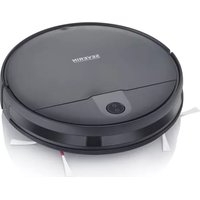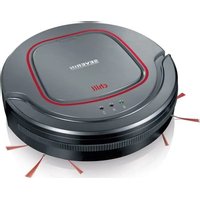
RB 7022 - Robot vacuum SEVERIN - Free user manual and instructions
Find the device manual for free RB 7022 SEVERIN in PDF.


| Product type | Robot vacuum cleaner |
| Brand | Severin |
| Model | RB 7022 |
| Color | Not specified |
| Power supply | Rechargeable lithium-ion battery (not specified) and power adapter |
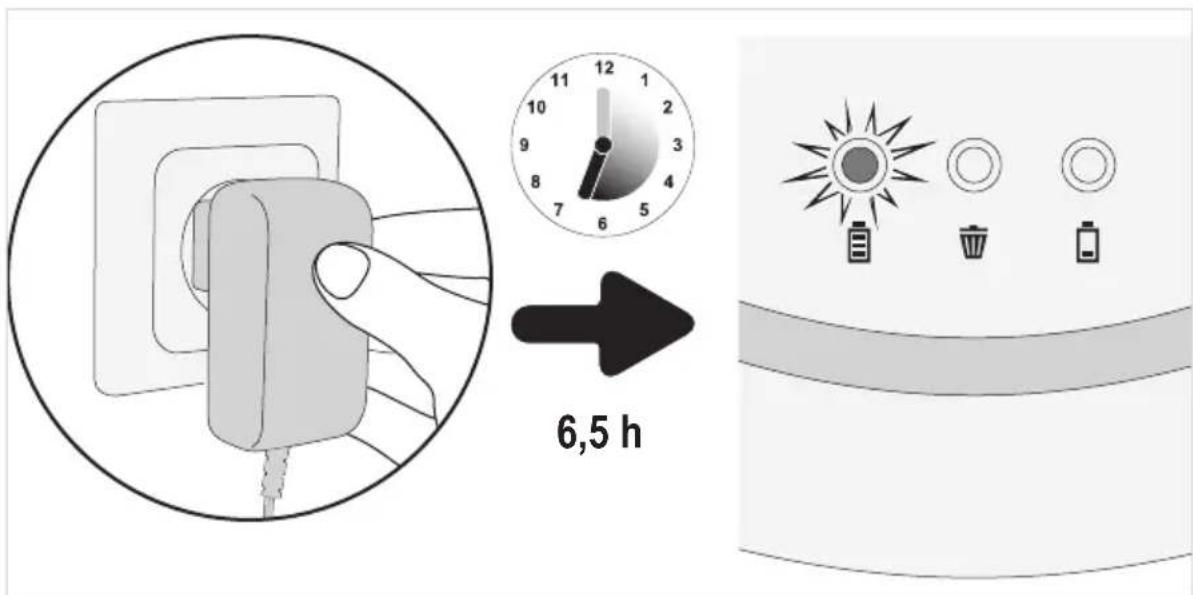
| Charging time | Approximately 6.5 hours |
| Runtime | Not specified (operates until fully discharged) |
| Floor type | Hard floors (with brushes) and low-pile carpets (without brushes) |
| Drop sensors | 3 adjustable sensors (positions 0 to 3) for light/dark floors and height |
| Dust container | With filter, capacity not specified |
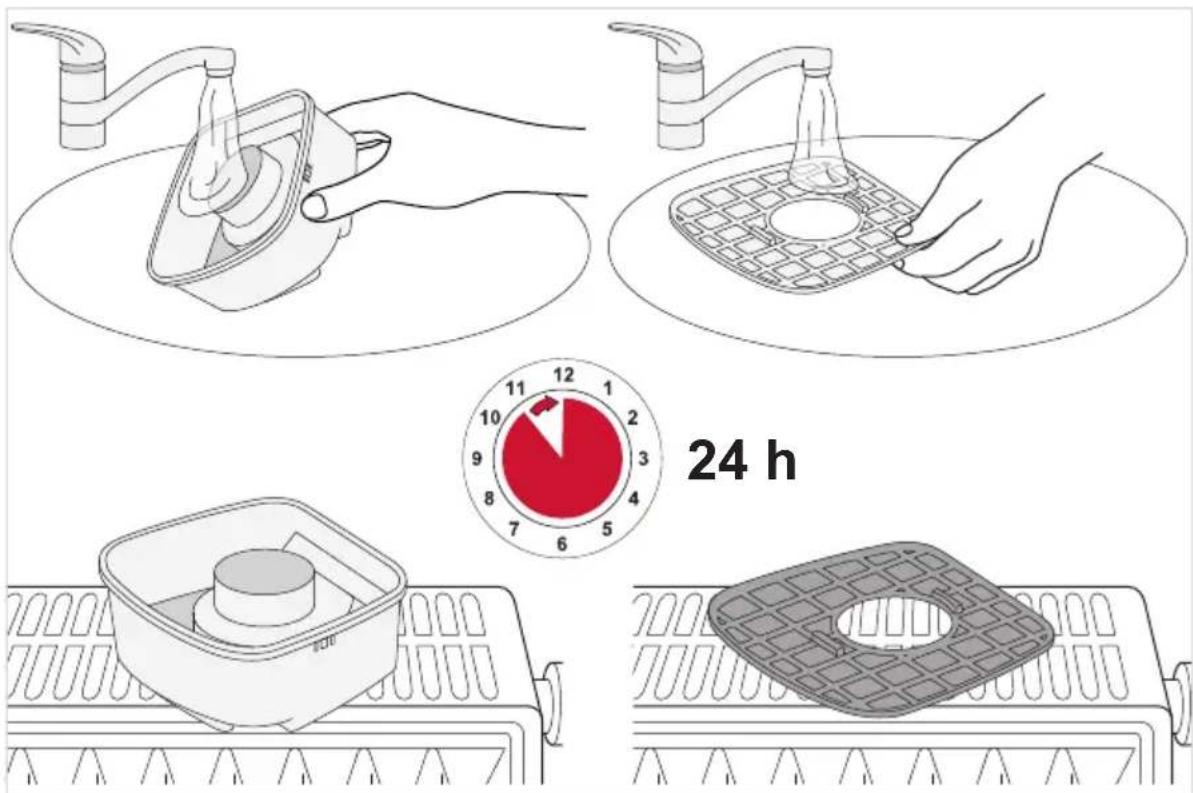
| Filter | Washable and reusable (drying 24h) |
| Included accessories | 2 round brushes, 2 spare round brushes, battery, cleaning brush, power adapter, spare filter |
| Child safety | Can be used from age 8 under supervision |
| Protection rating | Do not immerse, do not use outdoors |
| Manufacturer's warranty | 2 years from date of purchase |
| Spare parts available | Round brushes (ref. 6232048), cleaning kit (ref. 5248048) |
Frequently Asked Questions - RB 7022 SEVERIN
User questions about RB 7022 SEVERIN
0 question about this device. Answer the ones you know or ask your own.
Ask a new question about this device
Download the instructions for your Robot vacuum in PDF format for free! Find your manual RB 7022 - SEVERIN and take your electronic device back in hand. On this page are published all the documents necessary for the use of your device. RB 7022 by SEVERIN.
USER MANUAL RB 7022 SEVERIN
natural_image
Line drawing of a robotic vacuum cleaner with visible sensor array and control buttons (no text or symbols on the device itself)DE Saugroboter • Gebrauchsanleitung 3
GB Robotic vacuum • Instruction manual.... 19
FR Aspirateur robot • Mode d'emploi 35
NL Zuigrobot • Bedieningshandleiding.... 51
ES Robot aspirador • Manual de instrucciones.... 67
IT Robot aspirapolvere • Istruzioni per l'uso 83
DK Gulvstøvsuger med pose • Betjeningsvejledning 99
PL Robot odkurzający • Instrukcja obsługi 115
natural_image
Illustration showing a hand inserting a socket into a device, with no visible text or symbols.natural_image
Illustration showing a hand inserting electrical socket into a cable, with a magnified inset highlighting the socket (no text or symbols present)natural_image
Illustration showing a hand inserting a switch into an electrical socket, with no visible text or symbols.natural_image
Close-up of a finger pressing a button on a device (no text or symbols visible)flowchart
graph TD
    A["Square with directional arrows and arrows"] --> B["Converging Spiral"]
    B --> C["Converging Square with Arrow"]
    C --> D["Converging Spiral with Arrow"]
    D --> E["Converging Spiral with Arrow"]
natural_image
Illustration of a robotic vacuum cleaner being placed on its back panel, showing hand positioning and mounting mechanism (no text or symbols)natural_image
Illustration showing two steps of a robotic vacuum cleaner's internal structure, with arrows indicating the process (no text or symbols present)natural_image
Symbol of a trash bin crossed with no visible text or labelsWe wish you great joy with your high-quality SEVERIN product and we thank you for placing your trust in us.
About this instruction manual
This instruction manual includes important hints for your safety and the use of the appliance. If the instruction manual is not heeded, there can be injuries to people or damage to the appliance. Keep the instruction manual safe. If you give or sell the appliance to somebody else, give this person the instruction manual.
Read this instruction manual completely before using the appliance for the first time.
Table of contents
Thank you very much 19
Safety guidelines 20
Activating the rechargeable battery 25
Recharging the rechargeable battery 26
Adjusting appliance for floor 27
Cleaning a room 28
Emptying the dust container 29
Troubleshooting 31
Disposal 34
Safety of particular groups of people
- This appliance may only be used by children over the age of 8 and by persons with reduced physical, sensory or mental capacities or a lack of experience and/or knowledge when they are supervised or if they have been instructed about the safe use of the appliance and have understood the risks resulting from the use of the appliance.
- Children may not play with the appliance or stand or sit on the appliance. Cleaning and user maintenance may not be performed by children without supervision.
- Keep children younger than 8 away from the appliance and adapter cord.
- Keep packaging materials out of the reach of children and dispose of them. Otherwise they present a suffocation risk.
Connect the appliance safely
Since the appliance is operated with electrical current, there is a danger of electric shock. Therefore, heed the following:
- Only connect the mains adapter to outlets that correspond to the details on the type plate of the mains adapter.
- Check the appliance and mains adapter for possible damage before use. Never operate a defective appliance or an appliance with a defective mains adapter.
- Never try to repair the appliance or its mains adapter yourself. To prevent hazards, repairs to the appliance and the mains adapter may only be made by our customer service. Give a defective appliance to a dealer or SEVERIN customer service for repair.
Safety guidelines
- Do not immerse appliance or mains adapter in water or other liquids. Keep appliance and mains adapter away from rain and wet conditions. Do not operate the appliance outdoors or in rooms with high humidity.
- Do not handle the mains adapter with wet hands. When unplugging the mains adapter from the outlet, always pull directly on the plug.
- Make sure that the adapter cord is not kinked, crushed or run over and that it does not come into contact with sources of heat, humidity and sharp edges. Make sure that the adapter cord does not become a stumbling hazard.
- Before cleaning or maintaining the appliance, as well as before changing accessories, switch off the appliance and unplug the mains adapter from the outlet.
Safety when handling rechargeable batteries
With improper handling of rechargeable batteries, there is a danger of injury and explosion.
- Should it be necessary to replace the rechargeable battery, contact a dealer or SEVERIN customer service. Never replace the rechargeable battery yourself. Never replace with other rechargeable batteries or other batteries.
- Before activating, using or removing the rechargeable battery, make sure that the mains adapter is unplugged from the outlet.
- Never take rechargeable batteries apart, expose them to high temperatures or throw them in the fire.
-
Never subject rechargeable batteries to direct sunlight.
-
With a storage duration of up to 3 months, adhere to the following temperatures: -20 — +45 °C.
- With a storage duration of more than 1 year, adhere to the following temperatures: -20 — +20 °C.
Safety guidelines
- Never short-circuit rechargeable batteries, that is, never touch both poles at the same time, especially not with objects that conduct electricity. Store rechargeable batteries so that they cannot be short-circuited by other rechargeable batteries or metal objects during storage.
- Only use the included mains adapter to charge the rechargeable battery. Never charge the rechargeable battery with another mains adapter. Only use the included mains adapter to charge the rechargeable battery for this appliance.
- At the end of its life span, remove the rechargeable as described. Then take the rechargeable battery to an appropriate collection point nearby, thus ensuring safe and environmentally-appropriate disposal. Never throw rechargeable batteries away in household garbage!
- In case of improper handling, liquid can escape from the rechargeable battery. Do not use rechargeable battery if it is damaged or if liquid escapes from it.
- If liquid has escaped, avoid contact with the liquid.
- If there is contact with the liquid, rinse immediately with a lot of water. In case of follow-up symptoms (regardless of what kind), seek a physician's advice.
Intended use
The appliance may only be used in households. The appliance may only be used for cleaning on level, normally-soiled hard floors. The best cleaning results are obtained in small and enclosed rooms.
If the round brushes are not mounted, it can also be used on short-piled carpeting.
Any other use is improper and is forbidden.
Safety guidelines
In order to prevent injuries, fires and damage, the appliance may not be used to vacuum:
- People, animals and plants. Always keep vacuum openings away from all body parts, hair and clothing.
- Glowing or burning particles (such as ash, coals, charcoal, cigarettes, matches).
- Explosively or flammable materials or toner.
– Water and other liquids, e.g. damp carpet cleaners. - Pointy objects such as glass splinters, needles or construction waste.
Also forbidden:
- Independent alteration or repair of the appliance or its mains adapter.
- Use without the correct insertion of the dust container, filter and cover.
- Use in rooms where there are breakable object or objects that can tip over easily. Prepare rooms so that the use of the appliance will not cause damage.
– Use, storage or charging outdoors.
– The storage of objects on the appliance.
Unpacking
- Unpack the appliance and accessories.
- Check to ensure that delivery is complete (see figure).
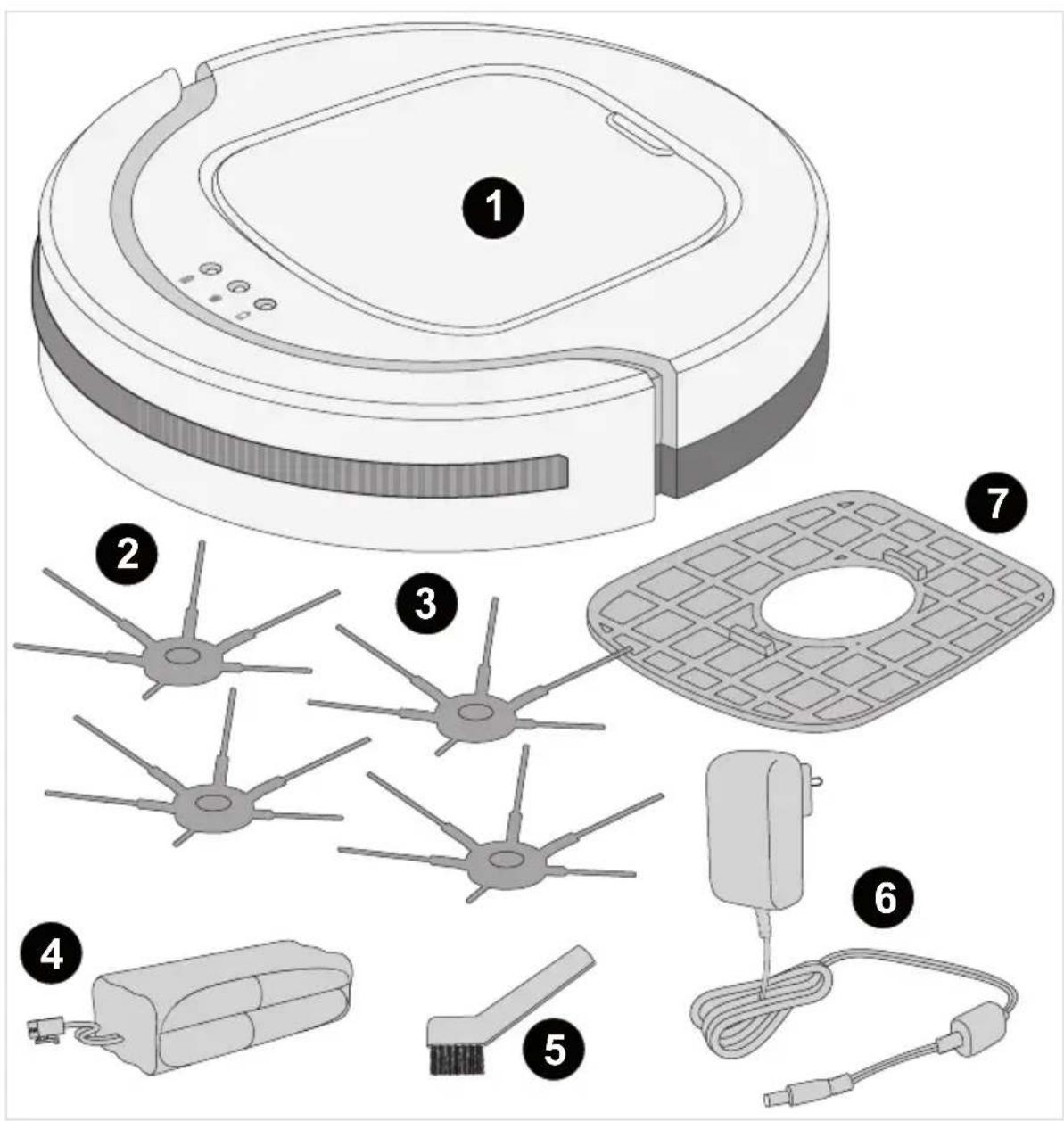
1 CHILL robotic vacuum
2 Round brushes
3 Replacement round brushes
4 Rechargeable battery
5 Cleaning brush
6 Mains adapter
7 Replacement filter
- not depicted: Instruction manual
Activating the rechargeable battery
- Make sure that the appliance is switched off and the mains adapter is not connected.
- Turn appliance carefully upside down so that the underside is accessible.
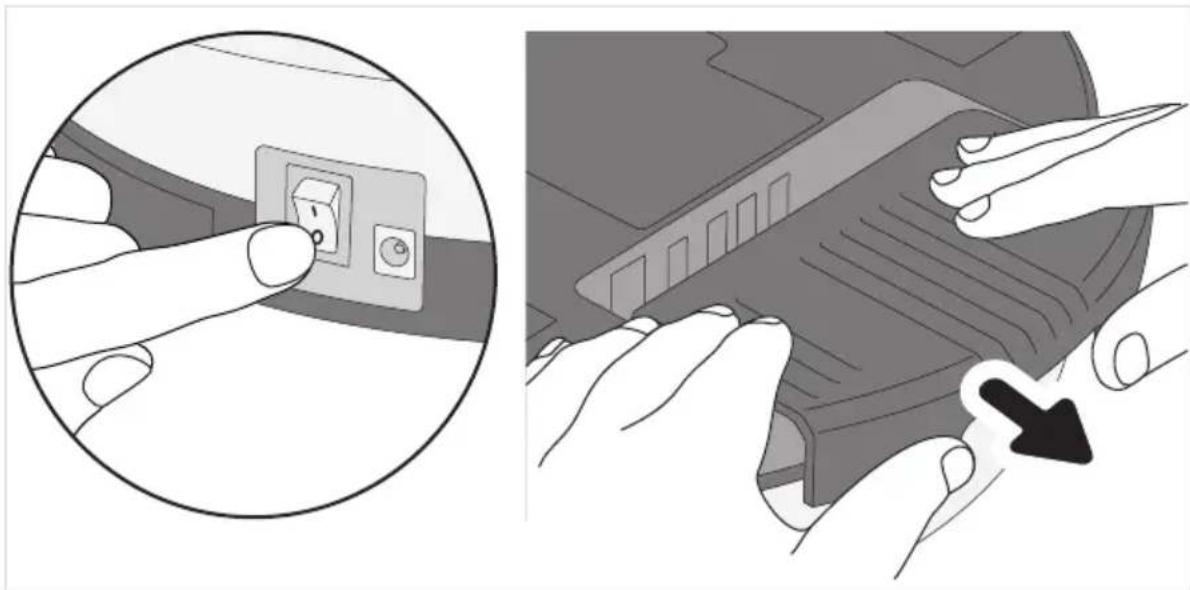
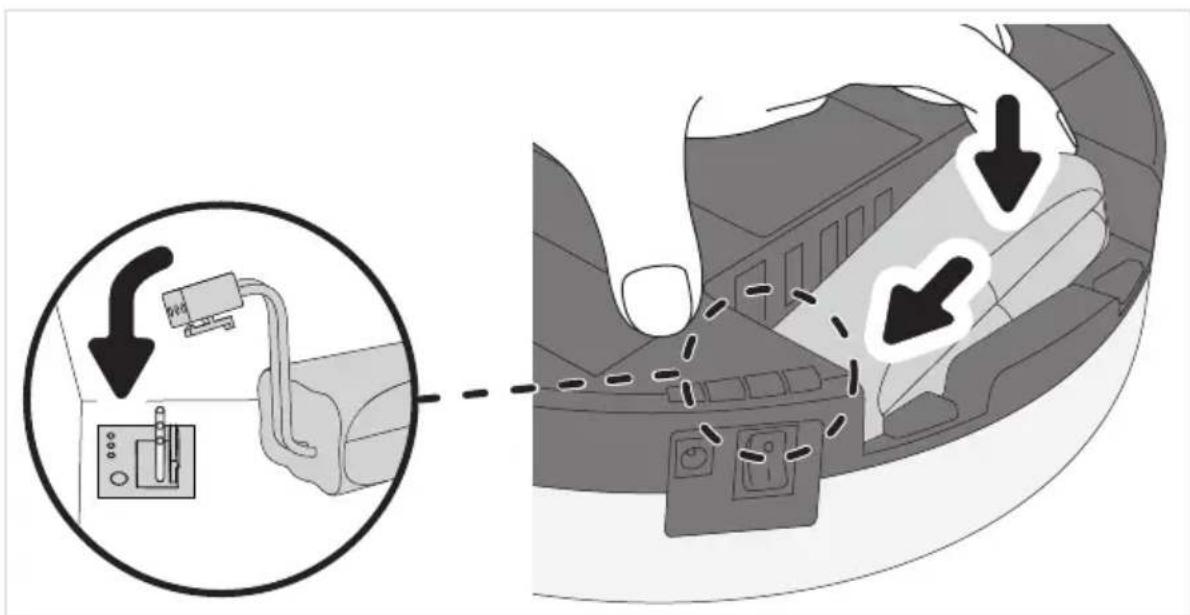
- Pull off the rechargeable battery cover forcefully with both hands (see figure).
natural_image
Illustration showing a hand inserting a socket into a device, with no visible text or symbols.- Connect rechargeable battery as shown (see detail).
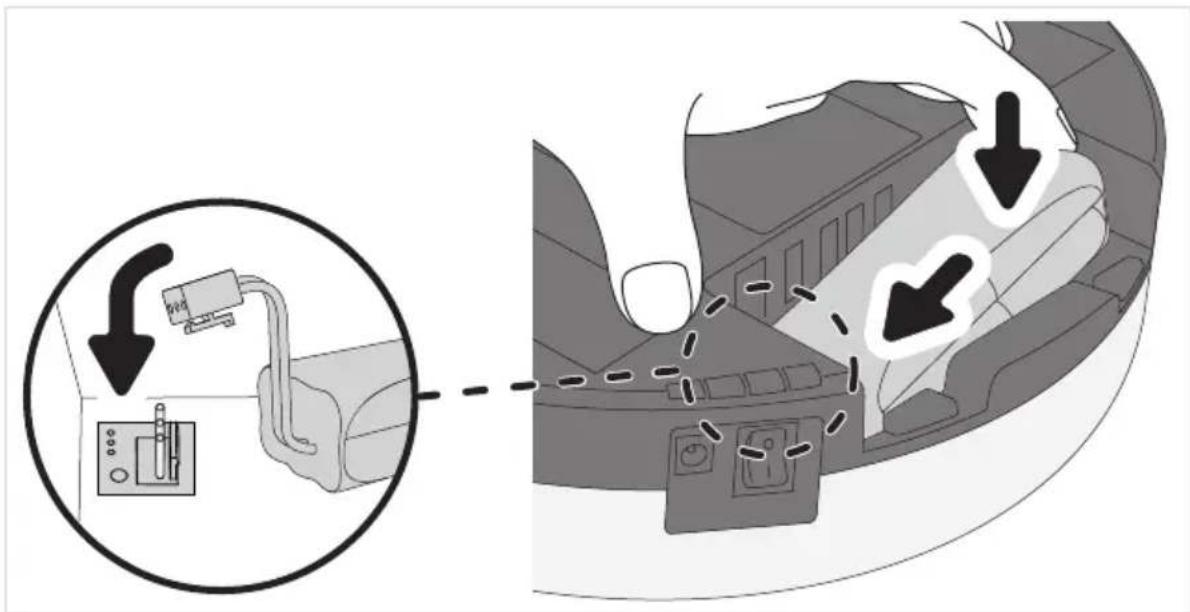
- Insert rechargeable battery in compartment (see figure).
- Push rechargeable battery cover on forcefully until it audibly snaps in.
The rechargeable battery is now activated and must be charged, ▷page 26, „Recharging the rechargeable battery“.
Recharging the rechargeable battery
It is best to charge the rechargeable battery before each use, especially after the appliance has not been used for a while.
This increases the life span of the rechargeable battery and ensures the longest cleaning cycles.
- Make sure that the appliance is switched off.
- Connect the mains adapter to the appliance (see figure).
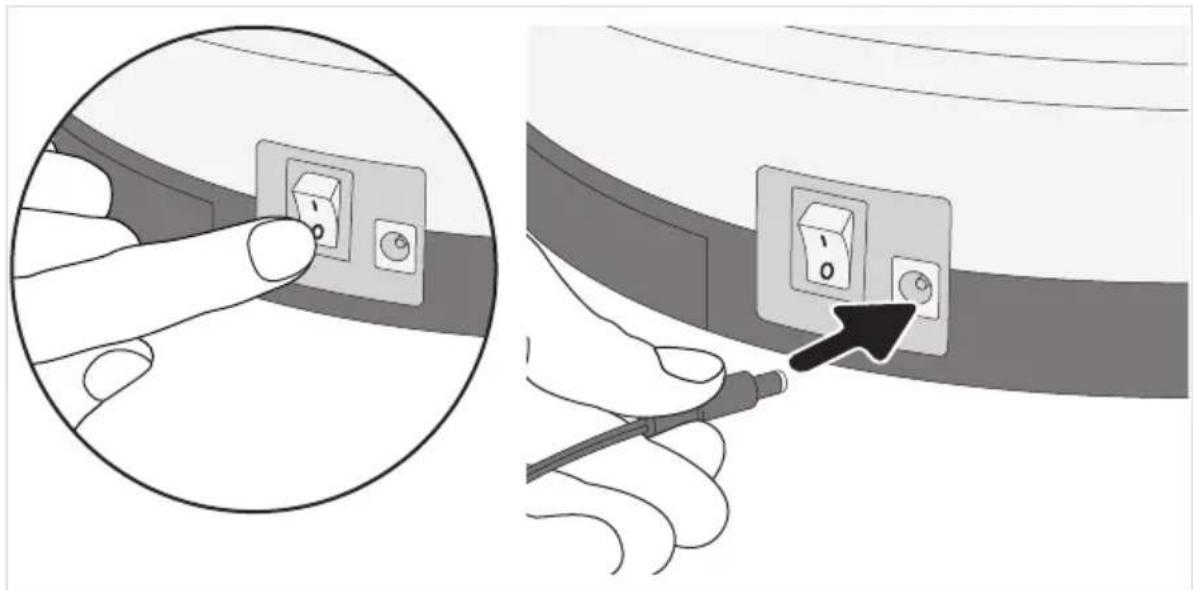
natural_image
Illustration showing a hand inserting electrical socket into a cable, with an arrow pointing to the socket (no text or symbols present)- Connect the mains adapter to the outlet (see detail).
- The LED blinks. Wait approx. 6.5 hours until the LED lights up permanently.
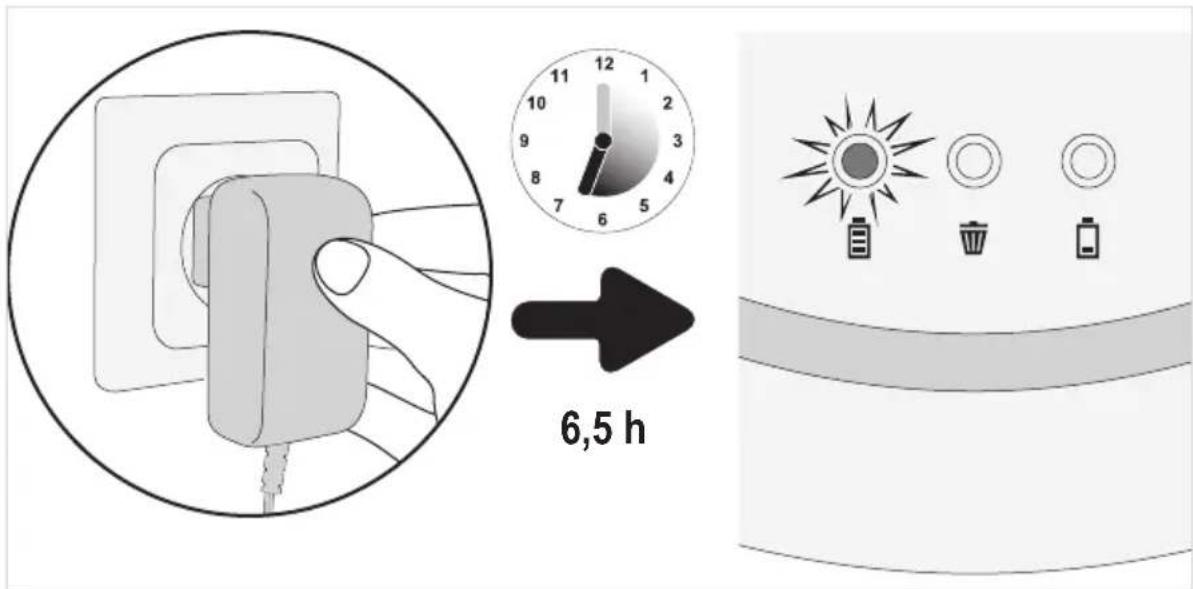
- Unplug the mains adapter from the outlet and appliance.
Prepare appliance for use, ▷ page 27, „Adjusting appliance for floor“.
Adjusting appliance for floor
- Make sure that the appliance is switched off.
- Depending on the floor, attach or remove brushes:
- If you want to clean hard floors, attach the round brushes (see figure).
- If you want to clean short-pile carpeting, remove the brushes (see figure).
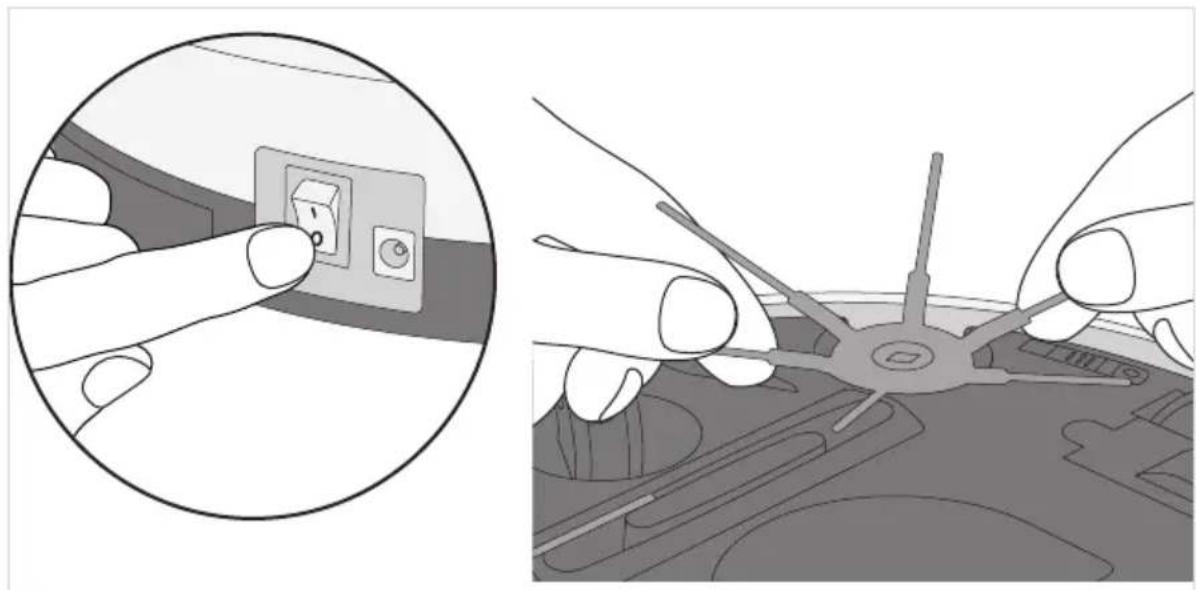
natural_image
Illustration showing a hand inserting a switch into an air conditioner cover, with no text or symbols present.-
Put all 3 sensors in the correct position:
-
For light floors and flat steps, position 0 to 1.
- For dark floors and higher steps, position 2 to 3.
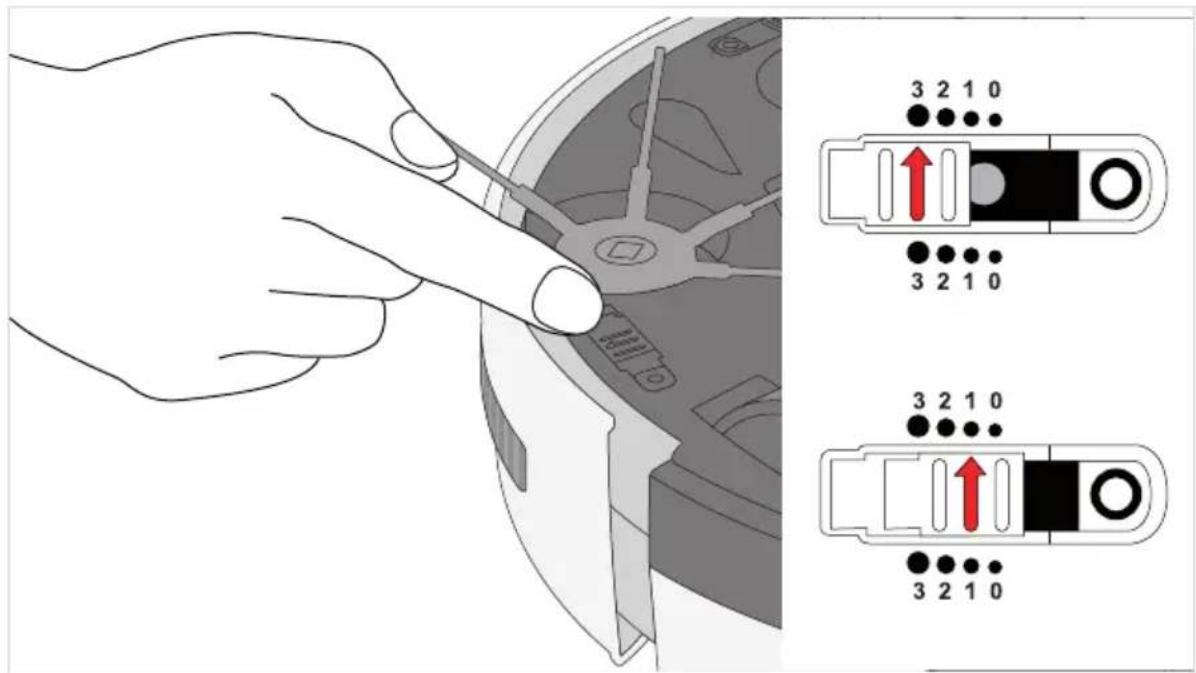
TIP: If the robot always moves backwards on dark floors, select position "3".
Cleaning a room
Prepare room as follows:
- Remove loose objects that the robot could push in front of itself.
- Remove cables, draperies, and everything that could get entangled in the brushes.
- Remove breakable objects or objects that can tip over easily.
Switch the appliance on as follows:
natural_image
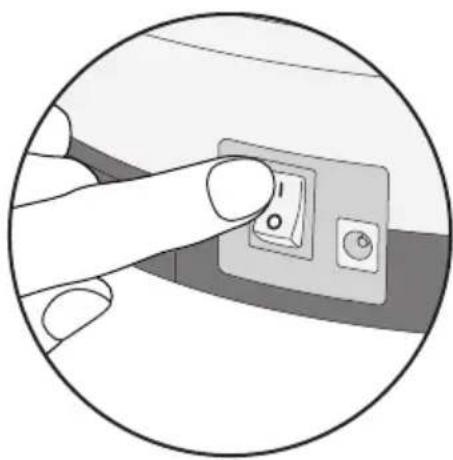
Close-up of a finger pressing a button on a device (no text or symbols visible)- Place appliance in the middle of the room to be cleaned.
- Switch appliance on using the on/off switch (position "I" - see detail).
The appliance will now clean the room according to the following pattern:
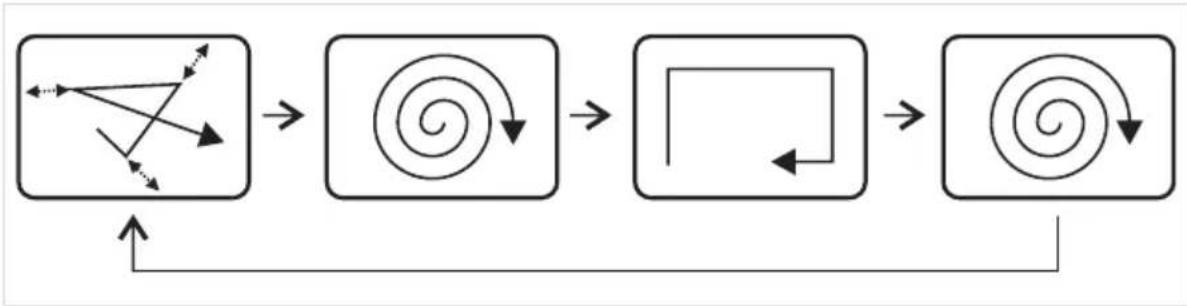
flowchart
graph TD
    A["Square with directional arrows and arrows"] --> B["Converging Spiral"]
    B --> C["Converging Square with Arrow"]
    C --> D["Converging Spiral with Arrow"]
    D --> E["Converging Spiral with Arrow"]
The appliance will now clean until
– the dust container is full and the LED lights up, ▷page 29, „Emptying the dust container“.
- or until the rechargeable battery must be charged and the LED lights up, ▷page 26, „Re-charging the rechargeable battery“.
In both cases, the appliance stops after a while.
It will then emit a peep tone every minute
- until you switch it off using the on/off switch (position "0")
- or the rechargeable battery is discharged completely.
If you do not intend to use the appliance any longer,
then remove the rechargeable battery, ▷ page 34, „Removing the rechargeable battery“.
Emptying the dust container
- Make sure that the appliance is switched off and the mains adapter is not connected.
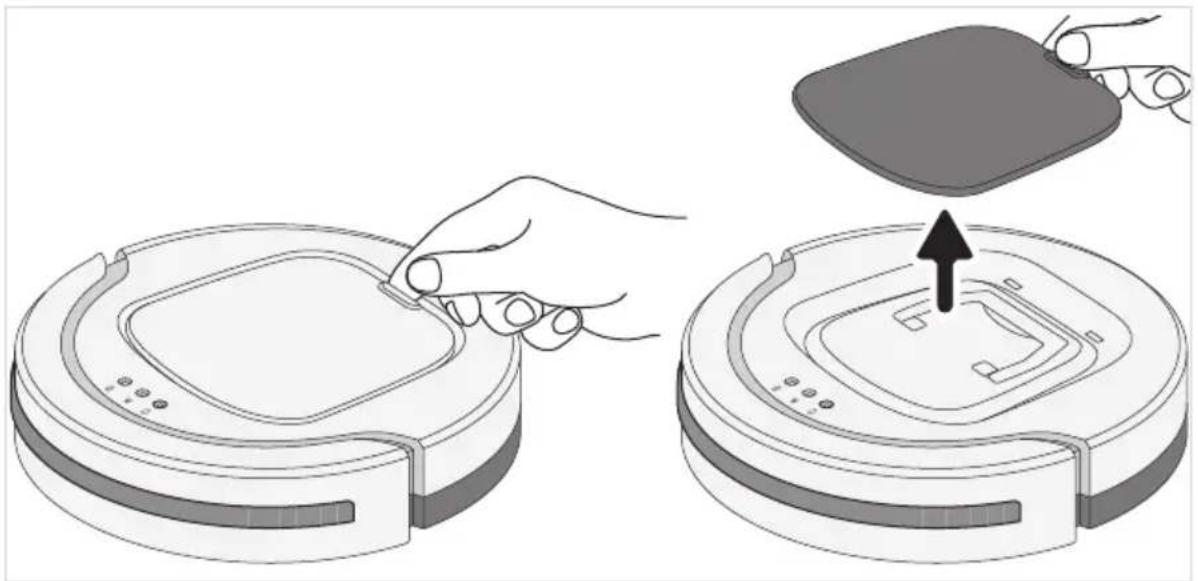
- Remove the cover (see figure).
natural_image
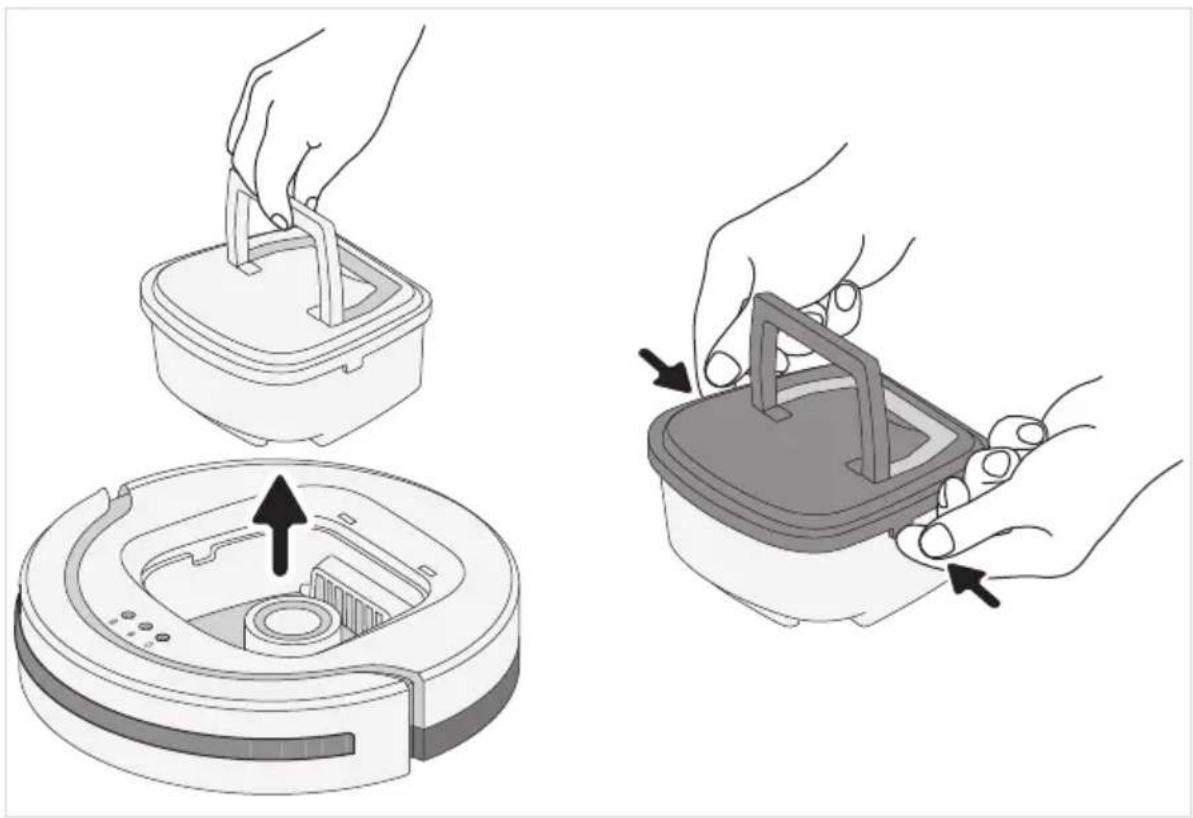
Illustration of a robotic vacuum cleaner being placed on its back panel, showing hand positioning and mounting mechanism (no text or symbols)- Use the handle to lift the dust container out of the appliance (see figure left).
- Remove the dust container cover (see figure right).
natural_image
Illustration showing two steps of a robotic vacuum cleaner's internal structure, with arrows indicating the process (no text or symbols present)Emptying the dust container
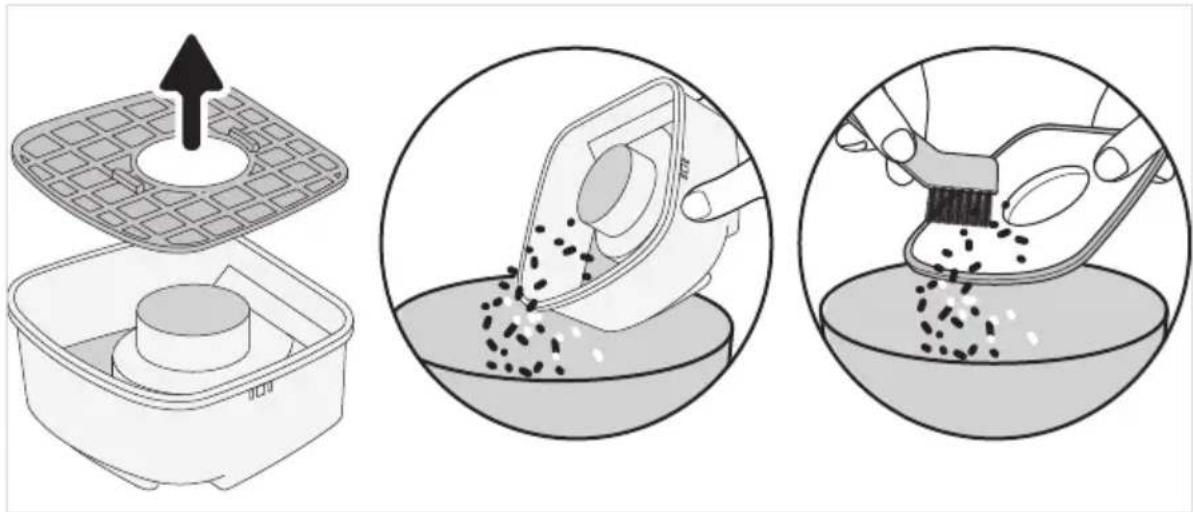
- Remove the filter upwards from the dust container (see figure left).
TIP: It is recommended that you use a vacuum cleaner for this.
The vacuum cleaner will take up any escaping dust directly and also clean the filter efficiently.
- Empty the dust container and clean of coarse dust together with the filter (see details).
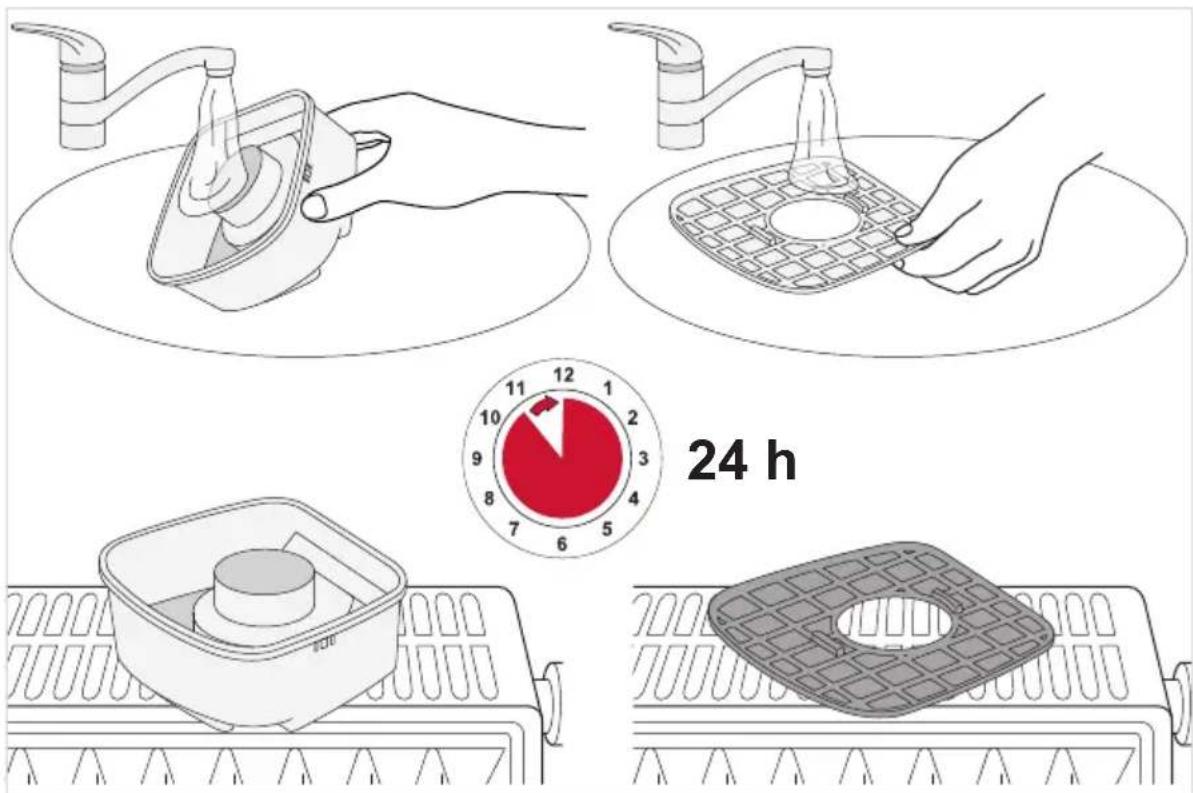
If necessary, wet-clean the dust container and filter:
Using the table below, check whether you can remedy the problem:
| Problem Possible cause/Remedy | |
| Appliance cannot be switched on. | Rechargeable battery is not activated.Activate the rechargeable battery, ▷chapter 4, „Activating the rechargeable battery“. |
| Rechargeable battery is completely discharged.Switch off the appliance (position "0") and charge rechargeable battery, ▷chapter 5, „Recharging the rechargeable battery“. | |
| Appliance was switched on during charging (position "I").Use the on/off switch to switch the appliance off (position "0") and then on again (position "I"). The appliance then starts up. | |
| Cover was removed while the appliance was still switched on.Use the on/off switch to switch the appliance off (position "0") and then on again (position "I"). The appliance then starts up. | |
| Cover is not fitted correctly. Switch off the appliance (position "0") and put the cover on again. | |
| LED "lights up red. | Rechargeable battery must be charged.Switch off the appliance (position "0") and charge rechargeable battery, ▷chapter 5, „Recharging the rechargeable battery“. |
| Appliance is not in contact with the floor.Place appliance on the floor. It now begins to clean right away. | |
| LED "lights up red. | Dust container is too full or filter is soiled.Switch off the appliance (position "0") and ▷chapter 8, „Emptying the dust container“. |
| Appliance switches on but only moves backwards. | The slider for setting the sensitivity of the sensors is on a setting for light floors, while the appliance is being used on a dark floor.Adjust setting of the slider for the setting of the sensitivity of the sensors, ▷chapter 6, „Adjusting appliance for floor“. |
| Appliance stops of its own accord. | Rechargeable battery must be charged.Switch off the appliance (position "0") and charge rechargeable battery, ▷chapter 5, „Recharging the rechargeable battery“. |
| Appliance is stuck. | Help the appliance manually by giving it a push. |
Troubleshooting
| Problem Possible cause/Remedy | |
| Appliance does not move in straight lines directly after it is switched on. | It is possible that dirt is preventing one of the wheels from moving freely.Free wheel of dirt. If necessary, carefully use a scissors or tweezers for this. |
| One of the round brushes no longer turns. | It is possible that dirt is preventing this round brush from moving freely.Remove the round brush (▷ chapter 6, „Adjusting appliance for floor“) and free it of dirt. If necessary, carefully use a scissors or tweezers for this. |
| Appliance cannot be charged. | Mains adapter is not plugged in correctly.Check whether the mains adapter or adapter plug is seated properly in the outlet (▷ chapter 5, „Recharging the rechargeable battery“). |
| Operating duration is becoming ever shorter. | It is possible that dirt is preventing the wheels from moving freely.Free wheels of dirt. If necessary, carefully use a scissors or tweezers for this. |
If you cannot solve the problem using the table above, call our Service hotline (see appendix to this instruction manual).
Together with our trained service employees, we are sure to find a solution.
Ordering spare parts and accessories
You can order spare parts or accessories on the Internet on our website http://www.severin.com/go/to/8363 by using the "Service / Spare Parts Shop" menu.
Item number Content
6232048 Round brushes, set of 4
5248048 Cleaning set (filter + cleaning brush)

Use this QR code to reach this website directly.
Warranty
The legal warranty rights with respect to the seller and any seller warranties are unaffected by the following warranty conditions.
If repair should be necessary, contact our customer service via telephone or mail. The contact data is in the appendix to this instruction manual. In case of warranty claim, contact the dealer directly. In addition, SEVERIN grants a manufacturer's warranty of two years from the purchase date. In this period, we will eliminate all defects due to material or manufacturing errors and which compromise the function. Other claims are excluded.
Excepted from the warranty are: Damage that is due to non-observance of the instruction manual, improper handling or normal wear; also easily-breakable parts such as glass, plastic or LEDs. Excepted from the warranty are also the batteries and rechargeable batteries, which as a consequence of normal wear or improper handling have become defective or whose run-time has shortened.
Intervention of people not authorised by SEVERIN voids the warranty.
Disposal
Removing the rechargeable battery
- Make sure that the appliance is switched off and the mains adapter is not connected.
- Turn appliance carefully upside down so that the underside is accessible.
- Remove the rechargeable battery cover (see description on ▷ page 26).
- Disconnect rechargeable battery as shown (see detail).
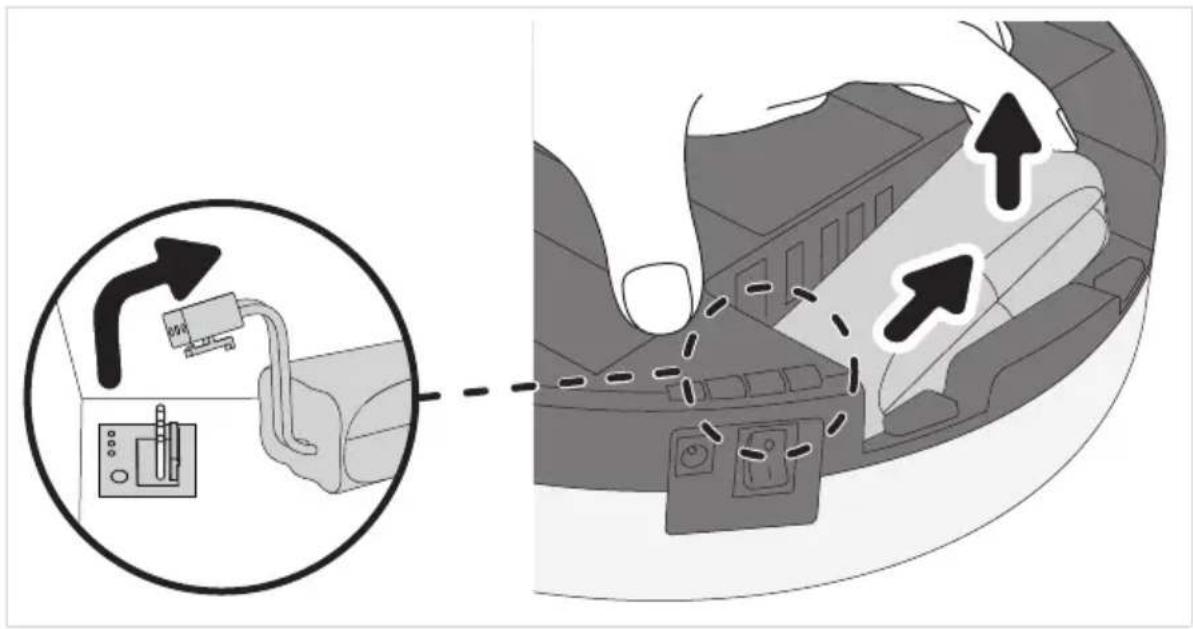
- Remove rechargeable battery from compartment (see figure).
- Push rechargeable battery cover on forcefully until it audibly snaps in.
The rechargeable battery and appliance must now be disposed of separately from one another, ▷chapter „Disposing of the appliance and rechargeable battery“.
Disposing of the appliance and rechargeable battery
natural_image
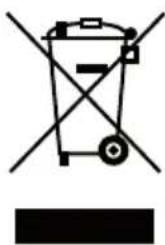
Symbol of a trash bin crossed with diagonal lines and a horizontal bar below (no text or labels)Appliances and rechargeable batteries that are marked with this symbol must be disposed of separately from household garbage. Appliances and rechargeable batteries contain valuable raw materials that can be recycled. Proper disposal protects the environment and the health of your fellow men. Dispose of the appliance and the removed rechargeable battery separately in the appropriate collection locations.
Chère cliente, cher client,
natural_image
Illustration showing a hand inserting a socket into a device, with no visible text or symbols.natural_image
Illustration showing a hand inserting electrical socket into a cable, with an arrow pointing to the socket (no text or symbols present)natural_image
Illustration showing hands installing or adjusting a switch device into a car (no text or symbols present)natural_image
Close-up of a finger pressing a button on a device (no text or symbols visible)flowchart
graph TD
    A["Square with directional arrows and arrows"] --> B["Converging Spiral"]
    B --> C["Converging Square with Arrow"]
    C --> D["Converging Spiral with Arrow"]
    D --> E["Converging Spiral with Arrow"]
natural_image
Illustration of a robotic vacuum cleaner being placed on its back panel, showing hand positioning and mounting mechanism (no text or symbols)natural_image
Illustration showing two steps of a robotic vacuum cleaner's internal structure, with arrows indicating the process (no text or symbols present)natural_image
Symbol of a trash bin crossed out by two crossed lines, with no text or labels present.1 Zuigrobot CHILL
2 Ronde borstels
3 Ronde borstels (reserve)
4 Accu
natural_image
Illustration showing a hand inserting a socket into a device, with no visible text or symbols.natural_image
Illustration showing a hand inserting electrical outlets into a cable, with an arrow pointing to the cable (no text or symbols present)natural_image
Illustration showing hands inserting a switch into an electrical socket, with no visible text or symbols.natural_image
Close-up of a finger pressing a button on a device (no text or symbols visible)flowchart
graph TD
    A["Square with directional arrows and arrows"] --> B["Converging Spiral"]
    B --> C["Converging Square with Arrow"]
    C --> D["Converging Spiral with Arrow"]
    D --> E["Converging Spiral with Arrow"]
natural_image
Illustration of a robotic vacuum cleaner being placed on its back panel, showing hand positioning and mounting mechanism (no text or symbols)natural_image
Illustration showing two steps of a robotic vacuum cleaner's internal structure, with arrows indicating the process (no text or symbols present)Stofreservoir legen
Indien nodig stofreservoir en filter nat reinigen:
Problemen verhelpen
natural_image
Symbol of a trash bin with crossed lines indicating no waste or restriction, and a solid black rectangle below (no text or labels)natural_image
Illustration showing two steps of installing a wall-mounted electrical socket, one being inserted and the other being placed on a device (no text or symbols present)natural_image
Illustration showing a hand inserting electrical socket into a cable, with a magnified inset highlighting the component (no text or symbols present)natural_image
Illustration showing a hand inserting a socket into a device, with no visible text or symbols.natural_image
Close-up of a finger pressing a small electronic switch (no text or symbols visible)natural_image
Illustration of a robotic vacuum cleaner being placed on its back panel, showing hand positioning and mounting mechanism (no text or symbols)natural_image
Illustration showing two steps of a robotic vacuum cleaner's internal structure, with arrows indicating the process (no text or symbols present)natural_image
Three-step illustration showing a food preparation procedure: adding a griddle into a container, pouring granular material into a bowl, and using a brush to remove granular material in a bowl (no text or symbols)natural_image
Pure electrical circuit lines without any symbolsnatural_image
Illustration showing a hand inserting a socket into a car electrical socket, with a hand adjusting the socket (no text or symbols present)natural_image
Illustration showing a hand inserting electrical socket into a cable, with an arrow pointing to the socket (no text or symbols present)natural_image
Illustration showing hands using a power switch to install an electrical socket, with no visible text or symbols.natural_image
Close-up of a finger pressing a button on a device (no text or symbols visible)flowchart
graph TD
    A["Square with directional arrows and arrows"] --> B["Converging Spiral"]
    B --> C["Converging Square with Arrow"]
    C --> D["Converging Spiral with Arrow"]
    D --> E["Converging Spiral with Arrow"]
natural_image
Illustration of a robotic vacuum cleaner being placed on its back panel, showing the handle and mode (no text or symbols present)natural_image
Illustration of two robotic vacuum cleaner steps: adding a component to a circular base and inserting a tray into a container (no text or symbols)natural_image
Symbol of a trash bin with crossed lines indicating no waste or restriction, and a solid black rectangle below (no text or labels)1 Robotstøvsuger CHILL
2 Rundbørster
3 Ekstra rundbørster
4 Akku
natural_image
Illustration showing a hand inserting a socket into a device, with no visible text or symbols.- Tilslut akkustikforbindelsen som vist (se detaljeudsnit).
natural_image
Illustration showing a hand inserting electrical socket into a cable, with an arrow pointing to the socket (no text or symbols present)- Slut strømforsyningen til en stikkontakt (se detaljeudsnit).
- LED'en blinker. Vent ca. 6,5 timer, indtil LED'en lyse
natural_image
Illustration showing a hand inserting a switch into an air conditioner cover, with no text or symbols present.- Sæt alle 3 faldsensorer i samme position samtidig
natural_image
Close-up of a finger pressing a button on a device (no text or symbols visible)flowchart
graph TD
    A["Square with directional arrows and curved arrows"] --> B["Converging Spiral"]
    B --> C["Converging Square with Arrow"]
    C --> D["Converging Spiral with Arrow"]
    D --> E["Converging Spiral with Arrow"]
natural_image
Illustration of a robotic vacuum cleaner being placed on its back panel, showing hand positioning and mounting mechanism (no text or symbols)natural_image
Illustration showing two steps of a robotic vacuum cleaner's internal structure, with arrows indicating the process (no text or symbols present)natural_image
Symbol of a trash bin with crossed lines indicating no waste, and a solid black rectangle below (no text or labels)natural_image
Illustration showing a hand inserting a socket into a device, with no visible text or symbols.natural_image
Illustration showing a hand inserting electrical outlets into a cable, with an arrow pointing to the outlet (no text or symbols present)natural_image
Illustration showing hands inserting a switch into a device, with no visible text or symbolsnatural_image
Close-up of a finger pressing a button on a device (no text or symbols visible)flowchart
graph LR
    A["Square with directional arrows and curved arrows"] --> B["Converging Spiral"]
    B --> C["Converging Square with curved arrow"]
    C --> D["Converging Spiral with curved arrow"]
natural_image
Illustration of a robotic vacuum cleaner being placed on its back panel, showing hand positioning and mounting mechanism (no text or symbols)natural_image
Illustration showing two steps of a robotic vacuum cleaner's internal structure, with arrows indicating the process (no text or symbols present)natural_image
Symbol of a trash bin crossed with no text or labels, accompanied by a black rectangle below (no readable text or symbols)F-67210 OBERNAI CEDEX
Tel.: +33 3 88 47 62 08
Fax: +33 3 88 47 62 09
eMail: severin.france@severin.fr
Web: http://www.severin.fr
Greece
BERSON
C. Sarafidis Bros. S.A.
Agamemnonos 47
176 75 Kallithea, Athens
Tel.: 0030-210 9478700
Greece
Philippos Business Center
Service Post of Thermi
570 01 Thessaloniki, Greece
Tel.: 0030-2310954020
Italia
via Dino Col 52r-54r-56r,
I - 16149 Genova
Green Number: 800240279
Tel.: 010/6 45 11 02 - 01041 86 09
Fax: 010/6 42 50 09
e-mail: videoelettronica@panet.it
Latvia
SERVO Ltd.
Mr. Janis Pivovarenoks
Tel: +371 7279892
Luxembourg
Ser-Tec